What's inside
- Where to buy
- Key Takeaways
- Quick Picks
- How did we choose printers for a budget that fights back?
- Why does the cost per page matter more than the price of the printer?
- How do the best printers around $100 compare side by side?
- How does printing from phones and the cloud change the choice?
- How do you set up a budget printer so it stays cheap and behaves?
- Which mistakes make a cheap printer expensive?
- What does a year of ownership actually look like on each route?
- How should paper and settings be handled to keep documents looking professional?
- Final Recommendation
- Frequently Asked Questions
- When should a household skip this budget class entirely?
- Related Guides
As an Amazon Associate I earn from qualifying purchases. This post may contain affiliate links at no extra cost to you.
gizmoverdict.com is reader-supported. When you buy through links on our site, we may earn an affiliate commission.
Where to buy
Let us begin the search for the best printers around $100 with the sentence most guides in this price class bury: around $100 is a neighbourhood, not a fence, and the printers actually worth owning refuse to distribute themselves neatly inside it. The honest map looks like this. Below and at the line sit the entry inkjets — genuinely cheap to buy, genuinely expensive to feed, and represented below by a prose-only route with its cartridge economics stated in daylight. Just above the line, close enough that a sale or a shrug covers the distance, sit the entry monochrome lasers from Brother that anchor this guide’s linked picks: machines that print only in black, do it for years without drama, and cost less to run per page than the inkjets cost per month of enthusiasm. Further above the line — flagged as stretches, never disguised as bargains — sit the multifunction lasers that add scanning, copying and document feeders, included because a home office that buys the cheap printer and then a separate scanner has not saved the money it thinks it has. Every pick below carries its position relative to the budget in plain words, no specific prices are printed anywhere in this guide because printer pricing moves too fast to carve into an article, and the running-cost story — where the real money in this class lives — is told qualitatively and completely.
One framing device will help throughout: think of this class as two purchases wearing one price tag. The first purchase is the machine, and it is the smaller one. The second is everything the machine will drink across its life — toner, cartridges, bottles, paper — and it is the larger one for every route except the lasers and the tanks, which is precisely why those two families dominate this guide’s recommendations despite living above its title. A reader who keeps both purchases in view will find the picks below arrange themselves; a reader who sees only the first purchase will find the inkjet route irresistible and the year expensive. The guide is written for the first kind of reader, and politely determined to convert the second.
Who is this budget actually for? Three households, mostly. The student or home worker whose printing is documents — essays, forms, contracts, boarding passes, the occasional hundred-page draft — and whose colour needs are served by a print shop twice a year. The small office that needs a second, tireless machine for invoices and labels while something fancier handles the brochures. And the household emerging from an inkjet relationship that has become financially abusive, ready to trade photographs at home for a printer that simply never becomes a topic of conversation again. If your life genuinely centres on colour — children’s artwork, photographs, design proofs — this guide will tell you so honestly and point at the one route that serves it, rather than pretending a monochrome laser is a lifestyle choice you will grow to love. It is not. It is a document appliance, and for document lives it is close to perfect.
Key Takeaways
- Around $100 buys documents, not photography: the honest centre of this class is the monochrome laser.
- Four linked Brother lasers sit above the line by increasing margins — each pick states its position rather than hiding it.
- The cheapest printers to buy, entry inkjets, are the most expensive to own; cartridge costs invert the shelf-price ranking within a year.
- Running costs dominate this class: a laser’s toner cartridge prints for semesters where an inkjet’s starter cartridges print for weeks.
- Duplex — automatic two-sided printing — is the one feature upgrade in this class that pays for itself in paper alone.
- Scanning and copying are worth a stretch above budget exactly when the alternative is buying a second device later.
- Audit one ordinary month — pages, colour, two-sided jobs, scans — before letting any shelf price speak.
Quick Picks
| Pick | Badge | Why it earns its place |
|---|---|---|
| Brother HL-L2405W | Closest to the line — linked | The entry mono laser: wireless, compact, and the shortest step above the budget into years of cheap pages. |
| Brother HL-L2460DW | The duplex step — linked | Everything the entry machine does, plus automatic two-sided printing that halves paper for document lives. |
| Brother DCP-L2640DW | The home-office stretch — linked | Adds scanning and copying to the laser formula for households digitising paper as fast as they print it. |
| Brother MFC-L2820DW | The full multifunction — linked | Print, scan, copy and fax with a document feeder — the stretch that replaces a desk of separate devices. |
| Entry inkjet all-in-one class | At the line, with a warning — prose-only | The only route at or under budget that prints colour; its cartridge economics are the price of that ticket. |
| Entry ink-tank class | The long-game alternative — prose-only | Well above the line to buy, dramatically cheap to run — the budget inverted for high-volume colour homes. |
How did we choose printers for a budget that fights back?
By costing the year, not the box. Every candidate was judged on the total experience of owning it through a realistic first year of document life — a few hundred pages a month of the mixture households actually print — and the judging inverted the shelf order almost immediately. Machines that look cheapest at purchase carry starter cartridges of modest capacity and replacement cartridges whose cost per page belongs to a different, crueller price class; machines that look like stretches carry toner that lasts long enough to be forgotten, in printers whose mechanical simplicity gives them little to go wrong. We weighted reliability folklore accordingly: in this class, the brands and designs with decade-long reputations for unglamorous endurance earned their places over feature-rich novelties, because a budget printer that fails in month nine was never a budget printer. Wireless competence mattered more than wireless speed — a printer that stays findable on a home network is worth more than a faster one that vanishes weekly — and paper handling was graded by the jobs named above: envelopes without origami, duplex without manual flipping, trays that hold a meaningful stack rather than a suggestion.
We also policed the guide’s own honesty about position. Each linked Brother sits above the around-$100 line, and the distance grows as features accumulate; the picks are ordered by that distance so a reader can stop descending the page at the exact point their budget stops stretching. The two prose-only routes bookend the class truthfully — the inkjet that actually lives at the line, with its costs confessed, and the tank printer that inverts the whole proposition for high-volume colour households. What we excluded matters too: colour lasers, whose purchase and toner economics belong to a different budget conversation entirely; no-name machines whose driver support evaporates with their storefronts; and any printer whose low price depends on a subscription arrangement a budget buyer has not knowingly chosen. What remains is a short page with an unusual property for this price class — nothing on it will surprise its owner in month three.
Why does the cost per page matter more than the price of the printer?
Because a printer is the rare product whose purchase price is a down payment on its consumables, and in this class the consumables win. Consider the two ownership shapes honestly. The entry inkjet arrives cheap with starter cartridges that are, charitably, a tasting portion; a household printing school documents discovers within the first term that replacement cartridges — whose yield is measured in the low hundreds of pages — cost a substantial fraction of the printer itself, and that the machine may decline to print black text because a colour cartridge has emptied itself in cleaning cycles. The monochrome laser arrives as a stretch and then essentially vanishes from the household budget: its toner cartridge yields pages in the thousands, does not dry out between quiet months, does not clean itself through your wallet, and asks for replacement on a schedule measured in semesters. By the end of a typical first year, the cheap printer has cost more. By the end of the third, the comparison is not close, and the laser is also — this part is underrated — still working.
A related virtue of the laser route hides in the household’s electricity and patience rather than its cartridge drawer. A monochrome laser sleeps at a whisper of power and wakes to a finished first page faster than an inkjet can finish persuading its printhead to cooperate, which matters in the only printing moments that are ever urgent — the form before the appointment, the ticket before the taxi. Speed claims in this class are best kept qualitative, since first-page behaviour and network manners dominate real waiting far more than any engine figure; but the lived experience is consistent enough to state plainly. The document machines in this guide feel instant at the scale of household jobs, and the inkjets feel deliberate, and across a year of small urgencies that feeling is worth a line in the ledger beside the cartridge arithmetic.
There are fairness footnotes, and this guide prints them. A household that prints almost nothing — a boarding pass a month — may never print enough for the laser’s economics to overtake the inkjet’s lower entry, though even that household must reckon with ink that dries and clogs in idleness where toner waits patiently forever. A household that prints colour constantly should not be in the monochrome conversation at all; the tank route below exists for it. And per-page costs vary with coverage and cartridge choice in ways we deliberately keep qualitative here, because the honest ordering — laser cheapest for documents, tank cheapest for volume colour, cartridge inkjet dearest for almost everything — survives every reasonable variation in the arithmetic. Learn that ordering and the entire printer market reorganises itself from a shelf of prices into a shelf of propositions, which is the only form in which it makes sense.

Brother HL-L2405W — Closest to the line
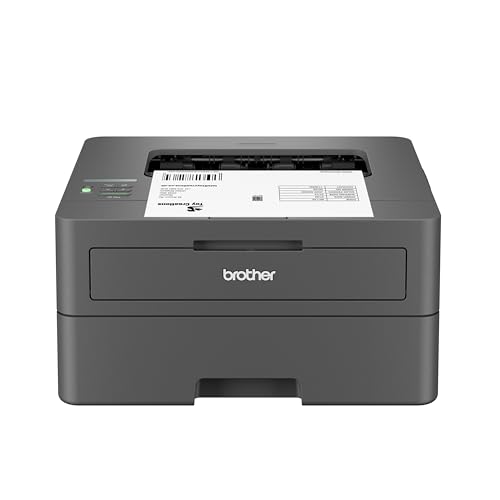
This is the shortest honest step above the budget, and for the pure document household it may be the only step needed. The HL-L2405W is Brother’s entry wireless monochrome laser formula in its purest form: a compact box that prints black text and graphics crisply, connects to the home network without a cable, accepts jobs from phones and laptops with the minimum of ceremony, and then sits silent and patient between them — for weeks, if your printing life runs that way, without the dried-ink penance an idle inkjet exacts. Its appeal is subtraction. There is no scanner to fail, no colour system to maintain, no screen to navigate; there is a paper tray, a toner cartridge with a long memory, and output that looks like it came from an office that has its life together. Students, home workers and form-signing households will recognise their entire requirement list in that sentence.
The compromises are the formula’s, and they are visible from the listing rather than discovered in month two. It prints on one side at a time, so the hundred-page draft is a manual flip for anyone who wants it duplexed — a tedium the next pick exists to cure. It prints only in black, permanently and without upgrade path, so the household that discovers a colour habit must discover a second printer too. And its position above the line, while the smallest in this guide, is real: this is a stretch purchase justified by running costs, not a budget miracle, and a reader for whom the line is absolute should read the inkjet route below with its warnings rather than pretend this machine costs what it does not. For everyone whose budget can bend by the smallest amount in the guide, this is where the bending pays best — the cheapest printer here to own, attached to the second-cheapest ticket in.
- Type: monochrome laser, print only
- Position vs budget: the closest above the around-$100 line of any linked pick
- Connectivity: wireless plus USB
- Duplex: manual only
- Footprint: compact desktop box
- Consumable character: long-yield toner; no ink to dry out
Strengths
- The laser cost-per-page story at the smallest stretch above budget.
- Wireless printing from phones and laptops without ceremony.
- Idles for weeks without the dried-cartridge penalty.
Trade-offs
- Black only, forever — colour needs another machine or a print shop.
- No automatic duplex; long documents flip by hand.
- No scanning or copying at any price of wishing.
Best for: students and document households making the smallest smart stretch. Not suited for: colour printing, duplex-heavy drafts or scan-and-file lives.

Brother HL-L2460DW — The duplex step
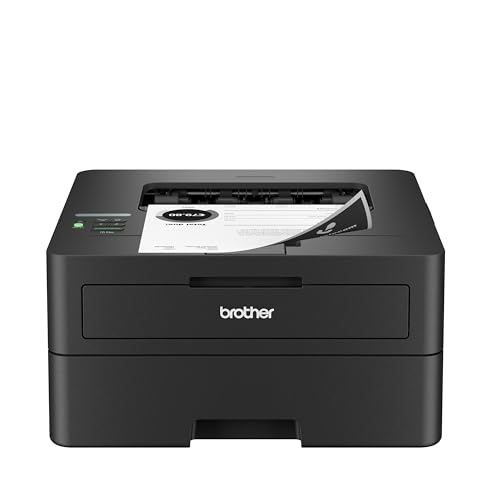
One letter’s worth of difference — the D — buys the single feature in this price class that repays its owner in physical stuff rather than in feelings. The HL-L2460DW takes the entry machine’s formula and adds automatic duplex printing, flipping its own pages so that two-sided documents emerge collated and finished while the owner makes tea. For the document lives this guide describes, that is not a luxury: drafts halve their paper, course packs and contracts stop arriving as bricks, and the printer’s output starts looking like the documents an office produces rather than the documents a student endures. The rest of the formula carries over intact — wireless, compactness, toner patience, the same monochrome honesty — at a position above the budget line one step further than its sibling, a step whose entire justification is printed in its name.
Choosing between the two HL machines is therefore the cleanest decision in this guide, and it should be made by evidence rather than by temperament: look at your last month of printing and count the jobs that wanted two sides. If they are most of them — and for essays, drafts, handouts, manuscripts and minutes, they usually are — the duplex step is not an upgrade but a correction, and its paper savings begin repaying the stretch from the first ream. If your printing is genuinely one-sided — forms, labels, letters, the occasional ticket — the entry machine’s simplicity is the better spend and the difference belongs in a second toner cartridge. What neither machine offers is colour or scanning, and this pick inherits the family warning unchanged: it is a document appliance of unusual virtue, and households should buy it for the documents they print, not for the photographs they occasionally imagine printing.
- Type: monochrome laser, print only
- Position vs budget: one step above the entry pick, still near the line
- Connectivity: wireless plus USB
- Duplex: automatic two-sided printing
- Footprint: compact desktop box
- Consumable character: long-yield toner, paper use halved on duplex jobs
Strengths
- Automatic duplex that repays its stretch in paper alone.
- The full entry-laser virtue set: wireless, patient, compact.
- Finished two-sided documents without manual flipping rituals.
Trade-offs
- Still monochrome only, with no colour path.
- Still print-only — scanning households should keep reading.
- The stretch is wasted on genuinely one-sided printing lives.
Best for: draft, essay and document printers whose jobs want two sides. Not suited for: label-and-form households or anyone needing scans.

Brother DCP-L2640DW — The home-office stretch
The third pick is where the guide’s budget honesty gets tested, so let the position be stated before the praise: this machine sits meaningfully above the around-$100 line — not a rounding error above it, a decision above it — and what the decision buys is the other half of a home office’s paper life. The DCP-L2640DW adds a flatbed scanner and copying to the duplex laser formula, which transforms the printer from an output device into the household’s paper border crossing: documents arrive, get digitised, filed, signed and returned, all on one footprint. For the household digitising a filing cabinet, the freelancer scanning receipts into an accounting habit, or the family whose school and insurer and landlord all demand copies of things, that second direction of travel is not a feature. It is the job. And buying it inside the laser — rather than as a separate scanner later — keeps the running-cost story this guide has been telling: one toner economy, one network citizen, one machine to keep alive.
The flatbed format deserves its sentence: a sheet at a time, lifted and placed by hand, which suits books, cards, passports and the occasional fragile original better than any feeder, and suits a fifty-page contract worse — that workload belongs to the next pick. Copying inherits the same character: superb for the ten pages a household copies in a week, patient rather than fast for the hundred it copies in a year. Wireless scanning to a computer or phone completes the modern expectation list. The verdict writes itself in the guide’s established grammar — this is a stretch, priced like one, justified when the scanning is real and recurring, and unjustified when it is hypothetical. Households should audit their last year for scans the way the previous pick asked them to audit for duplex: count them, and let the count, not the showroom, decide whether the line moves.
- Type: monochrome laser multifunction — print, scan, copy
- Position vs budget: a clear stretch above the line, bought for the scanner
- Connectivity: wireless plus USB
- Duplex: automatic two-sided printing
- Scanner: flatbed — books, cards and single sheets excel
- Consumable character: the same long-yield toner economy
Strengths
- Scanning and copying join the laser economy in one footprint.
- Flatbed handles the awkward originals feeders cannot.
- Duplex printing carries over from the step below.
Trade-offs
- The stretch above budget is real and must be justified by use.
- Multi-page scanning is a sheet-at-a-time patience exercise.
- Still monochrome — colour documents scan, but print in black.
Best for: households digitising paper as steadily as they print it. Not suited for: hypothetical scanners or high-volume document capture.

Brother MFC-L2820DW — The full multifunction
The final linked pick stands furthest from the budget line in this guide, and its section will behave accordingly: this is not an around-$100 printer wearing a disguise, it is the machine the around-$100 shopper should buy when the honest audit says the cheap printer was never going to be the only device on the desk. The MFC-L2820DW completes the multifunction formula — print, scan, copy and fax — and adds the component that changes scanning from a chore into a system: an automatic document feeder, which swallows a stack of pages and digitises them while the owner does something else. Duplex printing, wireless everything and the family toner economy complete a specification that reads less like a printer and more like a small office’s entire paper department, because that is what it is. Small practices, busy home offices and anyone whose paperwork arrives in bundles will recognise the shape of their week in it.
The fax capability, often mocked, deserves its defence in one sentence: a shrinking list of institutions — medical, legal, governmental — still run on it, and the households who need it need it absolutely, usually on a deadline. For everyone else it is inert ballast, neither costing attention nor demanding it. The genuine debits are position and proportion: the price distance from this guide’s title is the largest here, and the machine’s talents are wasted — visibly, expensively wasted — on a desk that prints a boarding pass a month. That is not a criticism of the machine; it is the guide’s whole thesis in its final form. Budget is a property of the household, not of the shelf, and the household whose paper life is genuinely this large will spend less, across three years, on this one stretch than on the cheap printer plus the scanner plus the compromises. The household whose paper life is small should close this section and buy the first pick with a clear conscience.
- Type: monochrome laser all-in-one — print, scan, copy, fax
- Position vs budget: the furthest above the line in this guide — a deliberate stretch
- Connections: WiFi networking plus USB
- Two-sided printing: automatic duplex
- Scanner: flatbed plus automatic document feeder for stacks
- Consumable character: long-yield toner across a heavy workload
Strengths
- The document feeder turns scanning into a background task.
- One machine retires the printer, scanner and copier shopping list.
- Fax included for the institutions that still insist on it.
Trade-offs
- The largest budget stretch here — unjustifiable for light paper lives.
- Capability this broad is wasted on occasional printing.
- Monochrome still: the colour conversation lives elsewhere.
Best for: small offices and paperwork-heavy households buying once, properly. Not suited for: light, occasional printers — the first pick exists for you.
Entry inkjet all-in-one class — At the line, with a warning
Here, at last, is the printer that actually lives at the budget line — and its section is a warning label written with affection, because for one specific household it remains the right answer. The entry inkjet all-in-one, the Canon-and-HP school of inexpensive colour machines, prints in colour, scans, copies, and sells at or below the around-$100 mark in a way no laser in this guide pretends to. For the household whose printing is genuinely colour — children’s homework in its required rainbow, the occasional photograph, craft projects, the birthday banner — and genuinely light, a few pages a week, it does what nothing else at the line can do at all. That household exists, it is not foolish, and this route is mapped for it prose-only because our pool verifies no listing in the class: buy it through normal retail, from the major makers, with the following paragraph tattooed on the decision.
The economics are the warning. These machines ship with modest starter cartridges and earn their makers’ money on replacements whose cost per page is the highest in this guide; they drink ink in cleaning cycles, especially when idle, and a colour cartridge’s exhaustion can halt black printing at the least convenient moment in the school year. The household described above survives this because its volume is low and its colour need is real — the cartridges last months at its pace, and no laser at any stretch prints its child’s rainbow volcano. But the household that buys this class for documents because the shelf price was lowest has made the most expensive decision in the category, and will remake it, cartridge by cartridge, all year. Volume is the whole verdict: colour need plus low volume, proceed with respect; documents plus any volume at all, return to the top of this page.
- Type: colour inkjet all-in-one (class description)
- Position vs budget: at or below the line — the only pick that is
- Connectivity: wireless typical across the class
- Duplex: varies by model; often manual at this level
- Consumable character: cartridge ink — highest cost per page here
- Buying note: major makers only; check cartridge yield before the printer
Strengths
- Colour printing, scanning and copying at the actual budget line.
- The only route here for photographs and children’s colour work.
- Low-volume colour households can live with its economics.
Trade-offs
- Replacement cartridges invert its cheapness within a year of document use.
- Idle inkjets dry and clean themselves through your budget.
- An empty colour cartridge can stop black printing entirely.
Best for: low-volume households whose printing is genuinely colour. Not suited for: document printing at any real volume — that is the lasers’ page.
Entry ink-tank class — The long-game alternative
The final route inverts the guide’s entire premise and deserves its place for the households it liberates. The entry ink-tank class — the EcoTank school and its rivals — sells printers at a multiple of this guide’s budget line, then refills them from bottles whose cost per page undercuts even the lasers, in full colour, at volumes that would bankrupt a cartridge household by half-term. For the high-volume colour home — the teacher printing classroom sets, the crafter, the home business shipping paperwork with every parcel, the family whose photographs are a weekly practice — the arithmetic is not subtle: the stretch is repaid in avoided cartridges with a speed that makes the budget line itself look like the extravagance. This route is prose-only because our pool’s tank listings sit in the wide-format and photo flagships far above even this class’s entry; shop the entry tank models through normal retail, where the class is well established.
The cautions are real but smaller than the cartridge class’s. Tank printers are still inkjets, with ink that prefers regular use to long idleness, though their economics make regular use the point. Print speeds and paper handling at the class’s entry are working rather than swift, and the machines reward owners who keep the bottles’ simple ritual — top up before empty, keep the printer printing something weekly — with years of nearly free colour. The verdict mirrors the inkjet route’s with its polarity reversed: volume is destiny. Below a modest monthly page count, the stretch never repays and the first pick in this guide is the wiser buy; above it, the tank is not a premium product but the cheapest colour printing a household can own, and the budget that matters was never the one on the shelf.
- Type: colour ink-tank all-in-one (class description)
- Position vs budget: well above the line to buy; cheapest colour to run
- Connectivity: wireless typical across the class
- Duplex: available on many models — verify per listing
- Consumable character: bottled ink, very low cost per page
- Buying note: entry tank models live in normal retail; our pool’s tanks are flagships
Strengths
- Colour running costs that undercut every other route here.
- High-volume households repay the stretch quickly.
- Bottle refills end the cartridge ritual entirely.
Trade-offs
- The purchase stretch is the largest in this guide.
- Low-volume owners never print enough to repay it.
- Still an inkjet: prefers regular use to long idleness.
Best for: high-volume colour households playing the long game. Not suited for: occasional printers — the lasers above serve them better.
How do the best printers around $100 compare side by side?
| Pick | Position vs the line | Colour? | Running-cost character | Buy it when |
|---|---|---|---|---|
| Brother HL-L2405W | Just above — smallest stretch | No | Low — long-yield toner | Documents only, budget nearly absolute |
| Brother HL-L2460DW | Above — one step more | No | Low, plus halved paper on duplex | Two-sided documents dominate |
| Brother DCP-L2640DW | Clearly above — a decision | No | Low — one toner economy | Scanning joins printing weekly |
| Brother MFC-L2820DW | Furthest above — deliberate | No | Low across a heavy workload | Paper arrives in stacks, fax included |
| Entry inkjet class | At or below the line | Yes | High — cartridge economics | Colour is real and volume is low |
| Entry ink-tank class | Well above to buy | Yes | Lowest for colour volume | Colour volume is the household’s habit |
Notice the pattern the grid makes visible once the rows are read as a family: features accumulate in the order households actually discover they need them. First the page itself, cheaply and wirelessly. Then the page’s other side. Then the page’s return journey through a scanner. Then the stack, the feeder, the fax line — each step a rung bought by a specific, countable habit rather than by a general sense that more must be better. A household that can name its rung can stop climbing there with total confidence, because the rungs above it are not upgrades to its life, only to a different household’s. That is the most useful thing a comparison table can teach, and it is why this one prints positions and habits instead of prices and stars.
The second column is this guide’s conscience, printed in a grid so it cannot be missed: only one route actually lives at the price in the title, and it carries the highest running costs in the table. That is not a scandal — it is the printer market’s oldest shape — but it is a shape a buyer should see whole before choosing which column to live in. Shelf price decides the first month. The fourth column decides the next three years, and households that choose by it rarely regret the stretch that bought them out of the cartridge economy.
How does printing from phones and the cloud change the choice?
Quietly, and in the lasers’ favour more than the marketing suggests. A modern household’s print jobs increasingly begin on a phone — the form in an email, the ticket in a wallet app, the homework photographed and sent — and every linked pick in this guide speaks the common wireless languages that let phones print without a computer intermediary. What separates a good experience from a legendary one is not the protocol list but the printer’s network manners across months: whether it wakes for a job sent from the sofa, whether it stays enrolled after the router reboots, whether its app, where one exists, respects the user enough to be optional. Brother’s machines in this class have built their household reputation on exactly those manners, which is one reason a guide about money keeps returning to them — a printer that needs re-setting-up four times a year charges a tax no cartridge comparison captures. When comparing any candidates in this class, weight the boring evidence of owner reports about staying connected over the exciting evidence of feature lists; the cloud prints through manners, not through specifications.
Scanning follows the same logic in reverse. The multifunction picks earn their stretch partly by making capture a phone-era habit — scan to the computer, to the phone, into the filing system the household actually uses — rather than a ceremony involving a USB stick and a prayer. Households digitising in earnest should test that path during the return window with the ugliest document they own: the multi-page, mixed-size, faintly printed stack that represents their real archive. A feeder and app that survive that stack will survive the year; a combination that struggles with it is telling the truth early, which is the kindest thing a new appliance can do.
How do you set up a budget printer so it stays cheap and behaves?
Begin with placement and connection, the two decisions that decide whether a printer is a citizen or a ghost. Put it within honest reach of the router’s signal — wireless printers forgive much, but a machine exiled to the far bedroom’s weak corner will vanish from the network often enough to become a household legend — and connect it once, properly, following the maker’s sequence rather than the operating system’s improvisations. Print a test page from every device that will ever ask: the laptop, the phone, the partner’s tablet, the child’s school Chromebook if it is allowed, because a printer discovered to be unreachable on the morning of a deadline was set up for one device and hoped for the rest. Set the default to monochrome and, on the duplex machines, to two-sided, so the household’s habits inherit the economy automatically rather than remembering it per job. Then register nothing, subscribe to nothing, and decline every ink programme offered during setup until you have read the cartridge section of this guide twice — some programmes suit some households, but none of them should be chosen by a setup wizard at midnight.
Maintenance at this level is a short liturgy. Keep a ream in the tray rather than a token stack, because printers asked to print from near-empty trays misfeed at the worst moments; store the spare toner or cartridges flat, sealed and out of sunlight; and run the printer’s own cleaning or calibration only when output quality asks for it, since inkjets spend ink on every ceremony. Once a season, print something — anything — on idle machines, a habit that costs a page and saves a printhead. Finally, write the consumable’s exact model number on a note inside the supply drawer. The single most common budget-printer expense after cartridges themselves is the wrong cartridge, bought in a hurry, unreturnable once opened. The note takes ten seconds. It is the highest-yield investment in this entire guide.
Which mistakes make a cheap printer expensive?
Before the catalogue, the audit deserves its own thirty seconds of instruction, because every mistake below is a skipped audit wearing a costume. Take one ordinary month — not the busiest, not the quietest — and count four numbers from memory, estimating generously where memory blurs: pages printed, how many of them needed colour, how many jobs wanted two sides, and how many times something needed scanning. Write the four numbers on the document you are reading this guide beside. Those numbers, and nothing else in the printer aisle, determine the correct row of this guide’s table. A household that will not count will guess, and in this category guesses are systematically biased toward the machine in the photograph rather than the machine in the house’s actual life.
The founding mistake is choosing by shelf price in a category where shelf price is the smallest number in the story — the error this guide’s comparison table exists to prevent. Its children are legion. One buys the inkjet for a document life and funds a laser’s price in cartridges by Christmas, in instalments too small to trigger reflection. Another stretches to the multifunction for hypothetical scanning and never lifts the lid, having bought the feeder’s promise for a household whose paper arrives one page a month. A third ignores duplex and pays the difference in paper, forever, in reams that never feel like a printer expense. A fourth lets the setup wizard enrol the machine in a subscription whose terms were never read, converting a purchase into a tenancy. And a fifth, the quietest, places the wireless printer where the signal is worst and spends a year believing the model is unreliable, when the model was merely far away. Every one of these is an audit failure — of volume, of colour, of paper flow — and every one is preventable by the five minutes of honest counting this guide keeps prescribing. Printers are simple machines. It is the buying that is complicated, and only ever by the buyer’s unexamined assumptions.
What does a year of ownership actually look like on each route?
Walk the calendar, because this class is bought in January and judged in December. The laser household’s year is almost offensively dull: the machine prints the school forms in September, the holiday letters in December, the tax documents in spring, and somewhere in that procession — once, perhaps twice — a toner message appears, is answered with a cartridge that was sitting in the drawer because its model number was written on a note, and is forgotten by lunch. Nothing dries, nothing clogs, nothing demands a cleaning cycle before the boarding pass. The cartridge inkjet household’s year has a plot: starter cartridges that end mid-term, a replacement set whose price prompts a household conversation, a colour cartridge that empties itself into maintenance while the family was on holiday, and at least one document, urgently needed, held hostage to a printhead alignment. None of this makes the inkjet household foolish — if its pages were colour and few, its year was still the right shape — but the difference in narrative is the difference in the products, and it never appears on a shelf edge.
The tank household’s year reads like the laser’s with colour illustrations: bottles topped up on a schedule measured in seasons, classroom sets and craft projects flowing without the per-page flinch, the only discipline being motion — something printed most weeks, keeping the ink honest. And the multifunction households discover the year’s quiet dividend: the scanned archive that grows without a second device, the contract returned in minutes rather than by post, the feeder emptying a stack while dinner cooks. Every route in this guide has a year it serves beautifully. The entire art of the purchase is matching the route to the year your household is actually going to live, which is why this guide has asked for audits instead of aspirations at every single step.
How should paper and settings be handled to keep documents looking professional?
Cheap printers produce expensive-looking documents when three unglamorous variables are respected. Paper first: a decent everyday sheet, stored flat and dry, transforms laser output from adequate to crisp, because toner sits on the surface and a damp, wavy sheet gives it nothing to sit on; the flimsy bargain ream is the one economy in this workflow that visibly taxes every page. Settings second: match the driver to the job — the heavier-paper setting for card and envelopes so the machine slows and fuses properly, the draft setting reserved for proofs nobody will file, and duplex with the correct binding edge chosen, because a two-sided document flipped on the wrong edge is a small, recurring humiliation that one dropdown prevents forever. Handling third: let laser pages rest a breath before stacking a tall job, keep the output tray from becoming a landslide, and file the originals you scanned in the order the feeder returned them. None of this costs money. All of it is the difference between a budget printer that produces office documents and one that produces evidence of a budget.
There is a final, almost free upgrade hiding in fonts and templates for the households that print forms and letters weekly: a saved template with the household’s details already laid out, a house style for the freelancer’s invoices, the school permission slip pre-filled except for the date. The printer does not care, but the household’s paper life accelerates around these small preparations, and a budget machine embedded in prepared habits outperforms an expensive one embedded in chaos. Appliances amplify systems. Choose the route, build the tiny system, and the around-$100 printer becomes what it was always capable of being — infrastructure.
Final Recommendation
For the household this budget mostly serves — documents, wirelessly, without drama — buy the Brother HL-L2460DW if your printing wants two sides, which it probably does, and the HL-L2405W if it honestly does not; those two machines, sitting just above the line, are where around $100 stops being a compromise and starts being a strategy. Stretch to the DCP or the MFC only when your own audit of scans and stacks says the paper life justifies it, and respect the two colour routes for the households they genuinely fit — light colour at the line, heavy colour via the tank. The worst purchase on this page is the one made by shelf price alone, and the best is the one made by counting: your pages, your colour, your two-sided jobs, your scans. Count those four things and the printer chooses itself — and then, if you have chosen anywhere in the laser family, it will spend the next several years doing the most beautiful thing a budget appliance can do, which is never being thought about again. That invisibility — no cartridge dread, no dried-ink mornings, no setup wizards with agendas — is the real product this whole class is selling, and it turns out to cost just slightly more than a hundred dollars, honestly labelled. Count first, buy once, and let the printer disappear into the household’s infrastructure where it belongs — beside the router, under the shelf, printing the household’s paper life without ever becoming its subject. That is the whole ambition, and it is enough. Truly, finally enough.
Frequently Asked Questions
Why are there no specific prices in this guide?
Because printer prices move with sales, seasons and stock in ways that would make any printed figure a lie within weeks. What does not move is each pick’s position relative to the around-$100 line — just above it, clearly above it, at it, or well above it — which is the information a budget decision actually needs. Check the live listing for the number; trust the positions here for the ranking.
Can a monochrome laser print good-looking documents?
Excellent ones. Text, forms, contracts, drafts and graphics in black are precisely what the technology is for — crisp edges, no bleed, pages that survive a highlighter and a coffee ring. What it cannot do is colour, at all, and households should choose it for the paperwork they actually produce, not for colour jobs they only picture.
Is wireless printing reliable at this level?
Yes, when the printer lives within honest range of the router and is set up once, properly, for every device that will use it. Most budget-printer wireless horror stories are placement stories — a machine in the signal’s far corner — or setup stories, where only one device was ever introduced. Both are cured in the setup section above.
How long does a toner cartridge actually last?
Long enough to change how the household thinks: where inkjet cartridges are measured in hundreds of pages and weeks of patience, laser toner is measured in thousands of pages and seasons of service, and it does not dry out between quiet months. Exact yields vary by cartridge and coverage, which is why this guide keeps the comparison qualitative — the ordering, not the decimal, is what a budget should be built on.
What can these printers not do that listings imply they can?
Photographs worth framing, for the lasers — their graphics are crisp documents, not continuous-tone images, and no setting changes that physics. Borderless photo printing, for most of this class generally. And sustained office mileage, for all of it: these are household and small-office machines whose monthly rhythms are measured in hundreds of pages, and a household honest about thousands should read the skip section above and buy a tier up.
Should I choose the printer with a scanner just in case?
Only if the case is a pattern rather than a possibility. Audit the last year honestly: households that scanned monthly have a case, and the DCP stretch will repay them; households that scanned twice have a possibility, and the money serves them better as the duplex step or a spare toner cartridge. Just-in-case features are the most expensive kind, because they are paid for with certainty and used by chance.
When should a household skip this budget class entirely?
Three households should, and naming them is this guide’s last act of honesty. The photography household first: if prints on the wall are the point, the machines here are prologue at best, and the money belongs toward the photo-class printers whose papers and ink sets exist for exactly that altar — a detour through a document laser will produce excellent contracts and disappointing sunsets. The high-volume document office second: a practice printing thousands of pages a month will wear this class’s trays and duty cycles like borrowed shoes, and should buy the workgroup tier above it, where the per-page economics improve again and the hardware is built for the mileage. And third, the household that prints almost literally nothing — a page a season — should consider owning no printer at all: the library, the office shop and the neighbour’s laser cover that volume without a machine ageing on the desk, and the around-$100 stays in the household for a year in which it can do more. A budget guide that cannot say “do not buy” is a catalogue. This one can, and the households it waves away are the proof that its recommendations to everyone else are meant.
Related Guides
Round out the desk with best aesthetic PC cases for a workspace that looks the part, best all-glass PC cases and their trade-offs, and best motherboards for the Ryzen 7 2700X.