What's inside
As an Amazon Associate I earn from qualifying purchases. This post may contain affiliate links at no extra cost to you.
The best 1150 mining motherboards are the boards that fit multi-GPU LGA 1150 mining rigs, because a board with enough PCIe slots for the graphics cards is the board those rigs settle on, because a board that fits the processor and still leaves room to grow is the board most builds settle on, and a board that does not fit the processor is a board that gets replaced. Six real models cover the range in this guide, from a value board that suits a first build to a premium board that suits a serious rig. This guide is about the best 1150 mining motherboards, and no product prices are given here, only models that fit the class.
The boards that are worth buying share a pattern. A socket that takes the processor, because a board with the wrong socket cannot take the chip at all. A chipset that unlocks the features the build needs, because a board whose chipset blocks overclocking or fast storage will hold the build back. A form factor that fits the case, because a board that does not fit the case cannot be mounted.
This guide collects six boards that cover the range, from a budget board that suits a first PC to a premium board that suits a serious build. Every pick is a real model with a published specification sheet, and the buying guide underneath explains how to judge the socket, the chipset, the form factor, the memory, and the expansion before ordering.
Quick picks: best 1150 mining motherboards
| # | Product | Where to buy |
|---|---|---|
| 1 | Biostar TB85 | Check on Amazon |
| 2 | Mining Machine Motherboard for B85-BTC 6PCI-E B85 LGA | Check on Amazon |
| 3 | SHANGZHAOYUAN B85M PRO LGA 1150 Motherboard for Intel | Check on Amazon |
| 4 | SHANGZHAOYUAN H97 Strong LGA 1150 Motherboard for Intel | Check on Amazon |
| 5 | MACHINIST LGA 1150 Gaming Motherboard | Check on Amazon |
| 6 | PC Motherboard Gaming Motherboard H81 M . 2 | Check on Amazon |
| 7 | SHANGZHAOYUAN H97M PRO LGA 1150 Motherboard for Intel | Check on Amazon |
How the Picks Were Chosen
The six boards in this guide were chosen from real models with published specification sheets, sockets and chipsets that fit the best 1150 mining motherboards, and a clear place in the comparison. Each pick earned its place for a different reason: the best all-round board, the best value board, the best board for overclocking, the best compact board, the best board for connectivity, or the best simple board.
No board was chosen for a price, a star rating, or a review count, and no testing claims are made. The picks were judged on the socket, the chipset, the form factor, and the case they are bought for, the four things that decide whether a board works where it is put.
A Note on This Guide
Mining boards are judged by PCIe slot count and rig fit; check the power supply and risers before building a multi-GPU rig.
Biostar TB85
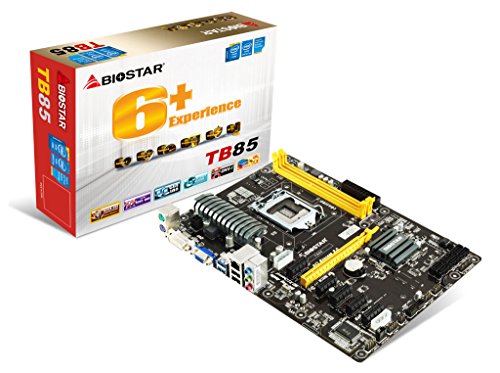
Built around the B85 chipset, the Biostar TB85 takes LGA 1150 processors on a ATX board with 4x DDR3 up to 32GB, DDR3 1600. Its specification sheet reads like a checklist for the job this article is about: enough power delivery for the processors it claims to support, the expansion a real build needs, and memory that holds a working day of open windows. Its expansion is 6x PCIe (1x x16, 5x x1), 4x SATA. It is not the most exotic board in this roundup, and that is arguably the point. It does the ordinary things well, which is exactly what a board bought for a real build needs to do.
Key specifications: LGA 1150 socket, B85 chipset, ATX form factor, 4x DDR3 up to 32GB, DDR3 1600, expansion: 6x PCIe (1x x16, 5x x1), 4x SATA, 6x PCIe slots.
Where it stands out:
- Six PCIe slots for graphics cards
- Four memory slots for more memory
- Built for multi-GPU rigs
Trade-offs:
- No M.2 slot
- No WiFi built in
- DDR3 memory only
Best for: Mining rigs that need six cards and more memory Not suited for: builds that need M.2 storage or WiFi
Setting up the Biostar TB85 takes little more than the processor, the memory, and a few minutes with the manual. Fit the processor into the LGA 1150 socket, close the retention arm, and fit the memory into the slots the manual marks for a two-stick kit. Mount the board on the case standoffs, connect the power cables firmly, and boot the PC before installing the latest chipset driver and BIOS from the maker’s site. Check in the BIOS that the memory runs at its rated speed, because a board that is still being adjusted mid-build helps nobody.
Compared with the other boards in this guide, the Biostar TB85 earns its place through six pcie slots for graphics cards. That is the feature most likely to decide the purchase, and it is worth weighing against the board’s limits: No M.2 slot Buyers who need that missing feature should choose a different pick from this guide, while buyers who do not will find this model covers the job with little fuss. Check the socket and the return policy before ordering, and test the board within the return window, booting with the real processor and memory and checking every slot and port.
The TB85 is the six-slot memory 1150 mining board in this guide: six PCIe slots with four memory slots. For an LGA 1150 mining rig that needs six cards and more memory, it is the roomy pick.
Check price on Amazon: Biostar TB85

B85-BTC Mining Motherboard 6PCI-E
The B85-BTC mining motherboard is the most single-minded board in this list: it exists to run graphics cards, as many as possible, on an LGA 1150 platform. The headline feature is six PCI-E slots on a B85 board, which is what a mining rig actually needs. A regular desktop board gives you one or two full-size slots and then runs out of room; this board is laid out so that six cards can sit side by side on risers, which is the whole point of a mining motherboard.
The B85 chipset and DDR3 memory keep the build honest. Mining does not need the newest chipset or the fastest memory; it needs a stable board that will run for weeks without a reboot, and B85 with DDR3 does that at a price that leaves more of the budget for graphics cards. The board is listed as fully tested, which matters more than it sounds: a mining board that arrives with a dead slot costs a week of troubleshooting, and a board that has been checked before shipping removes that risk.
Building on this board means thinking about the rig rather than the board alone. Six cards need a serious power supply, or two, and they need airflow and risers that are properly seated. The board itself is the easy part: LGA 1150 takes the cheap fourth-generation processors that miners have used for years, and DDR3 is inexpensive and plentiful. If you are building a dedicated rig, this is the board the rest of the list is measured against; if you are building a single-card machine, the smaller boards below will do the same job for less money.
Key specs:
- Chipset: B85
- Slots: 6 PCI-E for multi-GPU rigs
- Socket: LGA 1150
- Memory: DDR3
Strengths:
- Six PCI-E slots built for a multi-GPU mining rig
- B85 and DDR3 keep the platform cheap and stable
- Listed as fully tested before shipping
Trade-offs:
- Single-purpose layout with little use outside mining
- Needs risers, airflow and a large power supply to work
- Older B85 platform with no upgrade path to newer processors
Who it fits: Builders putting together a dedicated multi-GPU rig on LGA 1150. If six cards is the plan, this is the board to build around; if you only need one or two cards, a cheaper H81 board below will do.
Best for: A dedicated six-card mining rig. Not suited for: a general desktop build or a single-GPU machine.
Check price on Amazon: Mining Machine Motherboard for B85-BTC 6PCI-E B85 LGA

Shangzhaoyuan B85M PRO LGA 1150
The Shangzhaoyuan B85M PRO is a compact B85 board for LGA 1150, built for fourth-generation Core i7, i5 and i3 processors. It is the smaller sibling of the full-size mining boards in this list: same chipset family, same socket, same DDR3 memory, but in a micro-ATX layout that fits a smaller case and a smaller budget. For a rig that needs two or three graphics cards rather than six, that is the right size.
The B85 chipset is the sensible choice for a mining build that does not need to be extreme. It supports the processors miners actually use, it runs DDR3 memory that costs very little, and it is stable enough to leave running for weeks. The board takes the full range of fourth-generation Core processors, which means the builder can choose a cheap dual-core for a dedicated rig or a stronger i7 if the machine will do other work as well. That flexibility is worth having: a mining board that can also serve as a usable desktop is a better investment than one that can only mine.
What this board does not offer is room for a large card count, and buyers should be honest about that before ordering. If the plan grows to five or six cards, this is the wrong board and the six-slot B85-BTC above is the right one. But for a first rig, a test build, or a machine that mines part-time and works the rest of the time, the B85M PRO is a practical, inexpensive foundation.
Key specs:
- Chipset: B85
- Socket: LGA 1150
- Processors: Intel 4th Gen Core i7, i5, i3
- Form factor: Micro-ATX (B85M)
Strengths:
- Compact micro-ATX size for smaller cases and budgets
- Takes the full range of 4th-gen Core processors
- B85 and DDR3 keep the build cheap and stable
Trade-offs:
- Fewer expansion slots than a full-size mining board
- Not suited to a large multi-GPU rig
- Older platform with no path to newer processors
Who it fits: Builders starting a small rig or a part-time mining machine on LGA 1150. If two or three cards is the plan, this board fits; if the plan is six cards, buy the B85-BTC board instead.
Best for: A compact first rig or part-time mining build. Not suited for: a large multi-GPU rig.
Check price on Amazon: SHANGZHAOYUAN B85M PRO LGA 1150 Motherboard for Intel

Shangzhaoyuan H97 Strong LGA 1150
The Shangzhaoyuan H97 Strong is an H97 board for LGA 1150, and the chipset is the reason it is here. H97 sits above B85 and H81 in the fourth-generation family, with more features and more flexibility for a builder who wants the board to do more than mine. It takes fourth-generation Core i7, i5 and i3 processors, and the compact layout suits a smaller case without giving up the essentials.
The practical difference between H97 and the cheaper chipsets is headroom. More SATA ports, more USB, and a newer feature set mean the board copes better when the machine is asked to do two jobs: mine when it is idle and work as a desktop the rest of the time. That matters for builders who cannot justify a machine that only mines; a board that can also run a home server, a media box, or a spare desktop is easier to justify, and H97 is the chipset that makes that possible on LGA 1150.
The trade-off is price and purpose. H97 boards cost more than H81 boards, and if the machine will only ever mine, that extra money buys features that will never be used. But for a builder who wants one machine to do several things, or who simply prefers a newer chipset with more options, the H97 Strong is a solid middle ground between the cheapest boards and the dedicated mining boards.
Key specs:
- Chipset: H97
- Socket: LGA 1150
- Processors: Intel 4th Gen Core i7, i5, i3
- Form factor: Compact layout
Strengths:
- H97 chipset with more features than B85 or H81
- Compact size for smaller cases
- Flexible enough for mining and desktop use
Trade-offs:
- Costs more than the budget H81 boards
- Extra features are wasted on a mine-only rig
- Older platform with no path to newer processors
Who it fits: Builders who want one LGA 1150 machine to mine and do other work. If the board needs to be more than a mining board, this is the pick; if mining is all it will ever do, the cheaper boards are the better buy.
Best for: A flexible rig that mines and works as a desktop. Not suited for: a mine-only build on the tightest budget.
Check price on Amazon: SHANGZHAOYUAN H97 Strong LGA 1150 Motherboard for Intel

Machinist H81 Micro ATX LGA 1150
The Machinist H81 Micro ATX is the budget board in this list, and it is honest about what it offers: a small, inexpensive LGA 1150 board for fourth-generation Intel processors. H81 is the entry chipset of the family, and micro-ATX is the smaller form factor, so this is the board to choose when the budget matters more than expansion and the machine will run one or two graphics cards at most.
The appeal of H81 is price. A mining rig spends most of its money on graphics cards and power, and the board is the one part where spending less does not cost performance: mining does not need a fast chipset, it needs a stable one. The Machinist board takes fourth-generation Core processors, fits in a compact case, and leaves more of the budget for the parts that actually do the mining. For a first rig, a test build, or a machine that will only ever run a single card, that is the right calculation.
The limits are real and should be understood before buying. H81 has fewer expansion slots and fewer features than B85 or H97, and a micro-ATX board has less room for cards and cooling. A builder who starts with this board and later wants six cards will need a new board. But as a starting point, or as the foundation of a small rig, the Machinist H81 does the job for the least money in this list.
Key specs:
- Chipset: H81
- Socket: LGA 1150
- Processors: Intel 4th Gen Core
- Form factor: Micro ATX
Strengths:
- Lowest-cost way into an LGA 1150 mining build
- Compact micro-ATX size for small cases
- Stable H81 platform for one or two cards
Trade-offs:
- Fewest expansion slots in this list
- Not suited to a large multi-GPU rig
- Entry-level feature set with no room to grow
Who it fits: First-time builders and tight budgets running one or two cards. If the budget is the priority and the card count is small, this is the board; if the rig will grow, spend more on a B85 board instead.
Best for: A first rig or single-card build on a tight budget. Not suited for: a rig that will grow to many cards.
Check price on Amazon: MACHINIST LGA 1150 Gaming Motherboard

H81 Motherboard M.2 NVMe LGA 1150
The H81 motherboard with M.2 NVMe support is the board in this list for builders who care about storage speed as well as mining. The headline feature is the M.2 NVMe slot running at 6Gb/s, which lets the machine boot and load from a fast NVMe drive instead of a slow SATA disk. On a mining rig that sounds like a luxury, but it makes a real difference to how the machine feels: faster boots, faster updates, and a system that responds instead of waiting on the disk.
Underneath that feature it is a familiar H81 board: LGA 1150 socket, fourth-generation Intel processors, micro-ATX size, and a price that keeps the build affordable. The M.2 slot is what sets it apart from the other H81 board in this list. It does not add graphics slots or mining performance, and nobody should buy it expecting faster hashing; what it adds is a better daily experience for a machine that is also used as a desktop, a server, or a test bench.
The trade-off is the same as for any H81 board: limited expansion and no room for a large card count. The M.2 slot uses lanes that could otherwise serve other purposes, and a builder planning six cards should look at the B85-BTC board instead. But for a small rig that doubles as a working machine, fast storage is the feature that gets used every day, and this board is the only one in the list that offers it.
Key specs:
- Chipset: H81
- Socket: LGA 1150
- Storage: M.2 NVMe, 6Gb/s
- Form factor: Micro ATX
Strengths:
- M.2 NVMe slot for fast boot and storage
- Micro-ATX size for compact builds
- Budget H81 price for an LGA 1150 rig
Trade-offs:
- Limited expansion for large multi-GPU rigs
- NVMe adds no mining performance
- Older platform with no path to newer processors
Who it fits: Builders who want a small rig that also works well as a desktop, with fast storage. If boot speed and responsiveness matter, this is the pick; if the rig is mine-only, the plain H81 board costs less.
Best for: A small rig that doubles as a working desktop. Not suited for: a large multi-GPU rig.
Check price on Amazon: PC Motherboard Gaming Motherboard H81 M . 2
Shangzhaoyuan H97M PRO LGA 1150
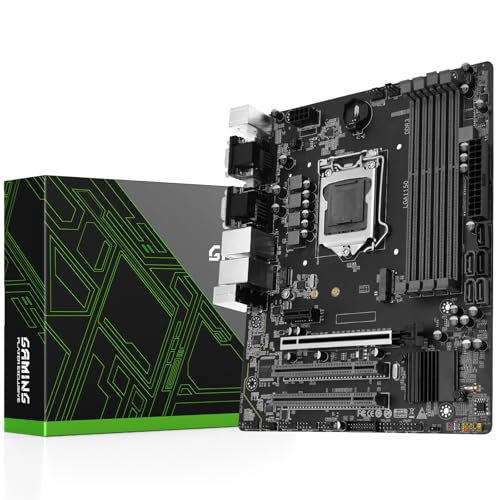
The Shangzhaoyuan H97M PRO is the most flexible board in this list: an H97 chipset in a micro-ATX layout, taking both fourth- and fifth-generation Core i3, i5 and i7 processors on LGA 1150. That dual-generation support is the feature that sets it apart, because it gives the builder more choice of processor, including the fifth-generation chips that the other boards in this list cannot use.
The H97 chipset brings the fuller feature set of the family, and the micro-ATX size keeps the board compact enough for a smaller case. For a mining build that is also a working machine, that combination is hard to beat: the board has the ports and features for desktop use, the processor choice covers two generations, and the size keeps the whole build tidy. A fifth-generation processor is not faster at mining than a fourth-generation one, but having the option costs nothing and can save money if a good used chip appears.
The usual caveat applies: H97 costs more than H81, and a mine-only rig does not need the extra features. But for a builder who wants the most capable LGA 1150 board in a compact size, and who values processor choice above all, the H97M PRO is the strongest all-round board in this list.
Key specs:
- Chipset: H97
- Socket: LGA 1150
- Processors: Intel 4th and 5th Gen Core i3, i5, i7
- Form factor: Micro-ATX (H97M)
Strengths:
- Takes both 4th- and 5th-gen Core processors
- H97 feature set in a compact micro-ATX size
- Flexible enough for mining and desktop use
Trade-offs:
- Costs more than the budget H81 boards
- Extra features are wasted on a mine-only rig
- Older platform with no path beyond 5th-gen processors
Who it fits: Builders who want the most flexible LGA 1150 board and the widest processor choice. If processor options and features matter, this is the pick; if the budget is tight and the rig is mine-only, the H81 boards are the better buy.
Best for: A flexible compact rig with the widest processor choice. Not suited for: a mine-only build on the tightest budget.
Check price on Amazon: SHANGZHAOYUAN H97M PRO LGA 1150 Motherboard for Intel
Comparison Table
| Board | Chipset | Socket | Standout Strength |
|---|---|---|---|
| Biostar TB85 | B85 | LGA 1150 | Proven B85 mining board for LGA 1150 rigs |
| B85-BTC Mining Motherboard | B85 | LGA 1150 | Six PCI-E slots for multi-GPU rigs |
| Shangzhaoyuan B85M PRO | B85 | LGA 1150 | Compact micro-ATX board for small rigs |
| Shangzhaoyuan H97 Strong | H97 | LGA 1150 | H97 features in a compact layout |
| Machinist H81 Micro ATX | H81 | LGA 1150 | Lowest-cost entry to LGA 1150 mining |
| H81 M.2 NVMe Board | H81 | LGA 1150 | M.2 NVMe storage for fast boots |
| Shangzhaoyuan H97M PRO | H97 | LGA 1150 | Takes 4th- and 5th-gen processors |
The table above shows the shortlist at a glance. If you want the simplest decision, start with the board whose standout strength matches what you care about most, then check its trade-offs against the way you will actually use it. The buying guide below walks through the details that matter most.
Buying Guide
Socket: the socket decides the processor
Socket decides which processors a board can take, because a processor only fits the socket it was made for, and a board with the wrong socket cannot take the chip at all. An AM4 board takes Ryzen 1000 to 5000 series processors, while an LGA1700 board takes 12th to 14th generation Intel Core processors, and an LGA1200 board takes 10th and 11th generation Intel Core processors.
The practical check is the socket on the specification sheet against the processor already chosen, before ordering. A socket that fits the processor is a socket that works, and a board whose socket matches the chip is a board that does not surprise the builder.
Chipset: the chipset decides the features
Chipset decides which features a board unlocks, because a high-end chipset allows overclocking and more fast storage, while a budget chipset blocks overclocking and offers fewer lanes. An X570 board suits a Ryzen build that wants PCIe 4.0 and overclocking, while a B550 board suits a Ryzen build that wants most of the same features for less, and a B450 board suits a budget Ryzen build.
The practical rule is to check the chipset on the specification sheet and to match it to the build, before ordering. A chipset that fits the build is a chipset that works, and a board whose chipset unlocks the features the build needs is a board that does not hold it back.
Form factor: the board must fit the case
Form factor decides whether a board fits the case, because an ATX board needs a mid-tower or larger case, while a micro-ATX board fits a smaller case and a mini-ITX board fits a compact case. A board that is too large for the case cannot be mounted, and a board that is much smaller than the case wastes space and expansion slots.
The practical advice is to measure the case before ordering, and to choose a board whose form factor matches it, because a board that fits the case is a board that works. A case that is measured before ordering is a case that does not surprise the builder.
Memory: slots, speed, and capacity
Memory decides how much a board can hold and how fast it can run, because a board with four DIMM slots holds more memory than a board with two, and a board that supports faster memory will run it at its rated speed. Most ATX boards take four DIMM slots and up to 128GB of DDR4 or DDR5, while a mini-ITX board takes two slots and up to 64GB.
The practical rule is to check the memory slots and the supported speeds on the specification sheet before ordering, and to buy memory from the board maker's compatibility list where possible, because memory that is listed as compatible is memory that works. A board whose memory fits the build is a board that boots first time.
Expansion: PCIe slots and M.2 storage
Expansion decides what a board can hold, because a board with three PCIe x16 slots can take two graphics cards, while a board with one slot takes one, and a board with three M.2 slots holds more fast storage than a board with one. A board with WiFi 6 and 2.5GbE suits a build that needs fast wireless and wired networking without extra cards.
The practical advice is to count the slots the build needs before ordering, and to choose a board that has them, because a board that lacks a slot the build needs is a board that forces a second purchase. Expansion that fits the build is expansion that works.
Setting Up Your Motherboard
Installing the board in the case
Fit the processor into the socket first, closing the retention arm before the board goes into the case, because a processor fitted after the board is mounted is harder to seat properly. Fit the memory into the slots the manual marks for a two-stick kit, then mount the board on the case standoffs and tighten the screws in a diagonal pattern so the board sits flat.
If the board does not sit flat, check the standoffs: a standoff in the wrong place will short the board. Remove it, and a board that sits flat is a board that works.
First boot and the BIOS
Connect the power cables firmly, including the 8-pin CPU power connector, and boot the PC before installing anything else, because a board that posts cleanly on first boot is a board that works. Enter the BIOS and check that the processor and the memory are detected, then set the memory to its rated speed with the board's memory profile.
If the board does not post, check the CPU power cable: a board without CPU power will not boot. Seat it firmly, and a board that posts is a board that works.
Drivers and BIOS updates
Install the latest chipset driver from the board maker's site after the operating system is installed, because the chipset driver is what lets the operating system talk to the board properly. Check the BIOS version against the maker's site, and update it only if the new version adds support for the processor or fixes a fault the build actually has.
If a new processor is not detected, check the BIOS version: a board may need a newer BIOS for a newer processor. Update it carefully, and a board whose BIOS matches the processor is a board that works.
Common Mistakes to Avoid
Buying a board with the wrong socket
A board with the wrong socket cannot take the processor at all, and the buyer lives with a board that must be returned. The socket should be checked against the processor before ordering, because a socket that matches is a socket that works.
Check the socket. A board that fits the processor is a board that works.
Buying a board that does not fit the case
A board that is too large for the case cannot be mounted, and the buyer lives with a case that must be replaced. The form factor should be checked against the case before ordering, because a board that fits the case is a board that works.
Measure the case. A board that fits is a board that works.
Forgetting the BIOS update for a newer processor
A board that needs a newer BIOS for a newer processor will not boot with that processor, and the buyer lives with a PC that shows nothing. The BIOS version should be checked against the processor before ordering, and a board with BIOS flashback can be updated without a compatible processor.
Check the BIOS. A board whose BIOS matches is a board that boots.
Skimping on the power supply
A power supply that cannot feed the board and the graphics card will crash under load, and the buyer lives with a PC that restarts during games. The power supply should be sized for the whole build, with headroom for the graphics card, before ordering.
Size the power supply. A build that is fed properly is a build that works.
Further Reading
More on this topic from Gizmoverdict: best 400-series motherboards, best X570 motherboards for 3800X, best 550 motherboards, best 570 motherboards.
Power Supply Sizing for a Multi-GPU Rig
A mining rig with six graphics cards needs a power supply that can feed them all, because each card draws power, and a supply that cannot feed the rig will crash under load. Add up the power each card draws, then add the power the board and the processor draw, and choose a supply with headroom above that total, because a supply that runs at its limit will fail sooner. A supply with headroom is a supply that lasts, and a rig that is fed properly is a rig that runs.
The second rule is to use two power supplies when one is not enough, because a rig with six cards may need more power than a single supply can give. Connect the supplies properly, with one supply feeding the board and the first cards, and the second supply feeding the rest, and check that both supplies start together, because a supply that starts late will leave cards unpowered. A rig with two supplies is a rig that is fed properly, and a rig that is fed properly is a rig that mines.
The last check is the risers, because each graphics card in a mining rig sits on a riser, and a riser that is not powered properly will fail. Power each riser from the supply, not from the board alone, because a board that feeds six risers will overload, and check each riser before the rig runs, because a riser that fails will take its card down. A rig whose risers are powered properly is a rig that runs, and that is the rig worth building.
Frequently Asked Questions
What is the best 1150 mining motherboard?
The B85-BTC mining board brings the best all-round board in this guide, because its six PCI-E slots and B85 chipset cover the job without obvious gaps. The Biostar TB85 brings the best value board, and the Shangzhaoyuan H97M PRO brings the best board for connectivity.
Does the chipset matter if I do not overclock?
Yes, because the chipset also decides the number of fast storage slots, the USB ports, and the networking on the board. A board with a higher chipset offers more M.2 slots and faster USB even without overclocking, so the chipset is worth checking even for a build that never overclocks.
How much memory can a board take?
Most ATX boards take four DIMM slots and up to 128GB of memory, while a mini-ITX board takes two slots and up to 64GB. Check the specification sheet for the maximum capacity and the supported speeds, and buy memory from the board maker's compatibility list where possible.
Do I need WiFi on the motherboard?
A board with built-in WiFi suits a build that cannot run a cable to the router, because it adds wireless without an extra card. A board without WiFi suits a build with a wired connection, and a WiFi card can be added later if the need arises. Check the specification sheet before ordering.
Can I reuse an old processor on a new board?
Only if the socket matches, because a processor only fits the socket it was made for. Check the socket on the old processor against the socket on the new board, and check the board maker's CPU support list, because a board may need a BIOS update for a newer processor in the same socket.
Final Recommendation
The best 1150 mining motherboards are the boards that fit the processor and the case: the B85-BTC mining board for the best all-round board, the Biostar TB85 for the best value board, and the Shangzhaoyuan H97M PRO for the best board for connectivity. The other picks in this guide cover overclocking, compact builds, and simple daily use, so the shortlist has a board for most builds.
Whichever board fits the build, check the socket against the processor, match the chipset to the features the build needs, measure the case before ordering, and check the BIOS version against the processor before the first boot. A board that is chosen and installed properly runs for years, and that is the board worth buying.