What's inside
- Key Takeaways
- Quick Picks
- How Did We Choose These Picks?
- What Does the 1200 in AC1200 Actually Mean?
- What Happened to the Original AC1200 Models?
- When Does Gigabit Ethernet Still Matter?
- How Does Wi-Fi 6 Change a Crowded Evening?
- Which Routers Carry the AC1200 Brief Forward?
- How Do the Six Compare Side by Side?
- How Do Channels and Interference Shape Real Speed?
- How Should You Set Up a Modern Gigabit Router?
- Should the Modem and Router Be One Box or Two?
- What Should You Check During the First Week?
- Which Rung Fits Your Internet Plan?
- What About Security and Software Support?
- What Mistakes Do AC1200 Shoppers Keep Making?
- Should Smart Gadgets Get Their Own Network?
- How Do You Know It Is Time to Replace an Old Router?
- Final Recommendation
- Frequently Asked Questions
- Related Guides
As an Amazon Associate I earn from qualifying purchases. This post may contain affiliate links at no extra cost to you.
gizmoverdict.com is reader-supported. When you buy through links on our site, we may earn an affiliate commission.
Where to buy: Every router named below links to its Amazon listing, and each one was drawn from the verified pool for this guide. A note before the list itself: the classic AC1200 shelf is nearly empty now, so this guide does something more useful than pretend otherwise — it explains what the AC1200 label actually promised, then lines up the gigabit routers that deliver that promise today, from the closest modern equivalent upward.
Shoppers hunting for the best 1200 gigabit routers usually carry a number in their head that deserves unpacking before any money moves. The “1200” in AC1200 was never a speed a single device could touch. It is the sum of two separate ceilings added together for the box art: roughly 300 Mbps on the 2.4 GHz band plus roughly 867 Mbps on the 5 GHz band, each figure being the theoretical maximum of that radio under laboratory conditions, with one client, at close range, doing nothing else. Your laptop connects to one band at a time. It never receives 300 and 867 simultaneously, and in a real house with walls, neighbours and a microwave, it receives a healthy fraction of whichever band it chose. Once that arithmetic is understood, the AC1200 class stops looking like a specification and starts looking like what it always was — an entry-level tier with a marketing total printed on top.
That tier earned its popularity honestly. For a decade, an AC1200 router was the sensible default for a flat or a small house on a modest broadband plan: dual-band Wi-Fi 5, four gigabit Ethernet ports, enough radio for streaming in one room and browsing in another. The silicon was cheap, the firmware was mature, and the whole category cost less than a family takeaway night. Its limits showed up slowly — a second 4K stream, a house filling with smart bulbs and cameras, a broadband plan that jumped from 100 Mbps to 500 — and each new device nibbled at a fixed pool of airtime managed by an ageing standard with no OFDMA, no MU-MIMO worth the name in early models, and security that often ended at WPA2.
The honest position in the current market is that AC1200 hardware still works, but buying it new means paying near-entry prices for a standard two generations old, while the entry rung of Wi-Fi 6 has fallen into the same neighbourhood. So the six picks below are arranged as a ladder. The first rung is the closest living relative of the AC1200 brief — an AX1800 router that costs and behaves like the old default while speaking a newer language. The middle rungs add airtime management, mesh options and VPN features. The top rung opens the 6 GHz band entirely. Every pick has gigabit-class wired ports, because “gigabit” in the original keyword referred to the Ethernet side of the box, and that part of the promise still matters: a router whose WAN port tops out at 100 Mbps would strangle a modern fibre plan no matter how loudly its Wi-Fi number shouted.
Who is this guide for, precisely? The reader whose router predates their car; the renter whose provider gateway wheezes in a hallway cupboard; the parent who typed the old class number into a search box because that is what the dying box says on its underside. It is also for the sceptic who suspects — correctly — that some of the replacement talk is marketing, and wants the honest residue separated from the noise. The honest residue is this: the wired gigabit promise still stands and every pick keeps it, the wireless standard underneath has genuinely improved in ways a crowded house can feel, and the security support clock on the old platform has genuinely run down. Everything else — the bigger sums, the extra bands, the gaming flourishes — is negotiable, and the ladder below is priced and ordered so you can stop climbing the moment your own household’s complaints are answered.
Key Takeaways
- The 1200 figure is a sum of two band ceilings — about 300 plus 867 Mbps — and no single device ever uses both at once.
- AC1200 means Wi-Fi 5; the living entry tier is now AX1800 Wi-Fi 6, which handles crowded homes far better at similar money.
- Gigabit refers to the wired ports, and a gigabit WAN port is the part of the old promise that still decides real-world speed.
- Every pick below is dual-band or better with gigabit Ethernet, verified against its listing before inclusion.
- Households on plans above roughly 500 Mbps, or with dozens of connected devices, should start at the AX3000 rung or higher.
- Firmware support and WPA3 matter more than the printed class number when a router will serve for five years.
Quick Picks
| Pick | Badge | Why it earns its place |
|---|---|---|
| TP-Link Archer AX21 | Closest modern equivalent | AX1800 Wi-Fi 6 with gigabit ports and EasyMesh — the old AC1200 brief, rewritten in a current standard. |
| TP-Link Archer AX55 | Best all-round step up | AX3000 airtime, a VPN client and server, and a USB 3.0 port for households that outgrew the entry tier. |
| TP-Link Archer AX73 | Range and throughput pick | AX5400 radios and six antennas aimed at larger homes that still want one box doing the work. |
| ASUS RT-AX86U Pro | Gaming-leaning powerhouse | A 2.5G port, deep firmware and AiMesh expansion for players who also run a busy house. |
| GL.iNet Slate AX | Travel and small-space pick | Pocket-sized AX1800 with OpenWrt roots and VPN tooling for flats, dorms and life on the road. |
| TP-Link Archer AXE75 | Future-proofing pick | Adds the uncongested 6 GHz band and a 2.5G WAN port, ending the upgrade question for years. |
How Did We Choose These Picks?
Selection began with the wired side, because the keyword’s second half is non-negotiable: any router whose WAN or LAN ports are limited to 100 Mbps was excluded outright, however attractive its wireless claims. Each surviving model then had to be dual-band at minimum, still sold through a verifiable listing, and current enough to receive firmware attention. Within that frame we weighted the things the AC1200 generation lacked — OFDMA for crowded airtime, WPA3 for modern security, mesh expandability for homes that grow, and processor headroom for households that stack streaming, calls and downloads on top of each other. The final six were ordered as a ladder rather than a ranking: each rung answers a different budget and a different house, and the right answer depends on where your current router hurts.
One more filter deserves stating plainly. We did not include surviving old-stock AC1200 units, even though a few still circulate, because their firmware trains have largely ended and their prices sit uncomfortably close to the AX1800 rung. Recommending a discontinued platform to save a small sum would trade years of security updates for almost nothing, and this guide refuses that trade on the reader’s behalf.
What Does the 1200 in AC1200 Actually Mean?
Wi-Fi class numbers are sums, and sums flatter. An AC1200 router divides its headline between two radios that serve different purposes. The 2.4 GHz band contributes about 300 Mbps of theoretical capacity and offers the longer reach and better wall penetration; the 5 GHz band contributes about 867 Mbps and offers the speed, across shorter distances, with less interference from neighbours. A phone in the kitchen uses one. A laptop in the study uses the other. The router’s total is a figure no client experiences, rather like advertising a car by adding the top speeds of its gears together.
Two further discounts apply before that number meets reality. Protocol overhead — the handshakes, acknowledgements and error correction that keep Wi-Fi orderly — consumes a substantial share of the theoretical rate even in perfect conditions. Then the environment takes its cut: distance, masonry, metal appliances, competing networks on the same channels, and the simple fact that older Wi-Fi 5 clients take turns speaking in a way that lets one slow device hold the floor. This is why an AC1200 router on a 500 Mbps fibre plan could leave a speed test in the next room showing a third of the plan’s rate, while the wired desktop beside the router showed nearly all of it. The gap was never a fault; it was the arithmetic of the class.
Wi-Fi 6 changed the conversation from raw totals to efficiency. OFDMA lets one transmission serve several devices at once, which matters enormously in a home where thirty gadgets each want small, frequent sips of data. Target wake time lets battery devices sleep properly. MU-MIMO, present in theory on late AC models, became genuinely useful. The result is that an AX1800 router — headline sum 1800, itself a flattering total — feels faster than an AC1200 unit in a crowded home not because its ceiling is half again higher, but because it wastes so much less of the airtime beneath the ceiling.
What Happened to the Original AC1200 Models?
The class had a long and honourable career. When 802.11ac arrived, its second wave settled into the AC1200 shape that filled shelves for years: routers like TP-Link’s Archer C6 and C1200 lines, NETGEAR’s R6220 generation and a dozen house-brand equivalents became the default recommendation of every forum thread and family tech adviser. They were cheap because the silicon had commoditised, and they were adequate because the average home asked little of them — a stream or two, some browsing, a phone count in single digits. If you are replacing one today, you are probably replacing a router that gave good service; the point of this guide is not that AC1200 failed, but that the household around it changed.
Three shifts did the work. Broadband plans climbed, with fibre tiers turning 300–900 Mbps into ordinary offerings where 50 Mbps once felt luxurious. Device counts multiplied quietly — the average connected home now fields cameras, speakers, plugs and appliances that did not exist as network citizens when AC1200 was designed. And the threat model matured, making ended firmware support a genuine risk rather than a footnote. Manufacturers read the same numbers and moved their entry lines to Wi-Fi 6 silicon, which is why the surviving AC1200 listings skew toward old stock, marketplace resellers and white-label boxes with unclear update futures. The class did not get worse; the world outgrew its assumptions, and the kindest thing a buying guide can do is say so before a reader spends money re-entering it.
When Does Gigabit Ethernet Still Matter?
Constantly, and quietly. The WAN port is the narrowest bridge between your home and your plan: a gigabit WAN port passes plans up to roughly 940 Mbps in practice, while the 100 Mbps ports found on the cheapest legacy boxes cap any plan above that tier before Wi-Fi even gets a say. Inside the house, gigabit LAN ports feed the devices that benefit most from a wire — a desktop, a NAS, a game console, a mesh node’s backhaul — and they do it with latency no radio can match. When a listing says “gigabit router,” this is the substance underneath the slogan, and it is why every pick in this guide was checked port by port rather than by headline.
Two picks here go further with 2.5 gigabit ports, and the reason to care is not today’s typical plan but tomorrow’s. Multi-gig fibre tiers are spreading, and a router bought now will likely still be in service when the street’s offer changes. A 2.5G WAN port also earns its keep locally, moving files between a wired PC and a NAS faster than gigabit allows. It is headroom, bought cheaply at purchase time and expensively later if skipped.
How Does Wi-Fi 6 Change a Crowded Evening?
Picture the moment that defines a modern home network: half past seven, rain outside, one person on a video call in the study, a 4K stream running in the lounge, a teenager’s game downloading an update, a doorbell camera uploading motion clips, and a dozen idle gadgets murmuring to their cloud services. Under Wi-Fi 5, the router handles this crowd the way a single waiter handles a full restaurant — one table at a time, in order, while everyone watches their drinks empty. Each small request, however tiny, occupies the channel for its turn. The big transfers suffer, but so, oddly, do the small ones, queuing behind bulk traffic they outweigh by nothing.
Wi-Fi 6 rebuilt the dining room. OFDMA subdivides each channel into resource units, letting one transmission carry data for several devices at once — the waiter now carries a tray. MU-MIMO, matured from its tentative Wi-Fi 5 form, lets the router converse with multiple clients simultaneously on the same band. BSS colouring teaches neighbouring networks to ignore each other’s quiet chatter instead of politely pausing for it, a mercy in apartment blocks where forty networks overlap. None of this raises the theoretical ceiling in a way the box art can brag about; all of it raises the floor, which is where households actually live. It is also why the class sums mislead in both directions — AC1200’s 1200 and AX1800’s 1800 are only half again apart on paper, yet the lived difference on a crowded evening is larger than the arithmetic suggests.
The practical consequence for a buyer is that the standard matters independently of the plan. A household on a 100 Mbps connection with forty devices will feel Wi-Fi 6’s discipline more than a household on a gigabit connection with six devices. When you choose among the picks below, count your connected things honestly — phones, tablets, televisions, consoles, cameras, bulbs, plugs, speakers, watches, the fridge that insisted on joining — and let that census, not the headline class, decide how far up the ladder to climb.
Which Routers Carry the AC1200 Brief Forward?

TP-Link Archer AX21 — Closest modern equivalent
The Archer AX21 is what the AC1200 default grew up to become. Its class sum reads AX1800 — about 574 Mbps on 2.4 GHz and 1201 Mbps on 5 GHz, with the same caveat that no single device sees the total — but the generational change underneath matters more than the larger number. Wi-Fi 6 brings OFDMA and MU-MIMO to a price tier where the old AC boxes offered neither in usable form, so a hallway full of phones, bulbs, plugs and a television all contending at 8 p.m. is handled with noticeably less of the stutter that made AC1200 routers feel tired years before they broke.
For a small home on a plan in the low hundreds of megabits, this is the rung where the ladder honestly starts. The four gigabit LAN ports cover a console, a desktop and a streaming box with one spare, the setup app is painless, and EasyMesh support means a compatible extender or second unit can patch a dead corner later instead of forcing a full replacement. It is also certified for simple voice-assistant integration, a small thing that signals where this tier now lives: the unglamorous, dependable centre of an ordinary home network. Buyers coming from an AC1200 unit will find the shape of the experience familiar — same job, same footprint, same modest appetite for attention — with the congestion manners of a newer decade.
- Class: AX1800 dual-band Wi-Fi 6 (574 + 1201 Mbps theoretical)
- Ports: gigabit WAN plus gigabit LAN
- Mesh: EasyMesh compatible
- Extras: OFDMA, MU-MIMO, Alexa integration
Strengths
- Directly inherits the entry-tier role at an entry-tier cost of ownership
- Wi-Fi 6 airtime handling transforms busy evenings compared with Wi-Fi 5
- EasyMesh leaves a cheap escape route if coverage falls short
Trade-offs
- No USB port, so printer and drive sharing stay off the menu
- Single-unit coverage still fades in long or masonry-heavy homes
- Advanced firmware features sit behind TP-Link’s simpler interface philosophy
Worth knowing before checkout: the AX21’s radios favour the rooms around it rather than the far end of a long flat, so measure your worst room during the return window. Its app-guided setup also handles the provider-gateway question gracefully, detecting double-NAT situations that confuse older routers and offering the access-point remedy in plain language — a small kindness that saves many households a support call.
Best for: small households replacing an ageing AC1200 router on a modest plan. Not suited for: multi-gig plans or homes already planning a mesh build-out.

TP-Link Archer AX55 — Best all-round step up
If the AX21 is the old brief rewritten, the Archer AX55 is the brief expanded. Its AX3000 class — roughly 574 Mbps on 2.4 GHz and 2402 Mbps on 5 GHz — doubles the fast band’s theoretical room, and the router spends that room well, pairing it with a quad-core processor that keeps the interface responsive while the house is busy. The feature list reaches into territory AC1200 owners never saw: a VPN client and server built in, a USB 3.0 port for sharing storage, and TP-Link’s HomeShield security layer watching over the network’s edges.
The VPN client deserves a sentence of its own, because it changes what a router at this level can do for privacy: instead of installing an app on every phone, tablet and television, the household can route chosen devices — or all of them — through the tunnel at the router, covering awkward gadgets like streaming sticks that accept no VPN app at all. EasyMesh support returns here too, so the AX55 can start life alone and gain satellites later. For the reader whose AC1200 box is not merely old but actively outgrown — more people, more streams, more everything — this is the rung where the upgrade stops feeling like maintenance and starts feeling like new capability.
- Class: AX3000 dual-band Wi-Fi 6 (574 + 2402 Mbps theoretical)
- Ports: gigabit WAN/LAN, USB 3.0
- VPN: client and server built in
- Mesh: EasyMesh compatible; HomeShield security included
Strengths
- Router-level VPN covers devices that cannot run their own client
- Processor headroom keeps admin and traffic smooth under load
- USB 3.0 sharing adds light NAS duty without another box
Trade-offs
- HomeShield’s fuller features lean on a subscription tier
- Still a single unit — big floor plans will test its reach
- No multi-gig port for buyers eyeing faster fibre tiers
Best for: growing households that want one box to cover streaming, calls and router-level privacy. Not suited for: very large homes or multi-gig internet plans.

TP-Link Archer AX73 — Range and throughput pick
The Archer AX73 answers a different complaint: not congestion, but distance. Six external antennas and an AX5400 class rating — about 574 Mbps on 2.4 GHz and 4804 Mbps on the 5 GHz band — give it the broadest single-box throw in this guide, and its listing leads with long-range coverage for a reason. In a wide single-storey home, or a two-storey house where the router can sit near the stairwell, one strong unit like this often beats a cheap mesh kit whose nodes spend their own bandwidth talking to each other.
Throughput at range is where the AC1200 comparison turns stark. The old class’s 867 Mbps fast band, shared and halved by distance, could leave a back bedroom with a stream that buffered at the worst moment; the AX73’s wider channels and beamforming hold usable speed further from the box. It keeps the family’s practical touches too — a USB port, VPN server support, and airtime fairness for older clients. What it deliberately is not is a mesh system or a 6 GHz gateway: it is the strongest expression of the traditional one-router house, and for the right floor plan that remains the simplest correct answer.
- Class: AX5400 dual-band Wi-Fi 6 (574 + 4804 Mbps theoretical)
- Antennas: six external, high-gain arrangement
- Ports: gigabit WAN/LAN, USB
- Extras: VPN server, beamforming, airtime fairness
Strengths
- Broadest single-unit reach in this line-up
- Wide 5 GHz capacity keeps distant rooms streaming cleanly
- Familiar one-box simplicity — no nodes to place or manage
Trade-offs
- Large footprint with an antenna forest that dominates a shelf
- No 6 GHz band for buyers wanting the newest spectrum
- Extreme floor plans will still defeat any single radio source
Best for: wide or awkward homes where one powerful central router can see most rooms. Not suited for: sprawling multi-floor houses with dead zones no single box can reach.

ASUS RT-AX86U Pro — Gaming-leaning powerhouse
The RT-AX86U Pro carries the AX5700 badge — roughly 861 Mbps on 2.4 GHz and 4804 Mbps on 5 GHz — but its real distinction sits in the firmware and the port bank. A 2.5 gigabit port can serve as the WAN feed for a faster plan or as a high-speed link to a NAS, and ASUS’s software adds a mobile game mode, proper port forwarding tools and subscription-free network security that does not ask for a monthly tribute. The listing for this unit describes a renewed example, so expect the possibility of refurbished stock and check the listing’s condition notes; the platform itself is the point.
Gamers will feel the difference from an AC1200 box most in the evenings, when the household’s streaming collides with a match: the processor headroom and traffic handling keep latency steadier while other devices pull their share. AiMesh compatibility means a second ASUS unit can extend coverage without discarding this one, turning today’s powerhouse into tomorrow’s mesh node. It is the most enthusiast-leaning pick in this guide — the one for the reader who opens the admin panel for pleasure, sets up the VPN, tunes the QoS, and considers the router a hobby surface as much as an appliance.
- Class: AX5700 dual-band Wi-Fi 6 (861 + 4804 Mbps theoretical)
- Ports: 2.5G multi-role port plus gigabit LAN
- Software: AiMesh, VPN support, subscription-free security
- Note: listing describes a renewed unit — verify condition at purchase
Strengths
- Deep, tweakable firmware without a security subscription
- 2.5G port bridges toward faster plans and fast local storage
- AiMesh gives the box a second life as a mesh node later
Trade-offs
- Renewed listing means condition varies — inspect on arrival
- Vertical, antenna-heavy design needs shelf room
- Feature depth can overwhelm set-and-forget buyers
Best for: gamers and tinkerers who want control, headroom and expansion options. Not suited for: buyers who want the plainest possible setup experience.
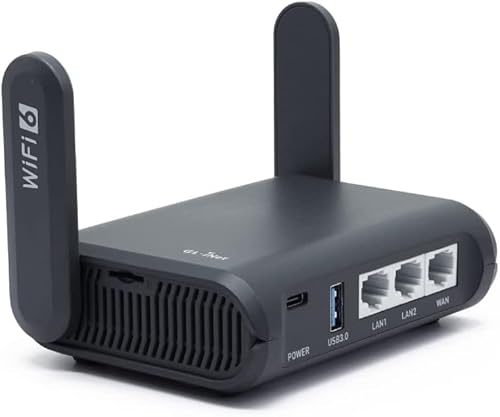
GL.iNet Slate AX — Travel and small-space pick
Every ladder needs one rung that breaks the pattern, and the Slate AX is it: a pocket-sized travel router whose AX1800 class matches the AX21’s arithmetic while its purpose could not be more different. Built on OpenWrt foundations, it exists to create a private, encrypted network wherever its owner lands — a hotel room, a rental flat, a dorm, a camper van — repeating the venue’s connection for all your devices at once so each gadget logs in once, through your tunnel, instead of trusting the venue individually.
At home it earns a quieter role. In a studio or a single room, its coverage is entirely sufficient, and its VPN tooling is the most flexible in this guide, with WireGuard and OpenVPN clients configured through an interface designed for non-specialists. The listing notes support for well over a hundred simultaneous device connections, a figure that matters at conferences and family gatherings more than at a desk. Nobody should buy it to cover a farmhouse; everybody who travels with a laptop and a healthy suspicion of lobby Wi-Fi should understand why it exists. Beside the AC1200 brief, it shows how far the entry class has travelled: the same headline arithmetic, now pocketable and privacy-first.
- Class: AX1800 dual-band Wi-Fi 6 (theoretical sum)
- Form: pocket-sized travel router, USB-powered class
- Software: OpenWrt-based, WireGuard and OpenVPN clients
- Ports: gigabit Ethernet for WAN/LAN roles
Strengths
- Turns untrusted venue Wi-Fi into one private, encrypted network
- OpenWrt base offers unusual flexibility for its size
- Doubles as a perfectly good single-room home router
Trade-offs
- Coverage is room-scale by design, not house-scale
- Peak throughput trails the full-size picks here
- Travel features are wasted if it never leaves a shelf
Best for: travellers, dorm rooms, studios and anyone who works from other people’s networks. Not suited for: covering a family house on its own.

TP-Link Archer AXE75 — Future-proofing pick
The top rung stops refining the old formula and replaces one of its ingredients: spectrum. The Archer AXE75 is tri-band, adding a 6 GHz radio to the familiar pair, and that new band is the first genuinely empty road Wi-Fi has had in decades — no legacy devices, no neighbours’ ageing routers, just wide channels for the phones, laptops and headsets new enough to use it. Its AXE5400 class sums across three bands, and the same honesty applies: one device rides one band, but here the band it rides can be nearly private.
Around that headline, the practical boxes are ticked with unusual completeness: a 2.5 gigabit WAN port ready for multi-gig plans, VPN support, WPA3, and OneMesh expansion. The listing carries a 2025 PCMag Editors’ Choice mention, which we note as the manufacturer’s claim rather than our own testing. For the AC1200 owner whose real question is “what do I buy so I can stop thinking about routers,” this is the answer with the longest shelf life: the household’s older gadgets keep their bands, the new ones get a motorway, and the wired side will not bottleneck the next plan upgrade.
- Class: AXE5400 tri-band Wi-Fi 6E with 6 GHz radio
- Ports: 2.5G WAN plus gigabit LAN
- Channels: 160 MHz support on the wide bands
- Extras: OneMesh, VPN support, WPA3
Strengths
- 6 GHz band sidesteps neighbourhood congestion entirely
- 2.5G WAN removes the wired ceiling for years of plan upgrades
- Tri-band design gives new devices a band of their own
Trade-offs
- Only Wi-Fi 6E/7 clients can use the band that justifies it
- 6 GHz reach is shorter — placement matters more
- Costs meaningfully more than the entry rungs below it
One caution for 6 GHz newcomers: the band’s signals fade faster through walls than the 5 GHz radio’s do, so the AXE75 rewards the central placement this guide keeps recommending. In the same room or the next, though, a modern laptop on 6 GHz feels less like an upgrade and more like a wire that forgot to exist — which is precisely the sensation the AC1200 generation kept promising and never quite delivered.
Best for: buyers replacing an old router once, for as many years as possible. Not suited for: households whose devices are all older Wi-Fi 5 models.
How Do the Six Compare Side by Side?
| Router | Class | Standout port | Defining trait |
|---|---|---|---|
| Archer AX21 | AX1800 Wi-Fi 6 | Gigabit WAN/LAN | The entry brief, modernised |
| Archer AX55 | AX3000 Wi-Fi 6 | USB 3.0 | VPN client and server aboard |
| Archer AX73 | AX5400 Wi-Fi 6 | Gigabit WAN/LAN | Six-antenna single-box reach |
| RT-AX86U Pro | AX5700 Wi-Fi 6 | 2.5G multi-role | Firmware depth, AiMesh growth |
| Slate AX | AX1800 Wi-Fi 6 | Gigabit, travel layout | OpenWrt pocket privacy |
| Archer AXE75 | AXE5400 Wi-Fi 6E | 2.5G WAN | The empty 6 GHz band |
Notice what the table leaves out: a price column and a star column, deliberately. Prices in this category swing with promotions too often for a printed figure to stay honest, and a single score would flatten the very differences — reach, firmware, spectrum, size — that should drive the choice. The constraint-first reading also explains why the guide’s cheapest and dearest picks can both be right answers on the same page.
Read the table by constraint, not by class number. If the constraint is budget, the ladder’s first rung solves it. If it is evening congestion, the AX55’s airtime and processor answer it. Distance points at the AX73, control at the ASUS, mobility at the Slate, and longevity at the AXE75. The class column is the least informative one on the page — which is, in miniature, the whole lesson of the AC1200 story.
How Do Channels and Interference Shape Real Speed?
Every Wi-Fi band is a shared road divided into channels, and your neighbours are driving on it too. On 2.4 GHz the road is narrow — in most regions only three channels truly avoid overlapping each other — which is why that band, despite its superior reach through walls, often crawls in apartment buildings: forty networks politely shouting over one another on the same few lanes. The 5 GHz band offers many more channels and wider ones, so routers can spread out; enabling 80 MHz channel width there usually buys real speed at home distances, while the widest 160 MHz modes trade reach for peak rate and suit the AX73 and AXE75 in quieter neighbourhoods.
Modern routers scan and choose channels automatically, and for most households the automatic choice, refreshed by a monthly reboot, is genuinely fine. Manual tuning earns its effort in one situation: a persistent slow band in a dense building. A free Wi-Fi analyser app will show which channels your neighbours occupy; moving your 2.4 GHz radio to the emptiest of the non-overlapping trio and letting 5 GHz sit on a high, clear channel can transform an evening more cheaply than any hardware change. This is also the deeper promise of the AXE75’s 6 GHz band — not merely more megahertz, but an entire second road system with almost no traffic yet, where wide channels run empty in every direction.
Interference is not only other Wi-Fi. Microwave ovens leak into 2.4 GHz, older cordless phones and baby monitors crowd it, and Bluetooth hops across it hundreds of times a second. A router placed beside a microwave will always lose the lunchtime argument no matter its class number. Distance from such sources, like distance from metal and masonry, is part of the purchase whether it appears on the receipt or not — which is why this guide keeps returning to placement with the persistence of a folk remedy: it works, it is free, and it is the variable buyers most consistently ignore.
How Should You Set Up a Modern Gigabit Router?
Placement decides more than purchase. Put the router near the centre of the home, raised on a shelf rather than crouched behind a television, with its antennas vertical and its surroundings free of metal cabinets and fish tanks. During setup, update the firmware before changing anything else, then set a fresh admin password and a Wi-Fi passphrase that is long, unique and not shared with any other account. Choose WPA3 where the option exists, or the WPA2/WPA3 transition mode if older gadgets complain.
Give the two bands one shared network name unless you have a reason to split them; modern band steering moves devices sensibly, and a single name keeps printers and smart bulbs from hiding on the wrong radio. Wire whatever sits still — televisions, consoles, desktops — into the gigabit LAN ports, because every device on a cable is airtime returned to the ones that truly need wireless. Finally, run a speed test beside the router and again in the worst room, and write both numbers down: that pair of figures is your baseline when something feels slow in six months, and it tells you whether the problem is the plan, the placement or the house itself.
Should the Modem and Router Be One Box or Two?
Every pick in this guide assumes a separate modem or an optical terminal from your provider, into which the router plugs. That separation is deliberate and worth defending. Two-box setups let each half be replaced on its own schedule — the router when Wi-Fi standards move, the modem when the provider’s network changes — and they keep the router’s placement free, because the modem must live where the line enters while the router should live where the people are. A single Ethernet cable between the entry point and a central shelf is the cheapest coverage upgrade in this entire guide.
Combined modem-routers have their defenders — one power supply, one box, provider support that cannot blame the other half — and for cable households they can be the tidy answer. But the combination welds your Wi-Fi generation to your access technology: move from cable to fibre, or watch a new Wi-Fi standard arrive, and the whole unit is retired together. For readers arriving from the AC1200 era, whose instinct is a single familiar box, the modern habit is worth adopting: let the provider’s equipment terminate the line, and let a router you chose, placed where you chose, run the house. The six picks above are all built for exactly that arrangement, and each will also work behind a provider gateway set to bridge or passthrough mode where the provider allows it.
What Should You Check During the First Week?
A new router deserves a short probation, and the checks are simple enough to run from a phone. Walk the house with a speed test at the hours your household actually uses the network — not at noon on a quiet Tuesday, but during the streaming-and-calling overlap of a weekday evening — and note the worst room’s figure rather than the best. Join a video call from the furthest desk. Let the game console download something large while a stream runs, and watch whether either complains. These are the loads the old router failed under; the new one should pass them without theatre.
Then inspect the unglamorous pages. Confirm the firmware updated itself or accept the update it offers. Open the client list and make sure you recognise every device; a new network is the one moment the census is short enough to audit. Check that the guest network exists for visitors and smart gadgets you half-trust, and that your main passphrase lives nowhere else in your digital life. If a dead corner persists, resist the urge to return the router immediately — first move it a metre, raise it a shelf, rotate it; radios are fussy about furniture in ways that have nothing to do with quality. Only if the corner survives honest placement experiments should the mesh conversation begin, and by then you will know exactly which room the extra node must serve.
Which Rung Fits Your Internet Plan?
Matching router to plan prevents both overspending and quiet disappointment. On plans up to about 200 Mbps, any pick here will deliver the full subscription to a wired device and most of it wirelessly in the rooms that matter; the AX21 is the rational buy, and the money saved is better spent on placement — a longer Ethernet run to a central shelf beats a stronger router in a bad corner. Between roughly 300 and 600 Mbps, the wireless side becomes the constraint at distance: the AX55’s wider fast band and stronger processor keep more of the plan alive in the second and third rooms, and its VPN client stops being a luxury once the household works from home.
At gigabit tiers and above, two specifications take over. The WAN port must be gigabit at minimum — all six picks qualify — and buyers eyeing multi-gig upgrades should look directly at the 2.5G ports on the ASUS and the AXE75, because a router purchased the month before a plan upgrade has a way of becoming the bottleneck everyone blames on the provider. Households unsure of their plan’s real speed should test it wired, at the modem, before shopping: a surprising number of “slow router” complaints are slow plans, failing cables or a modem negotiating at 100 Mbps, none of which a new router can cure.
What About Security and Software Support?
A router is the one computer in the house that never sleeps and stands between every other device and the open internet, so its software lifespan deserves the same scrutiny as its radios. The AC1200 generation’s quiet scandal is abandonment: many units stopped receiving firmware years ago, leaving known vulnerabilities unpatched in exactly the position where they matter most. Every pick in this guide comes from a current platform with an active update train, and that fact — unglamorous, unprintable on a box — is worth more than a few hundred theoretical megabits.
WPA3 is the visible half of the improvement, strengthening the handshake that guards your passphrase and protecting older traffic even if the passphrase later leaks. The invisible half is habit: enable automatic updates where offered, change the default admin credentials during setup, and switch off remote management from the internet unless you specifically need it. Two picks add their own layers — TP-Link’s HomeShield on the AX55 and ASUS’s subscription-free security suite on the RT-AX86U Pro — and while neither replaces common sense, both watch for the compromised smart bulb that common sense never inspects. Treat the router’s update page like a smoke alarm: boring, ignored for months, and the cheapest insurance in the building.
What Mistakes Do AC1200 Shoppers Keep Making?
The first is reading the class number as a speed. A buyer expecting “1200” to arrive at a laptop will feel cheated by any router ever made, because the figure is a two-band sum of theoretical ceilings; judge routers by band, standard and your plan instead. The second mistake is mirror-image thinking — assuming a newer standard is wasted on an older plan. A 200 Mbps plan still benefits from Wi-Fi 6’s airtime discipline when thirty devices contend, because the bottleneck at 8 p.m. is rarely the pipe; it is the queue at the router’s own door.
Third, shoppers overlook the WAN port while admiring the wireless claims, then discover a 100 Mbps ceiling strangling a gigabit plan — the one specification in this category that cannot be fixed later. Fourth, they buy old stock because the box looks familiar, inheriting ended firmware support and WPA2-only security for a saving that evaporates within a year. Fifth, they place the new router exactly where the old one lived — inside a cabinet, beside the modem in a corner — and blame the hardware for the house’s geometry. The router is a radio; treat its position like one.
Should Smart Gadgets Get Their Own Network?
The AC1200 era treated every device as equally trustworthy, because nearly every device was a computer or a phone. Today’s census includes cameras, bulbs, plugs and appliances built to a price, updated rarely, and abandoned by their makers with cheerful regularity. Putting that population on a guest network — a feature every pick here offers — fences them away from your laptops and storage while still letting them reach the internet they insist upon. Visitors get the same guest network, which keeps the main passphrase from accumulating in phones you will never see again.
Segregation has a second, quieter benefit: troubleshooting. When everything mysterious lives on the guest side, a device misbehaving at 3 a.m. announces its neighbourhood immediately. Some households go further, reserving the 2.4 GHz band largely for gadgets — many smart devices speak nothing else — and keeping 5 GHz for the machines people touch. None of this requires enterprise equipment or expertise; it requires ten minutes in the settings of any router in this guide and a willingness to treat the doorbell slightly differently from the laptop, which, on reflection, is simply accurate.
How Do You Know It Is Time to Replace an Old Router?
Routers rarely die dramatically; they fade. The symptoms arrive as small mysteries — a stream that buffers only on rainy evenings when everyone is home, a video call that freezes when a housemate starts a download, a smart speaker that drops off the network and returns hours later, a firmware page whose newest entry is dated several years back. Each incident looks like weather. Together they describe a platform whose airtime discipline, processor and software support have fallen behind the household’s census. A useful test: count your connected devices in the router’s client list. If the number surprises you, the router is not the only thing that has been quietly outgrown.
Two hard triggers should end the deliberation immediately. The first is the end of firmware support — check the manufacturer’s page for your model, and if the newest release is ancient or the model sits on an end-of-life list, replace the router regardless of how well it still performs, because its unpatched position at the network’s edge is a risk the household carries every hour. The second is a plan upgrade past the hardware’s ceilings: a gigabit subscription behind a 100 Mbps WAN port, or behind Wi-Fi 5 radios that cannot carry it across the house, is money paid monthly for speed that never arrives. Everything else — the buffering, the dropouts, the dead corner — is negotiation; those two are verdicts.
Final Recommendation
Start at the rung your house actually needs. Small homes on ordinary plans should take the Archer AX21 and enjoy the quiet miracle of a modern standard at the old tier’s price. Households that feel the evening crush should step to the AX55; homes fighting distance should consider the AX73’s throw or the AXE75’s new spectrum; gamers and tinkerers will be happiest inside the ASUS’s firmware, and travellers should simply own the Slate. What none of you should do is pay new money for the AC1200 label itself: honour what that class taught the market — that dual-band gigabit networking belongs in every home — by buying its descendants instead of its leftovers. Do the setup properly, place the box like a radio rather than an ornament, write down your baseline speeds, and the network should fade back into the walls where it belongs — noticed only on the day, years from now, when its own replacement earns a guide like this one.
Frequently Asked Questions
Is an AC1200 router fast enough for a 500 Mbps plan?
Wired, yes — its gigabit ports pass the plan. Wirelessly, only near the router on the 5 GHz band; across a house, expect a fraction of the plan, which is why this guide steers 500 Mbps households toward AX3000 and above.
What replaced AC1200 as the entry class?
AX1800 Wi-Fi 6 models such as the Archer AX21 and the Slate AX occupy the same role and price neighbourhood, adding OFDMA, better MU-MIMO and WPA3 while keeping gigabit ports.
Does the 1200 number mean two devices get 600 each?
No. The figure sums the theoretical ceilings of two different bands. Each device connects to one band, shares that band’s real capacity with everything else on it, and never sees the combined total.
Should I split my 2.4 GHz and 5 GHz network names?
Usually not. One name with band steering enabled lets the router place devices sensibly. Split them only when a stubborn smart-home gadget demands a visible 2.4 GHz network during setup.
Can I keep my old AC1200 router as an access point?
Often, yes — many models offer an access-point mode that disables their routing and lets them serve one corner’s Wi-Fi under the new router’s management. It is a reasonable free experiment for a garage or garden room. Keep its firmware limitation in mind, though: an unsupported unit is safer demoted to a low-trust corner than left guarding the whole network, and if it lacks an access-point mode entirely, retirement is the cleaner answer.
How long should a router bought today last?
Five years is a fair expectation for the picks above, provided firmware updates continue. Longevity is the strongest argument for the AXE75’s newer spectrum and 2.5G port — they postpone the next replacement furthest.
Related Guides
Routers reward a little reading before the purchase. Our companion coverage includes a plain-language explainer of Wi-Fi 6, 6E and 7 class numbers, a guide to placing a router for whole-home coverage, and an introduction to mesh systems for houses one box cannot cover.


