Our Top Picks
 Sony RDPM7IPN Lightning iPhone/iPod Portable Speaker Dock10.13 x 6 x 8.5 inches2.9 poundsCheck on Amazon

What's inside
- Two connector generations decide everything
- Compatibility: fit, charge, and control are separate questions
- The audio path, from player to dock amplifier
- Speaker configurations and how to read dock power claims
- Charging behaviour while the music plays
- Clock-radio docks for the bedside
- Portable docks and the Bluetooth bridge
- Buying used or new-old-stock today
- Check prices on Amazon
- When a Bluetooth speaker and a stand are the better answer
As an Amazon Associate I earn from qualifying purchases. This post may contain affiliate links at no extra cost to you.
A speaker dock solves two small problems at once. It gives an iPod a place to live that is not a pocket or a drawer, and it turns a private listening device, built for earbuds, into a small room system that other people can hear. While the player sits in the cradle, its battery charges. That simple combination explains why docks sold in such large numbers for more than a decade, why so many bedrooms, kitchens, dorm rooms, and office desks had one, and why people still hunt for good examples now, long after the iPod line itself was discontinued in 2022.
The hunt is trickier than it looks. A dock is not a generic speaker with a slot on top. It is a connector-specific appliance, built around one of two Apple dock interfaces, with charging circuits, audio wiring, remote protocols, and physical cradles that were all designed for particular generations of players. A dock that looks right can still be wrong in three separate ways: the plug may not match, the plug may match while the charging circuit does not, or everything electrical may work while the cradle physically rejects a player wearing a protective cover. This guide works through those layers in order, from the connector outward to the speakers, the clock features, the portable designs, and the realities of buying older hardware today.
If a reader buys through links in this guide, the site may earn a commission from the retailer at no extra cost to the reader, and that support helps keep detailed guides like this one freely available to read.
Nothing here depends on pretending a dock is something it is not. A one-box dock will not fill a large living room the way a pair of separate speakers can, and a legacy dock will not magically gain modern wireless features because it still sounds pleasant. What a good dock does offer is immediacy. Drop the player in, press play on a remote from across the room, and music starts while the battery climbs. For a household that still uses an iPod classic as a dedicated music library, or keeps an older iPod touch loaded for a child or a workshop, that immediacy remains genuinely useful, provided the dock and the player were truly made for each other.
Two connector generations decide everything
Every iPod speaker dock belongs to one of two families, and the dividing line is the connector on the bottom of the player. The first family uses the 30-pin dock connector, introduced with the third-generation iPod in 2003 and carried through a long run of models. The second family uses Lightning, introduced with the iPhone 5 and the seventh-generation iPod nano in 2012, and later used by the sixth and seventh generations of iPod touch. There is no passive shape difference to shrug off here. The two plugs differ in size, pin layout, signalling, audio handling, and charging behaviour, so family membership is the first filter any buyer should apply, before brand, before speaker size, before any other feature.
The 30-pin era and the players that used it
The 30-pin connector served the iPod line for roughly nine years, which is why the used market is dominated by docks built for it. It appeared on the iPod classic line through all its revisions, on the first through sixth generations of iPod nano, on the first through fourth generations of iPod touch, and on the iPhone models up to the iPhone 4S. It also appeared on the original iPad and its two successors, which is why some larger docks from that period were marketed for tablets as well as players, with wider cradles and stronger support arms. A connector that stayed in service that long created a deep bench of docks at every size, from travel models barely wider than the player to substantial home systems with separate subwoofers.
Inside that long run, though, the 30-pin connector was not one fixed electrical recipe. The original design carried FireWire data and charging alongside USB, plus analog audio and video lines. Over time Apple removed FireWire data support, then removed FireWire charging support, while keeping the same physical shell. The plug stayed constant; the wiring behind it changed. That history matters enormously for dock buying, and a later section returns to the charging split in detail, because it explains the most common disappointment in this whole category: a player that plays perfectly through a dock yet never charges in it.
Analog audio is the other defining trait of the 30-pin design. The connector includes dedicated left and right line-level audio pins, fed from the player before its headphone amplifier stage. A dock designer could therefore take a clean, fixed-level stereo signal straight from those pins and feed it to the dock amplifier, with volume controlled at the dock. Many docks did exactly that. Others, cheaper ones in particular, were little more than powered speakers with a cradle and a charging lead, but the better designs treated the dock port as the proper line output it was designed to be. Section three looks at what that meant for sound.
The Lightning era and the digital shift
Lightning arrived in 2012 as a much smaller, reversible connector with eight contacts, and it changed the rules for accessory makers. Where the 30-pin port offered ready analog audio pins, Lightning is a digital interface. Audio leaves the player as data, and the accessory, or an adapter in the chain, must convert that data to analog with its own digital-to-analog converter. Lightning accessories also work within an authentication framework: the connector system includes identification so that the host device can recognise the accessory type and its capabilities. For dock makers, that meant more electronics in the product, tighter licensing, and a higher floor on build cost than the freewheeling early 30-pin years.
The player list for Lightning docks is shorter and easier to memorise. It covers the seventh-generation iPod nano, the fifth, sixth, and seventh generations of iPod touch, and iPhone models from the iPhone 5 onward through the generations that kept Lightning before the move to USB-C. Note the split inside the nano line, which confuses many buyers: nano generations one through six are 30-pin players, while only the seventh generation, the taller model with a larger screen and a home button, uses Lightning. The shuffle, in all its forms, never had a dock connector at all, so no true charging speaker dock exists for it; shuffle owners were always directed to headphone-jack speakers and USB charging leads.
Lightning docks tend to be newer, smaller in number, and more likely to include Bluetooth as a second input, because makers knew the connector audience was narrower and that phones were drifting toward wireless audio anyway. Many Lightning docks also lean the player back against a support rather than gripping it in a deep well, a response to the wide variation in phone sizes and cover thicknesses. That design choice has real consequences for stability and for how the dock handles a player in a thick cover, both covered in the compatibility section below.
Adapters complicate the border between the two families. Apple sold a Lightning to 30-pin adapter that let newer players sit on older docks, in both a short rigid form and a short cabled form. In practice the rigid adapter raises the player high above the cradle, removes the lateral support the well was meant to provide, and can strain the dock connector if the player is knocked. The cabled version is kinder mechanically but leaves the player lying beside the dock rather than seated in it. Either way, audio and charging support depend on the dock itself, and some older docks that relied on analog pins or on FireWire charging behave oddly or partly fail through an adapter.
best 3rd party docking station for windows tablets
Compatibility: fit, charge, and control are separate questions
Experienced dock buyers learn to ask three questions instead of one. Does the player physically fit and stay supported? Does the dock charge that exact model? Does the dock control it, meaning play, pause, track skip, and volume through the dock remote? A yes to the first question guarantees nothing about the other two. Maker documentation from the period reflects this: compatibility lists in manuals name specific generations, not broad families, and a model missing from the list is usually missing for a reason, even when its connector looks identical.
The model-by-model picture
The iPod classic, in its final 160 GB form and in the earlier fifth and sixth generation designs, is the easiest player to serve in the 30-pin world, because so many docks were designed around its size. Universal dock wells used interchangeable plastic inserts, each numbered for a player family, that shaped the well to the thickness of a particular model. A classic with the correct insert sits upright, fully supported, with no wobble at the connector. Without an insert, or with a nano insert left in place, the player can lean and rock, and the rocking load falls on the connector solder joints, which is exactly where old docks fail.
The nano line demands more care. Six 30-pin generations span very different shapes: the tall first and second generations, the short wide third generation often called the fat nano, the tall fourth and fifth generations with the fifth adding a camera bump at the lower back, and the small square sixth generation with a clip and a touchscreen. A well and insert shaped for one shape may grip another badly or block its controls. The fifth generation camera position can foul deep wells. The sixth generation, being clip-backed and very light, sits happily in many wells but its touchscreen controls are partly hidden in deep cradles, so remote control matters more with that model than with a click-wheel player.
iPod touch and iPhone models bring the cover problem to the front. These players were, and are, commonly kept in protective covers, and a dock well cut tightly around a bare player will refuse a covered one. Better docks answered this in three ways: roomy wells with spring supports, removable inserts that could be left out entirely to gain depth, and, in the Lightning era, free-standing connector posts on a raised support arm, where the player rests against a padded back and cover thickness barely matters. When reading a maker description, look for explicit language about use with a cover fitted. Silence on the point usually means the dock expects a bare player, and forcing a covered player onto a fixed post risks cracking the cover or bending the connector tongue.
Why a dock that fits may still not charge
The single most documented frustration in this category has a precise technical cause. Early iPod models could charge from the FireWire pins of the 30-pin connector at roughly 12 volts, and many early docks, designed when FireWire charging was normal, supplied charge only on those pins. Later players, starting around the iPhone 3G and the fourth-generation nano era in 2008, dropped FireWire charging support and charged only from the USB pins at 5 volts. Put one of those later players on an early dock and the result is a small on-screen notice that charging is not supported with this accessory, while audio continues to work perfectly, because the analog audio pins never changed.
The reverse pairing is safe. A later dock that charges on the USB pins will charge an earlier player that accepts USB charging, which most mid-era models do, since Apple kept USB charging support across the transition. So the practical rule is directional: newer docks are broadly kind to older players, older docks are risky for newer players. When a listing or manual gives a manufacturing year or a model list, weight it heavily. Docks from roughly 2009 onward, built after the charging change was widely understood, are the safer used buys for late 30-pin players such as the final classic and the fourth-generation touch.
There is a second, quieter charging mismatch. Some very early docks pass through only enough current for the modest batteries of their day, and a nearly empty player with a large battery, playing music loudly at the same time, can draw close to what the dock offers. The player still charges, just slowly, and may hold its level rather than climb during a loud session. Maker spec sheets of the period sometimes state a charging output figure; where they do not, treat slow charging on an early dock as expected behaviour rather than a fault, and let the player sit silent for an hour if a full charge is the goal.
Remote control and the dock protocol
Most full-size docks shipped with a small infrared remote, and the commands travel from the dock into the player through the connector, not through the air to the player itself. That is why a dock remote can pause a classic buried in a well with no line of sight to the player. It also means remote support is part of compatibility: a dock from the earliest years may offer only volume and power, while later docks add track skip, menu navigation support on some players, and input switching. If the plan is to run a dock from an armchair, confirm the remote functions listed in the manual for the player generation in question, and remember that a lost remote on a used dock may be hard to replace, a point the buying section returns to.
The audio path, from player to dock amplifier
Sound quality in a dock system is decided in three places: the signal the dock takes from the player, the conversion and amplification the dock applies, and the speakers and enclosure at the end of the chain. Buyers tend to focus on the third place because it is visible. The first place matters more than most people expect, and it is where the two connector generations part company again.
Analog line-out on 30-pin docks
The 30-pin connector carries a line-level stereo output taken from the player before the headphone amplifier. Line level means a fixed, full-strength signal intended for feeding another amplifier, not for driving earbuds. Feeding a dock from that output has two advantages. The signal avoids the headphone stage, which was voiced and limited for small earbuds and which adds its own noise and distortion at high settings. And the level stays constant, so the dock volume control works across its full range with predictable behaviour, instead of stacking one volume control on top of another.
Anyone who has used a headphone-jack speaker knows the stacked-control problem: set the player too low and the speaker sounds thin and noisy at full volume; set the player too high and its headphone amp clips before the speaker reaches its limit. A proper 30-pin dock sidesteps that entirely. This is a large part of why good docks from the era sound cleaner than their driver size suggests they should. When a maker description from the period says the dock takes audio through the dock connector, that phrase is doing real work, and it separates a true dock from a powered speaker that merely borrows the cradle shape while listening through a 3.5 mm lead.
Not every 30-pin dock used the line output well. The pins deliver the signal; what happens next depends on the dock internal layout, shielding, and amplifier quality. Poorly routed analog wiring inside a crowded enclosure can pick up hum from the charging circuit, heard as a faint buzz during quiet passages that rises when the battery is low and charge current is high. Better designs separated the charging and audio sections and filtered the supply. A buyer cannot see that from a listing photo, but period reviews and maker documentation that mention low-noise design or separate regulation are more than decoration; they point at exactly this issue.
Digital extraction on Lightning docks
Lightning docks receive audio as digital data. Somewhere between the connector and the amplifier, a digital-to-analog converter turns that data into the analog signal the amplifier needs. In a Lightning dock, that converter lives in the dock, so the dock maker, not the player maker, chose its quality, its output level, and its supporting circuitry. Two Lightning docks fed by the same iPod touch can therefore sound subtly different in ways that two 30-pin docks fed by the same classic usually do not, because the 30-pin pair were both listening to the same converter inside the player.
Published converter specifications give a partial guide. Signal-to-noise ratio and total harmonic distortion figures, where a maker publishes them, describe the converter section under stated conditions, and figures in the region of 90 to 100 dB signal-to-noise are typical of competent designs of the period. Treat single headline numbers with care. A converter figure says nothing about the amplifier or drivers behind it, and a dock with a modest converter and good speakers will outperform a dock with a fine converter and poor speakers on any real listening. The honest use of spec sheets is comparative and negative: they can rule out designs with plainly weak published figures, and they can confirm that a maker bothered to measure and publish at all.
Auxiliary inputs and what they are for
Most docks above the smallest size include a 3.5 mm auxiliary input, and it earns its place for three reasons. It lets a non-dock source play through the system, from a shuffle to a laptop to a modern phone with the right lead. It provides a diagnostic path: if a player sounds wrong through the dock connector but clean through the auxiliary input, the problem sits in the connector path or the player output, not in the amplifier or speakers. And it extends the useful life of the dock beyond the player it was bought for, which, given how many docks outlived their first player, turned out to matter a great deal.
Remember that the auxiliary path uses the source headphone output, with the stacked volume behaviour described above. The practical method is to set the source volume high but not at its maximum, then control listening level at the dock. Some docks mute the auxiliary input automatically when a player is docked, others require a manual input switch, and a few mix both. The manual for the exact model settles which behaviour applies, and it is worth knowing before a dock is placed somewhere the input button is hard to reach.
Speaker configurations and how to read dock power claims
Dock speakers were built under a hard physical constraint: the whole system, player included, was expected to sit on a shelf, a nightstand, or a kitchen counter, and to look tidy there. That constraint produced a recognisable set of layouts, each with known strengths, and a set of power claims that need translating before they mean anything.
Compact 2.0 docks
The most common layout is a stereo pair of small full-range drivers in one enclosure, flanking or flanking-and-tilting around the central cradle. Driver sizes cluster around 2 to 3 inches. Such a dock does its best work at near and middle distances: a desk, a bedside, a small kitchen. Vocal clarity is usually the strength, because a single small driver per channel covers the voice range without a crossover in the middle of it. Bass is the limit. A 2.5 inch driver in a small sealed or lightly ported box cannot move enough air for deep bass, and no equalisation preset changes that physics; bass boost buttons on small docks mostly add upper-bass emphasis and distortion headroom problems.
Stereo separation is the second limit of the one-box format, and it is geometric, not electronic. With drivers perhaps 20 to 30 centimetres apart and a listener two metres away, the angle between channels at the ear is narrow, so the soundstage collapses toward mono. Sitting closer restores some width, which is why these docks feel more spacious at a desk than across a room. A few designs angled the drivers outward or used acoustic lenses to widen dispersion. Those measures help off-axis tone more than true separation. A buyer whose main wish is a wide stereo image should read the closing section of this guide carefully, because that wish points away from one-box docks altogether.
2.1 docks, subwoofers, and passive radiators
Larger docks added a bass channel. The honest form is a built-in subwoofer, typically a 4 to 5.5 inch driver firing downward or rearward, with the stereo pair handling everything above a crossover somewhere near 100 to 200 Hz. Done well, this transforms a dock from a radio-like device into something that can carry a full band recording at room-filling level in a modest space. The best-known premium docks of the era took this route, with heavy enclosures, generous amplifier capacity, and prices that reflected it, and they remain the most sought-after used models for that reason.
The lighter form of bass help is the passive radiator: an unpowered diaphragm, driven by air pressure inside the enclosure, that extends low-frequency output from small active drivers. Radiators appear as oval or round panels, often on the rear or sides. They are a legitimate technique, used in many well-regarded compact speakers, and they typically add useful weight in the upper bass rather than true depth. When a spec sheet lists driver counts, check whether the radiators are counted among them; a dock described with four drivers may have two active drivers and two radiators, which is a different thing from four powered units.
RMS, peak, and the honest reading of wattage
Dock spec sheets quote amplifier power in two dialects. RMS power, more precisely continuous average power into a stated load at a stated distortion level, is the conservative measure. Peak or dynamic power is the flattering one, describing short bursts. The same amplifier can honestly be described with a peak figure two to four times its continuous figure, and less scrupulous listings of the era quoted only the larger number, sometimes summed across channels, sometimes not even that clearly. A dock listed at 20 watts RMS total is a substantial small system. A dock listed at 20 watts peak may be a third of that in continuous terms.
Three habits make spec sheets readable. First, look for the letters RMS or the word continuous, and discount any figure that lacks them. Second, look for a distortion figure attached to the power claim; a rating given at 1 percent or 10 percent total harmonic distortion is not comparable with one given at 0.1 percent, and the 10 percent figure describes an amplifier already audibly straining. Third, remember that loudness grows slowly with power: doubling amplifier watts adds about 3 dB, which is a noticeable step, not a doubling of loudness, while driver sensitivity and enclosure design can easily matter as much as the amplifier figure. Weight, too, is a rough ally. A dock with a large power supply, a real subwoofer, and a rigid enclosure is heavy, and period spec sheets that list a reassuring weight usually belong to the more substantial designs.
Frequency response claims deserve the same calm reading. A small dock claiming extension to 40 Hz without a stated tolerance is describing the frequency at which output has fallen to near inaudibility. A claim with a tolerance, such as a range given within plus or minus 3 dB, is a measured, comparable statement, and makers who publish tolerances are generally makers whose other numbers can be trusted further. None of this requires laboratory faith. It only requires reading the qualifiers, because the qualifiers are where the truth of a spec sheet lives.
Charging behaviour while the music plays
A dock earns the word charging in its name only if it can do two jobs at once: run its amplifier at a useful level and still deliver charge to the player. Understanding how the charging side behaves, across two connector eras with different expectations, helps set fair expectations for older hardware and helps protect the aging batteries inside the players themselves.
Charge rates of the two eras
Thirty-pin charging on the USB pins follows the USB norms of its day. A dock typically offers standard USB charging current, enough to charge a nano or touch steadily while it plays, and to charge a classic more slowly given its larger hard-drive-era battery demands and spinning disc in the oldest designs. Lightning-era players expect smarter signalling: the player negotiates with the source, and docks of that period were built to identify themselves so the player draws current confidently. In both eras, the player screen or battery indicator is the ground truth. A charging symbol that appears, stays, and is joined by a rising percentage over an hour is a healthy pairing, whatever a listing claimed.
Charge-while-playing is the normal design point for home docks, and the power supply sizing shows it. A mains-powered home dock has current to spare for both jobs. The pinch points are battery-powered portable docks running on their own cells, discussed in a later section, and very early mains docks with small supplies, where loud playback and fast charging compete. If a player holds its charge level during a loud session on an early dock and then climbs when the music stops, the dock is behaving as its supply allows, not failing.
Trickle behaviour and full-charge habits
Players manage their own batteries once docked. As a lithium cell approaches full charge, the player tapers the current it draws, and at full charge it maintains itself with small top-ups rather than drawing continuously. This is why a player left in a dock for days sits at or near full without harm from the dock side: the draw is controlled by the player, and a dock cannot force current into a cell that declines it. The old advice about never leaving devices docked belongs to earlier battery chemistries and simpler chargers. For these players, the dock is one of the gentler places to live.
Gentle is not the same as immortal, and the real battery issue with these players now is age. Every iPod still in service carries a cell that is at least several years old, and in classic and early nano models, well over a decade old. Aged lithium cells lose capacity, and in some designs they swell. A swollen cell in a classic can press against the screen or the rear panel; in a nano it can distort the body or crack the face. A dock routine helps here in one specific way: regular, shallow use with frequent returns to the dock ages a cell more kindly than deep discharges followed by long storage empty. A player that lives on a dock, playing daily and staying near full, is generally in a happier state than one cycled hard and left flat in a drawer, though neither routine reverses age.
Heat is the variable worth watching. Charging and loud amplification both make warmth, and a dock placed in direct sun on a windowsill, or buried under papers on a desk, adds ambient heat to the player own. Keep the dock ventilated, out of sustained sun, and away from radiators, and the battery will repay the small effort. If a docked player feels hot rather than warm during an ordinary session, remove it, let it cool, and treat the pairing with suspicion until the cause is clear, since heat plus an aged cell is the combination that shortens what life the cell has left.
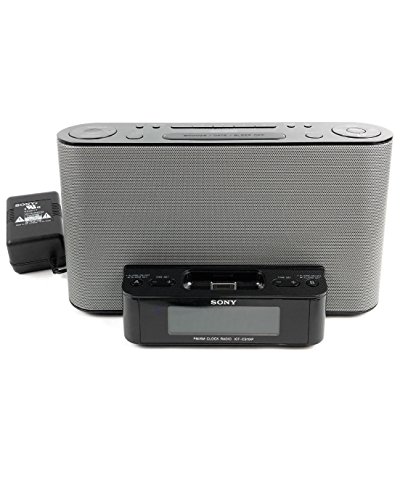
Clock-radio docks for the bedside
The clock-radio dock was the most popular dock subtype ever sold, and its logic is easy to see. The bedside table already held an alarm clock with a speaker. Replacing it with a unit that also charged the player, played its library, and woke its owner with a chosen song instead of a buzzer was an obvious upgrade, and makers from dedicated audio brands to hotel suppliers built them in large numbers. Hotel rooms were a major channel, which is why so many surviving examples carry the design fingerprints of that trade: big simple buttons, very dimmable displays, and alarms that are hard to set wrong by accident.
Alarms, tuners, and wake behaviour
Dual alarms are the baseline expectation in this class, letting two wake times, or two people, be served by one unit, with each alarm assigned its own source. Source choice per alarm is the detail to verify in the manual: the better designs let one alarm wake to the docked player and the other to radio or buzzer, and let weekday and weekend schedules differ. Wake-to-device behaviour has one classic trap. If the player battery is empty at bedtime, the dock charges it overnight and all is well, but if the player was removed in the evening and forgotten, the alarm source is absent, and a well-designed clock dock falls back to buzzer while a poor one stays silent. Fallback behaviour is stated in better manuals and is worth searching for before relying on the unit for a flight or an exam.
The FM tuner in these units is usually competent rather than remarkable, with digital tuning, preset memories typically in the range of ten to twenty stations, and a wire aerial that needs untangling and draping for best reception. Some models added AM for talk and sports coverage. Reception quality depends heavily on placement and on the wire aerial being extended rather than coiled behind the unit. A few later models included remote controls with preset access, which matters at the bedside more than it sounds: changing station from bed, without leaning across a nightstand, is the kind of small mercy owners remember.
Display dimming separates the good bedside units from the merely adequate. A proper dimmer offers several brightness steps down to very low, or a display that can be switched off entirely while the clock keeps time, because a bright display in a dark room is a genuine sleep problem for many people. Auto-dimming models with a light sensor existed at the premium end. When judging a used clock dock, test the dimmer through its full range in a dark room if the chance arises; a dimmer that only steps between bright and slightly less bright is a nightly irritation that no audio quality offsets.
Battery backup and timekeeping
Battery backup in a clock dock preserves the time and the alarm settings through a power cut, typically using a coin cell or a pair of small cells in a base compartment. It does not usually power the speakers or the player charging; its job is memory, not music. On a used unit, assume the backup cell is exhausted and replace it as a first act, since a clock that forgets its alarms after every brief outage is worse than no alarm at all. Some designs keep time from the docked player when one is seated, syncing the clock display to the player time, which is convenient until the player is removed and the internal clock, rarely adjusted, drifts into view.
Snooze and sleep functions complete the bedside picture. Sleep timers that fade the player or radio after a set interval were common, with intervals such as 15, 30, 60, and 90 minutes, and nap timers for a short daytime rest without disturbing the main alarms appeared on better models. These features are controlled by firmware in the dock, vary widely in button logic, and are the strongest argument for keeping the manual, or finding its PDF on the maker support archive, for any clock dock bought used. A bedside unit whose alarm logic its owner half understands is a small daily gamble.
Portable docks and the Bluetooth bridge
Battery-powered and travel docks
Portable docks divide into those that merely run on batteries and those that also charge the player from their own cells. The distinction matters and was not always clear on packaging. A dock running on disposable cells or its own rechargeable pack may power its speakers for many hours while drawing nothing for the player, or even, in some designs, while the player must run on its own battery because the cradle in battery mode is audio-only. Maker documentation settles the question for each model: look for explicit wording about charging the player while on battery power. Where a dock does charge the player from its pack, expect the pack to be the limit; a speaker battery sized for a day of music holds only a few full player charges at best, and loud playback shortens both budgets together.
Rechargeable portable docks of the Lightning era and late 30-pin era usually quoted play times between roughly 8 and 20 hours at moderate volume, figures that follow the industry habit of measuring at levels lower than most people choose outdoors. Treat quoted endurance as a comparison tool between models rather than a promise. Build traits that matter outside are simpler: a cradle that holds the player securely when the unit is carried by its handle, a cover or lid that protects the connector in a bag, and controls that can be found by touch. Folding travel docks, where the cradle tilts flat for packing, were a charming sub-family, though their hinges and thin connector posts are the first places to inspect on a used example.
Bluetooth-equipped docks
Late-era docks, and especially Lightning docks, often added Bluetooth reception alongside the cradle. At the time it looked like a bonus. In retrospect it was a bridge. A Bluetooth dock serves the docked player at breakfast and a modern phone, tablet, or laptop in the evening, without moving a cable. That dual life is why Bluetooth docks have held their usefulness, and their used prices, better than pure connector docks of similar audio quality. When comparing two otherwise equal used docks, the one with Bluetooth is usually the one still in daily service five years later.
The Bluetooth implementations of the period are basic by current standards: the standard SBC codec is universal, some models added AAC support which suits Apple sources well, and pairing memories are small, often remembering only a handful of devices. Range follows the class of radio fitted, with the usual indoor expectation of staying within the same room or the next one. None of that prevents a Bluetooth dock from doing its evening job well. It does mean a buyer should not pay a premium for wireless features described in modern terms; read the manual for the codec and pairing details of the exact model, and value the feature as convenience rather than as high-end audio.
Buying used or new-old-stock today
The market for these docks now has three streams. There is remaining new-old-stock, sealed units from the era that never sold and surface through clearance channels. There is the ordinary used market, from house clearances and upgrades. And there is a thin top layer of sought-after premium models that changed hands among enthusiasts even while new, and still do. Each stream has its own checks, and the checks below are ordered by how often each fault actually ends a purchase.
Mechanical wear: connectors, hinges, and foam
Start with the connector. A dock plug should stand straight, with no lean, no cracked surround, and contacts that look even in colour. A plug that leans has usually taken a knock with a player seated, and its solder joints inside may be cracked even if the unit works on the day of sale; such a dock can fail weeks later under the small daily stresses of docking and undocking. Dock and undock a test player several times during inspection. The action should be smooth, with a definite seat at the bottom of travel, and audio and charging should survive a gentle wiggle of the seated player without crackling or dropping.
Speaker surrounds are the second mechanical frontier. Many dock drivers of the era used foam surrounds, the soft ring that lets the cone move, and foam of that age commonly rots: it turns tacky, flakes, or splits, and a driver with a failed surround buzzes and loses bass. Rubber surrounds age far more gracefully. Inspection is simple where grilles come off or where drivers can be seen through grille cloth with a torch: look for cracks, crumbling edges, or a surround that has separated from the cone. A dock with rotten surrounds is a repair project, not a bargain, unless the price reflects refoaming work and the buyer has the skill or a willing repairer.
Capacitors and batteries inside the dock complete the age picture. A mains dock that hums loudly, runs hot at the rear panel, or needs several attempts to power on may have tired power-supply capacitors, a repair that is routine for a bench technician and unreasonable for most buyers to commission on a low-value unit. Portable docks carry the extra question of their own rechargeable packs, which age whether used or not; a sealed portable dock whose pack holds an hour of charge has lost the very quality it was bought for, and pack replacement ranges from easy, on models with a battery door, to effectively impossible on glued designs.
Completeness: remotes, inserts, and power supplies
More used docks are spoiled by missing small parts than by failed electronics. The remote control heads the list. Many docks can be operated from their own buttons, but some functions, and on a few designs nearly all functions beyond volume, live only on the remote. A missing remote therefore ranges from a nuisance to a crippling loss depending on the model, and the manual tells which. Replacement remotes for popular models circulate, but for obscure models they may be effectively unobtainable, so price a remoteless dock as the reduced device it is.
Dock inserts run second. A universal well without its set of numbered inserts can still serve one player if that player insert happens to be the one present, and sellers often include only the insert last used. Confirm which inserts are included and whether the needed one is among them. Power supplies run third, and here precision matters: docks need the voltage and polarity their label states, and a generic supply of the wrong voltage can damage a dock at first switch-on. A missing original supply is replaceable with a correctly specified regulated substitute of equal or greater current capacity, matched for plug size and polarity, but a supply of unknown origin bundled by a seller deserves suspicion rather than gratitude.
New-old-stock avoids the wear questions and raises two of its own. Sealed portables may hold packs that have sat discharged for a decade, and such packs often refuse charge or hold very little; budget for that possibility even in a sealed box. And sealed clock docks will certainly need their backup cells replaced. What sealed stock does guarantee is the full small-parts set: remote, inserts, supply, and manual, all present, which, given the paragraphs above, is worth real money in this category.
Checking the exact model list before paying
The final check is documentary, and it is the one this guide has pointed toward throughout. Maker support archives still host manuals and spec sheets for a large share of these docks, and the compatibility list in the manual for the exact model, including revision letters where they exist, is the authority that outranks a seller description, a listing title, and general family knowledge. Sellers routinely describe a dock as fitting all iPods because the connector matches. The manual knows better, and two minutes with its model list has saved more buyers from the charging mismatch described earlier than any other single habit.
Model numbers deserve the same respect as model lists. Dock families often spanned years with silent revisions: the same enclosure and retail name, a changed charging circuit inside, and a suffix letter on the base label to tell them apart. When a manual distinguishes revisions, match the suffix on the physical unit, not the name on the box. Photographs of the base label are a reasonable request in a remote purchase, and a seller who refuses one is telling the buyer something worth hearing.
Check prices on Amazon
Live listings for the shortlist in this guide are pulled from Amazon below, so prices and availability are always current at the moment you look.




When a Bluetooth speaker and a stand are the better answer
Honesty requires ending with the alternative, because for many households the best iPod dock in the current market is not a dock at all. A modern Bluetooth speaker paired with a simple charging stand and the player own charging lead covers the same ground with none of the connector risk. The player charges from its lead, plays over Bluetooth if it is a touch or a late nano with Bluetooth fitted, or plays through a short cable to the speaker auxiliary input if it is a classic or an earlier nano. The speaker brings current Bluetooth codecs, a fresh battery or mains supply, a warranty, and a second life with every other device in the house.
That modern pairing wins on flexibility, on parts availability, and usually on sound per unit of money spent today, because speaker design and amplifier efficiency have moved on since the dock era closed. It also wins for households whose player is a phone now: a Lightning or 30-pin dock bought for a phone that will be replaced within a few years is a short-lived purchase, while a Bluetooth speaker simply pairs with the next phone when it arrives.
The true dock still wins in specific, recognisable situations. It wins when the player is a click-wheel classic or nano with no Bluetooth, and the household wants one-motion play without cables draped across a counter. It wins at the bedside, where the clock-dock combination of alarm, dim display, charging, and wake-to-library in a single footprint has never been properly replaced by separate devices. It wins when a particular premium dock, bought well on the used market, offers sound that would cost far more to match with new separate components. And it wins on the simple ground of fit with a life already arranged around it: a kitchen where the dock has sat for a decade, its remote in the drawer below, its habits known.
The decision, then, is not really about old against new. It is about whether the connector at the bottom of the player is a living part of the household routine or a legacy to be worked around. If that player is still the music library, still the alarm source, still the thing reached for daily, a correct dock, matched by generation, charging circuit, and cradle, remains one of the most satisfying small systems ever made for it. If the player is an occasional guest in its own home, the modern speaker and stand will serve better and ask less. Choose with clear eyes, check the manual list either way, and the music, which was the point all along, will take care of itself.
Somewhere tonight a classic will click into a well-kept dock, draw its charge, and fill a kitchen with a library built song by song, and that small, ordinary ceremony is reason enough to keep these docks matched, mended, and playing.