Our Top Picks
 Asus ROG Strix X570-F Gaming ATX Motherboard withROG X570-F|DDR4|WiFi13.31 x 10.74 x 2.68 inches2.2 poundsCheck on Amazon
 ASUS TUF Gaming B550-PLUS WiFi II AMD AM4B550-Plus|M.2x2|D4|WiFi610.75 x 2.75 x 13.5 inches1.27 poundsCheck on Amazon


What's inside
As an Amazon Associate I earn from qualifying purchases. This post may contain affiliate links at no extra cost to you.
PCIe 4.0 on the AM4 platform still makes a lot of sense, even in a market that has moved on to newer sockets. If you already own a Ryzen 3000 or Ryzen 5000 processor, or you found one at a sensible price for a new build, a good B550 or X570 motherboard gives you fast graphics bandwidth, fast NVMe storage, modern networking, and enough USB connectivity to support a complete gaming or productivity system without paying for a platform change you do not need. You keep your DDR4 memory, you keep a huge choice of compatible coolers and cases, and you still get the core speed benefits that matter most in daily use.
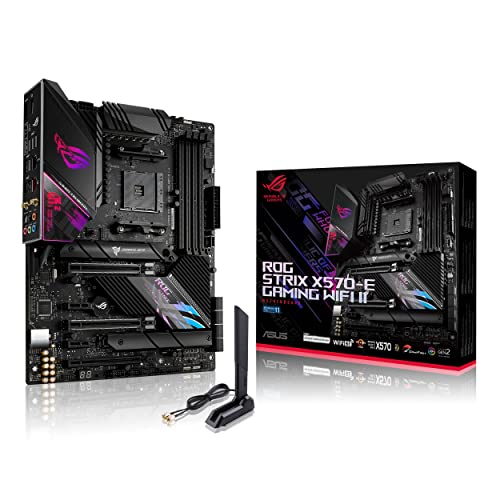
This guide covers eight AM4 motherboards that all support PCIe 4.0: the Asus ROG Strix B550-F Gaming WiFi II, the Asus ROG Strix X570-F Gaming, the ASUS TUF Gaming B550-PLUS WiFi II, the MSI PRO B550M-VC WiFi ProSeries, the GIGABYTE B550 Gaming X V2, the MSI MPG X570 Gaming Plus, the ASUS Prime B550M-A WiFi II, and the ASUS ROG Strix X570-E Gaming WiFi II. They span full-size ATX boards for spacious gaming towers and micro-ATX boards for compact builds, WiFi and non-WiFi models, and chipsets that differ in an important way we will explain in detail below. Our research focused on what each product title actually confirms — chipset, form factor, networking, ports named by the maker, and features such as BIOS Flashback or Q-Flash Plus — plus the well-established platform rules for AM4, rather than on invented specifications.
One platform rule matters before anything else, and we will repeat it because it decides whether you get PCIe 4.0 at all. On these boards, PCIe 4.0 support depends on the processor. Ryzen 3000 series and Ryzen 5000 series desktop processors provide the PCIe 4.0 lanes for the primary graphics slot and the primary NVMe slot on B550, and for the wider lane layout on X570. Older processors, and some entry-level parts with different lane configurations, can limit a board to PCIe 3.0 speeds even though the board itself is built for Gen4. Always pair a board in this guide with a Ryzen 3000 or 5000 series chip if Gen4 speed is the reason you are buying it, and check the board maker’s CPU support list for the exact model you plan to install.
Why PCIe 4.0 Still Matters on AM4
PCIe 4.0 doubles the bandwidth per lane compared with PCIe 3.0. For a graphics card in an x16 slot, that means substantially more headroom between the GPU and the processor. Many current and recent graphics cards run perfectly well on PCIe 3.0 x16, so the honest picture is that Gen4 graphics bandwidth is most valuable as headroom: it helps cards that use fewer physical lanes, it keeps a system comfortable for a future GPU upgrade, and it removes the slot itself as a bottleneck when you combine a fast card with other bandwidth-hungry hardware. If you are building an AM4 system to keep for several years, starting with a Gen4 x16 slot is simply the safer foundation.
Storage is where PCIe 4.0 is easiest to feel. A PCIe 4.0 x4 NVMe drive can transfer data far faster than a PCIe 3.0 x4 drive, and that shows up in game load times, large file copies, video project work, and any task that moves big assets on and off the drive. Every board in this guide supports PCIe 4.0 and M.2 storage, though the number of M.2 slots and which slots run at Gen4 speeds varies by chipset and model, which is exactly why the chipset section below matters. If fast storage is a priority, our roundup of drives in best m 2 nvme ssds is a useful companion once you have chosen a board with the slots to use them.
There is also a value argument. AM4 processors, DDR4 memory, and B550 and X570 boards are mature products with deep retail availability and a long record of BIOS updates. A builder who does not need the newest socket can put more of the budget toward the graphics card, storage, and cooling — the parts that most directly shape gaming performance — while still getting PCIe 4.0 where it counts. That trade-off is the reason this category remains popular for second PCs, streaming rigs, family gaming systems, and upgrades that reuse an existing Ryzen processor.
B550 vs X570: The Difference That Actually Matters
The single most important choice in this guide is the chipset. B550 and X570 both support PCIe 4.0, but they distribute it differently, and that difference should drive your shortlist more than brand or lighting.
What B550 gives you
On a B550 board, PCIe 4.0 comes from the processor. In practice that means the primary graphics slot runs at PCIe 4.0 x16 with a compatible Ryzen chip, and one M.2 slot — the primary one wired to the CPU — runs at PCIe 4.0 x4 for a Gen4 NVMe drive. The remaining expansion slots and additional M.2 slots are fed by the chipset at PCIe 3.0 speeds. For the large majority of gaming builds, that layout is enough: one fast graphics card and one fast boot and games drive cover the two places where Gen4 speed matters most, and a second drive at Gen3 speed is still quick for mass storage. B550 boards also tend to be simpler and, as a group, they cover a wide range from value micro-ATX models to well-equipped gaming ATX boards like the ROG Strix B550-F Gaming WiFi II in this guide.
What X570 gives you
X570 extends PCIe 4.0 beyond the processor lanes. The chipset itself carries PCIe 4.0, so more slots and more M.2 connectors across the board can run at Gen4 speeds, and the total number of usable high-speed lanes is greater. That matters if you plan to run two Gen4 NVMe drives at full speed, add capture or expansion cards that benefit from Gen4 bandwidth, or build a workstation-style AM4 system with heavy storage. The three X570 boards in this guide — the ROG Strix X570-F Gaming, the MPG X570 Gaming Plus, and the ROG Strix X570-E Gaming WiFi II — are the natural picks for builders who know they will use that extra connectivity. If you will never install a second Gen4 drive or an extra expansion card, the extra chipset capability may go unused, and a strong B550 board can be the smarter spend.
Which chipset should you choose?
Choose B550 if your build is a conventional gaming or general-purpose PC with one graphics card and one or two storage drives, and you want the widest choice of prices and form factors. Choose X570 if you want PCIe 4.0 available on more of the board, plan multiple Gen4 NVMe drives, or expect to keep adding storage and expansion hardware over the life of the system. Neither answer is wrong; the mistake is paying for X570 connectivity you will never use, or buying B550 and then discovering you wanted a second Gen4 M.2 slot. Decide your storage plan first, and the chipset decision usually makes itself.
Builders comparing across generations sometimes ask how these AM4 boards stack up against newer Intel platforms, and our separate guide at best 12th gen intel motherboards covers that side of the market if you are still deciding between ecosystems rather than within AM4.
How to Choose a PCIe 4.0 Motherboard
Form factor: ATX vs micro-ATX
Six of the boards in this guide are ATX and two are micro-ATX. ATX boards give you more physical room: more expansion slots, more fan and header space, and an easier build experience in a mid-tower or full-tower case. Micro-ATX boards — the MSI PRO B550M-VC WiFi and the ASUS Prime B550M-A WiFi II here — fit smaller cases and cost-conscious builds while keeping PCIe 4.0, DDR4 support, and M.2 storage. Check your case specification before ordering; an ATX board will not fit a case that only accepts micro-ATX, while a micro-ATX board will fit most ATX cases but leaves fewer slots in use. Form factor does not change PCIe 4.0 support itself, but it changes how much hardware you can add later.
Power delivery and Ryzen 5000
Ryzen 5000 processors include demanding multi-core models, so the voltage regulator module, or VRM, deserves attention. Makers sometimes state the power design directly in the product name or title: the GIGABYTE B550 Gaming X V2 lists a 10+3 power phase design, and the ROG Strix X570-E Gaming WiFi II lists 12+4 power stages. Those figures are confirmed by the titles in this guide. For boards where the title does not state a phase count, we do not invent one; instead, match the board tier to the processor tier. A flagship or high-core-count Ryzen chip belongs on a higher-end board such as the ROG Strix models, while a mid-range Ryzen 5 build is well served by the TUF, Gaming X, PRO, and Prime boards listed here. Good case airflow helps any VRM, which is one reason cooling deserves a place in your build plan alongside the board itself — see best 10 cpu coolers for cooler options that suit AM4 sockets.
WiFi and wired networking
Five of the eight boards here include WiFi in the product name: WiFi 6E on the ROG Strix B550-F Gaming WiFi II, the MSI PRO B550M-VC WiFi, and the ROG Strix X570-E Gaming WiFi II; WiFi 6 on the TUF Gaming B550-PLUS WiFi II and the Prime B550M-A WiFi II. The MSI PRO board also lists Bluetooth 5.2. WiFi 6E adds the 6 GHz band where supported by your router and region, while WiFi 6 covers the widely used 2.4 GHz and 5 GHz bands. If your PC sits near the router, wired Ethernet may matter more: 2.5Gb LAN appears on the ROG Strix B550-F Gaming WiFi II, the TUF Gaming B550-PLUS WiFi II, and the ROG Strix X570-E Gaming WiFi II, the ROG Strix X570-F Gaming lists Intel Gigabit Ethernet, and the GIGABYTE B550 Gaming X V2 lists GbE LAN. A 2.5Gb port only delivers its full speed with a matching switch, router port, or network storage device, but it is useful headroom for home networks that are moving beyond gigabit.
Storage, USB, and everyday ports
All eight boards support M.2 storage and SATA 6Gb/s drives where stated, and several name USB 3.2 Gen 2 in their titles, including the ROG Strix X570-F Gaming, the TUF Gaming B550-PLUS WiFi II, the MSI PRO B550M-VC WiFi, the MPG X570 Gaming Plus, and the ROG Strix X570-E Gaming WiFi II with USB 3.2 Gen 2 Type-C. The GIGABYTE board adds a front USB-C connection, which is worth checking if your case has a front-panel Type-C port you want to use. Display outputs such as HDMI, HDMI 2.1, and DisplayPort appear on several titles; remember that on AM4, board display outputs only work with processors that include integrated graphics, so a Ryzen chip without integrated graphics still needs a discrete graphics card for a picture.
BIOS update features
BIOS Flashback is named on the ROG Strix B550-F Gaming WiFi II and the TUF Gaming B550-PLUS WiFi II, and Q-Flash Plus — GIGABYTE’s equivalent feature family — is named on the B550 Gaming X V2. Features like these let you update the BIOS using a USB drive through a defined procedure, which can be valuable when pairing a board with a newer Ryzen processor that needs a later BIOS version. Whichever board you choose, check the maker’s support page for the CPU support list and the minimum BIOS version for your processor before you build, and plan the update path in advance rather than discovering it with the system half assembled.
Memory and extras
Every board in this guide uses DDR4 memory, as stated across the titles, so existing DDR4 kits can carry over to an AM4 upgrade. The Prime B550M-A WiFi II additionally lists ECC memory support, which matters to a small group of builders running unbuffered ECC for workstation or home-server use; confirm the maker’s memory qualification list if ECC is essential to you. RGB features — Aura Sync on the ASUS boards and RGB Fusion on the GIGABYTE board — are cosmetic, but addressable RGB headers, named on the ROG Strix B550-F and TUF B550-PLUS titles, matter if you plan lighting strips or fans you want the board to control. High-end Ryzen pairings are a topic of their own, and builders speccing a board for a flagship chip can also read best 3950x motherboards for that narrower use case.
Check prices on Amazon
Live listings for the shortlist in this guide are pulled from Amazon below, so prices and availability are always current at the moment you look.

Quick Comparison Table
| Model | Chipset | Form factor | WiFi | Wired LAN (as titled) | Notable titled features |
|---|---|---|---|---|---|
| Asus ROG Strix B550-F Gaming WiFi II | B550 | ATX | WiFi 6E | 2.5Gb LAN | BIOS Flashback, HDMI 2.1, Aura Sync |
| Asus ROG Strix X570-F Gaming | X570 | ATX | Not listed | Intel Gigabit Ethernet | Dual M.2 with heatsinks, USB 3.2 Gen 2, Aura Sync |
| ASUS TUF Gaming B550-PLUS WiFi II | B550 | ATX | WiFi 6 | 2.5Gb LAN | BIOS Flashback, USB 3.2 Gen 2, Aura Sync |
| MSI PRO B550M-VC WiFi ProSeries | B550 | mATX | Wi-Fi 6E, Bluetooth 5.2 | Not listed | HDMI/DP, USB 3.2 Gen 2, Ryzen 5000 Series |
| GIGABYTE B550 Gaming X V2 | B550 | ATX | Not listed | GbE LAN | 10+3 power phase, 2x M.2, front USB-C, Q-Flash Plus, RGB Fusion |
| MSI MPG X570 Gaming Plus | X570 | ATX | Not listed | Not listed | USB 3.2 Gen 2, HDMI, M.2 support |
| ASUS Prime B550M-A WiFi II | B550 | Micro ATX | WiFi 6 | Not listed | ECC memory support, HDMI 2.1, RGB header |
| ASUS ROG Strix X570-E Gaming WiFi II | X570S (X570) | ATX | WiFi 6E | 2.5 Gb LAN | Passive PCH heatsink, 12+4 power stages, USB 3.2 Gen 2 Type-C, Aura Sync |
The table only repeats what the product titles confirm, so a blank or not listed entry means the title does not state that detail — it does not prove the hardware lacks a port or feature entirely. Use the table to narrow the field by chipset, size, and networking, then read the individual sections below for the fuller picture of who each board suits.