Our Top Picks



What's inside
- How to Choose a Selfie Light for a Laptop
- ALTSON 60 LED Portable Selfie Light With Clip and Camera Tripod Adapter
- Cyezcor Video Conference Lighting Kit, Ring Light for Monitor Clip On
- Evershop Ring Light for Laptop Desk Clip On, 5-Inch Portable Mini LED
- Zoom Lighting for Computer, Adjustable Desk Ring Light With Stand and Phone Holder
- InnoGear Ring Light for Computer, On-Camera Monitor Video Conference Light With Remote Control
- Anautin Ring Light for Video Conference Lighting, 360-Degree Adjustable
- Newmowa 60 LED High Power Rechargeable Clip Fill Light With Front and Back Clip
- Clip On Selfie Light for Phone, Laptop and Monitor, USB Web Camera Fill Light
- Comparing the Eight Lights Side by Side
- Frequently Asked Questions
- Check prices on Amazon
- Closing Thoughts
As an Amazon Associate I earn from qualifying purchases. This post may contain affiliate links at no extra cost to you.
A laptop camera can only do so much in a dim room. Ceiling lights cast shadows, a window behind you turns your face dark, and an ordinary desk lamp often points at the desk rather than at you. A selfie light for a laptop is meant to solve that narrow, practical problem: it puts soft, forward-facing light close to the camera, so your face is clearer on a video call, a recorded lesson, a livestream, or a quick photo. On store shelves, this product class is not usually sold under one tidy name.
This guide compares eight options built around that job. Some are compact LED panels with a clip, designed to travel in a laptop bag and attach for a single call. Some are ring lights for a monitor or desk, better suited to a fixed workspace where you join meetings from the same chair every day. One includes a camera tripod adapter alongside its clip, one includes a stand and a phone holder, and one adds a remote control.
We built this comparison from the product listings and the specifications stated in each product title, checked against generic truths about this category: a light placed close to the lens usually flatters more than a bright light across the room, a ring shape spreads light around the camera, a panel shape is easier to pack, and adjustability in color mode and brightness gives you a way to match a warm living room or a cooler office without moving furniture.
If you are in a hurry, start with your setup rather than with a favorite shape. A frequent traveler who works from hotel desks and kitchen tables will usually value a small clip-on panel that also works on a phone. A remote worker with a fixed monitor will usually value a ring light that stays in place and frames the camera position. A creator who records with both a webcam and a phone will value a stand and a holder.
How to Choose a Selfie Light for a Laptop
Start With the Mount, Not the Glow
The mount decides whether a light fits your life. A clip that grips a laptop lid or a monitor bezel keeps the light centered and close to the camera, which is efficient for calls, but you should picture the thickness of your screen and the space around it before choosing. A very thin laptop lid, a monitor with a camera mounted on top, or a crowded desk with a second screen can all change what is practical. A desk stand takes up surface space, yet it lets you position the light independently of the screen, which helps if you open and close a laptop often or share the desk.
Panel Light or Ring Light
A rectangular or square LED panel is the most portable form in this group. It packs flat, clips on quickly, and works naturally as a fill light, filling in shadows from one main source of room light. It is a sensible shape for travel, for occasional calls, and for anyone who wants to remove the light and close the laptop when the meeting ends. A ring light spreads its LEDs in a circle, with the camera or phone typically looking through or near the middle. That arrangement tends to give even coverage across the face and is popular for video calls, streaming, and makeup, where evenness matters more than packability.
Color Modes, Brightness Steps, and Control
Adjustability is how one light serves more than one room. Several products here state three light modes or three color modes, one states thirty light modes, and one states three color modes with ten brightness levels. More modes are not automatically more useful, but a choice of warmer and cooler tones helps you avoid looking orange under warm household bulbs or washed out under cool office light. Brightness control matters for the opposite reason: the closest light is often the strongest-feeling light, so being able to turn it down keeps a near-camera setup comfortable.
Color Rendering and What a CRI Figure Can Tell You
Two products in this guide state a color rendering figure in their titles: one states CRI 97+, and one states CRI 97.8. CRI, or Color Rendering Index, is a scale used to describe how faithfully a light shows colors compared with a reference source. In practical buying terms, a stated high figure is one signal that a maker is aiming for natural-looking skin tones and makeup colors rather than only raw brightness. It is not the whole story. Placement, distance, color mode, your camera, and the other light in the room all shape the final image.
Power Source and Everyday Friction
Power is the detail people notice on the third day, not the first. Two products here state a rechargeable design in their titles, one of them with a stated 2200mAh battery, and one product describes itself as a USB web camera fill light. For the remaining products, the titles do not state the power arrangement, so confirm it on the listing if it matters to you. A rechargeable light removes a cable from a laptop lid and travels easily, but it needs charging before a long day of calls. A USB-powered light draws from the computer setup and avoids a separate charging routine, but it adds a cable to manage.
One Device or Several
Many buyers start with a laptop and then remember the phone. Several products here name phones, iPhones, Android devices, iPads, webcams, monitors, and laptops in their titles, in different combinations. That breadth signals intended versatility, not identical performance on every device. A clip that fits a phone may sit differently on a thicker monitor, and a ring sized for a desktop may be more than you want on a small laptop screen. List the devices you will genuinely use in the next few months, in order. If the laptop is first and the phone is a distant second, prioritize laptop fit.
With those criteria in mind, a camera upgrade and a light upgrade are often considered together, and it can help to think about the camera side of your setup at the same time.
The eight products below are presented in a consistent order and format, so you can compare mount, shape, stated modes, stated extras, and best-fit user for each one without hunting through different structures.
ALTSON 60 LED Portable Selfie Light With Clip and Camera Tripod Adapter
The ALTSON is a portable LED panel built around travel and flexibility. Its title states 60 LEDs, a clip, and a camera tripod adapter, which together describe a light that is meant to move: onto a laptop for a call, onto a phone for a photo, or onto a camera-style mount when that suits the setup better. It is rechargeable, with a stated 2200mAh battery, so it belongs to the cord-free side of this group. For a buyer who works from more than one place, that combination is the core appeal.
What Stands Out
Three stated details set the ALTSON apart. First, the stated CRI 97+ figure makes it one of only two products in this guide whose title gives a color rendering number, which will interest makeup users and anyone who cares about skin tones looking natural rather than merely visible. Second, it offers three light modes, giving you a way to shift tone between a warm room and a cooler workspace. Third, the camera tripod adapter widens its mounting life beyond the clip.
Who It Fits Best
Choose the ALTSON if you move between locations, if you want a rechargeable panel rather than a desk fixture, and if the stated color rendering figure matters to you. It also fits a buyer who already owns a small tripod or camera mount and likes equipment that can serve more than one purpose. It is less obviously the pick for someone who wants a ring shape around the camera, because this is a panel, or for someone who wants a stand that lives permanently on the desk, because portability is the point here.
- Form: portable LED panel with clip
- Stated LEDs: 60
- Stated battery: rechargeable, 2200mAh
- Stated color rendering: CRI 97+
- Stated modes: 3 light modes
- Extra stated mounting: camera tripod adapter
Cyezcor Video Conference Lighting Kit, Ring Light for Monitor Clip On
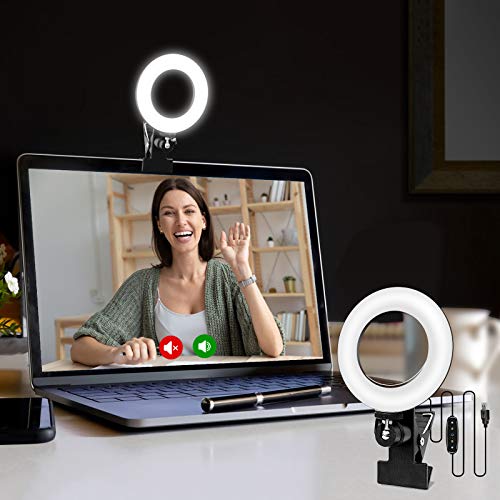
The Cyezcor is positioned squarely as a monitor clip-on ring light for work and study at a computer. Its title names remote working, distance learning, Zoom calls, self broadcasting, and live streaming, which is a clear statement of intent: this is a light for people who appear on camera as part of their day, from a desk, repeatedly. As a ring light that clips onto a monitor, it aims to sit at the camera position and stay there, giving even coverage without a separate stand occupying the desk.
What Stands Out
The emphasis here is the combination of ring shape and monitor clip. A ring around the camera position is a natural fit for faces, because the light surrounds the point of view rather than arriving from one side, which can leave one cheek in shadow. Clipping to the monitor keeps that arrangement aligned with a desktop or laptop screen, which suits a fixed workstation, a home office monitor, or a distance learning setup where the student sits in the same place each session.
Who It Fits Best
Choose the Cyezcor if your priority is a dedicated conference light for a monitor-based desk and you prefer a ring shape that clips on and remains ready. It fits remote workers with back-to-back calls, teachers and students in regular online sessions, and streamers who broadcast from a computer position. It is a less natural pick for travel, for phone-first recording, or for makeup work away from the desk, because its stated purpose centers on the monitor.
- Form: ring light for monitor, clip on
- Stated uses: remote working, distance learning, Zoom calls, self broadcasting, live streaming
- Stated devices: computer and laptop video conferencing
- Positioning: dedicated video conference lighting kit
If your desk is built around a separate webcam rather than a built-in laptop camera, the placement logic above is worth pairing with a look at dedicated webcam options.
Evershop Ring Light for Laptop Desk Clip On, 5-Inch Portable Mini LED
The Evershop is the small ring in this group: a 5-inch portable mini LED ring light for a laptop desk, with a clip and a stand among its stated features, for phone, webcam, and monitor use. That size is its identity. A 5-inch ring will not dominate a small desk, a dorm workspace, a kitchen table used as an office, or a laptop bag, and for close-up video calls a small light near the face can do useful work without turning a temporary setup into a production.
What Stands Out
Two mounting ideas appear together here: clip-on use and a stand. That pairing gives a small ring more placement freedom than its size suggests. Clip it for a centered call, or use the stand when the screen edge is not the best place, for example when a laptop lid is very thin or when you want the light slightly to one side to soften a shadow. The desktop description also matters. A light designed for the desk, in a mini format, suits renters, students, and hot-desk workers who must set up and pack away quickly.
Who It Fits Best
Choose the Evershop if space is your limiting factor: a small desk, a shared table, a laptop that travels between rooms, or a bag that is already full. It also fits a buyer who wants a ring shape but finds larger desk rings excessive for ordinary calls. It is less suited to someone who wants the widest ring coverage for standing presentations, a stated set of many light modes, or a phone holder as part of a recording station, because its stated strengths are size and simple placement.
- Form: small ring light, 5-inch, portable mini LED
- Stated mounting: desk clip on, with stand
- Stated devices: phone, webcam, monitor, laptop
- Stated uses: Zoom meetings, video calls, recording
Zoom Lighting for Computer, Adjustable Desk Ring Light With Stand and Phone Holder
This desk ring light, sold under a Zoom lighting description, is the most workstation-oriented option in the guide. Its title states an adjustable desk ring light with a stand and a phone holder, for webcam, meetings, and live stream use, and it gives two specific figures: 30 light modes and CRI 97.8. That combination describes a light for a desk that doubles as a small recording station, where the same setup serves a webcam meeting in the morning and phone-recorded content later in the day.
What Stands Out
The stated 30 light modes is the highest mode count in this group by a wide margin. A large number of modes typically means finer combinations of tone and brightness to step through, which can help you match mixed room light, though it can also mean more stepping to find a favorite setting. The stated CRI 97.8 is the other headline, making this the second product here whose title gives a color rendering figure, and the higher of the two stated figures.
Who It Fits Best
Choose this model if your desk is a fixed base, you use both a webcam and a phone there, and you value the widest stated range of light modes plus a stated high color rendering figure. It fits creators who livestream from a desk, sellers who present products on camera, and remote workers who also record training or social video in the same spot. It is less suited to travel or to a minimal laptop-only setup, because a stand and holder are desk furniture, not bag accessories.
- Form: adjustable desk ring light
- Stated mounting: stand, with phone holder
- Stated modes: 30 light modes
- Stated color rendering: CRI 97.8
- Stated uses: video calls, meetings, live stream, webcam work
InnoGear Ring Light for Computer, On-Camera Monitor Video Conference Light With Remote Control
The InnoGear is a clip-on ring light for a computer monitor that adds one control feature none of the other ring models state: a remote control. Its title describes an on-camera, monitor video conference light that is adjustable, easy to attach, and offered with three color modes, for video and recording on a monitor or laptop. The remote changes the daily experience of a ring light.
What Stands Out
Start with the remote, because it is the clearest reason to pick this model over a similar monitor ring. Presenters who stand, teachers who move between sitting and demonstrating, and creators who frame a shot and then step into it all benefit from adjusting light without walking back to the desk. Next, the three color modes give a stated choice of tones, enough for the common warm room, cool room, and in-between situations most laptop users face.
Who It Fits Best
Choose the InnoGear if you like the monitor ring format but dislike reaching for controls, or if you record and present from a position where the light is not within arm’s reach. It also fits a buyer who wants a stated set of color modes without stepping up to a large desk station with a stand and phone holder. It is less suited to a traveler who needs a flat panel for a bag, or to a buyer whose top priority is a stated color rendering figure.
- Form: ring light for computer, clip on to monitor
- Stated control: remote control
- Stated modes: 3 color modes, adjustable
- Stated devices: monitor and laptop
- Stated uses: video conference, video, recording
Anautin Ring Light for Video Conference Lighting, 360-Degree Adjustable
The Anautin is a portable LED ring light for video conferencing whose stated headline is 360-degree adjustability. Its title describes a ring for monitor, laptop, and desktop computer use, aimed at streaming, Zoom meetings, selfie and makeup work, and video calls. Angle is an underrated part of lighting.
What Stands Out
The 360-degree adjustable description is the differentiator, because it speaks to flexibility across the three computer types named in the title. A desktop monitor, a laptop, and a desktop computer setup rarely place a light at the same height, so a ring that can be re-aimed freely adapts to whichever screen is in front of you. Portability is the second theme. This is described as a portable LED video conference light, which places it between the stay-on-the-monitor rings and the travel panels: a ring you can move and reposition rather than a fixture.
Who It Fits Best
Choose the Anautin if your screen position changes, if you share a light between a laptop and a desktop monitor, or if you often find that a fixed-angle light points where your face is not. It also fits a buyer who wants ring coverage in a portable form rather than a permanent desk stand. It is less suited to someone who wants a stated long list of modes, a phone holder station, or a flat panel for a slim laptop bag.
- Form: portable LED ring light
- Stated adjustment: 360-degree adjustable
- Stated devices: monitor, laptop, desktop computer
- Stated uses: Zoom meetings, streaming, selfie, makeup, video calls
A flexible ring is often bought alongside a camera change, particularly by Mac users setting up a desk for the first time.
Newmowa 60 LED High Power Rechargeable Clip Fill Light With Front and Back Clip
The Newmowa is a 60 LED rechargeable clip fill light whose most distinctive stated feature is a front and back clip. Its title calls it high power, describes three light modes that can be adjusted, and names an unusually wide device list: phone, iPhone, Android, iPad, and laptop, for makeup, TikTok, selfie, and vlog use. Read together, those details describe a creator-leaning portable panel.
What Stands Out
The front and back clip is unique in this group and deserves the lead. Most clip lights assume one camera direction. This one states both, which aligns with its stated vlog and TikTok uses, where switching between talking to the camera and showing something to the camera is routine. The rechargeable design and 60 LED count place it alongside the ALTSON as a portable panel with a stated LED number, though the Newmowa title does not state a battery capacity or a color rendering figure, so do not transfer those figures across from another product.
Who It Fits Best
Choose the Newmowa if you create phone video, switch between front and rear cameras, and want a rechargeable fill light that also clips to a laptop when needed. It fits TikTok and vlog routines, makeup recording, and travel content where one small light must do several jobs. It is less suited to a buyer who wants a ring shape around a monitor, a desk stand station, or a stated color rendering figure for color-critical work.
- Form: clip fill light panel
- Stated LEDs: 60, described as high power
- Stated power: rechargeable
- Stated clip: front and back clip
- Stated modes: 3 light modes, adjusted
- Stated devices: phone, iPhone, Android, iPad, laptop
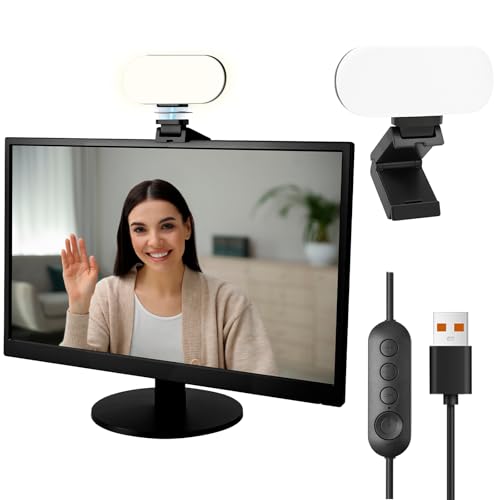
Clip On Selfie Light for Phone, Laptop and Monitor, USB Web Camera Fill Light
This clip-on selfie light is the most plainly specified option in the guide: a USB web camera fill light for phone, laptop, and monitor, with three color modes and ten brightness levels stated in its title, for Zoom calls, video conferencing, makeup mirror use, and live streaming. Where some listings leave control details vague, this one states both halves of control, tone and brightness steps, in numbers. Where some listings leave power unstated, this one states USB in its description.
What Stands Out
The ten brightness levels are the headline. A stated ladder of brightness steps is valuable at laptop distance, because a light that is only simply on or off forces you to adjust by moving it, while stepped levels let you find a comfortable setting for a bright office at noon and a dim room in the evening without repositioning the clip. The three color modes complement that by handling tone separately from brightness, which is the right division: tone matches the room, brightness matches the distance.
Who It Fits Best
Choose this model if you want the clearest stated control specification in the group, prefer USB power to a rechargeable battery, and use a light across phone, laptop, and monitor for calls and streaming. It fits students and remote workers who value simple, repeatable settings, and makeup users who want stepped brightness at a mirror. It is less suited to someone who needs a cord-free rechargeable panel for travel away from a computer, a ring shape, a stand, or a phone holder station.
- Form: clip-on selfie and fill light
- Stated power: USB web camera fill light
- Stated modes: 3 color modes
- Stated brightness: 10 brightness levels
- Stated devices: phone, laptop, monitor
- Stated uses: Zoom calls, video conferencing, makeup mirror, live streaming
Comparing the Eight Lights Side by Side
Seen as a group, the eight products divide cleanly along three lines. The first line is shape. Two are portable LED panels, the ALTSON and the Newmowa, both stating 60 LEDs and a rechargeable design, built to clip, pack, and move. Five are ring lights in different sizes and mounts, from the Cyezcor monitor clip and the InnoGear monitor clip with remote, through the small 5-inch Evershop, the adjustable Anautin, to the desk ring with stand and phone holder.
The second line is what is stated, and it is worth comparing stated facts rather than impressions. Only two titles state a color rendering figure: the ALTSON at CRI 97+ and the desk ring at CRI 97.8. Only one title states a battery capacity: the ALTSON at 2200mAh, while the Newmowa states rechargeable without a capacity figure, and the USB fill light states USB power.
The third line is the extra hardware. The ALTSON includes a camera tripod adapter. The desk ring includes a stand and a phone holder. The Evershop includes a stand alongside its clip. The InnoGear includes a remote control. The Newmowa includes a front and back clip. The Anautin states 360-degree adjustability. Extras are where a light stops being a generic glow and becomes a fit for a specific routine, so rank the extras by your own week. A remote you never use adds nothing.
A Quick Shortlist by Situation
- Travel and multiple locations: the ALTSON or the Newmowa portable rechargeable panels.
- A fixed monitor desk for calls: the Cyezcor monitor ring, or the InnoGear if remote control matters.
- A small or temporary desk: the 5-inch Evershop ring with clip and stand.
- A desk that is also a recording station: the adjustable desk ring with stand, phone holder, 30 stated light modes, and stated CRI 97.8.
- Changing screens and seating heights: the Anautin ring with stated 360-degree adjustability.
- Phone-led creating in both camera directions: the Newmowa with its front and back clip.
- Simple stated control and USB power: the clip-on fill light with 3 color modes and 10 brightness levels.
Budget is a legitimate part of any shortlist, but this guide deliberately compares design and stated specifications rather than asking you to decide on a number that can change between listings and sellers. Compare the current listing details for the two or three models that fit your situation, including what is included in the box, and let fit, mount, and control lead the decision.
If your camera itself is the weaker half of the setup, a basic webcam can pair well with any of these lights, and the entry-level end of that market is worth a look before you overspend on lighting alone.
Frequently Asked Questions
Is a Ring Light or a Panel Light Better for Laptop Calls?
Neither shape wins for every desk. A ring light around the camera position tends to give even coverage across the face, which is why so many conference and streaming lights use that shape. A panel is smaller, packs flat, and works well as a fill light that lifts shadows while your room light does part of the work. For a fixed desk, a ring is often the comfortable default. For travel, shared spaces, and occasional calls, a panel is often the practical default.
Where Should I Place a Laptop Selfie Light?
Place it close to the camera, near face height, and pointed at your face rather than down at the keyboard or up at the ceiling. Clip-on designs achieve this by sitting on the laptop lid or monitor edge. Stand designs achieve it by positioning the ring behind or around the camera position. Avoid placing your main light behind you, which puts your face in relative shadow, and avoid a strong light far to one side unless you want a deliberately dramatic look.
What Do Color Modes Actually Change?
Color modes change the tone of the light, typically across warmer and cooler appearances. A warmer tone can blend with household evening light, while a cooler tone can blend with daylight or office light. The goal is a natural-looking face that matches the room rather than fighting it. Models in this guide state three color or light modes, thirty light modes in one case, and in one case three color modes paired with ten brightness levels.
Should I Choose Rechargeable or USB Power?
Choose rechargeable if you want a clean laptop lid, travel use, and freedom from a cable during calls, and if you are willing to keep the light charged. The ALTSON states a rechargeable 2200mAh battery and the Newmowa states a rechargeable design. Choose USB if the light will mostly live with a computer setup and you prefer not to manage charging, as with the USB fill light in this guide.
Can One of These Lights Work for Makeup as Well as Calls?
Yes, and several titles say so directly, naming makeup among their uses, including the ALTSON, the Anautin, the Newmowa, and the USB fill light with its makeup mirror use. For makeup, even coverage, a tone choice that suits your room, and faithful color all matter. A stated color rendering figure, where a title provides one, is a relevant signal for that use.
Will a Better Light Fix a Poor Camera Picture on Its Own?
A better light improves what the camera has to work with, and in a dim room it is often the single most noticeable change you can make. It cannot change the camera itself, your background, or the room light behind you. Think of the light, the camera, and the background as three separate parts of the picture. This guide covers the first part.
Check prices on Amazon
Live listings for the shortlist in this guide are pulled from Amazon below, so prices and availability are always current at the moment you look.

Closing Thoughts
A selfie light for a laptop is a small purchase with an outsized effect on how you appear every day, and the right choice is mostly a matter of honest fit. Decide where the light will live, choose a panel for movement or a ring for a settled desk, confirm the power arrangement you prefer, and use stated figures, such as a mode count, a brightness ladder, or a color rendering figure, only where the listing actually states them.
Disclosure: GizmoVerdict is reader-supported and may earn a commission from qualifying purchases made through links in this guide, as an Amazon Associate, at no additional cost to you. That support helps keep our research and comparison work available, and it does not change which products we include or how we describe the specifications stated in their listings. Prices and availability can change, so please check the product listing for the current details before you buy.
Related guides
- Best 13 Inch Business Laptops: The Honest 13–14 Inch Ultraportable Shortlist
- Best 15 Inch Lightweight Workstation Laptops
- Best 5 Windows 10 Business Laptops: Professional Machines From the Windows 10 Era, Judged for Buyers Who Still Run It
- Best 32GB RAM Laptops Non Gaming: New Business Picks and an Honest Renewed Guide