Our Top Picks
 Panasonic Cordless Phone with Answering Machine4 Handsets4.04 x 5.04 x 6.8 inches0.7 poundsCheck on Amazon
 VTech Super Long Range DECT 6.0 Cordless Phone5 Handsets8.73 x 4.48 x 7.4 inches4.13 poundsCheck on Amazon
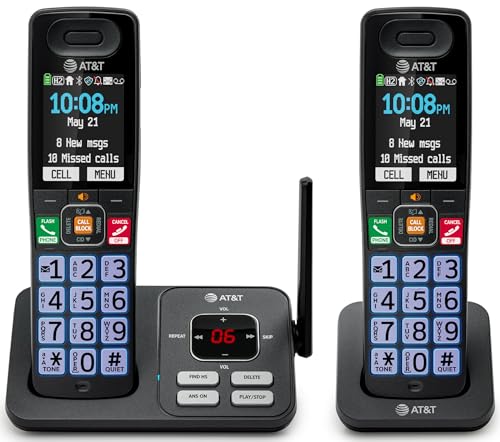 AT&T 2 Handsets Cordless Phone with Answering System2 Handsets5.63 x 2.99 x 7.4 inchesCheck on Amazon
What's inside
- What a Bluetooth cordless telephone set actually is
- How link-to-cell Bluetooth pairing works, step by step
- DECT 6.0 at 1.9 GHz, and why it avoids Wi-Fi interference
- Handset count, expansion limits, and satellite handsets
- Realistic range, and what walls do to it
- The built-in answering system: storage, quality, and remote access
- Call blocking and robocall screening in depth
- Accessibility: amplified handsets, talking caller ID, and big buttons
- Handset batteries: Ni-MH packs, talk time, and replacement
- Intercom, handset locator, and baby-monitor modes
- Using the system with no landline at all
- Sound quality, speakerphones, and headset support
- Displays, menus, and the daily details that decide satisfaction
- Power, backup behaviour, and what happens in an outage
- Troubleshooting the common pairing and coverage problems
- A practical buying checklist for your household
- Check prices on Amazon
- Privacy, security, and living with the system over years
As an Amazon Associate I earn from qualifying purchases. This post may contain affiliate links at no extra cost to you.
Reader support helps keep guides like this one freely available, and it never changes which features we prioritise or how we explain trade-offs. As an Amazon Associate we earn from qualifying purchases. Everything that follows is research-based editorial guidance drawn from manufacturer specifications, radio standards, and documented feature sets, so you can match a system to your home, your phones, and the people who will actually pick up the handset every day.
What a Bluetooth cordless telephone set actually is
A Bluetooth cordless telephone set looks, at first glance, like the cordless phones households have used for decades: a base station that sits on a counter or desk, and one or more lightweight handsets that rest in charging cradles. The difference is what the base can talk to. In a traditional setup the base had one job, connecting to a copper landline or to a voice-over-IP adapter. In a link-to-cell system the base gains a second job. It contains a Bluetooth radio that pairs with your mobile phones, so calls arriving on a mobile number can ring, be answered, and be continued on any cordless handset in the house. Outgoing calls can likewise be placed through the mobile line from a handset in the kitchen, the bedroom, or the workshop, without anyone needing to find the mobile itself.
That single change solves several ordinary frustrations at once. Mobile reception is often strong in one corner of a house and weak everywhere else, so people leave a phone charging by a window and then miss calls from the sofa. A link-to-cell base lets the mobile stay in its best reception spot while the conversation moves with the person. It also helps households where two adults keep separate mobile numbers but want a shared, audible ring throughout the home, and it gives older family members a familiar handset with large buttons instead of a touchscreen when a grandchild calls. For households that still keep a landline, most of these systems handle both services side by side, presenting landline and cellular lines as distinct choices on the same handset.
It helps to separate three ideas that marketing often blurs. Cordless describes the handsets, which communicate with their base over a dedicated radio link and are free of a coiled cord. Bluetooth describes the separate, short-range connection between the base and a mobile phone. Cellular describes the mobile network itself, which the system never joins directly; the mobile phone remains the gateway, and the cordless system simply borrows its call. Keeping those layers distinct makes troubleshooting far easier, because a dropped cordless conversation, a failed Bluetooth pairing, and a weak mobile signal are three different problems with three different fixes.
How link-to-cell Bluetooth pairing works, step by step
Pairing begins at the base, not at the handset. You place the base into pairing mode from its menu, make the mobile discoverable in its Bluetooth settings, and select the base when it appears in the list. Some systems ask for confirmation on both devices, others complete the exchange automatically once you approve it. After that first introduction the two devices remember each other. When the mobile comes back within range of the base, typically after you walk in the front door, the connection re-forms without further prompts, and an indicator on the base and handsets shows which cellular line is now available. If the mobile leaves the house, the indicator clears and the system quietly returns to landline-only behaviour.
Most link-to-cell bases can pair with two mobile phones at the same time, and that limit matters more than it first appears. Two paired phones might belong to two partners, to one person with a personal and a work number, or to a teenager whose number the household wants to ring on shared handsets during the evening. When a call arrives, the handsets display which cellular line is ringing, so nobody has to guess whose phone is buzzing in another room. When you dial out, you choose the line before or during dialling, and the call leaves through that mobile’s number, preserving caller ID for the person receiving it. Households with three or more mobile users should think carefully about whose phones get the two slots, because a third phone can usually be paired only by replacing one of the existing pairings.
Receiving a cellular call through the handsets feels deliberately ordinary, which is the point. The ring tone can be set to differ from the landline ring, the handset screen shows the caller name if it exists in the shared phonebook, and pressing the talk button connects you just as a landline call would. You can hand the call between handsets, place it on hold while you move rooms, or use the speakerphone on a handset set down on a worktop. Making a call reverses the path: you dial on the handset keypad, select the cellular line, and the base instructs the paired mobile to place the call. The mobile’s screen may light up in its charging spot, but you never need to touch it.
There are limits worth understanding before you buy. Bluetooth carries the call audio and control signals, but the mobile must still have its own network signal; the base cannot rescue a home with no mobile coverage at all, it can only let you exploit the one good spot. Only one call per cellular line can be handled at a time, so two handsets cannot run two separate conversations through the same mobile simultaneously. Text messages, app-based calls, and mobile data do not pass through the system. Video calling stays on the mobile. What transfers is the classic voice call, handled well, and for many households that is exactly the traffic they want on a shared handset.
Phonebook transfer and caller ID synchronisation
Many systems can download contacts from a paired mobile into the base phonebook, sometimes a few hundred entries at a time and sometimes well over a thousand across both paired phones. The transfer usually copies names and numbers, not photos or custom ring tones, and it is a snapshot rather than a live sync: contacts added to the mobile later will not appear until you run the download again. Even with that caveat, a transferred phonebook transforms caller ID from a bare number into a recognisable name, powers talking caller ID announcements, and lets you dial familiar numbers from any handset without retyping them. Check how a system handles duplicates and very long names, because handset screens truncate aggressively, and a directory full of clipped entries is less useful than a shorter, curated one.
Bluetooth version plays a modest but real role here. Systems built on newer Bluetooth revisions generally reconnect faster, hold a more stable link at the edge of range, and handle the simultaneous presence of two paired phones with fewer hiccups. Older implementations can still work perfectly well when the mobile lives near the base, which is the recommended arrangement anyway. What matters most in daily life is not the version number on the box but the discipline of giving the mobile a permanent charging home within a room or two of the base, so the link forms reliably and the phonebook and caller ID features stay available.
DECT 6.0 at 1.9 GHz, and why it avoids Wi-Fi interference
The handset-to-base link in nearly every modern system sold for North American homes uses DECT 6.0, a digital standard that operates around 1.9 GHz. That frequency choice is deliberate and is one of the strongest reasons to prefer a purpose-built cordless system over older or improvised alternatives. Home Wi-Fi lives mainly at 2.4 GHz and 5 GHz, microwave ovens leak energy around 2.4 GHz, and many wireless gadgets crowd into those same bands. DECT occupies its own dedicated slice of spectrum, set aside for voice, so a busy evening of streaming, gaming, and video calls in a house does not compete with a phone conversation for airtime. The result is not magic, simply separation: two busy systems ignoring each other because they were never speaking on the same channel in the first place.
DECT is also digital from end to end, which brings practical benefits beyond interference avoidance. Calls are encoded, compressed, and error-checked, so voices sound consistent right up to the edge of coverage instead of dissolving into the hiss and crackle older analogue cordless phones produced as you walked away. Digital transmission also means the conversation is not trivially audible to a neighbour with a scanner or an old baby monitor, a privacy weakness that plagued early cordless designs. Successive handsets register to the base with their own identities, which is what allows intercom calls, selective ringing, and per-handset settings to work cleanly within one system.
The 6.0 label itself is a marketing designation rather than a version in the usual software sense, and it should not be confused with a speed rating. What you are buying is maturity: a standard refined over many years specifically for residential voice, with predictable behaviour for handover-free roaming inside a home, low power draw that helps handset batteries last for days on standby, and wide compatibility between bases and expansion handsets from the same product family. When comparing systems, treat DECT as the assumed foundation and spend your attention on handset ergonomics, answering features, and call management, where real differences live.
Handset count, expansion limits, and satellite handsets
Systems are sold in configurations from a single handset up to five or six in the box, and most can expand beyond the bundled count by registering additional handsets later. The ceiling varies by family, commonly somewhere between five and twelve handsets on one base, and that ceiling counts every registered handset whether it is used daily or sits in a guest room. Buying a bundle that matches your home today is usually cheaper than adding handsets later, but expansion capability protects you when a room is remodelled, a relative moves in, or a handset is damaged. Before relying on expansion, confirm that add-on handsets for that exact family are still sold, because a discontinued accessory line can turn a generous ceiling into a dead end.
The convenience that makes expansion genuinely attractive is that satellite handsets need only power. Only the main base connects to the phone line, the router or modem for landline service, and the Bluetooth pairing. Every additional handset communicates wirelessly with that base and sits in a small charging cradle plugged into an ordinary outlet. There is no phone jack to wire in the bedroom, no cable to run to a home office upstairs, and no second subscription of any kind. Placement becomes a question of coverage and convenience rather than infrastructure, which is why multi-handset systems suit older houses with few jacks and rented homes where drilling and rewiring are not options.
Think through placement as a household, not as a shopper counting rooms. A handset earns its place where calls are answered under time pressure, where hands are often wet or dirty, or where a mobile is deliberately left behind: beside the main bed, in the kitchen, near the front door, in a laundry or utility space, and in any room used as an office. Garages and workshops deserve consideration because they are exactly where people miss calls and where a rugged speakerphone conversation while standing at a bench is valuable. Conversely, two handsets within earshot of each other in a small flat add charging clutter without adding reach, and the money is better spent on a better answering system or stronger call blocking in the base you choose.
Registration, naming, and everyday handset management
Registering an expansion handset is normally a matter of placing it in the main base briefly or entering a short sequence on its keypad, after which the base assigns it a number. Naming handsets in the menu, where the system allows it, pays off immediately: intercom calls can target the kitchen rather than handset four, a lost handset can be paged by name, and family members stop shouting room to room. Deregistering a lost or broken handset frees its slot for a replacement, a step people forget until the system refuses a new registration at its ceiling. Keep a simple note of which handset lives where and which mobile lines each handset is set to ring for, because selective ringing, where the nursery handset stays silent for late landline calls, is one of the quiet quality-of-life features these systems do best.
Realistic range, and what walls do to it
Range figures on packaging describe open-air conditions that no house provides. Indoors, a DECT signal must pass through plasterboard, timber, brick, insulation, appliances, and sometimes foil-backed materials that reflect radio energy very effectively. A useful planning assumption is that a well-placed base covers a typical single-storey home comfortably and a two-storey home well, provided the base sits near the centre of the building, elevated on furniture rather than on the floor, and away from large metal objects and dense electronics. Outdoors, a handset often remains usable across a garden or driveway because there are fewer obstructions, even though the straight-line distance is greater than anything attempted indoors.
Every wall taxes the signal, but not equally. Interior stud walls with plasterboard cost relatively little. Brick and concrete cost more. A wall containing plumbing, a tiled bathroom surface, a mirrored wardrobe, or a bank of kitchen appliances can behave almost like a barrier, and a signal passing diagonally through several such walls to reach a far corner room may fade even in a modestly sized home. Floors matter too, particularly reinforced concrete floors and floors with underfloor heating elements. When a particular room proves marginal, the honest remedies are moving the base a few metres, raising it, or choosing a system family that supports a range-extending accessory where one is offered, rather than expecting a different brand of the same standard to defeat physics.
Base placement therefore deserves ten deliberate minutes during setup. Choose the spot where the mobile gets its best signal and the base can sit centrally, because link-to-cell needs both conditions at once and they occasionally conflict. If the best mobile reception is at a front window but the base there leaves a back bedroom fringe, a compromise position one room inward often serves both links adequately. Avoid tucking the base behind a television, inside a closed cabinet, or directly beside a router, a computer, or a microwave, not because DECT shares their frequencies but because dense electronics and metal housings obstruct and reflect signals and because heat and clutter shorten equipment life. Walk the home with a handset during a call on the first evening, visiting the garden, the far bedroom, and the garage, and adjust while returning the system is still easy.
The built-in answering system: storage, quality, and remote access
Many bases include a digital answering system, and its headline specification is recording capacity measured in minutes. Capacities in the broad middle of the market often fall somewhere between roughly fifteen and thirty minutes, with some models offering more. That number must cover the outgoing greeting plus every saved message, and it fills faster than people expect during holidays, illness, or a burst of nuisance calls that all leave fragments behind. A household that screens calls and deletes promptly can live happily with a modest capacity. A small business run from home, a family coordinating care for a relative, or anyone who travels for weeks should treat capacity as a primary buying criterion rather than a footnote.
Minutes alone do not tell the whole story. Message quality depends on the compression the system applies, and heavily compressed recordings can make an unfamiliar voice, an accented caller, or a number read out quickly genuinely hard to follow. Features that help in practice include a visible message counter on the base, playback from any handset as well as from the base speaker, the ability to skip, repeat, and delete individual messages without wading through the whole queue, and a time and day stamp announced or displayed with each message. A message waiting indicator that other household members can see prevents the common failure where one person hears a message, intends to pass it on, and forgets.
Remote access completes the answering picture. With a PIN-protected remote code you can call your own number from a mobile, interrupt the greeting with the code, and listen to, save, or delete messages while away. Some systems add message alerts, calling or notifying another number when a new message lands, which suits people who are away from home for long stretches but need to respond quickly to anything urgent. Set the remote code to something that is not a birthday or a house number, and change the factory default before anything else, because a default code printed in a widely available manual is no protection at all. If your landline service already provides network voicemail, decide deliberately which single system will answer, and set the ring count so the other never competes; two answering services racing each other produce confusion, truncated greetings, and lost messages.
Call screening from the base and handsets
A related feature deserves separate attention: live call screening. When the answering system picks up, some bases broadcast the caller’s opening words through the base speaker, and on certain models through handsets as well, letting you decide in real time whether to step in and take the call. For households pestered by nuisance callers this is invaluable, because a genuine caller, a delivery driver, a clinic receptionist, begins speaking naturally, while many automated systems disconnect when they detect an answering device. Screening also helps a person with limited mobility decide whether a call is worth getting up for. Volume control on the screening broadcast, and the ability to mute it at night or in a particular room, keep the feature helpful rather than intrusive.
Call blocking and robocall screening in depth
Call blocking has become the feature that sells cordless systems, and the implementations differ enormously. At the simplest level a block list stores individual numbers you have rejected, often a few dozen to a few hundred entries depending on the model, and future calls from those numbers are disconnected, silenced, or sent straight to the answering system. Blocking a number should be possible during a call, after a call from the caller ID log, and by manual entry, because the moment you most want the button is while an unwanted call is still on the line. Check whether blocked callers hear a ring, a message, or nothing, and whether the handsets still flash silently, since a system that lights up the whole house for every blocked call has only solved half the annoyance.
Stronger systems add screening rules on top of the block list. Common tools include blocking calls with no caller ID, blocking by area code or number prefix, requiring unknown callers to press a key or speak their name before the handsets ring, and maintaining an allow list of trusted numbers that always get through. The challenge-based approach is particularly effective against automated diallers, which rarely respond correctly to an instruction, while a human caller simply follows the prompt and is connected, after which the system may remember them. Families should discuss the trade-off honestly: aggressive screening can delay a first call from a new doctor’s office, a school, or a tradesperson calling from a mobile you have never stored, so pairing screening with a generous allow list built from your transferred phonebook is the balanced configuration most households end up keeping.
Link-to-cell adds a wrinkle, because nuisance calls arrive on mobile numbers too. Some systems extend their blocking to cellular calls answered through the handsets, while others manage only the landline. If your main motivation is peace and quiet on a mobile-only setup, verify that the blocking and screening features apply to the cellular line, not just to the landline described in the headline copy. Remember also that blocking is reactive and local: it lives in your base, resets if you replace the system, and does nothing for calls to the mobile when you are out with it. Network-level services and the mobile’s own controls remain useful layers alongside, not replacements replaced by, the base. Readers who take many calls on the move often pair a home system like this with a dedicated listening option, and our notes on best telephone headsets cover that companion territory for desk and home-office use.
Accessibility: amplified handsets, talking caller ID, and big buttons
For older users and anyone with hearing, vision, or dexterity difficulties, the right cordless system is not a luxury purchase but the difference between independent communication and dependence on others. Amplified handsets raise incoming volume substantially beyond standard levels and often add tone adjustment, so a voice can be made clearer rather than merely louder. Boost controls that can be engaged during a call, rather than buried in a menu, matter because hearing needs vary by caller: a familiar family voice may need nothing, while a soft-spoken caller on a poor connection may need everything the handset can give. Compatibility with hearing aids and with telecoil coupling is worth confirming for the specific user, as is a loud, adjustable ring with a visual flashing alert for incoming calls.
Talking caller ID speaks the caller’s name or number aloud as the phone rings, using the phonebook entry where one exists. In a kitchen with wet hands, in a dark bedroom, or for a user whose eyesight makes handset screens hard to read, that announcement turns answering into an informed decision without moving closer to the phone. Announcements should be clear, reasonably paced, and adjustable in volume, and the system should handle long names gracefully. Big-button variants enlarge the keypad, increase contrast on the display, space keys so that a less steady hand can dial accurately, and sometimes add photo or one-touch memory keys for the handful of numbers that matter most. Those memory keys, programmed with a spouse, a child, a neighbour, and a doctor, are often the single most valued feature in the whole system.
Other details compound. A handset that is too light and slim can be harder for arthritic hands to grip than a slightly larger, shaped body. Speakerphone quality determines whether a user can set the handset down and talk without holding anything at all. Displays with large fonts and strong backlighting help in bright kitchens and dim hallways alike. Some systems offer a dedicated emergency or SOS approach through speed dial rather than a separate pendant, which only helps if the programming is done at setup, not left for later. Involve the person who will use the system in choosing it wherever possible, and prioritise the two or three difficulties they actually experience over a long accessibility feature list assembled in the abstract.
Handset batteries: Ni-MH packs, talk time, and replacement
Most cordless handsets run on rechargeable nickel-metal hydride cells, very commonly a pair of AAA-size cells or a small sealed pack built from them. Ni-MH suits this job well. It tolerates the pattern of life a cordless handset leads, long hours resting in a cradle punctuated by bursts of use, it holds a charge across days of standby, and replacements are inexpensive and widely available when capacity eventually fades. Manufacturers quote talk time and standby time under controlled conditions; treat both as comparisons between models rather than promises. Real talk time shrinks with speakerphone use, high volume amplification, backlight settings, and distance from the base, because a handset at the edge of coverage works harder to maintain its link.
In practical terms, a healthy handset should survive a long day of heavy conversation off its cradle and many days of mostly idle standby, and a household notices battery decline first as a handset that dies mid-call in the room furthest from the base. Good habits extend battery life without any fuss. Return handsets to their cradles at night, but do not worry about the occasional day forgotten on a sofa. Keep cradle contacts clean and dry, especially in kitchens. If a handset will be unused for a long season, remove its cells. When performance fades after a few years, replace the cells in a handset as a matched set, match the chemistry and capacity type the manual specifies, and recycle the old cells rather than binning them. A system whose handsets use standard AAA cells is far easier to keep alive for a decade than one dependent on a proprietary pack that may disappear from sale.
Battery indicators deserve a glance when comparing models. A multi-segment gauge on the handset display, plus a low-battery warning tone during calls and a flashing indicator in the cradle, prevents the small domestic drama of a phone dying just as a call matters. Some systems report battery state for all handsets from the base menu, which helps a household manager spot the one failing handset in a guest room before a visitor does. When buying expansion handsets second-hand or as old stock, budget mentally for fresh cells, because rechargeable batteries age on the shelf as well as in service.
Intercom, handset locator, and baby-monitor modes
Because every handset registers to one base, the system doubles as a private internal network. Intercom calls run handset to handset without touching the landline or a mobile line, and they are free, instant, and surprisingly habit-forming: calling the upstairs office, summoning a teenager for dinner, or checking on someone in the garden shed without shouting through the house. Two-way intercom with clear naming, as described earlier, is the version people actually use. Some systems also allow a three-way arrangement where an outside call is conferenced with another handset, useful when two family members both need to hear a relative or a tradesperson on the same call.
The handset locator is simpler and, in many homes, used weekly. Pressing a key on the base makes a misplaced handset ring or beep, even if its ringer was turned down, until it is found in a cushion, a coat pocket, or a child’s bedroom. Systems differ in whether a handset set to silent can be overridden by the locator, so check that detail if a particular family member habitually mutes their handset. A locator that can target one named handset rather than ringing the whole fleet is kinder in a large system at night.
Baby-monitor mode, offered on some families of handsets, lets one handset act as a listening unit in a nursery while another serves as the parent unit elsewhere in the house. The nursery handset opens its microphone when it detects sound above a sensitivity threshold, and the parent handset plays the audio and can sometimes talk back. As a secondary, occasional monitor, for a nap at a grandparent’s house or a visit to friends, it is genuinely handy and saves packing separate equipment. As a primary monitor it lacks the camera, temperature sensing, and dedicated alerts of purpose-built units, and its range is the DECT range of the system, so treat it as a bonus capability with clear limits rather than a reason to buy. Households that rely heavily on headsets for calls away from the handset may also want to look at best bluetooth headsets for making phone calls for the mobile side of the same problem.
Using the system with no landline at all
A growing number of households have no landline service and no intention of restoring one, and link-to-cell systems serve them directly. Setup simply skips the line cord: the base pairs with one or two mobiles, the handsets register as usual, and every call in and out travels through a mobile. The household gains a shared ringing presence in every room, handsets that elderly relatives and children can use confidently, a proper answering and blocking layer for calls received at home, and the freedom to leave mobiles charging in the one place reception is reliable. For many mobile-only families this is the entire case for buying, and it is a strong one.
Understand the dependencies you accept. When the paired mobile leaves the house, the system has nothing to carry, so a household where the only mobile is also the phone one adult takes to work will find the home handsets silent during the day unless a second, stay-at-home mobile or an inexpensive dedicated line lives with the base. Power cuts silence the base and therefore the system, whereas an old corded landline phone famously kept working; a small uninterruptible supply for the base, or simply awareness that mobiles themselves remain available directly, covers that gap. Emergency calling deserves a direct conversation at home: a call placed through a handset travels via the mobile, so location information follows the mobile’s arrangements, and every household member should know that the handset is not a landline in an emergency, even though it looks like one.
Cost comparisons also change shape without a landline. There is no line rental to save against, so the system must justify itself on convenience, accessibility, and call control alone, which for the households described above it usually does within weeks. Number portability is a non-issue, nothing needs porting, and moving house becomes trivially easy because the whole system unplugs and replugs anywhere with power and mobile signal. Renters in particular value that the installation leaves no trace: no jack wiring, no engineer visit, no contract tied to the address.
Combining landline and cellular sensibly
For households keeping both services, small configuration choices prevent daily friction. Assign distinct ring tones to landline and each cellular line and keep them consistent across handsets. Decide which line outgoing calls should prefer by default, if the system offers a default, based on the household’s calling patterns and inclusive allowances on each service. Put the landline number in the allow list logic of relatives whose calls must always ring, and remember that a contact stored only on one mobile’s transferred phonebook may not be recognised when they call the other line. Review the arrangement after the first month, when real call patterns have replaced guesses.
Sound quality, speakerphones, and headset support
Voice clarity on a DECT system is determined less by the radio, which is consistently competent, than by the small speaker and microphone in each handset and by how the system handles background noise. A handset with a well-tuned earpiece makes long calls less tiring, because the listener is not straining to separate consonants from room noise. Speakerphones vary even more. A good handset speakerphone, set on a table, carries a natural two-way conversation where both parties can speak and be heard without the clipping that occurs when a crude system switches direction like a radio. A base speakerphone adds a useful fixed point for family calls in the kitchen, where several people can gather around one conversation with a relative far away.
Volume range, tone control, and noise handling should be judged against your rooms. An open-plan kitchen with a kettle, extractor, and television is a hostile listening environment, and a handset that sounds refined in a quiet shop may be too polite there. Homes with a workshop, a sewing room, or a keen cook in residence benefit from handsets that stay intelligible at modest volume rather than simply getting louder and harsher. If one household member regularly takes calls while moving around with hands busy, consider how the system supports a wired headset through a handset jack where fitted, or a separate Bluetooth listening device used with the mobile directly. Budget-conscious readers comparing that separate route can start with best affordable bluetooth headsets and then decide whether the home system or the personal headset should take priority in this season’s spending.
Echo and delay deserve a mention because link-to-cell adds a hop. A call travels from the mobile network to the mobile, across Bluetooth to the base, and across DECT to the handset. Well-designed systems keep the added delay low enough that conversation rhythm feels normal. Noticeable echo usually traces to a speakerphone used at high volume in a reflective room, or to a mobile with its own audio processing struggling with the arrangement, and lowering speaker volume or moving away from hard corners often cures it. If a particular pairing misbehaves, re-pairing the mobile and confirming that no second Bluetooth audio device is competing for the same phone at home, a car kit remembered from the driveway, for instance, resolves a surprising share of complaints.
Displays, menus, and the daily details that decide satisfaction
Specifications rarely capture why one system delights a household and another irritates it daily, because the difference lives in interface details. Handset displays should be readable at arm’s length in ordinary light, with caller ID presented in a type size that does not require hunting for glasses. Backlighting that wakes with an incoming call and with any key press, and that can be dimmed for a bedroom handset, shows a designer who understood real homes. The caller ID log should store enough entries to cover a busy week, mark which line each call arrived on, distinguish missed from answered calls, and let you return a call directly from the log on the correct line without re-dialling.
Menus reward simplicity. The tasks people perform under pressure, blocking a number, paging a handset, switching a ringer off for the night, checking a message, should sit near the surface, ideally on dedicated keys. Tasks performed once, pairing a mobile, downloading a phonebook, setting the clock after a power cut, can live deeper without penalty. Shared phonebooks held in the base beat per-handset phonebooks in every household larger than one person, because an entry added once is available everywhere and talking caller ID pronounces the same name in every room. Alarm and appointment reminders on handsets, clock synchronisation from caller ID, and a night mode that silences selected handsets on a schedule are small features that accumulate into a feeling that the system works for the household rather than the other way round.
Physical design matters in unglamorous ways. Cradles should accept a handset dropped in carelessly by a tired person in the dark, with a positive seating feel and a charging confirmation that does not require inspection. Handsets should survive the ordinary knocks of family life, sit stably on a table for speakerphone use, and have a belt clip option for the member who carries one around the garden. Wall-mounting options for the base help in small hallways. None of this appears in headline marketing, and all of it appears in whether the system is still liked in its third year.
Power, backup behaviour, and what happens in an outage
The base is the brain of the system and it needs mains power continuously. In an outage the handsets may still hold charge, but they have nothing to connect to, and the answering system, Bluetooth link, and landline interface all stop together. Households in areas with frequent outages, and any home where a vulnerable person relies on the phone, should plan for that plainly. Options range from a modest battery backup unit sized for the base alone, which can keep the system alive for hours because the base draws little power, to simply ensuring that at least one mobile in the home is charged and reachable. Some bases include a feature that lets a charged handset supply limited power to the base so a call can still be made or received during an outage; where that feature exists, learn how it works before you need it, because the sequence is rarely intuitive under stress.
After power returns, check the small things. Most systems recover their registrations and phonebooks automatically because those live in non-volatile memory, but clocks, greeting selections, and ring counts occasionally need attention, and a message counter showing an error state can hide new messages. A brief household routine, confirm the time, play any messages, place one outgoing call on each line, takes two minutes and restores confidence. Surge protection for the base, particularly where the landline enters from overhead lines in storm-prone areas, is inexpensive insurance for the one component the whole system depends on.
Troubleshooting the common pairing and coverage problems
Most difficulties with link-to-cell systems fall into a short list, and each has a logical order of checks. If a mobile will not pair, confirm the base is in pairing mode rather than merely switched on, confirm the mobile is not already connected to another audio device that is holding it, and delete any stale entry for the base in the mobile’s Bluetooth list before trying again. If pairing succeeds but calls do not transfer, check which line the handset is set to use and whether the mobile has a network signal in its charging spot at that moment. If the connection drops at a particular time of day, look for a competing device, a vehicle arriving home, a headset left on, that claims the mobile when it comes into range.
If handset coverage disappoints, resist buying anything until the base has been moved. A metre of height and a doorway’s width of lateral movement routinely transform a fringe room, because radio paths through a building are lumpy rather than smooth. Keep a simple record of what changed during setup experiments, because families otherwise cycle through the same three base positions repeatedly. If one handset alone misbehaves while others thrive, swap its batteries with a healthy handset and see whether the fault follows the cells or stays with the handset; that single experiment separates the two most common causes. For listeners who prefer a single-ear option for long mobile calls around the house, best mono bluetooth headsets surveys that style, which many people find easier to wear while cooking or working.
A practical buying checklist for your household
Begin with lines, not handsets. Write down which services the system must carry: a landline, one mobile, or two mobiles, and whose numbers they are. Then count rooms where a handset will genuinely be used, add one for the place calls are most often missed, and check the bundle sizes and expansion ceiling against that number. Confirm the answering capacity against your travel habits and message volume, and decide whether network voicemail or the base will be the single answering point. Rank call control next: a short block list suffices for occasional nuisance calls, while households under sustained robocall pressure should insist on challenge screening, prefix blocking, and blocking that covers cellular calls as well as landline calls.
Then walk through the people. Who needs amplification, and how much? Who needs talking caller ID, large keys, or one-touch memory dialling? Who will use the speakerphone most, and in which noisy room? Who manages the system, adding contacts, clearing messages, updating the allow list, and will the menus suit that person? Finally, plan the physical installation before the box arrives: the base position that satisfies both mobile reception and central coverage, the outlet for each satellite cradle, and the permanent charging home for each paired mobile. A system chosen against that written list, rather than against a shelf of near-identical boxes, tends to be the system still earning its counter space years later, quietly ringing in the right rooms, carrying the right lines, and sparing the household the daily friction it was bought to remove.
Check prices on Amazon
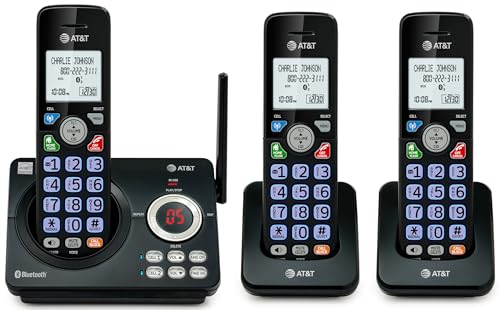
Live listings for the shortlist in this guide are pulled from Amazon below, so prices and availability are always current at the moment you look.


Privacy, security, and living with the system over years
A cordless system sits at the centre of a household’s conversations, so its quiet security habits deserve attention. DECT transmission between handset and base is digitally encoded, a major step beyond the open analogue era, and the Bluetooth link between base and mobile uses its own pairing keys established during setup. Keep that setup private: pair mobiles at home rather than in a shared space, remove pairings for phones that are sold, lost, or replaced, and deregister handsets that leave the household. When a mobile is replaced, delete the old pairing from both sides before adding the new phone, because stale entries are the most common cause of a base stubbornly trying to connect to a device that no longer exists.
Answering-system PINs, remote access codes, and any screening pass-through settings should be treated like house keys. Change defaults on the day of installation, store the new codes where the household stores other essential information, and make sure more than one responsible adult knows them. Review the block list and allow list a few times a year. Numbers that were urgent during a house move, a medical episode, or a school term linger long after their purpose ends, and an allow list crowded with forgotten entries quietly weakens the screening you configured so carefully. The same review is the moment to refresh the transferred phonebook from each mobile, clear messages that were saved by accident, and confirm that memory keys still point to the right people.
Longevity, finally, is mostly housekeeping. Dust the base vents, keep cradles out of steamy bathrooms where contacts corrode, replace handset cells when runtime fades rather than tolerating a phone that dies nightly, and keep the manual, or at least the model and family name, filed with other household documents so expansion handsets and batteries can be matched correctly years later. Systems bought with a clear view of lines, rooms, people, and call control tend to age gracefully, becoming part of the furniture of communication at home. Choose the set whose handsets your household will reach for without thinking, in the rooms where life actually happens, and every mobile call that rings calmly through the house instead of buzzing unheard in a hallway will confirm that the choice was right.
One last setup ritual worth doing
On the first evening, gather the household for ten minutes of deliberate familiarisation, because a system everyone understands gets used fully while a system only one person understands becomes that person’s unpaid job. Place one incoming call on the landline and one on each paired mobile, and let everyone hear the distinct rings and see which line indicator lights. Practise transferring a call between rooms, paging the handset most likely to be lost, blocking a harmless volunteer number and then removing it, and playing back a message left on purpose. Program the memory keys, set the night schedule, and agree where each mobile will charge. Write the remote access code, the base position that gave the best coverage, and the date the handset batteries were first installed on a card kept near the base. That small ritual turns a box of equipment into a shared household service, and it is the moment a link-to-cell system stops being a purchase and starts being simply how calls are answered under your roof.
Keep that card, and keep the habit of revisiting these settings whenever a phone, a room, or a household member changes, because the best Bluetooth cordless telephone set is not the one with the longest feature list but the one reconfigured, calmly and together, each time the life of the house shifts around it.