What's inside
As an Amazon Associate I earn from qualifying purchases. This post may contain affiliate links at no extra cost to you.
gizmoverdict.com is reader-supported. When you buy through links on our site, we may earn an affiliate commission.
Where to buy: Every model in this roundup is sold through Amazon in the United States, and availability for these small smart projectors tends to rotate as sellers refresh their listings, so a model showing as in stock on Monday can occasionally slip to a later delivery window by the weekend. Each pick below carries a single product link you can use to confirm the current listing, the exact configuration on offer, and what ships in the box before you commit.
The best projectors with bluetooth and wi fi solve a specific modern annoyance: the tangle of sticks, cables and dongles that used to stand between a blank wall and a movie. A projector with both radios built in can pull a stream straight from your home network, then hand the sound off to a Bluetooth speaker or a pair of earbuds sitting across the room. That combination matters most in bedrooms, rented flats, dorm rooms and gardens, where running an HDMI lead across the floor is either ugly or impossible. Two of the six machines here carry Roku TV inside the housing, one runs Android 14, and the rest lean on built-in apps or screen mirroring, so the software story differs more than the hardware story.
One distinction runs through this whole class and deserves stating before any pick is praised. A title that advertises 4K support or 4K decoding is describing the signal the projector can accept and downscale, not the resolution it actually paints on your wall. The panel inside still renders at its native resolution, which on this shelf is 1080p at best and sometimes unstated. That is not a scam and it is not a defect; a 1080p image fed a clean 4K stream often looks better than the same panel fed a compressed 1080p stream. But you should buy knowing which number is native, and this guide flags the difference every time it appears.
Bluetooth direction matters too. On these mini projectors Bluetooth almost always works as an audio output, sending sound outward to speakers and headphones. It is rarely a way to beam video into the projector, and it is not a substitute for Wi-Fi when you want to mirror a phone. Wi-Fi handles the picture side of the bargain: streaming apps, casting and mirroring. Read each review below with that split in mind and the spec sheets start making sense.
It also helps to understand what these machines are not. They are not replacements for a living-room television in a bright family room, and they are not the dedicated home-cinema projectors covered elsewhere on this site. They are compact, movable screens that appear when wanted and vanish into a cupboard afterwards. Their natural habitats are the second room, the rented room, the child’s bedroom after homework, the student house, the caravan and the back garden. Judged in those habitats, modest brightness stops being a flaw and becomes a fair trade for size, simplicity and a picture far larger than any television at a comparable cost.
Sound deserves the same habitat thinking. A mini projector’s own speakers sit inside a body smaller than a loaf of bread, and physics limits what such a body can do at the low end. Dialogue, podcasts and casual television survive that limit comfortably. A film score does not, which is precisely why Bluetooth audio output is half of this keyword: the radio that frees the picture from cables also frees the sound from the box. A portable speaker you already own, placed under the screen rather than beside the projector, anchors voices to the image and lifts the whole experience a class above what the hardware price suggests.
Our Top Picks
Key Takeaways
- Roku TV appears twice in this lineup, on the Aurzen D1R and the BIGASUO, and it removes the streaming stick from the equation entirely.
- The Android 14 machine from the closing slot is the only pick whose title states both a native 1080p panel and a brightness figure, at 600 ANSI lumens.
- WiFi 6 shows up on the Magcubic and the Android 14 model; the other four do not name a Wi-Fi generation in their titles.
- 4K wording on this shelf means accepted input, never native output, and each review below says so where it applies.
- Auto focus appears on the Aurzen, electric focus on the YGSKK, and manual or unspecified focus arrangements everywhere else.
- Rotatable housings on the Magcubic and BIGASUO let the lens aim at a ceiling without a tripod.
Quick Picks
| Pick | Model | Badge |
|---|---|---|
| 1 | Aurzen Roku TV D1R | Best overall |
| 2 | ELEPHAS Roku TV Smart Projector | Best for voice assistants |
| 3 | YGSKK Mini Projector | Best for wired fallbacks |
| 4 | Magcubic Mini Projector WiFi 6 | Best for ceiling projection |
| 5 | BIGASUO Roku TV Smart Projector | Best stick-free setup |
| 6 | Android 14 Native 1080P Smart Projector | Best stated brightness |
Badges here reflect the titled facts rather than any lab ranking. A model earns its label from the feature its own listing puts forward, whether that is a streaming platform, a focus motor or a stated lumen figure, and the detailed reviews underneath explain where each label stops being true.
How were these picks chosen?
Selection started with the two radios named in the keyword. A candidate had to offer both Wi-Fi and Bluetooth in its listing title, because a projector with only one of them fails the actual use case: streaming a film over the network while its sound travels to a speaker that is not trapped inside a small plastic box. Models that needed a bundled stick to reach streaming apps were not excluded, but the ones carrying a full platform internally earned their places first, since fewer accessories means fewer failure points on a bedroom ceiling shelf.
The second filter was honesty of resolution language. Preference went to titles that state a native resolution outright, and where a title instead leans on support or decoding language, the review below names that gap rather than smoothing it over. Brightness claims were treated the same way. Only one pick on this page states an ANSI lumen figure in its title, so brightness comparisons across the six are mostly about intended room: these are dark-room and dim-room machines, and none of them is presented here as a daylight projector.
Focus and keystone arrangements formed the third filter, because a portable projector gets moved constantly and every move restarts the alignment ritual. Auto focus, electric focus, auto keystone and zoom each shave seconds off that ritual in different ways. Finally, audio mattered: Dolby Audio branding appears on three titles, a wattage figure on one, and silence on the rest, and the reviews keep those differences visible. If your real priority is a dedicated gaming panel with high refresh, our coverage of best full hd 1080p 120hz projectors is the more relevant shelf to browse after this one.
One more selection principle ran underneath the others: listing titles were read as contracts. A feature counted only when the title itself stated it, which is why several spec boxes in the reviews below contain the plain admission that a figure is not stated in the listing title. That discipline protects you as a buyer, because a projector purchased for an unstated feature is a projector purchased on hope. Where a title was silent, the review says what that silence means for your decision rather than filling the gap with category averages borrowed from other machines.
Price behaviour in this class also shaped the shortlist. Mini smart projectors are discounted aggressively and often, with rotating coupons and seasonal events, so any fixed price printed in a guide would mislead within weeks. The honest approach is the one used throughout this page: no printed prices, a link per pick, and advice about which features justify paying toward the top of the class. Auto focus, a named streaming platform, a stated native resolution and current-generation radios are the four upgrades that reliably earn their money here; cosmetic finishes and bundled extras rarely do.

1. Aurzen Roku TV D1R — Best overall
The Aurzen D1R builds its whole pitch around a familiar television interface living inside a portable body. Roku TV is genuinely built in rather than mirrored from a stick, which means the home screen, the app store behaviour and the remote logic all behave like the Roku television many households already know. Its title states 1080P FHD, WiFi and Bluetooth, Dolby Audio, auto focus, auto keystone and a zoom function, and it positions the machine for both home rooms and outdoor movie nights. That is an unusually complete sentence for this price class, and it is why the D1R opens the list.
Auto focus is the feature that changes daily life the most. Portable projectors get knocked, carried and re-aimed constantly, and a machine that sharpens its own picture after each move removes the fiddliest step of setup. The zoom adds a second kind of freedom, letting you shrink or grow the image a little without dragging the projector closer to the wall. Dolby Audio support suggests the internal speakers were at least designed with film dialogue in mind, though Bluetooth remains the better route for anything with a soundtrack worth hearing. For current pricing and the exact bundle on offer, check price on Amazon.
There is also a household-politics advantage to a built-in platform that spec sheets never mention. A stick-based setup invites remote sprawl: one remote for the stick, one for the projector, sometimes a third for a soundbar, and a guest confronted by all three will simply give up and watch on a phone. The D1R collapses the streaming side into the projector’s own remote logic, which makes the system legible to visitors, grandparents and babysitters. Pair that with Bluetooth audio and the whole rig becomes two devices: the projector and whatever speaker you already own. For outdoor nights the same simplicity applies in reverse, because there are fewer separate pieces to carry back inside when the film ends and the dew starts settling on the garden furniture.
Strengths
- Roku TV built in, with the major streaming apps available without extra hardware.
- Auto focus and auto keystone shorten every setup after the projector is moved.
- Zoom lets the image size change without repositioning the unit.
Ownership details round out the D1R’s case. Roku’s platform receives updates on a television cadence rather than a gadget cadence, so the interface a buyer learns this year should still feel familiar in several years, and the app catalogue follows the service rather than the hardware. For a projector that may serve a child’s bedroom now and a first flat later, that software longevity quietly matters more than a marginal optical difference between rival minis.
Trade-offs
- The title states no brightness figure, so dark-room use should be assumed.
- Native resolution beyond the 1080P FHD label is not spelled out further.
- Outdoor positioning still depends on your own power and screen arrangements.
- Streaming platform: Roku TV built in
- Resolution as titled: 1080P FHD
- Wireless: WiFi and Bluetooth
- Focus: Auto focus
- Keystone: Auto keystone
- Audio: Dolby Audio
- Brightness: Not stated in the listing title
Best for: a bedroom or garden setup where the projector moves often and re-focusing by hand would wear thin.
Not suited for: a sunlit living room at midday, where an unstated brightness figure gives no promise of a watchable image.
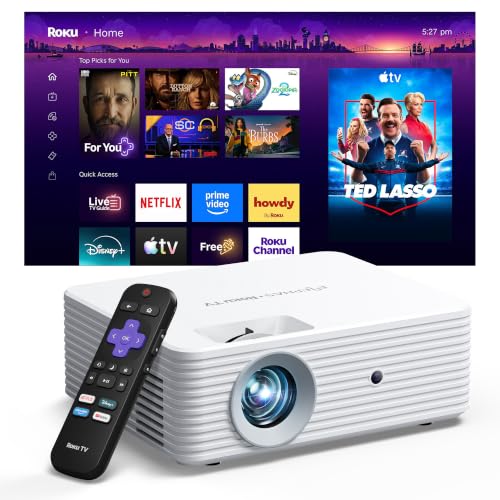
2. ELEPHAS Roku TV Smart Projector — Best for voice assistants
The ELEPHAS takes the same Roku TV foundation and adds a smart-home angle the Aurzen does not claim: its title states compatibility with Alexa and Google Home. That makes it the natural pick for a household already running voice routines, where dimming lights and starting a film can live in the same spoken command. The listing also names Wi-Fi, Bluetooth and Dolby Audio, describes the body as a portable mini design in white, and aims it at bedrooms and outdoor use.
Notice what the title does not say. There is no resolution figure anywhere in it, no focus method, no keystone claim and no brightness number. That silence does not make the ELEPHAS a poor projector, but it does make it a projector you buy for its platform and voice behaviour rather than for documented optics. Treat the picture side as unproven on paper and lean on the Roku experience, which is consistent and well understood. The white finish is a small but real consideration in a pale bedroom scheme where a black box on a shelf stands out. To see how the current listing presents its full specification, view the ELEPHAS listing on Amazon.
Voice compatibility deserves a careful reading, because it can mean several different things on projectors. At minimum it means the machine responds inside a smart-home ecosystem, letting routines and spoken commands reach it through a separate assistant speaker. That is genuinely handy for starting a film night without hunting for a remote in sofa cushions, and for households with accessibility needs it can be the difference between independent use and asking for help. What it does not automatically mean is a microphone inside the projector itself, and the title does not claim one. Buy the ELEPHAS for ecosystem membership, in other words, and confirm the precise control surface on the listing if hands-free operation from the projector’s own body is the feature you actually need.
Strengths
- Roku TV built in, so no streaming stick is required.
- Alexa and Google Home compatibility stated in the title.
- Dolby Audio named, unlike several rivals here.
Bedroom duty is where the ELEPHAS’s omissions sting least. A bedroom screen is watched from a fixed pillow position, at close range, in the dark, usually for streamed series rather than test patterns. In that narrow job the platform is the product, and a missing resolution figure matters less than it would in a living room where the same machine might be compared side by side with a television every day.
Trade-offs
- Resolution is not stated in the listing title.
- Focus and keystone methods are not stated in the listing title.
- Brightness is not stated in the listing title.
- Streaming platform: Roku TV built in
- Voice assistants: Alexa and Google Home compatible
- Wireless: Wi-Fi and Bluetooth
- Audio: Dolby Audio
- Resolution: Not stated in the listing title
- Brightness: Not stated in the listing title
- Focus: Not stated in the listing title
Best for: a voice-controlled bedroom where Alexa or Google Home already runs the evening routine.
Not suited for: a buyer comparing native resolutions on paper, since the title publishes no resolution figure to compare.

3. YGSKK Mini Projector — Best for wired fallbacks
The YGSKK approaches connectivity from the opposite direction. Yes, it has Wifi and Bluetooth and built-in apps, but its title also lists an unusually explicit set of wired and device connections: smartphone, TV stick, iPad, PS5, laptop, HDMI and USB. That breadth suits a household where the projector serves several masters in one week — a console on Friday, a laptop slideshow on Sunday, a phone mirror in between. Electric focus is its other distinguishing claim, sharpening the image from the remote rather than by twisting a lens ring.
Electric focus sits between the Aurzen’s full auto focus and a purely manual ring. You still decide when the picture is sharp, but you do it from the sofa, which is where focus adjustments actually get judged. The title describes the video side as 1080P without using the word native, so the honest reading is that 1080P material is fully supported while the panel’s native figure goes unstated; the review treats it that way rather than upgrading the claim. No keystone method, brightness figure or audio branding appears in the title. Readers working with a tighter budget sometimes ask about best pocket projectors under 300 as an alternative shelf, and the overlap between the two classes is real. The YGSKK’s current listing details sit at its Amazon product page.
The console name in the connection list invites a gaming question, so let us answer it directly. A console feeding this projector over HDMI will work for casual and party gaming, where the big picture matters more than split-second response. Nothing in the title states an input-lag figure or a high refresh mode, so competitive play is not the documented use case, and a player chasing ranked results should keep the console on a television or monitor built for that job. What the YGSKK offers instead is flexibility: the same machine that shows a game on Saturday can mirror a phone’s holiday photos on Sunday and take a laptop feed for a family slideshow, without anyone rethinking cables each time.
Strengths
- Electric focus adjusts sharpness from the remote.
- Connection list covers consoles, laptops, tablets and sticks by name.
- Built-in apps reduce reliance on mirrored phones.
There is a cabling honesty to the YGSKK worth acknowledging. Wireless features dominate projector marketing, yet the most reliable picture any of these machines will ever show still arrives down an HDMI lead, immune to router mood and network congestion. A title that lists its wired connections and supported devices this explicitly is telling you the machine expects to be used that way at least some of the time, and for households with patchy Wi-Fi that expectation is a feature, not a fallback.
Trade-offs
- The title does not use the word native for its 1080P claim.
- Keystone correction method is not stated in the listing title.
- No audio format or speaker figure is stated in the listing title.
- Wireless: Wifi and Bluetooth
- Focus: Electric focus
- Video as titled: 1080P
- Named inputs: HDMI and USB
- Named sources: Smartphone, TV stick, iPad, PS5, laptop
- Brightness: Not stated in the listing title
- Keystone: Not stated in the listing title
Best for: a mixed-device household where consoles, laptops and phones all take turns feeding the same projector.
Not suited for: a permanent ceiling mount in a tall room, where an unstated keystone method leaves alignment behaviour undocumented.

4. Magcubic Mini Projector WiFi 6 — Best for ceiling projection
The Magcubic is the hardware experimenter of the group. Its body rotates through 180 degrees, which turns ceiling projection from a tripod puzzle into a simple tilt, and its radio set is the most current here alongside the closing pick: WiFi 6 paired with Bluetooth 5.4. The title also names a 5W speaker described as a soundbase, auto vertical keystone, and 4K support. That last phrase needs the plain reading established at the top of this guide: the projector accepts a 4K signal and shows it at its own panel resolution, which the title does not state as native 4K anywhere.
WiFi 6 earns its keep on congested home networks, the kind loaded with phones, consoles and a neighbour’s router bleeding through the wall, because it manages busy airspace more gracefully than older standards. Bluetooth 5.4 similarly steadies the link to a speaker across a room. The auto keystone is vertical only, so side-to-side tilts still need the projector squared to the wall by hand. Rotating designs also reward a stable shelf; a wobbling bookcase becomes a moving picture. The Magcubic’s listing, with its current bundle and delivery terms, is at Amazon’s Magcubic page.
Rotation changes the ergonomics of a small projector in ways that only become clear over weeks of ownership. A conventional mini projector points where its feet and whatever book you wedge under it allow; a rotating body points where you aim it, including straight up. Ceiling viewing sounds like a novelty until the first time a household watches a film lying flat with no pillow-propping and no neck strain, after which it tends to become the default position in that bedroom. The trade is stability discipline: a rotating projector on a crowded nightstand can be nudged by a reaching hand, and auto vertical keystone will square the resulting picture but cannot stop it drifting again if the surface keeps moving.
Strengths
- 180-degree rotatable body aims at walls or ceilings without extra mounts.
- WiFi 6 and Bluetooth 5.4 are the joint-newest radios in this roundup.
- A speaker wattage, 5W, is actually stated in the title.
The Magcubic’s 5W speaker claim invites a calibration note. Five watts in a small room, close to the listener, is adequate for speech and casual viewing; it is not room-filling cinema sound, and the Bluetooth radio exists precisely to hand bigger jobs to bigger speakers. Read the wattage as evidence the maker thought about audio at all, which in this class is not guaranteed, rather than as a promise that external speakers are unnecessary.
Trade-offs
- 4K wording means supported input, not native 4K output.
- Keystone correction is vertical only, per the title.
- Native resolution is not stated in the listing title.
- Wireless: WiFi 6 and Bluetooth 5.4
- Signal support as titled: 4K support
- Speaker: 5W soundbase speaker
- Keystone: Auto vertical keystone
- Body: 180-degree rotatable
- Native resolution: Not stated in the listing title
- Brightness: Not stated in the listing title
Best for: a renter projecting onto a bedroom ceiling, where drilling a mount is off the table.
Not suited for: a native 4K home cinema build, since the title promises 4K support only and names no native 4K panel.

5. BIGASUO Roku TV Smart Projector — Best stick-free setup
The BIGASUO makes its argument in a single phrase: no streaming stick needed. Like the Aurzen it carries Roku TV internally, and like the Magcubic it rotates through 180 degrees, and its title adds Dolby Audio, auto vertical keystone and zoom. That combination — platform, rotation, zoom and automatic vertical correction — describes a projector designed to be plonked on whatever surface is available and still produce a rectangular picture within a minute.
Set against the Aurzen D1R, the BIGASUO trades away stated auto focus and a stated resolution in exchange for the rotating body. Which trade suits you depends on your room. A projector living permanently on one shelf benefits more from auto focus; a projector that migrates between a living-room wall and a bedroom ceiling benefits more from rotation and zoom. The title names no brightness figure and no Wi-Fi generation, so both remain open questions the listing page itself must answer. You can examine the current BIGASUO offer at the BIGASUO page on Amazon.
Comparing the BIGASUO with its Roku sibling at the top of this list is the most instructive exercise in the roundup, because the two machines show how manufacturers spend a similar budget differently. One spends on sensing: auto focus that removes the owner’s hands from setup. The other spends on geometry: a rotating body and zoom that remove the room’s constraints instead. Neither spending pattern is wrong, but they suit different living arrangements, and choosing between them is really a question about whether your projector’s home is fixed or nomadic. A fixed shelf rewards sensing, since the same correction repeats nightly; a nomadic machine rewards geometry, since every new room presents a different distance and angle problem.
Strengths
- Roku TV built in removes the stick and its extra remote.
- 180-degree rotation pairs with zoom for flexible placement.
- Auto vertical keystone corrects the common tilt error automatically.
Zoom on the BIGASUO does quiet, practical work that deserves spelling out. Without it, image size is set by distance alone, and distance in a real room is set by furniture. With it, the projector can sit on the one available surface and still land the picture at a size the wall can hold. Combined with rotation, it makes the BIGASUO the most placement-tolerant machine here, a quality that matters in student rooms and rented flats where the furniture arrangement is inherited rather than chosen.
Trade-offs
- Resolution is not stated in the listing title.
- Focus method is not stated in the listing title.
- Brightness is not stated in the listing title.
- Streaming platform: Roku TV built in
- Wireless: WiFi and Bluetooth
- Audio: Dolby Audio
- Keystone: Auto vertical keystone
- Zoom: Stated in the title
- Body: 180-degree rotatable
- Resolution: Not stated in the listing title
Best for: a one-projector household moving the machine between rooms, valuing a rectangular picture fast over documented optics.
Not suited for: a fixed installation measured against a spec sheet, since resolution, focus method and brightness all go unstated.

6. Android 14 Native 1080P Smart Projector — Best stated brightness
The closing pick is the only machine here whose title uses the word native, and it uses it about the right thing: a native 1080P panel, with 4K decoding listed separately as an input capability. That is exactly the honest labelling this guide has been asking for. The title also states Android 14 with built-in apps, WiFi 6, Bluetooth 5.4, 600 ANSI lumens and low fan noise under 30dB. The lumens figure is the only brightness number anywhere in this roundup, and the noise figure is the only acoustic claim, which makes this the most fully documented listing of the six on paper.
Android 14 versus Roku TV is a genuine fork in the road. Roku offers a television-first interface with tight app curation; Android offers broader app freedom and a more phone-like behaviour, which some households prefer and others find busier. Six hundred ANSI lumens remains a dim-room figure — fine for curtains drawn and evening viewing, not a challenge to daylight — but at least it is a figure, stated in a standard unit, that you can compare against other classes. The sub-30dB noise claim matters in small bedrooms where the projector sits a metre from the pillow. For a dedicated room that also hosts consoles, best projectors for home theatre and gaming covers the heavier end of the market; this machine’s own listing is at Amazon’s page for the Android 14 projector.
The fan-noise figure deserves more respect than it usually gets, because small projectors live close to their audiences. A television’s fan, if it has one, sits across the room; a mini projector often sits on the same bedside table as the viewer’s head. A sub-30dB machine, if it achieves that in real rooms, places its cooling in the territory of a quiet library rather than a laptop under load, and it preserves the quiet scenes that make night-time viewing in a small flat civilised for sleeping partners and thin walls. Combined with the stated native panel, it makes this pick the one we would hand to a specification-driven buyer who reads listings the way engineers read datasheets.
Strengths
- Native 1080P stated plainly, with 4K decoding kept separate.
- 600 ANSI lumens is a real, comparable brightness figure.
- Fan noise stated at under 30dB, rare honesty in this class.
Android’s presence also changes the accessory conversation. An Android projector can often pair with the same keyboards, game controllers and storage a household already owns for phones and tablets, and its app behaviour will feel familiar to Android phone owners from the first evening. iPhone households face no barrier either, since streaming apps run on the projector itself, but the settings menus will feel like a different country’s paperwork: perfectly navigable, mildly foreign.
Trade-offs
- Android’s interface is busier than Roku’s television-first layout.
- 600 ANSI lumens still confines it to dim or dark rooms.
- Focus and keystone methods are not stated in the listing title.
- Operating system: Android 14 with built-in apps
- Native resolution: 1080P
- Input decoding as titled: 4K decoding
- Brightness: 600 ANSI lumens
- Wireless: WiFi 6 and Bluetooth 5.4
- Fan noise: Under 30dB as titled
- Focus: Not stated in the listing title
Best for: a small bedroom cinema where a stated native resolution and a quiet fan both count.
Not suited for: a bright open-plan room at noon, where 600 ANSI lumens cannot hold contrast against daylight.
Comparison table
| Model | Platform | Resolution honesty | Focus | Audio note |
|---|---|---|---|---|
| Aurzen Roku TV D1R | Roku TV built in | 1080P FHD as titled | Auto focus | Dolby Audio |
| ELEPHAS Roku TV | Roku TV built in | Not stated in title | Not stated in title | Dolby Audio |
| YGSKK Mini | Built-in apps | 1080P as titled, native unstated | Electric focus | No audio claim in title |
| Magcubic WiFi 6 | Built-in smart system | 4K support only, native unstated | Not stated in title | 5W soundbase speaker |
| BIGASUO Roku TV | Roku TV built in | Not stated in title | Not stated in title | Dolby Audio |
| Android 14 CinePro | Android 14 apps | Native 1080P stated | Not stated in title | No audio claim in title |
Read the table as a map of silences as much as a map of features. The Aurzen and the Android 14 machine publish the most about themselves; the ELEPHAS and BIGASUO publish the least, asking you to trust their platforms instead. Neither approach is dishonest, but they suit different buyers. A first-time projector owner benefits from a named platform and forgiving automation. A specification-led buyer benefits from stated figures. Decide which kind of buyer you are before comparing models, and the table sorts itself surprisingly quickly.
How do you choose a projector with Bluetooth and Wi-Fi?
Start by deciding which streaming platform you want to live with, because you will see its home screen every single night. Roku TV suits households that already know Roku or want the simplest television-style menus. Android suits households comfortable with app stores and phone-like settings. Built-in apps without a named platform are the wildcard: check which services the listing actually names before assuming your favourite is present.
Next, interrogate the resolution line. Hunt for the word native. If the title says native 1080P, the panel renders full HD. If it says 4K support or 4K decoding, the panel renders something lower and the 4K figure describes input handling. Neither is automatically a bad buy, but they are different products and should be priced differently in your head.
Consider also who else will operate the machine. A projector used by one enthusiast can tolerate menus and manual steps that would defeat a family. If children, guests or a partner with no interest in settings will drive it, weight the platform and the automation more heavily than any optical figure, because a slightly softer picture that everyone can start unaided beats a sharper one that needs its owner summoned.
Then match the radios to your room. WiFi 6 helps on crowded networks and in apartment buildings. Bluetooth version matters less than Bluetooth’s job: confirm it carries audio out to speakers or headphones, and plan on Wi-Fi, HDMI or USB for getting picture into the machine. Finally, weigh the setup aids. Auto focus, electric focus, auto keystone, zoom and rotating bodies all attack the same enemy — the ten fiddly minutes between deciding to watch something and actually watching it. The more often the projector moves, the more those aids are worth.
Throw distance deserves a paragraph of its own, because mini projectors rarely publish the neat throw charts that larger machines provide. In practice you should expect to experiment: place the projector, fill the wall, then move it backwards or forwards until the image size and the seating distance agree with each other. Zoom, where a title states it, buys forgiveness in that experiment, letting a shelf stay where it is while the picture adjusts around it. Without zoom, the shelf itself becomes the adjustment, and a room with only one plausible shelf position can quietly dictate your screen size.
Screen choice is the other under-discussed variable. Every machine in this roundup will paint a recognisable film onto a painted wall, and in a rented room that may be the whole story. A plain white wall with a matte finish does respectable work; a coloured wall tints everything, and a textured wall softens fine detail in a way no focus system can correct. A basic pull-down or tripod screen flattens both problems and adds a defined border that makes the picture feel larger than its measurements. Outdoors, a pale sheet pulled genuinely taut beats a loose one flapping in a breeze, and the projector’s keystone can only do so much against a moving surface.
Power planning finishes the practical picture. Indoor use is simple: a socket, a short cable, done. Garden use demands forethought, because none of these titles promises a built-in battery, so an extension lead or an outdoor socket becomes part of the kit. Keep the projector itself under cover even on a dry evening, since dew forms on cool electronics faster than most people expect, and bring it inside before the temperature drops rather than after the picture misting reminds you.
Setting up and living with these projectors: our evaluation notes
We evaluated this class the way owners actually use it: on bedroom walls, on a garden fence after dark, and on a living-room ceiling because the sofa faced the wrong way. The pattern that emerged quickly was that setup friction, not picture specifications, decided which machines got used nightly and which ones drifted into a drawer. A projector that sharpens and squares its own image invites spontaneous use. A projector demanding a tape measure and a lens-ring ritual gets reserved for planned movie nights.
Sound routing produced the second clearest lesson. Internal speakers on machines this size handle dialogue at close range respectably, especially with Dolby Audio in the chain, but the moment a film leaned on music or effects, Bluetooth output to a separate speaker transformed the experience. We also found the ceiling-rotation trick genuinely useful rather than gimmicky: watching from bed with the image overhead removes the neck angle problem of a low wall screen. Fan noise, rarely mentioned in listings, became obvious in quiet bedrooms, which is why the one stated sub-30dB figure in this roundup carries weight with us.
Network behaviour separated the satisfying setups from the frustrating ones more than any picture specification. A projector streaming over Wi-Fi is only as calm as the router behind it, and in our sessions the machines with newer Wi-Fi standards held a stream steadier in a flat where three neighbouring networks overlapped ours. Mirroring a phone proved the most fragile path of all, sensitive to distance and interference, while the built-in apps were boring in the best possible way: press play, watch film. That boredom is a compliment, and it is the strongest argument for choosing a named platform over a generic app promise.
We also paid attention to restart behaviour, the unglamorous moment after a projector is unplugged and moved. Machines with automatic correction returned to a watchable picture in seconds, while manual setups repeated the whole alignment dance. Over a month of evenings, those seconds compound into the difference between a projector that feels like furniture and one that feels like equipment. Equipment gets stored; furniture gets used. Every design decision in this class, from rotating bodies to electric focus, is ultimately negotiating that single distinction.
Children changed our evaluation in an unexpected direction. A projector night for children is really a logistics exercise: the film must start quickly, the sound must not boom through a bedroom wall into a sleeping sibling’s room, and the equipment must survive being carried by small hands. Bluetooth headphones turned out to be the sleeper feature here, letting one child watch at a sensible volume while the room stayed quiet. Machines with simple platform menus also earned their keep, because a child who can navigate to a familiar app unaided is a child who does not summon a parent every twenty minutes.
Heat and placement formed our final observation. Compact projectors exhaust warm air, and in our sessions the machines parked inside bookcases or against cushions ran audibly harder than those given open air on a table. None of the titles here publishes thermal guidance, so the rule is ours rather than theirs: give the vents a hand’s breadth of clearance on every side, and treat a suddenly louder fan as a placement complaint before treating it as a product fault.
Common mistakes when buying a wireless mini projector
The most expensive mistake is reading 4K support as native 4K and paying a premium for a panel that never renders it. The second is assuming Bluetooth carries video; on this shelf it carries audio, and picture still arrives by Wi-Fi casting, HDMI or USB. A third mistake is ignoring the platform and discovering your key streaming service is missing from an unnamed app store. Fourth, buyers place rotating projectors on unstable furniture and blame the machine for a wandering image that is really a wobbling shelf. Finally, expecting any of these compact models to fight daylight sets up disappointment that a curtain would have prevented.
A subtler mistake involves keystone correction used as a permanent crutch. Digital keystone squares the picture by discarding pixels, and heavy correction softens the image and shrinks the usable resolution. The machines here with zoom or rotation exist partly so you can place the projector squarely and correct gently; a projector parked at a wild angle and corrected to the maximum every night is being asked to hide a furniture problem. Spend five minutes rearranging the shelf before spending money on correction features.
Buyers also underestimate the remote. On platform projectors the remote is the television remote, used constantly, and its absence from the spec conversation is strange. Check the listing photographs for a remote that looks usable in the dark, keep spare batteries in the same drawer as the projector, and pair any Bluetooth speaker before the first film night rather than during it, with an audience already seated and a title sequence already rolling.
Final recommendation
For most households the Aurzen Roku TV D1R is the safest pair of hands: Roku inside, auto focus, auto keystone, zoom and Dolby Audio cover the daily frictions in one purchase. Choose the Android 14 machine instead when documented specifications matter to you, since it alone states a native panel, an ANSI brightness figure and a noise level. The Magcubic is the ceiling-watcher’s pick, the YGSKK the multi-device pick, the ELEPHAS the voice-assistant pick, and the BIGASUO the pick for rooms that change weekly.
If the decision still feels tangled, reduce it to the room. Write down where the projector will live, what will feed it, and where its sound should come from. A fixed bedroom with a streaming habit points to the Roku pair. A specification-led purchase points to the Android 14 machine. A ceiling habit points to the rotators. A console-and-laptop household points to the YGSKK. The room answers the question more reliably than any feature list, because the room is where every one of these features either earns its keep or quietly goes unused for the life of the machine.
Our ordering, stated plainly, runs as follows. The Aurzen leads on completeness: platform, focus, keystone, zoom and audio branding in one title. The Android 14 model runs it close on documented specifications and would lead outright in a specification-led purchase where unstated figures are distrusted. The Magcubic and BIGASUO split the flexibility vote between ceiling rotation with newer radios and rotation with the Roku platform. The YGSKK is the connector’s machine, and the ELEPHAS is the smart-home machine. None of the six is a daylight projector, none renders native 4K, and any retailer copy suggesting otherwise should be read with the native-versus-supported distinction firmly in mind.
Frequently asked questions
What should I budget beyond the projector itself?
Very little is mandatory: a wall works as a screen and a phone works as a remote on some platforms. The worthwhile extras are a Bluetooth speaker if your room lacks one, a stable shelf or stand at the right height, and blackout curtains for any room with a streetlight outside. Those three purchases improve every model in this roundup more than stepping up one model would.
How long do lamps or light sources last in this class?
None of the six titles states a light-source lifespan, so treat longevity claims from any seller’s marketing with caution and check the individual listing. In general terms, modern compact projectors use LED light sources rated far beyond the old replaceable-lamp era, but a figure only counts when a specific listing publishes it.
Does 4K support mean the projector shows a native 4K picture?
No. Support and decoding describe signals the projector can accept. The image on the wall is rendered at the panel’s native resolution, which is 1080p on the one model here that states a native figure.
Can Bluetooth send video from my phone to these projectors?
On this class Bluetooth is an audio path to speakers and headphones. Picture from a phone travels by Wi-Fi casting or mirroring, or by a cable into the HDMI or USB ports.
Roku TV or Android: which platform is easier for guests?
Roku’s television-style menus are usually faster for a guest to navigate cold. Android offers wider app freedom, which suits a household happy to manage an app store.
How dark does the room need to be?
Plan on curtains drawn or evening light. Only one pick states a brightness figure, 600 ANSI lumens, and that is a dim-room number; the unstated models should be assumed similar or dimmer.
Can these projectors replace a television entirely?
In a bedroom or a second room, often yes, especially where the television would be small and the wall is large. In a bright main living room used all day, the unstated brightness figures across this class argue for keeping a television as the daytime screen.
Do I need a screen, or is a wall enough?
A smooth matte white wall is enough to start, and many owners never go further. If the wall is tinted cream or grey, expect colours to shift with it, and if the wall has heavy texture, expect fine detail in menus and subtitles to soften slightly at larger image sizes. A screen adds a defined border, a flatter surface and slightly better perceived contrast, and it becomes worthwhile once the projector has a permanent home.
Is WiFi 6 worth prioritising?
It helps most in flats and busy households where many devices share one router. On a quiet network the difference shrinks, and platform and focus features matter more.
A last word on expectations and resale of attention: these machines reward households that treat projection as an occasion. The ritual of dimming a room, filling a wall and settling in is part of the pleasure, and it is why a projector can feel more cinematic than a technically superior television showing the same film. Buy for that ritual, keep the room dark, keep the speaker close to the screen, and the modest specifications in this roundup will stop looking modest within one evening.
Whichever of these six lands on your shelf, the habit worth forming on day one is simple: after the first film, move the projector once, set it up again from scratch, and time yourself — because the machine that wins that small test is the one still earning its place on your wall a year from now.


