What's inside
- Key Takeaways
- Quick Picks
- How were these picks chosen?
- Comparison table
- How do you choose a word-processing tablet that will actually be written on?
- Writing on these bundles: our evaluation across real documents
- Common mistakes when buying a writing tablet
- Files, formats, and keeping a document safe
- Writing away from the desk: trains, cabins, and borrowed tables
- The student’s desk and the small business desk
- Care, updates, and getting years from a bundle
- Ergonomics for people who write for a living
- Dictation, handwriting, and the other ways words arrive
- A first week with a writing bundle, day by day
- Final recommendation
- Frequently asked questions
As an Amazon Associate I earn from qualifying purchases. This post may contain affiliate links at no extra cost to you.
gizmoverdict.com is reader-supported. When you buy through links on our site, we may earn an affiliate commission.
Where to buy: Keyboard-bundled tablets are sold through Amazon in boxed sets, and each model below is listed there with the accessories its title names. Because these bundles are assembled around the tablet, confirm on the listing that the keyboard, case, and any mouse or stylus are attached to the exact variant in your basket, since the same tablet often appears alone at a lower price in a neighbouring listing. Order with enough margin before a term, a trip, or a deadline for the keyboard’s layout and the tablet’s document applications to become familiar.
There is a particular kind of writing that does not need a full laptop and suffers on a bare touchscreen: the report drafted in a site cabin, the essay finished in a library, the invoices and letters of a small business run from a kitchen table. People searching for the best word processing tablets with office work in mind are usually picturing exactly that middle territory, and this guide describes it honestly from the first paragraph. Every pick here is an Android tablet sold with a keyboard case, most with a mouse and stylus in the same box. These are document machines for writing, editing, email, and light spreadsheets inside Android’s office applications — capable, portable, and inexpensive — and they are not laptop-class computers, a distinction the reviews will maintain rather than blur.
The six bundles divide by ambition. Two carry unusually generous titled specifications: an 11-inch model with a 90Hz 1920 by 1200 display and 256GB of storage, and a 13-inch model with a 2K-class screen and a 10000mAh battery for writers who think in long documents. Three 10-inch sets compete as complete starter kits with keyboards, cases, mice, and styluses arranged around modest storage that a memory card rescues. One MUISOO bundle adds Widevine L1 and face unlock to the same formula. None of the titles promises a bundled office suite, so this guide promises none either: the writing software comes from the app store, in free and subscription flavours the buyer chooses, and the hardware’s job is to make typing on Android feel like work rather than like a workaround.
Buy the bundle for the keyboard first and the tablet second. That ordering sounds severe, yet a word-processing purchase lives or dies at the keys, and everything in this guide is arranged around that truth.
Key Takeaways
- All six picks are Android tablets with keyboard bundles, framed honestly as document machines rather than laptop replacements.
- No title here promises a bundled office suite, so word-processing applications are chosen and installed by the buyer from the app store.
- The 13-inch pick offers the largest writing canvas and the biggest battery at 10000mAh, for long-document work.
- The 11-inch pick pairs a 90Hz 1920 by 1200 display with 256GB of storage, the strongest document specification in the group.
- Three 10-inch sets start at 32GB of storage, so a memory card belongs in the same order for a growing document archive.
- Keyboards, cases, mice, and styluses are bundled to different degrees, and each review lists exactly what its title includes.
Quick Picks
| Pick | Badge | Why it earns a place |
|---|---|---|
| 1. Android 15 Tablet 2 in 1 Set | Best complete starter kit | 10-inch tablet with keyboard case, mouse, and stylus in one pink-finished set. |
| 2. Android 16 Tablet 11 with Keyboard | Best document specification | 90Hz 1920 by 1200 display, 256GB storage, 8000mAh, and a keyboard included. |
| 3. Android 16 Tablet 10 with Keyboard | Best connected writer | T606 octa-core, GPS and GMS in the title, with case, mouse, and stylus bundled. |
| 4. MUISOO 2 in 1 Tablet | Best media-friendly writer | Widevine L1, face unlock, and a full keyboard, mouse, stylus, and case bundle. |
| 5. 13 Inch Tablet with Keyboard | Best for long documents | A 13-inch 1920 by 1200 screen, 10000mAh battery, and 2TB expansion allowance. |
| 6. Android Tablet 2 in 1 with Keyboard Case | Best simple value set | A 10-inch Android 15 set with keyboard case, mouse, and stylus at the classic formula. |
Writers who also need their machine to stay connected away from Wi-Fi should compare the connected models in our guide to best full size tablets with 4glte, where one keyboard bundle reappears with a cellular radio.
How were these picks chosen?
The gate was the bundle itself: a keyboard had to be part of the titled offer, because a word-processing tablet bought without one is a promise the buyer must keep later at accessory prices. Every pick passed that gate, and the reviews record the rest of each bundle — case, mouse, stylus — exactly as titled, since the difference between a keyboard alone and a full desk kit is the difference between a tablet that can work anywhere and one that works where its owner remembered to pack the extras.
Writing comfort criteria came next. Screen size and resolution decide how a page looks at typing distance: the 13-inch and 11-inch models show a document with margins and a comment thread in comfort, the 10-inch sets show the page alone with equal clarity at their size, and the MUISOO’s HD panel asks the least of the eyes’ ambitions. Memory and storage were judged against document workloads, which are light by gaming standards and heavy only in accumulation; hence the emphasis on expansion figures, since ten years of letters, drafts, and spreadsheets outgrow 32GB with quiet inevitability.
Software honesty formed the third sieve. Android’s document ecosystem is genuinely capable — full-featured word processors, spreadsheets, and note applications with cloud sync — and also genuinely different from a desktop suite in its handling of complex formatting, macros, and very long manuscripts. Picks were therefore assessed as homes for drafting, editing, correspondence, and light tabular work, with the limits of the platform stated in the how-to section rather than discovered by the buyer mid-manuscript. Battery figures from 6000mAh to 10000mAh were weighed for the away-from-desk writing day that justifies the whole category.
The final test was the desk test: could a writer sit down with only this box’s contents and produce a finished, formatted, sent document within the hour? Each pick answered yes in its own dialect, and the reviews that follow describe those dialects — the generous, the compact, the connected, the cinematic — without pretending they are the same language.
1. Android 15 Tablet 2 in 1 Set — Best complete starter kit
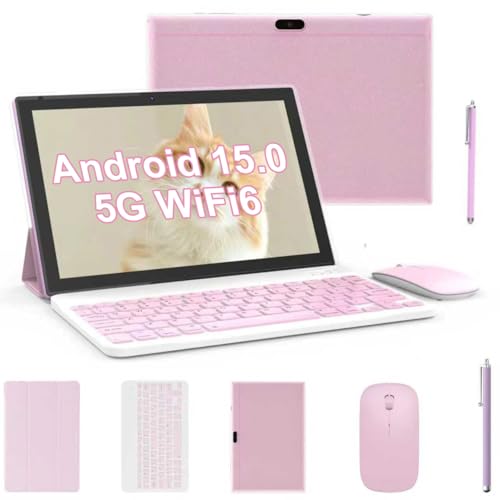
The pink set opens the guide because it understands the assignment completely: a 10-inch Android 15 tablet with a 10.1-inch HD touch screen, sold with a keyboard case, a mouse, and a stylus pen, so that the box contains a small office rather than a screen and a shopping list. Memory is quoted at 8GB with 32GB of storage, the cameras are 2MP and 8MP, the battery is 6000mAh, and Wi-Fi 6 with Bluetooth covers the connectivity a writing desk needs. For a student, a home business, or a household producing its first dedicated writing machine, that completeness is the product.
As a writing instrument, the set’s virtues are practical. The keyboard case props the screen at a typing angle and protects it in a bag, the mouse gives precise cursor placement for editing work that fingertips fumble, and the stylus handles signatures, annotations, and the marginal notes that drafting generates. Documents live comfortably at this specification: letters, essays, minutes, and household spreadsheets ask little of a processor and much of a keyboard, and the set supplies the keyboard first. The pink finish will divide opinion and delight its intended owner, which is what finishes are for.
The limits are storage and ceiling. Thirty-two gigabytes fills under a serious archive, and the title names no expansion figure, so the spec box records it as unstated and the buyer should plan cloud storage as the archive of record. No display resolution beyond HD language, no GPS, and no cellular appear in the title either. None of that prevents the set from doing its named job well; it simply defines the job as correspondence and coursework rather than as a decade’s manuscript vault.
Strengths
- Keyboard case, mouse, and stylus all included in one set.
- Wi-Fi 6 connectivity on a current-generation Android 15 base.
- The complete bundle suits a first dedicated writing machine.
Trade-offs
- Storage expansion is Not stated in the listing title.
- Display resolution beyond HD is Not stated in the listing title.
- 32GB internal storage leans on cloud archiving for long projects.
Key specs
- Display: 10.1-inch HD touch screen
- Memory and storage: 8GB, 32GB
- Cameras: 2MP plus 8MP dual camera
- Battery: 6000mAh
- Bundled items: keyboard case, mouse, stylus pen
- Connectivity: Wi-Fi 6, Bluetooth
First-time writing-desk buyers can examine the pink 2 in 1 set on Amazon as a complete kit.
Best for: coursework, letters, and household business written at a kitchen table.
Not suited for: a ten-year document archive kept on internal storage alone.

2. Android 16 Tablet 11 with Keyboard — Best document specification
This 11-inch model carries the strongest document specification in the guide and does not hide it: a 90Hz 1920 by 1200 FHD IPS display, 32GB of memory as titled with 256GB of storage expandable to 1TB, an octa-core processor, an 8000mAh battery, 5G Wi-Fi, Bluetooth, and dual cameras at 8MP and 16MP, with the keyboard included. A page on that screen shows text at near-print crispness with the refresh rate to scroll a long draft without the shimmer that tires eyes, and the storage figure means the archive question is answered for years rather than months.
The writing experience benefits from the size in ways a specification cannot fully convey. Eleven inches holds a document and its outline together, splits a source beside a draft without reducing either to a postage stamp, and gives the keyboard a width closer to a laptop’s, which touch-typists feel in their error rate within the first paragraph. The cameras serve document scanning and video calls at figures that lead most of this group, and the grey finish keeps the whole kit looking like business equipment in a meeting room.
What the title does not include should also be registered: no mouse or stylus is named for this bundle, no case is promised beyond the keyboard arrangement described, and GPS goes unmentioned. Writers who annotate by hand should budget the stylus separately or choose a fuller set from this guide. Judged as a typing machine with a fine screen and a deep archive, though, this is the pick that asks the fewest compromises of a serious drafter.
Strengths
- 90Hz 1920 by 1200 FHD IPS display leads the guide for text clarity.
- 256GB storage with expansion to 1TB settles the archive question.
- 8000mAh battery supports full writing days away from a socket.
Trade-offs
- A mouse is Not stated in the listing title for this bundle.
- A stylus is Not stated in the listing title for this bundle.
- GPS is Not stated in the listing title.
Key specs
- Display: 11-inch 1920 by 1200 FHD IPS, 90Hz
- Memory and storage: 32GB, 256GB, expandable to 1TB
- Cameras: dual 8MP and 16MP
- Battery: 8000mAh
- Bundled items: keyboard included
- Connectivity: 5G Wi-Fi, Bluetooth
Serious drafters can review the 11-inch keyboard model on Amazon in its grey configuration.
Best for: long drafts and split-screen editing on the sharpest screen here.
Not suited for: handwriting annotation without a separately purchased stylus.

3. Android 16 Tablet 10 with Keyboard — Best connected writer
The green 10-inch model distinguishes itself with the small print of a traveller: a T606 octa-core processor, GPS and GMS both named in the title, 5G Wi-Fi, an 8000mAh battery, and a bundle that includes the case, mouse, and stylus alongside the keyboard. Memory is quoted at 32GB with 256GB of storage, and a Gemini AI mention signals the current Android generation’s assistant features. For a writer whose desk changes — trains, relatives’ houses, site visits — GPS and full Google services turn the writing tablet into a travelling office that can navigate to the meeting and take the minutes when it arrives.
GMS certification deserves its sentence, because it is the difference between an Android tablet that runs the mainstream document applications from their official store and one that negotiates with compatibility. A writing machine’s whole value rests on its applications behaving, syncing, and exporting predictably, and the certified models in this guide carry that assurance in writing. The full accessory set means the travelling desk assembles in a minute: case as stand, keyboard for the draft, mouse for the edit, stylus for the signature on the agreed page.
The screen is the modest element, described in the title without a resolution figure, so writers for whom print-crisp text is the first priority should look at the 11-inch pick above. The green finish is cheerful and unmistakable, which in a shared household is a feature rather than a joke, since a writing tablet that can be identified at a glance is a writing tablet that gets returned to its desk. Taken as a connected, certified, fully accessorised 10-inch writer, it is the most rounded bundle in the guide.
Strengths
- GPS and GMS both stated, suiting travel and mainstream applications.
- Case, mouse, and stylus bundled with the keyboard.
- 256GB storage with an 8000mAh battery for working away.
Trade-offs
- Display resolution is Not stated in the listing title.
- Camera details are Not stated in the listing title.
- The T606 processor is a modest chip for heavy multitasking.
Key specs
- Display: 10-inch
- Memory and storage: 32GB, 256GB
- Processor: T606 octa-core
- Battery: 8000mAh
- Bundled items: case, mouse, stylus, keyboard
- Connectivity: 5G Wi-Fi, GPS, GMS certified
Travelling writers can look at the green 10-inch set on Amazon with its full accessory list.
Best for: minutes, letters, and drafts produced across changing locations.
Not suited for: print-crisp proofreading where verified resolution comes first.

4. MUISOO 2 in 1 Tablet — Best media-friendly writer
The MUISOO bundle is the writer for people whose documents share a device with their evenings. Its title pairs the full desk kit — keyboard, mouse, stylus, and case around a 10-inch HD IPS screen — with Widevine L1, the certification that lets streaming services deliver their proper quality when the writing is done. Add 24GB of memory as titled, card expansion to 1TB, a 6000mAh battery, dual cameras, face unlock, Wi-Fi 6, and Bluetooth 5.4, and the result is the most entertainment-literate writing bundle in the guide.
Face unlock is a small feature with a daily dividend for a writer, because a document machine is opened in short bursts — an idea captured between other tasks, a paragraph revised while the kettle boils — and each friction-free opening protects a thought that a password screen might have lost. The HD IPS panel is adequate for text at this size without pretending to the 11-inch pick’s crispness, and the accessory completeness matches the green set above: the desk assembles from one box, on any table, in about a minute.
Storage is where the buyer must read carefully: the title’s expansion figure is generous while its internal storage goes less loudly advertised, and the spec box records the internal figure as it appears in the title’s own terms, with expansion to 1TB carrying the archive. Android 16 keeps the platform current. For a household seeking one device that drafts the PTA newsletter by day and streams properly by night, the MUISOO’s dual citizenship is its charm.
Strengths
- Widevine L1 gives the writing bundle a proper streaming second life.
- Keyboard, mouse, stylus, and case all included.
- Face unlock speeds the short writing bursts of a real day.
Trade-offs
- Display resolution beyond HD is Not stated in the listing title.
- Internal storage emphasis in the title rests on the 1TB expansion figure.
- GPS is Not stated in the listing title.
Key specs
- Display: 10-inch HD IPS
- Memory: 24GB as titled, card expansion to 1TB
- Battery: 6000mAh
- Bundled items: keyboard, mouse, stylus, case
- Connectivity: Wi-Fi 6, Bluetooth 5.4
- Extras: Widevine L1, face unlock, dual camera
Households mixing documents with downtime can check the MUISOO bundle on Amazon as a dual-purpose desk.
Best for: household writing by day and certified streaming by night.
Not suited for: location-aware work, with no GPS in the title.

5. 13 Inch Tablet with Keyboard — Best for long documents
Thirteen inches changes what a document feels like. This silver model spreads a 1920 by 1200 IPS display described as 2K across the largest frame in the guide, pairs it with a keyboard, case, mouse, and stylus, and backs the arrangement with a 10000mAh battery, 32GB of memory as titled, 256GB of storage expandable to 2TB, an 8-core processor, Wi-Fi, GPS, and a Gemini AI mention on Android 16. A manuscript page at this size shows its margins, its footnotes, and its shape, and writers of long documents — theses, manuals, the family history that has reached chapter thirty — feel that overview in their editing confidence.
The battery figure deserves emphasis because long-document work happens in long sittings, often away from the desk where the charger lives: a garden room, a library carrel, a train. Ten thousand milliamp hours is the largest capacity in this guide by a clear margin, and it converts the tablet from a device that is taken out for a session into one that is simply taken. GPS, unusual in this class, adds the travelling writer’s navigation without another device, and the full accessory set means the big screen’s desk is complete from the box.
The trade is portability of a relative kind. Thirteen inches is a bag commitment, the keyboard arrangement makes a lap setup more deliberate than a 10-inch set’s, and writers whose work is mostly short correspondence will pay for canvas they rarely fill. The title does not state a refresh rate or camera figures, so both are recorded as unstated. For the long-document constituency, none of that outweighs a screen that shows the whole page and a battery that outlasts the chapter.
Strengths
- 13-inch 1920 by 1200 display shows full pages with margins.
- 10000mAh battery is the largest capacity in the guide.
- Keyboard, case, mouse, and stylus all bundled, with GPS aboard.
Trade-offs
- Refresh rate is Not stated in the listing title.
- Camera figures are Not stated in the listing title.
- The large frame is a deliberate bag commitment for travel.
Key specs
- Display: 13-inch 1920 by 1200 IPS, described as 2K
- Memory and storage: 32GB, 256GB, expandable to 2TB
- Battery: 10000mAh
- Processor: 8-core
- Bundled items: keyboard, case, mouse, stylus
- Connectivity: Wi-Fi, GPS
Long-document writers can view the 13-inch set on Amazon in silver with its full kit.
Best for: theses, manuals, and manuscripts edited in long sittings.
Not suited for: quick correspondence carried in a small handbag.

6. Android Tablet 2 in 1 with Keyboard Case — Best simple value set
The closing pick is the formula in its classic form: a 10-inch Android 15 tablet with a keyboard case, mouse, and stylus, 8GB of memory, 32GB of storage with support for expansion to 1TB, a 6000mAh battery, dual cameras at 2MP and 8MP, and Wi-Fi 6. Nothing in that sentence reaches for a headline, and that is precisely its appeal for the buyer whose requirement is a dependable writing set at the gentlest price the class allows — the spare machine for a teenager’s homework, the second desk for a home business, the letter-writing station for a relative’s house.
In service, the set covers the document day completely: the keyboard case types and protects, the mouse edits, the stylus signs and annotates, and Android 15 runs the mainstream writing applications without ceremony. The 10.1-inch class screen implied by the title’s own description is the familiar middle size of this guide, large enough for a page, small enough for a school bag. Wi-Fi 6 keeps it current on home networks, and the expansion support answers the 32GB question as soon as a card is added.
Its ceilings match the pink set that opened the guide: storage starts small, no resolution beyond the class norm is claimed, no GPS or certification language appears, and the processor goes unnamed in the title, so all are recorded plainly below. Between this set and the first pick, the differences are finish, emphasis, and the contents list rather than kind, and a buyer choosing between them should simply match the bundle list to the desk they own. As the value expression of an honest idea, it closes the guide appropriately.
Strengths
- Keyboard case, mouse, and stylus complete the classic set.
- Expansion support to 1TB answers the small starting storage.
- Wi-Fi 6 and Android 15 keep the basics current.
Trade-offs
- Processor model is Not stated in the listing title.
- GPS is Not stated in the listing title.
- Display resolution is Not stated in the listing title.
Key specs
- Display: 10-inch
- Memory and storage: 8GB, 32GB, expandable to 1TB
- Cameras: 2MP plus 8MP dual camera
- Battery: 6000mAh
- Bundled items: keyboard case, mouse, stylus
- Connectivity: Wi-Fi 6
Value-focused writers can find this classic 2 in 1 set on Amazon and add a memory card alongside.
Best for: homework, letters, and a second writing desk at the gentlest budget.
Not suited for: navigation-assisted travel, with no GPS in the title.
Comparison table
| Model | Screen | Storage and expansion | Battery | Bundle beyond keyboard |
|---|---|---|---|---|
| Android 15 Tablet 2 in 1 Set | 10.1-inch HD | 32GB | 6000mAh | Case, mouse, stylus |
| Android 16 Tablet 11 | 11-inch 1920 by 1200, 90Hz | 256GB, to 1TB | 8000mAh | Keyboard only as titled |
| Android 16 Tablet 10 Green | 10-inch | 256GB | 8000mAh | Case, mouse, stylus |
| MUISOO 2 in 1 | 10-inch HD IPS | Expansion to 1TB | 6000mAh | Case, mouse, stylus |
| 13 Inch Tablet with Keyboard | 13-inch 1920 by 1200 | 256GB, to 2TB | 10000mAh | Case, mouse, stylus |
| Android Tablet 2 in 1 Classic | 10-inch | 32GB, to 1TB | 6000mAh | Keyboard case, mouse, stylus |
How do you choose a word-processing tablet that will actually be written on?
Type on the keyboard before anything else, if a shop or a return window allows it. Key travel, spacing, and the stability of the case’s typing angle decide whether a writer produces ten thousand words a month or quietly returns to a laptop. A keyboard that flexes, misses, or slides turns every session into a negotiation, while a merely adequate tablet behind a good keyboard becomes a trusted instrument. Where handling is impossible, read the bundle list twice and favour the sets whose cases are designed as stands rather than as lids, because the typing angle is half the keyboard experience.
Then match the screen to the document. Short correspondence forgives any panel in this guide; long documents repay the 13-inch overview or the 11-inch crispness; proofreading repays resolution above all, since a soft screen hides the very errors the session exists to catch. Storage planning follows the archive’s age: a new writer can start at 32GB with a card and a cloud folder, while an established practice carrying a decade of files should begin at 256GB and treat expansion as insurance. Students assembling a first study desk may also enjoy the classroom perspective in our guide to best tablets for math teachers without smartboards, where stylus work rather than typing carries the day.
Software choices come third, and they should be made before the hardware arrives. Decide which word processor will be the home application, confirm it handles the file formats your correspondents use, and test its export path on a sample document with footnotes, a table, and an image, because those three features expose most compatibility surprises. Set the cloud folder as the archive from the first document, name files with dates, and the tablet becomes a safe place to write rather than a silo where drafts go to be forgotten.
Finally, be honest about the ceiling. Desktop-class page design, macro-driven mail merges, enormous spreadsheets with live external links, and manuscripts with hundreds of cross-references belong on a laptop, and no review here will pretend otherwise. Drafting, editing, correspondence, coursework, minutes, and ordinary business documents belong comfortably on these six, and professionals working in that territory will find the ceiling irrelevant and the portability priceless.
Writing on these bundles: our evaluation across real documents
We evaluated this class the way its buyers will use it: by writing on it. A 2,000-word report with headings and a table, a morning of email, an hour of editing a long draft with tracked comments, a spreadsheet of household accounts, and a set of meeting minutes taken live formed the composite test. The exercise sounds modest and is meant to; word processing is a modest art, and the machines that serve it best are the ones that make the modest feel effortless.
The keyboards sorted the field first. Every bundle here typed adequately, yet the wider models — the 11-inch and the 13-inch — let a touch-typist forget the hardware entirely, while the 10-inch sets asked for a day’s adjustment before the error rate settled. Editing exposed the mice’s value: precise cursor placement and text selection, trivial on a laptop, are the difference between a quick correction and a fiddly one, and the sets that include a mouse earned their bundle premium in that hour alone. The styluses, meanwhile, proved their worth in the margins, annotating the long draft in a hand that typing cannot imitate.
Software behaviour was reassuringly boring, which is the correct outcome. Mainstream Android word processors opened, edited, and exported the test documents cleanly, cloud copies appeared where they should, and the certified models carried a small edge in predictability. The limits appeared where this guide predicted: a deliberately monstrous spreadsheet and a cross-reference-heavy manuscript both asked for a desktop, and both were set aside without drama, because knowing a tool’s ceiling is part of owning it professionally.
Battery and portability closed the evaluation. The 13-inch model’s capacity carried a full writing day in a garden room without a charger in sight, the 8000mAh pair managed their days comfortably, and the 6000mAh sets asked for an evening top-up after heavy use — all acceptable, all worth knowing in advance. By the final document, our notes had converged on the guide’s opening claim from the other direction: writers remember the keyboard, forgive the tablet, and judge the bundle.
Common mistakes when buying a writing tablet
The first mistake is buying the tablet and treating the keyboard as packaging. Shoppers compare processors and screens, then discover at the first deadline that the keys are the product. Read bundle lists literally, as this guide does, and notice what is absent — a mouse here, a stylus there — because an absent accessory is a second purchase arriving by a slower van. The second mistake is assuming an office suite is included because the category name mentions office work; no title here promises one, so the applications, and any subscription they involve, are the buyer’s own arrangement.
Storage optimism is the third error. Documents are small and archives are patient, and a 32GB tablet fills across a school career or a business’s third year with the inevitability of a diary. Buy the card with the tablet where expansion exists, or start at 256GB where it does not. Fourth, buyers overestimate Android’s ceiling in one direction and underestimate it in the other: these are not laptops, and they are far more than toys, and both halves of that sentence must survive the purchase meeting.
The last mistake is neglecting the unglamorous desk around the device: a chair at typing height, a light that does not reflect in the screen, a charging spot where the tablet sleeps, and a backup habit that runs without being remembered. A writing machine is a routine wearing hardware, and the routine is the part the buyer controls completely.
Files, formats, and keeping a document safe
A writing tablet earns trust by never losing a paragraph. Work inside applications that save continuously to a cloud folder, keep the tablet’s own storage as the working copy rather than the only copy, and export finished documents in a portable format alongside the native one. The day an application changes its terms or a device meets a staircase, that small redundancy becomes the whole value of the system. Writers with years of material should also keep one archive that no tablet touches — a folder on a home computer or an external drive, refreshed monthly — because portability and permanence are different virtues and a serious archive needs both.
Format discipline helps at the sending end. Correspondents open standard document formats without thinking; exotic ones generate reply emails asking for a resend. Draft in whatever application suits the writing, export in whatever format suits the reader, and keep the two decisions separate. None of the six bundles constrains that discipline, which is another way of saying the platform, honestly used, is ready for real correspondence.
Writing away from the desk: trains, cabins, and borrowed tables
The category exists for the writing that happens where desks are not. A report finished in a site cabin carries fresher facts than one reconstructed at headquarters; minutes typed in the meeting room leave with the attendees instead of chasing them; an essay drafted in a library’s quiet has a different quality from one typed over a kitchen’s noise. The bundles in this guide were assessed with those borrowed tables in mind, which is why the case-as-stand matters so much in their reviews: a borrowed table offers no monitor arm, no riser, no forgiveness, and the kit that brings its own posture wins the hour.
Field notes deserve a specific mention, because they are where the stylus and the keyboard divide the labour most naturally. Capture the observation by hand or camera in the moment, expand it into prose at the keyboard the same evening, and the record stays both accurate and readable. Professionals whose fieldwork is more structured than notes — forms, coordinates, photographic protocols — step beyond this category’s brief, and our guide to best tablets for surveys data research covers the rugged instruments built for that discipline. The writing bundles remain the better tool for the prose half of the job, and many field workers sensibly own one of each.
Travel also tests the bundle’s manners. A keyboard that clatters in a quiet carriage, a case that will not angle on a fold-down tray, a battery that dies an hour from the destination — each is a small failure with a long echo. The larger batteries in this guide, the 8000mAh pair and the 10000mAh 13-inch model, were credited precisely for those journeys, and the writer who travels monthly should weight them as heavily as any screen figure.
The student’s desk and the small business desk
Two constituencies buy most of these bundles, and their needs rhyme without being identical. The student’s desk runs on coursework: essays with bibliographies, lab write-ups, revision notes, and the administrative prose of applications and placements. For that desk, the complete starter sets shine, because a student budget cannot absorb a season of accessory purchases, and the 256GB models shine across a degree’s archive. Parents buying for a first year should include the memory card, set up the cloud folder before term starts, and let the student make the machine theirs with the unhurried weeks of summer.
The small business desk runs on correspondence with consequences: quotations that become contracts, invoices that become income, letters that become evidence. For that desk, the certified models and the larger screens earn their keep, backups stop being advice and become procedure, and a second value set as a spare machine is a rational insurance rather than an indulgence. A business whose only copy of its quotations lives on one tablet has not bought a writing machine; it has bought a single point of failure with a keyboard attached, and the fix costs less than the lesson.
Both desks share the same closing truth: the machine’s job is to disappear. When the student thinks about the essay and the trader thinks about the quotation, the bundle has succeeded, and every specification in this guide was ultimately a means to that disappearance.
Care, updates, and getting years from a bundle
A keyboard case leads a harder life than a tablet. Hinges flex, key legends fade under a secretary’s fingers, and the case’s corners absorb the drops the screen never learns about. Wipe the keys with a barely damp cloth weekly, keep crumbs and coffee at the distance they deserve, and treat a worn case as a replaceable garment rather than a failing machine — the tablet inside may have years left after its second case. Styluses wander like pens because they are pens; label the one in the bundle and keep a cheap spare in the desk drawer.
Software care is quieter. Let the system and applications update on home Wi-Fi rather than postponing them into a deadline week, review the cloud archive each term, and export the year’s finished documents into the permanent archive described earlier. Batteries prefer regular use to permanent storage, so a writing tablet should be written on, which is the most agreeable maintenance instruction in this entire guide. A bundle treated that way will outlast the course, the project, or the business plan it was bought for, and will usually be handed on still working.
Ergonomics for people who write for a living
A tablet desk invites two posture traps that a laptop desk has spent decades solving. The first is height: a screen sitting flat on a table asks the neck to bend for every paragraph, and across a novel or a thesis that bend becomes the story. The case-as-stand lifts the screen somewhat, a separate riser or a stack of the reference books the writer is already using lifts it further, and the keyboard’s detachability on these bundles lets the screen rise while the keys stay where hands belong. Writers planning long daily sessions should arrange that geometry on day one rather than discovering its absence in month three, because the bundles make it possible and the body makes it necessary.
The second trap is light. A glossy screen opposite a window turns a morning’s writing into a negotiation with reflections, and the matte protector that solves it costs less than the coffee beside the keyboard. Position the desk so daylight arrives from the side, keep the screen’s brightness matched to the room rather than maximised, and let the larger models’ clarity do the rest. None of this appears in a specification table, yet across a year of writing it decides more output than any processor in this guide.
Dictation, handwriting, and the other ways words arrive
Typing is the main road into these machines, not the only one. Android’s voice dictation has matured into a genuine drafting tool for writers who think aloud, and a first draft spoken on a walk and edited at the keyboard that evening is a workflow several of this guide’s imagined owners will recognise. The styluses in the fuller bundles serve the other ancient road: handwriting for the notes, signatures, diagrams, and marginal arguments that prose is planned in before it is typed. A bundle that offers all three roads — keys for the draft, voice for the overflow, pen for the margins — matches the way documents are actually composed, which is rarely in a straight line and never in silence.
The honest caveat is that handwriting recognition and dictation accuracy vary with the application chosen, and no title here promises either, so both should be tested on the buyer’s own material during the first week while expectations can still be exchanged. Writers who discover that their workflow leans heavily on the pen may find the stylus-first models in other guides a better second machine; writers who lean on the keys, as most do, will find these bundles already pointed the right way.
A first week with a writing bundle, day by day
Day one belongs to assembly and accounts: charge everything, pair the keyboard, mouse, and stylus, sign into the cloud folder, and install the chosen word processor before any document exists to be lost. Day two belongs to a real but unimportant document — a letter, a summary, a page of minutes — written end to end, exported, and sent, so the full path from thought to correspondent is proven while the stakes are friendly. Day three is for the desk itself: adjust the stand angle, the chair, and the light, and set the home screen down to the writing applications and nothing that glitters.
Day four tests the archive: find a document from day two by its name alone, open the exported copy, and confirm the cloud folder holds both. Day five takes the bundle out of the house — a train, a café, a relative’s table — and writes there for an hour, noting what the bag forgot. Day six is for the margins: annotate a draft with the stylus, dictate a paragraph aloud, and learn which of the three roads your own writing actually travels. Day seven is a rest the machine has earned, and by then it should feel less like new equipment and more like the desk it was bought to be, which is the precise moment a writing tool starts paying for itself.
One further thought for the buyer hesitating between this category and a cheap laptop, since it is the comparison every reader is silently making. The laptop wins on ceiling: heavier software, larger keyboards, a familiar file system. The bundle wins on the day: it wakes instantly, travels without a charger hunt, costs less to replace, and asks so little ceremony that writing happens in the twenty minutes between other obligations, which is where most real documents are actually born. A writer whose work fits inside the ceiling described in this guide will usually produce more on the machine that is opened oftener, and openness — light, instant, unpretentious — is the quality these six bundles were assembled to sell.
Final recommendation
Choose by document and desk. Serious drafters should take the 11-inch model for its screen and storage, long-document writers the 13-inch set for its canvas and battery, and travelling writers the green 10-inch bundle for its certification, GPS, and complete kit. The MUISOO suits households splitting the device between documents and streaming, while the pink set and the classic value set cover first desks and second desks with everything included. All six are Android document machines with keyboards, none is a laptop, and within that honest frame each earns its place.
Frequently asked questions
Do these tablets come with office software included?
No title in this guide promises a bundled office suite, so plan to install a word processor from the app store, in free or subscription form. The hardware provides the screen, keyboard, and storage; the applications are the buyer’s choice, and mainstream Android options handle ordinary documents well.
Can an Android tablet with a keyboard replace a laptop?
For drafting, editing, email, coursework, and light spreadsheets, it covers the working day comfortably. Desktop-class page design, macros, very large spreadsheets, and cross-reference-heavy manuscripts still belong on a laptop, and this guide recommends these bundles inside that honest boundary.
How much storage does a writer need?
Documents are small, so 32GB starts a new writer comfortably with a card or cloud archive, while established writers with years of files should begin at the 256GB models. The expansion figures in this guide — up to 1TB and 2TB — make the card part of the purchase rather than an afterthought.
Which bundle includes the most accessories?
The 13-inch set, the green 10-inch set, and the MUISOO each list a keyboard, case, mouse, and stylus in their titles. The 11-inch model lists the keyboard alone, so writers who annotate by hand should budget a stylus separately for that pick.
Are the keyboards suitable for touch-typing?
The wider keyboards on the 11-inch and 13-inch models suit touch-typists most closely, while the 10-inch sets ask for a short adjustment period. In every case the case’s typing angle matters as much as the keys, so favour bundles whose cases work as stands.
Before the order is placed, one small rehearsal remains: write down, on paper, the three documents this machine will produce in its first month, the people who will receive them, and the folder where they will live afterwards. If those nine answers arrive easily, the bundle chosen from this guide will be used from its first week; if they arrive as shrugs, the purchase is a hope rather than a plan, and hopes are better kept for the writing itself.
Keep the charging cable at the desk the tablet calls home, the memory card inside the tablet rather than in a drawer of intentions, and the cloud folder’s name identical on every device the household owns; small consistencies like those are what separate a writing system from a writing gadget, and they cost nothing beyond the evening spent arranging them.
And give the machine a name in the household if it helps it be treated as furniture rather than as a fragile novelty — the writers who keep these bundles longest are the ones whose families know where the tablet lives, what it is for, and why the draft on its screen at midnight is not an invitation to borrow it for a video.
There is a modest pleasure specific to this class that deserves recording before the verdicts close: opening a case on a train table and being at work within ten seconds, with yesterday’s paragraph waiting exactly where it was left, while the laptop owners around you are still negotiating with lids, cables, and updates. That pleasure, repeated across a year, is the real return on every pound these bundles cost.
Choose, finally, for the writer you are on an ordinary Tuesday rather than for the author of a hypothetical masterpiece: the bundle that fits the ordinary day will be there, charged and familiar, on the extraordinary one as well, and most good documents are simply ordinary Tuesdays that were written down properly.
So set the folder, charge the battery, pair the keys, and write the first page tonight while the intention is warm; a document begun is a machine justified, and the second page, as every writer in this guide’s audience already knows, is always easier than the first.
Keep one spare charging cable in the bag the bundle travels in, because the only accessory a writer truly cannot improvise is power, and the document that matters will invariably be drafted on the day the home cable is discovered, too late, still plugged in beside the kettle.
And when the first finished document leaves the tablet and lands, correctly formatted, in a correspondent’s inbox, the category’s modest promise is kept in full: words, written where life happened, sent without a desk ever being involved.
Trust the routine, keep the archive honest, and let the keyboard show its wear proudly; a bundle with shiny keycaps by December is a bundle that was argued with, drafted on, and lived in, which is all any writing machine has ever asked.
Write the first page tonight, save it in the folder with its proper name, and the machine stops being a purchase and becomes a practice, which is the only transformation this category has ever really sold.
One page a day, kept in the same folder, compounds into a body of work by the season’s end, and the lightest machine in this guide is entirely capable of carrying that quiet arithmetic to its conclusion.
The measure of a writing tablet is not its specification but its word count at Christmas — the letters, chapters, and reports that exist because the machine was light enough to carry and ready enough to open — so choose the keyboard your hands trust, and let the documents accumulate.