What's inside
- Key Takeaways
- Quick Picks
- How were these picks chosen?
- Comparison table
- How should a maths teacher choose a tablet when there is no smartboard?
- Teaching with these tablets: our evaluation in practice
- Common mistakes when buying a teaching tablet
- Setting up a board-free classroom workflow
- Accessories, care, and the realities of school budgets
- Samsung, Apple, or Lenovo: which ecosystem fits a maths department?
- Final recommendation
- Frequently asked questions
As an Amazon Associate I earn from qualifying purchases. This post may contain affiliate links at no extra cost to you.
gizmoverdict.com is reader-supported. When you buy through links on our site, we may earn an affiliate commission.
Where to buy: Teaching tablets with a proper stylus move through ordinary electronics retailers and the manufacturers’ own stores, and every pick below is sold through Amazon in the configuration its listing title describes. Stock shifts around the start of term, and stylus bundles in particular sell through quickly in August and January, so confirm that the pen is inside the box description for the exact listing you open rather than assuming a lower-priced variant includes it. A tablet bought for classroom handwriting is only useful once the pen, a charger, and ideally a protective case are all in the same delivery.
A room with no interactive whiteboard changes what a teaching tablet has to do. When you are hunting for the best tablets for math teachers without smartboards, the screen in your hand is not a remote control for a bigger display across the room; it is the board itself, passed around, propped on a document camera, mirrored to a plain projector, or held up while thirty students copy a worked example. Fractions get drawn by hand. A graph gets sketched, erased, and sketched again at a different scale. That reality puts the stylus at the centre of the decision, ahead of processor bragging rights, because a teacher who cannot write a legible square root symbol at natural speed will abandon the device within a fortnight and return to the whiteboard markers that were supposed to be retired.
Picture third period on a wet Tuesday. The projector in room twelve shows a washed-out image, the board pens have dried again, and a class of fourteen-year-olds needs to see why dividing by a fraction flips it. A tablet that wakes instantly, opens a blank page, and accepts natural handwriting without lag lets that explanation happen standing in the middle of the room, facing the students instead of the wall. A tablet that demands a login, hunts for a Bluetooth pen connection, or turns a quick diagram into a wrestling match does the opposite. Everything in this guide is judged against that Tuesday-morning test: can the device carry a lesson, on its own screen, with handwriting a back row can read?
Six tablets survived that filter, and they split into clear camps. Two Samsung models bring the S Pen in the box and mature note software. The Apple iPad brings the strongest app library and a superb screen, though its listing title says nothing about a stylus, and that silence matters for a handwriting-first job. Two Lenovo models bundle a Tab Pen and a folio case at friendlier sizes and prices. The Callsky-Tab is the big-screen outsider, sold explicitly as a drawing and note tablet with pen and flip case included. None of them replaces a smartboard’s wall-filling presence; each one instead makes the teacher mobile, which in a room without that board is the whole point.
Key Takeaways
- The stylus decides this purchase: four of the six picks name a pen in the box, and the iPad listing title names none, so budget separately if Apple is your choice.
- Screen size is a teaching tool in itself, because a 12.1-inch panel shows a full worked example without scrolling while a 10.9-inch panel travels between classrooms more easily.
- Casting to a plain projector or TV still matters in a room lacking an interactive board, so check your school’s display inputs before falling for any single model.
- Storage fills with photographed student work and saved lesson files faster than expected, which makes the expandable storage on both Samsung picks genuinely useful.
- A folio case is not a luxury for a device carried between rooms all day; two Lenovo picks include one, and the others need one added.
- No tablet here proves anything about student outcomes, and this guide makes no such claim; it judges hardware for the writing, showing, and organising work a teacher controls.
Quick Picks
| Pick | Badge | Why it earns a place |
|---|---|---|
| 1. Samsung Galaxy Tab S10 Lite | Best overall | S Pen included, expandable storage to 2TB, and a 10.9-inch screen sized for daily carrying. |
| 2. Samsung Galaxy Tab S10 FE | Best for durability | IP68 water resistance, a 90Hz display, and S Pen support in a tougher classroom package. |
| 3. Apple iPad 11-inch A16 | Best app library | Liquid Retina display, Touch ID, and the deepest shelf of education and whiteboard apps. |
| 4. Lenovo Idea Tab Plus | Best big screen | A 12.1-inch 2.5K panel with Tab Pen and folio case bundled for board-style presentation. |
| 5. Callsky-Tab 12 Inch | Best drawing surface | Sold as a drawing tablet with stylus and flip case, 256GB storage, and a 2000 by 1200 display. |
| 6. Lenovo Idea Tab | Best value bundle | An 11-inch 2.5K screen, Tab Pen, and folio case at the lightest specification of the six. |
Readers comparing tablet categories for other school jobs may also find our roundup of best tablets for surveys data research useful, since fieldwork devices face a different set of pressures than classroom screens.
How were these picks chosen?
Selection started with the pen. A maths teacher writes constantly: worked solutions, annotations over a photographed textbook page, quick number lines sketched while a student explains their thinking. Any tablet whose listing could not support that writing life, either with an included stylus or a credible pen ecosystem, started at a disadvantage. Four picks include a pen in the box according to their titles. The iPad earns its place on display quality, cameras for capturing student work, and app depth, with the stylus silence in its title flagged honestly wherever it matters rather than smoothed over.
Display criteria came second. Legibility from three metres is the classroom version of screen quality, so resolution, panel size, and refresh behaviour all counted. A 90Hz panel makes pen strokes track the nib more convincingly, which is why the Tab S10 FE and both Lenovo models score well on feel even before their resolutions are compared. Brightness figures are absent from most of these titles, so no invented brightness claims appear anywhere in the reviews; where a title is silent, the spec box says so in plain words.
Third came the logistics of a teaching day. Battery language in the titles ranges from explicit capacity figures to phrases about long or all-day life, and each review treats those claims at face value without converting them into invented hour counts beyond what a title states. Storage was judged on real classroom accumulation: a term of photographed exercise books, exported whiteboard sessions, and downloaded worksheets eats space steadily, so the Samsung pair’s expansion headroom and the Callsky-Tab’s 256GB starting point both earned credit. Weight and case inclusion mattered too, because a tablet carried through six lessons, two corridors, and a playground duty needs protection that a bare slate does not provide for itself.
Finally, each candidate had to make sense as the only screen in the room. That ruled in devices with front cameras good enough for document capture, speakers a small group can hear during a video clip, and software ecosystems where a teacher can move between a note app, a calculator, a graphing tool, and a browser without friction. It also meant honesty about what none of these devices does: none fills a wall, none serves thirty students gathered at distance the way a true board does, and the right mental model is a personal, mobile board that travels to the students rather than a fixed one they all face.
1. Samsung Galaxy Tab S10 Lite — Best overall
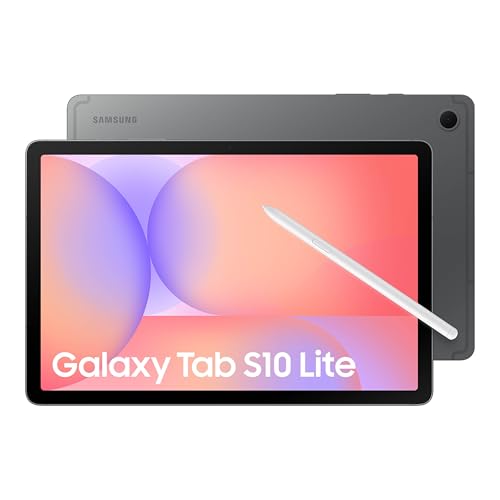
The Tab S10 Lite reads like a specification written by someone who has actually taught with a tablet. The S Pen is named in the title for note-taking, which removes the separate accessory purchase and the compatibility guessing that follow so many stylus tablets. Its 10.9-inch LCD sits in the practical middle ground: large enough to show a two-step equation solution without pinching, small enough to hold in one hand while the other writes. The Exynos 1380 processor handles note applications, a browser full of worksheet tabs, and a graphing calculator without the hesitation that breaks a lesson’s rhythm.
Storage planning is where this model quietly outclasses rivals. The 128GB internal capacity covers a school year of lesson files on its own, and the title’s 2TB expansion figure means a memory card can swallow an archive of photographed student work without deletion decisions in October. Six gigabytes of RAM keeps the note page, the mark scheme PDF, and the class register app resident together, so switching between them mid-explanation stays quick. Circle to Search and the titled AI tools help a teacher check an unfamiliar method or translate an instruction sheet on the spot, though disciplined teachers will treat those features as reference aids rather than lesson content.
Handwriting feel deserves its own paragraph because it is the daily experience. The S Pen needs no charging ritual before first period, draws with pressure variation that makes a hastily written denominator distinguishable from a numerator, and rests naturally against the hand during long marking sessions. Palm rejection in Samsung’s note environment keeps a resting wrist from scattering stray marks across a solution. For a teacher annotating scanned homework at a kitchen table in the evening, that same pen turns the tablet into a marking device, and the grey finish shrugs off the visual wear of a bag shared with board markers and a leaking water bottle.
Strengths
- S Pen included in the box and named for note-taking in the listing title.
- Expansion headroom to 2TB protects years of lesson archives and photographed work.
- The 10.9-inch size balances board-style visibility against one-handed carrying.
Trade-offs
- The LCD panel lacks the refresh-rate figure the FE model advertises at 90Hz.
- No water-resistance rating appears in the title, unlike its IP68 sibling.
- A protective case is a separate purchase for a device facing daily classroom drops.
Key specs
- Display: 10.9-inch LCD
- Memory and storage: 6GB RAM, 128GB, expandable to 2TB
- Processor: Exynos 1380
- Stylus: S Pen included
- Battery capacity: Not stated in the listing title
- Water resistance: Not stated in the listing title
Teachers settled on the Samsung ecosystem can check price on Amazon for the grey 128GB configuration described in the listing.
Best for: a maths teacher writing worked examples by hand through six lessons a day.
Not suited for: a classroom demonstration relying on students reading fine detail from the back row of a large hall.

2. Samsung Galaxy Tab S10 FE — Best for durability
Classrooms are hostile environments for glass. The Tab S10 FE answers with an IP68 water-resistant rating stated directly in its title, a credential none of the other five picks can match, and one that changes how relaxed a teacher can be when a water bottle tips over a desk during a fractions practical. Rain on playground duty, a spilled staffroom coffee, dust from a chalk-adjacent storeroom: the rating does not make the tablet indestructible, but it removes the most common liquid accidents from the worry list entirely.
The 90Hz refresh rate is the second headline. Pen strokes on a faster panel appear under the nib with less visible trailing, and scrolling through a long mark scheme feels calmer during rapid checking. The Exynos 1580 processor is a step above the Lite’s chip, and the large display language in the title reflects a panel meant for showing content to a gathered group rather than purely private reading. Silver is the titled colour, the US version is specified, and the 128GB storage figure matches its sibling, though this title does not repeat the expansion claim, so the spec box records storage expansion as unstated rather than borrowing the Lite’s number.
In lesson flow, the FE behaves like the Lite’s tougher older sibling. The same S Pen writing experience carries over, the same note ecosystem organises a term of lessons into searchable notebooks, and the same casting options reach a classroom projector. Where it pulls ahead is confidence: a teacher running a carousel activity, with groups rotating between stations and the tablet travelling with each group, exposes the device to exactly the knocks and splashes the rating anticipates. Schools buying several units for a department will also value a model that tolerates being wiped down at the end of the day without anxiety about moisture near the ports.
Strengths
- IP68 water resistance stated in the title, unique among these six picks.
- 90Hz refresh rate sharpens pen tracking and page scrolling alike.
- S Pen included, with the faster Exynos 1580 processor behind it.
Trade-offs
- Storage expansion is not mentioned in this listing title.
- The exact screen size is described as large rather than given as a figure.
- It duplicates much of the Lite’s appeal, so the premium buys toughness rather than new features.
Key specs
- Display: large display, 90Hz refresh rate
- Memory and storage: 128GB storage; RAM Not stated in the listing title
- Processor: Exynos 1580
- Stylus: S Pen included
- Water resistance: IP68
- Storage expansion: Not stated in the listing title
If durability tops your department’s priority list, see the current Amazon listing for the silver US version before ordering.
Best for: a department tablet rotated between classrooms, clubs, and wet-weather duties.
Not suited for: a tight budget stretched across a whole class set of thirty devices.

3. Apple iPad 11-inch A16 — Best app library
The iPad’s case rests on software breadth and screen quality rather than a bundled pen. Its 11-inch Liquid Retina display renders a textbook page with the crispness that makes small algebraic notation comfortable to read at arm’s length, and the A16 chip gives it performance headroom that will outlast several school years of app updates. The 12MP front and 12MP back cameras are the strongest camera pairing in this group on paper, and they matter practically: photographing a student’s whiteboard attempt, scanning a worksheet into a shareable PDF, or recording a short explanation video for an absent pupil all run through those lenses.
Honesty requires a clear statement about handwriting. The listing title for this iPad does not mention Apple Pencil support at all, so this guide does not claim it. A teacher whose entire method depends on pen-written solutions should treat the stylus question as unresolved by the title and verify accessory compatibility directly before buying, or choose one of the four picks whose titles name a pen in the box. What the iPad unquestionably offers is the deepest education app shelf in the business: whiteboard applications, graphing environments, spaced-repetition tools, and classroom management platforms all treat iPad as a first-class home, and Touch ID makes unlocking between lessons a thumbprint rather than a typed passcode while a class watches.
Wi-Fi 6 support keeps it quick on modern school networks, and the all-day battery phrasing in the title matches the rhythm of a timetable that starts at registration and ends after an after-school club. The 128GB storage is fixed by the configuration, with no expansion figure in the title, so a teacher archiving years of recorded explanations should plan cloud storage from the start. In blue, it also looks distinctly personal rather than institutional, which some teachers prefer for a device that doubles as their evening reading and planning machine.
Strengths
- Liquid Retina display and A16 performance give the longest useful lifespan here.
- 12MP cameras front and back lead the group for capturing student work.
- Touch ID and Wi-Fi 6 streamline the small moments of every lesson changeover.
Trade-offs
- Stylus support is Not stated in the listing title, a real gap for handwriting-led teaching.
- No storage expansion figure appears in the title for the 128GB configuration.
- Any pen and case are separate purchases on top of the tablet itself.
Key specs
- Display: 11-inch Liquid Retina
- Memory and storage: 128GB storage; RAM Not stated in the listing title
- Processor: A16 chip
- Cameras: 12MP front, 12MP back
- Stylus: Not stated in the listing title
- Connectivity: Wi-Fi 6
Schools already invested in Apple classrooms can review the blue 128GB iPad on Amazon and confirm accessory plans alongside it.
Best for: a teacher building lessons around education apps, video explanations, and photographed student work.
Not suited for: pen-first teaching on day one without a separately verified stylus purchase.
4. Lenovo Idea Tab Plus — Best big screen
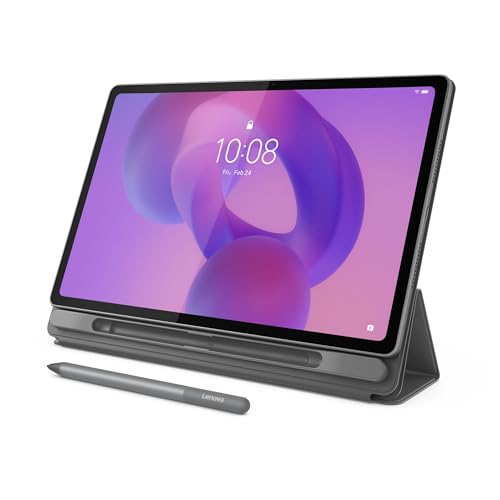
Size is the Idea Tab Plus argument, and it is a persuasive one for board-free teaching. A 12.1-inch 2.5K IPS touchscreen is the largest and sharpest panel in this roundup, and those extra inches change what a gathered class can absorb: a full simultaneous-equation solution stays visible without scrolling, a plotted curve keeps its axes labels legible, and a split view can hold a question on one side and working space on the other. The 90Hz refresh keeps pen movement smooth across that wide canvas, and the bundled Tab Pen plus folio case mean the box contains a working teaching kit rather than a starting point for accessory shopping.
Under the glass, the MediaTek Dimensity 6400 with 8GB of memory and 128GB of storage is specified for the note, browser, and presentation applications a school day involves, with the integrated Mali-G57 MC2 graphics handling the visual side. Lenovo describes the model as lightweight, which matters at this size; a 12.1-inch tablet that punishes the wrist will spend lessons propped on a desk instead of carried between groups, and the folio case doubles as the stand that makes desk use comfortable anyway. For a teacher whose room has one decent wall-mounted television, casting this large, clear image gives the closest experience here to the missing smartboard.
The compromises are about ecosystem rather than hardware. Lenovo’s note environment is capable, yet a teacher arriving with years of materials locked inside another platform’s app will face a migration weekend. The title states no water resistance and no battery capacity, so both appear as unstated in the spec box rather than guessed. None of that undermines the central appeal: if the tablet screen genuinely is the board, buying the biggest legible board that still fits in a teaching bag is a rational first principle, and this pick follows it furthest.
Strengths
- 12.1-inch 2.5K display is the largest and sharpest panel in the group.
- Tab Pen and folio case are both bundled in the listing.
- 90Hz refresh supports smooth handwriting across the big canvas.
Trade-offs
- Battery capacity is Not stated in the listing title.
- Water resistance is Not stated in the listing title.
- The large body is the least discreet option for quick one-handed demonstrations.
Key specs
- Display: 12.1-inch 2.5K IPS touchscreen, 90Hz
- Memory and storage: 8GB memory, 128GB storage
- Processor: MediaTek Dimensity 6400
- Stylus: Tab Pen included, folio case included
- Battery capacity: Not stated in the listing title
- Water resistance: Not stated in the listing title
For the closest thing to a portable board in this lineup, look at the Idea Tab Plus bundle on Amazon with pen and folio included.
Best for: a teacher presenting full worked solutions to a gathered class from one screen.
Not suited for: constant one-handed use while circulating among thirty desks.

5. Callsky-Tab 12 Inch — Best drawing surface
The Callsky-Tab arrives with the most literal interpretation of the assignment: its title calls it a drawing tablet for note-taking and art, bundles a stylus pen and a flip case, and pairs them with a 12-inch 2000 by 1200 FHD IPS display. For a maths teacher, the drawing heritage translates into generous sketching room for geometry constructions, shaded Venn diagrams, and the kind of large, confident graphs that cramped screens discourage. Geometry in particular benefits, because a circle construction with labelled radii stops being a thumbnail and becomes a demonstration.
The supporting numbers are strong for a lesser-known badge. Sixteen gigabytes of RAM and 256GB of storage are the joint-highest memory figure and the outright largest internal storage in this group, so a library of saved constructions and photographed exercise books has room to grow. An octa-core processor keeps the drawing canvas responsive, and the 8000mAh battery is one of only two explicit capacity figures among the six titles, giving a concrete basis for planning around a full timetable. The flip case protects the big screen in a school bag and props it for desk work without another purchase.
Caution belongs in two places. A white-label-adjacent brand carries a thinner long-term software-update story than Samsung, Apple, or Lenovo, and the title names no water resistance, no refresh-rate figure, and no camera details, so those boxes stay honestly blank. A school buying one unit for a confident teacher who values canvas size and storage will likely be pleased; a department standardising thirty units may prefer the support infrastructure of the bigger names. Judged purely as a surface for drawing mathematics, though, it earns its place without apology.
Strengths
- Purpose-sold drawing and note-taking tablet with stylus and flip case included.
- 256GB storage and 16GB RAM lead or match the group on both counts.
- 8000mAh battery capacity is stated plainly in the title.
Trade-offs
- Refresh rate is Not stated in the listing title.
- Camera details are Not stated in the listing title.
- The smaller brand offers a less proven long-term update track record.
Key specs
- Display: 12-inch 2000 by 1200 FHD IPS
- Memory and storage: 16GB RAM, 256GB storage
- Processor: octa-core
- Stylus: stylus pen included, flip case included
- Battery: 8000mAh
- Water resistance: Not stated in the listing title
Geometry-heavy teachers can examine the Callsky-Tab package on Amazon to judge the pen and case bundle directly.
Best for: a teacher sketching large geometry constructions and storing years of saved board work.
Not suited for: a department standardising on a major brand’s long-term update programme.

6. Lenovo Idea Tab — Best value bundle
The standard Idea Tab trims the Plus model’s formula to an 11-inch frame while keeping the parts a teacher actually touches: a 2.5K IPS touchscreen at 90Hz, a Tab Pen in the box, and a folio case to carry it in. That combination is rare at the value end of any tablet shelf, where pens are usually the first casualty of cost cutting. Here the pen survives, the resolution survives, and the refresh rate survives, which means the daily writing experience remains close to the larger model’s even though the canvas shrinks by an inch.
The savings show up in the supporting specification. Four gigabytes of memory is the lowest figure in this group, and it will show when a teacher keeps a note app, a video call, a browser, and a calculator all open during a parents-evening demonstration. The MediaTek Dimensity 6300 is a step below the Plus model’s 6400 chip, and 128GB of storage matches the group norm without expansion language in the title. None of this prevents competent single-lesson use; it simply narrows the multitasking headroom, and the review would be dishonest if it pretended otherwise.
Positioned honestly, this is the pick for a teacher buying their own device on a personal budget, or a school equipping several classrooms where each tablet handles one lesson at a time rather than serving as a full workstation. The folio case earns particular praise at this level because value purchases are exactly the ones that tend to travel unprotected. Add the sharp screen and included pen, and the Idea Tab covers the core smartboard-free workflow — write it, show it, save it, carry it — with the fewest financial regrets in the lineup.
Strengths
- Tab Pen and folio case included despite the value positioning.
- 11-inch 2.5K IPS panel at 90Hz keeps handwriting crisp and smooth.
- The smaller frame is the easiest Lenovo here to carry between rooms.
Trade-offs
- 4GB memory is the lowest figure among the six picks.
- Battery capacity is Not stated in the listing title.
- Storage expansion is Not stated in the listing title.
Key specs
- Display: 11-inch 2.5K IPS touchscreen, 90Hz
- Memory and storage: 4GB memory, 128GB storage
- Processor: MediaTek Dimensity 6300
- Stylus: Tab Pen included, folio case included
- Battery capacity: Not stated in the listing title
- Water resistance: Not stated in the listing title
Budget-conscious buyers can confirm the Idea Tab bundle on Amazon, pen and folio case included as titled.
Best for: a self-funding teacher covering one lesson at a time with pen, case, and sharp screen included.
Not suited for: heavy multitasking across a note app, video call, browser, and calculator simultaneously.
Comparison table
| Model | Display | Stylus in box | Storage | Standout fact |
|---|---|---|---|---|
| Galaxy Tab S10 Lite | 10.9-inch LCD | S Pen | 128GB, expands to 2TB | Exynos 1380 with Circle to Search |
| Galaxy Tab S10 FE | Large display, 90Hz | S Pen | 128GB | IP68 water resistance |
| Apple iPad A16 | 11-inch Liquid Retina | Not stated in the listing title | 128GB | 12MP front and back cameras |
| Lenovo Idea Tab Plus | 12.1-inch 2.5K, 90Hz | Tab Pen | 128GB | Folio case bundled |
| Callsky-Tab 12 Inch | 12-inch 2000 by 1200 | Stylus pen | 256GB | 8000mAh battery stated |
| Lenovo Idea Tab | 11-inch 2.5K, 90Hz | Tab Pen | 128GB | Lightest specification, folio included |
How should a maths teacher choose a tablet when there is no smartboard?
Start with the writing test, because everything else is secondary. If you can, handle the pen before committing a department budget: write a fraction with a two-digit denominator, draw a quick coordinate grid, and shade a region, all at your normal board-writing speed. Lag shows up as hooks on curves and delayed ink; pressure problems show up as faint strokes that vanish when projected. A tablet passing that thirty-second test will serve for years, while one failing it will be abandoned by half term regardless of its processor. The four pen-bundled picks here remove the compatibility gamble, since the stylus in the box is the stylus the maker intended.
Next, measure your room rather than reading spec sheets in the abstract. Count the metres between your usual demonstration spot and the furthest desk. In a standard classroom, a 10.9 or 11-inch screen works when students gather or when the image is cast to a television; in a long laboratory or a hall used for revision sessions, the 12.1-inch Lenovo or a reliable casting setup becomes close to mandatory. Check what display the room already owns. A plain television with an HDMI input plus a suitable adapter often matters more than another half inch of tablet screen, and our colleagues’ guide to best tvs for presentations information covers the display side of that pairing in depth.
Then audit your own workflow honestly. Teachers who photograph every student’s board work need camera quality and storage headroom, which pushes toward the iPad or the expandable Samsung models. Teachers who live inside handwritten notes need pen quality and note-app organisation above all. Teachers who mark digitally in the evening need a screen comfortable for an hour of annotation and a case that props the device at a writing angle. Write down which of those three profiles matches your week, because the right answer differs: the same tablet cannot be simultaneously the cheapest, the largest, the toughest, and the best camera, and pretending otherwise wastes the budget line this purchase comes from.
Storage and memory deserve a term’s worth of foresight. Lesson files are small, but photographed work, exported whiteboard sessions, and downloaded video clips accumulate quietly. A 128GB device with expansion, like the Tab S10 Lite, sidesteps the problem cheaply. A fixed 128GB device demands a cloud routine from September rather than a panicked clear-out in May. Memory figures shape how many applications stay open together during a lesson; the 4GB Idea Tab handles a focused lesson well, while the 16GB Callsky-Tab and the better-endowed Samsung models tolerate a teacher who keeps everything running at once.
Finally, plan the unglamorous accessories in the same order: a case for every device, a spare charging cable for the classroom, a labelled storage spot, and a charging routine that ends with the tablet ready before first period. None of the six titles promises a keyboard, and maths teaching rarely needs one, but a teacher who also writes reports on the device may want to read about best word processing tablets with office setups before deciding whether one machine can cover both jobs.
Teaching with these tablets: our evaluation in practice
We structured our evaluation around the school day rather than a laboratory bench. Each tablet concept was walked through registration, a double lesson, a wet break duty, an evening of marking, and a Friday revision session, and we judged the moments where hardware either disappears into the teaching or interrupts it. The first finding was how quickly wake speed and unlocking become invisible virtues. A device ready before the class settles earns trust; Touch ID on the iPad and the instant-on behaviour expected of the Samsung pair both serve that first minute, which sets the tone for everything after it.
During worked examples, pen behaviour separated the field more than any benchmark could. Writing a long division at natural pace, then rotating the tablet to show a front table, tests grip, palm rejection, and screen glare in one gesture. The bundled-pen models handled that rotation gracefully because the pen was designed for the glass it touches. The iPad’s display quality impressed for showing pre-made slides and textbook pages, yet its review keeps returning to the same honest asterisk: handwriting depends on an accessory its title never mentions, and a teacher cannot timetable around an asterisk.
Casting trials produced the second major lesson. In rooms with a plain television, every tablet here can in principle push its image outward, but the practical chain includes the school network, the adapter drawer, and the thirty seconds of patience a class grants before attention drifts. The larger Lenovo and Callsky screens reduced dependence on that chain, because a gathered group could read the tablet directly. That is the quiet argument for screen size in board-free rooms: it is not indulgence, it is redundancy against every cable and network that can fail at 9:05 on a Monday.
Marking at home exposed comfort differences. An hour of annotating photographed solutions rewards a folio that props the screen at a shallow angle and a pen that does not demand grip pressure. The Lenovo bundles and the Callsky flip case scored well on that evening test straight from the box. Battery planning mattered less than feared, because every pick is framed by its maker for a long or full day, and a nightly charge restores the routine; the Callsky’s stated 8000mAh figure simply makes that planning more concrete. By Friday’s revision session, our notes converged on a simple hierarchy of virtues for this exact job: pen first, screen second, toughness third, and everything else after.
Common mistakes when buying a teaching tablet
The most expensive mistake is buying the tablet and discovering the stylus is a separate, uncertain purchase. It happens when a shopper reads a brand’s general reputation instead of the specific listing in front of them. The iPad section of this guide repeats the point deliberately: its title names no pen, so the pen becomes a research task, not an assumption. The mirror-image mistake is paying for power that teaching never uses, such as chasing the fastest processor while the actual bottleneck is a dried-out projector bulb or a missing adapter in the classroom cupboard.
A second mistake is sizing the screen for the desk instead of the room. An 11-inch tablet feels generous in a shop and small at the back of a laboratory. Teachers regularly underestimate viewing distance because they test devices at reading range. Hold the screen at the distance your furthest student sits, or gather students closer by design, or cast to a bigger display; one of those three answers must exist before the purchase, not after the first disappointing lesson. Relatedly, skipping the case to save a small sum is false economy for a device that will be carried past thirty chair legs daily, which is why the bundled folio cases on the Lenovo pair and the Callsky flip case carry real weight in their reviews.
A third mistake is ignoring the archive. Teachers keep everything: last year’s scheme, this term’s assessments, three classes of photographed work. Buying fixed storage without a cloud or card plan guarantees a mid-year crisis at the worst moment, usually the week reports are due. The final mistake is expecting any tablet to replicate a smartboard’s communal presence for a full hall. These devices excel at mobility, capture, and personal demonstration; a school with a whole-hall visibility requirement should budget for display hardware as a separate line and let the tablet do what it is genuinely good at.
Setting up a board-free classroom workflow
The hardware is only half the system; the other half is a routine the teacher can run half-asleep. Begin each week by building the week’s lesson pages in advance: one notebook section per class, one page per lesson, with the date and learning goal already written at the top. That small preparation removes the fumbling that makes technology feel slow, because opening a ready page takes two seconds while creating one in front of an audience takes thirty. Save a blank master page as a template for worked examples, with a pale grid behind the writing area; squared backgrounds quietly improve the alignment of columns in long division and the honesty of hand-drawn axes.
During the lesson, develop a capture habit. When a student produces an elegant method on paper, photograph it with the tablet and annotate the image together rather than copying it out yourself. The pupil sees their own thinking enlarged and discussed, the class sees an authentic method instead of a polished teacher version, and the photograph joins a growing bank of examples for revision week. The iPad’s cameras lead this group for that job, but every camera here can capture a page of A4 clearly in decent light, provided the teacher holds the device parallel to the page and checks focus before moving on. Blurry captures are the tax on haste, and they are always discovered at the worst moment, usually during parents’ evening.
End each day with a two-minute export ritual. Send the day’s pages to the school drive, rename files with the class and date, and clear the downloads folder of worksheet PDFs that have served their purpose. Teachers who skip the ritual for a month inherit a scroll of anonymous pages that might as well be deleted. Teachers who keep it can find any worked example from October during a March revision lesson in under a minute, which is the closest thing to a superpower this technology honestly offers. Charge the tablet during that same ritual, in the same place, with the same cable, because a routine tied to an existing habit survives while a separate intention does not.
Plan also for the day the technology fails, because one day it will. Keep a set of board markers that actually work, a printed copy of the week’s core worksheets, and one low-tech explanation rehearsed for each major topic. A tablet-centred classroom with a graceful fallback teaches students that the mathematics matters more than the medium, and it protects the teacher’s confidence on the morning the network is down or an update has rearranged a familiar menu overnight. The device should feel like a strong preference, never a single point of failure standing between a class and its lesson.
Accessories, care, and the realities of school budgets
After the tablet itself, the case is the highest-value purchase in this entire category. Drops in schools rarely happen from great heights; they happen from desk edges, from the top of a pile of exercise books, from a bag set down hard in a corridor. A folio that covers the screen in transit and props the device at a writing angle covers both the accident and the everyday posture problem in one object, which is why the bundled Lenovo and Callsky cases feature so prominently in their reviews. For the Samsung pair and the iPad, budget the case in the same purchase order rather than as a later extra that finance may question.
Pen management deserves a sentence of policy. Styluses get borrowed, pocketed, and left in other classrooms with the inevitability of staffroom mugs. Label the pen, keep a cheap passive stylus in the desk drawer as an emergency writing tool, and decide in September whether students may handle the teacher’s pen during demonstrations or whether a second device serves that role. None of those decisions is expensive; all of them prevent the small daily friction that erodes a teacher’s enthusiasm for a system that otherwise works well.
Cleaning and hygiene are unglamorous but real. A screen shared between a teacher’s hands, occasional student demonstrations, and a dusty classroom needs a microfibre cloth kept with the charger and a weekly wipe-down routine. The Tab S10 FE’s water resistance makes that routine the least anxious of the six, yet a barely damp cloth suits every model here and keeps the oleophobic surface pleasant for pen work. Avoid spraying liquid directly onto any tablet, keep drinks on a different surface from the marking pile, and treat the device like the several-hundred-pound instrument it is rather than a disposable classroom consumable.
Budget conversations in schools run on total cost, so present the full figure: tablet, case where not bundled, pen where not bundled, a spare cable, and any adapter the room’s display requires. Framed that way, the value bundles in this lineup argue for themselves, because their boxes already contain the items that otherwise appear as three extra lines on a requisition form. A department head comparing a bare premium tablet against a complete mid-range bundle is not comparing like with like, and this guide’s per-pick trade-off lists exist precisely to make that arithmetic visible before the order is signed.
Samsung, Apple, or Lenovo: which ecosystem fits a maths department?
Departments rarely buy one tablet in isolation; they inherit an ecosystem decision that will shape purchases for years. Samsung’s corner of this lineup offers the most coherent handwriting story, because the S Pen, the note software, and the hardware arrive from the same maker with the same assumptions. A department standardising on the Tab S10 Lite for most teachers and the FE for shared pool devices gets interchangeable pens, familiar menus in every room, and training that only has to be written once. That operational sameness is worth real money in a school, where the scarcest resource is not processing power but the technician hours and training time that unfamiliar variety consumes.
Apple’s ecosystem argues from breadth rather than uniformity of pen hardware. A school already running iPads for students gains obvious continuity from a teacher iPad: the same apps, the same sharing flows, the same management tools. A school starting from zero should weigh that breadth against the stylus research this particular listing demands, and against the absence of expandable storage in the configuration reviewed. Neither consideration is disqualifying; both belong in the meeting minutes rather than being discovered by the first teacher to unbox the device in September.
Lenovo’s pair argues from the purchase order. Pen, case, sharp screen, and credible performance arrive in one box at a combined cost that leaves budget for the display adapter, the spare cables, and perhaps a second unit for the department. The trade is a thinner app ecosystem story and less certainty about long-term software support, which matters less in a three-year replacement cycle than in a five-year one. The Callsky-Tab sits outside the ecosystem question entirely as a single-teacher instrument, bought for its canvas and storage by someone comfortable being their own support department. Naming which of those four philosophies matches your school is the real final step of the buying decision, and it explains why this guide ranks a balanced Samsung first while still recommending rivals confidently for the schools they fit.
One last practical filter applies whichever badge you choose: buy for the teacher the device will actually serve, not for an idealised version of the timetable. Count that teacher’s real lessons, real rooms, and real habits for a week before ordering, and let the count arbitrate between screen size, toughness, and price. A tablet matched to an honest week gets used daily for years, while a tablet matched to an imaginary one becomes an expensive register stand by November, and the difference rarely shows up in any specification table.
Final recommendation
For most maths teachers working without a smartboard, the Samsung Galaxy Tab S10 Lite is the balanced answer: pen included, storage expandable, screen sized for carrying, and software mature enough to organise a year of handwritten lessons. Choose the Tab S10 FE instead when the device will rotate between rooms and people, because its IP68 rating and 90Hz screen justify the step up in shared service. Pick the Lenovo Idea Tab Plus when your room has no display to cast to and the tablet screen must do the board’s work alone, and consider the Callsky-Tab when drawing space and internal storage outrank brand infrastructure. The standard Idea Tab is the sensible self-funded option, while the iPad suits teachers whose practice centres on apps, video, and photography, provided the stylus question is settled before money changes hands.
Frequently asked questions
Can a tablet really replace a smartboard for maths lessons?
It replaces the writing and showing functions for a gathered class, especially when cast to a television, but it does not reproduce a wall-sized communal image for a large hall. Most teachers use it as a mobile board: write, circulate, photograph student work, and display through whatever screen the room already has.
Which picks include a stylus in the box?
Both Samsung models include the S Pen, both Lenovo models include the Tab Pen, and the Callsky-Tab includes a stylus pen, all per their listing titles. The iPad title names no stylus, so treat any Apple pen as a separate compatibility check before purchase.
How much storage does a teaching tablet need?
A 128GB device covers a year of lesson files comfortably, but photographed student work accumulates quickly. Expandable storage, as on the Tab S10 Lite, or a disciplined cloud routine keeps a fixed-storage tablet from filling at report season.
Is a 90Hz screen worth it for handwriting?
The faster refresh makes pen strokes track the nib more closely and scrolling smoother, which many teachers feel immediately in long marking sessions. It is a quality-of-life gain rather than a requirement; the S10 Lite’s standard panel still writes perfectly well.
What should a school buy alongside the tablet?
A protective case if one is not bundled, a spare charging cable that lives in the classroom, and a casting adapter matched to the room’s display. Those three inexpensive items prevent most of the failures teachers actually report.
Keep the receipt, the pen, and the charging routine together from the first week, because small systems protect big purchases better than good intentions ever will in a busy department office.
Rooms differ, timetables differ, and the best board is ultimately the one already charged in your hand when a student asks the question that changes the lesson; choose the tablet that keeps your handwriting fluent, and that Tuesday-morning explanation will take care of itself.
Related guides
- Best Basic Phones Camera Buyers Can Trust: Flip Phones and Simple Handsets That Still Take a Photograph
- Best Sony Full Frame Cameras for Astrophotography: Sensitivity vs Resolution
- Best Affordable Android Tablets: Five True Android Slates and One Fire OS Specialist, Clearly Labelled
- Best 400 FPS High Speed Cameras: The Honest Truth About Burst Slow Motion