What's inside
- Key Takeaways
- Quick Picks
- How Did We Choose the Best SD Cards for DSLR Professional Bodies?
- UHS-I or UHS-II: Which Bus Does Your DSLR Body Actually Have?
- What Do Read Speed, Write Speed and V Ratings Each Govern?
- How Much Capacity Does a Professional Day Really Need?
- What Should You Check Before Trusting a Card on Paid Work?
- How Do Heat, Handling and Storage Age a Working Card?
- How Do the Six Cards Compare Side by Side?
- How Should a Professional Format, Rotate and Retire Cards?
- How Should Cards Travel on Location and Assignment Work?
- What Mistakes Do Experienced Photographers Still Make With Cards?
- Final Recommendation
- Frequently Asked Questions
- Related Guides
As an Amazon Associate I earn from qualifying purchases. This post may contain affiliate links at no extra cost to you.
gizmoverdict.com is reader-supported. When you buy through links on our site, we may earn an affiliate commission.
Where to buy: Each card below links to its own verified Amazon listing, and every speed class, bus type and capacity quoted in this guide comes from that listing’s title, which you can read at the top of the listing page before paying. Where a title stays silent about a figure, the spec box says so plainly instead of filling the gap with a guess.
The best sd cards for dslr professional work are not chosen the way cards for a family compact are chosen. A professional DSLR body punishes a slow card in two separate places: inside the camera, where a shallow buffer fills during a burst and the photographer stands waiting while frames clear, and at the desk afterwards, where a full card of raw files turns an evening edit into a long import. The six cards here split along the fault line that decides both experiences, the UHS bus. Three are UHS-II cards built for bodies with a second row of contacts in the slot; three are UHS-I cards for the far larger installed base of DSLRs whose slots never had that second row.
That split matters more than any headline number on a packet. A UHS-II card in a UHS-I body runs at UHS-I speeds, because the extra contacts have nothing to meet. A UHS-I card in a flagship body caps the burst clearing and the video bitrates the body was bought for. So this guide names the bus in every pick’s title line, separates the two families in the comparison table, and treats read speed, write behaviour and video speed class as three different questions rather than one blended score.
Capacity is the quieter decision. All six picks sit at 128GB or 256GB, sizes that hold a long wedding day or a full sports assignment in raw format without forcing a mid-event swap, yet stay small enough that losing one card does not lose a whole week. Professionals working to a deadline will recognise the pattern: two slots, cards rotated in pairs, nothing carried longer than it must be.
There is a final framing worth stating before the picks themselves. A memory card is the one component of a professional kit that holds irreplaceable material and costs the least, and that asymmetry should drive every decision in this guide. Lenses can be hired, bodies can be borrowed, lights can be improvised; the frames from a ceremony, a final or a once-a-decade wildlife encounter exist on exactly one piece of plastic until the import completes. Cards are therefore bought the way pilots think about fuel: with margin, in duplicate, and never as the place to save money.
Key Takeaways
- The UHS bus decides more than the brand does: UHS-II cards only deliver their speed in bodies whose slots carry the second contact row.
- Read speed shortens the import at the desk; sustained write behaviour decides how a burst feels inside the camera.
- V90, where a listing title states it, is the video guarantee tier for high-bitrate recording; titles that omit a V rating get no rating invented for them here.
- Two of the six picks are 256GB cards, the rest 128GB, a deliberate spread for single-slot and dual-slot working patterns.
- The Sony TOUGH-G pick trades a conventional shell for a sealed, ribbed design aimed at cards that live in jacket pockets and muddy fields.
- Match the card family to the body first, then argue about capacity; the reverse order wastes money in both directions.
Quick Picks
| Pick | Badge | Why it earns its place |
|---|---|---|
| SanDisk 128GB Extreme PRO UHS-I | Best UHS-I all-rounder | A 250MB/s read ceiling on the bus most DSLR bodies actually have, from the line working photographers already trust. |
| SanDisk 128GB Extreme PRO UHS-II | Fastest SanDisk here | The 300MB/s UHS-II sibling for bodies with the second contact row and shooters tired of waiting on imports. |
| Lexar 256GB 2000x | Best for 8K and V90 video | The only pick whose title pairs 256GB with a stated V90 rating and an 8K claim. |
| Sony 128GB TOUGH-G | Toughest build | A sealed TOUGH shell with stated read and write ceilings of 300MB/s and 299MB/s for punishing locations. |
| ProGrade Digital 128GB Iridium V90 | Pro workflow pick | A V90 UHS-II card from a maker that sells to working media teams rather than the general card wall. |
| Kingston 256GB Canvas React Plus | Big-capacity alternative | Doubles the room of the 128GB cards for long assignments where swapping mid-event is not an option. |
How Did We Choose the Best SD Cards for DSLR Professional Bodies?
The first filter was the bus, applied strictly from listing titles. A card only entered the UHS-II group when its title said UHS-II outright, and only entered the UHS-I group on the same evidence. That sounds pedantic until you remember how many card packets shout a read speed in huge type and whisper the bus in small print; a professional buying at midnight before a flight deserves the split made honestly, so it is made from the one text both buyer and seller can see.
The second filter was the working photographer’s calendar rather than the benchmark chart. Burst depth, buffer clearing and import time decide whether a card feels professional across a season; a card that wins a synthetic test and then throttles during a long raw burst fails the real assignment. Where a title states a video class, that class is reported. Where it does not, the pick is judged on bus, capacity and maker pedigree, and the missing figure is flagged in its spec box as something to confirm in the maker’s documentation.
The third filter was range shape. Six near-identical cards would make a tidy table and a useless guide, so the set deliberately spans two buses, two capacities, a toughness-led design, and makers with different service networks. A wedding shooter in a single-slot body, a sports shooter in a flagship, and a hybrid shooter recording serious video all needed a defensible answer inside the same six.
A fourth consideration ran underneath the other three: what happens after the purchase. Cards are consumables with long lives, so the maker’s warranty culture, the ease of finding an identical replacement mid-season, and the clarity of the maker’s own documentation all counted. That is one reason the spec boxes in this guide are so insistent about which figures a title states and which it leaves to documentation — a maker whose paperwork is easy to reach and easy to read is a maker a professional can verify quickly at midnight, and verification speed is a working feature, not a clerical nicety.
UHS-I or UHS-II: Which Bus Does Your DSLR Body Actually Have?
Look inside the card slot before you look at any packet. A UHS-II slot shows two rows of contacts; a UHS-I slot shows one. That physical fact, not the age or price of the body, settles which family of cards can run at full pace. Many respected DSLRs, including long-serving full-frame and APS-C bodies still earning money every weekend, have UHS-I slots only, and in those bodies the fastest card on this page performs exactly like its UHS-I siblings.
Where the second row exists, the difference is not subtle. UHS-II roughly triples the bus ceiling, and the benefit shows up in the two places professionals feel time: the buffer of a burst-heavy body empties sooner, so the next sequence starts sooner, and a 128GB card of raw files lands on the workstation in a fraction of the UHS-I import time. Paired with a UHS-II reader, the desk half of the working day shrinks in a way that compounds across a season of assignments.
The honest complication is price per gigabyte, which climbs steeply on UHS-II. The rational pattern for a mixed kit is asymmetric: UHS-II cards in the flagship body that supports them, UHS-I cards in the second body and for overflow, and no guilt about the arrangement. Cards outlive bodies, so a UHS-II purchase also travels forward into the next camera; a UHS-I card bought today remains fully useful in every slot ever made, just never faster than its bus.
One more physical note: UHS-II cards are fully backward compatible. Slipping one into an older body, a laptop slot or a field reader harms nothing; the card simply speaks the slower language. That compatibility is what makes the asymmetric kit workable on a real assignment, where cards get swapped between bodies under time pressure and nobody has the patience to sort them by contact rows in the dark.
What Do Read Speed, Write Speed and V Ratings Each Govern?
Read speed is the number packets print largest, and it governs the least glamorous, most repeated task in professional life: moving finished work off the card. A stated ceiling of 300MB/s against 250MB/s is a real difference across hundreds of gigabytes a month, provided the reader and the computer port keep up. It does nothing for the moment of capture. Photographers seduced by the big number alone have bought fast-reading cards that still stalled their bursts, because capture is governed elsewhere.
Write behaviour governs capture, and it is the figure titles state least often. A burst of raw files is a sustained write, not a spike, and the card that holds its pace through the fortieth frame is worth more than one that sprints through ten and fades. Two picks here state write figures or video classes that speak to sustained behaviour; for the rest, this guide refuses to invent numbers and instead points to the maker’s documentation, where sustained write figures live.
The V rating is the video branch of the same promise: V30, V60 and V90 guarantee a minimum sustained write of 30, 60 or 90 megabytes per second respectively, which is the language high-bitrate video modes speak. A DSLR used for stills alone can ignore the letter entirely. A hybrid shooter recording demanding video to the same card cannot, because a dropped frame in a ceremony or a press conference does not come back. Match the V figure, where stated, to the most demanding mode the body offers, not the mode used on an average Tuesday.
How Much Capacity Does a Professional Day Really Need?
Work backwards from the body, not forwards from the packet. A modern high-resolution DSLR writing raw files produces frames that can run from roughly forty to well over eighty megabytes each once lossless compression choices and resolution are accounted for, and a busy professional day can run to several thousand frames before video is added at all. Multiply your own honest frame count by your own file size — both numbers are sitting in last month’s folders — and the capacity answer stops being a guess. Most stills-led shooters land between the two sizes in this guide; most hybrid shooters land on the larger one and carry the smaller as the spare.
Mirrored recording doubles the arithmetic and halves the effective room, because every frame exists twice by design. That is not waste; it is the price of a backup written at the moment of capture, immune to the card failure, the lost case and the corrupted import that ruin unmirrored days. Professionals shooting irreplaceable events should budget capacity for the mirrored total, then add the margin that a longer-than-planned day always demands. Running out of room at the decisive hour is a planning failure, not bad luck.
There is also a discipline argument for restraint. A 256GB card encourages carrying a whole weekend before offloading, and every hour unoffloaded is an hour in which one small object holds everything. The healthier pattern pairs capacity with rhythm: cards sized to a session or a half-day, offloaded at natural breaks, verified, and only then returned to the case as blanks. Buy the size that fits your rhythm rather than the largest size on the shelf, and the risk profile of the whole kit improves.
Video rewrites the sums entirely. A hybrid day that mixes stills with long clips can consume in an hour what a stills-only day consumes in six, and the consumption is spikier: one interview, one ceremony, one long take. Hybrid shooters should size cards from the video side of the diary, not the stills side, and should treat the 256GB picks in this guide as the starting point rather than the extravagance. The stills will fit into whatever room the video planning leaves; the reverse has never once been true on a real assignment.
What Should You Check Before Trusting a Card on Paid Work?
Run every new card through a shakedown before it earns a place in the working case. Fill it completely in the body it will serve, with the burst patterns and video modes of a real assignment, then import the whole card and spot-check files from the beginning, middle and end. Cards reveal their flaws at capacity and under sustained load, not during a ten-frame test on the kitchen table. A card that hesitates during the shakedown goes back to the seller, not into the bag with fingers crossed.
Buy from channels that stand behind authenticity, because professional-grade cards are among the most counterfeited objects in photography. A fake rarely announces itself with total failure; it announces itself with a capacity smaller than printed, speed that collapses under load, or corruption that arrives months later. Check the card’s reported capacity against its label on first use, register it where the maker offers registration, and keep purchase records with the same care as lens receipts. Warranty handling differs sharply between an authorised purchase and a marketplace gamble.
Finally, label and log. A strip of tape and a number on every card, a simple record of purchase date and rough usage, and a hard case that keeps full and blank cards physically separated turn card management from memory into system. Under the pressure of a real assignment, systems survive and memory does not. The professionals whose card stories end happily are rarely the ones with the fastest plastic; they are the ones whose habits made the plastic almost irrelevant.
How Do Heat, Handling and Storage Age a Working Card?
Flash memory is solid state, which tempts owners into treating cards as indestructible. The silicon is patient; the package around it is not. The shell of a conventional card is two thin halves of plastic, the contacts are exposed metal, and the whole object is routinely carried in pockets, dropped on venue floors, left in hot cars and pushed into slots thousands of times across its life. Most professional card failures are the accumulated result of that handling rather than any drama inside the memory cells, which is why the TOUGH-G pick further down this page exists at all.
Heat works more quietly. A card left on a dashboard through a summer afternoon, or worked hard in a sealed body recording video under stage lighting, runs hot, and sustained heat shortens flash life and can expose marginal cells that behaved perfectly in a cool studio. The practical defences are unglamorous: cards live in a hard case rather than loose in a bag, the case lives out of direct sun, and a card that has baked in a car earns a full shakedown before it carries paid work again. None of this requires buying anything; it requires treating the smallest item in the kit as if the job depends on it, because it does.
Storage after the shoot matters just as much. A card holding the only copy of a day’s work should be treated as an original negative: write-protected where the design allows, kept in its case, and copied with verification rather than dragged across a desktop in a hurry. Once two verified copies exist elsewhere, the card returns to the blank rotation and the cycle begins again. Photographers who build that loop into muscle memory stop having card stories to tell at conferences, which is exactly the outcome the loop is for.

SanDisk 128GB Extreme PRO SD Memory Card, UHS-I — Best UHS-I all-rounder
This is the card the majority of working DSLRs can actually exploit, and it knows it. The listing title states a read ceiling of up to 250MB/s on the UHS-I bus, which is brisk territory for that bus and directly useful at the desk: a full 128GB of raw files comes off the card quickly through a decent reader, and the card never pretends to be something its contacts cannot deliver. In the camera, it serves the long tail of professional bodies whose slots carry a single contact row, which includes plenty of cameras still shooting paid work every weekend of the year.
Its professional case rests on predictability as much as pace. The Extreme PRO name has been the default recommendation in camera bags for years, and that ubiquity carries practical weight: replacements are easy to source in a strange city, behaviour across bodies is well understood, and a card bought this season behaves like the ones already in the case. For a solo shooter standardising a kit, that sameness is a feature money usually cannot buy after the fact.
The ceiling is the bus itself. Put this card in a flagship body with a UHS-II slot and it will run politely at UHS-I pace while the body waits; the burst clearing and high-bitrate video headroom of that body stay locked behind the card. It is also a 128GB card in a guide containing 256GB options, so video-heavy days mean more swaps. Neither point dents its role: it is the correct answer for the largest number of professional bodies, bought with open eyes.
Consider how it behaves across a working week rather than a single test. Monday’s portrait session, Wednesday’s corporate event and Saturday’s wedding all land on the same card model, which means the photographer’s expectations never need recalibrating: the buffer behaviour is known, the import pace is known, the point at which a swap becomes wise is known. That familiarity is a genuine professional asset, because attention spent remembering how a card behaves is attention stolen from the subject in front of the lens. Standardising on this card for every UHS-I body in the bag is a defensible, even elegant, policy.
- Capacity: 128GB
- Bus: UHS-I, per the listing title
- Read speed: Up to 250MB/s, per the listing title
- Video speed class: Not stated in the listing title — verify with SanDisk documentation
- Write speed: Not stated in the listing title — verify with SanDisk documentation
Strengths
- Fastest stated read figure among the UHS-I picks here
- Behaviour in older professional bodies is thoroughly proven
- Easy to replace or match when travelling for work
Trade-offs
- Cannot unlock a UHS-II body’s burst or video headroom
- 128GB fills quickly on high-resolution raw bodies
- Sustained write figure must be confirmed outside the title
Best for: a working DSLR with a UHS-I slot that shoots long stills days and imports nightly
Not suited for: a flagship body with a second contact row waiting to be fed
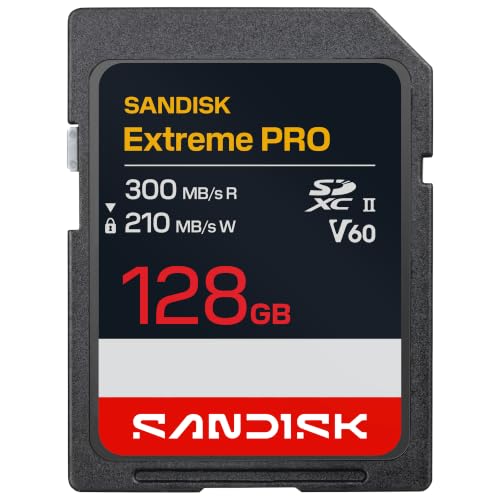
SanDisk 128GB Extreme PRO SD Memory Card, UHS-II — Fastest SanDisk here
The UHS-II sibling takes the same trusted name onto the faster bus, and its title states a read ceiling of up to 300MB/s to prove the point. In a body with the second contact row, that bus change is the single largest card upgrade available: bursts clear with visibly less waiting, the camera returns to ready while the action is still in front of it, and the evening import of a full card shrinks from a chore into a pause. Photographers who shoot sport, wildlife or any subject that arrives in flurries will feel the difference in the first hour.
There is also a workflow argument beyond the camera. A professional day increasingly ends with a same-night delivery, galleries turned around while an event is still news. The import is the one stage of that pipeline fully under the photographer’s control, and a 300MB/s-class card paired with a matching reader compresses it hard. Multiplied across a season of deadlines, the saved minutes become saved evenings.
Discipline is required about where the speed lives, though. Slip this card into a UHS-I body and every advantage evaporates; it becomes an expensive version of its cheaper sibling. The title also leaves the video class and sustained write figure unstated, so a hybrid shooter with demanding video modes should confirm those figures in SanDisk’s documentation before committing a kit’s budget. Bought for the right body, it is the straightforward fast choice; bought for the wrong one, it is a donation.
The reader at the desk completes the circuit, and it deserves a sentence of its own. A UHS-II card imported through an old UHS-I reader delivers only the older bus’s pace, silently erasing the desk half of the upgrade. Professionals moving to this card should budget for a UHS-II reader in the same purchase and treat the pair as one tool. With the chain complete, the card’s stated read ceiling becomes a realistic planning figure for turnaround times quoted to clients, which is where its cost quietly earns itself back across a season.
- Capacity: 128GB
- Bus: UHS-II, as the title prints it
- Read speed: Up to 300MB/s, as the title prints it
- Video speed class: Absent from the listing title — confirm through SanDisk documentation
- Format: Full-size SD, backward compatible with UHS-I slots
Strengths
- Full UHS-II pace for bursts and imports in matching bodies
- Familiar Extreme PRO handling and supply chain
- Travels forward into future UHS-II bodies
Trade-offs
- Every advantage disappears in a single-row slot
- Video class not stated in the title
- Costs more per gigabyte than its UHS-I sibling
Best for: a flagship DSLR with a UHS-II slot shooting bursts against same-night deadlines
Not suited for: an older body that can only ever run it at UHS-I pace

Lexar 256GB 2000x SD Memory Card — Best for 8K and V90 video
Lexar’s 2000x is the most completely specified card in this set, and its title does the talking: 256GB of capacity, a 300MB/s read figure, UHS-II bus, U3 and a stated V90 video class, with 8K named outright. For the hybrid professional whose DSLR or DSLR-style body doubles as a serious video tool, that V90 is the line that matters, because it guarantees a sustained write floor of 90MB/s rather than a peak the card visits briefly. High-bitrate modes stop being a gamble about which card is in the slot.
The capacity deserves equal billing. At 256GB, this is the card that swallows a full day of mixed stills and video without a lunchtime swap, and on a two-slot body a pair of them creates a genuinely capacious working set. Event filmmakers, wedding hybrids and documentary shooters who cannot call a pause in proceedings are the natural owners; the card’s job is to make storage disappear from the day’s list of worries.
Two cautions keep the recommendation honest. A card this large concentrates risk, so the professional habit of offloading at every natural break matters more, not less. And like every UHS-II pick here, it only earns its premium inside a body with the second contact row. Given that body and that workload, though, it is the most self-sufficient single card in the guide.
Think of it as the card for the one-body documentary pattern: a shooter travelling light, far from the office, recording interviews and stills through a long day where the laptop only appears at midnight. The 256GB capacity absorbs the day, the V90 floor keeps the high-bitrate clips honest, and the UHS-II read pace makes the midnight import a short one. In that pattern the card is not a luxury specification; it is the piece that lets the rest of the stripped-down kit stay stripped down.
- Capacity: 256GB
- Bus: UHS-II, per title
- Read speed: 300MB/s, per title
- Video speed class: V90 with U3, per title
- Video headline: 8K named in the title
Strengths
- Stated V90 floor suits the most demanding video modes
- 256GB halves the swapping on mixed stills-and-video days
- Full UHS-II read pace for heavy imports
Trade-offs
- Large capacity concentrates loss if a card goes missing
- Premium pricing per card across a multi-card kit
- Premium wasted in a body without the second contact row
Best for: a hybrid shooter recording high-bitrate video and stills to the same card all day
Not suited for: a stills-only kit that would rather spread work across smaller cards

Sony TOUGH-G Series SDXC UHS-II Card 128GB — Toughest build
Every other card in this guide is built the conventional way, a thin shell around the memory with a write-protect switch and a label. The TOUGH-G abandons that construction entirely: its title carries the TOUGH name because the card is a sealed, ribbed one-piece design built to be bent, dropped and soaked in ways that end ordinary cards. For photographers whose work happens on touchlines in November rain, on construction sites, on boats or anywhere a card gets fumbled with cold gloves, the build is not a gimmick; it is the specification.
The performance figures refuse to play second fiddle to the armour. The title states maximum read of 300MB/s and maximum write of 299MB/s, the only pick here to print a write ceiling at all, alongside a V90 video class, U3 and Class 10 on the UHS-II bus. That combination means the durability argument never asks the photographer to accept a slower card as the price of a tougher one, which is precisely why this card anchors so many professional kits that work outdoors.
Ownership quirks follow from the design. There is no write-protect switch to flip, which removes a failure mode and a convenience in the same stroke. The card’s ribbed shell can feel snug in some readers and older slots, worth a test fit before a big assignment rather than during one. And the sealed construction commands a premium over conventional cards of similar speed. For studio-bound work that premium buys nothing; for field work in bad weather it buys the card’s survival, which is the whole job.
The failure it prevents deserves describing plainly. Conventional cards most often die mechanically: a cracked shell, a snapped write-protect tab lodging in the slot, contacts exposed by a split casing after a drop onto concrete. Each of those deaths takes the day’s frames with it and can take the camera’s slot out of service too. A one-piece sealed card removes that entire family of accidents from the risk register. Expedition, adventure-sports and conflict-adjacent photographers are not paying for toughness as a lifestyle statement; they are paying to delete a column of ways a job can end early.
- Capacity: 128GB
- Bus: UHS-II — the title states it
- Read speed: Max 300MB/s — the title states it
- Write speed: Max 299MB/s — the title states it
- Video speed class: V90, CL10, U3 — the title states them
Strengths
- Sealed one-piece shell shrugs off drops, bends and water
- Only pick here stating both read and write ceilings
- V90 class covers demanding video modes as well as bursts
Trade-offs
- No write-protect switch, by design
- Ribbed shell can fit snugly in some slots and readers
- Premium wasted on gentle studio-only work
Best for: outdoor professionals working with cards exposed to weather, mud and hard floors
Not suited for: a studio kit that never leaves the building and pays for armour it never uses

ProGrade Digital SDXC UHS-II V90 Iridium Memory Card (128GB) — Pro workflow pick
ProGrade Digital sells memory to working media teams rather than to the general electronics wall, and this Iridium card is pitched exactly at that trade: an SDXC UHS-II card with a stated V90 video class at 128GB. The V90 in the title is the substance of the pick. It promises a sustained write floor that high-bitrate video and long burst sequences both depend on, from a maker whose reputation rests on cards behaving identically across a fleet bought for a whole department.
That fleet angle is the real professional argument. Newsrooms, agencies and production companies standardise on one card so that any card from any drawer behaves the same in any body, and ProGrade’s line is built and supported with that buyer in mind, including refresh and health tooling in its wider ecosystem. A solo professional gains the same benefit at smaller scale: buy the card once, learn its behaviour in your bodies, and reorder with confidence that the replacement matches.
The title is terse about everything beyond class and bus, stating neither a read ceiling nor a write ceiling, so both figures belong on the pre-purchase checklist in ProGrade’s own documentation rather than in this guide. The 128GB capacity also sits at the modest end for video-heavy days. Neither point undermines the pick for its intended owner, for whom the guaranteed floor and fleet consistency outrank a headline peak.
There is a quieter benefit to a maker of this size and focus: support that speaks the customer’s language. When a card misbehaves before a major assignment, a specialist maker whose entire business is professional memory tends to answer with recovery guidance and replacement processes designed around deadlines, rather than a consumer script. That difference never appears on a specification table, yet experienced production managers factor it into standardisation decisions alongside the V rating, and they are right to do so.
- Capacity: 128GB
- Bus: UHS-II, stated in the listing title
- Video speed class: V90, stated in the listing title
- Read speed: Not stated in the listing title — verify with ProGrade Digital documentation
- Write ceiling: Not stated in the listing title — verify with ProGrade Digital documentation
Strengths
- Stated V90 sustained-write floor for video and bursts
- Maker focused on professional fleet consistency
- 128GB size suits disciplined rotate-and-offload habits
Trade-offs
- Peak read and write figures absent from the title
- Modest capacity for all-day high-bitrate recording
- Less ubiquitous on local shelves than the big two brands
Best for: a media team or solo pro standardising every body on one V90 UHS-II card
Not suited for: a purchase chasing the largest stated numbers printed on the packet

Kingston 256GB Canvas React Plus SD Card — Big-capacity alternative
Kingston’s Canvas React Plus enters this guide as the capacity play with a serious name behind it: 256GB in a full-size SD card from the React Plus line, Kingston’s tier aimed at professional cameras and high-rate recording. The practical proposition is simple to state. On a long assignment where the card cannot be swapped at leisure — a ceremony, a match, a flight over scenery that will not repeat — doubling the room of the 128GB picks removes one whole category of mid-event anxiety.
The card also suits the second-body pattern common in professional kits. A primary body gets the exotic glass and the exotic card; the backup body, often an older UHS-I-era machine or a loaner, still needs a card with genuine headroom and a maker that stands behind it. Kingston’s long history in flash memory and the React Plus positioning make this a calmer choice for that slot than an unknown label at the same capacity.
Honesty about the title is required: it states the capacity and the line, and nothing about bus or speed class, so this guide claims neither. Before buying, confirm the bus and ratings in Kingston’s documentation and match them to the body the card will serve; the pick’s case rests on capacity and pedigree, and a guaranteed V90 floor, where required, points to the Lexar or ProGrade above instead. Chosen for room rather than records, it does its job without drama.
Its size also changes how a two-card day is planned. Pair one of these in the primary slot with a 128GB card in the second and a mirrored body still finishes most assignments on the first pair, while a stills-only configuration stretches across a multi-day trip with disciplined nightly offloads. Photographers who shoot travel features, festivals or any assignment where the hotel room is the office will recognise the appeal: fewer loose cards in the case, fewer chances to misplace one, and a simpler chain of custody for the work.
- Capacity: 256GB
- Line: Canvas React Plus, stated in the listing title
- Bus: Not stated in the listing title — verify with Kingston documentation
- Video speed class: Not stated in the listing title — verify with Kingston documentation
- Format: Full-size SD card
Strengths
- 256GB removes mid-event swaps on long assignments
- React Plus line is Kingston’s professional-camera tier
- Calm choice for a second or backup body
Trade-offs
- Bus and speed class must be confirmed outside the title
- Large card concentrates a day’s work in one place
- No stated V rating for demanding video modes
Best for: long single-card assignments, with second bodies carrying real headroom in reserve
Not suited for: a hybrid shooter seeking a guaranteed video class from the packet alone
How Do the Six Cards Compare Side by Side?
| Card | Capacity | Bus | Stated read | Stated video class |
|---|---|---|---|---|
| SanDisk Extreme PRO UHS-I | 128GB | UHS-I | Up to 250MB/s | Not stated in title |
| SanDisk Extreme PRO UHS-II | 128GB | UHS-II | Up to 300MB/s | Not stated in title |
| Lexar 2000x | 256GB | UHS-II | 300MB/s | V90 |
| Sony TOUGH-G | 128GB | UHS-II | Max 300MB/s | V90 |
| ProGrade Iridium | 128GB | UHS-II | Not stated in title | V90 |
| Kingston Canvas React Plus | 256GB | Not stated in title | Not stated in title | Not stated in title |
Read the table by bus first and capacity second, which is the order a camera experiences them. The two V90-and-write-stated cards, Lexar and Sony, carry the most complete titles; the Kingston row shows the most blanks because its title is the briefest, not because the card is the weakest. Blanks in this table are an instruction to check documentation, never a verdict smuggled in by silence.
How Should a Professional Format, Rotate and Retire Cards?
Format every card in the body that will shoot it, immediately before the assignment, never on the computer and never in a different camera. In-camera formatting builds the exact file structure that body expects, clears the previous job completely and gives the card a clean allocation table to write against. A card formatted elsewhere usually works; usually is not the standard for paid work, and the thirty seconds the ritual costs is the cheapest insurance in the entire kit bag.
Rotation is the second discipline. Number your cards, use them in order, and treat a full card as exposed film: out of the camera, into a hard case, contacts protected, and never back into a body until its contents exist in two other places. Dual-slot bodies should write mirrored pairs for irreplaceable work such as weddings, accepting the slower card of the pair as the pace-setter. The card is the only copy of the day until the import finishes and verifies, and every handling habit should flow from that fact.
Retirement is the discipline most often skipped. Flash memory wears, and a card that has served several heavy seasons owes you nothing. Watch for the early warnings — a body complaining about card speed it once accepted, an import that needs a second attempt, file errors that follow the card between bodies — and retire at suspicion rather than at failure. Replacing a card on your schedule costs a line in a spreadsheet; replacing one mid-assignment costs the assignment.
How Should Cards Travel on Location and Assignment Work?
Split the risk physically. Full cards and blank cards should never share one case in one bag, because a stolen bag, a soaked rucksack or a case left in a taxi then takes both the finished work and the means to continue. Working professionals split the load without thinking about it: blanks in the camera bag, full cards in a hard case on their person, and at the end of the day one copy of the material leaves the venue by a different route than the photographer wherever the assignment allows it. The habits sound theatrical until the first time a bag disappears; after that they sound like Tuesday.
Airport security and weather deserve a practical word. Modern screening equipment is not a realistic threat to flash memory, and cards pass through checkpoints in the case without ceremony; the genuine travel risks are loss, crushing and water, all of which a rigid, sealed case answers. Mark the case, keep it in hand luggage, and never check the day’s cards into the hold. On multi-day trips, the nightly ritual of import, verification and backup to a second device converts each day’s exposure into a closed chapter, so a disaster on day four cannot reach back and take days one to three with it.
Climate is the last travel variable. Moving cards between air-conditioned interiors and humid exteriors invites condensation on contacts, and cold-soaked cards brought into warm rooms deserve a few minutes in a sealed bag before use. None of this is exotic knowledge; it is the same care given to lenses, applied to the object that actually holds the photographs. A kit that protects its glass and neglects its cards has its priorities exactly backwards.
What Mistakes Do Experienced Photographers Still Make With Cards?
The classic error is buying the packet’s biggest number for a body that cannot use it: a UHS-II card in a UHS-I slot, purchased at triple the price for zero frames of benefit. The second error is the mirror image, feeding a flagship body a bargain card and then blaming the camera for a shallow burst. Both mistakes come from shopping by brand loyalty or by headline instead of by slot, and both are cured by the thirty-second contact-row check described earlier in this guide.
Formatting habits cause quieter losses. Deleting images in-camera to make room fragments the card’s free space and invites the camera to write a once-in-a-lifetime frame into a patchwork; offload and format instead. Mixing cards between a stills body and a video body without reformatting invites directory structures neither machine fully owns. And the oldest mistake of all still claims victims: carrying the day’s only copy in a jeans pocket, in a reader hanging off a laptop, or in a camera left in a car, any of which converts a small accident into a total loss.
A subtler mistake is the mixed-age kit: brand-new cards and five-season veterans shuffled together with no record of which is which, so the oldest card in the case is as likely to draw the wedding as the newest. Age and workload are invisible once the label fades, which is why the numbering habit matters. Retire by the log, not by the look of the thing. The companion error is buying a single huge card instead of several smaller ones to save a little money, then discovering that one card is also a single point of failure, a single object to lose, and a single import standing between the shoot and the backup.
Finally, beware the bargain that arrives without provenance. A professional card priced far below its usual level, from a seller with no history, is a risk transferred directly onto your clients’ material. The savings are measured in small money; the exposure is measured in a reshoot that may be impossible. Buy boringly, from sellers who will still exist when a warranty claim lands, and let the creativity live in the photographs instead of the supply chain.
Final Recommendation
Start from the slot, not the shelf. Bodies with a single contact row should take the SanDisk Extreme PRO UHS-I in multiples and spend the savings on more cards rather than faster ones. Bodies with the second row deserve the bus they were built for: the SanDisk UHS-II for straightforward pace, the Lexar 2000x where video bitrates and capacity dominate, the Sony TOUGH-G where the weather and the ground are enemies, the ProGrade Iridium where a whole kit must behave identically, and the Kingston 256GB where sheer room is the requirement and its ratings are confirmed before purchase.
If the budget forces a sequence rather than a single purchase, spend in this order: first the cards that match the bodies you already own, in pairs; then the reader that lets the fastest of them import at full pace; then capacity upgrades for the assignments that genuinely run long. That sequence keeps every pound spent working from the day it lands, instead of parking money in speed a current body cannot touch. Revisit the kit whenever a body changes, because a new slot quietly rewrites which of these six cards is the correct answer.
Whichever family you choose, buy cards in matched pairs, number them, format them in the body and retire them on suspicion. The card is the smallest, cheapest component in a professional DSLR kit and the only one holding the work itself; when the light is gone and the moment has passed, everything else in the bag can be replaced by Friday, but the frames on the right card are already home.
Frequently Asked Questions
Will a UHS-II card work in my older DSLR?
Yes, safely and without any adapter. UHS-II cards are backward compatible and will run at UHS-I speeds in a single-row slot. You gain nothing in pace, but the card remains ready for a future body that can exploit it.
Is 128GB enough for a full wedding day?
For stills on most bodies, a 128GB card holds thousands of raw frames and covers a long day for many shooters. High-resolution bodies, mirrored dual-slot recording and video coverage all eat capacity faster, which is why the 256GB picks exist in this guide. The safest habit is to rehearse with your own archive: open last season’s largest wedding folder, note its size, and buy for that day plus a margin rather than for an average day that a real wedding has never once resembled.
Does a V90 rating matter if I only shoot stills?
Not directly. The V scale guarantees sustained write for video. For stills, burst behaviour depends on the camera buffer and the card’s sustained write, which a V90 card also tends to serve well, but the letter itself is a video promise.
Why do some spec boxes here say a figure is not stated?
Because the listing title does not print it, and inventing a number would be worse than admitting the gap. The maker’s documentation carries the full specification; check it for the exact figure before a card joins a paid kit.
How long should a professional card stay in service?
There is no universal hour count, because workload varies enormously between a landscape shooter and a sports photographer. Use behaviour as the gauge: the first unexplained slowdown, error or hesitant import is the retirement signal. Logging purchase dates and rotating evenly keeps any single card from ageing far ahead of its partners.
Should both slots in a dual-slot body use identical cards?
For mirrored recording, yes in practice: the slower card sets the pace for the pair, so a mismatched pair wastes the faster card. Matched pairs also simplify numbering, rotation and replacement.
Related Guides
Keep building the kit around the bodies these cards serve: best mirrorless cameras for professional work, best camera bags for working photographers and best portable SSDs for photo backup in the field.


