What's inside
- Key Takeaways
- Quick Picks
- How We Chose These Picks
- Which Machine Matches Your Kind of Wide Work?
- How Do the Six Compare Side by Side?
- Why Does Ink Architecture Matter More Than Width?
- How Should a Designer Proof Wide Work Without Burning the Budget?
- What Mistakes Do Designers Make When Buying Wide?
- How Do Media Choices Change What These Machines Can Do?
- What Does Colour Management Look Like at Wide Format?
- How Should a Studio Handle Editions and Reprints?
- What Does Ownership Cost Beyond Ink and Paper?
- How Do You Brief a Client on What Wide Printing Can Promise?
- When Should a Designer Send Wide Work Out Instead?
- How Should the Studio Be Arranged Around a Wide Machine?
- What Does the First Month With a Wide Printer Teach?
- Which Questions Should You Take to Each Finalist’s Documentation?
- How Does Wide Printing Change a Designer’s Eye?
- Final Recommendation
- Frequently Asked Questions
- Related Guides
As an Amazon Associate I earn from qualifying purchases. This post may contain affiliate links at no extra cost to you.
gizmoverdict.com is reader-supported. When you buy through links on our site, we may earn an affiliate commission.
Where to buy: Order through the Amazon listings linked below, and check the bundle contents line on the listing page before checkout — two of these picks are bundles whose extras differ from the bare machine.
The best wide format printers for graphic designers divide along a line that marketing loves to blur: the difference between printing a picture and printing a plan. A graphic designer’s wide work is overwhelmingly pictorial — posters, proofs, portfolio sheets, exhibition prints — where colour fidelity, tonal gradation and media character decide quality. A technical office’s wide work is linear — CAD drawings, schematics, site plans — where line sharpness, speed and cost per sheet rule. The six machines here split cleanly across that line, and this guide keeps them separated with unusual strictness, because a designer who buys a CAD plotter for photographic work has purchased the wrong excellence.
On the pictorial side stand three machines: Epson’s SureColor P700 and P900 photo printers, carrying the UltraChrome PRO10 ink name in the P700’s listing, and Canon’s PRO 2100, described in its listing as a 24-inch wide fine art printer. On the technical side stand HP’s DesignJet T210 and T650 — the T210’s listing says poster and CAD printing outright, a useful honesty — and Canon’s imagePROGRAF TM-340 at 36 inches, from the line Canon builds for technical and poster production. One hybrid note: poster work lives on both sides of the line, since a bold graphic poster forgives what a photographic print never would, and several of these machines will happily serve a poster workflow. The reviews grade each machine against its own side’s standards.
Widths, as stated in the listings, run from the P700’s 13 inches through the P900’s 17, the 24-inch pair of the PRO 2100 and DesignJet T210, and up to the 36-inch T650 and TM-340. No listing here states resolution, ink channel counts beyond the PRO10 name, or media handling depths — those figures live in manufacturer documentation, and the spec boxes mark them rather than inventing them.
Key Takeaways
- Three picks serve pictorial work — Epson’s P700 and P900 photo printers and Canon’s PRO 2100 fine art machine — and three serve technical and poster production.
- The HP DesignJet T210’s listing names poster and CAD printing directly, the clearest habitat statement in the set.
- Widths stated in listings: 13 and 17 inches for the Epson photo pair, 24 for the PRO 2100 and T210, 36 for the T650 and TM-340.
- The P700’s listing names UltraChrome PRO10 ink — the only ink system identified by name in any title here.
- The DesignJet T650’s listing includes a 2-year onsite warranty, a service signal worth weighing for production desks.
- The P900 listing is a bundle with cables included, so its box contents differ from a bare machine’s.
Quick Picks
| Pick | Badge | Why it is here |
|---|---|---|
| HP DesignJet T210 | Poster and CAD | A 24-inch large-format printer whose listing names poster and CAD work directly. |
| HP DesignJet T650 | 36-inch plotter | The 36-inch DesignJet plotter with a 2-year onsite warranty in its listing. |
| Canon imagePROGRAF TM-340 | 36-inch Canon | Canon’s imagePROGRAF line at 36 inches for technical and poster production. |
| Canon PRO 2100 | Fine art 24-inch | A 24-inch wide fine art printer, per its listing — the pictorial Canon. |
| Epson SureColor P700 | 13-inch photo | Epson’s 13-inch photo printer with UltraChrome PRO10 ink named in the listing. |
| Epson SureColor P900 bundle | 17-inch photo bundle | The 17-inch SureColor photo printer bundled with Ethernet and USB cables. |
How We Chose These Picks
Selection began with the divide itself. A candidate had to declare a side — photo and fine art, or technical and poster — through its listing’s own language or its product line’s established identity, because a guide that mixes the two without labels teaches its readers to buy wrong. All six cleared that bar, three per side, across the widths designers and studios actually cross-shop.
The second filter was professional intent. These are not home photo printers with a wide tray or office machines with a poster mode; each belongs to a line its maker builds for production — SureColor P, imagePROGRAF PRO and TM, DesignJet T. Professional lines bring the things listings rarely state and ownership always feels: media ecosystems, colour tooling, service networks and documentation written for people whose income touches the output.
Evidence discipline closes the method, as across these reviews. Figures in these listings are mostly widths and habitats, and the reviews quote exactly those. Ink architectures, resolutions and media weights are documentation territory, flagged in each spec box — a restraint that matters doubly in this category, where a borrowed specification can send a studio’s entire media budget down the wrong path.
Which Machine Matches Your Kind of Wide Work?

HP DesignJet T210 Large Format 24-inch Poster Printer — Poster and CAD
The T210’s listing is a model of habitat honesty: a large-format 24-inch poster printer, for easy poster and CAD printing. Both halves of a design studio’s non-photographic wide work are named — the poster that must shout across a corridor and the drawing that must read at arm’s length — and the machine is HP’s DesignJet entry point into that world. For a designer whose wide output is presentational rather than photographic — pitch posters, event graphics, plan sets, diagrams at readable scale — this is the set’s most direct answer.
DesignJet’s design philosophy suits the studio corner rather than the print room: these machines are built to live near desks, to be operated by the people who authored the files, and to make large format an everyday verb instead of a service bureau trip. The 24-inch width covers the standard poster and drawing sizes that dominate office-scale production, and HP’s software chain aims at the same accessibility the listing’s word easy promises.
The boundary is photographic ambition. A CAD-and-poster engine renders bold graphics and line work beautifully, but the tonal subtlety of a photographic exhibition print — deep shadow gradation, delicate skin tones — belongs to the photo machines further down this page, whose ink systems exist for exactly that. Buy the T210 for the work its listing names, and it will not disappoint; ask it to be a gallery printer and the disappointment is scheduled at purchase.
- Width: 24-inch large format, stated in the listing
- Habitat: Poster and CAD printing, stated in the listing
- Line: HP DesignJet, stated in the listing
- Ink system detail: Listing title gives no figure — check HP documentation
- Media handling: Absent from the title; HP documentation carries the detail
Strengths
- Clearest habitat statement in the set — poster and CAD, named outright
- 24-inch width covers standard poster and drawing sizes
- DesignJet accessibility suits desk-side studio operation
Trade-offs
- Not a photographic printer — tonal work belongs to the P-series and PRO
- Ink and media specifics require the documentation trip
- Entry tier of the line caps production pace for heavy plan sets
Best for: a studio producing wide work — posters, presentations and CAD output — at 24 inches.
Not suited for: a photographer printing exhibition work with fine tonal demands.

HP DesignJet T650 Large Format 36-inch Plotter Printer — 36-inch plotter
The T650 scales the DesignJet idea to 36 inches and adds the listing detail that production buyers read first: a 2-year onsite warranty is included. Width and warranty together tell the machine’s story. Thirty-six inches is the size of serious plan sets and full-width posters, the output a small architecture or design practice produces weekly, and an onsite warranty is the manufacturer’s acknowledgement that when this machine stops, work stops — the engineer comes to the printer, not the reverse.
As a plotter in the DesignJet line, the T650’s excellence is the technical virtues: crisp line work, honest colour for diagrams and renders, and throughput aimed at sets rather than singles. Design and architecture studios straddle this machine’s world — their wide work is drawings first, with posters and presentation boards riding along — and for that mix the T650 is the set’s natural centre of gravity. Its listing calls it a plotter without apology, and the review follows the listing’s lead.
Photographic work remains the neighbouring country’s language. A T650 will print a photograph; it will not print it with the ink architecture a SureColor P or imagePROGRAF PRO brings, and a studio whose reputation rides on photographic output should read the warranty’s comfort as a production feature, not a colour one. Confirm media handling and ink configuration in HP’s documentation, where the plotter’s production figures are published in full.
- Width: 36-inch large format, stated in the listing
- Type: Plotter printer, stated in the listing
- Warranty: 2-year onsite warranty support included, stated in the listing
- Line: HP DesignJet, stated in the listing
- Ink configuration: The title is silent on this — consult HP documentation
Strengths
- 36-inch width serves full plan sets and wide posters
- Onsite warranty signals production-grade service expectations
- DesignJet plotter virtues — line work and set throughput — at studio scale
Trade-offs
- Photographic tonal work belongs to the photo lines, not this plotter
- 36-inch footprint and media costs exceed casual needs
- Production figures live in documentation, not the listing
Best for: a design or architecture practice producing plan sets and wide posters with service cover included.
Not suited for: a fine-art workflow where ink architecture for photography decides quality.

Canon imagePROGRAF TM-340 36-inch — 36-inch Canon
Canon’s TM-340 listing is the tersest here — a line name, a model, a width — and the line name does the talking. imagePROGRAF is Canon’s large-format family, and the TM branch of it is the technical and poster side: machines built for CAD, GIS, in-house posters and production graphics where speed and sheet economy share the throne. At a stated 36 inches, the TM-340 stands opposite the T650 as the Canon expression of the same habitat, and studios standardised on Canon will not need the comparison argued further.
The interesting cross-shop is against its own sibling further down this page, the PRO 2100, because the two Canons dramatise the category’s divide inside one brand. TM is the production-technical line; PRO is the photographic and fine-art line. Same badge, different ink philosophies, different media instincts, different definitions of a good print. A designer choosing between them is not choosing a brand but a discipline, and the discipline should be chosen from the work: drawings, posters and volume on one side; photographs, editions and tonal depth on the other.
Everything beyond width and lineage is documentation territory — ink configuration, media handling, pace — and Canon’s imagePROGRAF documentation is thorough, as fleet buyers require. Extract the production figures there and compare them against the HP pair’s if the studio is brand-neutral; the habitat is identical, so the decision will be made on ecosystem, service and those documented details.
- Width: 36 inches, stated in the listing
- Line: Canon imagePROGRAF TM — the technical and poster branch, per the listing’s line name
- Ink configuration: Title omits it — refer to Canon documentation
- Media handling: Unstated in the title; Canon publishes it in the full documentation
- Pace figures: Not given in the title — verify against Canon documentation
Strengths
- 36-inch Canon production line for technical and poster work
- imagePROGRAF ecosystem suits Canon-standardised studios
- Clear discipline identity against the PRO sibling’s photographic brief
Trade-offs
- Listing states almost nothing beyond line and width
- Photographic work belongs to the PRO line, not the TM
- Every production figure requires documentation verification
Best for: a Canon-standardised studio producing drawings, posters and production graphics at 36 inches.
Not suited for: a photographic workflow shopping on the Canon badge alone.
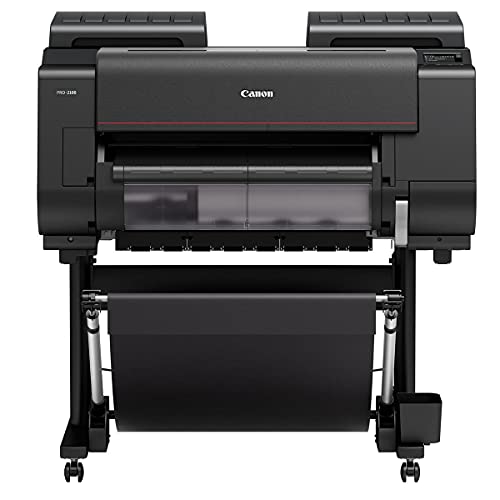
Canon PRO 2100 24-inch Wide Format Fine Art Printer — Fine art 24-inch
The PRO 2100’s listing uses the two words that define the pictorial side of this guide: fine art. A 24-inch wide-format fine art printer is a machine whose entire engineering budget leans toward image quality on demanding media — the matte papers, canvas and photographic stocks whose surfaces punish weak ink systems and reward deep ones. For a graphic designer whose wide work includes photographic imagery, brand visuals at exhibition quality, or art prints for sale, this Canon is the set’s 24-inch pictorial answer.
Fine art printing is a media discipline as much as a machine discipline. The papers are thicker, thirstier and more various than office stock, and the workflow — profiling, proofing, editioning — assumes a printer built to hold calibration across them. Canon’s PRO line exists inside that discipline, with the media ecosystem and colour tooling to match. The listing states none of those specifics, and this review invents none; Canon’s documentation carries the ink and media detail that a fine-art buyer will, correctly, read before anything else.
The comparison that matters is against the P900 below: 24 inches against 17, Canon’s PRO ecosystem against Epson’s SureColor one. Designers with existing colour workflows in either camp will feel the pull of familiarity, and rightly — at this level the machines are all serious, and the ecosystem a studio already speaks is a legitimate deciding vote.
- Width: 24-inch wide format, stated in the listing
- Discipline: Fine art printer, stated in the listing
- Line: Canon PRO, per the listing name
- Ink system detail: Listing title gives no figure — check Canon documentation
- Media range: Absent from the title; Canon documentation carries the detail
Strengths
- Fine-art brief at a full 24-inch width for exhibition-scale pictorial work
- PRO line ecosystem built for demanding art and photo media
- Canon’s colour tooling serves editioned, repeatable output
Trade-offs
- Ink and media specifics are entirely documentation-side
- Fine-art running costs punish casual poster duty
- 24-inch pictorial scale is surplus for plan and diagram work
Best for: a designer printing photographic and fine-art work at 24 inches inside Canon’s PRO ecosystem.
Not suited for: a CAD desk buying on width without the pictorial brief.
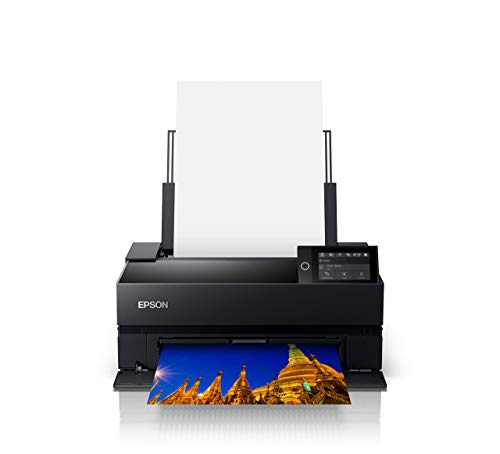
Epson SureColor P700 13-Inch Photo Printer with UltraChrome PRO10 Ink — 13-inch photo
The P700 is the set’s most information-rich listing: a 13-inch photo printer whose ink is named — UltraChrome PRO10. That name matters because ink architecture is the photo printer’s soul. A ten-channel-class pigment system exists to do what four office inks cannot: hold a gradient from deep shadow to highlight without banding, render skin without posterising, and keep black-and-white work neutral rather than tinted. The listing’s decision to name the ink is Epson telling photographers exactly which conversation this machine belongs to.
Thirteen inches is the photographer’s home width — the size of serious portfolio sheets, gallery pieces for modest walls, and the proof that finally tells the truth about a file. Designers whose wide work is photographic but not yet poster-scale live here: the P700’s format covers the proofing and editioning heartland, and its desktop footprint keeps it in the studio rather than the print room. SureColor’s P line is Epson’s photographic flagship family, and the P700 is its accessible rung — the same ink philosophy as its larger siblings, at the width where most photographic printing actually happens.
Beyond ink and width the listing is quiet, so media handling and connectivity belong to Epson’s documentation. The buying question is really about trajectory: a designer certain their photographic work stays at portfolio scale buys the P700 without regret, while one already quoting 17-inch pieces should let the P900 make its case before the smaller machine’s economy seduces them.
- Width: 13-inch, stated in the listing
- Type: Photo printer, stated in the listing
- Ink: UltraChrome PRO10, named in the listing
- Line: Epson SureColor P, stated in the listing
- Media handling: The title is silent on this — consult Epson documentation
Strengths
- Named PRO10 ink system signals genuine photographic architecture
- 13-inch width covers portfolio and proofing heartland
- Desktop scale keeps exhibition-quality printing inside the studio
Trade-offs
- Width ceiling excludes poster-scale photographic work
- Pigment ink economics punish non-photographic duty
- Media specifics await documentation confirmation
Best for: a photographer-designer printing portfolio and gallery work at 13 inches with a named pro ink system.
Not suited for: a studio already printing photographs at 17 inches and beyond.

Epson SureColor P900 17-Inch Photo Printer Bundle — 17-inch photo bundle
The P900 takes the P700’s photographic proposition wider — 17 inches, per its listing — and arrives as a bundle, with an Ethernet cable and USB cable named among its contents. The cables are a small honesty about what bundles are: this listing’s extras are connectivity, not ink or media, and a buyer comparing its price against a bare P900 elsewhere should price it as machine-plus-cables rather than imagining a richer box. Bundle literacy, in this category, is worth real money.
Seventeen inches is the width where photographic work becomes presentational: the framed piece over the desk, the competition print, the client proof that ends arguments. The P900 shares the SureColor P line’s photographic brief with its smaller sibling — the same family commitment to ink architecture and media discipline — at the scale where a designer’s photographic reputation is usually printed. Studios that proof on the P700’s width and present on this one are describing the classic two-rung ladder of the Epson line.
The listing names the model number C11CH37201 alongside the bundle, a useful exactness for matching documentation — use it, because the P900’s ink and media specifics, unstated in the title, should be pulled for this precise variant before ordering. With those figures confirmed, the choice between the Epson pair reduces to width trajectory, and the choice between the P900 and Canon’s PRO 2100 reduces to ecosystem and the step from 17 to 24 inches.
- Width: 17 inches, stated in the listing
- Type: Photo printer, stated in the listing
- Bundle contents: Ethernet cable and USB cable named in the listing; confirm the full contents on the listing page
- Model variant: C11CH37201, stated in the listing
- Ink system detail: Title omits it — refer to Epson documentation for this variant
Strengths
- 17-inch photographic width serves presentation and competition pieces
- SureColor P lineage shares the family’s photographic discipline
- Model number stated, making documentation matching precise
Trade-offs
- Bundle extras are cables — value them as such, not as consumables
- Ink specifics for this variant need documentation confirmation
- Still a ceiling for designers heading toward 24-inch pictorial work
Best for: a photographic designer stepping up to 17-inch presentation prints inside Epson’s SureColor ecosystem.
Not suited for: a buyer expecting the bundle to include ink or media beyond the stated cables.
How Do the Six Compare Side by Side?
| Model | Side of the line | Width stated | Listing’s own words |
|---|---|---|---|
| HP DesignJet T210 | Technical / poster | 24 in | Poster and CAD printing |
| HP DesignJet T650 | Technical / poster | 36 in | Plotter, 2-year onsite warranty |
| Canon imagePROGRAF TM-340 | Technical / poster | 36 in | imagePROGRAF line name only |
| Canon PRO 2100 | Photo / fine art | 24 in | Fine art printer |
| Epson SureColor P700 | Photo / fine art | 13 in | Photo printer, UltraChrome PRO10 |
| Epson SureColor P900 | Photo / fine art | 17 in | Photo printer, bundle with cables |
Read the table by its second column first. The side of the line is the purchase; width is merely the size of the purchase. A designer who sorts by width alone will eventually stand a photographic portfolio in front of a CAD plotter and learn the divide at full price. Sort by discipline, then by width, then let ecosystem and documented detail settle the final pair.
Why Does Ink Architecture Matter More Than Width?
Width is the specification everyone quotes because it is the one everyone can measure with a tape. Ink architecture is the specification that decides what the print looks like from a metre away. Photographic ink systems spread their channels across the tonal problem: multiple blacks for neutral monochrome and deep shadows, expanded colour channels for the greens and violets that four-colour systems approximate, pigment particles engineered to sit on art papers without bronzing or gloss unevenness. The P700’s named UltraChrome PRO10 is this philosophy in a listing title; the PRO 2100’s fine-art brief implies the same priorities on Canon’s side.
Technical ink systems optimise a different problem with equal legitimacy: line precision, fast drying on plain and coated production media, sheet economy across hundreds of drawings. Neither system is the other’s failure. They are answers to different questions, and the designer’s task is to notice which question their own work is asking — a noticing best done by looking at the last twenty wide prints the studio actually made and classifying them honestly.
Media completes the triangle. Fine-art papers, canvas and photographic stocks each interact with ink in their own way, and the photo lines’ ecosystems — profiles, handling guidance, tested media lists — exist to make those interactions predictable. A studio’s media shelf is an investment that compounds; choose the machine whose ecosystem stocks the surfaces your work already loves.
How Should a Designer Proof Wide Work Without Burning the Budget?
Large prints punish the improvised proof. The disciplined sequence starts on screen with a calibrated monitor and soft-proofing against the target paper’s profile, because the cheapest place to catch a colour error is before any ink moves. A reduced-scale proof on the actual paper follows — small enough to afford, large enough to judge colour and paper character together — and only then the full-size print, examined at the distance its audience will keep.
Keep a proof log with the same seriousness as a print log: file version, paper, settings, verdict. Wide work is often editioned or reprinted months later for a second client, and the log is what makes the reprint a procedure rather than a research project. The studios whose wide prints look effortless are usually the ones whose paperwork is quietly excellent.
Test strips deserve their ritual too. A narrow strip of the image’s most difficult passage — the shadow gradient, the skin tone, the brand colour — printed at full scale on the final paper, judges more per penny than any full proof. Make the strip a habit and the full-size surprises become rare enough to be interesting rather than expensive.
What Mistakes Do Designers Make When Buying Wide?
The category error leads: buying across the line. A plotter purchased for photographic work, or a fine-art machine purchased to churn plan sets, delivers a decade of almost-right output. The divide in this guide is repeated until it becomes reflex because the mistake is repeated until it becomes expensive.
The second mistake is width vanity — buying the largest format the budget touches rather than the format the work needs. Every width step raises media cost, ink commitment, footprint and the price of every error, and a 36-inch machine printing 13-inch work is a tax paid on every sheet. Buy for the largest recurring job, and let the once-a-year monster go to a bureau.
Third, ignoring the room. Wide machines need roll or sheet clearance, flat storage for large media, and a landing surface where a metre of paper can arrive without folding itself onto the floor. Measure the studio’s working space, not its empty space.
Finally, forgetting that the first print is the cheapest one the machine will ever make badly. Budget the learning curve — media, ink and time for the first month’s calibration and proofing — as part of the purchase, or the curve will budget itself out of the production schedule at the worst moment.
How Do Media Choices Change What These Machines Can Do?
A wide printer’s real specification is the shelf of media it handles well. Photographic work alone spans glossy and matte photo papers, baryta-style surfaces that mimic darkroom stock, canvas that must flex without cracking its ink film, and fine-art cotton papers whose texture becomes part of the image. Each surface drinks ink differently, holds a different maximum density and demands its own profile. The photo lines in this guide — SureColor P and imagePROGRAF PRO — exist inside ecosystems where those surfaces are tested, profiled and documented; the technical lines optimise instead for the plain, coated and film media of drawing offices, where the sheet must be cheap, flat and fast.
Roll against sheet is the handling question beneath the media question. Rolls feed long posters and banners without a sheet change and lower the cost per metre, but they ask the studio to manage curl, storage and cutting. Sheets suit editioned art work, where each piece is handled individually and the paper’s dignity matters. Which feed a model favours, and what thicknesses its path accepts, are documentation figures — and for a studio with an established media shelf, they are the figures that decide the shortlist before colour is even discussed.
Buy media like an editor, not a bargain hunter. Standardise on a small set of surfaces whose behaviour the studio knows completely — one gloss, one matte, one art paper, one production stock — and let novelty enter one sheet at a time, profiled and logged. A wide printer fed familiar media produces the eerie consistency clients describe as professionalism; fed a rotating cast of experiments, it produces a portfolio of almosts.
What Does Colour Management Look Like at Wide Format?
At small sizes a colour error costs a sheet; at wide sizes it costs a sheet the size of a door, so colour management graduates from virtue to economics. The chain has three links: a calibrated monitor that tells the truth about the file, a printer profile that translates the file honestly for a specific paper, and viewing light that does not lie about the result. Break any link and the studio enters the reprint loop, where each iteration is a metre wide and priced accordingly.
Profiles deserve their paragraph. Manufacturer profiles for their own papers are the reliable starting point, and both Epson’s and Canon’s photo ecosystems publish them per media. Custom profiles — built with a spectrophotometer or a profiling service — repay their cost on the studio’s signature paper within a handful of saved reprints. Keep profiles named by paper and date, and retire them when a paper batch or ink formulation changes, because a stale profile is a confident lie.
Monochrome deserves its own sentence, since designers increasingly print black-and-white editions. Neutral greys are the hardest trick in inkjet printing — any imbalance among the colour inks tints them — and the multi-black architecture of professional photo ink systems exists substantially for this. Judge a photo finalist partly by its monochrome behaviour on your own test file; the grey ramp never flatters, and it never lies either.
How Should a Studio Handle Editions and Reprints?
Editioned work converts a printer from a tool into a promise: print three of an edition today and print seven identical siblings next year. Keeping that promise is a documentation discipline. Record for each edition the file’s final version, the paper and its batch where known, the profile, the driver settings and a retained reference print stored away from light. When the reprint order arrives, the record turns a memory test into a procedure.
Reference prints age, inks get reformulated, papers get revised — the honest studio checks the reprint against the reference under the same light and tells the client about any drift before the client discovers it. Edition integrity is a reputation asset that compounds exactly like the print log described earlier: quietly, and then all at once when a collector asks the question.
Numbering and signing close the ritual. Print the full edition in one session where the work allows it, because a single session is the cheapest guarantee of consistency ever devised, and store the edition flat, interleaved, in the dark. The wide printer made the images; the studio’s paperwork makes them an edition.
What Does Ownership Cost Beyond Ink and Paper?
Printheads, maintenance cycles and the occasional service visit form the quiet ledger of wide-format ownership. Pigment systems periodically run cleaning cycles that spend ink to keep nozzles honest; a machine used daily often wastes less, proportionally, than one woken monthly, because regular work is itself maintenance. The T650’s included onsite warranty deserves a second mention in this ledger — service cover is a cost someone always pays, and a listing that bundles two years of it has prepaid a real line item.
Space is a cost with a monthly rhythm: a 36-inch machine and its media storage occupy studio square footage that could hold a desk, and the honest comparison against bureau printing includes that rent. So does the flat storage — large prints stored rolled acquire habits, and the plan chest a serious wide workflow eventually demands is furniture with a four-figure personality. None of this argues against ownership; it argues for entering ownership with the full ledger open, which is the only way the ledger stays friendly.
Time completes the account. Wide printing is slow by office standards, and a studio’s schedule should treat the machine as a colleague with a deliberate pace: jobs queued the night before, proofs batched, the big machine never the critical path of a same-hour deadline. Studios that schedule around the pace get serene production; studios that discover it weekly get theatre.
How Do You Brief a Client on What Wide Printing Can Promise?
Client conversations about large prints fail in predictable places, and a studio’s process should pre-empt each one. Resolution first: a phone photograph enlarged to a metre will soften, and the time to say so is at the quote, with a viewing-distance conversation — a piece designed for a corridor can carry softness that a piece designed for a desk cannot. Show a sample at final size, even a strip of it, and let the client’s own eyes sign the expectation.
Colour second: screens glow and paper reflects, so the same file will never look identical in both, and the soft-proof conversation — here is the profiled simulation, here is a printed strip on the actual paper — converts a metaphysical argument into a signed approval. Studios that print the strip before the edition rarely have the argument afterwards. Paper character third: matte, gloss, canvas and cotton each change the image’s mood, and a client choosing from small swatches under studio light is choosing with evidence.
Timelines last: wide work queues, dries, and occasionally reprints, and a quote that builds the machine’s deliberate pace into its dates will be met, while a quote that promises bureau-defying speed will be apologised for. The machines in this guide are production tools, not vending machines, and clients respect a studio that explains its craft’s tempo as confidently as its prices.
When Should a Designer Send Wide Work Out Instead?
The bureau keeps three territories that in-house machines should not contest. The first is scale beyond the studio’s width — the banner, the building wrap, the exhibition wall — where the equipment class changes entirely. The second is volume beyond the studio’s calendar: a hundred posters by Friday is a production house’s ordinary week and a single desktop machine’s nervous breakdown. The third is specialty finishing — mounting, laminating, framing at size — where the bureau’s benches and materials dwarf a studio’s corner.
Everything else is the in-house case, and it strengthens with every job: control of colour, control of schedule, the ability to proof at midnight before a morning presentation, and the compounding familiarity between a studio and its own machine. The break-even is not really a price — bureaus win on price at volume — it is a control argument, and designers whose work lives on iteration and immediacy feel it immediately.
Revisit the boundary annually. A studio’s mix changes; the job that justified the 36-inch machine may retire, or the photographic line may outgrow 17 inches. The six machines here are durable goods in a fluid practice, and the annual question — what did the last twenty wide jobs actually need? — keeps the fleet honest in both directions.
How Should the Studio Be Arranged Around a Wide Machine?
Layout is workflow made visible. The wide machine wants a straight, uncluttered path: media entering from storage on one side, finished prints landing on a clean flat surface on the other, and nothing — no mugs, no reference books, no leaning portfolios — stored on top of it, because a printer used as a shelf is a printer being slowly damaged by its own studio. Keep the cutting and trimming surface adjacent but separate; blades and fresh prints should meet only by intention.
Light deserves planning equal to space. A viewing area with consistent, daylight-balanced illumination near the machine turns every proof into a reliable judgement, while the mixed lighting of a typical studio — warm lamp here, window there — makes colour decisions that the client’s wall will contradict. The viewing corner is cheap: one good light source, one neutral wall, and the discipline to judge prints there and nowhere else.
Storage completes the triangle. Flat files or a plan chest for finished work, vertical slots for media rolls and boards, and a quarantine shelf for prints still drying or awaiting inspection. A studio that can answer, at any moment, where every large print in the building is, has understood that wide format is as much a logistics practice as an imaging one — and clients can feel that understanding in the condition of the work they collect.
What Does the First Month With a Wide Printer Teach?
Week one teaches scale: the machine is larger than its photograph, the first full-width print draws a crowd, and the studio’s existing paper storage is revealed as a letter-sized assumption. Week two teaches appetite: ink and media consumption at full coverage becomes visible in the gauges and the shelf, and the proofing discipline stops sounding like advice. Week three teaches the queue — colleagues and clients alike discover the machine’s existence, and the booking habit, however informal, gets invented before the conflicts invent it for you.
By the end of the month the studio knows its wide rhythm in numbers: sheets per week by size, the true cost of its signature paper printed at full coverage, and which of the machine’s documented capabilities the work actually exercises. That knowledge converts the purchase from an event into an operation, and it arms the annual review described earlier with facts instead of impressions. Keep the first month’s figures somewhere findable; every future media order, edition promise and replacement decision will quietly consult them.
Which Questions Should You Take to Each Finalist’s Documentation?
The documentation visit for this category has a precise agenda, worth writing down before it begins. For a photo finalist: the full ink channel list and cartridge sizes, the tested media list with thickness limits, whether roll and sheet both feed, and what the manufacturer publishes about monochrome behaviour. For a technical finalist: line accuracy and pace figures, media types and roll handling, ink configuration and yield basis, and the service terms beyond any bundled warranty period. Six questions per side, twenty minutes per finalist, and the listings’ silences become a specification sheet a decision can stand on.
Ask one more question of both sides: what does the machine’s own software chain assume about its operator? DesignJet’s accessibility, SureColor’s colour tooling, imagePROGRAF’s production management — each ecosystem teaches its user a way of working, and a studio should choose the teacher whose lessons match its habits. Software is the part of a wide printer touched every single day, long after the hardware’s novelty has faded into furniture.
File the answered agenda with the purchase record. When the machine is replaced in five years, those answers become the benchmark its successor must beat, line by line — the same trick these guides recommend for feeders, toners and tabloid trays, because a specification remembered is a negotiation half-won before it starts.
How Does Wide Printing Change a Designer’s Eye?
Something unlisted happens in the first season of ownership: the work itself changes. Designers who can print at full size begin composing at full size — type chosen for the distance it will be read from, images cropped for the wall rather than the thumbnail, whitespace given the physical room it always wanted. Files that were designed to survive reduction start being designed to reward presence. Clients notice before the studio does, usually in the phrase the work looks more confident, which is the sound of a feedback loop closing between a machine and a practice.
The loop has a shadow worth managing: everything becomes printable, and not everything deserves a metre of paper. The proofing discipline and the strip test exist partly as editors, forcing the question of whether a piece has earned its scale. A studio that keeps that editorial hand on the queue produces a wall of work that looks curated rather than merely large — and curation, at any width, is the designer’s actual product.
That editorial hand is the final specification no listing can state: the judgement to print large only when large serves the work. Every machine in this set will happily fill its full width with whatever it is fed, at full consumable cost, without opinion. The studio supplies the opinion. Choose the machine whose discipline matches your work, feed it with the proofing and logging habits this guide describes, and the opinion will have an instrument worthy of it — which is, in the end, the entire ambition of buying wide format well.
Ambition, properly instrumented, shows in the portfolio within a season: pieces that hold a wall, proofs that end arguments, editions that match across years. None of that arrives in the box with any of these six machines, and all of it is available to the studio that buys the right side of the line and then does the unglamorous paperwork of colour, media and records. The printer is the beginning of that story, and beginnings deserve to be chosen carefully.
Chosen carefully means, in this category, three verifications kept in order: the discipline verified against the studio’s real output, the width verified against the largest recurring job rather than the largest imaginable one, and the documented detail — ink, media, service — verified for the exact variant on the order. Keeping that order makes the six names in this guide sort themselves with surprising speed, because most studios are honestly one discipline, one width and one ecosystem wearing a wider curiosity. Serve the practice you actually have, and the machine will feel less like a purchase and more like a colleague who arrived already trained.
A colleague already trained is the right image to order by, because wide printers join a practice for years and touch its most visible output — the work clients hold, hang and judge the studio by. Nobody remembers the quarter’s invoices; everybody remembers the poster that held the corridor and the print that made a room go quiet. Buy the machine that serves those moments, on the side of the line where those moments live, and the rest of the specification sheet becomes what it should always have been: supporting evidence for a decision the work itself had already made.
The work had already made the decision, in truth, the day the studio’s output settled into its pattern — photographic or technical, intimate or architectural, editioned or ephemeral. This guide’s six machines simply give that pattern six well-made places to land. Read your own last twenty wide jobs once more, honestly, and the landing place will be obvious enough to feel less like shopping and more like recognition.
Recognition is a good place for a buying guide to end: not with a winner declared over five losers, but with a reader who can look at six serious machines and see, in each one, the studio it belongs to — and in one of them, their own.
See your own studio in one of them, verify its details, clear its corner of the room, and let the first full-width print make the introduction.
That first print, judged at the viewing wall under the good light, will confirm the decision more eloquently than any review — including this one — ever could.
Trust that print, file its settings, and start the log — the studio’s wide era begins with a single well-judged sheet.
One well-judged sheet, then another — the discipline compounds exactly like the editions it makes possible.
Compounding discipline, compounding colour — the two are the same habit seen from different ends of the studio.
Seen from either end, the habit is the purchase’s true warranty — longer than any bundled cover, and renewable every working day.
Renew it daily, and the machine will never be the oldest thing in the studio — only the most trusted.
Renew it daily, verify it seasonally, and the studio’s wide work will keep its edge.
Final Recommendation
Sort by discipline, as this guide has insisted from its first paragraph. Photographic and fine-art designers choose among three: the Epson SureColor P700 for 13-inch portfolio and gallery work with its named UltraChrome PRO10 ink, the P900 bundle for the step to 17-inch presentation pieces, and Canon’s PRO 2100 where 24-inch fine-art output inside Canon’s ecosystem is the destination. Technical and poster designers choose among the other three: HP’s DesignJet T210 for 24-inch poster and CAD work at desk scale, the T650 where 36-inch plan sets and its included onsite warranty fit a practice’s production rhythm, and Canon’s TM-340 for the same 36-inch habitat inside an imagePROGRAF fleet. Confirm ink and media specifics in each finalist’s documentation before ordering, measure the room for the machine’s working footprint, and the wide printer you buy will be the one your last twenty real jobs were already asking for.
Frequently Asked Questions
Can a CAD plotter like the DesignJet T650 print good photographs?
It can print photographs, but its ink system and media handling are optimised for line work, posters and production graphics rather than photographic tonal depth. Designers whose reputation rides on photographic output should choose from the pictorial side of this guide — the SureColor P700 or P900, or Canon’s PRO 2100 — where the ink architecture exists for exactly that work.
What width do most graphic designers actually need?
The width of their largest recurring job. Portfolio and proofing work lives at 13 to 17 inches, posters and presentation pieces at 24, and plan sets at 36. Buying beyond the recurring maximum raises every running cost for a job that may come twice a year — those rare monsters are usually cheaper at a print bureau.
What does the P900 bundle actually include?
Per its listing, the bundle names an Ethernet cable and a USB cable alongside the 17-inch SureColor P900 printer, identified by model number C11CH37201. Price it as a machine with connectivity cables included, and confirm the complete contents on the listing page before ordering.
Why is the P700’s ink named in its listing?
Because for photographic printing the ink system is the headline specification. UltraChrome PRO10 is Epson’s professional pigment ink family for the SureColor P line, and naming it tells photographers the machine carries a multi-channel system built for tonal gradation and monochrome neutrality rather than a general-purpose four-ink setup.
Is the Canon TM-340 a photo printer?
No — the TM branch of Canon’s imagePROGRAF family is the technical and poster side, built for CAD, production graphics and in-house posters at its stated 36 inches. Canon’s photographic wide-format brief in this set belongs to the PRO 2100, whose listing states fine art outright. Same brand, different discipline.
Related Guides
Wide output connects to the rest of the studio: see our guide to colour-accurate monitors for the screen half of the proofing chain, our roundup of office printers for the everyday machines beside the wide one, and our desk and studio setup picks for workstations that can hold a metre of paper gracefully.
Related guides
- Best 3rd Party MacBook Chargers: 96W-Class Alternatives, the 100W Cable Rule, and the Apple Benchmark
- Best Graphics Cards with HDMI Out for TV Only: Six Picks for a PC Whose Only Screen Is a Television
- Best TLC SSDs: Six Drives With TLC NAND Confirmed in Their Own Listings
- Best Built PC: Six Prebuilt Gaming PCs Judged on Parts, Power and Upgrades