What's inside
- Key Takeaways
- Quick Picks
- How were these picks chosen?
- How the six cameras compare
- How do you choose a high-frame-rate streaming camera?
- Running these cameras live: our evaluation frame
- Common mistakes when buying a streaming camera
- Frame rates, resolution and bitrate: the triangle explained
- Lighting for sixty frames per second
- The rest of the streaming chain, in plain order
- Audio, the half of the stream audiences judge first
- Rehearsing a broadcast like it matters
- Streaming for organizations: reliability as a feature
- What sixty frames per second does to different subjects
- Accessibility and the audience you cannot see
- Growing from one camera to a small production
- A first-month schedule for a new streamer
- Troubleshooting the first bad broadcast
- A word on privacy covers, consent and the always-on room
- Final recommendation
- Frequently asked questions
As an Amazon Associate I earn from qualifying purchases. This post may contain affiliate links at no extra cost to you.
gizmoverdict.com is reader-supported. When you buy through links on our site, we may earn an affiliate commission.
Where to buy: All six cameras in this guide are sold through Amazon in the United States, through the same listings that supply offices and classrooms, so stock is steadier than on most camera shelves. Each pick below carries one Amazon link for checking the current listing, and because several of these are conferencing products as much as streaming ones, the box contents, cables and mounts named on each listing deserve a careful read before ordering.
Before a single product is discussed, the best high speed cameras for streaming live video needs its premise corrected, because the phrase means something specific on this shelf and something else entirely in a physics laboratory. Here, high speed means high frame rate: cameras that capture and stream at the 60 frames per second class, doubling the ordinary 30fps of a built-in laptop webcam, so motion on a live broadcast looks fluid rather than stepped. True slow-motion high-speed cameras, the instruments that record thousands of frames per second to freeze a hummingbird’s wing or a bursting balloon, are a professional rental class costing more per day than every camera in this guide combined, and none of the listings below is one of those. If your project genuinely needs that class of capture, you need a rental house, not a shopping list. If your project is a livestream, a class, a service, a product demonstration or a game broadcast that should move like real life instead of a slideshow, the six cameras here are exactly the shelf you meant to search for.
Why does frame rate matter enough to name a category after? Because live audiences judge motion before they judge resolution. A 4K stream at a stuttering frame rate feels broken in a way a smooth 1080P stream never does, and the work these cameras do, tracking a teacher across a classroom, following a presenter’s hands over a product, holding a face steady through a fast-moving game, is motion work. The six picks divide into three families: a PTZ conference camera that pans, tilts and zooms under remote or automatic control, a set of streaming webcams built around sensors and autofocus, and one action camera moonlighting as a streamer. Frame rates are credited in this guide only where a listing title states them, and the titles that stay silent are marked as silent.
Key Takeaways
- In this guide, high speed means high frame rate, the 60fps class; true slow-motion high-speed cameras are a professional rental class and are not what these listings are.
- Three picks state 60fps-class capture in their titles: the TONGVEO PTZ at 1080P 60fps, the EMEET S600 at 1080P@60FPS and the NBPOWER at 1080P 60FPS, with the GoPro HERO12 stating 5.3K60 video.
- The TONGVEO is the room camera: a PTZ design with 3X optical zoom and AI auto-tracking for classrooms, services and meeting spaces.
- The EMEET C60E pairs wide-angle and telephoto cameras in one unit, with a stated maximum 11X hybrid zoom and a remote control.
- The GoPro HERO12 Black is the mobile option, a waterproof action camera whose title lists live streaming and webcam use among its roles.
- Frame rates are credited only where titles state them; the C60E and IFWATER listings do not state one, and their spec boxes record that.
Quick Picks
| Pick | Model | Badge |
|---|---|---|
| 1 | TONGVEO PTZ Camera | Best for rooms and classrooms |
| 2 | EMEET S600 | Best desk streaming webcam |
| 3 | EMEET C60E | Best dual-camera flexibility |
| 4 | IFWATER HDMI 4K USB Camera | Best for close-up demonstrations |
| 5 | NBPOWER 1080P 60FPS Streaming Camera | Best budget 60fps pick |
| 6 | GoPro HERO12 Black | Best mobile streaming camera |
The badges follow the room rather than the spec sheet. A camera for a fixed desk, a camera for a hall and a camera for a kayak are all called streaming cameras in their listings, and the sections below sort them by where they will actually stand while the red light is on.
How were these picks chosen?
The first filter was the premise itself: a stated relationship to frame rate or to live streaming as a named role. The TONGVEO, S600 and NBPOWER titles state 60fps figures outright; the HERO12’s title names live streaming and webcam duty; the C60E and IFWATER titles position their cameras for livestreaming and conferencing with dual outputs and demonstration-friendly zoom, and their unstated frame rates are recorded as unstated rather than assumed. The second filter was output plumbing, because a streaming camera lives or dies by how it reaches the computer or the switcher: HDMI and USB 3.0 on the PTZ, simultaneous USB and HDMI output on the IFWATER, straightforward USB webcam duty from the desk models.
The third filter was the human factors of live work: autofocus systems named in titles, microphones counted where titles count them, privacy covers, remote controls and lights, because a live camera is operated under the pressure of an audience and every fumbled setting happens in public. Creators whose streams are really filmed shows may also want the capture-side perspective in our guide to the best gopro & action cameras for fishing, where the HERO family’s other talents are exercised outdoors.

1. TONGVEO PTZ Camera — Best for rooms and classrooms
The TONGVEO is the only true room camera in this guide: a PTZ unit, pan, tilt and zoom under motor control, with a stated 3X optical zoom, AI auto-tracking, HDMI and USB 3.0 outputs, and 1080P video at 60fps through a wide-angle lens. Its title lists its habitats plainly: video conferences, business meetings, live streaming, online learning, with Zoom, YouTube, Teams and OBS named among its working partners. The auto-tracking is the feature that changes who can run a stream. A teacher who moves, a pastor who walks the platform, a trainer who demonstrates across a mat: the camera follows without a camera operator, and a one-person production gains the movement of a crewed one.
The 60fps figure matters in this habitat more than resolution does, because the subjects are people in motion at distance, and fluid movement reads as production quality to an audience watching a service or a lecture. Optical zoom, as opposed to the digital crops elsewhere in this guide, preserves detail when the camera sits at the back of a hall, which is where PTZ cameras live. The honest costs are installation and character: this is a mounted appliance, happiest permanently installed with cables run, and its conference-room aesthetic will never be mistaken for a cinema camera. For an organization streaming the same room every week, that permanence is the entire point, and the TONGVEO is the pick that treats streaming as infrastructure rather than as a laptop accessory.
Strengths
- AI auto-tracking follows a moving presenter with no camera operator.
- 1080P 60fps stated, with HDMI and USB 3.0 outputs for flexible plumbing.
- 3X optical zoom keeps detail from the back of a hall.
Trade-offs
- A mounted room appliance, not a portable desk camera.
- Resolution tops out at 1080P where desk rivals advertise 4K sensors.
- Best value appears in a fixed room streamed on a regular schedule.
Spec box
- Type: PTZ camera with AI auto-tracking
- Video: 1080P 60fps
- Zoom: 3X optical
- Outputs: HDMI, USB 3.0
- Platforms named: Zoom, YouTube, Teams, OBS and more
- Microphone: Not stated in the listing title
Best for: churches, classrooms, training rooms and meeting spaces streaming the same room weekly with a moving presenter. Not suited for: a single desk in a bedroom studio, where a PTZ appliance’s motors and mounting answer questions nobody asked. Room streamers can check price on Amazon and confirm the mounting hardware in the box.

2. EMEET S600 — Best desk streaming webcam
The S600 is the desk streamer’s precision instrument. Its title states a 4K webcam built on a Sony 1/2.55-inch sensor, with PDAF autofocus, 1080P at 60FPS streaming, two noise-reduction microphones, a built-in privacy cover and a 73-degree field of view, aimed at live commerce, gaming and beauty streaming. The specification tells a thoughtful story. The sensor is a 4K-class foundation, while the streaming headline is 1080P at 60 frames, which is the honest broadcast combination: high resolution for crisp downscaled or cropped images, high frame rate for the motion the audience actually watches. PDAF, phase-detection autofocus, is the focusing system borrowed from real cameras, fast and decisive where contrast-based webcam focus hunts and breathes.
The details around the sensor serve the solo creator. Two microphones with noise reduction carry a voice respectably for streams that have not yet grown an external microphone, the privacy cover answers the entirely reasonable anxiety of a camera that lives pointed at a desk chair, and 73 degrees is a considered field of view: wide enough for a presenter and a product, narrow enough to keep a bedroom’s laundry out of the frame. For the commerce and beauty streamers its title names, who hold products to the lens and move constantly, the autofocus and frame rate are the working features, and the S600 states both where many rivals state neither.
Strengths
- PDAF autofocus focuses with camera-grade speed and certainty.
- 1080P@60FPS streaming stated, on a 4K Sony sensor foundation.
- Privacy cover and dual noise-reduction microphones suit solo creators.
Trade-offs
- 73-degree field of view is a solo frame; groups will crowd its edges.
- Desk-bound design offers no PTZ movement or optical zoom.
- Streaming at 60fps in 1080P means the 4K sensor’s full resolution serves other modes.
Spec box
- Sensor: Sony 1/2.55 inch, 4K webcam
- Streaming: 1080P@60FPS
- Autofocus: PDAF
- Microphones: 2 noise reduction mics
- Field of view: 73 degrees
- Privacy: Built-in privacy cover
Best for: solo streamers in commerce, gaming and beauty who move, gesture and hold products close to the lens. Not suited for: a panel of four speakers across a table, where the 73-degree frame and desk mounting run out of room. Desk creators can see the Amazon listing for cable and mount details.
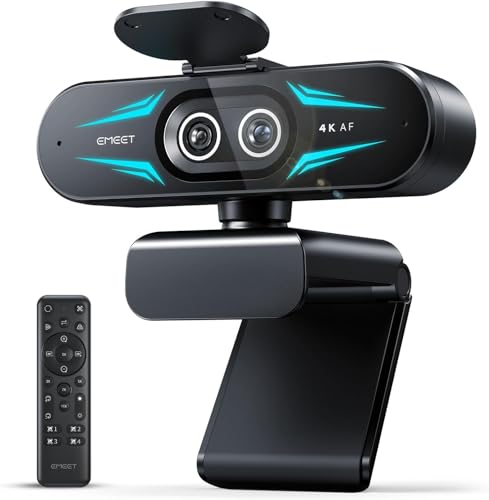
3. EMEET C60E — Best dual-camera flexibility
The C60E solves the solo streamer’s framing dilemma by carrying two cameras in one unit: a dual-camera 4K webcam with a wide-angle and a telephoto lens, a stated maximum 11X hybrid zoom, PDAF autofocus, a remote control, RGB lighting and two microphones, positioned for livestreaming and online meetings. The wide camera takes the room and the presenter; the telephoto takes the close-up, the product on the desk, the document, the detail a teacher is pointing at, and the remote swaps and zooms between those views from the presenter’s chair. In a single-device production, that pairing replaces the second camera and the switching desk that a two-webcam setup needs.
Discipline about claims applies here as everywhere in this guide: the C60E’s title does not state a frame rate, so none is credited, and buyers for whom 60fps is the whole brief should weigh the S600’s stated figure against this model’s flexibility. The RGB lighting is a modest, built-in answer to the dim home office, adjustable from the unit rather than from a separate lamp purchase. Hybrid zoom deserves its plain meaning too: optical reach from the telephoto lens extended by digital cropping, excellent for framing, not a claim of lossless magnification to 11X. Judged as a flexibility instrument for teachers, demonstrators and meeting hosts, the C60E is the most versatile desk device in this guide; judged purely as a frame-rate instrument, it asks to be confirmed on the listing.
Strengths
- Wide-angle and telephoto cameras in one unit cover scene and close-up.
- Remote control lets a solo presenter direct the framing live.
- Built-in RGB lighting and two microphones complete a one-device studio.
Trade-offs
- Frame rate is not stated in the listing title and needs confirming.
- 11X zoom is hybrid, so its far end is a digital crop.
- Two lenses and lights make it the busiest desk unit here to set up well.
Spec box
- Type: Dual-camera 4K webcam
- Lenses: Wide-angle and telephoto
- Zoom: Max 11X hybrid zoom
- Autofocus: PDAF
- Extras: Remote control, RGB lighting, 2 mics
- Frame rate: Not stated in the listing title
Best for: teachers, demonstrators and meeting hosts who alternate between a wide scene and a close detail within one stream. Not suited for: a frame-rate-first gaming broadcast, where the S600’s stated 1080P@60FPS is the firmer foundation. Presenters can check the Amazon listing and look for the frame-rate detail in its full specification.

4. IFWATER HDMI 4K USB Camera — Best for close-up demonstrations
The IFWATER occupies the guide’s most specialized niche: an HDMI 4K USB camera for live streaming with 10X variable focus, simultaneous USB and HDMI output, and an explicit close-up, zoom-in-and-out purpose for video conferencing, online teaching and training. Simultaneous output is the professional tell in its title: the camera can feed a computer over USB for the stream while feeding a monitor or recorder over HDMI at the same time, which is how demonstration benches, document teaching and product workstations are actually wired. The 10X variable focus and close-up positioning aim the whole device at the hands-and-objects end of streaming: the circuit board, the brush stroke, the instrument part, the page under discussion.
Its silences are equally informative and are recorded rather than filled: no frame rate is stated, no microphone is named, no autofocus system is claimed in the title, so a buyer should plan on an external microphone and confirm focus behavior and frame rate on the listing. Within its niche those are manageable conditions, because demonstration rigs are usually built as systems with their own audio. What the IFWATER offers that no other pick here does is the dual-output, close-up-first architecture, and for the teacher whose stream is a pair of hands and a workpiece, that architecture matters more than any headline figure.
Strengths
- Simultaneous USB and HDMI output feeds stream and monitor together.
- 10X variable focus with close-up positioning suits demonstration work.
- 4K HDMI camera design serves teaching and training rigs as a system component.
Trade-offs
- Frame rate is not stated in the listing title.
- No microphone is named, so audio is an external purchase.
- Autofocus system is not claimed in the title and should be confirmed.
Spec box
- Type: HDMI 4K USB camera
- Focus / zoom: 10X variable focus, close-up zoom
- Outputs: USB and HDMI simultaneous output
- Uses per title: Live streaming, conferencing, online teaching, training
- Frame rate: Not stated in the listing title
- Microphone: Not stated in the listing title
Best for: demonstration streamers and online teachers whose subject is a workpiece, a page or a pair of hands, wired into a small system. Not suited for: a plug-and-go solo broadcast from a laptop alone, where the unstated audio and frame-rate details ask questions the desk webcams answer outright. Bench streamers can review the Amazon listing for its mounting and cable arrangements.

5. NBPOWER 1080P 60FPS Streaming Camera — Best budget 60fps pick
The NBPOWER states its whole proposition in its name: a 1080P 60FPS streaming camera and webcam with a microphone, a fill RGB light, autofocus, and compatibility across laptops and desktops on Windows and Mac OS. On a shelf of careful qualifications, that directness has charm. The frame rate this guide exists to discuss is printed on the tin, the light that small rooms always need is built into the bezel, the microphone is included, and the autofocus keeps a moving presenter honest. For a first streaming setup, a classroom cart, a spare-room studio or a community group’s shared kit, that completeness at the simple end of the market is the correct shape of product.
Expectations should be set with the same directness. This is a 1080P camera in a guide where rivals advertise 4K sensors, and its RGB fill light is a small bezel light, helpful at desk distance and no substitute for lighting a set. What the buyer is purchasing is the frame rate and the completeness, not sensor prestige: smooth 60fps motion, a lit face, a focused image and a working microphone, from one USB connection, on either major operating system. Judged against the premise this article opened with, that is not a consolation prize; it is the premise fulfilled at the lowest complication in the guide.
Strengths
- 1080P at 60FPS stated plainly, fulfilling the guide’s premise in one device.
- Built-in fill RGB light and microphone complete a first streaming kit.
- Autofocus and cross-platform computer compatibility keep setup simple.
Trade-offs
- 1080P ceiling sits below the 4K-sensor rivals for cropping and downscaling.
- The bezel fill light helps at desk distance only.
- Sensor size and autofocus type are not stated in the listing title.
Spec box
- Video: 1080P 60FPS
- Light: Fill RGB light built in
- Microphone: Built in, per the title
- Autofocus: Autofocus stated; type not stated in the listing title
- Compatibility: Laptop and desktop, Windows and Mac OS
- Sensor: Not stated in the listing title
Best for: first-time streamers, classrooms and shared kits that need stated 60fps motion with light and sound included in one purchase. Not suited for: a polished commercial studio where sensor size, color depth and external lighting already set a higher ceiling. Beginners can check its price on Amazon as the starter line of a first setup.

6. GoPro HERO12 Black — Best mobile streaming camera
The HERO12 Black closes the guide by leaving the desk entirely. Its title describes a waterproof action camera with 5.3K60 Ultra HD video, 27-megapixel photos, HDR, a 1/1.9-inch image sensor, live streaming, webcam duty and stabilization. Live streaming and webcam are named roles in that title, which is what earns an action camera its place here: tethered or connected as the listing describes, the HERO12 becomes the streaming camera for the places the other five cannot go, the boat, the workshop, the touchline, the market stall, anywhere a stream originates in weather or motion rather than at a desk. Its stabilization, built for action sports, gives a walking presenter a steadiness no desk webcam is ever asked for.
The 5.3K60 figure deserves the guide’s usual translation: the camera captures at up to that specification, and a stream will typically be sent at the resolution and frame rate the platform, the connection and the encoder sustain, which for most live work means the 60fps motion survives even when the resolution is delivered lower. That is the right priority, as this article’s opening argued. The trade-offs are the action camera’s eternal ones: a wide fixed view that flatters landscapes and crowds faces at distance, controls designed for gloves and water rather than studio menus, and a streaming role that is one talent among many rather than the product’s whole identity. For the mobile creator, those are acceptable terms for the only pick here that can stream a regatta.
Strengths
- Live streaming and webcam roles named in the title, on a waterproof action body.
- 5.3K60 capture with stabilization suits moving, outdoor broadcasts.
- HDR and a 1/1.9-inch sensor handle harsh outdoor contrast.
Trade-offs
- Wide action view is unflattering for a seated talking-head frame.
- Streaming is one role among many, with action-first controls and menus.
- Delivered stream resolution depends on platform and connection, not the sensor headline.
Spec box
- Video: 5.3K60 Ultra HD
- Stills: 27MP
- Sensor: 1/1.9 inch
- Roles per title: Live streaming, webcam
- Stabilization: Stated in the title
- Body: Waterproof action camera
Best for: mobile creators streaming from boats, workshops, sidelines and streets, where weather and motion are the working conditions. Not suited for: a fixed desk broadcast as the primary camera, where the webcams above frame a seated presenter more kindly. Outdoor streamers can look at the Amazon listing for its streaming connection details.
How the six cameras compare
| Model | Habitat | Frame rate per title | Resolution per title | Movement | Audio per title |
|---|---|---|---|---|---|
| TONGVEO PTZ Camera | Room / classroom | 1080P 60fps | 1080P | Motorized PTZ, AI tracking, 3X optical zoom | Not stated in the listing title |
| EMEET S600 | Desk | 1080P@60FPS | 4K sensor | Fixed, 73-degree view | 2 noise reduction mics |
| EMEET C60E | Desk | Not stated in the listing title | 4K dual camera | Wide plus telephoto, 11X hybrid zoom, remote | 2 mics |
| IFWATER HDMI 4K USB Camera | Bench / classroom | Not stated in the listing title | 4K | 10X variable focus, close-up | Not stated in the listing title |
| NBPOWER Streaming Camera | Desk | 1080P 60FPS | 1080P | Fixed, autofocus | Microphone built in |
| GoPro HERO12 Black | Mobile / outdoors | 5.3K60 capture | 5.3K | Wearable and mounted, stabilized | Not stated in the listing title |
The frame-rate column is this guide in miniature: three explicit 60fps statements, one 60-frame capture specification from the action camera, and two silences that buyers with a hard frame-rate requirement should treat as questions to resolve on the listings. Everything else in the table is habitat, and habitat, more than any figure, is what separates a good streaming purchase from a frustrating one.
How do you choose a high-frame-rate streaming camera?
Start where the camera will live. A fixed room with a moving presenter is PTZ territory, and the TONGVEO’s tracking and optical zoom exist for exactly that geometry. A desk with one presenter belongs to the webcams, divided by whether you need the S600’s stated 60fps and PDAF certainty, the C60E’s two-lens flexibility, or the NBPOWER’s complete starter simplicity. A demonstration bench belongs to the IFWATER’s dual outputs and close-up focus. The outdoors belongs to the HERO12. Choosing habitat first prevents the commonest error on this shelf, which is buying a superb desk camera for a hall, or a hall camera for a desk.
Then audit the chain beyond the camera, because a 60fps camera feeding a weak link produces a 30fps stream with extra steps. The computer or encoder must accept and process the frame rate, the streaming software, OBS and its peers named in the TONGVEO’s title, must be set to it, the platform must accept it for your account and content type, and the upload connection must sustain the bitrate that high-frame-rate video at your chosen resolution demands, with headroom for the household’s other traffic. Lighting closes the audit: high frame rates shorten each frame’s exposure, so a dim room that looked acceptable at 30fps can turn grainy at 60, and the built-in lights on the C60E and NBPOWER, or a modest lamp purchase, belong in the same budget as the camera. Streamers whose broadcasts are also ceremonies will find the event-photography companion in our guide to the best nikon cameras for weddings, which now includes the livestream expectations couples bring to a modern wedding.
Running these cameras live: our evaluation frame
Live equipment earns trust differently from recording equipment, so our evaluation simulates broadcasts rather than test charts. Each camera here is run through a forty-minute mock stream with a presenter who moves, gestures, holds objects to the lens and twice walks out of frame and back, while a second person watches the received stream on another connection and logs every stutter, focus hunt and framing failure as an audience member would. The PTZ’s tracking is judged on its manners: smooth pursuit earns trust, while nervous corrections announce the machinery. The webcams are judged on their recovery, how gracefully autofocus re-acquires a face after a product close-up, because live audiences forgive many things and focus hunting is not one of them.
The second half of the routine is failure rehearsal. We throttle the connection, dim the room, let a household’s worth of background noise accumulate, and watch which parts of each setup degrade gracefully. Frame rate holds or falls, exposure compensates or collapses, microphones drown or endure. The cameras that pass a live evaluation are the ones whose weaknesses arrive gently and predictably, and the six here each passed in their own habitat, which is why this guide ranks by habitat rather than by a single league table. A stream is a promise made in real time; the evaluation’s job is to find out which cameras can keep it on a bad evening.
Common mistakes when buying a streaming camera
The founding mistake is the premise this article opened with: shopping for slow-motion high-speed capture in a streaming catalogue, or buying streaming gear for a slow-motion project. The two classes share three words and nothing else. The second mistake is resolution worship, choosing a 4K badge over a stated frame rate when the audience’s experience is governed by motion smoothness and the platform will compress the picture regardless. Third comes ignoring the chain: a 60fps camera behind a computer, a setting or a connection that caps the stream lower is a 30fps broadcast with a more expensive first link.
Audio neglect is the fourth classic error, and audiences punish it faster than any picture flaw: two of these listings state no microphone at all, and several others offer convenience microphones that a serious channel will outgrow, so budget a real microphone as the second purchase of any streaming life. The fifth mistake is lighting amnesia at high frame rates, discovered live when the new 60fps picture looks grainier than the old 30fps one in the same dim room. Fix the light, feed the chain, respect the premise, and the cameras in this guide will do the rest in public, which is the only place streaming quality exists.
Frame rates, resolution and bitrate: the triangle explained
Three numbers govern every live picture, and understanding their trade is the technical heart of this guide. Frame rate sets motion smoothness and, at 60fps, doubles the temporal information of ordinary video. Resolution sets spatial detail, the sharpness of a face or a product label. Bitrate, the data per second your connection and the platform sustain, is the budget the other two spend. Raise frame rate at a fixed bitrate and each frame gets fewer bits, which can soften detail; raise resolution as well and the compression strains visibly. This is why the S600’s combination, a 4K sensor delivering a 1080P 60fps stream, is engineering wisdom rather than a compromise: the delivered format matches what live bitrates flatter.
It is also why the HERO12’s 5.3K60 capture should be read as headroom for recording and reframing, with the live stream itself sensibly delivered at the frame rate this guide celebrates and a resolution the connection sustains. Streamers who grasp the triangle stop chasing the biggest number in any single corner and start tuning the three together for their room, their subject and their upload line, which is the entire craft of looking professional live.
Lighting for sixty frames per second
Because high frame rates shorten exposure, lighting deserves its own short section. At 60fps each frame receives half the light-gathering time of a 30fps frame at the same shutter logic, so the camera compensates with sensitivity, and sensitivity is where grain lives. The cure is unglamorous and cheap relative to cameras: a soft light in front of the presenter, a dimmer practical lamp behind for depth, and curtains or blinds tamed so a window does not fight the exposure all afternoon. The built-in RGB lights on the C60E and the NBPOWER are best understood as the first rung of that cure, face-level fill for a desk, with a real lamp as the planned second rung. Buy the light with the camera, not after the first grainy broadcast, and the frame rate you paid for will look like the upgrade it is.
The rest of the streaming chain, in plain order
A camera is the first link of a chain that ends in a stranger’s phone, and each link deserves a sentence of respect. The capture computer needs the processing headroom to encode at your chosen frame rate without dropping frames, which older laptops discover painfully in the first live minute. The software, OBS or the platform tools named in these listings, needs its output settings matched to the camera’s, since a 60fps camera feeding a 30fps project is a silent downgrade. The network link is the least forgiving: wired connections beat wireless for live work in every building ever tested, and an upload speed measured at noon on a quiet network is not the upload speed of a Saturday evening in a full house.
Finally, the viewing end forgives and accuses in its own way. Most audiences watch on phones over variable connections, and platforms transcode accordingly, which is the last reason this guide privileges frame rate and light over raw resolution: motion smoothness and a well-lit face survive transcoding, while fine detail is the first casualty. Build the chain backward from that phone screen and every purchase in this guide lands in its correct priority.
Audio, the half of the stream audiences judge first
It is a cliché of the streaming world because it keeps being true: viewers leave bad audio in seconds and tolerate mediocre pictures for an hour. The microphone arrangements in these titles span the whole honesty range, from the S600’s and C60E’s stated dual microphones with noise management, through the NBPOWER’s included microphone, to the three listings that state no microphone at all and therefore assume, correctly, that a room or a creator will supply one. A PTZ room in particular lives or dies by its audio architecture, ceiling or podium microphones feeding the same system the camera feeds, and the TONGVEO’s silent title on the subject should be read as an instruction to design that architecture rather than as an omission to overlook.
The upgrade path is mercifully simple. Start with whatever the camera provides, positioned as close to the speaker as physics allows, because distance is audio’s true enemy. Add a dedicated microphone, USB for desks, a room system for halls, before any second camera is contemplated. Monitor the stream’s audio on headphones from a second device at least once, in the way an audience hears it, and the most common streaming embarrassment, broadcasting silence or echo to a polite and dwindling chat, becomes a rehearsal story instead of a live one.
Rehearsing a broadcast like it matters
Professionals in every live medium share one habit the streaming world keeps relearning: they rehearse. A private unlisted stream, run at the same hour and from the same chair as the real one, exposes the chain’s weak links while the audience is still imaginary. Check the frame rate the platform actually received, not the one the camera sent. Walk the presenter’s full route and watch the tracking or the framing cope. Hold the product, the page or the instrument at the exact distance the real stream will use and confirm the autofocus decision pleases you. Read the chat’s test messages aloud to verify the audio delay feels natural.
Write the rehearsal’s findings on a single card that lives beside the camera: the settings, the light positions, the order of powering up, the spare cable’s location. Live work rewards the prepared with an almost unfair consistency, and punishes improvisation in public, in real time, in front of the exact audience the stream exists to serve. The cameras in this guide are all capable of a professional result; the rehearsal is what makes the result repeatable.
Streaming for organizations: reliability as a feature
Churches, schools, clubs and small businesses read this guide with a different anxiety from solo creators: the stream must work when the one knowledgeable volunteer is on holiday. That anxiety argues for the installed end of this shelf, the PTZ camera with its fixed position and tracking, or the simplest possible desk setup, the NBPOWER’s one-cable completeness, over any arrangement depending on a particular person’s laptop and memory. It also argues for documentation as an organizational habit: the settings card from the rehearsal section, a labeled cable or two, and a deputy who has run the stream once under supervision.
Organizations should also plan the archive. A stream that vanishes when it ends serves the absent audience of one Sunday; a recording, captured through the dual outputs of a device like the IFWATER or through the platform’s own archive, becomes the library newcomers actually browse. Decide the policy before the first broadcast, announce it to the people being filmed, and the technology conversation can return to its proper size, which is small, weekly and almost entirely about showing up.
What sixty frames per second does to different subjects
Frame rate’s value varies by subject, and streamers choosing where to spend should know the exchange rates. Fast hands, a musician’s, a gamer’s, a craft demonstrator’s, gain the most, turning blur into legible technique. Faces gain presence rather than detail, the micro-movements of expression arriving intact. Rooms and stages gain smoothness in every pan and walk, which is why the PTZ’s stated 60fps matters at hall scale. Static subjects, a slide, a document, a seated lecture, gain least, and a streamer whose content is slides should spend on the close-up clarity of the IFWATER or the C60E’s telephoto instead. Match the frame rate to the motion in your actual programme and the specification stops being a slogan and becomes a budget line with a return.
Accessibility and the audience you cannot see
A streaming guide earns completeness by remembering the audience’s edges. Captions, generated by the platform or supplied by the software, turn a stream from an exclusion into an invitation for deaf and hard-of-hearing viewers, and they cost the broadcaster a settings page rather than a purchase. Clear audio, the subject of the section above, is itself an accessibility feature, as is a camera framed wide enough that a presenter’s gestures survive, and a chat moderator reading questions aloud for listeners following without a screen. None of the cameras in this guide prevents any of that, and the room systems among them, designed for congregations and classrooms, serve audiences where these considerations are obligations rather than courtesies. Build them into the rehearsal checklist and the stream’s professionalism becomes visible to exactly the viewers most qualified to judge it.
Growing from one camera to a small production
Most lasting streams grow by addition rather than replacement, and this guide’s shelf was chosen to grow gracefully. The desk webcam that starts a channel becomes the second angle when a C60E or a PTZ takes the main chair. The HERO12 that streamed a launch becomes the roving camera at the event the channel grew into. The IFWATER’s dual outputs anticipate the day a recorder or a second display joins the bench. Plan purchases as future components and the kit compounds; buy each camera as a sealed verdict and every upgrade starts from zero. That, in the end, is the deepest sense in which these six belong in one guide: not as rivals for a single crown, but as the successive organs of a production that begins, as all of them do, with one person pressing go live for the first time.
A first-month schedule for a new streamer
New streamers benefit from a calendar more than from another accessory, so here is the one this guide recommends. Week one is rehearsal only: the private stream, the settings card, the light positions taped on the floor or the desk. Week two adds the first public broadcast at the programme’s easiest format, a seated talk, a short lesson, a simple service, where the chain’s manners can be watched without performance pressure. Week three introduces the motion the frame rate was bought for, the demonstration, the walk-around, the game, with the rehearsal repeated at the new complexity. Week four is review: watch the recordings as an audience member, on a phone, with the chat’s comments beside them, and write down the three fixes that matter before any further purchase is discussed.
Streamers who follow that month almost always discover the same hierarchy of needs: light before lenses, audio before angles, reliability before reach. The cameras in this guide were selected to survive that discovery without embarrassment, each in its habitat, which is a better definition of a good buy than any specification printed on a box.
Troubleshooting the first bad broadcast
Every streamer eventually hosts a bad broadcast, and a calm diagnostic order turns the post-mortem into tuition. If the picture stuttered, suspect the chain before the camera: encoder load, network contention and platform ingest, in that order, leave different fingerprints in the recording. If faces hunted for focus, check what the autofocus was asked to do, a low-contrast background at the presenter’s shoulder explains most hunts, and a plainer backdrop cures them. If the picture looked grainy at the new frame rate, the lighting section of this guide is the prescription, and the cure is a lamp rather than a setting. If the audio echoed, two live microphones or a speaker feeding a microphone will be found within a minute of honest searching.
Write the diagnosis on the settings card, fix exactly one layer, and rehearse again before the next public attempt. Streams improve the way aircraft safety improves, one understood incident at a time, and the streamers who last are simply the ones who keep the notebook.
One closing thought belongs to the premise this article began by correcting. The streamers who thrive at 60 frames per second are rarely the ones who bought the most exotic camera; they are the ones who understood earliest that live video is a chain of small competences, camera, light, sound, network, rehearsal, and who improved the weakest link each week instead of replacing the strongest one each season. Keep that discipline and the modest, honest devices on this page will carry a programme further than their prices suggest, in public, on schedule, at a frame rate that finally does the subject justice. And when a viewer writes in the chat that the stream suddenly looks like being there, the compliment will belong less to any single device than to the unglamorous system of habits this guide has spent its length describing, which is precisely as it should be for a medium whose magic was never the machinery. The machinery merely has to be chosen honestly, installed carefully and then forgotten gracefully, three virtues this shelf, read with its silences intact, is unusually well stocked to provide.
A word on privacy covers, consent and the always-on room
Streaming cameras live pointed at people, and two of this guide’s listings, the S600 with its built-in privacy cover foremost, acknowledge the etiquette that follows. A cover closed when the broadcast ends is a small, visible promise to everyone who shares the room, and organizations streaming services, classes or meetings should make the reciprocal arrangements explicit: who is filmed, where the recording lives, and how a person opts out of the frame. PTZ cameras in shared spaces deserve a posted notice and a defined off state, not because the law always demands one, but because trust is the audience an organization can least afford to lose. Handle those courtesies as carefully as the frame rate and the technology will be remembered, correctly, as the servant of the gathering rather than its overseer.
Keep one spare of every consumable the stream depends on, a cable, a power supply, a charged battery where the design uses one, stored in the room rather than in a distant cupboard. Live failures are almost never exotic; they are a cable sat on once too often, a supply borrowed for a phone, a battery that aged quietly in a drawer. The spare drawer, labeled and boring, is the cheapest reliability engineering in this entire guide, and the broadcast it saves will never know its name. Add a printed copy of the settings card to that drawer while you are at it, because the volunteer covering your holiday will bless the paper long before they bless the camera. Reliability, in live work, is mostly this: ordinary objects, labeled, within reach, in the room where the red light lives. Everything else in this guide, the sensors, the tracking, the frame rates themselves, is commentary on that single unglamorous foundation. Build the foundation first and the commentary starts to sound like praise within a month of broadcasts. That is the experience this page most hopes to sell, and it is not printed on any of the boxes. It is, however, entirely achievable with every device listed above, which is more than most equipment pages can honestly promise. Begin with the rehearsal, keep the notebook, and let the audience grow into the stream you are actually capable of repeating. Repetition, at sixty honest frames per second, is the whole art. Everything before it is shopping, and shopping, as this guide began by admitting, is the easy part.
Final recommendation
Match the camera to the room it will serve. Organizations streaming a hall, a classroom or a sanctuary should install the TONGVEO and let its tracking run the show. Solo creators at desks should choose between the S600’s stated 60fps precision, the C60E’s two-lens stagecraft and the NBPOWER’s complete, simple start, in that order of specialization. Demonstrators should build around the IFWATER’s dual outputs, and mobile creators should take the HERO12 into the weather it was born for. In every case, feed the camera light, bandwidth and a real microphone, and the high frame rate that named this guide will reach the audience intact. Streamers whose next project is a trip rather than a broadcast may enjoy our roundup of the best affordable underwater cameras, where several of the same small-camera virtues are judged underwater instead.
Frequently asked questions
Are these really high-speed cameras?
In the streaming sense, yes; in the laboratory sense, no, and this guide states the distinction in its opening paragraphs. High speed here means high frame rate, the 60fps class that makes live motion fluid. True slow-motion high-speed cameras recording thousands of frames per second are a professional rental class, and none of these listings belongs to it.
Is 60fps worth it for a talking-head stream?
For still, seated presentation the gain is modest; for anything that moves, gestures, demonstrates, plays or teaches across a room, 60fps is the difference between footage that feels live and footage that feels transmitted. Most streamers who switch do not switch back, provided their lighting and connection support it.
Which picks actually state a frame rate?
The TONGVEO states 1080P 60fps, the EMEET S600 states 1080P@60FPS, the NBPOWER states 1080P 60FPS, and the GoPro HERO12 states 5.3K60 capture. The EMEET C60E and IFWATER titles do not state a frame rate, so this guide credits them with none and advises confirming on their listings if the figure is decisive.
Do I still need a separate microphone?
Plan on one eventually. The S600 and C60E state dual microphones and the NBPOWER includes one, which serve starting and casual streaming well, while the TONGVEO, IFWATER and HERO12 listings state no microphone in their titles. Audiences forgive picture flaws faster than poor audio, so a dedicated microphone is the standard second purchase.
Can the GoPro really work as a streaming camera?
Its title names live streaming and webcam use among its roles, which is why it appears in this guide. It suits mobile and outdoor streams where its waterproofing and stabilization matter, while desk-bound presenters will generally be framed more kindly by the dedicated webcams above.
Set the premise straight, light the room for the frame rate you chose, feed the chain honestly, and your first 60fps broadcast will feel less like an equipment upgrade and more like the moment your stream stopped apologizing for being live.
Related guides
- Best Balancing Stabilizers for Mirrorless Cameras: Payload, Balancing and Native Vertical Shooting
- Best Canon Point and Shoot Digital Cameras: PowerShot Picks From Pocket Compacts to Travel Zooms
- Best Airbnb Security Cameras: Compliant Outdoor Cameras and Noise Sensors for Hosts
- Best Basic Phones Camera Buyers Can Trust: Flip Phones and Simple Handsets That Still Take a Photograph


