What's inside
- Where to buy
- Key Takeaways
- Quick Picks
- How did we choose these styluses?
- The picks in detail: six affordable styluses, two mechanisms, honest jobs
- What is the real difference between active and passive styluses?
- How do you take good handwritten notes on an Android phone with a stylus?
- Comparison table
- What mistakes do stylus buyers keep making?
- Who benefits most from a stylus? Six honest use cases
- How can you make a passive pen write better than it should?
- How do you look after a stylus so it lasts?
- Why do classrooms and kids change the stylus calculation?
- How do you annotate PDFs and photos like you mean it?
- Does a stylus make sense for games?
- How do styluses and screen protectors get along?
- How did the phone stylus go from standard equipment to affordable accessory?
- How do grip, weight and length change which pen suits you?
- Final Recommendation
- Frequently Asked Questions
- Related Guides
As an Amazon Associate I earn from qualifying purchases. This post may contain affiliate links at no extra cost to you.
gizmoverdict.com is reader-supported. When you buy through links on our site, we may earn an affiliate commission.
Where to buy
All six styluses in this guide are listed on Amazon in the US. They range from single rechargeable active pens to multi-packs of simple capacitive tips, and the sections below are explicit about which kind each pick is — because with styluses, the kind matters more than the brand, and buying the wrong kind is the one mistake this guide exists to prevent.
Searching for the best affordable stylus pen for android phones usually starts with a small frustration: a fingertip is a blunt instrument. It smears the screen, it hides the very point you are trying to tap, it cannot sign a delivery form legibly or sketch the idea that words are failing to carry. A stylus fixes all of that for the price of a sandwich — but the affordable stylus market is also a swamp of overpromising, where ordinary capacitive pens wear the vocabulary of professional drawing tools. So this guide begins with the honest physics, then ranks six verified picks by what they genuinely do: two rechargeable active pens that draw a fine, controlled line, and four passive designs that trade precision for simplicity, durability and multi-pack value.
One boundary deserves stating before the picks. No pen in this guide — no pen at this price anywhere — replicates a built-in digitiser stylus of the kind that ships inside a stylus-equipped phone. Those systems sense pressure and reject your palm because the screen itself is part of the instrument. Affordable pens work on any capacitive touchscreen by imitating a finger, more or less cleverly. Within that honest limit, they are wonderful: note-taking, annotating, sketching ideas, navigating with gloves or long nails, signing, tapping tiny targets. Buy one with the right expectations and it will feel like a bargain for years. Buy one expecting a professional drawing tablet in a pen’s body and no product at this price can save the purchase.
Key Takeaways
- Affordable styluses imitate a finger on a capacitive screen — none offers true pressure sensitivity or palm rejection, and any listing implying otherwise is marketing.
- The two active pens here (the fast-charge Android stylus and the Kenkor) draw the finest, most controlled lines and suit handwriting and sketching best.
- The ChaoQ 3-pack and Bopomofo 5-pack are the value plays: simple, replaceable, and cheap enough to live in every bag and drawer.
- MEKO’s two pens are the disc-tip specialists — a transparent disc that lets you see exactly where the line lands, with spare tips in the box.
- Tip style decides the experience: fine active tips for writing, disc tips for precision tapping and drawing, rubber and fibre tips for smooth everyday navigation.
- For note-taking apps, gloves, long nails, accessibility and signing forms, even the simplest pick here is a genuine upgrade over a fingertip.
Quick Picks
| Pick | Badge | Why it is here |
|---|---|---|
| Active Stylus Pen for Android | Best for Handwriting | A rechargeable active pen with a fine tip and fast charging, aimed squarely at Android phones and tablets. |
| Kenkor Active Stylus Pen | Best Active Alternative | Dual-touch active design with a fine point for drawing and writing across phones and tablets. |
| ChaoQ Stylus Pen 3-pack | Best Multi-Pack Simplicity | Three straightforward capacitive pens in different colours — one for every place a pen goes missing. |
| Bopomofo 2-in-1 Stylus 5-pack | Best for Spares and Sharing | Five pens with disc and rubber tips plus a pocketful of replacements — the household and classroom pack. |
| MEKO 3-in-1 Stylus Pen | Best Tip Variety | Fine tips in three sizes in one pen, for users who switch between writing, tapping and sketching. |
| MEKO 2-in-1 Stylus Pen | Best Everyday Classic | The long-running fibre-and-disc design with a clip and a grip — the dependable drawer pen, refined. |
How did we choose these styluses?
We started with the only list that matters: the stylus pens verified in our pool, with real listings we could stand behind. Then we sorted them by mechanism rather than marketing, because mechanism is destiny with a stylus. Active pens carry a battery and a fine tip that the screen reads as a precise point; passive pens conduct your hand’s capacitance through a rubber, fibre or disc tip and cost almost nothing. Both families earn their place — the active pair for anyone who writes or draws, the passive four for navigation, tapping, signing and sharing — and we have labelled every pick with its family so the choice is yours rather than the copywriter’s.
We also weighted the unglamorous virtues that decide whether a cheap stylus is still in use in month six: replaceable tips (tips are wear parts, and a pen whose tip cannot be replaced is a pen with an expiry date), charging convenience on the active models, clips and grips for real pockets and real hands, and pack sizes that match how pens actually live — which is to say, they migrate, hide and vanish, and the multi-packs price that reality in from the start.
The picks in detail: six affordable styluses, two mechanisms, honest jobs

Active Stylus Pen for Android — Best for Handwriting
This is the pick for the reader whose search began with a sentence they wanted to write. The active design — a powered pen with a fine tip — draws the thinnest, steadiest line of any stylus in this guide, and thinness is what handwriting is made of: letterforms need a point that behaves like a pen’s, not a fingertip wearing a costume. In a note-taking app the difference is immediate. Your writing shrinks from the inflated scrawl a passive tip produces to something close to your natural hand, lists stay lists instead of becoming murals, and annotating a document — circling the clause, underlining the figure — becomes a precision act rather than a hopeful one. Fast charging suits the role: the pen tops up quickly and asks so rarely that charging stops being a chore you plan around.
The listing is explicit that this pen serves Android phones and tablets alongside other touch devices, which matters because active pens are sometimes tuned for one ecosystem’s screens; this one is aimed at yours. Treat its limits with the same clarity. It will not sense how hard you press, and your palm must hover or rest on a cloth or a drawing glove rather than the glass, because the screen cannot tell your palm from the pen. Writers adapt to both within a page or two — the hover becomes habit, and note apps’ zoom-and-move writing panels exist precisely to make the rest comfortable. For students, journalists, meeting-note takers and anyone whose phone is their notebook, this is the affordable stylus that takes the job seriously.
- Type: rechargeable active stylus, fine tip
- Charging: fast-charge design — brief top-ups, long use
- Compatibility: Android phones and tablets, plus other capacitive touchscreens
- Best work: handwriting, annotation, sketching
- Colour on this listing: Black
Strengths
- The finest, most pen-like line in this guide.
- Fast charging removes the active pen’s traditional chore.
- Aimed at Android devices rather than adapted to them as an afterthought.
Trade-offs
- No pressure sensitivity or palm rejection — technique adapts, physics does not.
- A battery means a pen that can be flat at the wrong moment if ignored for weeks.
- Costs more than the passive packs, as every active pen does.
Best for: students, note-takers and annotators who write on their phones daily. Not suited for: buyers wanting a zero-maintenance pen to abandon in a drawer for months.

Kenkor Active Stylus Pen — Best Active Alternative
The Kenkor is the second active pen in the guide and the natural comparison point for the pick above: a rechargeable fine-point pen with a dual-touch function, built for drawing and writing across the whole touchscreen landscape — phones, tablets and the rest. Its appeal is control. The fine point lands where you intend it, the pen’s body has the reassuring heft of a real writing instrument rather than a novelty, and the active tip keeps thin lines thin through the curves of a signature or the strokes of a sketch. If your use leans visual — diagramming an idea in a meeting, sketching a room layout, marking up a photograph with arrows that point at the thing rather than near it — the Kenkor’s manner will suit you.
Choosing between the two active pens is a matter of small loyalties rather than large differences. This one’s dual-touch flexibility and broad device compatibility make it the household active pen, as happy on a child’s tablet homework as on your phone’s notes; the pick above leans harder into Android-first handwriting and faster charging. Either way, the same honest physics applies: no pressure levels, no palm rejection, and a battery to keep fed. Buy the Kenkor if your stylus life is split between writing and drawing and between several devices, and it will feel less like an accessory and more like the pen that happens to work on glass.
- Type: rechargeable active stylus with dual-touch function
- Tip: fine point for writing and drawing
- Compatibility: phones, tablets and capacitive touchscreens broadly
- Best work: sketching, diagramming, mixed writing and drawing
- Build: pen-like body with a proper writing balance
Strengths
- Fine-point control that serves drawing as well as writing.
- Broad compatibility makes it the household’s shared active pen.
- A body that feels like an instrument, not a giveaway.
Trade-offs
- The same active-pen limits: charging, no pressure, no palm rejection.
- Less Android-specific in its pitch than the pick above it.
- A single pen at a multi-pack price — losing it stings more.
Best for: sketchers and diagrammers whose stylus crosses several devices. Not suited for: buyers who lose pens often enough to need spares in the box.

ChaoQ Stylus Pen 3-pack — Best Multi-Pack Simplicity
There is a philosophy in this box, and it is the correct one for most people: a stylus is a simple tool, so own three simple ones. The ChaoQ pack gives you three capacitive pens in black, silver and blue — one for the bag, one for the desk, one for the car — each a straightforward high-sensitivity tip that turns fingertip chores into pointed ones. Tapping the small targets of a settings menu, scrolling a recipe with floury hands hovering rather than smearing, signing a delivery driver’s app, letting a grandparent navigate a tablet with a tool that feels like the pens they have used all their life: this is the passive stylus’s home turf, and the ChaoQ covers it without a battery, a pairing ritual or a moment’s thought.
What you give up against the active pair is line quality, and the trade should be made knowingly. A passive tip is wider than an active point, so handwriting comes out larger and less fine; these are pens for navigation and occasional notes, not for a lecture’s worth of longhand. What you gain is indestructibility of routine: no charge to manage, nothing to break that a two-dollar replacement does not solve, and colours that let a household assign pens the way it assigns toothbrushes. For the reader whose frustration was tapping, not writing, this pack is not the cheap option. It is the right one, three times over.
- Type: passive capacitive stylus — no battery, no charging
- Pack: 3 pens (black, silver, blue)
- Tip: high-sensitivity everyday tip for tapping and scrolling
- Compatibility: all capacitive touchscreens, Android included
- Best work: navigation, signing, casual notes, shared household use
Strengths
- Three pens end the lost-stylus problem by outnumbering it.
- Zero maintenance — they work after a year in a drawer.
- Gentle on screens and on the people least comfortable with gadgets.
Trade-offs
- Too broad a tip for fine handwriting or detailed drawing.
- No active features of any kind — it is a finger, improved.
- Tips wear with heavy use and are the pack’s consumable.
Best for: households, drivers, delivery signing and fingertip-frustration relief. Not suited for: students taking longhand notes or artists sketching.

Bopomofo 2-in-1 Stylus 5-pack — Best for Spares and Sharing
If the ChaoQ pack is a philosophy, the Bopomofo pack is an institution: five pens, each carrying a precise disc tip at one end and a soft rubber tip at the other, with a small treasury of replacement tips in the box — spare discs and a half-dozen rubber tips — so the set maintains itself. The disc tip is the passive world’s answer to precision: a small transparent disc pivots at the pen’s point, spreading the contact the screen needs while letting you see through it to the exact pixel you are addressing. For tapping tiny spreadsheet cells, placing a cursor inside a word, or tracing a line in a simple drawing app, it is visibly more accurate than a plain rubber tip, and the flip side’s rubber end handles the broad work — scrolling, swiping, games — with a glide that never squeaks.
Five pens with spares is a configuration aimed at real life: classrooms, offices, families with a tablet per child, the car, the workshop. Pens will be borrowed, pocketed and lost, and this is the only pick in the guide whose response to that certainty is a shrug and four more where that came from. The trade-offs are the passive family’s own — no fine handwriting, no active precision — plus the disc tip’s one quirk, which is that it prefers a reasonably clean screen and announces grit by skating. Keep the glass wiped, keep a pen in every location your life happens, and this set quietly becomes the most-used technology in the house.
- Type: passive 2-in-1 — disc tip one end, rubber tip the other
- Pack: 5 pens, plus spare disc tips and spare rubber tips included
- Tip behaviour: see-through disc for precise placement
- Compatibility: all capacitive touchscreens
- Best work: precise tapping, cursor placement, shared and classroom use
Strengths
- The disc tip’s visible precision beats every plain passive tip here.
- Spares in the box make the set self-maintaining for years.
- Five pens cover a household’s worth of locations and borrowers.
Trade-offs
- Disc tips skate on a gritty screen — keep the glass clean.
- Not a handwriting instrument beyond short notes.
- So many pens that keeping track of the spares becomes its own small job.
Best for: families, teachers, offices and anyone who shares devices. Not suited for: longhand writers or buyers wanting one premium pen.
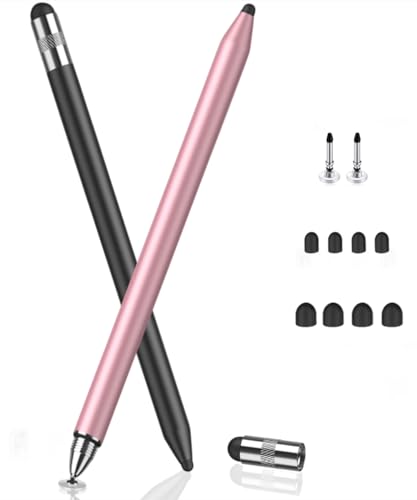
MEKO 3-in-1 Stylus Pen — Best Tip Variety
MEKO’s 3-in-1 takes a different route to versatility: instead of several pens, one pen carrying fine tips in three sizes, so the instrument adapts to the task instead of the drawer adapting to the instrument. A finer tip for placing a cursor and writing short notes, a broader one for scrolling and swiping, the set covering the passive range in a single body that lives clipped in a notebook or a pocket. For the user who carries one pen and wants it to be the right pen three times a day — annotating a PDF on the train, tapping through a spreadsheet at a desk, sketching a quick diagram for a colleague — this is the most considered passive design in the guide.
The MEKO name carries weight in this small world for a reason: the company’s tips have a reputation for glide and durability that the generic end of the market rarely matches, and the replaceable-tip design means the pen’s working ends are renewable rather than disposable. It remains a passive pen, with the family’s honest limits — the finest of its three tips is still broader than an active point, and long-form handwriting will feel it. But as the single-pen answer for mixed everyday use, with a choice of finishes that includes a rose gold for those tired of black tech, it is the connoisseur’s pick among the passive four.
- Type: passive capacitive, 3-in-1 tip system
- Tips: fine tips in three sizes for different tasks
- Design: replaceable tips extend the pen’s life
- Compatibility: all capacitive touchscreens
- Finishes on this listing: Black / Rose Gold
Strengths
- Three tip sizes make one pen serve writing, tapping and sketching.
- Tip quality and glide a cut above generic passive pens.
- Replaceable tips mean the pen is maintained, not replaced.
Trade-offs
- Still passive — fine tips are relative, not active-pen fine.
- Swapping tips is a small ritual some users will skip and simplify.
- One pen, however versatile, can still be lost like any other.
Best for: single-pen carriers whose stylus work changes through the day. Not suited for: households needing several pens at once.

MEKO 2-in-1 Stylus Pen — Best Everyday Classic
Every category has the product that defined it and then refused to leave, and in affordable styluses it is this MEKO: a 2-in-1 design pairing a fine fibre tip with a disc tip, finished with a pen clip and a non-slip rubber grip. The fibre tip is its signature — a woven mesh point that glides across glass with a smoothness rubber cannot imitate and wears far longer than foam, making it the best passive tip here for the long scrolling, swiping sessions of reading and browsing. Flip to the disc when precision calls, clip it to the notebook when neither does. It is a design that has survived a decade of touchscreen fashion because it solved the everyday problem completely and then stopped needing to change.
As the closing pick it makes the guide’s closing argument. Most stylus use is not art or longhand; it is the thousand small navigations of a phone’s day, done more accurately, more cleanly and more comfortably than a fingertip manages — with gloves in winter, with long nails, with hands that shake slightly or grip weakly, on a train, at a desk, in a kitchen. The MEKO 2-in-1 serves that majority use with the best everyday tip in the guide, a grip that respects the hand holding it, and a price that treats replacement as a shrug. If you buy one passive pen and keep it for years, buy the one the market has already kept for years.
- Type: passive 2-in-1 — fibre tip and disc tip
- Grip: non-slip rubber grip, pen clip for pockets and notebooks
- Tip behaviour: fibre tip glides for scrolling; disc for precision
- Compatibility: all capacitive touchscreens
- Finish on this listing: Black
Strengths
- The fibre tip is the smoothest everyday navigator in this guide.
- Clip and grip make it the most carry-able, hold-able passive pen here.
- A proven design with replaceable tips and a long track record.
Trade-offs
- Passive limits apply — navigation and notes, not fine art.
- The disc end shares the family’s preference for a clean screen.
- A single pen at a price where rivals sell packs — quality over quantity.
Best for: everyday navigators who want one dependable pen for years. Not suited for: buyers equipping a whole household at once.
What is the real difference between active and passive styluses?
Electricity and honesty. A passive stylus is a conductor: it carries your hand’s natural capacitance to the screen through a tip wide enough for the screen to register, which is why passive tips are broad — the screen needs a finger-sized patch of signal, and rubber, fibre and disc tips are three different ways of delivering it. The disc cheats elegantly, spreading the patch across a transparent plate while your eye reads the point at its centre. An active stylus generates its own signal from a battery, so its tip can be genuinely fine — a point rather than a patch — and the screen reads that point with a precision no passive design can match. That is the whole of the active advantage, and for handwriting it is decisive.
What neither family does at this price is talk back. Pressure sensitivity and palm rejection require the screen and pen to be designed as one system, with a digitiser layer in the display listening for the pen specifically. No add-on pen can retrofit that conversation onto a phone that was not built for it, whatever the listing’s adjectives suggest. Judge any affordable stylus by the honest scale — tip fineness, glide, durability, convenience — and the six picks here rank cleanly. Judge it by borrowed vocabulary about pressure levels and you will be disappointed by physics, which is the one reviewer no pen can argue with.
How do you take good handwritten notes on an Android phone with a stylus?
Choose the app for the pen you own. Note-taking apps with a zoomed writing panel — where you write large in a box at the bottom and the text flows onto the page at proper size — transform even a passive pen’s broad tip into legible notes, and they make the active pens feel like paper’s equal for lists and lectures. Turn on the app’s palm-guard or wrist-protection setting if it offers one; it will not be the hardware palm rejection of a digitiser, but it reduces stray marks from a resting hand. Write at the size the tip wants rather than the size you wish for: active pens take near-natural sizing, passive pens want letters a third larger, and fighting that preference is how notes become illegible murals.
Then build the small system that makes notes useful after the meeting. One notebook per project, a habit of titling every page with its date and subject, and a weekly five-minute pass to photograph or export the pages that matter into your main files — a stylus makes capturing thoughts easy, and only filing makes them findable. Rest the phone on a surface rather than holding it when you write at length; a phone in a gripped hand moves with every stroke. And keep the screen clean — a stylus tip on a greasy screen skates exactly like a pen on glass, because that is, in the end, precisely what it is.
Comparison table
| Stylus | Type | Tip story | Best at | Watch out for |
|---|---|---|---|---|
| Active Stylus Pen for Android | Active, rechargeable | Fine point, fast charging | Handwriting and annotation | Needs charging; no palm rejection |
| Kenkor Active Stylus Pen | Active, rechargeable | Fine point, dual-touch | Sketching across devices | Single pen, active limits |
| ChaoQ 3-pack | Passive | Everyday capacitive tip ×3 | Household navigation and signing | Too broad for fine writing |
| Bopomofo 5-pack | Passive 2-in-1 | Disc + rubber, spares included | Precision tapping, sharing | Disc prefers a clean screen |
| MEKO 3-in-1 | Passive | Fine tips in three sizes | Mixed tasks, one pen | Tip swapping is a ritual |
| MEKO 2-in-1 | Passive | Fibre tip + disc tip | Everyday gliding navigation | Quality over pack quantity |
What mistakes do stylus buyers keep making?
The first is believing the vocabulary. A listing that whispers about pressure sensitivity or palm rejection for a universal pen is describing a different product category, and buyers who purchase on those words return the pen for failing at physics it never possessed. Buy on mechanism — active for fine lines, passive for navigation — and the disappointment rate in this category collapses. The second mistake is the mirror image: dismissing passive pens as useless because they are simple, when for tapping, signing, scrolling and glove-season use they are not the lesser tool but the correct one, at a price that makes them nearly disposable.
Third, buyers forget that tips are consumables. A pen whose tip cannot be replaced has a lifespan measured in months of daily use; the picks here with spares in the box or replaceable tips are worth their small premium for that reason alone. Fourth, active-pen owners let the battery die of neglect and conclude the pen is broken — charge it on a rhythm, monthly at least, and it will outlast the phone it serves. And fifth, people write with a stylus on a filthy screen and blame the tip for skating; a two-second wipe is the cheapest performance upgrade in this entire guide.
Who benefits most from a stylus? Six honest use cases
The delivery and trades world runs on styluses nobody reviews. Signing a customer’s screen, ticking a checklist on a building site, photographing a meter and circling the reading — all of it is faster, cleaner and more accurate with a pen than with a cold or gloved fingertip, and the passive packs in this guide exist at exactly the price where a lost pen is a shrug. Field workers should buy the multi-packs and treat pens as consumables of the trade, like gloves: everywhere, cheap and replaced without grief. The same logic serves market traders, couriers and carers making visit notes at a doorstep in February.
Students are the second constituency, and theirs is the active pens’ home ground. A lecture’s worth of notes on a phone is a compromise — the screen is small — but revision notes, annotated slides, worked examples photographed and then written over: that is where a fine-tip pen on the phone you already own beats a notebook you left in another building. Older users form the third group, for reasons of dignity as much as utility: a stylus turns the touchscreen from a test of fingertip precision into a tool held like the pens of a lifetime, and the MEKO 2-in-1’s grip and the ChaoQ’s simplicity serve hands that the smartphone era did not design for. Add the long-nailed, whose taps land at an angle fingertips never intended; the winter-gloved, for whom a capacitive pen is the difference between answering and fumbling; and the cook, the gardener and the mechanic, whose hands are honourably dirty for hours a day and whose screens stay clean because a pen, not a finger, does the touching. Six constituencies, one small tool — that breadth is why this unglamorous category outsells its glamorous rivals year after year.
How can you make a passive pen write better than it should?
Technique closes half the gap between passive and active. Write bigger — letters at one and a half times your paper size keep a broad tip’s strokes from colliding — and slow down by a fraction; a passive tip reads position slightly less eagerly than an active point, and haste is what turns words into waveform art. Use lined or dotted digital paper in your notes app, because the eye forgives a wandering line that a visible baseline corrects. And write in the app’s zoom panel if it has one, which exists precisely to launder broad tips into fine script.
Hardware habits help the rest of the way. Keep the screen scrupulously clean, since every tip in the passive family reads through the film of the day if you let it accumulate. Prefer the disc tip for anything with small targets and the fibre tip for long scrolling sessions, matching the tool to the minute rather than the day. Rest the phone flat instead of holding it — a moving target defeats every tip ever made. None of this turns a three-dollar pen into a digitiser. All of it together turns it into a perfectly respectable writing instrument, which is what its owners, sensibly, actually needed.
How do you look after a stylus so it lasts?
Treat the tip as the product and the body as its handle, and the care regime writes itself. Inspect tips monthly: a rubber tip that has gone shiny-smooth or started to drag, a fibre tip frayed at the edges, a disc with a scratch across its face — each is a five-minute replacement on the picks that support spares, and a pen restored rather than retired. Store pens tip-protected where you can; the cap or case a pen arrived with is not packaging, it is the tip’s armour against the coin-and-key warfare of a pocket or bag.
For the active pair, battery manners decide longevity. Charge on a rhythm rather than on a crisis, avoid leaving the pen flat for months in a drawer, and keep it away from the two environments batteries hate — a hot car and a freezing one. A pen treated this way outlasts the phone it was bought for, which quietly changes its economics: the affordable stylus, maintained, is not a consumable at all but a small durable tool, and the packs with spares in the box are simply the ones honest enough to say so on the label. Keep the spare tips in the same place as the pens themselves — a small envelope in the desk drawer, the zip pocket of the tablet case — because a spare that cannot be found on the day the tip fails is not a spare at all, merely a rumour of one. The households that run these pens for years are not luckier than the rest; they are simply the ones whose spares live where the pens do.
Why do classrooms and kids change the stylus calculation?
Because children are honest product testers with no respect for unit economics. A pen given to a child will be chewed, dropped, lent, lost and used as a drumstick before Friday, and any buying strategy that ignores this is fiction. The multi-packs in this guide — the Bopomofo five with its spares above all — are the rational response: the cost per pen falls to the level where loss is a logistics event, not a financial one, and the spare tips keep the survivors working. Teachers equipping a class set should think the same way at scale, standardising on one passive model so tips, spares and replacements all interchange.
There is also a genuine educational case. Handwriting on a screen with a pen — forming letters, working sums in long form, drawing the diagram instead of photographing the board — exercises exactly the skills that tapping a keyboard does not, and a cheap stylus turns the family tablet into a workbook for the price of a sandwich. Choose passive for the young, keep the active pens for the students old enough to charge them, and let the pens be the least precious technology in the school bag. That is what they are for.
How do you annotate PDFs and photos like you mean it?
Annotation is where an affordable stylus stops being a convenience and becomes a professional tool. The workflow that works on a phone is simple: open the document in an app that supports pen markup, zoom until the passage you are marking fills the screen — annotation at full-page zoom is where sloppy lines are born — and mark with intent: circle the figure, strike the clause, write the three-word margin note rather than the paragraph. The active pens earn their price in this one task, because a fine tip writes margin notes at a size a passive tip cannot reach; the disc-tipped passive pens are the fallback, placing underlines and ticks with respectable accuracy.
Photographs annotate the same way and travel further. A builder circling the crack, a tenant arrowing the stain for the landlord’s email, a grandparent marking which face in the group photo is which cousin — the marked photo explains what a paragraph of description fumbles. Save annotated copies rather than overwriting originals, and export the marked PDF as a new file so the clean version survives your opinions. It is unglamorous work, done in vans and kitchens and site cabins, and it is the strongest argument in this guide: the stylus is not for artists alone. It is for anyone whose job involves pointing at things and being understood. Keep one annotated example of your own — the first form you marked up cleanly, the first photograph you arrowed for a landlord or a client — and you will have the reference that settles every future hesitation about whether the pen earns its pocket space. Tools prove themselves in artefacts, and an annotated page is the stylus’s artefact, as a written page is the pen’s.
Does a stylus make sense for games?
For a particular shelf of games, emphatically yes. Puzzle and drawing games, word games with small letters, tower-defence and strategy titles where a fingertip covers the very unit you are trying to select — all of them play better with a pointed instrument, and the disc-tipped pens here are the gamers’ passive pick because the transparent tip keeps the target visible at the moment of commitment. Rhythm and action games built for thumbs are the opposite case; a stylus only slows the hands they were designed around. Judge by genre, not by enthusiasm.
There is a comfort argument too. Long sessions of a tap-heavy game tire a fingertip and grease a screen in a way a pen simply does not, and players who keep a Bopomofo or a MEKO by the sofa are applying the same logic as the cook and the courier: the right contact point for the job. A stylus will not improve your ranking in a shooter. It will quietly improve your evening in everything slower, which is most of what phones are actually played. One practical note for the disc-tip players: rhythm-adjacent games that demand rapid repeated taps in one spot are kinder to the rubber end or the fibre tip, which absorb the tapping without the disc’s small pivot motion. Flip the pen to the game rather than forcing one end to serve every genre, and both ends will live longer — the two-ended designs in this guide are built on exactly that principle, and the players who use both ends as intended are the ones whose tips survive the year.
How do styluses and screen protectors get along?
Well — better than fingertips and protectors do. A stylus tip is smooth, consistent and free of the grit a fingertip picks up from pockets and life, so on a protected screen it is the gentlest input method available. Two pairings deserve a note. Matte and paper-feel protectors add friction that makes any stylus feel more like writing and less like skating; if handwriting is your main use, that combination is the cheapest upgrade in this entire guide, with the trade-off that matte finishes soften the screen’s sparkle for video. Tempered glass protectors pair happily with every tip here, with one caution for the disc tips: keep the disc’s face clean, because a trapped grain under a disc on glass is the one scenario in this guide that can mark a protector — which is, after all, what the protector is for.
If your phone has no protector, the calculus inverts slightly in the stylus’s favour again: the tips in this guide are softer than modern screen glass and will not scratch it in normal use, while the fingertip they replace can carry abrasive dust. Either way, the stylus is not the risk in the system. Neglect is — worn tips, gritty discs and dead batteries — and every pick here was chosen partly because its maintenance is cheap enough that neglect has no excuse.
How did the phone stylus go from standard equipment to affordable accessory?
Older readers will remember when the stylus was not an accessory but the interface itself: the resistive screens of early smartphones and PDAs needed a pointed prod, and devices shipped with a plastic wand slotted into the body. The capacitive revolution killed that stylus by making the finger sufficient — and spent the next decade rediscovering, use case by use case, the places where a finger is merely sufficient and a point is better. Handwriting came back through note apps. Signing came back through delivery and banking. Precision came back through ever-smaller interface targets on ever-larger screens. The modern affordable stylus is that rediscovery, productised: not the interface anymore, but the correction to the interface, sold for the price of lunch.
That history explains the category’s strange honesty problem. Because a built-in digitiser pen exists at the top of the market doing genuinely advanced things, the vocabulary of that world — pressure, rejection, latency — drifts down into listings for pens that share none of its hardware. The defence is the one this guide opened with: know the two mechanisms, know which one your task needs, and let the adjectives wash past. The stylus began as a necessity, became an accessory, and survives as a small, well-understood tool. Bought on that understanding, it is one of the best-value objects in the whole phone ecosystem.
How do grip, weight and length change which pen suits you?
The specifications nobody lists decide the pens people keep. Length first: a stylus that matches a real pen’s length balances in the hand for writing, while the stubby novelty sizes tire the fingers within a page — every pick in this guide is honestly pen-sized, which is part of why they are in it. Weight divides by task: a little heft steadies a writing hand and gives the active pens their instrument feel, while the lightest passive pens suit the all-day carrier who wants the tool to disappear into a pocket or a uniform. Grip is where hands cast their deciding vote — the MEKO 2-in-1’s non-slip rubber section exists because a smooth aluminium barrel, however handsome, rotates in a working hand and skates in a gloved one.
Clips deserve their sentence too, because a stylus without one lives on desks and in drawers, while a stylus with one lives on the notebook, the lanyard and the shirt pocket where the work is. When two pens in this guide otherwise tie for your use, choose by these unlisted numbers — the one whose length matches your hand, whose grip matches your day, whose clip matches your carrying — and you will have chosen the pen you are still using when the phone it serves has been replaced twice over. There is a simple home test for the finalists, incidentally: write the same sentence — your name and address, the thing you sign most — three times with each candidate, on the phone you actually own, at the speed you actually write. The pen whose third attempt looks most like your paper hand is your pen, whatever the comparison table said, because handwriting is the most personal specification in this entire guide and the only one that cannot be transferred from a reviewer’s hand to yours.
Final Recommendation
Match the pen to the frustration that sent you searching. If it was handwriting — notes that sprawled, annotations that missed — buy an active pen: the fast-charge Android stylus for phone-first note-taking, the Kenkor if drawing shares the job. If it was everything else a fingertip does badly — tapping, signing, scrolling, navigating through winter and flour and long nails — buy the passive that fits your household: the ChaoQ three-pack for simple coverage, the Bopomofo five-pack for a family, the MEKO 3-in-1 for one pen with range, the MEKO 2-in-1 for the smoothest everyday glide. Buy two if your life has two stations — desk and bag, kitchen and car — because a stylus, like reading glasses, is a tool whose value collapses the moment it is in the other room, and the passive picks here are priced precisely so that duplication is the sensible strategy rather than an extravagance. None of them will turn your phone into a drawing tablet, and this guide never promised they would. They will turn a blunt instrument into a pointed one, for the price of lunch — and a year from now, the pen by your keyboard will have earned its place a thousand small taps at a time.
Frequently Asked Questions
Will these styluses work on any Android phone?
Yes. Every pick here works on capacitive touchscreens, which is to say effectively every Android phone and tablet sold in the last decade and a half. No pairing, app or setting is required for the passive pens; the active pair simply needs charging and switching on.
Can an affordable stylus replace a built-in pen like the S Pen?
No, and it should not be bought expecting to. A built-in digitiser pen offers pressure sensitivity, palm rejection and button features because the screen contains hardware dedicated to it. Affordable universal pens imitate a finger with varying precision — superb for notes, navigation and annotation, but a different instrument category.
Which tip is best for drawing?
For sketching ideas and diagrams, the active pens’ fine points give the most control. Among passive designs, disc tips draw the most predictable lines because you can see the contact point. For detailed digital art, be honest with yourself: that work wants a digitiser tablet or a stylus-native device, not any pen in this price class.
Do stylus tips scratch phone screens?
Tips in good condition do not — rubber, fibre and disc tips are softer than screen glass. The risk is a worn tip or grit trapped under a disc, which is why replaceable tips and a clean screen matter. If you use a screen protector, a stylus is also the kindest way to interact with it, since a tip never carries the grit a fingertip can.
How long do the active pens run between charges?
Long enough that charging becomes a monthly rhythm rather than a daily one for typical note-taking use, and the fast-charge design of our top pick makes top-ups brief. The failure mode to avoid is neglect: a pen left flat for months is the one that is dead on the day of the big meeting, so charge it when you charge your patience — regularly and before it is urgent.
Can I use a stylus with gloves on?
Yes — this is one of the passive pen’s oldest jobs. An ordinary glove blocks the fingertip’s signal, but a conductive stylus tip held in a gloved hand still delivers the contact the screen needs, which is why couriers, site workers and winter commuters keep one in an outer pocket. The multi-packs exist for exactly this life: a pen that lives with the gloves and is replaced without ceremony when it wanders off.
Which pick should a student buy for a semester of notes?
An active pen — the fast-charge Android stylus if the phone is the main notebook, the Kenkor if a tablet shares the work. Pair it with a notes app that has a zoom writing panel, keep the pen charged on a weekly rhythm, and keep a ChaoQ passive in the bag as the understudy for the day the active pen is flat or forgotten. That two-pen system, still at sandwich money, covers a semester more reliably than any single pen at any price.
Are styluses good for people with limited hand mobility?
Often genuinely helpful. A stylus extends reach, allows a looser grip than a pinched phone demands, and turns tapping into a pointing task rather than a fingertip-precision one. The MEKO 2-in-1’s non-slip grip and the simple passive pens suit this use well; for long sessions, the lightest pen that does the job is usually the kindest.
Related Guides
A pen is only half of the setup, so round yours out with the best note-taking apps for Android, Android phones with built-in styluses, and tablet accessories for drawing and handwriting.


