What's inside
- Key Takeaways
- Quick Picks
- How were these picks chosen for real estate work?
- Comparison table
- How should a real estate office choose among these six?
- How we evaluated these printers against a transaction week
- Common mistakes real estate buyers make with office printers
- What a closing actually costs in ink and paper
- Setting up the brokerage print corner properly
- The odd jobs: envelopes, riders, labels and one-off signs
- Longevity: living with the machine for three years
- Final recommendation
- Frequently asked questions
As an Amazon Associate I earn from qualifying purchases. This post may contain affiliate links at no extra cost to you.
gizmoverdict.com is reader-supported. When you buy through links on our site, we may earn an affiliate commission.
Where to buy: Brokerage offices and solo agents usually source machines like these through Amazon because a replacement can arrive between listing appointments rather than after a supply-house order cycle, and because ink, toner and paper for mainstream office models sit in the same basket. Check the individual listing for the configuration on offer, since bundles and subscription trials change, and confirm the seller before ordering for an office that cannot afford a wrong delivery during closing week.
The best printers for real estate earn their desk space on two very different jobs that often collide on the same afternoon. At noon the machine is producing a forty-page closing packet that must come out in order, double-sided, with every signature page crisp. At two o’clock it is printing color listing sheets for an open house, where a washed-out kitchen photograph quietly undersells the property. Add buyer agreements scanned to a transaction folder, flyers reprinted after a price change, and the steady drip of disclosure forms, and the real estate printer turns out to be less a peripheral than a small production department. This guide weighs six all-in-one machines against that workload: automatic document feeders for packet scanning, duplex printing for thick files, color quality for marketing sheets, and the running-cost structures that matter when an office prints every single day rather than once a week.
Key Takeaways
- Every pick here is an all-in-one with print, scan and copy, because a real estate workflow constantly converts paper in both directions.
- Document feeders appear across the shortlist, and duplex printing appears on most, which together decide how painful a closing packet feels.
- The Epson WorkForce Pro WF-5938 states the largest paper capacity in this group at 500 sheets plus a 50-page feeder, suiting the busiest desk.
- The Xerox C245 states a 26 ppm speed, the only explicit print speed in these six titles, and positions itself for hybrid offices and small businesses.
- Color listing sheets favour the inkjet picks, whose titles emphasise photo and home-office output, while contract text favours whatever feeds reliably.
- Three picks carry a three-month Instant Ink trial in their titles, so subscription economics deserve a look before the trial lapses.
Quick Picks
| Pick | Label | Why it is here |
|---|---|---|
| HP OfficeJet Pro 8125 | Best overall for a solo agent | Feeder, duplex printing and an ink trial in a home-office frame |
| Canon PIXMA TR8620a | Best for photo-led listing sheets | Photo and document positioning with fax and a document feeder |
| Xerox C245 | Best stated speed | 26 ppm in the title, compact color output for small businesses |
| Brother Work Smart 1410 | Best touchscreen value pick | 2.7-inch touchscreen and automatic duplex in a compact inkjet |
| Epson WorkForce WF-2990 | Best wired-office option | Ethernet joins fax, feeder and two-sided printing |
| Epson WorkForce Pro WF-5938 | Best for packet volume | 500-sheet capacity and a 50-page feeder for heavy files |
How were these picks chosen for real estate work?
Selection started with the closing packet, because that is the document an office cannot reprint casually once signatures are involved. A machine had to scan multi-page originals through a feeder rather than one sheet at a time on the glass, and it had to copy, since agents still duplicate executed pages for clients asking for paper in hand. Duplex printing scored heavily: a purchase agreement printed single-sided doubles in bulk, reads worse in a folder, and costs twice the paper across a year of transactions. Color mattered for the second job, the listing sheet, where exterior photographs and floor-plan graphics carry the marketing weight. Machines whose titles spoke only to occasional home printing were passed over in favour of models aimed at home offices, hybrid offices and small businesses, which is the language these six titles use about themselves.
Running costs shaped the second pass. Real estate printing is spiky but relentless: quiet weeks still produce showing packets, and a hot listing can consume a ream in days. Three of these machines bundle a trial of HP Instant Ink, one bundles a Brother Refresh trial, and the Epsons and the Xerox follow more conventional cartridge or toner purchasing, so the guide treats the supply model as part of the pick rather than an afterthought. Physical fit mattered too. Many agents print from a spare bedroom or a shared brokerage bullpen, so wireless setup appears throughout, and one pick adds Ethernet for an office that prefers its shared printer on a wire. Finally, fax survives in this category for a reason: a few title companies, lenders and rural offices still send documents that way, and three titles here keep the capability alive.
Readers comparing office machinery for a different trade might also look at best printers for engineers when large-format drawings enter the picture, since the machines in this guide are letter-and-legal office models rather than plotters.

1. HP OfficeJet Pro 8125 — Best overall for a solo agent
The OfficeJet Pro 8125 frames itself in its title as a home-office machine, and that framing suits the way many agents actually work: one desk, one license, a printer within arm’s reach of the chair where calls get returned. It prints, scans and copies in color, feeds originals through an automatic document feeder, and prints on both sides automatically, which covers the full loop of a transaction file from first draft to signed copy. For a listing appointment, the same machine turns out color sheets where the photographs hold together, and for a contract revision it duplexes a long agreement without anyone standing beside the tray flipping pages. That combination, rather than any single headline feature, is why it leads this list.
Scanning deserves a closer word. A feeder changes the character of paperwork: a stack of disclosures goes in once, and the agent can answer email while the pages convert to a file for the transaction management system. The title does not state the feeder’s sheet capacity, so a very long original may still need splitting into batches, and the title does not state a print speed either, which means anyone timing a same-hour packet run should treat pace as unconfirmed rather than assumed. The three-month Instant Ink trial named in the title introduces the subscription route: ink delivered against a page plan. For an agent whose volume swings with listings, a plan can smooth supply surprises, though the trial’s end is the moment to compare plan cost against cartridge buying with real page counts from the first quarter in hand. The title also describes the machine as AI-capable, a maker’s label we note without leaning on, since the daily value here sits in feeding, duplexing and color output.
On the desk, a wireless all-in-one of this class typically serves a laptop, a phone and perhaps a partner’s machine on the same network, and mobile printing matters when a client sends a revised page from the road. The 8125’s positioning as best for home office suggests exactly that mixed personal-and-business duty: school forms in the morning, earnest-money paperwork by afternoon. Agents running a small team should look further down this list for stated paper capacity, because this title stays silent on tray size.
- Strengths: Feeder-equipped scanning for multi-page transaction documents
- Strengths: Automatic duplex printing keeps thick agreements compact
- Strengths: Three-month Instant Ink trial softens the first quarter of supply costs
- Trade-offs: Feeder capacity is not stated in the listing title
- Trade-offs: Print speed is not stated in the listing title
- Trade-offs: Paper tray capacity is not stated in the listing title
- Type: Wireless color inkjet all-in-one
- Functions: Print, scan, copy
- Document feeder: Yes, capacity not stated in the listing title
- Duplex printing: Yes
- Supply note: 3-month Instant Ink trial included
- Fax: Not stated in the listing title
Best for: a solo agent or two-person team running packets and listing sheets from one home-office desk. Not suited for: an office whose daily volume turns on a stated 500-sheet tray, since this title gives no tray figure.
Agents weighing this HP against their current running costs can check price on Amazon and compare the ink plan tiers against a typical month of closings.

2. Canon PIXMA TR8620a — Best for photo-led listing sheets
Canon’s TR8620a carries the broadest function list in this group: printer, copier, scanner and fax in one home-office machine, with an auto document feeder on top. Its title separates photo from document work explicitly, and that split maps neatly onto real estate output. The document side handles contracts and disclosures; the photo side handles the glossy-feeling listing sheet, the just-sold postcard proof, and the open-house handout where image quality is the entire point. An agent whose marketing leans on photography — twilight exteriors, bright interiors — gets the most from this pick, because a printer that treats photos as a first-class job tends to render smoother skies and cleaner skin tones on the page than one tuned purely for text.
The fax deserves mention because it refuses to disappear from property transactions. Certain lenders, county offices and long-established brokerages still transmit by fax, and owning the capability in the same machine avoids a separate subscription workaround on the rare week it matters. AirPrint support is named in the title, which speaks to iPhone- and iPad-carrying agents printing a showing sheet straight from the device that took the listing photos. The title also notes it works with Alexa, a convenience for voice-triggered prints that most offices will treat as a novelty rather than a workflow. What the title does not state is a print speed, a feeder capacity or a tray size, so high-volume packet work should be planned with that silence in mind; this machine’s case rests on versatility and photo output rather than stated throughput.
Duplex printing is not claimed in this title, and that absence matters for the closing-packet job: long agreements would emerge single-sided unless the listing itself confirms otherwise, so a buyer for whom two-sided contracts are non-negotiable should verify that point on the product page before committing. For the marketing-heavy office, though, the trade can be worth it, since the Canon’s photo orientation is the strongest in this six. It also suits a brokerage corner where one machine must serve walk-in clients, sign riders’ paperwork and the occasional fax without a second device.
- Strengths: Photo and document printing both named in the title
- Strengths: Fax included alongside print, scan and copy
- Strengths: AirPrint support suits phone-first listing workflows
- Trade-offs: Duplex printing is not stated in the listing title
- Trade-offs: Print speed is not stated in the listing title
- Trade-offs: Feeder capacity is not stated in the listing title
- Type: All-in-one inkjet, black
- Functions: Print, copy, scan, fax
- Document feeder: Yes, capacity not stated in the listing title
- Mobile: AirPrint named; works with Alexa
- Duplex printing: Not stated in the listing title
- Supply note: Not stated in the listing title
Best for: a marketing-led agent whose listing sheets and postcards carry the brand. Not suited for: a packet workflow built on automatic two-sided agreements, since duplex goes unmentioned in this title.
Photography-driven offices can view the current Canon listing on Amazon to confirm paper handling before matching it to a flyer routine.

3. Xerox C245 — Best stated speed
The Xerox C245 is the business entry in this set: a wireless color all-in-one described as an Amazon Exclusive, built for hybrid offices and small businesses, and replacing the earlier C235 model. Its title states 26 ppm, the only explicit speed figure among these six, and speed has a particular meaning in real estate. It is the difference between a revised contract reaching a client before a deadline and a nervous phone call explaining a delay. Twenty-six pages a minute will not set records in a corporate print room, but for a brokerage desk it clears a full agreement in about the time a coffee takes to pour, and color comes along for the ride when the same run includes a listing sheet.
The 3-in-1 description covers print, scan and copy; fax is absent from the title, which trims this pick for offices still tied to fax traffic but streamlines it for everyone else. Compactness is part of the pitch, and in real estate that matters more than it sounds: desks in shared offices shrink as teams grow, and a machine that fits beside a monitor bank earns tolerance a bulky unit never gets. Wireless setup is named, suiting the hybrid pattern the title invokes — an agent splitting the week between home and brokerage can print to the office machine’s queue habits without relearning anything, since the same driver model follows the laptop.
Because the C245 succeeds the C235, buyers with the older machine in another office gain a familiar control layout, and supplies research starts from a known family. The title does not state a document feeder, duplex behaviour, tray capacity or a touchscreen, so the careful reading is this: speed and color are the confirmed virtues, while packet-handling details need a look at the full specification before an office builds its closing routine around them. For a team whose bottleneck is raw page output — comparative market analyses for a morning of listing appointments, multi-copy buyer packets — a stated speed beats an unstated one, and that is the honest core of this recommendation.
- Strengths: 26 ppm stated in the title, the clearest pace figure here
- Strengths: Color print, scan and copy in a compact footprint
- Strengths: Positioned for hybrid offices and small businesses
- Trade-offs: Document feeder is not stated in the listing title
- Trade-offs: Duplex printing is not stated in the listing title
- Trade-offs: Fax is not part of the titled function list
- Type: Wireless color all-in-one, 3-in-1
- Functions: Print, scan, copy
- Speed: 26 ppm as stated in the listing title
- Positioning: Hybrid offices and small businesses
- Lineage: Replaces the C235 model
- Tray capacity: Not stated in the listing title
Best for: a small brokerage desk where multi-copy packet pace is the daily pinch point. Not suited for: fax-dependent transaction traffic, since the titled functions stop at print, scan and copy.
Offices timing their packet runs can look up the C245 on Amazon and read the full specification against their closing checklist.
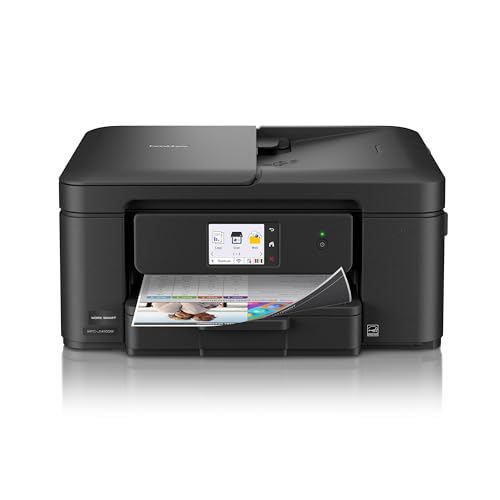
4. Brother Work Smart 1410 — Best touchscreen value pick
Brother’s Work Smart 1410 leads with its 2.7-inch touchscreen, and a screen sounds like a small thing until a printer lives in a shared office. Walk-up copying — a client arrives, an assistant needs twelve copies of a disclosure, nobody wants to open a laptop — runs through that panel. A legible touchscreen shortens every one of those interactions, and it reduces the training burden when a brokerage rotates transaction coordinators. Behind the screen sits a wireless color inkjet all-in-one with automatic duplex printing, so the core contract job is covered: two-sided agreements without manual page turning.
The title includes a Refresh subscription trial, Brother’s ink-delivery programme, which places this pick in the same running-cost conversation as the HPs: a trial period to measure real page volume before committing to a supply rhythm. For a newer agent still learning how much paper a month of listings consumes, that measurement window has genuine value. What the title does not state is a document feeder, and that silence is the pick’s main caveat. Scanning a long executed contract one page at a time on a flatbed is slow, thumb-tiring work, so an office whose scanning runs to full transaction files should weigh the WF-5938 or the 8125 more heavily. Where scanning stays short — identification pages, single addenda, deposit slips — the flatbed routine is tolerable and the touchscreen keeps it brisk.
Print speed and tray capacity also go unstated, reinforcing the picture of a machine bought for everyday competence rather than throughput heroics. In a one-agent office producing listing sheets, showing packets and the occasional full agreement, competence plus a friendly panel plus duplex output is a coherent package. The Work Smart name itself signals the intended buyer: a small operation that wants office behaviour without office-machine bulk or ceremony.
- Strengths: 2.7-inch touchscreen simplifies walk-up copying
- Strengths: Automatic duplex printing for two-sided agreements
- Strengths: Refresh trial lets a new office measure ink use
- Trade-offs: Document feeder is not stated in the listing title
- Trade-offs: Print speed is not stated in the listing title
- Trade-offs: Fax is not stated in the listing title
- Type: Wireless color inkjet all-in-one (MFC-J1410DW)
- Functions: Print, scan, copy as an all-in-one
- Display: 2.7-inch touchscreen
- Duplex printing: Automatic
- Supply note: Refresh subscription trial included
- Document feeder: Not stated in the listing title
Best for: a compact one-agent office where walk-up copies and two-sided contracts dominate. Not suited for: feeder-fed scanning of full transaction files, since no feeder appears in this title.
Small offices can see the Brother 1410 listing on Amazon for the Refresh trial terms and current configuration.

5. Epson WorkForce WF-2990 — Best wired-office option
The WF-2990 is the most completely specified mid-list pick: print, scan, copy and fax, a document feeder, automatic two-sided printing, a 2.4-inch touchscreen, a 150-sheet paper tray and Ethernet, all named in one title. That Ethernet port is the differentiator. In a brokerage with a wired network, a printer on a cable stays put — no Wi-Fi renegotiation after a router change, no mystery dropouts during a packet run — and every workstation in the office shares it predictably. For a transaction coordinator whose morning is a queue of other people’s print jobs, that stability is worth more than a headline speed figure.
The 150-sheet tray sets a realistic expectation: roughly a ream’s third, enough for a day of ordinary office output with a midweek top-up, and small enough to keep the machine compact. The feeder plus two-sided printing covers the closing workflow end to end, and fax covers the legacy corner of the business. The 2.4-inch touchscreen is slightly smaller than the Brother’s panel, a minor ergonomic note for offices that copy at the machine all day. Speed is not stated in the title, so a deadline-driven office should treat pace as a specification to confirm rather than a promise, and color positioning here is office-document color — entirely adequate for listing sheets with photographs, even if the photo-specialist Canon makes the stronger marketing claim.
Consider this the pick for an office that has outgrown a purely personal printer: multiple staff, a network cabinet, shared access, and a preference for connections that stay connected. It also bridges home and office gracefully, since wireless remains available for the agent working from a laptop at the kitchen table while the Ethernet serves the brokerage installation.
- Strengths: Ethernet joins wireless for a stable shared connection
- Strengths: Feeder, fax and automatic two-sided printing in one title
- Strengths: 150-sheet tray capacity is stated outright
- Trade-offs: Print speed is not stated in the listing title
- Trade-offs: Feeder capacity is not stated in the listing title
- Trade-offs: Touchscreen at 2.4 inches is the smaller panel here
- Type: Wireless all-in-one with Ethernet
- Functions: Print, scan, copy, fax
- Paper tray: 150 sheets as stated in the listing title
- Display: 2.4-inch touchscreen
- Duplex: Automatic 2-sided printing
- Document feeder: Yes, capacity not stated in the listing title
Best for: a shared brokerage desk that prefers its printer on a network cable. Not suited for: a tray-once-a-week routine, since 150 sheets is a top-up rhythm rather than a bulk store.
Networked offices can review the WF-2990 on Amazon and match its port layout to their cabling before ordering.

6. Epson WorkForce Pro WF-5938 — Best for packet volume
When a real estate office grows past the solo stage, the printer question stops being about features and becomes about capacity, and the WF-5938 answers in capacity language: a 50-page automatic document feeder and a 500-sheet paper capacity, both stated in the title, wrapped around print, copy, scan and fax with automatic two-sided printing. Five hundred sheets is a full ream loaded at once. A coordinator can start a morning of closing packets without the tray running dry mid-file, and the 50-page feeder swallows an executed contract stack in a single load for scanning to the transaction record.
The 4.3-inch color touchscreen is the largest panel in this group, which suits a machine several people share: bigger targets, clearer status, fewer mis-taps when someone is copying under time pressure. Wireless connectivity keeps laptops and phones attached without cabling every desk. The title does not state a print speed, and for a machine sold on capacity that omission is noticeable; offices should confirm pace on the full listing if same-hour bulk runs are routine. It also does not name a supply subscription, so ink purchasing follows the conventional cartridge route, which some offices prefer for its predictability and others avoid for its errand-running.
Physically and financially this is the step-up pick, the one a growing team buys when the smaller machine’s tray has become a daily interruption. Listing sheets, buyer packets, relocation guides and multi-copy disclosures all draw from the same deep tray, and the feeder keeps the scanning side of the transaction file moving at the same tempo. Among these six, it is the only model whose title speaks the language of volume in numbers, and volume is precisely what a busy brokerage produces.
- Strengths: 500-sheet paper capacity, the deepest stated here
- Strengths: 50-page feeder for full contract scanning loads
- Strengths: 4.3-inch color touchscreen, the largest panel listed
- Trade-offs: Print speed is not stated in the listing title
- Trade-offs: Supply subscription is not mentioned in the listing title
- Trade-offs: Ethernet is not stated in the listing title
- Type: Wireless all-in-one, WorkForce Pro line
- Functions: Print, copy, scan, fax
- Paper capacity: 500 sheets as stated in the listing title
- Document feeder: 50 pages as stated in the listing title
- Display: 4.3-inch color touchscreen
- Duplex: Auto 2-sided printing
Best for: a growing team whose coordinators load paper by the ream and scan by the stack. Not suited for: a single shallow desk in a spare bedroom, since a 500-sheet machine is built to office scale.
High-volume offices can find the WF-5938 on Amazon and check its footprint measurements against the print station they have in mind.
Comparison table
| Model | Functions | Feeder | Duplex | Stated capacity or speed | Supply angle |
|---|---|---|---|---|---|
| HP OfficeJet Pro 8125 | Print, scan, copy | Yes, size unstated | Yes | Not stated in the listing title | 3-month Instant Ink trial |
| Canon PIXMA TR8620a | Print, copy, scan, fax | Yes, size unstated | Not stated in the listing title | Not stated in the listing title | Not stated in the listing title |
| Xerox C245 | Print, scan, copy | Not stated in the listing title | Not stated in the listing title | 26 ppm | Not stated in the listing title |
| Brother Work Smart 1410 | Print, scan, copy | Not stated in the listing title | Automatic | Not stated in the listing title | Refresh trial included |
| Epson WorkForce WF-2990 | Print, scan, copy, fax | Yes, size unstated | Automatic 2-sided | 150-sheet tray | Not stated in the listing title |
| Epson WorkForce Pro WF-5938 | Print, copy, scan, fax | 50 pages | Auto 2-sided | 500-sheet capacity | Not stated in the listing title |
How should a real estate office choose among these six?
Begin by counting paper, not features. Pull last quarter’s transaction files and estimate pages printed per closing: the agreement, addenda, disclosures, inspection summaries and the copies handed to clients. Multiply by closings per month and the office has its true volume, which immediately sorts this list. A solo agent closing four deals a month lives comfortably with the 8125, the TR8620a or the 1410. A team closing twenty needs the WF-5938’s tray and feeder, or accepts daily reloading as a standing chore. Volume also drives the supply decision: subscription ink rewards steady, predictable page counts, while cartridge buying suits offices whose printing arrives in unpredictable bursts around listings.
Next, separate the two output jobs and be honest about which one pays. If the brokerage’s marketing is print-led — listing books at presentations, flyer boxes on sign riders, open-house handouts — color quality deserves priority, and the Canon’s photo positioning or the HP’s color inkjet output should lead the shortlist. If print mostly serves compliance and contracts, feeder and duplex behaviour matter more than photographic nuance, and the Epsons’ stated capacities carry the argument. Many offices discover the split is really about people: the marketing coordinator cares about the first job, the transaction coordinator about the second, and the right machine is the one that disappoints neither too often.
Then examine the scanning direction, which buyers routinely underweight. Real estate is a two-way paper business: as much material enters the file as leaves it. A feeder turns a forty-page executed contract into a ten-minute background task; a flatbed-only routine turns it into an afternoon of page lifting. Offices scanning complete files daily should treat a stated feeder as close to mandatory and should note which titles leave feeder capacity unstated, then confirm it. Offices whose inbound paper is mostly single pages can relax that requirement and spend the difference on color or speed.
Connectivity comes fourth. A one-person home office runs happily on Wi-Fi. A shared brokerage with several workstations, a network closet and an IT habit benefits from the WF-2990’s Ethernet, because a wired printer’s address and behaviour stay stable through router swaps and password changes. Fax, fifth, is a yes-or-no question about the office’s counterparties: if a regular lender or title partner still faxes, the Canon, the WF-2990 and the WF-5938 keep that door open; if every partner has moved to portals and email, the Xerox and the HPs lose nothing by omitting it.
Finally, stand in the room where the printer will live. Measure the shelf or credenza, allow space for the feeder lid to open and for paper to exit, and think about who walks up to the machine. A touchscreen earns its keep in shared spaces; a deep tray earns its keep where the machine sits far from the supply cupboard. The cheapest machine that fits the room and the volume is usually the right one, and the most expensive one that does neither is always wrong. For a contrasting workload, readers setting up a home studio desk might compare best printers for planners, where specialty paper handling replaces packet volume as the deciding test.
How we evaluated these printers against a transaction week
Our evaluation imagined a concrete week in a working brokerage and walked each machine through it hour by hour. Monday opens with a new listing: photographs from the weekend shoot become a two-page listing sheet, twenty copies for the flyer box and the office rack. We asked how each machine’s color positioning, as its title describes it, suits photographic output, and how the run feels if the tray holds thirty sheets versus five hundred. The Canon and the HP made their marketing case here; the WF-5938 made its capacity case, because twenty copies is a rounding error against a ream-deep tray.
Tuesday brings an accepted offer. The agreement and its addenda run to dozens of pages, printed twice — once for the buyer file, once for the seller file — and duplex behaviour decides whether those files read as professional packets or as unwieldy stacks. We scored the machines whose titles promise automatic two-sided printing as structurally ahead for this day, and we noted the Canon’s silence on duplex as the week’s clearest caveat. Wednesday is scanning day: the executed contract, earnest-money receipt and inspection report go into the transaction system. Feeder-equipped machines turned that into a load-and-walk-away task in our walkthrough; the Brother, whose title names no feeder, asked for page-by-page patience.
Thursday tests the shared-office reality: three people queue jobs, a client waits in the conference room, and someone needs twelve copies of a disclosure without touching a computer. Touchscreens — the Brother’s 2.7-inch, the Epson pair’s 2.4-inch and 4.3-inch panels — shaped that moment, as did the WF-2990’s Ethernet, which in our scenario kept the shared queue stable while laptops roamed the office Wi-Fi. Friday closes the week with a price change: flyers reprinted, a comparative market analysis refreshed for a Saturday listing appointment, and the Xerox’s stated 26 ppm making its case that raw pace, when a title is willing to state it, is a form of honesty an office can plan around. No single machine won every day, which is exactly why the guide ranks by fit rather than by a single score.
Common mistakes real estate buyers make with office printers
The first mistake is shopping for the listing sheet and forgetting the closing packet. A machine chosen for gorgeous color but lacking a feeder or duplex printing will be cursed through every transaction, and transactions outnumber listing launches. The second mistake is the mirror image: buying pure capacity for an office whose brand lives on printed marketing, then wondering why the flyers look flat. Read your own last month of output before reading any specification sheet, ours included.
A third mistake is ignoring the supply model until the first cartridge runs dry mid-closing. Subscription trials feel free for a quarter and then become a line item; offices should calendar the trial’s end on day one and decide with real page counts. A fourth mistake is placing the printer where the Wi-Fi is weakest — a back office behind two walls — and blaming the machine for dropouts the WF-2990’s wired option exists to prevent. A fifth is assuming every all-in-one faxes: three of these six titles omit fax entirely, and discovering that during a lender’s fax-only request is an avoidable embarrassment. A sixth is neglecting the scan direction when measuring a desk, forgetting the feeder lid needs vertical room to open under a shelf.
Finally, offices err by buying for the busiest imaginable week rather than the typical one. Peak-week thinking produces an oversized machine idling through ordinary months; typical-week thinking, with a copy shop as overflow for the rare monster packet, usually serves the budget better. The exception is the growing team, where next quarter’s volume is the honest planning figure.
What a closing actually costs in ink and paper
Offices rarely feel printer economics as a monthly total; they feel it as a rhythm of interruptions. A cartridge that empties during a quiet week is an errand. The same cartridge emptying an hour before a signing is a crisis with a courier fee attached. That is why the supply structures in these titles deserve reading as risk management rather than as marketing. The three HP entries and the Brother arrive with subscription trials — Instant Ink for the HPs, Refresh for the Brother — and a trial’s real gift is not the included pages but the data: three months of genuine transaction volume, recorded by the machine itself, against which any plan can be priced honestly. An office that lets the trial lapse into a default tier without reading its own page counts has wasted the one free measurement it will ever get.
Paper has its own quiet economics. Duplex printing, offered by the 8125, the 1410 and both Epsons, halves sheet consumption on long agreements, and across a year of closings that halving shows up in the supply cupboard as reams unopened. It also halves the physical bulk clients carry away, which is a small professionalism clients notice without naming. Tray depth interacts with paper cost too: a 500-sheet machine invites buying paper by the case at case prices, while a shallow tray refilled from a single ream at a time tends to be fed whatever the nearest shop charges. None of this appears on a specification sheet, yet over a three-year machine life these habits outweigh modest differences in purchase price, which is why this guide keeps returning to volume, tray and duplex figures rather than to headline features.
There is also the cost of the second machine that offices pretend they do not own. When the main printer cannot fax, someone maintains a workaround. When it cannot scan a stack, someone drives documents to a copy shop or pays a per-page service. When its color disappoints, the brokerage orders listing sheets from a print vendor at per-piece prices that dwarf in-house ink costs. A fair comparison prices each pick against the workarounds it eliminates: the Canon’s fax and photo positioning, the WF-2990’s wired stability, the WF-5938’s capacity. A machine that retires two workarounds is cheaper than its listing suggests, and a bargain machine that creates a third workaround is dearer.
Setting up the brokerage print corner properly
Placement decides whether a good printer feels good. Put the machine where paper flows: near the coordinator’s desk, within reach of the supply cupboard, and far enough from the client seating that a long packet run does not become background noise to a negotiation. Leave clearance above any feeder for its lid and for the stack being loaded, and clearance in front for output to land without curling off an edge. Offices routinely wedge an all-in-one under a low shelf and then wonder why scanning feels awkward; the WF-5938’s 50-page feeder and the other feeders here all ask for honest vertical room.
Network setup deserves one deliberate afternoon. Give a shared printer a consistent name the whole office recognises, load drivers on every workstation before the first deadline, and print a test packet from each seat. If the machine sits on Ethernet, as the WF-2990 can, label the cable at both ends; if it sits on Wi-Fi, check signal strength at the printer’s actual corner rather than at the desk nearest the router. Save the office’s common jobs as presets where the machine allows: duplex packet, color listing sheet, copy at slight enlargement for tired eyes. Presets are the difference between a printer every staff member uses confidently and one only its owner dares to touch.
Finally, build the paper system around the machine. Two paper types cover most real estate output — everyday stock for contracts and a heavier, brighter sheet for listing material — and they should live in labelled spots beside the printer, not in a distant closet. Keep one spare supply set for whichever machine you choose, because every model in this guide will eventually pause a job for ink at the least convenient moment, and the spare set converts that pause from a scramble into a swap. Review the setup after the first month: the tray that empties fastest, the job that jams the queue, the preset nobody uses. A print corner tuned once, early, serves quietly for years.
The odd jobs: envelopes, riders, labels and one-off signs
Beyond packets and flyers, a real estate printer absorbs a long tail of odd work that rarely appears in buying guides yet fills real weeks. Commission checks and earnest-money paperwork come with envelopes, and envelopes ask a printer to feed short, thick stock straight enough that the address lands level. Thank-you cards after a closing, just-listed postcards, and open-house sign-in sheets each arrive as small runs on whatever stock the office keeps. A machine with a forgiving paper path and a driver that remembers custom sizes turns these into two-minute tasks; a fussy machine turns each into a settings expedition, and staff quietly stop offering the personal touches that win repeat clients.
Signage sits at the edge of what any of these six should attempt. Rider panels and yard signs belong to sign vendors, but the paper proofs, the directional arrows for an open-house Saturday, and the printed inserts for brochure boxes are office-printer work, often needed within the hour. Color output that reads clearly at arm’s length — the listing-sheet quality already discussed — covers these jobs, and a deep tray matters when fifty directional sheets come off in one run. The WF-5938’s stated capacity and the Xerox’s stated pace both speak to this tail of work in different ways, while the Canon’s photo orientation suits the brochure-box inserts that carry exterior photographs.
Labels deserve a sentence of their own, because file organisation in a paper-heavy brokerage runs on them: transaction folders, archive boxes, keys and lockboxes all take printed labels, and a printer that feeds a label sheet without drama saves the office from a separate label device. None of these six titles speaks to label or envelope handling directly, so treat those abilities as points to confirm on the full listing rather than as promises — the same discipline this guide applies to legal-size paper and feeder capacities wherever a title stays silent. The odd jobs reward a machine that is merely willing, and willingness is verified model by model, sheet by sheet, before the office standardises on one.
There is a staffing angle to the odd jobs as well. They tend to be delegated — to the assistant, the intern, the agent’s spouse helping on a Saturday — and delegated work flows toward the machine with the friendliest front panel. That is the quiet argument for the touchscreens on the Brother and the two Epsons, and for presets saved under plain names. A printer that a newcomer can operate without a tutorial multiplies its value across every small task the office hands it, long after the headline jobs have been divided up and scheduled.
Longevity: living with the machine for three years
A brokerage printer typically serves for years, and the ownership experience settles into patterns the first month predicts. Machines fed through deep trays get their paper in bulk and their supplies on schedule; machines fed sheet by sheet get whatever is nearest, and their output quality wanders with the stock. The model an office chooses also shapes its habits around scanning: a feeder-equipped machine trains staff to digitise every file completely, which pays off months later when a closed transaction is questioned and the full record surfaces in seconds. A flatbed routine trains staff to scan only what feels essential, and gaps appear exactly where a dispute later looks. Choose the machine whose daily friction points your team in the thorough direction.
Support and familiarity compound over those years too. An office running one brand across two desks shares drivers, spare supplies and hard-won knowledge about quirks; an office mixing brands multiplies small confusions. The C245 succeeding the C235, and the two WorkForce models sharing a family, both hint at that continuity value. None of it should override the volume and workflow fit that this guide has emphasised, but as a tiebreaker between two close candidates, the machine your office will understand best by year two is a rational favourite.
Final recommendation
For the typical solo agent or two-person team, the HP OfficeJet Pro 8125 is the balanced answer: feeder, duplex, color and a supply trial in a home-office frame that matches how most agents actually sit and work. Step up to the Epson WorkForce Pro WF-5938 the moment a coordinator joins the team or packet volume becomes a daily tide, because its stated 500-sheet capacity and 50-page feeder remove the two interruptions that slow a transaction desk. Choose the Canon PIXMA TR8620a when printed marketing carries the brand and fax still walks through the door, the Xerox C245 when a stated speed helps plan deadline runs, the Brother Work Smart 1410 when walk-up copying on a friendly screen is the daily pattern, and the WF-2990 when the office network has a cable waiting. Offices whose copying needs extend well past real estate paperwork may also find best printers for copying a useful neighbouring read, since copy throughput gets its own full treatment there.
Frequently asked questions
Does a real estate printer really need a document feeder?
For transaction work, yes in practice. Executed contracts, disclosure sets and inspection reports run long, and a feeder converts scanning them from a page-by-page chore into a background task. Offices that only ever scan single pages — an identification card, a deposit slip — can live without one, which is the honest case for the Brother 1410, but the first full file will test that patience.
Is inkjet or laser better for listing sheets?
For photographic listing sheets, the inkjet picks here make the stronger claim, with the Canon naming photo work outright in its title. For dense contract text, either technology produces clean pages; the practical differences are supply rhythm and how the machine handles volume. Note that these six titles mostly describe themselves by function rather than engine, so judge each on its stated feeder, duplex and capacity figures.
How much paper capacity does a small brokerage need?
Match the tray to the reloading tolerance of the staff. A 150-sheet tray, as the WF-2990 states, suits a desk that prints in daily handfuls. A 500-sheet capacity, as the WF-5938 states, suits a coordinator who loads a ream on Monday and expects it to last the week. If nobody can say who refills the printer, buy the deeper tray.
Should an agent choose a subscription ink plan?
Only with page counts in hand. The HP picks include a three-month Instant Ink trial and the Brother a Refresh trial, and those trial months are best used as measurement: log pages per closing, then compare the plan tiers against cartridge costs at that volume. Steady volume favours a plan; spiky, listing-driven volume often favours buying supplies as the work arrives.
Do these printers handle legal-size paper?
The titles in this group do not state legal-size handling, so treat it as unconfirmed for every pick and check the full specification of any machine on your shortlist, because some jurisdictions still produce legal-size documents. Letter-size work — the bulk of modern agreements — is the safe assumption from what is stated here.
What matters more, print speed or feeder size?
They govern different halves of the day. Speed, stated only by the Xerox at 26 ppm, governs how fast fresh packets leave the machine. Feeder size governs how fast signed paper enters the file. A deadline-driven listing practice feels speed; a compliance-driven brokerage feels the feeder. Most offices should secure the feeder first, since scanning backlogs compound quietly for weeks.
One last practical note: whichever model an office selects, keep the outgoing tray and the feeder stocked as a single habit, check the supply level every Friday before the weekend showings, and record the first month of page counts somewhere the whole team can see them, because those early numbers will settle every later argument about plans, paper orders and whether the machine is keeping up with the practice it serves each season, through slow winter weeks and the spring surge alike, without guesswork or memory.
Real estate runs on paper that other people sign, and the right printer is the one that makes that paper feel effortless on the busiest afternoon of the month — measure your own transaction week honestly, and one of these six will match it the way a good listing matches its buyer.
Related guides
- Best Enterprise SATA SSDs: Endurance Classes, Power-Loss Protection and Fleet Sense
- Best Color Product Label Printers: Six Desktop Machines for Short-Run Product Labels
- Best Printers for Dental Practices
- Best 1440p 165Hz Monitors: One Native 165Hz Pick, Three 180Hz Upgrades, an Overclock Headline and a 160Hz Ultrawide


