What's inside
- Key Takeaways
- Quick Picks
- How Did We Choose Phones for Older Users?
- Which Phones Deserve a Closer Look for an Older Relative?
- How Do the Six Picks Compare Side by Side?
- What Should a Family Decide Before Choosing the Service Model?
- How Do You Set Up a Senior Phone So It Actually Gets Used?
- Which Mistakes Do Families Make Buying Phones for Older Relatives?
- What Does a Good First Month With a Senior Phone Look Like?
- How Do Hearing, Eyesight and Dexterity Change the Right Choice?
- What Should a Family Understand About Emergencies Before Relying on a Button?
- How Do You Keep an Older User’s Phone Safe From Scams and Confusion?
- What Happens to the Old Number When a Family Changes Service?
- How Should a Family Choose Between the Two Unlocked Flips?
- What Does an Unlocked Smartphone Ask of the Family That a Lively Phone Does Not?
- What Small Accessories Make the Biggest Difference Here?
- Final Recommendation
- Frequently Asked Questions
- Related Guides
As an Amazon Associate I earn from qualifying purchases. This post may contain affiliate links at no extra cost to you.
gizmoverdict.com is reader-supported. When you buy through links on our site, we may earn an affiliate commission.
Where to buy: each handset below links to its Amazon listing from the Quick Picks table and again from its detailed section. Several of these phones work only with one service provider, so read the network notes in each section before ordering for a relative.
The search for the best celular smartphones for elderly people — spelling and all — usually begins in a moment of concern: a parent whose old phone has become a source of daily friction, a grandparent whose family wants to see their face on a call, a relative whose safety would be eased by a button that summons help. The right purchase answers that concern with calm rather than with specifications. Big, legible text. A speaker that carries a voice clearly. Buttons or icons that behave the same way every time. And a support arrangement the family understands before the phone ever leaves its box.
One fact must be stated before any pick is praised, because it shapes three of the six: the Jitterbug phones from Lively are not bring-your-own-carrier devices. Their titles say so directly — the Smart5 and Smart3 require an activated Lively phone plan and are not compatible with other wireless carriers, and the Flip3 belongs to the same Lively ecosystem. That is not a flaw; Lively’s whole model is a simplified service built around older users, with its own plans and support. But it means a Jitterbug is a commitment to that service, and a family already holding a plan elsewhere should look at the unlocked picks in this set instead.
The set divides cleanly into three shapes. Two Lively smartphones with simplified interfaces, one Lively flip phone, two unlocked flip phones that are honestly basic phones rather than smartphones, and one unlocked large-screen smartphone from Gigglizio that works with AT&T and T-Mobile per its title. Calling the flips smartphones would be a disservice, so this guide names them what they are — and for many elderly users, a well-made basic flip is not a lesser choice but the correct one, because familiarity beats features every day of the week.
Our Top Picks
Key Takeaways
- The three Lively Jitterbug picks require a Lively phone plan and do not work with other carriers — the titles state this plainly.
- The Easyfone Prime-A1 Pro and the unbranded 4G flip are flip phones — basic phones, not smartphones — with SOS buttons, big buttons and charging docks.
- The Gigglizio is the set’s unlocked full smartphone: 6.56-inch HD+ screen, eSIM support, listed as compatible with AT&T and T-Mobile.
- No Samsung Galaxy appears in this set; the sixth pick is the Jitterbug Flip3, a Lively flip in red.
- Setup by a family member — text size, speed dials, SOS contacts — decides success more than any specification.
- Charging docks on the flip models remove the nightly cable fumble, a small feature with outsized daily value.
Quick Picks
| Pick | Badge | Why it earns its place |
|---|---|---|
| LIVELY Jitterbug Smart5 | Current Lively smartphone | Lively’s newer simplified smartphone — no SIM needed, on a required Lively plan. |
| LIVELY Jitterbug Smart3 | Established Lively option | The earlier Smart generation on the same Lively-only service footing. |
| Easyfone Prime-A1 Pro | Unlocked flip with dock | An unlocked 4G flip phone with SOS button, photo speed dial and an easy charging dock. |
| Gigglizio 4G Senior Cell Phone | Unlocked big screen | A 6.56-inch unlocked senior smartphone with eSIM, listed for AT&T and T-Mobile. |
| 4G Flip Phone Unlocked (Dual-Screen) | Big buttons, two screens | An unlocked dual-screen flip with large fonts, speed dial and a charging dock. |
| LIVELY Jitterbug Flip3 | Lively flip phone | Lively’s flip in red, for users who want physical buttons inside the Lively service. |
How Did We Choose Phones for Older Users?
The first filter was honesty about what each product is. A senior phone roundup that quietly mixes smartphones, basic flips and single-carrier service phones invites exactly the confusion it should prevent, so each pick here is labelled by its true nature in its section heading’s discussion and its spec box. The second filter was the service question: which phones demand a particular provider’s plan, and which arrive unlocked and plan-agnostic. Both kinds can be right; they are right for different families, and the guide keeps the distinction visible in every section.
The third filter weighed the features older users and their families actually name when asked: an SOS or emergency function, a charging dock, photo speed dial that lets a call be placed by tapping a face, large fonts, clear sound, and buttons with travel and feedback. The titles in this set state several of these outright — SOS buttons, docks, big buttons, photo speed dial — and where a title is silent, the spec boxes below mark the detail as not stated rather than assuming a senior phone must surely include it.
Finally, the set was balanced across confidence levels. Some older users are ready for a full smartphone with video calls and photographs; some want the phone they have effectively used for twenty years, refreshed; some sit between, ready for a big screen if the interface is kind. Six picks cannot cover every temperament, but these six cover the three honest shapes of the market without pretending the shapes are interchangeable.
Which Phones Deserve a Closer Look for an Older Relative?

LIVELY Jitterbug Smartphone Smart5 — Current Lively smartphone
The Smart5 is Lively’s current-generation answer to a specific request: a real smartphone, simplified, sold as part of a service designed for older users. Its title carries the arrangement in plain language — no SIM needed, and a requirement for an activated phone plan, with an explicit note that it is not compatible with other carriers. A family choosing the Smart5 is therefore choosing Lively as the provider, and should make that choice deliberately, eyes open, because the phone and the plan are one purchase wearing two boxes.
Within that arrangement, the proposition is coherent. Lively builds its phones around a simplified interface philosophy — large, list-based navigation rather than a thicket of icons — and around support staffed for patient questions. For an older user whose alternative is a mainstream smartphone configured by a busy relative, that designed simplicity can be the difference between a phone that gets used and one that gets apologised for. The family’s homework is the plan itself: confirm what the Lively plan includes, how activation proceeds, and what happens to the user’s existing number, all before the handset is handed over with a bow on it.
- Service: Lively plan required; not compatible with other carriers, per the title
- SIM: No SIM needed, per the listing title
- Type: Smartphone with senior-focused simplified design
- Model: Smart5
- Display size: Not stated in the listing title — verify with Lively documentation
- SOS or urgent-response features: Not stated in the listing title — verify with Lively documentation
Strengths
- Purpose-built senior smartphone rather than an adapted mainstream model.
- No SIM handling at setup — activation runs through Lively.
- Service and support designed around older users from the start.
Trade-offs
- Lively plan is mandatory; the phone cannot join another carrier.
- An existing number and plan elsewhere must be deliberately moved or left behind.
- Key interface details are not stated in the title and need confirming with Lively.
Best for: an older user whose family is happy to adopt Lively’s service wholesale.
Not suited for: keeping an existing carrier plan or number arrangement untouched.

LIVELY Jitterbug Smart3 — Established Lively option
The Smart3 is the earlier generation of the same idea, and its title tells the same service story in nearly the same words: a smartphone for seniors that must be activated on a Lively phone plan and is not compatible with other wireless carriers. Everything said about the Smart5’s arrangement applies here, because the arrangement is the product. The difference between the two is generation — the Smart3 is the older model, the Smart5 its successor — and a family choosing between them is really choosing how much the newer generation’s refinements matter against whatever separates the two listings on the day of purchase.
There is a respectable case for the established model. Its behaviour is a known quantity, its interface generation is the one many existing Jitterbug owners already know, and for a replacement purchase — a lost or failed Smart3 swapped for its twin — continuity is a genuine feature that no specification sheet captures. New adopters of the Lively idea will generally lean to the newer Smart5. Either way, the plan conversation comes first: Lively’s plan, Lively’s activation, Lively’s support, and a number porting question to settle before the box is opened in front of its recipient.
- Service: Must be activated on a Lively phone plan; not compatible with other carriers, per the title
- Type: Smartphone for seniors
- Model: Smart3
- SIM arrangement: Not stated in the listing title — verify with Lively documentation
- Display size: Not stated in the listing title — verify with Lively documentation
- Generation note: Earlier Smart generation than the Smart5 above
Strengths
- Known, established generation of Lively’s simplified smartphone.
- Like-for-like replacement path for an existing Smart3 owner.
- Same senior-focused service and support arrangement as its successor.
Trade-offs
- Older generation, with the shorter remaining runway that implies.
- Lively-only service, identical in kind to the Smart5’s lock.
- Title omits most hardware detail, so verification sits with Lively.
Best for: replacing a Smart3 in kind, or a deliberate value choice inside Lively.
Not suited for: a first Lively adoption that would benefit from the newest model.

Easyfone Prime-A1 Pro — Unlocked flip with dock
Now for the honest flip. The Easyfone Prime-A1 Pro is a basic phone in a folding body — not a smartphone — and its title reads like a checklist written by somebody who has watched an older person use a phone: easy to use, clear sound, an SOS button, FM radio, photo speed dial, and an easy charging dock. It is also unlocked and 4G, which frees it from the single-carrier question entirely. For a great many elderly users, this combination is not a compromise at all. It is the phone their habits already describe.
Each listed feature earns its sentence. Photo speed dial turns calling into recognition — tap the face, not the number — which survives failing eyesight and fading number memory alike. The SOS button gives the wearer a single, findable action for the worst day, and families should set its contacts deliberately rather than leaving defaults. The charging dock ends the nightly negotiation with a tiny cable and a tinier port; the phone simply sits down in its cradle, a gesture as learnable as hanging up a receiver once was. The FM radio, humble as it sounds, is a daily pleasure that asks nothing of data or accounts. Judge the Easyfone as a basic phone and it is a strong one; judge it as a smartphone and the category error is the reviewer’s, not the product’s.
- Type: Flip phone — a basic phone, not a smartphone
- Network position: Unlocked, 4G
- Emergency feature: SOS button, stated in the listing title
- Calling aid: Photo speed dial
- Charging: Easy charging dock included in the feature list
- Extras: FM radio, clear sound emphasis
Strengths
- Photo speed dial and SOS button answer real daily and emergency needs.
- Charging dock removes the fiddliest part of phone ownership.
- Unlocked, so it joins the family’s existing carrier arrangements.
Trade-offs
- A basic phone: no apps, no video calling, no smartphone internet.
- Flip form will not suit a user who wants a large touch screen.
- Camera and messaging are functional rather than rich.
Best for: calls-first users who value buttons, a dock and an SOS key.
Not suited for: video calls, apps or any smartphone duty.

Gigglizio 4G Senior Cell Phone — Unlocked big screen
The Gigglizio occupies the opposite pole from the flips: a full, unlocked smartphone built for seniors, with a 6.56-inch HD+ display that gives text and photographs genuine room. Its title lists 3GB of RAM, 32GB of storage, a 4,000mAh battery, an IP52 rating, eSIM support, and compatibility with AT&T and T-Mobile. That is a mainstream skeleton wearing senior clothing, and for the older user who is ready for video calls, photographs and messages on a big canvas — but whose family wants the purchase aimed at them — it is the set’s most flexible offering.
The memory figures deserve a calm reading. Three gigabytes of RAM and 32GB of storage are modest by mainstream standards, and they set the phone’s pace: one or two apps at a time, a photo library kept tidy, patience at the settings menu. For the senior brief, that pace is usually acceptable and sometimes even kind, since a phone that does fewer things at once presents fewer surprises. The IP52 rating speaks to light splash resistance rather than immersion, and should be described to its owner exactly that way — resistant to a rainy walk, not a companion in the shower. eSIM support simplifies activation for families setting the phone up at a distance, a quietly modern convenience in a category that often forgets it.
- Type: Smartphone for seniors
- Display: 6.56-inch HD+
- Memory and storage: 3GB RAM, 32GB storage
- Battery: 4,000mAh
- Network position: Unlocked; compatible with AT&T and T-Mobile, per the title; eSIM support
- Durability: IP52 rating, stated in the listing title
Strengths
- Largest screen in the set for text, photos and video calls.
- Unlocked with eSIM, easing remote setup by family.
- Full smartphone ability without a carrier-service commitment.
Trade-offs
- Modest RAM and storage enforce a tidy, unhurried pace.
- IP52 is splash resistance only, not waterproofing.
- A mainstream-style interface that family may need to simplify by hand.
Best for: a confident older user wanting a big-screen smartphone, unlocked.
Not suited for: heavy app use or a large photo library.
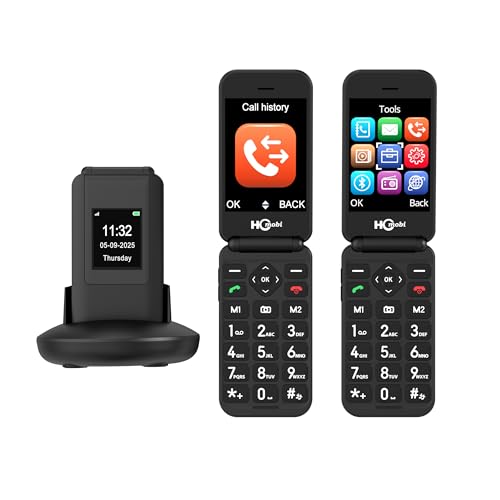
4G Flip Phone Unlocked (Dual-Screen) — Big buttons, two screens
The second flip in the set competes with the Easyfone on nearly the same ground, which makes the comparison instructive. This unbranded unlocked 4G flip lists a dual-screen design — an outer display for the time and the caller’s name, an inner one for menus — plus an SOS button, speed dial, large fonts, a charging dock, a 1,400mAh battery, big buttons, Bluetooth and a camera. Read as a basic phone, that is a complete and sensible specification, and the dual-screen arrangement is its distinguishing grace: the phone can be checked and its callers identified without opening it, a small mercy repeated twenty times a day.
Against the Easyfone, the differences are of emphasis. The Easyfone’s title names photo speed dial and clear sound; this model’s title names large fonts, big buttons and the second screen. A family choosing between them should ask which the recipient’s hands and eyes will thank them for: calling by face, or reading by font and answering by button. The 1,400mAh battery sounds small beside smartphone figures, but a basic flip sips where smartphones gulp, and days between dock visits are the category’s normal rhythm. Bluetooth opens the door to a simple headset or a car connection, extending the phone’s usefulness for drivers in the family.
- Type: Flip phone — a basic phone, not a smartphone
- Displays: Dual-screen design, per the listing title
- Emergency and calling: SOS button, speed dial, large fonts, big buttons
- Battery: 1,400mAh
- Charging: Charging dock included in the feature list
- Extras: Bluetooth, camera
Strengths
- Outer screen shows time and callers without opening the phone.
- Big buttons and large fonts target the two commonest frustrations.
- Unlocked and dock-charged, like its Easyfone rival.
Trade-offs
- A basic phone, with no apps or video calling.
- Unbranded model — documentation and support rest on the listing.
- Photo speed dial is not claimed in the title, unlike the Easyfone.
Best for: a buttons-and-fonts user who likes checking the phone closed.
Not suited for: smartphone tasks, or calling by photograph.

LIVELY Jitterbug Flip3 — Lively flip phone
The Flip3 closes the set by bringing Lively’s service model to the flip form, in red. It is a basic phone — physical buttons, a folding body, none of the smartphone’s app world — attached to the same Lively ecosystem as the Smart5 and Smart3. That combination is more thoughtful than it might appear: it lets a family choose the service designed for older users while letting the older user keep the phone shape they trust. A relative who has rejected touchscreens for a decade is not being stubborn; they are reporting their preference accurately, and the Flip3 is the pick that listens.
The red finish is a small, real virtue — visible in a handbag, findable on a cluttered table, and cheerful in a way the category’s greys rarely manage. The family’s homework mirrors the other Lively picks: the Flip3 lives on Lively’s plans, so confirm the plan, the activation and the number question with Lively before purchase, and do not assume an existing carrier arrangement can follow it. The title itself is terse, so details like an SOS function, speaker specifics and battery figures are marked not stated here and should be confirmed in Lively’s own documentation, where the service’s urgent-response offerings are described in full.
- Type: Flip phone — a basic phone, not a smartphone
- Service: Lively ecosystem, in line with the other Jitterbug picks in this set
- Finish: Red
- Model: Flip3
- SOS or urgent-response features: Not stated in the listing title — verify with Lively documentation
- Battery: Not stated in the listing title — verify with Lively documentation
Strengths
- Lively’s senior-focused service in the trusted flip shape.
- Red finish is genuinely easier to find and to see.
- Physical buttons suit users who decline touchscreens.
Trade-offs
- Lively service commitment, as with the other Jitterbug picks.
- No smartphone abilities — no apps, no video calling.
- Terse title leaves most details to Lively’s documentation.
Best for: a buttons loyalist whose family wants Lively’s service behind them.
Not suited for: any other carrier, or smartphone expectations.
How Do the Six Picks Compare Side by Side?
| Pick | Type | Service position | Headline aid | Charging |
|---|---|---|---|---|
| Jitterbug Smart5 | Smartphone | Lively plan required | Simplified senior interface | Not stated in title |
| Jitterbug Smart3 | Smartphone | Lively plan required | Established Lively generation | Not stated in title |
| Easyfone Prime-A1 Pro | Flip — basic phone | Unlocked 4G | Photo speed dial, SOS | Dock |
| Gigglizio 4G Senior | Smartphone | Unlocked, AT&T/T-Mobile | 6.56-inch screen, eSIM | Not stated in title |
| 4G Flip (Dual-Screen) | Flip — basic phone | Unlocked 4G | Big buttons, outer screen | Dock |
| Jitterbug Flip3 | Flip — basic phone | Lively ecosystem | Lively service, red finish | Not stated in title |
What Should a Family Decide Before Choosing the Service Model?
The deepest divide in this set is not screen size or button shape. It is the service model, and it deserves a family conversation before a product conversation. Lively’s model bundles the phone with a plan and support designed for older users, at the cost of leaving other carriers behind. The unlocked model keeps the family’s existing carrier, number and billing habits, at the cost of the family itself becoming the support department. Neither is the correct answer in the abstract; each is correct for the family whose circumstances match it.
Questions that settle it: Does the older user already have a number the whole family knows, and how painful would changing it be? Who will actually answer the phone’s questions at 9pm — a support line, or a son or daughter? Is there a health or safety dimension that makes a provider’s urgent-response ecosystem valuable, and what exactly does that ecosystem include? And what does the monthly rhythm look like in each model — a plan chosen once with Lively, or a line added to an existing family arrangement? Answer those four honestly and the set sorts itself into a shortlist of two or three, at which point buttons and screens can have their say.
One more consideration, easily missed: the decider and the user are often different people, and the user’s veto is absolute in practice. A phone that its owner finds embarrassing, confusing or infantilising will be left in a drawer whatever its specifications promised, and a drawer phone keeps nobody safe and nobody in touch. Wherever possible, let the older user handle the finalists — or at least describe the choice in their own terms — before the purchase hardens. Consent is not a formality in this category; it is the main predictor of whether the phone gets carried.
How Do You Set Up a Senior Phone So It Actually Gets Used?
Setup begins before the phone is handed over, and it is an act of editing. On the smartphones, raise the text size until it is generous, place the half-dozen real functions — phone, messages, camera, photos, the family chat — on the first screen, and remove or bury everything else. Set the ringtone loud and the vibration strong. On the flips, programme the speed dials with the family’s real numbers, assign the SOS contacts in the order the family actually wants them called, and write the phone’s own number on a card that lives in the case.
Then practise, together, the five acts of phone life: answering a call, placing a call, calling back a missed number, charging the phone, and using the emergency function in a rehearsal rather than a crisis. Practise them twice, on different days, with the recipient’s fingers doing the work and the helper’s hands staying in their lap. The second rehearsal is where the questions live, and it is better held at a kitchen table than discovered during a worrying evening three weeks later.
Finally, arrange the support rhythm. A named person checks in weekly — not to inspect, but to chat, which keeps the phone charged, carried and familiar. The charger or dock lives in one fixed place, ideally where the phone’s owner already sets down their keys and glasses. Spare reading glasses near the dock are not a joke but a systems decision. A senior phone succeeds as a routine, not as a gadget, and routines are built from exactly these small, deliberate placements.
Which Mistakes Do Families Make Buying Phones for Older Relatives?
The most expensive mistake is ignoring the service lock until after the gift is given. A Jitterbug bought for a relative whose number and plan live elsewhere creates an awkward fortnight of porting and explaining, and the titles in this set state the Lively requirement plainly enough that the surprise is avoidable. Read the service line first, always. The second mistake is buying capability instead of confidence: a flagship-class smartphone handed to a lifelong flip user is not generosity, it is homework, and it will be declined politely and completely.
The third mistake is skipping the rehearsal. Families configure a phone, demonstrate it once at speed, and leave; the recipient, unwilling to confess confusion, quietly returns to the old handset. The fourth is neglecting the unglamorous accessories — the dock that makes charging effortless, the case that makes the phone grippable, the spare cable in the room where the phone actually lives. And the fifth is choosing in secret for effect: the surprise unveiling feels kind and usually backfires, because the recipient’s own sense of the right phone was the most valuable information available and the surprise threw it away.
What Does a Good First Month With a Senior Phone Look Like?
Week one is rehearsal and placement: dock installed, numbers programmed, two practice rounds completed, and the first real calls made to family who know to be patient and warm. Week two adds one new ability, and only one — photographs on a smartphone, the radio on a flip, the outer screen’s caller names — chosen by the user rather than the helper. Week three is where the phone starts appearing in the user’s own stories: a call made unprompted, a photograph shown to a neighbour, a number dialled from memory or by face.
By week four, the signs of success are all absences. No missed-call anxiety, because returning a call is a learned motion. No flat battery dramas, because the dock is a habit. No drawer exile, because the phone has earned its place in the day’s geography — pocket, table, handbag, bedside. That is the outcome every pick in this guide is really selling, and it depends far less on which of the six was chosen than on whether the family did the quiet work around it.
How Do Hearing, Eyesight and Dexterity Change the Right Choice?
Every older user is a specific person, and the three senses and skills that phones tax most — hearing, eyesight and dexterity — vary independently. A relative with excellent eyes and poor hearing needs a different phone from one with sharp ears and arthritic hands, and the family’s first task is to notice which profile is actually in front of them rather than shopping for a generic idea of old age. The titles in this set speak to the profiles more directly than most: clear sound on the Easyfone, large fonts and big buttons on the dual-screen flip, the big 6.56-inch canvas on the Gigglizio.
Hearing asks for volume, clarity and placement. A speaker that is loud but harsh will be turned down and then missed; a clear voice at moderate volume carries further in practice. Test any finalist with a real call in a real kitchen, television on, and let the user judge — their verdict in that room outweighs every specification. Hearing-aid wearers should make that test with aids in and the phone in its usual position, because compatibility quirks announce themselves immediately in use and hide completely on paper. Where a title is silent about hearing features, as most here are, the in-hand test is not optional colour; it is the review.
Eyesight asks for contrast, size and consistency. Large fonts are listed outright on the dual-screen flip and are a settings choice on the smartphones, where the Gigglizio’s big screen gives the enlarged text somewhere to live. Consistency matters as much: an interface that keeps the phone function in the same place, with the same label, every day, is kinder than a cleverer one that rearranges itself. Families configuring a smartphone should resist decorative widgets and shifting shortcuts with real discipline — the home screen that stays still is the one that gets learned.
Dexterity asks for targets that forgive. Big physical buttons forgive most of all, which is the flips’ enduring argument; among touchscreens, large icons, a case with grip, and the removal of gesture-dependent tricks all help. The charging dock belongs in this conversation too, since the smallest motor task in phone ownership is the nightly cable. Judge the finalists in the user’s own hands, in their own chair, under their own lamp — the showroom of the imagination flatters every phone equally and informs about none.
What Should a Family Understand About Emergencies Before Relying on a Button?
Two of the flips in this set list an SOS button, and Lively’s service is built partly around urgent assistance, but a button is a beginning rather than a system, and families should understand precisely what their chosen arrangement does. An SOS key on a basic phone typically works through the contacts programmed into it: it dials or messages the family list in sequence. That means the safety net is exactly as strong as the list — current numbers, an order that reflects who is actually reachable at 3am, and recipients who know the alert may come and what it means when it does.
The rehearsal matters as much as the programming. An emergency function first discovered during an emergency is a rumour, not a tool. Practise it on a calm afternoon: press the button, let the sequence run, have each contact answer and confirm, then cancel and debrief. The user learns the sounds and the timing; the family learns whether the second contact’s phone was on silent; everyone learns the gaps while the stakes are a cup of tea. Repeat the rehearsal when numbers change, when the phone is replaced, and at least once a season for households where the arrangement carries real weight.
It is equally important to say what these phones are not. None of the picks here should be presented to a family as a monitored medical alarm unless the provider’s own documentation says exactly that for the exact plan chosen — which is why this guide keeps pointing Lively questions to Lively’s materials rather than summarising them into a promise. A phone-based arrangement covers the reachable, conscious, phone-carrying moments of a life. Families whose situation needs more than that should layer a dedicated alarm service alongside the phone, and feel no sense of failure in doing so: the phone remains the daily companion, and the alarm becomes the silent insurance behind it.
How Do You Keep an Older User’s Phone Safe From Scams and Confusion?
The telephone is the scammer’s favourite door into an older person’s home, and a new phone is the right moment to fit the locks. Begin with the call settings: where the service allows, silence or flag unknown callers, and teach the one rule that defeats nearly every script — a bank, a grandchild in trouble, or an official who demands urgent payment is a reason to hang up and dial the family’s known number instead. Write that rule on the same card that carries the phone’s own number, in the case, where a worried moment can find it.
On the smartphones, reduce the attack surface with the same editing used for usability. Remove the browser shortcuts and app-store temptations that will never be used, switch on the spam and fraud filters the software offers, and agree that no app gets installed without a family conversation first. On the flips, the protection is partly architectural — a basic phone cannot be talked into installing anything — which is one more honest argument for the flip shape in households where scam anxiety runs high. The Gigglizio’s mainstream openness is manageable, but it must actually be managed, during setup and at the weekly check-in chat.
Finally, normalise the reporting of strange calls. An older user who fears looking foolish will hide the suspicious call that most needs discussing, so the family should ask about odd calls the way they ask about the weather — routinely, lightly, without blame. The phone that results from all this is not a fortress; it is something better, a phone inside a family routine where confusion gets aired early and help is one familiar number away. That routine, more than any feature in any title in this guide, is what keeps an older person safe.
What Happens to the Old Number When a Family Changes Service?
The telephone number is often the most valuable object in the entire transaction — more valuable than any handset in this guide — because it is the address at which doctors, friends, banks and grandchildren have reached this person for years. Any move that touches it deserves deliberation. Switching to Lively raises the number question directly, since the Jitterbug picks cannot join the existing carrier: the family should ask Lively, before purchase, whether the existing number can be brought across, what the process requires, and how long the old and new arrangements overlap. Those answers belong in writing in the family’s notes, not in a vague memory of a sales conversation.
The unlocked picks avoid most of this drama. The Easyfone, the dual-screen flip and the Gigglizio join the carrier the family already uses, so the SIM, the number and the billing rhythm can continue undisturbed while only the handset changes. That continuity is a genuine, if unglamorous, selling point, and for households where the number is load-bearing — a relative whose surgery, pharmacy and bridge club all hold it — continuity may outweigh every other consideration in this guide, including interface design. Change one thing at a time is a good rule for technology and an excellent one for older users: handset this month, service next year, never both in the same weekend unless circumstances force it.
Whichever path is chosen, the transition week needs a plan. Keep the old phone charged and nearby until the new one has caught a full week of real calls. Tell the five most important callers personally that a change has happened, so a missed connection is understood rather than worried over. Check the mundane registrations that quietly depend on the number — the pharmacy’s refill texts, the surgery’s reminders, the bank’s security codes — and update each one deliberately. Numbers live in more places than a contacts list, and the week spent finding those places is the difference between a smooth change and a season of small mysteries.
How Should a Family Choose Between the Two Unlocked Flips?
The Easyfone and the dual-screen flip sit close enough in this set that the choice between them deserves its own examination, because it turns on details a spec table flattens. Both are unlocked 4G basic phones with SOS buttons and charging docks. The Easyfone’s title emphasises photo speed dial, clear sound and an FM radio; the dual-screen model’s title emphasises large fonts, big buttons, Bluetooth and the outer display. These are different theories of the same user, and the right one is the theory that matches the actual person.
Start with how the user places calls today. A relative who recognises faces faster than names, whose address book is a mental photograph album, will feel photo speed dial as a gift — the call becomes a tap on a grandchild’s face. A relative who still dials from memory and reads a screen closely will value the big buttons and large fonts more, and the outer display’s caller name lets them decide about a call before committing to it, phone still closed in the hand. Neither preference is more dignified than the other; both are simply true of different people.
Then weigh the surroundings. The Easyfone’s radio is a daily companion in a kitchen or a garden shed, asking nothing of data or signal beyond the airwaves. The dual-screen flip’s Bluetooth suits a driver, pairing with a car or a simple headset for hands-free calls. Battery figures differ on paper — only the dual-screen model states one, at 1,400mAh — but both live on their docks and should be judged by the dock habit rather than by milliamp arithmetic. In the end the family’s best tool is observation: watch the relative use their current phone for ten minutes, note where the friction lives, and buy the flip whose title answers that exact friction.
What Does an Unlocked Smartphone Ask of the Family That a Lively Phone Does Not?
The Gigglizio and the two Jitterbug smartphones can all make video calls and take photographs, but they distribute the work of ownership differently, and the difference decides which family thrives with which. A Lively phone arrives inside a service designed for the category: activation through Lively, an interface philosophy set by the maker, support staffed for the user’s questions. The family still sets up speed dials and rehearses the basics, but the architecture of simplicity is provided. An unlocked smartphone like the Gigglizio provides the raw material — a big screen, a standard interface, eSIM convenience — and leaves the architecture to the family.
That family work is real, and it should be scheduled rather than improvised. An evening to enlarge text, arrange the first screen, delete the distractions, set the filters against spam and scams, and pin the family’s faces to the contacts. A second evening, days later, to rehearse the video call end to end, because the first grandchild call should not also be the first rehearsal. A standing weekly chat that doubles as the maintenance window. Families who enjoy this involvement — and many genuinely do, finding the phone becomes a reason to talk — will get more from the unlocked route than from any bundle. Families stretched thin across distance and work should price their own hours honestly and let Lively’s service carry the weight instead.
There is no hierarchy of virtue here. The measure is fit: the right phone is the one whose support arrangement matches the support the family can actually sustain in month six, not just in the enthusiastic first weekend. Both routes, walked properly, end at the same place — an older person with a charged phone, a short list of faces to tap, and the confidence that help and company are equally close.
What Small Accessories Make the Biggest Difference Here?
Three modest purchases punch far above their cost in this category. The first is a case chosen for grip and visibility — a textured, brightly coloured shell that turns a slippery black rectangle into an object an older hand can hold and an older eye can find on a patterned tablecloth. The second is a second charger or dock for the room the phone migrates to, because a phone charged in two places is a phone that is rarely flat. The third is a simple lanyard or wrist strap for users who carry the phone around the house and garden, converting the drop-and-search cycle into a non-event.
Beyond those three, restraint is the accessory policy. Elaborate mounts, novelty speakers and app-driven gadgets add learning where the whole project is subtraction. Spend instead on the invisible infrastructure: a printed card of key numbers in the case, a labelled shelf where the phone sleeps, and the family’s agreement about who is the first call. The best accessory in this category is a routine, and it cannot be bought — only built, patiently, in the first month.
One more item earns an honourable mention for the smartphone picks: a simple stand for video calls. Propped at eye level on the kitchen table, the Gigglizio or a Jitterbug Smart stops being a thing held at arm’s length and becomes a window the grandparent can talk to hands-free, with a cup of tea in reach. It costs very little, it asks nothing to be learned, and it quietly transforms the call that most families bought the phone for in the first place. Pair the stand with a fixed home for it — the same shelf as the dock, ideally — and the video call stops being an event that needs arranging and becomes a habit that happens, which is the entire ambition of this category in a single sentence. The same shelf can hold the printed number card and the spare glasses, turning one corner of one room into the phone’s headquarters — a tiny infrastructure that family members can describe over the phone, sight unseen, when something needs finding or fixing at a distance. Small as it sounds, that shelf is the difference between a phone that belongs to a household system and a phone that merely belongs to a person, alone with its instructions. Families who build that shelf in week one rarely need the troubleshooting marathons that other households mistake for normal phone ownership in this demanding, rewarding category of devices built for connection.
Final Recommendation
Choose the service before the handset. If Lively’s bundled model suits the family, the Smart5 is its current smartphone, the Smart3 its established alternative, and the Flip3 its answer for a buttons loyalist. If the existing carrier stays, the Gigglizio offers the big unlocked screen, while the Easyfone and the dual-screen flip divide the basic-phone honours between photo speed dial and the outer display. Any of the six, set up patiently and rehearsed twice, will do the job this search is really about — keeping an older person reachable, confident, and glad the phone is there.
Frequently Asked Questions
Do the Jitterbug phones work with any carrier?
No. The Smart5 and Smart3 titles state that a Lively phone plan is required and that the phones are not compatible with other wireless carriers, and the Flip3 belongs to the same Lively ecosystem. Treat a Jitterbug purchase as a decision to use Lively’s service, and confirm the plan and number arrangements with Lively first.
Are the flip phones in this set smartphones?
No, and this guide labels them accordingly. The Easyfone Prime-A1 Pro, the dual-screen 4G flip and the Jitterbug Flip3 are basic phones: calls, texts, simple cameras and their listed aids such as SOS buttons and docks. They cannot run apps or make video calls, which for many older users is a virtue rather than a lack.
Is there a Samsung Galaxy option for seniors here?
Not in this set. The six picks are the two Lively smartphones, the Gigglizio smartphone, and three flip phones — the sixth pick is the Jitterbug Flip3. Families set on a Samsung should look at a mainstream Galaxy with the accessibility settings configured by hand, a different purchase from any listed here.
What does an SOS button actually do?
On the flip models that list one, the SOS button is a dedicated key that, when pressed, calls or alerts the emergency contacts programmed into it, following the sequence the family sets up. It is only as good as its programming, so the contacts and their order should be agreed and entered during setup, then tested in a rehearsal.
Why does a charging dock matter so much?
Because charging is the task most likely to defeat an older user nightly — a small cable, a smaller port, fading light. A dock replaces that fumble with a single placement gesture, and phones that are easy to charge stay charged, which keeps every other feature, including the emergency ones, available when they are needed.
Can an older user keep their existing phone number?
With the unlocked picks — the Easyfone, the dual-screen flip and the Gigglizio — the existing SIM and number simply carry over, subject to the carrier’s usual checks. With the Lively phones, the number question must be settled with Lively before purchase, since those handsets cannot join another carrier. Ask about porting early, and keep the old phone active until the new arrangement has caught a full week of calls.
What if my relative refuses a smartphone altogether?
Believe them, and buy from the flip side of this set. A refusal is information about what will actually be carried and used, and a basic flip that is charged, answered and trusted serves its owner far better than a smartphone exiled to a drawer. The Easyfone, the dual-screen flip and the Jitterbug Flip3 exist precisely for this answer, each with its own service and feature balance.
Which pick is best for video calls with grandchildren?
Only the smartphones can make them: the Gigglizio, with the largest screen here, or the Lively Smart5 and Smart3 inside Lively’s service. The flips cannot run video-calling apps at all. Choose by service first — unlocked Gigglizio for an existing AT&T or T-Mobile arrangement, Jitterbug if the family is adopting Lively.
Related Guides
Families comparing these handsets with neighbouring options may also find our guide to unlocked phones for calls, texts and photographs helpful, alongside the roundup of leftover flagship phones still on sale and our look at rugged phones with stated durability ratings.
Related guides
- Best 3D Art Tablets
- Best Canon Point and Shoot Digital Cameras: PowerShot Picks From Pocket Compacts to Travel Zooms
- Best Balancing Stabilizers for Mirrorless Cameras: Payload, Balancing and Native Vertical Shooting
- Best Basic Phones Camera Buyers Can Trust: Flip Phones and Simple Handsets That Still Take a Photograph


