What's inside
- Key Takeaways
- Quick Picks
- How Did We Choose These Extenders for FiOS Homes?
- Why Does the FiOS Router’s Address Matter More Than Its Speed?
- What Does an Extender Change — and Not Change — About Your FiOS Service?
- Should You Use Verizon’s Own Extender or Buy an Independent One?
- How Many Extenders Can One FiOS Home Usefully Run?
- How Do the Six Compare Side by Side?
- How Do You Place an Extender When the FiOS Router Lives in the Basement?
- What Mistakes Do FiOS Customers Keep Making with Extenders?
- Final Recommendation
- Frequently Asked Questions
- Related Guides
As an Amazon Associate I earn from qualifying purchases. This post may contain affiliate links at no extra cost to you.
gizmoverdict.com is reader-supported. When you buy through links on our site, we may earn an affiliate commission.
Where to buy: The six extenders below all come from this site’s verified product pool, and each links to its own listing. FiOS households should confirm the model revision on the listing page, since several of these product families have been sold for years under the same name.
The best wireless extenders verizon fios customers can buy start from a fact about how FiOS enters a house. Verizon’s fiber terminates at an optical network terminal that is very often installed where the installer’s life was easiest — a garage wall, a basement corner, a utility closet — and the FiOS router frequently ends up broadcasting from that same unglamorous neighbourhood. The result is a familiar FiOS paradox: some of the fastest internet in the country, delivered to the worst seat in the house. Extenders are the standard remedy, and they work with a FiOS router for the same unglamorous reason they work with everything: a FiOS router broadcasts ordinary Wi-Fi, and an extender is a device that hears Wi-Fi and repeats it.
Nothing in that arrangement requires Verizon’s permission or Verizon’s badge. There is no certification that makes a third-party extender “FiOS approved,” and this guide will not pretend otherwise. Verizon does sell its own extender intended to pair with its routers, and households that want the carrier’s matched hardware have that route; the six picks here are the independent route — extenders you own outright, from TP-Link, NETGEAR and ASUS, spanning a workhorse AC1200 up to a tri-band WiFi 7 flagship with a 6 GHz band. Every one of them will repeat a FiOS router’s network. The interesting questions are which generation fits your router, which suits your floor plan, and where on earth to plug it in.
That last question matters more for FiOS homes than for most, because of the basement problem. If the router is downstairs or in the garage, an extender’s first job is vertical — hauling the signal up a floor before it can spread across it. Placement strategy for that geometry gets its own section below, and it should be read before any purchase, because the right model in the wrong stairwell loses to the modest model in the right one every single time.
Key Takeaways
- Any standard extender works with a FiOS router, because extenders repeat Wi-Fi and a FiOS router broadcasts standard Wi-Fi — there is no FiOS certification for third-party extenders to earn.
- The classic FiOS problem is placement, not speed: the router often lives near the ONT in a garage or basement, so an extender’s hardest work is getting the signal up and across, not making it faster.
- Match generations loosely: a WiFi 6 or WiFi 7 extender behind an older FiOS router still improves the local hop, but the link home runs at the router’s generation.
- The TP-Link RE653BE is the only tri-band pick with a 6 GHz band in its title — genuine forward capacity, most of which waits on a future router to be fully used.
- One extender cures one dead zone; a FiOS home with a marooned basement router and dead rooms on two floors is describing a mesh system, and should budget accordingly.
Quick Picks
| Pick | Badge | Why it is here |
|---|---|---|
| TP-Link AC1200 WiFi Extender RE315 | Best simple fix | A dual-band AC1200 repeater covering both 5GHz and 2.4GHz, for the single mutinous room in an otherwise healthy FiOS home. |
| TP-Link AX1500 WiFi Extender RE500X | Best WiFi 6 step-up | An AX1500 WiFi 6 booster that brings the current generation to the far rooms without flagship pricing logic. |
| TP-Link BE10000 Wi-Fi 7 Tri-Band Range Extender RE653BE | Most capable pick | A BE10000 tri-band WiFi 7 extender with MLO and a 6 GHz band in its title — the heaviest artillery in this roundup. |
| NETGEAR WiFi Extender EX5000 | Best NETGEAR all-rounder | Title figures of up to 1,500 sq ft and 1.2 Gbps from NETGEAR’s mainstream extender line. |
| NETGEAR WiFi Extender EX6120 | Best proven NETGEAR | The same 1,500 sq ft and 1.2 Gbps title figures in a model with a long sales history behind it. |
| ASUS RP-BE58 BE3600 WiFi 7 Range Extender | Best for ASUS futures | A BE3600 WiFi 7 extender that can later serve as an AiMesh node behind an ASUS router. |
How Did We Choose These Extenders for FiOS Homes?
Compatibility screening, as with every ISP-flavoured guide in this series, was a screening for nothing: repeaters repeat, and a FiOS router’s Wi-Fi is repeatable by definition. The real screens were three. First, generational spread — FiOS routers in the wild range from older units to current WiFi 6 models, and the list had to contain a sensible partner for each era rather than six versions of the same answer. Second, architectural honesty: every pick is a true standalone repeater usable with any router, with the ASUS unit’s mesh second life treated as a bonus rather than a requirement. Third, title-verifiable claims only: where a figure appears in this guide — 1,500 square feet, 1.2 Gbps, a 6 GHz band — it appears because the product’s verified listing title states it.
We also deliberately included two NETGEAR models with identical headline figures, because their coexistence teaches the roundup’s most useful lesson. The EX5000 and EX6120 promise the same coverage and the same class on paper, yet they are different products from different moments in the line’s history. Paper equality is not product equality, and the entries below treat the pair as what they are: a choice between a newer mainstream model and a long-proven one, where either can be right depending on the household’s appetite for the tried and tested.
One more screen deserves disclosure, because it excluded some tempting hardware: intended environment. Outdoor extenders, travel routers and enterprise access points all surface in searches for this keyword, and all were left out. The FiOS dead-zone problem is an indoor, residential, single-relay problem, and the six picks are confined to products whose titles describe exactly that job. Specialists for other jobs appear in this site’s other guides, where their virtues are virtues instead of complications.
Finally, the list is capped at one extender per brand-generation lane where possible, because FiOS households do not need twelve near-identical repeaters ranked by decimal points. They need the shape of the decision: simple fix, current-generation fix, flagship fix, and the two house styles — NETGEAR and TP-Link, with ASUS as the strategist’s option — laid over it.
Why Does the FiOS Router’s Address Matter More Than Its Speed?
Ask a room of FiOS customers about their Wi-Fi and few will complain about the plan; many will describe a map. The kitchen is fine, the office is not, the upstairs bedroom drops calls, the basement — where the router lives — enjoys magnificent coverage of the water heater. That map is drawn by the ONT’s location and the building’s materials, not by anything the subscription controls. Fiber delivers enormous capacity to a fixed point, and then radio physics decides what fraction of it each room receives.
An extender redraws the map by moving the effective source. Placed at the stairwell, the landing, the hallway where the router’s signal is still respectable, it re-originates the network closer to the rooms that need it. This is why extender outcomes vary so wildly between neighbours with identical hardware: one household’s extender sits at the top of the basement stairs with a clear run down the hall, the other’s sits in the dead bedroom behind a chimney breast, repeating a signal that arrived already ruined. Same box, same FiOS plan, opposite reviews.
There is a corollary that saves households real money: because the map is drawn by placement, moving the router — where the installation allows it — can be worth more than any extender. FiOS routers connect to the ONT by Ethernet or coax depending on the installation, and a router that can be relocated to a central room changes every calculation in this guide. Not every install permits it, and landlords and wiring closets have their own opinions, but the question is always worth asking before the extender question. An extender bought to compensate for a router that could simply have been moved is a permanent tax on a one-time decision.
Vertical travel deserves special respect in FiOS homes. Floor structures — especially with radiant heating, tile, or dense subflooring — tax a signal far more than the same distance travelled horizontally through drywall. If your dead zone is directly above the basement router, the winning extender position is often not upstairs at all but at the stairwell opening, where the signal’s path stays mostly in open air. The setup section below turns that principle into a procedure.

TP-Link AC1200 WiFi Extender RE315 — Best simple fix
The RE315 is the roundup’s baseline done properly: an AC1200 dual-band extender whose title states the essential fact plainly — it works across both the 5GHz and 2.4GHz bands. For a FiOS home with one problem room, that plainness is the point. The unit joins the router’s network, rebroadcasts it from a better position, and asks nothing else of its owner. No ecosystem, no forward strategy, no premium for capacities the household will never request.
Dual-band operation matters even at this level, and it is worth understanding why. The 2.4GHz band is the traveller — it reaches the far room — while 5GHz is the sprinter that serves devices near the extender with real pace. A single-band extender would force the whole far room onto the traveller’s terms. The RE315’s two bands let the relay and the local service divide the labour, which is why AC1200 remains the sensible floor for a main-home extender rather than a relic class.
Set against its own sibling, the RE500X below, the RE315’s case is proportionality. If the FiOS router is of a similar generation and the dead zone’s workload is streaming, calls and browsing, this unit’s ceiling sits above the work. The money saved against a WiFi 6 model buys nothing the room will notice. Where the household’s router and devices have already moved to WiFi 6, the calculus flips — and the guide says so in the next entry rather than pretending one pick serves both eras equally.
It also deserves credit for what it refuses to be. The budget end of the extender market is crowded with single-band units and no-name boxes whose setup pages read like riddles; a dual-band unit from TP-Link’s main line, with the brand’s support and documentation behind it, is a different species of purchase. FiOS customers in particular — whose service is premium and whose complaint is a single room — should not let a small saving talk them into the riddle-box species. The RE315 is the floor of respectability for this job, and it knows it.
- Mode: dual-band WiFi extender (repeater)
- Wireless class: AC1200, per the listing title
- Bands stated in title: 5GHz and 2.4GHz
- Verizon certification: none exists for third-party extenders — compatibility is by standard Wi-Fi repeating
- Ethernet port provision: Not stated in the listing title — verify with TP-Link documentation
Strengths
- Straightforward dual-band repeating with no ecosystem strings attached
- AC1200 capacity is honestly matched to streaming, calls and browsing in a far room
- Works with any router, so it survives a future move or provider change
Trade-offs
- Previous-generation radios behind a WiFi 6 FiOS router leave some local pace unused
- No mesh coordination or ecosystem upgrade path
- Port and setup details are outside the title and need a documentation check
Best for: a FiOS home with one dead room, an AC-era router, and ordinary workloads. Not suited for: a two-floor coverage failure — one repeater cannot be in two stairwells at once, and that geometry belongs to mesh.

TP-Link AX1500 WiFi Extender RE500X — Best WiFi 6 step-up
The RE500X is the considered step into the current generation: an AX1500 WiFi 6 extender, described in its title with the plain phrase “Internet Booster,” aimed at FiOS households whose router and devices have arrived at WiFi 6 and whose far rooms have not. AX1500 is the modest end of the WiFi 6 class range, and this guide regards that modesty as well judged for extender duty — the relay’s bottleneck is the link home and the room’s workload, rarely the extender’s own headline class.
What WiFi 6 buys an extender is chiefly orderliness. The standard’s improvements target exactly the conditions of a family home’s far end at 8 p.m.: many devices, overlapping conversations, bursty demand. Behind a WiFi 6 FiOS router, the RE500X also speaks the same generation on the link home, so the relay stops being the oldest conversationalist in the chain. Behind an older FiOS router it still improves the local hop for WiFi 6 devices in the room — a partial benefit, honestly labelled.
Cross-shoppers should note how this pick relates to the TP-Link flagship further down. The RE653BE offers tri-band WiFi 7 with a 6 GHz band; the RE500X offers dual-band WiFi 6. Between those poles sits the actual question: is the far room’s problem disorder or distance? Disorder — many devices, evening sag — is this unit’s home turf. Distance is a placement problem that no class figure cures. Buy the RE500X for the crowd, site it for the distance, and the combination is the roundup’s best-balanced TP-Link answer for most FiOS homes.
Consider the evening that justifies this unit in a real FiOS home. The router is performing flawlessly in the den; upstairs, two laptops, a television and a games console all come alive at once in the rooms the router barely reaches. Without an extender of this generation, those devices queue on a fraying link and the household concludes the fiber is oversold. With the RE500X at the landing, the far rooms get an orderly local network fed by a healthy relay, and the fiber’s reputation is restored. That scene — not a benchmark — is what the AX1500 class is for.
- Mode: WiFi 6 extender (repeater)
- Wireless class: AX1500 WiFi 6, per the listing title
- Verizon certification: none exists for third-party extenders — compatibility is by standard Wi-Fi repeating
- Coverage figure: Not stated in the listing title — verify with TP-Link documentation
- Ethernet port provision: Not stated in the listing title — verify with TP-Link documentation
Strengths
- WiFi 6 generation matches current FiOS routers and device fleets
- Class size is proportionate to real extender workloads — no flagship waste
- Keeps a crowded far room orderly through the evening peak
Trade-offs
- Dual-band design lacks the dedicated extra band of the tri-band flagship
- Behind an older router, its generation advantage is only partly usable
- Coverage and port specifics require verification beyond the title
Best for: a WiFi 6 FiOS household whose far rooms sag under device count more than distance. Not suited for: stretching this purchase across the longest possible upgrade runway — the tri-band WiFi 7 pick below is built for that brief.

TP-Link BE10000 Wi-Fi 7 Tri-Band Range Extender RE653BE — Most capable pick
The RE653BE is the heaviest specification in this roundup by a wide margin: BE10000 class, WiFi 7, tri-band, with MLO and a 6 GHz band all stated in its listing title. Each of those terms earns a sentence. Tri-band means a third radio beyond the usual two, giving the relay more ways to organise its link home and its local service. The 6 GHz band is WiFi 7-era spectrum — wide, clean and short-ranged — valuable where it can be used. MLO, multi-link operation, is WiFi 7’s signature trick: capable devices converse over more than one band at once, smoothing exactly the bursty behaviour that makes far rooms feel unreliable.
Now the discipline. Behind a current FiOS router, much of this arsenal waits in reserve: the 6 GHz conversation and MLO’s full expression require a router that speaks them, and today’s FiOS routers largely do not. What the RE653BE delivers immediately is the most capable dual-band relay in this list plus unmatched headroom; what it promises is that when the router generation turns — as it will during this unit’s working life — the extender will not be the component holding the house back. That is a rational purchase for a household that keeps networking gear for many years, and an extravagant one for a household that replaces it casually.
There is also a physical caveat specific to 6 GHz ambitions: the band’s short range means the future benefits concentrate near the extender itself. A buyer dreaming of 6 GHz service in a distant barn conversion will be disappointed by physics; a buyer wanting the office above the garage to become the best-served room in the house, once the router catches up, has understood the product correctly. Buy this unit for the rooms near it and the years ahead of it, in that order.
Installation temperament is worth a mention at this tier. Flagship extenders reward the household that treats setup as a project: survey first, place deliberately, configure the bands with intent, and verify under load. The RE653BE’s capabilities are real but they are not self-deploying, and a buyer who plugs it into the first free socket and judges it in five minutes has purchased a sports car for a trip across a ploughed field. Given the afternoon its talents ask for, it returns the best far-room experience in this roundup — and the clearest conscience about the router upgrade still to come.
- Mode: Wi-Fi 7 tri-band range extender (repeater)
- Wireless class: BE10000, per the listing title
- Features stated in title: MLO, 6 GHz band
- Verizon certification: none exists for third-party extenders — compatibility is by standard Wi-Fi repeating
- Coverage figure: Not stated in the listing title — verify with TP-Link documentation
Strengths
- Tri-band WiFi 7 with 6 GHz and MLO — the fullest feature set in the roundup
- Enormous headroom keeps the relay composed under the heaviest household load
- The extender least likely to bottleneck a future router upgrade
Trade-offs
- Much of its arsenal awaits a WiFi 7 router that FiOS has yet to supply
- 6 GHz benefits are inherently short-range, concentrated near the unit
- Flagship capacity is wasted on a single lightly used spare room
Best for: a long-tenure FiOS household buying the extender once, for this router and the next. Not suited for: a renter or a short-tenure home — the future-proofing premium needs years in the same house to pay itself back.

NETGEAR WiFi Extender EX5000 — Best NETGEAR all-rounder
The EX5000 is NETGEAR’s mainstream answer to the FiOS dead zone, carrying title figures of up to 1,500 square feet and 1.2 Gbps. Those two numbers describe the centre of the consumer extender market, and the EX5000 sits squarely in it: not a stripped budget unit, not a flagship, but the model a household buys when it wants the job done by the other big name in home networking and then wants to forget the purchase entirely.
The coverage figure needs the guide’s standing footnote, applied here with FiOS specifics. Fifteen hundred square feet of open-plan, drywall construction is a different country from fifteen hundred square feet wrapped around a basement stairwell and a brick chimney. FiOS homes skew toward the second country, because the router’s starting position is so often compromised. Treat the figure as the unit’s ambition under kind conditions, and lean on placement — the stairwell opening, the landing, the hallway — to let it approach that ambition in your house.
Against its stablemate the EX6120, the EX5000’s argument is recency within the line: the newer mainstream model, bought by households that prefer current production. Against the TP-Link pair at similar class, its argument is house style — NETGEAR’s setup flow and presentation, which some households simply find more congenial. None of these arguments is about the FiOS service itself, because the service is not a variable in extender performance; the router’s Wi-Fi is, and every pick here repeats it equally in principle.
There is a FiOS scenario this unit fits with particular neatness: the split-level or raised-ranch house, where the router sits at the entry level and the family’s life happens half a floor up and half a floor across. That geometry defeats routers quietly rather than dramatically — nothing is fully dead, everything is slightly tired — and a single mainstream extender at the level change can lift the whole tired half at once. The EX5000’s balanced figures suit exactly that un-dramatic, whole-half-of-a-house improvement, which is the most common real-world extender job there is.
- Mode: WiFi extender (repeater)
- Coverage figure in title: up to 1,500 sq ft
- Class figure in title: 1.2 Gbps
- Verizon certification: none exists for third-party extenders — compatibility is by standard Wi-Fi repeating
- Wireless generation: Not stated in the listing title — verify with NETGEAR documentation
Strengths
- Mainstream NETGEAR extender with balanced coverage and class figures
- Suits the single-dead-zone FiOS geometry without flagship excess
- Provider-agnostic — equally at home behind any future router
Trade-offs
- Coverage claim assumes kind construction; basement-router homes will see less
- Wireless generation is not stated in the title, complicating generational matching
- One unit still cures one zone, whatever the square-foot figure implies
Best for: a FiOS household wanting NETGEAR’s mainstream fix for one defined dead zone. Not suited for: a home whose router is marooned in a basement with dead rooms on two floors — that map needs nodes, not a stronger single repeater.
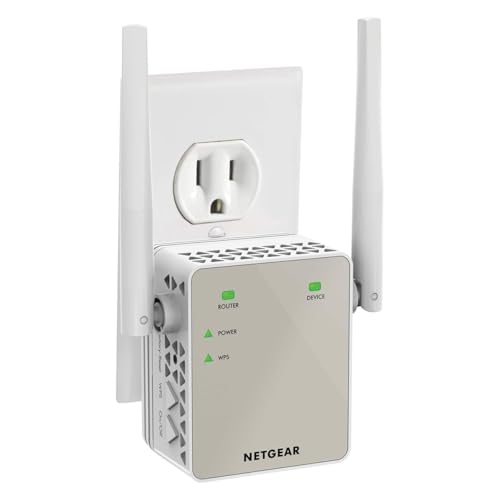
NETGEAR WiFi Extender EX6120 — Best proven NETGEAR
The EX6120 is one of the longest-serving extender models in the consumer market, and its title figures — up to 1,500 square feet, 1.2 Gbps — match its younger stablemate’s exactly. That longevity is itself the product being sold here. A model that has been manufactured and sold for years has had its behaviour mapped by an enormous installed base; there are no surprises left in it. For a FiOS household that values the known over the new, that is a rational and even shrewd preference.
Longevity cuts the other way in one respect: the model’s design belongs to an earlier moment in extender history, and households should buy it with era-appropriate expectations. It is a repeater of the classic school — join the router’s network, rebroadcast it, serve the far room — without the generational refinements the WiFi 6 and WiFi 7 picks in this list bring to crowded air. In a quiet household with a single dead zone, that school is entirely sufficient. In a device-stuffed modern home at the evening peak, the newer picks hold their composure longer.
The EX6120 also quietly serves as this guide’s control experiment. Its identical headline figures to the EX5000 demonstrate that coverage and class numbers, the two figures buyers comparison-shop by, cannot distinguish two real products. What distinguishes them — vintage, production status, the household’s trust in a long record — lives outside the numbers entirely. Read the pair’s entries together before choosing either; the right answer says more about your household than about NETGEAR’s catalogue.
Replacement buyers form a large share of this model’s audience, and their reasoning is sound. When a years-old extender finally dies, replacing it with the current equivalent of the same trusted unit minimises every risk at once: the household already knows the behaviour, the coverage shape and the setup temperament. In a FiOS home where the network’s map has been stable for years, that continuity has real value. Novelty is a virtue in a flagship purchase; in a like-for-like replacement of a working part, it is mostly risk wearing a nicer box.
- Mode: WiFi extender (repeater)
- Coverage figure in title: up to 1,500 sq ft
- Class figure in title: 1.2 Gbps
- Verizon certification: none exists for third-party extenders — compatibility is by standard Wi-Fi repeating
- Wireless generation: Not stated in the listing title — verify with NETGEAR documentation
Strengths
- Years of production and an enormous installed base — a fully known quantity
- Headline figures match the newer mainstream NETGEAR pick
- Classic, simple repeating that a quiet household will never outgrow
Trade-offs
- Earlier-era design lacks the crowd composure of the WiFi 6 and 7 picks
- Identical paper figures to the EX5000 make the choice one of vintage, not spec
- Long model runs can span revisions — confirm what the listing actually ships
Best for: a FiOS household that prefers a long-proven model and has one calm dead zone to cure. Not suited for: a device-dense home at war with the evening peak — the RE500X and RE653BE were designed for that fight.

ASUS RP-BE58 BE3600 WiFi 7 Range Extender — Best for ASUS futures
The RP-BE58 gives this roundup its second WiFi 7 option and its second strategist’s pick. Its title states the essentials: BE3600 class, dual-band WiFi 7 under the 802.11be standard, range extender — and then the phrase that changes its long-term meaning, AiMesh extender. Behind today’s FiOS router it is a current-generation repeater. Behind a future ASUS AiMesh router it becomes a true mesh node, promoted from relay to citizen. No other pick here except its TP-Link flagship rival offers a comparable combination of new-generation radios and an afterlife.
Against that flagship, the comparison is instructive. The RE653BE is tri-band with a 6 GHz radio and the larger class figure; the RP-BE58 is dual-band BE3600. On today’s FiOS network, where neither can express its full WiFi 7 character against the router, the practical gap between them narrows considerably — both are headroom purchases. The ASUS pulls ahead only in the specific future where the household standardises on AiMesh, and falls behind in the future where raw extender capacity is what matters. Choose by which future is actually yours.
For the present tense, judge it plainly: a WiFi 7 extender from a maker whose networking gear is generally well regarded, sized for a serious far room rather than a whole-house rebuild, and priced by its generation rather than by any FiOS relationship — because, to say it once more, no such relationship exists for any independent extender, and its absence has never stopped one from working perfectly well.
One more consideration separates this pick from the TP-Link flagship for a specific kind of buyer: the household that already owns ASUS peripherals of the networking kind — an ASUS router in a second property, AiMesh nodes at a relative’s house, familiarity with the interface. Ecosystems compound quietly, and an extender that speaks the household’s existing dialect reduces the total administration of a life. That is a soft argument, and this guide weights it below radios and placement, but it is a real one, and for the ASUS-fluent household it may honestly be the deciding one.
- Mode: WiFi 7 range extender; AiMesh node with compatible ASUS routers
- Wireless class: BE3600 dual-band WiFi 7 (802.11be), per the listing title
- Verizon certification: none exists for third-party extenders — compatibility is by standard Wi-Fi repeating
- Coverage figure: Not stated in the listing title — verify with ASUS documentation
- Mesh use requires: compatible ASUS AiMesh router — verify model list with ASUS documentation
Strengths
- WiFi 7 radios with an AiMesh promotion path no plain repeater offers
- Dual-band BE3600 sizing suits a serious single zone without flagship bulk
- Current-generation local hop for the newest devices in the far room
Trade-offs
- Dual-band design cedes the 6 GHz and tri-band advantages to the RE653BE
- AiMesh value never activates in a household that stays with carrier routers forever
- Full WiFi 7 expression still waits on a router generation FiOS has not shipped
Best for: a FiOS household with an ASUS router in its plausible future, wanting WiFi 7 headroom today. Not suited for: a lifetime of renting the carrier’s router — the AiMesh option that distinguishes this pick would never be used.
What Does an Extender Change — and Not Change — About Your FiOS Service?
An extender operates entirely inside your home network, downstream of the FiOS router, and that boundary is worth drawing precisely because households worry about the wrong side of it. Your fiber connection, your plan, your account and any services delivered over the wired side of the router are untouched: the extender neither registers with Verizon nor alters what arrives at the house. What it changes is the geography of the Wi-Fi the router already broadcasts — where that Wi-Fi can be used, and at what exchange rate of speed for distance.
Devices behind the extender remain citizens of the same home network. They can see the printer, the storage drive and each other just as devices near the router do, because the extender is a relay on one network, not a second network with its own border. That citizenship is what makes extenders the right tool for the smart-home long tail — the camera over the garage, the speaker in the kitchen, the thermostat at the far end of the hall — devices whose entire requirement is to be on the network, reliably, at modest speed. A FiOS home usually has more of those than it has speed-critical workstations, which is why a well-placed extender so often feels like a whole-house upgrade despite changing nothing about the service itself.
The one service-adjacent caution is expectations around anything latency-sensitive that rides the home Wi-Fi. Voice calls, game streams and video meetings all tolerate a good relay comfortably and complain about a bad one audibly. That is a placement verdict, not a product verdict: the same extender is a hero at the stair head and a villain inside the dead room. Everything in this guide’s setup section exists to keep your household’s verdict on the right side of that line.
Should You Use Verizon’s Own Extender or Buy an Independent One?
Verizon offers its own extender intended to pair with its routers, and for some households that is genuinely the right door to walk through. The carrier route concentrates responsibility: one company supplied the service, the router and the extender, so one company owns the support call when the bedroom drops. Households that never want to think about their network — that regard it as a utility like water — are well served by that arrangement, and this guide does not begrudge it.
The independent route, which is what this entire roundup represents, trades that single throat to choke for ownership and freedom. A purchased extender is yours: it works behind the FiOS router today, behind a different provider’s router after a move, and behind your own router if you later retire the carrier’s. It is chosen by you, from a competitive field, on the merits your house actually needs — a WiFi 7 flagship for a long-tenure home, a simple AC1200 for a single spare room — rather than being whatever the carrier currently issues. And it carries no ongoing relationship with the account; when the account closes, the hardware’s usefulness does not close with it.
The deciding question is temperament, not technology, because the technology overlaps almost completely — both routes repeat the router’s Wi-Fi, and the physics of your stairwell does not care whose logo is on the relay. Choose the carrier’s unit if you value a single point of responsibility above all. Choose from this list if you value ownership, choice of generation, and a device whose life is not tied to a subscription. Neither answer is a compromise; they are different goods, and confusing them is the only real way to choose wrong.
How Many Extenders Can One FiOS Home Usefully Run?
One, usually — and the reasons are instructive. Every extender spends airtime relaying, and two extenders serving overlapping territory spend it in each other’s way, competing to repeat a router that may itself be struggling to be heard at both positions. Households picture coverage as paint, where a second coat deepens the colour; radio behaves more like conversation in a room, where a second relay shouting the same message mostly raises the noise. The well-run FiOS home therefore uses a single extender to cure a single defined hole, sited with care, and treats the urge for a second as diagnostic information: the house is describing a mesh problem.
There is a legitimate two-extender pattern, and it is worth distinguishing from the daisy chain this guide keeps warning against. Two extenders placed in opposite directions from a centrally located router — one toward the bedrooms, one toward the garden office — each repeating the router directly, never each other, can work honourably in a large single-storey home. The conditions are strict: both must hear the router itself clearly, their territories should barely overlap, and the router must be central enough to feed both. FiOS routers, marooned by their ONTs, are rarely central enough — which is why the pattern is described here as the exception that proves the mesh rule rather than as a plan.
If you do find yourself sketching a second extender on the floor plan, price the mesh alternative before ordering. A two-node mesh kit replaces the router’s Wi-Fi with a coordinated system designed for exactly your geometry, and its cost is frequently within sight of two good extenders — while delivering roaming, management and hand-off behaviour that no pair of relays can imitate. The picks in this guide are for the one-hole house. Honour that boundary and they will not disappoint you.
How Do the Six Compare Side by Side?
| Pick | Generation | Class | Title coverage figure | Choose it when |
|---|---|---|---|---|
| TP-Link RE315 | AC (WiFi 5) | AC1200 | Not stated in title | One room, one fix, no fuss |
| TP-Link RE500X | WiFi 6 | AX1500 | Not stated in title | The far room is crowded, not just far |
| TP-Link RE653BE | WiFi 7 tri-band | BE10000 | Not stated in title | Buying once for two router generations |
| NETGEAR EX5000 | Not stated in title | 1.2 Gbps class | Up to 1,500 sq ft | You want NETGEAR’s current mainstream |
| NETGEAR EX6120 | Not stated in title | 1.2 Gbps class | Up to 1,500 sq ft | You trust the longest production record |
| ASUS RP-BE58 | WiFi 7 | BE3600 | Not stated in title | An AiMesh router is in your future |
Notice, too, what the table treats as a footnote and experience treats as the headline: two of these picks carry their coverage ambitions in their titles and four do not, and that difference says nothing about which will cover your house. A stated figure is a claim under kind conditions; an unstated one is merely an unmade claim. Neither is a measurement of your stairwell.
Notice what the table cannot show: placement. Every row’s real-world value will be set more by the outlet it lands in than by the row’s figures, which is why the next section, not this table, is the one to reread after the box arrives.
How Do You Place an Extender When the FiOS Router Lives in the Basement?
Accept the geometry first. The signal must climb before it can spread, and the cheapest climbing route is open air — the stairwell. Walk the route with a phone on a video call, starting at the router and climbing slowly. The point where the call first wavers on the stairs or the landing is information: the extender belongs a few steps before that point, where the router’s signal is still composed, mounted as high and as openly as the location allows.
Resist the two instinctive placements. The first is the dead room itself, where the extender would repeat a signal that arrived already broken. The second is directly above the router through the floor, a short distance on paper that passes through the densest structure in the house. The stairwell, the hallway that overlooks it, or the room adjacent to the stair head almost always outperforms both, because air is the medium Wi-Fi was designed for and floor assemblies are not.
Then verify like an engineer rather than an optimist. Test from the actual desk, bed or sofa with the actual workload at the actual worst hour — the evening, when the neighbourhood’s networks are all awake. If the result is close but not right, move the extender one outlet at a time toward the router and retest; small moves along the path change results more than large moves across rooms. When the placement is right, write down which outlet won. Future you, after a power cut or a redecoration, will be grateful.
What Mistakes Do FiOS Customers Keep Making with Extenders?
The signature FiOS mistake is blaming the service for the map. Customers speed-test beside the router, see the plan’s full glory, and conclude the extender must be defective when the bedroom gets a fraction of it. The extender is not defective; the bedroom is far from a basement through two floors of building. Extenders redistribute a network — they do not repeal distance — and the households that understand this place them well and judge them fairly.
The second mistake is hunting for Verizon branding as a proxy for compatibility. Verizon’s own extender exists and suits households that want the carrier’s matched kit, but its absence from a third-party box means nothing: compatibility comes from the Wi-Fi standard, not from a logo. Paying a premium for implied FiOS approval, or rejecting a strong extender for lacking it, are the same error in opposite directions.
A fourth mistake is buying the flagship to fix a floor plan. The RE653BE is a magnificent relay, but no relay of any class outperforms a modest unit placed where the signal is healthy; households routinely spend flagship money to avoid a placement decision worth more than the flagship. Spend the deliberation on the survey first and the catalogue second — the order matters, and reversing it is how excellent hardware ends up with one-star reviews it did not earn.
The third is the relay chain — an extender repeating another extender because the first one’s placement was wrong. Each relay compounds the throughput and latency costs until the far room is covered in name only. One extender in the right stairwell beats two in the wrong rooms, and a house that genuinely needs coverage in three directions needs a mesh system whose nodes were designed to cooperate, not a daisy chain of relays that were not.
Final Recommendation
A closing word about expectations, because FiOS sets them unusually high. A service that delivers its full plan speed to a laptop beside the router trains its customers to regard anything less as failure, and an extender judged by that standard will always be convicted. Judge it instead by the room it rescued: the call that no longer drops, the stream that no longer buffers, the desk that rejoined the household. Measured against the dead zone it replaced — rather than against the router’s best square metre — every pick on this page is a bargain, and the well-sited ones are close to miraculous.
For most FiOS homes the decision is shorter than the catalogue suggests. One dead room and an older router: the RE315, sited at the stairwell, ends the story. A WiFi 6 household whose far rooms sag under device count: the RE500X. NETGEAR loyalists choose between the current EX5000 and the proven EX6120 on temperament, since their paper figures are twins. Long-tenure owners buying against the next router generation take the RE653BE, unless an ASUS future is planned, in which case the RP-BE58’s AiMesh afterlife wins the argument. And every one of those choices will be decided less by the box than by the outlet — so spend the saved deliberation on the stairwell, where a FiOS extender placed at the last strong step does more for the house than any specification printed on its carton.
Frequently Asked Questions
Does Verizon need to activate or approve an extender on my FiOS account?
No. A third-party extender joins your FiOS router’s Wi-Fi like any other device and repeats it; Verizon’s network neither knows nor needs to know. Nothing is provisioned, nothing is registered, and no approval exists to seek. The only extender with any Verizon relationship is the one Verizon itself sells for its routers, and even that is a retail product, not an account requirement.
My FiOS router is in the basement. Will one extender fix the second floor?
Sometimes — if the second floor’s problem is one room within reach of a well-placed unit at the stair head, yes. If rooms on the second floor fail in several directions, one extender cannot be in all the right places at once, and the honest answer is a mesh system with a node per floor. Judge by the walking test: one dying room is extender territory, a dying floor is mesh territory.
Why do the two NETGEAR picks have identical figures?
Because headline coverage and class figures are coarse instruments. Both models are rated by their maker at up to 1,500 square feet and a 1.2 Gbps class, yet they are distinct products of different vintages. The figures tell you the lane a product plays in; they cannot tell you which of two same-lane products suits your household. That choice turns on whether you value a current model or a long production record.
Is the 6 GHz band on the RE653BE useful with FiOS today?
Mostly as stored value. The 6 GHz band’s full benefits — including multi-link operation with the router — require a WiFi 7 router, which current FiOS installations generally do not include. Today the RE653BE earns its place through headroom and relay capacity on the conventional bands. Its 6 GHz radio is best understood as the part of the purchase addressed to your next router, not your current one.
Will an extender slow down the rooms that already work well?
Devices connected directly to the FiOS router are unaffected in any meaningful way; the extender’s cost falls on the traffic it relays, which shares airtime on its path back to the router. One honest qualification: on a very busy evening, heavy relay traffic and heavy direct traffic do contend for the router’s attention, so a household running everything at once may notice the far room and the near rooms negotiating. That is the whole home sharing one router — the extender reveals the negotiation rather than causing it. Keeping the extender’s network on sensible settings and siting it where its link home is strong minimises even that. The rooms that worked well keep working well — the extender’s whole purpose is to extend that experience, at a fair exchange rate, to the room that lacked it.
Does an extender help if my problem is the evening slowdown rather than a dead room?
Only at the margins. An evening slowdown in rooms with good signal is a capacity story — many devices, one router, a busy neighbourhood — and a relay does not manufacture capacity. Where an extender does help is when the slowdown and the weak signal are the same rooms: there, a modern extender like the RE500X gives those devices an orderly local network instead of a fraying long-distance one. Diagnose which story your house is telling before spending; the walking test in this guide separates them in five minutes.
Can I take my extender with me if I move or change providers?
Yes — all six picks are independent, provider-agnostic repeaters that will work behind any standard router. That portability is one of the independent route’s structural advantages over carrier-supplied gear, and it is worth weighing if your housing or provider situation is likely to change during the extender’s working life.
Related Guides
Before reinforcing a weak foundation, read how to improve Wi-Fi from a basement router; households at the mesh crossroads should compare mesh Wi-Fi versus extenders for multi-storey homes, and anyone whose router position is negotiable at install time will benefit from where the ONT and router should go in a new fiber install.


