What's inside
- Key Takeaways
- Quick Picks
- How We Chose These Picks
- What Does Cutting the Cord Actually Require From a Television?
- Roku or Fire TV: Which Platform Suits a Cable Refugee?
- The Six Cord-Cutting Televisions in Detail
- How Do the Six Sets Compare?
- Where Do Free Streaming Channels Fit Into the Picture?
- What Changes When the Whole House Cuts the Cord at Once?
- How Do You Actually Cut the Cord, Step by Step?
- What Mistakes Do Cord Cutters Make in the First Month?
- Final Recommendation
- Frequently Asked Questions
- Related Guides
As an Amazon Associate I earn from qualifying purchases. This post may contain affiliate links at no extra cost to you.
gizmoverdict.com is reader-supported. When you buy through links on our site, we may earn an affiliate commission.
Where to buy: the six televisions in this guide are all sold on Amazon, and each name below links to its listing, where the platform details, remote type and live TV wording can be verified against the maker’s own text. Cord cutting is a category where the fine print is the product — whether a set’s home screen treats live channels as citizens or as an afterthought is written in those listings, not visible in any photograph of a smiling family on a sofa.
The best TVs for cord cutting are not simply smart TVs. Almost every television sold now streams; what separates a cord-cutting set is how gracefully it replaces the cable box’s two jobs — live channels and on-demand libraries — inside one interface the household already owns. The six picks here were chosen on exactly that evidence as their titles state it: live TV framing in the listing itself, the smart platform that organises it, and the remote that navigates it. Two run Roku’s platform, two run Fire TV, one is a Roku set from TCL with a live TV channel guide named in its title, and one is a Toshiba flagship-grade panel whose Fire TV front end sits on Mini-LED hardware. Three are 43-inch sets for the rooms where cable boxes most often hide, and two are 65-inch main-room screens.
Two companion routes deserve naming at the outset, because this guide’s picks are televisions and only televisions. The first is the antenna: a modern indoor or outdoor antenna feeding a set’s broadcast tuner remains the cheapest live television in existence, and the roundup of the best outside tv antennas covers that hardware on its own terms. Every set in this guide is a television with the broadcast side of the house built in — the live local news, sports and movies language in the Roku titles, the stream-live-TV-without-cable framing of the Insignia — but the antenna itself is a separate purchase this article discusses as a route, not a pick. The second route is the streaming stick, the plug-in fix for a television whose built-in platform has aged; sticks are likewise discussed in prose below, because a reader buying a new cord-cutting TV should be buying a set that makes the stick unnecessary for years.
What the titles reward, read closely, is honesty about the live half of the proposition. Roku’s listings say streaming live local news, sports and movies outright. Insignia’s F50 title says stream live TV without cable — the entire keyword in five words. TCL’s R7D names a live TV channel guide, the unglamorous grid that cable refugees actually miss. The Toshiba Z670R, by contrast, barely mentions live TV at all; its title is a panel specification — Mini-LED, native 144Hz, Dolby Vision IQ, Dolby Atmos — and it earns its place here as the pick for the household whose cord cutting is mostly streaming films and sport at a high standard, with the Fire TV platform handling the live side competently but unadvertised. The guide keeps those differences visible rather than flattening six sets into one recommendation.
Key Takeaways
- All six picks are televisions judged on their built-in live TV arrangements and smart platforms as titled — antennas and streaming sticks are companion routes covered in prose, not picks.
- Roku’s own two sets, at 43 and 65 inches, title live local news, sports and movies streaming plus a Bluetooth headphone mode for private listening.
- The Insignia F50 states the cord-cutting promise most directly of any title here: stream live TV without cable.
- TCL appears on both platforms — the R7D on Roku TV with a named live TV channel guide, the F7D on Fire TV with Dolby Vision and Atmos.
- The Toshiba Z670R is the hardware outlier: a 65-inch Mini-LED with native 144Hz and Dolby Vision IQ, where the picture outranks the platform in its own title.
- Four of the six picks are 43-inch or 65-inch sets at the two sizes where cable replacements are most often bought.
Quick Picks
| Pick | Badge | Why it is here |
|---|---|---|
| Roku Select 43″ 4K | The straightforward replacement | Roku’s own 43-inch 4K set, titled for streaming live local news, sports and movies, with a voice remote. |
| INSIGNIA F50 43″ Fire TV | The cable-free claim, verbatim | A 43-inch Fire TV whose title promises streaming live TV without cable, with an Alexa voice remote. |
| TCL R7D 43″ QLED Roku TV | The channel-guide set | QLED colour and a live TV channel guide on Roku’s platform, with Google Cast and AirPlay 2 for phones. |
| Roku Select 65″ QLED | The big Roku | The Select formula at 65 inches with QLED, live streaming language and Bluetooth headphone mode. |
| Toshiba Z670R 65″ Mini-LED | The picture-first flagship | Mini-LED, native 144Hz, Dolby Vision IQ and Atmos on Fire TV — hardware first, platform second. |
| TCL F7D 43″ QLED Fire TV | The small Fire TV with HDR manners | A 43-inch QLED Fire TV titled with Dolby Vision and Atmos, HDR10+ and an Alexa+ voice remote. |
How We Chose These Picks
The pool for this batch was filtered on a single question: does the listing title itself describe a television arranged for life after cable? That meant the live half of the proposition had to appear in words — live TV, live local news and sports, a channel guide, without cable — or the set had to bring a smart platform whose live integration is its reason to exist. Pure panel specifications, however impressive, were not enough on their own; the Toshiba is the exception that tests the rule, admitted because a flagship Mini-LED on Fire TV is precisely the set a streaming-heavy household graduates to, and its presence keeps the guide honest about the difference between a cord-cutting interface and a cord-cutting television.
Platform balance was deliberate. Roku and Fire TV divide this market between them, and a guide that picked six sets on one platform would be a platform advertisement, not a comparison. The final six split three and three if TCL’s two entries are counted by their operating systems — R7D on Roku, F7D on Fire — with Roku’s own Select series and Insignia’s F50 completing the sides. Size balance followed the same logic: 43-inch sets for kitchens, bedrooms and second rooms where the cable box was always an imposition, 65-inch sets for the main room where the cord is cut in public.
Claims discipline matched the rest of this batch. Tuner details, channel counts and app catalogues are not stated in these titles, so they are not stated in this article; where the guide discusses antennas and tuners, it discusses them as the route every television here supports by being a television, and sends the reader to the listing and the maker’s documentation for the specifics of any one model. Figures that do appear — 144Hz, Motion Rate 240 — are the makers’ figures, in the makers’ wording, flagged as such where the wording matters.
What Does Cutting the Cord Actually Require From a Television?
Strip the marketing away and a cable subscription provided three things: live channels that start instantly, a guide grid that shows what is on, and a remote an exhausted person can operate half-asleep. A cord-cutting television has to reproduce all three from parts — broadcast signals, free streaming channels, subscription apps — that were never designed to meet. The sets that succeed are the ones whose platforms treat live sources as a single shelf: antenna channels and free streaming channels interleaved in one guide, one search that spans services, one home screen that opens on television rather than on a shopfront. That is why this guide reads titles for guide and live language so literally; a named live TV channel guide, as in the TCL R7D’s title, is a promise about the daily experience, not a specification.
The antenna route deserves its full paragraph, because for many households it is the difference between cutting the cord and merely moving it. Broadcast television in most populated areas carries the major networks, local news and a long tail of sub-channels, free, in high definition, with a latency lower than any stream — a fact sports viewers notice the first time the streaming neighbour cheers ten seconds late. The television’s side of that bargain is its tuner and its guide integration, and the household’s side is placement: an antenna wants height and a window-ward aspect, and the experiment costs an afternoon. Readers whose reception is difficult should treat the antenna as a project with its own guide — the antennas roundup linked in the introduction — and the TV as the constant both routes plug into.
Roku or Fire TV: Which Platform Suits a Cable Refugee?
The honest difference between the two platforms in this guide is temperament. Roku’s interface is famously plain — a grid of apps, a live guide that behaves like the cable grid it replaces, a voice remote that searches across services without favouring its own shop. For a household leaving cable under protest, that plainness is mercy: the TCL R7D and the two Roku Select sets ask the least relearning of any picks here. Fire TV is the richer and busier platform — deeper integration with Alexa voice control, a home screen that surfaces content aggressively, and on the Toshiba, a front end attached to hardware that outclasses everything else in the guide. Households already speaking to Alexa at home will find the Insignia F50 and TCL F7D immediately familiar; households that want the television to disappear into a habit will lean Roku.
A third consideration is the remote itself, the only part of the television touched daily. Voice remotes appear in five of these six titles — Roku’s voice remote twice, Alexa remotes on the Insignia and the F7D, Alexa built into the Toshiba — and the pattern tells its own story about where the industry believes the guide grid is going: toward asking. A household that takes to voice search stops browsing almost entirely, which quietly demotes the channel guide from main entrance to side door. Neither habit is wrong, but a buyer choosing between the R7D’s guide-first Roku and the F50’s voice-first Fire TV is choosing which of those two doors their household will actually use, and the honest answer is visible in how they currently find programmes.
There is a second, quieter consideration: what happens in year four.
A television’s panel ages slowly and its platform ages quickly, and the streaming stick — discussed here as a route, never a pick — is the standard life-extension when a built-in platform slows. Both platforms in this guide are the current flagships of their makers, which is the strongest available hedge; the sets most at risk of early platform old age are the ones whose titles cannot name their platform proudly, and none of the six here has that problem. Readers building a whole streaming room rather than replacing one box may also want the companion roundup of the best small smart tvs for netflix, where the app-first end of the market is the whole subject.
The Six Cord-Cutting Televisions in Detail

Roku Select 43″ 4K — The straightforward replacement
Roku making its own television removes the middleman from the platform argument, and the 43-inch Select is the purest expression of the idea in this guide: a 2026 4K HDR LED set whose title promises streaming live local news, sports and movies, with a voice remote, Wi-Fi, and a Bluetooth headphone mode. That feature list is a cable replacement described in one breath — live content named first, the remote that searches it, and private listening for the household member whose schedule runs later than everyone else’s. At 43 inches it is sized for the rooms where cord cutting is actually decided: the bedroom that had a second cable box, the kitchen that had a rental receiver, the flat where one set does everything.
The Bluetooth headphone mode deserves more attention than its position at the end of the title suggests. Cord cutting concentrates viewing — one good set instead of a cable box in every room — and concentration creates the late-night problem, where the household’s main screen is also its loudest. A titled headphone mode answers it without extra hardware. What the title does not claim is equally instructive: no QLED, no motion-rate figure, no HDR format beyond HDR itself. This is the honest baseline of the guide, the set whose proposition is the platform and the live integration, and for a great many households that proposition is the whole purchase.
- Screen size, as titled: 43-inch
- Resolution and panel, as titled: 4K (2160p) HDR, flat screen LED
- Model year, as titled: 2026
- Live framing, as titled: streaming live local news, sports and movies
- Remote, as titled: voice remote
- Audio feature, as titled: Bluetooth headphone mode
- Not stated in the listing title — verify with the maker’s documentation
Strengths
- Live local news, sports and movies are named in the title — the cord-cutting core, stated.
- Bluetooth headphone mode is built in for late-night viewing without extra hardware.
- Roku’s own hardware and platform, so the interface and the set age together by design.
Trade-offs
- No QLED or enhanced colour claim appears in the title, unlike the TCL sets here.
- HDR is titled without a format name, so Dolby Vision shoppers must look elsewhere in this guide.
- At 43 inches it is a second-room or small-flat size, not a main-room centrepiece.
The Select also illustrates a buying principle this guide applies throughout: in a platform-led category, the maker’s own hardware is the reference implementation. Roku tunes its interface on its own sets first, documents them best, and supports them longest as a matter of corporate self-interest. None of that appears in a specification table, and none of it should outweigh a rival’s better panel where the panel is the priority — the R7D’s QLED and guide wording are real advantages — but as a tiebreaker between near-equal titles, the reference-implementation argument has settled more living rooms than any benchmark.
Best for: a bedroom, kitchen or small flat replacing a cable box with the least possible relearning. Not suited for: a main viewing room with seating beyond about two metres, where a 43-inch screen undersells films and sport.

INSIGNIA F50 43″ Fire TV — The cable-free claim, verbatim
Insignia’s F50 carries the most direct title in this guide: a 43-inch class F50 Series LED 4K UHD smart Fire TV, voice remote with Alexa, stream live TV without cable. The last five words are the keyword’s entire promise, printed by the maker on its own product, and the F50’s role here is to be the Fire TV answer at the same 43-inch size as the Roku Select — same rooms, same cable boxes evicted, different platform temperament. Where Roku sells plainness, the F50 sells the Alexa household: voice control through the remote, a platform that leans into Amazon’s content world, and a live TV proposition stated without a syllable of hedging.
The comparison with its same-size rival is instructive precisely because the titles are so different in what they choose to mention. Roku’s title lists connectivity and a headphone mode; Insignia’s lists the voice remote and the cable-free claim and stops. Neither mentions the other’s details, and this guide does not lend them across. The F50 buyer is choosing an ecosystem — the household with an Echo in the kitchen and a Prime habit will feel at home fastest here — and accepting that the listing title leaves the finer hardware points to be confirmed in the full listing. As the entry point to Fire TV cord cutting at the guide’s most useful size, it is exactly where it should be.
- Screen size, as titled: 43-inch class
- Series and panel, as titled: F50 Series LED 4K UHD
- Platform, as titled: smart Fire TV
- Live framing, as titled: stream live TV without cable
- Remote, as titled: voice remote with Alexa
- Not stated in the listing title — verify with the maker’s documentation
Strengths
- The title states the cord-cutting purpose outright — live TV without cable.
- Alexa voice remote suits households already running an Alexa home.
- 4K UHD LED panel at the versatile 43-inch size for second rooms and small flats.
Trade-offs
- The title names no HDR format, motion figure or headphone mode to compare against rivals.
- Fire TV’s content-forward home screen is busier than Roku’s plain grid.
- Hardware specifics beyond the panel class are left to the full listing to confirm.
There is a household type for whom this pick is almost comically well aimed: the one where the cable cancellation was decided by the bill rather than by enthusiasm, where nobody wants a new hobby, and where the replacement set’s job is to make live television appear when the button is pressed. For that household the F50’s title is the entire sales pitch and it is a good one — the maker promises the outcome, in the imperative, on the box. The finer points of HDR formats can be somebody else’s hobby; the F50’s buyer wants the news on, and the title says the news is on.
Best for: an Alexa household cutting cable in a bedroom or kitchen, with the claim stated in writing on the listing. Not suited for: a household with no Amazon ecosystem at all, where Roku’s neutral platform asks less commitment.

TCL R7D 43″ QLED Roku TV — The channel-guide set
The R7D is the pick for the cord cutter who misses the guide grid. TCL’s 43-inch R7D Series is a QLED 4K UHD HDR smart Roku TV whose title names high brightness, Motion Rate 240, Google Cast and AirPlay 2, and — the phrase that earns its badge — a live TV channel guide streaming live news, sports and movies. The channel guide is the cable experience’s load-bearing wall: the browsable grid that tells a household what is on now, across sources, without opening five apps. A maker that prints it in the title understands what cord cutting actually has to replace, and Roku’s platform is where that guide philosophy is most at home.
Around that core, the R7D is the most specification-forward of the three 43-inch sets: QLED colour where the Roku Select claims plain LED, high brightness for rooms that are not caves, and both major phone-casting standards — Google Cast and AirPlay 2 — so the household’s phones can throw video to the set regardless of which ecosystem the phones belong to. Motion Rate 240 is TCL’s own motion wording and is reported as such, not converted into a refresh figure the title does not state. For the second room that also hosts a games console or a sports habit, this is the 43-inch pick with the fewest apologies attached.
- Screen size, as titled: 43-inch (43R7D, 2026)
- Panel, as titled: QLED 4K UHD HDR, high brightness
- Platform, as titled: smart Roku TV
- Live framing, as titled: live TV channel guide; streaming live news, sports and movies
- Motion wording, as titled: Motion Rate 240
- Casting, as titled: Google Cast and AirPlay 2
- Not stated in the listing title — verify with the maker’s documentation
Strengths
- A live TV channel guide is named in the title — the cable grid, deliberately replaced.
- QLED panel with high brightness out-specifies the other 43-inch sets here on paper.
- Both Google Cast and AirPlay 2 are titled, covering phones from either ecosystem.
Trade-offs
- Motion Rate 240 is the maker’s composite wording, not a stated native refresh rate.
- No voice remote or headphone mode is mentioned in the title.
- Roku’s plain interface will feel sparse to households that enjoy Fire TV’s content surfacing.
High brightness, the least discussed phrase in its title, may be the one the second room feels most. Spare rooms and kitchens are bright, window-heavy places where a dim panel washes out at exactly the hours — morning news, afternoon sport — those rooms are used. A set titled for brightness, with QLED colour behind it, holds its picture in the conditions second rooms actually present, and that unglamorous competence is worth more in daily use than any single HDR badge. The R7D is, in this sense, the most room-aware of the three 43-inch picks: guide for the habit, brightness for the light, casting for the phones.
Best for: the cord cutter who browses by guide grid and wants QLED colour at 43 inches. Not suited for: voice-only control, since the title names no voice remote for this set.

Roku Select 65″ QLED — The big Roku
The 65-inch Select takes the formula of its 43-inch sibling and changes the two things size demands: the panel becomes QLED, and the room becomes the main one. Its title repeats the family’s live promise — streaming live local news, sports and movies — with the voice remote, Wi-Fi and Bluetooth headphone mode carried over intact. That continuity is the argument. A household that learns Roku’s plain interface on this set gets the identical live guide, search and remote habits at cinema size, and the headphone mode scales in importance with the room: the bigger the screen, the later the films run, and the more valuable private listening becomes in a house with sleeping children or thin walls.
Against the Toshiba below, this is the platform-first choice at 65 inches, and the titles make the contrast stark — Roku names live content, the remote and the headphone mode; Toshiba names dimming technology, refresh rate and HDR formats. Neither is the wrong priority; they are different households. The Select’s buyer is replacing a cable subscription in the main room and cares most that live sport and news feel native, the interface never surprises, and the picture — QLED 4K — is comfortably good. The buyer who can recite the difference between HDR formats already knows they are shopping further down this page.
- Screen size, as titled: 65-inch
- Resolution and panel, as titled: 4K (2160p) QLED, flat screen
- Model year, as titled: 2026
- Live framing, as titled: streaming live local news, sports and movies
- Remote, as titled: voice remote
- Audio feature, as titled: Bluetooth headphone mode
- Not stated in the listing title — verify with the maker’s documentation
Strengths
- QLED colour at main-room size with Roku’s live-first interface on top.
- Bluetooth headphone mode included — rare and valuable on a 65-inch family set.
- Identical platform habits to the 43-inch Select for multi-room households standardising.
Trade-offs
- No refresh or motion figure is stated in the title, unlike the Toshiba’s native 144Hz.
- HDR is named in the smaller sibling’s terms — the title here leans on QLED rather than formats.
- Panel technology is a step behind Mini-LED for contrast-critical film viewing.
There is also a generational argument for the big Select that rarely gets said aloud: the main-room television is the household’s shared screen, the one grandparents operate at holidays and children inherit for Saturday sport. A platform whose interface a visitor can run without instruction is a feature of the house, not just of the set, and Roku’s grid is the closest thing the streaming era has produced to the cable box’s universal legibility. The 65-inch Select’s QLED picture is good enough that the interface can be the deciding factor without apology — a sentence that would be false of the Toshiba, whose interface is the compromise and whose picture is the argument.
Best for: a main room cutting the cord where live sport, news and interface simplicity lead. Not suited for: a darkened cinema corner where Mini-LED contrast is the whole point of the purchase.

Toshiba Z670R 65″ Mini-LED — The picture-first flagship
The Z670R’s title reads like a different category wandered into this guide: a 65-inch Mini-LED 4K UHD smart Fire TV with QLED colour, native 144Hz, HDR10+, Dolby Vision IQ, the REGZA Engine Zri, Dolby Atmos, Game Mode Pro, ALLM and Alexa built in. Almost nothing in that list is about cord cutting, and that is precisely the pick’s honesty. This is the television for the household whose cord cutting already happened in their habits — they stream films and series, they game, they watch the occasional live event through an app — and whose remaining question is purely how good the picture can be. Fire TV handles the platform duties; the Mini-LED panel, the 144Hz native refresh and the Dolby Vision IQ are the purchase.
The gaming credentials deserve their sentence: Game Mode Pro and ALLM in the title mark a set that switches into low-latency behaviour when a console wakes, which matters to the household consolidating every screen habit onto one panel after the cable box leaves. Dolby Atmos completes the flagship pattern on the audio side, at least as a format the set can handle. What the cord-cutting purist should notice is the absence: no live guide language, no without-cable claim, nothing about broadcast at all. Toshiba assumes you stream. If your household’s live viewing is an antenna and a grid, the R7D’s philosophy fits better at a third of the screen; if your live viewing is a sports app and your evenings are films, this is the guide’s ceiling and it is not close.
- Screen size, as titled: 65-inch class (65Z670R, 2026 new)
- Panel, as titled: Mini-LED 4K UHD, QLED
- Refresh rate, as titled: native 144Hz
- HDR, as titled: HDR10+, Dolby Vision IQ
- Engine and audio, as titled: REGZA Engine Zri, Dolby Atmos
- Gaming, as titled: Game Mode Pro, ALLM
- Platform, as titled: smart Fire TV, Alexa built-in
- Not stated in the listing title — verify with the maker’s documentation
Strengths
- Mini-LED with native 144Hz is the strongest panel specification in this guide by a distance.
- Dolby Vision IQ and HDR10+ together cover the premium HDR formats streamers use.
- Game Mode Pro and ALLM make it the consolidation set for a console household.
Trade-offs
- The title offers no live TV or channel-guide language — broadcast-first households are unaddressed.
- Fire TV’s busy home screen is a mismatch for viewers who wanted cable’s plain grid.
- Flagship hardware is wasted on a room that mostly watches broadcast news.
Consider also what the Z670R does to the rest of a cord-cutting budget. A household that consolidates onto one excellent set — this panel, one sound solution, no boxes, no sticks, no second-room rentals — often spends less across five years than the household that buys three mediocre sets and extends each with accessories. The flagship argument is not that everyone should buy the most expensive television in the guide; it is that the main room is the wrong place to economise in a project whose entire premise is replacing a recurring bill with owned hardware. The spare rooms are where the 43-inch picks earn their keep, precisely so the main room can be done properly once.
Best for: a streaming-first main room that games and watches films at a flagship standard. Not suited for: an antenna household whose evenings are the broadcast grid, since nothing in this title is built around that habit.
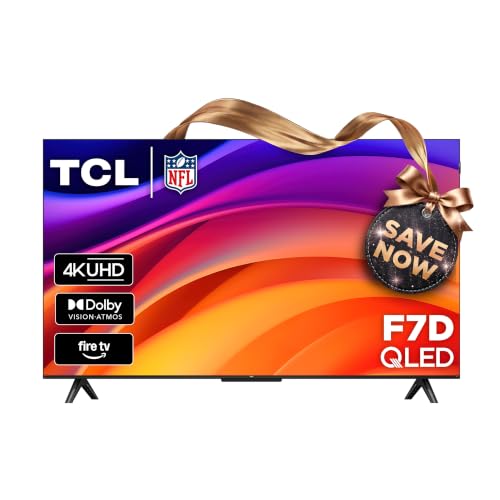
TCL F7D 43″ QLED Fire TV — The small Fire TV with HDR manners
The F7D completes the guide’s symmetry: TCL’s Fire TV entry at 43 inches, carrying the HDR specification the Insignia F50’s title omits. Its title lists a QLED 4K UHD HDR panel with Dolby Vision and Atmos, HDR10+, DTS, a voice remote with Alexa+, Motion Rate 240 with MEMC, and an Auto Game Mode. Read against its same-size, same-platform rival, the division of labour is clear — Insignia states the cord-cutting promise, TCL states the picture and sound formats — and a household choosing between them is really deciding whether the listing’s headline should be the mission or the machinery. For a bedroom or study set that will stream films from the major services, the machinery argument is strong: Dolby Vision content is what those services lead with, and a 43-inch set that handles it properly punches above its size.
The gaming touches — Motion Rate 240 with MEMC, Auto Game Mode — mark the F7D as the second-room set that also hosts a console, the classic cord-cutting consolidation where one screen absorbs the bedroom TV, the streaming box and the games machine at once. Alexa+ on the remote is the title’s platform flourish, the newer generation of Amazon’s voice assistant. What the title does not do is mention live TV at all, which places the F7D philosophically nearer the Toshiba than the Insignia despite sharing Insignia’s platform and size: it is a streaming set first, and households whose live viewing runs through apps will find nothing missing, while antenna households should note the silence and check the full listing.
- Screen size, as titled: 43-inch (43F7D, 2026)
- Panel, as titled: QLED 4K UHD HDR
- HDR and audio formats, as titled: Dolby Vision and Atmos, HDR10+, DTS
- Motion wording, as titled: Motion Rate 240 with MEMC
- Gaming, as titled: Auto Game Mode
- Remote, as titled: voice remote with Alexa+
- Platform, as titled: smart Fire TV
- Not stated in the listing title — verify with the maker’s documentation
Strengths
- Dolby Vision and Atmos at 43 inches — the strongest format list of the small sets.
- Auto Game Mode suits the second room that doubles as the gaming room.
- QLED colour with HDR10+ in reserve covers both major HDR ecosystems’ content.
Trade-offs
- No live TV or channel-guide claim appears in the title, unlike the Roku sets.
- Motion Rate wording is the maker’s composite measure rather than a native rate.
- Fire TV platform commitment is required, as with the Insignia — a cost for Roku households.
The DTS mention, easy to skim past, rounds out the F7D’s format story on the audio side: between Dolby Atmos and DTS, the set’s title covers the two soundtrack families that streaming services and discs actually use, so a soundbar added later meets a television fluent in both. It is a small line with a long shadow, because second-room sets have a habit of becoming hand-me-down main sets, and format fluency is what survives that promotion. A 43-inch television bought for a study in 2026 may be a teenager’s room anchor in 2029, and the F7D’s title reads like TCL knows it.
Best for: a film-streaming bedroom or study at 43 inches, with a console attached. Not suited for: a kitchen set whose whole job is morning broadcast news, where the R7D’s guide-first design fits the habit better.
How Do the Six Sets Compare?
| Pick | Size | Platform | Live TV evidence, as titled | Panel note |
|---|---|---|---|---|
| Roku Select 43″ 4K | 43″ | Roku | Live local news, sports and movies | LED, HDR |
| INSIGNIA F50 43″ Fire TV | 43″ | Fire TV | Stream live TV without cable | LED 4K UHD |
| TCL R7D 43″ QLED Roku TV | 43″ | Roku | Live TV channel guide | QLED, high brightness |
| Roku Select 65″ QLED | 65″ | Roku | Live local news, sports and movies | QLED |
| Toshiba Z670R 65″ Mini-LED | 65″ | Fire TV | Not stated in the title | Mini-LED, native 144Hz |
| TCL F7D 43″ QLED Fire TV | 43″ | Fire TV | Not stated in the title | QLED, Dolby Vision |
The empty cells mark the guide’s central divide: three sets sell the live replacement, two sell the streaming picture, and the big Roku attempts both at once. Households with wired networking as a priority — the set lives far from the router — should also scan the roundup of the best smart tvs with ethernet and web browser, where the connection itself is the subject.
Where Do Free Streaming Channels Fit Into the Picture?
Between broadcast and subscriptions sits a third layer that cable never had: the free, ad-supported streaming channels both platforms in this guide aggregate — hundreds of linear channels carrying news, films, old series, sport-adjacent programming and single-show marathons, arranged in the same guide grids as the antenna channels. For the cord-cutting household this layer quietly replaces cable’s long tail, the background channels that were never worth a subscription but were always on. It is also the layer that most rewards a good guide interface, which loops the argument back to the picks: the R7D’s titled channel guide and Roku’s live integration exist to make three sources — antenna, free channels, apps — feel like one television service, and on the evidence of the titles that is exactly what they promise.
The honest limits of the free layer are freshness and specificity. It will not carry this season’s prestige drama or the specific match a supporter cannot miss; those live behind subscriptions, and the household’s inventory from the setup section should say so plainly. What the free layer does is abolish the empty-evening problem — there is always something on, in the old cable sense — and for many households that abolition, plus broadcast for the local and live essentials, turns out to be the entire requirement, with subscriptions demoted to occasional guests rather than permanent residents of the monthly budget.
What Changes When the Whole House Cuts the Cord at Once?
Most households cut room by room, but the all-at-once version has a logic worth understanding, because it changes which of these six sets matters. A house with one platform everywhere — all Roku, or all Fire TV — develops a single set of habits: the same guide, the same search, the same remote in every room, and a guest or grandparent who learns one television has learned them all. The picks here allow either standardisation: Roku’s own 43 and 65 cover the two main sizes on one platform, with TCL’s R7D as the upgraded second-room option; Fire TV households can pair the Insignia F50 or TCL F7D in the small rooms with the Toshiba at the top of the stairs. Mixed-platform houses are not wrong — each room gets its best set — but they pay for it in small daily frictions that never appear in any specification.
Bandwidth becomes a household utility in the all-at-once house, planned the way hot water is planned. Three simultaneous streams, one of them a 4K match, will find the weak corner of a home network that one stream never troubled, and the remedies are boring and effective: the router moved to the middle of the house, the main set wired where a cable can reach, the oldest Wi-Fi gadget retired. The antenna, again, quietly relieves the whole system — every broadcast viewer is one less stream competing for the pipe, which is a second, infrastructural reason the free route keeps earning its place in a streaming household’s plans.
How Do You Actually Cut the Cord, Step by Step?
The order of operations matters more than any single purchase. Step one: inventory what the household actually watches for two honest weeks — the channels named, the programmes loved, the sports that are non-negotiable — because cord cutting fails when it is planned around an imaginary viewing life. Step two: test the free routes before cancelling anything. Connect an antenna to the current television, scan for channels, and live with the broadcast grid for a week; open the free streaming tiers on the existing set or a borrowed device and note what the household genuinely opens. Step three: choose the television from this guide against the inventory — guide-first sets for broadcast households, format-first sets for streaming households, the platform your voice-assistant habits already speak.
Step four is installation day discipline: set the new television up completely — platform accounts signed in, live guide populated, antenna scanned, remote learned — while the cable box is still connected beside it. A week of overlap, where both systems work and the household drifts naturally to the new one, converts a risky leap into a boring transition. Step five, only then: cancel the cable, return the boxes, and keep the paperwork until the final bill confirms the divorce. The households that regret cord cutting are almost never the ones with the wrong television; they are the ones who cancelled first and researched under pressure, with a silent screen in the corner keeping score.
What Mistakes Do Cord Cutters Make in the First Month?
Subscribing to everything at once is the classic own goal: the household replaces one cable bill with six streaming subscriptions and saves nothing while feeling virtuous. The corrective is the inventory from the setup section — most households discover their real viewing fits broadcast plus two services, with a third rotated in for a single series and cancelled after. The second mistake is neglecting the antenna because streaming felt sufficient in week one; the first local storm, breaking-news evening or live final that buffers at the wrong moment teaches the value of a broadcast route that no network outage can touch. Every television in this guide supports that route by being a television; the mistake is never testing it.
Placement and network mistakes fill the rest of the list. A streaming television fed by weak Wi-Fi in a far room will stutter in ways the household blames on the set, so the router’s geography deserves as much thought as the panel’s size. Keeping the old cable remote habits — channel surfing by number — sets a household up to hate a platform organised around search and guides, and the kindest fix is a week of deliberate practice with the voice remote before judging. And the quietest mistake: cutting the cord on the main room only, leaving rental boxes bleeding money in spare rooms where a 43-inch set from this guide would have ended the arrangement entirely.
Final Recommendation
And keep the perspective the whole project deserves: the television is the easy part. Every set in this guide will outlast several generations of streaming services, platform redesigns and viewing fashions, so the decision that echoes longest is not which panel hangs in the main room but whether the household’s habits were read honestly before the boxes were returned. The titles above give a buyer everything needed to make that reading — live promises where they are made, format lists where they matter, and silence where a maker has chosen not to claim, which is information of the most useful kind.
Match the set to the habit you verified, not the habit you admire. Broadcast households — antenna on the roof, guide grid on the screen, news at breakfast — should take the TCL R7D at 43 inches or the Roku Select 65 where the room is larger, because those titles promise the live replacement in writing. Alexa households replacing a second-room box should take the Insignia F50 and hold its maker to the five words in its title. Streaming households should divide by size: the TCL F7D where 43 inches and Dolby Vision meet, the Toshiba Z670R where the main room wants the best picture in this guide and the platform is a solved problem. Cut the cord in the order the setup section prescribes, and the cancellation call becomes the easiest part of the whole project.
Frequently Asked Questions
Do I still need an antenna if I buy one of these televisions?
Need is the household’s call, but the antenna remains the only route to free, live, local broadcast — news, network programmes, most major sports — with no subscription and no buffering. These televisions are built to receive that route and integrate it with streaming; the antenna itself is a separate, inexpensive piece of hardware covered in its own guide. Households far from transmitters or in deep valleys should test reception before building plans around it.
Can a streaming stick rescue my current TV instead of buying a new one?
Often, yes — a stick replaces an aged platform for a fraction of a television’s cost, and this guide names it as a legitimate route. The limits are the panel and the ports: a stick cannot add 4K, HDR formats, brightness or a better tuner to a set that lacks them. The picks here are for households whose television itself is due for replacement, or whose second room never had a smart set at all.
Which platform is easier for someone who has used cable for thirty years?
Roku, on the evidence of these titles and interfaces: a plain app grid, a live channel guide that mimics the cable grid, and a voice remote that searches everything at once. The TCL R7D is the fullest expression of that philosophy in this guide. Fire TV rewards households already comfortable with Alexa and Amazon’s services, and its home screen asks a little more learning in exchange for richer surfacing.
Will cutting the cord actually save money?
It saves exactly what the household’s discipline says it saves. Broadcast plus a small number of streaming services costs a fraction of a full cable package; broadcast plus every streaming service, kept forever, can quietly reassemble the old bill. The television is a one-time purchase either way — the recurring discipline is the subscription list, reviewed twice a year with the same honesty as the viewing inventory.
What internet speed does a streaming household need?
As a working rule, a single 4K stream wants a comfortable margin above the service’s stated minimum, and a household streaming two or three screens at once should multiply accordingly and then care more about the router’s placement than the headline package speed. The titles in this guide state Wi-Fi capability rather than speed requirements; a wired Ethernet run to the main set remains the cheapest reliability upgrade in the entire cord-cutting project.
What happens to my local channels when I cancel cable?
Nothing — they were never the cable company’s channels. Local stations broadcast over the air, and cable merely carried them for a fee wrapped into the bill. With an antenna connected to any set in this guide, the same stations return free, usually in sharper quality than the compressed cable feed provided, and the sets’ guide features arrange them alongside the streaming sources. The two genuine variables are distance from the transmitters and the building itself, which is why the test-before-cancelling order in the setup section exists.
Should every room in the house use the same platform?
It is the single most underrated decision in a whole-house cord cut. One platform means one guide layout, one search behaviour and one remote language everywhere, which compounds into real ease for guests, children and anyone who did not choose the system. The guide’s picks allow either standard: Roku through the two Select sets and the R7D, Fire TV through the Insignia, the F7D and the Toshiba. Mixed houses work too — they simply trade that compounding ease for each room’s individually best set.
Do these sets work for live sports without cable?
Between the broadcast route and the sports-carrying streaming services, yes — and the titles lean into it: Roku’s sets name live sports in their streaming promise, and the R7D’s channel guide covers the broadcast side. The honest caveats are rights and blackouts, which belong to leagues and services rather than televisions, and the small streaming delay compared with broadcast, which the antenna route eliminates for the games it carries.
Related Guides
Two neighbouring guides complete this cluster: the roundup of the best tvs for hard of hearing for households where dialogue delivery matters as much as channel choice, and the guide to the best tvs that look like art for the room where the new set has to earn its wall space while switched off.
Cord-cutting ends at an app ecosystem, and our guide to the best android tvs for kodi covers the sets whose platform lets the reader install what they actually use.


