What's inside
- Key Takeaways
- Quick Picks: The Best Low Pofile ITX CPU Coolers at a Glance
- How Did We Choose These Picks?
- Why Does Height Rule Everything in an ITX Build?
- What Should You Measure Before Choosing?
- Which Low-Profile Coolers Deserve a Place in Your Build?
- How Do the Six Compare Side by Side?
- What Mistakes Ruin a Small Build’s Cooling?
- How Do You Install a Low-Profile Cooler in a Crowded Case?
- Final Recommendation
- How Does Air Actually Move Through a Sandwich-Layout Case?
- How Should You Tune a Fan Curve for a Slim Fan?
- Which Pick Matches Which Kind of Small Build?
- Why Does the Downdraft Design Help the Rest of the Motherboard?
- What Happens to These Coolers When You Change Cases or Platforms?
- How Do You Know a Low-Profile Cooler Is Enough Before You Buy It?
- Why Does Mounting Pressure Matter More When the Cooler Is Small?
- Frequently Asked Questions
- Related Guides
As an Amazon Associate I earn from qualifying purchases. This post may contain affiliate links at no extra cost to you.
gizmoverdict.com is reader-supported. When you buy through links on our site, we may earn an affiliate commission.
Where to buy: Every cooler in this guide was matched to a checked listing in this site’s product pool, and the links point at those listings. In this category the listing titles are unusually informative — heights, fan models and heat-pipe counts are printed right in them — and the spec boxes below quote only what those titles state.
An ITX build is an argument conducted in millimetres. The case might allow 47mm of cooler height, or 57, or a luxurious 65, and every other component in the box has already spent its share of the space before the processor gets a say. Shoppers searching for the best low pofile itx cpu coolers — the phrase as it is typed into search boxes every day, typo and all — are really asking a precise question: what is the most cooling that can be persuaded into a slab of aluminium and copper no taller than a matchbox is long?
The six answers here span that slab from 36mm to 65mm. Three come from Thermalright’s AXP90 family, which has become the default vocabulary of ITX cooling: the X36 at a barely-there 36mm, the X47 in black, and the X53 in full copper for builders chasing every degree. Two come from Noctua, whose NH-L9 line treats a low-profile cooler as a serious instrument rather than a compromise, including a taller x65 variant for cases that can spare the room. The sixth, ID-COOLING’s IS-55, spends its 57mm on five heat pipes and a larger fan aperture than the others can offer.
What unites them is honesty about physics. A low-profile cooler will never match a tower, and none of these pretends otherwise. What they can do — what the good ones do — is keep a modern processor at full behaviour in a case the size of a shoebox, at fan speeds a living room can tolerate, for years, without the builder ever thinking about them again. That is the standard this guide judges by.
Key Takeaways
- Height is the first specification in this category: the picks here stand 36mm, 47mm, 53mm-class, 57mm and 65mm tall, and your case’s limit chooses your shortlist before performance does.
- Three of the six picks are Thermalright AXP90 variants — the family’s slim TL-9015 fan platform appears across the range with different stack heights and materials.
- Copper construction, as in the AXP90-X53 Full Copper, buys real degrees in a format where every degree is argued over.
- Noctua’s NH-L9i-17xx is the Intel-specific option in the list; its name ties it to the 1700-series socket family.
- The IS-55’s five heat pipes and 57mm height make it the performance-leaning pick for ITX cases with a little more room.
- All six blow air down toward the motherboard, which also cools the voltage regulators and memory around the socket — a genuine side benefit in cramped cases.
Quick Picks: The Best Low Pofile ITX CPU Coolers at a Glance
| Pick | Badge | Why it earns its place |
|---|---|---|
| Thermalright AXP90 X36 | Shortest of all | At 36mm tall it fits ITX cases that exclude everything else in this guide. |
| Thermalright AXP90 X47 Black | The ITX default | The 47mm-class AXP90 in black, the cooler the small-form-factor community reaches for first. |
| Thermalright AXP90-X53 Full Copper | Copper flagship | Full copper construction squeezes tower-envy performance out of a low-profile slab. |
| Noctua NH-L9x65 chromax.Black | Tallest and calmest | A 65mm-class Noctua for ITX cases that can spare the height, with the brand’s quiet manners. |
| Noctua NH-L9i-17xx | Intel specialist | A slim, quiet Noctua built around Intel’s 1700-series socket. |
| ID-COOLING IS-55 Black | Five-pipe option | Five heat pipes in a 57mm frame, for ITX builds that want the most stack they can fit. |
How Did We Choose These Picks?
We began with the case list, not the cooler list. The ITX cases builders actually use cluster around a few cooler-height limits, and a guide that recommended only 65mm coolers would be useless to the owner of a 40mm case. So the six picks deliberately staircase up the heights: 36mm for the truly tiny, the 47mm class for the classic sandwich and console-style cases, the low-50s and 57mm for mid-size ITX, and 65mm for the roomy end of small. Whatever your case allows, one of these is the most cooler that fits it, and that is the only honest way to organise this category.
The second filter was the fan. Every pick here uses a slim fan as part of its height budget — the Thermalrights name theirs in their titles, the TL-9015 series — because in this format the fan is not an accessory bolted onto a heatsink; it is half the product. A slim fan must move air through a dense stack at speeds that do not whine, on a bearing that survives being mounted horizontally in a warm box for years. The makers represented here have track records on exactly that point.
Third, mounting and clearance behaviour. A low-profile cooler lives surrounded by tall neighbours: memory on one side, the case’s riser cable or power supply on another, motherboard heatsinks at its back. We favoured designs known for keeping their footprint close to the socket’s keep-out zone, because a cooler that fits its height limit but leans on a memory stick has not, in any useful sense, fitted.
Last, verification, as always in this batch: each pick matched a checked listing in this site’s pool, and the specifications in the boxes — heights, fan models, pipe counts, materials — are the ones those listing titles state. Where a title does not state a figure, the box does not invent it.
Why Does Height Rule Everything in an ITX Build?
Because in a small case, height is not one dimension among three; it is the dimension that decides which product category you are shopping in at all. A tower cooler needs the case’s full depth from motherboard to panel. An ITX case spends that depth on other things — a graphics card on a riser, a power supply mounted over the board, a storage stack — and leaves the processor a horizontal slice. The coolers in this guide are engineered for that slice: wide rather than tall, with heat pipes bent flat to spread heat sideways across a fin field that lies like a blanket over the socket.
The engineering consequences are interesting. A tower moves heat up and away; a low-profile cooler spreads it out and then asks its fan to push air down through the fins and out sideways, washing the motherboard as it goes. That downward wash is genuinely useful in ITX, where the voltage regulators and memory sit in still, warm air with no case fan dedicated to them. Several builders choose a downdraft cooler partly as motherboard cooling, and in a tiny case that reasoning is sound.
The cost is ceiling. A fin field lying flat has less volume than a tower’s, and a slim fan has less pressure than a full-thickness one. The result is a class of coolers that handles mainstream and mid-range processors beautifully and flagship processors conditionally — with case airflow doing real work and fan curves set with intent. Judge the picks below by that contract and they are excellent. Judge them against a dual tower and you have misunderstood what the millimetres were spent on.
What Should You Measure Before Choosing?
Your case’s stated CPU cooler clearance is the headline, but ITX adds footnotes. First, what sits above the cooler? In sandwich-layout cases the power supply or its bracket may overhang the socket area, and the clearance that matters is to that bracket, not to the panel. Second, the fan’s intake needs breathing room: a slim fan pressed within a few millimetres of a vented panel or a power supply wall will be louder and weaker than the same fan with space to draw from. Some cases are honest about this and some are not; builder forums for your exact case are worth ten minutes.
Third, memory height — again, but differently. Low-profile coolers overhang the memory slots on many ITX boards, and the clearance under the fin field becomes the limit on your memory’s heatspreaders. Standard-height memory is the safe pairing; tall decorative modules and low-profile coolers are natural enemies. Fourth, the board’s own furniture: M.2 heatsinks, VRM towers and rear I/O shrouds all live within a few millimetres of the socket on ITX boards, and the cooler’s footprint drawing — published by every maker in this guide — is the document that settles whether your specific board and cooler are compatible.
Do this homework once, in writing, and the category becomes simple: your measurements produce a maximum height and a footprint verdict, and the picks below sort themselves.
Keep those notes with the build. ITX cases are kept for years and handed between projects, and the clearance figures you verified today are the figures a future upgrade will ask for at midnight, when the choice is between your notebook and a ruler held hopefully against a vent. The notebook wins every time, and it is also the only version of the measurement the side panel has ever agreed with.
Which Low-Profile Coolers Deserve a Place in Your Build?

Thermalright AXP90 X36 — Shortest of all
Thirty-six millimetres. The X36’s title leads with its height — “36mm Height, TL-9015 Slim PWM CPU Fan” — because that number is the entire product. There are ITX cases, particularly the slimmest console-style and sandwich designs, where 36mm is not a preference but the whole allowance, and in those cases the X36 is frequently the only aftermarket cooler that fits at all. That it is a real cooler at that height — a proper fin stack with heat pipes and a PWM slim fan, from a maker whose larger coolers embarrass expensive rivals — is the small miracle this category runs on.
Expectations must scale with the millimetres. The X36’s fin volume is the smallest in this guide, and its natural territory is the efficient end of the processor market: the chips chosen for small builds precisely because they sip power. On those chips it performs the essential trick — full boost behaviour, civilised fan speeds, temperatures nobody monitors twice. Paired with a case that gives its fan clean intake air, it disappears into the build, which is what a 36mm cooler is for.
The fitting experience deserves a sentence of respect. Working in the space a 36mm cooler leaves is watchmaker’s work, and Thermalright’s mounting is designed to be completed with the board outside the case, which is how you should do it. Fit the cooler before the board goes in, route its fan cable while you can still see the header, and the X36 will not trouble you again. Ask it to cool a flagship processor and it will answer honestly and audibly; that is not its failure, it is your specification error.
- Height: 36mm, as stated in the listing title
- Fan: TL-9015 slim PWM, per the listing title
- Format: low-profile ITX cooler
Strengths
- Fits cases whose allowance excludes every other pick here.
- A genuine heat-pipe cooler, not a shaped piece of aluminium.
- PWM slim fan answers properly to a motherboard curve.
Trade-offs
- Smallest fin volume in the guide; flagship processors are beyond it.
- Fan works harder, and is heard sooner, than the taller picks.
- Installation space is as tight as the cooler itself.
Best for: the slimmest ITX cases and the efficient processors that belong in them. Not suited for: processors whose power draw belongs in a tower case — its 36mm stack has a hard thermal ceiling.

Thermalright AXP90 X47 Black — The ITX default
If the small-form-factor community has a default answer, this is close to it. The X47’s title describes a “Low Profile CPU Cooler, with 92mm TL-9015B Slim PWM Fan, ITX” — the 47 in the name carrying the family’s height class, the black finish marking it as the version meant to be seen through a vented panel. The extra height over the X36 is spent exactly where a cooler wants it: more fin stack above the pipes, which translates directly into lower fan speeds at the same temperature. Eleven millimetres does not sound like a design philosophy until you watch what it does to noise.
The X47’s reputation was built across thousands of small builds, and the pattern in those builds is consistent: mainstream gaming processors, including the popular mid-range chips, run at full behaviour with the fan in its comfortable middle range. It is the cooler that lets an ITX gaming PC stop being a cooling project and start being a games machine. The black finish is not vanity, either — in cases with open or mesh panels, the cooler is a visible surface, and the blacked-out stack reads as intentional where bare metal reads as leftover.
Its limits are the class’s limits, arrived at later than the X36’s. High-power processors in a case with mediocre intake will push its fan into audible territory during sustained loads, and its footprint, while well-behaved, still needs the motherboard check described earlier in this guide. But as the balance point of the entire category — height, capacity, price, availability of knowledge — the X47 Black is where most ITX builders should start their thinking, and a great many end it there too.
- Fan: 92mm TL-9015B slim PWM, per the listing title
- Finish: Black
- Format: low-profile cooler for ITX, per the listing title
Strengths
- The category’s balance point: real capacity at a 47mm-class height.
- Huge installed base means every board pairing is documented somewhere.
- Black finish suits the mesh and windowed panels ITX cases favour.
Trade-offs
- Sustained flagship loads will make its fan audible.
- Footprint still needs checking against crowded ITX boards.
- Costs more than the X36 for what is, physically, a taller sibling.
Best for: mainstream ITX gaming builds in 47mm-class cases — the default done properly. Not suited for: high-power processors in sealed ITX cases with little intake air to offer it.

Thermalright AXP90-X53 Full Copper — Copper flagship
The X53 Full Copper is what happens when a maker decides the constraint is height, not money. Its title says it plainly: “Full Cooper Low Profile CPU Cooler ITX, with 92mm TL-9015R Slim PWM” fan — the listing’s own spelling of copper aside, the meaning is a heatsink built from copper rather than the usual aluminium fins over copper pipes. Copper conducts heat markedly better than aluminium, and in a low-profile slab, where the distance heat must travel sideways through the fin field is the whole problem, that conductivity is spent exactly where it earns.
The practical effect is a cooler that behaves a class above its height. The fin field warms evenly instead of developing a hot centre and cool edges, so the slim fan’s air is used across the whole stack, and temperatures on mid-range processors land where aluminium coolers a size larger would put them. Builders of dense, powerful ITX systems — the ones shoehorning serious processors into console-sized cases — are this cooler’s natural constituency, and they tend to speak of it the way audiophiles speak of a favourite cable: slightly defensively, entirely sincerely.
Copper’s costs are literal and physical. The material is expensive, so the X53 is the priciest Thermalright here; it is also heavy for its size, which matters in a case that travels, and copper tarnishes if handled carelessly, though inside a case that is an aesthetic footnote. None of this argues against it. It argues for buying it deliberately, when your build’s processor and case leave you exactly the problem it solves: maximum heat, minimum height, no remaining variables to trade.
- Construction: full copper, per the listing title
- Fan: 92mm TL-9015R slim PWM, per the listing title
- Format: low-profile ITX cooler
Strengths
- Copper fin field spreads heat evenly across the whole stack.
- Performance that embarrasses taller aluminium coolers.
- The connoisseur’s answer for dense, powerful ITX builds.
Trade-offs
- The most expensive Thermalright in this guide.
- Heavy for its footprint — a consideration in a travelling build.
- Its advantages shrink on low-power processors that never stress it.
Best for: powerful processors in height-capped ITX cases where every degree is contested. Not suited for: budget builds on efficient chips, where its copper buys performance the processor will never request.

Noctua NH-L9x65 chromax.Black — Tallest and calmest
The NH-L9x65 is the pick for the ITX case that can spare 65mm — and if yours can, the reward is the most tower-like behaviour available in this guide. The listing calls it a “High-Performance Low-Profile CPU Cooler”, and the x65’s extra height over its slimmer Noctua siblings is spent on a deeper fin stack and a full-thickness fan where the others must use slim ones. That combination — more metal, a fan with real pressure behind it — is why the x65 holds mid-range and even some high-end processors at fan speeds the slim picks cannot match.
Noctua’s contribution beyond the metal is temperament. The brand’s fans are the industry reference for low-speed smoothness, and its mounting system makes even pressure across the processor a matter of following instructions rather than developing a feel. In a small case that sits on a desk, in a room where the PC is heard, that temperament is the product. The chromax.Black finish completes the thought: an all-black cooler for the mesh-sided cases that show their internals, replacing the maker’s famous beige with something that matches a modern build.
The condition is in the name: x65. This cooler spends height the other picks save, and in a 47mm case it is not a contender at all — no amount of quality compresses metal. It also carries Noctua pricing, which in this category buys refinement rather than raw capacity. But for the roomy ITX build, the one in a case chosen with a little generosity, it is the cooler that makes the whole small-form-factor compromise feel least like one.
- Format: low-profile cooler, 65mm height class per the model name
- Listing description: high-performance low-profile
- Finish: chromax.Black all-black edition
Strengths
- Deepest stack and strongest fan in this guide.
- Noctua’s low-speed fan manners suit desk-side ITX cases.
- Mounting system and support are the class benchmark.
Trade-offs
- Needs a 65mm-class allowance many ITX cases do not offer.
- Premium pricing for refinement as much as capacity.
- Still a downdraft cooler — no match for a tower where a tower fits.
Best for: roomy ITX cases and owners who hear everything. Not suited for: cases with a cooler allowance below its 65mm height class, where it simply cannot go.
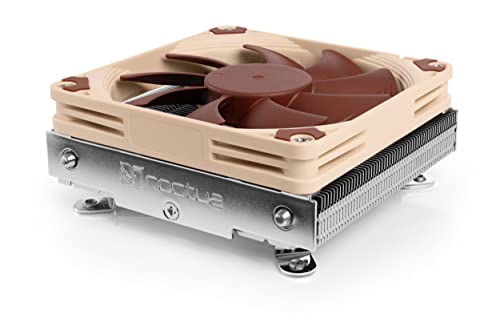
Noctua NH-L9i-17xx — Intel specialist
The NH-L9i-17xx is the specialist in a list of generalists. Its title — “Quiet High-Performance Low-Profile CPU Cooler” — leads with the brand’s twin obsessions, and its name carries its socket allegiance: the 17xx marks it as the variant built around Intel’s 1700-series socket, with mounting and a cold plate shaped for that platform rather than adapted to it. Platform-specific coolers are a Noctua tradition, and the logic is sound: a cooler designed for one socket’s dimensions and keep-out zone can be smaller, sit flatter and clear its neighbours better than a universal design carrying everyone’s compromises.
For an Intel-based ITX build, that specialisation shows up as fit. The L9i family’s footprint is famously disciplined, staying inside the socket’s keep-out so that memory, VRM heatsinks and rear I/O all keep their space — on an ITX board, where every millimetre around the socket is occupied by something the board maker refused to move, that discipline is worth more than a fin or two. Acoustically it is the quietest tool in this guide for its size class, the cooler for the ITX box that lives in a studio, a bedroom or a listening room.
The specialisation is also the limitation, and it should be stated without varnish: this is an Intel cooler. A builder who might migrate the build to AMD later is buying a cooler that does not migrate with it, and its slim stack shares the class ceiling — efficient and mainstream Intel processors are its home, and the hottest chips will lean on it hard in a small case. Within an Intel ITX build that values silence and fit, though, it is the most considered object in this guide.
- Platform: Intel 1700-series socket, per the model name 17xx
- Listing description: quiet, high-performance, low-profile
- Format: slim low-profile cooler
Strengths
- Socket-specific design gives it the tidiest footprint here.
- The quietest manners in its size class.
- Noctua mounting and long-term support behind it.
Trade-offs
- Intel-only: it does not follow you to an AMD rebuild.
- Slim stack caps its ceiling on the hottest processors.
- Premium price for a cooler of modest dimensions.
Best for: Intel-based ITX builds where fit and quiet outrank raw capacity. Not suited for: AMD builds of any kind — its mounting is designed around Intel’s 1700-series socket only.

ID-COOLING IS-55 Black — Five-pipe option
The IS-55 spends its dimensions differently from everything else here. The title states “57mm Low Profile CPU Cooler, 5 Heatpipes” — five heat pipes at 57mm, in a black finish — and the design uses the height on stack and pipes rather than splitting the difference. Five pipes is a tower-class count; finding it in a cooler under 60mm tells you the design brief was performance first within the height, and the larger fan aperture the 57mm frame allows gives those pipes a fan worthy of them.
That makes the IS-55 the pick for the ITX builder whose case allows high-50s millimetres and whose processor is a genuine mid-range gaming chip rather than an efficiency special. It has the most thermal ambition of the sub-60mm picks, and in cases with the intake to feed it, it holds loads that would set the slimmer coolers’ fans singing. ID-COOLING has built a quiet reputation in exactly this niche — small coolers that punch at weights above their height — and the IS-55 is the fullest expression of it in this guide.
Check the two usual things with extra care. At 57mm it fits fewer cases than the Thermalrights below it, and its wider performance intent means its footprint deserves the motherboard diagram check before ordering; a cooler designed to use space will use all of it. Its fan, while strong, does not have the Noctuas’ low-speed silkiness, so in a silent-room build the x65 remains the calmer choice where its height fits. But where the IS-55 fits and the processor is hungry, it is the performance answer in this class.
- Height: 57mm, as stated in the listing title
- Heat pipes: 5, per the listing title
- Finish: Black
Strengths
- Five heat pipes give it the strongest ceiling under 60mm.
- Black finish and tidy presentation for visible builds.
- A performance-first design for genuinely mid-range processors.
Trade-offs
- 57mm excludes the slimmest cases outright.
- Fan character at crawl speeds trails the Noctua picks.
- Footprint needs the motherboard check before ordering.
Best for: ITX cases with high-50s millimetre allowances and mid-range gaming processors. Not suited for: cases under 57mm of clearance, or silent-room builds where the Noctuas’ fan manners matter more.
How Do the Six Compare Side by Side?
| Cooler | Height (title) | Fan (title) | Distinguishing feature |
|---|---|---|---|
| Thermalright AXP90 X36 | 36mm | TL-9015 slim PWM | The shortest aftermarket cooler in the guide |
| Thermalright AXP90 X47 Black | 47mm class | 92mm TL-9015B slim PWM | The community default for ITX |
| Thermalright AXP90-X53 Full Copper | 53mm class | 92mm TL-9015R slim PWM | Full copper construction |
| Noctua NH-L9x65 chromax.Black | 65mm class | Full-thickness fan class | Deepest stack, calmest manners |
| Noctua NH-L9i-17xx | Slim class | Slim fan class | Intel 1700-series specialist |
| ID-COOLING IS-55 Black | 57mm | Larger-aperture fan class | Five heat pipes under 60mm |
What Mistakes Ruin a Small Build’s Cooling?
The first is buying the cooler before the case. In ITX the case is the specification; a cooler bought on reputation alone meets its height limit the way a train meets a tunnel it was not built for. The second is starving the fan. A slim fan drawing air through a panel it nearly touches makes a particular strained sound and delivers a fraction of its rated air; if your case sandwiches the cooler against a solid or barely-vented surface, no cooler in this guide can rescue the arrangement. The third is tall memory chosen for its looks, discovered at assembly time to occupy the space the cooler’s fin field was promised.
Fourth is forgetting the rest of the board. Downdraft coolers wash the motherboard with air, which helps VRMs and memory, but the graphics card in a sandwich case has its own thermal life, and a build is only as calm as its loudest fan. Fifth is the fan curve copied from a tower build: low-profile fans live at higher baseline speeds, and a curve written for a tower’s lazy range leaves a slim fan either idling too slow to matter or leaping at the first spike. Set the curve in the case, under the game, with patience.
How Do You Install a Low-Profile Cooler in a Crowded Case?
Outside the case, on the bare board, every time. Fit memory first if the cooler will overhang it, then the cooler, tensioning its screws gradually in a cross pattern so the cold plate settles evenly on a processor that has no room for a second attempt. Route the fan cable before the board goes in — in most ITX cases the CPU fan header becomes unreachable the moment the power supply or riser is fitted, and a cable left unrouted becomes a cable pressed against a fan.
Then think about air as you close the box. Note which way the cooler’s fan will draw and what it will draw from; if a cable bundle or a drive cage blocks its intake, move them now. Set the fan curve after the build is complete and the panels are on, because the acoustic truth of an ITX PC only exists fully assembled. Finally, stress it with your longest game, not a benchmark: the question is never whether the cooler survives ten minutes, it is whether the fan speed in hour two is one you can live with in hour two hundred.
Final Recommendation
Let your case’s measured allowance make the shortlist, then choose within it. At 36mm, the Thermalright AXP90 X36 stands alone. In the 47mm class, the AXP90 X47 Black is the default the community earned, with the full-copper X53 as the upgrade for dense, powerful builds that contest every degree. Intel builders who prize fit and quiet should look hard at the Noctua NH-L9i-17xx; cases that open up to 57mm unlock the five-pipe ID-COOLING IS-55; and where 65mm is available, the NH-L9x65 chromax.Black delivers the calmest, most tower-like behaviour a low-profile cooler can offer. Measure honestly, buy the most cooler your millimetres allow, and a small PC stops being a compromise you apologise for — it becomes the build that takes up the least space and asks for the least attention in the house.
One last encouragement, because this category intimidates newcomers out of proportion to its difficulty: every measurement in this guide is one you can take with documents the manufacturers publish for exactly this purpose, and every cooler here has been fitted by thousands of ordinary builders into the same cases you are considering. The small build rewards patience, not genius, and the patience is mostly spent before the parcel arrives.
How Does Air Actually Move Through a Sandwich-Layout Case?
The classic ITX sandwich puts the motherboard on one side of a central spine and the graphics card on the other, with the power supply wherever it fits and the CPU cooler drawing air through the side panel. That layout explains most of this category’s behaviour. The cooler’s fan is both the processor’s fan and, effectively, one of the case’s intake fans: the air it pulls in cools the chip, washes the board, and then must find its way out through whatever vents the case provides. When those vents are generous, the system breathes and even the X36 can surprise you. When the case seals its panels for looks, every cooler in this guide is breathing through a straw, and the differences between them compress into noise.
This is why experienced ITX builders talk about the case and cooler as one purchase. A mesh panel directly over the cooler is worth more than a fin’s worth of copper; a solid glass panel over it can undo a cooler’s entire advantage. If your case offers both panel types, the unglamorous mesh is the cooling upgrade. If it offers only solid panels with edge vents, prefer the picks with headroom to spare, because they will be working with warmer, slower air than their designers assumed.
Exhaust deserves a thought too. Many small cases rely on one or two small top or rear fans to remove what the cooler and graphics card heat up. Those fans set the case’s internal temperature, and the CPU cooler lives downstream of their competence. A build whose cooler seems mysteriously weak often has an exhaust problem wearing a cooler’s name — the chip is being cooled with air the graphics card already used. Before upgrading a cooler in a finished build, run it with the panels off; if temperatures fall off a cliff, your case was the cooler problem all along.
How Should You Tune a Fan Curve for a Slim Fan?
Slim fans live at higher speeds than tower fans, and their useful range is narrower, so a curve copied from a tower build serves them badly. Start by learning two temperatures: what your processor reaches in your longest real gaming session, and what it reaches in the heaviest burst — a loading screen, a compile, a big file operation. The curve’s job is to be generous at the first temperature and calm about the second. Set the fan to reach the speed your session temperature genuinely needs, and let short bursts ride on the heatsink’s mass with a response delay of several seconds before the fan is allowed to chase them.
Set the floor with your ears, in the finished case, at your desk. Increase the idle speed step by step until the fan just becomes audible, then back off one step; that is your floor, and it will be higher than a tower’s floor and that is fine. A slim fan turning at a steady, just-inaudible speed cools the idle processor, keeps air moving over the board, and — importantly — makes the transition to load speeds a slope instead of a step your attention catches.
Resist the maximum. A slim fan’s last few hundred RPM buy very little cooling and a great deal of noise, because the dense stack it blows through resists harder the faster it turns. If your processor needs the fan’s absolute top speed in ordinary gaming, the honest conclusions are that the cooler is undersized for the chip, the case is starving it, or the processor’s power limits have been raised beyond the build’s design. Fix the cause you actually have; the curve cannot repeal it.
Which Pick Matches Which Kind of Small Build?
For the console-style living-room PC — horizontal, under a television, built on an efficient processor — the X36 and X47 are the natural citizens, chosen by which of their heights the case allows. These builds are heard during quiet film scenes and game dialogue, so fan character matters more than the last degree; if the case is an Intel build and the budget allows, the NH-L9i-17xx is the connoisseur’s version of the same idea.
For the desktop ITX gaming tower, the small cube or tower case that sits beside a monitor and runs a real mid-range processor for hours, the IS-55 and the NH-L9x65 are the picks with the stamina for the job, separated by taste: the IS-55 for five-pipe ambition and value, the x65 for Noctua calm. The X53 Full Copper belongs to the third kind of build — the dense, deliberate, maximum-effort ITX system, often built by someone on their third small case, who knows exactly which degrees they are buying and why.
And for the travelling build, the LAN-party or work-from-anywhere machine that gets carried, consider weight and mounting confidence alongside height. The copper X53 is heavy for its size; the aluminium Thermalrights travel light. A cooler is a mass bolted to a motherboard, and in a case that moves, the kindest choice is sometimes the lighter one fitted with particular care, its screws checked after the journey the way a cyclist checks a wheel.
Why Does the Downdraft Design Help the Rest of the Motherboard?
Every cooler in this guide blows down. Air passes through the fin field, strikes the board, and spreads outward across the memory, the voltage regulators and the chipset area before leaving through the case’s vents. In a tower case that wash is a footnote; in an ITX case it can be the only deliberate airflow those components ever receive. ITX boards pack their power delivery tightly around the socket, and that circuitry runs warm under a gaming load, particularly on boards asked to feed a mid-range processor at full boost. A downdraft cooler is, quietly, also their fan.
This has a practical consequence for how you judge temperatures. Builders sometimes worry that a low-profile cooler “recycles” warm air onto the processor, and in a sealed box that concern is real — but in a vented case the exchange runs the other way: the board’s components shed heat into air that is moving, and the processor’s fan keeps that air honest. When you read ITX build logs, the ones reporting happy VRM temperatures under sustained load are disproportionately downdraft builds, and that is not a coincidence.
It also means the cooler’s fan is doing two jobs, which argues for not under-speccing it. A fan chosen purely to keep the processor alive at minimum speed may leave the board’s air stagnant at exactly the loads where the regulators work hardest. The picks here, with proper PWM fans on real stacks, avoid that trap; a bargain no-name slim cooler with a feeble fan falls into it, and the failure shows up as instability blamed on everything except the cooler that caused it.
What Happens to These Coolers When You Change Cases or Platforms?
Small coolers lead interesting second lives. A tower is bought for a build; an AXP90 is bought for a form factor, and form factors persist across upgrades. The builder who moves from one ITX case to another with a similar allowance takes the cooler along, and the staircase of heights in this guide means a case change often means stepping one rung — X36 out, X47 in — rather than starting research from nothing. Keeping the full mounting kit, for both platforms where supplied, is what makes that portability real; the brackets you throw away are the ones the next board needs.
Platform changes are the sterner test. The Thermalright and ID-COOLING picks are multi-platform designs whose kits cover the mainstream sockets of their era, and their makers’ sites are the authority on newer-socket support. The NH-L9i-17xx is the deliberate exception: an Intel instrument that stays with Intel builds. None of this is a flaw — it is a purchasing fact to hold alongside height and price. A cooler is one of the few components that can plausibly serve three processors; choosing one whose mounting story matches your likely path is worth a few minutes of foresight.
There is a small, thriving second-hand market in these coolers for the same reason, and a used low-profile cooler is a safer used purchase than most components: no firmware, no wear items but a fan, and a heatsink that either is straight or visibly is not. If you buy used, budget for fresh thermal paste and check the fan by hand for bearing roughness. If you sell, keep the box — in this category, the box with its full kit is half the value.
How Do You Know a Low-Profile Cooler Is Enough Before You Buy It?
Triangulate from three sources, none of which is a marketing page. First, your processor’s realistic power draw under gaming — not its headline TDP, which both makers define in their own ways, but the figures independent reviewers measure in games. Second, build logs for your exact case: the ITX community documents pairings obsessively, and a case with a following has a known list of coolers that work in it and processors they have been proven under. Third, the cooler’s own height against your case’s allowance, with the fan’s intake gap counted honestly.
When the three agree, buy with confidence. When they disagree, believe the most pessimistic source — it is the only one not trying to sell you anything — and step one rung up the height staircase if your case allows, or one step down the processor’s power settings if it does not. Nearly every modern processor offers an eco or reduced-power mode in the BIOS, and in games the performance cost of using it is often within the margin of measurement while the cooling benefit is large. In a small build, that setting is not a surrender; it is a design tool, and some of the most satisfying ITX machines ever built run their processors deliberately capped, cool and silent, inside cases that could never have hosted them at full song.
What you should not do is buy the tallest cooler that fits and the hottest processor that exists and let them negotiate. They will negotiate in fan noise, in your room, every evening. The builds that make their owners happy are the ones where the negotiation happened on paper first — processor chosen for the case, cooler chosen for the processor, curve set for the room. That sequence, more than any single product in this guide, is the craft of the small build.
Why Does Mounting Pressure Matter More When the Cooler Is Small?
A tower cooler has thermal slack: a slightly imperfect mount costs a degree or two in a budget of many. A low-profile cooler has no such budget. Its fin field is small, its fan is slim, and the difference between a good mount and a careless one can be the difference between a fan that cruises and a fan that works for a living. Even pressure across the cold plate is what makes the whole stack participate; a cooler tightened hard on one corner sits minutely tilted, its paste layer thick on one side and thin on the other, and heat takes the path it is given.
The technique is unglamorous and learnable. A pea-sized amount of paste at the centre, the cooler lowered straight down without sliding, screws started by hand, then tightened in a cross pattern a quarter-turn at a time until all four are evenly firm. No heroics on the final torque — these are small screws into small brackets, and firm is a destination you can feel. If temperatures disappoint after a build, a remount done slowly is the first troubleshooting step, ahead of new parts, because in this category the mount is a measurable share of the cooling.
It is also worth saying what good looks like once fitted. In your longest game, note the fan speed the curve settles at and the temperature it holds. Write them on a note in the case if you are the sort of builder who keeps records — many ITX builders are. Those two numbers are your baseline; a year later, if either has drifted, you will know whether you are looking at dust, a tired fan or a mount that has relaxed, and you will fix the right thing first instead of the most expensive thing.
Frequently Asked Questions
Can a low-profile cooler handle a gaming processor?
Yes, within the class’s honest limits. Mainstream and mid-range gaming processors run at full behaviour under the taller picks here, and efficiently under all six. The ceiling appears with flagship processors at raised power limits in sealed cases — a combination no 36-to-65mm cooler can fully serve, and one that belongs in a bigger case. Choose the processor for the case first, and the cooler will rarely be the thing that limits you.
Why do three picks come from one Thermalright family?
Because the AXP90 family is the category’s reference range: same slim-fan platform, staircase of heights, and a copper flagship at the top. Rather than padding the guide with lesser-known alternatives at the same heights, we included the versions that mark real decision points — shortest, default, and maximum effort. Between them they cover the heights most ITX cases actually allow.
Does full copper really make a difference at this size?
It does, and low-profile is where it matters most. Heat in a flat cooler travels sideways through the fin field, and copper’s conductivity keeps that field evenly warm, so all of it works. On a low-power processor you will never see the benefit; on a dense, powerful ITX build it is measurable in both degrees and fan speed.
Will these coolers clear my memory?
Standard-height memory, almost always. Tall decorative heatspreaders are the risk, because low-profile fin fields overhang the slots on many ITX boards. Check the cooler’s published footprint and clearance diagrams against your board and memory before ordering — in this category, that check is the difference between a build and a returns process. If you are choosing memory for a small build from scratch, treat low-profile modules as the default and let the cooler’s diagram, not the memory’s marketing, have the final word.
Is the NH-L9i-17xx usable on AMD?
No. The 17xx variant is built for Intel’s 1700-series socket, with mounting to match. AMD builders should choose from the other picks here and confirm the mounting kit covers their socket on the maker’s page before ordering anything at all.
How loud is a slim fan compared with a tower’s fan?
At the same cooling load, higher — a slim fan spins faster and works against a denser stack. The gap narrows dramatically with a sensible curve and good case intake, and at the light loads of menus, desktop work and older games, the picks here are effectively silent in a closed case. Judge loudness in the finished build, in the room it will live in, at the distance you will sit from it; those three conditions decide more than any figure printed on a box.
Should I use my processor’s eco mode with a low-profile cooler?
Often, yes, and without feeling you have compromised the build. In games, a capped power limit typically costs little or nothing in frame rates while cutting heat substantially, and in a height-capped case heat is the currency everything is priced in. Many experienced ITX builders run mid-range processors capped as a matter of course and enjoy quieter fans for the entire life of the machine.
Related Guides
If your measurements come back with more room than you feared, our guide to compact tower coolers under 150mm covers the next size up. For the cases themselves, see our roundup of ITX cases and their cooler clearances, and for the other half of a small build’s thermals, our guide to cooling a graphics card in a sandwich-layout case is the companion read.


