What's inside
- Key Takeaways
- Quick Picks: The Best Monitors for Photosensitive Eyes, by Titled Comfort Features
- How Did We Build a Shortlist Around Comfort Claims?
- What Do Flicker-Free and Low Blue Light Actually Describe?
- Six Screens Whose Titles Make the Comfort Claim Out Loud
- How Should You Test a New Screen During Its First Week?
- What Role Does the Rest of the Room Play?
- How Do Reading, Video and Games Stress a Screen Differently?
- Why Does the Dim End of the Brightness Range Deserve Your Attention?
- How Do the Six Stack Up on Their Own Printed Claims?
- What Setup Habits Matter as Much as the Panel?
- Which Buying Mistakes Recur in This Category?
- Final Recommendation
- Frequently Asked Questions
- Related Guides
As an Amazon Associate I earn from qualifying purchases. This post may contain affiliate links at no extra cost to you.
gizmoverdict.com is reader-supported. When you buy through links on our site, we may earn an affiliate commission.
Availability note: each screen reviewed below is listed on Amazon, and the product names throughout this article link straight to those listings, where you can study the exact comfort wording, the input list and the warranty terms for yourself before deciding. Readers comparing several models at once may find it helps to keep the comparison table in this guide open beside the listings, since the titles reward side-by-side reading and punish skimming more than most categories do.
People shopping for the best monitors for photosensitive eyes usually arrive with a short, practical list of demands: a backlight that does not flicker, a way to pull blue light down in the evening, and a panel that stays comfortable to look at for hours. This guide answers that list strictly from what the six manufacturers print in their own listing titles. Every pick below names flicker-free operation, low blue light, or both, in its title — that was the entry ticket. What this guide will not do is promise that any screen will change how your eyes feel. Comfort features are engineering claims about how a backlight behaves; how a given person responds to a given screen is personal, variable, and outside anything a product title can settle.
That restraint shapes the whole comparison. Instead of ranking by promised relief, the ranking weighs the verifiable surroundings of the comfort claims: which titles carry a certification mention, which pair the comfort features with a higher refresh rate, which add speakers or a second input for a work-and-rest desk, and which keep the package small and simple. Two picks run at 120Hz as titled, two at 100Hz, one curved gaming panel claims 180Hz, and sizes split between 24-inch-class screens and a pair of 27-inch models for readers who want the text larger rather than the desk deeper.
A word about method that matters more here than in most categories: flicker behaviour and blue-light output are exactly the specifications that marketing language loves to blur. This article therefore quotes the titles’ own vocabulary — Flicker-Free, Low Blue Light, Low Blue Light Plus, Eye Care — and treats each phrase as the maker’s claim, spelled the maker’s way. Where a title adds a third-party certification reference, as the BenQ does with its TUV mention, that is reported too, because a claim a maker submits to an outside body is a different class of statement from a claim it merely prints.
It also helps to say plainly who this shortlist cannot serve. A reader looking for a clinical answer — a diagnosis, a treatment, a guarantee — will not find one here, because monitors are not sold with those answers and this guide will not counterfeit them. A reader looking for a verifiable hardware shortlist, where every comfort claim can be traced to a printed title and every gap is labelled as a gap, is exactly who the following pages were written for. That distinction, kept visible from the first paragraph to the last, is the article’s main promise.
Key Takeaways
- All six picks state flicker-free operation in their titles, and all six state a low-blue-light feature; the shortlist was built on that double claim and nothing vaguer.
- The BenQ GW2491 is the only title here that references TUV certification alongside its Flicker-Free and Low Blue Light Plus wording.
- Refresh rates, as titled, run from 100Hz on the Philips 271V8LB and the BenQ to 180Hz on the curved Viewedge, with two ASUS models at 120Hz in between.
- Two picks are 27-inch screens — the Philips 271V8LB and the ASUS VA279QG — for readers who prefer larger on-screen text at the same 1080p resolution.
- The ASUS VA279QG is the sole pick whose title names built-in speakers, and the BenQ is the sole pick whose title names DisplayPort among the smaller screens.
- No article feature here is a medical claim: the guide compares stated backlight and blue-light features, and personal comfort remains a matter for the individual reader to test.
Quick Picks: The Best Monitors for Photosensitive Eyes, by Titled Comfort Features
| Pick | Badge | Why it made the cut |
|---|---|---|
| ASUS VA249HG Eye Care | The compact all-claims ASUS | A 24-inch IPS title that stacks Low Blue Light, Flicker Free, 120Hz and 99% sRGB into one small footprint. |
| Philips 271V8LB Eye Care | The larger easy-reading Philips | A 27-inch VA panel whose Eye Care title pairs Flicker-Free and Low Blue Light with a four-year advance replacement warranty. |
| BenQ GW2491 Eye-Care | The certified claim | The only listing here invoking TUV certification, with Low Blue Light Plus and a named Eye-CareU feature in the title. |
| ASUS VA279QG Eye Care | The 27-inch ASUS with speakers | Everything the smaller ASUS claims, enlarged to 27 inches and joined by titled built-in speakers. |
| Philips 24E2N2100 Flicker-Free | The straightforward Philips | A 24-inch IPS screen whose title keeps the promise plain: 120Hz, Flicker-Free, Low Blue Light, four-year warranty cover. |
| Viewedge 24″ Curved (low blue light) | The curved outlier | A 180Hz curved VA panel that carries Low Blue Light Technology and Flicker-Free wording inside a gaming title. |
How Did We Build a Shortlist Around Comfort Claims?
By refusing, first, to build it around anything else. Plenty of monitors gesture at eye comfort in their marketing while printing nothing checkable in the title; those products were passed over, because a reader with a genuine sensitivity cannot shop on gestures. The six survivors each print at least one of the two core claims — flicker-free backlighting or a low-blue-light mode — and in fact every one of the six prints both, which let the comparison move on to the quality of the surrounding evidence.
Certification language formed the second sieve. Makers can print “eye care” freely, and several of these titles do, but the BenQ’s reference to TUV certification describes a claim that has been through an external process, and that distinction is reported plainly in its review. Warranty length formed a quieter third consideration: a screen bought for daily comfort is a screen that will be used heavily, and the Philips titles’ four-year advance replacement wording, plus the ASUS VA249HG’s stated three-year warranty, speak to how long each maker expects its comfort claims to remain relevant.
Panel variety was preserved deliberately. Readers differ — some want the smallest possible luminous area on the desk, some want text rendered large, some sit close and some lean back — so the shortlist keeps 24-inch and 27-inch options, IPS and VA panels, and flat and curved glass in play. The comfort claims unite the six; the physical variety lets the reader match the claim to the room.
What Do Flicker-Free and Low Blue Light Actually Describe?
Strip the phrases back to engineering and they describe two separate properties of a backlight. Flicker-free, as makers use the term in these titles, concerns how the backlight’s brightness is controlled: the claim is that the light does not pulse visibly as brightness changes. Low blue light concerns the spectrum the panel emits, and specifically a reduction of the short-wavelength portion, achieved either in the backlight itself or through a picture mode that shifts the image warmer. The titles here use both families of wording, sometimes capitalised as feature names — LowBlue on Philips models in the sister design guide, Low Blue Light Plus on the BenQ — and the capitalisation matters less than the presence of the claim in print.
Why should a reader care about the distinction between the two claims? Because they solve different shopping problems. A reader who finds that screens bother them most at low brightness in a dim room is shopping primarily on the flicker claim and on how the panel behaves turned down. A reader whose discomfort gathers in the evening, under warm household lighting, is shopping primarily on the blue-light claim and on how gracefully the warmer modes render text. The six titles below all claim both properties, which is precisely why this category’s shortlist could be built at all — but the reviews still note which claim each maker emphasises, because emphasis hints at the reader each maker pictured.
One caution belongs in this section rather than buried later: a comfort claim in a title is a statement about the product, not a prediction about you. Readers whose light sensitivity is severe, new, or changing should treat any monitor purchase as one variable among several — room lighting, viewing distance, session length, and professional advice all sit outside this guide’s remit, and the guide’s honesty about its own limits is part of its usefulness.
Six Screens Whose Titles Make the Comfort Claim Out Loud

ASUS VA249HG Eye Care — The compact all-claims ASUS
ASUS packs this 24-inch title the way a careful pharmacist packs a label: every claim a comfort shopper scans for is present and accounted for. Low Blue Light and Flicker Free are both printed. The panel is IPS at full HD, the refresh is 120Hz, response is stated at 1ms, colour coverage is claimed at 99% sRGB, and the frame is described as frameless with VESA wall mounting and a three-year warranty behind it. Even the EPEAT reference appears, for readers who weigh a purchase’s footprint alongside its backlight behaviour.
The combination that earns this screen its place at the head of the list is comfort claims plus speed. A reader who works at a screen all day and plays on the same screen at night usually has to choose which identity the monitor serves; the VA249HG’s title refuses the choice, pairing its Eye Care branding with Adaptive-Sync and a refresh rate double the office standard. Whether that pairing matters to you depends on whether your evenings involve motion — games, video editing timelines, even fast scrolling through image libraries all read more smoothly at the titled rate — but the option being present in the smallest body here is the point.
Picture the desk this suits: a compact home office, a laptop closed beside it, documents open for six hours and then a game for one. The frameless description keeps the luminous area honest — what you see is the image, not a bezel’s frame — and the VESA provision lets the panel rise off the desk on an arm, which for comfort shoppers is not decoration: raising and tilting a screen to meet your posture is the cheapest comfort adjustment there is, and a mountable panel keeps that door open.
- Panel: 24-inch IPS, Full HD 1080P as titled
- Comfort: Low Blue Light and Flicker Free both stated
- Refresh and response: 120Hz and 1ms as titled
- Colour: 99% sRGB claimed in the title
- Inputs: HDMI and VGA named
- Warranty: 3-year warranty and EPEAT reference as titled
Strengths
- Both core comfort claims printed alongside a 120Hz refresh, the fullest small-screen title in this guide.
- Adaptive-Sync is named, so the comfort screen doubles as a credible gaming screen.
- VESA mounting and a frameless description give posture adjustments room to work.
Trade-offs
- VGA is the second input as titled, an analogue legacy port rather than DisplayPort.
- Speakers are not mentioned anywhere in the title.
- At 24 inches and 1080p, text is rendered smaller than on the 27-inch picks.
Best for: a compact desk that must serve documents by day and games by night under both comfort claims. Not suited for: a DisplayPort-only workstation, because the titled inputs are HDMI and VGA. Its Amazon listing shows the rear panel clearly, so the port question can be settled in one look before you order.
One more angle on this ASUS: its title carries an environmental reference, EPEAT, that most comfort shoppers skim past. It deserves a second of attention, not because it changes the backlight, but because it signals the product tier ASUS built the screen into — a business-adjacent line where documentation, warranty handling and parts availability tend to be treated seriously. For a reader whose monitor is a long-term fixture rather than a passing gadget, that tier signal, the stated three-year warranty and the dual comfort claims form a coherent whole: a screen specified to be looked at for years, and supported like one.

Philips 271V8LB Eye Care — The larger easy-reading Philips
Philips builds this 27-inch model around a simple ergonomic truth: at a fixed resolution, a bigger panel makes everything on it bigger. The title states FHD across 27 inches of VA glass, which means interface text, document type and video all render at a scale that suits readers who lean back, sit farther away, or simply prefer not to enlarge fonts in software. The Eye Care branding in the name is backed in the same title by the two claims this guide requires — Flicker-Free and Low Blue Light, spelled out in full.
The supporting cast is workmanlike in the best sense. A 100Hz refresh as titled lifts it above the basic office tier, 4ms GtG response is stated honestly rather than dressed in gaming language, Adaptive Sync is named, and the inputs are HDMI 1.4 and VGA. The warranty line carries the Philips signature found across this guide’s categories: four-year advance replacement, which for a reader buying a screen specifically to be looked at all day is a meaningful promise about the panel’s expected working life.
Consider who this screen quietly serves best: the reader whose sensitivity management is partly about scale. Larger text at the same resolution means less squinting into small type and a more relaxed viewing distance, and the VA panel family’s deep contrast makes that text sit firmly against its background. None of that is a medical statement; it is ordinary ergonomics, stated in ordinary terms, and the title’s plainness about its specification — no inflated response claims, no borrowed gaming vocabulary — is itself reassuring in a category where language often outruns evidence.
- Panel: 27-inch VA, FHD 1920×1080 as titled
- Comfort: Flicker-Free and Low Blue Light both stated, under Eye Care branding
- Refresh and response: 100Hz and 4ms GtG as titled
- Sync: Adaptive Sync named
- Inputs: HDMI 1.4 and VGA named
- Warranty: 4-year advance replacement warranty as titled
Strengths
- The 27-inch scale renders 1080p content large, suiting relaxed viewing distances.
- Both comfort claims are printed in full rather than implied by branding alone.
- Advance replacement cover across four years is the strongest warranty wording among the larger picks.
Trade-offs
- HDMI is version 1.4 as titled, and the second input is analogue VGA.
- The 4ms GtG response figure is a work specification, not a gaming one.
- No speakers are named in the title.
Best for: a 1080p world rendered large, with both comfort claims in print. Not suited for: a setup that needs DisplayPort, since the titled inputs are HDMI 1.4 and VGA. The listing on Amazon carries the stand and bezel photographs that the compact title omits.
The VA panel choice deserves one more thought. VA glass is generally chosen for contrast, and for a comfort shopper that choice shows up most in text: black characters on a white page sit in deeper relief, and white text on the dark themes of modern software floats less against its background. Readers who spend their hours in documents rather than in imagery often find that contrast, as much as any named comfort feature, is what makes a long page feel calm to read. Philips prints no contrast figure in this title, so the point here is about the panel family the title names, not about a number — and the distinction between a family trait and a measured figure is one this guide maintains throughout.

BenQ GW2491 Eye-Care — The certified claim
BenQ has built an entire product identity around eye-care monitors, and this title shows what that specialisation looks like in print. The comfort claims arrive with reinforcements no other pick here can match: Flicker-Free and Low Blue Light Plus are both described as TUV-Certified in the title, and a named Eye-CareU feature suggests the comfort controls are treated as a system rather than as a single menu toggle. For a reader who has learned to distrust adjectives, this is the listing that brings paperwork.
The rest of the specification is deliberately calm. A 23.8-inch IPS panel at 1080p, a 100Hz refresh as titled, an ultra-slim bezel, and — a detail that separates it from the ASUS and Philips compacts — DisplayPort named alongside HDMI. That input pairing makes the GW2491 the natural citizen of a modern desk: a laptop on one input, a desktop or dock on the other, both digital end to end. Nothing in the title chases gamers, and the restraint reads as focus; this is a screen for reading, writing and working, whose maker has spent its credibility budget on certification instead of spectacle.
There is a temperament match worth naming. Some readers manage screen comfort through settings rituals — a warmer mode after dark, brightness matched to the room, regular breaks — and a monitor whose comfort features are organised under a named system rewards that temperament. Others want the claims present and the thinking done. The BenQ serves the first reader better; the Philips models serve the second. Neither temperament is wrong, and this guide’s job is to make the distinction visible rather than to crown one.
- Panel: 23.8-inch IPS, 1080p FHD as titled
- Comfort: Flicker-Free and Low Blue Light Plus, TUV-Certified as titled
- Feature system: Eye-CareU named in the title
- Refresh: 100Hz as titled
- Inputs: HDMI and DisplayPort named
- Design: ultra-slim bezel stated
Strengths
- The only title in this guide that attaches a certification body to its comfort claims.
- DisplayPort beside HDMI makes it the most modern-input compact pick here.
- Low Blue Light Plus wording distinguishes its blue-light claim from the standard phrasing elsewhere.
Trade-offs
- The 100Hz ceiling as titled is the joint-lowest refresh in this set.
- No warranty duration is printed in the title.
- Speakers go unmentioned in the title’s text.
Best for: comfort claims externally certified and inputs fully digital. Not suited for: high-refresh gaming, because the titled refresh rate is 100Hz. BenQ’s own listing on Amazon expands on the Eye-CareU system for readers who want the detail before committing.
A note on the resolution line in this BenQ’s title, because it teaches careful reading: the listing prints its dimensions in an unusual order, 1080×1920, where the rest of the industry writes 1920×1080. Nothing about the panel changes with the ordering — it is the same full HD grid — but the quirk is a useful reminder that titles are marketing documents assembled by humans, and that a shopper’s job is to extract the verifiable facts (panel, resolution class, inputs, claims) while letting the typography go. This guide has read all six titles in that spirit, crediting what is stated and flagging what is merely styled.

ASUS VA279QG Eye Care — The 27-inch ASUS with speakers
Take the smaller ASUS formula — IPS, both comfort claims, 120Hz, Adaptive-Sync, 99% sRGB as titled — and stretch it across 27 inches, then add the one feature its sibling lacks: speakers, named in the title. That is the VA279QG’s proposition, and it is aimed at a reader who wants the large-text benefit of the Philips’ scale without surrendering the ASUS package of speed and colour claims. On paper formed only from titles, this is the most complete large-screen comfort specification in the guide.
The input list is also the most generous among the 27-inch pair: HDMI, DisplayPort and VGA are all named, which means this panel can host a modern laptop, a desktop and a legacy machine without an adapter parade. The frameless description returns, as does VESA wall mounting, so the big luminous area can be positioned with the same freedom as the compact ASUS. What the title does not carry is a warranty duration or a certification reference; its authority comes from the completeness of its feature list rather than from outside attestation.
Think of the reader who works with sound on all day — training videos, recorded lectures, voice notes, the occasional call taken at the desk. For that reader, titled speakers are not a bonus but a removal: no separate speaker bar crowding the desk, no headset for routine listening. Combined with the larger scale and the stated colour coverage, the VA279QG reads as the comfort pick for a media-rich workday, the screen in this set most comfortable being the only screen, speaker and display in one object.
- Panel: 27-inch IPS, Full HD 1080P as titled
- Comfort: Low Blue Light and Flicker Free both stated
- Refresh and response: 120Hz and 1ms as titled
- Colour: 99% sRGB claimed in the title
- Audio: speakers named in the title
- Inputs: HDMI, DisplayPort and VGA named
Strengths
- The fullest 27-inch title here: speed, colour claim, both comfort claims and speakers together.
- Three named inputs cover modern and legacy sources without adapters.
- Frameless design and VESA mounting keep the large panel positionable.
Trade-offs
- At 27 inches and 1080p, pixel density is the coarsest in this guide.
- No warranty term is stated in the title.
- No certification reference accompanies its comfort claims.
Best for: a media-rich workday at 27 inches, where the panel must also be the speakers. Not suited for: close-up pixel-dense work, because 1080p across 27 inches renders the coarsest grid here. Its listing page on Amazon is where the speaker and stand details can be checked in photographs.
There is a household scenario this ASUS fits with unusual neatness: the shared family desk. One screen serves a parent’s workday, a teenager’s homework and everyone’s video in the evening, and the titled combination — comfort claims for the long work sessions, speakers for the shared viewing, a colour claim for the photo libraries, three inputs for the rotating cast of machines — covers that rotation without specialising so hard in any one role that the others suffer. Generalist screens are often dismissed as compromises; in a shared room, the generalist is the only honest design brief, and this title meets it more completely than any other in the set.
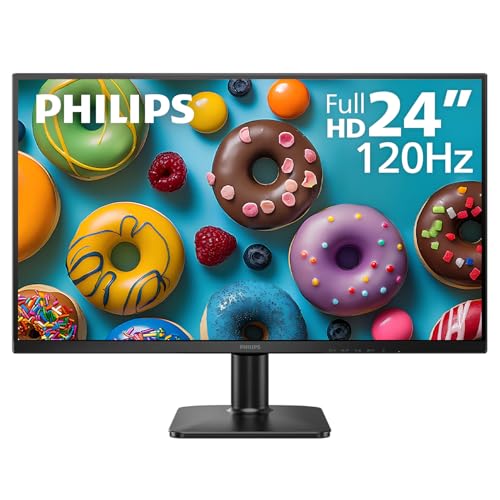
Philips 24E2N2100 Flicker-Free — The straightforward Philips
Philips puts the comfort claim in this model’s very name — the listing itself is headed with the word Flicker-Free — and the title behind it stays admirably plain. A 24-inch IPS panel at FHD, a 120Hz refresh as titled, HDMI 1.4 and VGA inputs, VESA mounting, Adaptive Sync, and then the pair of claims this category runs on: Flicker-Free and Low Blue Light, printed without ornament. The four-year advance replacement warranty closes the title, giving the plainest specification in the guide one of its strongest ownership promises.
Against the BenQ, its closest rival in size and intent, the Philips trades certification language for speed and warranty: 120Hz against 100Hz, four stated years of advance replacement against an unstated term. Against the compact ASUS, it trades the colour percentage and the 1ms claim for that same warranty depth. These are genuinely different bets about what a comfort shopper values after the comfort claims themselves are equal — and in this guide they are equal, all three titles printing both claims in full.
The reader pictured here is the pragmatist: someone who has read enough about backlights to know which two claims matter, wants them in writing, and would rather hold a long warranty than a certification logo. There is also a fleet logic to this pick — a small office or a family buying two or three identical screens for sensitive-eyed users gets the same claims, the same refresh and the same replacement terms in every box, and uniformity is its own comfort when a screen must be swapped or matched later.
- Panel: 24-inch IPS, FHD 1920×1080 as titled
- Comfort: Flicker-Free and Low Blue Light both stated
- Refresh: 120Hz as titled
- Sync: Adaptive Sync named
- Inputs: HDMI 1.4 and VGA named
- Warranty: 4-year advance replacement warranty as titled
Strengths
- The comfort claim is carried in the model’s listing name itself, not buried in features.
- Four-year advance replacement cover is the deepest warranty promise among the compact picks.
- 120Hz refresh matches the fastest of the flat screens here.
Trade-offs
- No colour coverage percentage is printed in the title.
- The second input is VGA, an analogue connection.
- No certification body is referenced for its comfort claims.
Best for: a heavily used desk where four years of advance replacement cover matter as much as the comfort claims in print. Not suited for: a DisplayPort chain, because the titled inputs are HDMI 1.4 and VGA. A quick pass over the Amazon listing confirms the VESA pattern and stand style before the box ships.
What would make a reader pass over this Philips for the BenQ standing beside it? Chiefly the input question and the certification question. A desk built on DisplayPort — many docking stations lead with it — finds no purchase here, since the titled pair is HDMI 1.4 and VGA, and a reader who wants an outside body behind the comfort claims finds branding rather than attestation. What would make the same reader choose it anyway is equally concrete: a faster titled refresh for the same desk hours, and a replacement promise that runs four years. The guide’s position is that this is a legitimate fork, not a ranking failure — the two screens encode different priorities in their titles, and the reader’s own priorities are the missing variable only the reader can supply.

Viewedge 24″ Curved (low blue light) — The curved outlier
Every shortlist benefits from one member that tests the premise, and here it is a curved gaming panel. The Viewedge title is built for players — 180Hz, 1ms, VA, Adaptive Sync, HDR10 — and yet threaded through the specification sit the two claims this guide exists to track: Low Blue Light Technology and Flicker-Free Eye Comfort, printed in the maker’s own words. A reader whose sensitivity coexists with a serious gaming habit does not have to choose between the comfort shelf and the gaming shelf; this title insists the same screen can stand on both.
The curve is the physical difference that matters. A curved 24-inch panel wraps its edges slightly toward the viewer, which changes the geometry of a close gaming setup: the luminous area feels enveloping rather than flat, and the whole image sits at a more even distance from the eyes. Whether that geometry suits a given reader is personal and cannot be settled by a title — but the claim set around it is unusually complete for a gaming listing, including a stated 100% sRGB colour claim and HDR10 wording alongside the comfort pair.
Connections are the honest limit: one HDMI and one DisplayPort as titled, so this is a one-or-two-source screen, and the gaming audience it addresses should note that its refresh headline will be fed properly only by a source that can drive it. For the reader it fits, though, the Viewedge resolves a real dilemma. Comfort-first shortlists usually exile fast panels; speed-first shortlists usually treat comfort claims as decoration. This listing, whatever its maker’s intent, documents a screen that refuses both exiles.
- Panel: 24-inch curved VA, FHD 1080p as titled
- Comfort: Low Blue Light Technology and Flicker-Free both stated
- Refresh and response: 180Hz and 1ms as titled
- Colour: 100% sRGB claimed, HDR10 named
- Sync: Adaptive Sync named
- Inputs: one HDMI and one DisplayPort as titled
Strengths
- The highest titled refresh in this guide, with both comfort claims still in print.
- A stated 100% sRGB claim, the strongest colour wording among these six titles.
- The curved form offers close viewers a different, enveloping geometry.
Trade-offs
- Only two inputs are titled, limiting multi-source desks.
- The curve is a personal geometry; it cannot be trialled from a listing.
- No warranty duration appears in the title.
Best for: players who refuse to leave the comfort claims behind when they buy for speed. Not suited for: a three-source desk, because the title lists exactly one HDMI and one DisplayPort. The curve’s radius and stand details live in the Amazon listing for anyone weighing the geometry.
A last consideration for the Viewedge: resale of attention. A curved gaming panel asks its owner to sit centred, in the sweet spot the curve is drawn around, which suits a single-user gaming desk perfectly and a shared or standing desk poorly. Comfort shoppers who mostly work alone at a fixed chair will never notice the constraint; those who frequently show the screen to someone standing beside them will feel the curve’s geometry working against the second viewer. The title cannot make that decision for you, but naming the trade here is cheaper than discovering it with the box already open.
How Should You Test a New Screen During Its First Week?
Returns windows are the comfort shopper’s laboratory, and the first week should be used like one. Reproduce your real workload at your real hours: the long document session, the evening reading, the video call under your room’s actual lighting. Resist judging the panel in the first hour, when any new screen feels strange simply by being new, and instead keep a few lines of notes — when did you notice the screen at all, in what light, at what brightness setting. A monitor that disappears from your attention during work is passing the only test that matters, and it can only be administered by you, in your room.
Test the modes as deliberately as the panel. Switch the low-blue-light feature on during an evening session and read real text through it, checking that the warmer rendering stays legible for the material you actually read — code, documents, subtitles all stress a warm mode differently. Run the screen at the brightness you would genuinely use at night, since comfort claims about flicker are most relevant exactly there, at the dim end where backlights work hardest. If the monitor offers several comfort intensities, find your setting during this week rather than leaving the feature at its factory default forever.
Finally, test the exit before you need it. Note the return terms while the box is still in the corner, keep the packaging until the verdict is in, and record which settings you settled on. Readers who treat the first week as a structured trial almost never end up keeping a screen that quietly bothers them; readers who unbox, approve in an afternoon and discard the carton sometimes do. The claims in the titles above got these six screens into your home. Only the week can decide which one stays.
What Role Does the Rest of the Room Play?
It is tempting to load every expectation onto the panel, but experienced comfort shoppers distribute the work across the room. A bias light behind the screen softens the contrast between the luminous rectangle and a dark wall. A desk lamp aimed at paper rather than at glass gives documents their own illumination instead of borrowing the monitor’s. Curtains or a repositioned chair can move a window’s reflection out of the panel’s surface entirely. None of these measures appears in any product title, and all of them multiply the value of the claims that do.
The same distribution applies to time. Short, regular diversions of gaze — to the far wall, out of the window, across the room — cost nothing and are recommended by every ergonomic tradition, whatever backlight a desk happens to hold. Readers assembling a comfort-first setup should therefore read this guide’s shortlist as the hardware layer of a larger arrangement, in which lighting, geometry, habits and professional guidance each carry their share. The screens were chosen because their titles make their layer of that arrangement verifiable. The remaining layers are yours to build, and they are worth building well.
How Do Reading, Video and Games Stress a Screen Differently?
Comfort shoppers often describe their sensitivity as a single thing, but the workload matters, because each kind of content asks the backlight to behave differently. Reading is a high-contrast, low-motion task: the image is mostly static, the eyes make small precise movements, and the panel’s behaviour at a steady brightness dominates the experience. Video adds motion and scene changes, with brightness swinging as content cuts between dark interiors and bright exteriors. Games add the fastest changes of all, plus the player’s own sustained focus, which is why the refresh and sync claims in the gaming-titled picks are relevant to comfort readers rather than incidental.
This is one reason the shortlist spans refresh rates from 100Hz to 180Hz as titled, even though the category is not about speed. A reader whose screen time is ninety percent documents is buying almost entirely on the backlight claims and the panel’s geometry; a reader who mixes work with play is buying those same claims plus headroom for motion. Neither reader is served by pretending the other’s priorities are imaginary. The reviews above therefore keep the workload in view — each verdict quietly assumes a different reader’s day, and matching your day to the right verdict is the real selection process.
Why Does the Dim End of the Brightness Range Deserve Your Attention?
Most specification reading happens at the bright end — peak brightness, HDR labels, showroom punch — but comfort shopping is decided at the opposite extreme. Readers who are sensitive to light typically run their screens turned down, in rooms that are themselves dim, and a backlight’s manners at low settings are what those readers actually live with. The flicker-free claim in these titles speaks directly to that territory, because brightness control is where backlights historically misbehaved; a maker willing to print the claim is at least addressing the right end of the dial.
Practical diligence follows from this. When a candidate screen arrives, spend real time at your genuine evening brightness before forming a judgement, and use the picture mode you intend to keep rather than the vivid default the factory chose to impress a showroom. Check text at that level, not just video, because text is where any instability announces itself to a reader. And if a title’s comfort claim is the reason for the purchase, confirm the claim’s wording on the maker’s own product page as well as in the marketplace listing — listings are copied and recopied, and the manufacturer’s documentation is the version of the claim that support will honour.
How Do the Six Stack Up on Their Own Printed Claims?
| Pick | Size and panel | Refresh as titled | Comfort wording in title | Extra evidence |
|---|---|---|---|---|
| ASUS VA249HG | 24″ IPS 1080p | 120Hz | Low Blue Light, Flicker Free | 99% sRGB, 3-year warranty |
| Philips 271V8LB | 27″ VA 1080p | 100Hz | Flicker-Free, Low Blue Light | 4-year advance replacement |
| BenQ GW2491 | 23.8″ IPS 1080p | 100Hz | Flicker-Free, Low Blue Light Plus | TUV-Certified wording, Eye-CareU |
| ASUS VA279QG | 27″ IPS 1080p | 120Hz | Low Blue Light, Flicker Free | Speakers, 99% sRGB |
| Philips 24E2N2100 | 24″ IPS 1080p | 120Hz | Flicker-Free, Low Blue Light | 4-year advance replacement |
| Viewedge 24″ Curved | 24″ curved VA 1080p | 180Hz | Low Blue Light Technology, Flicker-Free | 100% sRGB claim, HDR10 |
The table’s lesson is how narrow the true differences are once the entry claims are equal. Certification, warranty depth, screen scale, speakers and speed — the decision lives in that second row of evidence, which is exactly where a careful shopper should want it: in facts that can be checked, rather than in competing promises about how a screen will make anyone feel.
What Setup Habits Matter as Much as the Panel?
A comfort-featured monitor installed carelessly is a good backlight in a bad room. Start with ambient light: a screen that is dramatically brighter or dimmer than its surroundings forces constant visual adjustment, so match the panel’s brightness to the room rather than to a showroom instinct, and avoid a bare window or a naked bulb in the reflection zone behind you. The anti-glare character of a panel helps here, but positioning helps more, and positioning is free.
Distance and height come next. The panel should sit far enough away that your eyes rest rather than converge hard — roughly an arm’s length is the common starting point — with the top of the screen near eye level so your gaze falls slightly downward onto the text. The VESA provisions named in several titles above exist to make this adjustable rather than approximate; a monitor arm is the unglamorous accessory that lets a comfort claim do its work at the right geometry. Breaks complete the setup: no backlight specification substitutes for looking away regularly, and readers building a comfort-first desk should budget the habit alongside the hardware.
Software deserves a place in the setup conversation too. Operating systems on both major platforms offer evening colour-shifting features of their own, and readers sometimes stack a system-level warm shift on top of a monitor’s low-blue-light mode, double-warming the image until text contrast suffers. Choose one layer to do the warming — most readers find the monitor’s own titled mode the more predictable, since it travels with the panel across machines — and leave the other off. Similarly, per-application brightness utilities can fight a panel’s own controls; a comfort setup works best when exactly one piece of software and one piece of hardware share a clear division of labour, agreed in advance and then left alone.
Which Buying Mistakes Recur in This Category?
The first is treating a brand’s comfort sub-label as a specification. “Eye Care” appears in several titles here, but the guide admitted these six because each also prints the underlying claims — flicker-free, low blue light — in words. A product that carries only the label, with neither claim in its title, asks for a trust this category’s shoppers cannot afford to give casually. Read past the badge to the sentence underneath it, every time.
The second mistake is buying the backlight and ignoring the chain around it. An ageing cable that forces a lower refresh, a laptop dock that negotiates the panel down to a dimmer mode, a desk lamp aimed at the screen — any of these can quietly undo a careful purchase. When the new monitor arrives, verify that it is actually running at its titled refresh and resolution, in the picture mode you intended, before judging how it treats your eyes.
The third is expecting the purchase to adjudicate a medical question. A monitor can state its backlight behaviour; it cannot diagnose why screens trouble a particular reader, and a change in symptoms deserves a professional conversation rather than a shopping experiment. This guide’s claims discipline — comfort features only, as titled — is not legal caution for its own sake. It is the accurate description of what a product listing can and cannot tell you.
One more piece of housekeeping belongs to households rather than individuals. If several people share the desk, agree whose settings govern the panel, or use the monitor’s saved profiles if it offers them, so that one person’s evening-warm configuration is not another person’s morning surprise. Comfort setups fail socially as often as they fail technically — a well-chosen screen repeatedly reconfigured by a second user delivers none of its titled benefits to either. A small note beside the keyboard, recording the agreed brightness and mode, has preserved more comfort arrangements than any feature in any title in this guide.
Final Recommendation
Choose by the second row of evidence, since the first row — both comfort claims, in print — is shared by all six. If outside certification is what lets you trust a claim, the BenQ GW2491 is the only title here that offers it. If ownership security matters most, the two Philips models carry the four-year advance replacement wording, at 24 and 27 inches respectively. If the screen must also play, the compact ASUS and the curved Viewedge keep speed inside the comfort tent, and if the panel must speak, the larger ASUS is the one with titled speakers. Buy the claim set first and the furniture second, set the result up carefully in a room lit to match it, and let your own evenings — not any guide’s adjectives — deliver the verdict that actually counts.
Frequently Asked Questions
Does flicker-free in a title guarantee a screen will suit my eyes?
No, and this guide deliberately makes no such promise. The phrase is the maker’s claim about backlight behaviour, printed in the title. Individual responses to screens vary for reasons no listing can capture, which is why the reviews above compare the claims and their surrounding evidence rather than predicting any reader’s experience.
What is the difference between Low Blue Light and Low Blue Light Plus?
As the titles use the terms, they are two makers’ wordings for a blue-light reduction feature, with the BenQ’s “Plus” variant additionally described as TUV-Certified in its listing. The titles do not publish comparable measurements, so this guide reports the wording and the certification reference rather than ranking one phrase against the other numerically.
Is a 27-inch 1080p screen a sensible comfort choice?
It can be, for a specific reason: at the same resolution, the larger panel renders text and interface elements bigger, which suits longer viewing distances and readers who prefer not to scale fonts in software. The trade is pixel density — the same pixel count spread wider — so readers who sit close and prize fine detail usually prefer the 24-inch versions of the same claims.
Why does a gaming monitor appear in a comfort shortlist?
Because its title prints both comfort claims in full. The Viewedge’s Low Blue Light Technology and Flicker-Free wording sit alongside its 180Hz gaming specification, and this guide follows the printed evidence rather than the marketing shelf a product was placed on. Readers who game and who shop on comfort claims are exactly the audience that listing serves.
Should I prefer a certified claim or a longer warranty?
They protect against different disappointments. Certification, as referenced in the BenQ title, speaks to the comfort claims themselves; the Philips models’ four-year advance replacement wording speaks to what happens if the hardware fails. A reader who trusts claims cautiously leans to the first; a reader buying for a long, heavy daily workload leans to the second. Both instincts are rational, and the shortlist keeps both routes open.
Does screen size change how the comfort claims behave?
The claims themselves are properties of the backlight and the picture modes, and they appear in identical wording across the 24-inch and 27-inch titles here. What size changes is geometry: a larger panel at the same resolution spreads the same image over more area, which some readers experience as more relaxing and others as more luminous presence in the room. That is a preference to test in the first-week trial described above, not a specification any title can settle in advance.
Related Guides
Comfort shopping overlaps several neighbouring categories. Readers whose sensitivity centres on television viewing will find the same claims discipline applied in best tvs for people sensitive to flicker, while desk-focused readers can compare the wider field in best eye care monitors and best 27 monitors for eye strain. Those speccing a full design workstation alongside the display should also read best monitors for ux ui designer, this cluster’s companion on resolution and colour claims.


