What's inside
- Key Takeaways
- Quick Picks: Six Wrist-Worn Alert Systems Compared
- How Did We Compare Alert Watches Without Overclaiming?
- What Happens After a Fall Alert, According to the Listings?
- How Do You Get an Older Wearer to Actually Wear One?
- What Should the Family Set Up on Day One?
- How Does the Right Choice Change With Living Arrangements?
- What Questions Should You Ask the Documentation Before Ordering?
- How Do You Raise the Subject Without Starting an Argument?
- The Six Fall Detection Watches, Reviewed One by One
- What Does a Month of Living With an Alert Watch Teach a Family?
- Six Alert Chains, One Table
- Which Mistakes Do Families Make With Alert Watches?
- How Should Gifting Families Handle the Setup Visit?
- Final Recommendation
- Frequently Asked Questions
- Related Guides
As an Amazon Associate I earn from qualifying purchases. This post may contain affiliate links at no extra cost to you.
gizmoverdict.com is reader-supported. When you buy through links on our site, we may earn an affiliate commission.
Where families usually buy these: all six watches below are sold on Amazon, and each name links to a listing where you can confirm the band, the colour and what the seller says is in the box, then check price on Amazon before ordering; alert watches are frequently sold under shifting bundle names, so the listing page you land on is the record that counts.
Shopping for the best smartwatches with fall detection usually begins with a fright: a parent who slipped in the garden and lay there composing an explanation before anyone knew, a grandparent whose phone sat charging in another room at the wrong hour. The watch answers a narrow, practical question — if the wearer cannot reach a phone, can the wrist raise the alarm instead? This guide compares six watches whose own listings put that alerting job at the centre of their design, and it describes every feature strictly in the words the listings themselves use, because a family’s decision deserves the seller’s claims labelled as claims, not upgraded into promises.
That discipline shapes everything below. Where a listing states fall detection, SOS alerts, a caregiver app, GPS tracking or a video call, the review reports exactly that, in that scope. Where a listing does not state a feature — and one famous name in this guide does not state fall detection in its title at all — the spec box says so in plain language and tells you to verify with the maker’s documentation. No watch here is credited with saving anyone, diagnosing anything or guaranteeing an outcome; what can be compared honestly is design intent, alert plumbing, wearability and the daily habits each model asks of an older wearer.
The human factors dominate this category in a way they dominate no other. A watch that spends its life in a drawer detects nothing, so charging rhythm, strap comfort, screen legibility and the wearer’s willingness to be seen wearing it are not soft considerations — they are the product. The six below divide into two philosophies: dedicated senior alert watches, built around SOS buttons, caregiver apps and location features, and one mainstream smartwatch whose listing emphasises fitness, sleep and safety in general terms. Both philosophies have honest homes; the reviews try to make the matching easy.
Key Takeaways
- Five of the six listings state fall detection outright in their titles; the Apple Watch SE 3 listing does not, and its review and spec box treat that absence as information, not as a detail to gloss over.
- Caregiver apps recur across the dedicated senior models — COCO, both Fajocru watches — because an alert that reaches nobody is only a noise on a wrist.
- Location features separate the field: the Fajocru pair build on GPS, one with 4G tracking and video calling, the other with real-time tracking and two-way voice.
- Subscription language matters and is quoted only where a listing raises it: two picks state a no-subscription or no-monthly-fee position in their own titles.
- Water resistance appears as IP67 on one Fajocru model and IP68 on the senior sports-style watch, figures reported here exactly as the listings print them.
- Battery claims, where a listing makes them, range as widely as the designs do, and the seven-to-fifteen-day figure on one pick is a reminder to read each title’s own words rather than assume a category norm.
Quick Picks: Six Wrist-Worn Alert Systems Compared
| Pick | Badge | Why it made the cut |
|---|---|---|
| COCO BT2-X V2 Medical Alert Smartwatch | The caregiver-app design | A senior alert watch whose listing pairs fall detection and SOS alerts with a caregiver app, heart rate and SpO2 monitoring and Bluetooth calling. |
| Fajocru Fall Alert Watch (4G GPS) | The connected flagship | Automatic fall detection with 4G GPS tracking, an SOS emergency alert, HD video call and a caregiver app in an IP67-rated case. |
| Yihou Fall Detection Smart Watch | The gentle presentation | Fall alert and SOS in a rose-gold silicone presentation, with heart rate, sleep monitoring and a pedometer for Android and iOS households. |
| Senior Smart Watch with Auto Fall Detection | The long-battery all-rounder | Auto fall detection and SOS calling beside a large sports-mode count, a stated seven-to-fifteen-day battery and IP68 water resistance. |
| Fajocru Fall Detection Watch (GPS, SOS button) | The locator | GPS tracking with an SOS button, real-time location, two-way voice and a listing that states a no-monthly-fee position. |
| Apple Watch SE 3 (40mm) | The mainstream alternative | A 40mm aluminium smartwatch whose listing leads with fitness, sleep, heart rate and vitals tracking and a general safety framing. |
How Did We Compare Alert Watches Without Overclaiming?
We held one rule above all others: the listing is the evidence. Each review’s spec box transcribes the alert features the title itself names — fall detection, SOS, caregiver app, GPS, calling — and marks unstated features with a direction to the maker’s documentation. That rule produces an unusual review further down this page, where a very famous watch carries a spec line admitting its title never mentions the feature this whole guide is about. We consider that honesty the most useful sentence in the article, because families comparing on titles alone deserve to see the gap before a purchase, not after.
Beyond the alert claims, we compared the wearability evidence the titles offer: case size where stated, band material where stated, water-resistance ratings where stated, battery spans where stated. Where a title offers none of those, the review discusses the design’s evident intent — senior-first, sport-inflected, mainstream — without inventing dimensions. Comfort, charging and screen size decide whether an alert watch is worn, and a guide that fabricated those details would be steering families with fiction.
We also separated the two questions families often merge. The first is detection: does the listing say the watch notices a fall? The second is the chain after detection: an SOS alert, a caregiver app, a location, a voice call. A watch can honestly offer parts of that chain, and the reviews map each pick’s chain link by link, so a family can see whether the alert reaches a person, a place or merely a screen — and choose the chain that matches how their own household would actually respond.
What Happens After a Fall Alert, According to the Listings?
Read the six titles as six different answers to the same frightening minute. The COCO’s answer centres on people: SOS alerts plus a caregiver app, so the notification lands with a named human who already knows the wearer. The connected Fajocru adds geography and presence — GPS tracking to say where, an HD video call to see and speak — while its sibling Fajocru emphasises real-time location and two-way voice, a conversation rather than a picture. The Yihou keeps the chain short: fall alert and SOS, in a watch a wearer might actually enjoy wearing. The senior sports-style model pairs its auto detection with SOS emergency calling, the oldest and most direct chain of all: the watch phones for help.
None of those chains can be ranked in the abstract, because the right chain depends on who answers. A caregiver app is powerful when a daughter checks her phone hourly and pointless when the family’s responder is a neighbour with a landline; a voice call from the wrist is comfort itself when the wearer is confused, and irrelevant when the household’s plan is a monitoring routine of a different kind. The reviews therefore describe each chain faithfully and leave the matching to the family’s real habits — who is awake, who is near, who holds the spare key.
One more honesty belongs in this section. A listing’s claim that a watch detects falls describes the seller’s design intent; it cannot tell a family how the device behaves on their particular staircase, with their particular wearer’s gait and habits. The sensible household treats the first weeks as a supervised trial: the watch worn daily, the app installed and tested, an SOS pressed deliberately at the kitchen table so everyone learns what the alert looks like before it ever arrives uninvited.
How Do You Get an Older Wearer to Actually Wear One?
Begin with vanity, because vanity is undefeated. A watch that looks like a medical device will be left on the dresser by exactly the independent person it was bought to protect, while a watch that looks like jewellery or like a grandson’s gadget gets worn to lunch. That is the Yihou’s rose-gold wager and the Apple Watch’s entire mainstream advantage, and families should respect the force of it rather than argue with it. Let the wearer choose between two acceptable finalists and the chosen one gains a defender.
Continue with friction. Every charging session is an appointment the wearer must keep, so the household should anchor charging to an existing ritual — the morning wash, the evening news — and choose a spot where the watch is seen, not a drawer where it is forgotten. Battery spans stated in listings, such as the seven-to-fifteen days claimed by one pick here, change that ritual’s frequency and are worth real weight in the decision for a wearer whose memory is the very thing the family worries about.
Finish with dignity. Set the watch up with the wearer, not for them: their contacts in the caregiver app, their preference for how alerts are worded, their say in who sees a location and when. An alert watch accepted as a tool of independence — the thing that lets someone keep the garden, the stairs and the solo walks — will be worn with something close to pride. The same object imposed as surveillance will be defeated by a determined eighty-year-old within the week, and no specification in any listing can out-engineer that determination.
What Should the Family Set Up on Day One?
Install the companion or caregiver app on the responder’s phone first, before the watch is even unboxed, and learn its screens in calm conditions. Add the contacts, confirm whose phone receives the SOS, and agree — out loud, in the wearer’s hearing — what each person does when an alert arrives: who calls the watch, who calls the neighbour, who simply drives over. An alert system is a small social machine, and day one is when its gears are cut.
Then run the drills. Press the SOS deliberately and time the chain. Walk the garden’s far corner and check what the location features, where a listing provides them, actually report. Wear the watch in the shower only if its stated rating and the maker’s guidance bless the idea, and learn the charging ritual by performing it, not by reading about it. Every one of those drills converts a listing’s vocabulary — detection, alert, tracking, calling — into household knowledge, which is the only form in which features protect anyone.
Finally, write the plan where humans write plans: on the refrigerator. Watch model, charging spot, who receives alerts, the neighbour’s number, the spare key’s location. The watch is the electronic half of the system; the refrigerator sheet is the human half, and in the minute that matters, the humans will consult whichever half they can reach.
How Does the Right Choice Change With Living Arrangements?
A wearer who lives with a spouse needs a thinner safety net than one who lives alone, and the shortlist reads differently through each lens. In a shared house, the likeliest responder sleeps twenty feet away; the watch’s job narrows to raising that person when a shout cannot — after a fall in the bathroom with the door shut, in the garden’s far corner. A short chain like the Yihou’s SOS or the COCO’s app alert to a phone in the same house may cover that geometry completely, and the simpler device wins on wearability.
The solo dweller’s geometry is crueller: the responder is across town, the house is silent, and the where question becomes as urgent as the whether. That is the geometry the two GPS Fajocru models were listed for, and the connected model’s own cellular link matters most exactly here, where no household phone sits reliably within Bluetooth range of a person who has fallen beside the washing machine. Families shopping for a solo dweller should weight the location and independence features upward without apology, and weight fashion downward only if the wearer permits it.
The third arrangement — the wearer in sheltered or family-adjacent housing, a granny flat, a converted garage — splits the difference. Responders are near but not in the room, daily life is independent, and the watch is as much a reassurance for the main house as a tool for the wearer. Two-way voice, the locator Fajocru’s stated strength, fits that arrangement beautifully: a conversation settles most alarms faster than a drive across the garden, and the drive remains available for the alarms a conversation cannot settle.
What Questions Should You Ask the Documentation Before Ordering?
Titles are advertisements; documentation is where a purchase becomes informed. For any pick here, the family’s reading list is the same. How is the SOS actually triggered and cancelled, and what happens on an accidental press — a question whose answer determines whether the wearer dares use the button at all. Which phones and plans do the app and any cellular features require, and what, precisely, does the no-fee or no-subscription statement in two of these titles cover? What does the stated water rating permit in the maker’s own words? How long does charging take, and does the watch complain audibly when its battery fades, or does it simply go quiet?
Ask, too, about the alert’s audience controls: who can be added to a caregiver app, whether a location is shared continuously or only in an alert, and how a wearer revokes a sharing arrangement that no longer suits them. These are dignity questions dressed as settings questions, and the time to learn the answers is before the watch is a gift with the wrapping off. A maker whose documentation answers all of this clearly has told you something about the company behind the alert chain, and that something is worth as much as any single feature in a title.
Finally, ask the household’s own questions in the same sitting. If the alert arrives at 3 a.m., whose phone rings, and is that phone’s night mode going to swallow it? If the wearer presses SOS at a friend’s house across town, who is the realistic responder? Rehearsing the answers costs an evening; discovering them costs the minute the whole system was bought for.
How Do You Raise the Subject Without Starting an Argument?
Most families delay this purchase not over money or models but over the conversation, which can sound — to a proud listener — like a verdict on their competence. The framings that work share a trick: they make the watch about the family’s peace of mind and the wearer’s continued freedom, in that order of honesty. The garden stays yours, the walks stay yours, the stairs stay unbanned — the watch is the toll paid for keeping them, and it is cheaper than the alternative everyone is politely not naming.
Let the wearer handle the candidates. A person who has held the COCO’s silver case and the Yihou’s rose gold, who has pressed the locator Fajocru’s physical button with their own thumb, is choosing equipment; a person presented with a configured device and instructions is being managed, and managed people sabotage systems with a creativity no engineer survives. If the first choice fails on comfort after a fair fortnight, exchange it without a sigh and try the runner-up — the category’s whole value sits on a wrist, and a wrist’s verdict is final.
And keep the trial honest. Agree at the start what success looks like in a month: worn daily, charged without drama, one drill completed, nobody’s dignity dented. A family that defines success together can declare it together, and the watch graduates from intervention to appliance — which is where, like the refrigerator it shares a sheet with, it does its best work unnoticed.
The Six Fall Detection Watches, Reviewed One by One
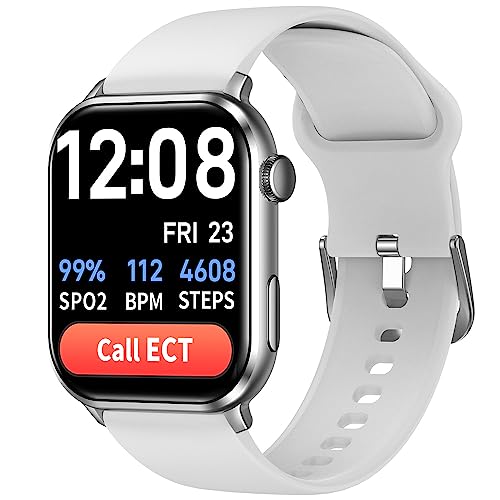
COCO BT2-X V2 Medical Alert Smartwatch — The caregiver-app design
The COCO BT2-X V2 announces its priorities in its own title’s order: a medical alert smartwatch for seniors, with fall detection, SOS alerts and a caregiver app named before any fitness vocabulary appears. That ordering tells a family exactly what the device is for. The alert chain here is human-centred — the watch raises an SOS, the caregiver app carries it to the people enrolled to receive it — and Bluetooth calling sits alongside, so the wrist can hold a conversation with a paired phone nearby. In silver, per the listing, which gives the design a neutral, jewellery-adjacent finish rather than a gadget’s gloss.
Heart rate and SpO2 monitoring appear in the title as monitoring features, and this review reports them in exactly those terms: functions the listing says the watch performs, whose readings a family may find useful context and whose interpretation belongs to the wearer and their clinician, not to a buying guide. The October 2026 dating in the listing marks this as the current revision of the line, worth confirming against the parcel that arrives. For a household whose responder is a phone-carrying adult child, the COCO’s app-centred chain is the most direct expression of the category; open the COCO BT2-X V2 page on Amazon to check the price and the app’s stated requirements.
- Alert features: fall detection and SOS alerts, per the listing
- Responder link: caregiver app, per the listing
- Monitoring named: heart rate and SpO2 monitor, per the listing
- Calling: Bluetooth calling, per the listing
- Finish: silver, per the listing
- Water resistance: Not stated in the listing title — verify with the maker’s documentation
Strengths
- The caregiver app puts a named human, not a call centre abstraction, at the end of the alert.
- Bluetooth calling lets the wearer answer and speak without hunting for a phone.
- The title’s senior-first ordering signals a design unembarrassed about its purpose.
Trade-offs
- No location feature is named, so responders learn that something happened, not where.
- Bluetooth calling depends on the paired phone being within range and charged.
- The title offers no water-resistance or battery figure for a family to plan around.
Best for: a wearer whose adult children live by their phones and want the alert in an app. Not suited for: a household whose responder needs the watch itself to report a location.

Fajocru Fall Alert Watch (4G GPS) — The connected flagship
Fajocru’s connected model carries the longest alert chain in this guide, and its title enumerates it link by link: automatic fall detection, 4G GPS tracking, an SOS emergency alert, an HD video call and a caregiver app, in a case rated IP67 waterproof. The 4G element is the philosophical divide in this category. A watch with its own cellular connection does not care where the wearer’s phone is — charging upstairs, forgotten at a friend’s house — because the wrist itself is the communicator, and the video call adds a responder’s eyes to the conversation the SOS begins.
That independence suits a particular life: the wearer who walks to the shops alone, gardens at the plot, visits neighbours — a radius of independence measured in streets rather than rooms. GPS tracking, as the listing names it, lets the caregiver app answer the where question that the COCO leaves open, and the IP67 figure, reported here as printed, speaks to a watch unbothered by rain and splashes in that outdoor life. Families should still read the maker’s documentation for what the connection requires in practice, because cellular features always carry arrangements a title cannot describe. As listed, though, this is the most self-sufficient alert chain of the six; look at the connected Fajocru on Amazon and check its current price before comparing chains.
- Alert features: automatic fall detection and SOS emergency alert, per the listing
- Location: 4G GPS tracking, per the listing
- Responder link: caregiver app, per the listing
- Calling: HD video call, per the listing
- Water resistance: IP67 waterproof, as printed in the listing
- Battery span: Not stated in the listing title — verify with the maker’s documentation
Strengths
- Its own 4G connection frees the alert chain from the wearer’s phone entirely.
- A video call lets a responder see the wearer’s situation, not merely hear about it.
- GPS tracking answers the where question inside the same app that receives the alert.
Trade-offs
- Cellular features bring arrangements and upkeep that a title cannot detail; the documentation must be read.
- A video-capable watch asks more of its battery, and the title states no span to plan by.
- Wearers wary of being reachable by video may resist the very feature families prize.
Best for: an active senior whose independent radius extends well beyond the house. Not suited for: a wearer who wants the watch to be a watch, with alerts as a quiet background function.

Yihou Fall Detection Smart Watch — The gentle presentation
The Yihou makes the category’s most persuasive aesthetic argument: fall alert and SOS, presented in rose gold with a silicone band, in a listing that speaks of heart rate monitoring, sleep monitoring and a pedometer in the same breath as the safety features. That blend is deliberate. A watch that joins the ordinary smartwatch conversation — steps counted, sleep noted — gives its wearer something to discuss at lunch besides the emergency it waits for, and an object discussed is an object worn. Compatibility spans Android and iOS, so the family’s phones, whichever tribe they belong to, can join the arrangement.
Its alert chain, as titled, is the shortest here: detection and SOS, without a named caregiver app, GPS or calling feature in the title’s account. Families should read that scope plainly — the spec box below records the absences — and decide whether their response plan needs more links or whether the household’s own phones and habits supply them. What the Yihou offers in exchange is wearability of a high order, and in this category wearability is not a consolation prize. It is the mechanism by which every other feature gets its chance to exist. See the Yihou watch on Amazon to check the price and the band’s sizing details.
- Alert features: fall detection watch with SOS, per the listing
- Monitoring named: heart rate monitor, sleep monitoring, pedometer, per the listing
- Compatibility: Android and iOS, per the listing
- Band and finish: rose gold with silicone band, per the listing
- Location features: Not stated in the listing title — verify with the maker’s documentation
- Caregiver app: Not stated in the listing title — verify with the maker’s documentation
Strengths
- The rose-gold presentation argues for the watch as jewellery, the strongest wearability pitch here.
- Everyday tracking features give the wearer non-emergency reasons to keep it on.
- Dual-platform compatibility spares the family a phone-tribal argument.
Trade-offs
- The title names no caregiver app, so the alert’s destination must be confirmed in the documentation.
- No location feature is stated for responders who need a where.
- A fashion-led finish will not suit every wearer’s taste in the opposite direction.
Best for: a wearer who would refuse a medical-looking device but accept a handsome watch. Not suited for: a family whose response plan depends on app-based location sharing.

Senior Smart Watch with Auto Fall Detection — The long-battery all-rounder
This men’s senior watch takes the opposite presentational path from the Yihou: it looks like a sports watch, counts its sports modes in the hundreds-plus as its title boasts, and folds auto fall detection and SOS emergency calling into that athletic frame. For the wearer who still walks, cycles or gardens with intent, the disguise is the dignity — the watch reads as equipment for an active life, with the alert features riding along as two lines in a long feature list rather than as the device’s whole identity. Heart rate, blood pressure and sleep tracking are named in the title as tracking features, and are reported here in those terms only.
Two practical figures anchor its case. The title claims a battery span of seven to fifteen days, which transforms the charging ritual from a daily negotiation into a weekly one — a genuine mercy in a household where remembering is the scarce resource. And it claims IP68 water resistance, printed here as the listing prints it. The listing also states a free-app, no-subscription position, which families budgeting the whole arrangement will note. Taken together, this is the pick for the active wearer and the forgetful household alike; check this senior watch’s price on Amazon and confirm the app arrangement in its details.
- Alert features: auto fall detection and SOS emergency calling, per the listing
- Subscription position: free app, no subscription, as stated in the listing
- Tracking named: heart rate, blood pressure and sleep tracking, per the listing
- Activity scope: 150+ sports modes, per the listing
- Battery: 7-15 day battery, as claimed in the listing
- Water resistance: IP68 waterproof, as printed in the listing
Strengths
- A week-plus battery claim reduces the charging ritual to a manageable rhythm.
- The sports-watch presentation protects the wearer’s self-image as an active person.
- A stated no-subscription position keeps the household’s ongoing commitment simple.
Trade-offs
- No caregiver app or GPS feature is named, so the alert chain is the direct SOS call alone.
- A large sports-mode count is decoration for a wearer who will use three of them.
- The title’s breadth means the alert setup must be learned from documentation, not intuited.
Best for: an active senior and a household that wants charging to be a weekly event. Not suited for: a family that wants relatives watching a shared app dashboard.

Fajocru Fall Detection Watch (GPS, SOS button) — The locator
The second Fajocru in this guide builds its identity around a button and a map. Its title promises an SOS button — a physical, findable-by-touch control, which matters more in a confused moment than any touchscreen menu — together with GPS tracking for elderly wearers, real-time location tracking and two-way voice, under the banner of a medical alert watch with no monthly fee. Where its 4G sibling leads with detection and video, this model leads with being found and being spoken to, the two things a searching family actually wants in the first five minutes.
Heart rate and a step counter appear in the title as the everyday layer, modest and sufficient. The two-way voice deserves emphasis: a responder who can speak through the watch can reassure, can ask the one question that triages everything — are you hurt, or are you embarrassed and unhurt? — and can tell the wearer that help is already moving. That conversation is a different instrument from an alert, and families whose wearer lives with any confusion will weigh it heavily. The no-monthly-fee statement is the listing’s own and is quoted as such. Find this Fajocru locator watch on Amazon and check the price alongside its coverage notes.
- Alert features: fall detection with an SOS button, per the listing
- Location: GPS tracker with real-time location tracking, per the listing
- Calling: two-way voice, per the listing
- Fee position: no monthly fee, as stated in the listing
- Monitoring named: heart rate and step counter, per the listing
- Water resistance: Not stated in the listing title — verify with the maker’s documentation
Strengths
- A physical SOS button can be found by touch when a screen cannot be read.
- Real-time location turns a family’s search into a walk with a destination.
- Two-way voice lets responders reassure and triage in the same minute.
Trade-offs
- No caregiver app is named in the title, so the location’s audience must be confirmed in the documentation.
- The title states no water rating for a watch meant to be worn everywhere.
- Its detection claim shares a brand with the 4G model; the two should not be confused when ordering.
Best for: a family whose nightmare is not the fall but the search afterwards. Not suited for: a household that wants video confirmation as part of the response.

Apple Watch SE 3 (40mm) — The mainstream alternative
The Apple Watch SE 3 enters this guide under a flag of honest difference, and its review must begin with the sentence its spec box repeats: the listing title for this watch does not state fall detection. What the title does state is a 40mm GPS smartwatch in a starlight aluminium case with a sand sport band, leading with fitness, sleep and cycle tracking, heart rate, vitals and a closing word — safety. Families drawn to it are usually drawn by everything around the alert question: the mainstream ecosystem, the familiar interface a grandchild can teach, the watch’s acceptability in any company, and a maker’s documentation deep enough to answer the questions a title leaves open.
That is a legitimate way to buy, provided it is done with eyes open. The correct procedure with this pick is to leave the title and read the maker’s own documentation for the safety features the single word gestures toward, verifying exactly what this model and configuration offer before relying on any of it — the spec discipline this guide applies to every pick, applied here to the most famous one. What can be said from the listing alone is real: a compact 40mm case suits smaller wrists, the tracking suite covers the everyday health-adjacent basics the title names, and the mainstream presentation will be worn without argument by the widest range of wearers. Judge it as the ecosystem choice, verified in documentation, rather than as a title-certified alert watch. View the Apple Watch SE 3 on Amazon to check the price and its stated configuration.
- Case: GPS 40mm, starlight aluminium case with sand sport band (S/M), per the listing
- Tracking named: fitness, sleep and cycle tracking; heart rate and vitals, per the listing
- Safety framing: the listing closes its feature list with the word Safety
- Fall detection: Not stated in the listing title — verify with the maker’s documentation
- Caregiver app: Not stated in the listing title — verify with the maker’s documentation
- Water resistance: Not stated in the listing title — verify with the maker’s documentation
Strengths
- The mainstream design and interface carry zero stigma and a family’s worth of potential teachers.
- A compact 40mm case suits the smaller wrists common among older wearers.
- The maker’s documentation ecosystem is the deepest place in this guide to verify unstated features.
Trade-offs
- The listing title does not state fall detection, so this guide cannot credit it from the evidence allowed.
- Its alert chain, whatever the documentation confirms, runs through the maker’s ecosystem rather than a senior-specific app.
- A general smartwatch’s breadth can bury the emergency functions a frightened wearer must find fast.
Best for: a wearer already fluent in the maker’s phones, whose family will verify safety features in the documentation. Not suited for: a family that needs the alert features certified by the listing itself at the moment of purchase.
What Does a Month of Living With an Alert Watch Teach a Family?
The first week teaches the charging geography. Every household discovers that the theoretically ideal charging spot — the bedside table, say — loses to the actually used one, which is wherever the wearer already removes jewellery and watches at night. Move the charger to the habit rather than moving the habit to the charger, and the compliance problem that defeats alert watches worldwide quietly dissolves. The second week teaches the strap: a notch tighter for the garden, a notch looser by evening, a material that either earns or loses the skin’s trust. Attend to both lessons without treating them as complaints; they are the fitting process, and a fitted system is a worn system.
The third week usually brings the false alarm, in whatever form the household’s model produces it — an SOS pressed against a doorframe, a detection the wearer laughs off. Treat the first one as the drill nobody scheduled: review together what arrived where, praise the chain for working, adjust what the wearer found confusing, and explicitly forgive the wearer, because a person scolded for a false alarm is a person who will hesitate during a true one. Hesitation is the enemy the entire category exists to defeat.
By the fourth week the watch should have become boring, and boring is the graduation certificate. It is charged where it is charged, worn where it is worn, and discussed about as often as the smoke alarm — another household sentinel whose value is measured in years of silence. Families still debating features at week four have usually bought a chain that does not match their responder habits, and the honest remedy is the exchange discussed earlier, not a louder insistence that the wearer adapt to the device.
Six Alert Chains, One Table
| Pick | Detection as titled | How the alert travels | Location as titled | Fee position as titled |
|---|---|---|---|---|
| COCO BT2-X V2 | Fall detection stated | SOS alerts to a caregiver app; Bluetooth calling | Not stated in the title | Not stated in the title |
| Fajocru 4G GPS | Automatic fall detection stated | SOS alert, caregiver app, HD video call | 4G GPS tracking | Not stated in the title |
| Yihou | Fall detection stated | SOS | Not stated in the title | Not stated in the title |
| Senior Auto Fall Detection | Auto fall detection stated | SOS emergency calling | Not stated in the title | Free app, no subscription stated |
| Fajocru GPS SOS Button | Fall detection stated | SOS button with two-way voice | GPS with real-time tracking | No monthly fee stated |
| Apple Watch SE 3 | Not stated in the title | Not stated in the title | GPS in the model’s name refers to the watch variant as listed | Not stated in the title |
Read the table’s empty cells as its most valuable content. They show, at a glance, which questions each purchase still owes the maker’s documentation — and a family that orders with those questions written down will set the watch up correctly the first time.
Which Mistakes Do Families Make With Alert Watches?
The first is buying for the emergency and forgetting the ordinary day. The watch will spend ten thousand hours being a watch and perhaps one being an alarm; if those ordinary hours chafe — an ugly strap, a fiddly charger, a screen the wearer cannot read — the alarm hour will find it in a drawer. Ordinary comfort is the emergency feature.
The second is never testing the chain. Families unbox, strap, and trust, and the first real alert becomes the first rehearsal, conducted at the worst possible time. Press the SOS at the kitchen table in week one. Watch what arrives, where, and how fast, and let the wearer hear their own voice coming back through a two-way call while everyone is calm and the kettle is on.
The third is confusing a listing’s vocabulary with a guarantee. Titles describe design intent in the seller’s words, and this guide has quoted them as exactly that. The household’s safety plan should be built from the documentation, the drills and the refrigerator sheet — with the watch as one component, never as the whole plan wearing a strap.
The fourth is setting the system up around the wearer rather than with them. Who receives alerts, who can see a location, what happens when the SOS is pressed by accident at bridge club — these are the wearer’s decisions to shape, and a system shaped with its wearer survives contact with their independence, which is the force every alert watch ultimately answers to.
A note on seasons closes the practical advice, because households change with the calendar and alert systems should change with them. Winter adds coats that swallow a wrist, gardens that turn treacherous, and evenings that arrive before the wearer’s walk home; summer adds visitors, trips and housesitters who have never seen the refrigerator sheet. Re-run the kitchen-table drill when the season turns, re-introduce the system to whoever is new in the house, and confirm that the responder chain still names people who are actually in the country. The watch does not know the calendar changed. The family does, and the family’s half of the system is the half that must remember.
How Should Gifting Families Handle the Setup Visit?
Bring time, not just the watch. The setup described in this guide — apps installed, contacts agreed, drills performed, the refrigerator sheet written — is an afternoon’s unhurried work, and compressing it into the twenty minutes before a birthday lunch guarantees the shallow version: a watch on a wrist, an app on nobody’s phone, a family reassured by an object rather than by a system. Schedule the visit the way you would schedule helping someone move a piano: fed helpers, no competing appointments, and the wearer rested enough to learn.
Leave behind three things besides the watch. The charger, installed in its discovered spot rather than in its box. The written sheet, with the responder chain in plain language. And a follow-up date — a call in three days, a visit in two weeks — at which the fortnight’s lessons get their hearing. Gifts that arrive with their own maintenance appointments attached are the ones that still work at Christmas, and in this category a working gift is not a nicety; it is the entire point, measured one worn morning at a time.
Budget the whole arrangement, not the watch alone, when the family compares finalists: a band that suits the wearer’s skin, a second charger for the room where the watch actually rests, and the time — the real cost in this category — of the setup afternoon and the fortnight’s follow-up. A modest watch with those provisions will outperform a flagship without them in every household outcome that matters, because the provisions are what convert a listing’s promises into a worn, charged, understood system — and because a family that has priced its own time honestly will stop asking which watch is best in the abstract and start asking which complete arrangement their household will still be running, cheerfully and without reminders, on an unremarkable Tuesday six months from now.
Final Recommendation
Match the chain to the household. Where a phone-fluent adult child is the responder, the COCO’s caregiver-app design is the cleanest line from wrist to help; where the wearer’s independence ranges across streets, the connected Fajocru’s own 4G link and video call earn their complexity, and where the fear is the search, its locator sibling’s button, map and voice answer directly. The Yihou is the choice when refusal is the risk, the sports-framed senior watch when charging discipline is, and the Apple Watch SE 3 when ecosystem fluency matters most — bought, in that case, on documentation verified rather than on a title that never made the claim. Whichever arrives, drill it at the kitchen table within the week. An alert watch earns its place not on the day it is unboxed but on the ordinary mornings it is willingly worn, one after another, until wearing it is simply what getting dressed means.
Frequently Asked Questions
Does every watch in this guide state fall detection in its listing?
No, and the exception is the point. Five listings state fall detection or automatic fall detection outright. The Apple Watch SE 3 listing does not mention it, closing instead with a general safety framing, so this guide directs readers to the maker’s documentation for that model rather than crediting a feature the evidence does not show.
What is a caregiver app, in the terms these listings use it?
It is the companion application, named by the COCO and the connected Fajocru listings, through which family responders receive alerts and, where the model provides it, location information. Its value depends entirely on the responder actually installing it and keeping its notifications audible, which is why day-one setup drills matter.
Which picks state a position on subscriptions or monthly fees?
Two, in their own titles: the sports-framed senior watch states a free app with no subscription, and the Fajocru locator states no monthly fee. The other listings are silent on the question, and silence should be resolved in the maker’s documentation before purchase, especially for the cellular model.
What do the IP67 and IP68 figures in two listings mean for daily wear?
They are the water-resistance ratings those two listings print for their models — IP67 on the connected Fajocru, IP68 on the senior sports-style watch. This guide reports the figures as stated and directs readers to each maker’s documentation for what activities those ratings cover, rather than translating them into promises about showers or swimming.
Can these watches replace a household safety plan?
No watch in this guide is presented as doing that. The listings describe alert features — detection, SOS, tracking, calling — and a family’s plan still needs the human half: who responds, who holds a key, what the refrigerator sheet says. The watch is the fastest messenger in that plan, not the plan itself.
How should we choose between the two Fajocru models?
By the chain you need. The 4G model leads with its own cellular connection, a caregiver app and a video call; the locator model leads with a physical SOS button, real-time location and two-way voice, and states a no-monthly-fee position. Both state fall detection; they differ in how the minute after is handled.
What if the wearer already owns a smartwatch they like?
Then the honest comparison is between a liked watch worn daily and a dedicated alert watch that might be worn less, and the titles above cannot settle it — only the wearer’s habits can. Read the liked watch’s documentation with the same discipline applied to the Apple Watch SE 3 here: establish what its maker states about fall-related features, and let the household choose between a verified mainstream arrangement and a senior-specific chain, rather than assuming either from a brand’s reputation.
Who should hold the caregiver app if several relatives want in?
Whoever genuinely responds fastest, with the others enrolled as informed backups where the app allows it. An alert that lands on five phones can land, in practice, on none, because each responder assumes another is driving over; the day-one conversation should name a primary responder per time of day and make the backups a deliberate chain, not a crowd.
Related Guides
Watches that live in the water rather than beside it are ranked in best waterproof smartwatches for swimming, while the heart-focused end of the shelf is covered by best ecg smartwatches. For everyday tracking without the alert brief, best smartwatches with sleep tracking follows a different set of priorities.
Related guides
- Best Basic Phones Camera Buyers Can Trust: Flip Phones and Simple Handsets That Still Take a Photograph
- Best Sony Full Frame Cameras for Astrophotography: Sensitivity vs Resolution
- Best Affordable Android Tablets: Five True Android Slates and One Fire OS Specialist, Clearly Labelled
- Best 400 FPS High Speed Cameras: The Honest Truth About Burst Slow Motion


