What's inside
- Key Takeaways
- Quick Picks
- How We Chose These Picks
- Why Does the Microphone Matter More Than the Earpiece?
- Wireless Freedom or Wired Certainty: Which Serves Dictation Better?
- What Is the Difference Between Dictating and Transcribing?
- How Do You Set Up a Dictation Headset for the Best Recognition?
- What Room and Habit Changes Pay Off More Than New Hardware?
- How Do You Pair a Headset With Recognition Software Day to Day?
- Can a Headset Choice Reduce Voice Strain?
- Equipping a Small Practice: Who Gets Which Headset?
- The Six Dictation and Transcription Headsets, Reviewed
- When Accuracy Drops, What Should You Check First?
- Comparing the Six: Which Half of the Workflow Are You Buying For?
- Which Dictation Headset Mistakes Waste the Most Money?
- What About Names, Jargon, and the Words Engines Always Miss?
- Final Recommendation
- Frequently Asked Questions
- Related Guides
As an Amazon Associate I earn from qualifying purchases. This post may contain affiliate links at no extra cost to you.
gizmoverdict.com is reader-supported. When you buy through links on our site, we may earn an affiliate commission.
Where to find these dictation headsets: each pick below is listed on Amazon under the exact title we checked, and the linked names open those listings. Dictation gear is a small, specialist corner of the headphone world, sold by speech-technology brands as often as by headphone brands, so the seller names may look unfamiliar even when the products are exactly right.
People searching for the best wireless headsets for dictation usually picture the freedom first: standing up mid-report, pacing while composing a letter, dictating from the couch where the case notes actually are. That freedom is real, and the Philips SpeechOne in this guide delivers it properly, with a docking station and a status light designed for professional dictation workflows. But an honest guide has to say what years of speech-recognition support calls have taught everyone in this niche: recognition accuracy is decided at the microphone, not at the earpiece, and not by whether the link between them is wireless. The engine hears what the microphone gives it. A superb wireless link carrying a mediocre microphone’s output produces fluent, confident, wrong text.
That is why this guide is built the way it is. One pick is the genuine wireless dictation headset, engineered for the job end to end. The others are the wired recognition and transcription headsets that professionals actually pair with dictation software every day — including two transcription sets, which serve the other half of the dictation workflow, the listening half. Pretending six equivalent wireless dictation headsets exist would make a tidier article and a worse buying decision. Where a pick is wired, the review says so in its first lines and explains what that wire buys: a stable digital audio path, an in-line sound card in one case, and microphones voiced for speech rather than for music.
A note on a famous name that is not a pick here: the Nuance PowerMic is a hand microphone, held like a dictaphone, not a headset at all. It is a legitimate tool for clinicians who dictate in bursts between patients, and it appears in this guide only as this mention, because a roundup of headsets that quietly included a hand mic would be cheating its own title. If your workflow is burst dictation at a workstation, research it separately; if your workflow is sustained, hands-free speaking, stay with the six below.
Key Takeaways
- Recognition accuracy is a microphone story: boom placement, noise rejection, and a clean digital audio path matter more than any earpiece specification.
- Only the Philips SpeechOne here is a true wireless dictation headset; the wired picks earn their places on microphone quality and workflow fit, and each review says so openly.
- The ECS WordCommander puts a premium sound card in the cable itself, which removes the computer’s noisy internal audio path from the recognition chain.
- Transcription headsets are listening tools for the playback half of dictation work — two picks serve typists and reviewers rather than speakers.
- Under-chin and single-ear designs exist because dictation is often one ear on the document and one ear on the room, or hours of wear where a headband becomes the complaint.
- Train the recognition engine with the exact headset you will use daily; switching microphones casually is a quiet accuracy tax.
Quick Picks
| Pick | Badge | Why it is here |
|---|---|---|
| Philips SpeechOne Wireless Dictation Headset | The true wireless dictation tool | A wireless headset sold with its docking station and a status light, from the one brand in this list whose whole business is professional dictation. |
| ECS WordCommander USB Headset | Recognition-first wired pick | A dual-ear USB headset whose title leads with a noise-canceling boom microphone and a premium in-line sound card, built explicitly for voice-to-text work. |
| Koss CS95-USB Communication Headset | Single-ear recognition value | A lightweight single-sided USB headset that names speech recognition in its own title, aimed at telehealth, education, and call-center desks. |
| ECS WordHear-O Transcription Headset | Under-chin listener for transcription | An under-chin 3.5mm headset from a speech-products maker, shaped for long playback sessions at a transcription desk. |
| SIMOLIO Wired Transcription Headset | Transcription set with its own microphone | A 3.5mm stereo headset with volume control, memory foam ear tips, and a microphone, titled for working from recordings at a PC. |
| Spectra SP-PC Stereo Transcription Headset | The plain stereo transcription spare | A stereo computer transcription headset with a deliberately unadorned title — the desk-drawer listener of the group. |
How We Chose These Picks
The pool was filtered on stated purpose. A pick had to declare dictation, voice recognition, voice-to-text, or transcription in its own listing title; general gaming and call-center headsets with fine microphones were excluded, because dictation software is an unforgiving customer that exposes microphones voiced for other work. That filter produced a list with one wireless flagship, two recognition headsets, and three transcription-leaning sets — a shape that reflects the real market rather than the keyword’s wishful thinking.
Within that filter, we weighted the audio path. USB headsets with their own sound processing rank ahead of bare 3.5mm sets for recognition, because the digital path bypasses the hiss and interference of a typical computer’s analog jack. For the transcription picks, the weighting flips: wearing style and session comfort dominate, because the listener’s job is endurance. Finally, we kept the prices out of it entirely and let each review state plainly what its title does and does not confirm, including the Spectra, whose title confirms almost nothing beyond stereo transcription for a computer — which is itself useful information about what kind of product it is.
One more framing note before the details: this guide uses the word “dictation” the way the profession does, to mean sustained, purposeful speaking meant to become a document — not the quick voice note or the shouted search query. The headsets below are judged against hours of that work, five days a week, where small virtues compound and small annoyances metastasize. A microphone that is merely good in a demo becomes the thing you trust in month three; a headband that is merely acceptable becomes the reason dictation migrates back to typing. Buy for month three.
Why Does the Microphone Matter More Than the Earpiece?
Speech recognition is a pattern-matching exercise performed on a waveform. Everything that waveform contains — your voice, the room’s fan, the colleague’s phone call, the electrical hiss of a cheap analog input — becomes part of the pattern the engine must sort. A close boom microphone improves the ratio of voice to everything else before the software ever sees the signal, and no amount of downstream processing fully recovers a recording where the room was as loud as the speaker. This is why dictation professionals sound obsessive about boom position: a finger’s width from the corner of the mouth, consistent every session, because the engine learned your voice through that exact geometry.
The earpiece, by contrast, only has to do one job: let you hear playback and prompts clearly enough to catch errors. Dictation playback is speech, not symphonic music, so a modest driver reproduces it faithfully. That asymmetry explains the odd shapes in this guide. The Koss CS95-USB covers one ear because the other ear’s job is hearing the room, the patient, the classroom. The WordHear-O hangs under the chin because transcriptionists pull headsets on and off hundreds of times and a featherweight frame survives that handling better than a padded band. Form follows the workflow, and the workflow is speaking and listening to speech — nothing else.
There is a training corollary. Modern recognition engines build a profile of your voice as captured by a specific microphone in a specific position. Dictate a training session through a headset, then switch to a laptop’s built-in microphone, and accuracy falls off a cliff — not because the second microphone is terrible, but because the profile no longer matches the input. Whichever pick you buy, make it the microphone the engine learns, and resist casual switching. Consistency is the cheapest accuracy upgrade in the entire dictation setup.
Wireless Freedom or Wired Certainty: Which Serves Dictation Better?
The honest answer splits by work pattern. Dictation that happens while moving — a physician rounding between exam rooms, a warehouse manager composing reports on the floor, anyone who thinks better pacing — is wireless work, and the SpeechOne exists for it. Its docking station matters as much as its wireless link: the dock gives the headset a home, a charge, and a predictable place in the workflow, and the status light tells the room whether you are recording, which in professional settings is a courtesy bordering on a requirement. A wireless headset without a dock becomes one more object to hunt for and one more battery to discover empty.
Seated dictation is wired work, and the wire is a feature. A USB headset like the WordCommander or the CS95-USB draws power from the computer, presents a stable digital device to the operating system every morning, and cannot be forgotten in another room. The WordCommander goes further and puts a premium sound card in the line, which means the analog-to-digital conversion — the step where cheap hardware adds hiss — happens in a component built for speech, inches from the microphone, instead of inside a electrically noisy computer case. For an attorney producing billable documents by voice all day, that chain of small certainties is worth more than untethered roaming they will never use.
There is also the question of what happens when the wireless headset meets a full day. A docked headset starts every morning charged, which makes its battery a non-event; an undocked one starts every morning in whatever state yesterday left it. If you choose wireless, choose the routine with it: dock at day’s end, every day, the way you hang up keys. The SpeechOne’s dock is therefore not packaging — it is the mechanism that makes wireless boring enough for professional work.
Budget and fleet logic point the same way. An office equipping five dictation desks will usually buy one SpeechOne for the partner who roams and wired sets for the desks, rather than five wireless headsets whose batteries all age together. The guide’s mix mirrors that real-world split deliberately.
What Is the Difference Between Dictating and Transcribing?
The two words share a workflow and describe opposite ends of it. Dictation is the speaking end: a person composes aloud, and either software or a human turns the speech into text. Transcription, in the headset sense used by three picks here, is the listening end: a person plays back a recording — sometimes their own dictation, often someone else’s — and types, corrects, or certifies the text. The hardware differs accordingly. A dictation headset lives or dies by its microphone. A transcription headset may have a modest microphone or, as the WordHear-O’s title suggests by omission, be primarily a listening instrument, and its virtues are comfort, clarity at low volume, and controls that suit constant pausing and replaying.
Many professionals do both halves. A solo attorney dictates in the morning and proofreads the draft against the recording in the afternoon — listening for the names and numbers recognition engines love to mangle. A medical transcriptionist never dictates at all. A clinician dictates and rarely transcribes. Knowing which half of the workflow is yours is the real buying decision in this guide, and the reviews mark each pick’s half clearly. Buying a transcription set to dictate with is the category’s classic error; the SIMOLIO is the one transcription pick whose title includes a microphone, and even it is framed by its maker for working from recordings.
Foot pedals, the transcriptionist’s traditional third hand, sit outside this guide’s scope — they are accessories, not headsets — but if your workflow is playback-heavy, know that the headset is only half the traditional transcription desk. The headset half still matters most for comfort, which is why two of the three listening picks obsess over wearing style in their titles.
How Do You Set Up a Dictation Headset for the Best Recognition?
Start with the microphone’s physical position and never skip this step. The boom should sit roughly a finger’s width from the corner of your mouth, off to the side rather than directly in front, so plosives — the puffs of air on p and b sounds — pass beside the capsule instead of striking it. Then run the recognition software’s own audio setup with the headset in that exact position, in the room where you will actually dictate, with the door in its usual state. Training in a silent room and dictating beside a rattling air conditioner teaches the engine a voice that does not exist in your real work.
Next, make the headset the computer’s default recording device and confirm the software is actually using it. Operating systems cheerfully switch defaults when devices are plugged and unplugged, and a dictator can lose an hour to a laptop microphone that was silently in charge. With USB picks, plug into the same port each day where possible; with the SpeechOne, let the dock define the routine — headset off the dock means working, headset on the dock means charging, no third state to manage.
Finally, dictate a known paragraph — a page of text you already have — and compare the engine’s output word by word. That five-minute test exposes boom position errors, room noise problems, and default-device mistakes while the stakes are zero. Repeat it after any change: new headset, new office, new computer. Recognition accuracy is a system property, and the system includes the chair you sit in.
What Room and Habit Changes Pay Off More Than New Hardware?
The cheapest accuracy improvements are environmental. A soft room — curtains, carpet, a closed door — returns less echo to the microphone than a bare office, and echo is a genuine enemy of recognition because the engine hears each syllable twice. Turning a desk so the microphone’s noisy side faces away from a fan or a corridor door costs nothing. So does dictating at a steady volume and pace: engines trained on your measured voice stumble when you perform, whisper, or rush, and the fix is a habit, not a purchase.
Punctuation habits matter too. Dictators who speak their commas and periods produce drafts that need structural editing only; dictators who stream consciousness produce drafts that need archaeology. If your documents will be transcribed by a human from a recording — the workflow the transcription picks serve — those spoken cues are the difference between a typist who flows and one who rewinds constantly. In that sense, the person at the listening end of this guide is affected by the habits of the person at the speaking end, and a good dictation setup trains both.
How Do You Pair a Headset With Recognition Software Day to Day?
The headset and the software meet at the operating system’s device list, and that unglamorous screen decides more dictation quality than any product page. Set the headset as the default recording device, then open the recognition program and confirm it names the same device — several professional programs keep their own device setting that can silently diverge from the system default. If your setup includes both a dictation headset and a transcription headset, name them clearly in your own notes, because plugging in the listening set and dictating into it is a mistake everyone in this workflow makes exactly once, usually during a deadline.
Gain staging is the second daily discipline. Most recognition software shows an input meter during its audio check; your normal dictation voice should live in the middle of that meter, neither whispering at its floor nor slamming its ceiling on emphatic words. If you must shout to reach the middle, the boom is too far away or the device gain is low. If a normal voice clips, back the boom off slightly rather than turning your whole delivery down, because a dictator performing at half-volume for eight hours will not stay consistent, and consistency is what the engine feeds on.
Keep a short standard passage — the same paragraph, read the same way — as your smoke test after any change. Software updates, operating system updates, and driver updates all occasionally rearrange the audio path, and the morning after an update is the wrong time to discover the rearrangement inside a real document. Thirty seconds of test dictation after every update is cheap insurance that professionals in this niche treat as ritual.
Finally, respect the profile. Back up your recognition user profile the way you back up documents, because that profile embodies hours of training with your chosen headset. Losing it means retraining from zero, and the week spent retraining is a week of degraded drafts. The headset choice and the profile are a matched pair; protect them like one.
Can a Headset Choice Reduce Voice Strain?
Dictation is athletic work for a small set of muscles, and people who dictate for a living develop the same respect for ergonomics that pianists have for posture. The headset’s contribution to voice strain is indirect but real. When sidetone and playback are clear, speakers hold a natural volume. When they cannot hear themselves properly — a muffled earpiece, a noisy room leaking past a loose fit — they push their voices up without noticing, and an afternoon of pushed dictation ends in a tired throat and a hoarser training match for the engine the next morning.
Fit plays into this more than dictators expect. A headset that slips makes its wearer tense; tension travels to the jaw and the voice. The under-chin transcription style and the single-ear Koss both minimize the apparatus on the head, which is part of why light designs persist in a category that could easily chase padding. For long dictation sessions, take the same advice given to call-center staff: stand periodically if your setup allows, keep water at the desk, and let the SpeechOne’s wireless freedom serve your posture as well as your workflow if you are its kind of user.
Pacing is the habit underneath all of it. Dictate in complete thoughts, pause at punctuation instead of racing through it, and review by ear in batches rather than correcting every word the instant it lands. That rhythm lowers error rates, lowers strain, and produces recordings that the transcription end of the workflow — perhaps a colleague with a WordHear-O — can work through without constant rewinding. Good dictation is a courtesy to everyone downstream, including your future self.
Equipping a Small Practice: Who Gets Which Headset?
A small law office or clinic buying for a team should resist the urge to standardize on a single model for everyone, because the roles genuinely differ. The partner or physician who dictates between rooms is the SpeechOne user. The associate or clinician whose dictation happens at one desk, in volume, is the WordCommander user. The front-desk and shared-room staff who dictate in bursts are CS95-USB users, one per desk, left plugged in permanently so the setup is never a decision. Standardize within roles, diversify across them, and the fleet matches the work instead of the org chart.
The listening side of the practice deserves the same deliberateness. A dedicated transcriptionist gets the WordHear-O and a spare Spectra in the drawer, because a dead headset on a deadline day costs more than the spare did. A paralegal who transcribes occasionally and records occasionally gets the SIMOLIO, the one pick fluent in both directions. Buying this way also stages the spending: the expensive wireless unit goes only where mobility is real, and the fleet’s total cost stays proportionate to the work each seat performs.
Whatever the mix, buy one extra unit of the fleet’s most common model. Headsets fail at the connector and the cable more than anywhere else, and a same-model spare keeps a desk working while a replacement ships — and keeps the recognition profile valid, because the spare is the microphone the engine already knows. That last point is the fleet version of this guide’s central lesson: in dictation, sameness is a feature.
The Six Dictation and Transcription Headsets, Reviewed

Philips SpeechOne Wireless Dictation Headset — The true wireless dictation tool
Philips is the only maker in this guide whose professional identity is dictation itself, and the SpeechOne’s title reads like a checklist written by that focus: a wireless dictation headset, sold with a docking station and a status light. Each element answers a known failure of general-purpose wireless headsets in professional dictation. The dock answers the lost-and-unCharged problem. The status light answers the social problem — colleagues and patients can see when a recording is live. The wireless link answers the movement problem for dictators whose work is not seated.
Who should pay the flagship premium this class implies? The clinician moving between exam rooms with hands needed for charts and doors. The attorney who composes while walking a home office. The inspector dictating findings in situ. For those patterns, the SpeechOne is not an indulgence but the only pick here designed around the whole job. For a permanently seated dictator, its virtues are mostly wasted, and the review of the WordCommander below is the more sensible read. Philips also sells into an ecosystem of professional dictation software and accessories, so a practice already standardized on that world will find this headset the native citizen.
- Type: wireless dictation headset, per the listing title
- Included in the title: docking station and status light
- Maker focus: professional dictation (Philips speech line)
- Range: Not stated in the listing title — verify with the maker’s documentation
- Battery life: Not stated in the listing title — verify with the maker’s documentation
Strengths
- Purpose-built for dictation rather than adapted from call-center or gaming lines.
- Docking station gives the headset a charging home base in the workflow.
- Status light makes recording visible to the people around you.
Trade-offs
- The flagship of this list; seated dictators pay for mobility they may never use.
- Wireless means battery management joins the morning routine.
- Key figures like range are not in the title and must be confirmed in the full listing.
Best for: mobile professionals whose dictation happens away from a fixed desk.
Not suited for: a permanently seated desk where a wired USB set covers the whole job.
Start your comparison at the top of the class: open the SpeechOne’s Amazon listing, confirm the dock and software compatibility against your dictation program, and then decide whether your work pattern justifies it.
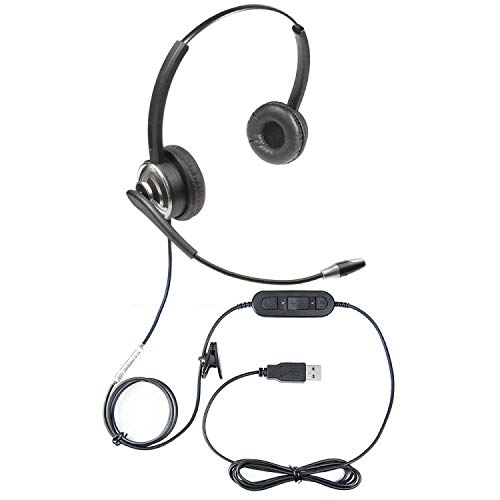
ECS WordCommander USB Headset — Recognition-first wired pick
The WordCommander’s title is a small manifesto for how recognition headsets should be built: dual-ear wearing, a noise-canceling boom microphone, a premium in-line sound card, and a pro-flex wire, explicitly ideal for voice-to-text. The in-line sound card is the detail that separates it from ordinary USB headsets. It moves the conversion of your voice into digital form out of the computer and into a component specified for speech, which attacks the hiss and interference problems at their source. For recognition work, that is the correct place to spend engineering effort, and ECS — a speech-products specialist — clearly knows it.
Dual-ear wearing suits the seated dictator who proofreads by ear: playback arrives in both ears, the room recedes, and long correction sessions stay comfortable. The pro-flex wire addresses the wired headset’s known weakness, cable fatigue at the flex points, which matters for a tool handled daily for years. If your dictation is desk-bound, high-volume, and judged by accuracy per hour, this is the pick the guide would hand you first. Its only real concession is the obvious one: the desk is where it lives, and a dictator who paces will feel the leash within a paragraph.
- Connection: USB, per the listing title
- Microphone: noise-canceling boom mic
- Audio path: premium in-line sound card
- Wearing: dual ear
- Cable: pro-flex wire
Strengths
- In-line sound card cleans up the recognition chain where it matters most.
- Noise-canceling boom voiced for voice-to-text, per its own title.
- Dual-ear playback suits long proofreading-by-ear sessions.
Trade-offs
- Wired to the desk; no pacing, no room-to-room work.
- Dual-ear coverage shuts out the room, which some offices dislike.
- Specialist speech-brand support channels differ from big headphone brands’ retail presence.
Best for: high-volume seated dictators who measure their setup in accuracy per hour.
Not suited for: mobile dictation between rooms or on rounds.
If accuracy at a fixed desk is the whole brief, this is the listing to read in full — check the WordCommander on Amazon and confirm the in-line sound card details against your software’s requirements.

Koss CS95-USB Communication Headset — Single-ear recognition value
Koss built its name on headphones, and the CS95-USB applies that heritage to a modest, honest brief: a single-sided, on-ear communication headset with a USB-A plug, a lightweight design, and speech recognition named in the title itself. The settings its title lists — telehealth, education, call centers, business-to-business work — share a pattern: the wearer talks to a computer and to a room in the same hour. A patient is in the exam room; a class is in front of the teacher; a colleague is at the door. One covered ear serves the software, one open ear serves the humans.
That split attention is exactly what single-ear recognition headsets are for, and it is why this pick belongs in a dictation guide despite its communication-headset clothing. The clinician dictating notes between patients, the teacher recording feedback while supervising a room, the adjuster dictating claim notes between calls — all dictate in bursts, in shared space, and the CS95-USB’s shape fits that rhythm. USB-A keeps it compatible with the older desktops that fill clinics and schools. What it does not promise is isolation or premium audio hardware; its title never mentions a sound card or noise canceling, so expect a competent speech microphone in a light frame, and judge it as the practical fleet purchase it is.
- Connection: USB-A plug, per the listing title
- Wearing: single-sided, on-ear
- Stated uses: speech recognition, telehealth, education, call centers
- Color: Beige, per the listing title
- Noise canceling: Not stated in the listing title — verify with the maker’s documentation
Strengths
- Speech recognition is a stated purpose, not an inference.
- Single open ear suits burst dictation in shared, people-filled rooms.
- Lightweight build and USB-A plug fit institutional desktops as they are.
Trade-offs
- One ear of playback is a limitation for long proofreading sessions.
- No sound-card or noise-canceling claims in the title to lean on.
- Beige institutional styling will not win any design awards.
Best for: clinics, classrooms, and offices equipping several burst-dictation desks.
Not suited for: a quiet solo office where dual-ear focus is the priority.
For shared-space dictation on sensible terms, view the CS95-USB’s Amazon listing and check its microphone details against your recognition software’s headset guidance.
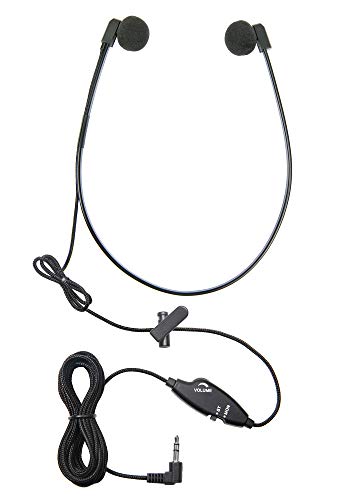
ECS WordHear-O Transcription Headset — Under-chin listener for transcription
The WordHear-O is the listening half of the dictation workflow made physical: a transcription headset in the under-chin style, with a 3.5mm connection, from ECS, the same speech-products maker behind the WordCommander. Under-chin wearing — a light band slung below the jaw, earpieces hanging from it — is the transcriptionist’s traditional form, and it persists for practical reasons. It goes on and off in one motion dozens of times a day, it does not disturb hair or collide with glasses arms the way bands can, and its weight is so slight that a six-hour playback shift registers as posture fatigue long before headset fatigue.
Be clear about what this pick is not: its title names no microphone, and transcription headsets in this style are listening instruments. If your job is playing back recordings and producing certified text — the medical or legal transcription desk — that is the correct tool and the microphone’s absence is irrelevant. If your job includes dictating, look at the WordCommander or the SpeechOne instead. The 3.5mm plug keeps the WordHear-O compatible with the dedicated transcription stations, foot-pedal setups, and older computers that still run professional transcription rooms, where USB-only gear can be the awkward guest.
- Type: transcription headset, under-chin style, per the listing title
- Connection: 3.5mm
- Microphone: Not stated in the listing title — verify with the maker’s documentation
- Volume control: Not stated in the listing title — verify with the maker’s documentation
- Maker: ECS speech products
Strengths
- Under-chin form is built for constant on-and-off across a playback shift.
- Featherweight wearing suits the longest listening sessions in this guide.
- 3.5mm plug fits traditional transcription stations without adapters.
Trade-offs
- A listening tool; the title offers no microphone for dictating.
- Under-chin fit is unfamiliar to wearers raised on headbands.
- Analog connection leaves audio quality to the source device’s jack.
Best for: transcriptionists and reviewers whose day is playback, pausing, and typing.
Not suited for: anyone whose workflow includes speaking to recognition software.
If your desk is the listening end of the workflow, read the WordHear-O’s full Amazon listing to confirm its earpiece and cable details before adding it to the station.

SIMOLIO Wired Transcription Headset — Transcription set with its own microphone
SIMOLIO’s title describes a wired transcription headset that hedges the category’s usual bet: stereo listening for the playback work, plus a microphone and volume control of its own, on a 3.5mm connection with a 4.9-foot cord and soft memory foam ear tips. The stated use — working from a copy of a recording at a PC or office desk — is transcription, and the microphone reads as the supporting feature: the reviewer who occasionally records a note, joins a call, or dictates a short correction without changing headsets. That in-between positioning is genuinely useful in small offices where one person does every part of the workflow on the same afternoon.
The details in the title are comfort-and-control details, which is the right emphasis for a listening-first product. Memory foam ear tips matter across a long playback session in a way they never would for a five-minute call. An in-line volume control matters when recordings vary wildly in level — as real dictation recordings do, from the clinician who whispers to the one who projects — because reaching for software volume fifty times a day is its own small misery. The 4.9-foot cord is long enough for a tower under a desk and short enough not to colonize the desktop. Judge this pick as the flexible generalist of the transcription trio: less specialized than the WordHear-O, more capable than the Spectra, and honest about its recording-first purpose.
- Connection: 3.5mm, per the listing title
- Cord length: 4.9FT, per the listing title
- Features in title: microphone, volume control, soft memory foam ear tips
- Sound: lightweight stereo
- Stated use: working from a recording, PC and office
Strengths
- Microphone included, so one headset covers playback and occasional speaking tasks.
- Volume control on the cord suits recordings with uneven levels.
- Memory foam ear tips target long-session listening comfort directly.
Trade-offs
- Transcription-first design; its microphone is a supporting feature, not a recognition flagship.
- 3.5mm analog path depends on the PC’s jack quality for both directions.
- Neither as light as the under-chin style nor as focused as a dedicated dictation set.
Best for: small-office generalists who transcribe, review, and occasionally record at one desk.
Not suited for: full-time dictators whose accuracy depends on a top-tier microphone path.
For a one-headset answer to a mixed listening-and-speaking desk, check the SIMOLIO listing on Amazon and confirm the plug and control layout against your PC.

Spectra SP-PC Stereo Transcription Headset — The plain stereo transcription spare
The Spectra SP-PC’s title is the shortest in this guide: a stereo computer transcription headset, full stop. This review refuses to decorate that brevity with invented virtues. What the title establishes is a stereo listening headset for computer-based transcription, from Spectra, a name associated with transcription accessories. Everything else a buyer would want — connection type, microphone presence, controls, cord length — is flagged below as not stated, because it is not stated, and a transcription manager equipping a desk should confirm those basics in the full listing before ordering.
Within those limits, the SP-PC’s role is legible: it is the spare-drawer and second-desk listener. Transcription operations run on redundancy — a headset that fails at hour three of a deadline shift gets replaced from a drawer, not from a purchase order — and a plainly specified stereo transcription headset is exactly what fills that drawer. It is also the rational choice for the occasional transcription task: the office that transcribes one deposition a month does not need the WordHear-O’s specialist ergonomics, but it does need a headset voiced for speech playback rather than a music headphone with booming bass smearing consonants. Buy it with eyes open about its unknowns, in the quantity its role implies.
- Type: stereo computer transcription headset, per the listing title
- Connection: Not stated in the listing title — verify with the maker’s documentation
- Microphone: Not stated in the listing title — verify with the maker’s documentation
- Controls: Not stated in the listing title — verify with the maker’s documentation
- Cord length: Not stated in the listing title — verify with the maker’s documentation
Strengths
- Stereo playback voiced for transcription work rather than music.
- A sensible spare and second-desk unit for transcription operations.
- Unpretentious product with an unpretentious job, easy to standardize.
Trade-offs
- The sparse title forces a full-listing check before any fleet purchase.
- No stated microphone, so dictation use cannot be assumed.
- No stated controls; playback ergonomics must be confirmed.
Best for: transcription desks needing a dependable spare or an occasional-use listener.
Not suited for: a buyer who needs specifications confirmed by the title alone.
Treat this as a verify-first purchase: open the SP-PC’s Amazon listing, confirm connection and controls in the description, and order it for the drawer role it fits.
When Accuracy Drops, What Should You Check First?
Accuracy problems feel like software problems and are usually geometry problems. The first check is the boom: has it crept away from the corner of your mouth across the morning? A few millimeters of drift changes the voice’s character at the capsule, and the engine experiences it as a slightly different speaker. The second check is the device selection: confirm the program is still listening to the headset and not to a webcam or laptop microphone that an update promoted. The third check is the room: a new fan, an open window onto a street, a colleague’s speakerphone two desks away — all arrive in the waveform uninvited.
If those pass, look at your own delivery with honest ears. Record a minute of dictation and play it back through the headset. Most dictators who do this hear the problem immediately: they were rushing, mumbling the ends of sentences, or dictating while turned toward a second monitor with the boom pointing at the room. The engine is a mirror. It returns the clarity it is given, and the playback test — dictation’s oldest diagnostic — tells you which side of the microphone the fault lives on.
Only after those checks should you suspect the hardware, and even then the suspect is usually a cable or connector rather than the microphone itself. Flex the cable gently while monitoring the input meter; a crackle or dropout localizes the fault. This is the moment the fleet spare earns its drawer space: swap in the same model, run the standard paragraph, and you have isolated hardware from habit in under five minutes. Randomly buying a different headset at this stage does not diagnose anything — it just restarts the training clock.
Keep a tiny log while troubleshooting: date, symptom, what changed. Tape it inside the desk drawer if a notebook feels like overkill; the medium does not matter, the habit does, and the second incident will thank the first incident’s author. Dictation setups are systems of small parts, and the log turns the next incident from an investigation into a lookup. Professionals who dictate for a living are not people with magical equipment; they are people whose equipment problems get solved in minutes because the system around the headset is disciplined.
Comparing the Six: Which Half of the Workflow Are You Buying For?
| Pick | Workflow half | Connection | Deciding detail |
|---|---|---|---|
| Philips SpeechOne | Dictation | Wireless with dock | Status light and docking station built for professional dictation |
| ECS WordCommander USB | Dictation | USB wired | Premium in-line sound card and noise-canceling boom for voice-to-text |
| Koss CS95-USB | Dictation | USB-A wired | Single ear for burst dictation in shared rooms |
| ECS WordHear-O | Transcription | 3.5mm wired | Under-chin lightness for all-day playback |
| SIMOLIO Wired Transcription | Transcription, some speaking | 3.5mm wired | Own microphone and volume control on a listening-first set |
| Spectra SP-PC | Transcription | Not stated in title | Plain stereo spare for transcription desks |
Which Dictation Headset Mistakes Waste the Most Money?
Buying a transcription headset to dictate with. Listening headsets are built for the playback half of the workflow. If the title names no microphone — or frames the product around recordings — it is not your dictation tool.
Judging by the earpiece. Plush earcups feel like quality in a shop and contribute almost nothing to recognition accuracy. Spend your attention on the boom microphone and the audio path.
Training the engine on one microphone and dictating on another. The profile the software builds is microphone-specific. Pick a headset, train with it, and stay with it.
Ignoring the room. Echo, fans, and corridor noise reach the microphone before any software can help. A closed door outperforms an expensive upgrade surprisingly often.
Assuming wireless is automatically the professional choice. Wireless serves mobile work patterns. A seated dictator often gets better accuracy per dollar from a wired USB set with a serious sound path.
Skipping the known-paragraph test. Five minutes dictating text you already have exposes setup errors that would otherwise surface inside real documents with real deadlines.
What About Names, Jargon, and the Words Engines Always Miss?
Every profession has a vocabulary that general recognition handles badly: medication names, case citations, street names, product codes, the surnames of everyone in a practice’s world. The headset cannot fix these, but the workflow around it can. Teach the software your custom vocabulary deliberately — most professional engines let you add words and train their pronunciation — and do it through the headset you actually use, so the pronunciation the engine stores is the one your microphone delivers. A monthly ten-minute vocabulary session, adding the new names that entered your work, pays for itself in corrections never made.
Numbers deserve a special habit. Recognition errors cluster on figures, dates, and dosages because context helps the engine least exactly where error costs most. Many dictators slow down fractionally for numbers and spell ambiguous ones; transcriptionists listening at the other end develop the same suspicion. Whichever side of the workflow you sit on, treat every number in a draft as unverified until a human has checked it against the source. That discipline, not any headset, is what makes dictated documents trustworthy.
Final Recommendation
Decide which half of the workflow is yours, then buy the microphone story, not the marketing story. If you dictate while moving, the Philips SpeechOne is the one complete wireless answer here, dock and status light included. If you dictate at a desk — most people, most hours — the ECS WordCommander’s in-line sound card and recognition-voiced boom make it the accuracy pick, with the Koss CS95-USB as the single-ear alternative for shared rooms where dictation happens in bursts between human conversations. If your desk is the listening end, choose the WordHear-O for full-time transcription, the SIMOLIO for mixed duty, and the Spectra as the spare that keeps a deadline alive. Set the boom once, train the engine on the headset you chose, and let consistency do the quiet work. In dictation, the best headset is the one your software has learned to hear you through, session after session, without surprises.
Frequently Asked Questions
Why does this guide include wired headsets in a wireless search?
Because only one true wireless dictation headset met the pool’s standard, and padding the list with wireless gaming or call-center sets would have served the keyword instead of the reader. The wired picks are the recognition and transcription tools professionals actually use, and each review states its connection openly.
Is the Nuance PowerMic a headset?
No. It is a hand-held microphone for burst dictation at a workstation — a legitimate product category, but a different one, which is why it is mentioned here and not ranked among headsets.
Can I dictate well with a transcription headset?
Only if it actually has a suitable microphone. Of the transcription picks here, only the SIMOLIO’s title includes one, and even it is framed for recording work. A dedicated dictation or recognition headset is the safer accuracy choice.
Does USB really beat a 3.5mm plug for recognition?
Usually, yes, because the digital path bypasses the computer’s analog input noise — and a headset with its own in-line sound card, like the WordCommander, improves that path further. A good 3.5mm setup can still work well for listening tasks.
How often should I retrain my recognition profile?
Whenever the input changes materially: a new headset, a new room, a new computer, or a lasting change in your voice. Retraining is short; dictating for months against a stale profile is the expensive option.
Do I need special software to use these headsets?
The headsets themselves are audio devices; the dictation behavior comes from your recognition or transcription software, which is a separate purchase and a separate decision. What the headset must do is present a clean, stable microphone to that software. Professional dictation suites and the recognition features built into modern operating systems and office suites all work with standard USB and 3.5mm devices like these — but if you run a specialized legal or medical package, confirm its headset guidance, since some suites certify specific models or expect a foot pedal on the transcription side.
How long do dictation headsets typically stay in service?
The electronics usually outlast the cable and the ear cushions. In daily professional use, the flex points and the boom hinge are the wear items, which is why a pro-flex cable is a headline feature on the WordCommander and why a same-model spare belongs in the drawer. When accuracy falls and troubleshooting points at the cable, replacement — not repair — is the realistic path.
Related Guides
Voice work wears many hats across this site. For another profession where a headset carries real operational weight, read best headsets for 9 1 1 dispatchers. For headsets judged on soundstage rather than speech, see best open back headsets, and for the cockpit version of the noise problem, try best headsets for fixed wing student pilots.


