Our Top Picks
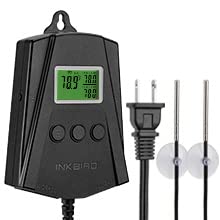 Inkbird WiFi Heat Mat Reptile Thermostat Controller TemperatureIPT-2CH Reptile Thermostat1.18 x 3.14 x 3.74 inchesCheck on Amazon
 LUX TQX Matter Smart Thermostat with Room SensorSmall1.1 x 3.5 x 3.5 inches0.86 poundsCheck on Amazon


What's inside
- Why the Android App Deserves More Scrutiny Than the Wall Unit
- Google Home, Matter, and the Question of Longevity
- HVAC Compatibility Comes Before Any Feature List
- Learning Schedules, Ordinary Schedules, and What Each Really Does
- Room Sensors and the Geography of Comfort
- Geofencing, Presence, and Privacy on Android
- Energy Reports, Rebates, and Honest Savings Claims
- Representative Model Families, Read Through an Android Lens
- Installation Day: What the Phone Cannot Do for You
- Daily Life With Android Control, Feature by Feature
- Troubleshooting Patterns Owners Report Again and Again
- Costs Without a Price Tag: Subscriptions, Accessories, and Spares
- Check prices on Amazon
- A Decision Sequence That Avoids the Usual Regrets
As an Amazon Associate I earn from qualifying purchases. This post may contain affiliate links at no extra cost to you.
Reader support keeps this guide available without a paywall. If a purchase follows a link on this page, a referral commission may be paid by the seller at no extra cost to the buyer. That income does not decide which models appear here, and no maker has reviewed this text before publication.
Controlling heating and cooling from an Android handset sounds simple until the details start to matter. A thermostat is not a light bulb that either responds or fails to respond. It sits in the middle of a furnace, a heat pump, a boiler, or a packaged rooftop style system, it negotiates with compressors and auxiliary heat strips, and it has to keep doing sensible things when the phone is asleep, when the router reboots, and when the person holding the phone is three time zones away. Judging these products purely as household gadgets therefore misses the point. The useful question for an Android owner is narrower and more demanding: how well does the Android experience carry the full job of running a home climate system, day after day, without surprises?
That question breaks into several smaller ones. Does the manufacturer maintain a proper Android application with timely notifications, or is the phone treated as an afterthought behind another platform? Does the thermostat appear natively inside Google Home so routines, voice commands, and household sharing behave predictably? Is the connection built on Wi-Fi alone, or does Matter over Wi-Fi or Thread promise a longer useful life as smart home standards settle? Can extra room sensors correct the classic problem of a hallway thermostat governing a bedroom that runs far colder? And underneath all of that software, will the hardware even work with the wiring already in the wall?
This guide compares representative model families from Google Nest, Ecobee, Honeywell Home by Resideo, Emerson Sensi, Wyze, and a handful of smaller Matter-focused brands, using published specifications, installation manuals, support documentation, and patterns visible in owner feedback. No laboratory bench was involved and no living room was borrowed for the occasion. Instead, the emphasis stays on verifiable facts: terminal compatibility lists, stated system types, documented sensor limits, declared protocol support, and the features each Android application publicly describes. Where owners repeatedly report the same frustration, that pattern is noted as a pattern rather than dressed up as a measured result.
Why the Android App Deserves More Scrutiny Than the Wall Unit
The glossy circular or rectangular unit on the wall is only half the product. Most owners touch the physical dial during the first week, admire the display, and then quietly migrate almost every interaction to the phone. Schedule edits happen from the sofa. Temperature holds get set from a train. Geofencing, if it is used at all, lives entirely inside the handset and its location permissions. Vacation modes, filter reminders, humidity targets, and alerts about a furnace that has stopped responding all arrive as Android notifications, which means the quality of that application shapes satisfaction far more than the finish on the faceplate.
Android adds its own complications that makers handle with uneven care. Background restrictions differ between Pixel, Samsung One UI, and other manufacturer skins, and an overly aggressive battery policy can delay geofence triggers or silence a freeze warning until the application is opened again. A well built Android client asks for location permission with a clear explanation, respects notification channels so urgent equipment alerts can be separated from marketing noise, and offers a home screen widget or quick settings tile for the single most common action, which is nudging the target temperature by a degree or two. A weaker client buries that action behind a splash screen, an account check, and a slow cloud round trip.
Widgets deserve a specific mention because they reveal how seriously a brand treats the platform. A resizable widget showing current indoor temperature, humidity, and the active mode lets an owner confirm at a glance that a house is safe while travelling, without opening anything. Quick settings tiles go further, allowing a hold or a resume from the shade. Some brands provide neither and rely solely on opening the full application, which is tolerable for weekly schedule work but irritating for daily micro adjustments. Shoppers who know they will adjust often should weigh that friction honestly rather than assuming every companion program feels alike.
Account structure matters as well. Households rarely consist of one person with one phone. Partners, adult children, house sitters, and landlords may all need different levels of access. Google Home handles this through household membership with familiar Google account sign in, which suits Nest hardware and other devices adopted into that ecosystem. Ecobee and Honeywell Home use their own account invitations, which can be perfectly serviceable but add another password, another recovery flow, and another place where two factor authentication must be configured. Before buying, decide who genuinely needs control, who only needs to view temperatures, and whether temporary access can be revoked cleanly when a guest leaves.
Google Home, Matter, and the Question of Longevity
For an Android household, Google Home is usually the centre of gravity. Thermostats that integrate there gain voice control through Assistant on phones, speakers, and displays, participation in Home and Away routines, and a single place to check status alongside locks, lights, and cameras. Owners comparing connected cameras, perhaps while reading about best 4k smart home security cameras, will recognise the benefit of keeping climate inside the same household graph rather than scattered across isolated brand accounts. A unified home also simplifies handovers when a phone is replaced, because the new handset inherits the household instead of requiring every device to be paired again from scratch.
Matter changes the buying calculation in a subtler way. A thermostat certified for Matter over Wi-Fi can be commissioned into Google Home and, in principle, into other Matter controllers without depending entirely on a proprietary cloud bridge. That does not guarantee identical features everywhere. Energy history, learning behaviour, remote sensor averaging, and detailed equipment diagnostics often remain exclusive to the maker application even when basic setpoint control works through Matter. Treat Matter therefore as insurance and interoperability, not as a promise that every advanced capability travels with the device. Thread based models add another wrinkle: they need a compatible border router somewhere in the home, a role many newer Google and other smart speakers can fill, but coverage and placement still need thought.
Proprietary cloud dependence remains the largest long term risk in this category. Thermostats have long service lives compared with phones, and a unit installed today may still be on the wall through several handset upgrades. If a brand shuts down a server, sells a product line, or moves features behind a subscription, remote control can degrade even though the local heating logic continues. Documentation that describes local scheduling, manual override behaviour during an outage, and operation without an account helps an owner judge that risk. A thermostat that becomes a dumb programmable unit when the internet drops is acceptable to many households; one that loses its schedule or refuses changes is a different proposition entirely.
Voice control, while convenient, should not be oversold. Saying a temperature aloud works well for a single zone home where everyone agrees on comfort. It becomes clumsy in multi zone properties, in homes where a voice command from a shared speaker could alter a nursery or a home office, and in households where guests should not be able to override a carefully set schedule. Google Home allows device placement by room and household permissions that reduce accidental control, yet the underlying thermostat application remains the authoritative place for holds, limits, and lockouts. Owners who need a PIN on the wall unit, a restricted temperature range for tenants, or a lock on system mode changes should confirm those controls exist before assuming voice convenience compensates for missing safeguards.
HVAC Compatibility Comes Before Any Feature List
No application, however elegant, can rescue a thermostat wired to a system it was never designed to run. Most residential equipment in North America uses low voltage 24 volt control circuits, and the thermostat acts as a switchboard for calls: heat, cooling, fan, reversing valve for a heat pump, auxiliary or emergency heat, humidifier, dehumidifier, and sometimes ventilation. The letters printed beside the existing thermostat terminals tell that story. W carries heat, Y carries cooling, G carries the fan, Rc or Rh carries power for cooling or heating transformers, O or B directs a heat pump reversing valve, and C, the common wire, returns power so modern electronics can run continuously.
The common wire deserves its own paragraph because it decides many purchases. Older installations often lack a C wire at the wall, since mechanical and simple programmable thermostats could sip power or run on batteries. Connected models draw more current for radios, colour displays, and sensors, and most manufacturers either require a common wire or offer a workaround. Workarounds include power extender kits that multiplex signals over existing conductors, adapters that borrow the fan wire, and designs that pulse charge from the heating circuit. Each approach carries caveats in the manuals: some kits are incompatible with zone boards, some sacrifice independent fan control, and power stealing arrangements can behave oddly with certain furnaces. Photographing the existing wiring, and also the control board inside the furnace or air handler, prevents the common mistake of judging compatibility from the wall plate alone.
System type narrows the field further. Conventional forced air furnaces with central air conditioning are the easiest match. Heat pumps need correct reversing valve orientation and sensible auxiliary heat lockout settings so expensive resistance heat does not run when the outdoor unit could cope alone. Dual fuel systems, where a heat pump hands over to a gas furnace below a chosen outdoor temperature, require explicit support and careful configuration. Boiler and radiant floor systems operate on slower thermal cycles, and some learning algorithms tuned for forced air can overshoot or short cycle hydronic equipment if cycle rate settings are ignored. Millivolt systems, line voltage electric baseboards, and proprietary communicating systems from certain HVAC brands frequently fall outside mainstream smart thermostat support altogether, needing specialist relays or the equipment maker own controls instead.
Staging is another quiet divider. A single stage furnace simply turns fully on or off, while two stage and modulating equipment can run at reduced output for longer, quieter, more even heating. Many connected thermostats support two stage heat and cool, but only when enough conductors are present to carry the second stage wires. If W2 or Y2 terminals are populated on the old unit and the replacement lacks those terminals, the system may still run yet lose the gentler low stage behaviour the owner paid for when the equipment was installed. Multi transformer systems, separate heating and cooling transformers, and homes with whole house humidifiers wired through the thermostat add still more checks. Manufacturer compatibility checkers are a starting point, not a verdict; the furnace manual and, where doubt persists, a licensed technician remain the safer authorities.
Learning Schedules, Ordinary Schedules, and What Each Really Does
Learning thermostats built their reputation on a seductive promise: adjust the temperature manually for a while, and the device will infer a routine and eventually programme itself. Google Nest popularised that approach, pairing early manual changes with occupancy sensing and later refinements through its application. For households with a stable rhythm, a commuter leaving at a similar hour, children returning after school, a cooler sleeping preference, the appeal is obvious. Schedule creation, normally the chore that causes programmable thermostats to be left on hold forever, largely disappears.
Reality is more conditional. Learning works best when the people generating the training signals actually represent the household pattern. Shift workers, carers whose nights vary, and homes where one person constantly overrides another can teach contradictory lessons. Seasonal change also confuses simple inference, because a preference expressed during a spring cold snap may be wrong for deep winter. Good implementations therefore expose what has been learned, allow individual days to be edited, and make it painless to abandon learning entirely and lock in a conventional schedule. An Android owner should inspect screenshots and help pages for that editability before purchase, since a schedule that cannot be corrected from the phone quickly becomes a source of friction rather than relief.
Conventional programmable models from Ecobee, Honeywell Home, and Sensi take the opposite philosophy. They ask the owner to define wake, away, home, and sleep periods, or a seven day pattern with different timings for weekdays and weekends, and then they follow it faithfully. The setup burden is higher on the first evening, yet behaviour is predictable and explainable to other household members. Several support schedule copies across days, holiday overrides, and gradual transitions that begin warming a house before the wake period rather than exactly at it. For many Android users, especially those managing a property for relatives, predictability beats cleverness.
Adaptive recovery, sometimes labelled smart recovery or early on, sits between those philosophies and is frequently misunderstood. Instead of starting the furnace at the moment a warmer period begins, the thermostat estimates, from recent run history and indoor temperature drift, how long recovery will take and starts earlier so the target is reached on time. On bitter mornings that can mean equipment running well before an alarm, which alarms some owners into thinking the schedule is broken. Documentation quality matters here. A clear explanation inside the Android application, with a toggle for the feature, prevents needless support calls and lets households with cheap overnight electricity or noise sensitive bedrooms decide whether punctual comfort is worth an earlier start.
Temporary holds and permanent holds sound trivial until they collide with family life. A temporary hold should expire at the next scheduled period, a vacation hold should survive until a stated return date, and a permanent hold should be unmistakable in the interface so nobody wonders why the house ignored its programme for a fortnight. Colour, wording, and notification behaviour inside Android clients vary. Some show a discreet banner; others make the override so prominent that accidental holds are rare. Owners who rent out a property, or who support an elderly parent remotely, benefit from an activity history that records who changed what and when, whether through the wall unit, voice, or a particular phone.
Room Sensors and the Geography of Comfort
A thermostat measures temperature where it is installed, which is often a hallway chosen for wiring convenience decades ago rather than for human comfort. South facing bedrooms overheat in afternoon sun, basements lag behind, and a nursery may sit several degrees away from the corridor reading. Wireless room sensors attempt to fix that geography. Placed in occupied rooms, they let the thermostat average several readings or prioritise a particular room during a particular period, the bedroom overnight, the living room in the evening, the home office during working hours.
Ecobee built much of its identity around bundled and additional sensors that also detect occupancy, allowing the system to follow people rather than a rigid timetable. Nest temperature sensors are simpler, reporting temperature for scheduled prioritisation without occupancy intelligence in the same way. Honeywell Home offers room sensors for certain T9 and related models, with prioritisation by active rooms or selected rooms. The distinctions sound minor in a feature table and feel large in daily life. Averaging smooths extremes but can leave every room slightly wrong; prioritising one room nails that space while letting distant rooms drift; occupancy based switching adapts to irregular days yet can chase a person who only popped into a room to fetch a coat.
Sensor hardware has practical limits that specifications state plainly if a shopper reads them. Battery life depends on reporting interval and temperature, radios have finite range through masonry and metal ductwork, and each thermostat supports a capped number of paired sensors. Placement guidance is not decoration: a sensor on an exterior wall, above a radiator, inside a bookcase, or in direct sun will faithfully report a misleading microclimate. Owners also need a plan for sensor naming inside the Android application, because six identical entries called Room become useless when alerts arrive. Names tied to actual spaces, plus a photograph of the house layout kept elsewhere, make remote troubleshooting far calmer.
Humidity sensing deserves attention alongside temperature. Many connected thermostats report indoor relative humidity, and some can run a humidifier, dehumidifier, or air conditioner overcooling strategy to manage it. Android graphs that place temperature and humidity together help an owner understand why a room feels clammy at a seemingly correct temperature, or why static and dry throats plague winter nights. Alerts for abnormally high humidity protect bathrooms and basements from mould risk, while low humidity warnings matter for wooden instruments, hard floors, and respiratory comfort. Buyers in humid climates should check whether dehumidification control needs a dedicated wire and compatible air handler behaviour, rather than assuming a software toggle alone can do the work.
Geofencing, Presence, and Privacy on Android
Presence based control promises savings without schedule discipline. When the last household phone leaves a defined radius, the thermostat relaxes to an away temperature; when someone approaches, recovery begins. On Android, that promise depends on location permission, background execution, mobile data, and the operating system continuing to trust the application with timely location updates. Android permission models now distinguish approximate from precise location and foreground from background access, and a thermostat application needs the stronger forms to geofence reliably. Owners uncomfortable granting always on location to a climate brand can reasonably skip the feature and use schedules instead, accepting slightly less automation in exchange for a clearer privacy boundary.
Multi person geofencing is where implementations diverge sharply. A single person household is easy. Add a partner whose phone battery dies, a teenager who disables location sharing, or a cleaner who arrives while everyone is out, and naive logic can set away mode on an occupied house or hold a home temperature in an empty one. Better systems combine phone location with thermostat occupancy sensors and room sensor motion, requiring agreement before changing state, and they expose a simple status line explaining why the house is in its current mode. That explanation, visible on Android, turns mysterious behaviour into something a household can debug together.
Home and Away routines inside Google Home use household presence signals that can include phones, compatible speakers, and device activity, and Nest devices participate in that broader picture. Standalone brand applications maintain their own geofence, which creates a risk of double control if both systems are enabled at once. One platform may command eco temperatures while the other tries to resume a schedule, producing oscillation that looks like a fault. Choose a single authority for presence, disable the competing automation, and note the decision somewhere the household can find it later. Future troubleshooting becomes far easier when only one system is allowed to decide occupancy.
Privacy extends beyond location. Thermostats learn occupancy rhythms that reveal when a home is empty, when occupants sleep, and when holidays occur. That data sensitivity makes account security a genuine safety issue rather than bureaucratic hygiene. Use a unique password stored in a manager, enable two factor authentication where offered, review household members periodically, and remove access for phones that have been sold or lost. When replacing a handset, perhaps while comparing best 5g android phones for a separate upgrade, remember to transfer household membership deliberately and sign out of the old device, rather than discovering months later that a traded in phone still belongs to the home.
Energy Reports, Rebates, and Honest Savings Claims
Energy dashboards are the most photogenic part of many Android thermostat applications: colourful graphs, leaf style badges, monthly summaries comparing runtime with the previous period, and tips nudging setpoints toward savings. Used well, these reports answer concrete questions. How many hours did auxiliary heat run during the cold spell? Did a schedule change after a holiday actually reduce furnace runtime, or did colder weather hide the improvement? Is one zone working dramatically harder than another, hinting at closed vents, a failing damper, or insulation trouble?
Used carelessly, the same dashboards invite false precision. Runtime is not energy consumption in any simple sense, because a modulating furnace, a heat pump drawing variable current, and resistance backup heat convert hours into cost at wildly different rates. Weather dominates comparisons between months, and occupancy changes, a new baby, a relative moving in, a month of working from home, can overwhelm any thermostat effect. Responsible brands frame reports as guidance and compare against weather normalised baselines where possible. Owners should adopt the same restraint, treating a falling runtime trend across a whole season as meaningful and a single cheerful week as entertainment.
Utility programmes add a financial dimension that varies by postcode and country. Some electricity providers offer rebates on qualifying thermostats, bill credits for enrolment in demand response events, or pre installed devices tied to a specific programme. During a demand response event, the utility may nudge temperatures by a few degrees during peak strain, with opt out controls that differ by scheme. An Android notification should make such an event unmistakable: who initiated it, how long it lasts, and how to override. Shoppers tempted by a rebate should read the enrolment terms before purchase, because a generous credit that hands a utility broader control than expected is not a bargain for every household.
Filter and maintenance reminders are less glamorous and arguably more valuable. A thermostat can count fan runtime and prompt for filter replacement at intervals based on actual use rather than calendar guesses. It can warn when indoor temperature fails to rise despite a heating call, when cooling output seems weak, or when humidity leaves a configured band. Those alerts, delivered promptly to Android, can turn a slow equipment failure into a scheduled repair instead of a midnight emergency. Confirm that alert thresholds can be tuned, though, because an oversensitive system that cries wolf weekly will be muted, and a muted alert channel protects nobody.
Representative Model Families, Read Through an Android Lens
Google Nest thermostats are the obvious starting point for an Android household, not because they win every category but because their software home is the Google Home application that many owners already use. The learning lineage emphasises automatic schedule generation, presence through the wider Google household, and a polished interface for reviewing energy history. Nest temperature sensors extend control into problem rooms on a timetable. The trade offs are equally clear: owners who prefer a traditional seven day programme may find the learning framing less direct, equipment compatibility is narrower than some professional grade rivals, and certain installations require the common wire or an approved power accessory. For a Pixel centred home already invested in Google routines, that balance often feels natural.
Ecobee appeals to households that want data and sensor intelligence without surrendering schedule control. Its Android application presents room by room readings, occupancy influence, and detailed runtime reporting, and flagship models have bundled additional functions such as voice services and security related features that some buyers will value and others will deliberately ignore. Sensor inclusion in the box changes the value calculation for homes with known hot and cold spots. Wiring support is broad, a power extender kit is commonly supplied for installations lacking a common wire, and staging support suits many two stage systems. The interface density that delights an enthusiast can initially overwhelm a relative who only wants the house warmer, so household training is part of the real cost.
Honeywell Home, under Resideo, brings a professional installer heritage that shows in terminal coverage and in models aimed at contractors as much as retail shoppers. The T9 line with room sensors, the T10 professional variants, and simpler T5 and T6 models span a wide range of ambitions. Android control runs through the Resideo application, and Google Home linking provides voice and household visibility. Buyers should pay close attention to exact model suffixes, because features, sensor support, and even application behaviour differ between retail and professional channels in ways a short product title conceals. That heritage also means documentation is thorough, with wiring diagrams and cycle settings written for people who genuinely intend to configure hydronic or heat pump behaviour correctly.
Emerson Sensi models occupy a pragmatic middle ground. The Sensi Touch and the simpler Sensi Lite prioritise straightforward scheduling, clear Android controls, geofencing, and compatibility guidance, without turning the thermostat into a general smart home hub. Contractor friendly features, such as the ability for an installer company to keep its contact details visible when service is due, matter to homeowners who rely on a regular HVAC firm. Sensor ecosystems are less elaborate than Ecobee, and the design language is more appliance than statement piece, which many walls will welcome. For a household upgrading from a basic programmable unit and wanting phone control without rethinking the entire home platform, that restraint is a genuine virtue.
Wyze and other value oriented brands lower the entry barrier and deserve neither automatic dismissal nor automatic recommendation. Their Android applications can handle schedules, holds, and remote changes perfectly adequately, and published compatibility covers common conventional systems. The questions are about depth and durability: sensor options are limited or absent, advanced staging and accessory control may be missing, energy reporting is thinner, and long term software commitment is harder to judge for a young product line. A simple single stage furnace in a small home may never need the missing features. A dual fuel heat pump in a large property will expose every one of them within the first cold month.
Matter native entrants and regional brands complicate any shortlist in a healthy way. In Europe and other 230 volt markets, systems from Tado, Netatmo, Hive, and Drayton Wiser address boilers, radiator valves, and OpenTherm modulation that North American wall thermostats do not govern in the same fashion. An Android owner in London or Berlin should therefore start from heating architecture, not from an American ranking. Radiator by radiator control, boiler modulation, and weather compensation can save more energy than any schedule feature, and those capabilities live in ecosystems designed around wet central heating. Importing a North American model for a European boiler because a review praised its application would be a category error, regardless of how attractive the phone interface looked.
Matching a Model to a Household Pattern
Consider a commuter flat with a single stage furnace, predictable weekday absences, and one bedroom that runs cold. A mid range thermostat with a single additional sensor, a clear Android schedule, and reliable notifications covers the need; paying for elaborate multi sensor averaging or security extras adds little. Consider instead a family house with a two stage heat pump, auxiliary heat, a humidifier, teenagers on shifting timetables, and a grandparent who visits for months. Terminal coverage, staging, accessory control, household permissions, and an intelligible activity log move to the foreground, and the cheapest adequate radio on the wall becomes a false economy.
Rental properties impose their own pattern. A landlord may want maximum and minimum limits, a lock on system configuration, alerts for freezing risk or excessive humidity, and an account structure that survives tenant turnover without sharing a personal Google household. A tenant may simply want schedule control and a guarantee that location tracking is off. Models and applications differ in how gracefully they separate owner from occupant, so both parties should agree the arrangement in writing before installation. Smart control that creates a dispute about surveillance or heating bills has failed at its human job even if every packet arrives on time.
Second homes magnify the value of remote visibility and the danger of connectivity loss. A cabin or coastal flat needs freeze protection that operates locally even when broadband fails, alerts that reach more than one phone, and a sensible answer to what happens after a power cut. Battery backed sensors in vulnerable rooms, a thermostat that resumes its schedule automatically, and a neighbour or caretaker with documented manual instructions form a system; the Android application alone does not. Owners of such properties often keep a minimum temperature far above the point where pipes are at risk, because the cost of a burst pipe dwarfs a season of cautious heating.
Installation Day: What the Phone Cannot Do for You
Every manufacturer urges the same first step and many eager buyers skip it: turn off power to the heating and cooling equipment at the breaker or service switch before touching control wiring. Low voltage circuits rarely pose the danger of mains wiring, yet a short between conductors can blow a small fuse on a furnace control board and turn a Saturday project into a service call. Photograph the old thermostat wiring with labels visible, keep the wire labels supplied in the new box, and resist pulling conductors out of the wall cavity. If a wire disappears into plaster, options narrow quickly and professional help becomes cheaper than improvisation.
Android becomes useful during installation in specific, grounded ways. The maker application usually walks through wire identification, asks which terminals were populated, and warns when a photographed combination suggests an unsupported system. Compatibility flows can detect a heat pump, prompt for reversing valve orientation, and ask about auxiliary heat and accessory devices. Treat those prompts as questions requiring truthful answers rather than hurdles to tap through. A wrong selection at this stage produces behaviour that mimics hardware failure: heat that arrives when cooling is called, auxiliary strips running constantly, or a compressor short cycling on a mild afternoon.
Commissioning deserves more patience than unboxing videos suggest. After wiring and power restoration, run each function deliberately and wait for equipment delays to expire. Compressors protect themselves with several minutes of enforced rest, furnaces complete purge and ignition sequences, and heat pumps may defrost. Confirm that a cooling call produces cool supply air, that a heating call does not engage auxiliary heat unnecessarily, that fan only mode circulates air, and that reversing a call does not trip a breaker. Then connect Wi-Fi, update firmware if the application offers it, set the correct location for weather assisted features, and only afterwards build schedules and invite household members.
Wi-Fi placement can decide whether remote control feels magical or flaky. Thermostats often sit in hallways far from routers, behind metal ducting or beside a mirrored wardrobe that reflects radio energy unpredictably. Most models use the crowded 2.4 gigahertz band for its reach, and some support 5 gigahertz as well. A weak but connected signal is the worst outcome, because commands mostly work and failures appear random. If the application reports poor signal strength, improving router placement or adding a well positioned access point solves more than repeated reboots ever will. Travellers managing a home from abroad, sometimes while sorting best chargers for international travel for the trip itself, learn quickly that a stable home network matters as much as the thermostat brand when a cold snap arrives mid holiday.
When in doubt, the boundary for professional installation is easy to state. Hire a technician when the existing system is a communicating proprietary setup, when wiring is unlabelled or damaged, when a zone board or dual fuel changeover is involved, when refrigerant or gas work might be needed, or when the furnace control board must be modified beyond a clearly documented adapter kit. The labour cost is modest beside the equipment being controlled, and a good installer will also verify static pressure, temperature rise, and safety controls that no consumer thermostat can assess.
Daily Life With Android Control, Feature by Feature
- Home screen access: A widget or tile that shows indoor temperature and allows a small adjustment saves repeated application launches during a working day.
- Notification channels: Separate controls for equipment faults, filter reminders, humidity warnings, and promotional messages let urgent alerts stay loud while marketing stays silent.
- Wearable glances: Some ecosystems surface temperature on a paired watch, useful for a quick check though rarely suitable for deep schedule editing.
- Household sharing: Invitations should state clearly whether a member can change schedules, only adjust temperature, or merely view status.
- Offline behaviour: The wall unit must keep heating and cooling safely when broadband, cloud service, or the phone itself is unavailable.
Notification design sounds like a detail until a furnace fails at two in the morning. An alert that merely says something is wrong, without naming the house, the system, or the observed condition, forces a half awake owner to open an application and hunt. A well written alert states that indoor temperature has fallen below a configured threshold despite a heating call, gives the current reading, and offers a direct path to the equipment history. Owners managing more than one property should test how multiple homes appear in notifications, because similar alerts from a main house and a rental can be dangerously easy to confuse in a crowded shade.
Android battery optimisation deserves a deliberate setup moment after installation. Exempting the thermostat application from aggressive battery restrictions, where the owner is comfortable doing so, improves geofence reliability and alert timeliness on many handsets. Samsung, Pixel, and other manufacturers expose those settings in different places, and brand help centres often document the steps for their own applications. The same applies to location accuracy: Wi-Fi and Bluetooth scanning toggles in Android location settings can sharpen presence detection indoors. None of this should be configured blindly. Each permission widens what the application can sense, and the owner should understand the exchange rather than tapping through prompts to make a banner disappear.
Accessibility is an under discussed strength of phone control. A wall thermostat with a small dial and low contrast display can be hostile to users with limited vision, reduced dexterity, or a wheelchair viewing angle below the mounting height. An Android application that respects system font scaling, screen reader labels, and high contrast settings returns control to people the wall unit excluded. Voice control through Assistant adds another route, provided commands are confirmed clearly. When choosing for a household that includes disabled or elderly members, evaluate the application with the actual accessibility settings those members use, not with default settings on a reviewer style handset.
Multiple zones multiply both benefit and complexity. Each zone needs an unambiguous name in the application, its own schedule logic, and clarity about shared equipment constraints. Two zones calling in opposite modes, one for heat and one for cooling, cannot both be satisfied by a single conventional system, and good software explains the compromise instead of silently favouring one area. Damper based zoning also interacts with airflow: closing too many dampers raises static pressure, which is an equipment concern beyond software. Android dashboards that show every zone on one screen help an owner spot a forgotten hold in a guest wing before it wastes a weekend of energy.
Troubleshooting Patterns Owners Report Again and Again
Short cycling, where equipment starts and stops in rapid bursts, generates a large share of owner complaints across brands. Causes range from a thermostat placed in a supply air draft, to an oversized furnace, to cycle rate settings mismatched with radiant heat, to a learning algorithm reacting to a sensor in a sunlit room. The Android history graph is the diagnostic starting point: it shows call duration, frequency, and correlation with outdoor temperature. Changing one variable at a time, and allowing a full day between changes, separates cause from coincidence far better than a frantic evening of toggles.
Temperature swing complaints often trace back to anticipation and recovery settings rather than sensor inaccuracy. A thermostat that waits too long to start allows a perceptible chill; one that starts eagerly overshoots and makes bedrooms stuffy. Many models expose swing or threshold settings in an installer menu, sometimes mirrored in the application and sometimes reserved for the wall unit. Owners should record original values before adjusting, because installer settings interact, and a forgotten change can resurface as a mystery during the opposite season. Photographing each settings screen into a household maintenance folder is a humble habit with outsized future value.
Connectivity dropouts follow their own familiar script. The thermostat reports offline, the owner reboots the router, service returns, and nobody learns anything. A more useful routine checks whether other 2.4 gigahertz devices dropped at the same moment, whether the router recently changed channels or firmware, whether a new mesh node created a roaming conflict, and whether the thermostat sits at the edge of coverage where a passing lift or a closed metal door tips the balance. Keeping the home network name and password stable across router upgrades also matters; a thermostat is an awkward device on which to type a long new passphrase, and some models require a partial setup repeat to join a renamed network.
Battery powered sensors that vanish from the application usually need the obvious remedies in an unglamorous order: confirm the sensor is within sensible range, replace the cell with a fresh one of the correct type, check for firmware updates on the parent thermostat, and re pair only after those steps. Metal enclosures, aquariums, and dense masonry between sensor and thermostat eat radio range that open plan estimates assume. Moving a sensor a metre along a wall, out of a cabinet and away from a heat source, can transform reliability while also improving the honesty of its temperature reading.
Costs Without a Price Tag: Subscriptions, Accessories, and Spares
The purchase is only the visible part of ownership cost, and this guide deliberately avoids printing figures that would age within weeks. Extra room sensors, wall plates to cover paint outlines from a larger old thermostat, power adapter kits, and professional installation all add to the first month. Some brands bundle a sensor and an adapter; others sell every addition separately. A household needing four sensors should compare complete system cost, not headline thermostat cost, and should confirm the maximum sensor count before assuming a large house can be covered room by room.
Subscriptions require the same whole picture reading. Core temperature control and scheduling are generally included without ongoing payment on mainstream models, while advanced security monitoring, extended video style history, or professional monitoring bundles may sit behind plans on multifunction devices. Read which exact capabilities are paywalled on the model under consideration, because a flagship thermostat marketed partly as a home awareness hub can carry expectations its basic climate functions never asked for. Nobody should discover after installation that a desired alert history or a household feature depends on a plan they never intended to buy.
Longevity spares are rarely discussed at purchase and matter by year five. Sensor batteries are standard cells in most designs, wall plates and trim are cosmetic, but proprietary sensor hardware ties a household to a brand continuing to sell compatible replacements. A thermostat with Matter support and standard scheduling retains more fallback value if its maker retreats, because basic control can migrate to another controller. Keeping the original wiring photographs, the equipment model numbers, and the installer settings in one folder means a future replacement, whatever brand it is, starts from knowledge instead of archaeology.
Shoppers weighing a new handset at the same time, for instance browsing best affordable android phones to replace a failing device, should sequence the changes sensibly. Set up the thermostat household on the account, not on the handset, confirm control from a second device or a web interface where available, and only then retire the old phone. Account recovery details, authenticator access, and household invitations should survive a phone change without drama if they were configured deliberately at the start.
Check prices on Amazon
Live listings for the shortlist in this guide are pulled from Amazon below, so prices and availability are always current at the moment you look.


A Decision Sequence That Avoids the Usual Regrets
Begin with the equipment, not the shop window. Record the system type, stages, fuel, accessories, and every terminal letter at the existing thermostat and control board. Decide whether a common wire exists or which documented adapter path applies. Only after that compatibility gate should features enter the conversation, because a model eliminated by wiring cannot be rehabilitated by an attractive application.
Next, choose the software home. An Android household already centred on Google Home gains simplicity from devices that live there natively. A household that prefers brand depth, Ecobee sensor intelligence or Resideo equipment reporting, can accept a separate application as the daily driver with Google Home as a viewing layer. What matters is deciding which application is authoritative for schedules, holds, and presence before installation day, and disabling duplicate automations that would fight that authority.
Then map the rooms. Walk the house at the times discomfort actually occurs, note which spaces run hot or cold, and decide whether averaging, prioritisation, or occupancy following matches the pattern. Buy sensors for measured problems rather than for symmetry. A single sensor in a cold nursery can outperform a houseful of sensors placed without a plan, and fewer radios mean fewer batteries and fewer pairing headaches over the years.
Finally, plan the human side. List who needs control, who needs alerts, who should be able to override, and who must never be locked out by an account problem. Configure two factor authentication, save recovery routes, document manual operation for a house sitter, and keep the furnace service company details with the thermostat records. Climate control is safety infrastructure during heatwaves and freezes, not merely convenience, and the paperwork should reflect that status.
Seasonal commissioning is a habit worth adopting twice a year, once before the heating season and once before cooling dominates. Walk through the Android settings and confirm that staging delays, auxiliary heat lockout temperatures, humidity targets, and fan circulation preferences still match the house after any furniture moves, insulation work, or equipment service. A technician may have altered a cycle setting during a repair, a child may have changed a sensor priority during a visit, or a schedule built around a former job may quietly persist into retirement. Ten unhurried minutes with the application, a glance at sensor batteries, and a check that every household phone still receives equipment alerts will catch those drifts while the weather is forgiving, rather than during the first frost when every service company in the district has a waiting list and a minor configuration slip becomes an uncomfortable night.
For most Android households, the satisfying purchase ends up being the model whose wiring support is unambiguous, whose application respects Android conventions, whose sensors solve a named room problem, and whose behaviour during an internet outage is documented and dull. Novelty fades within a month; a schedule that quietly fits a life, alerts that arrive when equipment falters, and a bedroom that finally matches the hallway reading keep earning their keep for a decade, and a house that warms itself correctly on a dark February morning while its owner is still half asleep on another continent is the quiet standard every thermostat in this guide should be measured against.


