What's inside
- Key Takeaways
- Quick Picks
- How did we choose these Xbox 360 controller chargers?
- Dock, cable or history — which shape does your 360 need?
- Why do newer Xbox chargers not fit the 360?
- Rechargeable packs or AA batteries for a 360 in 2026?
- How do you revive a 360 controller that seems dead?
- Setting up retro night for guests who have never held a 360
- How do you store a 360 collection between seasons of play?
- What should you pay for 360 charging in a third-party market?
- How long should a 360 pack last between charges?
- Can you charge 360 packs from the console’s USB?
- AA rechargeables as the understudy
- Reading a third-party retro listing like a sceptic
- The 360 as media remote: a quieter charging life
- What if a controller’s battery bay is damaged?
- Controllers per household: how many is enough?
- What do the packs inside these kits actually contain?
- Keeping the whole 360 shelf alive
- A note on collecting versus playing
- One last check before game night
- How do you set up a 360 charging station that stays ready?
- What mistakes do 360 owners make when buying chargers?
- Final Recommendation
- Frequently Asked Questions
- Related Guides
As an Amazon Associate I earn from qualifying purchases. This post may contain affiliate links at no extra cost to you.
gizmoverdict.com is reader-supported. When you buy through links on our site, we may earn an affiliate commission.
Where to buy: Every linked pick below is a third-party 360 charging kit whose listing names the Xbox 360 controller outright; the one original Microsoft kit appears unlinked as the discontinued reference it now is, and nothing for newer Xbox generations is presented as fitting the 360 — because it does not.
Shopping for the best chargers for xbox 360 controllers means shopping in a museum’s gift shop: the console is a beloved classic, and the entire charging ecosystem now belongs to third-party makers. Microsoft no longer sells its original Play and Charge Kit, so every kit you can actually buy — docks with rechargeable packs, cables with battery shells — comes from companies keeping the 360 alive after its maker moved on. That is not a problem, but it changes the buying discipline: there is no official option to default to, so listings must be read closely and generational confusion avoided ruthlessly.
The confusion to avoid has a name and a shape. Xbox One and Series X|S controllers use different battery compartments and different packs, and docks built for them do not fit 360 controllers, however similar the silhouettes look in a thumbnail. This guide therefore admits only products whose listings name the Xbox 360 controller explicitly, plus one prose-only mention of the discontinued Microsoft kit as the historical reference. If a charger you are considering elsewhere does not say 360 in its title, it is not a 360 charger, whatever the search results imply.
Two architectures divide the genuine picks. Dock kits give you two rechargeable packs and a stand that refills both while displaying them — the living-room solution for households where 360 night is a recurring event. Cable kits pair one pack with a charging lead that lets you keep playing while it refills — the solution for the solo player mid-campaign. The five linked picks below cover both architectures from several makers, and the verdicts match them to how your 360 actually gets used in 2026: retro nights, kids discovering classics, or a media-centre remote with a gamepad’s face.
Key Takeaways
- Every buyable 360 charging kit is third-party now; Microsoft’s original Play and Charge Kit is discontinued and appears here unlinked, as history.
- Xbox One and Series X|S docks do not fit 360 controllers — a listing that does not name the 360 is not a 360 product.
- Dock kits with two packs suit households and retro nights; cable-plus-pack kits suit the solo player who charges while playing.
- Capacity figures in these listings — 4800mAh appears twice — describe the pack as the maker states it; treat cross-brand comparisons of that number cautiously.
- OSTENT sells both architectures under one name, so check which of its two listings you are holding before ordering.
- A 360 controller that will not hold charge usually needs a new pack, not a new controller — these kits are the fix.
Quick Picks
| Pick | Badge | Why it is here |
|---|---|---|
| Rechargeable Battery 2-Pack + Dock for Xbox 360 | Complete two-pack dock kit | Two 4800mAh packs and a dual charging dock with power cable — the full living-room kit in one listing. |
| KEKUCULL Dual Dock Kit for Xbox 360 | Dual dock alternative | KEKUCULL’s take on the same formula — dual charging station with two rechargeable packs for the 360 controller. |
| OSTENT Cable + Battery Pack for Xbox 360 | Play-and-charge style kit | OSTENT’s 2-in-1 pairs a rechargeable pack with a charging cable, so a fading controller refills without ending the session. |
| OSTENT Charger Dock + Battery for Xbox 360 | Single-pack USB dock | OSTENT’s other answer: a USB charger dock station with one rechargeable battery — the minimal footprint for one controller. |
| 4800mAh Battery Charger Kit for Xbox 360 | LED-indicated dual kit | Two packs with a dual dock that states an LED indicator and fast charging for both batteries at once. |
| Microsoft Xbox 360 Play & Charge Kit (discontinued) | Discontinued original — prose only | Microsoft’s original kit, no longer sold: named here as the reference design every third-party kit imitates, not as a purchase. |
How did we choose these Xbox 360 controller chargers?
The admission test was a single sentence in each listing naming the Xbox 360 controller, applied without exceptions. That test sounds lax until you see what it excludes: the entire modern Xbox accessory shelf, whose docks and packs target Series X|S and One controllers with different shells. One well-known dock from a major accessory brand was checked during pool-building and rejected for exactly that reason — its listing is for the newer generations. What remains is a small, honest pool of 360-specific kits, which is the truthful size of this market now.
Within the pool we balanced the two architectures and noted what each listing actually states: pack counts, dock inclusion, the 4800mAh figure where makers print it, LED indication where claimed, and cable inclusion where offered. Where a title is silent — on charge time, on play-while-charging for a dock kit — the spec lists say so, because with third-party retro accessories the distance between two similar-looking listings is exactly those unstated details. The discontinued Microsoft kit is discussed for orientation only, unlinked, as a design reference rather than a purchase.

Rechargeable Battery 2-Pack + Dock for Xbox 360 — Complete two-pack dock kit
This kit states its whole proposition in its title: two rechargeable packs rated at 4800mAh, a dual charging dock styled as a station stand, and the power cable to run it, all for the Xbox 360 controller. That completeness is its argument. A household reviving a 360 for family game night needs exactly this shape of product — both controllers powered, both packs refilling on a stand that lives beside the console, nobody hunting for AA batteries at the moment the guests arrive. The dual dock also imposes a storage discipline: controllers return to the stand, and the stand keeps them ready.
Third-party retro kits live or die on fit and contacts, so seat the packs firmly until they click and keep the dock contacts clean; most ‘dead pack’ reports in this category trace to a pack resting a millimetre shy of its terminals. The stated capacity should be read as the maker’s figure rather than a cross-brand promise, but two packs rotating through a dock give a practical endurance no single pack matches — one plays while one charges, indefinitely. For the two-controller household, this is the default shape to buy.
One practical ritual completes this kit: rotate deliberately. When a pack fades mid-evening, swap it for the docked one and put the tired pack straight onto the contacts, rather than finishing the night on the fresh pack and forgetting the swap. Rotation keeps both packs exercised and their capacities honest, and it spreads age evenly across the pair instead of retiring one pack early from overwork. Households that rotate get the full value of the two-pack design; households that favour one pack effectively bought a one-pack kit at a two-pack price.
- Contents stated in title: two rechargeable packs plus dual charging dock
- Capacity stated in title: 4800mAh per the listing
- Dock power: power cable stated as included
- Controller named in title: Xbox 360 controller
- Play-while-charging cable: not part of this listing’s stated contents
- Charge time: Not stated in the listing title — verify with the maker’s documentation
Strengths
- Complete two-controller solution in a single purchase
- Rotation of two packs means a charged controller always exists
- Dock doubles as tidy controller storage beside the console
Trade-offs
- Dock needs a permanent home and socket near the console
- No play-and-charge cable for mid-session rescues
- Capacity figure is the maker’s own, unverified against rivals
Best for: a two-controller household bringing the 360 out for regular family retro nights
Not suited for: a single desk drawer where one controller sleeps between rare sessions

KEKUCULL Dual Dock Kit for Xbox 360 — Dual dock alternative
KEKUCULL’s kit covers the same ground as the lead pick — a dual charging station dock and two rechargeable battery packs, compatible with the Xbox 360 controller per its listing — and its presence in this guide is deliberate. In a third-party retro market, the sensible shopper compares two near-identical kits on the details each maker chooses to state, and buys the one whose stated contents match the household’s controllers and habits. Having a genuine alternative prevents the false scarcity that makes buyers overpay for whichever kit a search page surfaces first.
The listing does not print a capacity figure in its title, and this guide records that silence rather than borrowing the rival’s number — the two kits’ packs should not be assumed equal or unequal on evidence neither provides. What can be said is structural: two packs, a dual dock, the rotation-and-readiness logic that makes dock kits the household answer. If you are choosing between this and the lead pick, let stated contents, current availability and your controllers’ condition decide, in that order.
Comparison shoppers should also weigh the unglamorous logistics: which kit is actually in stock this month, which seller stands behind it, and how the dock’s footprint suits the shelf it will live on. Retro accessory markets fluctuate, and a guide’s ranking matters less than a household’s ability to receive a working kit this week. The KEKUCULL’s structural parity with the lead pick — two packs, dual dock, 360 fit stated in its title — makes it a legitimate first choice whenever those logistics favour it, not merely a runner-up.
- Contents stated in title: dual charging station dock plus two rechargeable packs
- Compatibility stated in title: Xbox 360 controller
- Capacity figure in title: Not stated in the listing title — verify with the maker’s documentation
- Dock power source: Not stated in the listing title — verify with the maker’s documentation
- LED charge indication: Not stated in the listing title — verify with the maker’s documentation
- Cable for play-while-charging: not stated in this listing
Strengths
- Same two-pack rotation logic as the lead kit
- A real alternative keeps the retro market honest on price
- Dock storage keeps controllers charged and findable
Trade-offs
- Capacity unstated in the title — compare on contents, not numbers
- Fewer stated details than the lead listing overall
- Dock-only design offers no mid-game cable rescue
Best for: a 360 household comparison-shopping the dual-dock formula on stated contents
Not suited for: a spec-driven shelf where a printed capacity figure is demanded before any purchase

OSTENT Cable + Battery Pack for Xbox 360 — Play-and-charge style kit
OSTENT’s first listing revives the architecture Microsoft’s original kit made famous: one rechargeable battery pack for the 360 wireless controller and a charging cable, in black, so the controller refills while you keep playing. The mid-session rescue is this design’s whole soul. A dock demands foresight — packs charged before the session — while a cable forgives the forgotten charge at the exact moment it happens, tethering the controller for the final boss rather than ending the evening. Solo players and single-controller households feel that difference most.
The trade is equally plain: one pack means no rotation, and a tethered controller is a wired controller for as long as the rescue lasts, with the cable’s reach setting your seat. OSTENT has sold 360 accessories for many years, which in this market counts as a credential — the 360’s accessory shelf rewards makers who tooled their shells to the original’s dimensions long ago. Buy this kit for the chair you play in, keep the cable coiled beside it, and the flat-battery ending leaves your repertoire.
Cable care decides this kit’s lifespan. The lead will be sat on, rolled over by chair casters and coiled too tightly by helpful hands; treat it gently and it outlasts the pack it serves. Route it along the chair’s side rather than across the walkway, coil it loosely at the session’s end, and inspect the connector monthly for the wobble that precedes intermittent charging. When the cable eventually tires, the pack remains a standard 360 shell that other charging routes in this guide can adopt — the kit degrades gracefully rather than all at once.
- Contents stated in title: charging cable plus rechargeable battery pack, 2-in-1
- Controller named in title: Microsoft Xbox 360 wireless controller
- Colour in title: black
- Play-while-charging: the cable design’s stated purpose
- Capacity figure in title: Not stated in the listing title — verify with the maker’s documentation
- Second pack or dock: not part of this listing
Strengths
- Charges during play — the forgotten-charge rescue
- Simple one-controller kit with nothing to store on a dock
- Long-running 360 accessory maker behind the shell fit
Trade-offs
- Single pack means no charged spare in rotation
- Tethered play limits seating to cable reach
- No dock means the controller still needs a home
Best for: a solo 360 player mid-campaign who refuses to let a flat pack end a session
Not suited for: a games-room with four controllers rotating through party nights
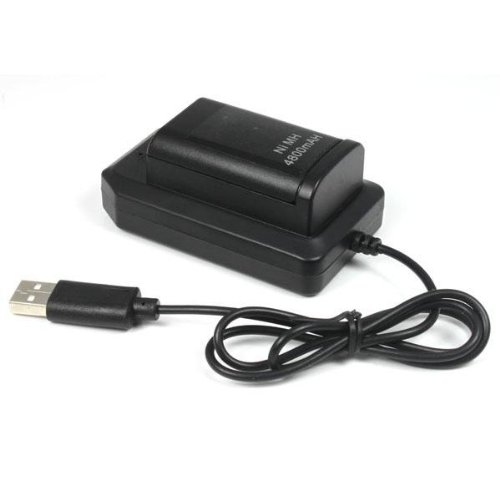
OSTENT Charger Dock + Battery for Xbox 360 — Single-pack USB dock
The second OSTENT listing is the dock counterpart to its cable kit: a USB charger dock station with a rechargeable battery for the 360 wireless controller, in black. One pack, one small dock, USB power — this is the minimal viable revival for the household with a single 360 controller that serves as occasional gamepad and long-serving media remote. The dock gives the controller a defined home and a standing charge, so the one controller is always the ready controller, without the two-pack ceremony of the bigger kits.
USB powering is the quiet convenience: the dock can draw from the console itself or any household USB source, sparing a wall socket in the crowded strip behind a television. The limits mirror the cable kit’s in reverse — no spare pack, no mid-game tether — so the choice between OSTENT’s two listings is really a choice about your failure mode. Forget to charge and play solo? Cable kit. Charge faithfully but want a home for the controller? This dock. The guide keeps both because households honestly divide that way.
The little dock also suits a second location: the spare room, the holiday home, the caravan — anywhere a single 360 lives a quieter life and a full two-pack station would be ceremony without audience. USB powering helps there too, since the dock can sip from whatever television or console USB the room offers. Retro hardware spreads across a household’s geography over twenty years, and charging should follow it in appropriately sized instalments rather than demanding every controller report to one central station.
- Contents stated in title: USB charger dock station plus rechargeable battery
- Controller named in title: Microsoft Xbox 360 wireless controller
- Colour in title: black
- Dock power in title: USB
- Capacity figure in title: Not stated in the listing title — verify with the maker’s documentation
- Pack count: one, by the listing’s contents
Strengths
- Smallest dock footprint in the guide for a single controller
- USB power frees a wall socket behind the television
- Controller gains a home and a standing charge
Trade-offs
- One pack — a flat pack still ends the session
- No cable for mid-play rescue
- Minimal kit for a household that may grow a second controller
Best for: a one-controller 360 doing media-remote and occasional gaming duty in the living room
Not suited for: a retro party setup where controllers rotate faster than packs refill

4800mAh Battery Charger Kit for Xbox 360 — LED-indicated dual kit
This kit’s listing adds two stated details the other docks leave out: an LED indicator on the dual charging station and fast charging of both batteries at once, alongside its pair of 4800mAh packs for the 360 controller. The LED sounds minor until you have lived with an indicator-free dock, guessing whether a pack is charging, full or badly seated. A light that answers that question at a glance converts the dock from furniture into an instrument, and for households where several people swap controllers, that shared visibility prevents the classic grab-a-dead-controller failure.
Structurally it joins the two-pack rotation family with the lead pick, and the same reading discipline applies: 4800mAh is the maker’s stated figure, contacts want keeping clean, and packs want seating with a click. Where it earns its separate place is the combination of stated indication and simultaneous charging — both packs genuinely refilling together after a two-player night, with the dock reporting progress. For the games-room shelf that hosts regular two-controller sessions, those two printed details are worth choosing on.
The LED indicator earns one more scenario: the shared house. When controllers are communal property — siblings, flatmates, a games room at a youth club — the dock’s light is a public promise about which pack is ready, sparing everyone the squeeze-and-guess ritual. Public readiness sounds trivial until four people are choosing controllers for a tournament bracket. Kits bought for communal spaces should be judged on exactly that legibility, and on that criterion this kit’s stated indicator is the loudest small feature in the guide.
- Contents stated in title: two rechargeable batteries plus dual charging station dock
- Capacity stated in title: 4800mAh
- Indication stated in title: LED indicator on the dock
- Charging claim in title: fast charging, two batteries at once
- Controller named in title: Xbox 360 controller
- Charge duration in hours: Not stated in the listing title — verify with the maker’s documentation
Strengths
- LED indication ends the guesswork about pack status
- Both packs stated to charge simultaneously
- Two-pack rotation covers regular two-player nights
Trade-offs
- Fast-charging claim is unquantified in the title
- Dock still needs its permanent socket and shelf space
- Newer listing with a shorter track record than the OSTENT gear
Best for: a games-room running regular two-controller 360 nights who wants the dock to report itself
Not suited for: a single-controller drawer where indication and rotation both go unused
Microsoft Xbox 360 Play & Charge Kit (discontinued) — Discontinued original — prose only
This entry carries no link and asks for no money, because Microsoft discontinued the original Play and Charge Kit years ago and no longer sells it. It earns its paragraphs as orientation: the pack-and-cable combination Microsoft designed for the 360 wireless controller defined the category, and every third-party kit in this guide is an interpretation of its choices — a rechargeable shell in the controller’s battery bay, charged by cable or by contacts in a dock. Understanding the original explains why the imitations look the way they do.
Old original kits still circulate second-hand, and the honest guidance is caution: a decade-old rechargeable pack has usually lost much of its capacity, and a bargain original can underperform a fresh third-party pack while costing more for the logo. If a sealed, verifiable original appears at a sane price, a collector may value it; a player who simply wants controllers that work should buy fresh packs from the linked kits above. History is for understanding the shelf, not for stocking it.
There is a preservation angle for the truly dedicated: an original kit, kept with its packaging, documents the platform’s accessory design language — the pack’s sculpting, the cable’s connector, the era’s typography — in a way photographs cannot. Museums of gaming hardware are built from exactly such survivors. That argument justifies a collector’s shelf purchase; it does not change the player’s arithmetic one cent, and this guide keeps the two conversations separate so that neither audience is misled by the other’s reasons.
- Status: discontinued — Microsoft no longer sells this kit
- Format: rechargeable pack plus play-and-charge cable, the original design
- Availability: second-hand only; aged packs lose capacity
- Link: none — prose-only reference entry
- Fit warning: later-generation Xbox kits are a different design and do not fit 360 controllers
- Modern equivalent: the cable and dock kits listed above
Strengths
- The reference design that explains the whole category
- Original fit and finish, where a genuine sealed unit survives
- Useful benchmark for judging third-party interpretations
Trade-offs
- Discontinued — no warranty, no fresh stock, no support
- Second-hand packs are usually capacity-tired by age
- Collector pricing can exceed better fresh alternatives
Best for: a collector or historian of the platform who values the original artefact itself
Not suited for: a working games-room that needs fresh capacity tonight, which the linked kits serve better
Dock, cable or history — which shape does your 360 need?
The architectures answer different failures: docks answer the unready controller, cables answer the mid-session fade, and the discontinued original answers only curiosity. Match the kit to the failure you actually have.
| Pick | Kit shape | Stated contents | Failure it prevents |
|---|---|---|---|
| Rechargeable Battery 2-Pack + Dock for Xbox 360 | 2 packs plus dock | 4800mAh stated | Power cable included |
| KEKUCULL Dual Dock Kit for Xbox 360 | 2 packs plus dock | Capacity not stated | Dual station design |
| OSTENT Cable + Battery Pack for Xbox 360 | 1 pack plus cable | Play while charging | Black finish |
| OSTENT Charger Dock + Battery for Xbox 360 | 1 pack plus USB dock | USB-powered station | Single-controller focus |
| 4800mAh Battery Charger Kit for Xbox 360 | 2 packs plus dock | 4800mAh stated | LED indicator stated |
| Microsoft Xbox 360 Play & Charge Kit (discontinued) | Discontinued original | Pack plus cable design | Prose-only, unlinked |
Why do newer Xbox chargers not fit the 360?
Because Microsoft redesigned the battery bay. The 360 wireless controller carries a removable pack in a compartment shaped for it, while Xbox One and Series X|S controllers use a different compartment, different contacts and different pack shells. A dock moulded for the newer controllers physically cannot seat a 360 pad correctly, and a newer pack will not click into a 360’s bay. The similarity of the controllers’ silhouettes in photographs conceals a mechanical incompatibility that no adapter in this category honestly bridges.
This is why the guide’s admission test — the words Xbox 360 in the listing — matters more than brand reputation. A superb dock from a famous maker, built for Series X|S, is a paperweight to a 360 household, and marketplace search results cheerfully mix the generations because the keywords overlap. Read titles the way this guide does, and let any listing that omits your generation eliminate itself.
Rechargeable packs or AA batteries for a 360 in 2026?
The honest answer depends on session frequency. A controller used weekly earns a rechargeable kit quickly: packs live in the bay, the dock keeps them ready, and the per-session cost falls to electricity. A controller used twice a year for a nostalgia weekend may be served more reliably by fresh AA batteries or modern AA rechargeables, because a dedicated pack left flat for a year ages in the drawer and may greet its annual outing already tired. Lithium and nickel packs alike prefer regular gentle use to long neglect.
There is a middle habit worth adopting either way: whatever you fit, remove it if the controller will sleep for months, store packs partly charged in a cool drawer, and give the kit one full cycle before the big retro night rather than during it. The 360 has survived two decades; its power accessories survive by the same principle — modest, regular attention instead of heroic rescues.
How do you revive a 360 controller that seems dead?
Work the cheap diagnoses in order before replacing anything. Fresh AA batteries first: if the controller wakes on AAs, the controller lives and the rechargeable pack is the corpse, which the kits in this guide exist to replace. If it stays dark, clean the battery contacts in the bay with a dry cloth, check the pack seating for the click that confirms contact, and try the pack in a second controller if the household has one. Most ‘dead controller’ stories end at one of those three steps.
If a new pack also fails, suspect the dock or cable before the controller: try charging the pack by the other architecture — cable if you docked, dock if you cabled — and inspect contacts for the green corrosion that old nickel-based packs can leave behind. A controller that wakes on AAs but refuses every pack has a bay-contact problem a careful clean usually cures. Only after all of that should a replacement controller enter the conversation.
Setting up retro night for guests who have never held a 360
The charged controller is only the beginning of hospitality. Guests meeting the platform for the first time need the dock’s readiness to be visible — controllers sitting in their station, lights saying what they say — so that picking one up feels like being handed something prepared rather than archaeological. Charge both packs the day before, keep a set of ordinary AAs in the drawer as the silent insurance nobody mentions, and put the play-and-charge cable at the main chair for the guest whose session runs long. The technology disappears, and what remains is the game, which was the point of keeping a 360 alive at all.
Expect the questions, too: why the packs are not the modern kind, why the dock is not the one from the games shop. The answers — a redesigned battery bay, a discontinued original, a third-party ecosystem keeping the platform breathing — are a small history lesson that tends to delight exactly the guests retro night is for. A platform survives on stories as much as on charge cycles, and a well-kept charging station quietly tells the best one: this machine is still in service here.
How do you store a 360 collection between seasons of play?
Storage is where retro kits go to die, usually in a hot loft with the packs left inside the controllers. Do it properly instead: packs out, stored partly charged in a cool drawer, controllers clean and dry, dock contacts covered from dust, cables coiled loosely rather than kinked around the dock. A note in the drawer — what is charged, what is tired, when it was last cycled — turns next season’s revival from an investigation into an unpacking. Ten minutes of method in autumn buys an evening of play in spring.
Give the stored kit one mid-season cycle if the gap runs long: an hour of play, packs back to part charge, everything away again. Rechargeable cells are perishables wearing electronics’ clothing, and the calendar, not the session count, is their main enemy at this age. Owners who accept that rhythm keep a 360 fleet alive indefinitely on occasional fresh packs; owners who demand the drawer be a time capsule meet the capsule’s terms instead, and the terms are flat batteries.
What should you pay for 360 charging in a third-party market?
Price discipline in a discontinued ecosystem follows stated contents, not brand nostalgia. A kit’s value is its packs, its dock or cable, and its maker’s willingness to print specifics — the listings in this guide that state capacities and contents are the ones a buyer can compare, and comparison is the only protection a market without an official option offers. When two kits state the same contents, the cheaper one is not automatically the wiser buy, but the burden of proof sits on the dearer one to state what its premium purchases.
Beware the two pricing traps at the market’s edges. At the bottom, listings that omit the generation or blur it with words like ‘for Xbox’ are selling the incompatibility this guide opened with. At the top, second-hand original kits priced as collectibles are selling history to players who need capacity. The middle — fresh third-party kits with the 360 named in the title — is where the honest money goes, and it is a narrower, calmer market than the search results suggest.
How long should a 360 pack last between charges?
Listings in this category rarely promise session hours, and the titles in this pool do not — which is why the spec lists record charge time and endurance as not stated rather than borrowing numbers from other products. In practical terms, a fresh third-party pack in good health carries a long evening of play, and the two-pack rotation exists precisely so that endurance stops being a question: when one pack fades, the other is waiting on the dock. Households that find themselves timing packs have usually outgrown a one-pack kit.
Endurance fades with age and with storage habits. A pack kept on its dock, topped and ready, lives a different life from one left flat in a drawer between summers. If a once-strong pack now fades mid-evening, that is the normal arithmetic of rechargeable age, not a defect worth a feud with the maker — replacement packs are the consumable heart of this whole category, priced accordingly.
Can you charge 360 packs from the console’s USB?
The USB-powered OSTENT dock in this guide is built for exactly that arrangement, drawing from the console or any household USB source, and cable kits similarly sip from USB power. The convenience is real — no extra wall adapter behind the television — with one behavioural note: a console that sleeps fully may stop feeding its USB ports, so a pack left ‘charging’ overnight on a sleeping console can wake uncharged. Check your console’s standby power settings, or feed the dock from a small wall adapter, if overnight readiness matters.
Heat and patience complete the picture. Charging beside a warm console is harmless at these gentle rates, and gentle is the operative word: USB-fed retro kits refill across hours, not minutes, whatever a title’s enthusiasm suggests. Plan the rotation so the hours exist — packs onto the dock when the session ends, not when the next one is announced — and the modest power stops mattering entirely.
AA rechargeables as the understudy
Every 360 household should keep one understudy ready: a set of modern AA rechargeables and their charger, or even a packet of quality disposables in the drawer. The understudy covers the nights the packs are all flat, the controller borrowed at short notice, and the diagnostic moment when a controller’s health is in question — if it wakes on AAs, the controller lives. No dedicated kit, however good, removes the value of a universal fallback that fits every controller ever made for the platform.
The understudy also disciplines the main cast. Knowing AAs wait in the drawer removes the panic from a fading pack and lets the household replace packs on evidence rather than urgency. Keep the AAs themselves fresh — rechargeables self-discharge across months, so the drawer set joins the seasonal kit check alongside the packs. A fallback that is itself flat is a plot twist nobody ordered.
Reading a third-party retro listing like a sceptic
Retro accessory listings reward a particular reading order: generation first, contents second, numbers third, adjectives never. Generation — the words Xbox 360 in the title — is the gate this guide applied to build its pool. Contents tell you the architecture you are actually buying: packs counted, dock or cable named, power source stated. Numbers like the 4800mAh printed by two listings here are the maker’s own and should be weighed as claims, not measurements. Adjectives — premium, advanced, pro — are weather, and a sceptic dresses for the facts.
Apply the same order in reverse when something arrives wrong: if the kit does not fit, the generation was misread; if a piece is missing, the contents were; if endurance disappoints, a number was believed too warmly. Most retro-accessory regret decomposes into one of those three reading errors, which is good news, because reading errors are free to fix on the next order and expensive only in postage on this one.
The 360 as media remote: a quieter charging life
Many surviving 360s no longer game nightly; they serve as the household’s DVD and streaming box, with one controller living beside the sofa as a remote with ambitions. That controller’s charging life is different — long idle weeks punctuated by film nights — and it punishes packs left flat between uses while rewarding a small dock that keeps one pack standing ready. The OSTENT USB dock in this guide is sized for exactly that biography, and households should buy for the biography their console actually has.
Idle months also argue for the drawer discipline this guide described: pack out or pack maintained, never pack forgotten inside a controller in a warm cabinet. A media-remote 360 woken for a family film night deserves a controller that wakes with it, and that outcome is decided by storage habits formed months earlier. Retro ownership is mostly stewardship, and stewardship is mostly putting things away properly.
What if a controller’s battery bay is damaged?
Springs bend, contacts corrode and the little door over the bay loses its click across twenty years of thumbs. Before pronouncing a controller dead, inspect the bay under a good light: a contact bent flat can often be coaxed back with a fingernail, corrosion yields to a dry cloth and patience, and a door that will not latch can be persuaded by the pack’s own fit in many cases. These are gentle, reversible attentions, appropriate to hardware that has earned care rather than force.
If the bay is truly gone, the honest options narrow to a wired controller for the sessions that matter, or a replacement 360 controller from the second-hand market — bought, like the chargers in this guide, by reading its listing for specifics rather than adjectives. The platform’s long life means spares circulate; the discipline that finds a good one is the same sceptical reading this article has practised from its first page.
Controllers per household: how many is enough?
The platform’s party games assume four controllers, and a household that hosts them should count its charging against that ceiling rather than against its everyday two. Four controllers do not require four packs in constant rotation — sessions are occasional, and two packs charging while two play covers most evenings — but they do require the dock habit to be household law rather than one person’s preference, because the fourth controller is always the one somebody left in a drawer in March.
Test the full set before the occasion, not during it: every controller awake, every pack seated, the AA understudy counted. Retro hospitality fails in the first five minutes or not at all, and the five minutes are decided by preparation measured in days. The hosts who make it look effortless are simply the hosts who ran the checklist on Thursday.
For the solo player, the arithmetic inverts: one controller, one pack, one cable or small dock, and a spare set of AAs constitute complete infrastructure. Spend the savings on the games. Charging, like every support system in this guide, should be sized to the life it serves and then forgotten — forgotten being the highest compliment infrastructure can earn.
What do the packs inside these kits actually contain?
Third-party 360 packs are rechargeable cells in a shell shaped to the controller’s bay, with contacts placed to meet the dock or the console-era charging points. The shell is the engineering: it must click home with the original’s tolerances, present its contacts exactly where the dock expects them, and survive being swapped by excited hands for years. Makers who tooled that shell well — the long-running names in this guide — are selling fit as much as chemistry, and fit is what the buyer actually experiences.
Chemistry ages on its own schedule regardless of fit, which is why packs are the consumable heart of the ecosystem and why a fresh mid-priced pack outperforms a tired famous one. Judge a kit by the freshness and stated contents you receive, keep the receipt’s date in mind as the pack’s birthday, and expect to refresh packs across the years while docks and cables serve on. That expectation, set correctly at purchase, converts future fading from a grievance into a maintenance line item.
Handle the cells with the ordinary respect all rechargeables deserve: no punctures, no fires, no charging of a pack that has swollen or been crushed. A damaged pack leaves service immediately and goes to battery recycling by the routes your local authority publishes — the one safety sentence that outranks every nostalgia in this article.
Keeping the whole 360 shelf alive
The chargers in this guide are one organ of a larger preservation project. The console wants ventilation and dust kept from its vents; the discs want sleeves and shade; the controllers want the battery discipline this article describes; and the whole shelf wants to be played occasionally, because machinery that runs ages more gracefully than machinery that only sits. A monthly retro night is not indulgence — it is the maintenance schedule wearing its best clothes.
Document the shelf as you go: which packs are fresh, which controller has the sticky bumper, which cable is the good one. A note in the drawer serves the household’s memory the way the dock serves the controllers’ readiness, and it serves the next owner too, because well-kept retro hardware tends to be inherited, gifted and rehomed rather than binned. Stewardship includes paperwork, even when the paperwork is a pencil note.
And when something finally fails beyond the cheap diagnoses, replace the component rather than the platform. The ecosystem this guide shops in — fresh packs, honest docks, cables by the pair — exists precisely so that a twenty-year-old console’s failures arrive one small, solvable piece at a time.
A note on collecting versus playing
This guide has kept the two audiences separate throughout, and the closing note belongs to both. Collectors preserve the platform’s artefacts — the discontinued Microsoft kit among them — and their care keeps the history legible. Players preserve the platform’s purpose, and their fresh third-party packs keep the games lit. Neither is the other’s enemy; a healthy retro scene needs the sealed box on the shelf and the worn controller on the dock, each valued for what it is.
Confusion between the two is the only real waste: the player who pays collector prices for tired capacity, the collector who opens a sealed kit to charge a controller a fresh pack would serve better. Decide which purchase you are making before you make it — the sentence this guide has applied to chargers applies, in the end, to the whole hobby.
Whichever side of the line your purchase falls, the platform thanks you the same way: by working. A 360 that boots to a dashboard, controllers awake in every hand, is the argument for all of it — the docks, the packs, the notes in drawers — made more eloquently than any guide can manage.
One last check before game night
Run the whole fleet once, a day early, the way a theatre runs a technical rehearsal: every controller woken, every pack seated and swapped, the cable kit tested at the main chair, the AA understudy counted in its drawer. Ten unhurried minutes on the quiet day purchases the one thing retro night cannot buy at any price once the guests arrive — a beginning without a hiccup, where the first thing anybody touches is a working controller and the first thing anybody says is about the game. Preparation that complete does not feel like effort; it feels like the console simply being young again.
How do you set up a 360 charging station that stays ready?
Give the dock a permanent home within reach of where controllers are put down, not where they are used — readiness is a storage habit before it is a technology. Seat both packs, confirm each dock light or contact behaves as its listing describes, and run one full charge before the first session so the rotation starts honest. Label nothing, complicate nothing: controllers return to the dock by the same instinct that returns keys to a hook, and the household learns the ritual in one evening.
Then maintain the ritual lightly. Wipe dock contacts with a dry cloth every few months, reseat any pack that was knocked, and keep the play-and-charge cable — if your kit has one — coiled at the main playing chair rather than in the dock’s drawer. Before a planned retro night, glance at the dock the day before, not the hour before. The entire philosophy of this category fits in that glance: small checks, early, instead of large disappointments, late.
What mistakes do 360 owners make when buying chargers?
The expensive mistake is generational: ordering a handsome Series X|S or Xbox One dock for a 360 controller, discovering the mechanical mismatch at unboxing, and paying return postage for a lesson this guide gives free — if the listing does not name the 360, it is not for the 360. The second mistake is trusting a second-hand original Microsoft kit to outperform fresh third-party packs; age taxes rechargeable cells regardless of the logo on the shell, and discontinued means discontinued.
Owners also buy one architecture and resent it for the other’s virtues: the dock owner cursing the mid-session fade a cable prevents, the cable owner cursing the tether a dock avoids. Decide which failure you actually suffer before choosing. Finally, do not store packs fully flat for months or controllers in hot attics; the 360 earned its longevity, and its batteries ask only for the same cool, dry, occasionally exercised retirement.
Final Recommendation
Two-controller households should take the dual dock kits — the lead 2-pack for its complete stated contents, the LED-indicated kit where visible charge status matters, the KEKUCULL as the comparison alternative — while solo players should choose between OSTENT’s cable kit for mid-session rescues and its USB dock for a single controller’s tidy home. The Microsoft original belongs in the platform’s history, honoured here in prose and sensibly left out of the shopping basket.
Whichever kit you fit, seat the packs until they click, glance at the dock the day before game night, and keep one set of ordinary AAs in the drawer as the final referee — because a twenty-year-old console still delivering party nights deserves power habits as reliable as it has been, and a charged controller in every hand is how those nights begin.
Frequently Asked Questions
Will an Xbox Series X|S charging dock work with my 360 controllers?
No. The battery compartments, pack shapes and contacts differ between generations, and docks moulded for Series X|S or Xbox One controllers cannot seat a 360 controller correctly. Buy only kits whose listings name the Xbox 360 controller, as every linked pick in this guide does, and treat generational silence in a listing as a no.
Does Microsoft still sell the original Play and Charge Kit?
No — the original kit is discontinued, which is why it appears in this guide as an unlinked, prose-only reference. Surviving units are second-hand, their packs aged accordingly. Fresh third-party kits are the practical purchase for controllers that need to work, however fond the platform’s memory of the original is.
How many packs does a household need?
One per controller in regular use, plus the rotation logic of a dual dock if sessions run long: two packs across two controllers, swapped as needed. A single controller used occasionally is honestly served by one pack and a cable or small dock. Buy for your session pattern, not for a hypothetical tournament.
Why does my new pack seem to die quickly?
First, seat it fully — a pack resting shy of its contacts charges partially and dies young-looking. Second, give a new pack a couple of full cycles before judging it; rechargeable cells settle into their capacity. Third, check the dock contacts and try the other charging route. A pack still fading after that is a warranty conversation, in that order.
Can I leave packs on the dock permanently?
For ready households, that is the dock’s purpose, and modern kits tolerate standing duty. For long storage between seasons, remove packs and store them partly charged in a cool drawer instead, which ages cells more kindly. Match the habit to the calendar: docked for the season of play, drawer for the season of rest.
Are the 4800mAh figures comparable between brands?
Treat them as each maker’s own statement rather than a laboratory standard. Two listings here print 4800mAh and others print nothing, and this guide repeats figures only where titles state them. Judge kits primarily on architecture, stated contents and fit for your controllers; capacity claims in the retro third-party market reward scepticism.
Related Guides
Retro power sits beside the modern kit. For the other batteries that must never be flat, compare Best chargers for cell phones when you have no power. For the modern USB-C shelf beside the retro one, see Best android wall adaptive fast chargers. And for cable-free charging elsewhere in the house, read Best wireless chargers through thick case dual coils.


