What's inside
- Choosing a First Tablet for a Two-Year-Old Who Mostly Watches Downloaded Shows
- Key Takeaways
- Quick Picks
- How Did We Choose These Six Tablets?
- What Size Screen Suits a Toddler, Really?
- Why Do Downloads Beat Streaming for This Age Group?
- How Much Storage Does a Download Library Actually Need?
- Which Parental Controls Matter Most at Age Two?
- What Should a Travel-Day Routine Look Like?
- How Do the Six Picks Compare Side by Side?
- How Do You Load Netflix Downloads Before a Trip?
- How Should You Set the Tablet Up Before the First Handover?
- Which Mistakes Do Parents Make With a First Toddler Tablet?
- Final Recommendation
- Frequently Asked Questions
- Related Guides
As an Amazon Associate I earn from qualifying purchases. This post may contain affiliate links at no extra cost to you.
gizmoverdict.com is reader-supported. When you buy through links on our site, we may earn an affiliate commission.
Choosing a First Tablet for a Two-Year-Old Who Mostly Watches Downloaded Shows
The search for the best tablets for 2 year olds down load netflix usually starts in a departure lounge, a waiting room or the back seat of a car, and it usually starts with one practical fear: the Wi-Fi will vanish and the cartoon will stop. Offline downloads solve that fear, but only when the rest of the tablet suits a child who is two. A two-year-old does not need processing power, a stylus or a dazzling panel. A two-year-old needs a screen that survives being dropped off a highchair, controls a parent can lock down in minutes, a battery that outlasts a journey, and a case chunky enough for small hands to grip without covering the picture.
One honest point belongs at the very front, because it shapes every pick below. The manufacturers of the two Amazon tablets in this list publish an age range of three to five years, and several other makers aim their software at three and up as well. No tablet maker in this roundup certifies its device for a child of exactly two. That does not make the search pointless; it means a parent of a two-year-old is buying slightly ahead of the printed label, choosing hardware for its bumper, its locks and its download behaviour, then supplying the supervision and the short sessions that the age label quietly assumes an older child needs less of. Read every recommendation here through that lens.
Screen time guidance for this age is restrictive for good reason, and paediatric guidance in general terms encourages very limited, co-viewed screen use for children under about two and a half, favouring shared watching over solo scrolling. This guide will not dress a tablet up as a developmental tool. It treats the tablet as what it honestly is in most homes: a travel and waiting-room device that plays downloaded episodes and simple picture books while an adult stays close, sets a timer, and decides when the session ends. Bought for that job, with the locks switched on, these six machines do it well at very different prices and sizes.
Downloads deserve one clarification before the picks. Netflix allows downloads inside its own app on supported tablets, and the episodes then play without a connection until their licence window closes. On Amazon’s Fire Kids tablets, a parent installs Netflix through the adult profile and then grants the child profile permission to use it, because the child profile is walled off by design. On the Android tablets here, Netflix comes from the Play Store in the ordinary way, and the maker’s parental-control layer sits on top. Either route works on a plane. Neither route works if you first open the app at the gate, so the how-to section later walks through loading episodes at home, testing them in aeroplane mode, and checking expiry dates before a trip.
Key Takeaways
- Every tablet in this list is officially aimed at children aged three and older, so a two-year-old’s parent is buying the case, the locks and the battery, then supplying closer supervision than the box assumes.
- Offline Netflix viewing works on all six picks, but on the two Amazon models a parent must install the app in the adult profile first and share it into the child profile deliberately.
- Storage fills faster than families expect: the 32GB models here hold a sensible holiday library, yet a card slot or a ruthless delete-before-you-download habit matters more than screen size.
- The Contixo 7 bundle is the only pick that arrives with headphones and a carry sleeve in the box, which quietly removes two extra purchases from a travel shopping list.
- A bumper case with a handle or kickstand is not decoration at this age; it is the difference between a tablet that survives toddlerhood and one with a cracked corner by Christmas.
- Set the session timer before the first handover, not after the first argument, because every control suite here works better as a routine than as a punishment.
Quick Picks
| Pick | Badge | Why it earns its place |
|---|---|---|
| Amazon Kids Tablet 8 | Best compact Amazon pick | The smaller Fire Kids model pairs a soft Paw Patrol bumper with a year of Kids+ content, and its size suits short legs and small laps on crowded transport. |
| Amazon Kids Tablet 11 | Best big-screen Amazon pick | A larger canvas for shared picture books and two-up watching with a sibling, wrapped in the Rescue bumper and the same year of included Kids+ access. |
| Contixo 10-Inch Kids Tablet | Best open Android option | A full Android tablet in a kickstand case with a stylus, so Netflix comes straight from the Play Store and the child is not confined to one content subscription. |
| Contixo 7-Inch Learning Tablet Bundle | Best travel bundle | Headphones and a sleeve bag ride along in the box, the 7-inch body disappears into a change bag, and trial learning apps widen the offline library. |
| PEICHENG Kids Tablet 7 | Best small-budget starter | A simple 7-inch Android 12 tablet with dual cameras and a shockproof case, bought for journeys rather than for any grand educational promise. |
| Dragon Touch Kids Tablet 10 | Best strap-and-stand pick | The shoulder strap and pre-installed KIDOZ environment make this 10-inch model the easiest to carry between car, café table and grandparents’ house. |
How Did We Choose These Six Tablets?
The first filter was the download test in spirit: could a parent plausibly load Netflix episodes onto this machine at home and play them later with no network at all? That single question removed adult tablets with no child layer and toy tablets with closed systems that cannot run Netflix at all. What survived falls into two families. Amazon’s Fire Kids line offers the deepest parental controls and a bundled content year, inside a garden whose gate the parent holds. The Android models from Contixo, PEICHENG and Dragon Touch offer ordinary Play Store freedom, wrapped in foam cases and simplified launchers of varying polish.
The second filter was physical. At two, a tablet is dropped weekly, sat on monthly and occasionally thrown in protest. Every pick here ships with a protective case as part of the product rather than as an accessory hunt, and the spec boxes note the case style because a kickstand, a handle and a shoulder strap produce genuinely different days. A stand matters for shared watching at a table. A strap matters for a child who insists on carrying the device personally. Thick bumpers matter most of all, because the screen underneath is ordinary glass in every price band represented here.
The third filter was honesty about software. Listings for children’s tablets groan with claims about learning outcomes. This guide repeats none of them. Letters, numbers, shapes and colours appear in the Amazon listing titles because the included Kids+ year genuinely contains books and videos on those topics; whether a particular two-year-old absorbs anything from them depends on the adult beside them, the time of day and the child’s mood, none of which a review can promise. We judged content libraries by breadth and download behaviour, controls by how completely a parent can fence them, and hardware by whether it will still be working when the child turns three and the manufacturer’s age label finally fits.
What Size Screen Suits a Toddler, Really?
Seven and eight inches sound small beside the 10-inch models, yet for a two-year-old the smaller screens carry real advantages. The whole device weighs less in a lap, two small hands can reach around a narrower case, and the picture sits closer to the child’s face at a natural holding distance, so a modest resolution stops mattering. Parents also report an unglamorous benefit: a 7-inch tablet fits the seat-back pocket, the change bag and the glove box without negotiation. For pure downloaded-cartoon duty on transport, small is not a compromise. It is the design working as intended.
The case for 10 and 11 inches rests on sharing. A bigger screen lets a parent and child read a picture book together without crowding the page, lets two siblings watch one episode without a territorial dispute, and turns the tablet into a small television on a kitchen table during a rainy afternoon. The costs are weight, price and a wider body that a toddler carries in two hands like a tray. Families buying one tablet for a two-year-old who will grow into it, and who expect an older sibling to borrow it, usually land on the larger size and accept the tray-carry phase.
Weight hides inside the size decision and deserves daylight. The case, not the tablet, contributes much of what a toddler actually lifts, and a thick bumper on a 7-inch body can outweigh a slim case on a larger one. Judge the combination, not the bare specification: hold the cased device at the angle a child holds it, for the length of an episode, and your forearm will deliver a verdict no spreadsheet can. Shops rarely allow that test with a toddler present and impatient, which is another argument for the smaller Amazon and Contixo models as first purchases — their cased weight forgives a wrong guess, while an 11-inch tablet in a heavy bumper punishes one every single day until the child’s arms catch up with the ambition of the purchase.
Resolution deserves a calming word. None of these screens will trouble a child who watches animation at arm’s length, and chasing pixel counts in this category wastes money that a spare charging cable or a second case would spend better. Brightness and viewing angle matter more in practice, because toddlers tilt screens at angles no adult would tolerate and watch in bright cars. The IPS panels named in several listings hold their picture at those slants, which is the specification that actually reaches a two-year-old’s eyes.

Amazon Kids Tablet 8 — Best compact Amazon pick
The 8-inch Fire Kids tablet is the default answer for many families, and the reasons are structural rather than glamorous. Amazon builds the child profile first and the tablet second: a parent creates the profile, sets an age filter, approves each app, and hands over a device whose home screen contains only what was granted. Netflix fits into that structure neatly once a parent installs it on the adult side and shares it across, after which downloaded episodes sit inside the fence like everything else. The included year of Kids+ fills the same fence with early-learning books, apps and videos covering letters, numbers, shapes and colours, so a flight library can mix a downloaded cartoon with a read-along book without any extra subscription decision at the airport.
The Paw Patrol soft bumper sounds like a marketing flourish until you watch a two-year-old carry a tablet. The raised, squishy edges give fingers something to close around, cushion the corners that meet the floor first, and keep the screen off a table surface when the device lands face down. At eight inches the whole package stays light enough for a small lap across a long drive, and the screen is big enough for a parent to share a picture book at bedtime in a hotel room. For a family buying one device mainly for journeys, this balance of size, fence and padding is the one the rest of the list has to beat.
Its limits follow from its garden walls. Everything a child sees must be approved, which protects a two-year-old beautifully and mildly irritates a parent who wants to add an app quickly in a queue. Storage on the base configuration also fills quickly once Netflix downloads, Kids+ books and a camera roll of toddler photography compete, so the download library needs the occasional clear-out described later in this guide. Neither limit is hidden, and both are the price of the strongest control suite in this roundup.
- Display: 8-inch screen in a soft Paw Patrol bumper case
- Included content: 1 year of Amazon Kids+ with books, apps and videos
- Manufacturer age guidance: ages 3-5, per the listing title
- Controls: Amazon child profile with parent-approved content sharing
- Offline viewing: Netflix installable by a parent, downloads playable in the child profile once shared
Strengths
- The child profile model means a two-year-old cannot wander into a browser, a shop or an unapproved video by tapping hopefully.
- A year of included Kids+ content removes the what-do-we-put-on-it problem for the first twelve months of ownership.
- The bumper’s raised corners and grippy texture suit hands that are still learning to carry glass objects.
Trade-offs
- The printed age range starts at three, so parents of two-year-olds are deliberately buying ahead of the label.
- Sharing each new app from the adult profile adds a small chore every time the library grows.
- Downloaded shows and books compete for modest storage, which rewards families who prune the library monthly.
Best for: a family that wants the tightest fence and the easiest first-year library for travel watching.
Not suited for: a household that shares one tablet between a toddler and an older child who chafes at profile approvals.

Amazon Kids Tablet 11 — Best big-screen Amazon pick
Everything said about the smaller Amazon model’s control structure applies here, because the software, the Kids+ year and the parent dashboard are the same system wearing a larger screen. The difference is the eleven inches themselves, and they change the tablet’s social life. A picture book page can hold a parent and child side by side without either leaning in. Two siblings can share one downloaded episode on a train table with the device propped between them. A grandparent reading over a video call can actually see the page the child is pointing at. For a two-year-old growing fast, with a sibling in the picture, the larger canvas earns its keep in shared moments rather than solo ones.
The Rescue-themed soft bumper repeats the smaller model’s protective logic at the bigger size, and it needs to: a larger tablet carries more momentum into a fall and presents a wider target to a swinging toy. The case keeps the corners padded and the grip forgiving. Parents should still expect the two-handed tray carry from a child this age, and should treat this model as a device that travels in an adult’s bag and appears at the table, rather than one a toddler totes personally around the house.
Netflix handling mirrors the 8-inch model exactly: install in the adult profile, share into the child profile, download over home Wi-Fi, then play offline until each title’s window closes. The larger screen makes downloaded animation look grander, which cuts both ways; a bigger, brighter picture is harder to wind down from at bedtime, so the session timer and the daily routine around it matter even more here. Amazon’s bedtime and goal settings inside the parent dashboard help, provided they are configured on day one rather than discovered during a dispute in week three.
- Display: 11-inch screen in a Paw Patrol Rescue soft bumper case
- Included content: 1 year of Amazon Kids+ with books, apps and videos
- Manufacturer age guidance: ages 3-5, per the listing title
- Controls: Amazon child profile with parent-approved content sharing
- Offline viewing: Netflix downloads playable inside the child profile once a parent shares the app
Strengths
- Shared reading and two-child watching feel comfortable instead of cramped, which suits how toddlers actually use screens.
- The same deep parental controls as the smaller model, with no learning curve for families already in Amazon’s system.
- The included Kids+ year scales gracefully as the child grows toward the printed age range.
Trade-offs
- A two-year-old carries it like a serving tray, so it lives in the adult’s bag between sessions.
- The grander picture can make ending a session harder, putting more weight on timers and routine.
- Families paying for screen size a solo toddler cannot yet exploit may find the 8-inch model covers the same journeys.
Best for: homes with siblings, shared story time and a tablet that will still fit the child at four.
Not suited for: a parent who wants the toddler to carry the device independently from room to room.

Contixo 10-Inch Kids Tablet — Best open Android option
Contixo takes the opposite route from Amazon: this is an ordinary Android tablet wearing a kid-proof case, with parental controls and a curated layer of games and educational apps on top of an open system. Netflix therefore arrives the straightforward way, installed from the Play Store under the parent’s account, and downloads behave exactly as they do on any Android device. Families who already live in Google’s ecosystem, or who resent subscription gardens on principle, tend to prefer this arrangement even though the fence needs more manual assembly.
The hardware story is written for sharing and for growth. Ten inches of screen sit in a case with a kickstand, so the tablet stands on a tray table or kitchen counter for hands-free watching, and the included stylus waits in its slot for the scribbling stage that arrives somewhere around the third birthday. Thirty-two gigabytes of storage holds a respectable offline library for a holiday, and the exclusive games and educational apps preloaded by Contixo give a parent something to offer when the downloaded episodes run out over a long travel day.
Honesty requires noting what the open route asks of the parent. Android’s own parental tools plus Contixo’s controls can fence this tablet well, but the fence is assembled rather than automatic, and a technically confident two-year-old with unsupervised time will eventually find the seams in any assembled fence. The sensible pattern is the same one recommended throughout this guide: the tablet appears for journeys and set sessions, lives on a high shelf otherwise, and gets its settings reviewed whenever a new app joins the library.
- Display: 10-inch screen in a kid-proof case with kickstand
- Storage: 32GB, per the listing title
- Extras in the box: stylus included, per the listing title
- Software: Android with parental controls and preloaded games and educational apps
- Offline viewing: Netflix from the Play Store, downloads stored on the device
Strengths
- Open Android means Netflix, a family music app and a library reading app coexist without subscription walls.
- The kickstand turns tray tables and café counters into stable shared screens.
- A bundled stylus gives the purchase a second life when scribbling and tracing begin.
Trade-offs
- Parental controls require deliberate setup, and the defaults deserve a full review before the first handover.
- Thirty-two gigabytes is a holiday library, not an archive, so downloads need rotating.
- The 10-inch body is a two-handed carry for a child of two.
Best for: a Google-ecosystem family that wants one open tablet to grow from cartoons into early drawing.
Not suited for: a parent who wants the control fence finished before the box is even opened.

Contixo 7-Inch Learning Tablet Bundle — Best travel bundle
Most kids’ tablets are sold as a device and leave the journey accessories as homework. This Contixo bundle reverses the order: the box contains the 7-inch tablet in its kid-proof case with kickstand, a pair of headphones and a sleeve bag, which together cover the three moments a travel tablet actually faces — watching, listening without disturbing a carriage, and being carried through an airport by an adult with full hands. For a family assembling a flight kit from nothing, that completeness is the product.
The tablet itself runs Android 13 with parental controls, aimed by its maker at ages three to seven, and it carries trial access to the Epic reading service and the Lingokids learning app alongside its preloaded content. Trials expire, and parents should treat them as auditions rather than as part of the purchase’s lasting value. What lasts is the Netflix route: install from the Play Store, download episodes and films at home, and let the headphones turn a downloaded cartoon into a private cinema that the passenger in the next seat never hears. At seven inches, the screen suits exactly that solo, close-up watching.
Smallness is also the ceiling here. A 7-inch display shared between a parent and child for a picture book feels like reading through a letterbox, and two siblings sharing one episode will negotiate elbow room the whole journey. The bundle is therefore best understood as the toddler’s personal travel screen, excellent at its one job, rather than as the family’s shared story-time device. Bought with that expectation set, it disappoints nobody.
- Display: 7-inch screen in a kid-proof case with kickstand
- Bundle contents: headphones and sleeve bag included, per the listing title
- Software: Android 13 with parental controls; trial Epic and Lingokids apps
- Manufacturer age guidance: ages 3-7, per the listing title
- Offline viewing: Netflix from the Play Store, downloads stored on the device
Strengths
- Headphones in the box end the aeroplane-volume problem before it starts.
- The sleeve bag gives the whole kit one grab-and-go home in a change bag or carry-on.
- Seven inches disappears into luggage that a 10-inch tablet would dominate.
Trade-offs
- Shared reading on a 7-inch page is cramped for an adult and child together.
- The named learning-app trials run out, so their value is a taste, not a library.
- Siblings sharing one small screen should expect territorial negotiations.
Best for: a family building a complete flight kit in one purchase for one toddler.
Not suited for: bedtime story sharing, where a parent and child crowd around one page nightly.

PEICHENG Kids Tablet 7 — Best small-budget starter
The PEICHENG occupies the sensible bottom rung of this ladder: a 7-inch Android 12 tablet with an IPS screen, 4GB of RAM, 32GB of storage, dual cameras, Bluetooth and a shockproof case, sold for the price band where a cracked screen is an annoyance rather than a financial event. For a first tablet handed to a two-year-old — a child whose grip, temper and aim are all works in progress — there is a calm logic in starting with the machine whose loss would hurt least while the family’s tablet habits form.
Performance expectations should be set to the job. Downloaded Netflix episodes, simple picture apps and the toddler camera experience — photographing the cat, the floor and one’s own ear at close range — are well within this hardware’s comfort. The IPS panel holds its colours when the tablet tilts in small hands, and the parental controls cover the essential fencing: app approval, time limits and a child-facing launcher that keeps the wider system out of casual reach. What the modest specification will not do is age gracefully into heavier games as the child grows, and families should buy it as a two-year device rather than a four-year one.
The dual cameras deserve their sentence because toddlers adore them beyond all proportion to their quality. A two-year-old given a camera button becomes a documentary maker of household life, and the resulting blurry archive is, for many parents, the unexpected treasure of the whole purchase. The shockproof case, meanwhile, is the feature that decides whether that archive keeps growing; it wraps the corners and edges in the material that meets the floor first.
- Display: 7-inch IPS screen
- Memory and storage: 4GB RAM, 32GB storage, per the listing title
- Software: Android 12 with parental control, per the listing title
- Cameras: dual cameras, per the listing title
- Case: shockproof case included, per the listing title
Strengths
- The gentlest financial risk in the list for a first device in unpredictable hands.
- Dual cameras feed the toddler photography phase that no listing ever advertises properly.
- Thirty-two gigabytes is enough for a rotating library of downloaded episodes.
Trade-offs
- Modest hardware will feel its age sooner as apps grow heavier over the years.
- The control layer covers the essentials without matching Amazon’s depth.
- Seven inches suits solo watching and strains at shared story time.
Best for: a cautious first purchase while a family learns its own tablet rules.
Not suited for: a buy-once plan that expects the same device to serve happily at age five.
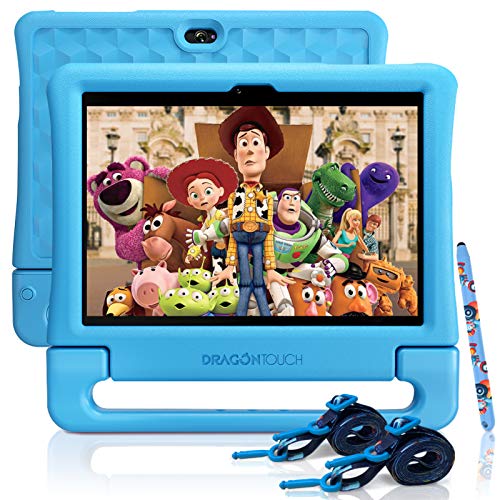
Dragon Touch Kids Tablet 10 — Best strap-and-stand pick
Dragon Touch’s 10-inch model thinks hardest about movement. Its kid-proof case adds a shoulder strap to the usual padding, so the tablet travels across a grandparent’s house, out to the car and into a café slung rather than clutched, and a stylus rides along for the scribble era. Inside, the KIDOZ environment comes pre-installed, giving parents a curated child-facing layer over ordinary Android, with 32GB of storage, 2GB of RAM and a quad-core processor handling the workload.
That specification is the honest centre of this pick: it is the lightest hardware in the roundup, and it shows in the right places to look. Downloaded Netflix playback, the job this guide cares about, is undemanding and runs happily. The KIDOZ library of approved content covers the gaps between downloads. Where patience gets tested is in rapid app-hopping and heavier games, which a two-year-old does not do and a five-year-old might. As with the PEICHENG, buy this as a device for the toddler and preschool years rather than as a long-term family computer.
The strap changes one more behaviour worth naming: handovers. A toddler carrying a strapped tablet drops it less, because the device hangs rather than balances, and when it does swing it meets a doorframe padded-side first more often than screen-first. Combined with Wi-Fi-only simplicity — no mobile data contract, no surprise connectivity — the Dragon Touch suits families whose tablet life happens in homes, cars and cafés with downloads doing the heavy lifting between them.
- Display: 10-inch IPS HD display, per the listing title
- Memory and storage: 2GB RAM, 32GB storage, quad-core processor
- Software: KIDOZ pre-installed child environment over Android
- Case: kid-proof case with shoulder strap; stylus included
- Connectivity: Wi-Fi only, per the listing title
Strengths
- The shoulder strap suits a child who insists on transporting the tablet personally.
- KIDOZ pre-installed means the curated layer exists from the first switch-on.
- A 10-inch screen at this end of the market gives shared watching room cheaply.
Trade-offs
- Two gigabytes of RAM is the thinnest margin here for busy app-switching later on.
- Wi-Fi only means downloads must be planned before every trip, with no fallback.
- The stylus will be lost at least once; treat its survival as a pleasant surprise.
Best for: a mobile household moving between homes, cars and cafés with one shared toddler tablet.
Not suited for: a family expecting the hardware to stretch into primary-school homework years.
Why Do Downloads Beat Streaming for This Age Group?
Streaming asks a network to perform flawlessly for an audience with no patience for buffering wheels. Downloads move the performance to the night before, when failure is free. That is the whole argument, and for children under three it is decisive: a streamed episode that stalls at a tunnel entrance becomes a grievance, while a downloaded episode simply plays, identically, in a basement car park, a rural cottage or the far end of a hospital corridor. Predictability is the feature. Everything else in this guide — cases, fences, timers — exists to protect a predictable twenty minutes.
Downloads also change the power and data arithmetic of a journey. A tablet playing a local file can sit in aeroplane mode, radios dark, sipping battery, while a streaming tablet hunts for signal and spends charge on the hunt. Parents sharing a phone hotspot discover the second benefit quickly: the downloaded library costs no mobile data at all, so the family’s data allowance survives the holiday. Even at home, a downloaded bedtime episode is immune to the evening broadband wobble that turns a calm routine into a spinning circle at the worst possible hour.
There is a subtler advantage in curation. A streamed service presents a two-year-old with an endless, shifting shelf designed to continue itself; a downloaded library is finite, parent-chosen and identical every day, which matches how toddlers actually enjoy media — repetition of the familiar, in order, with the favourite first. When the library ends, the session has a natural floor. Several families find that single property worth more than any specification in this roundup, because it converts the end of watching from an extraction into a completion.
How Much Storage Does a Download Library Actually Need?
Storage advice for toddlers usually fails by thinking in series rather than in journeys. A two-year-old does not need a franchise archive; a two-year-old needs the eight episodes currently in favour, two films for long hauls, and a handful of picture books, refreshed as tastes rotate with the ruthlessness of fashion. Measured against that library, the 32GB fitted to the Contixo models, the PEICHENG and the Dragon Touch is not a limitation but a discipline: it forces a monthly clear-out in which watched downloads leave and new favourites arrive, and the child never faces a home screen groaning with stale choices that take longer to scroll than to watch.
Picture quality settings inside Netflix quietly double or halve that library. At the lower download setting, an hour of animation occupies a fraction of the space of the higher one, and on screens between seven and eleven inches, viewed at toddler distance in a moving car, the visual difference is a rounding error. Set downloads to the space-saving option once, at home, and every pick in this list suddenly carries twice the library. Parents who skip that setting and then blame a tablet’s storage are arguing with a menu they never opened.
The camera roll is the other silent tenant. A two-year-old photographer produces hundreds of images and short clips, each one precious for exactly a day, and they accumulate in the same storage the downloads need. Build a monthly ritual around the tablet’s charging cable: back the photographs up to the family computer or cloud account, delete the downloads that have been watched, fetch the next batch of favourites, and run the aeroplane-mode rehearsal while the device is already in your hands. Ten minutes a month keeps any of these six machines feeling roomy for its entire working life.
Which Parental Controls Matter Most at Age Two?
Control suites advertise dozens of toggles, but at this age four of them carry nearly all the weight. The first is content approval: nothing reaches the home screen unless a parent put it there, which both Amazon models enforce by architecture and which the Android picks achieve through their child launchers once configured. The second is the session timer, ideally one that ends with a warning a minute or two before the screen sleeps, because a boundary announced in advance produces a fraction of the protest of a boundary that simply falls. The third is purchase and browsing lockout, so exploration cannot become shopping. The fourth, often overlooked, is a parent PIN that a child cannot guess from watching it entered twice — choose digits unrelated to birthdays, because toddlers are better observers than adults remember being.
Daily time budgets deserve a separate word, because they convert an argument into a routine. Paediatric guidance for very young children favours small amounts of high-quality, co-viewed screen time, and the practical translation is a short daily allowance the tablet enforces while the parent stays nearby for much of it. Set the allowance generously enough that it rarely bites on a normal day, and strictly enough that it always bites on a travel day before the library runs out, and the machine becomes the bad cop in a drama the parent no longer has to perform.
Finally, review the fence after every growth spurt of skill. The child who at two could only tap now swipes with intent; the child who at two watched whatever appeared now searches for favourites by icon memory. Controls are not a one-time setup but a quarterly habit, like checking that shoes still fit. Each pick here supports that habit adequately; Amazon’s dashboard simply makes the review fastest, which is why the fence argument keeps returning to those two models for the youngest users.
What Should a Travel-Day Routine Look Like?
The calmest tablet journeys share a choreography. The device appears after takeoff, after the meal, or at the point in a drive where songs and snacks have spent their magic — not at the first minute, because a tablet produced early has nowhere to escalate to later. Downloads play in order, with the reserved new episode held for the final stretch. Headphones go on before volume becomes a negotiation with neighbouring passengers. When the timer ends the session, the tablet returns to the adult’s bag rather than to the seat pocket, where its glowing availability would restart the argument every ninety seconds.
One more routine earns its place on longer trips: the mid-journey swap. Halfway through a flight or a drive, trade the tablet for a snack, a window, a sticker book or a walk to stretch small legs, then let the second session begin fresh rather than letting one marathon run until the battery or the mood gives out. Two bounded sessions almost always end calmer than one endless one, and the library lasts the whole day instead of expiring by lunchtime.
Charging fits the same routine. These tablets sip power during downloaded playback compared with streaming, because the radios rest and the screen drives a local file, so a full morning charge covers most travel days represented here. Still, pack the cable in hand luggage, know where the car adapter lives, and treat a power bank as part of the tablet kit rather than as a separate gadget. A dead tablet at hour three of a delay is a planning failure, not a hardware failure, and it is the easiest failure in this entire guide to prevent.
How Do the Six Picks Compare Side by Side?
| Tablet | Screen | Content route | Carry style | Standout trait |
|---|---|---|---|---|
| Amazon Kids Tablet 8 | 8-inch | Kids+ year included; Netflix shared by parent | Soft bumper, hand-carried | Deepest child-profile controls |
| Amazon Kids Tablet 11 | 11-inch | Kids+ year included; Netflix shared by parent | Soft bumper, adult’s bag | Roomiest shared-reading canvas |
| Contixo 10-Inch | 10-inch | Open Play Store plus preloaded apps | Kickstand case | Stylus ready for the scribble stage |
| Contixo 7 Bundle | 7-inch | Open Play Store; trial learning apps | Sleeve bag and headphones included | Complete travel kit in one box |
| PEICHENG 7 | 7-inch | Open Play Store | Shockproof case | Lowest-stakes first tablet |
| Dragon Touch 10 | 10-inch | KIDOZ layer over Android | Shoulder strap case | Built for house-to-car movement |
Read the table by journey rather than by specification. A family flying twice a year with one toddler lands naturally on the Contixo bundle or the smaller Amazon model. A family whose tablet lives on the kitchen table for shared books lands on an 11 or 10-inch screen. A family buying a spare for the grandparents’ house, where supervision is loving but settings knowledge is thin, should weight the Amazon fence most heavily, because a pre-built garden survives being operated by someone who never read the manual.
How Do You Load Netflix Downloads Before a Trip?
Start two evenings before travel, on home Wi-Fi, with the tablet plugged in. On the Amazon models, open the adult profile, install Netflix from Amazon’s app store, sign in, then use the parent settings to share the app into the child profile. On the Android models, install Netflix from the Play Store inside the parent’s account and confirm the child launcher exposes it. In every case, the downloading itself happens inside Netflix: open the title, tap the download control, and choose the whole series season or film rather than single episodes where the app offers it, because a toddler’s favourite episode is always the one you did not save.
Then run the rehearsal nobody does and everybody wishes they had. Switch the tablet to aeroplane mode, open the child profile exactly as your two-year-old will, and play each download for ten seconds. This catches the three classic failures while they are still fixable: a title that downloaded under the wrong profile, a licence that needs a refresh connection, and a storage shortage that silently dropped the last episodes in the queue. Check the downloads screen for expiry warnings, since titles carry individual windows and a film saved three weeks ago may demand a quick renewal tap before it will play offline.
Finish with the physical kit. Charge the tablet fully, pack its cable in hand luggage rather than the hold, load the headphones if your pick has them, and download one emergency novelty — a single new episode held in reserve — because the final hour of a delayed journey is exactly when a never-seen cartoon earns its storage space. Set the session timer before departure day, while the decision is calm, and let the routine travel with the tablet.
How Should You Set the Tablet Up Before the First Handover?
Unbox it alone, in the evening, after the child is asleep. Charge it fully, connect it to home Wi-Fi, run every system update the device requests, and only then build the child’s world inside it. Create the profile, set the age filter to its youngest position, choose the PIN discussed earlier, and install the short list of approved apps — Netflix first among them for this guide’s purpose — followed by two or three picture-book or simple puzzle apps so the home screen never presents a single glowing temptation. Download the travel library now, while the connection is fast and nobody is waiting, and rehearse it in aeroplane mode before the tablet ever meets its owner.
Next, rehearse the ending rather than the beginning. Set the session timer to a short first session, let it expire while you watch, and learn exactly what the child will see: which warning appears, whether sound fades, whether the lock screen shows anything tappable. Parents who have watched the ending once can describe it calmly at handover — the tablet will have a rest soon — and a described ending lands as information rather than betrayal. Decide where the tablet will live when not in use, fit the case properly, check that the kickstand or strap works as the listing photographs promised, and put the charging cable in its permanent home rather than in the drawer of good intentions.
Finally, write the house rules on paper while they are still yours to choose: which journeys earn the tablet, which rooms it never enters, what happens when it is thrown. Two-year-olds test boundaries physically, and the throwing rule matters most — most families settle on the tablet resting for the remainder of the session after a deliberate throw, enforced once, kindly, without negotiation. The cases in this list will protect the glass through accidents; the rule protects the habit, and the habit is what the child actually keeps.
Which Mistakes Do Parents Make With a First Toddler Tablet?
The commonest mistake is handing over the tablet before fencing it. Every control suite in this list works, and every one of them has a default state that assumes a parent will spend ten minutes configuring it. Skip those ten minutes and a two-year-old will find the one unapproved corner of the internet with the focus of a safecracker. Configure first, hand over second, and revisit the settings whenever a new app arrives, because each addition quietly changes what the fence contains.
The second mistake is treating downloads as permanent. Netflix licences expire, storage fills with camera-roll footage of the carpet, and an update can sign an app out at the worst moment. Families who build the aeroplane-mode rehearsal into their packing routine stop having airport meltdowns of the logistical kind. The third mistake is buying for the child you hope to have in three years — overspending on power and screen while underspending on the case, the spare cable and the second charger that daily toddler life actually consumes.
A quieter mistake deserves naming: using the tablet as the only soothing tool, so its removal becomes a crisis rather than a transition. Paediatric guidance favours short, shared, bounded sessions at this age, and the timer features in these tablets exist to make the boundary the machine’s decision rather than the parent’s. When the tablet says the session is over, the argument is with the tablet, and that small fiction preserves a surprising amount of household peace.
Final Recommendation
For most families in this exact search, the Amazon Kids Tablet 8 is the balanced answer: the strongest fence, a year of content included, a bumper shaped for small hands, and a size that travels without dominating the bag. Choose the 11-inch Amazon model when siblings and shared story time define your tablet life. Choose the Contixo 10 when an open Play Store matters more than a pre-built garden, the Contixo 7 bundle when a complete flight kit in one box solves your packing, the PEICHENG when the first tablet should carry the smallest financial risk, and the Dragon Touch when the device will live in motion between houses and cars. Whichever you pick, configure it before the first handover and rehearse the downloads in aeroplane mode before the first journey. A toddler will never thank you for a well-fenced tablet with working offline cartoons at thirty thousand feet, but the entire row of passengers will.
Frequently Asked Questions
Can a two-year-old use these tablets if the boxes say ages three and up?
Physically, yes, with closer supervision than the printed range assumes. The age labels describe the content libraries and the independence the makers design for, not a safety threshold in the hardware. Parents of two-year-olds should expect to sit alongside, keep sessions short, and rely on the parental controls rather than on the child’s judgement, which at two is gloriously absent.
Does Netflix really work without Wi-Fi on a kids’ tablet?
Yes, once episodes or films are downloaded inside the Netflix app while connected. Downloads play in aeroplane mode until each title’s licence window closes, at which point the app asks for a brief reconnection to renew it. The rehearsal described earlier — aeroplane mode on, child profile open, every title played briefly — confirms a library works before a journey depends on it.
How many episodes fit on a 32GB tablet?
It varies with picture quality settings and episode length, but a 32GB device shared between the system, apps and books typically holds a comfortable holiday library of toddler episodes rather than an entire series archive. Lowering the download quality inside Netflix stretches the space considerably, and at these screen sizes a two-year-old will never perceive the difference.
Are the Amazon tablets locked to Amazon content?
The child profile is curated, not sealed. A parent can install approved apps such as Netflix in the adult profile and share them into the child’s space, alongside the included Kids+ books, apps and videos. What the child cannot do is browse or buy freely, which is precisely the restriction most parents of toddlers are shopping for.
What volume protection should parents look for?
Use headphones made for children where possible, keep the tablet’s own volume modest during shared watching, and check whether the parental settings include a volume ceiling. The Contixo bundle’s included headphones solve the travel half of the problem in the box; for the other picks, a dedicated pair of child-sized headphones is the one accessory worth buying alongside.
Can one tablet serve two children of different ages?
It can, provided each child gets a separate profile with its own age filter, library and time allowance. Amazon’s system handles sibling profiles particularly smoothly, while the Android picks rely on their launcher’s multi-child support or on a parent manually swapping the visible apps. What never works is one shared profile pitched at the older child’s level, because the younger child inherits every freedom the profile contains. Set the fence per child, and the hand-me-down argument later becomes a profile deletion rather than a factory reset.
When should the tablet be replaced or handed down?
Replace it when the control layer stops receiving updates, when the battery no longer covers a travel day, or when the child’s school-age needs outgrow the hardware — the lighter-specified picks here will reach that point sooner. A toddler tablet that survives to hand-me-down status for a younger sibling has done everything its price ever promised.
Related Guides
Families comparison-shopping the wider tablet shelf may also find our companion roundups useful: best learning tablets for individuals with special needs examines durable cases and control suites from a different angle, best android tablets that support active pen covers the stylus-ready models an older child eventually graduates toward, and best tablets when you already have a laptop looks at companion screens for the adults in the house.


