What's inside
- Where to Buy Cameras That Keep Their Footage Without Renting It Back to You
- Key Takeaways
- Quick Picks
- How Did We Decide What Counts as Not Requiring a Subscription?
- Where Does the Footage Live When Nobody Is Billing You for It?
- How Can You Audit Any Camera’s Subscription Line Before You Buy It?
- How Should You Set Up a Fee-Free Camera in Its First Hour?
- How Do the Six Fee-Free Approaches Compare Side by Side?
- What Does a Year of Fee-Free Ownership Actually Ask of You?
- What Mistakes Do Fee-Free Camera Buyers Keep Making?
- Three Households, Three Different Right Answers
- Final Recommendation
- Frequently Asked Questions
- Related Guides
As an Amazon Associate I earn from qualifying purchases. This post may contain affiliate links at no extra cost to you.
gizmoverdict.com is reader-supported. When you buy through links on our site, we may earn an affiliate commission.
Where to Buy Cameras That Keep Their Footage Without Renting It Back to You
The best security cameras that don’t require a subscription share one conviction: the footage of your own front door should not become a monthly bill. The subscription model crept in quietly — a camera bought outright would record a motion clip, hold it hostage in a cloud account, and ask for a recurring payment to keep, review, or even intelligently sort the recordings it had already made. For many households the sum is small and the convenience real, but the arithmetic compounds: several cameras, several years, price rises announced by email, and a library of your own family’s comings and goings that evaporates the month you stop paying. The six cameras in this guide are the alternative tradition. They record to memory inside the camera, to a card you own, to storage built into the unit, or to a home hub on your shelf — and their listings say so, in several cases printing the words no subscription or no monthly fee in the title itself.
Honesty requires one distinction to be drawn before the picks, because this category attracts fuzzy language. A camera can need no subscription for its core job — recording, storing, and letting you review footage — while its maker still sells an optional plan for extras, and one pick below, the Blink, draws the line in a different place entirely: live viewing is free, but saving clips is where its plan begins. That pick is included deliberately and labelled plainly, because it is a popular camera whose free tier suits some homes genuinely well, and a guide that pretended the line did not exist would fail the very readers it claims to protect. Read each pick’s storage arrangement the way you would read a contract’s storage clause, because that is what it is. Where a listing title states the storage, this guide uses it; where a title is silent about where footage lives, the spec boxes say so and send you to the maker’s documentation, since the entire point of this category is knowing exactly where your recordings sleep.
Key Takeaways
- Local storage is the dividing line in this entire category: the eufy SoloCam S340 carries 8GB of built-in storage per its listing, the REOLINK Argus PT Ultra prints no subscriptions in its title, and the eufy Indoor Cam E30 prints no subscription in its — the promise is in writing before you buy, in the listing itself.
- Solar power and fee-free recording pair naturally: both outdoor picks here pair a solar panel with pan-and-tilt coverage, so the camera neither bills you monthly nor asks you to climb a ladder to recharge it in the middle of winter.
- The Blink Outdoor 4 is the honest exception — live view costs nothing, but saving clips is a plan feature, and this guide treats that boundary as the most important fact about the camera.
- WYZE’s Cam v4 keeps its subscription optional: the paid tier exists, but a memory card in the camera is the established route to recordings you keep without it.
- Indoor cameras are where fee-free recording is easiest to find, because a powered camera near a shelf can record around the clock to local storage in a way battery cameras cannot, and because indoor positions rarely test a network the way a garden corner does.
- Optional plans are not scams and not requirements; the skill this category teaches is reading which features sit on which side of the paywall before the box is opened, and keeping the receipt of that reading — the listing itself — in case the boundary ever moves.
Quick Picks
| Pick | Badge | Why it earns its place |
|---|---|---|
| REOLINK Argus PT Ultra | The 4K solar sentinel | A solar-fed pan-and-tilt camera recording 4K with auto-tracking, dual-band Wi-Fi 6, and no subscriptions stated outright in its listing. |
| eufy SoloCam S340 | The self-contained solar eye | Dual lenses, 360-degree coverage, solar power, and 8GB of storage built into the camera, with no monthly fee named in the title. |
| eufy Indoor Cam E30 | The indoor fee-free watcher | A 4K pan-and-tilt indoor camera whose listing leads with no subscription, recording around the clock with AI tracking for pets and children. |
| WYZE Cam v4 | The budget all-rounder | 2.5K colour night vision indoors or out, with the paid plan kept optional and a card slot providing the subscription-free recording route. |
| Blink Outdoor 4 | The two-year battery pick — with a caveat | Two-year battery life and free live view in a five-camera system, bought with open eyes about clip saving belonging to the plan. |
| Amcrest ProHD 4MP Indoor | The traditional IP camera | A 4MP pan-and-tilt camera from the older IP tradition, recording at 30 frames per second with a wide 90-degree view and remote viewing. |
How Did We Decide What Counts as Not Requiring a Subscription?
The test was applied to the core job, defined strictly: the camera detects or records an event, the footage is stored somewhere you control, and you can review it later without paying a recurring fee. A pick passes if that loop closes for free. Optional plans do not disqualify a camera — most makers sell one — provided the loop genuinely closes without it, and provided the free route is a real route rather than a crippled demonstration. Cameras whose stored clips, smart detection, or basic review sit behind the paywall fail the test, however good their optics are.
One pick required a judgement call, and it is documented rather than hidden. The Blink Outdoor 4’s free tier covers live view and alerts, while clip saving is where its plan starts; by the strict test, its recording loop does not fully close for free. It remains in the guide for two reasons: its two-year battery life is a genuine operational advantage no other pick matches, and a meaningful group of owners use door cameras primarily as live lookouts rather than archivists. It is ranked with its caveat attached everywhere it appears. A guide about subscription honesty that quietly dropped the most instructive case would be less useful than one that shows you exactly where a popular camera draws its line.
The third test was storage evidence taken from the listings themselves. Built-in storage figures, no-fee statements, and subscription language are quoted from titles; where a title does not state the storage medium, the pick’s spec box records that silence and directs you to the maker’s documentation, because in this category an unstated storage arrangement is itself information — it usually means a card you supply, and you should confirm size limits before the camera goes up.
A fourth consideration shaped the ordering rather than the selection: how much ongoing effort each fee-free arrangement quietly charges. Built-in storage charges almost none, which is why the SoloCam sits high for set-and-forget households. Cards charge a small provisioning decision and an occasional health check. A hub charges shelf space and a second device to keep alive. None of these is a monthly bill, but they are not identical ownership experiences, and the picks below are written with the effort priced in, so the camera that suits a hands-off household is not accidentally recommended to one that wanted a project, or the reverse.
Where Does the Footage Live When Nobody Is Billing You for It?
Four answers recur, and each shapes daily life with the camera differently. Built-in storage, like the SoloCam S340’s 8GB, is the most effortless: nothing to buy, nothing to insert, footage inside the camera until it cycles. Its limit is capacity and the fact that the archive shares a housing with the camera itself — a stolen camera takes its memory with it. Memory cards, the route the WYZE and many indoor cameras take, are cheap, swappable, and sized by you; they share the stolen-camera weakness and add a small ritual of occasional checking. A home hub or recorder, which the REOLINK’s listing gestures toward with its Home Hub compatibility, moves the archive indoors where it is safer and larger, at the cost of another box to buy and place. The fourth answer is the one to interrogate: storage that lives in the maker’s cloud under a free tier, because free tiers are policy, and policy can be revised by an email you might not read.
Capacity deserves the same realism here as in any archive. A camera recording motion events only, in short clips, sips storage; a camera recording around the clock, like the indoor E30 is built to do, drinks it. Match the medium to the habit: continuous indoor recording wants the largest card the maker supports or a hub; a solar camera at a gate, waking for events, lives happily on modest built-in memory. And whichever medium you choose, rehearse retrieval once. Open the app or the camera, find last Tuesday’s clip, and play it. The subscription-free promise is only real when the footage is not merely stored but reachable, by you, on an ordinary afternoon, without a payment screen appearing anywhere along the way.
A final word on detection, because it is the feature most often moved behind paywalls across the industry. Person detection, pet detection, and tracking appear in the listings of the fee-free picks here — the eufy cameras name AI detection and tracking, the REOLINK names auto-tracking — which matters because smart alerts are what make a camera usable rather than a generator of wind-blown-branch notifications. When comparing any camera in this category, ask the detection question as precisely as the storage question: which detections run free, on the device, forever, and which are rented? The listings in this guide answer it unusually clearly. Hold every other camera you consider to the same standard of clarity.
And a word on the household politics of free footage, because it decides whether the system survives its first month. A camera that costs nothing monthly still costs the people it watches something less tangible: the feeling of being recorded in their own garden, hallway, or nursery. The fee-free era makes cameras cheap enough to multiply thoughtlessly, and the houses that stay happy with them are the ones that agreed their boundaries early — entrances and exteriors watched, private rooms never, guests told rather than surprised. That agreement is also what makes the footage respectable if it is ever handed to an insurer or a police officer. Storage you own, aimed with restraint, is a stronger position in every sense than a rented cloud aimed everywhere.
How Can You Audit Any Camera’s Subscription Line Before You Buy It?
Because this category’s language is slippery, here is the audit this guide applied, written out so you can run it on any camera — including future models none of us has seen yet. First, find where recordings are stored when no plan is active, and refuse to accept an answer vaguer than a place: inside the camera, on a card, on a hub, or nowhere. Second, ask which detections run without payment, because a camera that records for free but charges to tell a person from a swaying branch will bury you in useless clips. Third, ask how far back the free archive reaches at your position’s activity level, and convert marketing language into days. Fourth, ask what happens to the camera the day the maker changes its terms — the honest fee-free designs are indifferent to that day, because their storage never depended on the maker’s servers or goodwill.
Run that audit on the six listings in this guide and the pattern shows itself. The eufy S340 answers the first question with a number printed in its title: 8GB, built in. The REOLINK answers it with a promise and a path — no subscriptions, and a hub if you want the archive indoors. The WYZE answers it with a slot and a choice, the Amcrest with a tradition of owner-managed storage, and the E30 with a promise whose storage detail you must fetch from the documentation. The Blink answers it most instructively of all: live view is the product, the archive is the plan. None of those answers is hidden; all of them were in the listings before a single camera was bought. The subscription disappointments that fill review sections are almost never cases of makers lying. They are cases of buyers never asking where the footage lives — the one question this entire category turns on.
There is a fifth question, for households with several cameras: does the fee apply per camera or per household? It does not arise for the fee-free picks themselves, but it decides the real cost of any plan you are comparing them against, and it is the multiplier that turns a trivial monthly figure into a serious one across a whole property and a whole decade. Fee-free cameras sidestep the question entirely, which is part of their quiet appeal for larger homes: the sixth camera costs exactly what the first one did, because neither of them rents anything.

REOLINK Argus PT Ultra — The 4K solar sentinel
The Argus PT Ultra makes the strongest opening argument in this guide: a battery camera fed by a solar panel, turning through a full circle of pan and tilt, recording at 4K with colour night vision, tracking movement automatically, and carrying the words no subscriptions in its listing title. That combination addresses the two recurring costs of outdoor cameras at once — the monthly fee and the ladder. A solar-fed camera at a gate, a yard corner, or a driveway entrance keeps its own charge in decent light, and the auto-tracking means a single unit sweeps a scene that would otherwise need two fixed cameras arguing over the overlap. Its dual-band Wi-Fi 6 connection, spanning both the 2.4 and 5 GHz bands per the title, gives it the best chance of a stable link to a house router from an outdoor position.
The listing also names compatibility with REOLINK’s Home Hub, which is the detail archivists should circle. A hub moves recordings off the camera and into the house, answering the stolen-camera objection that applies to every self-contained unit, and it does so inside the same fee-free philosophy. Without a hub, plan on the camera’s own local storage arrangement and confirm its details in the maker’s documentation, since the title does not state a capacity. Judged as a whole, this is the pick for an owner who wants the modern experience — sharp 4K detail, a camera that follows the action, colour after dark — with neither a subscription nor a charging routine attached. Its demands are a position with honest sunlight for the panel and a Wi-Fi signal that actually reaches the mounting point, both testable before the screws go in.
- Resolution: 4K / 8MP per the listing title
- Movement: 360-degree pan and tilt with auto-tracking
- Power: battery with solar panel, per the listing
- Night vision: colour night vision stated in the title
- Connection: dual-band 2.4/5 GHz Wi-Fi 6
- Storage: no subscriptions stated in the listing; Home Hub compatibility named — confirm onboard storage details with the maker’s documentation
Strengths
- The no-subscriptions promise is printed in the listing title, not buried in a support page.
- Solar feeding removes the recharge ritual that quietly kills most battery cameras’ usefulness by winter.
- Pan, tilt, and tracking let one camera cover a yard corner that fixed cameras would need help with.
Trade-offs
- The solar panel needs real sun; a north-facing, tree-shaded mount will starve it in the dark months.
- Onboard storage capacity is not stated in the title, so archive depth needs confirming before purchase.
- A Wi-Fi camera is only as reliable as the signal at its post, and garden extremities are where home networks go to die.
Best for: a sunny gate, driveway, or yard corner where one tracking camera can watch a wide area with no fees and no charging routine.
Not suited for: a shaded alley between two tall buildings where the panel would see an hour of weak light a day.

eufy SoloCam S340 — The self-contained solar eye
The SoloCam S340 is the most self-contained object in this guide. Its listing describes a dual-lens solar camera with 360-degree pan-and-tilt coverage, AI detection and tracking, colour night vision, no monthly fee — and, the detail that sets it apart, 8GB of storage built into the camera itself. Nothing to insert, nothing to pair, no hub required for the core promise: the camera records, the footage lives inside it, and you review it without a plan. The dual-lens arrangement pairs a wider view with a closer one, which addresses the standing weakness of single-lens pan cameras — seeing everything in a sweep and identifying nothing in particular. A figure crossing the yard can be followed and viewed closely by the same unit that spotted it.
Eight gigabytes is a real number with real edges, and this guide will not pretend otherwise. For an event-driven outdoor camera recording clips rather than continuous video, it holds a useful rolling window; for a busy position — a camera watching a shared drive or a pavement — the window shortens, and the oldest clips cycle away sooner. That is the honest shape of built-in storage: total convenience, bounded depth. Solar feeding suits the design, since a camera that never needs charging and never needs a card swapped can be mounted high and genuinely forgotten, which is what most owners want from a yard camera. Choose it for a self-contained watch over a garden, a side return, or an outbuilding approach, and check the view from the app during the first week to confirm the lens pairing is earning its keep on the distances your property actually involves.
- Lenses: dual-lens design per the listing title
- Coverage: 360-degree pan and tilt, no blind spots claimed in the title
- Storage: 8GB built into the camera
- Detection: AI detection and tracking named in the listing
- Night vision: colour night vision stated in the title
- Power: solar, per the listing; no monthly fee stated in the title
Strengths
- Built-in storage makes the fee-free promise completely self-contained — no card, no hub, no account gymnastics.
- Dual lenses answer the identification problem that wide sweeping views usually create.
- Solar power plus internal storage means the camera can be mounted high and left alone.
Trade-offs
- 8GB is a bounded archive; a busy position will cycle its oldest clips quickly.
- The archive lives in the camera, so a stolen unit takes its footage with it.
- Solar feeding still depends on the mounting position receiving decent daylight.
Best for: a garden, side passage, or outbuilding approach where a single forgotten-on-purpose camera should just work, fee-free, for seasons at a time.
Not suited for: a shopfront on a busy pavement, where constant events would churn through 8GB before the week turns.
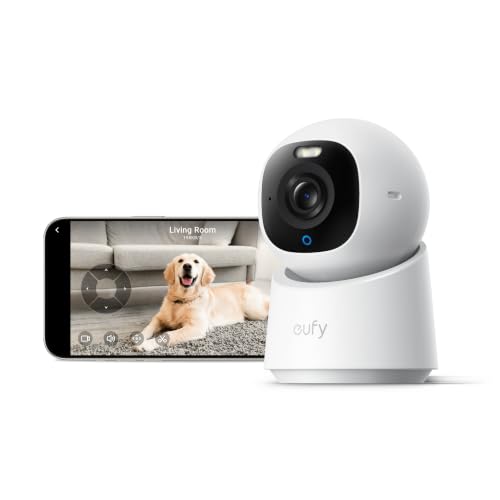
eufy Indoor Cam E30 — The indoor fee-free watcher
Indoor cameras live a different life from their outdoor cousins: mains power is always near, the weather is a rumour, and the questions asked of them are intimate ones — did the dog settle, what did the toddler do, who came in while the house was empty. The E30’s listing leads with the words no subscription and then describes a 4K pan-and-tilt camera with AI tracking and detection, colour night vision, two-way audio, and 24/7 recording. Continuous recording is the indoor superpower the battery cameras cannot match, and it changes the evidentiary quality of the footage: instead of clips that begin when motion trips a sensor, you hold the whole day, including the thirty seconds before the event that explain it.
The listing also names HomeKit among its compatibilities, which matters to households building around Apple’s ecosystem and wanting their camera inside the same app as their other devices. Storage specifics are not stated in the title, so treat the maker’s documentation as required reading: continuous 4K recording consumes space at a rate that makes the storage medium and its ceiling a genuine buying factor, not a footnote. Position the camera for the room’s real traffic — a hallway-facing corner sees more truth than a shelf aimed at a sofa — and use the two-way audio deliberately, since a voice from the camera settles a dog or startles an intruder in ways silent footage cannot. As a pet camera, a nanny camera, or a quiet witness for an empty house, this is the guide’s indoor benchmark, and it earns the title without renting you your own hallway.
- Resolution: 4K per the listing title
- Movement: pan and tilt with AI tracking
- Recording: 24/7 recording stated in the title
- Audio: two-way audio named in the listing
- Compatibility: works with HomeKit, per the listing
- Storage: no subscription stated in the title; storage medium not stated in the listing title — verify with the maker’s documentation
Strengths
- Continuous recording captures the run-up to events, not just the moments a sensor happened to catch.
- 4K detail indoors is identification-grade at room distances, for faces and small incidents alike.
- The no-subscription promise leads the listing itself, which is the clearest signal this category offers.
Trade-offs
- Continuous 4K recording is storage-hungry, so the unstated storage arrangement must be checked before buying.
- An indoor camera raises household privacy questions that an outdoor unit never does — placement and household agreement matter.
- It is a mains-powered indoor device, useless for a shed or yard position without an outlet.
Best for: a living room, hallway, or nursery in a connected home, where continuous fee-free recording watches pets, children, and an empty house.
Not suited for: a holiday let, where an indoor camera pointed at guests’ living space is a problem no feature list can fix.

WYZE Cam v4 — The budget all-rounder
The WYZE Cam v4 occupies the pragmatic end of this guide: a compact 2.5K camera for indoors or outdoors, with colour night vision, enhanced two-way audio, and motion detection, from the brand that built its name on making cameras inexpensive. Its relationship with subscriptions needs stating precisely, because WYZE sells a plan and does not hide it. The plan is optional. The established subscription-free route with this camera is local recording to a memory card you insert, which keeps clips on the camera and reviewable without the paid tier; the plan then becomes a menu of extras you may never order rather than a toll on the footage itself. That arrangement — honest hardware, optional services — is exactly the balance this guide exists to identify.
Two practical notes belong with this pick. The listing states 2.4 GHz Wi-Fi only, so the camera joins the older, longer-reaching band; in most homes that is a feature for a camera at the edge of the garden, but it means your network must still broadcast that band, as nearly all do. Colour night vision at this level changes the usefulness of overnight clips substantially compared with the monochrome infrared of older budget cameras — a jacket’s colour at the door is identification material. The camera’s small size and indoor-outdoor rating make it the natural second or third camera in a house: the garage corner, the side door, the room the main camera cannot see. Buy a card sized generously, set the recording mode deliberately, and this modest unit delivers the category’s core promise — your footage, stored by you, costing nothing per month — with the least ceremony in the guide.
- Resolution: 2.5K per the listing title
- Use: rated for indoor and outdoor use in the listing
- Night vision: colour night vision stated in the title
- Audio: enhanced two-way audio named in the listing
- Connection: 2.4 GHz Wi-Fi only, per the title
- Subscription position: paid plan optional; local card recording is the fee-free route — confirm card limits with the maker’s documentation
Strengths
- The subscription is genuinely optional, with local card recording carrying the core job for free.
- Colour night vision at a budget position makes overnight footage far more descriptive.
- Compact and rated for outdoors, so it fills the awkward second and third positions in a house cheaply.
Trade-offs
- The app will offer the paid plan, and owners must be content declining extras that card users do without.
- 2.4 GHz only means no access to the faster band for houses with congested older spectrum.
- Card storage shares the camera’s fate if the unit itself is taken, and cards need the occasional health check.
Best for: a household adding cameras room by room and position by position, wanting each one fee-free on a card from the day it goes up.
Not suited for: full smart-feature access switched on from day one, since the fullest feature set is precisely what the optional plan sells.

Blink Outdoor 4 — The two-year battery pick, with its caveat printed large
Here is the pick this guide refuses to oversell. The Blink Outdoor 4’s virtues are real and, in one respect, unmatched here: its listing promises two-year battery life, in a wireless camera with 1080p day view, infrared night view, and two-way talk, sold in this listing as a five-camera system with the Sync Module Core included. Two years between battery changes transforms where cameras can live — the far fence, the tree at the drive’s bend, the outbuilding with no power at all. Live viewing is free, and motion alerts reach your phone without a plan. For an owner whose security habit is looking, live, when something stirs, this system does that job for years on a set of batteries.
Now the boundary, stated as plainly as the pool notes for this guide demand: saving clips is where Blink’s subscription begins. Without the plan, the camera shows you the present but does not keep a library of the past for you; recorded, reviewable history is the paid tier’s territory. Some households will read that and shrug — a live lookout at a holiday property, checked when alerts arrive, may be all they ever wanted. Others are buying a camera precisely to answer what happened yesterday, and for them this pick fails the category’s core test no matter how extraordinary its battery is. Decide which household you are before the five-camera box tempts you, because the system price buys the lookout experience outright and rents the archive. Included here with its line drawn in ink, it is a legitimate choice for the first household and a trap for the second.
- Resolution: 1080p HD day view with infrared night live view, per the listing
- Battery life: two years stated in the title
- System: five-camera system with Sync Module Core included, per this listing
- Audio: two-way talk named in the listing
- Free tier: live view and alerts without a plan
- Subscription position: saving clips requires the maker’s plan — the central caveat of this pick
Strengths
- Two-year battery life frees cameras from power entirely, opening positions no other pick here can serve.
- Free live view and alerts make it a genuine long-life lookout system with no ongoing cost.
- A five-camera bundle with the sync module included covers a whole property in one purchase.
Trade-offs
- Clip saving sits behind the subscription, so the recorded-history job this guide is about is not free here.
- 1080p is the lowest resolution in the guide, and fine detail at distance is correspondingly limited.
- Infrared night view is monochrome, giving up the colour identification the similarly priced WYZE offers.
Best for: a spread-out property needing live lookouts at distant, powerless positions, where alerts and live checks matter more than a clip archive.
Not suited for: an owner whose whole reason for buying is reviewing recorded incidents after the fact without paying monthly.

Amcrest ProHD 4MP Indoor — The traditional IP camera
The Amcrest ProHD comes from the older IP camera tradition, and its listing reads like it: 4 megapixels at 30 frames per second, pan and tilt, two-way audio, night vision, remote viewing, and a wide 90-degree field of view. That tradition has a philosophy this guide respects — the camera as a network device that can record to local destinations under the owner’s control, in an ecosystem where subscription cloud plans were never the centre of gravity. Amcrest’s world is cards, recorders, and network storage arranged by the owner, which makes this camera a natural citizen of a fee-free house, particularly one already running a recorder from our companion guide to offline systems.
The trade for that tradition is setup temperament. IP cameras reward owners comfortable with network settings and storage configuration, and the listing title does not state the storage arrangement, so the maker’s documentation is where you confirm card capacity and recorder compatibility before ordering. In return, the 30-frames-per-second recording is a genuine differentiator indoors: motion looks like motion rather than a slideshow, which matters when the footage’s job is showing exactly how something happened — a fall, a pet’s escapade, a disputed moment at the door. The 90-degree view covers a room corner generously even before the pan and tilt are used. For a technically comfortable household, or one adding a camera to an existing local recorder setup, the Amcrest is the connoisseur’s fee-free indoor pick; for a first-time buyer wanting an app and instant simplicity, the eufy E30 above is the gentler road.
- Resolution: 4MP at 30 frames per second, per the listing title
- Movement: pan and tilt named in the listing
- Field of view: wide 90 degrees stated in the title
- Audio: two-way audio named in the listing
- Viewing: remote viewing stated in the title
- Storage: local-recording tradition (card / recorder) — not stated in the listing title; verify capacities with the maker’s documentation
Strengths
- Full-frame-rate recording shows motion smoothly, which is what incident review actually needs.
- Belongs to the local-storage IP tradition, so it integrates with recorders and owner-managed storage naturally.
- The 90-degree native view covers a room well even before pan and tilt enter the picture.
Trade-offs
- Setup expects more network confidence than the app-first cameras in this guide.
- Storage details are absent from the title, so homework is required before the camera can record fee-free.
- An indoor-only unit in a guide where several picks also work outside.
Best for: a technically comfortable household, or one already running a local recorder, adding a smooth-recording indoor camera with no plan attached.
Not suited for: a first-time camera buyer who wants to be watching a live feed within five minutes of opening the box.
How Should You Set Up a Fee-Free Camera in Its First Hour?
Begin before the ladder: bench-test the camera indoors, storage inserted or confirmed, app connected, and one test clip recorded and played back. That ten minutes proves the entire fee-free loop — record, store, review — while the box is still open and returns are still painless. Then choose the position for the footage’s sake rather than the installer’s convenience: faces at doors are captured by cameras placed near head height at an angle to the approach, not by units perched high in corners painting the tops of heads. For solar picks, mount the panel where the midday sun actually lands, which is often a metre or two away from the camera’s own best viewpoint; the cable between them exists for exactly that reason.
Settings are where the fee-free promise is kept or squandered. Set detection to the categories you care about — people first, vehicles where relevant, pets where supported — and sensitivity a notch below the level that reports every moth. Choose recording length and cooldown so a single event becomes one watchable clip rather than six fragments. If the camera offers a schedule, match it to the house’s real rhythm: full vigilance while empty, discretion while everyone is home in the evening. Finally, write the storage facts on a card kept with your household documents — camera, position, storage type and size, install date. It reads like overkill in month one. In year two, when a card tires or a camera is replaced, it is the difference between a five-minute job and an archaeological dig through settings screens.
How Do the Six Fee-Free Approaches Compare Side by Side?
| Pick | Where footage lives | Resolution | Power | Subscription position |
|---|---|---|---|---|
| REOLINK Argus PT Ultra | Onboard / Home Hub compatible | 4K | Solar-fed battery | No subscriptions, stated in title |
| eufy SoloCam S340 | 8GB built in | 3K dual lens | Solar | No monthly fee, stated in title |
| eufy Indoor Cam E30 | Local — verify medium in maker docs | 4K | Mains | No subscription, stated in title |
| WYZE Cam v4 | Memory card in camera | 2.5K | Mains | Plan optional; card route is free |
| Blink Outdoor 4 | Clips are a plan feature | 1080p | Battery, two-year life | Live view free; clip saving needs the plan |
| Amcrest ProHD 4MP | Local card / recorder tradition — verify in maker docs | 4MP at 30fps | Mains | Local-recording ecosystem, no plan at its centre |
The table’s middle column is the one to shop by. Storage is destiny in this category: built-in memory is effortless and bounded, cards are cheap and owner-sized, a hub is safer and larger, and the Blink row shows the one arrangement where the archive itself is the subscription. Resolution and power sort themselves out once storage is settled — solar for the posts far from sockets, mains for the indoor cameras that record all day, and the Blink’s extraordinary battery for the positions nothing else can reach.
What Does a Year of Fee-Free Ownership Actually Ask of You?
Month one is configuration. Cards go in, recording modes get chosen, detection sensitivity gets tuned against a week of real life — the branch that waves all afternoon, the cat with a schedule, the neighbour’s headlights sweeping the drive at the same hour nightly. Fee-free cameras reward this tuning more than cloud cameras do, because the storage being wasted by false events is yours and finite, and the archive window you protect by tuning well is the archive you will one day search. By the end of the month the system should be boring: events that matter, silence that does not, and a retrieval path you have walked at least twice.
The middle months ask for almost nothing, which is the point. Solar panels want an occasional wipe; lenses want a cloth after pollen season; cards, like all flash memory, are consumables that will one day need replacing, and a camera that suddenly records nothing is usually confessing to a tired card rather than a dramatic failure. Build one habit — a seasonal glance at each camera’s live view and a playback of one old clip — and the system will tell you its troubles while they are still small. Compare that maintenance ledger with the alternative: a plan whose price, terms, and feature boundaries can all be revised by the maker between one month and the next, and whose cancellation converts your archive into a countdown. Neither ownership style is effortless; they simply bill in different currencies, attention or money, and this guide’s readers have already declared which currency they would rather spend.
The year’s last lesson arrives the first time the footage is genuinely needed — the disputed delivery, the bumped car, the night something went missing from the shed. That is when the category’s abstract virtues become concrete: the clip is there, on your storage, reaching back as far as you provisioned for, playable without a login wall or an expired-plan notice standing between you and your own evidence. Owners describe a particular satisfaction in that moment that has nothing to understanding of technology: the camera was a purchase, complete and finished, and it behaved like one. Everything in this guide — the storage tables, the caveats, the audit questions — exists to make that moment arrive exactly as described, with no invoice attached to it.
What Mistakes Do Fee-Free Camera Buyers Keep Making?
The first mistake is reading no subscription as no homework. Every camera here asks something of its owner instead of a monthly payment: a card to size and insert, a panel to aim at the sun, a storage setting to confirm, a hub to place. Buyers who skip that hour of setup end up with a camera recording over a tiny window or saving nothing at all, and conclude wrongly that fee-free was a fiction. It is not a fiction; it is a trade of attention for money, and it only pays out when the attention is actually spent.
The second mistake is ignoring the stolen-camera problem. Footage stored inside the device that recorded it is footage an intruder can carry away, which is why hub and recorder arrangements exist and why camera placement height matters more for self-contained units. A camera mounted just within reach, at a side door, holding the only copy of its own footage, is a gift to the one person it was installed to identify. Mount self-contained units high and awkward, and for the position you care about most, prefer the arrangement whose archive sleeps indoors. The third mistake is capacity optimism: choosing the smallest card, the built-in 8GB, or the default settings for a busy position, then discovering the archive reaches back hours instead of weeks. Work out how far back you might ever need to look, and provision for that number, not for the quietest week of the year. The fourth mistake is treating optional plans as insults. A plan you decline costs nothing; the error is only ever buying a camera whose free tier cannot do the job you bought it for — which is why this guide prints the Blink’s boundary in its largest type.
Three Households, Three Different Right Answers
A couple in a suburban semi wants the front door and the car on the drive watched, hates recurring bills on principle, and is home most evenings. Their positions have partial sun and strong Wi-Fi. The REOLINK Argus PT Ultra covers the drive with tracking and 4K detail, the WYZE v4 watches the back door on a card, and nothing in the house bills them monthly. Total ongoing effort: a glance at the app when alerts arrive and a card check twice a year. This is the category working exactly as advertised, and it is the household most fee-free marketing is drawn for.
A landlord with a vacant property between tenants, forty minutes away, needs to know the house is undisturbed and to have evidence if it is not. Live view alone — the Blink’s free strength — is not enough here, because the entire value lies in reviewing what happened on the nights nobody was watching. The honest build for this household is storage that keeps history: an indoor E30 recording continuously, or a recorder-based kit from the no-internet guide if the property’s broadband is off between tenancies. The Blink’s two-year battery tempts, and its caveat is precisely the reason it must not win this particular argument.
A family with a new baby, a dog, and a grandparent who visits daily wants indoor awareness without turning the house into a surveillance project. The E30 in the hallway and nursery orbit gives them continuous recording, two-way talk, and fee-free storage, with the household rule agreed in advance: cameras watch entrances and the nursery, never private rooms, and anyone in the family can ask for one to be turned to the wall. The Amcrest would serve the technically inclined version of this family, particularly one already running a recorder. In all three households the winning question was never which camera is best in the abstract — it was where the footage lives, and whether that answer survives a change of plan, a change of terms, or a change of tenant.
Final Recommendation
Start outdoors with the REOLINK Argus PT Ultra if your mounting points have sun and signal: 4K, tracking, solar feeding, and a no-subscriptions promise in its own title make it the most complete fee-free outdoor camera here, with the SoloCam S340 the pick when you want the archive built in and the whole unit forgotten about. Indoors, the eufy E30’s continuous 4K recording is the benchmark, the WYZE v4 is the value route to the same fee-free principle, and the Amcrest serves owners who think in recorders and networks. The Blink earns its place only for live-lookout households who have read its caveat and chosen it anyway. Whichever you choose, the principle survives the purchase: a camera should be a thing you own, recording your life onto storage you own, and the day the footage of your own door starts arriving with a monthly invoice is the day the arrangement stopped being yours.
Frequently Asked Questions
Do no-subscription cameras still work with a phone app?
Generally yes — live view, settings, and review of locally stored footage run through the maker’s app without a plan on the picks in this guide. What plans typically sell is cloud storage and extended extras. The Blink is the exception to note: its app shows live view free, while its clip library is the plan’s territory.
What happens to my footage if the camera is stolen?
If the footage lives inside the camera — built-in storage or a card — it goes with the camera. Arrangements that move recordings indoors, such as the REOLINK’s Home Hub compatibility or a recorder-based setup like the Amcrest’s tradition, keep the archive in the house even when the camera itself is taken.
How long will 8GB of built-in storage last?
It depends on how busy the position is and how the camera records. Event clips at a quiet garden gate can cover a long rolling window; a camera facing constant activity cycles far faster. Treat built-in storage as convenience for moderate positions, and choose card or hub arrangements where you need weeks of guaranteed history.
Is the WYZE plan ever worth taking?
That is a household decision rather than a trap. The card route covers recording and review for free; the plan sells additional cloud and smart extras. The right way to decide is to run the camera on its card first, live with the free arrangement, and let a genuine gap — not the sign-up screen — make the argument.
Can solar cameras work through winter?
They work within the limits of daylight. Shorter, greyer days reduce what the panel harvests, so position matters more in winter than in summer: honest sun, a panel angle that sheds dirt and snow, and a camera whose event load is reasonable. Both solar picks here pair modest event-driven recording with their panels, which is the right match.
Does no subscription mean no account and no app sign-up?
Not necessarily — most of these cameras still use the maker’s app for setup, live view, and reviewing local footage, and an account may be part of that. The distinction that matters is payment: reviewing your own stored recordings does not require an active paid plan on the picks whose listings promise fee-free recording. If avoiding accounts entirely is the goal, the recorder-based systems in our no-internet guide are the architecture built for it.
Can I mix fee-free cameras from different brands in one house?
Yes, and many households do, accepting a separate app per brand as the price of choosing each position’s best camera. The discipline to keep is a simple written note of which camera stores footage where — which card, which hub, which built-in memory — so that the day footage is needed, nobody has to reconstruct the system from memory.
Do these cameras need the internet to function?
They need a network for app viewing and setup in most cases, but not a subscription — those are different things. If your requirement is stronger and the system must record with no internet service at all, a recorder-based kit is the right architecture; our companion guide covers exactly that case.
Related Guides
For the strongest form of independence, see the security cameras that do not need internet access guide, where recorder-based kits keep recording with the broadband unplugged entirely and the archive never leaves the building at all. The same local-first thinking protects vehicles in our dual dash cameras with parking mode roundup, where the recorder guards a parked car overnight and the card inside it, not a cloud account, holds what it saw, and for finding cold spots rather than intruders, the thermal imaging cameras for building heat loss guide is the natural next read for anyone turning the same careful eye on their house itself.


