What's inside
- Where to buy
- Key Takeaways
- Quick Picks
- How did we choose the best 1ms response time monitors?
- What does a 1ms response time actually measure?
- How does response time interact with refresh rate and input lag?
- How should you set up a 1ms monitor once it arrives?
- Comparison Table
- What mistakes do buyers make when chasing 1ms?
- Final Recommendation
- Which panel type delivers honest speed for your kind of play?
- How can you test a response claim with your own eyes?
- Do consoles and older PCs benefit from a fast-response screen?
- What will response-time marketing look like next?
- Frequently Asked Questions
- Related Guides
As an Amazon Associate I earn from qualifying purchases. This post may contain affiliate links at no extra cost to you.
gizmoverdict.com is reader-supported. When you buy through links on our site, we may earn an affiliate commission.
Where to buy
Every linked model name in this guide points to its Amazon listing, which is where you should confirm the exact response-time wording before ordering, because that wording matters more here than in almost any other monitor category. The best 1ms response time monitors all wear the same badge, yet the badge hides two different measurements, a handful of favourable test conditions, and a marketing habit of quoting the single fastest pixel transition a panel managed once rather than the average it manages all day. This roundup was built to separate the honest members of the 1ms club from the honorary ones, and to explain what the number can and cannot promise about motion clarity.
Start with the uncomfortable truth: no LCD panel changes every pixel from any shade to any other shade in one millisecond. What manufacturers quote is either a grey-to-grey figure, measured between selected shades with voltage overdrive pushing the liquid crystals hard, or an MPRT figure, which describes perceived blur once backlight strobing or black-frame tricks enter the picture. Both can legitimately reach 1ms on a spec sheet while describing quite different experiences in a fast game. The six screens below were picked because their claims are at least anchored in fast panels, high refresh rates and credible overdrive implementations, so the headline number points at something real even if it flatters it.
Who should care this much about a millisecond? Players of shooters, racing games and fighting titles, where the picture pans constantly and targets cross the screen at speed, gain the most, because slow pixel transitions smear those pans into a soft wash. Everyone else gains a little: scrolling documents stay crisper, video pans hold together better, and a fast panel simply feels more immediate under the mouse. What response time never does is reduce input lag on its own, fix a weak graphics card, or rescue a 60Hz screen, and several sections below return to those boundaries so the buying decision rests on the whole picture rather than one seductive digit.
Key Takeaways
- A 1ms claim built on MPRT and a 1ms claim built on grey-to-grey testing describe different things, and only the grey-to-grey figure speaks about the panel itself.
- Overdrive is the mechanism that makes fast transitions possible, and its middle settings usually deliver the cleanest motion once inverse ghosting is counted.
- Three picks here quote figures below 1ms on paper, and each of those numbers deserves more scepticism than the plain 1ms claims, not less.
- Refresh rate and response time multiply together: a fast panel at 240Hz shows its advantage far more clearly than the same panel would at 60Hz.
- The TN veteran in this lineup still demonstrates why its panel type owned competitive gaming for a decade, even as fast IPS closes in.
- Chasing the smallest printed number past this class buys bragging rights long before it buys visible clarity.
Quick Picks
| Pick | Badge | Why it earns its place |
|---|---|---|
| ASUS TUF Gaming VG249QML5A 240Hz | The boldest claim in the roundup | A Fast IPS panel quoting 0.3ms alongside 240Hz and ELMB Sync, for buyers who want every motion technology ASUS offers in one 24-inch frame. |
| Acer Nitro KG240Y 240Hz | Half-millisecond IPS value | Acer pairs a 0.5ms claim with 240Hz and FreeSync Premium on a 23.8-inch IPS panel that suits fast play without an esports-only personality. |
| ViewSonic VX2428A 180Hz | The measured middle path | ViewSonic’s 180Hz Fast IPS screen quotes 0.5ms, adds HDR10 support and keeps the stand and feature set sensibly everyday. |
| LG UltraGear 27GP850-B | 1ms GtG with 1440p headroom | LG’s Nano IPS panel states its 1ms as a grey-to-grey figure and backs it with 165Hz at QHD, the most complete specification here. |
| BenQ MOBIUZ EX251 | Console-friendly speed | BenQ quotes 1ms GTG for this 24.5-inch screen and surrounds it with unusually good speakers and colour tools for game worlds beyond esports. |
| BenQ ZOWIE XL2411P | The TN reference point | The classic 144Hz TN formula with Black Equalizer, included because any honest conversation about response time starts with panels like this. |
How did we choose the best 1ms response time monitors?
The first filter was the claim itself, read carefully rather than at face value. Listings that stated a grey-to-grey figure were ranked ahead of listings leaning entirely on MPRT or VRB language, because grey-to-grey at least attempts to describe pixel behaviour, while strobing-based figures describe a perception trick layered on top of whatever the pixels are doing. Listings that hid the basis of the number entirely were treated as decoration. That single rule reshaped the shortlist more than any other, since a surprising share of nominally 1ms screens become vague the moment you ask which millisecond they mean.
Refresh rate formed the second filter, because response claims only become visible when frames arrive quickly enough to expose slow transitions. Every pick here runs at 144Hz or far beyond, which means a frame lasts between roughly four and seven milliseconds, and a panel whose transitions wander toward the long end of that window will smear no matter what its brochure says. Pairing the claim with genuine refresh speed also protects buyers from the oldest trick in this category, the slow-refresh screen wearing a fast-response badge it can never demonstrate.
Panel type and overdrive reputation came third. Fast IPS has matured to the point where its best examples genuinely rival older TN screens in transition speed while keeping far better viewing angles and colour, so IPS dominates this list on merit. One TN pick remains deliberately, as a benchmark and because its price class and esports tooling still make sense for a particular buyer. Finally, each screen had to work as a complete monitor — stand, ports, adaptive sync and everyday picture quality all counted — because a response figure never excuses a screen that annoys you for the other twenty-three hours of the day.
What does a 1ms response time actually measure?
Grey-to-grey response describes how long a pixel takes to move between two shades of grey, which sounds precise until you learn that the journey between some shade pairs is quick and between others is ponderous, and that manufacturers naturally publicise the quickest pairing they can find. A panel advertised at 1ms GtG may average several times that across the full range of transitions a game actually asks for, particularly the dark-to-dark steps that produce the trailing smear behind moving objects in night scenes. None of this makes the figure useless; it makes it a best-case indicator, comparable between brands only loosely and meaningful mainly as evidence that the panel belongs to a fast generation.
MPRT, moving picture response time, answers a different question: for how long does a moving image appear blurred to a tracking eye? Sample-and-hold displays keep each frame lit until the next arrives, so even infinitely fast pixels would blur in perception, and MPRT figures improve when a monitor strobes its backlight or inserts black frames to shorten each frame’s visible life. A 1ms MPRT claim therefore tells you the strobing is aggressive, not that the pixels are quick, and it usually costs brightness and sometimes conflicts with adaptive sync. When a listing shouts 1ms without naming its method, MPRT is frequently the quiet answer.
Overdrive is where these numbers are manufactured. Driving liquid crystals with extra voltage speeds their rotation, and every fast monitor offers several overdrive levels because the correct amount depends on refresh rate and content. Too little and transitions dawdle; too much and pixels overshoot their target shade, producing pale halos called inverse ghosting around moving edges. The quoted response figures are achieved at the strongest overdrive setting, which is often the one real users abandon within a week because its artefacts are uglier than the blur it cured. Judging a 1ms monitor therefore means judging its middle overdrive gear, the one you will actually live with, and the picks below were chosen partly on the strength of that middle gear’s reputation.

ASUS TUF Gaming VG249QML5A 240Hz — The boldest claim in the roundup
ASUS prints 0.3ms for this 24-inch Fast IPS screen, a figure that deserves a raised eyebrow and then a fair hearing. The eyebrow first: sub-half-millisecond grey-to-grey numbers are achieved under the friendliest possible transitions with overdrive at full attack, and no honest reading of the panel’s behaviour across all shades supports treating 0.3ms as typical. The fair hearing follows quickly, because a panel capable of winning that cherry-picked test is still a genuinely rapid panel, and at 240Hz it needs to be. Each frame at 240Hz survives for barely four milliseconds, so any transition sluggishness occupies a large share of the frame’s life, and this screen’s transitions are, by every account of its Fast IPS generation, short enough to keep fast pans unusually clean.
ELMB Sync is the feature that separates this ASUS from other quick screens, since it allows backlight strobing to operate alongside adaptive sync rather than forcing a choice between blur reduction and tear-free motion. Strobing shortens each frame’s visible persistence, attacking the MPRT side of the blur problem while the panel’s raw speed handles the transition side, and the combination produces the kind of clarity that makes tracking a strafing opponent feel almost unfair. The costs are real and should be budgeted for: strobing dims the picture, some players notice flicker sensitivity during long sessions, and the mode rewards a steady high frame rate, because strobing a juddering frame stream merely sharpens the judder.
Around the speed story sits a properly equipped gaming monitor. G-SYNC compatibility and FreeSync Premium are both claimed, the stand adjusts like a stand should, and the 99% sRGB coverage keeps colours honest for the coursework, editing and streaming that share most desks. In the context of this particular guide the ASUS is the maximalist answer: it attacks response time from both measurement directions at once and charges for the privilege, which makes it the right recommendation for a player whose graphics card genuinely sustains very high frame rates and who will use the strobing mode rather than merely owning it.
- Panel: 24-inch Fast IPS, 1920 x 1080
- Refresh rate: 240Hz
- Response claim: 0.3ms, with ELMB Sync strobing
- Adaptive sync: G-SYNC compatible and FreeSync Premium
- Colour: 99% sRGB coverage claimed
- Stand: ergonomic, adjustable
Strengths
- Attacks blur from both directions, pairing very fast transitions with strobing that can run beside adaptive sync.
- 240Hz gives the panel’s speed a frame rate high enough to actually display it.
- Dual adaptive-sync support keeps the screen useful across graphics card brands and future upgrades.
Trade-offs
- The 0.3ms headline describes best-case transitions, and treating it as an average will disappoint a careful buyer.
- Strobing reduces brightness noticeably, which matters in sunlit rooms.
- Owners of modest graphics cards will rarely feed it the frame rates its talents require.
Best for: competitive players with strong hardware who will genuinely enable the blur-reduction mode. Not suited for: buyers in bright rooms or with entry-level graphics cards that hover near 60 frames per second.
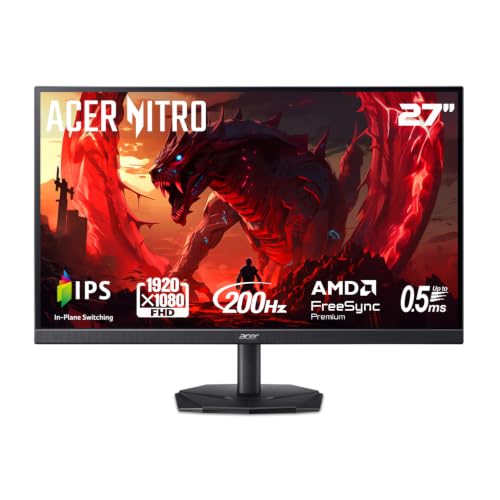
Acer Nitro KG240Y 240Hz — Half-millisecond IPS value
Acer’s Nitro quotes 0.5ms for a 23.8-inch IPS panel running at 240Hz, and the pairing of those numbers at this screen’s market position is the story. A few product generations ago, 240Hz IPS panels with sub-millisecond claims lived exclusively at enthusiast prices; the KG240Y represents that technology filtering down into the Nitro line’s more democratic territory. The same scepticism applied to the ASUS figure applies here in miniature — 0.5ms is a best transition, not a census of all transitions — but the underlying panel generation is quick enough that its ordinary behaviour, not just its highlight reel, keeps motion tidy at very high frame rates.
What distinguishes the Acer in daily use is how little it asks you to specialise. FreeSync Premium handles tearing, the IPS panel keeps colours stable when you slouch or share the screen, and the 99% sRGB claim suggests Acer expects this monitor to earn its keep outside matches as well. That breadth matters for a response-time purchase, because the milliseconds only perform during fast content while the panel’s viewing angles, text clarity and colour perform constantly. A screen bought purely for a response figure that then irritates its owner through every spreadsheet is a bad trade, and this one avoids forcing it.
Set against the ASUS above, the Acer concedes the strobing party trick and some gaming polish, and in exchange asks less of your wallet and your graphics card’s supporting cast. For the player moving up from a 60Hz or 75Hz screen, the jump to this monitor is the single largest motion upgrade available at its size: frames arrive four times as often and pixels keep pace instead of trailing behind. Judged strictly on the theme of this guide, it may be the most honest value in the 1ms conversation, a fast claim attached to a fast panel attached to a monitor with no serious everyday compromises.
- Panel: 23.8-inch IPS, 1920 x 1080
- Refresh rate: 240Hz
- Response claim: 0.5ms
- Adaptive sync: AMD FreeSync Premium
- Colour: 99% sRGB claimed
- Mounting: VESA compatible
Strengths
- Brings the 240Hz fast-IPS experience down from flagship territory without gutting the specification.
- IPS viewing angles make it a comfortable shared and everyday screen between matches.
- FreeSync Premium certification adds low-framerate compensation to the tearing protection.
Trade-offs
- No backlight-strobing mode, so perceived blur relies entirely on the panel’s native speed.
- The stand and chassis feel built to a budget compared with pricier rivals here.
- Its half-millisecond figure is, like all such figures, a best-case measurement.
Best for: players upgrading from 60Hz who want the full high-refresh, fast-panel transformation in one step. Not suited for: strobing enthusiasts or buyers wanting height adjustment and premium build above all.

ViewSonic VX2428A 180Hz — The measured middle path
ViewSonic quotes 0.5ms for the VX2428A and then does something quietly sensible: it pairs that claim with 180Hz rather than chasing the 240Hz flag. That restraint reads as honesty about where the panel performs best. At 180Hz a frame lasts about five and a half milliseconds, a window this Fast IPS panel’s transitions fit inside comfortably at a sensible overdrive setting, which means the motion clarity you get in practice stays close to the motion clarity the brochure implies. Monitors whose refresh rates outrun their panels often look no clearer than humbler screens; this one’s numbers are matched to each other, and the picture benefits.
The supporting specification suits the mixed-use desk. HDR10 support is present, which at this size and brightness class should be read as compatibility with HDR signals rather than a promise of dramatic HDR pictures — a theme the HDR sections of this site return to often — while FreeSync keeps console and PC frame rates smooth. ViewSonic’s eye-care features, anti-glare coating and console-friendly positioning make the VX2428A the pick in this list most likely to be bought by someone who games seriously in the evening and works at the same desk all day, and who needs the response figure to justify itself without the rest of the monitor becoming a compromise.
Within a guide devoted to a single millisecond, the ViewSonic makes the case that the number matters less than the match between panel, refresh rate and overdrive tuning. Its claim is aggressive on paper yet its engineering is conservative where conservatism counts, in the settings owners actually use. Players who compete at the highest level will still gravitate to the 240Hz screens above it in this list, but for the far larger group who play fast games recreationally at high frame rates, this is the point where spending more stops buying visible milliseconds.
- Panel: 24-inch Fast IPS, 1920 x 1080
- Refresh rate: 180Hz
- Response claim: 0.5ms
- Adaptive sync: FreeSync
- HDR: HDR10 signal support
- Connections: HDMI and DisplayPort
Strengths
- Refresh rate and panel speed are well matched, so real-world clarity tracks the specification closely.
- Comfortable everyday manners, with eye-care features and anti-glare treatment for long desk days.
- Works naturally with consoles as well as PCs, widening its usefulness in shared spaces.
Trade-offs
- Serious esports players will notice the step down from 240Hz during the fastest pans.
- HDR support is a compatibility tick rather than a transformative picture feature at this level.
- No strobing mode for players who prefer blur reduction over adaptive sync.
Best for: mixed-use desks where fast evening gaming follows long working days. Not suited for: tournament-focused players determined to own the highest refresh rate available.

LG UltraGear 27GP850-B — 1ms GtG with 1440p headroom
LG states this monitor’s response as 1ms GtG, and the explicit GtG suffix is worth more than a smaller number without one. It tells you the measurement at least concerns pixel transitions, tested on a Nano IPS panel that helped define the modern fast-IPS era. At 27 inches and 2560 x 1440, the 27GP850-B also asks a more interesting question than its 1080p rivals: can a screen stay genuinely quick while carrying half again as many pixels? Its 165Hz refresh rate, with the headroom owners of this class commonly use, says the panel was engineered for exactly that workload, and its reputation among QHD buyers rests on motion that stays composed when the resolution climbs.
The practical consequence of pairing 1ms-class transitions with QHD is clarity that survives scrutiny at a size where 1080p begins to look coarse. Text edges in a strategy game, distant detail in a shooter, the fine print of a minimap — all benefit from the extra pixels, and none of it smears away during movement because the panel completes its transitions well inside the roughly six-millisecond frame window. Nano IPS colour, with wide gamut coverage by the standards of its class, adds a further dimension the smaller picks cannot match: this is a screen for players who want speed and a picture worth looking at when the game slows down.
G-Sync compatibility and FreeSync support together make the LG unusually graphics-card agnostic, which matters at QHD where an upgrade cycle may swap brands. Judged as a response-time purchase, it is the most defensible specification in this roundup: the claim names its method, the refresh rate gives the claim room to operate, and the resolution ensures the clarity you gain is visible in stillness as well as motion. Buyers whose systems cannot drive QHD at high frame rates should look at the 1080p picks instead, because an underfed 165Hz panel shows stutter that no response figure can disguise.
- Panel: 27-inch Nano IPS, 2560 x 1440
- Refresh rate: 165Hz
- Response claim: 1ms GtG
- Adaptive sync: G-Sync Compatible and FreeSync
- Colour: wide-gamut Nano IPS
- Size class: 27-inch QHD
Strengths
- Names its measurement method, giving the 1ms figure more credibility than bare claims elsewhere.
- QHD resolution makes the motion clarity usable for detail work, strategy titles and mixed gaming.
- Colour performance exceeds what pure esports screens attempt, suiting creators who also play.
Trade-offs
- Needs a capable graphics card to feed QHD at the frame rates the panel deserves.
- Costs more than the 1080p picks while offering a lower headline refresh rate.
- Its size demands more desk depth than the 24-inch screens in this list.
Best for: QHD players who read spec sheets sceptically and want the claim backed by method. Not suited for: systems built around entry-level graphics cards or very shallow desks.

BenQ MOBIUZ EX251 — Console-friendly speed
BenQ’s MOBIUZ line approaches response time from the direction of game feel rather than tournament statistics, and the EX251 quotes 1ms GTG for a 24.5-inch Full HD panel that refreshes at up to 220Hz according to its listing, with 180Hz as the everyday figure in its name. That specification places it firmly among genuinely fast screens, while the surrounding design — built-in speakers of unusual ambition for the class, colour modes tuned per game genre, and a look that does not shout gaming hardware — broadens the audience beyond the headset-wearing competitive crowd. The millisecond here serves immersion as much as advantage.
Consider what that means in a living-room-adjacent setup. A console player on a sofa-adjacent desk, or a PC player who enjoys cinematic single-player titles between ranked sessions, experiences response time as the absence of smear during camera sweeps across detailed scenery. The EX251’s fast panel keeps those sweeps coherent, and its colour tooling lets different genres present as their makers intended rather than through a single oversaturated gaming preset. BenQ’s long history with eye-care features also shows in the package, which matters during the long story-driven sessions this monitor seems designed to host.
The honest caveat is positioning. Dedicated esports buyers get more specialised tools from the ZOWIE pick below, including shadow-lifting features tuned for spotting opponents, while the MOBIUZ spends its budget on audio, colour and comfort. Neither allocation is wrong; they answer different definitions of a good game night. As a 1ms monitor for someone whose gaming spans genres, consoles and media, the EX251 may be the most liveable screen in this entire roundup, and its response claim, plainly stated as GTG, does not need asterisks to justify its inclusion.
- Panel: 24.5-inch, 1920 x 1080
- Refresh rate: 180Hz, listed up to 220Hz
- Response claim: 1ms GTG
- Adaptive sync: AMD FreeSync
- Audio: built-in 2.5W speakers
- Colour: 99% sRGB claimed
Strengths
- Speakers good enough to skip desktop audio for casual play, a rarity among fast monitors.
- Genre-aware colour modes serve story-driven games better than a single gaming preset.
- The 1ms GTG claim is stated with its method, on a panel fast enough to honour it.
Trade-offs
- Esports specialists will miss the dedicated shadow and vibrance tools of tournament lines.
- FreeSync only, so NVIDIA owners rely on unofficial adaptive-sync behaviour.
- The 24.5-inch size suits desks, not shared viewing from across a room.
Best for: genre-hopping players and console owners who value sound and colour alongside speed. Not suited for: ranked specialists who want every feature subordinated to spotting opponents.

BenQ ZOWIE XL2411P — The TN reference point
Every response-time discussion eventually owes a debt to TN, the panel technology that made 1ms claims routine when IPS was still struggling to break single figures without artefacts, and the XL2411P is the archetype of that era still on sale. Its 144Hz TN panel states 1ms, and while modern fast IPS has closed the practical gap, the ZOWIE demonstrates the qualities that kept TN on tournament desks for years: transitions that stay consistent, a picture tuned without sentimentality for visibility, and tools like Black Equalizer that lift shadow detail so opponents stop hiding in it. Colour vibrance controls serve the same master, making enemy models separate from backgrounds.
Age brings honest limitations that this guide will not launder. TN viewing angles shift colour and contrast when you move off centre, the 1080p resolution at 24 inches is merely adequate, and the design predates niceties like USB-C entirely. The stand and bezel belong to a more utilitarian period. None of that prevents the XL2411P from doing its one job superbly, but it does mean the buyer should be choosing that job deliberately: competitive play on a budget, a second screen dedicated to ranked sessions, or a training setup where the picture exists to be read rather than admired.
There is also a calibration lesson embedded in this pick. Because TN panels respond evenly and their overdrive behaviour is well understood after years in the field, the XL2411P’s middle settings are famously usable, and its motion character is predictable in a way newer panels sometimes are not. For a reader learning to judge response claims, owning the reference point clarifies every other claim in this article: this is roughly what an honest, mature 1ms implementation feels like, and anything dramatically better on paper should be asked to prove it in motion rather than in a table.
- Panel: 24-inch TN, 1920 x 1080
- Refresh rate: 144Hz
- Response claim: 1ms
- Esports tools: Black Equalizer, colour vibrance
- Adaptive sync: none headline-listed
- Era: long-running tournament design
Strengths
- Predictable, well-understood motion behaviour refined over years of competitive use.
- Shadow-lifting and vibrance tools exist purely to make opponents easier to read.
- Usually the most affordable route in this list to a genuinely fast panel.
Trade-offs
- TN viewing angles punish slouched postures and shared viewing.
- Colour performance trails every IPS pick here by a wide margin.
- The feature set shows its age, with no modern conveniences to soften daily use.
Best for: competitive players on a budget and anyone wanting a dedicated ranked-play screen. Not suited for: colour-sensitive work, shared viewing, or buyers who want one monitor to excel at everything.
How does response time interact with refresh rate and input lag?
Three separate delays hide inside the phrase “responsive monitor,” and confusing them leads to bad purchases. Refresh rate sets how often a new frame can appear. Response time sets how cleanly pixels move between frames. Input lag sets how long the monitor takes to begin showing a frame after receiving it. A screen can excel at any one and disappoint at the others, which is why this guide insists on high refresh alongside fast claims: the two multiply. At 60Hz, a frame waits over sixteen milliseconds for its successor, so even perfect pixels cannot make motion look fluid; at 240Hz the frame window shrinks to about four milliseconds, and suddenly pixel transitions occupy most of that window, which is precisely when a fast panel earns its money.
Input lag deserves its own sentence because marketing happily blurs it into response time. They are unrelated measurements. A monitor with a 1ms response claim can still process its signal slowly, though in practice modern gaming monitors keep processing lag low, and every pick here comes from a gaming line where that discipline holds. The practical test for a buyer is simpler than the theory: if a screen is marketed to competitive players, refreshes at 144Hz or beyond, and states a grey-to-grey figure, its total motion pipeline is almost certainly coherent. The failures happen at the margins — office screens wearing a gaming badge, or strobing figures standing in for panel speed.
Frame rate from the computer completes the chain. A 240Hz monitor fed 70 frames per second by an overloaded graphics card displays those frames with tearing or adaptive-sync smoothing, but it cannot invent the missing motion information, and its fast pixels merely render the stutter crisply. Matching the monitor to the machine is therefore part of buying response time honestly: the 1080p picks suit mid-range systems that can push high frame rates at that resolution, while the QHD LG expects hardware a tier up. Spend on the panel your system can feed, and the millisecond you bought will actually appear on screen.
How should you set up a 1ms monitor once it arrives?
Begin by verifying the refresh rate in your operating system’s display settings, because a remarkable number of fast monitors spend their lives accidentally running at 60Hz over the wrong cable or port. Use the DisplayPort connection where offered, confirm the full refresh figure is selected, and only then open the monitor’s own menu. Find the overdrive or response-time setting and start at its middle option — labelled Normal, Standard or a mid-numbered level depending on brand — then play something fast and watch moving edges for pale fringes. Fringes mean overshoot; step down. Smearing without fringes means headroom; step up once and retest.
Decide the strobing question deliberately rather than by default. If your pick offers blur reduction, try it in a game where your frame rate is high and stable, and judge both clarity and brightness with your room’s real lighting. Many owners enable it for competitive titles and disable it for everything else, which is a perfectly rational split. Adaptive sync deserves the opposite treatment: enable it, confirm it is active in the graphics driver, and leave it on, since its tearing protection costs nothing in the scenarios where it operates. Finally, revisit overdrive when your typical frame rate changes, because the ideal setting at 240 frames per second is not the ideal setting at 90, and a monitor bought for speed deserves five minutes of tuning per season of use.
Comparison Table
| Pick | Size and panel | Resolution | Refresh | Response claim | Sync |
|---|---|---|---|---|---|
| ASUS TUF Gaming VG249QML5A | 24-inch Fast IPS | 1920 x 1080 | 240Hz | 0.3ms | G-SYNC compatible, FreeSync Premium |
| Acer Nitro KG240Y | 23.8-inch IPS | 1920 x 1080 | 240Hz | 0.5ms | FreeSync Premium |
| ViewSonic VX2428A | 24-inch Fast IPS | 1920 x 1080 | 180Hz | 0.5ms | FreeSync |
| LG UltraGear 27GP850-B | 27-inch Nano IPS | 2560 x 1440 | 165Hz | 1ms GtG | G-Sync Compatible, FreeSync |
| BenQ MOBIUZ EX251 | 24.5-inch | 1920 x 1080 | 180Hz, listed to 220Hz | 1ms GTG | FreeSync |
| BenQ ZOWIE XL2411P | 24-inch TN | 1920 x 1080 | 144Hz | 1ms | Not headline-listed |
What mistakes do buyers make when chasing 1ms?
The commonest mistake is treating the smallest printed number as the best monitor, full stop. A 0.3ms claim measured kindly tells you less about Tuesday night’s gaming than a 1ms GtG claim on a well-tuned panel, yet comparison shoppers routinely rank by the digit alone. The second mistake is buying response speed and starving it: pairing a 240Hz screen with a system that delivers 80 frames per second, then blaming the monitor for motion that was never going to look clean. The third is cranking overdrive to maximum on day one, admiring the spec-sheet setting, and quietly tolerating the coronas it paints around everything that moves.
Two further errors concern what the number is not. It is not input lag, so it cannot make controls feel instant on a screen whose processing is slow, and it is not a picture-quality grade, so it says nothing about colour, contrast or the deep grey mush that TN and IPS panels both substitute for true black in dark rooms. Buyers who internalise those boundaries choose well from this list; buyers who expect one millisecond to fix every complaint about their current screen will be disappointed by any monitor ever manufactured.
Final Recommendation
Most players should start with the Acer Nitro KG240Y or the ViewSonic VX2428A, depending on whether 240Hz or a calmer 180Hz pairing suits their hardware, because both attach aggressive claims to panels quick enough to make those claims feel honest in motion. Step up to the LG 27GP850-B when your system drives QHD and you want the claim stated with its method at a larger, sharper size. Choose the ASUS when strobing alongside adaptive sync is a feature you will genuinely use, the MOBIUZ when your gaming spans consoles and genres, and the ZOWIE when competitive visibility outranks every other virtue. Above all, remember that the millisecond is a clue about a panel’s generation and tuning, not a score — and the screen that keeps your eyes comfortable through a whole evening will always beat the screen that merely wins a table.
Which panel type delivers honest speed for your kind of play?
TN earned its reputation when it was the only technology that could change shades quickly without smearing, and its remaining advantages are consistency and price. A TN panel’s transitions behave similarly across the screen and across shade pairs, which is why tournament players trusted it: the picture might be plain, but it was plain everywhere, instantly. Its weaknesses never healed. Colour washes out at angles a relaxed posture easily reaches, contrast is modest, and a TN screen asked to double as a family photo viewer or a film screen will disappoint everyone in the room. Buy TN today as a specialist instrument, the way you would buy a metronome rather than a piano.
Fast IPS is the technology that changed this guide’s conclusions. Early IPS panels trailed badly, earning a reputation for beautiful stills and blurry motion, but successive generations attacked transition times until the best current examples stand within a whisker of TN in practice while keeping the viewing angles and colour that made IPS desirable in the first place. The cost of that progress is complexity: IPS overdrive tuning varies more between models, some transitions — particularly away from black — still lag their TN equivalents, and a badly tuned fast IPS can look worse in motion than a well-tuned ordinary one. That variance is exactly why individual model reputation matters more than panel-type generalisations when you shop this category.
VA panels sit outside this roundup deliberately, and their absence deserves explanation rather than silence. VA offers the deepest contrast of the three LCD families, which makes it lovely for films and atmospheric games, but its dark transitions are historically the slowest in the industry, producing the dark smearing that gives certain VA screens their reputation in night scenes. A handful of premium VA models have improved dramatically, yet none appears in the verified pool behind this guide, and the honest general advice stands: a buyer whose first priority is response time should start with fast IPS or TN and treat VA as a contrast-first choice for slower content.
OLED reframes the entire conversation and is worth naming even though no OLED pick appears in this particular list. Its pixels switch almost instantaneously by LCD standards, so its response figures are not marketing embroidery but physics, and its motion clarity at moderate refresh rates can shame LCD screens refreshing far faster. The trade-offs are price, peak brightness in full-screen bright content, and the care routines that come with the technology. For a buyer whose budget reaches OLED territory, response time stops being a selection criterion altogether; for everyone shopping the screens above, fast LCD remains the pragmatic summit, and the gap, while real, is narrower in motion than specification tables suggest.
How can you test a response claim with your own eyes?
The classic home test needs no equipment: open a fast-scrolling text page or a game with a quick camera pan and read while the picture moves. On a slow panel, letterforms smudge into grey streaks and fine detail dissolves until the motion stops; on a quick one, characters stay recognisable and scenery retains its texture mid-pan. Run the same pan at each overdrive level your monitor offers. The setting you want is the fastest one that does not paint bright or dark fringes along high-contrast edges, window frames against sky being the easiest place to spot them. That fringe is overshoot, and it means the brochure setting has been found and should be left to the brochure.
A camera helps if you own one capable of short exposures, because photographing a moving test pattern freezes artefacts the eye averages away, though this quickly becomes a hobby of its own. More useful for most buyers is the comparison test between your old screen and the new one, run side by side on the same content for ten minutes. Differences in motion clarity that spec sheets argue about in fractions of milliseconds become obvious or invisible in that direct comparison, and invisible differences are information too: they tell you the upgrade money would have worked harder spent on refresh rate, size or resolution instead.
Finally, test at the frame rates you actually play. A panel that behaves beautifully at a locked 240 frames per second may show its weaker transitions at 75, because overdrive tuned for the top of the range can overshoot at the bottom, and variable-refresh implementations differ in how gracefully they adapt. Play your slowest game as well as your fastest during the return window, in your room’s real lighting, at your real seating distance. Response time is a property of a whole evening’s use, not of a benchmark, and the buyers who test that way are the ones who keep their monitors for years.
Do consoles and older PCs benefit from a fast-response screen?
Consoles complicate the response story in a useful way, because they expose how much of motion quality comes from frame rate rather than panel speed. A console title running at 60 frames per second on a 120Hz-capable screen gains smoothness only when the game offers a performance mode that actually targets the higher rate; the panel cannot interpolate its way to clarity the source never provided. What a fast panel does give console players is clean rendering of whatever frames arrive, plus headroom for the performance modes that modern consoles increasingly ship. The MOBIUZ pick above leans into exactly this use, and its speakers and colour tooling make sense once you picture a console desk rather than a tournament station.
Older PCs present the mirror image of the problem: plenty of panel, not enough frames. A graphics card from several generations back may drive competitive titles at high frame rates on lowered settings while struggling to hold 60 in current releases, so the same monitor will feel transformed in one library and ordinary in another. That is not a reason to avoid a fast screen; panels outlive graphics cards, and buying the monitor first is a defensible upgrade order. It is a reason to set expectations per game, to use adaptive sync so fluctuating rates stay smooth, and to resist judging a new monitor by its worst-fed title during the first week.
There is one more audience for honest response figures that rarely gets mentioned: people who simply work at a screen all day. Text scrolling, window dragging and video calls all involve motion, and a fast panel renders that motion with a crispness that reduces the faint visual fatigue of watching the interface smear through every scroll. Nobody should buy a 240Hz esports screen for spreadsheets, yet buyers choosing between two otherwise equal office monitors may reasonably prefer the quicker panel, and several picks in this list — the ViewSonic and the LG especially — are built to serve that double life without embarrassment in either role.
Budget allocation follows from all of this. Within a whole setup, response time is one of the cheapest qualities to buy well, because fast panels have filtered down through every price tier, while resolution, size and colour volume still charge full price for their improvements. A sensible order of spending is therefore to secure competent speed early — it costs little and flavours everything — and then direct the serious money toward the qualities that remain expensive. The mistake is the reverse: paying a premium for the last fraction of a millisecond while sitting in front of a resolution or size that frustrates you daily.
What will response-time marketing look like next?
The direction of travel is easy to read, because the easy numbers have already been claimed. Once every gaming monitor on a shelf wears 1ms or a fraction beneath it, the figure stops differentiating anything, and manufacturers are responding in two ways. The healthier response is methodological honesty: publishing the test conditions, naming the measurement type in the headline rather than the footnotes, and quoting averages across shade transitions instead of a single heroic pairing. A few brands have begun moving this way under pressure from reviewers who now measure panels independently, and buyers should reward the trend by reading the footnotes of any claim that still hides its basis.
The less healthy response is escalation into ever smaller fractions, where a 0.1ms claim built on strobing arithmetic competes against a 0.3ms claim built on a different definition entirely, and the shopper is left comparing numbers that share nothing but a unit. The defence against that future is the habit this whole guide has tried to teach: ask which measurement, at which overdrive setting, at which refresh rate, and then weigh the answer against panel generation and independent reputation. A claim that survives those four questions is probably honest. A claim that dissolves under them was never a specification at all, only an advertisement wearing a lab coat.
Meanwhile the technology underneath keeps improving in ways the marketing undersells. Overdrive that adapts continuously to the current refresh rate, rather than offering three fixed gears, quietly fixes the overshoot problem at low frame rates that fixed tuning cannot. Panels keep gaining speed at larger sizes and higher resolutions, which is why this list can include a QHD screen whose motion would have embarrassed flagship esports monitors of a few generations ago. The practical advice is to buy for the games and the desk you have now, since the panel in front of you will be judged by your eyes nightly, not by next year’s spec-sheet arms race.
One last calibration thought before the questions below: a millisecond is roughly the time a hummingbird’s wing spends on a single beat’s fraction, far below conscious perception as an isolated event, yet motion clarity is cumulative across thousands of pixels and hundreds of frames, which is why panels that differ by fractions on paper can still feel different across an evening. Trust the accumulated impression over the isolated number.
Frequently Asked Questions
Is 1ms GtG better than 1ms MPRT?
They describe different things, so better depends on what you want to know. GtG speaks about the panel’s pixel transitions and is the more informative figure for comparing panels. MPRT speaks about perceived blur under strobing and tells you the blur-reduction mode is aggressive. A monitor offering both a credible GtG figure and an optional strobing mode gives you the most complete picture, literally and figuratively.
Can you see the difference between 0.5ms and 1ms?
In isolation, almost certainly not, because both figures are best-case measurements and real transitions overlap heavily between such panels. What you can see is the difference between a fast modern panel and a slow one, and between well-tuned and poorly tuned overdrive. Shop for the panel generation and tuning, not for fractions of a millisecond on a box.
Does response time affect games that are not shooters?
Yes, though more subtly. Racing games, sports titles and anything with camera pans show the same smearing when transitions lag, and even strategy games benefit when scrolling the map stays legible. Slow-paced, mostly static titles gain least, which is why this guide weighs everyday qualities alongside the headline figure.
Should overdrive stay on its fastest setting?
Rarely. The fastest setting produces the brochure number and usually the worst artefacts, pale inverse-ghosting trails that many players find more distracting than ordinary blur. The middle setting is the industry’s worst-kept secret: nearly all of the speed, almost none of the coronas. Test both in a fast scene and trust your eyes over the menu labels.
Does a 1ms monitor reduce input lag?
No. Response time and input lag are separate links in the chain, and a fast pixel figure says nothing about signal processing delay. In practice the gaming monitors in this guide keep processing lag low as a matter of category discipline, but the credit belongs to their design as gaming screens, not to the millisecond on the box.
Is a 1ms monitor worth it for a casual player?
Usually yes, provided the price difference is the small one it has become. Casual play still involves camera movement, scrolling and video, and a fast panel renders all of it with a cleanliness that players notice even when they cannot name what changed. The value disappears only when the response badge is used to excuse weaknesses elsewhere — a dim panel, a wobbly stand, a resolution your eyes dislike — because those flaws perform all day while the millisecond performs during motion. Judge the whole monitor, let the claim break ties, and a casual player will end up with a screen that quietly feels right for years.
Related Guides
Readers weighing speed against size and resolution may also find our coverage of the best 24 inch gaming monitors useful, alongside a closer look at the best 144Hz monitors for competitive play and our explainer on how overdrive settings change real-world motion clarity.



[…] going with our guides to the best 200Hz monitors and the panels that overshoot them, the best 27-inch 16:10 monitors and the honest state of that format, and the best 24-inch monitors […]