What's inside
- Key Takeaways
- Quick Picks
- How Did We Choose the Best Cordless Phone Dual Earpiece Headsets?
- What Is DECT, and Why Does It Own the Wireless Landline?
- How Do the Six Entries Compare on Route and Ear Count?
- How Do You Choose Between the Wired Route and the DECT Route?
- What Mistakes Do Buyers Make in This Thin Class?
- What Does “Dual Earpiece” Mean When a Listing Says It?
- Final Recommendation
- How Do You Install a DECT Headset System at a Desk Phone?
- Why Is This Class Shrinking, and What Should That Change About Buying?
- Who Actually Needs Both Ears on a Landline Call?
- What Does DECT Range Feel Like in a Real Building?
- How Do You Set Up a Wired Dual-Ear Headset for Best Results?
- What About the Handset Jack on a Home Cordless Phone?
- How Do You Care for a DECT System Across the Years?
- What Should a Small Business Still on Landlines Buy?
- Frequently Asked Questions
- Related Guides
As an Amazon Associate I earn from qualifying purchases. This post may contain affiliate links at no extra cost to you.
gizmoverdict.com is reader-supported. When you buy through links on our site, we may earn an affiliate commission.
Where to buy: The linked picks below lead directly to their Amazon listings for the best cordless phone dual earpiece headsets available. Before ordering, identify which of the two routes in this guide your phone needs — a wired headset that plugs into the phone or its handset system, or a DECT base that connects to the desk phone — because the two routes do not substitute for each other.
Start with the honest shape of this class, because it is shrinking and the listings will not tell you so. A true dual-earpiece headset for a landline — both ears covered, built for a cordless phone system or a desk phone rather than a computer — is a niche product in a world that moved its calling to mobiles and softphones. The best cordless phone dual earpiece headsets that remain reach the landline by two distinct routes. The wired route plugs a dual-ear headset into the phone system with a cord: a 2.5mm or RJ9 connection, no battery, no pairing, and compatibility that lives and dies by your phone model. The wireless route is DECT: a base station wired to the desk phone, and a cordless dual-ear headset that talks to the base, giving you both ears and the freedom to stand, file, and make tea mid-call.
This guide keeps those routes — and one important exception — clearly labelled. Four picks are genuinely dual-ear. One pick, the Panasonic, is a single-ear headset included deliberately as the cordless-phone-native budget route for Panasonic’s own cordless landline systems; it is labelled single-ear everywhere it appears in this guide, including the comparison table, because calling it dual would be a lie of exactly the kind this category specialises in. One further model, the famous Plantronics CS540, appears as prose-only context: it is a mono convertible DECT headset, not a dual-ear one, and its current status in this guide is context without a link. If you remember nothing else, remember to check the ears column before you check the price.
Key Takeaways
- This is a thin, shrinking class. True dual-ear headsets for landline phones come by two routes only: wired into the phone system, or DECT wireless through a base wired to the desk phone.
- DECT is not Bluetooth. A DECT headset pairs with its own dedicated base, not with your phone or computer directly, and that dedicated link is why it offers long range and dependable call control at a desk phone.
- Wired dual-ear picks are strictly phone-specific. The Wantek Dual and the MKJ each name their phone families; an unlisted phone is an unverified fit, exactly as in the corded guide in this cluster.
- The Panasonic pick is single-ear. It earns its place as the native budget route for Panasonic TCA-series cordless phones, and it is labelled single-ear in every section of this guide — never described as dual.
- The Plantronics CS540 is mono and prose-only here: useful context for the wider DECT world, not a dual-ear pick and not linked.
- Dual-ear wearing is a concentration choice. It suits long landline calls where the room should disappear; it is the wrong tool where you must hear the door, a child, a colleague, or the kettle that has been boiling dry for a full minute while a caller explains something important.
Quick Picks
| Pick | Badge | Why it earns its seat |
|---|---|---|
| Wantek Corded Telephone Headset Dual | Best wired dual for legacy systems | A dual-ear wired headset listed across ShoreTel, Polycom, NEC, Nortel and more — the wired route for mixed estates. |
| EPOS Impact D 30 Phone | Best DECT for desk phones | A dual-ear DECT headset system built solely for desk-phone connection, from a business-audio specialist. |
| Yealink WH62 Dual DECT Headset | Best DECT for phone and PC | A dual-ear DECT system that serves an IP phone and a computer together, with long range and call control. |
| MKJ Dual Ear Landline Headset | Best wired dual for Cisco desks | A dual-ear wired headset listed for a named bench of Cisco phone models. |
| Panasonic Comfort Fit Headset | Single-ear budget route (not dual) | The native headset for Panasonic TCA-series cordless landline phones — single-ear, and labelled so throughout. |
| Plantronics CS540 (prose-only) | Mono DECT context (not dual) | The famous convertible DECT headset, included as background; it is mono, so it is context here, not a pick with a link. |
How Did We Choose the Best Cordless Phone Dual Earpiece Headsets?
We began by admitting what the class is. Searches for dual-ear landline headsets return a fog of computer headsets, gaming headsets, and mono products wearing dual-ear keywords, so the first pass was purely subtractive: out went everything that was not genuinely built for a landline phone system, and out went every “dual” claim that dissolved on reading. What survived had to reach a landline by one of the two real routes — a wired connection to the phone or its system, or a DECT base — and had to state its phone compatibility in a way a buyer could check.
Within that honest remainder, we balanced the two routes rather than crowning one. Wired dual-ear headsets are the value and reliability play: no batteries, no base, instant function, at the price of a cord and a strict phone list. DECT systems are the freedom play: both ears, real range around an office or home, call control from the headset, at the price of a base station, a charging routine, and a higher commitment. The two exceptions were chosen with equal deliberateness. The Panasonic is here because owners of Panasonic cordless systems ask for a headset by name and deserve the native answer — labelled single-ear with total clarity. The CS540 is here because it is the DECT headset readers will ask about, and a guide that ignored it would be less useful; it is mono, it is context, and it carries no link.
What Is DECT, and Why Does It Own the Wireless Landline?
DECT is a radio standard built for cordless telephony long before Bluetooth existed, and its design assumptions still fit a desk phone better than Bluetooth’s do. A DECT headset does not pair with the phone; it registers with its own base station, and the base is wired to the desk phone (and, on dual-connectivity models, to a computer by USB). That architecture buys three things Bluetooth struggles to match at a desk: range measured in hundreds of feet rather than a room, a dedicated radio channel that does not compete with the office’s other wireless traffic, and proper telephony behaviour — answer and end from the headset, with the phone understanding what happened.
The costs are the mirror image. A DECT system is married to its base, so the headset is useless away from it; there is no taking it to a phone in your pocket. Bases occupy desk space and a power socket. And DECT headsets are single-purpose in a way that makes them a considered purchase for a home with one landline. None of that diminishes the technology’s fit for its job. If your calling life is anchored to a desk phone and you want both ears covered while you move around the room, DECT is not the old-fashioned option — it is the correct one, and the two DECT picks below are its current standard-bearers in this guide.

Wantek Corded Telephone Headset Dual — Best Wired Dual for Legacy Systems
This is the dual-ear sibling of the mono Wantek in this cluster’s corded guide, and it serves the reader the mono version cannot: the desk-phone worker who wants both ears on the call. It is a wired dual-ear headset with a noise-cancelling microphone, listed for a wide bench of phone systems — ShoreTel, Plantronics and Polycom, Zultys, Toshiba, NEC Aspire and Dterm, Nortel Norstar. That list matters because dual-ear wired headsets are rarer than mono ones, and estates running those systems have few places left to shop. A dual-ear option that is already wired for the estate’s phones is not a luxury; for a worker taking long calls on a legacy system, it may be the only correct answer available.
Be clear about what “cordless phone” means in this pick’s case: nothing. This headset is corded, and it earns its place in this guide because the wired route is one of the two honest ways to put two ears on a landline call — the keyword’s shoppers include many desk-phone owners whose “cordless” need is really a “both ears” need. The cord buys the usual wired virtues: no battery, no base, no charging, instant function every morning. It costs the usual wired price: you are tethered to the phone’s vicinity, and the fit is only as good as the match between this headset’s wiring and your exact phone model, which must be checked against the listing’s named systems before ordering.
- Connection: wired to the desk phone headset port
- Wearing style: dual-ear (both ears), over-the-head
- Microphone: noise-cancelling microphone
- Listed systems: ShoreTel, Plantronics, Polycom, Zultys, Toshiba, NEC Aspire and Dterm, Nortel Norstar
- Power: none — fully wired
Strengths
- It brings genuine dual-ear listening to legacy phone systems that most modern headsets ignore.
- The wired design removes batteries, bases, and charging from a landline seat entirely.
- Its named compatibility list covers the mixed estates where dual-ear options are scarcest.
Trade-offs
- Despite this guide’s keyword, it is a corded headset — buyers wanting freedom to roam need the DECT picks.
- Both ears covered means the room disappears, which suits focused calls and frustrates walk-in duties.
- Exact-model verification remains mandatory; the long list is a starting point, not a guarantee.
Best for: long-call desk-phone workers on its listed legacy and mixed systems. Not suited for: anyone who needs to leave the desk mid-call, or unlisted phone models.
EPOS Impact D 30 Phone — Best DECT for Desk Phones
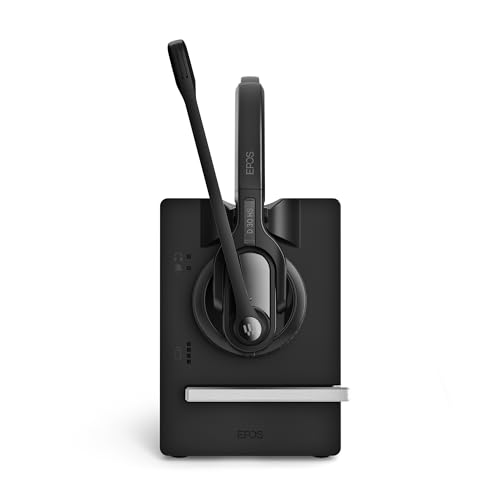
The EPOS Impact D 30 Phone is the specialist’s answer: a wireless DECT headset system whose base connects to a desk phone, full stop. EPOS comes out of the professional audio world, and the D 30’s brief is a single-purpose one — give a desk-phone worker a dual-ear cordless headset with the range to leave the desk, the call control to answer and end from the headset, and a noise-cancelling microphone that keeps the office out of the caller’s ear. In a guide where several picks compromise toward computers or mobiles, that purity is the D 30’s identity.
Dual-ear DECT changes the character of a desk-phone day. Both ears on the caller makes long calls less effortful at lower volume, and the freedom to stand, reach a file, or walk to a colleague’s desk without ending the conversation quietly removes the small frictions that accumulate across a week of calling. The base-and-charging routine is the price: the headset lives on its base, charges there, and is a citizen of that desk. For a phone-anchored professional — an executive assistant, a practice manager, a support lead whose calls are long and whose phone is a landline — the D 30 is the most purpose-built pick in this guide.
- Connection: DECT base wired to the desk phone
- Wearing style: dual-ear (both ears), cordless from the base
- Microphone: noise-cancelling microphone
- Call control: answer/end from the headset within DECT range
- Maker: EPOS business audio line
Strengths
- A single-purpose desk-phone DECT system, with none of its design budget spent on other devices.
- Dual-ear cordless freedom suits long landline calls and movement around the office.
- A professional maker’s support and accessories stand behind a fleet or a single important seat.
Trade-offs
- The base ties it to one desk phone; there is no computer or mobile story in this model.
- DECT systems cost more than any wired pick here, and the commitment should match the seat’s importance.
- Range, while long, is still a radius around the base — it is not a whole-building promise.
Best for: desk-phone professionals who want dual-ear cordless calling on a landline only. Not suited for: computer softphone users, or buyers who need one headset for phone and PC.

Yealink WH62 Dual DECT Headset — Best DECT for Phone and PC
The WH62 Dual answers the modern desk’s actual shape: an IP phone on the desk and a computer beside it, with calls arriving on both. Yealink’s dual-ear DECT system connects its base to an IP phone and a PC together, so the same headset serves the desk phone’s calls and the computer’s meetings — Teams and Zoom are named in its listing — without a second headset or a cable swap. For the growing number of offices whose “landline” is a Yealink IP phone and whose meetings live on the computer, this is the pick that matches the furniture.
Its headline numbers are seller figures and are read here the way this cluster always reads them: the range is quoted at up to 525 feet and talk time at up to 14 hours, both under the maker’s conditions, both to be understood as best-case spans rather than guarantees for your building’s walls and your day’s call mix. The substance beneath the numbers is sound: DECT range comfortably covers an office floor’s worth of wandering, dual-ear wearing suits long calls, call control and a quick mute live on the headset, and the noise-cancelling microphone addresses the caller’s side. If your desk runs Yealink phones and a meeting-heavy computer, the WH62 is the most complete single purchase in this guide.
- Connection: DECT base to IP phone and PC (USB)
- Wearing style: dual-ear (both ears), cordless from the base
- Microphone: noise-cancelling microphone with quick mute
- Range: seller-quoted up to 525 ft under the maker’s conditions
- Talk time: seller-quoted up to 14 hours under the maker’s conditions
- Platforms named: Teams and Zoom meetings via the PC connection
Strengths
- One headset serves the IP phone and the computer, which is the real shape of a modern desk.
- DECT range frees the wearer to move around an office during long calls.
- It comes from the same maker as the phones on many of the desks it will serve, simplifying support.
Trade-offs
- Its phone-side fit is Yealink-centred; other IP phone brands need verification before a fleet order.
- The dual-connection base is a bigger desk commitment than a wired headset’s simple cord.
- Headline range and talk figures are best-case claims, and thick-walled buildings will tax both.
Best for: Yealink IP phone desks that also live in computer meetings. Not suited for: analogue landlines, or buyers wanting the simplest wired seat.
MKJ Dual Ear Landline Headset — Best Wired Dual for Cisco Desks
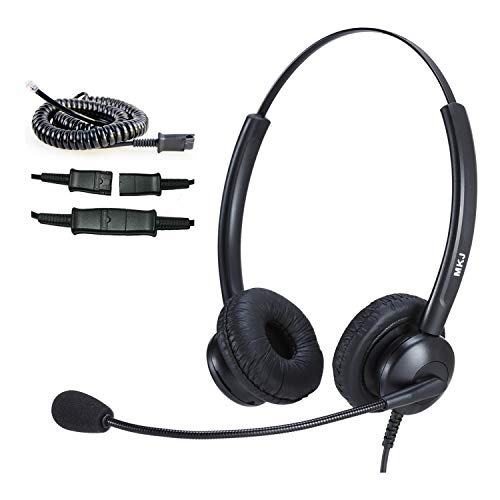
Cisco-desk readers who want both ears have a short shopping list, and the MKJ is on it: a dual-ear wired landline headset with a noise-cancelling microphone, listed for a named bench of Cisco telephone models — the CP-7821, 7841, 7941G, 7942G, 7945G, 7960, and 7961G among them. As this cluster’s corded guide argued, a named model list is the most trustworthy sentence in this category, because it converts compatibility from a hope into a check. Find your Cisco model on the list and the wiring question is answered; do not find it, and the honest move is to ask before ordering.
The headset’s proposition is the wired dual-ear one in its purest form: plug into the Cisco phone’s headset port, put both ears on the call, and forget about batteries and bases forever. Dual-ear wearing on a Cisco desk suits the worker whose calls are long and concentrated — the engineer on a vendor call, the administrator working through a list — while the colleague-facing duties of a reception desk would argue for mono instead. The MKJ is a third-party specialist rather than Cisco’s own line, so its support story is a seller’s rather than a maker’s; within its named models, though, it fills a gap that Cisco’s own catalogue largely leaves to others.
- Connection: wired to the Cisco phone headset port
- Wearing style: dual-ear (both ears)
- Microphone: noise-cancelling microphone
- Listed systems: Cisco models including CP-7821, 7841, 7941G, 7942G, 7945G, 7960, 7961G per the listing
- Power: none — fully wired
Strengths
- A named Cisco model list replaces compatibility guesswork with a checkable fact.
- Dual-ear wired simplicity: no base, no battery, no charging routine at the desk.
- It serves a niche — dual-ear on Cisco hardware — that the maker’s own range barely addresses.
Trade-offs
- Cisco models outside the named list are unverified, however similar they look.
- Third-party support and spares are thinner than a first-party line’s.
- The cord tethers the wearer to the desk, as with every wired pick.
Best for: Cisco-desk workers on the named models who want both ears on long calls. Not suited for: unlisted Cisco models, other brands, or roaming callers.

Panasonic Comfort Fit Headset — Single-Ear Budget Route (Not Dual)
This pick requires the clearest labelling in the guide, so here it is first: the Panasonic Comfort Fit is a single-ear headset. It has one earpiece, not two, and it appears in a dual-earpiece guide for one honest reason — it is the native headset for Panasonic’s TCA-series cordless landline phones, the home cordless systems that a large share of this keyword’s readers actually own. Those readers searching for a headset for their cordless phone deserve the correct, purpose-made answer, and the correct answer happens to be mono. Pretending otherwise, or quietly letting it sit in a dual-ear list unlabelled, would be exactly the category dishonesty this guide exists to refuse.
Judged as what it is, the Comfort Fit is a sensible little tool: a lightweight, foldable wired headset that plugs into the cordless handset, with a flexible noise-cancelling microphone and in-line volume control. It turns a Panasonic cordless phone into a hands-free device for the kitchen-counter call, the home-office landline call, the long family call where holding a handset to your ear stops being charming at minute twenty. One ear stays open to the house, which for most home landline use is a feature, not a compromise. Buy it knowing it is single-ear, for a Panasonic cordless system, and it will do its modest job well. Buy it expecting dual-ear coverage and no listing text is to blame but the hope you brought to it.
- Connection: wired plug into the Panasonic cordless handset
- Wearing style: SINGLE-EAR (one earpiece) — not a dual-ear headset
- Microphone: flexible noise-cancelling microphone
- Controls: in-line volume control
- Listed systems: Panasonic TCA-series cordless landline phones
- Design: lightweight and foldable for storage
Strengths
- It is the purpose-made headset for Panasonic’s cordless landline systems, so fit and function are native rather than adapted.
- The light, foldable design suits home landline use, where the headset lives in a drawer between calls.
- One open ear suits home calling, where the doorbell and the household are part of the environment.
Trade-offs
- It is single-ear. Any reader who needs both ears covered should choose a genuinely dual pick above.
- Its world is Panasonic cordless systems; it is not a general desk-phone or computer headset.
- The wired plug tethers you to the handset’s cord length rather than freeing you from it.
Best for: Panasonic TCA-series cordless phone owners wanting hands-free home landline calls. Not suited for: anyone who actually needs dual-ear coverage — choose the Wantek Dual, MKJ, EPOS, or Yealink instead.
Plantronics CS540 — The Mono DECT Reference Point (Prose-Only)
The CS540 is probably the most widely deployed DECT headset ever made, and readers researching cordless landline headsets will meet its name within minutes — so this guide addresses it directly, with its two disqualifications stated plainly. First, it is a mono headset: a single-ear convertible design that can be worn over the head or over the ear. In a dual-earpiece guide, that makes it context, not a pick. Second, it is included here without a link, as prose-only background, because this guide links only the verified picks in its pool.
What the CS540 explains, by its fame, is the appeal of the DECT route itself. Generations of desk-phone workers have worn one because it is light, because the base gives it desk-phone call control and real range, and because a single ear suits desks where the room still matters. If your reading of this guide leads you to conclude that mono DECT is actually your answer — you want cordless freedom but not both ears covered — the CS540 is the model your research will keep returning to, and the DECT picks above will show you the dual-ear expression of the same idea. It is named here so that its absence from the linked picks reads as the deliberate, ears-based decision it is, rather than an oversight.
- Connection: DECT base wired to the desk phone
- Wearing style: MONO convertible (over-the-head or over-the-ear) — not dual-ear
- Microphone: noise-cancelling microphone
- Status in this guide: prose-only context; no link given
- Role: the reference point for mono DECT at a desk phone
Strengths
- Its long service in offices makes its behaviour, accessories, and support path thoroughly known.
- The convertible wearing options suit users who dislike a fixed headband style.
- It demonstrates the DECT virtues — range and call control — in their lightest form.
Trade-offs
- It is mono. In a dual-ear guide that is a disqualification from the picks, stated openly.
- Its age means buyers should check the exact variant and condition on offer wherever they shop.
- Like all DECT, it belongs to its base and desk, not to a pocket.
Best for: readers who realise mono DECT, not dual, fits their desk — as a research reference. Not suited for: anyone whose requirement is genuinely two ears; that is what the linked picks are for.
How Do the Six Entries Compare on Route and Ear Count?
| Headset | Route | Ears | Deciding trait |
|---|---|---|---|
| Wantek Corded Dual | Wired to phone | Dual | Dual-ear for legacy/mixed systems |
| EPOS Impact D 30 Phone | DECT base to desk phone | Dual | Single-purpose desk-phone DECT |
| Yealink WH62 Dual | DECT base to phone and PC | Dual | Phone plus computer in one system |
| MKJ Dual Ear | Wired to phone | Dual | Named Cisco model fit |
| Panasonic Comfort Fit | Wired to cordless handset | SINGLE — not dual | Native Panasonic cordless budget route |
| Plantronics CS540 | DECT base (prose-only) | MONO — not dual | Mono DECT reference point |
The ears column is this table’s reason to exist. Four rows are dual, one row is a clearly labelled single-ear exception for Panasonic cordless owners, and one row is mono context. Any version of this table that blurred those labels would be lying to you in a grid, and this guide does not do that. If you arrived here from a search and take only the table away with you, take the labels with it: the Panasonic is the right answer to a different question, the CS540 is background rather than a recommendation, and the four dual rows divide cleanly into two wired picks for named phone systems and two DECT systems for readers who need to move.
How Do You Choose Between the Wired Route and the DECT Route?
Ask where your calls happen. If they happen at the desk, seated, with the phone in reach, the wired route gives you dual-ear landline calling at the lowest cost and the highest reliability, and the cord is a theoretical annoyance rather than a practical one. If your calls regularly involve standing, fetching, walking to a colleague, or simply not being pinned to a chair for an hour, the DECT route earns its price the first week. Ask also what the phone is. An analogue home landline, a legacy PBX extension, a modern IP phone, and a Panasonic cordless system each narrow the field differently, and the named compatibility of the wired picks or the base connections of the DECT picks must match it.
Then ask the ears question honestly, because this guide’s exceptions exist for readers who discover their answer is not “two.” If the calls are home landline calls with a household around them, one open ear may serve you better than dual coverage, and the Panasonic route — or mono DECT in the CS540 pattern — is the truthful purchase. Dual-ear is a concentration instrument. Buy it when concentration is the requirement, and do not let a keyword talk you into it when your life needs an ear on the room.
What Mistakes Do Buyers Make in This Thin Class?
One more pattern completes the set: buying a DECT system for a phone it cannot lift. A DECT base that cannot answer from the headset — because the phone needs a lifter or hook-switch cable that was never ordered — reduces an elegant system to a headset you must walk back to the phone to use, which is the wired experience at a wireless price. The compatibility check for a DECT pick therefore has two halves, the headset-to-base half that the maker guarantees and the base-to-phone half that your phone model decides, and a careful buyer confirms both in the same order.
The signature mistake is buying a “dual earpiece” listing that turns out to be mono with stereo marketing, or a computer headset that never touches a landline at all. Read the wearing description, count the earpieces in the photographs, and check the connection: if it is USB-only, it is not a landline headset. The second mistake is assuming a DECT headset pairs with the phone like a Bluetooth earpiece; it registers with its own base, and the base must be wired to a compatible phone. Third, buyers skip the model check on wired picks — the Wantek and MKJ lists exist to be read, not admired. Fourth, home buyers purchase office DECT systems for a single cordless handset that a simple native headset, in the Panasonic pattern, would have served for a fraction of the commitment. Fifth, the reverse: an office buys a home-grade wired headset for a seat that takes six hours of calls a day. Thin classes punish vague shopping more than deep ones do, because there are fewer correct products to stumble into by luck.
What Does “Dual Earpiece” Mean When a Listing Says It?
A short glossary is worth having before any purchase in this class, because the vocabulary is where the fog lives. Dual-ear, binaural, and stereo are used almost interchangeably by sellers to mean two earpieces; on a telephone headset the call audio is a single channel delivered to both ears, so “stereo” here describes the furniture, not a music experience. Mono and monaural mean one earpiece. Convertible means the wearing style can change — headband to ear loop — and says nothing about ear count, which is how the mono CS540 can sound, to a skimming reader, like a member of this guide’s class when it is not. Over-the-head, on-ear, and over-ear describe where the earpieces sit, and matter for comfort across long calls.
The verification habit that cuts through all of it takes ten seconds: count the earpieces in the listing’s photographs, find the connection type in the specifications — wired plug, DECT base, or USB — and find your phone in the compatibility text. A product that survives those three checks is what it claims to be. A product that fails any of them is a keyword wearing a costume, and in a class this thin, costumes outnumber genuine articles. This guide did that counting for its six entries so its table could be trusted; do it for anything you consider beyond these pages.
Final Recommendation
Choose by route, then by phone, then by ears — in that order. Desk-bound long-call workers on legacy systems should take the Wantek Dual; Cisco desks on the named models, the MKJ. Readers who want to move should take DECT: the EPOS D 30 for a pure desk-phone seat, the Yealink WH62 when the computer shares the calling day. Panasonic cordless owners should take the Comfort Fit with its single ear understood and accepted, because native fit beats a forced dual-ear adaptation. And readers who came for dual-ear but leave wanting mono DECT have the CS540 as their signpost. In a shrinking class, the right purchase is the one whose route, phone list, and ear count all match the life you actually live on the phone — everything else is a keyword’s promise, and keywords do not take your calls.
How Do You Install a DECT Headset System at a Desk Phone?
The installation is a wiring job of about ten minutes, and understanding it removes the mystery that surrounds DECT for first-time buyers. The base station sits at the desk and connects to the phone in place of, or alongside, the handset connection, following the maker’s diagram for your phone type; it also takes power from the mains. The headset registers to the base — usually a button sequence described in the manual — and from then on the phone believes the headset is part of itself. Answering from the headset requires the phone to know a call should be lifted, which is where the one variable in the whole setup lives: some phones handle this electronically through a hook-switch cable matched to the phone model, and others use a small mechanical handset lifter that physically raises the handset when you answer from the headset. Neither is complicated, but the correct one depends on your phone, which is this cluster’s eternal lesson in a new costume: check the phone model against the DECT system’s compatibility before ordering, including its lifter or hook-switch requirements.
Once installed, daily life is simple. The headset lives on the base and charges there; taking it off the base and pressing its call button answers; range covers the office or home in most buildings. The two habits worth forming are returning the headset to the base at day’s end — a DECT headset left in a drawer is a flat headset by Thursday — and learning the mute and volume controls by touch before a live call demands them. Fleets should document which lifter or cable each phone model needed, because that note is what makes the second installation a copy of the first rather than a fresh investigation.
Why Is This Class Shrinking, and What Should That Change About Buying?
The landline itself is retreating — to mobiles in homes, to softphones in offices — and the accessory class retreats with it. Fewer dual-ear landline headsets are designed each year, the survivors concentrate in professional brands and a handful of specialists, and some excellent older models persist as listings long after their makers have moved on. None of that makes the remaining products bad; the needs they serve are real, and a hospital ward phone, a workshop landline, a farmhouse kitchen phone, and a legacy PBX estate are not migrating on any blog’s schedule. It does change how a wise buyer shops.
Practically, shrinking-class buying means three things. Buy the complete system now: if a DECT base needs a specific lifter cable for your phone, order it in the same basket, because accessory availability thins faster than headset availability. Buy the consumables now: spare ear cushions and, for wired picks, a spare cord belong in the first order, not a future one that may find them delisted. And prefer makers who still treat the category as a living product line — the EPOS, Yealink, and Panasonic names in this guide — over listings whose support page is a memory. The class is shrinking; your phone is not. Equip it as if you intend to keep it, because the evidence of your search is that you do.
Who Actually Needs Both Ears on a Landline Call?
Strip the keyword down and the genuine constituencies are three. The first is the long-call professional on a landline: the adviser, administrator, or support worker whose calls run to tens of minutes and whose comprehension is the job. Two ears halve the effort of following a quiet caller in a way that is hard to appreciate until a day of mono listening has tired the covered ear. The second is the worker in a noisy room who cannot leave it — the workshop office, the depot desk — where sealing both ears is the only way the call becomes the foreground. The third is the home worker whose landline is a work line, taking client calls from a house full of life, for whom dual-ear wearing draws a boundary the household can see: headset on, both ears covered, parent or partner is in a meeting.
Against those, honestly, stand the readers this guide’s exceptions were built for. Home landline callers in ordinary houses rarely need the room to disappear; they need their hands free and one ear on the kettle, which is the Panasonic’s exact proposition. Desk workers with walk-in duties need the room more than the call’s stereo image. The discipline of this category is matching the ear count to the life, and a shrinking class makes that discipline more valuable, not less — when the choice is among few products, each wrong one is a larger share of the shelf.
What Does DECT Range Feel Like in a Real Building?
Quoted range figures are measured in open air, and buildings are not open air. Floors and walls tax a DECT signal the way they tax any radio: a base on the desk will usually cover its floor of an office or the whole of an ordinary home comfortably, fade at the garden’s end or the warehouse’s far aisle, and drop somewhere in the stairwell between floors. The honest expectation is a generous working radius, not a campus. Where you put the base matters within that radius — on the desk rather than in a metal cabinet, away from the microwave and the thickest wall — and a five-minute walk-test on the first day, headset on, caller patient, will map your real coverage more truthfully than any number in a listing.
For most desk-phone lives, that radius is not a limitation but a definition: the headset serves the desk’s orbit — the filing shelves, the colleague’s desk, the kitchen for the mid-call coffee — and the calls that need to leave that orbit belong to a mobile phone anyway. Judge a DECT pick by whether its orbit covers yours, and remember that the wired picks have an orbit of exactly one cord’s length and still earn their places, because for seated long calls the orbit was never the point.
How Do You Set Up a Wired Dual-Ear Headset for Best Results?
The wired picks ask for five minutes of setup that pays back on every call. Seat the headset so both cups sit evenly — a dual-ear headset worn crookedly delivers one loud ear and one quiet one, and the wearer compensates by turning the volume up for both. Set the phone’s headset volume on a test call with a familiar voice, at the level where you can follow a soft speaker without straining, then leave it there; daily volume fiddling usually means the fit, not the level, is drifting. Place the boom at the corner of your mouth as with every headset in this cluster, and check sidetone — the faint sound of your own voice in the earpieces — which on a correctly matched phone is present but gentle. Loud sidetone or an echo of yourself is a compatibility symptom, not a setting to endure, and it is the wired route’s way of telling you the model check deserves a second look.
Route the cord once, properly: away from the chair’s castors, with slack for turning, and with the QD point — where your pick has one — positioned where standing up separates it cleanly rather than dragging the phone. Then make the test call that closes every setup in this cluster: a colleague, your real voice, your real room, and three questions about clarity, room noise, and naturalness. A wired headset that passes that call on day one will pass it for years, because nothing in its signal path is going to change its mind overnight.
What About the Handset Jack on a Home Cordless Phone?
Home cordless systems — the multi-handset kind that live in kitchens and hallways — meet headsets at a small socket on the handset, most commonly a 2.5mm jack. That little port is the entire wired route for home cordless owners, and it explains both the Panasonic pick’s existence and its shape: a light wired headset that plugs into the handset, turning any room the handset visits into a hands-free calling spot. The handset stays the phone; the headset simply moves the conversation from a cramped ear to a comfortable one and frees the hands for the cooking, gardening, or paperwork that home calls accompany.
Two practicalities follow. First, the headset is tethered to the handset, not to the base, so your range is the handset’s own cordless range minus a cord’s length — carry the handset in a pocket and the arrangement works far better than setting it on a counter and orbiting it. Second, the jack is a physical standard but headsets are still made per system family, and Panasonic’s own headset for Panasonic’s own handsets remains the fit you do not have to think about. Owners of other cordless brands should check their handset’s jack and the headset’s stated compatibility with the same model discipline this cluster applies to desk phones, because a plug that fits is a beginning, not a promise.
How Do You Care for a DECT System Across the Years?
A DECT headset’s battery is its clock. Rechargeable cells age with cycles and calendar alike, so the habits that matter are the gentle ones: keep the headset on its base when it is not being worn, which is what the base is for; do not leave it flat in a drawer for a season; and when talk time eventually shortens past usefulness, check whether the maker sells a replacement battery before pricing a whole new system — on professional lines like the DECT picks here, the battery is often a part, not a post-mortem. Cushions follow the usual rule: they are consumables, they shape both comfort and microphone position as they compress, and a shrinking category argues for holding a spare set from the first order.
The base deserves a sentence of its own, because it is the half of the system nobody thinks about until it fails. Keep its vents clear, its connections seated, and its place on the desk permanent; a base that migrates between sockets collects pairing confusion the way a travelling charger collects losses. Document the registration steps from the manual somewhere the next person can find them, because re-registering a headset to its base after a power cut or a desk move is a two-minute job with the instructions and a folklore expedition without them. Systems cared for this way routinely outlast the phones they were bought for — which, in a shrinking class, is the strongest argument for buying a good one while the buying is good.
What Should a Small Business Still on Landlines Buy?
Small businesses are this class’s heartland: the practice, the depot, the trades office where the landline number is printed on vans and invoices and is not moving to a mobile this decade. For them the buying order in this guide becomes a small policy. Standardise the seats by role. The reception seat, with its walk-ins and interruptions, belongs to mono — the corded guide in this cluster covers it — and forcing dual-ear onto it helps nobody. The back-office seats, where calls are long and the door stays shut, are the dual-ear seats: wired Wantek or MKJ where the phones match and the workers sit, DECT where the work involves moving with the call in progress. The owner or manager who floats between both worlds is the Yealink WH62’s natural owner, one headset across the IP phone and the computer.
Buy the spares and the second base charger with the first order, write the phone-model list on the same page as the invoice, and the landline fleet becomes what it should be: invisible infrastructure that simply works every morning. The businesses that suffer with landline audio are not the ones on old technology; they are the ones whose headsets were bought vaguely, matched approximately, and supported by nobody. This class rewards precision out of all proportion to its size, because every product in it is a specialist — and a specialist, correctly matched, is the most reliable tool there is.
Frequently Asked Questions
Can I use a Bluetooth headset with my cordless landline phone instead?
Some cordless phone systems offer Bluetooth pairing with a mobile phone or a headset, but that is a feature of specific named systems, not of landlines generally, and it should be verified in your own system’s manual before you plan around it. The dependable routes for a landline remain the two in this guide: a wired headset matched to the phone, or a DECT system whose base is wired to the desk phone.
Is the Panasonic Comfort Fit really not dual-ear?
Correct — it has a single earpiece. It is included as the native budget route for Panasonic TCA-series cordless phones and is labelled single-ear in the quick picks, its review, its spec list, and the comparison table. Readers who need both ears covered should choose one of the four genuinely dual picks.
Why is the Plantronics CS540 not linked?
Two reasons, both stated in its section: it is a mono headset in a dual-ear guide, and this guide links only its verified pool picks. It is discussed because readers will encounter it constantly while researching DECT headsets, and its fame explains the DECT route’s appeal.
How far can I walk with a DECT headset?
DECT range is measured in hundreds of feet in open space — the Yealink listing quotes up to 525 feet under the maker’s conditions — but walls, floors, and building materials tax that figure heavily. Expect comfortable coverage of an office floor or a home, and test your own furthest room during the return window. Walk the route you actually take mid-call — to the filing shelves, the kitchen, the colleague’s desk — with a caller listening, and note where your voice first thins; that point, not the number on the box, is your headset’s true range in your building, and it is worth knowing before the first important call tests it for you.
Will a wired dual-ear headset work on my phone?
Only if your phone model is within the pick’s named compatibility. The Wantek Dual lists its systems and the MKJ lists its Cisco models; an unlisted phone is an unverified fit. Check the exact model, or ask the seller with the model number in hand, before ordering.
Do DECT headsets interfere with Wi-Fi or Bluetooth?
DECT operates in its own dedicated spectrum in most regions, separate from Wi-Fi and Bluetooth bands, which is part of why it behaves so predictably at a desk. Your office’s other wireless gear and a DECT base can coexist without the pairing congestion that crowded Bluetooth environments suffer.
Can two people share one DECT base?
Some DECT systems allow more than one headset to be registered or conferenced, but the standard pattern is one headset per base per active call. A shared-desk arrangement usually means each worker keeps a personal headset registered in turn, or the desk simply has its own headset that stays with the base. Check the specific system’s manual before planning a shared setup around it.
Is a dual-ear headset better for someone who is hard of hearing in one ear?
This guide does not give medical advice, and hearing questions deserve a professional’s input. What can be said as a product matter is that dual-ear headsets deliver the call to both ears at an adjustable volume, which some users find easier to follow than a single earpiece, while mono headsets leave one ear entirely to the room. If hearing is part of your decision, discuss the options with an audiologist and test any headset with real calls during the return window.
What happens to my DECT headset if I change desk phones?
The headset and base usually survive the move; the connection to the phone is what changes. A new phone may need a different hook-switch cable or lifter, and a move from a desk phone to a softphone-only setup would leave a phone-only DECT system without a job — one reason the Yealink pick’s added computer connection is worth weighing if a migration is on your horizon.
Related Guides
For the wired desk-phone world in full, with its plugs and bottom cables explained, read best corded headsets for office phone; for floor headsets, see best call center headsets noise cancelling; and for computer-side wireless, compare best bluetooth headsets for noisy office.


