What's inside
- Where to buy
- Key Takeaways
- Quick Picks
- How Did We Judge Tablets Purely as Movie Machines?
- Why Does Panel Technology Matter More Than Resolution for Films?
- What About Sound, the Forgotten Half of a Movie?
- How Do You Build the Perfect Tablet Movie Night?
- Six Screens in the Dark: How the Movie Contenders Compare
- What Mistakes Ruin Tablet Movie Purchases?
- How Should You Set Up Downloads for Travel?
- What Is It Like to Watch a Whole Film on Each Kind of Screen?
- How Do These Tablets Handle Sport, the Other Movie Night?
- What About Battery Life Across a Double Feature?
- Which Movie Tablet Suits a Family, a Cinephile and a Frequent Flyer?
- How Do Subtitles, Accessibility and Late-Night Viewing Change the Choice?
- A Short History of Watching Films on Tablets
- What Should You Check During the First Weekend of Movie Watching?
- How Does a Movie Tablet Fit the Rest of the House’s Screens?
- One More Audience: The Viewer Who Watches in Bed
- A Note on Children’s Film Nights and the Big Screen
- What About Watching With the Lights On?
- How Long Will a Movie Tablet Stay a Good Movie Tablet?
- Final Recommendation
- Frequently Asked Questions
- Related Guides
As an Amazon Associate I earn from qualifying purchases. This post may contain affiliate links at no extra cost to you.
gizmoverdict.com is reader-supported. When you buy through links on our site, we may earn an affiliate commission.
Where to buy
The best large tablets for viewing movies are judged by a stricter court than other tablets: a darkened room, a demanding film and two hours in which the screen has nowhere to hide. Specifications that impress in a shop — a benchmark, a camera count — fall silent in that court. What speaks is contrast in a shadowy scene, colour that stays honest at an angle, speakers that carry dialogue without strain, and a battery that treats a long film as a warm-up rather than a marathon. This guide gathers six large tablets and puts each of them in the cinema seat.
The field divides by panel, as movie fields always do. Samsung’s Galaxy Tab S10+ brings an AMOLED 2X screen with a 120Hz refresh rate; HONOR fields two machines, the 13.3-inch MagicPad3 and the 12.3-inch MagicPad4, from a brand that builds its reputation on displays; Apple’s iPad Air 13-inch counters with its Liquid Retina panel and the deepest streaming ecosystem in the business; Lenovo’s Idea Tab Pro offers a 3K LCD with a pen and folio in the box; and Samsung’s Galaxy Tab S10 FE+ closes the list with a 13.1-inch screen, an IP68 rating and the S Pen included. Sizes, panels and speakers are compared as movie qualities throughout — brightness is discussed comparatively, panel against panel, because that is how films actually reveal it.
One promise before the reviews: no invented numbers. Where a listing states a screen technology, a size or a refresh rate, the review uses it; where brightness is concerned, the guide talks in the honest currency of panel behaviour — per-pixel OLED-family blacks against LCD backlights — rather than in figures no listing here provides.
Key Takeaways
- Panel technology is the movie decision: the AMOLED S10+ renders night scenes with per-pixel blacks that the LCD picks cannot fully imitate.
- The iPad Air 13-inch is the streaming citizen of the group — Liquid Retina screen, Touch ID, and the smoothest path to every major service.
- HONOR’s MagicPad3 is the storage pick for travellers: 512GB holds a serious offline film library.
- The Galaxy Tab S10 FE+ adds IP68 water resistance — the movie tablet that can live by the pool or the bath without anxiety.
- Lenovo’s Idea Tab Pro bundles its pen and folio, making it the film machine that also takes notes in the interval.
Quick Picks
| Pick | Badge | Why it earns its place |
|---|---|---|
| Apple iPad Air 13-inch (M4) | The streaming all-rounder | A 13-inch Liquid Retina screen and Apple’s ecosystem make every service feel native, at a tier below the Pro’s drama. |
| Samsung Galaxy Tab S10+ AMOLED 120Hz | Best night scenes | The 12.4-inch AMOLED 2X panel at 120Hz gives films their shadows back, with the S Pen riding along unnecessarily but welcome. |
| HONOR MagicPad3 13.3-inch | The offline library | The largest HONOR screen here with 512GB of storage — a travelling cinema that does not ask the hotel Wi-Fi for permission. |
| Lenovo Idea Tab Pro 12.7-inch | Film plus folio value | A 12.7-inch 3K LCD with pen and folio included; the stand you need for viewing is in the box from day one. |
| HONOR MagicPad4 12.3-inch | The newer HONOR | The current-generation MagicPad at 12.3 inches with Android 16 and 256GB — the compact end of serious movie screens. |
| Samsung Galaxy Tab S10 FE+ Silver | Movies anywhere, even wet ones | A 13.1-inch screen, S Pen and an IP68 rating — the film tablet for kitchens, poolsides and bath-time epics. |
How Did We Judge Tablets Purely as Movie Machines?
The criteria were cinematic rather than computational. First, the panel: its technology, its size, and how it behaves in the dark scenes that expose every screen’s character. Second, sound — whether dialogue survives at sofa distance and whether the speakers serve a film or merely announce one. Third, the viewing logistics: refresh behaviour for smooth motion, storage for offline libraries, battery temperament for long features, and the stand or case story that decides whether the screen sits at a watchable angle or slides down the cushions. Processors were judged only on whether streaming stayed effortless; in this court, they are stagehands, not stars.
Listings were verified as throughout this programme, and their stated facts — sizes, panels, refresh rates, storage, the FE+’s IP68 rating — are the facts the reviews use. Brightness comparisons are drawn between panel families rather than quoted as figures, because the listings do not offer figures and a movie guide that invents them would fail its own first scene. Two brands appear twice — Samsung and HONOR — because their ranges genuinely bracket the category: flagship panel against value panel, larger against smaller, and the reviews keep the siblings’ differences in plain view.
Finally, the guide respects the two ways people watch. The streamer’s tablet is an ecosystem device, judged on services and polish; the traveller’s tablet is a library device, judged on storage and independence. Both readers are served below, and the Final Recommendation separates their answers rather than blending them into a mushy single winner.
Why Does Panel Technology Matter More Than Resolution for Films?
Because films are made of shadows. A night scene in a thriller, the blacks of a space epic, the murk of a horror film — these are rendered by a screen’s ability to produce true darkness beside bright detail. OLED-family panels, including Samsung’s AMOLED, light each pixel individually, so a black pixel is simply off: darkness is real, and stars, headlights and candle flames punctuate it. An LCD lights its whole panel from behind and dims zones to approximate the effect; good LCDs — and the iPad Air’s Liquid Retina and Lenovo’s 3K panel are good LCDs — do it gracefully, but the approximation is visible in the darkest scenes to anyone watching for it.
Resolution, by contrast, reaches a point of politeness quickly at tablet distances. All six screens here are sharp enough that the eye stops counting and starts watching; the differences that remain are contrast, colour behaviour at angles, and motion smoothness, where the S10+’s 120Hz panel lends pans and credits a steadiness that 60Hz-class screens approximate. Buy the panel family your favourite genres deserve — horror, noir and space epics vote OLED-family; bright animation, sport and comedy are gracious on any screen in this guide.
What About Sound, the Forgotten Half of a Movie?
Dialogue is the first casualty of weak tablet speakers, and it is the sound films can least afford to lose. The machines in this guide are all built with media in mind, with multi-speaker arrangements that stage sound around the screen rather than firing it at the table. At sofa distance in a quiet room, each of them carries a film respectably; at kitchen distance over a running tap, all tablets surrender, and the honest accessories take over — headphones for fidelity, a small Bluetooth speaker for company viewing. Judge speakers by speech, not by the bass-heavy demonstration loop: play a quiet conversation scene and stand where you will actually sit.
Two-up viewing changes the acoustic brief again. A screen shared on a sofa or a train table needs volume with clarity rather than volume alone, and it needs viewing angles that hold colour for the person on the outside seat — another quiet strength of the OLED-family panels. The movie tablet is a social object more often than its marketing admits, and this guide’s reviews keep the second viewer in the room.

Apple iPad Air 13-inch (M4) — The streaming all-rounder
The iPad Air at 13 inches is the movie tablet for the viewer who wants the cinema to simply work. Its Liquid Retina display is a superb LCD — bright, colour-honest, and graceful in all but the very darkest scenes, where the AMOLED rival below holds its one clear advantage. The M4 chip makes every streaming application feel over-provisioned in the best way, Touch ID unlocks the machine with a finger rather than a face-hunt in the dark, and this configuration’s 256GB holds a respectable travelling library alongside the streaming life. Wi-Fi 7 keeps it current for years of evenings.
Apple’s real movie argument is the ecosystem’s polish. Every major streaming service treats the iPad as a first-class citizen, downloads behave, offline libraries organise themselves, and the machine’s speakers stage dialogue with a clarity that flatters talk-heavy films. For households already inside Apple’s world — shared purchases, family accounts, a phone that hands off effortlessly — the Air is the path of no resistance, and its price tier sits a clear step below the Pro’s flagship drama while keeping the 13-inch canvas that makes films feel like events.
Its debits are the platform’s familiar ones: the file system thinks in applications, accessories are separate purchases, and contrast purists will notice the LCD’s grays in a noir’s darkest reel. For the great majority of films and viewers, though, this is the balanced cinema — the screen, sound and services in equilibrium, in Space Gray, ready for tonight.
- Panel: 13-inch Liquid Retina display
- Chip: Apple M4
- Storage: 256GB
- Cameras: 12MP front and back
- Details: Touch ID, Wi-Fi 7 with Apple N1, Space Gray
Strengths
- The most polished streaming experience in the guide — every service at home, downloads painless.
- A large, colour-honest screen that flatters the vast majority of films.
- Storage and performance headroom sized for years of evenings.
Trade-offs
- LCD blacks cannot match the AMOLED pick in the darkest scenes.
- Stand and case are separate purchases the viewing life quickly demands.
- Apple’s file habits suit streamers better than library tinkerers.
Best for: a streaming-first viewer, especially in an Apple household, who wants the big screen without the Pro tier. Not suited for: a contrast absolutist, or an offline archivist who manages files by hand.

Samsung Galaxy Tab S10+ AMOLED 120Hz — Best night scenes
This configuration of the S10+ is specified like a cinema that happens to take notes. The 12.4-inch AMOLED 2X panel refreshes at 120Hz, and its per-pixel light control gives films the thing LCDs spend their engineering approximating: darkness that is actually dark. Horror holds its nerve, space holds its stars, and the chiaroscuro of a prestige drama survives the transfer to a tablet screen intact. Samsung pairs the panel with 12GB of memory, 256GB of storage, the S Pen and its AI toolset, in a lightweight body that belies the screen’s seriousness.
Motion is the second half of its case. The 120Hz refresh lends camera pans, tracking shots and scrolling credits a steadiness that, once seen across a whole film, makes ordinary panels feel faintly juddery by comparison. Sound staging matches the picture’s ambition, with dialogue placed clearly enough for sofa-distance viewing. The listing’s long-battery positioning will please the double-feature crowd; marathon viewers can plan evenings rather than scenes.
Against its own family in the previous guide, this S10+ configuration is the movie specialist: more memory, the high-refresh AMOLED brief, and a review written from the sofa rather than the desk. Against the iPad Air it trades ecosystem polish for panel drama. Viewers whose favourite films live after dark should not hesitate long — this is the screen their library has been waiting for.
- Panel: 12.4-inch AMOLED 2X, 120Hz, 2K+
- RAM / storage: 12GB / 256GB
- Included: Galaxy S Pen
- Cameras: 13MP + 12MP
- System: Android with Galaxy AI tools
Strengths
- Per-pixel blacks give night scenes, horror and space films their intended look.
- 120Hz motion smoothness flatters pans, action and credits alike.
- Memory, storage and included pen make it a complete machine beyond the cinema.
Trade-offs
- Its panel talents are wasted on bright, talky content alone — buy it for the dark reels.
- Keyboard and case accessories remain separate decisions.
- Android’s streaming polish, while strong, lacks Apple’s uniformity across every service.
Best for: a film lover whose library leans dark, dramatic and cinematic. Not suited for: a casual viewer who watches mostly bright comedy and sport in lit rooms.
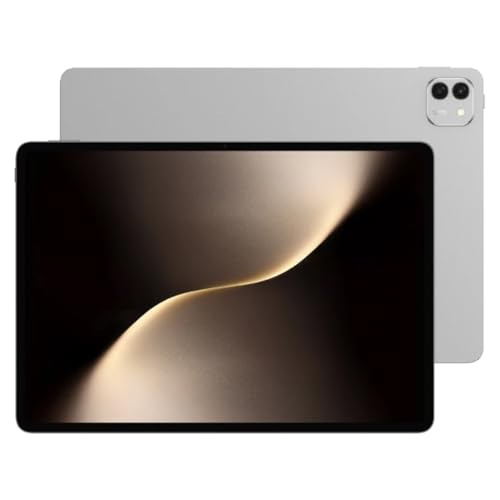
HONOR MagicPad3 13.3-inch — The offline library
The MagicPad3’s movie argument begins in an airport. With 512GB of storage — the most in this guide — and 16GB of memory, this 13.3-inch HONOR is built to carry its cinema with it: a season of a series, a director’s whole period, the children’s emergency library, downloaded at home and watched at altitude, in a cabin, in a hotel whose Wi-Fi has opinions. Independence is a feature, and this is the independent machine of the six.
The screen is the largest here after the giants of the size guide — 13.3 inches of HONOR display engineering, a brand whose tablets compete on their panels — running Android 15 in a grey finish that suits its travelling brief. For the viewer, the experience is of a private cinema that asks nothing of its surroundings: no passwords from reception desks, no buffering wheels over the ocean, no rationing of episodes against a data allowance. Families will recognise the deeper value — a pre-loaded long journey is a calm long journey.
HONOR’s ecosystem caveats apply as they did to its sibling in the size guide: accessories and local support are thinner than Samsung’s or Apple’s, and the buyer building a workstation around the tablet should verify the extras. As a viewing machine pure and simple, though, the MagicPad3’s combination of the big screen and the vast library is the guide’s most persuasive travel argument.
- Panel: 13.3-inch display
- RAM / storage: 16GB / 512GB
- System: Android 15
- Model year: 2025
- Finish: Grey
Strengths
- Half a terabyte of storage turns offline viewing from a compromise into a library.
- The largest screen in this guide, sized for shared and immersive viewing.
- Memory headroom keeps the machine composed for years of media duty.
Trade-offs
- Accessory ecosystem and support network are slimmer than the biggest brands’.
- Its storage generosity is wasted on a pure streamer who never downloads.
- Panel technology details are less storied than the AMOLED and Liquid Retina rivals’.
Best for: a traveller, a family journey-planner, or any viewer who downloads first and streams second. Not suited for: a home-only streamer, or an accessory maximalist.

Lenovo Idea Tab Pro 12.7-inch — Film plus folio value
Lenovo’s Idea Tab Pro understands something the other reviews treat as an accessory problem: a movie tablet needs to stand up. Its pen and folio case are in the box, so the 12.7-inch 3K LCD props itself on the tray table, the kitchen counter and the bedside from the first evening, and the machine’s second life as a notebook — Google Gemini on board, pen in hand — fills the hours between films. The panel itself is a sharp, generous LCD driven by a MediaTek Dimensity 8300, with 8GB of memory and 128GB of storage.
As a cinema it is the value proposition of the guide: a big, high-resolution screen, honest sound for dialogue, and the stand included, at the terms of a brand competing on completeness. Dark scenes reveal the LCD family’s limits beside the AMOLED pick — the blacks are a backlight’s approximation — but the vast centre of cinema, brightly lit drama, comedy, animation and sport, plays beautifully at this size and sharpness. Students will find the double life irresistible: lecture by day with the pen, film by night on the folio, one machine, one bag.
Storage is the configuration’s discipline, at 128GB — a streamer’s allowance rather than an archivist’s — and Lenovo’s software story is quieter than Samsung’s. Neither dents the central case. For the buyer who wants the movie screen and the means to prop it up in a single parcel, this is the guide’s most efficient answer.
- Panel: 12.7-inch 3K LCD display
- Chip: MediaTek Dimensity 8300
- Memory and drive: 8GB RAM, 128GB storage
- In the box: a pen and a folio case
- Software: Google Gemini on board
Strengths
- Folio included — the viewing posture is solved in the box, not in a second order.
- A large, sharp screen at value terms, with a genuine second life as a note-taker.
- Student-shaped versatility: study machine by day, cinema by night.
Trade-offs
- LCD contrast trails the AMOLED pick in dark scenes.
- 128GB suits streaming libraries better than downloaded archives.
- Lenovo’s software polish and accessory range sit a step behind Samsung’s and Apple’s.
Best for: a student or value-minded viewer who wants screen, stand and pen in one purchase. Not suited for: a noir devotee, or an offline collector.

HONOR MagicPad4 12.3-inch — The newer HONOR
The MagicPad4 is the current-generation HONOR in this guide — a 12.3-inch tablet running Android 16, generously specified with memory and storage in equal measure and finished in white — and its movie brief is the compact one. At 12.3 inches it is the smallest screen here, which in cinema terms means the most personal: the tablet for the viewer who watches alone, in bed, in a hammock, in the spare room while the main television hosts somebody else’s match. Personal screens live or die by their panels and their comfort over two hours, and HONOR builds its name on exactly that ground.
The specification supports the brief generously. Storage at 256GB holds a real travelling library — not the MagicPad3’s archive, but weeks of films — and the memory figure matches machines positioned well above it. Android 16 makes it the most current software citizen in the guide, a small but real longevity point for a machine bought to be kept. Its white finish, like its sibling’s in the size guide, signals a designed object rather than a specified one.
Set against its own sibling, the choice is size and archive against compactness and currency: the Pad3 for the family’s travelling cinema, the Pad4 for the individual’s personal screen. Against the field, it is the pick for the viewer who found 13-inch machines magnificent and faintly cumbersome, and who wants the movie experience at the size a single pair of hands can host all evening.
- Panel: 12.3-inch display
- RAM / storage: 12GB / 256GB
- System: Android 16
- Model: YLE-W09, Wi-Fi
- Finish: White
Strengths
- The most manageable serious movie screen here — personal cinema without the furniture.
- Storage and memory are generous for its size and position.
- The newest Android generation in the guide, bought at the start of its life.
Trade-offs
- Shared viewing for two is tighter than on the 13-inch machines.
- HONOR’s accessory world remains thinner than Samsung’s or Apple’s.
- Its sibling offers a bigger screen and double the storage for the library-minded.
Best for: a solo viewer who wants a premium-feeling personal cinema that stays easy to hold and house. Not suited for: a two-up sofa audience, or an archivist building a vast offline library.

Samsung Galaxy Tab S10 FE+ Silver — Movies anywhere, even wet ones
The FE+ returns in this guide wearing a different medal: IP68. Water and dust resistance at that level changes where a movie tablet may live — propped by the pool, resting near the bath, surviving the kitchen’s splash zone and the beach bag’s sand — and for many households those are the rooms where a second screen earns its keep. The hardware is the familiar FE+ formula in Silver: a 13.1-inch screen at a 90Hz refresh rate, an Exynos 1580 processor, 128GB of storage, the S Pen included, and a US version listing this time, which spares the buyer the international-model homework its sibling listing in the size guide required.
As a cinema it is the big, smooth, sensible screen: 90Hz keeps motion tidier than the basic class, the size fills a single viewer’s world or serves two at a counter, and Samsung’s software keeps every streaming service in easy reach. The panel is an LCD, so the AMOLED S10+ keeps the night-scene crown — but daylight, poolside and kitchen viewing, where brightness and resilience rule, play to this machine’s strengths rather than its rival’s.
Buy it as the household’s everywhere screen and its virtues compound: the tablet that does not need to be worried about is the tablet that gets used, in the rooms the precious machines avoid. That is a movie argument as real as any panel’s, and the FE+ makes it at the friendliest Samsung terms in this guide.
- Panel: 13.1-inch display, 90Hz
- Chip: Exynos 1580
- Storage: 128GB
- Rating: IP68 water-resistant
- Included: S Pen; US version, Silver
Strengths
- IP68 resilience opens the pool, bath and kitchen to the movie library.
- A big, smooth screen with the S Pen included, at FE terms.
- US version listing — no international-model checking required.
Trade-offs
- LCD panel cedes the darkest scenes to the AMOLED pick.
- Storage is a streamer’s allowance; downloaders should look at the HONOR pair.
- Its talents overlap the S10+ for buyers who never leave dry rooms.
Best for: a household wanting one big movie screen that can live anywhere, water included. Not suited for: a dark-room cinephile, or an offline archivist.
How Do You Build the Perfect Tablet Movie Night?
Start with the stand, because posture is half the picture. A folio or case that holds the screen at a slight recline on the sofa arm, the bed or the tray table transforms every machine in this guide; the Lenovo’s included folio is the reminder that this is infrastructure, not decoration. Kill the overhead light rather than the screen’s brightness — a lamp behind the viewer, or darkness, lets the panel’s contrast do its work — and give the film the household’s best headphones or its courtesy: after a certain hour, the finest speakers in this guide should be a private affair.
Downloads deserve a ritual of their own. Queue the evening’s film on home Wi-Fi before the journey or the countryside weekend, at the highest quality the storage allows, and let the MagicPad3’s archive or the Air’s library do in advance what hotel networks will not do on the night. Subtitles are the traveller’s friend and the sleeper’s mercy — set them up once, in the size and style you prefer, and every service inherits the habit. A movie night on a tablet fails on logistics far more often than on picture quality; the logistics are all solvable on a Tuesday afternoon.
Six Screens in the Dark: How the Movie Contenders Compare
| Pick | Screen | Panel character | Storage | Movie identity |
|---|---|---|---|---|
| iPad Air 13-inch (M4) | 13-inch Liquid Retina | Premium LCD, colour-honest | 256GB | Streaming polish above all |
| Galaxy Tab S10+ AMOLED | 12.4-inch AMOLED 2X 120Hz | Per-pixel blacks, smooth motion | 256GB | Night scenes and drama |
| HONOR MagicPad3 | 13.3-inch | Big-screen HONOR panel | 512GB | The travelling archive |
| Lenovo Idea Tab Pro | 12.7-inch 3K LCD | Sharp LCD, folio included | 128GB | Value with the stand solved |
| HONOR MagicPad4 | 12.3-inch | Compact current HONOR | 256GB | The personal cinema |
| Galaxy Tab S10 FE+ Silver | 13.1-inch, 90Hz | LCD with IP68 resilience | 128GB | Movies in any room, wet or dry |
The table’s lesson is that “best screen” splits three ways: darkest, largest, most polished. The S10+ wins the dark, the MagicPad3 wins the acreage-per-archive, and the iPad Air wins the evening’s ease. Choose which victory your viewing life actually celebrates.
What Mistakes Ruin Tablet Movie Purchases?
Buying by resolution alone is the first — a sharp LCD will still grey a horror film’s blacks, and the buyer who never asked about panel family discovers it during the first midnight movie. The second is forgetting the stand, then spending a year propping a slippery screen against cushions and cookbooks. Third is storage optimism among travellers: a 128GB machine is a fine streamer and a rationed archive, and the difference announces itself at 30,000 feet. Fourth is ignoring the second viewer’s angle — a screen bought for shared sofas should hold its colour off-axis, a quiet OLED-family virtue.
Fifth is ecosystem surprise: the viewer whose purchased film library lives in one store should buy the tablet that store calls home. Libraries, unlike subscriptions, do not travel between platforms, and more movie-tablet regret flows from that sentence than from any specification in this guide.
How Should You Set Up Downloads for Travel?
Treat the library as luggage: packed deliberately, before the day. Download at the highest quality your storage comfortably allows — the big screens in this guide reveal compression that a phone forgives — and favour complete series over fragments, because a journey’s viewing is sequential. Keep a permanent children’s or comfort-film reserve on the machine that never gets deleted in a tidy-up; it is the viewing equivalent of the spare charger, invisible until the day it saves the trip. Finally, re-download rather than hoard: libraries on the 512GB MagicPad3 can be archives, but on the 128GB machines a rotation habit keeps the drive breathing and the choice fresh.
What Is It Like to Watch a Whole Film on Each Kind of Screen?
Take a demanding test film — a thriller with a long night sequence in its middle act — and watch it three ways. On the AMOLED S10+, the night sequence is architecture: doorways and faces emerge from genuine darkness, and the film’s tension, which lives in what you cannot quite see, survives intact. On the iPad Air’s Liquid Retina, the same sequence is handsome and legible, its shadows a deep grey rather than a black, the mood preserved at ninety percent. On a value LCD the sequence flattens further, though the Lenovo’s sharpness keeps faces and detail clear. None of these viewings is a failure; they are three grades of fidelity, and the viewer’s own genre loyalty decides how much the grades matter.
Now take a bright film — an animated feature, a travel documentary, a sunlit comedy — and the ranking dissolves. Every screen in this guide renders colour and daylight beautifully, the size differences reassert themselves as the main event, and the MagicPad3’s acreage and the FE+’s big LCD feel like the premium experiences. This is why the guide refuses a single winner: the library decides. A household whose shelves groan with noir should buy darkness; a family whose queue is animation and sport should buy size and sound.
How Do These Tablets Handle Sport, the Other Movie Night?
Sport is cinema’s opposite — bright, fast and usually shared — and it reshuffles the field again. Motion handling takes the lead role: the S10+’s 120Hz panel and the FE+’s 90Hz screen keep fast play and panning cameras composed, while size governs how much of the tactical picture a second viewer can follow. Daylight viewing, sport’s natural habitat, flatters the bright LCDs and the resilient FE+ by the pool. Dialogue gives way to crowd and commentary, which every speaker system here carries with enthusiasm.
The honest summary is that a household split between film nights and match days should weight size and motion above panel purity — which points at the larger screens and the higher refresh rates — while the pure cinephile’s money remains best spent on the AMOLED’s darkness. Most households, being both, will find the S10+ the natural compromise: dark enough for the thriller, smooth enough for the match, sized for two.
What About Battery Life Across a Double Feature?
A film evening asks a specific question of a battery: two features, back to back, at evening brightness, with the machine’s other duties paused. Every tablet in this guide was built with media endurance in its brief — the S10+ listing’s own long-battery positioning is the explicit version of a promise the whole category makes — and a double feature is comfortably within their design centre, especially at the moderate brightness a dark room invites. The traveller’s version of the question is stricter: a long-haul flight’s worth of downloaded films, on airplane mode, which is where the big-storage machines double as big-endurance machines, since a downloaded film costs a fraction of a streamed one’s power.
Habits extend the story. Download before you fly, dim for the dark room rather than against it, and let the machine that lives by the sofa keep a charger in that room rather than borrowing the bedroom’s nightly. Movie tablets die mid-film almost exclusively through logistics, not through capacity — and logistics, as this guide keeps noting, is the solvable half of ownership.
Which Movie Tablet Suits a Family, a Cinephile and a Frequent Flyer?
The family’s cinema is a shared, forgiving, occasionally sticky-fingered institution, and its tablet should be the one nobody has to protect from the evening. The FE+ — big screen, friendly terms, IP68 shrugging off the splash and the spill — is the family machine of this guide, with the Lenovo’s bundled folio as the runner-up for households whose film nights share a machine with homework. The family’s real specification is the account structure: profiles for the children, purchases behind a parent’s approval, and a library that keeps everyone’s place in their own series.
The cinephile’s brief is narrower and deeper. One viewer, a dark room, a library curated like a record collection, and a zero tolerance for grey blacks. The S10+ was specified by Samsung as if briefed by that viewer, and the iPad Air is the alternative only where the purchased library lives in Apple’s store. Everything else — pens, processors, ecosystems — is stage machinery for this reader; the panel is the performance.
The frequent flyer’s cinema flies at altitude, offline, in a seat where the tray table is the auditorium. Storage becomes the screen’s equal partner, which crowns the MagicPad3 and its half-terabyte, with the Air and the S10+ as the 256GB alternatives whose ecosystems may already hold the flyer’s library. Noise-cancelling headphones complete the kit, and the tablet that boards fully downloaded is the one whose owner watches the film instead of the progress bar.
How Do Subtitles, Accessibility and Late-Night Viewing Change the Choice?
More households watch with subtitles than the industry admits — the sleeping baby, the sleeping partner, the hearing that is not what it was, the dialogue mixed for a cinema and murmured into a tablet. Every platform here handles subtitles gracefully, but the habit argues for screen size: captions on a 12-inch-plus panel sit in the picture’s margin rather than across its faces, and the larger machines make captioned viewing a pleasure rather than a compromise. Accessibility features — audio description tracks, dialogue enhancement where services offer it, system-wide caption styling — are mature on both Apple and Android platforms in this guide.
Late-night viewing adds its own brief: a screen that dims gracefully without crushing its shadows, a night-friendly warmth setting for the hours before sleep, and speakers or headphones that keep a film’s dynamic range civil at low volume. The OLED-family panels excel at the dim end, holding their blacks at brightness levels where LCDs turn to murk — one more reason the night-owl viewer’s money follows the same path as the horror fan’s.
A Short History of Watching Films on Tablets
The first tablets were sold as many things, but their owners quickly settled the question: the killer application was the film in bed, the series on the train, the cartoon that bought a peaceful car journey. Screen technology chased that use for a decade — resolution first, then colour, then the contrast revolution that OLED-family panels brought from phones to slates. The machines in this guide are the current state of that chase: screens that a projectionist would respect, in objects that fit a tote bag, attached to libraries that no video shop in history could have stocked.
What has not changed is the social geometry. A tablet film is watched alone or in a pair, close, often in the dark, and that intimacy is why panel quality matters more here than on any television: there is no room size, no viewing distance, no sound system to hide behind. The screen is the whole cinema. Buyers choosing from this guide are, in the oldest sense of the phrase, choosing a picture palace — merely one that fits on a tray table.
What Should You Check During the First Weekend of Movie Watching?
Programme the weekend like a festival. Night one: your darkest film, lights low, and an honest verdict on the blacks. Night two: your brightest — animation or sport — with a second viewer in the outside seat, judging angles and sound. Day three: a downloaded film away from home Wi-Fi, on battery, with subtitles on, testing the travel story end to end. By Monday the machine will have told you the truth about itself in your rooms, with your library, at your distances — and if the truth disappoints, the return window is still open and the neighbouring pick in this guide is the obvious next audition.
Check the small mercies too: whether the stand holds its angle on your sofa’s arm, whether the speakers carry a whispered scene without your reaching for the volume, whether the screen’s reflections in your lamplight sit where you can ignore them. Movie machines fail on mercies more often than on specifications, and a weekend is long enough to meet them all.
How Does a Movie Tablet Fit the Rest of the House’s Screens?
Few households buy a screen into a vacuum. The large tablet’s role in an existing ecology — main television, phones, perhaps a laptop — is the flexible one: the second room’s cinema, the personal screen that spares the household a schedule negotiation, the travelling member of the set. Casting complicates the picture pleasantly: every platform here can hand a film to a television when the audience grows, so the tablet also serves as the library’s remote control and browsing surface, the place where the evening’s film is chosen before it is promoted to the big screen.
That ecology argues for buying the platform your other screens already speak. An Apple household’s Air inherits purchases and habits; an Android-and-Windows household’s Samsung or HONOR slots into its casting and file world without translation. The movie tablet bought against the household’s grain becomes the screen that is technically excellent and practically orphaned — a fate this guide’s platform advice exists to prevent.
One More Audience: The Viewer Who Watches in Bed
Statistically, invisibly, the bed is the tablet cinema’s most loyal auditorium, and it has its own requirements. Weight matters at arm’s length in a way it never does on a stand; the 12.3-inch MagicPad4 and the lighter end of this field earn their keep here. A case that props without slipping on bedding, a screen that dims gracefully, and headphones that survive being slept in complete the brief. Couples negotiating one screen will find the 13-inch machines the diplomatic size; solo viewers can buy smaller and lighter with a clear conscience. There is no shame in optimising for the bed — it is where the category was, in large part, invented.
A Note on Children’s Film Nights and the Big Screen
For children, the large tablet is the cinema at its most democratic: the film at their eye level, on the floor cushions, in the back seat, at the grandparents’ house where the television is a mystery of remotes. The size that serves two small viewers and a parent is the 13-inch class, the resilience that serves the occasion is the FE+’s, and the preparation that serves everyone’s temper is the downloaded library, loaded before the journey rather than negotiated with a motorway’s signal. Set the profiles, set the limits your household believes in, and let the machine do the oldest job in entertainment — gathering its audience close and keeping them, happily, in the story until the lights come up.
What About Watching With the Lights On?
Not every film is a midnight affair. The weekend matinee, the kitchen’s cooking companion, the children’s afternoon feature all happen in lit rooms, where the contest changes: reflections and raw panel quality in brightness replace the blacks as the deciding virtues, and the premium LCDs — the Air’s Liquid Retina above all — hold their colour and composure beautifully. The OLED-family machines are hardly disgraced in daylight; they simply spend their genius where the room cannot see it. Households whose viewing is mostly daytime and social should weight size, speakers and anti-reflection behaviour accordingly, which is another way of saying that the honest guide’s answer to “which screen” is always, first, “in which room, at which hour”.
How Long Will a Movie Tablet Stay a Good Movie Tablet?
Longer than most technology stays good at anything, because the film does not upgrade its demands the way games do. A fine panel remains a fine panel; streaming applications remain undemanding; the parts that age are the battery and the software support window, and on both counts the big brands in this guide offer the longest runways. A movie tablet bought well today should still be hosting excellent evenings in five years, its screen unimpeached, its library intact, its stand worn smooth at the hinge by a thousand small ceremonies of propping, settling and pressing play. That longevity is the final argument for buying the panel rather than the bargain: the screen is the one component you will judge every single night, and it is the one that never gets a software update.
Final Recommendation
Let your favourite genre hold the casting vote. If your films live after dark — horror, noir, space, prestige drama — the Galaxy Tab S10+ and its AMOLED panel are this guide’s answer, and it is not close. If your viewing is the streaming mainstream in a household that values polish, the iPad Air 13 is the evening’s easiest machine. Take the MagicPad3 when the journey is the cinema, the MagicPad4 when the cinema is personal, the Lenovo when value and a stand in the box matter most, and the FE+ when the film must follow you to the poolside. A movie tablet is bought for a thousand evenings, not for a specification sheet — choose the screen your library deserves, prop it at the right angle, and press play. Then do the thing that separates a purchase from an appliance: watch something you love on the first night, in the room where it will live, with the person or the quiet you bought it for — because a movie tablet’s real specification is not written in any listing in this guide, but in the evenings it is about to become a part of, one film at a time, for years of evenings that will remember the stories long after they have forgotten the specification sheet that made them possible, the comparison tables that argued for them, and everything except the films themselves, the company they were watched with, and the particular quality of light in the room when the credits finally rolled and the room, for a moment, stayed quiet in the way that only a good film, well watched, can arrange for the people who shared it, together, in the dark, at home, exactly as the filmmakers hoped someone, somewhere, would one day watch, closely, comfortably, and to the very end of the credits, where the names of everyone who made it scroll past like a small, honourable parade of grips, gaffers, composers and caterers, each owed a moment of somebody’s grateful attention somewhere in the wide, watching, film-loving world beyond the screen’s own softly glowing rectangular edge tonight.
Frequently Asked Questions
Is AMOLED really better than LCD for movies?
For dark content, yes, visibly: per-pixel light control produces true blacks, so night scenes, horror and space films look as their makers intended. For bright content — animation, sport, comedy, daytime viewing — the excellent LCDs in this guide, the iPad Air’s Liquid Retina and Lenovo’s 3K panel, are every bit as pleasurable. The question is not which technology wins in the abstract but which genres fill your evenings.
How big a tablet do I need for two people to watch together?
Thirteen inches is the comfortable threshold for two viewers on a sofa or in a pair of train seats; the 12.3 and 12.4-inch machines serve two at closer quarters, and anything here serves one viewer luxuriously. Viewing angle matters alongside size — the OLED-family panels hold their picture for the outside seat — and a stand that aims the screen between the viewers is worth more than another half-inch of diagonal.
Can these tablets really replace a television for films?
For one or two viewers, in the rooms televisions do not reach, yes — that is the role this entire category has grown into. For a family’s main-room premiere with an audience of five, the television keeps its crown on size alone. Most households end up with both, and discover the tablet takes the majority of solo and paired viewing hours within a month.
How much storage does a movie tablet need?
A streamer who watches over Wi-Fi needs little — 128GB is ample. A downloader should count in films: high-quality downloads are large, series are larger, and a travelling library worthy of the name starts to breathe at 256GB and luxuriates at the MagicPad3’s 512GB. Buy for the journeys you actually take; the home streamer paying for archive storage is subsidising a holiday they may never have.
Does refresh rate matter for films?
Films are shot at a low frame rate by design, so refresh rate is not about the film’s own motion — it is about the smoothness of pans, credits and the interface around the film, and about how gracefully the panel handles motion processing. The S10+’s 120Hz and the FE+’s 90Hz both lend that grace; viewers sensitive to judder in slow camera moves will feel the difference, and everyone else will simply find the picture calm.
Should I buy a separate stand or case for movie watching?
Yes, and buy it with the tablet rather than after a month of improvisation. The stand decides the viewing angle, the viewing angle decides half the picture’s quality, and a screen propped against a cushion is a cinema with a collapsing wall. The Lenovo in this guide includes its folio for exactly this reason; for the others, a folio case or a simple adjustable stand is the highest-value accessory in the whole purchase, ahead of any other extra you are considering.
Do I need headphones for the best movie experience on a tablet?
For solo viewing, a good pair of headphones is the cheapest dramatic upgrade available — it restores the dynamic range and the quiet detail that small speakers compress, and it makes the late-night session a courtesy instead of a negotiation. For shared viewing the speakers in this guide carry the room respectably, and a small Bluetooth speaker is the household upgrade. Either way, sound deserves a line in the budget; a film is half audio, and the finest panel in this guide cannot change that arithmetic.
Is a tablet or a small television better for a bedroom?
For a single viewer or a couple, the tablet wins on everything except raw size: it moves between rooms, it needs no installation, it carries the whole streaming world in one object, and it turns off with a tap rather than lighting the room with a standby glow. A bedroom television wins only where the audience is the whole room and the viewing distance is measured in metres. Most households that buy from this guide discover the tablet also liberates the bedroom from a permanent screen — the cinema arrives for the film and leaves with the morning, which is a kind of hospitality no fixed screen in the house can offer a guest room, a sick day or a rainy afternoon that needed a story more than it needed the sun.
Related Guides
For the full size story behind these screens, see our guide to the best large tablets 12 inch and above, where the same machines are judged as work and study tools. Readers building a pen-and-paper workflow around their viewing should visit the detachable Windows tablets guide, and anyone furnishing a whole room rather than a lap will find our Microsoft Windows tablets round-up a useful companion read.


