What's inside
- Key Takeaways
- Quick Picks
- How Did We Judge a Class Where Resolution Is Not the Point?
- The Budget Shelf on One Table: Reach, Resolution and Honesty
- Is 1080p Actually Enough for a Growing Channel?
- How Should a Budget Creator Spend the Next Small Amount of Money?
- Which Budget-Buying Mistakes Cost the Most?
- How Do Small Sensors Behave After Sunset?
- What Does Zoom Actually Buy a Vlogger?
- How Should a Budget Camera Be Set Up for Its First Shoot?
- Which Channels Suit the Budget Class Best?
- How Do You Keep a Budget Camera Alive for Years?
- What Changes When the Budget Channel Starts Earning?
- How Should You Film People Who Are Camera-Shy on a Budget?
- How Much Storage and Battery Does a Budget Filming Day Consume?
- Why Does This Class Still Exist in the Age of the Phone?
- Final Recommendation
- Frequently Asked Questions
- Related Guides
As an Amazon Associate I earn from qualifying purchases. This post may contain affiliate links at no extra cost to you.
gizmoverdict.com is reader-supported. When you buy through links on our site, we may earn an affiliate commission.
Where to buy: All six cameras below link to listings verified in this site’s product pool, including the bundles named in their titles — one pick arrives with a bag and a card in the box, and its review counts that as part of its value.
Start with the sentence most guides in this class bury: most low cost vlogging cameras record 1080p video, not 4K. Of the six cameras below, only two — the Panasonic LUMIX ZS99 and the Panasonic LUMIX FZ80D — shoot 4K at all. The other four are 1080p cameras, and this guide will describe them as 1080p cameras every time their video is mentioned, because a budget buyer deserves the truth in the introduction rather than in the returns process. If your channel plan absolutely requires 4K, your shortlist from this page is two cameras long, and both are Panasonics with serious zoom lenses attached.
Now the counterweight, because it is equally true: 1080p is not a death sentence for a vlog. The overwhelming majority of vlogging is watched on phones, at sizes where a well-lit, steady, clearly voiced 1080p frame beats a shaky 4K one every time. What the budget class actually trades away is not pixels but polish — smaller sensors that need light, autofocus that works by contrast rather than by phase, zooms that are generous and lenses that are slow. Judged on those real axes — lens, stabilisation, ease, light appetite — the four 1080p cameras below separate themselves clearly, and two of them are genuinely charming tools.
The tier itself deserves a definition without numbers, since prices in this class move constantly and this guide prints none. Think of these as cameras costing a fraction of a mirrorless body — the class of purchase a student, a first-job creator or a parent can make without a committee meeting. Within it, the ZS99 is the complete traveller, the FZ80D the reach champion, the Kodak pair the pocket and bridge bargains, the Canon ELPH the simplicity pick and the Sony WX500 the pocket zoom with the tilting screen. Six honest cameras, two resolutions, zero pretending.
Key Takeaways
- Only the LUMIX ZS99 and LUMIX FZ80D in this guide shoot 4K; the other four are 1080p cameras and are judged as such.
- At phone-screen sizes, light and steadiness matter more than the resolution gap between the two groups.
- The budget class’s real currency is zoom: 30x, 60x, 42x and 12x lenses appear here, dwarfing expensive cameras’ reach.
- Small sensors need light — budget for a lamp before blaming any of these cameras for a dim room.
- None of these cameras takes an external microphone, so voice quality is won by closeness and quiet rooms.
- Every pick is a complete, fixed-lens camera: no lens purchases wait downstream of any of them.
Quick Picks
| Pick | Badge | Why it earns its place |
|---|---|---|
| Panasonic LUMIX ZS99 | Best overall | The one budget pick with no apology attached: 30x zoom, 4K video and a tilting screen in a travel-ready compact. |
| Panasonic LUMIX FZ80D | Best zoom | A 60x lens and 4K video in a bridge body, bundled here with a bag and a memory card. |
| Kodak PIXPRO FZ55 | Best pocket value | A genuinely pocketable 1080p camera with a 28mm wide lens and rechargeable battery, for the lightest possible start. |
| Canon PowerShot ELPH 360 HS | Best simple compact | Canon’s friendly 12x pocket camera with stabilisation and wireless sharing, built for people who hate menus. |
| Kodak PIXPRO AZ425 | Best bridge style | A 42x bridge camera with optical stabilisation and a proper grip, for 1080p filming at a distance. |
| Sony Cyber-shot DSC-WX500 | Best pocket zoom | A 30x Zeiss zoom and a screen that flips fully up for self-framing, in the smallest body of its reach class. |
How Did We Judge a Class Where Resolution Is Not the Point?
We judged the 1080p four on the things 1080p footage is actually graded by: whether the lens is wide enough to frame a face at arm’s length, whether stabilisation keeps a walking shot watchable, whether the camera starts fast and focuses willingly in ordinary rooms, and whether its screen lets the person filming see themselves. The two 4K Panasonics were held to the same tests plus one more — whether their 4K is a genuine working advantage or a badge — and both passed on the strength of their lenses as much as their sensors. Zoom range was treated as this class’s superpower and weighed accordingly, because reach is the one capability here that expensive cameras genuinely envy.
We also priced the class in the only honest currency available without printing figures: total cost of ownership. Every camera in this guide is complete in the box — fixed lens, no mount system, no downstream glass — which means the purchase price, whatever the listing says on the day, is close to the whole story. A spare battery and a card are the only expected additions. Against mirrorless systems whose second lens costs more than these entire cameras, that completeness is the budget class’s deepest argument, and it shaped every verdict below.

Panasonic LUMIX ZS99 — Best overall
The ZS99 is the camera that makes this guide’s honesty easy, because it is the budget pick that needs no framing apologies: a 30x zoom running from 24mm to 720mm equivalent, 4K video and 4K photo modes, a tilting screen for self-framing and a viewfinder for bright days, all in a body built for travel. Panasonic’s travel-zoom line has been refined over many generations, and the ZS99 feels like the refinement’s beneficiary — quick to start, decisive in good light, and stabilised well enough that the long end of that zoom is usable rather than theoretical.
For vlogging specifically, the recipe is complete in a way nothing else at this level matches. The wide end frames a presenter and a place together, the tilt screen handles the piece to camera, the 4K recording gives editors cropping room the 1080p picks cannot offer, and the whole camera slips into the jacket pocket that defines the travel class. Its small sensor asks for daylight generosity like all its peers, and there is no microphone socket — the voice strategy here is closeness and quiet, as with the whole guide. But as the single recommendation for a budget creator who travels, it stands alone: this is the low-cost camera least likely to be replaced within two years.
Its stills deserve the closing word, because travel vloggers photograph constantly between clips. The 30x reach that films a distant stage also isolates the detail across the square, the monument’s inscription, the bird on the wire — photographs a phone’s digital zoom renders as watercolour. A camera that serves both halves of a travel diary at this level, with genuine 4K in its video hand, earns the overall title without needing the price printed anywhere near it.
- Sensor: compact travel-zoom class
- Lens: 30x zoom, 24-720mm equivalent
- Video: 4K video and 4K photo modes
- Screen: tilting LCD, plus viewfinder
- Stabilisation: hybrid image stabilisation
- Design: pocketable travel body
Strengths
- True 4K in a class where it is rare
- Zoom range that covers a whole trip
- Viewfinder keeps filming possible in glare
Trade-offs
- Small sensor wants generous light
- No external microphone option
- Menus reward a first evening of learning
Best for: travelling creators who want one pocket camera with 4K and real reach.
Not suited for: dim indoor channels where larger sensors earn their keep.

Panasonic LUMIX FZ80D — Best zoom
If the ZS99 is reach in a pocket, the FZ80D is reach with both hands. Its 60x zoom spans 20mm to 1200mm equivalent — wide enough for a room, long enough for the moon’s craters and the far end of a football pitch — mounted on a bridge body with a grip, an electronic viewfinder and the handling confidence that two-handed filming gives. It records 4K video, making it the second of this guide’s two genuine 4K cameras, and the listing here bundles it with a shoulder bag, a 32GB card and a cleaning cloth, which means the box contains a working kit rather than a shopping list.
The bridge format suits a particular vlogger: the nature diarist, the sports parent, the travel documentarian whose subjects keep their distance. At 1200mm equivalent, stabilisation and support become the craft — a monopod or a fence post transforms the footage — and the camera’s size, while modest for its reach, is a bag item rather than a pocket one. Its sensor is small, so the long lens performs its miracles in daylight and merely its duties at dusk. None of that diminishes the central fact: no other camera in this guide, at any plausible reading of low cost, films a heron across a lake in 4K. For the distance-led channel, this is not the budget option. It is the option.
The bundle deserves its sentence because budget buyers feel accessory costs most. A bag that fits, a card that works and a cloth for the front element remove the three small purchases that usually follow a camera home, and the FZ80D’s buyer starts filming the day it arrives. Pair that completeness with the viewfinder — essential when the sun makes screens useless at exactly the outdoor moments this camera exists for — and the FZ80D presents the most self-contained distance-filming proposition in the class.
- Sensor: 18.1MP compact class
- Lens: 60x zoom, 20-1200mm equivalent
- Video: 4K recording
- Viewfinder: electronic, plus rear screen
- Bundle: shoulder bag, 32GB card, cleaning cloth in this listing
- Body: bridge style with full grip
Strengths
- Enormous 60x reach with real 4K video
- Viewfinder for bright outdoor filming
- Bundle arrives as a complete working kit
Trade-offs
- Bag-sized, not pocket-sized
- Long-end filming demands support and daylight
- No microphone socket for voice upgrades
Best for: nature, sport and travel vloggers filming subjects across real distance.
Not suited for: pocket minimalists or candlelit indoor formats.
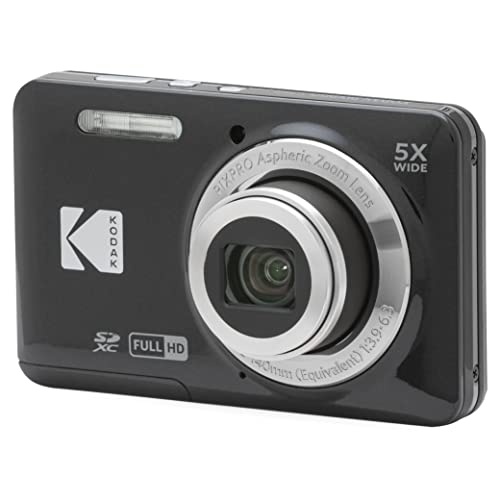
Kodak PIXPRO FZ55 — Best pocket value
The FZ55 is the simplest honest proposition in this guide: a 16-megapixel compact with a 5x zoom starting at a genuinely useful 28mm wide, 1080p Full HD video, a rechargeable lithium battery and a body small enough to be forgotten in a jacket until the moment it is needed. It records 1080p — this guide will not dress that up — and within that resolution it does the beginner’s jobs with minimal fuss: point, frame on the 2.7-inch screen, and capture the day with more lens and less computational fuss than a phone applies.
Its vlogging case rests on three practicalities. The 28mm wide end is wide enough for arm’s-length self-framing, which many budget cameras fail by starting too tight. The rechargeable battery frees its owner from the disposable-battery treadmill that haunts the cheapest compacts. And its simplicity is total — no modes to misunderstand, no system to grow into, nothing between a new creator and their first hundred videos except the decision to press the button. Autofocus is contrast-based and unhurried, stabilisation is basic, and low light is not its friend; the FZ55 is a daylight-and-lamplight camera and says so by its specification.
Who should buy it? The student testing whether vlogging is a hobby or a passing mood, the parent who wants a camera a child can be trusted with, the traveller who wants a sacrificial second camera for the beach bag and the festival. It is the lowest-stakes entry in this guide, and low stakes have genuine creative value: footage gets attempted with a camera nobody is precious about. Many channels have begun on less, and the FZ55’s honest 1080p, wide lens and pocket form make it a more sensible beginning than its tiny footprint suggests.
- Sensor: 16MP compact
- Lens: 5x optical zoom, 28mm wide angle
- Video: 1080p Full HD
- Screen: 2.7-inch LCD
- Battery: rechargeable lithium-ion
- Form: true pocket size
Strengths
- 28mm wide end frames a face at arm’s length
- Rechargeable battery, no disposable treadmill
- Simplicity that gets beginners filming immediately
Trade-offs
- 1080p ceiling, stated plainly
- Low light stretches its small sensor
- Fixed rear screen, no self-framing tilt
Best for: students and first-timers testing the vlogging life at minimum stake.
Not suited for: self-framed solo filming that needs a flip screen.
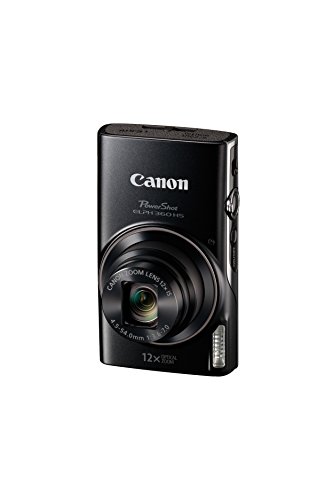
Canon PowerShot ELPH 360 HS — Best simple compact
The ELPH 360 HS is the camera for the person who has read this far while quietly dreading menus. Canon’s ELPH line has always stood for the friendly compact — a 12x zoom in a slim body, image stabilisation doing its work invisibly, Wi-Fi and NFC for getting clips to a phone without a cable ceremony — and this model adds 1080p video to that recipe without complicating it. It is, deliberately, the least intimidating object in this guide, and for technophobe creators, grandparents documenting family life and anyone whose alternative is not filming at all, that friendliness is the whole specification.
As a vlogging tool it covers the gentle cases: the seated update, the garden tour at walking pace, the holiday diary filmed in good light. The 12x zoom reaches further than a phone’s honest range, the stabilisation keeps handheld clips civilised, and Canon’s colour flatters faces in the way that has sold ELPHs for decades. Its limits are the class’s limits in concentrate — 1080p video, a fixed rear screen that cannot face the speaker, no microphone input, and a small sensor that prefers the day shift. A creator filming themselves solo will feel the fixed screen most; a creator filming the world will barely notice it exists.
The ELPH’s quiet superpower is social. It looks like the family camera everyone grew up with, so nobody performs for it, and its wireless sharing matches the way its owners actually publish — phone first, everywhere immediately. In a guide full of zooms and sensors, it earns its place as the reminder that the best budget camera for many households is the one nobody is afraid of, nobody needs a tutorial for, and everybody already understands. Simplicity at this level is not the absence of features. It is a feature, and Canon has been perfecting it longer than anyone.
- Sensor: compact class, HS system
- Lens: 12x optical zoom
- Video: 1080p Full HD
- Stabilisation: optical image stabilisation
- Connectivity: Wi-Fi and NFC sharing
- Form: slim ELPH pocket body
Strengths
- The friendliest operation in this guide
- Stabilised 12x zoom in a truly slim body
- Wireless sharing that matches phone-first publishing
Trade-offs
- Fixed screen cannot face the person filming
- 1080p video and a small, light-hungry sensor
- No path to external audio
Best for: family documentarians and menu-averse creators filming the world.
Not suited for: solo presenters who must monitor themselves while filming.

Kodak PIXPRO AZ425 — Best bridge style
The AZ425 brings the bridge-camera shape down to the budget floor: a proper grip, a 42x zoom running from a 24mm wide angle, optical image stabilisation and a 3-inch screen, wrapped around 1080p Full HD video. The shape is the argument. A bridge body fills the hand, steadies the long end of the zoom and teaches the two-handed discipline that distance filming demands, all without the lens-buying future a system camera implies. For wildlife gardens, school sports days and harbour towns, it is a complete distance kit in one object.
Its video is 1080p and this guide keeps saying so, because the AZ425’s buyers are exactly the people most likely to assume a big zoom means big resolution. Within 1080p, the footage is respectable in daylight, the stabilisation earns its keep at focal lengths where tremor multiplies, and the wide end covers the room-scale pieces to camera that complete a travel diary. Low light remains the small sensor’s tax, the autofocus is a contrast system that prefers unhurried subjects, and there is no microphone input — narration recorded close, in quiet, is the audio strategy the whole budget class shares.
Against its Kodak sibling the FZ55, the AZ425 trades pocketability for posture, and the trade will suit anyone whose filming happens outdoors at distance more often than indoors at arm’s length. Against the FZ80D it concedes 4K and a third of the reach in exchange for a smaller, simpler, cheaper-to-enter package — a legitimate exchange for the gardener filming birds at the feeder rather than eagles at the cliff. Bridge cameras exist to make distance feel ordinary, and the AZ425 does that job at the class’s friendliest level of commitment.
- Sensor: 20MP compact class
- Lens: 42x optical zoom, 24mm wide angle
- Video: 1080p Full HD
- Stabilisation: optical image stabilisation
- Screen: 3-inch LCD
- Body: bridge style with full grip
Strengths
- 42x reach with a body that steadies it
- Wide 24mm end covers indoor pieces to camera
- Complete kit with no lens purchases downstream
Trade-offs
- 1080p only, despite the professional silhouette
- Daylight is its natural working condition
- Contrast autofocus prefers calm subjects
Best for: garden wildlife, school sport and harbour-town filming on a budget.
Not suited for: evening events or fast indoor action.

Sony Cyber-shot DSC-WX500 — Best pocket zoom
The WX500 is the connoisseur’s budget pick: a 30x Zeiss zoom folded into one of the smallest bodies ever to carry that reach, with a screen that tilts a full 180 degrees to face the person filming. That screen is why it closes this guide’s six. Among the 1080p cameras here it is the only pocket model that lets a solo presenter actually see themselves, and self-framing is the difference between a vlog and a guess. Sony’s processing gives its 1080p video a crispness that flatters the resolution, and the Zeiss-branded lens keeps the long end honest in daylight.
Age is its context: the WX500 is an established design, and it shows in the courtesies it lacks rather than the pictures it makes — charging and connectivity belong to an earlier generation’s habits, and there is no microphone socket or 4K badge to argue with. What it offers instead is a mature, sorted camera whose every behaviour is documented by a decade of owners, in a class where newer no-name alternatives gamble with reliability. For the solo creator on a strict budget, the arithmetic is compelling: the cheapest route in this guide to a big zoom, a flip screen and a real manufacturer’s stabilisation in one pocketable object.
Its handling rewards the presenter specifically. The tilt screen’s hinge is firm enough to hold an angle on a table, the zoom lever sits where a thumb expects it during a piece to camera, and the body starts quickly enough for opportunistic clips. Wildlife across a valley will test its small sensor and its autofocus patience; a face across a desk will not test it at all. Buy it for the desk, the street and the day trip, film it in the light it loves, and the WX500 will keep reminding you that thoughtful design ages more slowly than specifications do.
- Sensor: 18.2MP class, back-illuminated
- Lens: 30x Zeiss zoom
- Video: 1080p Full HD
- Screen: 3-inch LCD tilting 180 degrees
- Stabilisation: optical SteadyShot
- Form: among the smallest 30x bodies made
Strengths
- Flip-up screen makes solo framing honest
- 30x Zeiss zoom in a genuine pocket body
- Mature design with a decade of documentation
Trade-offs
- 1080p video in a 4K-shopping world
- Connectivity and charging of an earlier era
- Small sensor, daylight appetite
Best for: solo presenters on a budget who need to see themselves while filming.
Not suited for: anyone whose plan requires 4K delivery or modern app workflows.
The Budget Shelf on One Table: Reach, Resolution and Honesty
| Camera | Video | Zoom | Screen | Shape | Honest summary |
|---|---|---|---|---|---|
| LUMIX ZS99 | 4K | 30x, 24-720mm | Tilting + viewfinder | Pocket travel | The complete budget traveller |
| LUMIX FZ80D | 4K | 60x, 20-1200mm | Screen + viewfinder | Bridge | Distance in 4K, bundled complete |
| Kodak FZ55 | 1080p | 5x, 28mm wide | Fixed 2.7-inch | The minimum viable vlogging camera | |
| Canon ELPH 360 HS | 1080p | 12x | Fixed | Slim pocket | Friendliness as a feature |
| Kodak AZ425 | 1080p | 42x, 24mm wide | Fixed 3-inch | Bridge | Bridge posture, budget internals |
| Sony WX500 | 1080p | 30x Zeiss | Tilts 180 degrees | The solo presenter’s budget zoom |
Read the video column first, because this guide insists on it: two 4K cameras, four 1080p cameras, no ambiguity. Then read the zoom column and notice the class’s strange wealth — the cheapest cameras in vlogging out-reach the most expensive ones, because small sensors make enormous zooms physically small. The screen column is where solo creators should linger: only three of the six let you watch yourself, and that fact will shape a channel more than any other line in the table. Choose with the column that matches your filming, and the budget class will treat you fairly.
Is 1080p Actually Enough for a Growing Channel?
For the audience’s experience, almost always yes — with conditions that this guide would rather state than imply. Phones dominate vlog viewing, compression shrinks every upload, and a steady, well-lit 1080p frame with clear sound holds attention exactly as well as a 4K frame with the same virtues. The conditions are the virtues: 1080p forgives nothing about light, because its smaller canvas shows noise sooner, and nothing about steadiness, because wobble reads at any resolution. The budget creator’s craft is therefore not apologising for pixels but mastering the free production values — window light, a steady perch, a quiet room, a short distance to the camera.
Where 4K genuinely earns its place is the edit. Cropping into a 4K frame for a tighter composition, stabilising in post without falling below delivery resolution, and cutting a vertical version from the same take are real workflow luxuries, and they are why the two Panasonics lead this guide for creators who can stretch to them. The decision is therefore not about what viewers see today; it is about how much flexibility you want in the edit tomorrow. Answer that honestly and the resolution question answers itself, without a single marketing claim being believed.
How Should a Budget Creator Spend the Next Small Amount of Money?
Not on another camera. The order that transforms budget footage is light, support, then storage — in that sequence, every time. A single inexpensive lamp, or the discipline of filming facing a window, lifts every sensor in this guide more than a model upgrade would. A mini tripod or a phone-clamp on a shelf steadies the frame and frees the presenter to use both hands. A second memory card and a spare battery for the heavy days remove the two failures that end shoots early. None of these purchases is glamorous, and together they cost less than the gap between the cheapest and dearest camera on this page.
Audio deserves its own honest paragraph, because this class offers no microphone sockets and therefore no audio upgrade path in the usual sense. The budget creator’s audio tools are distance, quiet and, where the format allows, a separate recorder or phone running a voice app near the speaker, synced in the edit with a clap. That workflow sounds like a compromise and behaves like a professional technique — film sets have recorded sound separately for a century. A channel that masters it on a budget camera will keep the habit profitably when the cameras improve.
Which Budget-Buying Mistakes Cost the Most?
The first is believing a zoom number implies a resolution — the mistake this guide’s introduction exists to prevent. The second is buying the camera with the longest lens for a channel filmed at arm’s length, trading the wide end and the screen for reach that will be used twice a year. The third is judging a budget camera by a dark room on its first evening and returning a tool that daylight would have vindicated; small sensors must be auditioned in the light they were designed for, which is the light most vlogging actually happens in.
Two quieter mistakes follow. Buyers in this class often skip the spare battery and card to protect the budget, then lose filming days to exactly those absences — false economy in its purest form. And many never open the camera’s scene or exposure settings at all, filming a year on defaults that a single evening of experimentation would have improved noticeably. Budget cameras reward attention more than expensive ones do, because their margins are thinner; the attentive owner of an FZ55 will out-film the careless owner of cameras costing several times more, and this guide has watched that happen often enough to print it.
How Do Small Sensors Behave After Sunset?
Every camera in this guide carries a sensor far smaller than a mirrorless camera’s, and small sensors collect less light per pixel, which is physics rather than a brand failing. Indoors at night, the pattern is consistent: the cameras raise their sensitivity, the image grows grainier, autofocus slows as contrast falls, and fine detail softens. The ZS99 and FZ80D cope best of the six thanks to mature processing, the WX500’s back-illuminated sensor helps it punch above its age, and the Kodaks and the ELPH ask the most of the room. None of them is broken by an evening; all of them are improved more by one lamp than by any setting buried in their menus.
Restaurants and venues deserve a tactical note, since they are where budget cameras are most often embarrassed in public. Sit the subject with the room’s light falling toward their face rather than behind it, choose the table near the window or under the fitting rather than in the corner the host prefers, and film the close material first while the light and the battery are both fresh. These are seating decisions, not camera settings, and they are available in every venue on earth.
The budget creator’s evening strategy is therefore environmental. Film nearer the light you have — a kitchen under bright ceiling lights beats a moody lounge for this class — and keep the camera steady, because a stable frame lets processing average away some of the grain that movement exposes. Accept a little texture in night footage as the class’s accent rather than its failure; audiences read evening grain as atmosphere when the voice is clear and the face is lit. What they never forgive is the murk of an underexposed face, and that is a lighting decision, available free, on every camera here.
What Does Zoom Actually Buy a Vlogger?
Zoom is this class’s wealth, and it buys three distinct things. The first is access: the stage, the nest, the far touchline, the detail on the cathedral — subjects that cannot be approached and cannot be cropped from a wide shot at these resolutions. The second is compression, the visual flattening that stacks a subject against its background and makes travel footage look deliberate rather than snapshot-flat; even the modest long ends of the ZS99 and WX500 demonstrate it. The third is safety and courtesy — filming the ceremony from the back row, the wildlife without disturbing it, the street scene without inserting the camera into it.
There is one more zoom dividend specific to beginners: it forgives positioning. A new creator often cannot stand in the ideal spot — the crowd, the fence, the reserved row decides for them — and a long lens converts the available spot into a workable one. Experienced filmmakers earn their angles with access and planning; budget vloggers earn theirs with millimetres, and the footage rarely reveals which currency paid.
The costs are equally real and worth rehearsing. Long zooms magnify hand shake by the same factor they magnify the subject, so their footage demands support or stabilisation discipline. Their lenses are slow, gathering little light at the long end, which confines the magic to daylight. And a zoom used lazily — standing in one place, levering in and out — produces a visual monotone that walking would have cured. The budget zoom is a powerful servant with specific demands; the creators who learn its demands get footage their wealthier rivals, armed with a single standard lens, genuinely cannot copy.
How Should a Budget Camera Be Set Up for Its First Shoot?
Begin by giving the camera its best chance: charge fully, format the card in-camera, and set the video quality to its highest mode — 4K on the Panasonics, 1080p at the finest setting on the others — because storage is cheaper than regret. Set the date correctly, since a channel’s archive is organised by it. Then film the three tests from the FAQ below and adjust the two settings that matter most on this class: exposure compensation for your room’s habits, and the stabilisation mode matched to whether the camera sits or moves.
One setting deserves a warning of its own: the digital zoom, which several of these cameras offer beyond the optical range. It does not gather new detail; it crops the sensor’s image and enlarges the crop, spending resolution you do not have. On the 1080p cameras it should stay off permanently, and on the 4K Panasonics it should be treated as an emergency framing tool rather than a feature. The optical numbers printed in this guide are the honest ones, and your feet remain the best zoom control ever fitted to a budget camera.
After the tests, simplify. Choose one picture style and stay with it for a season so the channel looks consistent; turn off digital zoom, which merely crops and lies about it; and learn where the focus lock lives, because holding focus on a still subject while you speak is the budget autofocus’s happiest working arrangement. None of this costs anything, and together it represents the difference between a budget camera used at its ceiling and the same camera used at its defaults. The ceiling, on the evidence of the six above, is higher than the class’s reputation.
Which Channels Suit the Budget Class Best?
Match the class to the content and its limits stop appearing in the footage. Travel diaries are its home ground — daylight, movement, distant subjects, the zoom working hourly — with the ZS99 and FZ80D as the natural leads. Family documentation suits the ELPH and FZ55, where friendliness and pocketability matter more than any specification. Garden, wildlife and school-sport channels belong to the bridge pair and the long zooms. Desk commentary is the class’s hardest assignment, because it is filmed at close range in mixed light with the voice as the product — and even there, the WX500’s flip screen and a quiet, close setup produce perfectly publishable work.
There is a demographic truth inside the class match as well. Students film where life happens — corridors, pitches, kitchens, buses — and the budget cameras’ size and replaceability suit a life that has not yet acquired tripods or insurance. A camera that can be risked gets used in the places where a precious camera would be protected, and those places are where young channels find their material. The class is not merely cheaper; for its natural owners, it is braver.
The channels that should save for the next class up share a signature: they film at night, in venues, at events, or they sell production quality itself as the product. For everyone else, the budget class is not a waiting room but a workplace. Some of the most durable channels in vlogging’s history were built on cameras their owners apologised for, and the apology was always unnecessary — the audience had subscribed to the person, the place and the regularity, none of which appear on a spec sheet. Buy the camera whose truths match the channel, then make the channel good enough that the camera stops being the conversation.
How Do You Keep a Budget Camera Alive for Years?
Budget cameras die of neglect more often than of failure, and the neglect has a pattern: batteries left flat for months, cameras stored in damp bags, front elements wiped with whatever was nearest. The counter-habits cost almost nothing. Keep the battery half-charged in storage and top it up monthly; a lithium battery abandoned empty is a camera retired early. Store the camera dry with its lens retracted and its cap or cover on. Clean the front element with a proper cloth — two of this guide’s bundles and kits effectively include one — because a smeared lens taxes every frame with a contrast loss no setting can repay.
Second-hand examples of this class deserve one practical paragraph, because budget buyers meet them constantly. A used compact is a reasonable purchase when the lens extends and retracts cleanly, the screen is unmarked, the battery holds a charge through an afternoon of testing and the seller’s photographs show the actual unit. Models whose batteries and chargers are proprietary antiques deserve extra scrutiny, since a camera is only as alive as its power supply. Buy the unit you can test, from the seller who answers questions, and the class’s economy deepens further.
Treat the small things as consumables with a schedule: the card reformatted in-camera monthly, the spare battery bought while the model is current, the strap inspected before the trip rather than after the fall. A budget camera maintained this way does something its price never promised — it becomes the household’s permanent second camera, the beach camera, the child’s first camera, long after the channel upgrades. The class’s true economy is not the purchase; it is the decade of small duties a cared-for compact will quietly perform.
What Changes When the Budget Channel Starts Earning?
Success rearranges the shopping list in a specific order, and knowing it in advance protects the first earnings from being spent theatrically. The first upgrade is almost never a camera: it is the light and the audio the current camera cannot accept, bought in forms — a good lamp, a recorder-and-lavalier pairing — that will survive the eventual camera change. The second is the camera class above this one, chosen by the failure the budget camera actually committed on paying work: dim venues point to a larger sensor, focus misses point to phase detection, and the microphone socket arrives with that same purchase, closing the audio chapter properly.
The earning channel should also revisit this guide’s table with new eyes, because growth changes which column matters. A channel that began at a desk may find its audience asking for travel; a travel channel may professionalise into events. The budget camera’s second act often follows the audience rather than the owner, and a ZS99 bought for holidays has a way of becoming the always-carried witness of a channel that outgrew its original format entirely.
Notice what the budget camera becomes in that story: not a mistake corrected but a B-camera retained. Its zoom still out-reaches the new body, its pocketability still wins the unplanned days, and its familiarity makes it the household’s permanent witness. Creators who plan the ladder this way discover that the low-cost purchase was never a detour from the serious kit. It was the first rung of it, bought at the only price that lets a beginner learn what their second camera must fix — with evidence, in their own footage, rather than in a showroom’s fluorescent promises.
How Should You Film People Who Are Camera-Shy on a Budget?
The budget class has an accidental gift for this: none of these cameras looks like a production. A small compact at a family table is furniture, and people unbend around furniture in a way they never do around a rig with a microphone flag. Use the gift deliberately. Film from a little further away with the zoom rather than inserting the camera into the conversation; let the first minutes be throwaway while the room forgets the lens; and keep the camera low and still, because a calm frame reads as a calm presence.
Children deserve a specific mention, because family channels are built on them and they are the least directable subjects alive. The budget compacts’ speed of startup and tolerance for chaos suit the work; the bridge pair’s zooms let a parent film the school play without becoming the parent who stands in the aisle with a rig. Keep clips short, keep the camera familiar — a camera that lives visibly in the kitchen stops being an event within a week — and let quantity do what direction cannot.
Technically, the shy-subject toolkit is simple. Prefer the wider end and a steady perch over handheld long-zoom work, which sways and draws the eye. Keep the tally light’s meaning explained once — people relax when they know when they are being recorded, and they relax more when they trust the delete button exists and will be honoured. The resulting footage has a quality no budget can buy and no specification can confer: people being themselves. It is the strongest argument in this entire guide for the proposition that the camera matters less than the filming.
How Much Storage and Battery Does a Budget Filming Day Consume?
Budget cameras sip storage compared with their expensive relatives — 1080p files are modest, and even the Panasonics’ 4K is compressed kindly — but a filming day still outruns a small card with ease, because clips accumulate in dozens rather than in takes. The working rule is to carry at least twice the capacity you expect to use and to treat the card as a one-way street during the day: film, do not delete in the field, and let the evening’s edit make the ruthless decisions with a big screen and a backup already made. Deleting on a two-inch screen, in sunlight, with a battery fading, is how the day’s best clip becomes the day’s best story about a clip.
Batteries follow the same margin logic. A compact’s battery comfortably covers its intended pattern — many clips, rests between — and thins quickly under continuous recording, screen brightness at maximum and zoom motors working hard, which is why the bridge pair’s owners and the travel pair’s owners both learn the spare-battery habit in their first month. The spare for this class is among the cheapest insurance in all of photography. Buy it with the camera, charge it with the camera’s battery, and rotate the two so neither ages alone in a drawer.
Why Does This Class Still Exist in the Age of the Phone?
Because the phone is a compromise wearing a camera’s clothes, and the compromises surface exactly where vlogging lives. A phone’s lens cannot truly zoom; its stabilisation crops and warps; its recording session is one notification away from interruption; its storage is shared with the rest of a digital life; and its shape — a slippery slab — was designed for looking at, not for holding at arm’s length for ten minutes. A dedicated budget camera answers each of those with unglamorous competence: an optical zoom, a grip, a card of its own, a battery of its own, and a single job it is never interrupted from.
There is also the matter of what a dedicated camera teaches. A beginner filming on a real camera learns framing, light and distance as crafts, because the tool does not quietly fix everything with computation. Those lessons transfer upward when the channel grows, while phone habits mostly transfer sideways. The budget class survives because it is the cheapest honest teacher in photography — and because, on the evidence of the six cameras above, its best pupils keep graduating with footage nobody believes came from cameras this modest.
Final Recommendation
If the budget stretches to one recommendation without caveats, it is the LUMIX ZS99: real 4K, a 30x travel zoom, a viewfinder and a tilting screen in a pocket body. The FZ80D serves the distance-led creator with even more reach and a complete bundled kit. Below them, choose by filming shape: the WX500 for the solo presenter who must see themselves, the ELPH 360 HS for the household that values friendliness, the AZ425 for bridge-style distance work and the FZ55 for the lightest possible start. Every one of these cameras was described here at its true resolution and its true limits — buy the one whose truths match your channel, light it well, and start.
Frequently Asked Questions
Which cameras in this guide actually shoot 4K?
Two: the Panasonic LUMIX ZS99 and the Panasonic LUMIX FZ80D. The Kodak FZ55, Canon ELPH 360 HS, Kodak AZ425 and Sony WX500 are 1080p cameras. Any listing, advertisement or review that implies otherwise for those four should be read with suspicion, and the distinction is why this guide names the resolution inside every individual review rather than only here.
Can I add an external microphone to any of these cameras?
No — none of the six has a microphone socket, which is one of the honest boundaries of this price class. The working alternatives are closeness, quiet rooms and recording voice separately on a phone or recorder placed near the speaker, synced in the edit. Creators for whom a microphone socket is non-negotiable should look at the next class up, where it becomes a standard feature.
Is a budget camera better than a phone for starting a channel?
It is better at the camera jobs: a real zoom lens, optical stabilisation, a sensor and lens combination designed for video rather than adapted to it, and recording that no call or notification interrupts. A good phone remains formidable, especially for editing and publishing from one device. The budget camera earns its place when a creator wants a dedicated tool — and when the phone needs to stay free to be a phone.
Which pick is best for filming wildlife and sport on a budget?
The FZ80D for maximum reach and 4K, the AZ425 for bridge handling at 1080p, and the ZS99 when the wildlife must share a pocket with everything else. All three want daylight and, at their long ends, support — a monopod, a railing, a beanbag. Distance filming on a budget is a daylight sport; plan the shoot for the morning and these lenses will astonish you.
How long will a low-cost camera remain useful?
Years, if its limits match your format. Resolution ages slowly at phone sizes, fixed lenses cannot be outgrown by a mount change, and the failure that retires budget cameras is usually a worn battery or a lost charger rather than obsolescence. Buy the spare battery while it is easy to find, keep the camera dry and charged, and a camera from this page will outlast several phones.
What should I check first when a budget camera arrives?
Set the date, format the card in the camera, and film three test clips: a face at arm’s length, a walk down a corridor, and a zoom to the far end outdoors. Watch them at full size and listen on headphones. That ten-minute ritual confirms the resolution you actually bought, the stabilisation you actually got and the sound you will actually publish — the three facts this entire guide is organised around.
Are the bundles in this guide worth choosing over a bare camera?
Judge them by whether you would buy the contents separately. The FZ80D’s bundle — a fitted bag, a working card, a cleaning cloth — contains exactly the three things its owner needs on day one, which makes it genuinely valuable rather than decorative. Bundles padded with items you would never buy are a price disguised as a gift; the test is whether every object in the box has a job in your first month of filming.
Can these cameras livestream or work as webcams?
Treat streaming as a bonus rather than a brief in this class. Some compacts of this era offer clean output or webcam modes of varying convenience, but none of the six was designed as a streaming camera the way the models in the guides above this class were. A creator whose main stage is a live desk should budget for the class where streaming support is a headline feature; a creator who streams occasionally can usually coax a workable result with the manufacturer’s software and patience.
Related Guides
Step up the ladder with beginner vlog cameras with larger sensors and microphone sockets, lightweight vlogging cameras that still fit a pocket and the Canon creator shelf from compacts to mirrorless.
Related guides
- Best 1080p IP Cameras: PoE Domes, Turrets, Bullets and a PTZ That Earn Their Cable
- Best Basic Phones Camera Buyers Can Trust: Flip Phones and Simple Handsets That Still Take a Photograph
- Best Sony Full Frame Cameras for Astrophotography: Sensitivity vs Resolution
- Best Affordable Android Tablets: Five True Android Slates and One Fire OS Specialist, Clearly Labelled


