What's inside
- Where to buy
- Key Takeaways
- Quick Picks
- How We Chose These Picks
- Tax, Audit and the Specialist Modules
- Group Projects: Where Student Laptops Go to Suffer
- What Does an Accounting Student’s Week Actually Demand?
- Six Student Machines, Weighed for Spreadsheet Life
- Cloud Accounting and the Browser-First Firm
- Exam Season: The Fortnight That Grades Your Purchase
- Spreadsheets Without the Swearing: Setup Habits That Help
- Second-Hand, Refurbished and Handed-Down: The Honest Alternatives
- Intel, AMD or Snapdragon for a Numbers Degree?
- Excel Fluency: The Features Your Coursework Actually Uses
- The Dorm Desk: A Second Screen and a Grown-Up Setup
- The Class at a Glance: Keypads, Storage and Stamina
- Money Talks: Budgeting the Purchase Like an Accountant
- Where Do Accounting Students Waste Their Budget?
- Final Recommendation
- Internships and Placement Years: The Professional Test
- Numbers Need Eyes: Screens, Posture and the Long Day
- After Graduation: Training Contracts and the Machine’s Second Life
- Accessories Worth Their Space in the Bag
- Frequently Asked Questions
- Related Guides
As an Amazon Associate I earn from qualifying purchases. This post may contain affiliate links at no extra cost to you.
gizmoverdict.com is reader-supported. When you buy through links on our site, we may earn an affiliate commission.
Where to buy
Student laptops are a category where the same model name covers a wide spread of memory and storage, so the configuration block deserves more attention than the headline: for spreadsheet work the figures that matter are 16GB of memory and a solid-state drive of at least 512GB, and both appear in cheaper and dearer versions of the same badge. Prices in this class move with the academic calendar — term-start and holiday sales shift them constantly — so treat any figure you see as a snapshot, compare the tier rather than the ticket, and let the specification, not a discount banner, make the decision. Every pick below was verified against its live listing.
The best laptops for accounting major students are judged by a workload that is less glamorous and more specific than most degree guides admit. Accounting coursework is spreadsheets — large, formula-dense, occasionally macro-bearing spreadsheets — alongside accounting software, statistics packages, lecture capture and an ocean of documents. It is not a graphics workload and never becomes one, which frees the budget for the things that genuinely change a student’s day: a numeric keypad for data entry, a screen that keeps a wide workbook readable, a battery that survives a full timetable, and enough memory that Excel, a browser of lecture materials and a video call never have to negotiate.
All six machines here are 15.6 or 16-inch laptops in the student-budget class, chosen because that size is where numeric keypads live and where a workbook’s columns fit without constant horizontal scrolling. They divide by emphasis rather than quality: an all-round HP, a value Acer, an AMD Lenovo, a battery-champion ASUS running on Snapdragon silicon, a Dell with the roomiest storage, and a second HP that steps up performance for students eyeing data-heavy electives.
Key Takeaways
- The HP Pavilion 15 with Core i5 leads as the all-rounder: 16GB of memory, a touchscreen, a numeric keypad and battery life sized for a full lecture day.
- Acer’s Aspire 5 15 is the value benchmark — a Core i7 and 16GB in the class’s most sensible chassis, with Wi-Fi 6E for crowded campus networks.
- The IdeaPad Slim 3 is the AMD route: an eight-core Ryzen 7 that shrugs at multitasking, at the lighter end of the class’s spend.
- The Vivobook 16 on Snapdragon X is the battery pick, with a 16-inch screen — bought with one software-compatibility check made first.
- Dell’s Inspiron 15 3530 brings a terabyte of storage and a Core i7 to students whose file hoard grows every semester.
- The Ryzen 7 Pavilion is the step-up: the strongest multitasking specification here, a stated numeric keypad and an office suite in the box.
Quick Picks
| Pick | Badge | Why it is here |
|---|---|---|
| HP Pavilion 15 (Core i5-1334U) | Best Overall | The complete student package: keypad, touchscreen, 16GB and all-day battery. |
| Acer Aspire 5 15 | Best Value | Core i7 pace and campus-ready connectivity in the class’s sensible-spend chassis. |
| Lenovo IdeaPad Slim 3 15 | Best AMD Option | Eight Ryzen cores for the multitasker, in a slim and affordable frame. |
| ASUS Vivobook 16 (Snapdragon X) | Best Battery Life | A 16-inch workbook canvas with Snapdragon stamina — check software fit first. |
| Dell Inspiron 15 3530 | Best Keyboard Deck | A terabyte of storage and a full-size layout for entry-heavy coursework. |
| HP Pavilion (Ryzen 7) | Best Performance Step-Up | The strongest multitasking spec here, with keypad and office suite included. |
How We Chose These Picks
The numeric keypad was the first filter, and it eliminated most of the laptop market at a stroke. Entering figures from a top number row is slower and more error-prone than a proper keypad, and accounting students enter figures for hours a week, for years. Every pick here is a 15.6-inch or 16-inch machine from a line that builds keypads into its decks; where a listing states the keypad outright, the review says so, and students for whom this is the deciding feature should confirm it on the exact configuration before ordering, since decks can vary by region.
Memory and storage drew the second line. Sixteen gigabytes is the class standard this guide insists on, because the real accounting workload is never one program: it is Excel beside a statistics package beside forty browser tabs of lecture notes beside a call. All six picks meet it. Storage at 512GB or better covers coursework, recorded lectures and a growing archive of workbooks, with the two terabyte-class machines singled out for hoarders.
Battery and build formed the third lens. A degree is a four-year carry, across campuses that are not generous with power outlets, so we favoured machines whose listings and lines are known for full-day stamina and unglamorous durability over thinness contests. Graphics, gaming features and exotic screens were ignored entirely — the surest sign a laptop was designed for this degree is how little of its budget they consume.
Tax, Audit and the Specialist Modules
The degree’s later modules specialise, and each specialism leans on the machine in its own accent. Tax coursework is a document discipline — legislation, guidance and worked computations layered across a screen that wants to show the rule and the return at once, which quietly rewards the larger panels in this guide and the second-screen habit from the dorm-desk section. Audit modules add sampling tools and data-analysis exercises over datasets that finally give the processors something to chew; the eight-core Ryzen picks and the Core i7 machines divide that work with visible ease, while every pick here remains adequate. Financial modelling, where it appears as an elective, is the spreadsheet workload at its most theatrical — linked models, sensitivity tables, charts for the board that does not exist yet — and it is the one module that reads a student’s machine the way this guide’s step-up Pavilion was specced for.
The reassuring conclusion is that specialisation does not overturn the purchase. No mainstream accounting module — tax, audit, forensics taster, modelling elective — demands hardware beyond the standard this guide set at the start, because the profession’s own firms run the same software on the same class of business laptop. The student who bought the standard in year one discovers in year three that the syllabus has no surprise left to spring, which is exactly what a correct specification feels like from the inside.
Group Projects: Where Student Laptops Go to Suffer
Every accounting student discovers that the degree’s hardest workload is not a program but a collaboration. The group project assembles four laptops of wildly different vintages around one workbook, edited live, commented in margins, saved over itself by helpful teammates at midnight. The machines that survive this gracefully are not the fastest; they are the ones with the memory to hold the shared file beside the call beside the chat, the battery to last the library session that runs long, and the storage to keep a local copy of everything — because the group’s shared drive will, at least once, contain a version of the project that nobody can explain.
The habits matter as much as the hardware, and they are the professional ones in miniature. One person owns the master file. Versions are dated, never overwritten. The submission copy is exported and checked by a second pair of eyes on a second machine. A student who runs a group project this way is rehearsing audit discipline with coursework stakes, and the laptop that supports it — any of the six here, honestly — is doing the job this guide bought it for. The student on the 8GB machine with the dying battery, by contrast, becomes the group’s single point of failure, a role no one volunteers for twice.
What Does an Accounting Student’s Week Actually Demand?
Follow the timetable. Monday opens with a financial accounting workshop: a workbook with linked sheets, a trial balance to build, and the lecturer’s model answer to compare against — work that is ninety percent keypad and screen. Midweek brings the statistics module, where a dataset meets a stats package while the lecture recording plays in a second window and the notes live in a third. Friday is the group project: a shared workbook edited live by four people, a video call running, and someone screen-sharing a spreadsheet that has grown to genuinely alarming size.
None of that needs a fast graphics card, a high-refresh screen or a processor with a gaming pedigree. All of it needs memory that does not force triage between open programs, storage that does not fill with recorded lectures by November, a battery that treats a three-lecture day as routine, and a keyboard deck — keypad included — that data entry can be practised on until it becomes the professional skill it is. Internships add one more demand: a machine that looks and behaves unremarkably professional in an office, running the standard office suite without ceremony. The six picks were chosen against that week, hour by hour, rather than against a benchmark chart.
Software compatibility deserves its sentence. Coursework staples — Excel in its full desktop form, mainstream accounting packages used in teaching, statistics tools — run natively on the Intel and AMD machines here. The Snapdragon Vivobook runs Windows on ARM: the major office applications run natively and most else runs in emulation, but a student whose course mandates a specific legacy package or Excel add-in should verify that one program before choosing the battery champion. It is a five-minute check that protects a four-year purchase.
Six Student Machines, Weighed for Spreadsheet Life

HP Pavilion 15 (Core i5-1334U) — Best Overall
The Pavilion 15 leads because it assembles the accounting brief without a missing line. Its ten-core Intel Core i5-1334U is precisely the class of processor spreadsheet work rewards — responsive in large workbooks, untroubled by the statistics package running beside them — and 16GB of memory with a 512GB solid-state drive meets this guide’s standard specification outright. The 15.6-inch Full HD touchscreen adds a practical pleasure for scrolling long statements and annotating lecture PDFs, and the Pavilion deck carries the numeric keypad that this degree turns into a professional instrument.
Battery is the other half of its case: the listing positions this configuration for long days, and the Pavilion line’s efficiency-first processor choice supports the claim in the way that matters — a timetable of lectures, library and seminar rooms, much of it far from a free socket. Windows 11 Pro with AI assistance features is a small bonus in a student machine. Against the field, its compromises are mild: integrated graphics (irrelevant here), a design that prizes sense over flair, and a 512GB drive that the two terabyte picks out-store. As the single recommendation for the typical accounting major, it is the easiest name on this page to defend.
- Processor: Intel Core i5-1334U, 10 cores
- Memory and storage: 16GB RAM, 512GB SSD
- Display: 15.6-inch FHD touchscreen
- Battery positioning: long-day battery life per listing
- Connectivity: Wi-Fi 6, Windows 11 Pro
Strengths
- Complete specification: keypad deck, 16GB, touchscreen, all-day intent.
- Ten-core i5 keeps big workbooks and stats tools responsive together.
- Pavilion line is a known, serviceable quantity for four years of carry.
Trade-offs
- 512GB is the class floor — lecture-recording hoarders should look at the terabyte picks.
- Sensible rather than stylish design.
- Touchscreen costs a little battery versus a plain panel.
Best for: the typical accounting major wanting one machine that simply covers the degree. Not suited for: students building a huge local archive of recordings and datasets — the Inspiron’s storage speaks to them.
Acer Aspire 5 15 — Best Value
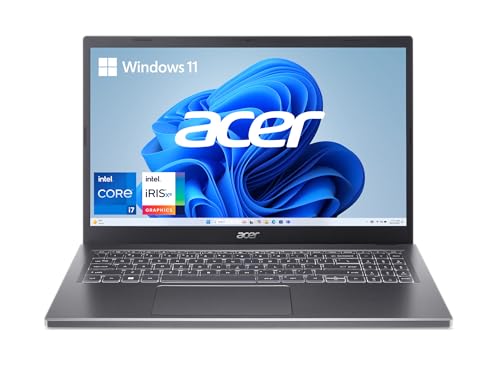
The Aspire 5 has spent years as the answer to a specific question — what is the most laptop a careful budget can buy — and this configuration keeps the tradition honest. A Core i7-1355U is a step above the class’s usual processor, which buys smoothness in the moments coursework actually stresses: recalculating a fat workbook, running the stats package, sharing a screen on a group call with everything else still open. Sixteen gigabytes of LPDDR5 memory and a 512GB Gen 4 SSD match the guide’s standard, and Wi-Fi 6E is a genuinely useful inclusion on campuses whose networks groan under ten thousand students at 9 a.m.
The Aspire’s deck includes the backlit keyboard and numeric keypad layout the line is known for, in a slim aluminium-leaning chassis that does not read as a compromise in a seminar room or an internship office. Its limits are the value line’s limits: the display is a good Full HD IPS rather than a great one, battery life is a solid day rather than the Vivobook’s marathon, and the Iris Xe integrated graphics are, as everywhere in this guide, simply not the point. For the student whose budget is the binding constraint and who refuses to let it bind the specification, this is the pick that respects both.
- Processor: Intel Core i7-1355U
- Graphics: Intel Iris Xe integrated
- Memory and storage: 16GB LPDDR5 RAM, 512GB Gen 4 SSD
- Display: 15.6-inch FHD IPS touchscreen
- Connectivity: Wi-Fi 6E, backlit keyboard
Strengths
- Core i7 pace at the value end of the class.
- Wi-Fi 6E suits congested campus networks.
- Slim, professional chassis that suits internships as well as lectures.
Trade-offs
- Battery is a working day, not the Vivobook’s endurance class.
- Display is competent rather than outstanding for long reading.
- LPDDR5 memory is fixed — the 16GB you buy is the 16GB you keep.
Best for: budget-led students who still want the full 16GB, Core i7 specification. Not suited for: outlet-free marathon days, where the Snapdragon Vivobook’s stamina is the point of the machine.

Lenovo IdeaPad Slim 3 15 — Best AMD Option
The IdeaPad Slim 3 makes the AMD case in the terms accounting students actually experience: eight cores of Ryzen 7 5825U, ready to divide the day’s multitasking among themselves without the hesitation that creeps into lesser machines by the third open application. Recalculation, a stats dataset, lecture playback, a group call — the Ryzen simply absorbs the pile, and it does so in one of the slimmer and lighter 15.6-inch chassis in this set, which matters across a four-year commute of lecture theatres. Sixteen gigabytes of memory and a 512GB SSD keep the rest of the specification at the guide’s standard.
Its honest compromises are about generation and garnish rather than capability. The Ryzen 5000-series platform is a mature one rather than the newest silicon here, its DDR4 memory a step behind the LPDDR5 machines on paper, and the 720p webcam is the weakest camera in this guide — a real consideration for students whose seminars and interviews run on video. None of that touches the core work. For the student who multitasks heavily, carries the machine everywhere and would rather spend the difference on textbooks, the Slim 3’s eight-core calm is a thoroughly rational purchase.
- Processor: AMD Ryzen 7 5825U, 8 cores
- Graphics: AMD Radeon integrated
- Memory and storage: 16GB DDR4 RAM, 512GB SSD
- Display: 15.6-inch FHD touchscreen
- Connectivity: Wi-Fi 6, Bluetooth 5.2, 720p camera
Strengths
- Eight-core Ryzen keeps heavy multitasking composed.
- Slim, light 15.6-inch chassis for a campus carry.
- Full 16GB/512GB specification at the class’s lighter spend.
Trade-offs
- 720p webcam trails the field for video seminars and interviews.
- Mature platform generation beside the newest Intel and Snapdragon picks.
- DDR4 memory is a paper step behind LPDDR5 rivals.
Best for: multitasking students who carry the machine all day and spend carefully. Not suited for: video-heavy remote learners, for whom the camera specification will grate weekly.

ASUS Vivobook 16 (Snapdragon X) — Best Battery Life
The Vivobook 16 is built around the resource accounting students run out of most: hours away from a socket. Its Snapdragon X platform is the efficiency architecture behind the current generation of long-battery Windows laptops, and pairing it with a 16-inch WUXGA display creates a distinctive student machine — the largest workbook canvas in this guide, since the taller 16:10 screen shows more rows of a statement at once, with stamina that treats a full timetable as a light day. Sixteen gigabytes of memory and a 512GB drive hold the standard specification, in a Quiet Blue chassis slim enough for any bag.
The platform caveat from this guide’s introduction applies to this machine specifically, so it is repeated at full size: Snapdragon runs Windows on ARM. Microsoft’s office applications run natively and well; most other Windows software runs through emulation, usually invisibly; but a course that mandates a particular legacy accounting package, a niche statistics tool or a specific Excel add-in should be checked against ARM compatibility before purchase. For the majority of students — Office, browser, mainstream course tools — the check comes back clean and the reward is the best battery-and-screen combination here. For the minority it catches, the Intel and AMD picks above are waiting, and knowing which minority you are in takes one email to the course office.
- Processor: Qualcomm Snapdragon X
- Graphics: Qualcomm Adreno integrated
- Memory and storage: 16GB RAM, 512GB SSD
- Display: 16-inch WUXGA, 60Hz
- Finish: Quiet Blue, Windows 11
Strengths
- Battery stamina is the class leader’s whole design brief.
- 16-inch 16:10 screen shows more spreadsheet rows at once.
- Cool, quiet running suits libraries and lecture halls.
Trade-offs
- Windows on ARM requires a software-compatibility check for niche course tools.
- Emulated legacy programs run well but not natively.
- Newer platform means a thinner track record than the Intel lines.
Best for: students with long outlet-free days whose software is mainstream Office and browser work. Not suited for: anyone whose course mandates a specific legacy package they have not verified on ARM.

Dell Inspiron 15 3530 — Best Keyboard Deck
The Inspiron 15 3530 earns its slot on two grounded virtues: room and layout. The room is a terabyte of storage — double the class floor — which quietly changes a student’s habits: recorded lectures kept rather than deleted, datasets archived rather than pruned, a local backup of the dissertation-year workbook folder existing at all. The layout is Dell’s full-size 15.6-inch deck with its numeric keypad, the working surface this degree’s data-entry hours are spent on, backed by a Core i7-1355U and 16GB of memory that keep the specification at full standard.
The 15.6-inch Full HD touchscreen is a fair working panel, and the Inspiron’s business-adjacent black design suits the internship terms as well as the lecture ones. Its compromises are weight of expectation rather than specification: the Inspiron line is Dell’s mainstream rather than premium range, so materials and battery are good rather than class-leading, and Wi-Fi 6 rather than 6E is a small step behind the Acer. None of that dents its argument. For the student whose coursework generates files the way accounting coursework does, and whose fingers will live on the keypad, the Inspiron is the deck-and-storage pick, honestly priced within its class.
- Processor: Intel Core i7-1355U
- Memory and storage: 16GB RAM, 1TB SSD
- Display: 15.6-inch FHD touchscreen
- Connectivity: Wi-Fi 6, HDMI
- Operating system: Windows 11 Pro, Black
Strengths
- A terabyte of storage ends the delete-to-survive cycle.
- Full-size Dell deck with keypad for entry-heavy coursework.
- Core i7 and 16GB keep the performance specification complete.
Trade-offs
- Mainstream materials and battery beside the class’s best.
- Wi-Fi 6 rather than 6E on crowded networks.
- Unremarkable styling — a virtue in offices, a shrug elsewhere.
Best for: file-hoarding students who want storage headroom and a proper entry deck. Not suited for: the style-conscious or the battery-maximalist — other picks court each of those readers directly.

HP Pavilion (Ryzen 7) — Best Performance Step-Up
This second Pavilion is the first Pavilion’s argument with the volume raised. An eight-core AMD Ryzen 7 replaces the Intel chip, storage doubles in effect to a terabyte across its SSD and bundled external drive, and the listing states the two inclusions that read like they were specified by an accounting lecturer: a numeric keypad, explicitly, and an office suite in the box. For the student whose ambitions extend past the core degree — data analytics electives, a minor in business computing, freelance bookkeeping alongside study — this is the configuration with growth already inside it.
The eight-core processor is the substantive step-up: where the degree’s ordinary days would never separate it from the Core i5 model, the heavy days — the giant group workbook, the analytics coursework, the internship’s real data — are exactly where cores divide the work and the machine stays calm. The 15.6-inch FHD IPS panel drops touch compared with its sibling, a fair exchange at this positioning, and the bundled storage arrangement asks the student to keep the external drive in the backup habit rather than the daily one. As the top of this guide’s student-budget class, it is the pick for the major who already suspects the degree is the beginning of a data-heavy career, not the whole of it.
- Processor: AMD Ryzen 7, 8 cores
- Memory and storage: 16GB RAM, 1TB total (512GB SSD + 500GB external)
- Display: 15.6-inch FHD IPS
- Deck: numeric keypad (stated in listing), office suite included
- Operating system: Windows 11 Pro
Strengths
- Eight-core Ryzen is the strongest multitasking specification here.
- Keypad stated outright and office suite included — the lecturer’s checklist.
- Terabyte-class total storage for datasets and archives.
Trade-offs
- Half the storage is an external drive — a habit to manage, not internal room.
- No touchscreen, unlike the Core i5 Pavilion.
- More performance than the core degree strictly needs — buy it for the electives.
Best for: ambitious majors adding analytics, data electives or freelance bookkeeping to the degree. Not suited for: students who want the simplest single-box answer — the Core i5 Pavilion is that machine.
Cloud Accounting and the Browser-First Firm
A current runs through the profession that students should see coming, because it mildly revalues everything in this guide: accounting itself is moving into the browser. The cloud platforms that small firms now run on — and the client portals, bank feeds and receipt-capture tools around them — ask nothing of a laptop but a modern browser, a reliable connection and a screen the figures can be read on. Internships increasingly happen inside that world, and a graduate’s first firm may issue logins before it issues hardware. For the student, the consequence is liberating: the machine bought for desktop Excel and coursework is already overqualified for the cloud half of the profession, and will remain so for years.
It also sharpens the guide’s priorities rather than blunting them. In a browser-first workflow the laptop is a window, and the qualities of a window are the screen, the keyboard, the battery and the Wi-Fi — precisely the four virtues this class was judged on, with Wi-Fi 6E’s crowded-lecture-hall value rising yearly. Processing headlines matter even less than they did, which is saying something in a guide that never cared for them. The accounting student’s laptop, bought on those four virtues, is future-proof in the only sense the phrase honestly bears: aligned with where the work is going, not merely where it has been.
Exam Season: The Fortnight That Grades Your Purchase
Revision season is the audit of every laptop decision, conducted under time pressure. The workload peaks in a specific shape: past papers and model answers open as PDFs, the workbook of attempted solutions beside them, lecture recordings at double speed, and a browser carrying the course forum’s collective anxiety. It is not heavy computing, but it is relentless computing — twelve-hour days, away from the desk, in libraries where the good seats with sockets are claimed by eight in the morning. This is the fortnight the battery picks were bought for, and the one where the student on a tethered machine learns the geography of every power outlet in the building.
It is also the fortnight where reliability stops being abstract. A machine that updates itself into a forty-minute ceremony on the morning of a mock exam, or a drive so full that the past-paper archive cannot download, converts a hardware saving into an academic cost at the worst possible exchange rate. The boring virtues this guide has praised — 16GB, roomy storage, a battery in health, updates managed rather than suffered — are exam-season virtues. Buy them in September for the student who will need them in May; that student is you, slightly more tired, and they will be grateful.
Spreadsheets Without the Swearing: Setup Habits That Help
Five minutes of setup pays rent all degree. First, learn the keypad properly: switch on the number lock, practise the ten-key rhythm on real coursework rather than exercises, and set Excel’s decimal and entry options to match your course’s conventions — the speed this builds is a professional asset firms genuinely notice at internship interviews. Second, tame the workbook environment: freeze panes, name your ranges, and keep one clean template for each recurring assignment type, so a new task starts from structure rather than from a blank grid and good intentions.
Third, defend the work. Coursework files deserve the same backup discipline as professional ones: the laptop’s drive, a cloud copy and — for the dissertation-year project — a third copy somewhere else, a habit the Ryzen Pavilion’s bundled external drive makes nearly free. Fourth, set the machine’s power profile for lectures: a battery-saver plan in halls, full performance at the desk, so the stamina you bought is spent where it matters. And finally, keep the software current and the desktop empty; the student whose machine opens Excel in seconds in week one and week ninety is the student who treated setup as part of the course.
Second-Hand, Refurbished and Handed-Down: The Honest Alternatives
Not every accounting student buys new, and this guide’s silence on the alternatives would be a gap, because the degree’s modest demands make used machines unusually viable. A three-year-old business laptop — the corporate fleet’s cast-off ThinkPad, Latitude or EliteBook — runs spreadsheets, coursework and the office suite without strain, and its original owner paid the depreciation. The checks that matter are specific: battery health, because a worn battery converts a bargain into a tethered desktop; the keyboard and keypad’s condition, because they are the degree’s tools; and enough memory — the 16GB standard applies to used machines exactly as to new ones, with the advantage that business laptops often accept an upgrade.
Refurbished units from reputable sellers, with a warranty attached, sit between new and used in both price and risk, and for this degree they are frequently the sweet spot of the whole market. What should be avoided is the false economy at the bottom: the ancient consumer machine with a spinning hard drive and 4GB of memory, whose slowness will tax every assignment for years. The accounting student’s correct instinct — the one the degree itself teaches — is to price the whole life of the asset: a used business machine with two healthy years in it is a better entry in the ledger than a new bargain that must be replaced before the finals.
Intel, AMD or Snapdragon for a Numbers Degree?
The honest answer is that the accounting workload forgives all three, and the choice turns on secondary virtues. Intel’s U-series chips in the Pavilion, Aspire and Inspiron are the default for a reason: universal software compatibility, mature drivers, and performance pitched exactly at office work. AMD’s Ryzen options — the Slim 3 and the step-up Pavilion — answer with more cores at the class’s price points, which multitaskers and analytics-curious students will feel on the heavy days. Snapdragon is the specialist: unmatched battery and silence, bought with a compatibility homework assignment that most students pass and a few genuinely fail.
Decide by your course’s software list, which your department publishes and which takes minutes to check. If everything on it is mainstream — Office, a browser, a common statistics package — any platform in this guide serves you, and battery or budget can cast the deciding vote. If the list contains a named legacy package or a required add-in, let it: buy the Intel or AMD machine that runs it natively, and consider the question settled by the only authority that matters, your own syllabus.
Excel Fluency: The Features Your Coursework Actually Uses
Since the spreadsheet is the degree’s home room, the features that matter deserve naming, because they quietly shape what the laptop must do. PivotTables and their charts turn raw ledgers into answers and reward a screen wide enough to see source and summary together — one more argument for the 15.6-inch class over prettier small machines. Lookup functions, conditional formatting and data validation are the daily grammar of coursework workbooks; none of them is computationally heavy, and all of them are miserable on a cramped display with a tired battery at 4 p.m. What-if analysis and Solver, which arrive with management accounting and finance modules, are the first features to make a processor visibly think — briefly, and well within every chip in this guide.
Macros and VBA divide students into those who fear them and those who automate their coursework with them, and the second group finishes assignments measurably faster. Recording a macro for the weekly formatting ritual, then editing it into something reusable, is the highest-return hour an accounting student can spend on software — and it runs identically on every Intel and AMD pick here. The one platform sentence worth repeating: the full desktop Excel with its complete add-in ecosystem is a Windows application in its most capable form, which is the deep reason this guide is a Windows guide, and why the Snapdragon pick carries its verification errand for add-in-dependent courses.
Finally, learn the file discipline alongside the features. One master copy of each coursework workbook, dated versions at milestones, and the backup habit from this guide’s setup section — because the only spreadsheet horror story every lecturer tells is the group project overwritten the night before submission, and it is told every year because it happens every year.
The Dorm Desk: A Second Screen and a Grown-Up Setup
A student desk becomes a workstation with three additions, in this order. First, the laptop raised: a stand that lifts the screen to eye level ends the hunch that four years of coursework would otherwise engrave, and every machine here drives its own display happily while docked. Second, an external keyboard and mouse for the long sessions — the laptop’s own deck, keypad and all, remains the travel instrument, but the desk deserves full-size tools, and the keypad habit built in lectures should be practised on a proper external pad at home. Third, when budget allows, a second monitor: source data on one screen, the workbook on the other is the single largest productivity jump available to an accounting student, larger than any processor tier in this guide.
The beauty of the accounting desk is how little of it is exotic. No component needs to be premium; a mid-range 24 or 27-inch monitor, a sensible stand and an honest keyboard outperform, in coursework terms, a flagship laptop used hunched on a bed. Buy the laptop in this guide for the whole degree, add the desk pieces across the first year as term budgets allow, and the setup that results is recognisably the junior version of the desk the graduate will sit at in their first firm — which is, in the end, the point of the exercise.
The Class at a Glance: Keypads, Storage and Stamina
| Pick | Processor | Memory / Storage | Display | Defining trait |
|---|---|---|---|---|
| Pavilion 15 (i5-1334U) | Intel Core i5, 10-core | 16GB / 512GB | 15.6″ FHD touch | The all-rounder |
| Aspire 5 15 | Intel Core i7-1355U | 16GB / 512GB | 15.6″ FHD IPS touch | The value benchmark |
| IdeaPad Slim 3 15 | AMD Ryzen 7, 8-core | 16GB / 512GB | 15.6″ FHD touch | The multitasker |
| Vivobook 16 (Snapdragon X) | Qualcomm Snapdragon X | 16GB / 512GB | 16″ WUXGA | The battery champion |
| Inspiron 15 3530 | Intel Core i7-1355U | 16GB / 1TB | 15.6″ FHD touch | The storage-and-deck pick |
| Pavilion (Ryzen 7) | AMD Ryzen 7, 8-core | 16GB / 1TB total | 15.6″ FHD IPS | The step-up |
Money Talks: Budgeting the Purchase Like an Accountant
There is a certain pleasure in applying the degree’s own method to the degree’s own laptop, and students might as well start now. The purchase is a capital decision: cost spread across a four-year life, with a residual role afterwards, against the alternative of two cheaper machines with a replacement’s disruption in the middle. Priced that way — per year of service, per assignment survived — the mid-class machines in this guide routinely beat the bargain tier that tempts in September, and the comparison is not close once the second purchase, the migration week and the exam-season risk are entered honestly in the ledger.
The timing lines deserve the same treatment. Student pricing, term-start sales and education discounts move this class’s prices around the calendar; the specification, by contrast, does not move at all. The disciplined sequence is to fix the specification first — 16GB, solid-state storage, keypad deck, the platform your syllabus blesses — and then let timing and discounts choose among machines that meet it, rather than letting a discount choose the specification. It is the first genuinely professional judgement of the degree, made before the first lecture, and the students who make it well rarely think about their laptop again — which is the entire return on the investment.
Where Do Accounting Students Waste Their Budget?
The first waste is the graphics card: machines marketed to gamers and creators charge for a component this degree will use to render exactly nothing more demanding than a chart, while skimping the memory and keypad the degree uses hourly. The second is the beautiful small laptop — a 13 or 14-inch jewel with no keypad and a screen that shows eleven columns of a workbook — bought for its looks in September and cursed at every data-entry assignment until graduation. Size is a feature in this degree, not a failure of miniaturisation.
Memory is the third trap, and it springs late: 8GB machines are still sold to students, and they cope until the second year, when the group workbook, the stats package and the call arrive together. Buy 16GB now; it is the cheapest insurance in this entire guide. Fourth is ignoring the software list — the Snapdragon caveat in this guide is five minutes of checking that protects four years of ownership. And the fifth is buying for one semester’s budget panic instead of the degree: the cheapest adequate machine replaced in year three costs more than the right machine bought once, in money and in the week of term it chooses to die.
Final Recommendation
Buy the HP Pavilion 15 with the Core i5 unless your circumstances point somewhere specific — it is the complete, balanced answer to this degree’s actual week. Point at the Aspire 5 if the budget is the tightest constraint that still refuses to compromise the specification; at the IdeaPad Slim 3 if you multitask relentlessly and carry the machine everywhere; at the Vivobook 16 if your days are long, your sockets are few and your software check comes back clean; at the Inspiron if your files multiply; and at the Ryzen Pavilion if your ambitions already extend beyond the core syllabus. An accounting degree is, in the end, an apprenticeship in careful numbers — and the careful purchase, keypad under your fingers and a battery that outlasts the timetable, is the first piece of professional judgement the course will ever ask of you.
Internships and Placement Years: The Professional Test
Somewhere in the degree, the laptop leaves the campus and enters an office, and the machine’s second job begins. Internship and placement work is unglamorous in a specific way: the firm’s templates, the client’s data, video calls with people whose opinion becomes a reference, and days spent in software the university also uses — which is why this guide’s Windows-and-Office orthodoxy pays off precisely here. A machine that runs the standard suite natively, presents itself soberly in a meeting room and lasts a working day unplugged is not merely adequate for placement; it is indistinguishable from the equipment the firm issues its own juniors.
Two habits matter more than hardware in that setting. The first is file professionalism: named, dated, backed-up workbooks, and nothing of the firm’s left scattered across a personal desktop when the placement ends. The second is security hygiene — screen locked, updates applied, client data treated as the firm’s property rather than the laptop’s content — because accounting is a profession built on confidentiality, and placement supervisors notice its practice in small things. The student whose laptop and habits both read as professional collects the reference that the degree alone cannot issue.
None of the six picks embarrasses its owner in that room. The business-leaning designs — the Inspiron’s black sobriety, the Aspire’s slim professionalism, the Pavilions’ restraint — were chosen with the placement year in peripheral vision, because an accounting degree is a professional apprenticeship and its tools should be allowed to look like it.
Numbers Need Eyes: Screens, Posture and the Long Day
Accounting is a reading profession before it is a calculating one, and the screen is where the reading happens — statements, ledgers, tax guidance, the fine print of a standard — for more hours a day than any other component is used. The 15.6 and 16-inch panels in this guide were chosen partly as an ergonomic position: large enough that a workbook and its source document can share the glass, matte-finished in the main so library lighting does not turn the display into a mirror, and bright enough for the window seat. The Vivobook’s taller 16:10 screen earns its recurring mentions here precisely because statements are vertical documents; every extra row visible is a scroll not made, thousands of times a term.
Posture is the screen’s partner. The student who works hunched over a laptop on a bed for four years is conducting an experiment on their own spine with a predictable result, and the countermeasures are the cheap desk habits from earlier in this guide — the raised screen, the external keyboard for long sessions, the chair treated as equipment. None of this appears on a specification sheet, which is exactly why guides should say it: the laptop is bought in an afternoon and inhabited for a degree, and the inhabiting deserves as much design as the buying.
After Graduation: Training Contracts and the Machine’s Second Life
The accounting laptop’s story does not end at graduation, and buying with the sequel in mind costs nothing. Graduates entering training contracts — the ACA, ACCA and their international cousins — face years of professional exams whose study is, again, spreadsheets, recorded lectures and documents: precisely the workload this guide specced for. A machine bought correctly for the degree crosses into the training years without apology, which stretches its cost across six or seven years of service and makes the slightly-better specification bought at eighteen look very wise at twenty-three.
Firms will eventually issue their own hardware, at which point the student laptop retires to the honourable roles: the home-office machine, the freelance bookkeeping seat for the side clients many accountants keep, the backup that holds the archive. Storage and battery health decide how graceful that retirement is — one more reason the terabyte picks and the efficiency platforms in this guide earn their places. The through-line of this entire article can be stated in one sentence, and the graduate will recognise it as the profession’s own philosophy applied to a purchase: buy the boring, adequate, well-documented thing once, keep the records, and let it compound.
Accessories Worth Their Space in the Bag
The accounting student’s kit is mercifully short, and each item on it earns its place in coursework rather than in a catalogue. A compact mouse is the first: trackpads serve in lectures, but a long data-entry or modelling session belongs to a mouse, and the habit of carrying one separates the students who set up properly from those who endure. A small USB-C hub follows, because seminar rooms and group tables present the same port arithmetic everywhere — a projector, a drive, a charger, one socket short. A headset with a decent microphone has become coursework infrastructure in the era of the recorded seminar and the group call, and a padded sleeve is the cheapest insurance in the entire degree. Finally, the humble USB drive, nearly free and endlessly lent, remains the fastest way to move a workbook across a library table. None of it is exciting; all of it is used weekly, which is more than can be said for most accessories ever sold to students.
A closing consolidation, because six similar-looking laptops invite one fair question — how different are they, really? In the coursework itself, honestly, not very: every pick here runs the degree’s software at full comfort, and a student teleported between them mid-semester would notice the keyboards and the batteries long before the processors. They differ at the edges where individual lives differ — the hoarder’s storage, the commuter’s stamina, the multitasker’s cores, the budget’s hard floor — and the reviews above were written to expose exactly those edges. Choose by your edge, and the middle of the machine, which all six share, will simply get on with the degree.
One more edge deserves naming, because it decides real purchases in this class: noise and heat in shared spaces. Libraries and lecture halls are quiet by covenant, and a machine whose fan announces every recalculation taxes its owner’s welcome in them. The efficiency-first processors across this guide — the U-series Intel chips, the Ryzen parts at student loads, the Snapdragon above all — run coursework in near-silence as a class, which is a final, unglamorous reason the accounting shortlist looks the way it does: the right laptop for this degree is the one nobody else in the library ever notices, from the first freshers’ week induction session to the final examination of the final year.
Frequently Asked Questions
Does an accounting student really need a numeric keypad?
It is the closest thing this degree has to essential equipment. Data entry from a keypad is faster and more accurate than the top number row, the skill itself is one employers value, and coursework involves hours of figure entry weekly. That is why every pick here is a 15.6-inch or 16-inch machine from a keypad-building line — confirm it on your exact configuration before ordering.
How much RAM do spreadsheets and coursework need?
Sixteen gigabytes is the standard this guide sets, because the real workload is several programs at once: Excel, a statistics package, lecture materials and a call. Eight-gigabyte machines cope in the first year and struggle by the second, which is why none appear here.
Is a Snapdragon laptop safe for accounting software?
For mainstream work — the full Office suite runs natively, browsers and common course tools are fine — yes, and the battery reward is large. The check that matters is any specific legacy package or Excel add-in your course mandates; verify that one program, and the Vivobook becomes a safe and stamina-rich choice.
Mac or Windows for an accounting major?
Windows is the default for a reason: some teaching packages and the profession’s desktop software tradition are Windows-first, and every pick in this guide runs the full desktop Excel without qualification. A Mac can serve many students, but the course software list, not preference, should make that call.
Should I buy for the whole degree or upgrade later?
Buy for the whole degree. The specification that matters — 16GB, a solid-state drive, a keypad deck, a battery in good health — is cheapest bought once, and the workload only grows. Every pick here was chosen to still be adequate in the final year, which is the correct horizon for a student purchase.
Related Guides
For the rest of the student desk, see our guide to laptops for business and finance degrees compared, our roundup of second monitors that turn a dorm desk into a workstation, and our advice on backing up coursework with portable drives and cloud copies.



[…] equipping the rest of the desk may find our roundup of laptops for computer science and programming degrees useful alongside this one, together with the guide to USB-C docks and adapters for lab and dorm […]