What's inside
- Where to buy
- Key Takeaways
- Quick Picks
- How did we assemble this laser line-up?
- What does laser light actually change, day to day?
- Which laser projector suits a gaming household?
- How large a screen can a laser projector really feed?
- How do projectors handle HDR when they cannot match a television’s brightness?
- Should the streaming platform live inside the projector?
- The six laser projectors, reviewed one by one
- How do the six compare side by side?
- How do you install a laser projector for the long term?
- What mistakes do laser projector buyers keep making?
- Where does the projector’s own noise fit into the decision?
- Final Recommendation
- Frequently Asked Questions
- Related Guides
As an Amazon Associate I earn from qualifying purchases. This post may contain affiliate links at no extra cost to you.
gizmoverdict.com is reader-supported. When you buy through links on our site, we may earn an affiliate commission.
Where to buy
If the lamp is the part of projector ownership you would happily never think about again, the best laser home theater projectors are where your search should begin. The six models gathered here all replace the traditional lamp with a laser light engine, and all six are listed on Amazon in the United States; follow the product links in the table below or inside each review to check the current listing, the exact variant and whatever bundle the seller is shipping this month. Laser models change less frequently than lamp models and their listings tend to stay stable for longer, but firmware-era features such as app licensing can differ between production runs, so a final read of the listing on the day you buy is still time well spent.
Why does the light source deserve an entire category of its own? Because it quietly governs half the ownership experience. A lamp dims gradually from the day it is struck, asks for a replacement partway through the projector’s life, and needs warm-up and cool-down courtesy at every session. A laser light engine, by contrast, is rated by its makers in tens of thousands of hours — figures we report as maker claims, because they are — reaches full brightness almost immediately, tolerates being switched on for a twenty-minute highlights show without guilt, and holds its output with a consistency that suits households where the projector is simply the television. Colour behaviour differs by design, too: single-laser, laser-phosphor and RGB triple laser architectures each render colour through a different mechanism, and the reviews below keep those mechanisms distinct rather than hiding them under one glowing word.
One piece of language needs settling before the picks, because it appears on nearly every box in this category. When a projector in this price territory says 4K, it almost always means the image is built with pixel-shifting: the imaging chip works at a lower native resolution and shifts the picture extremely rapidly to place additional pixels, producing a 4K-addressed image that viewers experience as 4K-class sharpness. Epson calls its version PRO-UHD, DLP makers use their own shifting systems, and the effect on screen is genuinely close to native 4K for film content. We follow each listing’s own wording in the reviews and flag the shifting once, plainly, here — not as a scandal, but as the vocabulary you need to compare these machines against each other and against the televisions they replace.
Key Takeaways
- Laser light is the whole point of this category: maker-rated lifespans in the tens of thousands of hours, no lamp purchases, near-instant full brightness and output that stays consistent for years.
- The Epson Home Cinema LS6000 is the balanced traditional-throw choice here, with 3,400 lumens of both colour and white brightness quoted in its listing and refresh support up to 120Hz.
- XGIMI’s HORIZON 20 and Valerion’s StreamMaster Plus2 chase the gaming-and-streaming household, advertising 240Hz-class response and Dolby Vision in their listings.
- ViewSonic’s LX700-4K is the gaming-leaning value route — read its 240Hz claim carefully, because that figure applies at 1080p rather than at 4K.
- The AWOL VISION Aetherion Pro is the ultra short throw outlier: it sits centimetres from the wall while the other five expect a conventional throw across the room.
- Almost every 4K badge in this class involves pixel-shifting; judge sharpness by screen size and seating distance, not by outrage at the technique.
Quick Picks
| Pick | Badge | Why it earns its place |
|---|---|---|
| Epson Home Cinema LS6000 | Balanced Laser All-Rounder | Three-chip 3LCD colour, equal colour and white brightness figures, and 120Hz support for households mixing films with fast sport. |
| Optoma UHZ36 | Straightforward 4K Laser | A 4K UHD laser HDR brief with the least marketing garnish in this set, for buyers who want the format without the fanfare. |
| Valerion StreamMaster Plus2 | Big-Screen Streaming Machine | IMAX Enhanced ambitions, Dolby Vision and headline gaming figures aimed at very large images and very long evenings. |
| XGIMI HORIZON 20 | RGB Triple Laser Flagship | Separate lasers for each colour, optical zoom with lens shift, licensed Netflix on Google TV and a maker-rated 3,200 ISO lumens. |
| ViewSonic LX700-4K | Gaming-Leaning Laser Value | A 4K UHD laser built around console play, with a 4.2ms input figure in its listing and optical zoom for imperfect rooms. |
| AWOL VISION Aetherion Pro | Ultra Short Throw Laser | RGB triple laser light in a cabinet-hugging body with Google TV, for rooms that cannot host a projector across the space. |
How did we assemble this laser line-up?
The first requirement was the light engine itself, verified from each listing rather than assumed from a model name, because several famous projector families sell lamp and laser variants under confusingly similar badges. Beyond that threshold, we looked for spread. A laser category that contained six near-identical black boxes would serve nobody, so the set deliberately spans a three-chip LCD design from Epson, DLP designs from Optoma and ViewSonic, RGB triple laser flagships from XGIMI and Valerion, and one ultra short throw machine from AWOL VISION for rooms where throw distance is the binding constraint. Whatever your room and budget, at least two of these should read as plausible finalists, and the reviews are written to separate them by use rather than by spec-sheet altitude.
Brightness figures were handled with the suspicion they have earned. Where a maker quotes a figure on a recognised standard — ISO lumens on the XGIMI and the AWOL — we say so, because a standardised number can at least be compared against other standardised numbers. Where a listing quotes plain lumens, we report it as the maker’s figure and move on. Laser lifespan claims were treated the same way: tens of thousands of hours is the class norm in marketing language, it is broadly consistent with how laser diodes age, and it remains a projection rather than a promise, so the reviews attribute it every time it appears. What we would not do is invent the missing numbers — several listings here are terse, and a terse listing earns a review about positioning and fit rather than a paragraph of borrowed statistics.
Finally, we weighted the features that decide whether a laser projector gets used daily or reserved for occasions. Smart platforms with properly licensed apps remove friction from every single session. Lens shift and optical zoom decide whether the projector fits the room you have or demands the room be rebuilt around it. Gaming figures matter to a growing share of buyers and are quoted here exactly as listings state them, with the resolution context attached where a headline number was measured at 1080p. A projector is a decade-scale purchase in this class; the criteria above are the ones still visible after the unboxing excitement fades.
What does laser light actually change, day to day?
Start with the clock. A lamp projector’s brightness is a countdown: the lamp is brightest when new and fades across its service life, so the picture you calibrated in January is not quite the picture you own two winters later. Laser output also declines over time, but the slope is far gentler and the rated horizons — tens of thousands of hours in maker language — exceed how long most households keep a projector at all. Practically, this means the laser projector you set up this year asks for recalibration as a hobby, not as maintenance, and a replacement lamp simply never joins the household budget.
Then there is the rhythm of switching on. Lasers reach operating brightness almost immediately and can be switched off without a fan-driven cool-down vigil, which rewires how a household uses projection. The projector stops being a cinema that must be booked and becomes a screen that can be borrowed: twenty minutes of news over breakfast, a single episode at lunch, a gaming session that ends the moment it should. Lamp owners ration those short sessions instinctively, because every strike of the lamp spends a little of its life and the warm-up tax is real. Laser owners stop rationing, and the projector quietly absorbs viewing hours that used to belong to a television.
Colour is the third change, and it depends on architecture. Laser-phosphor designs pass blue laser light through a phosphor wheel to build their palette, an approach proven across the industry. RGB triple laser designs give each primary colour its own laser, which is how the XGIMI HORIZON 20 and the AWOL Aetherion Pro reach for the widest colour volumes in this guide. Three-chip LCD designs like the Epson split light into separate colour paths with their own panels, avoiding the colour-wheel artefacts some viewers notice on single-chip DLP machines. None of these architectures is simply best; they trade colour volume, artefact behaviour, cost and brightness against each other, and the per-pick reviews note which trade each model has chosen.
Which laser projector suits a gaming household?
Gaming on a projector used to mean accepting a visible delay between hand and screen. The listings in this set describe a market that has closed that gap with intent. Valerion advertises a 4-millisecond figure at 240Hz for the StreamMaster Plus2; ViewSonic quotes 4.2 milliseconds of input lag for the LX700-4K; XGIMI claims a 1-millisecond figure for the HORIZON 20; the AWOL quotes 1-millisecond lag alongside 1080p gaming at 240Hz; Epson counters with refresh support up to 120Hz and ALLM, the auto low latency mode that lets a console switch the projector into its fastest behaviour without a menu expedition. Every one of those numbers arrives with the same footnote, which the honest buyer internalises: headline figures are measured at 1080p in a dedicated game mode, not at 4K with full processing engaged. That does not make them meaningless — 1080p at high refresh is exactly how competitive play is actually configured — but it does mean the 4K film experience and the fastest gaming experience are two different modes of the same machine.
What should a gaming household actually prioritise? First, the mode you will live in: if your play is cinematic single-player at 4K, refresh support to 120Hz and ALLM matter more than a one-millisecond badge. If your play is fast and competitive, the 1080p high-refresh modes of the Valerion, ViewSonic, XGIMI or AWOL are the relevant specification, and the projector becomes a very large, very fast monitor. Second, the connection count: consoles, a PC and a streamer compete for HDMI sockets, and the Epson’s listing states two HDMI ports, a reminder to count yours before purchase rather than after. Third, the room itself — gaming sessions run long, fan noise sits closer to the ear in a small room, and a projector chosen for films alone may sing louder than a gamer sitting beneath it prefers. The reviews flag these threads per model so the household can weight them honestly.
How large a screen can a laser projector really feed?
Two listings in this set advertise images up to 300 inches, which is a diagonal wider than many rooms. Such figures describe the optical range of the lens and the focus mechanism, not a recommendation, and the physics of brightness explains why: the same light spread across four times the area delivers a quarter of the brightness per unit of screen. A projector that looks vivid at 120 inches will look merely adequate at 200 and genuinely dim at 300 unless the room is a true blackout cave and the screen does some of the work. Treat maximum image size the way you would treat a car’s top speed — evidence of engineering headroom, not a description of daily life.
The practical ceiling for this class in a normal home sits between 100 and 150 inches, where every pick here can sustain a convincing film image in a dimmed room. Within that band, the choice between models turns on colour and features rather than raw size capability. Beyond 150 inches, priorities reorder themselves: brightness headroom and screen gain climb the list, seating distance must grow to keep the image comfortable, and the ultra short throw AWOL leaves the conversation entirely, since its geometry is optimised for the television-replacement sizes rather than the wall-filling extremes. Buyers planning a genuinely huge screen should also budget for the screen itself at a quality tier that matches the projector; a flagship laser engine firing at a wrinkled budget surface is the category’s most common act of self-sabotage.
How do projectors handle HDR when they cannot match a television’s brightness?
Every listing in this guide advertises HDR support, and every one of those claims conceals the same physical negotiation. A premium television can produce highlights many times brighter than any home projector, so a projector cannot simply display an HDR signal as authored. Instead it tone-maps: it studies the incoming range and compresses it into the range its light engine and your room can actually render, protecting mid-tone detail at the expense of the most extreme highlights. The quality of that compression — how intelligently the projector reads each scene — separates a film that looks rich from one that looks merely bright, and it is why two projectors with identical paper specifications can produce visibly different versions of the same dark scene.
Dolby Vision, supported by the Valerion, the XGIMI and the AWOL in this set, changes the negotiation by sending instructions with the content. Rather than asking the projector to guess how to compress each scene, the mastering process supplies per-scene guidance that the projector follows, which is why Dolby Vision support is worth more on a projector than on a bright television: the television has headroom to improvise, the projector does not. HDR10, the universal baseline, asks the projector to work from static information about the whole film, and a good static implementation still looks excellent — the Epson and ViewSonic rely on their makers’ tone-mapping craft here. The practical advice follows from the mechanism. Feed these machines the best HDR source you have, choose the picture mode your maker tuned for film rather than the one tuned for the showroom, and resist raising the brightness control to rescue dark scenes, because you will be spending the contrast that makes the bright scenes work.
Room light rewrites the HDR story more than any setting can. Tone mapping assumes the projector’s black is the darkest thing in your visual field; raise the ambient light and the screen’s black becomes the room’s grey, compressing the range from below while the engine compresses it from above. This is why laser brightness headroom matters for HDR even in rooms that seem adequately dim — the extra output is not there to make white painful, but to keep the middle of the range separated when the room refuses to be a cave. Buyers choosing between the brighter long-throw models and the subtler ultra short throw AWOL for an HDR-led brief should weigh that headroom honestly against the AWOL’s placement gifts.
Should the streaming platform live inside the projector?
Three of these six machines carry Google TV; three advertise no platform at all. The split looks like a feature gap and behaves like a philosophy gap. A projector with licensed apps inside — the HORIZON 20’s Google TV with licensed Netflix is the polished example here — turns on like a television, resumes where you left off, answers to one remote and needs nothing else in the room to be a complete entertainment system. For living rooms, bedrooms and any space where the projector is the screen, that self-sufficiency is a daily pleasure rather than a bullet point, and it is why the smart flagships command their position.
The source-fed machines make the opposite argument with equal sincerity. A dedicated theater usually already owns its sources — a disc player, a console, a streamer chosen for its own merits — and in that room an internal platform is a duplicate interface competing for the input button. Projectors also live far longer than smart platforms stay sprightly; a light engine rated in tens of thousands of hours will outlast several generations of streaming hardware, and an external streamer can be replaced inexpensively when its apps slow down, while a built-in platform ages inside a machine you otherwise love. The Epson LS6000, Optoma UHZ36 and ViewSonic LX700-4K are best understood through that lens: not missing a feature, but declining to embed a perishable computer in an imperishable light engine.
The deciding question is embarrassingly domestic: where does your household’s streaming actually happen today? If the answer is a television’s built-in apps, buy a projector with a platform you recognise and the transition will feel like a bigger television arriving. If the answer is a console or a beloved streamer box, buy the optics and ignore the platform column entirely, because your habits have already made the decision. What you should not do is pay flagship money for a platform you will bypass, or save money on a source-fed projector and then resent the extra remote every evening for a decade.
The six laser projectors, reviewed one by one

Epson Home Cinema LS6000 — Balanced Laser All-Rounder
Epson’s listing for the LS6000 reads like a deliberate refusal to play the usual spec-sheet games. It is a 4K HDR laser projector built on a three-chip 3LCD engine, quoted at 3,400 lumens of colour brightness and 3,400 lumens of white brightness — the same number for both, which matters more than it might appear. Many projectors quote a white brightness their colour image cannot match, so colours dim relative to highlights; Epson’s equal figures promise that a saturated scene holds its punch. The listing adds a dynamic contrast figure of 0.8 million to one, refresh support up to 120Hz, ALLM for automatic game-mode switching and two HDMI ports. As a description of a household all-rounder, it is admirably complete.
The three-chip architecture is the LS6000’s quiet superpower. Because red, green and blue each get a dedicated LCD panel, there is no colour wheel and therefore none of the rainbow artefacts that a minority of viewers perceive on single-chip DLP designs — if you are among the sensitive, this Epson and the lamp-based Epsons elsewhere in this cluster are your natural home. The 120Hz support opens the door to smoother sport and to high-refresh gaming at the resolutions the source can supply, while ALLM removes the menu-diving that usually accompanies it. What the listing does not promise is a smart platform, so streaming will arrive via whatever console, streamer or player you connect — a perfectly respectable arrangement that keeps the projector’s job purely optical. In a room where films lead and games follow, the LS6000 is the pick that offends nobody and serves everybody.
- Engine as listed: 3-chip 3LCD with laser light
- Brightness as listed: 3,400 lumens colour and 3,400 lumens white
- Contrast as listed: 0.8 million to one dynamic
- Refresh as listed: up to 120Hz, with ALLM
- Connections as listed: two HDMI ports
Strengths
- Equal colour and white brightness figures, so saturated scenes keep their intensity.
- Three-chip design sidesteps the rainbow artefacts some viewers see on single-chip rivals.
- 120Hz support with ALLM gives sport and gaming a properly fast path through the projector.
Trade-offs
- No smart platform is advertised, so a streaming device joins the shopping list if you lack one.
- Its brightness is generous rather than class-leading; very large screens in imperfect darkness stretch it.
- The 4K image is built by Epson’s pixel-shifting approach, as across this class, rather than a native 4K chip.
Best for: mixed households wanting one laser projector that handles films, sport and games without favouritism. Not suited for: buyers who want streaming apps inside the projector itself.
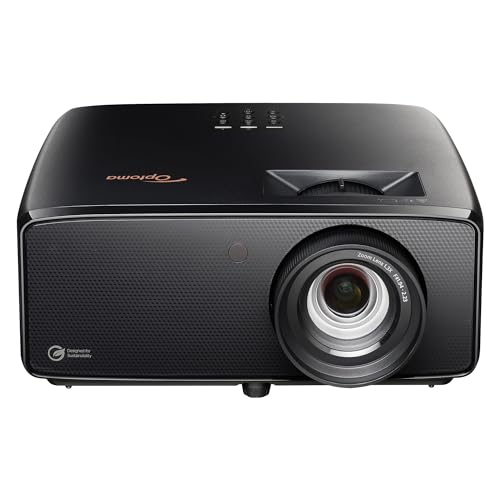
Optoma UHZ36 — Straightforward 4K Laser
The UHZ36’s listing is the shortest in this guide by a distance: a 4K UHD laser HDR home theater projector, in black, full stop. Some buyers will read that brevity as a warning. We read it as a positioning statement that the review must handle honestly — this is a machine sold on its format fundamentals rather than on a constellation of trademarked features, and its natural audience is the buyer who has already decided on 4K, laser light and HDR support, and who intends to feed the projector from a proper source stack rather than from internal apps. Optoma’s UHZ line has long occupied exactly that ground: DLP imaging, laser light, and a feature set trimmed to what a connected home theater actually uses.
What can be said responsibly about living with it? The DLP imaging path brings the format’s characteristic sharpness and motion clarity, and the laser engine brings the class benefits this whole guide is organised around — immediate brightness, no lamp calendar, consistent output across years of evenings. HDR support in the listing means the projector accepts and tone-maps high dynamic range sources, the standard arrangement for projectors, which cannot reach television peak brightness and instead compress the range intelligently. Because the listing declines to quote brightness, lag or lifespan figures, we decline to invent them; buyers comparing on those axes should interrogate the listing’s full specification section on the day of purchase, and should weigh the UHZ36 on its price position and format fit against rivals whose makers publish more. Judged that way — as the unadorned route into 4K laser projection — it earns its place in this six without pretending to be the flagship of anything.
- Format as listed: 4K UHD
- Light source as listed: laser
- HDR: supported, per the listing
- Colour as listed: black finish
- Positioning: home theater, source-fed rather than app-led
Strengths
- The core modern format — 4K UHD, laser light, HDR — without paying for features a source stack duplicates.
- Laser ownership benefits in full: instant-on viewing and no lamp replacement ritual.
- DLP imaging brings crisp single-chip sharpness that suits film and sport alike.
Trade-offs
- The listing publishes no brightness or gaming figures, so comparison shoppers must dig into the full spec.
- No smart platform is advertised; your streamer or console supplies the interface.
- Single-chip DLP designs can show rainbow artefacts to sensitive viewers, who should look at the Epson.
Best for: source-fed home theaters that want 4K laser fundamentals and already own their streaming hardware. Not suited for: buyers who comparison-shop by published numbers or want apps built in.

Valerion StreamMaster Plus2 — Big-Screen Streaming Machine
Valerion arrives in this category with the confidence of a brand that has read the flagship spec sheet and decided to contest every line of it. The StreamMaster Plus2’s listing describes a 4K laser projector with IMAX Enhanced certification ambitions at image sizes up to 300 inches, a 4-millisecond response figure at 240Hz, 3D support, Dolby Vision, HDR10, Google TV and smart home integration with an AI assistant. That is a streaming-era flagship brief: the projector as the entire entertainment stack, apps inside, voice control on top, and gaming figures quoted like a monitor’s. The 300-inch figure should be read with the physics from earlier in this guide — it is optical headroom, not a lifestyle suggestion — but its presence signals a lens and light engine built for the larger end of home screens.
Dolby Vision support is the feature with the deepest film consequences, since it lets premium streams steer brightness scene by scene rather than asking the projector to impose one static interpretation on an entire movie. IMAX Enhanced content, where you can find it, pairs with that to give the Plus2 a credible claim on the enthusiast-streamer brief. The gaming headline needs its standard translation: 240Hz operation lives at 1080p, and the 4-millisecond figure belongs to that mode, which is precisely where fast play happens anyway. Where the review must stay honest is brightness: the listing text we verified does not hang its case on a lumens figure, so the big-screen promise should be tested against your room’s darkness rather than assumed. In a properly dim room at 120 to 150 inches, the Plus2’s combination of formats, platform and speed is the most complete streaming brief in this six. In a bright room, look first at the picks whose makers publish their light output.
- Format as listed: 4K laser projection
- Image size as listed: up to 300 inches, IMAX Enhanced
- Gaming as listed: 4ms response at 240Hz (a 1080p-class mode)
- Formats as listed: Dolby Vision, HDR10, 3D support
- Platform as listed: Google TV with smart home and AI assistant features
Strengths
- Dolby Vision plus IMAX Enhanced support gives streamed films their most faithful projector path here.
- Google TV inside removes the external streamer from the equipment list entirely.
- High-refresh gaming mode answers the console brief without a second display.
Trade-offs
- The listing leans on formats rather than a published brightness figure, so bright rooms are a gamble.
- Maximum image claims flatter the lens; plan around 120 to 150 inches for real punch.
- Feature-rich smart projectors ask for software updates and account sign-ins as part of ownership.
Best for: streaming-first enthusiasts building a large-screen room around premium formats. Not suited for: bright lounges, or minimalists who want a projector that only projects.

XGIMI HORIZON 20 — RGB Triple Laser Flagship
The HORIZON 20 is XGIMI’s statement that a lifestyle projector can also be the technical flagship of the room. Its listing describes a 4K RGB triple laser design rated at 3,200 ISO lumens, with Google TV carrying licensed Netflix, optical zoom and lens shift, IMAX Enhanced and Dolby Vision support, image sizes to 300 inches, 240Hz operation and a 1-millisecond input lag claim. Start with the light engine: separate lasers for red, green and blue free the colour palette from the phosphor compromise, which is how this class reaches for the widest, most saturated colour in home projection. Then note the rating standard — ISO lumens are measured against a published method, which makes the 3,200 here a firmer number than the unqualified lumens figures scattered across the wider market.
The placement tools separate the HORIZON 20 from most smart rivals. Optical zoom and lens shift are the vocabulary of serious installation: zoom sets image size without moving the projector, and shift moves the image without tilting it, which means the picture can be squared by optics rather than by keystone’s pixel-discarding shortcut. For a projector that may live on a shelf, a stand or a mount across its lifetime, that flexibility is worth real money. Licensed Netflix on Google TV closes the app gap that quietly annoys owners of projectors whose platforms carry workarounds instead. The gaming claims follow the class pattern — 240Hz and the 1-millisecond figure describe the fast 1080p path — and the 300-inch ceiling deserves the same discount applied to its Valerion rival. What remains after the discounts is still formidable: the most complete combination of colour architecture, placement optics and platform polish in this guide.
- Light engine as listed: RGB triple laser
- Brightness as listed: 3,200 ISO lumens, maker figure on a measured standard
- Optics as listed: optical zoom and lens shift
- Platform as listed: Google TV with licensed Netflix
- Formats as listed: IMAX Enhanced, Dolby Vision
- Gaming as listed: 240Hz with a 1ms input lag claim (fast mode)
Strengths
- RGB triple laser colour with an ISO-rated brightness figure you can actually compare.
- Lens shift and optical zoom make placement an optical task instead of a keystone compromise.
- Licensed Netflix on board ends the sideloading and casting workarounds of lesser platforms.
Trade-offs
- Flagship positioning means flagship pricing territory within this set.
- Triple laser colour can look oversaturated to purists until the accurate picture modes are chosen.
- Its headline gaming figures, like all rivals here, belong to the 1080p fast mode rather than 4K play.
Best for: buyers wanting one projector that leads on colour, placement flexibility and streaming polish at once. Not suited for: strict budgets, or rooms where a simpler source-fed machine would do.

ViewSonic LX700-4K — Gaming-Leaning Laser Value
ViewSonic builds the LX700-4K around a confession the rest of the industry makes quietly: a great many 4K projectors are bought substantially for games. The listing describes a 4K UHD laser gaming projector with a maker-rated 3,500 lumens, 240Hz support badged for Xbox, dual HDMI, a 4.2-millisecond input lag figure, the company’s SuperColor technology, HDR support, optical zoom and keystone correction. The 240Hz figure requires the by-now familiar footnote, stated in the framing of this entire guide because it matters: that refresh rate is available at 1080p. At 4K the machine plays at the standard console rates. Configured honestly, that is not a weakness — it is the correct engineering split, offering cinematic resolution for films and single-player adventures, then genuine high-refresh speed for the games that reward it.
The rest of the package reads as pragmatism. A maker-rated 3,500 lumens is healthy headroom for a living room that dims rather than blacks out. Optical zoom gives the placement a forgiving range, and keystone waits in reserve for the shelf that is not quite square. Dual HDMI acknowledges the two-source reality of console plus streamer. What the listing does not advertise is a smart platform, which in a gaming-led household is barely a loss: the console is the platform, with the apps, the store and the controller already in hand. Against the flagship pair above, the LX700-4K trades RGB colour architecture and licensed-app polish for a gaming-first brief at a friendlier position in the range. For the household whose projector hours are majority gameplay, that trade is not a compromise at all — it is the correct allocation of the budget.
- Format as listed: 4K UHD laser
- Brightness as listed: 3,500 lumens, maker figure
- Gaming as listed: 240Hz support (at 1080p), 4.2ms input lag figure
- Connections as listed: dual HDMI
- Optics as listed: optical zoom, keystone correction
- Colour as listed: SuperColor technology, HDR support
Strengths
- A gaming brief stated plainly, with the high-refresh mode where fast games actually live.
- Maker-rated brightness with enough headroom for dimmed living rooms, not just caves.
- Optical zoom softens placement demands in rooms that were not designed around a projector.
Trade-offs
- The 240Hz headline belongs to 1080p; 4K play runs at conventional console refresh rates.
- No smart platform is advertised, so film streaming needs the console or a stick.
- Single-laser colour architecture cannot match the RGB flagships for sheer colour volume.
Best for: console-led households splitting time between 4K adventures and fast 1080p play. Not suited for: streaming-first buyers who want the apps inside the projector.
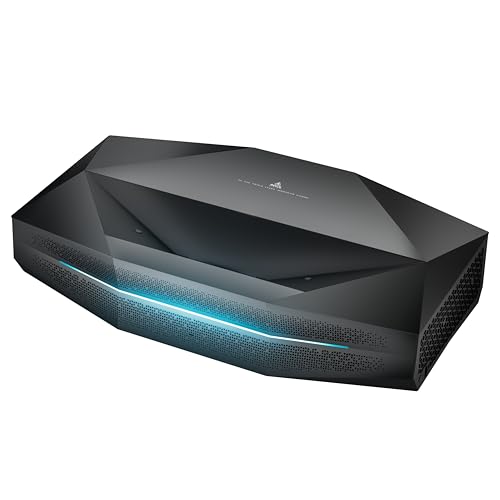
AWOL VISION Aetherion Pro — Ultra Short Throw Laser
The Aetherion Pro is the pick for the household that wants laser projection without giving the projector the room. Listed as a 4K ultra short throw laser home theater projector, it sits on a cabinet centimetres from the wall and builds its image from below, while the other five models in this guide expect a clear throw across the space. Its specification is thoroughly flagship: Google TV, an RGB triple laser engine, Dolby Vision, a feature AWOL calls PixelLock, a 6,000:1 contrast figure with an IRIS mechanism, a maker-rated 2,600 ISO lumens, and gaming credentials of 1080p at 240Hz with a 1-millisecond lag claim. The ISO basis of the brightness figure deserves the same respect given to the XGIMI — it is a number with a method behind it.
Ultra short throw ownership concentrates its demands into a single afternoon. The wall must be flat, the cabinet must be stable and level, and the alignment — assisted here by the maker’s PixelLock feature, whose listing presence signals how seriously the brand treats the geometry problem — must be done once and done properly. After that afternoon, the projector behaves like a television: on for the news, on for the match, immune to people crossing the room, indifferent to ceiling construction. The honest constraints are the format’s own. Image sizes live in the television-replacement band rather than the 300-inch frontier, an ambient light rejecting screen is close to obligatory in a bright room, and the 2,600 ISO lumens suit dimmed spaces better than sunlit ones. Within those constraints, the Aetherion Pro offers the most television-like path into RGB laser colour that this guide contains.
- Format as listed: 4K ultra short throw
- Light engine as listed: RGB triple laser
- Brightness as listed: 2,600 ISO lumens, maker figure on a measured standard
- Contrast as listed: 6,000:1 with IRIS
- Platform as listed: Google TV, Dolby Vision support
- Gaming as listed: 1080p at 240Hz, 1ms lag claim
Strengths
- RGB triple laser colour in a footprint that asks for a cabinet, not a ceiling mount.
- Google TV and Dolby Vision make it a complete television replacement out of the box.
- Fast 1080p gaming mode with a 1ms claim matches the flagship long-throw models.
Trade-offs
- Demands a flat wall and careful one-time alignment; wavy surfaces will betray it.
- Screen sizes top out in the television band rather than the cinema frontier.
- An ultra short throw ALR screen is effectively a required companion purchase in bright rooms.
Best for: households swapping a large television for laser colour without touching the ceiling. Not suited for: very large screens or walls that cannot be made properly flat.
How do the six compare side by side?
| Projector | Imaging path | Brightness basis | Platform | Signature strength |
|---|---|---|---|---|
| Epson Home Cinema LS6000 | 3-chip 3LCD | 3,400 lumens colour and white, maker figure | None advertised — source-fed | 120Hz support with ALLM and no rainbow artefacts |
| Optoma UHZ36 | DLP | Not quoted in the listing | None advertised — source-fed | Unadorned 4K UHD laser HDR format |
| Valerion StreamMaster Plus2 | Laser, smart flagship | Not headline-quoted in the listing | Google TV | Dolby Vision and IMAX Enhanced streaming brief |
| XGIMI HORIZON 20 | RGB triple laser | 3,200 ISO lumens, maker figure | Google TV, licensed Netflix | Lens shift and optical zoom with triple laser colour |
| ViewSonic LX700-4K | DLP laser | 3,500 lumens, maker figure | None advertised — console-led | 240Hz-at-1080p gaming mode, 4.2ms figure |
| AWOL VISION Aetherion Pro | RGB triple laser, UST | 2,600 ISO lumens, maker figure | Google TV | Television footprint with flagship colour |
The imaging path column is where the deepest differences hide. Three-chip LCD and RGB triple laser designs reach colour by splitting or generating it directly, while the single-chip DLP models build colour sequentially at high speed — a distinction most viewers never notice and a minority notice immediately, which is why the Epson exists in this set. The brightness column teaches the guide’s recurring lesson in miniature: two of these figures carry the ISO standard’s discipline, two are unqualified maker figures, and two listings decline to headline a number at all, so any ranking built on lumens alone collapses on inspection. Platform, by contrast, is a clean binary — Google TV inside, or bring your own source — and it predicts your daily remote-control life more accurately than any optical specification.
How do you install a laser projector for the long term?
Laser projectors reward a slightly more deliberate installation than their lamp ancestors, precisely because you expect to leave them there for so long. Choose the mounting position with the lens’s zoom range centred rather than at either extreme, so the optics work in their comfortable middle and you keep adjustment in reserve for the day the screen changes. Ventilation is the long-life variable: laser engines are efficient, but they still move heat, and a projector sealed into a hush box or a closed cabinet without airflow will age its electronics faster than its light source. Leave the clearances the manual asks for, and treat them as part of the specification rather than as timidity.
While the mount is being planned, settle the screen’s future at the same time. A laser projector’s output will look essentially the same in year five as in week one, so any improvement you crave in year three will come from the room: a better screen, darker paint near the image, blackout lining for the curtains. Owners who leave wall space and budget for those upgrades find their projector apparently improving with age, which is the closest thing home cinema offers to a free lunch.
Cable for the projector you might own next, not only the one in the box. A laser installation can plausibly serve a decade, across two or three generations of source devices, so the HDMI run should be the best you can reasonably install, routed where it can be replaced without demolishing the room — conduit and accessible trunking are the unglamorous heroes of every long-lived media room. Power deserves the same foresight: a surge-protected feed protects an engine with no user-replaceable lamp economics behind it. Finish the installation by saving your calibrated picture settings somewhere other than the projector’s memory, because a factory reset during a future firmware update should cost you an email to yourself, not an evening of test patterns. Photograph the mount position and the menu pages while you are at it; future you, crouched on a ladder in poor light, will be grateful for evidence of what correct once looked like.
What mistakes do laser projector buyers keep making?
The first is treating laser as a synonym for maintenance-free in every respect. The light source stops asking for lamps; the projector still asks for clean filters, clear vents and the occasional firmware update, and a neglected laser projector fails by electronics rather than by darkness. The second mistake is comparing brightness figures across different measurement standards as if they were one currency — an ISO-rated figure and an unqualified marketing figure can describe similar real output while differing wildly on paper, and this guide contains both species. The third is configuring the projector once in its showroom-bright default mode and never visiting the accurate picture modes where films actually live; laser colour, particularly from the RGB models, rewards the calmer settings enormously.
Fourth comes the 240Hz misunderstanding, repeated across the category: the high-refresh modes operate at 1080p, and a buyer who expects 4K at 240Hz from any machine here will feel cheated by physics rather than by a brand. Fifth is under-buying the screen. Laser engines hold their output for years, which means the screen — not the projector — becomes the component most likely to limit the picture across the installation’s life, and a screen chosen as an afterthought taxes every film shown on it. The final mistake is forgetting sound in the celebration of silent light sources: laser projectors are quieter in maintenance, not in fan noise, and a projector mounted close to the seating should be auditioned for its fan note in a quiet scene before the return window closes.
Where does the projector’s own noise fit into the decision?
Laser marketing celebrates silence of one kind — no lamp to change — while a different sound decides whether a quiet film scene survives: the fan. Every projector in this guide moves air across hot electronics, and the acoustic result depends on brightness mode, room temperature and mounting position more than on brand. A machine run in its brightest mode on a warm evening will sing; the same machine in its film mode, in a cool room, may disappear beneath the soundtrack entirely. Because listings in this set do not publish comparable noise figures, the honest guidance is procedural rather than numerical: plan the mount as far from the main seats as the lens allows, avoid the brightest mode as your default, and use the return window to audition the projector during a genuinely quiet scene in your own room, at your own seating position, before deciding it is a keeper.
Mounting choices can help or hurt. A projector hard against a ceiling couples its vibration and its exhaust into the structure of the room; isolation mounts and a small air gap soften both. Shelf mounting behind the seating often wins acoustically because the sound must travel further and the shelf itself absorbs vibration, though it asks the lens to have the throw for the job. The ultra short throw AWOL escapes the dilemma by living on a cabinet at the front of the room, where its fan note, whatever its level, competes with the speakers beside it rather than hovering over the audience. Households that watch at low volume late at night — the exact audience for a laser projector’s instant-on convenience — should weight this section heavily, because it describes the soundtrack of every quiet scene they will ever watch.
Final Recommendation
Choose the Epson Home Cinema LS6000 if your household wants one laser projector to do everything with the least argument: its colour honesty, 120Hz support and freedom from rainbow artefacts make it the peacemaker of this set. Choose the XGIMI HORIZON 20 if colour, placement optics and a properly licensed streaming platform are worth flagship money, and the Valerion StreamMaster Plus2 if streamed premium formats at large sizes lead your brief. The ViewSonic LX700-4K is the gamer’s allocation of the same budget, the Optoma UHZ36 the minimalist’s, and the AWOL Aetherion Pro the answer when the room forbids a throw altogether. A lamp projector is a consumable with a lens attached; a laser projector is furniture that happens to throw light, and the household that buys it that way — installed once, cabled properly, left in peace — will still be enjoying the same bright picture on the evening the warranty paperwork has long since been recycled.
Frequently Asked Questions
How long does a laser projector really last?
Makers rate laser light engines in the tens of thousands of hours, which at a few hours of viewing a day stretches well past a decade. Treat the figure as a maker claim about the light source’s slow decline rather than a guarantee: electronics, fans and capacitors age on their own schedules, and ventilation care is what lets the light engine reach its rated horizon.
Is pixel-shifted 4K visibly worse than native 4K?
For film and television content at normal seating distances, the shifted image is extremely difficult to distinguish from native 4K, which is why the entire industry builds this class this way. Fine static detail — small PC text, test charts — is where native chips pull ahead, and at very large screen sizes the gap widens enough for enthusiasts to care.
Do laser projectors need calibration?
They benefit from it once, at installation, because their out-of-box modes favour brightness over accuracy like every projector’s. Unlike lamp models, they hold that calibration steadily for years rather than drifting as a lamp fades, so the hour you spend with test patterns at the start keeps paying out instead of expiring.
Can a laser projector replace my television completely?
The smart models here — the XGIMI, the Valerion and the AWOL — are designed to do exactly that, with licensed apps, instant-on behaviour and no lamp anxiety about short sessions. The remaining condition is the room: a projector still wants dimmed light for its best picture, so a sun-drenched daytime lounge remains television territory unless an ambient light rejecting screen joins the plan.
Why do two listings here quote ISO lumens and others do not?
ISO lumens are measured against a published standard method, so figures from different makers can be compared with some confidence. Unqualified lumens figures follow each maker’s own approach and tend to flatter. When one listing quotes a smaller ISO number than a rival’s larger unqualified number, the real-world gap is usually far narrower than the paper gap suggests.
What happens when a laser projector finally ages?
Unlike a lamp, a laser engine is not a user-replaceable part, so end-of-life planning differs: when the engine eventually dims beyond your tolerance — a horizon makers measure in tens of thousands of hours — the projector is replaced as a whole. In practice, most households will replace the machine for its electronics, its connections or its resolution long before the light gives out, which is precisely why this category’s economics favour buyers who keep equipment for a long time and punish nobody — not the early adopter, not the keeper, and not the household that simply wants the lamp question closed for good.
Is 240Hz gaming real on these projectors?
Yes, at 1080p, in the dedicated fast modes — which is where high-refresh gaming is genuinely played, since even powerful consoles target high frame rates by reducing resolution. At 4K these machines run at the standard rates your sources supply. The listings that advertise 240Hz are describing a real capability with a resolution condition attached, and this guide attaches the condition every time.
Related Guides
Laser light answers the lamp question, but placement writes its own rules. Our guide to Best Home Theater Projectors Short Throw covers the geometry of small rooms, while Best Ceiling Mounted Projectors walks through permanent installation. If your room’s problem is daylight rather than distance, Best Bright Projectors takes the lumen question apart in full. Laser light taken outside for movie nights is covered by the best backyard projectors.
Related guides
- Best 1080p IP Cameras: PoE Domes, Turrets, Bullets and a PTZ That Earn Their Cable
- Best 43 1080p TVs: Why 43 Inches Went 4K — and Where True Full HD Survives
- Best Doorbell Cameras No Subscription: Local Storage Picks, and the Ring/Blink Truth
- Best AC Powered Wireless Security Cameras: Wi-Fi Data, Mains Power, Zero Sleep


