What's inside
- Key Takeaways
- Quick Picks
- How Did We Sort the Monochrome Shelf?
- Who Still Buys a Printer That Only Prints Black?
- How Do the Six Divide on the Decisions That Matter?
- Why Does Toner Behave So Differently From Ink?
- How Do You Choose Between Print-Only and the One Multifunction Model?
- What Mistakes Do Buyers Make in the Monochrome Aisle?
- How Do You Set Up a Monochrome Laser for Years of Quiet Service?
- What Paper Should a Laser Black Printer Actually Eat?
- How Does Owning One Cartridge Colour Change the Household Maths?
- Which of These Printers Belongs in a Student Room?
- What Should You Do When a Laser Page Comes Out Wrong?
- How Does a Black Laser Fit Alongside a Colour Printer You Already Own?
- How Should You Read Speed Claims in This Category?
- What Does a Monochrome Laser Ask From Your Room and Your Wiring?
- When Is the Cheapest Model the Wrong Economy?
- How Long Should a Machine Like This Actually Last?
- How Should These Printers Connect in Difficult Networks?
- What Does the First Toner Warning Actually Mean?
- Final Recommendation
- Frequently Asked Questions
- Related Guides
As an Amazon Associate I earn from qualifying purchases. This post may contain affiliate links at no extra cost to you.
gizmoverdict.com is reader-supported. When you buy through links on our site, we may earn an affiliate commission.
Where to buy: All six machines are listed on Amazon; the names below link to the matching pages, where the current configuration and the toner arrangement each model ships with can be checked before ordering.
Strip a printer of colour, scanning gimmicks, photo ambitions, touchscreens the size of paperbacks and every other fashionable distraction, and what remains underneath is the machine most desks actually need, most weeks of the year, for most of the paper that genuinely matters in a working household. The best laser black printers — monochrome lasers, in the industry’s plainer language — do one thing with total commitment: they put crisp black text on paper, quickly, repeatedly, and without caring whether the last job was three minutes or three months ago. Toner is a dry powder sealed in a cartridge, so there is no ink to dry, no nozzles to clog, and no warm-up ritual of cleaning cycles before an urgent page.
The six picks divide into two honest camps. Four are print-only machines — two compact Brothers, two compact Canons and an HP that competes on sheer smallness — while one Brother, the MFC-L2820DW, adds copy, scan and fax for desks whose paperwork runs in both directions. Within the print-only camp the dividing line is duplex: two models turn the page over automatically, and three, including the budget Brother HL-L2405W, print on one side only. That single difference, stated plainly and early in each review below, is where most buyers in this deceptively simple category should spend the great majority of their decision, because nearly everything else about these six machines is reassuringly similar.
Key Takeaways
- Laser black means monochrome laser: black toner only, no colour, and text sharpness that inkjets struggle to match at any price.
- The Brother HL-L2405W is the simplex budget pick — its listing does not promise duplex, so every two-sided job there is a manual flip.
- Duplex appears in writing on the Brother HL-L2460DW, the Brother MFC-L2820DW and the Canon LBP122dw, and in no other listing here.
- Only the MFC-L2820DW scans, copies or faxes; the other five print and do nothing else, which for many desks is a virtue.
- Pages-per-minute figures quoted are the manufacturers’ own — the Canon pair state 30 PPM and 19 PPM respectively, a useful tier signal rather than a promise.
Quick Picks
| Pick | Badge | Why it earns its place |
|---|---|---|
| Brother HL-L2405W | Simplex budget anchor | The entry point to Brother laser ownership: compact, wireless, mobile printing, and honestly one-sided. |
| Brother HL-L2460DW | Duplex step-up | The same compact Brother formula with automatic two-sided printing added where it matters. |
| Brother MFC-L2820DW | The multifunction one | Copy, scan and fax join duplex printing for the desk that handles paperwork in both directions. |
| Canon imageCLASS LBP122dw | Fastest stated pace | A maker-rated 30 PPM duplex print-only Canon, the quickest headline figure in this guide. |
| Canon imageCLASS LBP6030w | Proven compact veteran | A long-running 19 PPM single-function design in white, with a 1-year limited warranty. |
| HP LaserJet M110w | Smallest footprint play | HP’s miniature monochrome laser for tight spaces, built around mobile and wireless printing. |
How Did We Sort the Monochrome Shelf?
We began by refusing to be distracted. In a category defined by an absence — no colour — the temptations are speed claims and badge engineering, so we sorted on the three differences a buyer can actually feel: whether the machine prints two-sided automatically, whether it does anything besides print, and how much desk it occupies while doing it. Listings were read literally. Where a Brother title says “with Duplex”, duplex is credited; where the HL-L2405W’s title stays silent, this guide treats the machine as simplex and says so in the first line of its review, because a buyer who discovers the omission after delivery has been failed by somebody’s copywriting.
Brother’s listings also mention a Refresh subscription trial bundled with several models. We describe that neutrally, as the listings do: a trial of a toner subscription arrangement, included in the box’s paperwork. Whether a subscription suits a household depends on printing rhythm, and this guide makes no claims about savings either way — steady printers and sporadic printers will read the same offer very differently.
Speed figures appear only where a listing publishes them, labelled as manufacturer numbers. Canon states both of its figures, which is why the Canons anchor the pace discussion; the Brothers and the HP are judged on their stated features and their well-documented class behaviour rather than invented numbers.
Who Still Buys a Printer That Only Prints Black?
More people than the colour market admits. Students print essays, problem sets and lecture notes. Home offices print contracts, returns, invoices and shipping labels. Writers print drafts they intend to attack with a pen. Small shops print receipts-adjacent paperwork, delivery notes and rota sheets. Every one of those jobs is black text on white paper, and every one is better served by a machine that treats that job as its whole identity rather than as the least interesting of nine functions. The monochrome laser is not a compromised colour printer; it is a specialist that never has an off day, and its running costs stay low precisely because there is only one consumable colour to buy, forever.

Brother HL-L2405W — Simplex budget anchor
Start with the sentence this model deserves to have read aloud: the HL-L2405W does not print on both sides automatically. Brother’s listing describes a wireless compact monochrome laser printer with mobile printing and black-and-white output, includes a Refresh subscription trial, and notes Alexa compatibility — and nowhere in that description does the word duplex appear. In Brother’s own range, the step-up model below adds “with Duplex” to its very title. So this is the simplex machine, the one-sided printer, and it should be bought with open eyes and a clear conscience, because for the right desk that is not a flaw at all.
The right desk prints short things. A shipping label is one-sided by nature. A boarding pass, a recipe, a permission slip, a single-page letter, a form that will be signed and scanned by somebody else’s machine — none of these jobs has a back side worth printing. A student printing handouts to read once and recycle, a household printing the week’s paperwork in single sheets, a small shop printing delivery notes: all of them can run this Brother for years without once missing a duplexer. What they get instead is the cheapest honest route into laser reliability — wireless, compact, mobile-friendly, and indifferent to idle weeks.
The manual workaround exists and should be described honestly: print the odd pages, return the stack to the tray in the correct orientation, print the even pages. It works, it is fiddly, and everyone who tries it on a sixty-page document does it exactly once before developing strong feelings. If long two-sided documents feature in your life even monthly, walk one step down this page to the HL-L2460DW and never perform that ritual. If they do not, the 2405W’s simplicity is the feature.
- Function: print only, monochrome
- Duplex: not stated — treat as simplex (single-sided)
- Extras stated: mobile printing, works with Alexa, Refresh subscription trial included
- Form stated: wireless, compact
Strengths
- The most affordable posture in Brother’s compact laser family, with wireless and mobile printing intact.
- Compact body fits shelves, counters and student desks where a multifunction machine would sprawl.
- Laser indifference to idle time suits households that print in bursts separated by quiet weeks.
Trade-offs
- Single-sided printing only; long duplex documents become a manual, error-prone ceremony.
- No scan or copy function at all — paperwork arriving on paper must go elsewhere to be digitised.
- Households whose volume grows will feel both limits sooner than they expect.
Best for: light, single-sided printing households and students who want laser reliability at the entry tier. Not suited for: anyone who prints long documents on both sides, or needs to scan.

Brother HL-L2460DW — Duplex step-up
The HL-L2460DW answers its cheaper sibling in its own title: a wireless compact monochrome laser printer with duplex, mobile printing and black-and-white output, again with a Refresh subscription trial in the paperwork and Alexa compatibility. One word — duplex — carries the whole argument for stepping up, and it is worth pausing on why that word matters more than any other in this class.
Automatic two-sided printing changes three things at once. Paper consumption on long documents halves, which a student printing a semester of reading or a home office printing contracts feels within a month. Documents become physically better: a thirty-page agreement becomes a fifteen-sheet object that staples neatly and files flat. And the job becomes unattended — you send sixty pages, collect a finished document, and never learn the manual flip ritual that the simplex model demands. For anyone who prints documents rather than slips, this is the single most valuable feature in the entire monochrome category, worth more than a faster engine or a fancier panel.
Everything else about the 2460DW keeps the family virtues: compact wireless body, phone printing for the household’s other devices, toner that sleeps peacefully between jobs. It remains print-only, so the scanning question must be answered by something else — a phone app for the occasional page is the common compromise, and it is a fair one until scanning becomes a weekly stack. Buyers standing between this and the 2405W should decide on one question alone: do I print long documents? The honest answer picks the model.
- Function: print only, monochrome
- Duplex: stated in the listing title
- Extras stated: mobile printing, works with Alexa, Refresh subscription trial included
- Form stated: wireless, compact
Strengths
- Automatic duplex printing removes the manual flip ritual and halves paper use on long jobs.
- Same compact, wireless, mobile-friendly formula as the budget model.
- The natural long-term buy for document printers who do not need scanning.
Trade-offs
- Still print-only: no scanner or copier for inbound paperwork.
- Costs more than the simplex sibling for a feature single-sheet printers will never use.
- Colour, as everywhere in this guide, does not exist — plan another route for the rare colour page.
Best for: students, writers and home offices printing long black-and-white documents weekly. Not suited for: desks that must scan, or households printing only labels and slips.

Brother MFC-L2820DW — The multifunction one
One model in this guide refuses to be only a printer. The MFC-L2820DW’s listing describes a wireless compact monochrome all-in-one laser printer with copy, scan and fax, duplex printing and black-and-white output, with the Refresh trial and Alexa support in the fine print. That function list turns a print-only appliance into the complete paper loop for a small office: documents arrive by fax or on paper, get scanned into the digital world, get copied for a colleague, and leave again as printed pages — all through one compact box.
The buyer here runs paperwork, not just print jobs. A bookkeeper receiving client documents, a small legal or insurance office, a clinic’s back desk, a home business that still gets faxed orders from one stubborn supplier — these desks need the inbound half of the loop as much as the outbound half. Duplex printing keeps their own output tidy, the scanner turns archives digital a stack at a time, and the copier handles the walk-up jobs that would otherwise justify a second machine. That it does all this in the compact MFC footprint, rather than in a full office chassis, is what makes it the guide’s most complete answer for a one-machine office.
The cautions are the mirror of its strengths. You are paying for scan, copy and fax hardware that a pure printing desk leaves untouched, and the machine is the largest commitment on this page in both budget and desk space. Fax in particular should be justified by a real correspondent, not nostalgia. And monochrome scanning means colour originals archive in greyscale — fine for documents, sad for photographs. Buy this Brother when the paperwork genuinely flows in both directions; otherwise its smaller siblings do the printing half with less ceremony.
- Functions stated: print, copy, scan, fax
- Duplex: stated in the listing
- Extras stated: mobile printing context, works with Alexa, Refresh subscription trial included
- Form stated: wireless, compact all-in-one
Strengths
- The complete paper loop — print, scan, copy, fax — in one compact laser machine.
- Duplex printing included alongside the multifunction kit.
- Toner reliability applied to scanning-heavy desks that cannot tolerate inkjet moods.
Trade-offs
- The priciest posture in this guide, buying functions some desks never touch.
- Monochrome scanning archives colour originals in greyscale.
- Larger and more complex than the print-only models it shares this page with.
Best for: small offices and home businesses whose paperwork arrives on paper and leaves on paper. Not suited for: pure print desks, or anyone archiving colour documents.

Canon imageCLASS LBP122dw — Fastest stated pace
Canon publishes a number where Brother stays quiet: the LBP122dw’s listing calls it a wireless monochrome duplex laser printer, print only, mobile ready, at 30 PPM for home — the PPM being Canon’s own figure, measured Canon’s way. Thirty pages a minute is brisk for this class, and it signals the machine’s intent: this is the print-only Canon for people whose jobs are long and whose patience is short.
Consider the rhythm it suits. A teacher printing a class set of worksheets before the bell, an administrator producing a meeting pack, a student printing a thesis draft the night before a supervisor meeting — these are jobs where the difference between a slow engine and a quick one is measured in standing-around minutes. Duplex is built in, so the long jobs emerge two-sided without supervision, and Canon’s imageCLASS line brings the office-bred paper handling of its larger machines down into a home-sized box. Mobile readiness covers the phone-and-tablet printing that modern households generate without asking.
Print-only discipline applies here as firmly as anywhere: there is no scanner hiding under a lid, no copier for the one form a month, nothing but a fast, duplexing, monochrome engine. Households that occasionally need a scan will lean on a phone, and households that need scans weekly should be reading the MFC review above instead. Also read the 30 PPM the way this guide keeps insisting: as a tier marker. First-page time and warm-up behaviour govern short jobs, and Canon’s figure describes sustained pace once the machine is running — which is exactly the long-job scenario this model is bought for.
- Function: print only, monochrome
- Duplex: stated in the listing
- Speed stated: 30 PPM (manufacturer figure)
- Extras stated: mobile ready, wireless
Strengths
- The fastest manufacturer-stated pace in this guide, with duplex built in.
- imageCLASS paper handling gives long jobs an office-bred steadiness.
- Print-only focus keeps the machine simple, compact and quick to warm to a task.
Trade-offs
- No scanning or copying of any kind.
- The pace advantage only shows on longer jobs; single pages feel like any other laser.
- Canon toner ecosystem differs from Brother’s, so households standardising brands should pick a side.
Best for: high-page-count home printing — teachers, administrators, thesis writers. Not suited for: anyone needing a scanner, or printing a page a day.

Canon imageCLASS LBP6030w — Proven compact veteran
Some products earn a review by being new; the LBP6030w earns one by refusing to leave. Canon’s listing describes a monochrome single-function wireless compact laser printer, print only, rated at 19 PPM as a manufacturer figure, finished in white, and backed by a 1-year limited warranty. It has served in dorm rooms, spare bedrooms and small offices for years, and its continued presence on the shelf is itself a specification: the design works, the supplies remain available, and the owner experience pool under its listing is deep.
Nineteen pages a minute sounds modest beside the LBP122dw’s thirty until you ask what home jobs actually look like. A five-page document does not care about sustained pace; it cares that the printer woke up, connected, and printed before the kettle boiled. The 6030w’s compact body and light weight make it the easiest machine here to place — a shelf, a wardrobe top, the corner of a small desk — and its wireless design means the placement is not dictated by a cable. For a bedroom printer, a student printer, a second printer for one person’s text work, those placement virtues outweigh a speed figure measured on jobs the owner will never send.
The limits are written on the box: single-function means print only, and duplex is not part of this listing’s promises, so two-sided documents join the manual-flip club described under the Brother 2405W. Buy the 6030w for what it demonstrably is — a compact, proven, single-sided monochrome printer for light duty — and it will not disappoint. Buy it hoping it secretly duplexes or scans, and it will disappoint immediately. The listing is honest; meet it halfway.
- Function: print only, monochrome
- Duplex: not stated — treat as single-sided
- Speed stated: 19 PPM (manufacturer figure)
- Coverage stated: 1-year limited warranty; compact, white, wireless
Strengths
- A long-proven compact design with deep owner experience behind its listing.
- Small and light enough for shelves and student rooms where other lasers will not fit.
- Simple single-function brief: nothing to configure beyond printing.
Trade-offs
- No automatic duplex; long two-sided jobs are manual work.
- The slowest stated pace here, fine for short jobs and limiting for long ones.
- Print-only, like most of this page — no scan or copy safety net.
Best for: light-duty personal printing in small spaces, students and second-printer roles. Not suited for: long duplex documents or heavy daily volume.
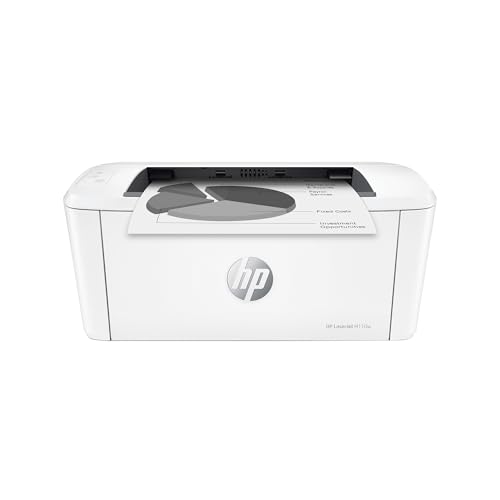
HP LaserJet M110w — Smallest footprint play
HP’s contribution to this category is an argument about size. The M110w’s listing presents a monochrome laser printer built around fast black-and-white printing, mobile printing and wireless printing, in one of the smallest laser chassis HP has ever sold. In a category where several rivals compete to be taken seriously as office equipment, the M110w competes to disappear — onto a narrow shelf, beside a monitor, in a rental room where furniture is negotiated by the centimetre.
That smallness serves a real and growing desk: the laptop worker whose office is a corner, the student in a shared house, the travelling professional printing contracts from a temporary base. Mobile printing is the centre of gravity here, because the M110w’s natural owner prints from a phone or a laptop that moves rooms, not from a fixed workstation. Wireless setup through HP’s app-led process suits that owner too — the machine is designed to be adopted in minutes and carried when life moves.
Compromises follow the chassis. Duplex is not part of this listing’s stated promises, so two-sided work is manual. A very small printer also means a small paper supply and a design aimed at modest volumes; the household that discovers it prints two hundred pages a week should promote the M110w to second-printer duty and buy a deeper machine for the main load. Judged as what it is — the laser you can fit anywhere, for text, right now — it has no rival on this page. Judged as a family workhorse, it was never entered in that race.
- Function: print only, monochrome
- Duplex: not stated in the listing
- Extras stated: mobile printing, wireless printing, fast black-and-white printing
- Form: HP’s compact LaserJet chassis for tight spaces
Strengths
- The smallest laser footprint here, opening placements no rival can use.
- Mobile-first printing suits laptop-and-phone households without a fixed desk.
- Laser reliability in a machine that can move house as easily as a kettle.
Trade-offs
- No stated automatic duplex — two-sided jobs are manual.
- Compact design implies modest paper handling and light-duty volume.
- Print-only, with no scan or copy fallback.
Best for: space-starved desks, renters, students and mobile workers printing text. Not suited for: family-volume printing or duplex document work.
How Do the Six Divide on the Decisions That Matter?
| Model | Role | Automatic duplex per listing | Scans or copies? |
|---|---|---|---|
| Brother HL-L2405W | Print-only budget | No — simplex | No |
| Brother HL-L2460DW | Print-only duplex | Yes | No |
| Brother MFC-L2820DW | Multifunction | Yes | Yes — plus fax |
| Canon LBP122dw | Print-only, 30 PPM maker figure | Yes | No |
| Canon LBP6030w | Print-only compact, 19 PPM maker figure | Not stated | No |
| HP LaserJet M110w | Print-only miniature | Not stated | No |
Two questions do nearly all the work in this category. Do your long documents need two sides? And does paper ever need to enter the machine, not just leave it? Answer those honestly and the table above collapses to one or two names without any further research.
Why Does Toner Behave So Differently From Ink?
The chemistry explains the ownership experience. Ink is a liquid that must stay ready to jet through microscopic nozzles; leave it idle and it thickens, clogs and demands cleaning cycles that spend ink to restore ink. Toner is a fine dry powder fused onto paper by heat at the moment of printing. Sealed in its cartridge it is essentially indifferent to time, which is why a laser can sit through a summer holiday, a slow quarter or a student’s gap year and print a perfect first page on return. For the irregular printer — and most households are irregular printers, whatever they intend — that indifference is the single strongest argument in this entire guide.
Toner also explains the text quality. Fused powder sits on the paper surface with hard edges, producing the dense, uniform blacks that make a laser page look authoritative. Fine print, footnotes and dense tables stay legible at sizes where inkjet output softens. The trade is equally chemical: a powder fused on a surface cannot blend into photographic gradients the way dye soaking into coated paper can, which is why this category wisely never promises photographs. Black laser printing is a text technology perfected, and its limits are the shadow of its strengths.
How Do You Choose Between Print-Only and the One Multifunction Model?
Count your inbound paper. If documents arrive digitally — email attachments, downloads, portals — and leave on paper, a print-only machine covers your whole life and a scanner would gather dust. If paper arrives physically and must become digital — posted forms, handed-over documents, signed pages to return by email — you need a scanner somewhere in the house, and the MFC-L2820DW puts it in the same box as the printer, with a copier for the walk-up jobs.
Phone scanning apps blur this decision for light users: a page a week photographs beautifully and files itself. The honest threshold is volume and formality. A stack of pages, a document that must look scanned rather than photographed, a fax number that still appears in your correspondence — any of those promotes the multifunction Brother from luxury to necessity. Below that threshold, save the money and the desk space, and let a print-only machine do its one job superbly.
What Mistakes Do Buyers Make in the Monochrome Aisle?
The most expensive mistake is assuming duplex. Shoppers raised on office machines treat two-sided printing as a law of nature, order a simplex model, and discover the truth with a deadline running. This guide has named the simplex machines in their first paragraphs for exactly that reason; carry the same suspicion to any listing you read alone. The second mistake is the mirror image: buying the multifunction model “just in case”, then never once lifting the scanner lid in three years — desk space and money spent insuring against a paperwork life the buyer does not lead.
A third error is ignoring the second cartridge. The starter toner supplied with a new printer is rarely a full cartridge, a convention across the industry, so the first replacement arrives sooner than new owners expect. It is not a defect and it is not hidden, but households that budget for it stay calm, and households that do not, feel ambushed. Finally, buyers place these small lasers in cupboards and drawers, forgetting that a laser needs ventilation and a flat surface; a machine that overheats or prints on a wobble will manufacture problems that get blamed on its brand.
How Do You Set Up a Monochrome Laser for Years of Quiet Service?
Begin with the surface. A laser wants a flat, stable, ventilated spot — not a wobbling shelf, not a sealed cupboard, not the top of a filing cabinet that rings like a drum with every page. Leave space behind and above for warm air to escape, and keep the paper stored nearby in its wrapper, because paper left open in a humid room absorbs moisture and then feeds badly, curls, and gets blamed on the printer. Join the machine to the household’s main wireless network during setup, print a test page from every computer and phone that will use it, and write the printer’s name on a label if two similar machines share the house.
Then set the defaults that decide the next three years. Duplex on, if your model has it, for the queues that print documents; single-sided for the label-and-receipt queue if you create one. Choose the print quality setting honestly — the highest mode is for the final copy of a document that matters, and everyday drafts print beautifully one notch down while moving faster. If the driver offers a toner-save or eco mode, understand what it does before enabling it globally: it lightens output, which is invisible on drafts and faintly disappointing on a contract’s signature page.
Finish by planning the consumable before it plans you. Note the cartridge model your machine takes, keep one spare once the starter cartridge’s warning appears, and put the empty-cartridge return or recycling route in the same drawer. None of this takes an afternoon; all of it together is the difference between a printer that is “always broken” in family mythology and one that is simply never discussed, which is the natural state of a good monochrome laser.
What Paper Should a Laser Black Printer Actually Eat?
Standard office paper is the diet these machines were bred on, and most feeding drama comes from departures: damp stock, paper stored loose and curled, mixed reams married in one tray, or heavy card asked to bend around a path designed for ordinary sheets. Fan a new ream before loading, load it print-side as the tray’s diagram instructs, and set the guides touching the stack without squeezing it. Paper that has lived in a garage or a steamy kitchen for a season will misfeed in any machine on this page, and the fix is a fresh ream, not a repair.
Special media rewards small courtesies. Envelopes feed best a few at a time with flaps arranged as the manual shows. Laser-rated labels — the rating matters, because the fuser’s heat will soften adhesives never meant for it — should travel the straightest path available and never be re-fed once partially printed, since a label that peels inside the machine is a service visit in sticker form. Card stock within the machine’s stated weight range prints handsomely for certificates and covers; beyond that range, a copy shop’s heavier machine is the honest tool. Respecting these small rules is nearly the whole of laser maintenance, and owners who do tend to describe their printers as indestructible.
How Does Owning One Cartridge Colour Change the Household Maths?
A colour printer maintains four supplies on four schedules and can be stopped by any one of them — including, on many inkjets, a refusal to print black text because a colour cartridge is empty. A monochrome laser maintains exactly one supply. When it runs low, the warning concerns the only thing the machine does, the replacement is a single decision, and the household’s printing never hostage-trades against a colour nobody needed that week. That simplicity compounds in shared houses and small offices, where the person who notices the warning is rarely the person who knows what to order; “the black one” is a complete purchasing instruction.
The deeper economy is attention. Inkjets ask their owners to think about them weekly — a page to keep nozzles wet, a cleaning cycle before the big job, a worry after the holiday. A monochrome laser asks to be thought about when its cartridge warns and when its tray empties, and at no other time. For households whose printing is a means to an end — the form, the essay, the label, the contract — that near-zero attention budget is worth more than any specification in this guide, and it is why so many people who switch to a black laser describe the change with the word “finally”.
Which of These Printers Belongs in a Student Room?
Student printing has a distinctive shape: nothing for three weeks, then a landslide the night before a deadline, in a room where desk space is measured in centimetres and the printer may travel home in a car boot at term’s end. That shape argues for three qualities in order — indifference to idle time, small footprint, and the ability to print a long document two-sided without supervision at 1 a.m. The HL-L2460DW is the fullest answer, because deadline documents are exactly the long duplex jobs its engine exists for. The LBP6030w and the M110w trade the duplex away for size and simplicity, which suits the student whose printing is handouts and forms rather than bound coursework.
Dormitory practicalities deserve a sentence each. Wireless networks in halls of residence can be hostile to printers — shared, login-gated, device-isolating — so a student should confirm the machine can also work over a direct cable or its own direct wireless mode before term starts, rather than discovering network policy during deadline week. Noise matters when a roommate sleeps three metres away; lasers print in brisk bursts rather than inkjet’s longer warm-up symphony, but the considerate student queues the landslide before midnight anyway. And a printer shared by a corridor becomes a small business: agree the paper-and-toner etiquette in week one, in writing, on the printer itself.
What Should You Do When a Laser Page Comes Out Wrong?
Read the page like evidence, because each fault has a short suspect list. Faint output across the whole page usually means a toner cartridge nearing its end or an eco setting doing its job; a gentle rock of the cartridge redistributes toner and buys time, a habit as old as the technology. A repeating mark at regular intervals down the page points at a roller or the drum’s surface — the spacing is the fingerprint, and the manual’s troubleshooting chart converts that spacing into a part name. Streaks and smudges that rub off suggest the fuser or damp paper; a fresh sheet from a sealed ream is the cheapest diagnostic in printing.
Jams, the fault everyone meets, are usually autobiographical: they describe the paper, not the machine. Paper loaded crooked, a tray overfilled past its line, a previous jam’s torn corner still lurking in the path — clear those and most “jam-prone” printers reform completely. When removing a jammed sheet, pull in the direction the paper travels, slowly, with both hands, and never with the enthusiasm that tears a sheet into confetti inside the mechanism. A laser that still misbehaves on fresh paper, loaded carefully, in a clean path has earned a support call; one fed on cupboard-damp leftovers has earned a new ream first.
How Does a Black Laser Fit Alongside a Colour Printer You Already Own?
Many households arrive at this category owning a colour inkjet they half-like, and the mature arrangement is a division of labour rather than a replacement. The inkjet keeps the jobs it is genuinely good at — the photograph, the colour school project, the birthday banner — while the monochrome laser absorbs the daily text traffic that was wearing the inkjet’s cartridges and patience. Text volume is most of most households’ volume, so the inkjet’s ink suddenly lasts, its nozzles stay exercised by the colour work it still does, and the laser’s toner handles the grind without complaint.
Setting the arrangement up well is mostly a naming exercise. Make the laser the default printer on every computer, so documents go there unless a human deliberately chooses colour; a household that leaves the inkjet as default will keep printing contracts in expensive colour out of pure inertia. Keep both machines on the same network, label them by job rather than brand — Text and Colour teach the household faster than model numbers — and the two-printer household becomes the calmest printing arrangement most families ever own.
How Should You Read Speed Claims in This Category?
Only two listings here publish a pace — Canon’s 30 PPM for the LBP122dw and 19 PPM for the LBP6030w — and both are manufacturer figures measured under standardised conditions that flatter every machine equally. Read them as league tables: the 122dw is built to sustain long jobs at roughly half again the veteran’s pace, and that difference is real over a hundred pages and invisible over three. What the figures never capture is the time to the first page, which includes waking, warming the fuser and receiving the job over the network — the only speed a five-page household ever experiences. A printer that wakes briskly feels fast at any PPM rating, and one that sleeps deeply feels slow at all of them, which is why the reviews in this guide keep returning to rhythm rather than worshipping the one number manufacturers agree to print.
Duplex pace deserves its own footnote. A two-sided job asks the sheet to travel further, so duplex output always lands slower than the headline single-sided figure suggests. For the buyer whose life is long reports, the meaningful comparison is not simplex speed against simplex speed but the total elapsed time of a finished, two-sided, stapled document — a race the automatic duplexers win by an enormous margin over any manual-flip routine, whatever the brochure numbers say.
What Does a Monochrome Laser Ask From Your Room and Your Wiring?
Very little, but not nothing. The fuser that bonds toner to paper draws power in pulses, so a laser sharing a circuit with a kettle, heater or microwave in an older house can announce itself through flickering lights; a different socket on a calmer circuit cures it. Warm air exits through vents that want a hand’s breadth of clearance, and the machine appreciates not living directly above a radiator, whose rising heat dries the paper in the tray into a gentle curl. Sleep modes on modern machines sip power quietly, and the practical advice is to let the machine sleep rather than switching it off at the wall nightly — a sleeping laser wakes in seconds and stays ready, while a cold one performs its full warm-up opera for the first page of every day.
Placement shapes behaviour more than owners expect. A printer within arm’s reach of the main desk gets used for the one-page jobs that justify it; the same printer in a distant room trains its owner to batch, postpone and eventually resent printing. Put the machine where the documents are born, give it air and a stable shelf, and the ownership story of a monochrome laser becomes the shortest in technology: it prints, for years, and that is the whole story.
When Is the Cheapest Model the Wrong Economy?
When the missing feature is one you will rent back with your time every month. The simplex Brother is a rational purchase for single-sided lives and a slow leak for duplex ones: every long document costs a standing, flipping, re-feeding ritual, and rituals compound. The same logic judges the whole page. A print-only machine is false economy for a desk that scans weekly, because the scanning migrates to a phone, then to frustration, then to a second purchase. A miniature is false economy for a household printing hundreds of pages, because small trays and light-duty design convert volume into interruptions. The correct question is never which model costs least today, but which model’s limits your actual week will collide with least often across three years — and on that question, this category is unusually honest, because its limits are printed in the listings for anyone who reads them the way this guide has.
How Long Should a Machine Like This Actually Last?
A monochrome laser is among the longest-lived devices in a home. There are few moving parts compared with an inkjet’s priming and cleaning choreography, no liquid system to gum up, and a design lineage — in Brother’s and Canon’s cases — that descends from office machines built for years of daily service. Realistic ownership is measured in school careers and business leases, not in product cycles, provided the machine is fed decent paper, kept ventilated, and given a cartridge when it asks. The usual reasons these printers retire are external: a household’s needs change, a network standard moves on, a scanner becomes necessary. The engine itself rarely files the resignation.
That longevity changes how to buy. A feature you will use weekly — duplex, above all — deserves more weight in a machine you will keep for six years than in a gadget replaced in two, because its value compounds across thousands of jobs while its cost is paid once. Conversely, a function bought for a hypothetical future usually stays hypothetical for the machine’s whole life. Buy the monochrome laser your current paperwork describes, maintain it with the five-minute habits scattered through this guide, and expect it to outlast the laptop that feeds it — possibly two laptops. In a technology landscape addicted to replacement cycles, planned novelty and annual upgrades nobody requested, that plain, unglamorous durability is the category’s final and best argument — a machine bought once, understood completely, and trusted daily for years on end without a single moment of drama.
How Should These Printers Connect in Difficult Networks?
Every machine here is wireless, and most homes will simply join it to the router and forget the question. Difficult networks reward a little more thought. In student halls, serviced offices and some rentals, the network demands a browser login or isolates devices from each other, and a printer joined to it becomes unreachable even while technically connected. The workarounds, in order of preference, are a direct cable to the one computer that prints most, the printer’s own direct wireless mode where the model offers one — the phone or laptop joins the printer’s signal for the job, then rejoins the house network — or a small dedicated router of your own where the tenancy allows it. Testing which of these your building permits is a week-one task, not a deadline-night discovery.
Shared houses raise a social version of the same problem: a printer visible to every device on the network will eventually print a stranger’s document at an awkward hour. Most households solve this with geography — the printer lives in its owner’s room — or with the simple discipline of switching it off when away for long stretches, which a laser tolerates without complaint. Small offices should go one step further and put the printer on the staff network rather than the guest network offered to visitors, a distinction many routers make easy and many installers forget. None of these arrangements requires expertise; all of them require deciding once, deliberately, instead of inheriting whatever the setup wizard guessed.
What Does the First Toner Warning Actually Mean?
Sooner than expected, usually — and it is worth understanding why before the moment arrives. New printers commonly ship with a starter cartridge holding less toner than a standard replacement, an industry-wide convention that listings rarely headline. The warning itself is also conservative: it appears when the cartridge reaches a threshold, not when the powder is exhausted, and many pages of perfectly good printing remain beyond it. The seasoned owner’s response is unhurried — order the replacement when the warning appears, keep printing, and swap when output genuinely fades or the machine stops. Owners who treat the first warning as an emergency pay for urgency they did not need; owners who ignore it for a month eventually meet the deadline-day empty cartridge that every office legend describes. Between those two temperaments lies the entire art of owning a laser printer, and it takes exactly one cartridge cycle to learn.
Final Recommendation
For most buyers the Brother HL-L2460DW is the centre of this category: compact, wireless, and duplex where it counts. Step down to the HL-L2405W only if your printing is genuinely single-sided, and step up to the MFC-L2820DW when paper flows into your home as well as out of it. The Canon LBP122dw is the pace pick for long jobs, the LBP6030w the proven miniature for light duty, and the HP M110w the answer when the desk itself is the constraint. The best laser black printers ask so remarkably little of their owners — no ink anxiety, no colour decisions, no weekly maintenance ceremony, no subscription arithmetic, no warm-up negotiations — that the right one tends to vanish quietly into the household’s background, noticed only on the rare day it is briefly busy, which is the highest praise any printer can possibly earn.
Frequently Asked Questions
Is a monochrome laser cheaper to run than an inkjet?
For text-heavy printing, generally yes in shape if not in any figure quoted here: one toner cartridge replaces four ink cartridges, nothing is spent on cleaning cycles, and pages do not get wasted to clogged nozzles. Colour households printing photographs live by different arithmetic.
Can these printers handle shipping labels and envelopes?
Yes, with laser-rated labels — adhesive stock not rated for laser heat can soften in the fuser. Feed envelopes and label sheets in small batches, snug the paper guides, and use the straightest paper path the model offers. A practical routine helps: keep a small, clearly marked folder of laser-safe odd media beside the printer, so nobody feeds the inkjet labels left over from an old machine in a moment of haste. Most laser media disasters are really storage accidents, where the wrong sheet was simply the nearest sheet. Separate the supplies once, label them in plain words, and the printer will handle labels, envelopes and card with the same bored reliability it brings to plain paper — which is, after all, the entire promise of this category.
What does the Refresh trial in Brother’s listings mean?
The listings describe a trial of Brother’s toner subscription arrangement included with several models. It is an offer to have toner supplied on a subscription basis; whether it suits you depends on how steadily you print, and this guide makes no savings claims for it either way.
How long does toner last in storage?
Sealed toner cartridges keep for a very long time compared with ink, which is why keeping one spare on the shelf is a calm habit rather than a gamble. Store cartridges flat, sealed, away from heat and sunlight. When the spare finally goes in, note the date somewhere unglamorous — a label on the cartridge box kept in the drawer works — because a household that knows roughly how long a cartridge lasts can predict the next purchase within a few weeks and never think about toner in between. That small act of record-keeping completes the monochrome laser’s philosophy: a machine with one consumable, on a schedule its owner understands, asking for attention a handful of times a year and delivering identical pages on every single one of the days in between.
Can a monochrome laser print decent greyscale images?
It can print them legibly — a chart, a diagram, a screenshot in a document — but a photograph emerges looking like a good photocopy rather than a print, because toner cannot reproduce the gentle tonal blends that ink on photo paper achieves. If an image’s job is to inform, the laser is fine; if its job is to be looked at, send it to an inkjet or a photo service. Most owners settle into this division without ever stating it: documents on the laser, pictures anywhere else.
Why is there only one multifunction model in this guide?
Because the keyword is about laser black printing, and the strongest shelf for that job is print-only machines plus one complete paperwork model. Buyers who need colour scanning or photo work belong in a multifunction guide rather than this one.
Is a monochrome laser a sensible gift for a student or a new home office?
Unusually sensible, because it solves a problem the recipient definitely has — printing documents — with a machine that asks almost nothing in return and tolerates the recipient’s learning curve, irregular schedule and probable neglect. The duplex models make the more generous gift, since they protect the student from the manual-flip ritual for the whole degree; the compact simplex models suit the recipient whose space is the binding constraint. Include a spare ream of paper and the knowledge that a first toner replacement will arrive sooner than expected, and the gift is complete: no setup weekend, no subscription decision, no colour cartridge expiring unused in a drawer three years from now.
Related Guides
Desks that also need colour and a feeder can step across to best color laser printers with duplex printing and document feeder. Households comparing ink against toner for the whole paperwork loop will find the wider field in best home office multifunction printers, and growing businesses should weigh the heavier machines in best home office and small business printers. Readers who outgrow black-only printing should compare the best laser color home printers.
Related guides
- Best Direct Thermal Printers: Shipping-Label Machines and Professional Label Systems
- Best 4K UHD HDR HDMI Extenders: 4K60, Long-Run and 4K120 Kits Compared
- Best 25–35 Inch Monitors With Lowest Display Lag: An Honest Ranking Without Invented Numbers
- Best Color Product Label Printers: Six Desktop Machines for Short-Run Product Labels


