What's inside
- Where to buy
- Key Takeaways
- Quick Picks
- How did we choose the best travel routers with ethernet ports?
- Why do the Ethernet ports matter more on the road than at home?
- How do you get a travel router through a captive portal without tears?
- How safe is hotel WiFi once your own router stands in front of it?
- Which connection mode should you use, venue by venue?
- Why does the power supply deserve a traveller’s attention?
- What changes on long stays, RVs and boats?
- How does a travel router fit the wider work-from-anywhere kit?
- How do the six travellers compare, port by port?
- What do travellers get wrong with these routers?
- Final Recommendation
- Frequently Asked Questions
- Related Guides
As an Amazon Associate I earn from qualifying purchases. This post may contain affiliate links at no extra cost to you.
gizmoverdict.com is reader-supported. When you buy through links on our site, we may earn an affiliate commission.
Where to buy
The best travel routers with ethernet ports are small, light and confusingly similar on a shelf, so buy by the port list and the model code through the linked listing on each name below, and check the weight while you are there — a router that travels lives or dies by grams and by whether its power supply is a universal USB lead or a proprietary brick. These are niche tools sold mostly online rather than in airport shops, which is an argument for buying before the trip, not at the departure gate: the router you want is the one you have already set up, updated and tested at your own kitchen table. Order early, configure at home, and let the hotel room be a deployment, not a first date. If the trip is imminent and the router cannot arrive in time to be rehearsed, buy it anyway and rehearse in the departure lounge’s stead — an evening at home with the manual — because a half-understood travel router still beats seven devices negotiating with a portal individually.
The best travel routers with ethernet ports exist to solve one specific indignity of modern travel: the hotel, the cruise ship, the conference centre and the rented flat all offer WiFi, and all of it is shared, captive-portalled, device-limited and faintly hostile. A travel router takes that single, compromised connection and rebuilds your own small network behind it — your network name, your password, your VPN, all your devices counted as one by the venue — and the Ethernet ports in this keyword are what separate the serious tools from the toys. A wired port lets the router drink from a wall socket instead of weak lobby air, lets a laptop work wired and steady, lets a streaming stick or a work phone dock behave. The six routers below were chosen port by port as much as radio by radio, because on the road the cable is frequently the whole point.
An honesty note before the picks: one maker, GL.iNet, dominates this shelf, supplying five of the six routers here, and this guide sees no reason to dress that fact up for the sake of a balanced-looking table. GL.iNet builds travel routers the way other companies build flagships — as the main product, with OpenWrt-based firmware, proper VPN tooling and port counts designed for the job — while most big brands treat the category as an afterthought. TP-Link’s Roam 6 is the credible challenger. Judge each box on its ports, its firmware and its weight, and let the badge count fall where it falls. One more expectation to set before the reviews: no travel router manufactures bandwidth. What it manufactures is order — one login instead of seven, one tunnel instead of a prayer per device, one network name that your bag already knows — and on the road, order is the scarcer commodity. Travellers who understand that buy once and travel for years; travellers who chase venue-defying speed buy repeatedly and blame the category.
Key Takeaways
- The job is repeating a venue’s captive-portal WiFi behind your own network and VPN; Ethernet ports decide how well, because a wired feed beats a repeated weak signal every time.
- The Beryl AX is the balanced traveller: a 2.5G WAN port, a gigabit LAN port, USB 3.0 and OpenWrt in a pocketable WiFi 6 box.
- The Beryl 7 and Slate 7 bring WiFi 7 to the category; the Beryl 7’s dual 2.5G ports make it the wired traveller’s flagship.
- The Opal’s three gigabit ports are the most wired generosity in the smallest, lightest body here — 145 grams by its listing.
- The Slate AX is the proven previous generation, with listing-rated capacity for up to 120 devices for crew and family travel.
- TP-Link’s Roam 6 is the non-GL.iNet route, with multi-mode operation and phone tethering for the trips where the venue network is not worth repeating.
Quick Picks
| Pick | Badge | Why it earns its place |
|---|---|---|
| GL.iNet Beryl AX | Best All-Round Traveller | WiFi 6 with a 2.5G WAN and a gigabit LAN, OpenWrt and VPN tooling — the port set the keyword asks for, in the size a bag forgives. |
| GL.iNet Slate 7 | Best Touchscreen Traveller | WiFi 7 with a small touchscreen that toggles VPN and AdGuard at a fingertip — the hotel-room network you run without opening a laptop. |
| GL.iNet Beryl 7 | Best Wired Traveller | Dual 2.5G ports and WiFi 7 in a 205-gram box, for travellers who plug into the wall socket first and ask wireless questions later. |
| GL.iNet Slate AX | Best Proven Workhorse | WiFi 6 up to 1800 Mbps with MU-MIMO and OFDMA, and listing-rated headroom for up to 120 devices on group trips. |
| GL.iNet Opal | Best Ultralight with Ports | Three gigabit ports in a 145-gram AC1200 traveller — the most wired options per gram in this guide. |
| TP-Link Roam 6 | Best Non-GL.iNet Option | AX3000 WiFi 6 with multi-mode operation, phone tethering and public-network sharing from the mainstream brand in the category. |
How did we choose the best travel routers with ethernet ports?
Ports first, because the keyword insists and because the road rewards it. We recorded, for each router, what its listing actually states about Ethernet: which ports exist, at what speed, and whether the arrangement serves the two wired jobs of travel — taking a feed from a wall socket or a venue router, and giving a laptop or dock a wired seat. The spread is wider than the similar-looking boxes suggest. Some travellers carry a 2.5G WAN and a single gigabit LAN; one carries dual 2.5G ports; the smallest carries three gigabit ports. A traveller who works wired from hotel desks and a traveller who only repeats WiFi are buying different machines that happen to share a shelf.
Firmware came second, because a travel router is a security device wearing a networking costume. The test was whether the router can join a captive-portal network gracefully — the hotel login page must reach one device, the router, and then serve everyone behind it — and whether it can run a VPN client for the whole little network, so a family’s phones and a worker’s laptop are tunnelled without per-device setup. OpenWrt-based firmware, which most of this list shares, earned its place here: it is the difference between a repeater and a small, serious router that happens to travel.
Size, weight and power closed the judging. Figures quoted are the listings’ own — a 205-gram flagship, a 145-gram ultralight — and power matters as much as mass: a router that runs from a common USB supply can share a charger with your phone and work from a power bank in a blackout or a train seat, while one with a proprietary brick taxes every trip. Radios were judged last and honestly: the speed figures in these listings are the makers’ per-band maxima, useful as tier markers between models, meaningless as promises about a cruise ship’s saturated satellite link.
We also weighted the maker’s relationship with the category. A travel router is firmware with a radio attached, and firmware improves where a maker concentrates: the depth of the VPN tooling, the grace of the portal handling and the honesty of the port specification in these listings all trace back to whether the company treats travel routing as its craft or as a sideline. That is the deeper reason one badge recurs in this guide, and readers who value it will find the pattern reassuring rather than suspicious.
Why do the Ethernet ports matter more on the road than at home?
At home, Ethernet is an optimisation. On the road, it is frequently the difference between a network and a rumour of one. Hotel WiFi is engineered for lobbies and light browsing; the room at the end of the corridor gets the leavings. But many hotels, conference venues, offices and rented flats still offer a wired socket — in the desk, behind the television, on the venue router itself — and a travel router with a proper WAN port can drink from that socket at full strength and then distribute the connection wirelessly to your devices at short range, where wireless works well. The repeater-only traveller, by contrast, must first receive the weak signal and then re-serve it, compounding the loss.
The LAN side earns its keep in the other direction. A wired laptop connection is immune to the venue’s wireless weather, which matters for the traveller uploading a presentation or holding a call from a hotel desk. Wired ports also rescue the awkward devices of travel: the streaming stick that behaves better fed from a nearby strong signal the router creates, the work dock that expects a cable, the colleague’s laptop with a broken WiFi card at the worst possible moment. Count the ports when you shop, and count them by job — one WAN to drink, at least one LAN to serve — because a travel router with a single multipurpose port asks you to choose which job matters today. The reviews below therefore open with the port list rather than the radio, in a deliberate reversal of the order the boxes themselves are sold in.

GL.iNet Beryl AX — Best All-Round Traveller
The Beryl AX, GL.iNet’s GL-MT3000, is the router this category is judged against, and its port arrangement shows why. The listing states a 2.5G WAN port and a gigabit LAN port, with USB 3.0 alongside: one fast mouth to drink from a wall socket or a venue router, one wired seat for a laptop or dock, and a USB port that can share storage or host a tethered phone or modem. Around those ports sits a dual-band WiFi 6 radio — listed at 574 Mbps on 2.4GHz and 2,402 Mbps on 5GHz, the maker’s per-band figures — running GL.iNet’s OpenWrt-based firmware with VPN tooling built in. It is, in one pocketable box, the complete hotel-room argument: join the venue once, through the portal, then serve your own network, tunnelled, to everything you brought.
Daily travel with it has a rhythm owners recognise. The router keeps your home network name, so phones and laptops join it in a new city as if nothing happened; the VPN profile set up at home reconnects without ceremony; and the wired LAN port turns the hotel desk into a small office with a connection that does not care about the corridor’s wireless weather. The 2.5G WAN is admittedly faster than any hotel feed you will meet this decade — its value is at the other end of the trip, in the serviced apartment, the office visit or the home-office-away where a fast wired socket actually exists.
Its compromises are size-class compromises. Two Ethernet ports means one wired guest at a time without a pocket switch, and dual-band WiFi 6 means no 6GHz fast lane for the newest laptops — the Beryl 7 below exists for both complaints. But as the balance of ports, firmware, radio and packability that most travellers actually need, the Beryl AX remains the reference: the one to buy if you are buying one, and the one the others must argue against.
- Ports per the listing: one 2.5G WAN, one gigabit LAN, USB 3.0
- Radio: dual-band WiFi 6, listed at 574 plus 2,402 Mbps by band
- Firmware: OpenWrt-based, with VPN support
- Role: the category’s reference design
Strengths
- The exact port pairing the travel job wants: fast WAN in, wired LAN out.
- OpenWrt-based firmware with VPN tooling that treats security as the point.
- USB 3.0 adds tethering and shared-storage tricks the bare repeaters cannot do.
Trade-offs
- One LAN port seats one wired device without extra hardware.
- No WiFi 7 or 6GHz band for the newest laptops to enjoy.
- Its 2.5G WAN will spend most hotel nights sipping far below its ceiling.
Best for: the regular traveller who wants one box that handles hotels, rentals and office visits without fuss.
Not suited for: travellers who need several wired seats at once, or who specifically want WiFi 7 radios.

GL.iNet Slate 7 — Best Touchscreen Traveller
The Slate 7, GL.iNet’s GL-BE3600, is the travel router for people who manage their network in the room, in the moment, without opening a laptop — because it carries a small touchscreen on its face. The listing describes a WiFi 7 travel router with 2.5G Ethernet provision and a touchscreen that toggles VPN or AdGuard directly. That screen sounds like a flourish until you have used it at midnight in a hotel room: the VPN is down, the streaming region is wrong, the family wants the ad-blocking off for one site — and the fix is a fingertip on the box by the television rather than a laptop, a login and a settings page. GL.iNet pitches it at hotels, cruises, RVs and business trips, and the pitch fits: this is the appliance version of the travel router idea.
Under the screen it is a current-generation machine: dual-band WiFi 7 radios for the devices that can use them, multi-gig Ethernet for the wired feed, and the same OpenWrt-rooted firmware philosophy as its siblings, with VPN behaviour designed to be switched rather than configured. For the traveller whose trips mix work and family — laptop tunnelled to the office by day, everyone’s tablets on the room network by night — the ability to change the network’s posture from the box itself is a genuine workflow, not a gimmick.
The cautions are the usual ones for a flagship traveller. WiFi 7’s benefits arrive only with WiFi 7 clients, and a bag full of older devices will use it as a good dual-band router and nothing more. The touchscreen is one more thing to protect in a bag, and travellers who set their router once and never touch it are paying for an interface they will ignore. Buy it if you interact with your network on the road; admire it and buy the Beryl AX if you do not.
- Class: dual-band WiFi 7 travel router (GL-BE3600)
- Interface named on the listing: touchscreen toggling VPN or AdGuard
- Ethernet: 2.5G provision per the listing
- Pitch per the listing: hotel, cruise, RV, business trip use
Strengths
- On-box touchscreen control of VPN and filtering, no laptop required.
- WiFi 7 radios for current laptops and phones.
- Multi-gig wired provision for the venues that offer a real socket.
Trade-offs
- The screen’s value depends on how often you actually adjust the network.
- WiFi 7 advantages wait on WiFi 7 devices in your bag.
- Flagship of the range, with a flagship’s claim on the travel budget.
Best for: frequent travellers who actively manage VPN and filtering from room to room.
Not suited for: set-and-forget travellers, who should take the Beryl AX and the simpler life.
GL.iNet Beryl 7 — Best Wired Traveller
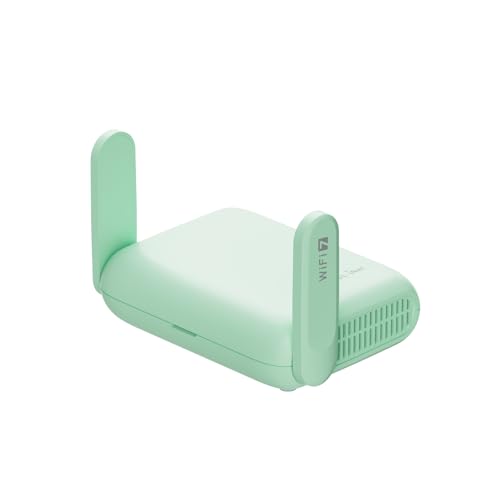
If the keyword’s emphasis on Ethernet ports has a champion, it is the Beryl 7. GL.iNet’s GL-MT3600BE listing states dual 2.5G ports — both of them multi-gig, where rivals pair one fast port with a slower sibling — in a dual-band WiFi 7 body of 205 grams. The listing adds per-band figures of 688 plus 2,882 Mbps, USB 3.0, WPA3, AdGuard Home, OpenWrt 21.02 foundations and a WireGuard figure of 1,100 Mbps. Read that port line again, because it changes the travel geometry: the router can drink from a 2.5G wall feed and still hand a laptop a 2.5G wired seat, so the wired traveller loses nothing at either side of the box.
The WireGuard figure deserves the same care as every number in this guide: it is the maker’s figure for the tunnel’s capacity, and its practical meaning is that the VPN stops being the bottleneck. On hotel and apartment feeds, the venue’s own connection will give up long before this router’s tunnel does, which is exactly the ordering a working traveller wants — your security layer should never be the slowest part of a fast connection. AdGuard Home on the box extends the same philosophy to the whole room network: every device behind the router gets filtered, tunnelled service without per-device software.
At 205 grams it is the heavyweight of the GL.iNet travellers here, which is to say it weighs about as much as a phone with a case — the honest framing for a category where grams are argued over by people carrying laptops anyway. Dual-band WiFi 7 means no 6GHz band, a limitation it shares with every travel router in this guide and one that matters little at hotel distances. For the traveller who plugs in first — the consultant in serviced apartments, the engineer on site, the remote worker renting by the month — the Beryl 7 is the most complete wired traveller we can point to.
- Ports per the listing: dual 2.5G, plus USB 3.0
- Radio: dual-band WiFi 7, listed at 688 plus 2,882 Mbps by band
- Weight on the listing: 205 grams
- Firmware details on the listing: OpenWrt 21.02, WPA3, AdGuard Home, WireGuard listed at 1,100 Mbps
Strengths
- Dual multi-gig ports: nothing slows at either the feed or the desk.
- VPN capacity that outruns any venue feed you are likely to meet.
- Whole-network ad filtering from the box, for every device behind it.
Trade-offs
- The heaviest GL.iNet here, if every gram of the bag is accounted.
- Dual-band only; no 6GHz lane exists in this travel class yet.
- Its wired talents are wasted on purely wireless, portal-only venues.
Best for: wired-first travellers — serviced apartments, site work, month-long rentals with real sockets.
Not suited for: ultralight packers, or cruise-and-lobby travellers who never see an Ethernet socket.
GL.iNet Slate AX — Best Proven Workhorse
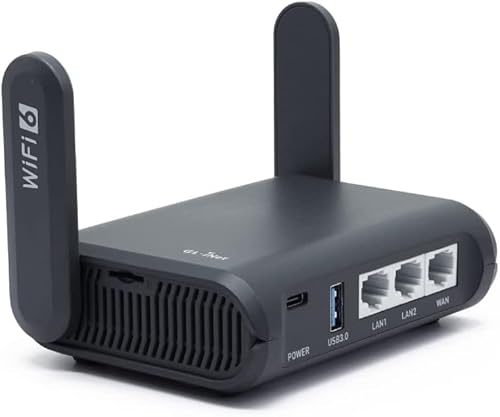
The Slate AX, GL.iNet’s GL-AXT1800, is the previous generation’s flagship traveller, and it remains on this list because travel rewards proven firmware even more than new radios. The listing describes a pocket-sized WiFi 6 router with VPN, dual-band speeds up to 1,800 Mbps, MU-MIMO and OFDMA, and capacity for up to 120 devices simultaneously. That device figure, a maker’s ceiling like all the others in this guide, points at its natural habitat: group travel. The crew house, the family reunion rental, the small team at a conference — situations where one venue login must become a network for a dozen people’s worth of phones, laptops and tablets, and where the router’s job is crowd management as much as connection.
OFDMA and MU-MIMO, the scheduling tools from our streaming guide, do quiet work here: a crowd of devices checking messages and syncing photos is exactly the many-small-talkers pattern those features organise. The Slate AX’s Ethernet provision serves the desk worker in the group — plug the laptop in, leave the air to the crowd — and its VPN tooling covers the whole temporary network at once, which is the difference between a team that is tunnelled and a team where everyone’s laptop fends for itself on café-grade WiFi.
Against the Beryl AX, its younger sibling, the Slate AX trades the 2.5G WAN for a track record and that crowd capacity; against the WiFi 7 pair, it trades new radios for maturity. Travellers buying for a group, or buying the router their colleagues already know, will find it the calm choice. Solo travellers with one laptop should take the Beryl AX’s ports instead.
- Class: dual-band WiFi 6 travel router (GL-AXT1800), up to 1,800 Mbps
- Scheduling named on the listing: MU-MIMO and OFDMA
- Maker’s crowd figure: up to 120 devices
- Role: the group-travel workhorse
Strengths
- Crowd capacity sized for crews, families and team rentals.
- Mature firmware with a long record in exactly this job.
- Whole-group VPN coverage from a single configuration.
Trade-offs
- Gigabit-era wired provision where the Beryl AX offers a 2.5G WAN.
- No WiFi 7 radios for the newest devices.
- Solo travellers pay for crowd headroom they will never use.
Best for: group trips, crew houses and family rentals where one login must serve everyone.
Not suited for: the solo wired-first traveller, better matched by the Beryl AX or Beryl 7.

GL.iNet Opal — Best Ultralight with Ports
The Opal, GL.iNet’s GL-SFT1200, makes the most charming argument in this guide: three gigabit Ethernet ports in a body its listing puts at 145 grams. Read that again in the context of the keyword. The smallest, lightest router here offers more wired seats than the flagships — a WAN to drink from the wall and LAN ports for a laptop and a second device, or a small wired cluster at a trade-show table — because GL.iNet designed the Opal for travellers who measure their kit in grams and still refuse to give up the cable. Its radio is AC1200 dual-band, a WiFi 5-era specification, and its listing promises OpenWrt with OpenVPN and WireGuard and support for more than 30 VPN services.
The AC radio is the honest price of the package, and this review will price it plainly. In a hotel room, where the venue feed is the bottleneck and distances are three metres, AC1200 serves a traveller’s devices perfectly well; the feed gives up first. In a serviced apartment with a fast wired connection and a new laptop, the Opal’s radio becomes the ceiling in a way the Beryl AX’s WiFi 6 would not. Know which traveller you are. The Opal’s owner is the one whose bag is a carry-on and a personal item, whose trips are measured in hotel nights, and whose wired habit is a laptop at a desk rather than a rack of gear.
As the entry point to serious travel routing, it is also the easiest recommendation in the guide to hand to a non-technical traveller: small enough to live in the cable pouch, cheap in commitment, and still a real router — portal handling, VPN client, three honest ports — rather than a repeater with ambitions. Travellers outgrow it toward the Beryls; many start here and some, sensibly, never leave.
- Ports per the listing: three gigabit Ethernet
- Radio: AC1200 dual-band
- Weight on the listing: 145 grams
- Firmware on the listing: OpenWrt with OpenVPN and WireGuard, 30-plus VPN services
Strengths
- Three wired ports in the lightest body here — the keyword’s brief, answered literally.
- A real router’s firmware and VPN support at an entry level of commitment.
- Small enough to be forgotten in the bag until the moment it is needed.
Trade-offs
- AC-class radio caps wireless speed where a fast wired feed deserves WiFi 6.
- Gigabit ports only; no multi-gig future at either side.
- Performance headroom for crowds is the smallest of the GL.iNet picks.
Best for: ultralight travellers and first-time travel-router buyers who still want proper ports.
Not suited for: fast serviced-apartment feeds or group travel, where its radio and crowd ceiling show.

TP-Link Roam 6 — Best Non-GL.iNet Option
TP-Link’s Roam 6, the TL-WR3002X, is the mainstream brand’s serious entry in this category, and its listing reads like a checklist of the travel job: an AX3000 dual-band WiFi 6 router described as multi-gig portable, with OpenVPN and WireGuard support, public network sharing, hotel and cruise approval in its pitch, phone tethering and USB 3.0, and multi-mode operation. The tethering deserves attention. When the venue network is not worth repeating — the café with a broken portal, the rural rental with nothing — a travel router that can drink from your phone’s connection instead turns the phone into the venue and still serves the whole bag from one network name.
Multi-mode is the other grown-up feature: the same box can act as router, repeater or access point depending on what the trip provides, which suits travellers whose accommodation varies from wired apartments to wireless-only hotels within one itinerary. AX3000-class WiFi 6 gives it the strongest mainstream radio in this guide, ahead of the Opal and level in spirit with the Beryl AX, and TP-Link’s consumer polish will suit travellers who prefer a familiar brand’s app and support channels to GL.iNet’s enthusiast flavour.
The comparison with the Beryl AX is the decision most buyers here will actually make, and it is close: the GL.iNet’s OpenWrt depth and port specification against TP-Link’s modes, tethering and mainstream ease. Travellers who live inside VPN configuration pages will pick the GL.iNet; travellers who want the router to handle the trip’s variety with the least thinking will pick the Roam 6, and neither is wrong. What both share matters more: a real router, with real ports and a real VPN client, standing between your devices and the venue.
- Class: dual-band WiFi 6 travel router, AX3000 (TL-WR3002X)
- Modes and inputs on the listing: multi-mode operation, phone tethering, USB 3.0
- VPN named on the listing: OpenVPN and WireGuard
- Pitch per the listing: public network sharing, hotel and cruise use
Strengths
- Phone tethering covers the trips where there is no venue network worth joining.
- Multi-mode flexibility matches mixed itineraries in a single box.
- Mainstream brand polish and support, with a strong WiFi 6 radio.
Trade-offs
- Less firmware depth than the OpenWrt-rooted GL.iNet picks for advanced users.
- Port-for-port, the Beryl 7’s dual 2.5G arrangement is the more wired-first design.
- A newer entrant in a category where GL.iNet’s track record is the benchmark.
Best for: travellers who want a mainstream brand, mixed itineraries and tethering as a fallback.
Not suited for: firmware tinkerers, who will feel the difference from OpenWrt within a day.
Cellular travel routers with built-in 4G/5G modems — The Other Answer, Considered in Prose
Prose-only: this class carries no linked listing in this guide, because it answers a different question from the six routers above and mixing the two on one shelf confuses both. A cellular travel router takes a SIM card and builds your network from the mobile network itself. It does not repeat a venue’s WiFi, does not negotiate with captive portals, and does not care whether the hotel’s internet is broken, absent or priced like a minibar — if there is mobile signal, there is your network, with the same name and VPN posture you use everywhere.
That independence is genuinely valuable in its places: the rural rental with no broadband worth the name, the road trip where the network must work in motion, the trade stand or site cabin beyond the reach of venue infrastructure, the traveller whose work cannot depend on a stranger’s router behaving. The costs are equally real — a data plan with enough allowance for a household of devices, speeds and latency set by the local mobile network’s mood, and coverage that vanishes exactly where the most beautiful rentals tend to be. Judge it as a separate purchase for a separate problem: if your trips reliably offer a network worth repeating, the six routers above are the efficient answer; if your trips reliably offer nothing, the SIM class is not an upgrade to them but a different tool, bought deliberately and fed monthly.
Best for: travellers whose destinations have mobile signal but no usable venue network — rural stays, road work, temporary sites.
Not suited for: hotel and cruise travel, where a venue network exists to be repeated and a data plan is money spent twice.
How do you get a travel router through a captive portal without tears?
The portal is the venue’s login page — the one that asks for a room number, a surname or a cheerful tick in a terms box — and it is designed for one device at a time. The travel router’s trick is to be that one device. Connect the router to the venue network first, then join the router’s own network with a phone or laptop and open a browser: the portal page appears, you complete it once, for the router, and every device behind the router inherits the authorised connection. If the portal does not appear on its own, browsing to any plain, non-secure web address usually provokes it, because the venue’s system intercepts the request and substitutes its page.
Two refinements separate calm travellers from lobby philosophers. First, some venues bind the authorisation to the connecting device’s hardware address, and travel routers can present a consistent one — set this up at home if your regular venues behave that way, rather than discovering it at midnight. Second, portals expire: a three-night stay may re-ask on day two, and the fix is the same one-minute ritual from your own network, not a call to the front desk. Cruises and trains add their own wrinkle — the connection is shared satellite or trackside and priced or throttled accordingly — and the router cannot improve what the venue buys; it can only ensure your devices share the ration gracefully, under your VPN, as one customer instead of five.
Do the maiden voyage at home. Join the router to your home network as if it were a venue, complete a portal simulation by simply browsing, confirm the VPN connects, and confirm each of your travel devices joins the router’s network name automatically. A travel router configured for the first time in a hotel room, against a checkout deadline, is a story told at dinners for years. The same setup done on a Sunday afternoon is a non-event, which is the highest praise travel equipment can earn. While you are rehearsing, rehearse the failure too: turn the VPN off and on, forget and rejoin the venue network, and watch the router recover, so that the first time you see its behaviour under stress is in your own kitchen rather than in a corridor at midnight with a boarding pass in your teeth.
How safe is hotel WiFi once your own router stands in front of it?
Safer in the ways that matter, and worth describing precisely rather than breathlessly. Your travel router gives you a private network with your own password, so the stranger two rooms away is no longer on your network at all — the casual snooping and mischief that shared venue networks invite are locked out by architecture, not by hope. Running the router’s VPN client extends the protection outward: everything between your little network and your VPN provider travels encrypted, so the venue’s operator and anyone watching its traffic sees a tunnel, not your browsing. Those two layers — your own network, your own tunnel — are the practical security of business travel, and every router in this guide provides both. Travellers sometimes ask whether this is over-engineering for a holiday; the answer is that the same tunnel also keeps the children’s tablets and the streaming stick inside one governed network, so the security and the convenience arrive in the same box, for the same setup effort, on business trips and family ones alike.
The limits deserve the same clarity. A VPN moves trust rather than abolishing it: your provider sees what the venue no longer can, so choose one you would defend in conversation. The router cannot protect a device you take off its network — the phone that joins the lobby WiFi directly at breakfast has left the castle — so the discipline is to let your devices forget venue networks entirely and know only yours. And no router fixes a compromised website or a phished password; it secures the road, not the destination. Within those honest borders, a travel router is the single largest security upgrade a regular traveller can buy, which is why the VPN tooling in these listings was weighted as heavily as the ports.
Which connection mode should you use, venue by venue?
A good travel router offers three ways to drink, and the skilled traveller picks per venue rather than by habit. Wired mode — an Ethernet lead from the wall socket, the desk port or the venue’s own router into your WAN port — is the first choice wherever it exists, because it starts from the strongest version of the venue’s connection and skips the wireless weather entirely. Repeater mode, where the router joins the venue WiFi and re-serves it as your own, is the universal fallback: it works in every lobby and corridor, at the price of sharing airtime between the receiving and the serving, which is why a repeater placed in the room’s best signal spot — high, near the door, not behind the television — outperforms one plugged in wherever a socket happened to be.
Tethering mode, where the router drinks from your phone’s mobile connection over USB, is the reserve parachute, and the Roam 6’s listing calls it out by name. It earns its place when the venue network is broken, extortionate or absent: a cabin, a site office, a flat in the week before its broadband is connected. USB tethering beats wireless hotspot sharing for this job because the phone charges while it works and the link between phone and router is a cable, immune to the room’s wireless crowding. The traveller who knows all three modes stops experiencing venues as lucky or unlucky and starts experiencing them as a short decision, made at the door, with the bag already containing every answer.
Why does the power supply deserve a traveller’s attention?
Because a router that cannot be powered is a paperweight with excellent firmware. The travellers in this guide live in the USB era, and that is a deliberate virtue: a router fed by a common USB supply can share the multi-port charger that already travels with the phones, can run from a power bank through a venue blackout or a long train leg, and can borrow a laptop’s port in an emergency. Before any trip, confirm how your router is fed and standardise the cable — the traveller’s kit should contain one known-good lead for the router, kept with the router, not borrowed from the phone’s pile each night.
Power also decides placement more often than signal does. The best radio position in a hotel room is frequently a shelf with no socket, and a long power lead is the difference between the router living there or crouching behind the minibar. Pack length, not adapters: a generous lead for the router is the cheapest coverage upgrade in the travel context, the same lesson the home guides teach about modem positions, miniaturised into a cable pouch.
What changes on long stays, RVs and boats?
The long stay turns a travel router from a gadget into the household network, and the priorities shuffle accordingly. In a month-long rental, wire everything the flat allows: the router belongs on the venue’s Ethernet if it exists, the work laptop belongs on the router’s LAN port, and the VPN posture becomes a standing arrangement rather than a nightly decision — the WiFi 7 pair and the Beryl 7’s dual multi-gig ports earn their keep here, because a month is long enough for a slow wired seat to become a daily irritation. In an RV or on a boat, the venue changes nightly and the calculus flips to the feed: marina and campsite WiFi is famously the weakest version of the idea, so the traveller’s skill becomes antenna-side thinking — the router placed high and near a window, repeating a signal it can actually hear — and the tethering and cellular answers stop being reserves and become the plan on the legs where the site network is a rumour.
Two habits serve every long-stay traveller. Keep the router’s configuration backed up in your password manager or a note you control, because a reset router in week three of a rental is a small emergency with a long tail. And keep the home network’s name sacred across every mode and venue, so that the devices of the household — including the ones belonging to people who will never read a guide like this — simply work in each new place, which is, in the end, the entire product being sold in this category.
How does a travel router fit the wider work-from-anywhere kit?
It is the piece that makes the rest of the kit behave as if it never left the office. The laptop docks to it wired; the phone charges beside it and lends it a connection when the venue fails; the same VPN profile that protects the hotel night protects the apartment month. Travellers who build their kit around the router — one network name, one tunnel, one small box that every other device trusts — stop performing IT support at the start of every trip and start working. That is why this guide has argued ports and firmware over radios from the first page: on the road, the network is not a utility the venue provides. It is a thing you bring, and the bringing is the skill.
How do the six travellers compare, port by port?
| Router | Ethernet, as listed | Radio class | Distinguishing trait |
|---|---|---|---|
| GL.iNet Beryl AX | 2.5G WAN plus gigabit LAN, USB 3.0 | WiFi 6 dual-band | The balanced reference traveller |
| GL.iNet Slate 7 | 2.5G provision | WiFi 7 dual-band | Touchscreen VPN and filtering control |
| GL.iNet Beryl 7 | Dual 2.5G ports, USB 3.0 | WiFi 7 dual-band | The wired-first flagship at 205 g |
| GL.iNet Slate AX | Gigabit-era provision | WiFi 6 dual-band | Crowd capacity listed at 120 devices |
| GL.iNet Opal | Three gigabit ports | AC1200 dual-band | Most ports, least weight at 145 g |
| TP-Link Roam 6 | Multi-gig portable provision, USB 3.0 | WiFi 6 AX3000 | Multi-mode with phone tethering |
The Ethernet column is this keyword in one view. Notice that port count and port speed trade against each other across the range — three gigabit seats on the Opal, two multi-gig seats on the Beryl 7, one of each philosophy on the Beryl AX — and that the right answer depends on whether your travel desk holds a laptop alone or a small wired civilisation. The cellular class discussed above does not appear in this table because it does not play this sport at all: no venue feed, no portal, a SIM instead of a socket.
What do travellers get wrong with these routers?
The capital mistake is the first-night setup: unboxing in the room, against a portal that expires, with a firmware update pending and a meeting at nine. Everything in the previous section about configuring at home exists because this mistake is so common and so avoidable. The second is forgetting the router at the venue’s mercy on power — a travel router that cannot run from the USB power the traveller already carries becomes one more proprietary brick to pack, lose or leave in a socket in another country. Check the power arrangement before the trip, and standardise it.
Third is expecting the router to improve the venue’s internet. It redistributes and protects the connection; it cannot widen it. A cruise ship’s saturated satellite link will be slow behind the finest router here, merely fairly shared and safely tunnelled. Fourth is leaving the home network name behind: travellers who give the travel router a new name condemn every device to a fresh pairing ritual in every room, when the whole point is that the bag should join automatically, like it never left home. Fifth is the abandoned router — left plugged in at checkout, a small gift to the hotel. Tape your name to it, pack it with the cables it travels with, and count it like a passport.
Final Recommendation
Most travellers should buy the Beryl AX: its 2.5G WAN, gigabit LAN and OpenWrt firmware are the category’s centre of gravity, and it will handle a decade of hotel rooms without becoming the story of any of them. Travellers who live wired — serviced apartments, site work, long rentals — should step to the Beryl 7 and its dual multi-gig ports, while those who actively manage their VPN from the room will enjoy the Slate 7’s touchscreen more than they expect. Groups take the Slate AX, ultralight packers take the Opal and its three honest ports, and travellers who prefer a mainstream brand with tethering in reserve take the Roam 6. Whichever box you choose, set it up this Sunday, at home, with a cup of tea — the router you have rehearsed with is the one that works at midnight in a strange city, which is the only review that ultimately counts. Then write its name on your packing list, between the passport and the charger, where its record says it belongs.
Frequently Asked Questions
Will a travel router work on a cruise ship or a train?
Yes, in the same way it works in a hotel: it joins the venue’s network once, through the portal, and serves your devices as a single customer behind it. That single-customer point matters at sea, where connections are often sold per device — your router counts as one. What it cannot do is improve the underlying link: satellite and trackside connections are shared and slow, and the router’s job there is fair sharing and VPN protection, not speed. Check the venue’s terms if per-device pricing is involved, and set expectations to messaging and light browsing on the worst legs.
Can the venue see what I do behind my travel router?
The venue sees one device — your router — and, if your VPN client is running, sees only encrypted tunnel traffic leaving it. Your individual devices, their names and their separate activities stay behind your own network’s wall. Without the VPN, the venue’s operator can observe the router’s traffic in the ordinary way a network operator can. This is why the guides above treat the VPN client as part of the product, not an accessory: run it, and the venue becomes a pipe rather than an audience.
How many devices can I put behind a travel router?
Far more than a traveller carries. The listings here talk in ceilings — the Slate AX’s maker figure is 120 devices — but the practical limit on the road is the venue’s feed, not the router’s address book. A couple’s bag of phones, laptops, tablets and a streaming stick is a light load for every router in this guide. Groups should do the honest count, devices per person included, and favour the Slate AX’s headroom when the total starts to look like a small office.
Do I still need a VPN app on each device if the router runs one?
Behind the router, no: the router’s client tunnels the whole little network, which is precisely the convenience of the arrangement — the television stick and the tablet that could not run a VPN app are covered anyway. The apps earn their keep when a device leaves the router’s network: the phone on venue WiFi in the lobby, the laptop in a café without the router. Many travellers run both, router tunnel as the default and per-device apps as the away kit, and that belt-and-braces posture is reasonable rather than paranoid.
What should I pack alongside the router?
A short Ethernet cable — the wall socket is never where the desk is — a long charging lead for the router’s power, and a small power strip or travel adapter with enough sockets for the router, the laptop and the phones to share one outlet, because hotel rooms ration sockets like water. Add the router’s details to your password manager before the trip: its admin login, your VPN credentials, the venue-agnostic settings you chose at home. The kit weighs almost nothing and converts the first night from a project into a plug.
Should I update the router’s firmware while travelling?
Almost never. Update at home, before the trip, where a failed update is an inconvenience with a kettle nearby rather than a crisis with a checkout time. On the road, the working router is a finished router: note any update the admin page mentions, apply it on your return, and let the trip run on the version you rehearsed with. The single exception is a security fix for a flaw being actively exploited, and even then the venue for the update is a quiet evening with power, time and a wired laptop — not the night before an early flight.
Can a travel router replace my home router between trips?
It can serve as a spare, a guest-room extender of your setup, or the heart of a small flat’s network in a pinch — several of these are respectable small routers by any measure. But their design brief is the road: port counts, radios and coverage are sized for rooms, not houses. Keep it packed and ready rather than absorbed into the home, or the morning of a trip will find it behind the television, doing domestic duty, exactly when it is needed in the bag.
Related Guides
Travellers building a whole kit around connectivity at home as well as away will find the current generations compared in best mesh routers, and the VPN ideas this guide leans on are treated in full — client, server and site-to-site — in best affordable routers with vpn support. For the house you return to, best routers for streaming and multiple devices explains why the evening pile-up at home is a scheduling problem, not a speed one.


