What's inside
- Key Takeaways
- Quick Picks
- How Did We Judge Headsets Meant for Work?
- Microphone Noise Cancelling Versus Headphone Noise Cancelling: What Is the Difference?
- The Six Headsets, Assessed Call by Call
- How Do the Six Stack Up for a Working Week?
- Which Habits Ruin Good Work Headsets?
- How Should You Set Up Your Headset for Clearer Calls?
- One Ear or Two? The Open-Plan Question at Home
- What Does a Week of Real Meetings Reveal That a Demo Cannot?
- The Ergonomics Nobody Mentions: Neck, Posture and Voice
- Sharing a Home Office: Two Workers, One Room, Four Ears
- Troubleshooting the Five Complaints Every Remote Worker Meets
- How Long Should a Work Headset Last, and When Is Replacement Due?
- Buying for a Team You Manage? Read This First
- The Home-Office Audio Chain, From Voice to Colleague
- A Note on Calls, Recordings and Being Understood in a Second Language
- What Should Sit on Your Desk Beside the Headset?
- Checking a Listing Like an Auditor Before You Order
- Final Recommendation
- Frequently Asked Questions
- Related Guides
As an Amazon Associate I earn from qualifying purchases. This post may contain affiliate links at no extra cost to you.
gizmoverdict.com is reader-supported. When you buy through links on our site, we may earn an affiliate commission.
Where to buy: Use the Amazon links in this guide to open each listing, and check the connector named in its title, because this category mixes USB-A, USB-C, 3.5mm and one Bluetooth model with a USB dongle.
The best work from home headsets with mic are not really bought for the person wearing them. They are bought for everyone else on the call. Your colleagues will never know whether your headset’s stereo image is wide or whether its bass is tasteful, but they will know, within ten seconds, whether your voice arrives clear or swims in kitchen noise, and whether your mute button works the moment a dog erupts or a child asks a question at full volume. That is why this guide judges six headsets the way a meeting does: microphone first, hardware mute second, all-day comfort third, and connection reliability woven through everything. Five of the six are wired USB designs, the traditional uniform of call work, and one is a Bluetooth model with a USB-A dongle for people whose laptops wander around the house.
One label needs dismantling before any shopping happens, because it misleads more home workers than any other phrase in the category. When most of these listings say noise cancelling, they are describing the microphone, not your ears. The technology listens to the room around you and strips much of it out of the voice you send, a gift to your listeners, while you still hear the house at full volume through ordinary earcups. A headset that silences the room for you is a different product with different technology. Neither is better in the abstract; they solve opposite problems. This guide keeps the two meanings separate in every single review, so you know which silence you are actually buying.
Key Takeaways
- On most listings here, noise cancelling describes the microphone cleaning your outgoing voice, not quiet arriving at your own ears.
- A physical mute you can find without looking is a professional feature, not a luxury, in a house with doors, dogs and deliveries.
- Wired USB remains the reliability champion for calls: no pairing, no battery, and computers recognise it instantly.
- Weight and clamp decide whether a headset survives an eight-hour day, long after its sound stops being interesting.
- One pick here depends on an app for its headline noise feature, which is fine if your work laptop allows the software and limiting if it does not.
- The single wireless pick earns its place by including a USB-A dongle, sparing you the lottery of a laptop’s built-in Bluetooth.
Quick Picks
| Pick | Badge | Why it earns its place |
|---|---|---|
| Jabra Evolve 20 | Office pedigree | A dual-ear wired USB headset from a call-centre institution, with in-line call control and USB-A or USB-C connection. |
| LEVN USB Headset | Home-office all-rounder | USB headset with a noise-cancelling microphone, shaped for PC work at home, in call centres and in open offices. |
| NUBWO HW02 | Featherweight on-ear | An ultra-comfort on-ear wired design with noise-cancelling mic and in-line control for webinars and long call queues. |
| EKSA H8 | Connector diplomat | Over-ear stereo with USB-C, USB-A and a 3.5mm jack, so one headset can serve laptop, desk phone habits and mobile. |
| Lenovo USB-A Wired Headset | 140-gram minimalist | AI noise cancelling via its app, replaceable earcups and a double-sided boom, built to work with Teams and Zoom. |
| AOC Wireless Headset with Mic | Cordless escape | Bluetooth 5.4 with a USB-A dongle, one-touch mute and a 30-hour battery claim for workers who pace while they talk. |
How Did We Judge Headsets Meant for Work?
We weighted the evidence the way a team lead would after a week of calls. Microphone behaviour came first: a boom that sits near the mouth, a capsule aimed at your voice, and processing that keeps household sound out of the stream. Hardware controls came next, because software mute buttons hide behind windows exactly when you need them, while an in-line control or a one-touch button is always in the same place. Comfort was scored across a working day rather than a working hour, which is why the 140-gram Lenovo and the on-ear NUBWO earn attention out of proportion to their prices.
Connection honesty mattered too. A wired USB headset makes one promise and keeps it daily, while app-dependent features, like the Lenovo’s AI noise cancelling via its app, were credited only with the caveat attached, because a locked-down employer laptop may never run that software. Listings’ platform claims were taken at face value and no further: when a title says a headset works with Teams or Zoom, we repeat that as the maker’s statement. No headset here was credited with silencing a room for its wearer unless its own listing supported that reading, and as you will see, the honest story is almost always about the microphone.
Microphone Noise Cancelling Versus Headphone Noise Cancelling: What Is the Difference?
Say the two sentences out loud and the confusion dissolves. Microphone noise cancelling cleans what you send. Headphone noise cancelling, the active kind, cleans what you hear. The first uses the boom’s capsule, sometimes with a second microphone sampling the room, to separate your voice from the dishwasher and forward mostly the voice. Your colleagues benefit; you notice nothing except perhaps that nobody asks you to repeat yourself. The second builds an anti-noise signal inside the earcups to erase steady sounds like fan hum before they reach you. Your concentration benefits; your colleagues hear no difference at all.
Now reread the listings in this guide with that lens. LEVN promises a noise-cancelling microphone. NUBWO promises a noise-cancelling microphone. EKSA promises mic noise cancelling. Lenovo promises AI noise cancelling delivered through an app, which is microphone processing performed in software. Every one of those phrases is about your outgoing voice. A home worker in a quiet flat who buys one expecting personal silence will be disappointed, while a home worker in a loud flat whose team keeps complaining will be delighted. Knowing which worker you are is the entire first step of this purchase, and it costs nothing.
Passive isolation is the third, quieter mechanism: earcups that physically block some sound by covering your ears. Over-ear models like the EKSA H8 and the LEVN give you some of this for free, on-ear models like the NUBWO give less, and none of it should be confused with the active technology above. When this guide says a headset will help you hear a call in a busy room, it means volume, fit and that passive seal, stated plainly, never a hidden promise of electronic silence.
The Six Headsets, Assessed Call by Call

Jabra Evolve 20 — Office pedigree
Jabra sells headsets to call centres by the thousand, and the Evolve 20 in its 2025 edition form is that institutional knowledge distilled for a home desk. The listing describes a wired USB headset with a microphone, a comfortable dual-ear design for office and work-from-home setups, a USB-A or USB-C connection and in-line call control. Dual-ear matters more than it sounds: hearing a call in both ears, at lower volume, with the room partly shut out by two cushions, is how professionals survive six hours of meetings without the fried feeling a single earpiece can leave.
The in-line control pod is the working heart of the design. Volume and call handling sit on the cable at chest height, always in the same place, operable by touch while your eyes stay on the document being discussed. There is a particular dignity in never saying hold on while hunting through a meeting window for a mute icon, and this headset’s entire philosophy serves that dignity. The boom microphone carries Jabra’s call heritage, favouring speech clarity over musical warmth, which is the correct priority order for a tool your manager hears more than you do.
What it does not attempt is equally clear. There is no wireless freedom, no app ecosystem, and no promise beyond honest wired call work; the noise story here is a professional microphone and two covered ears, not electronic silence. The styling is office-plain, which some home workers will read as a relief and others as a missed chance for personality. If your workday is measured in meetings and your employer’s laptop is locked down tight, this is the safest pair of hands in the guide.
- Connection: wired USB, with USB-A and USB-C named in the listing
- Fit: dual-ear cushions for long meeting days
- Controls: in-line call control on the cable
- Setting: designed for office and work-from-home call setups
Strengths
- Call-centre heritage shows in microphone discipline and control placement.
- Two connector standards named, easing life across old and new laptops.
- Dual-ear listening lowers the volume you need across a long day.
Trade-offs
- The cable anchors you to the desk for every call.
- No companion app or wireless upgrade path exists here.
- Its plain office looks will not charm style-led buyers.
Best for: meeting-heavy professionals who want the headset their company’s office would have issued, at home. Not suited for: workers who take calls while walking the house and need their laptop to stay behind.

LEVN USB Headset — Home-office all-rounder
LEVN aims its USB headset squarely at the modern mixture of workplaces, naming work from home, call centres and open offices in a single title, and that breadth reflects how interchangeable those environments have become. The listing promises a noise-cancelling microphone for PC and laptop use, which in this guide’s established language means your voice is the thing being cleaned: the boom works to keep your room out of your calls, so a partner’s video playing nearby or a kettle reaching the boil does not become your team’s problem.
The over-ear shape gives the wearer the passive half of the bargain. Two cushions around your ears blunt the household wash a little and let you run call volume lower, which across a day of meetings is a genuine comfort feature even without any electronic cancellation aimed at you. USB connection keeps setup to a single plug, and computers treat such headsets as their default call device with a reliability that Bluetooth, for all its freedom, still occasionally fumbles when a laptop wakes from sleep before an early call.
LEVN’s pitch is competence across situations rather than a single spectacular feature, and the compromises follow that shape. There is no second connection route for a phone, no app to tune, and no wireless escape from the desk. Buyers with one laptop and a head full of meetings will find that focus refreshing. Buyers whose work sprawls across devices should keep reading toward the EKSA or the AOC, which were built for sprawl.
- Connection: USB wired to PC or laptop
- Microphone: noise-cancelling boom, cleaning the voice you send
- Fit: over-ear cushions with a passive seal against room wash
- Audience in the listing: home workers, call centres and open offices
Strengths
- The microphone’s noise work directly answers the loud-house problem.
- Over-ear fit helps you hear calls without pushing volume upward.
- One plug, no pairing, no battery, every single morning.
Trade-offs
- Desk-bound by its cable, like most of this category.
- No phone or tablet connection route is offered.
- Personal silence is passive only, despite the cancelling headline.
Best for: home workers whose team keeps hearing their household and who want that fixed first. Not suited for: anyone expecting the headset to electronically silence the room for their own ears.
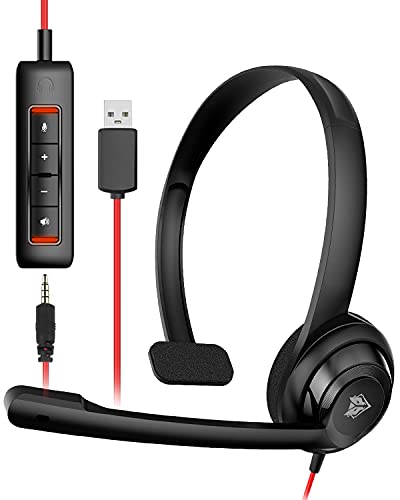
NUBWO HW02 — Featherweight on-ear
The HW02 makes its case in a single phrase from its listing: ultra comfort. This is an on-ear wired USB headset with a noise-cancelling microphone and in-line control, described for laptop and PC use across office calls, call centres, Skype and webinars. On-ear is a deliberate philosophy. The pads rest on the ear rather than around it, the whole headset stays light, air reaches your skin, and after four hours you have not been wearing a clamp so much as resting a tool against your head. For workers who split the day between calls and focused solo work, that easy on-and-off character fits the rhythm perfectly.
Hearing your surroundings is the flip side of that lightness, and for some home workers it is a benefit in disguise. A doorbell, a child, a pet in trouble: the on-ear wearer notices all of them without removing anything, which is precisely why this style remains popular with people whose job shares a building with their life. The microphone still does its cancelling work on your outgoing voice, so your situational awareness does not cost your colleagues their clarity. In-line controls keep mute and volume at your fingertips, the only place they are worth having during a webinar.
The limits are acoustic and obvious. With less seal comes less isolation, so a genuinely loud room will compete with your callers’ voices in your own ears, and music between meetings will sound lighter than through the over-ear models here. Long, unbroken call-centre shifts may also prefer the distributed pressure of a bigger cushion. But as the headset you forget you are wearing, the HW02 has few rivals in this line-up, and forgetting your tools is the highest compliment work equipment can earn.
- Fit: on-ear pads, the lightest wearing style in this guide
- Connection: wired USB with in-line control on the cable
- Microphone: noise-cancelling boom for calls and webinars
- Named uses: office calls, call centres, Skype and webinars
Strengths
- Ultra-light on-ear design survives a full day without fatigue.
- You stay aware of doorbells, children and pets while on calls.
- In-line mute and volume are always where your hand expects them.
Trade-offs
- Minimal passive isolation in a genuinely noisy room.
- Music and media sound thinner than through over-ear rivals.
- On-ear pressure points vary, so sensitive ears should trial it early.
Best for: workers who alternate calls with focused tasks and want the lightest possible daily companion. Not suited for: anyone whose home office competes with constant loud noise at their own ears.

EKSA H8 — Connector diplomat
Every office has one drawer of orphaned adapters, and the EKSA H8 reads like a headset designed by someone tired of that drawer. Its listing describes a stereo wired over-ear headset for PC, laptop, office, call centre and Teams use, with a noise-cancelling microphone, in-line controls and three ways to connect: a 3.5mm jack plus USB-C and USB-A. That trio covers a decade of laptops without a single dongle purchase, and it lets the same headset serve a work laptop by USB and a personal phone or older machine by its jack, which is a small daily mercy that adds up across a year.
Over-ear cushions give it the most enveloping fit among the wired models here, and for workers in shared spaces that seal is worth real money in concentration. Your callers arrive in both ears with the room pushed politely back, passively, while the microphone’s cancelling works the other direction for your team. EKSA comes from the gaming headset world, and the H8’s sturdier build language shows it; this is a headset that expects to be picked up, put down and occasionally knocked off a desk without complaint.
Diplomacy has a price in complexity. Three connection routes mean more cable hardware to keep track of, and the in-line control behaviour can differ subtly between the USB and jack paths, so the first week asks for a little attention. It is also the most substantial wired presence on your head in this guide, which all-day wearers should weigh against the NUBWO’s lightness. For a worker whose devices change more often than their job does, though, the H8 is the closest thing here to future-proof.
- Connections: USB-C, USB-A and 3.5mm jack in one package
- Fit: over-ear stereo cushions for shared-space concentration
- Microphone: noise-cancelling, with in-line controls on the cable
- Named setting: PC, laptop, office, call centre and Teams
Strengths
- Three connectors end the adapter hunt across old and new machines.
- The over-ear seal is the strongest passive help among the wired picks.
- Sturdy build tolerates a busy, shared desk’s daily knocks.
Trade-offs
- More cable hardware to manage than single-connector rivals.
- Heavier on the head than the on-ear and 140-gram options.
- Control behaviour needs a first-week learning pass per connection type.
Best for: workers juggling several machines who want one headset that plugs into all of them. Not suited for: minimalists with a single laptop who value the lightest possible setup.

Lenovo USB-A Wired Headset — 140-gram minimalist
Lenovo states this headset’s weight in its title, 140 grams, and that number is the review in miniature. At 140 grams a headset stops being equipment and becomes closer to clothing, something you can wear from the first stand-up to the last call without the end-of-day head rub that heavier designs provoke. The listing adds replaceable earcups, a double-sided boom microphone, in-line controls with mute, and stated compatibility with Teams and Zoom. Replaceable cushions deserve emphasis: the part of a headset that wears out first can be renewed instead of condemning the whole product, which is both economical and quietly sustainable design.
The headline technology needs its caveat spoken clearly, as this guide promised. Lenovo describes AI noise cancelling delivered via an app. That means the voice-cleaning intelligence lives in software on your computer rather than entirely in the headset, so the feature’s availability follows your machine and your permissions. On a personal laptop where you install what you like, it is a genuine asset. On a locked employer machine, the headset still works as a light, clear wired headset, but the marquee feature may never switch on. Read that sentence twice before buying for a corporate laptop.
The double-sided boom is a small ergonomic grace: wear the microphone on whichever side you prefer, matching your desk layout, your dominant hand for coffee, or the ear you favour. Combined with the weight and the replaceable cushions, the Lenovo feels designed by people who think in years of daily use. Its boundary is the USB-A connection in a USB-C world; newer laptops may need the very adapter this guide keeps trying to help you avoid, so check your ports before falling for the 140 grams.
- Weight from the listing: 140 grams, the lightest figure stated here
- Noise feature: AI noise cancelling delivered through an app
- Boom: double-sided, wearable on either side of the head
- Longevity: replaceable earcups, with in-line mute controls
Strengths
- Featherweight build that long meeting days genuinely appreciate.
- Replaceable cushions extend the headset’s working life.
- Teams and Zoom compatibility is stated in the listing itself.
Trade-offs
- The AI noise feature depends on app access your employer may block.
- USB-A only, so slim modern laptops may demand an adapter.
- App-based processing ties its best trick to one computer’s setup.
Best for: personal-laptop workers who prize low weight and can install the companion app freely. Not suited for: locked-down corporate laptops where the app, and its headline feature, may never run.

AOC Wireless Headset with Mic — Cordless escape
Some people think on their feet, literally, and the AOC is the only pick here that lets them take the call with them. Its listing describes a Bluetooth 5.4 computer headset with a USB-A dongle, a clear-call microphone, a 30-hour battery claim, one-touch mute and stated suitability for PC, laptop, home office, Zoom and phones. The dongle is the professional detail: instead of trusting whatever Bluetooth radio a laptop happens to contain, the headset brings its own pre-paired partner, which is why dongle headsets behave so much more predictably in meeting software.
One-touch mute earns its headline placement for the pacing worker. When you are standing at a whiteboard or letting the dog out mid-call, a single obvious control on the headset beats any software button on a screen across the room. The clear-call microphone phrasing follows this guide’s rule, describing the treatment of your voice for listeners rather than silence for you. Thirty hours, taken as a maker’s best case, still means a working week of calls between charges for most people, and Bluetooth 5.4 keeps the same headset honest with a phone when the laptop lid closes.
Freedom’s invoices arrive as habits. The battery must be charged, the dongle must not be lost, and a wireless link, however good, adds one more thing to troubleshoot on the morning a big presentation looms. Workers whose calls are all at one desk gain nothing from the mobility and should take the wired reliability above. Workers whose home office is really the whole home, kitchen whiteboard, garden door and all, will find this the only pick that respects how they actually work.
- Wireless: Bluetooth 5.4 with a USB-A dongle included
- Battery claim in the listing: up to 30 hours
- Mute: one-touch control on the headset itself
- Stated range: PC, laptop, home office, Zoom and phones
Strengths
- The included dongle makes wireless behaviour predictable in meetings.
- One-touch mute works when you are steps away from the screen.
- A full working week of calls fits inside the battery claim.
Trade-offs
- Charging and dongle-keeping become new weekly chores.
- Wireless adds a troubleshooting layer wired picks never have.
- Desk-only workers pay for mobility they will never use.
Best for: restless workers who walk, stand and gesture their way through calls at home. Not suited for: anyone who wants a headset that can never, under any circumstances, run out of battery.
How Do the Six Stack Up for a Working Week?
| Headset | Connection | Fit style | Noise story, honestly told |
|---|---|---|---|
| Jabra Evolve 20 | USB-A or USB-C wired | Dual-ear over-ear | Professional microphone, passive cushions |
| LEVN USB Headset | USB wired | Over-ear | Noise-cancelling microphone for your voice |
| NUBWO HW02 | USB wired | On-ear, ultra light | Noise-cancelling microphone, open fit |
| EKSA H8 | USB-C, USB-A, 3.5mm | Over-ear | Noise-cancelling mic plus the strongest passive seal |
| Lenovo USB-A | USB-A wired | 140g light fit | AI noise cancelling through its app |
| AOC Wireless | Bluetooth 5.4 plus dongle | Wireless over-ear | Clear-call microphone for listeners |
The noise column is the one to study, because it refuses to let a single phrase do six different jobs. Every model here invests in your outgoing voice; they differ in how much passive help your own ears get and in whether software joins the effort. The connection column then predicts your mornings: wired models simply work, the EKSA works everywhere, and the AOC works anywhere, at the price of a battery habit. Fit is the column your neck will vote on by Friday.
Which Habits Ruin Good Work Headsets?
Testing a headset once, in silence, and declaring it comfortable is the founding error of home-office shopping. Comfort is an eight-hour verdict, so trial any new headset across your longest meeting day before the return window closes, with your glasses on if you wear them and your hair as you actually wear it. The second habit is software-only muting: workers who rely on a meeting app’s button eventually broadcast a private moment, while workers with a hardware control develop a reflex that never fails them. Build the reflex on day one, whichever pick you chose.
Third, people park their headset on the monitor, where heat and knocks age the cushions and one day a fall ends the story; a cheap hook or stand is the highest-value accessory in this entire category. Fourth, wireless owners drain the battery to zero weekly and leave it there, the fastest way to shorten its life, when a twice-weekly top-up would keep it healthy. Fifth, buyers never move the boom. A microphone left pointing at a cheek instead of the corner of the mouth can halve your clarity, and no processing fully rescues geometry. Bend it once, gently, into place, and leave it there.
How Should You Set Up Your Headset for Clearer Calls?
Plug in or pair before the workday starts and set the headset as the default device for both playback and recording in your meeting apps, not just in the operating system, because apps remember their own choices. Speak a test sentence at your true working volume while a colleague or a recording app listens, then adjust the boom before you adjust any slider; position beats processing every time. Set your listening volume in the middle of the range during a quiet call so loud moments have headroom, and turn on your app’s own noise suppression only after hearing yourself without it, since stacked processing can chew consonants.
Then rehearse the two emergencies. Practise muting with your eyes on the screen, not on the control, until the gesture is boring. Practise the first ten seconds of a call, headset on, boom down, water within reach, because most call anxiety is really setup anxiety wearing a disguise. Workers who do this once, on a calm morning, sound professional for months afterwards, and they sound that way on any of these six headsets, which is rather the point of buying a work tool instead of a toy.
One Ear or Two? The Open-Plan Question at Home
Dual-ear headsets dominate this guide because meetings dominate home work, but the choice deserves a moment’s thought. Two covered ears pull you into the call, lower the volume you need and signal to the household that you are occupied, which is its own social technology. One ear open, whether through an on-ear fit like the NUBWO or by wearing any headset slightly askew, keeps you reachable for the door, the children and the cat, at the cost of concentration when the house gets loud. Neither arrangement is more professional; they encode different truces between your job and your address.
Parents of young children often settle into a seasonal answer: dual-ear during school hours, open awareness during holidays. Workers in shared flats report the opposite rhythm, sealing themselves in while housemates are home and relaxing the seal when the place empties. The practical lesson is to choose the headset whose natural state matches your majority hours, because you will not reconfigure your habits daily for a minority case. That majority logic is why the guide offers both philosophies at honest prices instead of declaring a winner.
What Does a Week of Real Meetings Reveal That a Demo Cannot?
A demo reveals sound. A week reveals friction. By Wednesday you know whether the in-line control hangs where your hand falls or swings against the desk edge all day. By Thursday you know whether the cushions that felt plush on Monday have started a slow negotiation with your glasses. By Friday you know whether the wireless model’s battery gauge is a comfort or a background anxiety, and whether your team has stopped asking you to repeat yourself, which is the only microphone metric that has ever mattered.
Keep a tiny log during that first week, three lines a day at most: comfort by evening, one comment from a colleague about your voice, and any moment the hardware embarrassed you. Patterns emerge fast. A headset that scores well across all three lines is not merely good; it is yours, fitted to your house and your habits. A headset that fails one line repeatedly is telling you its true specification, the one no listing prints, and the return window exists precisely for that discovery.
The Ergonomics Nobody Mentions: Neck, Posture and Voice
A headset is a posture device in disguise. Workers wearing one stop cradling a phone, stop hunching toward a laptop microphone and stop raising their voice to reach a machine across the desk, and those three changes compound across a year of meetings. Keep the microphone boom honest and your speaking volume drops to conversational level, which spares both your voice and your housemates. Set your chair and screen so the headset’s cable, where one exists, falls without pulling, because a gentle constant tug will rotate your sitting position by degrees all day.
Vocal fatigue is the sleeper issue of remote work. People speak louder and longer on calls than in rooms, partly because the feedback loop of hearing yourself is weaker. A little microphone monitoring, where your setup offers it, or simply the discipline of a test recording each month, keeps your self-image calibrated. The headsets here cannot fix a badly run meeting culture, but a clear, comfortable one removes the physical tax from it, and that tax was the part silently exhausting you.
Sharing a Home Office: Two Workers, One Room, Four Ears
Two professionals in one room is the stress test of the work-from-home era, and headsets are its peace treaty. When both partners wear dual-ear models with disciplined microphones, two calls can coexist at conversational volume in a way that laptop speakers never permit. Boom position becomes household etiquette: the closer and cleaner your capture, the quieter you can speak, and the quieter you speak, the less your partner’s microphone hears of you. It is an arms race in reverse, where better equipment makes everyone softer.
Scheduling still beats hardware, and staggered heavy-call hours will do more than any purchase. But when schedules collide, the picks in this guide divide sensibly: give the over-ear EKSA or LEVN to the partner whose calls run longest, the featherweight NUBWO or Lenovo to the one who dips in and out, and let the AOC’s owner take the garden-office shift when the room gets truly crowded. A household that thinks this way stops experiencing headsets as personal gadgets and starts treating them as shared infrastructure, like the router and the good chair.
Troubleshooting the Five Complaints Every Remote Worker Meets
You sound far away: the boom has drifted or the wrong microphone is selected, because laptops cheerfully default to their built-in mic even with a headset plugged in. Check the app’s device setting first, the boom second, and any processing third. You sound robotic: two noise systems are fighting, usually an app’s suppression stacked on the headset’s own processing, so disable one layer and retest. One ear has gone silent on a wired model: the plug is half-seated or the cable is failing at its favourite bend, and reseating costs nothing to try.
Your wireless headset connected to the wrong device: it remembered a phone more fondly than your laptop, which the AOC’s dongle largely prevents by giving the work link its own hardware. Your team hears your keyboard more than you: the boom is too far back, so your voice arrives quieter than the desk sounds in front of it, and geometry, again, is the cure. Notice how few of these fixes involve buying anything. Most call quality lives in setup and habit, and the headsets in this guide simply give those habits good raw material.
How Long Should a Work Headset Last, and When Is Replacement Due?
A wired work headset should measure its life in years, with cushions as the scheduled casualty. When cushions flatten or peel, models like the Lenovo let you replace the wear part; on others, universal pads often fit well enough to buy another year. Cables announce their end with crackle at a repeatable bend, booms with a joint that will no longer hold position, and those are honest retirement signals rather than annoyances to endure, because a headset that fails mid-presentation costs more than its replacement.
Wireless models add the battery’s slow fade. When a full charge stops covering your longest day, the headset has not died, but its job description has shrunk, and a worker who depends on mobility should plan the succession rather than meet it during a conference week. Keep the retired unit, if it still works wired or for short calls, as the household spare. Every home office needs a backup headset the way every kitchen needs a spare phone charger: unglamorous, and priceless exactly once a year.
Buying for a Team You Manage? Read This First
Managers equipping a small remote team face a different maths problem from individuals. Uniformity beats excellence: one model everyone shares means one set of controls to teach, one mute gesture to standardise, and spare units that work for anybody. The Jabra’s office lineage makes it the natural fleet choice, while the EKSA’s connector range suits teams whose laptops span several generations. Buy one spare per five headsets, because the cost of a worker spending a day on a laptop microphone, apologising through a fan’s roar, exceeds the price of the spare within a single client call.
Set expectations in writing when you issue them. Tell the team which silence the headset provides, your voice cleaned for others, and which it does not, because a worker who expects personal quiet in a loud house will judge a good headset as broken. Include the boom-position photograph in your onboarding, the mute reflex in your meeting norms, and the cushion replacement path in your budget. Equipment programmes fail on those small print items far more often than on the hardware itself.
The Home-Office Audio Chain, From Voice to Colleague
Your voice crosses four borders before a colleague hears it: the air between your mouth and the boom, the headset’s own processing, your computer and meeting app, and the network. Each border can only preserve or damage what it receives; none can add clarity that was lost earlier. That is why this guide obsesses over the first border, geometry, and treats processing as a helpful second. It is also why a wired connection quietly outperforms its reputation: it removes one whole border’s worth of pairing and radio variables from a chain that already has enough of them.
Network problems wear audio costumes. A colleague who sounds underwater may be suffering their bandwidth, not their headset, and your own headset cannot fix their upload. Learn to tell the difference by the pattern: if one person fades, it is their chain; if everyone fades, it may be yours. That diagnostic habit will save you from replacing a healthy headset some rainy Tuesday, and it will make you the calmest person on every troubled call you ever join.
A Note on Calls, Recordings and Being Understood in a Second Language
Many home workers now spend their days speaking a language that is not their first, or listening to colleagues doing the same, and headset clarity carries extra weight there. Consonants are the first casualty of poor audio and the very sounds that distinguish similar words, so a disciplined boom microphone and dual-ear listening genuinely change comprehension, not just comfort. If your work crosses languages, weight the microphone-heavy picks, Jabra, LEVN and the app-assisted Lenovo, above the mobility of the AOC, and keep your speaking pace a fraction slower than feels natural; the headset and the habit together will do more for your reputation than either alone.
Recorded calls raise the stakes once more. A training session or client webinar recorded through a bad microphone preserves that badness forever, replayed to audiences who never met you live. Workers who record anything should run the test-recording ritual monthly, because cushions shift, booms bend and laptops update their defaults without asking. Two minutes of prevention, filed with the same seriousness as the recording itself, is the cheapest professional insurance in this entire guide.
What Should Sit on Your Desk Beside the Headset?
A hook or stand, first, because a headset with a home survives. A glass of water placed before the call, second, because the mute-and-sip manoeuvre is smoother than the mute-and-dash one. A notebook, third, since the clearest audio in the world will not remember the action points for you. And a small habit, fourth: the headset goes on two minutes before the meeting, not during its first hello, so the opening exchange is spent on people rather than on equipment. None of these items appears in any listing, and together they decide whether a good headset feels like a professional system or a lucky accessory.
Resist the upgrade itch that peripherals invite. A worker with a mid-priced headset, a stand, a rehearsed mute and a tested boom will out-present a worker with a flagship model and none of the habits, on every call, forever. Spend the difference on the chair, the light for your face, or the second monitor. This guide sells headsets for a living, in a sense, and it is still telling you the truth: beyond the honest middle of this category, money buys diminishing returns while habits buy compounding ones.
Checking a Listing Like an Auditor Before You Order
Read the title as a contract. Note the connector and refuse to assume adapters are included unless the words say so. Note whether the noise phrase attaches to the microphone or floats unattached, and distrust any listing that will not tell you which silence it sells. Note platform claims exactly as written, Teams here, Zoom there, and treat silence about your app as a question to ask rather than a promise to assume. Note weight when it is given, as Lenovo gives it, because a maker who prints grams is a maker who understands the product’s real job.
Then read your own desk with the same severity. Count your laptop’s free ports. Measure nothing, but honestly picture your longest day, your loudest hour and your most embarrassing mute failure of the last year. The headset that answers those three pictures is your headset, and it is somewhere in the six above. Shopping this way feels slower for ten minutes and saves the month of low-grade dissatisfaction that follows a prettier, worse-matched purchase.
Final Recommendation
For most home workers, the Jabra Evolve 20 is the professional default: honest, wired, dual-eared and built by people who outfit call centres. Choose the LEVN if your household noise is what your team keeps hearing, the NUBWO if your head aches by three o’clock in anything heavier, the EKSA H8 if your devices multiply and their ports disagree, or the Lenovo if 140 grams and replaceable cushions speak to you and your laptop welcomes its app. Take the AOC when your body refuses to sit through calls and your home becomes the office. Whichever name ends up on your head, remember the distinction this guide opened with, and you will never again pay for the wrong kind of silence.
Frequently Asked Questions
Will one of these headsets block out my household noise for me?
Not electronically. The noise cancelling in these listings works on your microphone, cleaning the voice your colleagues receive. Your own ears get help only from fit and cushions, strongest in the over-ear EKSA and LEVN, lightest in the on-ear NUBWO. If personal silence is your main need, shop for active noise cancelling headphones as a separate category and check their microphone separately.
Is wired really better than wireless for work calls?
For reliability at a fixed desk, yes: no battery, no pairing, instant recognition. For a worker who moves, the AOC’s dongle-based wireless closes most of that gap, because the dongle removes the unpredictability of a laptop’s built-in Bluetooth. The honest answer follows your feet, not the technology’s reputation.
What does AI noise cancelling via an app actually require?
In the Lenovo’s case, software running on your computer processes your voice before your meeting app receives it. That requires installing the app and having permission to do so, which personal laptops allow and managed corporate laptops often refuse. Without the app the headset still works as a wired headset; it simply loses its headline trick.
Why do call headsets sound less exciting for music?
Because they are tuned for speech intelligibility, the frequency range where voices live, rather than for the bass and sparkle that flatter songs. Between meetings they are perfectly listenable, and many workers enjoy podcasts and focus music through them all day. Just do not judge a work tool by a concert test it never auditioned for.
How close should the microphone boom be to my mouth?
Near the corner of your mouth, roughly a finger’s width or two away, not directly in front of your lips where breath blasts it and not back at your cheek where your voice thins out. Set it once with a test recording, then use the flip or the natural rest position consistently so every call starts from the same geometry.
Can I use a work headset for my child’s online lessons too?
Yes, and the wired USB models here are well suited to it, since a school laptop will recognise them instantly and the microphones will make a quiet child audible to a teacher. Choose the lighter fits for a child, supervise volume as you would with any headset, and expect the in-line mute to be learned faster by the child than it was by you.
What if my employer will not let me install any software?
Then buy hardware, not features. Every wired pick in this guide works fully without an app except the Lenovo’s AI noise feature, which is why that caveat sits in its review in plain language. A Jabra, LEVN, NUBWO or EKSA on a locked laptop loses nothing at all, and the AOC’s dongle route keeps even the wireless option independent of extra software.
How do I stop my headset cable becoming a desk hazard?
Route it once, deliberately: down from the ear on the side nearest the laptop, behind the monitor or along the desk’s back edge, with enough slack at your chair that turning does not pull. A cable managed on day one disappears from your attention, while a cable left to chance will find your elbow, your coffee and your chair’s wheels within the week.
Should I keep my old headset as a backup?
Absolutely, provided it still works at all. A spare that lives in a drawer near your desk converts a hardware failure from a ruined day into a thirty-second swap, and for a worker whose income runs through meetings, that insurance costs nothing but a little storage. Label its cable, store its dongle with it if it has one, and test it once a quarter during a calm call so the backup is a fact rather than a hope.
Does a better headset make me sound more senior?
It makes you sound clearer, and listeners unconsciously read clarity as competence, which is close enough to matter. A voice that arrives without echo, fan noise or fading edges lets people attend to your argument instead of your circumstances, and in distributed teams, where many colleagues know you only as a voice in a grid of faces, that attention is a genuine career asset. The headset cannot supply the argument, but it can stop taxing it. That is also why a modest headset, properly set up, outperforms an expensive one left at factory defaults in a messy audio chain: the last ten percent of call quality is almost always behaviour, and behaviour, unlike hardware, is free to upgrade tonight, before tomorrow’s first meeting, with nothing more than a test recording and five honest minutes.
When is the right time to upgrade from a bundled or borrowed headset?
When the borrowed one starts costing you moments: a mute you cannot find, a voice your team keeps asking you to repeat, a headache that reliably arrives by mid-afternoon. Those three symptoms map exactly onto the strengths of this guide’s picks, and any one of them justifies the purchase on its own. Until then, a bundled headset with good habits remains a respectable tool, and nobody in this guide will pretend otherwise. Upgrade for a reason you can name in one sentence, and the new headset will feel like a solution rather than a purchase.
Related Guides
When the workday ends, the same ears may enjoy best headsets for listening to tv for the evening shift, while gamers in the house are covered by best xbox one game headsets. And if every headset you try feels built for a smaller skull, read best headsets for people with big heads before your next order.


