What's inside
- Where to Buy These Sublimation Machines Without Guessing
- Key Takeaways
- Quick Picks
- How Did We Decide Which Sublimation Routes Deserved a Place?
- What Actually Decides a Sublimation Result: Ink, Paper, Press and Blank?
- From Mug Blanks to Twenty-Four Inch Panels: How Do These Six Routes Scale?
- How Do You Set Up a First Sublimation Bench That Actually Works?
- Which Sublimation Mistakes Ruin More Blanks Than Bad Printers Do?
- Which Blanks Reward Sublimation Most, and Which Ones Waste Your Ink?
- What Does a Year of Sublimation Ownership Actually Look Like?
- How Should Press Time, Temperature and Pressure Change From Blank to Blank?
- What Should You Ask a Seller or Maker Before Money Changes Hands?
- How Do You Design Differently When the Print Lives Inside the Coating?
- What About Ventilation, Storage and the Household Around the Bench?
- Final Recommendation
- Frequently Asked Questions
- Related Guides
As an Amazon Associate I earn from qualifying purchases. This post may contain affiliate links at no extra cost to you.
gizmoverdict.com is reader-supported. When you buy through links on our site, we may earn an affiliate commission.
Where to Buy These Sublimation Machines Without Guessing
The best dye sublimation printers split into two honest families, and confusing them is the most expensive mistake in this whole category. Three of the six picks below were engineered from the first sketch for sublimation work: they ship with genuine sublimation ink, their drivers expect transfer paper, and their makers will answer the phone when a mug press goes wrong. A fourth pick, the wide Epson at the bottom of the top half, belongs to that same purpose-built family at a larger scale. The final two picks are something else entirely, and this guide labels them in plain language every time they appear: they are ordinary EcoTank inkjets that owners deliberately fill with third-party sublimation ink instead of the Epson ink they were sold for. Epson does not sell sublimation ink for those machines and does not support that use. People do it anyway, in large numbers, because the results on polyester and coated blanks can be genuinely good. You deserve to know exactly which bargain you are striking before you strike it.
Sublimation itself rewards a quick explanation, because the buying logic follows from the chemistry. The printer lays down a design on transfer paper using inks that turn directly from solid to gas under heat. A heat press then drives that gas into polyester fabric or into the polymer coating on a mug, tumbler, plaque or phone case, where it bonds inside the surface rather than sitting on top of it. The finished print cannot crack or peel the way a surface film can, and it survives washing because the colour lives within the coating. The catch is absolute: uncoated cotton, bare wood and plain ceramic give the gas nothing to bond with, so no printer on this page, at any budget, will sublimate a plain cotton tee successfully. Buyers who understand that single fact choose better machines than buyers who shop on print width alone.
So the real questions are about your blanks and your order book. A crafter pressing onesies, socks and coffee mugs at a kitchen table needs letter-size output, forgiving ink costs and a machine that tolerates sitting idle between weekend projects. A seller fulfilling daily orders of garden flags, tote bags and oversized tee graphics needs width, refill economics and a workflow that does not stall when one colour runs low mid-batch. The six picks below are arranged to answer both ends of that spectrum, plus the middle ground where most home businesses actually live.
Key Takeaways
- Three picks are true factory sublimation printers with maker support for the process: the Epson SureColor F170, the Sawgrass SG500 bundle and the Brother SP-1 bundle, with the 24-inch Epson SureColor F570 extending that family to wide work.
- The Epson EcoTank ET-15000 and EcoTank Photo ET-8550 appear strictly as conversion routes, filled by their owners with sublimation ink that Epson neither sells for them nor supports, and they are labelled that way throughout this guide.
- Letter-size output covers mugs, onesies and most small blanks, while 13 by 19 inch conversion output and the F570 roll-and-sheet width serve oversized apparel and home décor panels.
- Anti-clog design and included training matter more than raw speed for machines that may sit idle between craft fairs, which is why the Sawgrass bundle earns its place.
- Every route still needs a heat press, suitable blanks and polyester or polymer-coated surfaces, none of which any printer box on this page supplies by itself.
Quick Picks
| Pick | Badge | Why it earns its slot |
|---|---|---|
| Epson SureColor F170 | Best overall | A purpose-built letter-size sublimation printer with genuine Epson ink in the box and full manufacturer support behind the process. |
| Sawgrass SG500 bundle | Best starter bundle | SubliJet UHD inks, TruePix paper and one-on-one training wrapped around a printer designed to resist clogging between projects. |
| Brother SP-1 bundle | Best app-driven pick | A generous starter carton of ink, transfer sheets and fifty blanks that lets a beginner press something real on the first afternoon. |
| Epson SureColor F570 | Best wide-format | Twenty-four inches of purpose-built sublimation width with two full ink sets and remote installation help for growing shops. |
| Epson EcoTank ET-15000 | Conversion pick, 13 by 19 | A wide-format supertank all-in-one that owners convert with third-party sublimation ink for big prints at low refill cost. |
| Epson EcoTank Photo ET-8550 | Conversion pick, six-colour | A six-colour photo tank machine whose converted output flatters gradients and skin tones on wide blanks. |
How Did We Decide Which Sublimation Routes Deserved a Place?
We started by separating intent from improvisation. A printer earns the purpose-built label only when its maker sells it for sublimation, supplies sublimation ink for it and supports that workflow, because warranty language and driver design both change when a manufacturer stands behind the process. By that test the two SureColor machines, the Sawgrass and the Brother qualify, and the two EcoTanks do not, however capable they prove in converted service. Rather than hide the conversions, which dominate real-world craft rooms, we included the two most established conversion platforms and fenced them with warnings wherever they are discussed.
Within the purpose-built group we weighed the unglamorous traits that decide whether a sublimation printer stays in service. Ink systems that tolerate idle weeks matter because sublimation nozzles suffer when machines sleep, and a hobbyist who prints twice a month will meet clogging long before meeting any speed limit. Bundle contents matter because a first-time buyer otherwise discovers, one missing item at a time, that the printer alone cannot produce a single finished mug. Included training, genuine ink in the carton and paper matched to the ink all counted heavily.
For the conversions we asked a different question: if an owner accepts the unsupported route, which base machines reward that decision? Tank capacity, maximum print width, colour count and the size of the existing owner community sharing profiles and settings all shaped the answer. The ET-15000 brings office all-in-one hardware and 13 by 19 inch output, while the ET-8550 brings a six-colour photo engine to the same width, and those are meaningfully different tools despite sharing a surname.
Finally, we ignored headline speed claims almost entirely. Sublimation throughput is governed by the press, not the printer: a mug spends far longer under heat than its transfer spent printing. A machine that prints a sheet in forty seconds instead of sixty changes a production day by minutes, while a machine that clogs on the morning of a market changes it completely.
What Actually Decides a Sublimation Result: Ink, Paper, Press and Blank?
Newcomers tend to credit the printer for everything, good and bad, when in truth it controls perhaps a third of the outcome. Ink formulation decides how completely the dye converts under heat and how the colours land after pressing, which is why purpose-built systems pair a specific ink with a specific paper profile. Paper decides how much ink is released during the press cycle; a sheet that holds back a fifth of its dye load produces washed-out reds no driver setting can fully rescue. The press decides temperature evenness and pressure, and a cheap press with a cold corner will ghost one edge of every large design. The blank decides the ceiling: a quality polymer coating takes colour evenly, while a bargain coating can yellow under the same heat that its neighbour tolerates.
Colour management is the second hidden half of the craft. Sublimation prints look dull and wrong on the paper itself, because the transformation happens in the press, so beginners often overcorrect a design that was actually fine. Purpose-built ecosystems reduce this confusion by shipping matched profiles, while converted EcoTank owners lean on community-shared profiles and test presses on scrap blanks. Either way, budget material and time for calibration prints. Nobody’s first ten transfers are sellable, and the sellers who pretend otherwise are quietly counting theirs as packaging samples.
Idle behaviour deserves its own paragraph because it eliminates more sublimation printers than any defect. Ink sitting in nozzles between projects slowly thickens, and a machine pressed into service after a month’s rest may need cleaning cycles that waste the very ink a small batch was meant to save. Anti-clog engineering, automatic maintenance routines and the simple habit of printing a small test design weekly all fight the same enemy. If your craft calendar has long quiet stretches, weight this section more heavily than any other in the guide.
Running costs follow ink architecture. Cartridge systems in the purpose-built group cost more per millilitre but arrive measured, sealed and profiled. Tank conversions drink from inexpensive bottles and print large designs for pennies of ink, which is precisely their appeal for wide work. The honest comparison includes waste: purged cleaning cycles, ruined blanks during calibration and the occasional print abandoned mid-run all belong in the ledger, and they punish temperamental setups more than thirsty ones.

Epson SureColor F170 — Best overall
The F170 is what a sublimation printer looks like when a major manufacturer stops treating the craft as an afterthought. It is a compact letter-size machine sold explicitly for dye sublimation, supplied with genuine Epson sublimation ink, and backed by the full manufacturer support its listing promises. That combination sounds modest until you have spent an evening reading conversion forums, translating error codes and wondering whether a firmware update just ended your warranty argument. The F170 owner skips that entire genre of evening. The driver expects transfer paper, the ink was formulated for the press cycle, and the support desk has heard your problem before.
In daily craft-room service the F170 suits the classic small-blank repertoire: mugs, mouse pads, coasters, baby garments, socks, ornaments and phone cases all fit within its 8.5 by 11 inch canvas, and designs for larger items can be tiled when a seller is patient, though tiling is a compromise rather than a feature. Its refill-bottle ink system keeps running costs civilised compared with small cartridges, and the machine’s tidy footprint leaves room on the bench for the press itself, which is the appliance that actually earns the money. For a first serious sublimation purchase, or for a seller whose catalogue lives on small blanks, this is the reference point the rest of the page is measured against.
- Format: letter size, up to 8.5 by 11 inches
- Ink: genuine Epson sublimation ink included in the box
- Support: original equipment product with full manufacturer backing
- Role in the room: dedicated sublimation only, not a general office printer
Strengths
- Purpose-built design removes the warranty and profile guesswork that shadows every converted machine.
- Bottle-fed ink keeps per-print costs low enough for practice runs and calibration sheets.
- Compact body shares a craft bench with a heat press without crowding either appliance.
Trade-offs
- Letter-size ceiling rules out full-front adult apparel designs unless they are split and tiled.
- It prints transfers only, so households still need another printer for documents and labels.
- Epson’s own sublimation ink is the supported path, narrowing the bargain-bottle shopping some crafters enjoy.
Best for: crafters and small sellers whose blanks are mugs, small garments and gifts, and who want maker support behind the process. Not suited for: anyone whose core product is oversized apparel graphics or wide home décor panels.
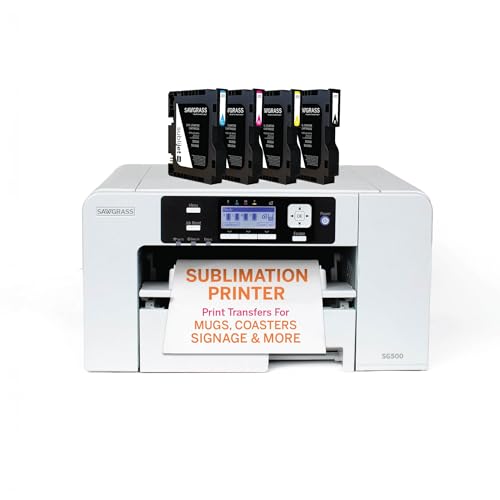
Sawgrass SG500 bundle — Best starter bundle
Sawgrass has served the sublimation trade longer than most brands have known the word, and the SG500 bundle shows that heritage in its packing list rather than its spec sheet. Alongside the printer you get 20 mL SubliJet UHD inks, TruePix transfer paper matched to that ink, and one-on-one training, which is the bundle item veterans value most and beginners value least until their first faded press. The printer itself is built around an anti-clog design brief, a direct answer to the category’s defining frustration: the crafter who prints in bursts around school holidays and craft fairs, then returns to a machine that has quietly sealed its own nozzles.
The Sawgrass ecosystem leans on managed colour, with the company’s software steering output toward predictable results on common blanks, and that hand-holding is either the product’s charm or its constraint depending on your temperament. Tinkerers who want to profile exotic papers themselves may feel fenced in. Everyone else, particularly sellers who need Tuesday’s mug to match the mug photographed for the listing in March, will appreciate a system designed to remove variables. Treat the SG500 as the tutored route into sublimation: more structure, fewer mysteries, and a support culture built around people who sell what they press.
- Bundle: printer, SubliJet UHD ink set, TruePix paper, personal training session
- Design priority: anti-clog engineering for intermittent use
- Format class: desktop letter-size sublimation
- Workflow: managed colour through the maker’s own software ecosystem
Strengths
- Training and matched consumables shorten the expensive beginner phase of ruined blanks.
- Anti-clog focus suits seasonal sellers whose machine rests between selling bursts.
- Colour output stays consistent across months, which protects repeat-order businesses.
Trade-offs
- Proprietary ink cartridges cost more per print than bottle-fed rivals over a long year.
- The managed software approach gives advanced users less room to build custom profiles.
- Standard configuration stays at letter size, with wider work needing a different machine.
Best for: new sellers who want instruction, matched materials and a machine that forgives an irregular printing calendar. Not suited for: high-volume producers watching ink cost per unit above every other metric.

Brother SP-1 bundle — Best app-driven pick
Brother approached sublimation from the phone outward. The SP-1 is a compact sublimation printer designed to be driven through an app-based design workflow, so the path from a photo on your handset to a pressed design on a blank involves fewer cables, fewer file exports and fewer excuses than the desktop-software route. For crafters who genuinely create on their phones, and for parents turning family pictures into grandparent gifts at the kitchen table, that design centre of gravity matters more than any laboratory measurement.
The bundle listing is unusually generous with the materials of first success: a full ink set, 160 sublimation transfer sheets, fifty blanks, tape and more. Fifty blanks is not a token sample; it is enough stock to survive the calibration phase and still have sellable or giftable pieces left over, and the sheet count means paper stops being the thing you ration while learning. Brother’s print heritage also shows in the hardware manners: the machine behaves like a tidy modern home printer that happens to speak sublimation, rather than a temperamental specialist. If your household’s creative centre is a phone and a kitchen table rather than a dedicated studio desk, the SP-1 was drawn with your floor plan in mind.
- Bundle: full ink set, 160 transfer sheets, 50 blanks, tape and accessories
- Workflow: app-driven design and printing from a phone
- Format class: compact desktop letter-size sublimation
- Maker position: purpose-built sublimation model in Brother’s craft range
Strengths
- Fifty included blanks turn the first week into production practice instead of shopping trips.
- Phone-first workflow removes the laptop bottleneck for casual and family creators.
- Generous paper supply encourages the test presses that good calibration requires.
Trade-offs
- App-centred control may frustrate designers who live in full desktop editing suites.
- Letter-size output shares the tiling compromise for large apparel designs.
- Consumables beyond the bundle follow Brother’s own ecosystem pricing and availability.
Best for: phone-first crafters, gift makers and families who want a complete first-week kit in one carton. Not suited for: studio sellers standardising on wide formats or elaborate desktop colour workflows.

Epson SureColor F570 — Best wide-format (24 inch)
When a sublimation business outgrows letter size, the F570 is the step that keeps it inside the supported world. This is a 24 inch desktop sublimation printer in Epson’s purpose-built SureColor line, and the listing loads the carton accordingly: two full ink sets, sublimation paper, the user guide and free remote installation help. That last item deserves respect. Wide-format machines punish sloppy setup with expensive media waste, and having the maker’s installer walk the first configuration remotely is worth real money to a shop that bills by the order.
Twenty-four inches of width changes the catalogue, not just the dimensions. Full-front designs for adult garments print in one pass, garden flags and banners stop needing seams, and a production minded seller can gang several small designs across the width and cut them apart after pressing, turning the press into the only real bottleneck. The F570 also changes the room: it wants a proper stand or a deep bench, a media handling routine and an owner who thinks in weekly volumes. None of that is criticism. It is simply the honest border between a craft appliance and a small production asset, and buyers crossing it should budget for the heat press width to match, because a 24 inch print under a small press is a heartbreak arranged in advance.
- Width: 24 inch desktop sublimation format
- Bundle: two full ink sets and sublimation paper included
- Setup: free remote installation assistance in the listing
- Lineage: purpose-built SureColor sublimation family, fully maker supported
Strengths
- One-pass wide output unlocks apparel and décor work that letter machines tile or refuse.
- Double ink supply in the box postpones the first refill order well into production.
- Supported status keeps warranty and profile help available at production scale.
Trade-offs
- Footprint and media handling demand dedicated space rather than a spare corner.
- Purchase and running commitment only make sense with steady order volume behind them.
- Owners must match it with a suitably wide press to use the format honestly.
Best for: growing sellers moving into oversized apparel, flags and décor panels with daily output. Not suited for: occasional gift makers, whose volume belongs on a letter-size machine.

Epson EcoTank ET-15000 — Conversion pick, 13 by 19
Read this heading the way it is written: conversion pick. The ET-15000 leaves the factory as a cartridge-free wide-format all-in-one office printer, with scanning, copying, fax, Ethernet and prints up to 13 by 19 inches at up to 17 pages per minute on ordinary inkjet work. Nothing in that description mentions sublimation, because Epson does not sell this machine for sublimation and does not sell sublimation ink for it. The conversion is entirely the owner’s project: instead of filling the tanks with the included Epson ink, the owner fills them with sublimation ink bought from third-party suppliers, installs community colour profiles, and accepts that Epson support for ink-related trouble is not part of the arrangement.
Why do so many crafters accept those terms? Because the arithmetic is seductive and, handled carefully, real. Tank refills of sublimation ink cost a fraction of cartridge systems, the 13 by 19 inch canvas covers most adult shirt designs without tiling, and the huge owner community means every paper, blank and setting combination has been tested by somebody who posted the results. The risks are equally real: once sublimation ink enters the tanks there is no casual road back to office printing, print quality depends on profiles you source yourself, and a clogged converted machine is your own repair bill. Buy it as a project with known terms and it can be the hardest-working machine in a small shop. Buy it imagining a hidden factory feature and you will be disappointed in writing.
- Base machine: wide-format supertank all-in-one, print, scan, copy and fax
- Print size: up to 13 by 19 inches; office speed up to 17 ppm on standard ink
- Conversion status: owner-filled with third-party sublimation ink, unsupported by the maker
- Connectivity: wireless plus Ethernet for shared craft-room placement
Strengths
- Wide 13 by 19 inch output at tank-ink running costs undercuts every cartridge route.
- Enormous converted-owner community supplies profiles, settings and troubleshooting lore.
- All-in-one hardware scans artwork and handles paperwork when a second unit shares duty.
Trade-offs
- Maker support does not cover the sublimation use the machine is bought for.
- Colour accuracy depends on third-party profiles and your own calibration patience.
- Filling with sublimation ink is effectively permanent; it stops being an office printer.
Best for: confident tinkerers and volume crafters who accept unsupported status in exchange for wide, cheap output. Not suited for: buyers who want a warranty conversation to include the word sublimation.

Epson EcoTank Photo ET-8550 — Conversion pick, six-colour
The same conversion warning applies here, word for word in spirit: the ET-8550 is a six-colour wide-format photo all-in-one that Epson sells for photographic printing, not for sublimation, and owners who convert it pour in sublimation ink from independent suppliers entirely on their own responsibility. What distinguishes this conversion candidate from its ET-15000 sibling is the engine’s photographic breeding. Six colours, including the extra tones a photo printer uses to smooth gradients, give converted output a gentler hand with skin tones, sunset skies, watercolour artwork and the soft shading that four-colour conversions can render in visible steps.
That refinement points the ET-8550 toward a particular catalogue: art prints on coated panels, personalised photo gifts, pillow covers and apparel designs built from photographs rather than flat vector shapes. Its standard-ink credentials, up to 16 pages per minute and 13 by 19 inch output with scanning and copying, describe a capable creative-studio machine before conversion enters the discussion. After conversion, the same caveats govern everything: profiles come from the community, support questions about sublimation ink go unanswered by the maker, and the tanks’ new contents retire the machine from photo-paper duty. Sellers whose designs are photographic and whose confidence is high will find this the most graceful of the conversion routes; sellers printing bold flat logos will rarely see what the extra colours earn.
- Base machine: six-colour wide-format photo all-in-one with scan and copy
- Print size: up to 13 by 19 inches; standard speed up to 16 ppm
- Conversion status: third-party sublimation ink only, entirely owner managed
- Character: gradient-friendly output for photographic and watercolour designs
Strengths
- Six-colour engine smooths photographic gradients that four-colour conversions can band.
- Wide format pairs with tank refills to keep large art prints inexpensive in ink.
- Photo-studio heritage brings careful paper handling to delicate transfer stock.
Trade-offs
- Conversion remains unsupported, with profile hunting left to the owner community.
- Flat graphic work gains little from the extra colours this machine charges for.
- Six tanks of third-party ink multiply the variables when a colour drifts.
Best for: photo-led gift and art sellers who understand conversion terms and prize smooth tonal work. Not suited for: first-time buyers, who should learn the craft on a supported machine.
From Mug Blanks to Twenty-Four Inch Panels: How Do These Six Routes Scale?
| Pick | Route | Working width | Ink system | Support position |
|---|---|---|---|---|
| Epson SureColor F170 | Purpose-built | Letter | Genuine Epson sublimation bottles | Full maker support |
| Sawgrass SG500 bundle | Purpose-built | Letter | SubliJet UHD cartridges | Maker support plus training |
| Brother SP-1 bundle | Purpose-built | Letter | Brother sublimation ink set | Maker support, app workflow |
| Epson SureColor F570 | Purpose-built | 24 inch | Genuine Epson sets, two included | Maker support plus remote install |
| Epson EcoTank ET-15000 | Conversion | 13 by 19 inch | Owner-filled third-party ink | Not supported for sublimation |
| Epson EcoTank Photo ET-8550 | Conversion | 13 by 19 inch | Owner-filled third-party ink | Not supported for sublimation |
Read the table as a map of responsibility as much as capability. Moving down the rows, output grows wider and ink grows cheaper, while the share of the workflow owned by the manufacturer shrinks and the share owned by you grows. Neither end is the correct one in the abstract. A supported letter machine that produces flawless mugs every weekend beats a wide conversion that spends its mornings in cleaning cycles, and a well-run conversion producing daily shirt orders beats a supported machine sitting in its box awaiting courage. Match the row to your temperament as honestly as to your catalogue.
How Do You Set Up a First Sublimation Bench That Actually Works?
Begin with the press, not the printer, because the press dictates bench layout and power. Place it where its swing or clamshell motion clears shelves and walls, on a surface that tolerates heat, near ventilation you can open when coatings warm up. The printer belongs within cable or reliable wireless reach but out of the press’s heat plume, and your blanks belong in a dust-free stack, because every speck of lint on a coating becomes a permanent resident of the finished design.
Your first session should be deliberately uncommercial. Print a colour grid and a photograph you know well, press them onto sacrificial blanks at the ink maker’s suggested time and temperature, and write the settings on the back of each result with a marker. Change one variable at a time across a handful of presses until the colours on the blank resemble the colours on your screen as closely as your setup allows. This notebook page, not any forum post, becomes your studio’s constitution, because it describes your press, your blanks and your room.
Then build the habits that keep the system alive. Tape designs with heat-resistant tape every time, even when a blank looks too heavy to shift. Mirror every design before printing unless your software does it automatically, and check the preview rather than your memory. Print something small each week the machine would otherwise sleep, and keep a log of wasted blanks with the reason attached. Within a month the log will show you your real enemy, whether it is ghosting from movement, fading from short press times or colour drift from an ageing ink set, and you can fix the enemy you actually have.
Which Sublimation Mistakes Ruin More Blanks Than Bad Printers Do?
Pressing cotton is the classic heartbreak, and it survives every warning label because a first blank order often mixes fabrics. Sublimation gas needs polyester or a polymer coating; on cotton it washes away to a vintage fade that some sellers then mistake for a style choice. The second mistake is trusting the print on paper. Transfer sheets look muted before pressing by design, and beginners who darken a healthy design three times produce muddy, oversaturated results they then blame on the ink.
Movement during the press opening causes ghosting, a faint double image that no setting can cure after the fact, and rushing the peel on blanks that want a cool release cracks coatings in ways that photograph badly for listings. Skipping the lint roller invites blue specks from clothing fibres baked permanently into light designs. Finally, the conversion-specific mistake: filling a new EcoTank with its included standard ink first, just to test it, then discovering that switching ink families afterwards means flushing a system that was never meant to change its mind. Decide before the first fill, not after.
Which Blanks Reward Sublimation Most, and Which Ones Waste Your Ink?
Start with drinkware, because coated mugs and tumblers forgive beginners while teaching them everything. The coating is consistent from piece to piece, the press wraps or clamps with predictable pressure, and a failed mug costs little and diagnoses clearly: banding points at the printer, fading points at time or temperature, and a pale band near the handle points at uneven contact. A dozen practice mugs will educate a new owner faster than a month of forum reading, and the successful ones are genuinely saleable or giftable, which cannot be said of practice anything in most crafts.
Apparel is the second classroom and the stricter one. Polyester performance shirts take colour beautifully and show every flaw in registration, because fabric shifts as it warms and a design placed by eye at room temperature lands somewhere slightly different after the press closes. Light garments reveal sublimation at its best, since the dye becomes part of the fibres and leaves no hand feel at all; dark garments defeat the process entirely, because sublimation inks are transparent dyes with no white layer beneath them. Sellers dreaming of black tees need a different decoration technology, and discovering that before buying a printer is worth the price of this entire guide.
Hard home goods occupy the third tier: coated aluminium panels, slate, ceramic tiles, keyrings and ornaments. These blanks vary in coating quality more than any other family, and two visually identical panels from different suppliers can press ten shades apart. The discipline here is sourcing: buy blanks from one supplier until your settings are proven, record batch changes in your notebook, and never fulfil a bulk order on a fresh blank shipment without a sacrificial test piece. Experienced sellers speak about blank suppliers the way bakers speak about flour, and they are not being precious; they are describing where their consistency actually lives.
Soft home textiles reward the wide machines. Pillow covers, blankets and garden flags use the full width of a 13 by 19 conversion or an F570 pass, and their forgiving surfaces hide minor banding that would ruin a glossy panel. They also expose the tiling lie: a letter-size design split across two sheets and aligned on a waving piece of fabric will show its seam to anyone who looks, which is every customer. If textiles are your catalogue, width is not an upgrade path; it is the entry ticket, and the letter machines in this guide should be read as mug-and-gift tools in your planning.
What Does a Year of Sublimation Ownership Actually Look Like?
The first month is calibration and inventory. You will own more blank types than designs, your notebook will fill faster than your order book, and your cost per finished piece will look alarming because every mistake is visible on the shelf. This is the correct shape of month one. Sellers who skip it pay the same tuition later, in refunds.
Months two to six are where the machine choice starts compounding. A supported printer with matched profiles settles into a rhythm: design, print, press, photograph, list. A converted machine demands a second rhythm alongside it, of profile tweaks when a new ink batch arrives and head checks before big runs, and owners who enjoy that tinkering genuinely thrive while owners who resent it begin leaving the machine off. Be honest about which owner you are, because the calendar will not negotiate.
The back half of the year is about consumable logistics and press wear. Ink arrives in larger quantities, transfer paper becomes a standing order rather than a purchase, and the press, which nobody writes guides about, starts asking for a new pad or showing a temperature drift your notebook catches before your customers do. Shops that survive their first holiday season share one trait: they reordered blanks in October. Build that date into your year the day the printer arrives, and let the machine, whichever of the six you chose, become the boring reliable centre of a business that gets interesting everywhere else.
How Should Press Time, Temperature and Pressure Change From Blank to Blank?
Every ink and paper pairing arrives with a suggested press window, and treating that window as a universal constant is the quiet cause of half the failures blamed on printers. A ceramic mug in a wrap press lives in a different thermal world from a polyester shirt on a flat press: the mug’s mass drinks heat slowly and returns it slowly, while the shirt reaches temperature almost at once and can scorch or yellow if the cycle stretches. Your notebook should therefore hold one page per blank family, not one page per machine, and the entries should record the blank supplier as faithfully as the numbers, because a coating change moves the window even when the blank looks identical.
Pressure is the variable beginners set once and forget, usually at whatever the press arrived with. Too little pressure and the paper floats on microscopic air gaps, producing the soft, faded patches that look like ink starvation but survive every nozzle check in perfect health. Too much pressure on coated hard blanks can crack edges and squeeze designs out of register on fabric. The diagnostic habit worth building is tactile: after a press, run a fingertip across the design’s edge. A crisp boundary with even colour suggests the window is right; a halo or a shadow twin suggests movement; a washed centre with strong edges suggests the middle of the platen runs cool, a press fault that widens with platen size and explains why large cheap presses disappoint more often than small ones.
Moisture is the uninvited variable. Transfer paper stored in a humid room carries water into the press, where it flashes to steam and blurs fine lines, and fabric blanks stored in the same room do the same. Studios in damp climates learn to pre-press garments for a few seconds to drive moisture out and to keep paper in a sealed box with the lid actually closed. None of this appears in printer listings, yet all of it decides whether the printer you bought gets the reputation it deserves in your own workshop.
Finally, respect cooling. Some coatings want a hot peel, others cloud if disturbed while warm, and tumblers rolled too soon can smear at the seam where the wrap overlaps. The minute after the press opens is part of the process, not a pause in it, and production sellers build a cooling rack into the bench for exactly this reason. When a result disappoints, change the cooling habit before changing the ink, the paper or the machine; it is the cheapest variable you own and the one most often guilty.
What Should You Ask a Seller or Maker Before Money Changes Hands?
Ask which ink the machine is warrantied with, and listen for a specific answer rather than a vibe. Supported machines name their ink family proudly; conversions, by definition, cannot, and any listing language that blurs that distinction is language you should price accordingly. Ask what the first refill costs in money and in downtime, and whether the ink system can be topped up mid-production or demands a cartridge swap that pauses a run. Ask how the machine behaves after three idle weeks, and treat a shrug as data.
Ask about the driver and the colour path in plain terms: whose profiles ship in the box, which design software the workflow assumes, and whether the app-driven route still works when the household internet drops. Ask what the largest realistic design is, not the largest sheet, because margins shrink every format and a letter machine’s printable sublimation area is smaller than its paper. Ask, if you are buying a bundle, exactly which blanks are inside and whether they are coated for sublimation or merely shaped like things that are; uncoated lookalikes in a starter box have ended more first weekends than any printer fault. The answers divide this page’s six picks more honestly than any advertisement, and a seller who answers them precisely has usually earned the order.
How Do You Design Differently When the Print Lives Inside the Coating?
Sublimation forgives gradients and punishes hesitation. Because the dye disperses microscopically as it bonds, photographs, watercolour washes and soft shadows render with a smoothness that surface-printing methods envy, and designs that exploit that smoothness, full-bleed images wrapping a tumbler or a photograph across a pillow, look expensive out of all proportion to their cost. The same dispersion softens hairline rules and tiny type, so text below a modest size should be set bold or given room, and registration-critical designs with hard edges meeting across a seam should be tested before they are sold.
Colour choice needs one mental adjustment: you are designing for the pressed result, not the screen and not the sheet. Saturated reds and deep greens survive the transfer gloriously, pastels can vanish into light coatings if they are mixed too timidly, and pure black built from a single dye channel may press thinner than a rich black blended across channels, depending on the ink set and profile. The calibration grid from your first weekend tells you your own system’s truth here; tape it to the wall above the press and design against it, rather than against the optimistic colours glowing on a backlit monitor in a dark room.
Layout for curvature is its own small craft. A mug design lives on a cylinder segment, so straight borders bow in the hand and text near the handle compresses visually; tumbler wraps add a taper that turns rectangles into subtle trapezoids. Templates from blank suppliers exist precisely because eyeballing curvature fails, and the professional habit is to print the template, wrap it, photograph the result and adjust, before a single production blank is committed. Sellers who skip this step meet the geometry eventually, usually across a whole batch.
File hygiene closes the loop. Work at the final print size, keep a master with layers intact, export a flattened copy for the print queue, and name files with the blank and date inside the name, because six months from now the difference between the mug version and the tumbler version of a design will not be visible in a thumbnail. The printer at the centre of all this, whichever of the six routes you chose, only ever sees the last file in that chain; everything upstream is you, and it is where the quality is actually decided.
What About Ventilation, Storage and the Household Around the Bench?
Heat pressing vaporises dye and warms coatings, adhesives and tapes, and while a hobby bench is not a factory floor, it deserves moving air. Work near a window you can open or a small fan exhausting outward, keep food preparation out of the pressing zone, and let pressed items cool and air before they are bagged for a customer. These are modest habits, but they are the difference between a craft corner the household enjoys sharing and one it quietly resents.
Storage discipline protects your calibration work. Keep transfer paper flat, sealed and away from the press’s heat plume; keep inks at a steady room temperature rather than in a garage that swings between seasons; and store finished blanks off the floor, because coatings scratch and a scratched coating prints its injury into every design. Label ink bottles with the date they were opened, rotate stock so the oldest bottle is used first, and write the same date discipline onto your paper boxes. A sublimation bench fails by drift more often than by disaster, and dates on bottles are how you see drift coming.
Final Recommendation
Most readers should start with the Epson SureColor F170, because supported, letter-size, bottle-fed sublimation covers the blanks that dominate craft selling without a single asterisk. Choose the Sawgrass bundle if your printing calendar is irregular and you value training and anti-clog engineering, and the Brother SP-1 if your creative life happens on a phone and you want fifty blanks waiting in the carton. Step up to the F570 when orders, not curiosity, demand width. Take an EcoTank conversion only with open eyes: the ET-15000 for wide workhorse value, the ET-8550 for photographic smoothness, both unsupported and both genuinely capable in committed hands. Whichever route you take, spend your second weekend pressing test blanks instead of listing products, because the sellers who last are the ones whose calibration notebook is thicker than their returns pile, and whose first buying decision was made with the same unsentimental clarity they later bring to pricing, blank sourcing and the discipline of saying no to orders their format cannot serve well.
Frequently Asked Questions
Can any of these printers sublimate a cotton T-shirt?
No printer can change the chemistry involved. Sublimation dye bonds with polyester and polymer coatings, so a cotton shirt needs either a polyester blend, a suitable coated transfer approach outside true sublimation, or a different decoration method entirely such as screen printing or a heat-transfer film. Blaming the machine for a cotton failure is the one diagnosis this guide can rule out in advance.
Is converting an EcoTank risky for a complete beginner?
The honest answer is that the risk is manageable but real, and it concentrates exactly where beginners are weakest: colour profiles, clog recovery and troubleshooting without manufacturer support. A beginner with patience, a test-blank budget and a willingness to learn from the owner community can succeed. A beginner who wants the first saleable mug this weekend should buy a supported machine and learn the craft itself first.
Do I still need a heat press if my printer is excellent?
Yes, without exception. The printer only prepares the transfer; the press supplies the heat and pressure that turn the dye to gas and drive it into the coating. A household iron cannot hold even temperature across a design and cannot apply uniform pressure, which is why ironed attempts come out patchy. Budget for the press as half the system, not as an accessory.
Why do my prints look dull on the paper before pressing?
That dullness is normal and expected. Sublimation inks only reach their intended colour after heat converts them and they bond inside the coating, so the sheet in your hand is a preview in the wrong medium. Judge colour from pressed test blanks, keep notes on those results, and resist adjusting a design based on how the untransferred paper looks under craft-room lighting.
How long can a sublimation printer sit unused?
It varies by ink system and room conditions, but every machine in this category prefers regular small jobs to long sleeps followed by heroic cleaning cycles. Purpose-built designs with anti-clog engineering tolerate gaps better, yet the cheapest insurance remains a tiny weekly print. If your calendar involves months away, factor maintenance discipline into the purchase as seriously as width.
Should a seller own two machines instead of one larger one?
Often, yes, and the pairing this guide suggests is a supported letter machine beside whichever wide route the catalogue needs. The small machine keeps mugs and gifts flowing while the wide machine is mid-run, mid-cleaning or mid-experiment, and it serves as the calibration mule for new blanks before they are trusted to the expensive format. Redundancy sounds like a luxury until the first market weekend arrives with a clogged nozzle; after that it reads as insurance with a power cord.
What is the single best first blank to learn on?
Choose a coated aluminium photo panel in a modest size. Panels lie flat, press evenly, show banding and colour error without ambiguity, and keep indefinitely as reference samples you can hold beside next month’s attempt. Write the date, ink batch and press settings on the back of your first panel and keep it forever; experienced studios all have an equivalent artefact, usually still taped somewhere near the press.
Related Guides
Readers planning a full craft bench may also want our walkthrough of choosing a heat press for mugs, shirts and flat blanks, the companion survey of wide-format inkjet printers for craft rooms and small studios, and our plain-language explainer on setting up colour profiles for converted tank printers before the first big order lands.



[…] stocking the rest of the studio may also want our guide to professional photo printers for large prints and fine-art media, the companion survey of craft printers for scrapbooking, stickers and paper projects, and our […]