What's inside
- Where to buy
- Key Takeaways
- Quick Picks
- How did we sort the serious boxes from the spare parts?
- What does an external sound card actually improve?
- Which connections should you count before buying?
- How much amplifier does your headphone actually need?
- Three desks, three different right answers
- The six external sound cards, reviewed one by one
- What about wireless headsets and other escape routes?
- How do the six compare side by side?
- How should you set up an external sound card properly?
- What mistakes do external sound card buyers keep making?
- What does living with one actually change day to day?
- Final Recommendation
- Frequently Asked Questions
- Related Guides
As an Amazon Associate I earn from qualifying purchases. This post may contain affiliate links at no extra cost to you.
gizmoverdict.com is reader-supported. When you buy through links on our site, we may earn an affiliate commission.
Where to buy
All six products in this guide carry live Amazon listings, and the links below run to them — but the six split into two families that share almost nothing except a USB plug, so read the family labels before the product names. Four are desktop DAC and headphone-amp units built for people who hear the difference and game seriously. Two are pocket adapters whose entire ambition is to give a computer working headphone and microphone jacks again. Both families are legitimate answers to the question of the best external sound cards; they are answers for different people, and mixing them up is how money gets wasted in this category.
An external card earns its desk space by moving conversion and amplification out of the electrically noisy interior of a PC and into a box you control. What that buys in practice: a quieter background behind sensitive headphones, a volume knob your hand can reach, enough drive for demanding headsets, and — on the gaming models — surround processing and microphone tools that motherboard audio treats as afterthoughts. What it does not buy is magic. A good external unit cannot repair a bad headphone, a noisy recording, or a game mixed in flat stereo, and the honest reviews below keep returning to that boundary.
Consoles matter here too. Several of these units court PlayStation and Switch owners as well as PC builders, because a console’s controller jack is nobody’s idea of high fidelity. Where a listing supports consoles, the review says so; where support is a PC-only affair, that is stated just as plainly, because buying a desktop DAC for a console it ignores is an expensive way to learn to read listings.
Key Takeaways
- The category splits in two: hi-res gaming DAC/amps for headphone listeners, and simple USB adapters that replace dead or missing jacks.
- Creative’s G-series dominates the serious end — the G6 for one machine done well, the G8 when two devices must share one pair of headphones.
- The Sound Blaster X4 is the living-room bridge of the set, built around speaker systems and multi-device switching rather than a single headset.
- StarTech’s 7.1 adapter and Sabrent’s stereo dongle solve connection problems, not fidelity ambitions — buy them for exactly that.
- Microphone handling is the hidden divider: sidetone, monitoring and mic processing separate gaming DACs from plain audio dongles.
- Match the box to the headphone you own today; output drive you will never use is the easiest money to overspend in this guide.
Quick Picks
| Pick | Badge | Why it earns its place |
|---|---|---|
| Sound BlasterX G6 | Best for most gamers | The proven single-machine formula: hi-res conversion, serious headphone drive, surround and Dolby decoding in one small box. |
| Sound Blaster G8 | Best for two devices | Dual USB inputs let a PC and a second machine feed one headset, with mixing handled on the box instead of in software. |
| Sound Blaster X4 | Best for speakers too | Surround outputs, optical connections and multi-device control for desks where headphones share time with real speakers. |
| Sound BlasterX G5 | The veteran value route | An older, simpler gaming DAC that still covers PC, Mac and PlayStation-era consoles without software fuss. |
| StarTech 7.1 USB adapter | Best connection fixer | Analog 7.1 outputs plus digital SPDIF from a USB stick — the way to wake up an old surround receiver or a jackless mini PC. |
| Sabrent USB stereo adapter | Best pocket spare | A driver-free headphone-and-mic jack on a cable, priced and sized like the spare part it honestly is. |
How did we sort the serious boxes from the spare parts?
By asking what problem each product actually retires. The gaming DACs were judged on conversion quality as far as their listings state it, on headphone drive, on the surround and microphone tooling wrapped around the audio path, and on how gracefully they move between PC and console. A unit that needs a driver suite to wake up scores differently from one that a console recognises the moment it is plugged in, and both behaviours are reported rather than smoothed over.
The two adapters were judged by a plainer standard: do the jacks work, on the machines the listing names, without a driver hunt? Adapter buyers are usually mid-crisis — a dead laptop jack before a work trip, a mini PC with no audio output at all — and the correct virtues are boredom and compatibility. Fancy specifications on a ten-dollar-class dongle would be decoration; reliability is the specification.
Portability was weighed as a real criterion rather than a spec-sheet garnish. A unit that moves between a desk and a living-room console weekly lives a different life from one bolted into a permanent installation, and the reviews distinguish travellers from furniture. The G6 and G5 travel; the X4 settles; the G8 commutes between exactly two fixed points. None of those is a flaw — but buying furniture for a travelling life, or a traveller for a media wall, produces the low-grade dissatisfaction that fills return windows.
We also listened for what these boxes do to voices, because for a growing share of buyers the microphone path matters as much as the music path. A card that flatters game audio while making its owner sound like a distant radio caller has failed half its job in the hybrid-work era. Sidetone availability, input cleanliness and how gracefully each unit hands a microphone to call software all fed the judgements below, and the headphone-only audiophile boxes were deliberately kept out of this guide for exactly that reason — they live in our audiophile roundup, where the priorities differ.
One discipline ran through the whole guide: figures appear only where the maker’s own listing states them. The G6’s signal-to-noise figure is quoted because Creative prints it in the product’s title; where a listing stays silent about its conversion ceiling, the review talks about behaviour and features instead of inventing numbers to fill the spec box.
What does an external sound card actually improve?
Start with noise. Inside a desktop case, the motherboard’s audio traces run past power regulation, GPU switching and fan motors, and sensitive headphones — especially efficient in-ear monitors — reveal that neighbourhood as hiss, whine that tracks your mouse movements, or a faint buzz when the graphics card works hard. Moving conversion outside the case, into a shielded box fed by USB, removes the neighbourhood rather than arguing with it. That single change is the most reliable, least mystical improvement in this entire category, and for many buyers it alone justifies the purchase.
Drive comes next. A headphone amplifier’s job is not loudness — almost anything can make most headphones loud — but control: holding bass together at volume, keeping quiet passages clean, and not collapsing when a demanding planar or high-impedance headphone asks for current and voltage a motherboard header never budgeted for. The gaming DACs below all carry dedicated amplification for this reason, and their reviews distinguish between headphones that merely work on them and headphones that genuinely wake up.
Then there is everything wrapped around the audio. Surround virtualisation decides whether footsteps in a shooter sit convincingly behind you. Microphone sidetone decides whether you shout through a whole match without knowing. A physical knob decides whether volume changes happen in a game or in a settings menu three alt-tabs away. External cards are really bundles of these small mercies, and the differences between the six picks live mostly in which mercies each one chose to include.
Which connections should you count before buying?
Inventory your desk honestly. A headset with a single combined plug wants a combined jack or a splitter; separate headphone and microphone plugs want separate sockets, which the adapters below provide and some DACs assume. Speakers change the arithmetic entirely: a 2.1 desktop set needs one stereo output, a true surround speaker system needs either multi-channel analog outputs or an optical feed to a receiver, and that requirement alone can pick your product for you — it is the X4’s and the StarTech adapter’s home ground.
Consoles deserve their own sentence in the inventory. PlayStation generations differ in how willingly they hand audio to USB devices, Nintendo’s dock has its own habits, and a PC-first DAC that ignores consoles is not broken — it is simply aimed elsewhere. The listings behind this guide state their console support plainly, and each review repeats it, because “works with everything” is the most expensive assumption in external audio.
Finally, count your machines. One computer is the easy case. A work laptop beside a gaming PC, or a console beside both, turns cable-swapping into a daily tax — and that tax is precisely what the G8’s dual inputs exist to abolish. Buyers with a single machine should not pay for mixing hardware they will never touch; buyers with two should not pretend a cable swap is a workflow.
How much amplifier does your headphone actually need?
Headphone specifications frighten buyers out of proportion to their difficulty, so here is the plain version. Sensitivity tells you how loud a headphone gets from a given amount of power; impedance hints at how much voltage swing it wants. Most gaming headsets and portable headphones are easy loads that any device in this guide will drive without breathing hard. The demanding minority — high-impedance studio headphones, thirsty planar magnetics — are where dedicated amplification stops being a luxury and becomes the difference between a headphone performing and a headphone merely audible.
The symptom of under-driving is rarely quietness. It is looseness: bass that arrives late and leaves early, dynamics that flatten when a scene gets busy, a sense that the headphone is being polite when the music asked it to be rude. If your current setup exhibits that politeness at volumes you enjoy, an amplifier with real headroom — the G6 and G8 are this guide’s clearest examples — addresses the cause rather than the symptom. If your headphones already sound taut and alive from the motherboard, amplification is not your missing piece, and your external-card case must rest on noise, features or connections instead.
A practical test before spending: borrow or briefly try any decent dedicated amp, or even a friend’s gaming DAC, with your own headphones and your own music. Ten minutes of comparison teaches more than a month of forum reading, because your ears, your headphones and your tolerance for hiss are the actual specification sheet. This guide’s job is to shortlist the boxes worth that audition.
Three desks, three different right answers
Desk one belongs to a nurse who games after night shifts in a flat with thin walls. Her world is a closed-back headset, a single gaming PC and a hard requirement for silence — hers and the PC’s. The G6 fits her life without remainder: conversion quiet enough for 3 a.m. listening levels, drive for the headset she upgraded to last year, and no features she must apologise for not using. Every dollar of a G8’s second input would be a dollar spent on a machine she does not own.
Desk two is a streamer’s command centre: gaming PC, a laptop running chat and music, a console for exclusives, one excellent headset presiding over all of it. His old workflow involved a cable swap so frequent he had worn the plating off a plug. The G8 was designed in his image — two USB sources blended at the box, levels set once, the ritual abolished — and the X4 tempts him only when he daydreams about speakers his neighbours would veto.
Desk three is not a gaming desk at all. It is a family media PC under a television, feeding a venerable surround receiver, in a house where the onboard audio died quietly in the spring. Nobody there needs headphone amplification or Scout modes; they need their films back in surround by Friday. The StarTech adapter’s analog and optical outputs answer that need precisely, and the Sabrent rides along in the drawer for the day a headset must join a video call with grandparents. Matching the product to the desk — not to the loudest marketing — is the whole skill this category asks of you.
The six external sound cards, reviewed one by one

Sound BlasterX G6 — Best for most gamers
The G6 is the reference point of this category, the box against which other gaming DACs get measured, and its listing leads with the number that explains why: a 130dB signal-to-noise ratio from its hi-res DAC, a figure Creative prints in the product title itself. Around that conversion sits the full gaming toolkit — 7.1 surround processing, Dolby Digital decoding for console feeds, and a headphone amplifier with the muscle for demanding headsets — packaged in a unit small enough to disappear under a monitor stand.
Its temperament is single-machine focus. The G6 assumes one primary source, played seriously: a gaming PC, or a console whose optical or USB feed it decodes with the same surround treatment. Scout-style audio processing and game profiles live in Creative’s software on PC, while console owners get the hardware essentials without the app. That split is worth understanding before purchase — the box is complete on its own, and the software is seasoning rather than the meal.
Picture the desk it suits: a competitive player on closed-back headphones, in a room where speakers would start a domestic negotiation, playing late. The G6 gives that player a silent background between gunshots, positional processing that survives fast head movement in the mix, and a knob that answers instantly when a cutscene arrives louder than the match did. Nothing about the unit is theatrical; it is a tool that removes audio from the list of things a player thinks about mid-game.
Longevity is the quiet argument. Because the G6’s talents are conversion, amplification and decoding — things that do not age the way RGB fashions do — it survives PC rebuilds, console generations and headphone upgrades without becoming the weak link. Buyers who replace their graphics card every two years but keep headphones for five will find the G6 keeps the same pace as the headphones.
One more habit worth naming: the G6 rewards owners who set it up once and stop. Its processing profiles invite experimentation, and a week of playful toggling is healthy, but the unit’s real gift is consistency — the same clean feed, at the same level, every session, until your ears calibrate to it and start hearing the game instead of the gear. Players who chase a new EQ curve nightly are usually compensating for a headphone they secretly dislike, and no DAC in this guide can fix that particular honesty problem.
- Role: hi-res gaming DAC and headphone amplifier
- Conversion: hi-res DAC, 130dB SNR as stated in the listing
- Processing: 7.1 surround and Dolby Digital decoding
- Platforms: PC and consoles, per the listing
- Form: compact desktop unit, portable between setups
Strengths
- Conversion quiet enough that silent passages in games and films stay silent.
- Amplification with genuine headroom for harder-to-drive headphones.
- Dolby decoding makes it as useful under a TV-side console as at a desk.
Trade-offs
- One source at a time is its philosophy; multi-machine desks should look at the G8.
- Deepest software features live on PC, so console owners use a subset.
- It is a headphone-first device — surround speaker systems belong to the X4.
Best for: solo-machine gamers and headphone listeners who want the category’s benchmark box. Not suited for: two-computer desks or speaker-based surround setups.
Players settled on one main machine can check the G6’s current listing on Amazon and match its inputs against their console or PC before ordering.

Sound Blaster G8 — Best for two devices
Every multi-device desk develops the same ritual: headphones unplugged from the gaming PC, plugged into the work laptop, unplugged again for the console, the cable slowly fraying into a consumable. The G8 exists to end that ritual. Its dual USB DAC arrangement takes two sources at once — the listing describes a USB dual DAC with headphone amplification — and lets both feed one headset, with the balance between them handled at the box rather than in two operating systems’ sound panels.
That makes the G8 less a successor to the G6 than a sibling with a different brief. Where the G6 polishes one feed to a shine, the G8 is a small mixing desk for a life split across machines: game audio from the PC underneath a work call from the laptop, a console’s soundtrack sharing the evening with a PC’s voice chat. Streamers will recognise the shape immediately, because combining game sound and a second machine’s audio without a capture chain is a problem they pay real money to solve.
The amplification and hi-res conversion are present and serious — this is not a switcher with a DAC attached as an afterthought — but the honest headline remains the dual-device architecture. Buyers with one machine will find the G6 simpler and cheaper to live with; buyers with two will wonder why they tolerated the cable dance for so long. Hardware lives or dies on whether its signature feature matches your Tuesday, and the G8’s signature feature is unmistakably aimed at a specific, common Tuesday.
Setup rewards a few minutes of intention: label which input is which, set each machine’s output level once, and the box becomes invisible infrastructure. The G8 also travels well between desk and living room, since “two devices” describes a console-plus-PC entertainment centre as accurately as it describes a work-from-home desk.
There is also a cable-hygiene dividend nobody advertises. Two permanently connected sources mean the USB leads get dressed once, routed behind the desk and forgotten, instead of dangling across the keyboard awaiting their turn. Desks look calmer, connectors stop wearing, and the headset’s own cable — the one that actually moves — lives a longer life. Infrastructure you never see is still infrastructure, and the G8 quietly upgrades all of it.
- Role: dual-input USB DAC and headphone amplifier
- Conversion: high-resolution dual DAC arrangement, per the listing
- Signature feature: two USB sources feeding one headset
- Platforms: multi-platform desktop use, per the listing
- Form: desktop unit sized for permanent dual-machine desks
Strengths
- Abolishes cable swapping between two everyday machines.
- Mixing at the hardware keeps levels sane across operating systems.
- Full DAC and amp quality, not a compromise switcher box.
Trade-offs
- Single-machine owners pay for a second input they will never feed.
- Two sources demand one thoughtful setup session to label and level.
- Its talents are wasted on speaker-first listening rooms.
Best for: streamers, dual-machine desks and console-plus-PC corners. Not suited for: anyone whose audio life happens on exactly one device.
Dual-machine readers can look over the G8’s Amazon page to confirm the input arrangement matches the two devices they actually own.
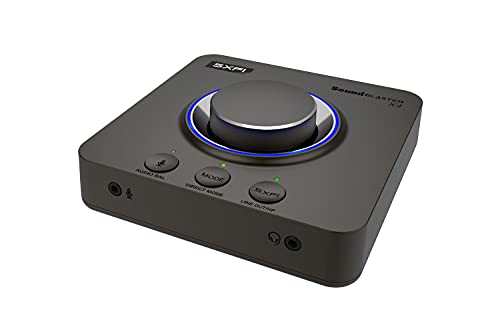
Sound Blaster X4 — Best for speakers too
The X4 is the diplomat of this guide: an external USB DAC and headphone amp that also speaks fluent speaker. Its listing emphasises 7.1 surround, Dolby Audio and multi-device control, and the hardware backs the words with the outputs a headphone-only box omits — the connections to run a surround speaker system, feed optical sources, and switch between them without crawling behind the desk. Desks where headphones and speakers genuinely share the day are rarer than either camp admits, and the X4 is built for exactly that minority.
Creative wraps the X4 in its Super X-Fi and Sound Blaster processing families, and the unit carries microphone tools aimed at people who take calls and meetings from the same chair they game in. The result is a box whose feature list reads longest in this guide — which is both its appeal and its warning. Every capability you use is value; every capability you ignore is menu depth between you and the volume knob.
Consider a hybrid worker whose desk holds powered monitors for music, a headset for calls, and a console that visits on weekends. The X4 absorbs all three without a patch bay, and its remote-friendly switching suits a chair that stays put while sources rotate. In a bedroom-desk or studio-flat setting, where one surface must be office, cinema and games room in rotation, that consolidation is worth more than a final increment of DAC purity.
The X4 also ages gracefully into home-theatre duty: optical input from a TV turns it into the headphone station for late-night films, with surround processing standing in for the speaker system the hour forbids. Few products in this guide stretch across that many rooms of a life.
Ownership of a hub like this changes how a room gets used. When switching from speakers to headphones is one gesture rather than a settings expedition, people actually do it — the late-night film migrates to headphones without a debate, the call moves to the headset without a scramble. Convenience compounds quietly, and within a month the X4 tends to become the room’s audio front door, the single place every sound enters and leaves. That centrality, more than any specification, is what its owners end up praising.
- Role: external USB DAC, headphone amp and speaker hub
- Processing: 7.1 surround with Dolby Audio, per the listing
- Connections: multi-device switching with optical and speaker outputs
- Extras: microphone processing for calls and meetings
- Form: desktop hub, happiest in a permanent installation
Strengths
- One box genuinely serves headphones, speakers and a TV-side source.
- Surround speaker outputs that headphone-focused rivals simply lack.
- Call and meeting microphone tools suit hybrid-work desks.
Trade-offs
- Feature depth means menus; minimalists may prefer the G6’s narrower focus.
- Pure headphone purists trade a little simplicity for its speaker talents.
- Permanent-desk design — it consolidates a setup rather than travelling with one.
Best for: mixed headphone-and-speaker desks and hybrid workers. Not suited for: laptop bags, minimalists, or single-headset gaming rigs.
Hybrid desks can browse the X4’s listing on Amazon and count its outputs against the speakers and sources already on their desk.

Sound BlasterX G5 — The veteran value route
The G5 has been on sale long enough to qualify as the category’s elder, and its listing tells you exactly which era it serves: a 7.1 headphone-surround external card with a built-in amplifier, aimed at Windows PC, Mac and the PS4 generation of consoles. Nothing about that pitch is fashionable, and everything about it is proven. The G5’s proposition is that the essentials of external gaming audio were settled years ago — clean conversion, real amplification, surround for headphones — and that a mature product delivers them without novelty pricing.
Age cuts both ways, and the review should say where. Console support names the PS4 generation because that is when the G5 was designed; owners of the newest consoles should verify how their machine handles USB audio before assuming a veteran box slots straight in. Software expectations deserve the same honesty: the G5’s experience is hardware-led, with less of the app-driven profile culture that newer Creative units assume. For some buyers that is a limitation. For others — anyone tired of creating accounts to change volume — it is the entire appeal.
There is a reliability argument that only time can make. A product that has survived this long in a fast-moving category has had its failure modes discovered, documented and argued about in public; the G5 a buyer receives today is a known quantity in a way no launch-month product can be. Secondary desks, spare rooms, a console corner at a relative’s house, the PC the kids inherit — these are G5 habitats, places where proven and adequate beats novel and finicky.
It also makes a sensible first step into external audio. A listener unsure whether a DAC/amp will change their gaming life can learn the answer on the G5’s complete feature set — surround, amplification, console manners — and upgrade later with educated ears rather than hopeful ones.
Budget realists should also weigh the G5 against doing nothing. If a PC’s onboard audio is clean and the headphones are easy to drive, the honest upgrade might be no purchase at all — yet the moment hiss, weak drive or a console enter the story, the G5’s mature package answers for less commitment than the flagships demand. Knowing where “enough” lives is a form of expertise, and this veteran unit marks the spot clearly.
- Role: external gaming sound card with headphone amplifier
- Processing: 7.1 virtual surround for headphones
- Platforms: Windows PC, Mac and PS4-generation consoles, per the listing
- Character: hardware-led controls, mature and documented design
- Form: compact unit suited to second desks and console corners
Strengths
- The complete classic feature set, refined over a long production life.
- Known behaviour on PC and Mac with minimal software ceremony.
- A rational first external card for listeners testing the category.
Trade-offs
- Console pitch names the PS4 era; newest-console owners must verify USB audio handling.
- Fewer app-driven profiles and modern extras than the G6 and G8 offer.
- Its surround is headphone-only — speaker systems need the X4 or StarTech route.
Best for: value-minded gamers, second setups and PS4-era console corners. Not suited for: buyers wanting the newest software ecosystem or dual-device mixing.
Value hunters can check the G5’s Amazon listing to confirm the console and platform support lines up with the machines in their room.
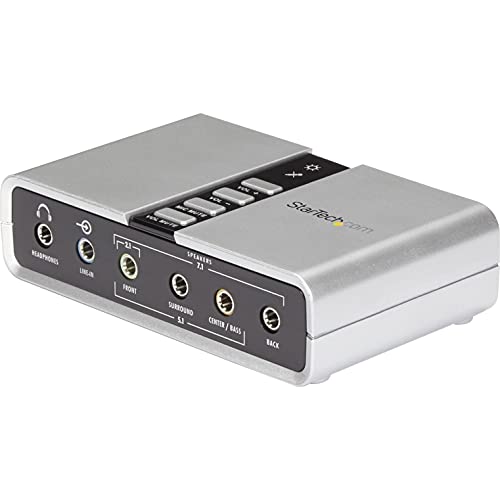
StarTech 7.1 USB adapter — Best connection fixer
StarTech’s adapter belongs to the other family in this guide, and it should be judged there: this is a USB stick that hands a computer analog 7.1 outputs and a digital SPDIF connection, per its listing, and that plain trick solves problems the glossy DACs cannot. A mini PC with no audio output can suddenly feed a surround receiver. An ageing receiver with a free optical input gains a digital path from a modern laptop. A motherboard whose analog jacks have died gets its speaker system back without opening the case.
The 7.1 analog outputs are the feature to linger on, because almost nothing else at this size offers them. Driving a true multi-channel speaker set — the kind with separate front, centre, surround and subwoofer inputs — normally means an internal card or a receiver; the StarTech path means a USB port. Fidelity expectations should be set by the product’s station in life: this is competent, workmanlike conversion for speakers and everyday listening, not a hi-res headphone instrument, and the review will not pretend otherwise.
Its natural buyers are problem-solvers mid-project: the media-centre builder whose small-form PC forgot audio, the office resurrecting a presentation room’s surround set, the gamer whose onboard audio died a month after the warranty did. In those moments the adapter’s virtues are that it exists, that it is inexpensive in spirit, and that it turns a weekend of rewiring into a plug and a settings panel.
StarTech’s broader reputation in unglamorous connectivity helps here — the company makes the adapters and docks that IT departments buy by the tray — and this unit carries that same no-drama design language. It will never be photographed for a desk-setup post. It will also never be the reason a setup fails to make sound.
Installers should note one practical grace: because the adapter lives outside the machine, it moves. The media PC gets replaced, the adapter unplugs and re-plugs into the successor, and the receiver never learns anything happened. Internal cards die with their host or demand a slot the new small-form box may not have; this little stick simply emigrates. For setups built around long-lived receivers and short-lived PCs, that portability is a genuine design virtue.
- Role: USB external sound adapter for speakers and receivers
- Outputs: analog up to 7.1 surround, per the listing
- Digital: SPDIF output for receiver connections
- Inputs: analog 3.5mm connections for microphone and line sources
- Form: compact USB adapter, no desk footprint to speak of
Strengths
- True multi-channel analog outputs almost unique at this size.
- SPDIF gives older receivers a clean digital feed from any USB machine.
- Rescues jackless or audio-dead computers without opening a case.
Trade-offs
- Conversion is workmanlike, not hi-res headphone territory.
- No gaming surround processing or microphone polish of the Creative boxes.
- Multi-channel analog means cable runs — plan the spaghetti honestly.
Best for: surround speaker rescues, media-centre PCs and receiver owners. Not suited for: headphone listeners chasing fidelity or gaming processing.
Problem-solvers can view the StarTech adapter on Amazon and verify its output set against the receiver or speakers waiting at home.

Sabrent USB stereo adapter — Best pocket spare
Sabrent’s adapter is the smallest possible answer to a broken audio jack: a USB plug, a short cable, and separate 3.5mm headphone and microphone sockets, with a listing that promises plug-and-play behaviour and no drivers on Windows and Mac. It does not process surround, it does not amplify with intent, and it does not pretend to be a hi-fi component. It gives a computer its voice back, and it costs and weighs about as much as the cable it hangs from.
That honesty is why it belongs in a guide of far grander products. A remarkable share of external-audio purchases begin as emergencies: the laptop jack that crackles the night before a flight, the desktop whose front-panel audio never worked, the borrowed machine with a single port doing double duty badly. In those moments the correct product is the one already in the drawer. Experienced travellers and IT-adjacent relatives keep a Sabrent-class adapter the way they keep a spare charging cable — unglamorous, unmissed until the day it saves everything.
The separate microphone socket deserves its line, because it preserves an older, useful arrangement: a proper headset with two plugs, or a standalone microphone beside ordinary headphones, both work through this adapter when a laptop’s combined jack or missing jack says otherwise. Call quality through it is exactly what the connected microphone provides — the adapter’s job is to be a transparent doorway, and at that job it is entirely adequate.
Buy two expectations and no more: it will work without ceremony, and it will not improve a good setup. Listeners whose onboard audio already works and who want a fidelity step should be reading about the G6, not this page’s final pick. The Sabrent is insurance, and insurance is judged on the day everything else fails.
There is a small etiquette to owning one: lend it freely. The colleague whose headset jack dies before a client call does not need a lecture on DAC architecture; she needs the drawer opened and the dongle handed over. Products like this circulate through offices and families like spare umbrellas, quietly preventing bad days, and their value compounds with every rescue nobody remembers to count.
- Role: USB stereo sound adapter — headphone and microphone jacks
- Setup: plug and play, no drivers needed, per the listing
- Platforms: Windows and Mac named in the listing
- Connections: separate 3.5mm headphone and mic sockets
- Form: cable-style dongle, pocket and drawer friendly
Strengths
- Instant rescue for dead, missing or crackling audio jacks.
- Separate mic socket keeps two-plug headsets fully working.
- Small and cheap enough to own as a spare before you need it.
Trade-offs
- Stereo only — no surround, no processing, no amplification ambitions.
- Sound quality is “working and clean”, not an upgrade path.
- The short cable puts the jacks where the USB port is, like it or not.
Best for: emergency kits, travellers, and anyone reviving a silent machine today. Not suited for: gamers, audiophiles, or surround speaker owners.
Anyone building a spares drawer can find the Sabrent adapter’s listing on Amazon and confirm its sockets match the headset waiting in theirs.
What about wireless headsets and other escape routes?
Every external-card shopper eventually asks why they should not simply buy a wireless headset and skip the boxes entirely. It is a fair question with a real answer. A wireless headset bundles its own conversion and amplification inside the earcup, which solves the noise and connection problems at a stroke — and then owns them forever, because the electronics you cannot upgrade are married to drivers that wear out, batteries that age and a microphone fixed at whatever quality the bundle allowed. The wired-plus-external-card route keeps each layer replaceable: headphones for a decade, the DAC across two PCs, the microphone upgraded alone when calls start mattering more.
Bluetooth deserves its own honest sentence. Ordinary Bluetooth audio still carries latency that competitive players can feel between a muzzle flash and its report, which is why gaming ecosystems built their own low-latency wireless links instead. For films, music and casual play the delay hides; for ranked shooters it does not. The external cards in this guide are wired because the wire remains the zero-compromise answer for synchronisation, and because a cable never needs charging before a match.
There is one more escape route worth dismissing politely: the expensive HDMI audio extractor or receiver bought solely to feed headphones. Receivers are magnificent at their actual job, but as headphone stations they are oversized, slow to wake and priced like furniture. The desktop DAC exists because a whole class of listeners needed receiver-grade intentions in a box that fits beside a keyboard — and that, in the end, is the niche all four Creative units are competing to serve.
How do the six compare side by side?
| Pick | Family | Surround | Signature strength | Watch out for |
|---|---|---|---|---|
| Sound BlasterX G6 | Gaming DAC/amp | 7.1 + Dolby decode | Conversion quality and drive | One source at a time |
| Sound Blaster G8 | Gaming DAC/amp | Dual-device audio | Two USB sources, one headset | Overkill for single machines |
| Sound Blaster X4 | Desktop hub | 7.1 + Dolby Audio | Speaker and headphone consolidation | Menu depth |
| Sound BlasterX G5 | Gaming DAC/amp | 7.1 headphone virtual | Proven classic feature set | PS4-era console pitch |
| StarTech 7.1 adapter | Connection adapter | Analog 7.1 outputs | Receiver and speaker rescue | Workmanlike conversion |
| Sabrent stereo adapter | Connection adapter | Stereo only | Driver-free jack replacement | No processing at all |
How should you set up an external sound card properly?
Begin by making the new device the system’s default for both playback and recording, in the operating system and then again inside the games and call apps that keep their own device lists — Discord, Teams and most launchers all remember old defaults fondly. A surprising share of “my DAC sounds no different” stories end at this step, with the shiny box connected and the motherboard still doing the work.
Next, set one sensible sample-rate policy and leave it alone. Hi-res capability is about headroom and clean conversion, not about forcing every source to the highest number the panel offers; mismatched rates invite resampling artefacts and the occasional crackle. Set the device to a mainstream high-quality rate, confirm your media plays cleanly, and resist the weekly urge to fiddle.
While you are in the settings, name the device properly if your system allows it, and photograph or note the working configuration. Driver updates, operating-system upgrades and helpful relatives all conspire to reset audio defaults over a machine’s life, and the owner who documented a working setup restores it in minutes while everyone else re-derives it from memory and superstition. Treat the five minutes as insurance paperwork for your ears.
Then disable the processing you are not using. Motherboard enhancement suites, leftover virtual-surround tools and a game’s own headphone mode can stack on top of your new card’s processing until footsteps smear into weather. One processor should own the surround illusion — normally the external box you just bought — and everything upstream should hand it a clean, unprocessed signal. Finally, learn the sidetone control if your unit offers one: hearing your own voice at a natural level in the headset is the difference between speaking and performing, and it takes thirty seconds to set.
What mistakes do external sound card buyers keep making?
The classic error is buying across the family line: a Sabrent-class dongle purchased in hope of a fidelity transformation, or a flagship DAC purchased to fix a broken jack that a pocket adapter would have solved before lunch. Diagnose the problem in one sentence first — noise, drive, connections, or processing — and the correct family usually selects itself.
Second comes ignoring the microphone until the first call. Buyers audition music and game audio, then discover in a work meeting that their headset’s mic path, monitoring or noise behaviour was the thing they actually needed daily. If you speak through your setup as much as you listen to it, the mic column of the spec sheet is not fine print.
Third, console buyers assume USB audio is universal. Consoles ration their USB audio support by generation and by device class, and a listing’s platform line is the cheapest research in this entire category. Fourth, speaker owners buy headphone boxes: a surround speaker system cannot be fed by a stereo headphone output, whatever the marketing photograph implies. And fifth, tidy-minded buyers coil the new DAC’s cable together with power bricks and GPU feeds, reintroducing through the cable run the interference they bought the box to escape — route audio and power apart, and let the outside of the case be the quiet neighbourhood it was meant to be.
What does living with one actually change day to day?
The first change is silence where silence belongs. Between tracks, in game menus, during the pause before a call connects — the background drops away, and listeners who insisted their old setup “sounded fine” discover how much low-level grit they had been unconsciously ignoring. It is the least dramatic improvement to describe and the one owners mention most, because it is present in every second of use rather than only in showcase moments.
The second change is behavioural. A real volume knob within reach gets used constantly — micro-adjustments during films, a quick dip when someone speaks from the doorway — in a way that keyboard shortcuts and on-screen sliders never quite achieve. Audio becomes something your hand manages without your eyes, and the whole setup feels less like operating a computer and more like using an instrument. Several of this guide’s boxes earn their keep on that knob alone once the novelty of their specifications fades.
The third change arrives slowly: your headphones stop being suspects. When a recording sounds harsh, you know the chain delivered it faithfully and the recording is at fault; when a game mix confuses you, you trust the processing rather than blaming the hardware. That confidence reorganises how you listen and what you buy next. It is also why external audio, once adopted, is rarely abandoned — people downgrade many components over a lifetime of setups, but almost nobody volunteers to return to a noisy motherboard feed.
Final Recommendation
For most readers the G6 remains the answer
: one machine, one good headset, and the category’s benchmark conversion and drive. Add a second machine to your day and the G8’s dual inputs stop being a luxury and become the obvious tool. Desks that alternate between headphones and real speakers belong to the X4, while the G5 serves value hunters and older console corners with a proven hand. The StarTech and Sabrent adapters close the guide the way they close real problems — quietly, cheaply, and without pretending to be anything grander. Match the box to the sentence you wrote about your problem, and external audio stops being a gamble. A quiet background, after all, is only worth buying once you know which noise you were paying to remove.
Frequently Asked Questions
Will an external sound card make cheap headphones sound expensive?
No — it will make them sound like themselves, cleanly driven and free of hiss, which is a real improvement and a smaller one than hope suggests. The headphone remains the largest single influence on what you hear. Buy the external card to remove noise, add drive and gain processing; buy better headphones when you want a different character of sound. The two purchases stack, but they are not interchangeable.
Do these devices work without installing software?
The adapters do — the Sabrent’s listing promises driver-free operation outright, and the StarTech is built in the same spirit. The gaming DACs work as audio devices the moment they are recognised, with Creative’s software unlocking profiles, processing tweaks and firmware care on PC. Consoles use the hardware layer only, which is why the reviews separate what the box does from what the app adds.
Can one external card serve my PC and my console?
Yes, if the listing names your console — the G6 and G5 both court console owners, and the G8 was designed for two sources at once. The condition is verification, not optimism: console generations differ in USB audio support, so match the product’s stated platforms against your exact machine before ordering, and expect optical connections to feature in PlayStation-style setups.
Is 7.1 surround on a headphone DAC real surround?
It is virtualised surround: processing that uses timing and tonal cues to place sounds around a two-driver headphone. Done well — and the Creative units here are the category’s old hands — it is convincing enough to locate footsteps and dialogue in space. It is not seven speakers, and it cannot be; judge it by whether games become easier to read by ear, not by the channel count on the box.
Why does my microphone sound worse through a new DAC?
Usually because two processors are fighting: the operating system’s enhancements, a call app’s noise suppression and the DAC’s own mic tools can stack into a watery mess. Turn processing off everywhere except one place, set the input level so normal speech peaks comfortably below clipping, and enable sidetone if you find yourself shouting. The hardware in this guide handles microphones well when it is the only cook.
How long will an external sound card stay useful?
Longer than most components in a gaming PC. Conversion and amplification improve slowly, USB audio standards are conservative, and a well-built DAC bought today will still be the cleanest part of a setup assembled years from now — the G5’s long commercial life is the category’s own evidence. The parts that date are software fashions and console quirks, not the audio path itself, which is why this guide weights hardware virtues over app features when the two compete.
Should I replace a working internal setup with an external card?
Only for a named reason: audible noise the internal path cannot shake, headphones it cannot drive, a console it cannot reach, or a second machine it cannot share. If none of those sentences describes your desk, your money is better kept for headphones or speakers. External cards solve problems; they are not a rite of passage every PC must undergo.
A closing word on second-hand units, since the mature models in this guide circulate widely: external DACs are among the safer used purchases in tech, having no batteries to swell and few moving parts beyond a knob, but test the microphone input and every output before the return window closes, and expect to supply your own cables. A used G5 or G6 with all its ports alive is a genuinely sensible buy; one with an intermittent jack is a lesson priced exactly like a new Sabrent.
Related Guides
Builders who prefer their audio inside the case should read Best Desktop Sound Cards, laptop owners with failing jacks will find their fixes in Best Laptop Sound Cards, and listeners chasing the last word in headphone drive can continue to Best Sound Cards Audiophile. Recording, as opposed to playback, starts with the interfaces in the best sound cards for studio recording.


