What's inside
- Key Takeaways
- Quick Picks: Desktop Webcams and Mics at a Glance
- How Did We Judge Devices That Do Three Jobs at Once?
- Why Is Echo Cancellation the Specification That Matters Most Here?
- How Far Can a Desk Unit’s Microphones Really Reach?
- What Does the Speaker Half of an All-in-One Actually Change?
- What Does an All-in-One Ask of Your Desk in Return?
- How Does an All-in-One Behave in a Hybrid Room?
- The Six Desktop Webcam and Mic Units, Reviewed in Detail
- What Is a Microphone Array Actually Doing While You Talk?
- When Should You Split the Circuit Instead of Integrating It?
- How Do the Six All-in-One Picks Compare Side by Side?
- Which All-in-One Fits Which Kind of Desk?
- How Should You Place and Test an All-in-One Unit?
- What Does the Camera Half Still Owe You in a 3-in-1?
- How Does Living With a Speaker Desk Change Your Meeting Manners?
- What Mistakes Do All-in-One Buyers Make?
- How Do You Decide Between Integration and the Bundle, in Practice?
- Final Recommendation
- Frequently Asked Questions
- Related Guides
As an Amazon Associate I earn from qualifying purchases. This post may contain affiliate links at no extra cost to you.
gizmoverdict.com is reader-supported. When you buy through links on our site, we may earn an affiliate commission.
Where to buy: these all-in-one units are sold through their Amazon listings, where you can confirm exactly which combination of camera, microphones and speaker a given model contains and check price on Amazon before it takes over your desk.
The best desktop webcams and mics solve a problem the ordinary webcam only half answers. A camera gives a meeting your face; it does not give the meeting your voice at full strength, and it does nothing at all for the voices coming back. The devices in this guide close the whole circuit: camera, microphone array and speaker in a single body that sits on your desk, or — in one case — a bundle that pairs a proper speakerphone with a separate camera. They exist because the weakest link in most home meetings is not the picture. It is the sound, in both directions.
Understand the trade before you admire the convenience. A combined unit cannot match a dedicated camera’s ceiling or a dedicated speakerphone’s reach; its microphone array and small speakers are engineered for one person at one desk, or a few people around a small table, and they make their compromises accordingly. What it buys you is a desk with one device, one cable and no decisions — a meeting station that simply works when you sit down. For a great many workers, that is not a compromise at all. It is the product they were actually shopping for.
Five of the six picks are true 3-in-1 devices; the sixth, EMEET’s bundle, splits the same idea into two boxes that can be placed independently. The reviews below judge each on the whole circuit — how it sees, how it hears, how it speaks — because in this category a brilliant camera strapped to a feeble speaker is a failed product wearing a good disguise.
Key Takeaways
- In an all-in-one, the microphone array and speaker decide meeting quality; echo cancellation is the specification that separates the serious units from the toys.
- The EMEET C980 Pro line is the category’s reference design, in 1080p and 4K forms, with four noise-cancelling microphones and twin speakers.
- TONGVEO’s 116-degree view and AI auto-framing aim the format at small rooms rather than solo desks.
- The AIRHUG is the compact, privacy-covered route into 3-in-1 for a single desk.
- TOALLIN’s unit adds touch controls and a video-bar character for meeting-first spaces.
- The M0 Plus bundle is the exception that proves the rule: a separate speakerphone and camera beat integration when placement flexibility matters.
Quick Picks: Desktop Webcams and Mics at a Glance
| Pick | Badge | Why it made the cut |
|---|---|---|
| EMEET C980 Pro 1080P 3-in-1 | The reference design | Four noise-cancelling microphones, two speakers and an adjustable wide view in the format’s defining unit. |
| EMEET C980 Pro 4K 3-in-1 | The 4K edition | The same audio architecture with a 4K camera and a magnetic privacy cover for desks that also record. |
| TONGVEO 4K all-in-one | The wide room unit | A 116-degree lens and AI auto-framing built for the small meeting table, not just the solo desk. |
| AIRHUG 3-in-1 | Compact all-in-one | Camera, microphone and speaker with a built-in privacy cover, sized for one person’s desk. |
| TOALLIN 4K all-in-one | Touch-control bar | AI framing, 5X zoom and touch controls in a video-bar body for meeting-first rooms. |
| EMEET M0 Plus speakerphone + C960 bundle | The two-box answer | A Bluetooth speakerphone placed where voices are, plus a separate camera placed where faces are. |
How Did We Judge Devices That Do Three Jobs at Once?
By refusing to let any single job carry the verdict. Each candidate was assessed as a circuit: the picture it sends, the voice it captures, and the voices it returns to the room. A unit that aced one leg and failed another — a sharp camera whose speaker made colleagues sound like they were calling from a stairwell — could not rank on its strength, because the buyer experiences the whole circuit in every call, every day. Echo cancellation received special scrutiny, since a speaker and a microphone sharing one body is an invitation to feedback and echo that only good processing can politely decline.
And we weighted a quality that never appears in listings: how the unit behaves at the edges of the day. The first call at eight, half awake, when the device must simply be ready; the long call at four, when speaker fatigue decides whether the last agenda item gets real attention; the evening class, when the household is awake behind the door. An all-in-one is a piece of domestic infrastructure as much as office equipment, and the picks below were chosen for the whole arc of that day, not for a demonstration’s best five minutes.
We also judged placement honesty. These units sit on the desk or under the monitor rather than at eye level on top of it, which shapes both the camera angle and the microphone’s distance from your mouth; a design that acknowledges that geometry — with an adjustable field of view, a tilting body or a microphone array voiced for desk distance — scored above one that pretended to be a webcam with extras. Finally, we checked the privacy story, because a device with an always-listening array of microphones owes its owner a cover, a mute that is physically obvious, or both.
Claims in the reviews trace to the listings: microphone counts, speaker counts, fields of view and features are as the makers state them, and any pickup-distance or coverage language is attributed to the maker rather than repeated as measurement.
Why Is Echo Cancellation the Specification That Matters Most Here?
Because an all-in-one commits the original sin of meeting audio: it places loudspeakers and microphones in the same small box, pointed at the same room. When a colleague speaks, the speaker plays their voice into the room — and the microphone, doing its job, hears it and tries to send it back. Without echo cancellation, the colleague hears themselves return a beat later, and the meeting dissolves into the familiar “sorry, there’s an echo, let me mute.” Cancellation is the processing that recognises the outgoing voice and subtracts it from what the microphones gather, so your side of the conversation travels alone.
Every serious unit in this guide is built around that problem — it is why the microphone counts run to four in the EMEET designs, since arrays give the processing more information to separate your voice from the room’s. When you compare models, treat the audio architecture as the headline and the camera resolution as the subheading. A meeting forgives a modest picture in the first minute; it does not forgive echo at all.
How Far Can a Desk Unit’s Microphones Really Reach?
Honestly: across a desk, comfortably; across a small table, adequately; across a room, not at all — and any claim beyond that should be read as the maker’s optimism. The physics are unforgiving. Your voice weakens with distance while the room’s noises do not, so the array’s noise cancellation works harder and your voice arrives thinner the further you sit. The all-in-ones here are voiced for the distances their listings imply — a person at a desk, a few people around a small table — and within those distances the better arrays are genuinely good, gathering a voice clearly enough that a headset becomes a preference rather than a necessity.
Practically, this means the distance between you and the unit is a specification you control. An all-in-one shoved to the back of a deep desk, behind the monitor’s shadow, will underperform a modest unit placed at the desk’s edge within arm’s reach — the microphones do not know what you paid, only where you sit. When you set one of these up, place it as deliberately as you would a microphone on a stand, because that is what it is, with a camera and a speaker keeping it company.
This is also where the bundle in this guide makes its argument. A speakerphone placed in the middle of the table, near the talkers, will out-hear any camera-mounted array at the room’s edge, because it starts closer to the sound. Integration is convenience; separation is physics. The reviews below keep returning to that tension because it is the real decision in this category.
What Does the Speaker Half of an All-in-One Actually Change?
More than buyers expect, because incoming audio is half of every meeting and the half most setups neglect. Laptop speakers fire at the keyboard or the ceiling and render colleagues thin and distant; a desk unit’s speakers face the room and put voices at a natural level and direction, which measurably reduces the fatigue of a long call — you stop leaning toward the sound. The twin-speaker designs in the EMEET units exist for exactly this: presence. A voice that sounds like a person in the room gets answered like one.
There is a privacy dividend in the speaker half too, rarely advertised: a worker who can hear a call clearly at low volume in a closed room no longer needs the isolating seal of a headset to follow it, and can stay aware of the household — the doorbell, the child, the delivery — while remaining fully in the meeting. For home workers, that ambient awareness is a safety feature disguised as an audio specification.
Judge the speaker by meeting standards, not music standards. The question is never whether the unit plays a song beautifully; it is whether four different colleagues, on four different connections, remain intelligible at low volume in a real room. That is a test of clarity and of freedom from distortion at speaking levels, and it is the test these units were designed to pass.
What Does an All-in-One Ask of Your Desk in Return?
Centrality, and it is a fair price that should be agreed before buying. These units do their three jobs from one position, so that position must serve camera, microphones and speaker simultaneously — roughly centred on the user, unobstructed, at a consistent distance. Desks that can offer that spot gain a meeting station of real elegance. Desks that cannot — the corner wedge, the dual-monitor fortress with no centre, the shared surface that rearranges itself daily — will fight an integrated unit in small ways forever, and their owners are the natural customers of the two-piece bundle in this guide, which lets the speakerphone live where the sound is while the camera keeps the screen.
There is a cable corollary. One device means one cable, but it also means that cable carries everything, so its route matters: keep it clear of the monitor arm’s pinch points and the desk’s moving edges, because unplugging an all-in-one mid-call silences you in both directions at once. The integrated life is simpler, and like all simpler lives it depends on a few arrangements being made properly at the start.
How Does an All-in-One Behave in a Hybrid Room?
Hybrid meetings — some people at your table, some on the screen — are the stress test this format was born for, and the results split by scale. Around a small table, a wide unit like the TONGVEO or a bar like the TOALLIN gives the remote side a framed view of the whole group and gathers every voice into one managed audio stream, which is a dramatically better experience than a laptop at the table’s end performing the same duties badly. The remote participants hear the room as one conversation instead of as a near voice and several far ones, and the room hears them through a speaker aimed at people rather than at a keyboard.
Beyond that small-table scale, honesty resumes: a boardroom with eight chairs needs dedicated room systems, and no pick here pretends otherwise. The all-in-one’s kingdom is the desk and the huddle, and inside that kingdom it solves the hybrid problem more completely than any separate webcam can, because the problem was never only the picture.
The Six Desktop Webcam and Mic Units, Reviewed in Detail
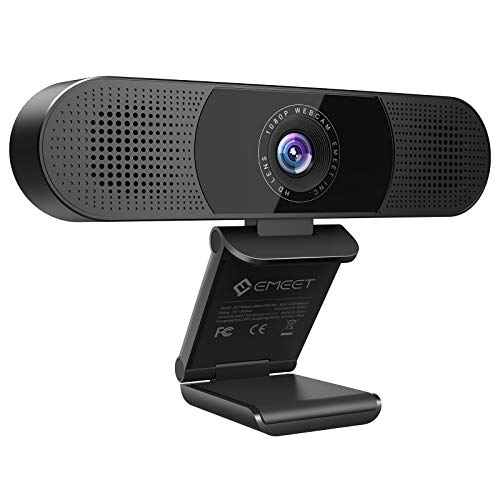
EMEET C980 Pro 1080P 3-in-1 — The reference design
The C980 Pro is the unit that defined this category for the home office, and its listing reads like the format’s constitution: a 1080p webcam with an adjustable field of view spanning 60 to 98 degrees, four noise-cancelling microphones, two speakers, auto low-light correction and a privacy cover, in one USB device for conferences and classes. That adjustable view is a quietly brilliant answer to the all-in-one’s placement problem — narrow it for a solo desk portrait, widen it when a second chair joins — without moving the unit an inch.
The audio architecture is the reason it leads this guide. Four microphones give its noise cancellation the material to separate a voice from a room, and twin speakers return colleagues’ voices with a presence no laptop achieves. In a one-person office or a two-person huddle at a desk, the C980 Pro replaces a camera, a speakerphone and the cable spaghetti between them with a single object that behaves like a meeting appliance. Buyers furnishing a desk for daily calls should begin with the C980 Pro’s listing on Amazon; it is the benchmark the rest of this category is priced and specced against.
Its ceiling is the category’s ceiling, honestly worn: the camera is a good 1080p rather than a great one, and the speakers serve speech rather than music. Buyers who need a recording-grade picture should look at its 4K sibling below; buyers who need a meeting that simply works, in both directions, have found the original article.
One ownership note from the category’s long history with this model: because it asks to be the desk’s only meeting device, it rewards being set up as infrastructure — centred, cabled once, its view adjusted deliberately for the chair it serves. Owners who treat it as a gadget, moved between rooms and laptops, get a lesser version of it; owners who install it get an appliance. The difference is not in the box, and it is the largest performance variable this guide can point at.
- Video: 1080p with an adjustable 60-to-98-degree field of view, per the listing
- Microphones: four noise-cancelling microphones
- Speakers: two built-in speakers for meeting audio
- Exposure help: auto low-light correction
- Privacy: cover included, per the listing
Strengths
- The most complete audio circuit in the guide at its level.
- Adjustable field of view adapts the unit to desk or huddle.
- One USB device ends the camera-plus-speakerphone tangle.
Trade-offs
- Camera quality is meeting-grade 1080p, not creator-grade.
- Speakers are tuned for voices, not for music playback.
- Desk placement means the camera angle sits below eye level.
Best for: home offices and small huddles wanting one device for the whole call. Not suited for: content recorders, or rooms larger than a small table.

EMEET C980 Pro 4K 3-in-1 — The 4K edition
The 4K edition of the C980 Pro keeps the family’s audio constitution — four noise-cancelling microphones, two speakers, the same adjustable 60-to-98-degree view — and upgrades the camera to 4K, with a magnetic privacy cover replacing the standard arrangement. Its listing specifies fixed focus, a choice worth pausing on: at desk distances, with a unit that sits in one place, fixed focus is a defensible engineering decision rather than a cut corner, and it removes focus hunting from calls entirely.
Who needs the 4K version of a meeting appliance? The worker whose desk doubles as a recording corner — the coach capturing sessions, the tutor building a library, the consultant whose webinars are reposted — and who refuses to maintain two setups. The 4K frame gives those recordings a shelf life and cropping room the 1080p model cannot, while the daily call experience remains the family’s proven circuit of array microphones and present speakers. If your desk earns money in both directions — live calls and recorded content — the 4K C980 Pro’s Amazon listing is the one to study.
The magnetic cover is a small delight worth naming: it attaches and removes with a satisfying certainty that loose caps never achieve, which means it gets used, which means the four microphones and the lens spend their off-hours properly blind and deaf. In a category built on always-ready convenience, a privacy ritual this easy is a genuine feature.
Think about who else benefits from this edition’s particular blend: the professional whose credibility arrives partly through recordings that outlive the call — the webinar that becomes a course, the consultation that becomes a reference video. For them the integrated audio matters twice, once live and once in the archive, because a recording with meeting-grade sound needs no rescue in editing. The 4K C980 Pro is the only pick here that treats the archive as a first-class citizen while keeping the live circuit intact.
- Video: 4K capture with an adjustable 60-to-98-degree field of view, per the listing
- Focus: fixed focus, per the listing
- Microphones: four noise-cancelling microphones
- Speakers: two built-in speakers
- Privacy: magnetic privacy cover
Strengths
- 4K recording headroom on top of the proven audio circuit.
- Magnetic cover makes the privacy habit effortless.
- Fixed focus means zero hunting during calls or recordings.
Trade-offs
- Fixed focus cannot adapt to presenters who move close or far.
- The 4K premium is wasted on call-only desks.
- Shares the format’s below-eye-level camera position.
Best for: coaches, tutors and consultants who record from the meeting desk. Not suited for: pure callers, who should save the difference and buy the 1080p edition.

TONGVEO 4K all-in-one — The wide room unit
TONGVEO’s all-in-one reads the category’s brief and answers with width. Its listing specifies a 4K conference camera with dual microphones and a speaker, a 116-degree wide angle — the widest view in this guide by a distance — and AI auto-framing, compatible with Zoom and OBS among its named platforms. That is not a solo desk specification; it is a small-room specification, aimed at the table where three or four people sit on one side and the far end needs to see all of them.
Auto-framing earns its keep in exactly that setting: as speakers shift, lean and take turns, the camera adjusts its crop to keep the active group composed, doing quietly the job a camera operator would do in a bigger production. The dual microphones and integrated speaker complete a unit that wants to live at the end of a meeting table rather than on a monitor. Small firms furnishing a first real meeting space should weigh the TONGVEO’s listing on Amazon against the video-bar money it undercuts in spirit; it is the room-scale pick of this guide.
Honesty about width: 116 degrees shows everything, including the door, the coats and the colleague who thought they were out of shot, and it makes a solo user look small and distant. This unit’s talents are collective. Buy it for a table, place it centrally, and let the framing do its work; buy it for a single desk and you have purchased a wide-angle portrait of your office with yourself in the middle distance.
Small organisations should also weigh what this unit replaces organizationally. A room equipped with a TONGVEO needs no booking of the good laptop, no hunt for the speakerphone in someone’s drawer, no ten-minute cable ceremony at the meeting’s start. The equipment is simply there, wide awake and wide-angled, and meetings begin on time — a benefit that never appears in a specification and that office managers value above every specification in this guide.
- Video: 4K capture with a 116-degree wide angle, per the listing
- Framing: AI auto-framing for group composition
- Audio: dual microphones and a built-in speaker
- Format: all-in-one USB video camera for conference calls
- Platforms named in the listing: Zoom and OBS
Strengths
- The widest view here, genuinely suited to a small meeting table.
- Auto-framing keeps a shifting group composed without an operator.
- One unit equips a room that would otherwise need a bar.
Trade-offs
- Far too wide for a solo desk portrait.
- Dual microphones against the EMEETs’ four-mic arrays.
- Shows the whole room, tidy or otherwise.
Best for: small meeting rooms, team tables and group classes. Not suited for: individual desks, where its width becomes a liability.

AIRHUG 3-in-1 1080p — Compact all-in-one
Read the AIRHUG by its listing, which describes a 1080p webcam with microphone and speaker in a 3-in-1 body with a built-in privacy cover, aimed at video conferencing, online classes and gaming live use. That is the compact expression of this guide’s idea: the full circuit — see, hear, speak — in a unit sized for one person’s desk, with the cover built in rather than clipped on as an afterthought.
Its natural owner is the worker with a small desk and a full calendar, for whom the EMEET units’ footprint or the TONGVEO’s width are simply too much device. The AIRHUG’s proposition is proportion: adequate camera, present microphone and speaker, one cable, and a lens that closes at the end of the day. Students in digs, teachers at kitchen-table desks and anyone whose meeting station must share space with the rest of life will recognise the design’s intent immediately. The AIRHUG’s Amazon listing keeps its promises modest and checkable, which suits the unit’s whole character.
The compromises are the compact format’s own: a smaller body houses a smaller speaker and a simpler microphone arrangement than the four-mic flagships, so its voice — in both directions — serves one person at one desk rather than a table of colleagues. Judged at that desk, it is complete. Judged at a table, it is out of its depth, and the guide says so plainly so the right desks find it.
There is a portability argument tucked inside its compactness. A unit this size travels between a term-time desk and a home desk, or between the kitchen table and the spare room, without becoming luggage — and for students and renters whose meeting place changes monthly, that mobility is worth more than a second speaker or a fourth microphone. The AIRHUG is the all-in-one for people whose lives are not yet bolted down, and it wears that role without apology.
- Video: 1080p capture, per the listing title
- Format: 3-in-1 camera, microphone and speaker
- Privacy: built-in privacy cover
- Connection: USB camera for conferencing and classes
- Setting: a single person’s desk
Strengths
- The full 3-in-1 circuit in the smallest footprint here.
- Built-in cover suits desks in shared living spaces.
- Proportioned honestly for one-person meetings and classes.
Trade-offs
- Speaker and microphones serve a desk, not a table.
- Less audio architecture than the four-microphone flagships.
- Compact body leaves little room for placement adjustment.
Best for: small desks, students and solo workers in shared spaces. Not suited for: group meetings or buyers wanting the strongest audio circuit.

TOALLIN 4K all-in-one — Touch-control bar
TOALLIN’s entry is the most appliance-like unit in this guide: a 4K all-in-one with microphones and speaker, AI auto-framing, 5X zoom, touch controls and WDR/HDR image handling, presented in its listing as a video bar for conference rooms, meetings, streaming and video calls. The touch controls are the tell — this device expects to be operated by whoever is standing in front of it, in a room, without a laptop settings expedition. Tap, frame, meet.
For a shared space — the small firm’s meeting corner, the classroom, the clinic’s telehealth desk — that operational simplicity is the product. Auto-framing composes the group, the zoom lets a presenter push in on a face or a detail, and the wide dynamic range handling copes with the bright-window rooms that defeat simpler cameras. Buyers equipping a space that many different people will use, none of them technicians, should read the TOALLIN’s listing on Amazon as a room appliance’s specification, because that is how it will live.
The counterweight is specialisation: a bar’s talents are room talents, and its framing, controls and presence are calibrated for a space larger than a personal desk. On a solo desk it will work, in the way a conference phone works on a bedside table — correctly and slightly absurdly. Match it to a room and it is the most self-sufficient unit here.
Telehealth and tutoring rooms make an unexpected second home for this design. A practitioner who must frame a treatment table, a teacher whose classroom corner hosts small groups — both need a device that a non-technical colleague can wake, frame and mute by touch, and both work in rooms with windows that punish simple cameras. The TOALLIN’s combination of touch operation and dynamic-range handling reads, in those settings, less like a feature list and more like a job description already filled.
- Video: 4K capture with WDR and HDR handling, per the listing
- Framing: AI auto-framing with 5X zoom
- Controls: touch control on the unit itself
- Audio: built-in microphones and speaker
- Format: video bar for meeting spaces
Strengths
- Touch controls make it operable by anyone in the room.
- Auto-framing and zoom serve presenters and groups together.
- WDR/HDR handling copes with bright, difficult rooms.
Trade-offs
- A room appliance’s scale and price of attention for a solo desk.
- Features aimed at groups idle in one-person use.
- Bar placement needs a display-side home, not a monitor clip.
Best for: shared meeting corners, classrooms and telehealth desks. Not suited for: a single personal desk, where the desk-sized picks fit better.
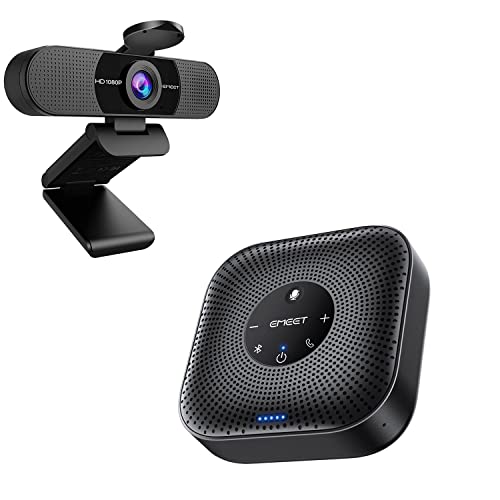
EMEET M0 Plus speakerphone + C960 bundle — The two-box answer
The other five devices integrate. This one deliberately does not: the bundle pairs EMEET’s M0 Plus USB Bluetooth speakerphone with a separate C960 webcam, and that separation is its argument. The speakerphone sits where the voices are — the middle of the desk, the centre of the small table — while the camera sits where the faces are, at eye level on the monitor. Each device gets the position its job actually wants, which no single box on Earth can arrange.
The practical dividends are real. The speakerphone’s placement shortens the distance to every talker, which is the single most effective audio upgrade available at any price; its Bluetooth option frees it from the desk entirely for ad-hoc huddles; and either half can be upgraded or replaced independently when needs change. The cost is the integration tax in reverse: two devices, two cables or a charge to remember, and a desk with one more object on it. Buyers whose meetings involve more than one talker at their end should study the bundle’s listing on Amazon carefully — it is the grown-up answer hiding inside a convenience category.
For the solo desk worker, the honest verdict is that the bundle’s flexibility buys less: one talker, one chair, and the integrated units above will serve with less furniture. The bundle shines as the table grows. Know your table, and the choice between this and the C980 Pro makes itself.
A final, unfashionable virtue: repairability by replacement. When one half of an integrated unit fails in year three, the whole circuit goes in the bin; when a bundle’s speakerphone tires, the camera keeps working while its partner is replaced, and vice versa. Households and small firms that keep equipment for a long time feel that difference in their budgets, and it is a legitimate reason — alongside placement — to choose the two boxes over the elegant one.
- Format: two-piece bundle — speakerphone plus separate webcam
- Speakerphone: M0 Plus, USB and Bluetooth, per the listing
- Camera: EMEET C960 webcam, placed independently
- Placement: audio at the table’s centre, camera at eye level
- Upgrade path: either half replaceable on its own
Strengths
- Microphone sits near the talkers, the strongest audio advantage here.
- Camera keeps the eye-level position integration sacrifices.
- Bluetooth speakerphone moonlights away from the desk.
Trade-offs
- Two devices to place, cable and keep charged or connected.
- Less tidy than any single-box pick in this guide.
- Solo users pay for flexibility they will rarely use.
Best for: small tables, hybrid desks and buyers who value placement over tidiness. Not suited for: minimalists and strictly solo desks.
What Is a Microphone Array Actually Doing While You Talk?
Plainly: comparing. A single microphone hears a mixture — your voice, the room, the speaker’s output — and can do little but pass the mixture along. An array of microphones hears the same events at slightly different times and strengths, and from those differences the processing can tell where a sound came from, favour the direction of the talker, and suppress what arrives from elsewhere. That is why the microphone counts in this guide matter as information rather than as decoration: four microphones give the separation maths more to work with than two, and the audible result is a voice that stays forward while typing, fan noise and the television in the next room recede.
The same comparison powers the noise cancellation these listings advertise. Steady, directionless sounds — the room’s hum — are the easiest to subtract; the human voice, arriving from a consistent place with a consistent character, is what remains. No array performs magic at long distances, which is why this guide keeps returning to placement, but at desk range a good array is the difference between sounding present and sounding like a phone call from 2009.
When Should You Split the Circuit Instead of Integrating It?
Three situations argue for separation, and the bundle in this guide exists for all of them. When the talkers and the camera cannot share a position — a table’s centre versus a screen’s top — separation wins on geometry alone. When one half of the circuit matters disproportionately — a voice professional who needs a serious microphone, a recorder who needs a serious camera — separation lets each half be bought at its own level. And when the setup must change often, travelling between rooms and tables, separate pieces reconfigure in ways a single body cannot.
Integration wins the opposite cases: the fixed desk, the balanced need, the household that values one cable and no decisions. Neither answer is the advanced one; they are answers to different rooms. The mistake is buying either by fashion — the tidy box for a table that needed physics, or the flexible pair for a desk that needed peace.
How Do the Six All-in-One Picks Compare Side by Side?
| Pick | Camera | Microphones | Speaker | Form | Space it suits |
|---|---|---|---|---|---|
| EMEET C980 Pro 1080P | 1080p, adjustable view | Four, noise-cancelling | Twin speakers | Integrated 3-in-1 | Solo desk, small huddle |
| EMEET C980 Pro 4K | 4K, fixed focus | Four, noise-cancelling | Twin speakers | Integrated 3-in-1 | Desk that also records |
| TONGVEO 4K | 4K, 116-degree view | Dual | Built in | Integrated, auto-framing | Small meeting table |
| AIRHUG 3-in-1 | 1080p | Built in | Built in | Compact integrated | One small desk |
| TOALLIN 4K | 4K, WDR/HDR | Built in | Built in | Video bar, touch control | Shared meeting space |
| EMEET bundle | C960 webcam | Speakerphone array | Speakerphone | Two separate pieces | Tables where voices sit centrally |
One pattern in the table deserves emphasis: microphone counts climb with room size, not with price theatre. The desk units carry the arrays their distances require, the room units carry what a table demands, and the bundle sidesteps the question by moving the microphones to the voices. Read the count as a statement about intended distance and the whole category becomes easier to shop.
The form column is the decision. Integrated units win on tidiness and lose on placement; the bundle inverts both — and the size of your table, not the size of your budget, should arbitrate between them.
Which All-in-One Fits Which Kind of Desk?
Consider the private-practice desk: one professional, client calls all day, a room that must look and sound like a consulting room. That desk belongs to the C980 Pro — 1080p for pure practice, 4K if sessions are recorded — because its audio circuit is the most trustworthy in the guide and its adjustable view frames one person with intention. Now consider the startup’s meeting corner, funded once and used by everyone: the TOALLIN or the TONGVEO, chosen by whether touch-control self-service or sheer width matters more to the team that will actually run it.
The student and the small-desk worker map to the AIRHUG without ceremony. And the hybrid household — two adults, one desk, a small table that hosts grandparents on Sundays and colleagues on Mondays — is the bundle’s home ground, where the speakerphone migrates to wherever the conversation is. As ever in this batch, the specification table finishes a decision that the shape of your days should start.
How Should You Place and Test an All-in-One Unit?
Place it centrally, at the edge of the desk nearest the talkers, with nothing between its microphones and the mouths it serves — no monitor base, no coffee mug fortifications. Angle the camera up honestly and accept the format’s geometry, or raise the unit on a small stand or shelf to buy back some eye level; several of these designs tolerate a perch better than a monitor clip ever would. Then run the echo test that defines the category: have a colleague speak for a full minute while you stay silent, and ask them the only question that matters — did you hear yourself come back?
While you are testing, check the incoming direction at low volume as carefully as the outgoing one. Colleagues mumble, connections vary, and a speaker that stays clear when turned down — in the range where a home worker actually listens, so as not to fill the house — is worth more than one that only impresses at full blast. The units in this guide were voiced for speech at domestic levels; confirm yours with the quietest talker you know before the calendar fills up.
Follow it with the distance test. Speak from your chair, from a lean-back, and from the second chair if the unit will ever serve one, recording each. The recording tells you your unit’s true working radius, which is knowledge worth having before a client does the experiment for you. Finally, close the cover or find the mute, physically, with your eyes shut — because the day you need it mid-call is not the day to learn where it is.
What Does the Camera Half Still Owe You in a 3-in-1?
It would be easy, in a category ruled by audio, to let the camera become an afterthought — and the better makers here refuse to. The camera half still owes you honest colour in bad light, which is why light correction appears across these listings; a field of view matched to the unit’s intended space, from the C980 Pro’s adjustable span to the TONGVEO’s room-wide gaze; and framing help — auto-framing in the room units — that composes a group without an operator. A 3-in-1 whose camera was specced by the audio team’s leftovers will disappoint daily, in the most visible way possible.
The fixed-focus choices in this guide deserve their defence here too. A unit that never moves, serving people at known distances, gains more from focus that cannot hunt than it loses from focus that cannot adapt — one less behaviour to surprise you mid-sentence. Judge the camera half as you would any webcam in this batch, by behaviour at its real distance, and the all-in-ones here hold their heads up.
How Does Living With a Speaker Desk Change Your Meeting Manners?
Subtly, and mostly for the better. A desk that plays colleagues’ voices into the room at natural level makes meetings feel like conversations rather than broadcasts, and people interrupt less, listen more and stop saying “you’re on mute” to a person who was simply too quiet to notice. It also makes your household part of the arrangement: a speaker desk is audible beyond the room, so the cover, the mute and the door become meeting equipment in their own right, and households develop the small courtesies — a knock, a closed door during the client hour — that shared acoustic space has always required.
New owners should set the speaker’s volume for the quietest colleague, not the loudest, and resist running it hot; a unit straining at full volume distorts in exactly the range voices live in. Set it once at a civilised level and the circuit disappears into the furniture, which is where every device in this guide is trying to get to.
What Mistakes Do All-in-One Buyers Make?
The first is shopping by camera in a category decided by audio — comparing resolutions while the echo cancellation, the microphone count and the speaker quality go unexamined, then discovering in the first real meeting which half of the product they actually bought. The second is scale error in both directions: a wide room unit dwarfing a solo desk, or a compact desk unit asked to cover a six-person table, each failing in exactly the direction its design predicted.
A related error is auditioning the unit alone. An all-in-one reveals itself only in a real call, with a real colleague whose echo report and voice are the instruments — solo test recordings flatter the microphones and say nothing about the circuit. Recruit one patient colleague for ten minutes before the unit’s first important meeting, and let their ears sign the purchase off.
Third, buyers place the unit where the desk has space rather than where the sound is — off to the side, behind the monitor — and then judge the microphones for a geometry they chose. And fourth, they forget the off-duty question: a device with an array of microphones in a home owes its household a cover, a mute or a power habit, arranged on day one rather than after the first uneasy evening. Integration concentrates everything, including the responsibilities.
How Do You Decide Between Integration and the Bundle, in Practice?
Answer three questions with your actual calendar, not your aspirations. How many people sit at your end of the call in a typical week — if the honest answer is one, integration’s tidiness wins and the C980 Pro line is your shortlist. Where does the sound need to come from — if your meetings involve a table’s worth of colleagues at your end, the bundle’s central speakerphone or a room unit answers physics that no desk box can argue with. And how fixed is the furniture — a desk that never changes rewards a single installed unit, while a life that rearranges itself rewards pieces that can follow.
Buyers who answer those three questions honestly rarely regret this category, because its products are unusually legible: each design in this guide announces its room, its scale and its trade-offs in its own listing. The regrets belong to buyers who purchased a form for its looks and discovered its geometry in the first meeting. Geometry, in this category, always collects its debt.
Final Recommendation
For the classic one-person meeting desk, the EMEET C980 Pro 1080P remains the format’s benchmark: the strongest audio circuit at its level, an adjustable view and one cable between you and a complete meeting. Take its 4K edition if the same desk records, the TONGVEO if your meetings happen around a small table, the TOALLIN if the room is shared and must run itself, and the AIRHUG if the desk is small and the cover matters. Choose the bundle when voices, not tidiness, are your problem. Buy the circuit, place it where the sound lives, and your meetings will finally be as clear coming back as they are going out.
Frequently Asked Questions
Will an all-in-one work with my existing meeting apps?
Yes — these are standard USB audio and video devices, and the listings name the major platforms among their intended habitats. The one discipline that matters is routing: set the unit as both the microphone and the speaker in each app, because splitting the circuit across devices — in through the unit, out through laptop speakers — is the classic way to defeat echo cancellation and confuse yourself.
Can an all-in-one really replace a separate speakerphone?
At desk scale, yes — the four-microphone designs here were built for exactly that job, with echo cancellation to keep the speaker and microphones coexisting in one body. At table scale the physics tilt back toward separation, which is why this guide includes a bundle with a speakerphone that sits among the talkers.
Why do these units sit below eye level, and does it matter?
Because they live on the desk or under the monitor rather than clipped on top of it. The angle is slightly low rather than wrong, and most viewers never consciously notice it; raising the unit on a small stand recovers much of the difference. It matters most to buyers who present formally, and least to everyone in ordinary internal calls.
Is 4K worth it in a webcam-and-mic combo?
Only if the desk records. For live calls, platforms compress everyone into the same range and the 1080p editions here are indistinguishable in practice. For recorded sessions, webinars and content, the 4K editions of the C980 Pro and the room units give the material a longer, croppable life.
How do I know if the microphones will reach my meeting table?
Match the unit to the table honestly: desk units are voiced for one person at arm’s length, the wide and bar units for a few people around a small table, and nothing in this category covers a boardroom. Where a listing states a pickup figure, treat it as the maker’s claim and plan inside it, not at its edge.
Does an all-in-one use one cable for everything?
The integrated units do — a single USB connection carries video in one direction and audio in both, which is the format’s tidiness in its purest form. The bundle is the exception, with a camera cable and a speakerphone connection or charge to manage. Either way, route the cable once and leave it; these devices are furniture, not peripherals to be packed away nightly.
Do I still need a headset with an all-in-one?
Not for ordinary meetings in a reasonably quiet room — carrying the whole call is the product’s purpose. Keep a headset for open-plan noise, household chaos and calls where your side must stay private; the all-in-one handles the other ninety percent of working life.
Can an all-in-one handle two people at one desk?
Yes, within its design distance — that is what the adjustable and wide fields of view in this guide are for. Widen the C980 Pro’s view or sit inside the TONGVEO’s, keep both talkers within the microphones’ comfortable range, and the unit treats the pair as its native case. Three or more regular talkers at your end argues for the room-scale picks or the bundle’s central speakerphone.
What should I check first when an all-in-one sounds bad?
Placement, before settings. Centre the unit, clear the obstacles between it and the talkers, and confirm your app is using the unit for both microphone and speaker — a call routed out through laptop speakers and in through the unit’s array defeats the echo cancellation’s design and is the commonest cause of strange sound in this category.
Related Guides
Buyers who decide the camera deserves its own device after all should compare the dedicated options in Best Conference Webcams, where the room-scale argument continues. Desk workers weighing simpler cameras against these circuits will find the contrast drawn in Best Home Office Webcams, and desktop owners starting from a bare tower should begin with Best External Webcams for Desktops.



[…] once you add a microphone and speaker to the desk, so compare these picks with our guide to Best Desktop Webcams and Mics if your meetings would benefit from an all-in-one unit. Streamers weighing the same brands for a […]