What's inside
- Where to buy
- Key Takeaways
- Quick Picks
- How did we judge OpenVPN support in these routers?
- Client or server: which OpenVPN direction does your life need?
- Why is OpenVPN slower than the connection it rides on?
- What does living behind a router tunnel feel like day to day?
- Protocols, ports and processors: the six compared
- How do you set up router-level OpenVPN without tears?
- Which OpenVPN buying mistakes disappoint owners most?
- Final Recommendation
- Frequently Asked Questions
- Related Guides
As an Amazon Associate I earn from qualifying purchases. This post may contain affiliate links at no extra cost to you.
gizmoverdict.com is reader-supported. When you buy through links on our site, we may earn an affiliate commission.
Where to buy
Running a VPN on the router instead of on each device changes what a VPN is. It stops being an app you remember to open and becomes a property of the house: every phone, television, console and visiting laptop inherits the tunnel the moment it joins the network, including the gadgets that could never run a VPN app themselves. The best routers with openvpn support that arrangement properly — as OpenVPN clients connecting your whole network to a provider or to your own server elsewhere, as OpenVPN servers letting you reach home safely from the road, or, in the wired gateways below, as permanent site-to-site links. Six routers follow, chosen because their OpenVPN support is a designed feature with the processor to sustain it, not a checkbox that collapses under real traffic.
All six picks are linked to live listings checked while this guide was assembled, so each table name opens the product’s own page — the place to confirm today’s price and the hardware revision currently shipping. A caution that shapes the whole guide: OpenVPN is computationally expensive, and its real-world speed on a router depends on the processor far more than on the radio. Every review therefore discusses throughput expectations honestly rather than quoting the Wi-Fi class as if it described the tunnel.
Most of these routers also speak WireGuard, the newer, leaner protocol, and the guide notes it where it matters — but the keyword here is OpenVPN, and OpenVPN earns its place through compatibility: corporate networks that mandate it, providers whose configurations assume it, older servers that speak nothing else, and a two-decade audit history that cautious network owners trust. Buy for the protocol your life actually requires.
Key Takeaways
- Router-level OpenVPN covers every device at once, including televisions and consoles that cannot run VPN apps.
- The GL.iNet Flint 2 is the performance anchor: dual 2.5G ports and a processor that keeps OpenVPN speeds respectable.
- Beryl AX and Slate AX carry the tunnel on the road — here they are judged as VPN clients first, travel routers second.
- TP-Link’s Omada ER707-M2 and ER605 are wired VPN gateways for permanent tunnels, failover and multi-site links.
- The Linksys WRT3200ACM is the open-source veteran: older AC3200 hardware whose firmware freedom remains its argument.
- OpenVPN throughput is a processor story; expect a fraction of your line speed unless the router’s chip is genuinely strong.
Quick Picks
| Pick | Badge | Why it earns its place |
|---|---|---|
| GL.iNet Flint 2 (GL-MT6000) | OpenVPN performance anchor | Wi-Fi 6 router with dual 2.5G ports built for fast VPN client duty at home. |
| GL.iNet Beryl AX (GL-MT3000) | Travel VPN client | Pocket Wi-Fi 6 router whose OpenVPN and WireGuard clients tunnel a whole trip’s devices. |
| GL.iNet Slate AX (GL-AXT1800) | Faster travel tunnel | Stronger pocket router for travellers whose VPN runs all day on the road. |
| TP-Link Omada ER707-M2 | Multi-gig VPN gateway | Wired router with dual 2.5G WAN ports, high network capacity and Omada SDN control. |
| TP-Link Omada ER605 | Value VPN gateway | Wired gigabit VPN router with up to three WAN ports, USB WAN and an SPI firewall. |
| Linksys WRT3200ACM | Open-source veteran | AC3200 router famous for open-source firmware and OpenVPN flexibility. |
How did we judge OpenVPN support in these routers?
Presence of the protocol was merely the entry fee. We looked for OpenVPN in both directions where a home user needs it: client mode, to send the household’s traffic out through a provider or a personal server, and server mode, to let the owner tunnel back into the home network from elsewhere. Routers that offer one direction grudgingly, buried in an advanced menu with a configuration format from another decade, scored below routers — the GL.iNet family above all — that treat VPN as a headline feature with importable profiles and per-device policy.
Processor honesty came next. OpenVPN encrypts in a way that leans hard on a single core, and the gap between a router that sustains a useful tunnel and one that wheezes at a tenth of the line speed is written in its silicon, not its marketing. Where a pick’s VPN ceiling is modest, the review says so and names the workload it still suits; where a pick is genuinely quick — Flint 2 at home, Slate AX on the road — the review explains what that buys in daily life rather than quoting a laboratory number as a promise.
Policy control separated the toys from the tools. The useful question is rarely ‘VPN or not’ but ‘which devices, which destinations, what happens if the tunnel drops’. Routers that let you route the television through the tunnel while the work laptop goes direct, or kill traffic rather than leak it when a connection fails, earned their places. GL.iNet’s policy routing and the Omada gateways’ rule sets both answer that question like adults.
We also valued the second protocol. WireGuard support — present across the GL.iNet and Omada picks — does not diminish an OpenVPN guide; it future-proofs the purchase, because many owners begin with a provider’s OpenVPN configuration and migrate later. A router fluent in both lets the household change protocols without changing hardware.
Finally, the ecosystem around the feature: configuration import that accepts standard .ovpn files without surgery, clear connection status, and firmware that is still maintained. An OpenVPN router abandoned by its maker is a security device that has stopped receiving security — the one contradiction this category cannot afford.
Client or server: which OpenVPN direction does your life need?
Client mode is the household tunnel. The router connects outward to a VPN provider — or to a server you control in another place — and every device behind it browses, streams and works through that encrypted path. The uses are privacy on an untrusted connection, a consistent geographic presence for the whole house, and protection for devices with no VPN app of their own. Smart televisions, games consoles, e-readers and guests’ phones all inherit the tunnel silently, which is why client mode on a router quietly outperforms the same subscription spread across five apps.
Server mode is the way home. The router listens for your connection from a hotel, an office or another country, and joining it places your laptop, virtually, on your own LAN: the NAS answers, the printer prints, the home cameras show, and services that only exist inside your house work as if you were on the sofa. For travellers and remote workers with a real home base, server mode is the feature that justifies OpenVPN over every simpler privacy tool.
Many households need both, at different hours — out through a provider in the evening, in from the road during the working week — and the stronger picks here run both without complaint. The gateways extend the idea further: a permanent site-to-site tunnel joins two buildings into one network, the pattern behind the ER605’s second appearance in this batch of guides, where it wears its small-business hat; here, its tunnel discipline is the story.
Decide your direction before shopping, because it changes what ‘good’ means. Client-heavy households should weight processor and provider-profile handling. Server-heavy owners should weight setup clarity, dynamic-DNS support and upload speed at home — the tunnel home can never be faster than the home line’s upload, whatever the router promises. Gateways suit permanence; travel routers suit motion. The six reviews map onto those four lives deliberately.
Why is OpenVPN slower than the connection it rides on?
Encryption is arithmetic, and arithmetic takes time. Every packet leaving through an OpenVPN tunnel is wrapped, encrypted, authenticated and unwrapped at the far end, and OpenVPN’s design performs much of that work on a single processor thread. A router with a modest chip can therefore turn a fast line into a modest tunnel — not through incompetence, but through mathematics. This is why the category’s honest reviews talk about processors before radios, and why a Wi-Fi class figure tells you almost nothing about VPN pace.
Three variables decide your real number. The router’s processor sets the ceiling. The provider’s server — its load, its distance, its own hardware — sets a second, often lower ceiling. And your line’s characteristics, particularly upload speed for server mode, set the floor of the whole arrangement. A tunnel is a chain of three performances, and it moves at the pace of the slowest performer on the night.
WireGuard exists in this guide’s margins precisely because it attacks the first variable: its leaner design uses processors far more efficiently, and on identical hardware it commonly multiplies tunnel throughput. Owners whose provider supports both protocols often run OpenVPN where compatibility demands it — a work server, a particular country’s configuration — and WireGuard for the household’s everyday tunnel. The routers below that speak both are not hedging; they are acknowledging how real networks actually evolve.
Set expectations by workload, then. Browsing, messaging, banking and ordinary streaming need a modest, steady tunnel and every pick here provides one. A household that expects to push continuous 4K streams and large downloads through OpenVPN all evening should buy processor first — Flint 2 at home, the ER707-M2 at the core — and treat every other specification as decoration until that one is satisfied.
What does living behind a router tunnel feel like day to day?
Mostly, like nothing — and that is the design goal. Devices join the network and are simply, silently routed as the policy dictates. The television wakes in the region the household chose. The laptop’s banking session leaves through the tunnel without an app being opened or a warning being acknowledged. Guests receive the same protection without receiving a lecture, and the smart plug that has never heard of encryption is encrypted anyway, because the router stands between it and the world.
The moments it becomes visible are the good ones. A café network on a trip stops being a risk calculation because the Beryl in the bag has already tunnelled it. A work server that demands OpenVPN connects from the whole desk, not just the one machine with the client installed. A household member in another country reaches the home NAS through the server you set up in spring, and the files simply appear. Router-level VPN converts a hundred small acts of vigilance into one piece of infrastructure.
There are honest frictions. Some streaming services dislike VPN endpoints and must be routed around — policy routing exists for exactly this, and the GL.iNet interface makes the exception a two-minute job rather than a household referendum. Banking sites occasionally challenge tunnelled logins. A well-arranged router policy treats these as routing entries, not as arguments against the tunnel itself, and after the first week’s adjustments the arrangement settles into invisibility again.
The discipline worth keeping is a quarterly glance: is the tunnel still the default, did a firmware update reset a policy, is the provider’s recommended configuration unchanged? Infrastructure earns trust by being checked occasionally, not by being worried about daily. Five minutes, four times a year, is the entire ongoing cost of living behind a properly arranged tunnel.

GL.iNet Flint 2 (GL-MT6000) — OpenVPN performance anchor
The Flint 2 is what happens when a travel-router company builds a home router: the VPN stops being a feature and becomes the architecture. Its listing describes a Wi-Fi 6 gaming-class router with dual 2.5G ports and 8-stream Wi-Fi at the 6 Gbps aggregate class — but the specification its owners talk about is the processor behind its VPN performance, which keeps OpenVPN client speeds in the territory where a household can genuinely live inside the tunnel rather than visiting it for banking. For the reader whose whole network should ride a provider connection permanently, this is the anchor pick.
GL.iNet’s software is the second half of the argument. OpenVPN and WireGuard clients are first-class citizens: import a provider profile, choose which devices or which destinations use the tunnel, and set the behaviour for a dropped connection, all from an interface designed by people who consider this the main event. Policy routing deserves its reputation — the television can stream through the tunnel while the game console takes the direct road for latency, and neither requires a networking qualification to arrange.
The dual 2.5G ports give the Flint a wired life beyond VPN duty: a fast plan enters without a gigabit ceiling, and a NAS or a main PC rides the second multi-gig lane. As a home’s only router it covers a typical house with its Wi-Fi 6 radios and can grow via its own ecosystem habits. Readers comparing it with a gaming router should note the difference in emphasis — the Flint’s theatre is encryption throughput and routing policy, not RGB and game boosters — and choose by which theatre their evenings actually use.
Honest limits: OpenVPN on any consumer router still trails WireGuard on the same box, and the Flint’s own WireGuard speeds will tempt owners to migrate everyday traffic across, keeping OpenVPN for the endpoints that demand it. That is a fine outcome, not a flaw. Buy the Flint 2 for the strongest OpenVPN client performance in a home router at a sane price, and accept its second protocol as the bonus it cheerfully is.
Long evenings are where the Flint separates itself from checkbox VPN routers. A tunnel that benchmarks well for a minute and throttles within the hour is a common disappointment in this category; the Flint’s hardware was specified by a company whose entire reputation rests on VPN behaviour, and it holds its pace through the family pile-up — streams, calls and downloads sharing one encrypted pipe — without the connection turning to soup. That stamina, more than any single figure, is what a permanent-tunnel household is actually purchasing.
Households with a gamer should note the Flint’s split personality trick once more, because it resolves the oldest router-VPN argument. Latency-sensitive play goes direct, everything else rides the tunnel, and nobody has to choose between privacy and ping at the household level ever again. That per-device diplomacy, configured once, is the feature owners cite when the router comes up in conversation a year later.
- Wireless: 8-stream Wi-Fi 6, 6 Gbps aggregate class
- Ports: dual 2.5G sockets for WAN and wired core duty
- VPN role: high-performance OpenVPN and WireGuard client
- Policy tools: per-device and per-destination routing rules
- Software: GL.iNet interface over OpenWrt foundations
- Audience: whole-home permanent-tunnel households
Strengths
- OpenVPN client pace that a whole household can live behind.
- Policy routing splits tunnelled and direct devices gracefully.
- Dual 2.5G ports keep the wired core as fast as the tunnel allows.
Trade-offs
- WireGuard on the same box still outruns its OpenVPN mode.
- Utilitarian design beside gaming-router showpieces.
- Deep options reward an owner willing to read a settings page.
Best for: a household that wants its entire home network inside an OpenVPN tunnel, permanently.
Not suited for: a plug-and-forget home that will never open the VPN settings after setup day.

GL.iNet Beryl AX (GL-MT3000) — Travel VPN client
In this guide the Beryl AX is not wearing its RV hat. Here it is the pocket OpenVPN client — the device that turns a hotel, airport-lounge or café network into a tunnelled private space for every gadget in your bag. Its listing names the essentials: Wi-Fi 6 travel router, 2.5G WAN, VPN support and OpenWrt underneath. The VPN is the headline act in this context: connect the Beryl to the venue’s network, raise its OpenVPN client to your provider or your home server, and your laptop, phone and tablet all inherit the encryption without each negotiating the venue’s captive portal and exposure separately.
The security geometry is the argument. On an open venue network, an untunnelled laptop sits among strangers; behind the Beryl, it sits behind NAT — and with the OpenVPN client running, even the venue’s operator sees only an encrypted stream to your endpoint. For the traveller who banks, works and files from other people’s Wi-Fi, that is the difference between using public networks and merely enduring them. Kill-switch behaviour and per-device policy, GL.iNet staples, keep the arrangement honest when a tunnel drops mid-session.
Throughput expectations belong to the road: OpenVPN on a pocket processor will not trouble a fast fibre line, but hotel and café feeds rarely offer one to trouble. The Beryl’s tunnel comfortably covers the work of travel — documents, calls, browsing, streaming at venue speeds — and its WireGuard client stands ready for providers and home servers that speak it, where the same small chip suddenly feels a class faster. Owners commonly run OpenVPN to the office server that mandates it and WireGuard to their personal provider; the Beryl holds both profiles without fuss.
Server mode completes the traveller’s symmetry trick: left at home, a Beryl can serve as the household’s OpenVPN doorway; carried, it is the client that knocks. Many owners in this ecosystem eventually own two GL.iNet boxes playing those two roles to each other. As a single purchase for the VPN-minded traveller, nothing in this guide packs so much protocol into so little luggage.
Power and size repeat their travel virtues in this context — USB-C from any charger or power bank, a body that vanishes into a sleeve pocket — but judge it here on its tunnelling manners: profiles import from standard files, the connection status is legible at a glance, and reconnecting at the next venue is a two-tap ritual. That reliability, repeated across a hundred hotel nights, is what its owners are actually buying.
There is a second Beryl in many owners’ futures: the one left plugged in at home as the server while its twin travels as the client. The pair cost less together than many single flagship routers, and the arrangement gives the traveller a tunnel home that no subscription provides — into their own network, under their own keys. In this guide’s economy of recommendations, that two-box pattern is the connoisseur’s move.
- Wireless: Wi-Fi 6 dual-band travel router, 574 Mbps on 2.4 GHz
- VPN role: OpenVPN and WireGuard client for venue networks
- Server option: can also serve as a home OpenVPN doorway
- Wired: 2.5G WAN port for wired venue or home feeds
- Software: OpenWrt under GL.iNet’s traveller interface
- Power: USB-C, pocketable, power-bank friendly
Strengths
- Whole-bag tunnelling from one pocket-sized connection.
- Policy and kill-switch tools keep public-network use honest.
- Client and server roles in one inexpensive device.
Trade-offs
- OpenVPN pace is pocket-class, not home-anchor class.
- Venue feeds, not the router, set most travel ceilings.
- Few wired ports for anything beyond a laptop.
Best for: a frequent traveller who treats every hotel and café network as untrusted by default.
Not suited for: a home office expecting one pocket router to tunnel a whole family’s evening at full line speed.
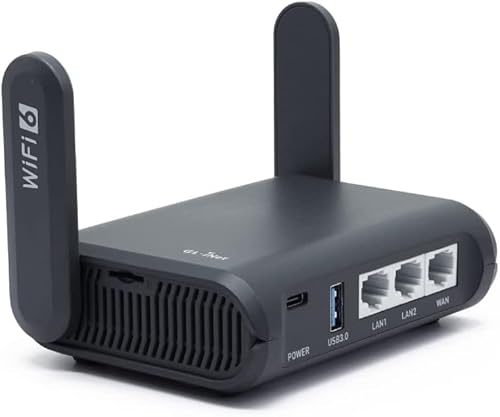
GL.iNet Slate AX (GL-AXT1800) — Faster travel tunnel
Where the Beryl is the tunnel for a traveller, the Slate AX is the tunnel for a traveller whose workday comes along. Judged here purely as a VPN client, its stronger processor and AX1800-class Wi-Fi 6 buy the two things OpenVPN on the road consumes: encryption headroom, so the tunnel’s pace is set by the venue rather than the router, and composure when a laptop, a phone and a tablet push through the tunnel together during a working morning in a rented apartment.
The distinction shows on video calls — the workload least forgiving of a wheezing tunnel. An OpenVPN connection carrying a day of calls, screen shares and file syncs asks the little router to encrypt continuously for hours, and the Slate’s extra muscle keeps that stream smooth where a lesser travel box begins to ration. Travellers whose income depends on those calls should read the price difference against the Beryl as insurance rather than indulgence.
Its fold-out antennas also serve the VPN use case indirectly: a stronger, steadier link to the venue’s access point means the tunnel retransmits less, and a tunnel that retransmits less feels faster than its benchmark. GL.iNet’s policy tools carry over — split the work laptop into the tunnel and the streaming stick out of it, or run everything through when the venue smells wrong — with the same interface habits as its sibling, so a household fluent in one is fluent in both.
WireGuard, again, is the shadow headline: on the Slate it flies, and many owners will run their personal tunnelling there while reserving OpenVPN for the employer’s mandated endpoint. The router’s job is to make that mixed life simple, and it does. Choose the Slate over the Beryl when the tunnel is a workplace rather than a precaution; choose the Beryl when it is a precaution rather than a workplace. That single sentence is the whole comparison, and both routers would agree with it.
Size and appetite are the familiar costs — a larger pouch footprint and a heartier power draw than the Beryl — and on the road both are paid gladly by the working traveller and resented by the minimalist. VPN performance, like insurance, is a purchase you evaluate on the bad day, and the Slate is priced for people whose bad days are expensive.
Renters of longer-stay apartments are a growing Slate constituency: a month in a Lisbon flat or a Denver condo, on Wi-Fi of unknown parentage, with a work laptop that must reach an OpenVPN-only office. The Slate turns that borrowed network into a tunnelled office branch in an evening, then packs away without a trace when the stay ends. Infrastructure that leaves no mark on the premises suits the way professional life is increasingly lived.
- Wireless: Wi-Fi 6 dual-band up to AX1800 class
- VPN role: OpenVPN client with headroom for all-day work
- Processor: stronger chip for sustained encrypted loads
- Antennas: fold-out pair for steadier venue links
- Policy tools: per-device tunnel decisions, GL.iNet style
- Software: OpenWrt base, WireGuard alongside OpenVPN
Strengths
- All-day OpenVPN work stays smooth under real call loads.
- Stronger venue links mean fewer tunnel retransmissions.
- Same trusted interface as the Beryl, deeper performance.
Trade-offs
- Costs and consumes more than its pocket sibling.
- OpenVPN still trails its own WireGuard mode for pace.
- Overqualified for travellers who tunnel only for banking.
Best for: a remote worker living in other people’s networks with an OpenVPN endpoint to reach daily.
Not suited for: an occasional holidaymaker who joins a café network twice a year.

TP-Link Omada ER707-M2 — Multi-gig VPN gateway
The ER707-M2 is OpenVPN grown into infrastructure. It is a wired multi-gigabit VPN router — the listing specifies dual 2.5G WAN ports, high network capacity, an SPI firewall and Omada SDN management — built to terminate tunnels for a small office, a multi-site household or a home whose networking has graduated to a rack shelf. There are no Wi-Fi radios aboard; this box’s craft is borders: between sites, between the office and the owner’s home, between a business and the internet it cannot afford to lose.
Dual 2.5G WAN is the specification that separates it from its ER605 sibling below. Faster lines can enter at full pace, two lines can be balanced or held in failover, and the VPN tunnels riding those lines inherit the headroom. A household joining two properties with a permanent OpenVPN link — files, cameras and phones behaving as one estate — will feel that headroom every time a backup crosses the tunnel at night.
Omada SDN is the management story: one console for this gateway, the access points that give the premises Wi-Fi, and the switches between them, with VPN policies drawn as rules rather than typed as prayers. For the technically minded owner, that centralisation turns a multi-box network into a single artefact that can be understood, backed up and restored. It is the professional pattern, priced for a serious home or a small firm.
Buy it with the full architecture in mind: access points are a separate purchase, setup assumes an owner who enjoys a console, and its talents idle in a home that wanted a single box with Wi-Fi. Deployed as intended — at the centre of a wired, tunnelled, possibly multi-site network — the ER707-M2 is the most capable OpenVPN citizen in this guide, and the one whose limitations are measured in years rather than features.
Its place beside the ER605 is a study in scaling: same philosophy, same console, more WAN speed and more capacity. Owners who begin with the smaller gateway and grow into this one keep their habits and their access points, which is precisely how TP-Link designed the Omada ladder to be climbed.
The ER707-M2 also flatters the household that has quietly become two households — the main home and the annex, the office above the garage, the adult child’s flat sharing the family’s NAS and camera system. A permanent OpenVPN link makes those fragments one estate with one set of rules, and the multi-gig WAN design means the link will survive the next line upgrade at either end without the gateway becoming the story.
- Role: wired multi-gigabit VPN router, no radios aboard
- WAN design: dual 2.5G WAN ports with failover options
- Capacity: high network capacity per the listing
- Firewall: SPI firewall within Omada SDN management
- Tunnels: OpenVPN for site and remote-client links
- Partners: Omada access points provide the Wi-Fi
Strengths
- Multi-gig WAN headroom for serious permanent tunnels.
- Omada console unifies gateway, switches and access points.
- Failover design treats connectivity as business-critical.
Trade-offs
- No Wi-Fi included — access points cost extra.
- Console-first setup suits the technically committed.
- Capacity is wasted on a single-room, single-line home.
Best for: a multi-site household or small office running permanent OpenVPN links over fast lines.
Not suited for: a flat dweller shopping for one box that does Wi-Fi and VPN together.

TP-Link Omada ER605 — Value VPN gateway
The ER605 appears in this batch’s business guide as an office core; here it wears its original hat, the one printed in its listing: wired gigabit VPN router. Up to three WAN Ethernet ports plus a USB WAN option, an SPI firewall and Omada management make it the least expensive serious OpenVPN gateway in this guide — the box that joins a home to an office, a shop to a second shop, or an owner to their own network, permanently and without drama.
As a VPN device its virtues are permanence and price. Site-to-site OpenVPN tunnels are set-and-forget infrastructure: configure once, and two buildings share files, printers and cameras as if geography had been negotiated away. Remote-client tunnels give the travelling owner a road home. The ER605 terminates both patterns on dedicated hardware that does nothing else — no radios to reboot, no gaming features to update — and that monastic focus is why these gateways run for years untouched in cupboards and racks.
Multi-WAN failover is the second act: a main line, a backup line or a USB cellular modem, and the tunnels re-establish over whichever path lives. For a small business whose card machines ride the VPN to a central system, that failover is not a feature but a revenue policy. The gigabit ceiling on its ports is the honest limit — fast multi-gig lines belong to its ER707-M2 sibling — and within gigabit country the ER605’s value is difficult to argue with.
Remember the architecture before ordering: no Wi-Fi lives in this box. Pair it with access points — Omada’s own for one-console management — or place it ahead of an existing router switched to access-point duty. Owners who already own good Wi-Fi and lack only the tunnelled core will find the ER605 the cheapest correct answer in this guide; owners starting from an empty room should price the whole system, not the gateway alone.
Longevity closes its case. VPN gateways are infrastructure, bought on a decade’s horizon, and the ER605’s enormous installed base means its behaviours, quirks and Omada updates are documented beyond any rival at its price. A tunnel you depend on should be boring, and boring is this box’s native language.
Value hunters should run the ER605’s arithmetic across a decade, because that is its natural unit. No subscriptions hide in its console, its job does not change as Wi-Fi standards churn around it, and the access points it feeds can be replaced generation by generation while the tunnel core abides. Few networking purchases depreciate this slowly, and none in this guide asks less of the future.
- Role: wired gigabit VPN router — tunnels are the product
- WAN design: up to three WAN Ethernet ports plus USB WAN
- Firewall: SPI firewall, Omada SDN management
- Tunnel types: site-to-site and remote-client OpenVPN
- Ceiling: gigabit ports, honestly stated
- Partners: any access points; Omada for one console
Strengths
- Permanent site-to-site tunnels at the gentlest price here.
- Multi-WAN failover keeps tunnels alive through outages.
- Dedicated hardware runs untouched for years.
Trade-offs
- Radios not included — budget for access points alongside it.
- Gigabit ports cap faster lines and tunnel aggregates.
- Setup vocabulary assumes a networking-comfortable owner.
Best for: joining two premises, or giving a home a permanent VPN doorway, on a strict budget.
Not suited for: a beginner expecting to unbox Wi-Fi and a tunnel in a single device.

Linksys WRT3200ACM — Open-source veteran
The WRT3200ACM is the elder of this guide, and its review must be honest in both directions. Its hardware is AC3200-class Wi-Fi from an earlier generation — dual-band, beamforming, tri-stream wireless in the listing’s words — and beside the Flint 2 it will lose every modern comparison of speed, efficiency and polish. Its argument was never those comparisons. This is the router that became famous as open-source-ready hardware: a platform for OpenWrt and community firmware, where OpenVPN can be configured with a freedom no vendor interface permits, by owners who want their tunnel built from parts they can inspect.
That freedom is a real feature with a real audience. An owner who needs an unusual OpenVPN arrangement — custom routes, particular cipher policies, scripts that react to tunnel state, a configuration a work server demands and a consumer UI refuses — can build it here, on firmware the community maintains and documents exhaustively. The WRT’s blue silhouette has sat under a decade of such experiments, and nearly every question a new owner will ask has a forum answer written by someone who asked it in 2018.
The costs of the veteran’s path are equally real. Vendor firmware support has long since wound down in spirit; the open-source route is the living one, which means the owner is the maintenance department. Wi-Fi performance is previous-generation, VPN throughput is bounded by its era’s processor, and buyers who simply want a tunnel that works should buy the Flint 2 and spend their evenings elsewhere. Freedom and convenience are both virtues; they are rarely the same router.
Choose the WRT3200ACM deliberately, then, as a platform for learning and control — the networking equivalent of a car with an accessible engine. For the reader who has read this far and felt recognition rather than alarm, it remains a legitimate, characterful way to run OpenVPN exactly as specified and not one toggle more. Everyone else has five newer answers above, and this guide recommends them without a flicker of doubt.
Second-hand caution applies: these units have lived long lives, and a used example’s condition varies. Buy from a listing you trust, plan the open-source firmware installation as the first evening’s project, and the veteran will repay the care with a configurability nothing else in this guide attempts.
There is a teaching argument for the WRT that deserves its sentence: an owner who has built an OpenVPN configuration by hand understands their network in a way no app can confer, and that understanding transfers to every router they will ever own afterwards. As tuition, the veteran’s price is fair. As mere transport for a tunnel, its newer rivals are better value — and the guide’s honesty requires both sentences to stand.
- Wireless: AC3200 dual-band, tri-stream, previous generation
- Claim to fame: open-source firmware readiness
- VPN role: OpenVPN with full manual configuration freedom
- Beamforming: named in the listing for client steering
- Maintenance: community firmware is the living path
- Audience: tinkerers who inspect their own tunnels
Strengths
- Configuration freedom no vendor interface matches.
- A decade of community documentation for every question.
- Honest, durable hardware with an enthusiast following.
Trade-offs
- Previous-generation Wi-Fi and VPN throughput.
- Owner becomes the firmware maintenance department.
- Vendor-era polish has been overtaken by every rival here.
Best for: an enthusiast who wants OpenVPN configured to the last route, on open firmware.
Not suited for: a household that wants the tunnel to simply work while nobody thinks about it.
Protocols, ports and processors: the six compared
| Pick | Form | OpenVPN role | Also speaks | Buy it for |
|---|---|---|---|---|
| Flint 2 | Home Wi-Fi router | Fast client, server | WireGuard | Whole-home permanent tunnel |
| Beryl AX | Pocket travel router | Client on venue Wi-Fi | WireGuard | Tunnelling a trip’s devices |
| Slate AX | Pocket travel router | Client under work loads | WireGuard | All-day remote work abroad |
| ER707-M2 | Wired gateway | Site and client tunnels | Omada rule sets | Multi-gig permanent links |
| ER605 | Wired gateway | Site-to-site value | Multi-WAN failover | Two premises on a budget |
| WRT3200ACM | Home Wi-Fi router | Manual, open firmware | Community builds | Total configuration control |
Notice that ‘fastest Wi-Fi’ appears nowhere in that table’s logic. In OpenVPN shopping the honest columns are role, processor and protocol company — the radio is the part of the router the tunnel barely consults. Buyers who internalise that one inversion will choose correctly from this page almost regardless of model.
How do you set up router-level OpenVPN without tears?
Start by choosing the endpoint and gathering its gift: a configuration file or a set of credentials from your provider, or the server details of your own machine elsewhere. Every pick here imports standard OpenVPN profiles, and the five minutes spent downloading the right file — TCP or UDP variant, the region you actually want — before touching the router saves the traditional hour of blaming the hardware for a paperwork error.
On the router, find the VPN client page — on GL.iNet hardware it is a headline menu, on the Omada gateways a policy section, on the WRT a service you may be installing yourself — import the profile, enter credentials, and connect. Then verify like a sceptic: check the router’s status page shows the tunnel up, and confirm from a connected device that its apparent location and DNS match the tunnel’s promises. A VPN that ‘connected’ while leaking DNS is a decoration, and the check takes one minute.
Policy comes next, and it is where router-level VPN becomes genuinely yours. Decide which devices ride the tunnel always, which never, and which only for particular destinations. Set the dropped-tunnel behaviour explicitly — block traffic or fall back to direct — according to whether your priority is privacy or continuity. Write the choice down; future-you, debugging at midnight, will be grateful.
For server mode, the additional steps are an address and a door: a dynamic-DNS name so the road can find your house when its IP changes, and the router’s own guidance for certificates and client files, which the GL.iNet and Omada interfaces generate for you. Export the client profile to the laptop that travels, test it from a phone hotspot before the trip, and the first hotel evening becomes a demonstration instead of an experiment.
Security hygiene around a VPN router deserves the same seriousness as the tunnel itself. The router that encrypts the household is also the household’s most valuable target, so its admin password must be unique, its firmware current, and its remote administration — where a model offers it — protected as carefully as the tunnel it manages. Several picks here receive their makers’ updates on a business-like cadence; enable them automatically and let the machine that guards the house be guarded by its maker’s attention in return.
Credentials deserve a household policy too. Provider passwords and server keys belong in the same password manager as the banking logins, and the exported client profiles for your OpenVPN server are, in effect, house keys — a laptop carrying one deserves the same care as a laptop carrying the banking app. None of this is advanced practice; it is the ordinary respect owed to a device that holds the keys to the whole network’s privacy.
Logs, finally, are the tunnel’s diary, and a monthly glance at them teaches more than any benchmark: which devices chatter at 3 a.m., when the tunnel last dropped and recovered, whether the policy you wrote in spring is the policy the router is enforcing in autumn. The owners who keep that small habit are the ones whose VPN setups are still correct in year three, rather than merely still running.
Which OpenVPN buying mistakes disappoint owners most?
Buying the radio instead of the processor leads the list. A flagship Wi-Fi class wrapped around a modest chip produces a tunnel that crawls, and the owner blames the provider, the protocol and the weather before suspecting the box. In this category the CPU is the product; the reviews above repeat it because the market’s packaging works so hard to hide it.
Expecting the tunnel to equal the line is the second disappointment. Even excellent hardware gives back a fraction of raw speed through OpenVPN, and a household that planned to run everything through it at full fibre pace should either buy the strongest processors here or split traffic with policy routing — a feature several picks provide precisely for that reconciliation.
Forgetting the server direction is the third. Owners buy a client-only arrangement, then discover on a trip that reaching home was the feature they actually wanted. The GL.iNet pair and the gateways cover both directions; confirm your pick does before the trip, not from the hotel.
The last mistake is neglecting the kill-switch question. When a tunnel drops — and tunnels drop — a router either blocks the affected traffic or quietly routes it in the clear. Neither answer is wrong for every household, but the choice should be made in a settings page on a calm afternoon, not discovered in a log after a month of evenings.
One scenario gathers the whole guide into a single household, and it is more common than the industry admits: the couple whose work is remote, whose parents live abroad, whose second home is a touring van, and whose television taste is international. Their network needs a client tunnel for the evenings, a server for the road, a gateway’s permanence for the van’s base and a travel router for the venues in between. No single box in this guide is that whole answer, and the honest architecture — Flint at home, Beryl or Slate in the bag, an Omada gateway if a second property joins — is assembled from these six picks like instruments in one band.
That composability is the quiet theme of the category. OpenVPN is a standard, not a brand, so devices from different makers and different decades interoperate through it: the veteran WRT can still knock on a modern gateway’s door. Buying into a protocol rather than a silo is the deepest future-proofing available in networking, and it is available here at every price on the page.
Final Recommendation
For the household that wants to live inside a tunnel, the Flint 2 is the answer this guide reaches for first: the strongest OpenVPN client performance in a home router here, policy routing with manners, and WireGuard waiting for the day the household’s endpoints allow it. Travellers should take the Beryl AX for precaution-grade tunnelling or the Slate AX when the tunnel is the workplace. Permanent links between buildings belong to the Omada pair — ER707-M2 where lines are fast, ER605 where budgets are real — and the WRT3200ACM remains the honourable choice for the owner who wants to build the tunnel by hand and know every bolt in it.
Whichever you choose, the purchase is the same idea in six costumes: privacy as a property of the network rather than a habit of its users. Set it up once, verify it honestly, and let every device you own — including the ones that could never ask for protection themselves — live behind it.
Give the finished setup the traveller’s test before trusting it: join a network that is not yours — a phone hotspot is the honest stand-in — and confirm the tunnel home answers, the client tunnel reports the right apparent location, and a deliberately dropped connection behaves the way your policy said it would. Ten minutes of rehearsal at home converts the first real hotel evening from an experiment into a routine, and routine, repeated without incident, is the entire product this category sells.
And keep the provider’s alternative configuration — the TCP variant, the second region — saved beside the primary one. Tunnels fail in interesting places: a venue that blocks UDP, a provider region under maintenance, a work server that changed its mind. The owner with a second profile in the drawer fixes the evening in two minutes; the owner without one spends it in a support queue, learning why this paragraph exists.
With those two rehearsals done — the foreign-network test and the spare profile filed away — the system stops being a project and becomes part of the house, like the lock on the door: noticed rarely, valued constantly, trusted quietly by every person and gadget behind it, and never again a topic of household debate on any ordinary evening of the year.
That is also the moment to write the setup down — endpoint, policy choices, where the spare profiles live — in the household’s records. A tunnel arranged by one person and understood by one person is a single point of failure wearing a privacy costume; a page of notes makes it a household asset that survives holidays, absences and the arranger’s own forgetfulness.
File that page beside the provider paperwork and the router’s own credentials, and the network’s memory no longer depends on any single person’s recollection — the final, unglamorous step that turns a clever weekend setup into a durable household institution that quietly outlasts the very hardware it first ran on, and the next set after that.
Frequently Asked Questions
Will a router VPN slow down my whole network?
Only the traffic you send through the tunnel, and by an amount set by the router’s processor and the provider’s server. Policy routing — strong on the GL.iNet picks and the Omada gateways — lets latency-sensitive or local traffic bypass the tunnel entirely, so the household pays the encryption cost only where it buys something.
Can I use my existing VPN subscription with these routers?
Almost certainly yes. Providers supply OpenVPN configuration files precisely for router clients, and every pick here imports them. Check your provider’s router guidance for the recommended region and protocol variant, and keep your account credentials at hand during setup.
Is OpenVPN or WireGuard better on a router?
WireGuard is faster on identical hardware; OpenVPN is compatible with more endpoints, more corporate servers and more provider configurations, and carries the longer audit history. Most owners end up using both for different jobs — which is why dual-protocol routers dominate this guide’s recommendations.
Can a router run a VPN server and client at the same time?
The stronger picks here can — the GL.iNet pair and the Omada gateways handle outbound client tunnels and inbound server duties concurrently, within their processors’ budgets. It is a common arrangement for owners who browse through a provider while keeping a private road home open.
Do I need a static IP address to run an OpenVPN server?
No. A dynamic-DNS service gives your home a stable name that follows its changing address, and the router platforms here either include DDNS support or document it. What you do need is an internet connection that allows inbound connections — a detail worth confirming with your provider before server plans harden.
Can I watch my home cameras through an OpenVPN server?
Yes — that is one of server mode’s most loved uses. Tunnel into the home network and the cameras, NAS and other local-only services answer as if you were on the sofa, without exposing them to the open internet through port forwarding. For households uneasy about camera security, the VPN road home is the arrangement professionals recommend.
Related Guides
VPN decisions sit inside a wider network picture, and these guides cover the neighbouring ground. best routers for rvs for tunnelling from the road best home small business routers with gateways and separation best asus gaming routers with VPN-compatible models



[…] the premises network is settled, these are the guides owners usually need next. best routers with openvpn for secure remote access best mesh routers wifi 6 for the home side of the premises best asus gaming routers for after-hours […]