What's inside
- Key Takeaways
- Quick Picks
- How Did We Choose the Best 250 Dollar Laptops?
- Which of the Six Deserves Your Money?
- What Does the Extra Fifty Actually Buy?
- How Long Will the Battery Realistically Last, and What Else Ages?
- Which Pick Suits Which Buyer? A Walk Through Five Households
- What Are the Honest Limits? Gaming, Creative Work and Heavy Software
- What Should You Check During the First Week?
- Why Do Most Buyers at This Price Still Choose Windows Over ChromeOS?
- What About Keyboards, Ports and the Details You Touch Daily?
- How Do the Six Compare Side by Side?
- How Should You Handle a 128GB Drive?
- What Mistakes Do Buyers Make at This Level?
- Still Torn? A Ten-Minute Decision Walkthrough
- Final Recommendation
- Frequently Asked Questions
- Related Guides
As an Amazon Associate I earn from qualifying purchases. This post may contain affiliate links at no extra cost to you.
gizmoverdict.com is reader-supported. When you buy through links on our site, we may earn an affiliate commission.
Where to buy: The six laptops below are linked to their Amazon listings, and those listings are where the final word lives: confirm the screen resolution, memory and storage lines on the listing itself before paying, because sellers at this level often run several configurations through near-identical product pages.
The best 250 dollar laptops occupy the most contested ground in the entire laptop market. Fifty dollars above the absolute floor does not sound like much, yet it is exactly the step where the worst compromises start to fall away: processors gain real cores, storage stops being a rounding error, and at least some models manage a proper Full HD screen. It is also the step where the traps get subtler. At two hundred dollars everything is compromised and you know it. At two hundred and fifty, a laptop can look complete in a thumbnail while hiding an HD panel or a 4GB memory ceiling behind a handsome product photo.
So this guide is organised around a single discipline: naming, for every pick, the one compromise it still carries. Every machine here has one. The strongest specification on the page pays for its memory and storage with a colour and a configuration story you need to read carefully. The prettiest machine has the least memory. One pick trades screen resolution for touch, openly, and whether that trade suits you depends entirely on whose hands will use it. A quarter-thousand dollars buys a genuinely usable Windows laptop in 2026, but only for buyers who read the fine lines instead of the headline.
Windows does not hold this shelf alone, either. Chromebooks compete hard at exactly this money, offering simplicity and long battery life in exchange for a different operating system and fixed hardware. The six picks here are all Windows machines, because the shoppers who type this search usually have a Windows application, a school requirement or a work portal in mind, but the guide returns to the Chromebook question in the questions section, because for some households it is honestly the better answer. Nothing on this page should be bought on autopilot, and the sections that follow are written so that each machine’s bargain is struck in daylight.
Key Takeaways
- The HP in Rose Gold with 16GB of memory and a 512GB SSD is the specification outlier: nothing else here fits that much of either, and its Full HD panel means the spec sheet has no weak line.
- Five of the six picks have Full HD screens and one, the HP touchscreen, is HD only; that single difference is the most important line in the whole comparison.
- The two ASUS Vivobook Go models look alike but are not: one runs an Intel N150 with 4GB of memory, the other a Ryzen 3 with 8GB, and they suit different people.
- 128GB of storage appears on four of the six picks, so a storage plan, cloud, card or eventual drive swap, is part of buying at this level, not an afterthought.
- Several picks ship with Windows in S Mode; leaving it is free and takes minutes, but it is a first-day task you should know about before the laptop is a gift.
Quick Picks
| Pick | Badge | Why it earns its place |
|---|---|---|
| HP 15.6 FHD, Ryzen 3, 16GB, 512GB, Rose Gold | Specification leader | Double the memory and storage of the typical pick here, with a Full HD screen and fast charging. |
| ASUS Vivobook Go 15 (2023), Ryzen 5 7520U | Balanced all-rounder | A Ryzen 5, 8GB of memory and a 512GB SSD behind a Full HD panel, the calmest spec here. |
| Acer Aspire Go 15, Ryzen 3 7320U | Modern and efficient | Full HD IPS display and a frugal Ryzen 3 in Acer’s current slim design, with 128GB storage. |
| ASUS Vivobook Go 15, Ryzen 3, 8GB | Slim with real memory | The Vivobook Go’s tidy shell with a Ryzen 3 and 8GB fitted, a step up from its Intel sibling. |
| HP 15.6 HD Touch, Ryzen 3 7320U | Touch at the price | The only touchscreen in the six, bought knowingly at HD resolution and 128GB of storage. |
| ASUS Vivobook Go 15, Intel N150 | Quiet minimalism | Full HD screen and silent-running Intel N150, with 4GB of memory as its defining limit. |
How Did We Choose the Best 250 Dollar Laptops?
We started from verified listings and filtered for machines a person could defend buying with their own money. That meant a real SSD rather than eMMC-only storage wherever possible, a processor from a current or recent generation, and a specification with no single line so weak it poisoned the rest. A laptop with a fine chip and 4GB of memory can still appear here, and one does, but only when its price position and screen make the trade legible, and only with the limit stated in plain language next to its name.
Screen resolution got its own pass, because it is the specification this shelf most often fudges. Marketing language at this level uses “HD” as a compliment, and in the technical sense it is one, but on a 15.6-inch panel the 1366 by 768 grid shows its spacing in every paragraph of text. We recorded the true resolution of every pick from its listing and we print it in every spec box in this guide, so the one HD machine here is identified as HD in its heading summary, its spec list, the comparison table and this paragraph. Nobody finishes this article believing all six are Full HD, because five are and one is not.
The final filter was configuration honesty. Budget laptops are sold in families, and a listing’s photographs may show a sibling with a better screen or more ports. Where a pick exists in several configurations, we describe the one the link actually sells. Where a colour is part of the product, we name it, because a Rose Gold laptop is a deliberate purchase, not a surprise anyone should receive by post.
We also kept two near neighbours in view while writing, because shoppers will meet them in the same search results and deserve a map. Acer’s Aspire Lite in its N350 configuration competes on this shelf with storage capped at a 128GB SSD, which makes it a machine to judge purely on screen and build. HP’s Essential 15.6 in Rose Gold shares the linked HP’s colour story but not necessarily its configuration, so its memory and storage lines must be read on their own terms before any comparison is drawn.
Which of the Six Deserves Your Money?

HP 15.6″ FHD, Ryzen 3, 16GB RAM, 512GB SSD, Rose Gold — Specification leader
Read this specification against the rest of the page and it looks like a misprint. Sixteen gigabytes of memory is what we tell buyers to seek in laptops costing twice as much, and 512GB of storage ends the capacity anxiety that haunts this entire category. The Ryzen 3 behind it is an entry processor, but entry processors are transformed by memory headroom: with 16GB fitted, the chip spends its time working instead of waiting for the drive to shuffle data in and out, and the machine feels a class faster than its processor badge suggests. Add a Full HD anti-glare panel and fast charging, and there is no line in this spec box that needs an apology.
The considerations are about identity rather than capability. Rose Gold is a colour you choose on purpose; it will be noticed in a meeting and adored or regretted accordingly. Configurations of this HP family are sold through many listings with subtly different memory and storage pairings, so the discipline of this guide applies with full force: open the listing, read the specification tab, and confirm the 16GB and 512GB figures are attached to the machine in your basket, not to a sibling variant photographed beside it.
For a student who will keep one laptop through a whole course, or a remote worker whose employer expects them on calls all day with a dozen applications open, this is the pick that removes the most future problems per dollar. It is the only machine here we would describe as generously specified, and in a category defined by scarcity, generosity is the whole story.
Fast charging deserves its sentence too, because in a household machine the pattern of use is bursty: flat before a call, plugged in during breakfast, carried to the sofa. A laptop that recovers a useful charge quickly fits that rhythm better than one with a marginally larger battery and slow charging. Between the memory, the storage, the panel and the charging, this HP is the pick whose compromises you have to go looking for, and what you find when you look is a colour and a configuration check, both survivable.
- Display: 15.6-inch Full HD, anti-glare, micro-edge
- Processor: AMD Ryzen 3
- Memory: 16GB RAM
- Storage: 512GB SSD
- Extras: fast charge, webcam, Rose Gold finish
Strengths
- 16GB of memory, double most of this shelf, fitted as standard
- 512GB SSD removes storage from the worry list entirely
- Full HD anti-glare screen keeps text crisp and reflections down
Trade-offs
- Rose Gold finish is a strong aesthetic commitment
- Sibling configurations crowd the listings, so verify the exact spec
- The Ryzen 3 remains an entry chip beneath the generous memory
Best for: students and remote workers who multitask heavily and want one purchase to settle the question for years. Not suited for: anyone who needs a sober black laptop for conservative workplaces, or who will not check the configuration before ordering.

ASUS Vivobook Go 15 (2023), Ryzen 5 7520U, 512GB — Balanced all-rounder
If the HP above is the extrovert of this guide, the 2023 Vivobook Go 15 is its calm counterpart. A Ryzen 5 7520U brings four proper cores with boost headroom the Ryzen 3 picks lack, 8GB of memory covers the mainstream workload honestly, and the 512GB SSD matches the HP’s storage generosity. The Full HD screen completes a specification with no drama in it, which at this price is a genuine achievement. This is the laptop for the buyer who reads roundups hoping to be told which one is simply fine, in every direction, for years.
Being a 2023 model is its only real caveat, and it is a mild one. The platform is a generation behind the newest designs, which shows in small places: port selection and wireless standards reflect its year, and the design language is slightly plainer than the current Vivobook Go’s. None of that touches daily usability. Processors age far more slowly than product photography does, and a Ryzen 5 from a recent generation will outlast the fashion cycle of the shell around it.
There is also a quiet storage lesson in this pick. Two of the ASUS machines in this guide carry 128GB drives, and living with 128GB in 2026 means curating: cloud folders for photos, restraint with game installs, periodic clear-outs. This model’s 512GB simply deletes that chore from your life, and for many buyers that difference, felt weekly, matters more than any benchmark gap between the processors on this page.
Ownership is equally uneventful, in the good sense. ASUS’s mainstream support pages cover this model thoroughly, the chassis uses conventional construction, and the specification asks nothing exotic of its owner. It is the pick we would hand to a relative who will never read a manual and never open a settings panel beyond Wi-Fi, confident that nothing in its daily behaviour will generate a phone call for help.
- Display: 15.6-inch Full HD
- Processor: AMD Ryzen 5 7520U
- Memory: 8GB RAM
- Storage: 512GB SSD
- Colour: Mixed Black
Strengths
- Ryzen 5 performance a clear step above the Ryzen 3 picks
- 512GB SSD matches the best storage in this guide
- No weak line anywhere in the specification
Trade-offs
- A 2023 design, so platform details trail the newest models slightly
- 8GB of memory is adequate rather than generous
- Styling is restrained to the point of anonymity
Best for: the buyer who wants the balanced, no-regrets answer for home, study or hybrid work. Not suited for: shoppers who specifically want the newest platform generation, or heavy multitaskers who should take the 16GB HP instead.
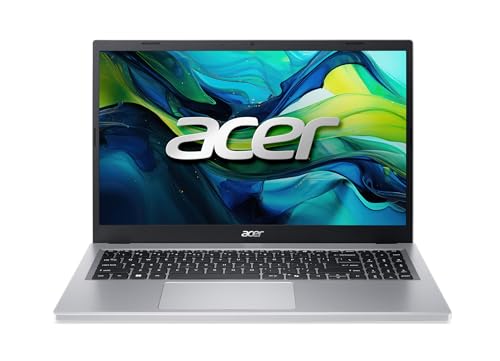
Acer Aspire Go 15, Ryzen 3 7320U, FHD IPS — Modern and efficient
Acer’s Aspire Go 15 is what the entry level looks like when a manufacturer sweats the details. The Ryzen 3 7320U is an efficient quad-core that runs cool, the 15.6-inch screen is a Full HD IPS panel with viewing angles that shame the TN panels still lurking in this category, and the design is Acer’s current one rather than a leftover. For a shared family laptop that gets viewed from the side of a sofa as often as from a chair, that IPS panel is not a luxury; it is the difference between a screen everyone can see and a screen one person can see.
Its compromises are capacity and mode. The 128GB PCIe SSD is the small size this category keeps returning to, and it demands the cloud-and-curation lifestyle described elsewhere in this guide. The memory is 8GB of LPDDR5, which in practice means fixed for the machine’s life. And the laptop ships with Windows in S Mode, so the first setup session includes the free, one-way switch out of S Mode for anyone installing software from outside the Microsoft Store. None of these are hidden; they are simply the price of the panel and the design, printed here so the trade is yours to accept or refuse.
Efficiency is this model’s quiet superpower. The 7320U was built for thin machines that sip power, and in a house where the laptop migrates between rooms and the charger migrates more slowly, that translates into a computer that is awake and ready more often than its rivals. Buy it for the screen and the manners, and manage its storage like you mean it.
Students in shared houses will recognise another of its virtues: it is undemanding about where it works. The matte-leaning IPS panel tolerates the overhead lighting of libraries and kitchens, the keyboard is a standard full-size layout with a number pad for the spreadsheet weeks of term, and the whole machine slips into a bag without announcing itself. It is a laptop designed to disappear into a routine, which at this price is high praise.
- Display: 15.6-inch Full HD IPS
- Processor: AMD Ryzen 3 7320U
- Memory: 8GB LPDDR5
- Storage: 128GB PCIe SSD
- Mode: Windows 11 Home in S Mode as shipped
Strengths
- IPS panel with wide viewing angles, rare at this money
- Cool, quiet, efficient processor for shared spaces
- Current Acer design with tidy, modern styling
Trade-offs
- 128GB storage requires active management from day one
- LPDDR5 memory is soldered, so 8GB is the permanent ceiling
- S Mode needs switching out for non-store software
Best for: families and sharers who will view the screen from every angle and live happily in cloud storage. Not suited for: local-storage hoarders or anyone planning a later memory upgrade.

ASUS Vivobook Go 15, Ryzen 3, 8GB RAM — Slim with real memory
This is the Vivobook Go configured the way we would configure it ourselves. ASUS sells this shell with several processors and memory sizes, and the version linked here pairs a Ryzen 3 with 8GB of memory, which is the combination that turns the design from a pretty compromise into a working tool. The Full HD screen, the slim Mixed Black chassis and the light weight all carry over from its siblings; what changes is that the machine underneath can hold a realistic workload without constant tab-closing.
Set it beside the Intel N150 version further down this page and the family logic becomes clear. The two laptops share a name, a shell and a screen, and differ in the two specifications that decide daily speed. The Ryzen 3 here has the stronger cores and the memory is doubled, so this is the Vivobook Go for a student whose course involves more than documents: data work in a browser, light creative tools, a call running beside everything else. The 128GB SSD remains the family constraint, shared with most of this guide.
One caution applies to the whole Vivobook Go clan and is worth stating once, clearly: because the configurations share listings and photography, the model in your basket must be checked by its specification lines, not recognised by its picture. If the listing in front of you says 4GB, you are looking at the other laptop, whatever the photo shows.
In daily use the difference announces itself in the small recoveries: the browser that reopens where you left it, the call that starts without a round of closing things first, the spreadsheet that recalculates while a document stays open. These are not thrills, but they are the texture of a laptop that fits its owner’s life, and they are exactly what the extra memory buys over the N150 edition.
- Display: 15.6-inch Full HD
- Processor: AMD Ryzen 3
- Memory: 8GB RAM
- Storage: 128GB SSD
- Colour: Mixed Black
Strengths
- The Vivobook Go shell with a specification that does it justice
- 8GB of memory doubles its Intel sibling’s allowance
- Full HD screen in a genuinely portable 15.6-inch body
Trade-offs
- 128GB SSD is the ceiling unless you swap or supplement it
- Easy to confuse with the 4GB configuration at a glance
- Entry Ryzen 3 still sets a modest performance ceiling
Best for: students who like the Vivobook Go design and need it to handle a real workload. Not suited for: buyers who want maximum storage per dollar, who should look at the 512GB picks above.

HP 15.6, HD Touchscreen, Ryzen 3 7320U — Touch at the price
Here is the guide’s designated honest trade. This HP gives you a touchscreen, a modern Ryzen 3 7320U and HP’s mainstream 15.6-inch chassis, and it pays for that combination with an HD screen. Not Full HD: HD, 1366 by 768, the resolution we have flagged throughout this article. On a touchscreen machine the penalty lands differently than on a typist’s laptop, because touch machines are used at arm’s length for tapping, scrolling and showing, where pixel density matters less than responsiveness. But if your use is reading and writing for hours, the grain of this panel will be in front of your eyes the whole time, and the Full HD picks above exist precisely for you.
Within its intended role, the machine makes sense. A kitchen or family-room laptop that gets poked at, a till-side or reception machine, a grandparent’s computer where tapping a big button beats steering a cursor: for those jobs the touch layer is worth more than the pixels surrendered for it. The 128GB SSD is the second compromise, standard for the shelf, and the S Mode shipping state is the third, minor and fixable in minutes.
We include this pick because touch at this price is rare enough that buyers search for it specifically, and they deserve a version of the recommendation that does not let them discover the resolution after delivery. Bought knowingly, it is a friendly, flexible machine. Bought by accident, it is the return label this guide exists to prevent.
One more honest note in its favour: among shared-household machines, the touchscreen is the feature that gets used by the people who never touch settings, while the specification lines are managed by the one person who does. If you are buying for someone else and that someone navigates by pointing, this HP’s trade may be the most humane one on the page.
- Display: 15.6-inch HD touchscreen (not Full HD)
- Processor: AMD Ryzen 3 7320U
- Memory: 8GB RAM
- Storage: 128GB SSD
- Mode: Windows 11 Home in S Mode as shipped
Strengths
- The only touchscreen among the six picks
- Modern Ryzen 3 keeps touch interactions snappy
- Natural Silver finish suits shared and public spaces
Trade-offs
- HD resolution is visibly coarser than the Full HD picks
- 128GB storage, the joint-smallest here
- Touch layer adds reflections under bright lighting
Best for: families, grandparents and shared spaces where fingers do the navigating. Not suited for: readers, writers and spreadsheet users who stare at text all day.
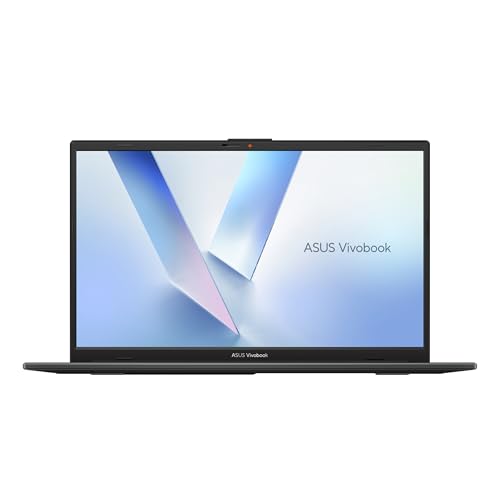
ASUS Vivobook Go 15, Intel N150, 4GB RAM — Quiet minimalism
The third Vivobook Go in this guide is the minimalist’s edition. Intel’s N150 is a low-power processor designed for silence, and in this slim shell it delivers a laptop that runs cool and unobtrusively, with a Full HD screen that keeps it respectable for reading and streaming. As a dedicated writing machine, a travel backup or a child’s first Windows laptop for browser-based schoolwork, its specification is coherent: nothing is fast, but everything is present, and the screen is the right one.
The limit, stated as plainly as we can state it, is 4GB of memory. In current Windows, 4GB is a discipline: a document and a few tabs, or a call with everything else closed. The machine will not multitask its way out of trouble, and because memory in this class is not a later upgrade, the limit is permanent. Buyers who recognise their own habits in that description, one task, finished properly, then the next, will get along with this laptop. Buyers who keep forty tabs as a filing system will not, and no affection for its quiet fan will save the relationship.
It earns its place as the guide’s floor: the least you can spend in this family while keeping a Full HD screen and a real SSD. Everything above it in this article buys speed, memory or storage. If none of those purchases matter to your actual habits, the floor is a rational place to stand.
There is a dignity in a machine this honest about its limits. It boots, it shows your words on a good screen, it stays quiet while you think, and it asks only that you not mistake it for something else. For a first laptop, a spare laptop or a single-purpose laptop, that clarity is worth more than a specification it would struggle to honour.
- Display: 15.6-inch Full HD
- Processor: Intel N150
- Memory: 4GB RAM
- Storage: 128GB SSD
- Colour: Mixed Black
Strengths
- Full HD screen retained even at the family’s floor
- Cool, quiet running from the low-power N150
- Slim, light shell that travels well
Trade-offs
- 4GB of memory enforces strict one-task-at-a-time habits
- N150 performance is the gentlest in this guide
- 128GB storage completes a specification with no slack anywhere
Best for: single-task minimalists, writers and young students with browser-based work. Not suited for: multitaskers, tab collectors and anyone expecting the laptop to grow with them.
What Does the Extra Fifty Actually Buy?
Shoppers often arrive at this shelf from the one below it, wondering whether the step up is real. It is, but it is unevenly distributed. The fifty dollars does not raise every specification; it concentrates on whichever one a given manufacturer chose to rescue. In the HP Rose Gold it rescued memory and storage simultaneously, which is why that machine reads like a pricing error. In the 2023 Vivobook it rescued storage and processor tier. In the Acer it rescued the panel, IPS and Full HD where the cheaper shelf settles for less. Understanding this shelf means asking of each model not “is it better?” but “which single rescue did my money perform, and is that the rescue I needed?”
The specifications the step up does not rescue are just as consistent. Batteries stay modest, cases stay plastic, webcams stay basic, and 128GB drives keep appearing like relatives nobody invited. Two near neighbours deserve mention because shoppers meet them in the same search results. Acer’s Aspire Lite line, in its N350 configuration, competes here with a hard ceiling of a 128GB SSD, so treat it as a storage-fixed machine and judge it on screen and price alone. HP’s Essential 15.6 in Rose Gold is a colour-and-configuration sibling of the HP family represented above; if you meet it while browsing, compare its memory and storage lines against the linked HP’s before assuming the two are the same laptop in the same dress.
How Long Will the Battery Realistically Last, and What Else Ages?
Manufacturers quote battery figures gathered under gentle conditions, and the honest translation for this shelf is a working day of light use if you are kind, and half a day if you are not. Video calls are the great consumer, followed by screen brightness, and a 15.6-inch panel at full brightness in a sunny room will drain any of these machines by mid-afternoon. The practical habits matter more than the model differences: dropping brightness a few notches, closing the lid between tasks and keeping the charger in the room where the laptop mostly lives will do more for your unplugged life than choosing one pick over another for its battery line.
What ages first, after the battery, is storage headroom, and it ages by accumulation rather than failure. Photographs migrate from phones, school projects pile up, Windows grows. This is the mechanical reason the two 512GB picks in this guide will feel younger in year three than their 128GB siblings even if every other component is identical: they postpone the month where every saving decision becomes a deleting decision. Memory ages more gracefully, because mainstream applications grow slowly, which is why 8GB remains serviceable while 4GB, already tight today, has nowhere to retreat to.
Physically, expect hinges and keyboards built for ordinary care rather than abuse. These are household machines, happiest moving between rooms on a flat hand, less happy living in the bottom of a sports bag. A padded sleeve is the cheapest longevity accessory in this entire article, and a can of compressed air twice a year keeps the cooling path of the fan-cooled models honest. None of the six needs pampering; all of them repay not being treated as indestructible.
Which Pick Suits Which Buyer? A Walk Through Five Households
Picture a sixth-form student whose day is a learning platform, a word processor, a spreadsheet and a call with a tutor. Her constraint is not speed but simultaneity, and the HP with 16GB is the machine that will never once make her close something to open something else. Her brother, a year younger and entirely in browser-based schoolwork, would be served nearly as well by the Ryzen Vivobook Go, and the money saved between the two buys his headphones and a sleeve.
Picture a receptionist’s desk in a small clinic, where the laptop runs a booking system, a browser and a card-reader application from morning to night. The Acer Aspire Go belongs there: its IPS screen reads clearly from the standing position staff actually use, its processor is efficient enough to run all day without drama, and its small drive is irrelevant because the clinic’s records live on a server. Now move the same machine into a photographer’s spare room and it fails the audition instantly, which is the whole point: fit is a property of the pairing, not the product.
Picture a grandparent whose computing is family photographs, video calls and online banking, on a machine that lives on a kitchen worktop. The HP touchscreen, HD panel and all, is the kindest choice in this guide for those hands, because tapping a photograph to enlarge it is a skill nobody has to be taught. And picture a writer in a studio flat who works in one application at a time and values silence over everything: the N150 Vivobook Go, the guide’s floor, is genuinely his machine, bought with full knowledge of its ceiling. The sixth household, the one that wants everything, should stop reading this page and save toward the next tier, because no arrangement of these six will be a gaming or video-editing station, and honesty about that is worth more than any badge.
What Are the Honest Limits? Gaming, Creative Work and Heavy Software
Every roundup at this price owes its readers a paragraph of refusals, and here is ours. None of these six laptops is a gaming machine in the modern sense. The integrated graphics in the Ryzen picks will run older titles, browser games and lightweight esports settings at modest quality, and for a child whose gaming is Minecraft and Roblox that may be entirely sufficient. Current large games, however, are beyond the hardware, and no setting buried in a menu changes that; a buyer whose priority is gaming should be reading a different guide at a different budget.
Creative work divides similarly. Photo editing of phone pictures and social images is fine on the Ryzen machines, especially the 16GB HP, and becomes slow precisely when files grow: layered documents, large RAW batches and long video timelines will test patience on every pick here. Short clips and school video projects are achievable; a YouTube channel edited daily is a workload for the next tier up. The same realism applies to programming: learning to code, coursework projects and web development are comfortable, while large compiled codebases and virtual machines belong to machines with more memory and stronger processors. Naming these limits is not a criticism of the six. It is the difference between a laptop that disappoints in month two and one that is still pleasing its owner in year three, because it was bought for the work it can actually do.
What Should You Check During the First Week?
The returns window is a testing laboratory that most buyers waste, so spend it deliberately. On the first evening, run the screen through its paces: display a white page, a black page and a mid-grey one, and look for dead pixels, bright spots or uneven backlighting, all easier to exchange in week one than to argue about in month six. Check every key with a paragraph of typing, both USB ports with a real device, the webcam and microphone with an actual call, and the Wi-Fi from the furthest room the laptop will serve. Budget machines are built to tolerances, and the unit in your hands is the only unit whose tolerances matter.
Then verify the machine against its listing while the evidence is fresh. Open the system information panel and read the memory and storage figures back to the specification you ordered; on this shelf, with its sibling configurations and shared photography, that thirty-second check is the one that catches the wrong-variant delivery. Confirm the screen resolution in display settings too, particularly if you bought the touchscreen HP, where the HD panel is correct for the model but should still match what you knowingly chose. Finish the week by creating your recovery media and setting up backup, the two chores that are trivial now and precious later, and keep the box until the window closes. A laptop that passes its first week under this scrutiny has earned its place; one that fails has failed at the cheapest possible moment.
Why Do Most Buyers at This Price Still Choose Windows Over ChromeOS?
It is worth understanding what you are declining when you choose from this page, because the Chromebook alternative at the same money is genuinely strong. A Chromebook in this band typically offers a simpler interface, faster updates, longer battery life and a machine that is very hard to break with software. For a household whose computing is entirely web-shaped, that can be the wiser purchase, and several of this guide’s readers should make it without a moment’s guilt.
Windows wins the shelf for three concrete reasons. The first is obligation: schools, employers, exam boards and government portals still publish requirements that name Windows applications, and a laptop that cannot run the one required program is not a bargain at any price. The second is peripherals and files: printers, scanners, exam lockdown browsers, USB devices accumulated over a decade, and local file collections all assume Windows in a way that takes effort to escape. The third is software ownership: the family copy of Office, the accounting package, the genealogy program, the games library. A Windows laptop at this level is partly a compatibility device, and compatibility is a feature as real as memory. Choose ChromeOS when your life is in the browser and nobody can oblige you otherwise; choose from this page when anything in your life still speaks Windows.
What About Keyboards, Ports and the Details You Touch Daily?
Specification tables omit the parts of a laptop your hands meet, so a word about them. All six picks use full-width keyboards with numeric keypads, the standard 15.6-inch layout, which suits spreadsheet work and data entry and slightly crowds the main keys compared with a keypad-free design. Trackpads at this level are plastic, adequately precise and occasionally over-eager with palm touches while typing; a cheap wireless mouse remains the highest-value accessory purchase in this entire category, transforming every pick here for desk work.
Ports follow the class pattern: a couple of USB-A sockets for the peripherals you already own, USB-C on the more modern designs, HDMI for a television or monitor, and a headphone jack that schools still require. Chargers are proprietary barrel or USB-C depending on model, which matters when it is lost: check the replacement’s availability for your exact model before you need it urgently. Webcams across the six are basic video-call units, adequate in daylight and grainy in lamplight, and the honest fix for a work-from-home user is lighting, not a different laptop: a lamp in front of you improves a call more than any camera fitted at this price. These details are unglamorous, and they are also what ownership actually consists of, which is why they belong in a guide that claims to be about buying well.
How Do the Six Compare Side by Side?
| Model | Processor | Memory | Storage | Screen | Defining trade |
|---|---|---|---|---|---|
| HP 15.6 Rose Gold | Ryzen 3 | 16GB | 512GB SSD | 15.6″ FHD | Colour is a commitment; verify configuration |
| ASUS Vivobook Go 15 (2023) | Ryzen 5 7520U | 8GB | 512GB SSD | 15.6″ FHD | Previous-generation design |
| Acer Aspire Go 15 | Ryzen 3 7320U | 8GB LPDDR5 | 128GB SSD | 15.6″ FHD IPS | Small drive, soldered memory, S Mode |
| ASUS Vivobook Go 15 Ryzen 3 | Ryzen 3 | 8GB | 128GB SSD | 15.6″ FHD | Small drive; easy to confuse with 4GB sibling |
| HP 15.6 Touch | Ryzen 3 7320U | 8GB | 128GB SSD | 15.6″ HD touch | Resolution traded for touch |
| ASUS Vivobook Go 15 N150 | Intel N150 | 4GB | 128GB SSD | 15.6″ FHD | Memory ceiling is permanent |
How Should You Handle a 128GB Drive?
Four of these six laptops ask you to live in 128GB, so the skill deserves a short manual of its own. Begin by accepting the arithmetic: Windows and its updates will claim a large share, your applications another, and what remains is yours. Move the big, cold categories off the machine. Photographs and videos belong in cloud storage or on an external drive, because they are large, rarely urgent and perfectly streamable. Keep the working set local: the documents, spreadsheets and apps you touch weekly.
Then use the tools Windows already provides. Storage Sense can clear temporary files and empty the recycle bin on a schedule you set once and forget. The Downloads folder is where capacity goes to die, so sort it monthly. If the laptop has a microSD slot, a card makes an excellent permanent annex for media libraries, addressed like a second drive. And if the machine’s SSD is a standard replaceable part, as many in this class are, a larger drive fitted in a year or two is a legitimate plan rather than an admission of defeat, provided you confirm the model’s internals before relying on it. The buyers who suffer with 128GB are the ones who pretend it is 512GB until the disk-full warnings begin.
What Mistakes Do Buyers Make at This Level?
The classic mistake is comparing photographs instead of specifications. Three of this guide’s picks share a product family and near-identical photography while differing in processor and memory by a factor of two; the buyer who clicks the prettiest thumbnail may receive the 4GB machine. The second mistake is reading “HD” as a compliment and discovering the panel’s resolution only when the first essay looks fuzzy. The third is treating S Mode as a broken laptop rather than a shipping state, when leaving it takes minutes and costs nothing.
Buyers also overvalue the wrong rescue. A big storage figure attached to a 4GB machine does not make it a multitasker, and a strong processor behind an HD screen does not make text sharper. Match the rescue to your bottleneck: if your current laptop dies under many open applications, memory is your rescue; if it dies under a full drive, storage is; if your eyes ache, the panel is. Finally, do not let a colour do the deciding in either direction. The Rose Gold HP is the strongest specification here, and dismissing it for its finish, or buying it for its finish while ignoring the configuration check, are the same error wearing different clothes.
One more deserves naming because it is so common in gift purchases: buying for the recipient you imagine rather than the one you have. A grandparent who points at screens gets the touchscreen; a student who hoards tabs gets the memory; a writer who works in silence gets the quiet chip. The specifications in this guide are only useful when they are matched to observed habits, and a five-minute conversation about how the laptop will actually be used outperforms an hour of benchmark reading.
Still Torn? A Ten-Minute Decision Walkthrough
If the six blur together, decide by elimination, in this order. First, strike any machine whose memory cannot hold your habits: if you work with many applications open, the 4GB Vivobook goes, however much you like its silence. Second, strike by screen: if you read or write for a living, the HD touchscreen goes, however charming touch sounds; if your user navigates by pointing, reverse the strike and keep only it. Third, strike by storage: if your files live locally and number in the hundreds of gigabytes, only the two 512GB machines remain standing, and the choice between them is memory and colour, the HP’s 16GB and Rose Gold against the ASUS’s Ryzen 5 and black restraint.
If three or more machines survive those strikes, your needs are genuinely mainstream, and the tiebreakers become temperament and setting. A shared family room favours the Acer’s viewing angles. A bag that travels daily favours the Vivobook Go’s slimness in its Ryzen form. A desk that never moves favours whichever survivor is cheapest on the day, because at a fixed desk the differences shrink to the screen you stare at, and all the survivors’ screens are Full HD. What you should not do is let the decision be made by a countdown timer on a listing page. These models are staples, restocked constantly, and the right one next week is worth more than the wrong one at a flash discount today. Decide by elimination, verify the configuration on the listing, and then stop shopping: the hours people spend hovering over this shelf would buy the sleeve, the mouse and the external drive that will improve whichever laptop they choose far more than another evening of comparison.
Final Recommendation
Most buyers should take the HP with 16GB of memory and the 512GB drive, because it is the only laptop here that removes both of the category’s chronic shortages at once, and its Full HD screen means nothing was quietly traded away to pay for them. If its colour rules it out, the 2023 Vivobook Go with the Ryzen 5 is the sober substitute, nearly as complete and entirely black. Choose the Acer for its IPS panel and manners, the Ryzen Vivobook Go for slim portability with honest memory, the HP touchscreen only when fingers will genuinely do the navigating, and the N150 Vivobook only if your working style is truly one thing at a time. Two hundred and fifty dollars, spent on the rescue you actually need, is the first rung of the ladder where a laptop stops feeling like an apology.
And if you take one habit from this page, let it be the configuration check: thirty seconds reading the specification tab of the exact listing in front of you prevents nearly every single recorded disappointment this category is famous for, and it costs nothing but the brief moment it takes to scroll down the page.
Frequently Asked Questions
Is 8GB of memory enough in 2026?
For the mainstream workload of browser, office applications, email and streaming, yes, provided you are not also running heavy creative software. Sixteen gigabytes, as fitted to the HP in this guide, is noticeably more comfortable for heavy multitasking, while 4GB demands single-task discipline. Memory is the specification to prioritise if your current machine slows down with many programs open.
Are all of these laptops Full HD?
No, and the exception matters. Five of the six picks have Full HD 1920 by 1080 screens. The HP touchscreen model is HD at 1366 by 768, a trade it makes for touch input. Its heading, spec box and row in the comparison table all say so, and buyers who read and write all day should choose one of the Full HD five.
What is S Mode, and should it worry me?
S Mode is a Windows configuration that only allows applications from the Microsoft Store, which keeps a machine simple and locked down. Leaving it is free, takes a few minutes through the Store, and cannot be undone. Several picks here ship in S Mode; plan the switch as part of setup if you install software from elsewhere.
Would a Chromebook be better at this price?
If your life is entirely in a browser and your school or work does not require Windows applications, a Chromebook at this money can be simpler, quieter and longer-lasting on battery. The cost is a different operating system and hardware that is fixed at purchase. Buyers with any Windows-specific need should stay with the machines in this guide.
How long will a laptop at this price realistically last?
Expect three to five years of useful service for light and mainstream work, with the battery the first component to fade. Models with more memory and storage, the 16GB HP and the 512GB Vivobook in particular, sit at the long end of that range because they postpone the two shortages that make old laptops feel old.
Can I add more storage later?
Externally, always: cloud folders, microSD cards and USB drives work with every pick here. Internally, it depends on the model; many 15.6-inch machines in this class use a standard replaceable SSD, but you should confirm from the manufacturer’s documentation for the exact model before counting on a swap, and never assume it of a machine whose listing is vague.
Which of these is best for a child’s school laptop?
For browser-based school platforms, the Ryzen Vivobook Go 15 balances screen, memory and portability best, while younger children with purely web-based work are also served by the quieter N150 edition. If the school specifies Windows applications or a lockdown exam browser, avoid the temptation of a Chromebook and stay with the Windows picks in this guide, confirming the school’s exact requirement first.
Related Guides
Buyers working with a tighter ceiling should compare these picks against the best 200 dollar laptops upgradable roundup, where the upgrade paths are the whole point. If your budget can climb instead, the best 500 600 dollar laptops guide shows the tier where 16GB and Full HD become the norm, and the best 700 dollar laptops roundup covers the step into metal bodies and stronger processors. The folding end of this same budget is ranked in the best 2 in 1 laptops under 250, where the hinge eats part of the spend. The core-count floor under this whole tier is examined in the best 4 core laptops.



[…] who decide a conventional laptop suits them better should compare the best 250 dollar laptops roundup, while anyone whose budget is tighter still can look at the best 200 dollar laptops […]