What's inside
- Key Takeaways
- Quick Picks
- How Did We Choose the Best 2000 Dollar Laptops?
- Why “Best” Is the Wrong Question at This Price
- Which Flagship Matches Your Life?
- How Do the Screens Really Compare? XDR, OLED and the Refresh Question
- What About Heat, Noise and the Desk?
- Three Flagship Households, Three Different Machines
- What Is the Five-Year View? Longevity, Resale and Support
- When Should You Not Spend This Much?
- How Should You Configure Within a Tribe?
- What Does the AI Hardware Mean at Flagship Level?
- How Do the Six Compare Side by Side?
- What Should You Check Before Spending at This Level?
- What Mistakes Do Buyers Make With Flagships?
- Final Recommendation
- Frequently Asked Questions
- Related Guides
As an Amazon Associate I earn from qualifying purchases. This post may contain affiliate links at no extra cost to you.
gizmoverdict.com is reader-supported. When you buy through links on our site, we may earn an affiliate commission.
Where to buy: Each flagship below links to its Amazon listing, where the configuration lines, memory, storage, graphics and operating system edition, should be confirmed before ordering, because at this level a single model name can cover several very different machines.
The best 2000 dollar laptops are not six versions of one idea. They are three different tribes that happen to share a price band, and any guide that ranks them as if they were competing at the same sport is lying to you in the first paragraph. There is the Apple tribe: one machine, the 16-inch MacBook Pro, built around Apple’s own silicon and an operating system its maker controls completely. There is the Windows creator tribe: big, beautiful OLED screens from Dell and ASUS wrapped around Intel and AMD processors, built for people whose work is images. And there is the thin gaming tribe, represented here by Razer’s Blade 16, a machine that treats a graphics card as the main event and everything else as supporting cast. LG’s gram Pro stands outside the tribes as the ultralight exception, a 16-inch laptop that weighs what a 13-inch one used to.
So this guide refuses the fake question, “which is best?”, and answers the real one: which axis do you live on? If your work is video, photography or design inside Apple’s ecosystem, the MacBook is not a choice but a destination. If your work is Windows-shaped and screen-led, the creator machines divide by panel and processor. If your evenings are games and your days are everything else, the Blade is the only pick here designed for you. Two thousand dollars buys excellence in any of these directions. It does not buy excellence in all of them at once, and the sections below map each machine to the life it actually serves.
One naming trap needs defusing before the list. Dell sells two of these picks, and they are the same lineage wearing successive names: the XPS 16, listed here in its Premium 4K form, and the Premium 16, which the listing itself notes was previously the XPS 16. They are not rivals from different families; they are generations and configurations of one flagship line, distinguished below by processor, graphics and screen so the two entries do not contradict each other.
Key Takeaways
- Three tribes share this band: Apple silicon, Windows creator OLED machines, and thin gaming; choose the tribe first and the model second.
- The MacBook Pro 16 with the M5 Pro is the ecosystem pick: 24GB of unified memory, a 1TB drive and the Liquid Retina XDR screen, for buyers whose software and habits are Apple’s.
- Dell’s XPS 16 Premium and Premium 16 are one flagship lineage under successive names; the XPS listing here carries the stronger processor, graphics and a 4K OLED touchscreen.
- The Razer Blade 16 is the only true gaming machine in the six, with an RTX 5070 Ti and a 240Hz OLED built for play as much as work.
- LG’s gram Pro is the exception that proves the band’s rule: 32GB of memory and a 2TB drive in a 16-inch body under three pounds.
Quick Picks
| Pick | Badge | Why it earns its place |
|---|---|---|
| Apple MacBook Pro 16, M5 Pro, 24GB, 1TB | The Apple flagship | Apple silicon, the XDR display and a unified-memory architecture, for the ecosystem-committed creator. |
| Dell XPS 16 Premium, RTX 5060, Ultra 9, 4K OLED | Windows creator flagship | A 4K OLED touchscreen, RTX 5060 graphics and the Core Ultra 9 in Dell’s flagship shell. |
| Razer Blade 16 (2026), RTX 5070 Ti | The gaming blade | A 240Hz QHD+ OLED and the strongest graphics here, in a thin metal chassis. |
| ASUS Zenbook S16, Ryzen AI 9, 3K OLED Touch | The elegant creator | A 3K OLED touchscreen and 32GB of memory in ASUS’s slim flagship design. |
| LG gram Pro 16, 32GB, 2TB, 2.97 lbs | The featherweight | A full 16-inch flagship specification at under three pounds, with the largest drive here. |
| Dell Premium 16, RTX 5050, Ultra 7 | The renamed flagship | The XPS lineage continued under its new name, with RTX 5050 graphics and a 2K screen. |
How Did We Choose the Best 2000 Dollar Laptops?
At this level the selection problem inverts: everything is powerful, so the guide selected for distinctness. Each pick had to own an axis outright, the ecosystem axis, the creator-panel axis, the gaming axis, the weight axis, or the lineage axis that lets us explain Dell’s naming honestly. Machines that were merely excellent in the same direction as a stronger pick were set aside, because a flagship guide that lists three near-identical creator laptops has abdicated its only real job, which is mapping differences that matter.
Verification at this tier means reading configuration lines like contracts. Memory architectures differ fundamentally between the tribes: Apple’s unified memory is shared between processor and graphics and cannot be expanded after purchase, which makes the fitted 24GB a permanent decision in a way Windows buyers are not used to. The Windows machines split between soldered LPDDR5X and, in the Blade’s case, DDR5 in a gaming chassis. Graphics range from integrated, in the gram, through the RTX 5050 and 5060, to the Blade’s 5070 Ti, and that range, more than any processor badge, is what separates the tribes in daily use.
We also declined, deliberately, to import the sellers’ superlatives. Battery endurance figures, AI performance numbers and display claims in these listings are manufacturers’ own measurements under their own conditions; where this guide mentions one, it says whose claim it is. A flagship purchase deserves better than a brochure repeated at higher volume.
Availability shaped the final list in one more way worth recording: flagship configurations churn, with memory and storage variants appearing and vanishing as stock moves. Every pick here was verified as a live, orderable configuration at the time of writing, and the guide’s insistence on checking the listing before ordering applies with double force at this level, where a variant change can mean a different graphics card rather than a different colour.
Why “Best” Is the Wrong Question at This Price
Cross-tribe comparisons produce nonsense with impressive confidence. The MacBook’s unified memory cannot be lined up against the Dell’s DDR5 as if they were the same substance; the Blade’s graphics card is irrelevant to the writer choosing the gram for its weight; the Zenbook’s touchscreen is invisible to the gamer counting frames. Each machine is the correct answer to a different examination. The useful questions are tribal: do your applications exist on macOS, and do you want them to? Is your work’s centre of gravity the screen, the graphics card or the shoulder that carries the machine? Does your employer, your clients’ file formats or your own decade of habits already live in one ecosystem?
Answer those, and the six collapse to one or two candidates with remarkable speed. What remains is configuration: how much memory the permanent architectures demand, how much storage your library needs, whether the screen’s particular excellence matches your eyes. The rest of this guide is organised to make exactly those decisions well, tribe by tribe, rather than to crown a winner the reader’s life would overrule.
There is a budget corollary worth stating once. Within a tribe, the step between configurations is usually worth more than the step between brands: the XPS buyer agonising over Dell versus ASUS often gains more from the higher Dell configuration than from switching families at the same one. Tribes first, configurations second, brands third, in that order, is the decision sequence this guide recommends to every flagship buyer.
Which Flagship Matches Your Life?

Apple MacBook Pro 16, M5 Pro, 24GB Unified Memory, 1TB SSD — The Apple flagship
The MacBook Pro is the only machine here that is an ecosystem wearing a laptop as its outfit. The M5 Pro chip, with its 18-core CPU and 20-core GPU as listed, is built on Apple’s unified architecture, where the 24GB of memory is shared between processing and graphics and the whole system behaves like a single, tightly integrated instrument. For video editing, photography, music production and development inside Apple’s world, that integration is the product: the software is written for exactly this hardware, the battery endurance under creative work is the class benchmark in spirit, and the 16.2-inch Liquid Retina XDR display is a reference-grade panel that makes colour decisions trustworthy.
The commitments are equally total. The memory and storage are fixed at purchase, permanently, so the 24GB and 1TB fitted here must be judged as the machine’s lifetime allowance, generous for most creators and a ceiling for the few with enormous libraries or virtualisation habits. The operating system is macOS, which is either your home or a foreign country; there is no casual middle. And the gaming library, while growing, remains the smallest of the three tribes, which matters if play shares the machine with work.
Buy it as what it is: the flagship of a platform, bought by people whose tools, files and habits already live there, or who have decided deliberately to move. For those buyers, no Windows machine in this guide is a substitute, and this guide will not pretend the comparison is closer than it is.
Its ownership rhythm is also distinctive. Apple machines hold their value, receive long software support and integrate with the phones and tablets their owners already carry, so the MacBook’s price is partly a subscription to continuity. A creator mid-career, with a library in Apple’s formats and a clientele sending Apple-shaped files, is not really choosing a laptop here; they are renewing a working environment, and the M5 Pro machine renews it at the highest level the platform offers.
- Display: 16.2-inch Liquid Retina XDR
- Processor: Apple M5 Pro, 18-core CPU, 20-core GPU
- Memory: 24GB unified memory, fixed at purchase
- Storage: 1TB SSD, fixed at purchase
- Extras: Wi-Fi 7, Space Black finish, built for Apple Intelligence
Strengths
- Unified architecture delivers creative performance with remarkable efficiency
- XDR display is a reference panel for colour-critical work
- The deepest software-hardware integration in the guide
Trade-offs
- Memory and storage can never be expanded after purchase
- macOS is a total commitment, not a preference setting
- Gaming library remains the smallest of the three tribes
Best for: creators and developers inside, or deliberately joining, Apple’s ecosystem. Not suited for: Windows-dependent workflows or buyers who upgrade components over time.

Dell XPS 16 Premium, RTX 5060, Core Ultra 9 285H, 4K OLED Touch — Windows creator flagship
This is the Windows creator tribe’s flagship in its fullest dress. The screen is a 16.3-inch 4K OLED touchscreen refreshing at 120Hz, the kind of panel that makes photographers and video editors stop mid-sentence: perfect blacks, enormous colour range and touch for the hands-on moments. Behind it sit Intel’s Core Ultra 9 285H, 32GB of memory, a 1TB drive and NVIDIA’s RTX 5060, a genuine dedicated graphics card that moves this machine beyond integrated graphics for creative acceleration and respectable gaming. Three Thunderbolt 4 ports, Wi-Fi 7 and Windows 11 Pro complete a specification aimed at professionals whose desk is a studio.
Place it beside the Dell Premium 16 further down this page and the lineage clarifies. This XPS listing is the higher configuration of the family: the stronger Ultra 9 processor, the RTX 5060 rather than the 5050, and the 4K OLED rather than the 2K panel. The Premium 16 is the same flagship idea in its newer name and a step-lower specification. They are not two laptops competing; they are two rungs of one ladder, and a buyer choosing between them is choosing how high on that ladder to stand.
The costs are the flagship costs: weight that belongs to a desk more than a shoulder, fans that will speak during exports, and a price position at the band’s summit. For the Windows creator whose screen and graphics are the job, this is the machine the rest of the guide is measured against.
It is also the pick that most rewards a proper desk. Docked to a large colour-accurate monitor it becomes a studio workstation; undocked, its own 4K panel keeps the standard when the work travels to a client’s office. That dual life, studio core and portable presentation in one object, is the flagship proposition at its most complete, and the XPS in this configuration is its fullest expression on the Windows side.
- Display: 16.3-inch 4K OLED touchscreen, 120Hz
- Processor: Intel Core Ultra 9 285H
- Memory: 32GB RAM
- Storage: 1TB SSD
- Graphics: NVIDIA GeForce RTX 5060; extras include 3x Thunderbolt 4, fingerprint reader, Windows 11 Pro
Strengths
- 4K OLED touchscreen is the creator panel of the guide
- RTX 5060 brings real graphics acceleration to Windows work
- Ultra 9 and 32GB complete a no-compromise specification
Trade-offs
- Desk-weight machine, not a traveller’s companion
- Fans make themselves heard under sustained creative load
- Sits at the summit of the band’s pricing
Best for: Windows-based photographers, video editors and designers whose screen is their studio. Not suited for: frequent travellers or buyers who do not need dedicated graphics.

Razer Blade 16 (2026), RTX 5070 Ti, Core Ultra 9 386H, QHD+ 240Hz OLED — The gaming blade
The Blade 16 exists to disprove an old sentence: that a gaming laptop must look and weigh like a gaming laptop. Razer’s 2026 edition wraps an RTX 5070 Ti, the strongest graphics card in this guide, and Intel’s Core Ultra 9 386H in a thin metal chassis that would not embarrass a boardroom, and pairs them with a 16-inch QHD+ OLED running at 240Hz with a response time listed at 0.2ms. That screen is the gaming argument in one object: high resolution for the workday, very high refresh for the evening, OLED contrast for both.
Its 32GB of DDR5 and 1TB drive match the creator machines, and Thunderbolt 5 plus Wi-Fi 7 make its connectivity the most current here. The compromises are the gaming tribe’s eternal ones: under full gaming load it will be warm and audible, its battery is a between-sockets resource rather than an all-day one when the graphics card is working, and its price buys frames that a non-gamer will never see. Judge it as its tribe demands: as the machine for the person whose evenings are games, whose days are serious work, and who refuses to own two computers to serve both.
Against the Dell creator flagship, the Blade trades panel resolution and touch for refresh rate and graphics power, which is the tribes’ difference in miniature. Neither trade is a mistake. They are answers to different questions asked at the same price.
There is a professional shadow to the Blade worth acknowledging: the same graphics and screen that serve games serve game development, 3D work and video effects, and its DDR5 memory, a more conventional arrangement than the soldered memory elsewhere here, suits the workstation aftermarket. The gamer who grows into a creator does not outgrow this machine; they merely start using its other half.
- Display: 16-inch QHD+ OLED, 240Hz, 0.2ms as listed
- Processor: Intel Core Ultra 9 386H
- Memory: 32GB DDR5 RAM
- Storage: 1TB SSD
- Graphics: NVIDIA GeForce RTX 5070 Ti; extras include Thunderbolt 5, Wi-Fi 7
Strengths
- RTX 5070 Ti is the graphics peak of the guide
- 240Hz OLED serves gaming and working days alike
- Thin metal build hides its gaming nature completely
Trade-offs
- Heat and fan noise arrive with full gaming loads
- Battery life under gaming is a between-sockets affair
- No touchscreen, and its price buys frames non-gamers waste
Best for: gamers who also need a serious, presentable work machine. Not suited for: silent-room workers or all-day unplugged travellers.

ASUS Zenbook S16, Ryzen AI 9, 32GB LPDDR5x, 3K OLED Touch — The elegant creator
ASUS builds the creator tribe’s most elegant argument. The Zenbook S16’s 16-inch 3K OLED touchscreen, at 2880 by 1800, sits between the Dell’s 4K and the 2K panels in resolution while adding the touch layer the HP-style panels omit, and its slim flagship design carries that screen with a grace the bigger creator machines do not attempt. The Ryzen AI 9 processor and 32GB of LPDDR5x memory give it the modern AMD platform’s efficiency and a Copilot+ badge, and the 1TB drive matches the band’s standard.
Its graphics are integrated Radeon rather than a dedicated NVIDIA card, and that single line defines its tribe-within-the-tribe: this is a creator machine for photography, design, illustration and video at sensible scales, where the panel and the processor do the work, rather than for 3D or heavy effects pipelines that feed on graphics cards. Buyers whose creative work is two-dimensional will find nothing missing; buyers whose work is rendered will find the ceiling and should look at the Dell or the Blade.
The Zenbook’s real competition is the XPS, and the choice between them is tactile: Dell’s maximal specification and 4K touch against ASUS’s slimmer elegance, 3K touch and AMD efficiency. Both are flagships. The one that feels right in the hand, at the desk, in the bag, is the one to buy, and at this level that is a legitimate decision procedure rather than an evasion.
Illustrators and designers who work directly on the screen will find the Zenbook’s combination, a fine OLED, touch, a slim body that rotates easily on a desk, the most congenial of the creator set. It is the flagship that behaves most like a sketchbook and least like a workstation, and for the right pair of hands that is the highest praise in this guide.
- Display: 16-inch 3K (2880 x 1800) OLED touchscreen
- Processor: AMD Ryzen AI 9
- Memory: 32GB LPDDR5x RAM
- Storage: 1TB PCIe SSD
- Extras: backlit keyboard, Copilot+ PC, Antrim Gray finish
Strengths
- 3K OLED touchscreen in the slimmest creator design here
- Ryzen AI platform efficiency with 32GB fitted
- Elegance that suits client-facing work
Trade-offs
- Integrated graphics cap 3D and heavy effects work
- Memory is soldered LPDDR5x, fixed at 32GB
- Less raw graphics headroom than the Dell at similar money
Best for: photographers, designers and illustrators who value panel and portability together. Not suited for: 3D artists and effects work that needs a dedicated graphics card.
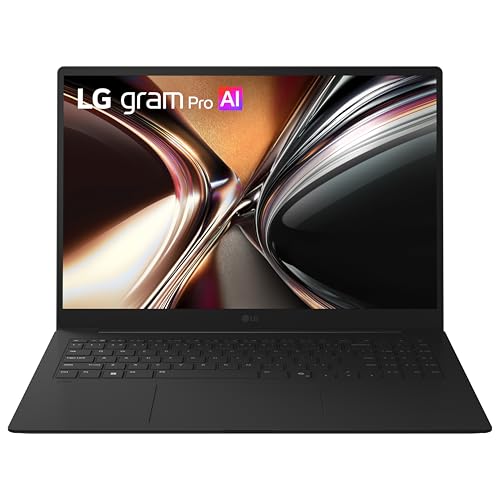
LG gram Pro 16 Touch, Core Ultra 7 355, 32GB, 2TB SSD, 2.97 lbs — The featherweight
Every figure in this guide bends around one number in the gram Pro’s listing: 2.97 pounds, for a 16-inch laptop with 32GB of memory and a 2TB SSD. That is the weight class of small ultraportables, carrying a screen and a specification from the flagship shelf, at 0.6 inches thin. LG’s gram line has pursued this trick for years and the Pro is its fullest expression: the machine for the consultant, the academic, the executive whose office is wherever the plane lands, and who has stopped believing that power must be heavy.
The specification refuses to apologise for the weight. The Core Ultra 7 355 is a current Intel processor, the 2TB drive is the largest in this guide, the touchscreen serves the travelling presenter, and LG advertises battery endurance up to 28.5 hours, a manufacturer’s figure under the maker’s own test conditions, quoted here as their claim rather than our measurement. Graphics are integrated, which is the one structural concession: this is a machine for documents, data, media and light creative work at flagship speed, not for gaming or rendering.
The gram asks its buyer a single question: how much is a kilogram worth to you? If the answer involves airports, conferences and a shoulder that keeps accounts, this is not the compromise pick of the guide. It is the point of it.
Its existence also disciplines the rest of the guide. Every heavier pick must justify its grams against the gram’s proof that a 16-inch flagship specification can travel at under three pounds. The creator machines justify theirs with graphics and panels; the Blade with its card and cooling. The gram justifies its lightness by declining those contests entirely, and for the traveller that declination is wisdom, not absence.
- Display: 16-inch touchscreen
- Processor: Intel Core Ultra 7 355
- Memory: 32GB RAM
- Storage: 2TB SSD, the largest here
- Build: 0.6 inches thin, 2.97 lbs; extras include Thunderbolt 4, Copilot+ PC
Strengths
- Flagship specification at a weight rivals cannot approach
- 2TB of storage ends capacity planning entirely
- Touchscreen and modern platform in a traveller’s body
Trade-offs
- Integrated graphics only; no gaming or rendering ambitions
- Featherweight build feels different from dense flagships
- Battery endurance is the maker’s claim, not a guarantee
Best for: consultants, academics and executives who live in transit. Not suited for: gamers, 3D work or buyers who equate heft with quality.

Dell Premium 16, Core Ultra 7 255H, RTX 5050, 32GB LPDDR5X — The renamed flagship
The Premium 16 is the XPS 16’s story continued under new management of the nameplate: Dell’s listing itself records that this line was previously the XPS 16, and the machine carries the flagship’s design language into its next generation. In this configuration it steps one rung below the XPS Premium entry above: a Core Ultra 7 255H rather than the Ultra 9, an RTX 5050 rather than the 5060, and a 16.3-inch 2K screen rather than the 4K OLED touchscreen. Memory is 32GB of LPDDR5X and storage 1TB, matching its sibling where it counts for longevity.
Read correctly, this is not the lesser Dell; it is the calibrated one. The RTX 5050 still brings dedicated graphics acceleration that the integrated machines cannot offer, the 2K panel remains a creator-grade screen by any honest standard, and the Ultra 7 covers professional workloads without the flagship’s summit pricing. A buyer who wants the XPS lineage’s design and support with the specification trimmed to the work they actually do will find this the most rational Dell in the guide.
What it must not be is confused with its sibling at ordering time. The two listings share a design, a screen size and nearly a name; the differences live in the processor, graphics and panel lines, and those are the lines to read. Flagship families reward the same discipline as budget ones, at ten times the stakes.
There is a fleet argument for it as well. An organisation standardising on the Premium line gets the flagship’s design, docks and support with a specification matched to ordinary professional work, reserving the XPS’s summit configuration for the few desks whose work truly reaches it. Calibration, multiplied across a fleet, is how flagship budgets survive contact with finance departments.
- Display: 16.3-inch 2K
- Processor: Intel Core Ultra 7 255H
- Memory: 32GB LPDDR5X RAM
- Storage: 1TB SSD
- Graphics: NVIDIA GeForce RTX 5050; extras include fingerprint reader, Windows 11 Home
Strengths
- The XPS lineage’s design at a calibrated specification
- Dedicated RTX 5050 graphics for creative acceleration
- 32GB and 1TB match the flagship’s longevity figures
Trade-offs
- A rung below the XPS Premium in chip, graphics and panel
- 2K screen is not the 4K OLED of its sibling
- Name similarity with the XPS listing invites ordering errors
Best for: professionals who want the flagship line with the specification trimmed to their real work. Not suited for: buyers who need the 4K OLED panel or the strongest Dell configuration.
How Do the Screens Really Compare? XDR, OLED and the Refresh Question
At this level the screen is not a component; it is the workplace. The MacBook’s Liquid Retina XDR is a mini-LED design rather than OLED, built around extreme brightness and local dimming, and its virtue for creators is reference behaviour: what you see is a trustworthy account of the image. The OLED panels in the Dell, ASUS and Razer answer with perfect per-pixel blacks and contrast that mini-LED approaches but does not equal, at resolutions from the Premium 16’s 2K through the Zenbook’s 3K to the XPS’s 4K. For photography and film, both technologies are professional tools; the choice between them is about the work’s relationship with brightness, contrast and the static-interface question raised in our questions section.
The Blade adds the dimension the others ignore: time. A 240Hz refresh rate is invisible in a spreadsheet and transformative in a game, and its presence redefines what the machine is for in a way no other specification here does. Touch divides the set differently again: the Dell XPS and the Zenbook invite the hand, the Blade and the MacBook decline it, the gram includes it for the travelling presenter. There is no panel hierarchy in this guide, deliberately. There is a panel for the colourist, a panel for the player, a panel for the presenter, and the flagship buyer’s job is to know which pair of eyes they own.
Brightness and finish decide the outdoor and office cases that specifications photograph badly. Glossy OLEDs in a sunlit studio, matte-leaning panels in a glass office, the XDR’s headroom under a skylight: these are the moments where a flagship earns or embarrasses its price, and they argue for seeing your finalist in person, under real light, before the money moves. At two thousand dollars, a showroom visit is not indecision. It is due diligence.
Keyboards and trackpads, the other daily surfaces, divide the tribes by philosophy as well. Apple’s large glass trackpad is the reference for its kind; Razer’s and Dell’s serve their gaming and creator briefs with different priorities of travel, size and feel; the gram’s are engineered around the weight budget. Hands differ more than eyes do, and a flagship’s keyboard is the component most likely to be loved or quietly resented for five years, which is one more argument for the showroom hour this section keeps recommending.
What About Heat, Noise and the Desk?
Flagships are exercises in applied thermodynamics. The creator Dells and the Blade move serious heat through thin bodies, and under sustained exports or gaming loads their fans will be audible in a quiet room, which is not a defect but a disclosure: sustained performance has a sound, and the buyer who records narration or works in silence should plan the desk accordingly, with the machine docked at a distance and a long cable earning its keep. The efficiency-led machines, the MacBook under ordinary creative loads and the gram almost always, run their fans as a rumour rather than a presence.
Docking is where these machines become systems. Thunderbolt 4 on the Dells and Thunderbolt 5 on the Blade drive multi-monitor desks with a single cable; the MacBook’s ports serve its own ecosystem of displays and storage; the gram’s Thunderbolt 4 keeps the traveller’s hotel-room desk honest. At this level the correct accessory conversation is about the desk the flagship will command: a colour-accurate external monitor for the creator, a high-refresh one for the gamer, a hub that matches the port generation you actually bought. The laptop is the most expensive part of the workstation, not the whole of it, and the flagship buyer who budgets the desk alongside the machine will extract what the specification promises.
Power supplies tell the same story in miniature. The gaming and creator machines ship with substantial adapters that are part of their travel weight, a figure the headline specification never includes; the gram and the MacBook travel with comparatively modest chargers, and USB-C charging across much of the set lets a single adapter serve the bag. Weigh the whole travelling system, charger and cables included, before declaring one flagship lighter than another, because shoulders carry systems, not spec sheets.
Three Flagship Households, Three Different Machines
The film editor with a decade in Apple’s ecosystem, a library in its formats and clients who review on the same screens, is not comparison shopping and this guide will not waste her time pretending otherwise. The MacBook Pro is her machine, configured with the memory her fifth year needs, and her only real decision is the one this guide keeps repeating: buy the permanent parts generously, because the platform gives no second chances. Her Windows-based counterpart, editing in a studio whose pipeline and plug-ins are Windows-native, takes the XPS 16 Premium and its 4K OLED for exactly symmetrical reasons, and the two of them will produce indistinguishable work on machines that share almost nothing.
The consultant whose office is a sequence of client sites, trains and hotel desks has a different examination to pass: every gram is taxed daily, and every socket-free hour is billable. The gram Pro was designed by people who understood her invoice. She gives up the graphics card she never used and the panel resolution her documents never needed, and receives a 16-inch flagship that treats travel as its home terrain. Her colleague in game development, meanwhile, takes the Blade and thinks about it no further: his work and his play are the same specification, and the machine that serves both in one thin chassis is not a luxury but an economy.
The design studio equipping three desks splits the difference with intent: Zenbooks for the illustrators who draw on their screens, the Premium 16 for the producer whose work is documents and calls, and a shared XPS for the desk where colour decisions are signed off. Flagship buying at its best looks like that: not a ranking imposed on different lives, but a map consulted by each of them in turn.
What Is the Five-Year View? Longevity, Resale and Support
A flagship’s price divides by its years, so the years deserve analysis. Specification headroom is the first longevity factor: 32GB of memory and current processors postpone the day the machine feels old, and the permanent-memory machines reward the buyer who fitted generously at the start. Software support is the second: Apple’s long update horizon is a documented part of its value, and the current Windows platforms here are at the beginning of their support lives rather than the end. The third is physical: metal-bodied machines like the Blade and the Dells age cosmetically better than painted surfaces, while the gram’s lightness is its own form of durability, since the machine that is carried gently is the machine that is dropped least.
Resale follows the same map. MacBooks are the liquid asset of the laptop world; flagship Windows machines hold value in proportion to their brand’s service network and their specification’s generosity; gaming machines hold a particular value with the one audience that understands them. None of this should drive the purchase, but a buyer choosing between two finalists may fairly count the second life, sale, hand-me-down or trade-in, as part of the first one’s price. The battery, on every machine here, remains the planned consumable: budget for its replacement in the later years and the five-year view stays honest.
When Should You Not Spend This Much?
A flagship guide that cannot talk a reader out of a flagship is a sales brochure, so here is the counter-case in full. If your work is documents, browsing, calls and media, the tier below this one will serve you indistinguishably for years, and the difference would buy the desk, the chair and the monitor that your body actually needs. If your machine will live a hard, unsupervised life, in site cabins, school bags or shared pool use, a flagship’s finish and price are liabilities rather than assets, and two mainstream machines, one as a spare, are the professional’s answer. If your employer’s software is a single Windows application of modest appetite, the ecosystem argument for the MacBook evaporates and the gaming argument for the Blade never forms.
Spend at this level when a specific axis is your living: when the panel is the product, the graphics card is the tool, the ecosystem is the workflow or the weight is the tax you pay daily. Spend it, in other words, the way the tribes in this guide spend it, on a named excellence that maps to a named day of your week. The buyer who can complete the sentence “this machine earns its price every time I…” has a flagship purchase. The buyer who cannot has a very expensive mainstream laptop, and the honest guides are the ones that say so before the box arrives.
There is no shame in that second outcome, only in discovering it late. The mainstream tiers in this batch of guides are the best they have ever been, and a buyer who talks themselves down from a flagship to a machine that fits has not settled; they have aimed. This article’s six are for the buyers whose sentence completes itself, and it is written to be equally useful to the reader it talks out of them.
How Should You Configure Within a Tribe?
Once the tribe is chosen, the remaining decisions are few and mostly permanent, so they deserve the guide’s last piece of method. Memory first, because on the MacBook and the soldered Windows machines it is forever: fit the allowance of the workload you expect in the machine’s later years, when software has grown and your projects have too. Storage second, by library rather than optimism: measure your current machine’s usage, double it for the archive’s growth, and let that arithmetic, not a sale banner, choose between the terabyte configurations and the gram’s two.
Operating system edition third, on the Windows machines: Pro, as fitted to the XPS here, earns its place where management, encryption control or remote access are real requirements, and is a pleasant extra elsewhere. Accessories last and deliberately: the dock that matches your Thunderbolt generation, the case that matches your travel, the cover that matches your risk. Configuration is where flagship money is most often wasted, not on the machine but on the mismatch between the machine ordered and the life waiting for it, and an hour with a tape measure, a software list and a library census prevents nearly all of it.
What Does the AI Hardware Mean at Flagship Level?
Every tribe in this guide now sells an AI story, and the flagship buyer deserves the calm version. Apple’s silicon integrates its neural engine into the same unified architecture as everything else, and its present uses are the platform’s own: image and video features, transcription, the assistance features gathered under Apple Intelligence. The Windows machines divide between the Copilot+ pattern, represented by the Zenbook’s Ryzen AI platform, and the creator flagships, whose RTX graphics cards double as the most powerful local AI accelerators in this guide, a fact the creative software increasingly exploits for effects, denoising and upscaling.
The honest valuation is the same one this site applied a tier below, scaled by the stakes: buy the machine for the work it does today, treat the AI roadmap as a bonus whose value will be decided by software, and note that at this level the hardware tickets are punched on every pick. Nobody in this guide is buying a machine that the AI era will leave behind; equally, nobody should pay a flagship premium for a feature list written in the future tense. The screens, the graphics and the ecosystems are the present tense, and they are quite enough to justify the money when they match your work.
Buyers who keep a flagship for its full term will likely watch that bonus appreciate slowly, as local features accumulate across system updates, which is the pleasant way for a purchase to age: the machine gaining small abilities it did not ship with, rather than merely losing speed.
How Do the Six Compare Side by Side?
| Model | Tribe | Processor | Memory | Storage | Screen | Graphics |
|---|---|---|---|---|---|---|
| MacBook Pro 16 | Apple | M5 Pro | 24GB unified | 1TB | 16.2″ XDR | Integrated 20-core GPU |
| Dell XPS 16 Premium | Creator | Ultra 9 285H | 32GB | 1TB | 16.3″ 4K OLED touch | RTX 5060 |
| Razer Blade 16 | Gaming | Ultra 9 386H | 32GB DDR5 | 1TB | 16″ QHD+ OLED 240Hz | RTX 5070 Ti |
| ASUS Zenbook S16 | Creator | Ryzen AI 9 | 32GB LPDDR5x | 1TB | 16″ 3K OLED touch | Integrated Radeon |
| LG gram Pro 16 | Ultralight | Ultra 7 355 | 32GB | 2TB | 16″ touch | Integrated |
| Dell Premium 16 | Creator | Ultra 7 255H | 32GB LPDDR5X | 1TB | 16.3″ 2K | RTX 5050 |
What Should You Check Before Spending at This Level?
Flagship money buys flagship consequences for small mistakes, so the checklist grows teeth. First, the ecosystem question, answered with your software list open: every application you depend on, checked by name against the operating system you are about to marry. Second, the permanence question: on the MacBook, and on the soldered-memory Windows machines, the memory figure is a lifetime decision, so buy the allowance your fifth year needs, not your first. Third, the panel question, answered in person if possible: OLED’s blacks, the XDR’s reference tuning and the Blade’s refresh rate are all visible qualities that specifications only gesture at, and at this price your eyes are entitled to a vote.
Fourth, the support question. At this level, warranty terms, accidental-damage cover and the manufacturer’s service network are part of the product, and the differences between brands are real. Read what is included, price what is not, and register the machine the week it arrives. Fifth, the desk question: docks, monitors and Thunderbolt generations. The Blade’s Thunderbolt 5 and the Dells’ Thunderbolt 4 both drive serious desk setups, but cables and docks should be planned with the machine, not discovered after it. A flagship is a system purchase; buy the system.
Sixth, and most often skipped, the arrival inspection. Panels at this level are the product, so examine yours in the first days for uniformity, dead pixels and backlight behaviour, under the lighting you work in, while exchange is a courtesy rather than a negotiation. Run the machine at full load once, listen to it, and confirm the thermals match the reviews’ character. A flagship that passes its first week under scrutiny has given you the only unit that matters: the one in your hands, verified.
Seventh, photograph the serial number and store the invoice outside the machine, and set up the manufacturer’s account while the process is a courtesy rather than a recovery. Flagship support is excellent right up to the moment it needs proof of purchase from a laptop that will not boot, and the thirty seconds that prevents that scene is the cheapest insurance in this entire article. Do it on the day the machine arrives, while the box is still open and the paperwork is still warm from the printer by the door.
What Mistakes Do Buyers Make With Flagships?
The first is cross-tribe envy: buying the gaming machine for its specifications and resenting its fans in the library, or buying the creator flagship and resenting its weight in the airport. The machine was honest; the match was not. The second is under-configuring the permanent parts, saving a little on memory in a machine whose memory can never change, a false economy that compounds annually. The third is its mirror: maxing every option on a machine whose work never leaves the browser, buying frames and cores that will idle for five years.
Fourth, flagship buyers forget the software bill: creative subscriptions, the platform-specific tools, the migration of a decade of files and licences, which can rival the accessory budget and arrives in the same month. Fifth, they skip the insurance conversation. A machine at this price that travels should be insured or covered against accidents deliberately, as a decision, rather than by default and regret. None of these mistakes is about the laptops, which are all excellent. They are about the buyer’s map of their own life, which is the document this entire guide has been asking you to draw.
A final mistake is timing theatre: waiting indefinitely for the next generation while doing present work on a dying machine. Flagships improve annually and depreciate politely; the cost of a year spent struggling is paid in the only currency that does not recover. Buy the machine your current work deserves when the current work demands it, and let the next generation be the next buyer’s good fortune.
Final Recommendation
Choose the tribe and the flagship chooses itself. Apple’s faithful, and those ready to become so, take the MacBook Pro and its XDR screen without a backward glance. Windows creators take the XPS 16 Premium for the full flagship specification, the Zenbook S16 for elegance with a 3K touch panel, or the Premium 16 for the same lineage calibrated a rung lower. Gamers who work take the Blade, and travellers who refuse to choose between size and weight take the gram. Two thousand dollars spent this way does not buy the best laptop in this guide, because there isn’t one; it buys the laptop whose excellence is shaped exactly like your life, which is the only superlative that survives contact with a Tuesday.
Buy it once, configure the permanent parts generously, insure the risk you cannot afford, and then stop reading laptop guides for five years. That silence, the sound of a purchase that does not need revisiting, is what flagship money is actually for. Everything else in this guide, the panels, the processors, the tribes themselves, is simply the machinery for earning it, one ordinary working day at a time, year after year.
Frequently Asked Questions
Is the MacBook Pro really worth it over the Windows flagships?
For buyers inside Apple’s ecosystem, yes: the integration of the M5 Pro, the unified memory architecture and the XDR display with macOS software is a combination no Windows machine replicates. For buyers whose software and habits are Windows-shaped, the same money buys more graphics and more configuration freedom in the Dell and Razer picks. The question is tribal, not financial.
What is the difference between the Dell XPS 16 and the Dell Premium 16?
They are one flagship lineage under successive names; the Premium line is the XPS 16 continued. In this guide the XPS 16 Premium listing carries the stronger configuration, Core Ultra 9, RTX 5060 and a 4K OLED touchscreen, while the Premium 16 listing carries the Core Ultra 7, RTX 5050 and a 2K screen. Read the processor, graphics and panel lines to tell them apart.
Can these laptops really game?
One of them is built for it: the Razer Blade 16, whose RTX 5070 Ti and 240Hz OLED are a gaming specification in full. The Dell XPS with its RTX 5060 and the Premium 16 with its 5050 game respectably as a second job. The MacBook, Zenbook and gram are not gaming machines in the catalogue sense, whatever their other excellences.
How much memory do I need at this level?
The 32GB fitted to the Windows picks is the comfortable flagship standard for creative and technical work. The MacBook’s 24GB of unified memory serves its architecture efficiently and suits most creators, but because none of these machines can be expanded later, buyers with very large projects should treat memory as the first place to be generous.
Are OLED screens a risk for burn-in on a work laptop?
Modern OLED panels include mitigation features and are widely used in professional machines, but static interface elements displayed for years at high brightness are the known stress case. Buyers whose work is a fixed dashboard all day should weigh that honestly; for varied creative and general work, the panel quality on offer here is the reason to buy, not a reason to hesitate.
Will a laptop at this price last longer than a cheaper one?
Generally yes, in specification headroom, build and support, with five or more years of serious service a reasonable expectation. The battery remains a consumable on every machine here, and the lightest designs trade some serviceability for their weight, but the performance ceilings of these flagships postpone obsolescence far beyond the mainstream tiers.
Which of these is best for video editing specifically?
It follows your ecosystem rather than the spec sheet. Editors in Apple’s world take the MacBook Pro, whose software and silicon are built for each other. Windows editors take the XPS 16 Premium for its 4K OLED and RTX 5060, with the Blade as the alternative when gaming shares the machine. The Zenbook serves lighter editing beautifully but its integrated graphics set its ceiling.
Related Guides
Buyers stepping down to earth can compare these flagships with the best 700 dollar laptops roundup, where the mainstream becomes genuinely modern, and with the best 500 600 dollar laptops guide for the tier where value peaks. Creators assembling a desk around a flagship may also want the storage-focused best 2tb laptops roundup. The workstation end of this budget is modelled in the best 3d modeling laptops, where certified drivers matter more than raw frames. The shrinking 15-inch 4K class is audited honestly in the best 4k 15 inch laptops.


