What's inside
- Where to Buy the Best ATX Mid Tower PC Cases
- Key Takeaways
- Quick Picks
- How Did We Choose These Mid-Towers?
- Which ATX Mid Tower Should You Buy First?
- How Do the Six Mid-Towers Compare Side by Side?
- What Actually Matters When Buying a Mid-Tower?
- How Do You Plan a First Build Inside One of These Cases?
- What Mistakes Do Mid-Tower Buyers Keep Making?
- How Does Airflow in a Mid-Tower Actually Work?
- Why Does Fan Size Matter More Than Fan Count?
- Which Mid-Tower Fits Which Kind of Build?
- How Should You Maintain a Mesh Mid-Tower Over the Years?
- What Does a Quiet Mid-Tower Sound Like at a Real Desk?
- How Do You Read a Case Listing Without Being Fooled?
- How Did the Mid-Tower Get This Good?
- What Should You Upgrade First Inside an Older Mid-Tower?
- Should You Mount the Graphics Card Vertically?
- Final Recommendation
- Frequently Asked Questions
- Related Guides
As an Amazon Associate I earn from qualifying purchases. This post may contain affiliate links at no extra cost to you.
gizmoverdict.com is reader-supported. When you buy through links on our site, we may earn an affiliate commission.
Where to Buy the Best ATX Mid Tower PC Cases
Ask a dozen builders to name the best atx mid tower pc cases and you will hear the same short list of brand names, usually defended with the loyalty of football supporters. Strip away the tribalism, though, and the mid-tower is simply the most honest size of computer case ever made: large enough for a full ATX motherboard, a long graphics card and a proper tower cooler, small enough to sit on or under an ordinary desk, and cheap enough to manufacture well that competition stays fierce. That fierceness is your friend. In 2026 a mid-tower buyer is choosing between genuinely different engineering philosophies — twin 160mm intake fans the size of dinner plates, real walnut trim over a five-fan chassis, perforated panels on nearly every face, modular fan rails that unclip like camera gear — rather than between a good case and several bad ones wearing RGB lipstick.
This guide compares six verified mid-towers head to head. Two come from Lian Li’s LANCOOL line, which has quietly become the airflow benchmark of the segment. NZXT’s H5 Flow represents the compact, perforated school of design. Fractal Design’s North argues that a gaming PC can look like furniture. Corsair’s 4000D RS ARGB brings a modular frame system down from its flagship cases, and MONTECH’s X3 Mesh closes the list as the fan-loaded value play, six fixed-RGB fans included before you spend another penny. Every case here takes a standard ATX board. Two smaller micro-ATX cases you may see recommended elsewhere — the MONTECH AIR 100 and the ASUS Prime AP201 — are deliberately absent: they are fine cases, but they are not ATX mid-towers, and a guide that blurs that line will eventually sell someone a case their motherboard cannot enter.
Read the picks with your own build in mind. A mid-tower is a ten-year purchase in a way a graphics card is not; boards, cards and coolers will pass through it in procession. The right question is rarely which case is best in the abstract. It is which case forgives your habits — the dusty room, the cat, the radiator you swear you will fit next upgrade, the side panel you remove monthly because you cannot leave well enough alone.
Key Takeaways
- The Lian Li LANCOOL 216 is the airflow reference here: two 160mm front fans move air at low speed and low noise, which is the combination that actually matters at a desk.
- Wood is no longer a styling trick — the LANCOOL 217 and Fractal North both pair real walnut with serious fan counts, so a living-room build no longer means a hot build.
- Check graphics card length before falling in love: the MONTECH X3 Mesh supports cards up to 305mm per its listing, noticeably tighter than the long-card room in the LANCOOL and Corsair cases.
- Included fans are real money. Cases shipping with four, five or six fans can undercut a bare chassis once you price the fans you would otherwise add.
- Radiator plans decide cases: builders intending a 360mm top radiator should shortlist the H5 Flow’s front 360mm support and the larger LANCOOL models carefully against their exact mounting positions.
- Every pick below is a true ATX mid-tower; the popular micro-ATX minis were excluded on purpose rather than mislabelled.
Quick Picks
| Pick | Badge | Why it earns its place |
|---|---|---|
| Lian Li LANCOOL 216 RGB | Best Overall | Twin 160mm intakes give it the calmest high-volume airflow in this group. |
| Lian Li LANCOOL 217 | Best Wood-Accent Airflow | Five PWM fans and walnut trim — the rare case that pleases both a thermometer and a decorator. |
| NZXT H5 Flow | Best Compact Mid-Tower | Perforated panels and a tidy interior in a footprint that suits smaller desks. |
| Fractal Design North Charcoal TG | Best for Living Rooms | Walnut slats and dark glass make a gaming rig read as furniture, not equipment. |
| Corsair 4000D RS ARGB | Best Modular Interior | A customisable frame and InfiniRail fan mounting for builders who rearrange often. |
| MONTECH X3 Mesh | Best Fan-Loaded Value | Six fixed-RGB fans included; the light show arrives without a second purchase. |
How Did We Choose These Mid-Towers?
We started from the constraint in the keyword itself: a case only qualifies if a standard ATX motherboard fits with room to work, because the quiet scandal of case round-ups is the micro-ATX mini wearing a mid-tower badge. From there we weighted four things. First, intake design — mesh area, fan diameter and whether the stock fans are large and slow or small and frantic. Second, build forgiveness: tool-less panels, cable channels with actual depth, and grommets placed where cables genuinely travel. Third, expansion honesty, meaning the radiator and card lengths in the listing rather than in the marketing photograph. Fourth, what the case costs you after purchase; a chassis that needs three extra fans is competing at a different price than its sticker suggests.
We also discounted fashion. Tempered glass is lovely and we have included plenty of it, but a glass front panel over a sealed intake is a terrarium, and no case here asks your components to live in one. Where a pick has a real weakness — a modest card-length ceiling, fixed-speed fans, a compact interior that punishes large hands — that weakness is written into its section rather than buried, because the reader most harmed by a review is the one whose exact use case matched the flaw nobody mentioned.
Which ATX Mid Tower Should You Buy First?

Lian Li LANCOOL 216 RGB — Best Overall
The LANCOOL 216’s party trick is visible from across the room: two 160mm fans behind the front mesh, larger than the 120mm and 140mm units nearly every rival uses. Fan physics rewards that diameter in a way spec sheets undersell. A bigger fan moves a given volume of air at lower rotational speed, and noise rises far faster with speed than with size, so the 216 can feed a hot graphics card while turning at a lazy, low-pitched pace that disappears under game audio. In a quiet room at idle it is closer to a refrigerator’s hum than a computer’s whine, and that character — calm under load — is what owners actually praise a year later.
The rest of the chassis supports the headline act sensibly. The interior follows Lian Li’s recent LANCOOL layout, with a ventilated PSU shroud, room for long cards, and cable routing that assumes you will use the rear fan as exhaust and get out of the way. The ARGB lighting on the big fans is tasteful at low brightness and can be toned down or switched through the usual motherboard sync routes. Assembly is uneventful in the best sense: panels come off without a fight, the motherboard tray gives your knuckles clearance, and nothing about the build requires a third hand or a magnetic dish of rescued screws.
Consider who this case suits in practice. A builder running a mid-to-high wattage GPU in a warm room, gaming in the evening with the door closed, gets the most from it — the intake headroom means fan curves can stay gentle even in summer. It is also a strong choice for a first build that is meant to last through two graphics cards, because the airflow ceiling is high enough that a future, hotter card does not force a case change. If your desk is shallow, measure before ordering; the 216 is a full-proportioned mid-tower, not one of the new compact breed.
- Form factor: ATX mid-tower
- Included fans: 2 x 160mm ARGB front fans per listing, plus rear exhaust in the standard configuration
- Front panel: full mesh intake
- Side panel: tempered glass
- Standout trait: large-diameter, low-speed intake airflow
Strengths
- 160mm intakes shift serious air without the shrill note of small fans at high rpm.
- Mesh front and ventilated shroud give the GPU a direct, unchoked supply of cool air.
- Build process is calm and spacious, with panels and routing that respect the builder.
Trade-offs
- Full-size proportions need a desk measurement before purchase, especially under-desk with a shelf above.
- The big-fan look is industrial; it will not pretend to be furniture.
- ARGB is front-and-centre — minimalists may spend setup time dimming rather than admiring.
Best for: performance-first builders who want airflow headroom for future, hotter graphics cards. Not suited for: very shallow desks or anyone chasing a wood-and-brass living-room aesthetic.
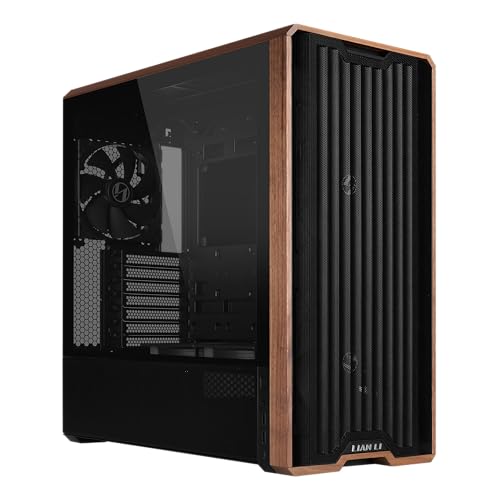
Lian Li LANCOOL 217 — Best Wood-Accent Airflow
The LANCOOL 217 answers a question the industry avoided for years: what happens if the walnut-trimmed case is also the well-cooled one? Lian Li’s answer ships with five PWM fans fitted as standard, which is a statement of intent — this is not a styled box that tolerates airflow, it is an airflow chassis that happens to wear real walnut. PWM control matters here because it lets the motherboard trim fan speed finely across the whole temperature range, so the case can idle near-silently during desktop work and still have five fans’ worth of ceiling when a game loads the GPU.
Visually the 217 sits between the 216’s industrial mesh and Fractal’s full furniture act. The wood appears as trim rather than a slatted front, which reads as an accent on a modern case instead of a sideboard impersonation. For many rooms that is the better balance: a desk in a bedroom or study gains warmth without the PC becoming a theme. Build quality follows the LANCOOL pattern — panels align, the interior is logically zoned, and the fan complement means most builders will add nothing at all, which quietly makes its value stronger than the sticker comparison against bare cases suggests.
The ownership scenario that flatters the 217 is the shared-space build: a PC that games hard at night and sits in a partner-approved study by day. Five controllable fans also suit builders who like to tune — there is enough installed hardware to experiment with intake/exhaust balance properly. The counterweight is choice complexity; with five PWM fans you will spend a few minutes in BIOS or software deciding curves, where a two-fan case decides for you. Treat that as a feature with a small time tax, and set the curves once, properly, on day one.
- Form factor: ATX mid-tower
- Included fans: 5 x PWM fans per listing
- Accent material: walnut wood trim
- Control style: full PWM fan control via motherboard headers
- Standout trait: highest included-fan count among the airflow-led picks here
Strengths
- Five PWM fans fitted — nothing extra to buy for a complete airflow setup.
- Walnut trim warms up a desk without committing to a full furniture disguise.
- Fine-grained speed control lets it be quiet at the desktop and capable in games.
Trade-offs
- Five fans mean five headers’ worth of curve-setting on build day.
- Wood trim still reads as a gaming case first; full stealth belongs to the North.
- Buyers who prefer a single lighting ecosystem may find the presentation plainer than RGB-led rivals.
Best for: shared-space builds that must look civilised and cool properly. Not suited for: builders who want to plug in two fans and never open a fan-curve screen again.

NZXT H5 Flow — Best Compact Mid-Tower
NZXT built its reputation on clean rectangles, and the H5 Flow is that rectangle taught to breathe. The design perforates the panels extensively — front and top carry dense hole patterns that let the case inhale across a broad surface rather than through a slot — and the result is a compact ATX mid-tower that cools far better than its tidy footprint implies. Per its listing it ships with two 120mm fans and supports a 360mm radiator at the front, a pairing that tells you exactly who it is for: the builder with a normal desk, a normal room, and no desire for the PC to become the largest object in either.
Inside, NZXT’s cable management remains the brand’s quiet strength. Channels and straps sit where a first-time builder’s hands naturally route cables, and the compactness works for rather than against tidiness because there is simply less slack to hide. The tempered glass side shows off a neat build flatteringly. Two included fans is a modest count next to the LANCOOL pair, so plan the airflow honestly: the stock layout handles mainstream gaming hardware well, and adding one exhaust or intake fan later is a cheap, easy upgrade rather than a rescue mission.
The H5 Flow’s natural home is the smaller setup — a bedroom desk, a student room, a home office corner where a full-proportioned tower would crowd the monitor arm. It also suits the tidy-minded builder who values a case that looks deliberate from every angle, including the top, which many rivals treat as an afterthought. If you are planning a thick top radiator with tall memory, check clearances carefully, since compact cases trade exactly that vertical room for their footprint; the front radiator route in the listing is the safer plan.
- Form factor: compact ATX mid-tower
- Included fans: 2 x 120mm per listing
- Radiator support: 360mm front per listing
- Panels: perforated front and top, tempered glass side
- Standout trait: NZXT cable management in a small footprint
Strengths
- Perforated panels give honest airflow without a bulky frame.
- Cable channels make a tidy first build genuinely achievable.
- Compact footprint fits desks where full-size towers crowd everything else.
Trade-offs
- Only two fans included; heavy builds may want one more.
- Compact interior rewards planning — test-fit large coolers and radiators on paper first.
- The minimalist look divides opinion next to wood or RGB-led alternatives.
Best for: smaller desks and tidy builders running mainstream gaming hardware. Not suited for: maximum-radiator custom-loop ambitions in a first chassis.

Fractal Design North Charcoal TG — Best for Living Rooms
The North is the case that changed what a gaming PC is allowed to look like. Its front is a grille of real walnut slats over the intake, the chassis wears charcoal panels and a dark tempered-glass side, and the whole object sits in a room the way a good speaker or a record player does — as an intentional piece of the furniture. People who share their living space with non-gamers underestimate how much this matters until the alternative, a glowing tower, is exiled to a corner behind the sofa where its airflow goes to die.
Under the tailoring, the North is a competent ATX mid-tower rather than a style-over-substance shell. The slatted front passes air properly, the interior follows Fractal’s sensible layout tradition, and the glass edition shows components with a smoked restraint that suits the design. It will not match the LANCOOL 216’s raw intake ceiling, and it does not try to; its thermal target is the mainstream-to-strong gaming build, cooled adequately and quietly, in a case a household can live with. Treat it as engineering in service of coexistence and it makes complete sense.
Picture the use case plainly: a living-room PC driving a television for games and media, or a study machine in a design-conscious home. The North is also the pick for anyone whose previous case was banished, hidden or apologised for. The cautions are practical — walnut deserves the same respect as any wood finish around drinks and direct sun, and builders chasing the last degree with an overclocked flagship card should choose the mesh-fronted sibling or the LANCOOLs instead.
- Form factor: ATX mid-tower
- Front: real walnut slatted intake
- Side panel: dark tempered glass on this TG edition
- Finish: charcoal
- Standout trait: furniture-grade appearance with real airflow through the front
Strengths
- Genuinely beautiful in shared rooms; ends the glowing-box argument.
- Walnut front is functional intake, not a sealed decorative plate.
- Fractal’s interior layout keeps building and upgrading straightforward.
Trade-offs
- Airflow ceiling sits below the mesh-first LANCOOL cases for extreme hardware.
- Wood finish wants basic care — coasters exist for a reason.
- The aesthetic is specific; it will clash with an all-RGB, all-glass battlestation theme.
Best for: living-room and shared-space builds that must earn their place visually. Not suited for: maximum-overclock showpieces chasing every last degree.

Corsair 4000D RS ARGB — Best Modular Interior
Corsair’s 4000D line has been a default recommendation for years, and this RS ARGB edition is the version for builders who rearrange. Per its listing, the case is built around a customisable, fully modular frame with three pre-installed fans, InfiniRail fan mounting that lets fans slide along a rail to the position you actually want, GPU anti-sag support, and even reverse-motherboard support for layouts that flip the conventional orientation. That is a flagship toolbox arriving in a mid-tower, and it changes the ownership experience: fan placement becomes an experiment you can redo in minutes rather than a decision cast in screws.
The practical dividends show up over years, not on unboxing day. When a longer graphics card arrives, the anti-sag bracket and modular interior accommodate it without improvisation. When you decide the intake balance is wrong, the rail system lets you test alternatives on a Saturday morning. Three RS ARGB fans are included, so the case lights and cools out of the box, and Corsair’s ecosystem familiarity means most builders already know the software landscape they are entering.
This is the tinker’s pick — the builder who swaps coolers, tries vertical or reversed layouts, and treats the PC as a project with a power button. It is equally good for a methodical first build that is expected to evolve, because modularity is really just future-proofing with better marketing. The honest cost is complexity at the margin: more systems to understand, and a feature set you pay for whether or not you ever slide a fan along its rail. Fixed-layout builders can save the difference and lose nothing they would use.
- Form factor: ATX mid-tower, modular frame
- Included fans: 3 x pre-installed RS ARGB per listing
- Mounting: InfiniRail sliding fan mounts
- Extras per listing: GPU anti-sag support, reverse motherboard support
- Standout trait: reconfigurable interior uncommon at this size
Strengths
- Modular frame and fan rails make layout changes quick and reversible.
- Anti-sag support answers the modern long-card problem properly.
- Three ARGB fans included, with a familiar ecosystem behind them.
Trade-offs
- You pay for flexibility that set-and-forget builders may never touch.
- More mounting systems mean a slightly longer first-build learning curve.
- Reverse-layout support is a niche delight, not a mainstream need.
Best for: tinkerers and evolving builds that will be rearranged over years. Not suited for: build-it-once owners who value the simplest possible interior.

MONTECH X3 Mesh — Best Fan-Loaded Value
The X3 Mesh makes its pitch in the first line of its listing: six fixed-RGB fans, already installed, behind a high-airflow mesh front, inside an ATX mid-tower with a swivel tempered-glass side panel. MONTECH understood that a large slice of builders want the illuminated, well-fanned gaming case as a single purchase, not as a chassis plus a fan multipack plus an afternoon of wiring. Six fans also means the airflow layout is complete on day one — three 140mm intakes per the listing among them — which removes the most common beginner failure, the case bought bare and run hot because the extra fans were always next month’s job.
The compromises are named in the same listing, and we will name them too. Graphics card support tops out at 305mm, so measure any long flagship card twice; radiator support is 240mm class, which suits tower air cooling and modest liquid setups rather than big top radiators. The fans are fixed-RGB — they light in their pattern rather than chasing motherboard-addressable effects — which is either a blessed simplicity or a limitation depending on whether you planned a synchronised light show. Dust filters are included, which matters in a mesh case that breathes this freely.
Who should buy it? The value-led gaming builder whose card fits the 305mm ceiling and who would rather spend the savings on storage or a better GPU tier. It is also a genuinely kind first case: the swivel glass door makes the inevitable post-build fiddling painless, and a complete fan set means the thermals are handled while the owner learns everything else. Builders planning a future flagship card longer than the ceiling should step up to the LANCOOL or Corsair picks instead of gambling on millimetres.
- Form factor: ATX mid-tower
- Included fans: 6 x fixed-RGB fans per listing, including 3 x 140mm intakes
- GPU support: up to 305mm per listing
- Radiator support: 240mm class per listing
- Side panel: swivel tempered glass; dust filters included
Strengths
- Six fans installed — the complete light-and-airflow package in one box.
- Mesh front feeds the intakes honestly; no sealed-glass suffocation.
- Swivel glass door makes a first builder’s adjustments easy.
Trade-offs
- 305mm card ceiling excludes some long flagship graphics cards — measure first.
- Fixed RGB cannot join a fully addressable motherboard lighting scheme.
- 240mm radiator class limits ambitious liquid-cooling plans.
Best for: value gaming builds that want fans and lights included, with a card that fits. Not suited for: very long flagship GPUs or large-radiator liquid builds.
How Do the Six Mid-Towers Compare Side by Side?
| Case | Character | Included fans | Watch out for |
|---|---|---|---|
| Lian Li LANCOOL 216 RGB | Airflow benchmark | 2 x 160mm ARGB front | Full-size footprint |
| Lian Li LANCOOL 217 | Wood-trimmed all-rounder | 5 x PWM | Curve setup time |
| NZXT H5 Flow | Compact and tidy | 2 x 120mm | Tight radiator clearances |
| Fractal Design North TG | Furniture first, PC second glance | Standard Fractal complement | Lower airflow ceiling |
| Corsair 4000D RS ARGB | Modular tinkering platform | 3 x RS ARGB | Paying for unused flexibility |
| MONTECH X3 Mesh | Fan-loaded value | 6 x fixed RGB | 305mm GPU ceiling |
What Actually Matters When Buying a Mid-Tower?
Start with the two measurements that cannot be negotiated after purchase: graphics card length and CPU cooler height, taken from your actual parts, compared against the case listing’s stated support. Card lengths have crept upward for a decade, and the gap between a 305mm ceiling and a long flagship model is the difference between a build and a return shipment. Next, decide your cooling route honestly. Tower air cooling forgives almost any case on this list. A 360mm liquid setup narrows the field to the cases whose listings support your chosen mounting position, and a radiator at the front consumes card length, which loops you back to measurement one.
Then think about air the way the case will experience it: intake area, filter access, and where the machine will live. A mesh case under a desk in a carpeted, pet-owning home needs filters you can reach without moving the PC, because a filter that requires a full unplug-and-carry ritual gets cleaned twice a year at best. Front-panel ports deserve a glance too — a USB-C port on the case only works if your motherboard has the header, a mismatch that still surprises buyers. Finally, weigh included fans as currency. The spread in this guide runs from two fans to six, and pricing a case without counting the fans you must add is how a bargain quietly becomes the expensive option.
How Do You Plan a First Build Inside One of These Cases?
Work in the order the case rewards. Fit the motherboard’s I/O shield if it is not pre-attached, install the CPU, cooler backplate and memory on the board outside the case, and route the EPS CPU power cable through its corner cut-out before the board goes in — that single sequence saves the most skinned knuckles in PC building. Mount the power supply next and lay its cables toward where they will land. Only then lower the motherboard in, because every cable routed afterwards is routed in the open. Install the graphics card last, support it while the screws go in, and leave the glass off until the machine has posted once; a case is a workbench before it is a display cabinet.
Fan curves deserve ten deliberate minutes. Set the intake fans to respond to GPU temperature if your motherboard allows it, or to a blended sensor, and keep idle speeds low enough that the desktop is silent. Run a game for twenty minutes, listen, and adjust once. A mid-tower with this much mesh and fan capacity should be a machine you hear only when it is working hard on purpose.
What Mistakes Do Mid-Tower Buyers Keep Making?
The classic error is buying by photograph: a sealed glass front that looked sleek online and cooks the GPU by August. Second is the phantom radiator — assuming a 360mm unit fits the top of a compact case because it fits the front, or forgetting that a front radiator eats the card length the same build was counting on. Third is treating included fans as decoration and never connecting the rear exhaust, leaving a pressurised box that vents through its seams and dust with it. Fourth, and most avoidable, is confusing form factors: micro-ATX cases like the MONTECH AIR 100 and ASUS AP201 are excellent, but they are not ATX mid-towers, and an ATX board will not shrink to forgive the mistake. Measure, read the listing’s own numbers, and let the case be the calmest purchase of the whole build.
How Does Airflow in a Mid-Tower Actually Work?
Case airflow is usually explained with arrows on a diagram, which hides the one idea that matters: your graphics card is a room heater with opinions, and the case’s job is to give it a private supply of cool air and a private exit for hot air, without the two streams mixing into a lukewarm soup. Intake fans at the front or bottom pull room air in. The GPU and CPU consume it, heat it, and exhaust fans at the rear and top push it out before it can recirculate. Every design choice in the six cases above is a variation on that plumbing. The LANCOOL 216’s 160mm fans are a bet on volume at low speed. The H5 Flow’s perforations are a bet on surface area — thousands of small holes adding up to a large, low-resistance intake. The North’s slats are the same bet wearing tailoring, and the X3 Mesh’s six fans are a bet that enough motivated air movement forgives a multitude of layout sins.
Pressure is the second idea worth owning. A case with slightly more intake than exhaust — positive pressure — vents its excess air through seams and gaps, which sounds sloppy but has a housekeeping virtue: air leaving through gaps carries no dust in, while a negative-pressure case inhales through every unfiltered crack and coats its interior accordingly. The practical route to positive pressure in these cases is simple: run intakes a touch faster than exhausts, keep filters clean, and resist the urge to add exhaust fans out of symmetry. Temperature differences of a degree or two between layouts are real but rarely worth chasing; dust behaviour over eighteen months is the difference you will actually live with, and it is decided by pressure and filtration, not by the last fan.
The third idea is that the GPU, not the CPU, sets the thermal agenda in a gaming build. A tower air cooler or a radiator gives the processor a dedicated path, but the graphics card breathes whatever the case hands it and dumps its heat into the interior for everything else to share. That is why ventilated PSU shrouds and bottom intake paths have spread through modern mid-towers, and why a case that looks generous on CPU-cooler clearance can still disappoint if the card sits in stagnant air. When you read our pick sections, the repeated question underneath them is always the same: what does this chassis do for the card at minute forty of a gaming session, when the room has warmed and the fans have settled? The cases that answer it well are the ones owners keep.
Why Does Fan Size Matter More Than Fan Count?
Marketing counts fans because counting is easy; physics cares about diameter and speed. Doubling a fan’s speed roughly doubles its noise energy in perceived terms far faster than doubling its airflow, which is why a large fan turning slowly feels civilised and a small fan turning quickly feels frantic even when both move similar air. The 160mm units in the LANCOOL 216 exist precisely on this principle, and the 140mm intakes in the X3 Mesh lean the same way. A case with two large, well-placed fans and a clean exhaust path will out-cool and out-quiet a case stuffed with six small fans fighting turbulence — though the X3’s six are a deliberate value package rather than a cooling record attempt, and should be judged as such.
Control is the other half of the equation. PWM fans, like the five fitted to the LANCOOL 217, report and accept fine speed commands, so the motherboard can hold them at a near-silent floor through desktop work and still summon full speed in seconds. Fixed-speed or simply lit fans, like the X3 Mesh’s set, trade that finesse for a plug-and-play constancy some builders honestly prefer. Neither answer is wrong; the mistake is buying one philosophy while wanting the other. If you know you will tune curves, buy controllable fans. If you know you will not, buy a case whose default behaviour is already the behaviour you want, because a fan curve you never set does not exist.
Which Mid-Tower Fits Which Kind of Build?
Consider three builds that walk into this guide. The first is a living-room gaming PC: a strong but not flagship graphics card, a television as its display, a household that will see it daily. That build belongs in the Fractal North, where the walnut front turns a chore of coexistence into a small pleasure, and the thermal demands sit comfortably inside the case’s abilities. The second build is a workstation that games — long rendering or compiling sessions, a card that works for a living, a room where the machine runs eight hours a day. That build belongs in the LANCOOL 216 or 217, where intake headroom and controllable fans translate directly into lower sustained noise, the workstation’s true currency. The third build is the evolving project: water-cooling experiments pencilled in, a card upgrade already rumoured, panels coming off monthly. That one belongs in the Corsair 4000D RS, whose modular frame treats rearrangement as the normal state of things.
The H5 Flow and X3 Mesh cover the remaining common ground between them. The NZXT suits the compact, design-led setup where desk space is the scarcest resource and the build is mainstream by design. The MONTECH suits the budget-allocated build, where money saved on fans-included value moves up a GPU tier — provided the chosen card respects the 305mm ceiling. Notice that none of these assignments is about one case being better than another in the abstract. Each is a match between a chassis’s compromises and a household’s habits, which is why the pick sections above spend as much time on who should walk away as on who should buy.
How Should You Maintain a Mesh Mid-Tower Over the Years?
A high-airflow case is a filter with a computer inside, and it asks for a small, regular kindness: the intake filters cleaned on a rhythm you will actually keep. Tie it to something monthly — the same day you descale the kettle or water the stubborn plant — and it takes four minutes with the panels’ filters slid out, tapped, rinsed if the design allows, and dried fully before refitting. A neglected mesh case does not fail dramatically; it warms by degrees across a summer, the fans work a little harder, the noise floor creeps, and the owner blames the graphics card for what the dust did.
There is also a seasonal rhythm worth adopting in homes without air conditioning. Before the warmest month, give the filters their deep clean and consider nudging the intake curve up by a small step; before winter, when heating dries the air and dust turns restless, check the filters again. Cases in this guide with front filters that slide or swing out make the habit painless, and that convenience is a genuine buying criterion disguised as a detail — the best filter design is the one still being used in year three, not the one with the finest mesh in a laboratory test nobody repeats at home.
Once a year, open the case properly. Check that fan blades carry only a film, not a felt; that the GPU’s own heatsink fins are clear; that cables have not migrated into a fan’s arc after a upgrade; and that the front-panel connectors still seat firmly, since they are flexed at every deep clean. Blow dust outward, in the direction the air already travels, ideally outside the room the PC lives in. This modest ritual is the entire maintenance contract of the modern mid-tower, and it is why filtered, tool-less designs age so much better than the sealed boxes they replaced: the case that is easy to clean is the case that gets cleaned, and the cleaned case keeps its day-one temperatures into its fifth year of service.
What Does a Quiet Mid-Tower Sound Like at a Real Desk?
Noise is where case reviews most often mislead, because a decibel figure measured in a lab says little about the sound that reaches your chair. Character matters more than level. A low, steady rush of air from large fans reads to the ear as weather — present, ignorable. A high, thin whine from small fans at speed reads as machinery, and it cuts through game audio and conversation alike. Coil whine and fan-motor tones add their own signatures, but the case decides the background against which all of them play, and it decides it through fan diameter, panel perforation and how hard the cooling system must work to hold temperatures. This is the deeper reason the LANCOOL designs lead this guide: headroom is quietness, purchased in advance. A case that can cool at forty percent fan speed never has to introduce you to its hundred percent voice.
Placement finishes what design starts. A mid-tower on the desk sits roughly a metre from your ears and radiates directly at you; the same tower under the desk gains the desk itself as a baffle and sounds markedly calmer, at the price of warmer intake air near the floor and dustier filters. Neither is wrong, but choose deliberately, and if the machine lives on the desk, weight the large-fan and PWM picks more heavily, because you are buying the sound signature at conversational distance. Glass side panels, incidentally, are not the noise villain of forum legend — they reflect a little internal sound, but a mesh side at ear height leaks fan noise straight out, which is one reason several of these designs pair mesh fronts with solid or glass sides. Judge the whole acoustic system, and remember that the quietest upgrade in PC building is often a fan curve set with patience rather than a part bought in hope.
How Do You Read a Case Listing Without Being Fooled?
Every case in this guide was chosen from its listing, so the listing-reading skill deserves a section of its own. Photographs lie by omission: they show the case empty, lit, and shot from the angle that hides the cable basement. The numbers in the listing are the honest part, and four of them decide your build. GPU support length, quoted in millimetres, must exceed your card’s full length including its bracket — not the round number in the card’s marketing name. Radiator support must be read per position, because front and top mounts differ and a front radiator subtracts from card room. Included fans must be read for size and control type, since six fixed fans and five PWM fans are different ownership experiences wearing similar counts. And the motherboard line must say ATX plainly if ATX is what you own; the micro-ATX cases excluded from this guide are a standing reminder that similar names hide different trays.
Two softer signals repay attention. The weight of a case, rarely celebrated, correlates honestly with steel thickness and panel rigidity — a featherweight tower will drum and resonate in ways a heavier one will not. And the spare-parts question matters across a ten-year ownership: brands with established case lines tend to stock replacement panels, filters and fan trays long after a no-name chassis has become unrepairable. None of this requires expertise, only the habit of reading a listing the way you would read a rental contract — the photographs are the invitation, the specifications are the agreement. The six cases above passed that reading; the ones that failed it, including some famous names with sealed fronts and vague radiator claims, are the invisible majority of this guide’s research.
How Did the Mid-Tower Get This Good?
It is worth remembering how recently the mid-tower was a beige compromise. The cases of fifteen years ago sealed their fronts, starved their intakes, mounted power supplies at the top where they breathed the CPU’s exhaust, and treated cable management as the owner’s private shame. The modern form — PSU basement, mesh or perforated intake, large slow fans, glass for those who want it and wood for those who want that — emerged because graphics cards became the hottest component in the machine and the audience started building on camera, in public, where ugly engineering could be seen. Competition did the rest. Lian Li chased airflow numbers, Fractal chased the room the PC lives in, NZXT chased the tidy desk, Corsair chased modularity, and MONTECH chased the complete package at a keen price. The six cases in this guide are what that decade of argument produced, and the buyer’s luck is that the argument had no loser: each philosophy survives because each serves a real household.
The practical consequence for you is that the mid-tower has become the lowest-risk purchase in a build. There is no longer a wrong door among reputable designs, only mismatches — a compact case asked to host a flagship loop, a value case asked to swallow a card beyond its ceiling, a furniture case asked to win a benchmark chart. Everything in this guide is an attempt to prevent mismatches rather than to crown a champion, which is why each pick carries its walk-away conditions in plain sight.
What Should You Upgrade First Inside an Older Mid-Tower?
Not everyone reading this guide needs a new case, and honesty requires a section for them. If your current mid-tower has a mesh front and fits your card, its cooling ceiling is probably set by its fans and filters rather than its frame: a pair of modern 140mm PWM fans and a thorough clean will recover most of what a new chassis offers, for a fraction of the cost and none of the rebuild weekend. Add a fan controller curve with intent, replace a rattling fan before replacing a case, and check that your GPU is not simply choked by a dust mat on its intake side of the shroud.
Replace the case when the frame itself is the limit: a sealed front no fan can fix, a card ceiling your next GPU exceeds, a radiator position that does not exist, or cable routing so hostile that every upgrade becomes an afternoon. Those are frame problems, and they are exactly the criteria this guide graded. If you do replace, keep the old tower in service — a retired mid-tower with modest parts makes a fine home server or a relative’s first PC, and the cases built as well as these six deserve a second life rather than a landfill. Longevity, in the end, is the mid-tower’s oldest virtue: buy the frame once, buy it honestly, and let everything inside it change around it for a decade.
Should You Mount the Graphics Card Vertically?
Vertical GPU mounting is the mid-tower’s most photographed option and its most misunderstood. Turning the card to face the glass undeniably shows off the part of the build that cost the most, and cases like the AIR 903 class and the modular Corsair here acknowledge the demand — the 4000D RS even builds anti-sag and layout flexibility into its frame. But a vertical card pressed close to a glass side panel breathes through a slot, not a room, and its fans sit millimetres from a wall. In a spacious chassis with genuine clearance it can work beautifully; in a compact one it is a thermal tax paid for a photograph. If you mount vertically, leave real space between card and glass, watch temperatures under a long session rather than a benchmark minute, and treat the riser cable as a component with its own quality grades, because a cheap riser is a troubleshooting weekend disguised as an accessory. The horizontal default, unfashionable as it is, remains the layout every case in this guide was primarily engineered around — and engineering, unlike photography, is what your card experiences at midnight in July.
Final Recommendation
For most builders the LANCOOL 216 is the mid-tower to beat: its big, slow fans deliver the quiet competence everything else in the build depends on. Choose the LANCOOL 217 when the room is shared and five PWM fans plus walnut sound like the right peace treaty, the H5 Flow when the desk is small and tidiness is a personality trait, the North when the PC must pass as furniture, the 4000D RS when you know you will rearrange, and the X3 Mesh when the budget works hardest with fans already fitted. A case is the one component your build will still be wearing three graphics cards from now — pick the one whose compromises are the kind you enjoy living with.
Frequently Asked Questions
Is a mid-tower big enough for a high-end graphics card?
Usually, yes — but verify the specific pairing. Long cards fit comfortably in the LANCOOL and Corsair cases here, while the MONTECH X3 Mesh lists a 305mm ceiling that some flagship models exceed. The case listing’s stated GPU support and your card maker’s stated length are the only two numbers that count.
Do more included fans always mean better cooling?
No. Fan size, speed control and intake openness matter as much as count. The 216’s two 160mm fans move air quietly and effectively, while the X3 Mesh’s six smaller fixed fans win on completeness and lighting. Judge the system — mesh, diameter, control — not the fan census alone.
Can these cases take a 360mm liquid cooler?
Some can, in specific positions. The NZXT H5 Flow’s listing states 360mm support at the front. Others in this group are 240mm class, like the X3 Mesh. Always match the radiator to the exact mounting position in the listing rather than assuming top and front are interchangeable.
What is the difference between an ATX mid-tower and a micro-ATX case?
An ATX mid-tower accepts full ATX motherboards; a micro-ATX case like the MONTECH AIR 100 or ASUS AP201 accepts only micro-ATX and mini-ITX boards. The smaller cases are more compact and often excellent, but they belong in a different guide — which is why they are not picks here.
Is tempered glass worse for airflow than mesh?
A glass side panel makes little difference; a glass front panel over the intake is the problem. Every pick here feeds its fans through mesh, slats or perforations. The North’s walnut front, for example, is a working intake grille, not a sealed decorative face.
Does a mid-tower fit under a standard desk?
Most do, but the margin lives in your desk’s modesty panel and any under-desk shelf or cable tray, which steal height the tape measure forgets. Measure the actual cavity, leave room above the case for top exhaust to escape rather than pool against the desktop, and remember that a tower on a small riser or board escapes carpet pile, which improves both bottom intake and filter life. The compact H5 Flow exists for exactly the setups where this arithmetic gets tight.
Should I buy extra case fans with my mid-tower?
It depends on the pick. The LANCOOL 217 and X3 Mesh arrive complete. The H5 Flow’s two fans suit mainstream builds, with one added fan a cheap later upgrade. Budget for fans only after counting what the listing already installs.
Related Guides
Keep researching with our Best Affordable Gaming PC Cases, compare the larger class in Best Airflow Full Tower PC Cases: Verified High-Airflow Mid-Towers and Two True Full Towers, and plan the board that goes inside with Best B550 Motherboards: Four Verified AM4 Picks, Plus the X570 Alternative Honestly Labelled.


