What's inside
- Key Takeaways
- Quick Picks
- How Did We Choose These 92mm Coolers?
- Why Does Fan Size Decide So Much in a Small Case?
- Which Half of the Category Is Your Case In?
- How Do You Install a Small Cooler Without Small Mistakes?
- What Mistakes Do Buyers Make With 92mm Coolers?
- Why Do Small Coolers Sound Bigger Than They Are?
- How Should You Choose a Processor for a 92mm Cooler?
- What About Living-Room and Travel Machines?
- How Should You Read a Small Cooler’s TDP Claim?
- Comparison Table
- Final Recommendation
- Frequently Asked Questions
- Related Guides
As an Amazon Associate I earn from qualifying purchases. This post may contain affiliate links at no extra cost to you.
gizmoverdict.com is reader-supported. When you buy through links on our site, we may earn an affiliate commission.
Where to buy: All six coolers below are verified listings from this site’s product pool, and every one of them turns on a 92mm fan. Heights quoted in this guide come straight from each listing title, because in this category a few millimetres decide whether the side panel closes.
The best 92mm cpu coolers exist because of a measurement most builders only make once, usually with a sinking feeling: the distance between a motherboard and the side panel of a small case. When a full-size tower cooler will not fit — in a small-form-factor enclosure, a slim desktop, a home-theatre PC hiding in a media cabinet, an older compact case inherited from a previous build — the 92mm class is where the honest options live. These are coolers designed around a 92mm fan rather than the 120mm and 140mm fans of mainstream towers, and that single design decision splits the category cleanly in two, a split this guide will keep returning to because confusing the halves is how buyers end up with the wrong cooler.
On one side stand the small towers. Models like Noctua’s NH-U9S and NH-D9L and be quiet!’s Pure Rock Slim 2 stand upright from the socket the way a normal tower cooler does, only scaled down: heights in the region of 110 to 125 millimetres instead of 160-odd, a 92mm fan pushing air through a fin stack that still has real depth, and cooling manners suitable for a proper desktop processor doing proper desktop work. These are the answer when your case is compact but still fundamentally a tower — a mini-ITX box with honest headroom, a small micro-ATX build, a workstation that must fit a shelf.
On the other side lie the low-profile coolers, and “lie” is the operative word. Thermalright’s AXP90 family spreads flat over the socket, built for mini-ITX cases where the clearance above the CPU is measured in the thirties and forties of millimetres — sandwich-style enclosures, console-sized living-room boxes, builds where the power supply or a drive cage hovers directly over the board. Their fans are slim 92mm units, their heights run from 36mm to 53mm in this guide, and their job is not to chase flagship temperatures but to keep a sensibly chosen processor cool inside a space that would suffocate anything taller. Two categories, one fan size, utterly different intentions. Choose your half first; the model second.
Key Takeaways
- The 92mm class splits into upright small towers for compact cases and flat low-profile coolers for ITX enclosures with almost no headroom.
- Noctua’s NH-U9S stands 125mm tall per its listing; the NH-D9L trades a little cooling for a shorter 110mm dual-tower design.
- be quiet!’s Pure Rock Slim 2 carries a stated 130W TDP and a maximum noise figure of 25.4 dB(A) in its listing title.
- Thermalright’s AXP90 X36, X47 and X53 are named for their heights in millimetres — 36, 47 and 53 — and use slim 92mm fans.
- The full-copper X53 is the low-profile pick when every degree matters inside a sealed-feeling ITX case.
- Measure clearance above your socket before anything else; in this category the tape measure outranks every benchmark chart.
Quick Picks
| Pick | Badge | Why it earns its place |
|---|---|---|
| Noctua NH-U9S | Best small tower | A 125mm single tower with the refinement and accessory kit that made this class respectable. |
| Noctua NH-D9L | Best shorter tower | Dual towers squeezed into 110mm for compact cases that cannot spare the U9S’s extra height. |
| be quiet! Pure Rock Slim 2 | Best quiet value tower | A 130W TDP rating and an easy install aimed at limited-space cases that still want silence. |
| Thermalright AXP90 X36 | Best ultra-low profile | Just 36mm tall for sandwich ITX cases where the socket clearance barely exists at all. |
| Thermalright AXP90 X47 | Best middle height | 47mm of cooler for the large middle ground of ITX cases that clear more than the minimum. |
| Thermalright AXP90-X53 Full Copper | Best low-profile cooling | A full-copper 53mm design for builders who can spend their case’s whole clearance budget. |
How Did We Choose These 92mm Coolers?
The pool for this guide was deliberately built to cover both halves of the category, because a list of six near-identical small towers would fail the reader whose case allows 40mm, and a list of six pancake coolers would fail the reader whose compact tower could have used something far stronger. So the selection holds three upright towers and three low-profile models, and within each half it spreads across height steps: 125, 110 and a slim be quiet! design among the towers; 36, 47 and 53 millimetres among the flat coolers. Whatever your measured clearance is, one of these six was chosen to be the pick that fits it.
Every height in this article comes from the manufacturer’s own listing title — Noctua prints 125mm and 110mm for its two towers, Thermalright prints its heights into the AXP90 model names themselves, and be quiet! prints its 130W TDP and noise ceiling for the Pure Rock Slim 2. Where a listing did not state a figure, this guide does not invent one; it describes behaviour qualitatively instead. That discipline matters more in this category than in any other we cover, because 92mm coolers are bought against hard physical limits, and a guessed millimetre is a returned parcel.
We also weighed what ownership feels like after the panel closes: mounting systems that can be fitted without removing the motherboard, fan quality at the low speeds these coolers will actually run, and whether the cooler leaves memory slots and the top expansion slot usable. Noctua’s listings make a specific promise on that last point — full RAM compatibility — and it is the kind of promise small-build owners learn to check first, because in a cramped case a cooler that eats a memory slot has not solved a problem, it has relocated one.
Why Does Fan Size Decide So Much in a Small Case?
A cooler’s fan diameter sets the ceiling on everything else. A 92mm fan moves less air per revolution than a 120mm fan, and it must spin faster for the same airflow, which is why small coolers live or die by the efficiency of what sits behind the fan: fin density, heatpipe count and layout, the flatness of the base. The good designs in this guide compensate with engineering rather than rpm. The mediocre ones — none of which you will find below — simply spin, and announce themselves through the side panel all evening.
Height interacts with fan size in a way worth understanding before you buy. An upright 92mm tower keeps the classic tower airflow: intake at the front of the fin stack, exhaust toward the case’s rear fan, the processor’s heat leaving in an orderly line. A low-profile cooler blows downward onto the socket, which cools the motherboard around the CPU as a side benefit — voltage regulators and memory in an ITX build often quietly depend on that wash of air — but recirculates some warm air inside very tight enclosures unless the case gives it an escape path. Neither pattern is superior in the abstract. The tower pattern suits cases with a rear exhaust and a little height; the downward pattern suits cases with a vented panel directly above the cooler, which most sandwich ITX designs provide precisely because they expect this kind of cooler.
The buyer’s translation is simple. Read your case before you read reviews: find the manufacturer’s stated CPU cooler clearance, subtract a safety margin for cable and panel flex, and let that number choose your half of this guide. Then, within the half, choose by the processor you actually run. A low-power chip in a media PC asks little; a high-core-count desktop processor in a small tower asks for the strongest tower your clearance allows and a fan curve with some patience in it.
Which Half of the Category Is Your Case In?
Before the detailed reviews, one exercise settles most purchases. Find your case’s CPU cooler clearance — in the manual, on the maker’s specification page, or by measuring from the motherboard’s surface to the inside of the closed panel. If the honest number is anywhere from about 115mm upward, you are shopping in the tower half, and the only remaining question is how much cooling you can afford within it. If the number lives between roughly 40 and 60mm, you are in low-profile territory, and the AXP90 ladder of heights becomes your shortlist. If the number falls in the awkward gap between those bands, favour the strongest low-profile model your clearance swallows, or the shortest tower if it genuinely fits with margin — but never a cooler whose stated height equals your clearance to the millimetre, because panels flex, cables wander, and published clearances are not sworn affidavits.
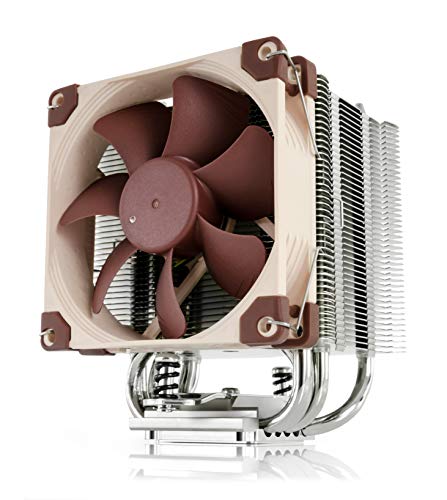
Noctua NH-U9S — Best small tower
The NH-U9S is the cooler that taught a generation of builders that “small” did not have to mean “compromised,” and it remains the reference point of the upright half of this guide. It is a single tower standing 125mm tall per Noctua’s listing, built around a 92mm fan and a fin stack deep enough to behave like a shrunken mainstream cooler rather than a novelty. In a compact tower case — a small micro-ATX build, a mini-ITX enclosure with real headroom, a slim workstation — it delivers the category’s most reassuring combination: temperatures that do not require apology and noise that does not require explanation to anyone else in the room.
Noctua’s listing makes two promises that matter disproportionately in small builds. The first is full RAM compatibility: the tower’s footprint is arranged so memory slots stay clear, which in an ITX or compact build can be the difference between using the memory you own and shopping for low-profile sticks you did not budget for. The second is the accessory kit, described in the listing as rich, and in practice the thing owners mention years later — mounting hardware for both Intel and AMD, the little extras that make installation in a cramped case a procedure rather than a wrestling match. Small cases punish fiddly mounting systems more than big ones do; there is simply less room for your hands to be clever in.
Set against its own sibling below, the U9S is the choice when your clearance reaches its height with room to breathe and your processor has genuine work to do — sustained compilation, a gaming load in a warm room, a small workstation that renders. Its single fan keeps the acoustic character simple, and Noctua’s fan quality at low speeds is the reason this cooler so often ends up described as inaudible in ordinary use. It is not the cheapest way to cool a CPU with a 92mm fan. It is the way that ends the research.
- Height: 125mm per listing
- Design: single tower, 92mm fan
- Compatibility note: 100% RAM compatibility per listing
- Platforms: Intel and AMD per listing
- In the box: rich accessory kit per listing
Strengths
- The strongest all-round cooling manners in the upright half of this guide.
- Memory clearance is designed in, not hoped for — vital in compact builds.
- Mounting hardware and accessories make a cramped install feel procedural.
Trade-offs
- At 125mm it is still too tall for genuinely slim cases and all low-profile enclosures.
- Premium pricing buys refinement rather than a different class of cooling.
- A single fan means no redundancy if you like a spare already installed.
Best for: compact tower cases with roughly 130mm or more of clearance and processors that do sustained work. Not suited for: sandwich ITX cases, media-cabinet PCs, or any enclosure whose clearance is measured in the forties of millimetres.
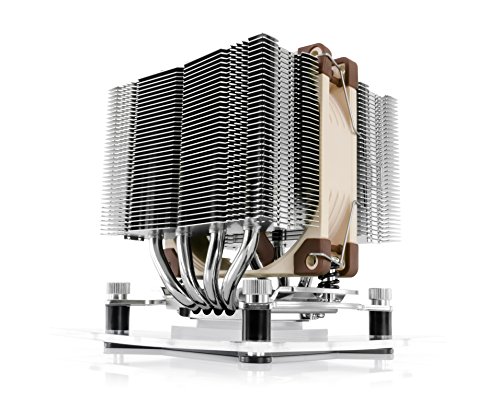
Noctua NH-D9L — Best shorter tower
The NH-D9L answers a very specific sentence: “the U9S is fifteen millimetres too tall.” Noctua’s listing states 110mm for this dual-tower design, and those saved millimetres are bought with architecture rather than surrender — two smaller fin stacks with the 92mm fan working between and around them, instead of one taller stack. Dual-tower layouts spread the heat across more fin area, which is how the D9L stays in the same performance conversation as its taller sibling while fitting cases that would have rejected it at the door.
Who owns a case with exactly this much room? More people than the mainstream market admits: compact towers from the era when optical bays set the proportions, small home-server enclosures, slim desktop workstations, and a long tail of mini-ITX cases that offer tower clearance but not tower generosity. For those machines the D9L is not a compromise pick; it is frequently the strongest cooler that fits at all, which is a different and much happier position to buy from. Its listing repeats the family’s important promises — full RAM compatibility and the rich accessory kit — so the space saving does not smuggle in a memory problem through the side door.
The honest cost of the shorter stature appears at the top end of processor behaviour. Under a sustained all-core load from a high-draw chip, the D9L’s smaller total mass will run its fan harder than the U9S would for a similar result, and in a warm room that difference becomes audible sooner. Pair it with the processors it was designed for — the broad middle of desktop chips, gaming loads, office and creator work with bursts rather than plateaus — and that cost never presents itself. Ask it to tame a flagship running flat out for hours and you have bought the wrong shape of cooler for the job, however excellent the cooler is.
- Height: 110mm per listing
- Design: dual tower, 92mm fan
- Compatibility note: 100% RAM compatibility per listing
- Platforms: Intel and AMD per listing
- In the box: rich accessory kit per listing
Strengths
- Fits a whole class of compact cases that exclude the 125mm U9S outright.
- Dual-tower fin area keeps its cooling respectable rather than token.
- Keeps the family promises on memory clearance and mounting hardware.
Trade-offs
- Sustained flagship-class loads will push its fan harder than the taller tower’s.
- Still far too tall for the low-profile enclosures half this guide serves.
- Costs Noctua money for a problem — height — some cases do not have.
Best for: compact cases with clearance in the low one-hundreds of millimetres and mainstream processors. Not suited for: ultra-slim ITX builds, or high-draw chips under long all-core loads in warm rooms.

be quiet! Pure Rock Slim 2 — Best quiet value tower
be quiet! approaches the small-tower problem from the direction its name advertises. The Pure Rock Slim 2’s listing leads with two numbers that tell you the design brief: a 130W TDP, and a maximum noise level of 25.4 dB(A) from its PWM fan. Read together, they describe a cooler for the sensible middle of computing — the home office machine, the family PC, the living-room-adjacent build — where the processor is a mainstream desktop chip and the owner’s real requirement is that the machine never becomes a presence in the room. Three heatpipes with direct-touch technology carry heat from the base into the fins, an arrangement chosen for efficiency at exactly this scale.
The listing also promises easy installation, and in this category that phrase carries more weight than marketing usually allows. Compact cases turn cooler installation into knuckle work; a mounting system that goes together without drama, ideally without exotic tools or a second pair of hands, is worth real money to the person building on a kitchen table. be quiet! has aimed this cooler squarely at limited-space cases, says so in the listing, and the whole design — slim profile, modest height class, quiet-first fan tuning — coheres around that aim in a way that makes it the easiest recommendation in this guide to hand to a non-enthusiast.
Its boundaries are equally coherent. A stated 130W TDP is a fence, and it should be respected as one: this is not the cooler for an unlocked flagship processor or a small case being asked to double as a rendering farm. Within the fence, though, the value argument is strong — this is typically the most affordable route in the tower half to a genuinely quiet machine, from a maker whose entire reputation rests on the noise side of the ledger. If your processor lives in the mainstream and your ears have veto power, the Pure Rock Slim 2 is where the tower half of this guide starts making financial sense.
- Rating: 130W TDP per listing
- Noise: max. 25.4 dB(A) per listing
- Heatpipes: 3, with HDT technology per listing
- Fan: PWM, tuned for silent operation
- Installation: described as easy in the listing
Strengths
- A stated noise ceiling from a silence-first maker suits shared and living spaces.
- Straightforward installation respects the realities of building in a small case.
- The most wallet-friendly temperament in the tower half of this guide.
Trade-offs
- The 130W TDP fence excludes high-draw and heavily overclocked processors.
- Three heatpipes cannot match the sustained-load composure of the Noctua towers.
- Its slim profile gives up fin mass that bigger small-towers spend on headroom.
Best for: mainstream processors in limited-space cases where quiet matters more than records. Not suited for: flagship chips, overclocking projects, or sustained rendering loads in warm enclosures.

Thermalright AXP90 X36 — Best ultra-low profile
Thirty-six millimetres. That is the entire height of the AXP90 X36 per Thermalright’s listing — cooler and its slim 92mm PWM fan together — and it exists for the cases at the extreme edge of small: sandwich-layout ITX enclosures where the graphics card folds behind the motherboard, console-sized boxes that slide into a TV stand, builds where the distance between socket and panel is less than the width of two fingers. In that world, the question is never which cooler is best in the abstract. It is which cooler exists at all, and the X36’s answer is: this one, engineered rather than improvised, with the AGHP heatpipe technology Thermalright specifies across this family.
Engineering at 36mm is an exercise in honesty. There is no fin stack to speak of in the tower sense; there is a low, dense spread of fins fed by heatpipes flattened into the available space, and a slim fan doing its work immediately above the socket, washing the surrounding motherboard with the air it draws through. That downward wash is a genuine secondary benefit in ITX builds, where the board’s power delivery components sit in the cooler’s neighbourhood with no other fan likely to visit them. The listing’s socket breadth is generous for so specialised a part, covering AMD AM4 and AM5 alongside a long run of Intel platforms from 1150 through 1700 and 1851.
The discipline this cooler demands is processor choice. A 36mm cooler is a partner for efficient chips — the kind of processor a sensible ITX builder selects precisely because the case was chosen first. Ask it to cool a high-draw flagship and it will do so the only way it can: with its slim fan spinning at speeds that contradict the entire point of a quiet little box. Matched to the right CPU, in the case it was born for, the X36 is not a compromise at all. It is the component that makes the whole form factor possible.
- Height: 36mm per listing
- Fan: 92mm TL-9015B slim PWM per listing
- Technology: AGHP per listing
- Sockets per listing: AMD AM4/AM5, Intel 1150/1151/1155/1851/1200/1700
- Finish: black
Strengths
- Fits sandwich ITX cases whose clearance excludes every tower in this guide.
- Downward airflow gives the ITX board’s power delivery a helpful breeze.
- Broad stated socket support lets it follow a processor upgrade within the same case.
Trade-offs
- Cooling capacity is strictly for efficient processors chosen with the case in mind.
- The slim fan has no acoustic headroom; heavy loads will be heard.
- Leaves performance unused in any case that could have fitted a taller cooler.
Best for: sandwich and console-style ITX builds with roughly 40mm of clearance and efficient CPUs. Not suited for: high-draw processors, silence-at-all-costs builds, or cases with room for a real tower.

Thermalright AXP90 X47 — Best middle height
If the X36 serves the extreme edge, the AXP90 X47 serves the populous middle of the ITX world. Its listing states 47mm of height — eleven more than its smaller sibling, spent on a deeper fin array under the same slim 92mm PWM fan arrangement — and that increment buys a noticeably calmer cooler. More fin mass means more surface for the fan’s air to cross, which means the same cooling at lower speed, or more cooling at the same speed, and in a small case sitting on a desk a metre from your ears, lower speed is the currency everything is ultimately priced in.
The cases that clear 47mm but not a tower are legion: the classic shoebox ITX enclosures, slightly taller sandwich designs, home-theatre PCs with a real shelf’s worth of height, and slim desktops whose makers left a civilised margin above the socket. For those machines, the X47 is frequently the sweet spot of the whole low-profile market — tall enough to breathe, short enough to belong — and its AGHP heatpipe layout and broad socket list, AMD AM4 and AM5 plus Intel from 1150 to 1851 per the listing, make it easy to carry across a platform change without re-entering the clearance lottery.
Choosing between the X47 and the X53 below is a pure clearance calculation, and this guide will not pretend otherwise. If your case swallows 53mm with margin, the copper model earns its place. If it clears the high forties and no more, the X47 is not the consolation prize; it is the correct part, and its aluminium construction keeps the build’s budget pointed at components with more influence on your day. The mistake to avoid is buying the X36 out of excess caution for a case that had room for this — unused clearance is cooling you paid for in case volume and never collected.
- Height: 47mm per listing
- Fan: 92mm TL-9015B slim PWM per listing
- Technology: AGHP per listing
- Sockets per listing: AMD AM4/AM5, Intel 1150/1151/1155/1851/1200/1700
- Finish: black
Strengths
- The extra fin depth over the X36 buys quieter operation at the same cooling.
- Sits at the clearance figure a large share of real ITX cases actually offer.
- Wide stated socket support makes it a carry-over part across upgrades.
Trade-offs
- Still a low-profile cooler: flagship sustained loads exceed its brief.
- Aluminium fins leave the copper X53 ahead when clearance allows both.
- Too tall for the strictest sandwich cases the X36 was made for.
Best for: ITX and slim-desktop cases clearing the high forties of millimetres, running efficient to mainstream CPUs. Not suited for: sub-40mm enclosures, or builders whose case fits the X53 and whose chip runs hot.

Thermalright AXP90-X53 Full Copper — Best low-profile cooling
The X53 is what the low-profile half of this guide looks like with the gloves off. Thermalright’s listing specifies a full-copper construction at 53mm of height — the tallest cooler the flat category here allows — and copper is not a cosmetic choice in this context. It conducts heat away from the base and into the fins more eagerly than aluminium, which matters most exactly where this cooler lives: in a thin fin array with limited airflow, where every inefficiency in the path from socket to air shows up as fan speed. The listing names the fan as a slim 92mm PWM unit and the mounting breadth covers AMD AM4 and AM5 with Intel 1700, 1150, 1151, 1200 and 1851.
Its natural home is the performance-leaning ITX build: the small machine that games seriously, the compact workstation whose owner refused to accept that small meant slow, the living-room PC driving a big television. In those builds the processor is a real one with real heat, the case has been chosen with just enough generosity to clear 53mm, and the X53 converts that generosity into the calmest temperatures the low-profile format can offer. It also carries the downward-airflow benefit its siblings provide, stirring air across the ITX board’s hardworking power stages in cases that rarely offer those components any other breeze.
Two honest cautions accompany it. Copper is heavy, and while 53mm of it is no burden to a motherboard in normal use, builders who transport their ITX machines should treat the cooler with the respect a dense metal block deserves during moves. And the X53’s existence tempts a specific error: buying it for a case that clears 53mm on paper and nothing in practice. Measure with the panel’s inner ribs and any cable runs accounted for. Fitted properly, in the build it was designed for, this is the low-profile cooler that ends arguments — the strongest answer the flat half of the category currently gives.
- Height: 53mm per listing
- Construction: full copper per listing
- Fan: 92mm TL-9015R slim PWM per listing
- Technology: AGHP per listing
- Sockets per listing: AMD AM4/AM5, Intel 1700/1150/1151/1200/1851
Strengths
- Copper construction extracts the most from a thin fin array and limited airflow.
- The strongest cooling available in this guide without leaving the low-profile format.
- Downward airflow still tends the ITX board’s power delivery as a side benefit.
Trade-offs
- Needs a genuine 53mm-plus margin; paper-thin clearance claims invite disappointment.
- Copper’s weight deserves care in machines that travel regularly.
- Costs the most in the flat half for gains only hotter processors will reveal.
Best for: performance ITX builds with honest clearance above 53mm and processors that work hard. Not suited for: strict sub-50mm cases, ultralight travel builds, or low-power chips that would never tax the X47.
How Do You Install a Small Cooler Without Small Mistakes?
Small coolers forgive less than big ones, because everything around them is close. Before the motherboard goes into an ITX case — and with low-profile coolers, ideally before anything else goes anywhere near the board — fit the cooler’s backplate and mounting hardware on the bench, where your hands have room and dropped screws land on a table rather than inside a power supply. Many veterans of small builds install the cooler to the board entirely outside the case, memory fitted first so its clearance can be verified by eye, and only then lower the whole assembly into the enclosure. In a sandwich case this is not a preference; it is the only sequence that does not end in vocabulary.
Paste discipline matters more at this scale too. A low-profile base covers the heat spreader with a smaller margin for error, and excess paste squeezed into the socket’s neighbourhood is a mess you will be cleaning with the board already trapped in the case. A modest pea, even pressure in a cross pattern, and one test seating to check the spread will teach you more than any diagram. Then route the slim fan’s cable before the panel goes on, keeping it out of the fan’s own blades — the single most common cause of the mysterious ticking sound new ITX owners report at midnight.
Once running, set the fan curve for the cooler’s real life. Low-profile fans are small and their useful range is high, so give the curve a calm floor for desktop work, a long delay before responding to spikes, and permission to be genuinely busy only under sustained load. Then run the machine’s actual hardest task — not a synthetic stress test the owner will never repeat, but the game, the render, the compile — and listen from where you will actually sit. That chair, not the benchmark, is the audience every decision in this guide has been performing for.
What Mistakes Do Buyers Make With 92mm Coolers?
The defining mistake is shopping by fan size alone, as if “92mm” named a performance class. As this guide’s two halves show, it names a fan diameter shared by coolers with utterly different purposes, and a low-profile model dropped into a case that had tower room wastes the build, just as a tower ordered for a sandwich case wastes the postage. The second mistake is trusting a case’s headline clearance without asking what it was measured against: some makers measure to the panel, others to a structural rib, and the difference lives exactly in the millimetres this category trades in. Measure your own, from the board, with the panel closed.
Third comes the processor mismatch, in both directions. A flagship chip under a 36mm cooler produces a loud, hot small machine and a disappointed owner who blames the case. An efficient chip under the full-copper flagship produces a delighted owner who spent more than the problem required. And the quiet fourth mistake is forgetting the neighbours: memory height beside a tower, the top expansion slot beside a low-profile cooler, a drive cage above the socket. Small coolers are bought against a map of proximities, and the map, not the marketing, is the document to trust.
Why Do Small Coolers Sound Bigger Than They Are?
Owners of compact machines often report a paradox: the little cooler they chose for a quiet desk build seems more present than the big cooler in the tower under the desk ever was. Distance explains part of it — a small PC lives on the desk, beside the monitor, at ear height, while a tower hides below in the room’s acoustic shadow. But the cooler itself contributes. A 92mm fan moves its air in a higher register than a 140mm fan moving the same air slowly, and the human ear is unkind to high registers at close range. Add a case panel a few centimetres from the fan, sometimes perforated in a pattern that whistles faintly at certain speeds, and the small machine’s acoustic signature is decided by details no specification sheet prints.
The practical responses are all within the owner’s control. First, fan curve shape: small fans should be kept out of the narrow speed bands where panel perforations sing, which usually means either a genuinely low idle speed or a decisive step over the resonant zone, and the only way to find the zone is ten unhurried minutes of manual adjustment while the room is quiet. Second, mounting honesty: a cooler or fan screwed down unevenly adds a buzz that gets blamed on bearing quality. Third, expectations calibrated by class — the low-profile picks in this guide, asked to cool a sensible processor, can be near-silent at desktop loads and merely audible in games; asked to cool an extravagant one, they will file their complaint at full volume. The tower picks have an easier acoustic life because their fin stacks give the fan less to fight, which is one more reason to buy the tallest cooler your case honestly fits.
There is also a placement trick worth more than many upgrades: give the little machine’s intake an unobstructed life. An ITX case pushed against a wall, its vented panel breathing its own exhaust, will run every fan faster than the same case given ten centimetres of air. Small coolers are exquisitely sensitive to the quality of the air they are fed, because they have no thermal mass to hide behind. Feed them room air, keep their filters clean, and the 92mm fan that seemed loud in February becomes the one you forget by June.
How Should You Choose a Processor for a 92mm Cooler?
Since this category is defined by limits, the processor conversation belongs in the cooler guide rather than the other way round. The governing idea is sustained power, not peak specification: what a chip draws across a ten-minute load is what a small cooler must actually dispose of, and modern processors are configurable creatures. Most desktop platforms allow power limits to be set in the BIOS, and a modest limit applied to a strong chip typically costs a few percent of all-core performance while buying a dramatically calmer cooler — a trade that makes eminent sense in a sandwich case and none at all in a rendering workstation. The smart ITX build is designed as a system: case clearance chooses the cooler class, the cooler class sets a sensible power envelope, and the processor is chosen or configured to live happily inside it.
Workload shape matters as much as wattage. Gaming loads are spiky and GPU-dominated; the processor surges and rests, and even a low-profile cooler rides those waves comfortably because its fins cool between surges. Compilation, rendering, video encoding and scientific work are plateaus; the cooler reaches its equilibrium and stays there, fan and all, for as long as the job lasts. A builder whose small machine games should not fear the flat half of this guide. A builder whose small machine renders overnight should either buy the strongest tower the case allows or move the rendering to a machine with more air in it — advice that respects both the cooler and the owner’s sleep.
Finally, remember the supporting cast. In a tower build, the socket’s neighbours look after themselves; in an ITX build, memory and power delivery share the cooler’s weather. The downward airflow of the AXP90 family is a quiet ally there, and the Noctua towers’ designed-in memory clearance prevents the classic small-build ambush in which the cooler fits, the panel fits, and the second memory stick does not. Choosing a 92mm cooler is really choosing a neighbourhood for your processor to live in. These six are the good streets.
What About Living-Room and Travel Machines?
Two habitats deserve their own word, because they stress this category in opposite directions. The home-theatre PC lives horizontally, often inside furniture, and its enemy is not peak temperature but trapped air: a cabinet with a closed door can turn any cooler into a recirculation device, and no fin stack in this guide can cool a processor with the same warm breath indefinitely. Owners of cabinet builds should treat ventilation holes and a quiet cabinet fan as part of the cooling purchase, choose from the low-profile half — the X47 suits most shelf heights, the X36 the truly tight ones — and favour efficient processors whose heat the cabinet can plausibly shed. The reward for that honesty is a machine the room forgets exists, which is the entire home-theatre brief.
The travel machine — the ITX box that goes to LAN events, site offices, a second home — stresses mounting instead of air. Every cooler here is modest by tower standards, but the full-copper X53 concentrates real mass on the socket, and a machine that rides in cars should have its cooler checked after rough journeys the way a cyclist checks a headset. The lighter aluminium models travel more casually. Orientation matters in transit too: a machine carried on its side, motherboard horizontal, loads the mounting the way the designer intended; carried upright with a tower cooler hanging off a vertical board, it asks more of the screws. Small coolers, mercifully, ask less than big ones in every direction, which is one of the under-sung reasons this class owns the portable niche outright.
Both habitats share one closing truth: in a small machine, the cooler is never only cooling the processor. It is setting the machine’s noise, its placement, its manners in the room. Choose the one whose limits match the life the machine will actually lead, and the specifications will take care of themselves.
How Should You Read a Small Cooler’s TDP Claim?
One pick in this guide prints a TDP figure — the Pure Rock Slim 2’s stated 130W — and the number deserves a careful reading, because TDP is the most casually abused unit in cooling. A cooler’s TDP rating is not a promise that any processor labelled with that wattage will run cool and quiet in any case; it is a statement, under the maker’s own test conditions, of the heat load the cooler can dissipate while keeping a processor within its limits. Change the conditions — seal the case, raise the room’s temperature, remove the exhaust fan — and the same cooler handles less. Keep the conditions kind, and it handles its rating with room to spare. The number is a fence to respect, not a score to chase.
Processor TDP labels complicate the reading further, because a chip’s printed wattage and its sustained draw under an all-core load are related rather than identical, and boost behaviour can hold a processor above its nominal figure for as long as cooling and power delivery allow — which, in a small case, becomes a negotiation between the chip and the cooler conducted in fan noise. This is why the guidance throughout this guide speaks in workloads rather than wattage wherever possible: a gaming load, a rendering plateau, an office day. Match the cooler to the workload’s shape and the room it will live in, treat any printed TDP as the outer boundary of the conversation, and the pairing will behave. Ignore the boundary because a forum post said the cooler “handled it fine” in a different case, in a different climate, and you have outsourced your build to someone else’s weather.
Comparison Table
| Pick | Class | Height (per listing) | Fan | Choose it when |
|---|---|---|---|---|
| Noctua NH-U9S | Small tower, single | 125mm | 92mm | Clearance allows the strongest upright option |
| Noctua NH-D9L | Small tower, dual | 110mm | 92mm | The U9S is just too tall for your case |
| be quiet! Pure Rock Slim 2 | Small tower, slim | Slim profile | 92mm PWM | Quiet mainstream use within its 130W TDP |
| Thermalright AXP90 X36 | Low-profile | 36mm | 92mm slim | Sandwich ITX with minimal clearance |
| Thermalright AXP90 X47 | Low-profile | 47mm | 92mm slim | The middle band of ITX clearances |
| Thermalright AXP90-X53 Full Copper | Low-profile | 53mm | 92mm slim | Maximum flat cooling, clearance permitting |
Final Recommendation
Let your tape measure make the first cut, and this guide becomes short. Compact tower owners should default to the NH-U9S, step down to the NH-D9L when fifteen millimetres say so, and choose the Pure Rock Slim 2 when the processor is mainstream and the room values quiet. ITX builders should climb the AXP90 ladder only as high as their case honestly allows — X36 for the sandwich extremes, X47 for the broad middle, the full-copper X53 when the build is a performance machine wearing a small case as a deliberate disguise. Every one of these six is the best answer to a specific number of millimetres. Find yours, and the little cooler you fit will never once feel like the compromise it is so often accused of being.
Frequently Asked Questions
Can a 92mm cooler handle a modern gaming processor?
The tower half of this guide can, within reason: the NH-U9S class of small tower was designed for real desktop chips and games are bursty rather than sustained loads. The low-profile half asks for processor discipline — choose an efficient chip for a sandwich case and the pairing works; demand flagship all-core behaviour from a 36mm cooler and no fan curve can save the idea.
How do I measure my case’s cooler clearance?
Measure from the motherboard’s surface around the socket — practically, from the top of the installed CPU — to the inside face of the closed side panel, accounting for any ribs or cable runs crossing the space. Then compare against the cooler’s stated height with a few millimetres of humility in reserve, and check the case maker’s stated clearance as a second opinion rather than the verdict.
Why do the AXP90 names contain numbers?
They are the coolers’ heights in millimetres: X36 is 36mm tall, X47 is 47mm, and the X53 is 53mm, each figure taken from Thermalright’s listing. It is the most honest naming scheme in the category, and this guide wishes more manufacturers would adopt it, because the number in the name is the first number an ITX builder needs.
Does a low-profile cooler help cool the motherboard?
As a side effect, yes. Its fan blows downward across the socket area, and that moving air passes over the voltage regulators and memory nearby — components that, in a tight ITX case, may have no other fan paying them attention. It is not a substitute for case airflow, but in enclosures designed around this cooler style, it is part of how the whole board breathes.
Is the full-copper X53 worth it over the X47?
Only when two conditions meet: your case clears 53mm with real margin, and your processor runs hot enough, long enough, for the copper’s better heat conduction to convert into lower fan speeds. For an efficient chip in a 47mm case, the X53 is not an upgrade at all — it simply does not fit, which settles the question the way this category prefers: physically.
Tower or low-profile: which ages better in a build?
Whichever one still fits the next case. Towers in the 110–125mm band travel well between compact cases, because that clearance class has been stable for years, while low-profile coolers are married more tightly to the enclosure they were bought for — a 36mm cooler in a future, roomier case is simply cooling left on the table. If you rebuild often, the Noctua towers’ broad socket kits and conservative heights make them the longest-lived residents of a parts shelf; if your ITX case is a keeper, the AXP90 matched to it will likely outlast two processors inside the same walls.
Should I replace the fan on a 92mm cooler with a thinner or thicker one?
Only with your eyes open about what the swap trades. A slimmer fan buys clearance and sells airflow; a thicker fan, where the mounting allows it, buys pressure and sells the clearance you may not have. The coolers in this guide ship with fans their designers matched to the fin density, and the AXP90 family’s slim units in particular are part of the height printed in the name. Treat fan swaps as a new build decision, with new measurements, rather than a casual upgrade.
What if my clearance falls between two picks?
Buy for the number you measured, not the number you hoped for. Clearance in the fifties with genuine margin belongs to the X53; the same figure arrived at by optimistic rounding belongs to the X47, and the difference between those two purchases is the difference between a panel that closes and a parcel that travels back. Between the towers, the same logic applies in reverse: a case that truly clears 125mm deserves the U9S rather than the D9L bought from excess caution, because cooling headroom surrendered at purchase is never recovered later. Measure twice, honestly, and then commit to the answer the measurement gave you — that discipline, more than any single model in this guide, is what separates a small build that delights from one that merely assembles. It also future-proofs the purchase in the only way this category allows: a cooler chosen against an honest measurement keeps fitting through panel swaps, cable reroutes and the small improvisations every build accumulates, while a cooler chosen against a wish spends its life one millimetre from an argument. Small machines reward precision out of all proportion to their size, and they punish its absence just as disproportionately — which is why the humble tape measure, wielded before the order rather than after the delivery, remains the most powerful cooling accessory any of these six products will ever be paired with.
Do 92mm coolers work for a small home server?
They suit the role well, with one adjustment of emphasis: a server’s load is a plateau that lasts all day, so favour the tower half if the enclosure allows it, and among the towers favour the design whose fan you would trust running for years at a modest, constant speed. The Noctua pair’s accessory-rich mounting and unhurried manners make them natural server residents, while a low-profile pick in a server role should be reserved for genuinely small enclosures with efficient processors and a room that stays reasonably cool through the long summer months of the year, every single year it faithfully serves you.
Related Guides
Small cases make every other component choice tighter too, so readers planning a compact build may want Best 1080p 21 Inch Monitors: The Honest Guide to the Compact Class for a desk that matches the machine’s footprint, alongside Best 100 Dollar Gaming Monitors: Honest Picks and Sensible Stretch Options when the ITX budget needs relief. Those speccing the whole system at once should also see Best 1080 Gaming Monitors: Six Fast Full HD Screens for Smooth Play before the parts list is finalised.



[…] of a quiet, fast machine; the other halves live in our graphics and display coverage, including Best 1080p 240Hz Monitors for Competitive Gaming for readers pairing a cool CPU with a fast screen, and Best 100 Dollar Gaming Monitors: Honest […]
[…] being kept in service usually wants its display and storage reviewed with the same honesty, so see Best 1080p FreeSync Monitors: Six Screens That End Tearing and Stutter for the screen an upgraded rig deserves, and Best 120Hz Monitors: Native 120Hz Picks at 1080p, a […]