What's inside
- Key Takeaways
- Quick Picks
- How Did We Choose These Picks?
- What Do the Best 17 Inch Laptops Actually Change?
- Detailed Reviews: Three Grams, a Mainstream Machine and Two Gaming Generations
- Comparison Table
- Which Tribe Should You Actually Buy From?
- Common Mistakes When Buying a 17-Inch Laptop
- How Do You Set Up a 17-Inch Laptop as a Desk Replacement?
- What Should You Know About Heat, Noise and Battery at This Size?
- Who Actually Buys a 17-Inch Laptop, and Why Do They Stay?
- How Do the Screens in This Class Compare With Each Other?
- Final Recommendation
- Frequently Asked Questions
- How Should You Verify Generation and Condition in This Class?
- How Long Should a 17-Inch Laptop Serve, and What Ages First?
- What Should You Check in the First Week With a 17-Inch Laptop?
- How Should You Choose Between the Gram Trio and Everything Else?
- How Does a 17-Inch Laptop Fit a Small Home?
- Related Guides
As an Amazon Associate I earn from qualifying purchases. This post may contain affiliate links at no extra cost to you.
gizmoverdict.com is reader-supported. When you buy through links on our site, we may earn an affiliate commission.
Where to buy: All six laptops in this guide are available through their current Amazon listings. Seventeen-inch families span several generations under similar names, so confirm the processor generation, graphics chip and memory on the exact listing before you order, and check whether the unit is new or from an older model year.
The best 17 inch laptops exist to answer a single desire: a screen large enough to replace a desk monitor, in a machine that can still be moved when moving is required. Seventeen inches changes what a laptop is for. Spreadsheets stop scrolling sideways, timelines show their whole shape, two documents sit side by side at full size, and a film fills the evening rather than suggesting it. The class has always split into tribes — the featherweight travellers who want the screen without the burden, the mainstream machines that bring the size to ordinary budgets, and the gaming designs that treat the big chassis as room for power — and this guide is organised around those tribes rather than around a single ranking, because a gram and a gaming laptop at the same size are answers to different questions.
LG’s gram family dominates the light tribe so completely that three of the six picks wear its name, and they are not repetitions: a touch-equipped Pro with 16GB of memory, a Pro sibling with double the memory and an even lighter frame, and a business gram carrying the stronger Ultra 9 processor and a WQXGA touchscreen. Reading those three carefully is a short course in how one idea — a seventeen-inch screen at roughly the weight of a much smaller laptop — can be tuned for different owners. HP’s OmniBook 3 represents the mainstream tribe, bringing 17.3 inches to an everyday specification and budget. The final two picks are gaming machines from a previous generation, the MSI Katana GF76 and the Razer Blade 17, and this guide labels their generation plainly: they are older designs whose graphics and processors belong to earlier years, valuable for what they still do well and priced by the market accordingly, not new flagships in disguise.
Two familiar names appear only in prose. The Dell XPS 17, once this class’s premium reference, has been discontinued, and its remaining listings are old stock of a finished line; the HP Envy 17 has no clean current listing in this pool. Both are discussed below as reference points, because a shopper who arrives looking for them deserves to know the state of the shelf they left behind. What follows is the class as it actually stands: three grams tuned three ways, one honest mainstream machine, and two previous-generation gaming designs wearing their age openly.
Key Takeaways
- Seventeen inches is a desk-replacement screen that can still travel; the class divides into lightweight, mainstream and gaming tribes with different priorities.
- Three LG gram variants anchor the light tribe, separated by memory, touch and processor tier rather than by size or idea.
- The gram Pro with 32GB of memory is also the lightest machine in this guide, proving the tribes can overlap in surprising ways.
- HP’s OmniBook 3 17.3 is the mainstream route: a big full HD screen on an everyday specification.
- The Katana GF76 and Blade 17 are previous-generation gaming designs — capable, and labelled with their generation honestly rather than dressed as new flagships.
- The Dell XPS 17 line is discontinued and the Envy 17 has no clean listing here, so both appear as prose-only reference points.
Quick Picks
- Best lightweight all-rounder: LG gram Pro 17″ Touch Ultra 7 355 16GB/1TB (B0GSBKKLQ8) — a 3.30 lb seventeen-inch machine with touch and a Copilot+ platform.
- Best for heavy multitasking: LG gram Pro 17″ Ultra 7 355 32GB/1TB (B0GSB6NTJB) — double the memory at an even lighter 3.04 lbs, the guide’s endurance-led gram.
- Best screen and processor in the light tribe: LG gram 17 Business Ultra 9-288V 32GB (B0FPYSFVPW) — a WQXGA touchscreen and the strongest processor of the three grams.
- Best mainstream value: HP OmniBook 3 17.3 FHD Core 5 120U 8GB (B0H3QGLDN4) — the big screen at an everyday specification and position.
- Best previous-generation gaming value: MSI Katana GF76 17.3 144Hz RTX 3050 Ti (B0C5S6NXCH) — an older gaming design with a fast screen, labelled with its generation.
- Best previous-generation premium gaming: Razer Blade 17 RTX 3070 Ti QHD 240Hz (B09RBHKPJJ) — a former flagship gaming machine with a superb screen for its era.
How Did We Choose These Picks?
Selection began with the tribes, because comparing a three-pound gram against a gaming machine on a single scale produces nonsense in both directions. Each tribe was asked its own question. The light tribe was judged on the credibility of its central claim — a genuinely large screen at a weight that changes carrying behaviour — and on whether the specification around that claim could sustain real work. The mainstream tribe was judged on honesty of specification at its position: a full HD screen, a modern-enough processor, and no pretence of capabilities the hardware lacks. The gaming tribe was judged on what remains true of older designs — screen quality, cooling volume, graphics that still serve the games of their era and many since — with generation stated rather than smoothed over.
The second filter was configuration clarity. Seventeen-inch families are sold across years under recycled names, so each pick was verified against its current Amazon listing, with the full title — processor, memory, storage, panel — checked line by line before it earned a place here. Where three picks share the gram name, the reviews separate them by the variables that actually differ, because a shopper choosing between near-identical listings needs a referee for exactly those variables and no others.
The third filter was the class’s founding purpose. A seventeen-inch laptop that cannot plausibly serve as a household’s or a professional’s main screen has missed its own point, so every pick here can anchor a desk: the grams through their panels and platforms, the OmniBook through its size and simplicity, the gaming pair through screens that were their generations’ highlights. Machines that offered size without that substance did not survive the filter.
What Do the Best 17 Inch Laptops Actually Change?
The honest answer is: the shape of the working day. A spreadsheet that needed horizontal scrolling at fifteen inches displays its columns whole; a document beside a source replaces the alt-tab rhythm with a glance; a video call can share the screen with the notes it is discussing. For households, the same screen becomes the second television, the photo viewer that gathers people around it, and the machine a family buys instead of a desktop because the desk itself is optional. These are not marginal comforts — they are the reason the class persists despite its carrying cost, and they explain why its owners describe their machines with an attachment smaller laptops rarely inspire.
The carrying cost deserves equal honesty. A seventeen-inch laptop needs a bag that genuinely fits it, dominates a small café table, and announces itself in every room. The gram tribe exists to soften the weight half of that bargain while keeping the footprint; the gaming tribe accepts both halves as the price of power; the mainstream tribe splits the difference. No pick in this guide makes seventeen inches small, and a buyer whose life is measured in train tray tables and lecture-hall flip desks should weigh the class’s gift against its geometry before falling for the screen.
There is also a longevity argument unique to this size. A screen this capable discourages the external monitor purchase for many owners, the chassis volume gives cooling an easier life than a thin machine’s, and the class’s buyers tend to keep their machines for years because replacing them is a decision rather than an impulse. Bought well — matched to tribe, specified honestly — a seventeen-inch laptop is among the longest-serving computers a household or a professional can own.
Detailed Reviews: Three Grams, a Mainstream Machine and Two Gaming Generations

LG gram Pro 17″ Touch Ultra 7 355 16GB — Best Lightweight All-Rounder
Badge: Best light all-rounder
The gram Pro in this configuration is the class’s idea in its most balanced form. The listing — LG gram Pro 17″ Touch Laptop, Intel Core Ultra 7 355, 16GB RAM, 1TB SSD, 0.57 inches thin, 3.30 lbs — describes a seventeen-inch touchscreen laptop that weighs what many fourteen-inch machines weigh, and that single fact reorganises its owner’s habits. A screen this size normally lives where it is put; at 3.30 pounds it travels to the garden office, the client’s site and the evening sofa without negotiation. The Core Ultra 7 355 platform brings current-generation efficiency and the Copilot+ feature set the listing advertises, giving the lightness a modern engine rather than a compromised one.
Sixteen gigabytes of memory and a terabyte of storage set this configuration’s tier precisely: a full working allowance for the professional or household whose day is documents, browser, calls, media and moderate creative work, held simultaneously without strain. The touchscreen suits the size’s natural postures — scrolling a long document at arm’s length, tapping through a presentation, annotating at a table — and at seventeen inches touch stops being a novelty and becomes a reasonable way to drive a screen that is often beyond comfortable keyboard reach.
Within the gram trio, this is the configuration for the owner who wants the idea without a specialisation: its sibling below doubles memory for the multitasker, its business cousin above adds processor and panel for the demanding professional. For the broad centre of buyers — the ones who will use the big screen for everything and stress nothing in particular — this Pro is the trio’s natural starting point and, for most, its finishing point too.
Strengths
- Seventeen-inch touchscreen at 3.30 lbs changes where a big laptop can realistically go.
- Current Ultra 7 platform with Copilot+ features keeps the lightness modern rather than compromised.
- 1TB of storage gives the big screen a working library worthy of a main machine.
Trade-offs
- 16GB of memory is the trio’s standard tier; heavy multitaskers should take the 32GB sibling.
- Integrated graphics bound gaming and GPU-led creative work.
- The footprint remains seventeen inches however light the machine feels.
Key specs: Intel Core Ultra 7 355 · 16GB RAM · 1TB SSD · 17-inch touch display · 0.57 in thin · 3.30 lbs · Windows 11 Home · Copilot+ PC
Best for: Buyers wanting the big-screen, light-carry idea in its most balanced current form. Not suited for: Heavy multitaskers needing 32GB, or anyone needing discrete graphics.

LG gram Pro 17″ Ultra 7 355 32GB — Best for Heavy Multitasking
Badge: Best multitasking gram
The second gram Pro differs from its twin in the two variables that matter most to a certain owner, and its listing states them immediately: LG gram Pro 17″ Light Laptop, Intel Core Ultra 7 355, 32GB RAM, 1TB SSD, 0.57 inches thin, 3.04 lbs. The memory doubles to 32GB, and the weight falls slightly to 3.04 pounds, making this — counterintuitively and delightfully — the lightest machine in the entire guide as well as one of its most capable. The same Ultra 7 355 platform drives it, and LG positions this configuration with an endurance-led claim in its listing, which this guide repeats only qualitatively: the gram Pro line is engineered around long untethered days, and this is the configuration whose specification best supports that promise.
Thirty-two gigabytes changes the texture of ownership for the multitasker. The analyst with a model, a deck, a browser of sources and a call all alive at once; the developer whose environment shares the day with documentation and a virtual machine; the household power user whose photo library, editing and streaming overlap — these owners meet memory ceilings as their defining frustration, and this configuration simply removes the ceiling at this size and weight. The terabyte of storage matches that ambition, holding the working library locally rather than in a permanent negotiation with the cloud.
The absence of touch in this configuration’s listing, against its twin’s touchscreen, is the one clear trade, and it will decide some buyers by itself: owners who drive the big screen by fingertip should take the twin, owners who drive it by keyboard and mouse lose nothing here. Everything else about the choice is scale — this is the gram Pro for the owner whose work is wide rather than heavy, spread across many applications at once, and who wants the class’s lightest possible expression of that width.
Strengths
- 32GB of memory removes the multitasking ceiling at a class-leading 3.04 lbs.
- Endurance-led design suits the long untethered professional day.
- 1TB of storage supports a full local working library at this size.
Trade-offs
- No touchscreen in this configuration, unlike its 16GB twin.
- Integrated graphics keep GPU-led workloads outside the brief.
- The flagship gram specification carries the line’s premium positioning.
Key specs: Intel Core Ultra 7 355 · 32GB RAM · 1TB SSD · 17-inch display · 0.57 in thin · 3.04 lbs · Windows 11 Home · Copilot+ PC
Best for: Heavy multitaskers who want maximum working width at minimum carrying weight. Not suited for: Touch-driven users or buyers needing discrete graphics performance.

LG gram 17 Business Ultra 9-288V 32GB — Best Screen and Processor in the Light Tribe
Badge: Best professional gram
The third gram wears the family’s business colours and carries its strongest specification. The listing — LG gram 17 Business Laptop 17.0″ Touchscreen IPS WQXGA Display, Intel Ultra 9-288V, 32GB LPDDR5X, 1TB PCIe SSD, Intel Arc 140V — separates it from its Pro siblings on three axes at once. The processor steps up to the Ultra 9 tier, the memory is the fast LPDDR5X type at the full 32GB, and the panel is the trio’s best: a WQXGA touchscreen whose resolution above full HD gives the big screen the sharpness its size deserves, so text stays crisp across a document pair and detailed work — drawings, dense data, photo review — uses the inches rather than merely occupying them.
Intel’s Arc 140V integrated graphics, named in the listing, are the strongest integrated graphics in this guide, narrowing — without closing — the gap to the gaming tribe for light creative and casual gaming duties. The business positioning brings the professional layer the gram Pros aim at consumers: a design and support posture meant for organisational buyers and demanding independents, in the same featherweight gram tradition that makes a seventeen-inch machine a daily carry rather than a desk fixture.
This is the gram for the owner who reads the trio as a ladder and belongs at its top: the professional whose screen is a working instrument, whose processor is exercised daily, and whose organisation or practice justifies the line’s fullest expression. Buyers who recognise their own work in the lighter configurations should let those reviews argue; buyers who found both previous grams almost enough will find this one is the version that stops qualifying its answers.
Strengths
- WQXGA touchscreen is the sharpest panel in the light tribe and the trio’s best.
- Ultra 9 processor and 32GB of fast memory top the gram range’s capability.
- Arc 140V graphics are the strongest integrated graphics in this guide.
Trade-offs
- The fullest gram specification carries the family’s highest positioning.
- Still integrated graphics beside the gaming tribe’s discrete cards.
- Business focus may include features individual buyers never exercise.
Key specs: Intel Core Ultra 9-288V · 32GB LPDDR5X RAM · 1TB PCIe SSD · 17-inch WQXGA IPS touchscreen · Intel Arc 140V graphics · Windows business platform
Best for: Professionals wanting the light tribe’s best screen, processor and memory in one machine. Not suited for: Buyers whose workloads fit the lighter grams, or who need discrete graphics.
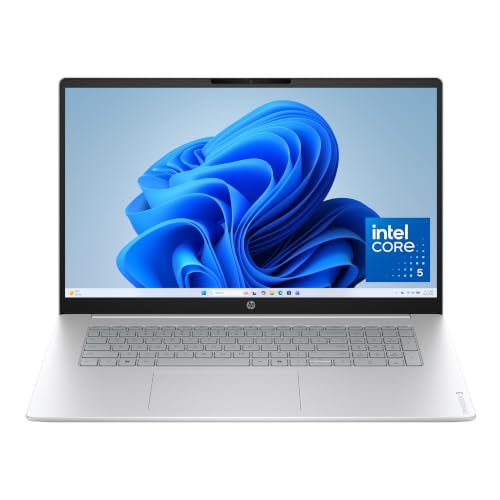
HP OmniBook 3 17.3 FHD Core 5 120U — Best Mainstream Value
Badge: Best mainstream pick
The OmniBook 3 brings the class’s gift — the screen — to the mainstream, and its listing is refreshingly free of theatre: HP OmniBook 3 17.3 inch Laptop PC, FHD Display, Intel Core 5 120U, 8 GB RAM, 512 GB SSD, Intel Graphics, Windows 11 Home. At 17.3 inches this is technically the largest panel in the guide, paired with the full HD resolution that keeps a screen this size honest, and driven by Intel’s Core 5 120U — a modern mainstream processor with the responsiveness ordinary computing actually uses. For the household or home-office buyer whose requirement reads “a big screen for everything we do at home,” this is the configuration that answers without upselling them into a tribe they never asked to join.
The specification’s boundaries are the mainstream’s boundaries, stated plainly. Eight gigabytes of memory covers the household pattern — browser, documents, streaming, photos, a call — and asks the usual discipline of the genuinely simultaneous workload. The 512GB SSD is the right mainstream allowance, holding a family’s files and media without the cloud juggling smaller drives impose. Integrated graphics serve video, casual games and everyday visuals, and make no claim beyond them.
What the OmniBook offers that no gram can is position: it is the seventeen-inch idea at the point where the screen, rather than the engineering, is the purchase. Households replacing an ageing desktop, home workers who want one large calm display, and buyers whose computing is broad but shallow will find this the most rational machine in the guide — provided they accept that its size travels reluctantly, as every machine in this class does, and that its specification serves the present rather than insuring against a heavier future.
Strengths
- The guide’s largest screen at 17.3 inches with honest full HD resolution.
- Modern Core 5 processor keeps everyday computing feeling responsive.
- Mainstream position makes the big-screen idea accessible without tribe premiums.
Trade-offs
- 8GB of memory asks discipline from simultaneous heavy workloads.
- Integrated graphics limit gaming and creative work to the casual tier.
- Full mainstream weight and size travel as reluctantly as the class implies.
Key specs: Intel Core 5 120U · 8GB RAM · 512GB SSD · 17.3-inch FHD display · Intel Graphics · Windows 11 Home · Glacier Silver
Best for: Households and home workers wanting the biggest screen on an honest everyday specification. Not suited for: Heavy multitaskers, serious gamers or frequent travellers.

MSI Katana GF76 17.3 144Hz RTX 3050 Ti — Best Previous-Generation Gaming Value
Badge: Best older gaming value
This review begins with the sentence its subject deserves: the Katana GF76 is a gaming laptop from an earlier generation, built around an 11th-generation Intel Core i7-11800H and an NVIDIA GeForce RTX 3050 Ti, and nothing in this guide will pretend otherwise. The listing — msi Katana GF76 17.3” 144Hz FHD Gaming Laptop: Intel Core i7-11800H, NVIDIA Geforce RTX 3050 Ti, 16GB DDR4, 512GB NVMe SSD — describes a machine whose design era is its identity. What that identity still offers is real: a large 17.3-inch chassis with the cooling volume thin modern machines cannot match, a 144Hz full HD screen that remains a genuine pleasure for fast games, and discrete graphics that run the games of its era and a great library since at settings its integrated-graphics contemporaries cannot approach.
The Katana line was always MSI’s value gaming pattern — performance first, materials second — and age has sharpened rather than blunted that proposition for the right buyer. A household wanting a big-screen machine that genuinely games, a younger player’s first dedicated gaming laptop, or a buyer whose favourite titles predate the current graphics race will find capability here that the mainstream picks cannot offer at any setting. Sixteen gigabytes of memory remains a comfortable gaming allowance, and the 512GB SSD holds a sensible library of the era’s titles.
The limits are the generation’s limits, and they are stated so the purchase is made knowingly. The processor and graphics trail current designs in efficiency as much as in speed, so the machine runs warmer and louder under load and treats its battery as a bridge between sockets rather than a working supply. Its DDR4 platform and older connectivity belong to its years. Bought as what it is — a previous-generation gaming machine with a big fast screen — it is an honest value; bought as a disguised modern flagship, it would be a misunderstanding this review exists to prevent.
Strengths
- 17.3-inch 144Hz screen remains a genuine asset for fast-paced games.
- Discrete RTX 3050 Ti graphics outgame every integrated pick in this guide.
- Large chassis gives an older design cooling volume modern thin machines lack.
Trade-offs
- 11th-generation processor and DDR4 platform belong to an earlier era.
- Runs warmer and louder under load than current gaming designs.
- Battery serves as a bridge between sockets, not a working supply.
Key specs: Intel Core i7-11800H · NVIDIA GeForce RTX 3050 Ti · 16GB DDR4 RAM · 512GB NVMe SSD · 17.3-inch FHD 144Hz display
Best for: Gamers valuing a big fast screen and discrete graphics from a proven older design. Not suited for: Buyers wanting current-generation efficiency, quiet running or long untethered use.

Razer Blade 17 RTX 3070 Ti QHD 240Hz — Best Previous-Generation Premium Gaming
Badge: Best older premium gaming
The Blade 17 closes the linked list as the gaming tribe’s former flagship, and its generation is stated as plainly as the Katana’s: the listing — Razer Blade 17 Gaming Laptop: NVIDIA GeForce RTX 3070 Ti – 12th Gen Intel 14-Core i7 CPU – 17.3″ QHD 240Hz – 16GB DDR5 RAM, 1TB PCIe SSD — describes a machine from the RTX 30-series era, when this was among the most desirable gaming laptops money could buy. Time has moved the frontier, but it has not moved what this machine fundamentally is: a premium-built 17.3-inch gaming laptop whose QHD 240Hz screen remains superb by any era’s standards, and whose RTX 3070 Ti still drives a vast library of games at high settings on that screen.
Razer’s contribution to the class was always the object itself — an aluminium unibody discipline borrowed from premium ultrabooks and applied to gaming hardware — and that quality survives its generation intact. The fourteen-core 12th-generation i7 remains a strong processor for gaming and content work, the terabyte of storage suits a serious library, and the whole machine presents in professional rooms in a way gaming designs of its era rarely managed. For the buyer who wanted this exact machine when it was a flagship and declined its flagship moment, the market’s ageing of it is an opportunity rather than a warning.
The cautions mirror the Katana’s with a premium accent. Battery life was never this design’s argument and age will not have improved it; fans under load speak with an era-appropriate voice; and the platform’s connectivity and efficiency belong to its years. Judge it as what it verifiably is — one of its generation’s finest gaming laptops, available in a later season of its life — and it earns its place here without a single inflated claim.
Strengths
- QHD 240Hz screen remains an outstanding gaming and viewing panel.
- RTX 3070 Ti still drives a large game library at high settings.
- Premium aluminium build presents professionally unlike most gaming designs.
Trade-offs
- RTX 30-series generation trails current designs in efficiency and features.
- Battery life is a bridge between sockets, as with all gaming picks here.
- Fan voice under load reflects its era’s performance-first tuning.
Key specs: Intel Core i7 12th Gen, 14 cores · NVIDIA GeForce RTX 3070 Ti · 16GB DDR5 RAM · 1TB PCIe SSD · 17.3-inch QHD 240Hz display · Windows 11
Best for: Gamers who prize screen quality and premium build from a proven flagship generation. Not suited for: Buyers wanting the current generation’s efficiency or all-day battery.
Comparison Table
| Pick | Processor | Memory | Storage | Screen | Tribe |
|---|---|---|---|---|---|
| LG gram Pro 17 Touch (B0GSBKKLQ8) | Core Ultra 7 355 | 16GB | 1TB SSD | 17″ touch | Lightweight |
| LG gram Pro 17 (B0GSB6NTJB) | Core Ultra 7 355 | 32GB | 1TB SSD | 17″ | Lightweight |
| LG gram 17 Business (B0FPYSFVPW) | Core Ultra 9-288V | 32GB | 1TB SSD | 17″ WQXGA touch | Lightweight |
| HP OmniBook 3 17.3 (B0H3QGLDN4) | Core 5 120U | 8GB | 512GB SSD | 17.3″ FHD | Mainstream |
| MSI Katana GF76 (B0C5S6NXCH) | Core i7-11800H | 16GB | 512GB SSD | 17.3″ FHD 144Hz | Gaming, earlier gen |
| Razer Blade 17 (B09RBHKPJJ) | Core i7 12th Gen | 16GB | 1TB SSD | 17.3″ QHD 240Hz | Gaming, earlier gen |
Which Tribe Should You Actually Buy From?
Let the machine’s address decide. A laptop that lives in several places — home desk, office, client site, the occasional journey — belongs to the gram tribe, because its weight is the only version of seventeen inches that tolerates that itinerary, and within the tribe the choice is the trio’s ladder of memory, touch and panel. A laptop that lives in one home and serves everyone in it belongs to the mainstream tribe, where the OmniBook’s honest specification outlasts fancier machines whose capabilities a household never summons. A laptop that lives beside a desk chair and exists to play belongs to the gaming tribe, where the only real question is whether the older flagship’s screen and build or the older value machine’s directness suits the library it will run.
The mistake the tribes exist to prevent is the cross-purpose purchase: the gaming machine bought for its screen by a traveller who will curse its charger, the gram bought by a gamer who will curse its integrated graphics, the mainstream machine bought by a multitasker who will meet its memory ceiling monthly. Seventeen inches amplifies both satisfaction and mismatch, because the machine is too present to ignore when it is wrong. Name the address first, and this guide’s six reviews resolve into a shortlist of one or two almost immediately.
Common Mistakes When Buying a 17-Inch Laptop
The first mistake is forgetting the bag. A seventeen-inch machine needs a compartment built for it, and discovering at the airport that the new laptop fits no bag you own converts a celebration into an errand; buyers comparing carrying options should match the bag to the machine’s true footprint. The second mistake is buying a previous-generation gaming machine under a present-generation impression — the Katana and Blade in this guide are labelled with their eras precisely because the wider market does not always label them so clearly, and the listing’s processor generation is the line to read.
The third mistake is assuming the big screen removes the need to think about resolution: full HD at seventeen inches is comfortable for most work, WQXGA is visibly finer for detailed work, and the difference is a daily experience rather than a specification hobby. The fourth is undervaluing memory at this size, because a machine bought as a household’s or a professional’s main computer accumulates simultaneous duties, and the 32GB grams exist for owners who have watched an 8GB machine juggle. The fifth is expecting any tribe to borrow another’s virtues — lightness, price and gaming power remain a choose-two conversation even at this generous size.
How Do You Set Up a 17-Inch Laptop as a Desk Replacement?
The founding promise of this class is that the laptop alone suffices, and a thoughtful setup keeps that promise instead of rebuilding a desktop around the machine. Begin with position: a seventeen-inch screen wants viewing distance and a slight elevation to sit at a comfortable eye line, and a simple stand that lifts the rear of the machine improves both posture and the cooling airflow beneath it. Add a keyboard and mouse only if the working day is long and desk-bound — the class’s keyboards, the grams’ included, are full-width designs with number pads that many owners happily use as their only input for years.
Power is the second consideration, because a desk-replacement machine lives plugged in and its battery ages accordingly. Owners whose laptops rarely leave the desk should look for any charge-limiting setting the manufacturer provides, since a battery held away from constant fullness keeps its health for the journeys that do occur. Owners whose machines travel — the gram pattern — need only the simpler discipline of a charger that lives in the bag and a second, if budget allows, that lives at the desk, so the travelling kit is never dismantled for an evening’s work.
The third consideration is what not to buy. The external monitor, the dock and the peripheral shelf are the desktop habits this class exists to retire, and adding them reflexively spends money to recreate a setup the screen already replaced. Buy instead from evidence after a month of real use: the households and professionals who thrive with seventeen inches are the ones who let the machine prove which single accessory it actually lacks, rather than furnishing a desk out of habit on the first day.
What Should You Know About Heat, Noise and Battery at This Size?
Size cuts both ways thermally. The large chassis of a seventeen-inch machine gives heat room to spread and fans room to breathe, which is why the gaming pair in this guide can sustain their performance at all, and why even the grams run their efficient platforms without the frantic fan behaviour thin small machines exhibit under load. Under genuinely heavy work the gaming designs will still make themselves heard — that is the sound of their era’s performance being cooled honestly — while the light tribe’s efficiency keeps it near silent through the workloads it was built for.
Battery expectations should be set by tribe rather than by hope. The gram line is engineered around the untethered day, with manufacturer claims that this guide treats, as always, as laboratory comparisons rather than schedules. The mainstream OmniBook serves a household pattern where sockets are plentiful and the battery is a convenience between rooms. The gaming pair treat their batteries as bridges — enough to move rooms, survive a power cut mid-match or finish a document on a train — and a buyer who needs more than that from them has chosen the wrong tribe, however excellent the screens that tempted them.
One size-specific habit protects all three tribes: a machine this large invites being used on sofas and beds, where soft surfaces seal the vents its cooling depends on. A lap desk or any hard surface beneath it is the cheapest performance accessory in this entire guide, and the difference it makes on a long session is larger than many specification steps shoppers agonise over.
Who Actually Buys a 17-Inch Laptop, and Why Do They Stay?
The class’s owners cluster into recognisable lives. The home professional whose office is a corner of a house keeps one because the screen is the office — large enough that no monitor purchase ever quite justifies itself, calm enough that the working day feels less like peering and more like reading. The household that buys one computer for everyone chooses this size because the machine must be a homework desk, a photo archive, a streaming screen and a video-call stage in the same evening, and seventeen inches is the size at which none of those roles feels like a compromise. The older buyer, often replacing a desktop after years away from the market, chooses it for the most human reason of all: text at a size that asks nothing of their eyes, on a machine that can still be carried to the room where the family is.
What unites them is that the purchase is rarely regretted in the direction shoppers fear. Owners do not typically wish they had bought smaller; they wish, when they wish anything, that they had matched the tribe more carefully at the start — more memory for the multitasking that grew, the lighter gram for the travel that increased, the gaming screen for the hobby that deepened. That pattern is why this guide spends its length on tribes and ladders rather than on a single winner: at seventeen inches the machine becomes furniture in the owner’s life, and furniture is chosen for the room it will live in, not for the showroom it was seen in.
How Do the Screens in This Class Compare With Each Other?
Resolution at seventeen inches behaves differently from resolution at thirteen, because the same pixel count is spread across a far larger canvas. Full HD on the OmniBook and the Katana renders text at a comfortable, readable size that suits documents, browsing and games — the mainstream experience of the class, and one most owners never find wanting. The business gram’s WQXGA panel sharpens that experience noticeably for detailed work: small text in dense data, fine lines in drawings and the grain of photographs all gain definition, which is why the professional tribe pays for pixels the household tribe happily skips. The Blade’s QHD panel pursues a different excellence altogether — resolution in service of frame rate, a screen built to be looked at in motion — and judging it by document sharpness, or the gram by gaming smoothness, mistakes each instrument for the other’s job.
Touch divides the class along a similar line of purpose. The two touch grams assume a screen that is reached for — scrolled at a table, tapped through a presentation, annotated in a meeting — while the non-touch Pro, the OmniBook and both gaming machines assume the keyboard-and-mouse posture of a settled desk. Neither assumption is a hierarchy; they are descriptions of how the machine will actually be sat with, and the buyer’s own habits, honestly observed for a week, arbitrate between them more reliably than any panel specification in this guide.
Final Recommendation
Start with the gram Pro Touch if your seventeen inches must travel, because it is the class’s central idea at its most balanced; climb to the 32GB Pro if your work is wide, or to the business gram if your screen and processor are working instruments that earn their specification daily. Take the OmniBook when the screen itself is the whole requirement and the household’s work is honestly everyday. Take the Katana or the Blade with their generations understood — the first for direct gaming value on a big fast screen, the second for the finest screen and build its era produced. A seventeen-inch laptop is a commitment to a way of working rather than a specification, and the buyers who love theirs are the ones who chose the tribe before they chose the machine.
Frequently Asked Questions
Is a 17-inch laptop too big to travel with?
It depends entirely on the tribe. The gram picks at roughly three pounds travel like much smaller machines and suit daily carrying, while gaming and mainstream models are occasional travellers that mostly live in one place. In every case the footprint stays seventeen inches, so the bag and the table must be planned for it.
What separates the three LG gram picks?
Memory, touch and tier: the Pro Touch carries 16GB with a touchscreen, the Pro Light carries 32GB without touch at the guide’s lowest weight, and the Business model tops the range with an Ultra 9 processor, a WQXGA touchscreen and the strongest integrated graphics. The reviews separate them variable by variable.
Are the older gaming laptops still worth buying?
They can be, when bought as what they are: previous-generation designs whose screens and graphics still serve large game libraries well. Their processors and efficiency belong to earlier years, their batteries bridge between sockets, and their listings should always be read for generation and condition before ordering.
Why is the Dell XPS 17 not in the linked list?
The XPS 17 line has been discontinued, so its remaining presence is old stock of a finished family rather than a current model. It is discussed as a prose-only reference because shoppers who arrive looking for it deserve an honest account of the shelf, not a link dressed as a recommendation.
How much memory does a 17-inch laptop need?
Eight gigabytes serves the household pattern of browsing, documents and streaming. Sixteen is the comfortable tier for a main professional machine, and thirty-two serves the multitaskers whose work spreads across many applications at once — the exact ladder the three gram picks are arranged along.
Do I need a special bag for a 17-inch laptop?
Yes, in the practical sense that the compartment must genuinely fit the machine’s footprint, and many bags rated for smaller classes will not close around one. This site’s backpack guide for the size is linked in the related guides below, and matching the bag to the laptop before the first journey prevents the class’s most avoidable frustration.
Can a 17-inch laptop replace a desktop entirely?
For most households and many professionals, yes: the screen removes the usual reason for a monitor, and the stronger configurations here handle a full working day. Owners who later want a desk setup can still add one, but the class’s founding promise is that the laptop alone is enough.
How does a larger screen change ordinary work with documents and spreadsheets side by side?
The difference is felt less as spectacle and more as relief, because two windows can finally sit beside each other at a size where neither one feels squeezed. A spreadsheet can keep its important columns visible while a document, a set of notes or a browser page remains open alongside it, and the constant shuffling between overlapping windows that defines life on a smaller laptop begins to fade. Text stays readable without leaning in, figures can be compared without repeatedly switching views, and long tables stop demanding quite so much scrolling to understand where a row belongs. This is the reason many owners of machines in this class describe the screen in terms of patience rather than entertainment. They are not necessarily watching more, they are interrupting themselves less. Anyone whose work involves copying between sources, checking one document against another or keeping instructions visible while they work will notice the benefit within the first day, long before they think about films, photographs or games in the evening.
Should a buyer expect to use a laptop of this size comfortably on their lap at home?
For a short spell of browsing, reading or watching something in a chair, most people manage perfectly well and enjoy the generous view while they do it. For a long evening of typing, the experience is less kind, because a machine of this width needs a stable surface and tends to make the arms work at an angle that feels fine at first and tiring later. Heat and fan noise are also closer to the person when a powerful model is working hard on a lap than when it sits on a desk with air moving freely around it. The lighter picks in this guide are noticeably more forgiving in this setting than the gaming machines, simply because there is less weight pressing down and less warmth building up underneath. The sensible expectation is that a laptop of this size belongs mainly on a table, a desk or a lap tray, and visits a lap only occasionally. Buyers who know that most of their home computing happens curled up on a sofa should weigh that habit honestly before choosing this class.
How Should You Verify Generation and Condition in This Class?
Seventeen-inch listings demand a particular literacy because the class recycles its names across years more than any other in this batch. The processor’s generation is the document that never lies: an 11th-generation or 12th-generation chip dates its machine as surely as a registration plate, whatever the listing’s photography suggests, and the graphics card’s series performs the same service on the gaming side. Read those two lines first, then the memory type — DDR4 against DDR5 corroborates the era — and only then the price, which in this class is meaningful only once the generation is known.
Condition is the second document. Large premium machines circulate as open-box, refurbished and renewed stock alongside new units, and the differences hide in the listing’s condition statement rather than its title. A knowingly bought refurbished Blade or gram can be a shrewd purchase with warranty terms read; an unknowingly bought one is a grievance. Every pick in this guide was verified against its current listing on the date recorded in the sources file beside it, and the same verification — generation, configuration, condition — repeated at your own checkout is the class’s final lesson.
How Long Should a 17-Inch Laptop Serve, and What Ages First?
The class’s ownership horizon is long, because the machines are bought as fixtures, and the order in which their parts age is predictable enough to plan around. Batteries fade first, gently, across years of cycles — a consideration the desk-bound owner manages with charge settings and the travelling gram owner barely notices, since the platform’s efficiency leaves margin to spend. Fans and hinges accumulate the physical history of the machine’s journeys, which is where the gaming pair’s generous chassis and the grams’ build discipline repay their design philosophies in years four and five. Screens, the class’s whole argument, age slowest of all: a good seventeen-inch panel bought today will still be a pleasure when the processor that drives it has become merely adequate.
That last asymmetry is the class’s quiet investment logic. Processors date by software’s appetite, but the screen is experienced directly every hour of every year, and it does not become smaller, duller or less welcome with time. Buyers who understand this buy the panel they want to live with and the memory tier their work will grow into, accept the processor their tribe’s tier provides, and keep the machine until the relationship genuinely ends — which, in this class, is measured in school careers and business cycles rather than in product seasons.
What Should You Check in the First Week With a 17-Inch Laptop?
Use the first week to test the machine against the life it was bought for rather than against its specifications. Carry it on the journey it will actually make, in the bag it will actually live in, and let your shoulders file their report while returns remain simple. Work one full day at the table or desk it will occupy, at the distance your posture chooses naturally, and confirm the screen’s size and resolution please your eyes at that distance rather than in the abstract. Run the heaviest ordinary task — the household’s photo library, the professional’s largest document, the gamer’s favourite title — and listen to what the cooling says about the arrangement of the room.
Owners who rehearse honestly in week one almost never exchange these machines, because the class’s compromises are all visible early: the footprint, the charger, the fan’s voice, the screen’s character. What the rehearsal protects against is the slow discovery, three months in, of a mismatch that a single carried journey would have announced on the first morning.
How Should You Choose Between the Gram Trio and Everything Else?
Strip the guide to its decision skeleton and a single question does most of the work: will this machine be carried by a person, daily, as part of their working life? If yes, the contest is inside the gram trio, and it resolves by the ladder the reviews built — touch and balance in the Pro Touch, memory and lightness in the Pro Light, panel and processor in the Business model. If the machine will be carried rarely and used constantly in one place, the grams’ central miracle is being paid for without being spent, and the honest contest moves to the OmniBook’s mainstream sense or the gaming pair’s screens and graphics. Buyers who answer that one question truthfully before comparing anything else will find the rest of this guide reads as confirmation rather than as persuasion, which is exactly what a good shortlist should feel like.
How Does a 17-Inch Laptop Fit a Small Home?
The class’s size raises a domestic question that specifications ignore: where does a seventeen-inch machine live when it is not being used? The grams answer with their nature — light enough to be shelved, carried to a cupboard or left on a side table without dominating it — while the gaming and mainstream machines claim a more permanent territory, a desk corner or a dedicated table that becomes, in effect, the household’s computing room. Neither answer is a problem, but both should be chosen rather than discovered, because a large laptop without an agreed home migrates across surfaces and accumulates the small damages of a machine that is always being moved out of the way.
Households that settle the question early — a charging place, a closed-lid place, a rule about drinks sharing the table — keep these machines for the long service lives the class is capable of. The screen that justified the purchase deserves that small domestic treaty, and the treaty, once made, is the reason seventeen-inch laptops so often outlast the smaller machines bought in the same year.
Related Guides
Readers weighing this size against its neighbours should compare the best 18 inch laptops for the one step larger, the best 17.3 inch laptop backpacks for carrying any machine in this guide properly, and the best 15 inch laptops with great battery life for the smaller class where endurance leads.
Related guides
- Best 4K UHD HDR HDMI Extenders: 4K60, Long-Run and 4K120 Kits Compared
- Best 25–35 Inch Monitors With Lowest Display Lag: An Honest Ranking Without Invented Numbers
- Best Enterprise SATA SSDs: Endurance Classes, Power-Loss Protection and Fleet Sense
- Best Color Product Label Printers: Six Desktop Machines for Short-Run Product Labels



[…] should compare the best 15 inch college laptops for the student version of this trade-off, the best 17 inch laptops for larger screens that carry their own battery compromises, and the best 200 and under laptops for […]