What's inside
- Key Takeaways
- Quick Picks: Headsets Under the $100 Frame at a Glance
- How Did We Choose These Six Headsets?
- What Does the Brand Premium Actually Buy in This Class?
- Wired at This Budget: Which Connector Should You Want?
- How Do the Six Headsets Compare Side by Side?
- How Do You Get the Best From a Wired Headset Once It Arrives?
- What Mistakes Do Headset Buyers in This Class Make?
- How Can You Judge Comfort Without Trying a Headset On?
- Microphone Technique: How Do You Sound Clear on Any of These?
- What About Music, Films and Study Between Games?
- What Do the Numbers on the Box Actually Mean?
- Buying for a Younger Player: What Changes?
- When Should You Leave This Class Entirely — Up or Down?
- Final Recommendation
- Frequently Asked Questions
- Related Guides
As an Amazon Associate I earn from qualifying purchases. This post may contain affiliate links at no extra cost to you.
gizmoverdict.com is reader-supported. When you buy through links on our site, we may earn an affiliate commission.
Where to buy: every headset in this guide links to its Amazon listing, where you can check the current price on Amazon, confirm the colour and connector variant in the title, and verify which platform versions are in the box before ordering.
The best 100 dollar headsets live in the most contested territory in gaming audio, and the hundred in the keyword is a budget frame, not a price list — this guide treats it as the ceiling of a class rather than a tag on any single model. Under that ceiling, the established gaming brands field their most carefully judged products: headsets that borrow drivers, microphones and frames from more expensive siblings and give up only the luxuries. Also under that ceiling, at its floor, sits a thriving generic tier with lights, dramatic surround claims and prices that make the brand names look extravagant. Both populations are in this guide, because both are what a reader shopping this keyword will actually meet, and pretending the floor does not exist would leave the most important judgement — how much of the budget the brand premium really buys — unmade.
Here is that judgement up front, so the reviews can argue with it. At the top of the class, money buys three things that matter every single session: a microphone your teammates describe as clear without being asked, a frame and ear cushions that disappear during hour three, and drivers tuned by people who also make the expensive models. At the floor, money buys a working headset — sound arrives, voice leaves, the game is playable — wrapped in compromises that show up as pressure hot spots, microphones that make you sound like a radio broadcast from another building, and surround claims that are software decoration. Neither is a scam. They are different products sharing a search term, and this guide’s job is to tell you exactly where the line between them runs.
All six picks are wired, which is the class’s quiet consensus: at this budget, a cable buys better drivers and microphones than a radio and a battery would, and it never needs charging before a session. Connection variety still matters — USB with its digital processing on PC, plain 3.5mm that plugs into everything from controllers to laptops — and the reviews below treat the cable as a feature to choose, not an apology to make.
Key Takeaways
- The HyperX Cloud III is the ceiling of this class: the headset the others are measured against for build, comfort and all-platform wiring.
- Razer BlackShark V2 X makes the microphone its headline and wraps it in the lightest serious frame here, at 240 grams by its listing.
- Comfort is the Logitech G335’s entire argument — a suspension-style fit and memory foam for players who wear glasses or play long.
- SteelSeries Arctis Nova 1 brings the Nova line’s design language and spatial-audio positioning down into this budget in a white finish.
- Ozeino and BENGOO are the generic floor: functional, decorated and honest value only if your expectations are set to their level first.
- Every “7.1” claim in this class is virtual processing over two drivers; the tuning quality differs, the physics does not.
Quick Picks: Headsets Under the $100 Frame at a Glance
| Pick | Badge | Why it made the cut |
|---|---|---|
| HyperX Cloud III | Best Overall at the Ceiling | The complete package of the class: durable frame, memory foam, detachable microphone and USB-C, USB-A and 3.5mm wiring. |
| Razer BlackShark V2 X | Best Microphone for the Money | A HyperClear cardioid mic and 50mm titanium-coated drivers in a 240-gram frame built for long competitive sessions. |
| SteelSeries Arctis Nova 1 (White) | Best Lightweight Design | The Nova family’s comfort-first design with hi-fi drivers and spatial audio positioning, in a clean white finish. |
| Logitech G335 | Best for Glasses and Long Sessions | A featherweight suspended fit, memory foam earpads and a flip-to-mute mic that stays out of the way. |
| Ozeino Gaming Headset | Best Generic With Ambition | LED lighting and surround positioning across PC and consoles for buyers whose budget stops well below the brand tier. |
| BENGOO G9000 | Best Rock-Bottom Spare | The long-running budget staple: works on everything, costs the least, and asks only that expectations arrive pre-adjusted. |
How Did We Choose These Six Headsets?
The shortlist began with the brands’ own class structure. Each major gaming audio maker fields a headset aimed squarely at this budget frame, and those anchor products — HyperX, Razer, SteelSeries, Logitech — were included because they represent four genuinely different answers to the same brief: build-first, mic-first, design-first and comfort-first. A guide that picked only one philosophy four times would be shorter and less useful. The two generic headsets were then chosen from the floor’s most established names, the ones with years of listings behind them rather than a season, because the floor deserves representation by its most durable citizens rather than its most disposable.
Claims discipline shaped the writing throughout. Surround sound in this class is virtual — two drivers and processing — so the guide describes what the processing is for and never repeats a seller’s theatre imagery as fact. Battery claims do not arise because every pick is wired. Weight and driver figures quoted are the ones the listings themselves publish, attributed as such, and anything this guide could not ground in a listing or in widely documented product fact is written qualitatively instead. The result is a ranking with a spine: ceiling first, floor last, and the reasoning visible in between.
What Does the Brand Premium Actually Buy in This Class?
Start with the microphone, because it is where the gap is largest and least visible in photographs. A good gaming microphone in this class uses a cardioid capsule positioned to reject the keyboard and the room, with tuning that keeps a voice intelligible at conversational volume. The generic floor’s microphones work — your squad will hear you — but they tend toward thin, distant captures that bury consonants, and in a team game your voice is not a cosmetic feature. Players who mostly play solo can discount this entire paragraph. Players whose games are social should treat the microphone column as the ranking.
Next, the frame. Brand-tier headsets in this guide use metal-reinforced or carefully engineered polymer frames, ear cushions in memory foam with durable coverings, and clamping forces tuned across thousands of heads. The floor uses simpler plastics and foams that feel acceptable in week one and announce their compromises by month three — a creak, a hot spot, a cushion that has packed down. None of this shows in a listing photograph, which is why the price gap looks mysterious online and obvious on your head. Finally, support: a brand headset comes with firmware, spare-part ecosystems and a warranty route with a name attached. The floor comes with a listing. Price those differences honestly against your own usage and the class sorts itself.
Wired at This Budget: Which Connector Should You Want?
Three connection philosophies appear in this guide. Plain 3.5mm analogue, used by several picks, is the universal solvent: it plugs into controllers, laptops, handhelds and phones with jacks, needs no drivers, and sounds exactly as good as the device feeding it. USB connection, which the Cloud III adds alongside its 3.5mm option, lets the headset carry its own digital processing — surround virtualisation and microphone handling happen in the headset’s electronics rather than the computer’s, which makes behaviour consistent across machines. Detachable cables and microphones, where offered, are longevity features disguised as conveniences: the parts most likely to fail or be sat on can be replaced instead of retiring the whole headset.
The practical advice is to inventory your platforms before choosing. A PC-and-console player benefits most from a headset that offers both USB for the desk and 3.5mm for the controller — precisely the Cloud III’s arrangement. A console-first player can live entirely on 3.5mm and should spend the difference on microphone and comfort. A laptop player with a single noisy analogue jack may find USB’s self-contained processing the cleanest upgrade in the whole class. The cable is not a compromise at this budget; chosen well, it is the feature that makes the rest of the headset behave.

HyperX Cloud III — Best Overall at the Ceiling
The Cloud line earned its reputation the slow way, by being the headset players recommended to each other for a decade, and the Cloud III is the current form of that argument. Its frame is built to survive being tossed on desks and into bags, the ear cushions are memory foam deep enough to seal without clamping, and the microphone detaches entirely for the sessions — music, films, solo play — where a boom in your peripheral vision is pure cost. HyperX wires it for every life it might lead: USB-C and USB-A for the PC, where its digital side handles surround processing, and a 3.5mm plug for controllers and everything else. In a class of specialists, this is the generalist that gives up the least.
Ownership details reinforce the position. The ear cushions are replaceable, the cable detaches, the microphone detaches — the three components that age fastest on any headset are the three this one lets you renew, which is how a purchase at the top of a budget class justifies itself across years rather than months. HyperX also keeps the controls where hands expect them, on the earcup, without an inline brick dangling mid-cable. None of these touches is glamorous in a listing, and together they are most of what ownership actually feels like. The Cloud III is recommended first in this guide because it is the headset least likely to generate a second purchase to fix the first one’s compromises.
Sound tuning follows the family recipe: present, controlled bass that serves explosions without swallowing footsteps, and a midrange that keeps dialogue and callouts forward. The detachable microphone is among the clearest at this level, with an LED mute indicator positioned where you can actually see it — a small mercy anyone who has talked to a muted room will appreciate. If your budget reaches the top of this class and you play across PC and console, the Cloud III is the default this guide measures the others against: not because it wins every subcategory, but because it is the only pick here with no subcategory it loses badly.
- Connection: USB-C, USB-A and 3.5mm — the widest wiring in this guide
- Fit: memory foam ear cushions on a durable metal-reinforced frame
- Microphone: detachable, with visible mute indication
- Platforms: PC, PS5, PS4 and Xbox Series X|S per the listing
Strengths
- The most complete wiring story here, so one headset genuinely covers desk and sofa.
- Build quality aimed at years of daily handling rather than a season of care.
- A detachable microphone that turns it into respectable plain headphones when the boom is off.
Trade-offs
- It sits at the ceiling of the class, so the budget floor picks undercut it dramatically.
- The wired-only design means no wireless freedom at any price within this model.
- Its understated looks will not satisfy players who want their headset to glow.
Best for: cross-platform players who want one headset, bought once, that does everything well. Not suited for: buyers whose budget lives at the class floor, or anyone committed to wireless.

Razer BlackShark V2 X — Best Microphone for the Money
Razer’s BlackShark line began as an esports design exercise — a headset shaped like helicopter crew gear, built light enough to forget during a match — and the V2 X is its budget-frame form. The listing quotes 240 grams, and the number is believable on the head: this is the headset in the guide that most convincingly disappears. Inside sit Razer’s TriForce titanium-coated 50mm drivers, a three-part driver design intended to tune bass, mids and treble with less interference between them; in practice the signature is bright and competitive, favouring the audio cues — footsteps, reloads, distant engines — that ranked players actually listen for.
The microphone is the reason this model anchors so many team players’ setups. Razer’s HyperClear cardioid capsule is tuned to take the voice from the front and leave the keyboard, the fan and the household behind, and it produces the kind of clarity that makes teammates stop asking you to repeat callouts. The boom is fixed rather than detachable, which is the honest cost of the price point against the Cloud III. For a PC-and-console player whose games are voice-driven and whose sessions run long, the BlackShark V2 X makes the most persuasive single-argument case in this class: your squad hears you, your head forgets the hardware, and the budget survives.
Two ownership notes belong with it. The ear cushions use a breathable fabric-and-foam combination that players in warm rooms consistently prefer to full leatherette, at the cost of leaking a little more sound to the room and admitting a little more of the room to you — in a shared space at midnight, that trade cuts both ways and is worth knowing before the first session. And the analogue connection means the headset’s behaviour is identical on every device you own, with no software layer to configure or to break; what you hear on the PC is what the console delivers. For players who value predictability over processing, that simplicity is a feature the USB models cannot offer.
- Drivers: TriForce Titanium 50mm, per the listing
- Microphone: HyperClear cardioid, fixed boom
- Weight: 240 grams per the listing — the lightest serious frame here
- Platforms: PC and PS5 positioning, with console use via 3.5mm
Strengths
- Microphone clarity that leads the class for team communication.
- Featherweight build with breathable cushions that suit long competitive sessions.
- A tuning that favours gameplay information over cinematic boom.
Trade-offs
- The fixed microphone cannot detach for music-only use.
- Bass-forward players may find the competitive tuning lean for films and single-player spectacle.
- Wired only, like the whole class — no wireless variant at this level of the line.
Best for: competitive and team players whose voice is part of their game. Not suited for: buyers who want a detachable mic or a bass-heavy cinematic signature.

SteelSeries Arctis Nova 1 (White) — Best Lightweight Design
The Arctis Nova 1 is what happens when a premium line’s design language is asked to work within this budget. SteelSeries built the Nova family around a comfort-first architecture — a flexible, ski-goggle-inspired suspension approach in its higher models, distilled here into a lightweight frame with carefully judged clamp — and the result is a headset that sits easy from the first minute, in a white finish that stands out in a sea of black plastic. The listing emphasises hi-fi drivers and 360-degree spatial audio positioning; as with every headset here, the spatial effect is processing over two drivers, but SteelSeries’ software ecosystem on PC is among the more polished places to manage it.
Where the Nova 1 earns its row is the combination of that design polish with genuine multi-system intent: it is pitched across PC and consoles without favour, and its microphone tucks into the earcup’s lines more discreetly than most booms in the class, which suits players who share a room or a stream camera. It does not out-argue the Cloud III on build or the BlackShark on microphone, and it is not trying to. It is the aesthetic and comfort candidate — the headset for the player whose setup is visible, whose sessions are long, and who wants the object on their head to feel designed rather than assembled. In a class of sensible black boxes, that is a real position.
SteelSeries also brings an ecosystem consideration: players already inside the company’s software on PC — for a mouse, a keyboard, or its Sonar audio tools — will find the Nova 1 the most at home of these picks, since its spatial processing and equaliser live in the same place as their other gear’s settings. Ecosystem gravity is a soft factor, easily overrated in marketing and genuinely convenient in practice, worth a tiebreak rather than a headline. Against the G335, its closest comfort rival, the Nova 1 trades the flip-to-mute gesture for a more integrated design and a more fashion-forward finish; against the BlackShark it trades microphone authority for lightness of presence. It is the pick for the player who reads those trades and nods.
- Design: Nova-family lightweight frame, white finish
- Audio positioning: hi-fi drivers with 360° spatial audio per the listing
- Fit: comfort-first design with an unobtrusive microphone profile
- Platforms: multi-system — PC and consoles
Strengths
- The most considered industrial design in the class, in a finish that escapes the all-black default.
- Light, easy fit that suits long sessions and smaller heads alike.
- SteelSeries’ PC software gives its spatial processing a polished home.
Trade-offs
- White shows wear and makeup of daily life faster than black finishes.
- Its microphone is good rather than class-leading; voice-first players should look at the Razer.
- The design premium means raw specification shoppers can find louder numbers elsewhere for less.
Best for: design-conscious multi-platform players who wear their headset for hours. Not suited for: buyers chasing maximum microphone quality or minimum possible spend.
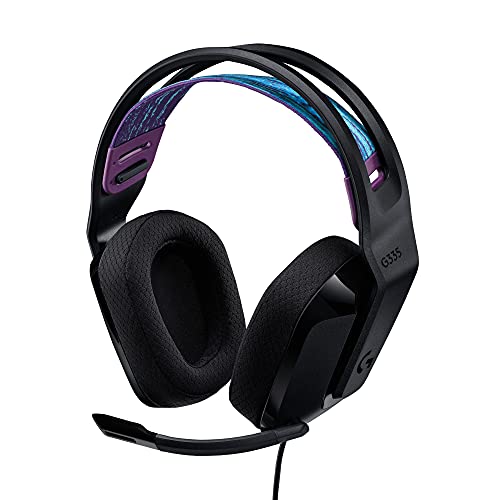
Logitech G335 — Best for Glasses and Long Sessions
The G335’s entire design brief can be read off its silhouette: a suspension headband that floats the headset on a strap rather than a padded arc, ear cups that hang light, and a total package that asks as little of your head as a wired over-ear design can. Logitech sells it in the language of comfort and the experience matches the copy. The memory foam earpads are soft rather than deep, the clamp is gentle, and the whole arrangement is notably kind to glasses frames, whose temples are where most headsets wage their quiet war of pressure. For the player whose sessions are measured in evenings, that kindness outranks specifications.
The microphone flips up to mute — the most intuitive mute gesture in the class, since the mic physically leaves the conversation — and the 3.5mm connection makes the G335 the simplest citizen of multi-device households: controller, laptop, handheld, done. Its sound is tuned in Logitech’s lighter house style, clear and unexaggerated, which flatters dialogue-heavy games and long voice calls more than it flatters cinematic bass. Set against the Cloud III it gives up build heft, wiring variety and some microphone polish. Set against an evening of play with glasses on, it gives up nothing that matters. Comfort is a feature; this is the pick that proves it.
The G335 also has a family resemblance worth exploiting: it descends from Logitech’s colourful, youth-oriented G line, and it shows in colour options and a design that reads friendly rather than tactical. Households buying for teenagers often find it the easiest yes in the guide — light enough for smaller heads, simple enough to need no setup sermon, tough enough in the ways that matter for its tier. Its cable is fixed, so route it kindly, and its cushions are the wear item to watch after a year of heavy use. Neither caveat dents the central case. Of all the picks here, this is the one whose owners most consistently report forgetting they are wearing it, and in comfort-led buying that report is the specification.
- Connection: 3.5mm audio jack, universal across controllers and computers
- Microphone: flip-to-mute boom
- Fit: suspension headband with memory foam earpads
- Character: among the lightest full-size wired headsets in the class
Strengths
- Glasses-friendly, low-pressure fit that stays comfortable across very long sessions.
- Flip-to-mute is foolproof in the middle of a match.
- Dead-simple analogue connection with no software or drivers to manage.
Trade-offs
- No USB option, so PC surround processing depends on your software, not the headset.
- The light build feels less substantial than the Cloud III’s frame.
- Sound tuning is clear rather than thrilling; bass seekers should look elsewhere.
Best for: glasses wearers, long-session players and anyone whose headset history is a history of headaches. Not suited for: players wanting USB processing or a heavy, premium-feeling frame.
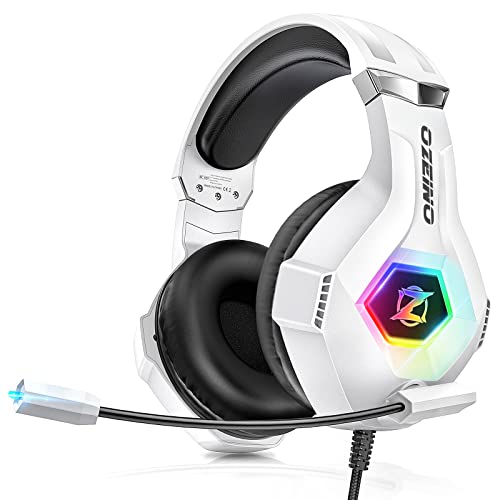
Ozeino Gaming Headset — Best Generic With Ambition
Now for the floor, taken seriously. Ozeino represents the ambitious end of the generic tier: a headset that lists 7.1 surround positioning, a noise-cancelling microphone, LED lighting and compatibility across PC, PlayStation and Xbox, all for a fraction of the ceiling picks’ territory. Read those claims the way this guide has taught: the surround is software-style virtualisation of the most basic kind, the noise cancelling describes the microphone’s intent rather than a measured performance, and the LEDs are decoration that some buyers — younger players especially — genuinely enjoy. Stripped of theatre, what remains is a big, padded, working headset that plays games and carries voice today, for very little money.
Who should buy it without embarrassment? The player equipping a second station, the household buying for a child whose headsets live dangerously, the beginner who does not yet know whether gaming audio matters to them. In those roles the Ozeino’s compromises — simpler materials, a microphone that serves rather than shines, tuning that favours loudness and bass weight over detail — are proportionate to the risk being taken. Who should not: anyone whose primary game is team communication, where the microphone gap documented earlier in this guide is the difference between being understood and being tolerated. The floor is a legitimate place to stand. Just stand there with your eyes open.
Set-up realism helps too. On some platforms the Ozeino’s lighting draws power from a USB connection while the audio travels by 3.5mm, so a console setup may involve two plugs where the brand picks need one, and the lights may simply stay dark in configurations that cannot feed them — no loss to the ears, but a disappointment to a buyer who shopped by the glow. Read the current listing’s connection diagram for your exact platform before ordering, a habit this guide recommends for every generic headset, because their listings revise quietly and the diagram is the only contract that counts. With that homework done, the Ozeino delivers precisely what it is: an inexpensive, cheerful, fully working headset.
- Positioning: 7.1 surround claims (virtual), noise-cancelling mic claims, LED lighting
- Platforms: PC, PS4, PS5 and Xbox per the listing
- Fit: large padded over-ear design
- Role: the ambitious end of the generic budget tier
Strengths
- Covers every major platform in one inexpensive package.
- Lighting and styling that younger players actively prefer over sober black designs.
- Perfectly serviceable game audio for casual and solo play.
Trade-offs
- Microphone quality is the clearest step down from the brand tier.
- Surround and noise-cancelling language promises more than the hardware delivers.
- Materials and long-term durability trail the established brands noticeably.
Best for: second stations, younger players and first headsets bought to test the waters. Not suited for: competitive team players or anyone buying for the long term.

BENGOO G9000 — Best Rock-Bottom Spare
The BENGOO G9000 has been the budget answer for so long that it functions as the category’s baseline: the headset a generation of players received as a gift, found in a drawer, or bought to find out whether they cared about gaming headsets at all. Its formula is unchanged and unembarrassed — large over-ear cups, LED lighting, a noise-cancelling-positioned microphone, surround claims in the listing copy, and compatibility with everything from PS4 controllers to PCs. It works. That sentence, at its price level, is the whole review many buyers need, and the G9000’s decade of continued sales says the market agrees.
Placed beside the Ozeino, the differences are of degree rather than kind: the BENGOO is the older, simpler expression of the same idea, and the one to choose when the requirement is literally a working headset for the least commitment — a spare for guests, a headset for the console in the spare room, a placeholder while a broken brand headset is replaced under warranty. Placed beside the ceiling picks, it demonstrates what the premium buys more clearly than any specification table: voice clarity, sustained comfort, materials that age gracefully. Keep one in the drawer if your household games socially. Just do not mistake the drawer’s headset for the desk’s, if your budget can tell them apart.
A practical footnote for G9000 buyers: the lighting and full functionality ride on how it is connected — the USB plug exists largely to power the LEDs while the 3.5mm carries the audio — so read the listing’s connection notes for your platform, particularly on controllers where a USB port may not be part of the arrangement at all. Owners who skip the lights lose nothing audible. It is a fitting emblem of the whole floor tier: the features that photograph best are the ones that matter least, and the ones that matter — the microphone, the cushions, the cable — are exactly where the money was saved. Buy it knowing which list you are shopping from.
- Positioning: stereo gaming headset with LED light and surround claims per the listing
- Platforms: PS4, PC, Xbox One, PS5 controller and more per the listing
- Fit: padded over-ear cups with an adjustable band
- Role: the long-running baseline of the budget floor
Strengths
- The least expensive route to a working, compatible gaming headset in this guide.
- A decade of market presence means its behaviour and limits are thoroughly known.
- Ideal spare economics: cheap enough to keep purely for guests and emergencies.
Trade-offs
- Sound and microphone quality sit at the floor’s floor; team voice is functional, not pleasant.
- Build materials are the first thing the price removes, and it shows within months of heavy use.
- Marketing claims in its listing copy should be read as decoration, per this guide’s framing.
Best for: spares, gifts for beginners, and households equipping a casual second console. Not suited for: anyone’s primary headset if the budget can reach the brand tier at all.
How Do the Six Headsets Compare Side by Side?
| Headset | Connection | Microphone story | Defining trait |
|---|---|---|---|
| HyperX Cloud III | USB-C, USB-A, 3.5mm | Detachable, clear, LED mute indicator | The complete ceiling package |
| Razer BlackShark V2 X | 3.5mm | HyperClear cardioid, class-leading clarity | The voice-first featherweight |
| SteelSeries Arctis Nova 1 | 3.5mm multi-system | Discreet, integrated profile | The design-led lightweight |
| Logitech G335 | 3.5mm | Flip-to-mute boom | The comfort specialist |
| Ozeino Gaming Headset | 3.5mm with USB for lighting on some setups | Noise-cancelling positioned, basic capture | The ambitious generic |
| BENGOO G9000 | 3.5mm with USB for lighting | Basic boom microphone | The baseline spare |
The table’s honest pattern: as price falls through the class, the microphone column degrades first, the frame second, and the ability to make game sounds last of all. That ordering is the most useful shopping knowledge in this guide. Solo players can safely buy low, because the last thing to degrade is the thing they use. Team players should buy as high as the microphone column requires, because it is the first thing the floor gives up.
How Do You Get the Best From a Wired Headset Once It Arrives?
Setup is short but not nothing. On PC, plug in and then visit the sound settings: set the headset as the communication device, check the microphone level by recording ten seconds of your own voice and listening back — the single most informative test in gaming audio — and only then enable any surround processing, so you know what the processing changed. In your games and chat applications, select the headset explicitly rather than trusting defaults, and agree a push-to-talk or voice-activity threshold with your regular squad before a match depends on it. Small rituals, immediate dividends.
Fit deserves the same minute of attention. Extend the band so the cups centre on your ears rather than resting on your jaw, let the suspension designs settle where they want to sit, and wear the headset for a full session before judging comfort — most fits improve as cushions warm and settle, and the ones that do not are telling you something worth hearing within the return window. Finally, route the cable like you mean it: down the desk’s back edge, clear of chair wheels and foot traffic. More wired headsets die by cable than by driver, and the detachable designs in this guide forgive that accident while the fixed ones do not.
What Mistakes Do Headset Buyers in This Class Make?
The most expensive mistake is buying the floor for a ceiling job: equipping a competitive team player with a generic headset and then blaming their communication. The mirror mistake is buying the ceiling for a floor job — a flagship-budget headset for a child whose equipment lives at high velocity. Match the tier to the user and both errors vanish. A third mistake is chasing the surround claim: shoppers compare “7.1” badges as if they were driver counts, when every badge in this class describes processing over two drivers, and the processing you already own in software may be better than the one in a cheap headset’s dongle.
Two quieter errors complete the set. Buyers forget the platform inventory — purchasing a USB-only arrangement for a controller that wants 3.5mm, or vice versa — and discover the mismatch at unboxing. And buyers judge comfort from a photograph, when comfort is the property least visible in pictures and most decisive in month two. If you can try a headset on, do; if you cannot, weight the comfort-focused picks in this guide more heavily than your instincts suggest. Your head will be wearing the decision long after your eyes have forgotten the listing.
A last mistake is really a superstition: assuming a headset must be replaced when its cushions flatten or its cable frays. On the brand-tier picks, cushions are consumables with replacements available, and detachable cables are a spare-part purchase rather than a funeral. Owners who learn which parts of their model are renewable routinely double its service life for a fraction of a replacement’s cost. The floor-tier headsets offer no such path, which is part of their true price — factor it in when the gap between tiers looks smaller than this guide claims, because over three years the renewable headset is frequently the cheaper object as well as the better one.
How Can You Judge Comfort Without Trying a Headset On?
Comfort is the least photographable property in this guide, so buyers need proxies. Weight is the first: every hundred grams is a tax your neck pays hourly, which is why the BlackShark’s listing figure of 240 grams and the G335’s featherweight design philosophy matter beyond their spec sheets. Clamp force is the second proxy, and it hides in design language — suspension headbands and floating straps distribute pressure, while simple padded arcs concentrate it at two points above the ears. Cushion material is the third: memory foam adapts and seals, standard foam is firmer and airier, and fabric coverings breathe where leatherette insulates, which matters in warm rooms and summer sessions.
Head shape is the variable no listing can solve. Players with larger heads should weight the picks with generous extension and flexible frames; players who wear glasses should weight the low-clamp, soft-cushion designs and treat every review’s comfort paragraph as written for someone else’s skull. The honest method, when trying on is impossible, is to buy from the comfort-first end of this guide, use the return window as a fitting room, and judge after a genuine long session rather than a five-minute unboxing impression. First impressions of headsets lie in both directions: tight ones loosen, and plush ones sometimes reveal a pressure point at hour two that no photograph predicted.
Microphone Technique: How Do You Sound Clear on Any of These?
Equipment sets the ceiling, but technique decides how close you get to it, and the technique is free. Position the boom so the capsule sits a couple of centimetres from the corner of your mouth, not directly in front of it: corner placement captures the voice while letting breath and plosives pass by instead of detonating into the capsule. Then set the input level by recording yourself at your loudest callout volume — the laugh, the warning shout — and lowering the gain until that peak stays clean; a microphone set for conversation will distort exactly when the game gets exciting, which is when your callouts matter most.
Room and software finish the job. A headset microphone forgives a noisy room better than a desk microphone does, because it lives close to the source, but keyboard clatter still enters from below, so players on mechanical keyboards should angle the boom slightly upward and consider the chat application’s noise suppression, which modern platforms do surprisingly well. Agree norms with your regular group: push-to-talk for open-plan houses, voice activity for quiet rooms, and a test sentence in the lobby rather than a discovery mid-match. Do these things and the brand-tier microphones in this guide sound professional; skip them and even the best capsule here will make you sound like weather.
What About Music, Films and Study Between Games?
Most headsets in this class live double lives, and the picks divide by how gracefully they moonlight. The Cloud III, with its microphone detached, becomes a presentable pair of headphones for a desk — the one to choose if the same budget must cover the workday’s calls and the evening’s play, though its microphone returns for the calls, which is rather the point. The G335’s gentle clamp and light weight suit long study and film sessions, and its tuning’s restraint flatters dialogue. The BlackShark’s competitive brightness makes films sound lean but keeps speech intelligible at low volume, a genuine virtue for late-night viewing in shared houses.
The generic pair moonlight least gracefully — their tuning pushes bass and loudness in ways that flatter neither music nor film dialogue — but they have one honest second career: the household spare that covers a broken headphone emergency, a child’s online lesson, a guest’s console session. Judge moonlighting as a tiebreaker rather than a headline. A headset bought for gaming should be bought on gaming evidence; that it also carries a film night or a study session without complaint is the bonus that separates a good purchase from a merely adequate one over the years you will own it.
What Do the Numbers on the Box Actually Mean?
Driver diameter is the figure listings shout loudest and the one that predicts least. A 50mm driver can move more air than a 40mm one, all else equal, but all else is never equal: tuning, enclosure and damping decide whether that air becomes controlled bass or a foghorn, which is why this guide’s brand picks include both sizes without embarrassment and why the generic floor’s large drivers do not rescue its tuning. Treat diameter as a description of the hardware, not a grade of the sound. Impedance and sensitivity, where published, matter mainly for very quiet sources; every headset here is designed to be driven happily by controllers and ordinary jacks, which is the only compatibility question most buyers need answered.
The figures worth your attention are the unglamorous ones. Weight, because you wear it. Cable length and detachability, because they decide where you can sit and what breaks first. Microphone type — cardioid against omnidirectional — because it decides how much of your room joins the call. Platform list, read literally, because “compatible” sometimes means the audio works while the microphone needs the other connector. A buyer who checks those four lines will choose better than a buyer who memorises driver diameters, and will understand their own headset better a year later when something needs replacing.
Buying for a Younger Player: What Changes?
A good share of this class is bought by adults for children and teenagers, and the priorities rearrange honestly. Durability outranks tuning, because young headsets are dropped, sat on and transported in school bags. Fit range matters in the other direction — smaller heads need headsets whose minimum size is genuinely small, where the light, suspension-style designs in this guide earn another quiet point. Volume behaviour deserves a thought: choose setups where the adult controls the ceiling, through the console’s or PC’s own settings, rather than relying on a child’s restraint with a dial.
And the floor tier finds its most defensible role here. A first headset for a young player is partly an experiment — in whether they game socially, whether they care for equipment, whether the hobby sticks — and the Ozeino and BENGOO answer that experiment at a price that forgives every outcome. If the experiment succeeds, the upgrade path to the brand tier is exactly the ladder this guide has built, and the old headset retires to spare duty rather than to landfill. Buying in that order is not settling; it is sequencing, and it is how most households in this market actually and sensibly proceed.
When Should You Leave This Class Entirely — Up or Down?
Classes exist to be exited at the right moments. Step down to the fifty-dollar tier, covered in its own guide, when the headset is a spare, a gift with training wheels, or equipment for a player whose games are solo and whose voice chat is occasional; the savings are real and the sacrifices land where that user will not feel them. Step up beyond this frame when one of three things is true: you need wireless and are willing to pay the class where wireless stops compromising, you stream or record and the microphone has become a production tool rather than a communication one, or you have worn out a headset from this tier and know precisely which of its limits you are paying to remove. That last reason is the best one — an upgrade bought from experience is never wasted.
Stay in this class, happily, if none of those applies. It is the tier the industry’s best engineers are assigned to, because it is where most players actually live, and the products show it: the ceiling picks here are not diminished versions of flagships so much as flagships with the jewellery removed. A player who buys the Cloud III or the BlackShark V2 X and plays on it for three years has not compromised in any way their squad could detect. The frame is a budget, not an apology, and the headsets at its top are the proof.
Final Recommendation
If the budget reaches the top of this frame, buy the HyperX Cloud III and stop shopping: it is the class’s complete answer, wired for every platform, built for years, and polite to remove its microphone when the game ends. If your games are voice and your head is tired, the BlackShark V2 X is the specialist to choose, with the G335 as the comfort-first alternative and the Nova 1 for the player who wants the object itself to look considered. Buy the Ozeino or the BENGOO with clear eyes for spares, beginners and second stations, where their compromises are proportionate and their prices are the point. The hundred-dollar frame contains multitudes, but its lesson is simple enough to carry into the store: in this class you are not really buying sound, which even the floor provides — you are buying the clarity of your own voice and the comfort of your own head, so spend where those two things live and let the best 100 dollar headsets sort themselves exactly as this guide has sorted them, by how honestly each one serves the player wearing it — in the lobby, in the third hour, and in the third year, which are the three moments a headset purchase is truly judged.
Frequently Asked Questions
Is the surround sound on these headsets real 7.1?
No headset in this class contains seven drivers. The 7.1 and spatial labels describe virtual processing that uses two drivers and timing and level cues to suggest direction. Good implementations genuinely help locate sounds in games; the label alone guarantees nothing, which is why this guide weighs the maker’s audio pedigree alongside the badge.
Which of these is best for playing on both PC and console?
The HyperX Cloud III, because its wiring covers both worlds natively: USB connections for the PC with its processing, and 3.5mm for controllers. Most other picks here are 3.5mm-only, which still works on both, but asks the PC’s own software to handle any surround processing.
Why are all the picks wired?
Because at this budget a cable buys better drivers, a better microphone and zero charging discipline, while wireless at the same money spends the budget on a radio and battery. Wireless has its own guide and its own honest tier; within this frame, wired is where the value concentrates.
How much does microphone quality really matter?
Exactly as much as your games are social. In team play your voice is equipment, and the gap between the brand tier and the floor is widest at the microphone — wider than the gap in game sound, wider than the gap in comfort, and the first thing your regular teammates will notice about your new purchase, usually within one match. Solo players can weight it lightly and buy for comfort and sound instead, but anyone who plays in a regular squad should treat the microphone column of the comparison table as the ranking itself and let the other columns break ties.
Will the generic headsets damage my console or PC?
No — they are ordinary analogue headsets electrically, and their compromises are in materials, tuning and microphone capture, not safety. Buy them for the right jobs and they serve; the risk they carry is disappointment, not damage, and even that risk is manageable when the job is a spare drawer, a first headset for a young player, or a second station where sessions are short and expectations have been set by guides like this one rather than by listing photography.
Does a more expensive headset in this class sound twice as good?
No, and understanding why protects your wallet. Audio quality rises steeply from the floor to the brand tier — that step buys real tuning, real microphones and real materials — and then flattens, because the remaining gains are refinements rather than transformations. The smart money in this class buys the step, not the slope: reach the brand tier, then choose among it by microphone, comfort and wiring rather than by small price differences.
How long should a headset in this class last?
The brand-tier picks are built for years of daily use, with the cable and cushions as the usual first wear points — one reason detachable designs age well. Floor-tier headsets should be bought with a shorter horizon in mind, as spares and starters rather than heirlooms.
Related Guides
Keep going with best 50 dollar gaming headsets to see what the tier below this one keeps and cuts, best affordable gaming headsets pc for the PC-only view of the same problem, and best affordable wireless gaming headsets when you are ready to cut the cable. Builders splitting the budget between audio and graphics should also read the best 4k gaming graphics cards before fixing the parts list. For the surround-processing side of the same budget, the best 7 1 gaming headsets compare the virtual 7.1 options. Headsets bought for the sofa rather than the desk are ranked in the best headsets for listening to tv.



[…] our guide to active noise cancelling headsets, and anyone building a complete desk setup may find our affordable gaming headset roundup for PC a useful companion before […]