What's inside
- Where to buy
- Key Takeaways
- Quick Picks
- How did we assemble a field at such an odd capacity?
- The picks in detail: best 5 terabyte hard drives reviewed
- Comparison table
- What should a 5TB buyer decide before choosing a badge?
- How do you set up a 5TB portable so it serves for years?
- What mistakes follow buyers to this capacity?
- Arriving at five terabytes: the migration most buyers are really making
- Five terabytes in a small business or studio
- What recovery cover means when five terabytes fail
- Reading the makers’ staircases at this size
- The living-room life of a five-terabyte drive
- How does a drive this size change your backup habits?
- Final Recommendation
- Frequently Asked Questions
- Related Guides
As an Amazon Associate I earn from qualifying purchases. This post may contain affiliate links at no extra cost to you.
gizmoverdict.com is reader-supported. When you buy through links on our site, we may earn an affiliate commission.
Where to buy
Five entries below carry links to Amazon, where we confirmed each listing against the maker’s range before including it here. The sixth is not a product at all but an absence — the internal 5TB drive that the market never made — and it is covered in prose because explaining that absence is one of the most useful things this guide can do.
Five terabytes is the odd number of the storage world, and the best 5 terabyte hard drives exist because of a quirk worth understanding before you spend anything. Desktop and internal drives step over this capacity entirely: their sizes climb from four terabytes straight to six, because the platter configurations inside 3.5-inch drives never landed on five. Portable drives, built on different platters in the 2.5-inch format, did land on it — and so 5TB became the largest size a pocketable, bus-powered hard drive commonly offers, a capacity that lives exclusively in the portable world. Every drive in this guide is therefore a portable: thick-profile 2.5-inch mechanisms in carryable shells, drawing their power from the USB port, holding more than any internal-bay shopper at this size will ever be offered. If you arrived here hunting for a 5TB drive to screw into a desktop or a NAS, the honest headline is that your shelf is empty by design, and the prose pick at the end of this guide explains what to do instead.
Within the portable field, the five linked drives divide along the lines this category always draws, with one refinement. WD offers the full staircase: the bare Elements at the base, the guarded My Passport in the middle, and the My Passport Ultra at the top with its USB-C connection and metal-accented finish. Seagate answers with the plain Portable — the drag-and-drop vessel with a year of rescue cover — and the One Touch, whose hardware-encryption password system makes it Seagate’s guarded entry. The differences among them are not capacity, speed or size, all of which sit within a breath of each other; they are protection philosophy, connection and finish. This guide’s job is to make those differences legible enough that your habits, not the marketing, choose the drive.
Key Takeaways
- 5TB is a portable-only capacity: internal and desktop drive lines step from 4TB straight to 6TB, and no honest 5TB internal exists to buy.
- The WD My Passport Ultra 5TB tops WD’s staircase with USB-C connectivity, hardware encryption and a metal-accented shell.
- The standard My Passport 5TB carries the same encryption and backup protection in the classic plastic shell at a friendlier tier.
- Seagate’s One Touch 5TB is the guarded Seagate, with password-activated hardware encryption for travelling archives.
- The WD Elements 5TB and Seagate Portable 5TB are the plain vessels — the capacity without the ceremony, for libraries and rotations.
- At this size every drive is a thick-profile unit; expect a paperback’s heft, an overnight first backup, a displayed capacity near 4.5 in system units, and a first evening spent on setup rather than copying if you want its features to be real.
Quick Picks
| Pick | Badge | Why it is here |
|---|---|---|
| WD 5TB My Passport | Best Guarded All-Rounder | The full protection package — hardware encryption plus backup software — at the portable ceiling. |
| Seagate Portable 5TB | Best Plain Seagate | Drag-and-drop simplicity for PC, Mac and consoles, with a year of Rescue cover included. |
| Seagate One Touch 5TB | Best Guarded Seagate | Password-activated hardware encryption in Seagate’s textured, travel-minded enclosure. |
| WD 5TB Elements Portable | Best Bare Capacity | The largest Elements of all: five terabytes of nothing but volume, for libraries and rotations. |
| WD 5TB My Passport Ultra | Best Finish and USB-C | The Passport formula in metal-accented dress with a USB-C connection for modern machines. |
| The Internal 5TB Drive | The Missing Size — Prose | It does not exist; this entry explains why, and what desktop and NAS buyers should do instead. |
How did we assemble a field at such an odd capacity?
By starting with the market’s own map rather than a wish list. We verified which 5TB drives are genuinely sold through current listings, and the field resolved into the five portables above — three from WD’s staircase and two from Seagate’s — plus a shaped hole where internal-drive shoppers expected a sixth. Rather than filling that hole with a mislabelled 4TB or a stretched 6TB, we gave the hole its own entry, because a reader who understands why 5TB is portable-only will shop the neighbouring capacities more intelligently than a reader handed a padded table. Within the five, judging followed the portable discipline this site applies at every size: protection for a drive that can be lost, software that can be trusted with a backup measured in terabytes, build equal to years of bag life, and pricing that leaves room for the second copy.
One judgement was specific to this capacity: growth honesty. A 5TB purchase is usually a response to pressure — the 2TB drive is full, the 4TB is spoken for — and pressured buyers overestimate how much headroom a single step buys. We assessed each pick partly as a citizen of a system: how gracefully it works as one half of a rotation, how its software handles a library that will outgrow it, and how clearly its maker supports the migration you will eventually make. The best 5TB drive is not the one that postpones the next purchase longest; it is the one that behaves best inside the arrangement that keeps your data safe at every size.
The picks in detail: best 5 terabyte hard drives reviewed

WD 5TB My Passport — Best Guarded All-Rounder
At the top of the portable capacity range, the My Passport’s guarded formula finds its most natural home. Five terabytes in a travelling object is, for most owners, the consolidated archive — the photos, the documents, the work history — and this drive wraps that consolidation in password protection on 256-bit AES hardware encryption, with WD’s backup software maintaining scheduled copies behind it. The combination answers the two questions a 5TB portable must answer: what happens when it is lost, and what guarantees the copy it carries is current. A lost Passport is a sealed black slab to its finder; a scheduled Passport is a backup that does not depend on its owner’s memory or mood.
The ownership texture is the line’s familiar one, scaled. The shell is the thick profile this capacity requires, finished in the Passport’s two-tone style; the first backup is an overnight occupation that the software, once scheduled, never asks you to repeat; and the password, set on the first evening and filed in a password manager, stands guard without further ceremony. One discipline matters more at 5TB than at any smaller size: because this drive can hold everything, it tempts its owner to let it hold the only copy of everything, and the encryption that protects it from strangers does nothing against its own mechanical mortality. Guarded is not the same as backed up, and the Passport’s finest use is as the protected half of a pair.
- Capacity: 5TB, thick-profile 2.5-inch mechanism, bus-powered
- Connection: USB 3.1 / USB 3.0 compatible, cable included
- Security: password protection with 256-bit AES hardware encryption
- Software: WD backup suite with ransomware-aware features
- Compatibility: Windows ready; Mac use after reformat
Strengths
- Hardware encryption matched to the largest portable stakes in this guide.
- Scheduled, self-maintaining backups scale to a five-terabyte library without new habits.
- The Passport finish and manners suit a drive handled daily for years.
Trade-offs
- A forgotten password seals the archive permanently — by design, without appeal.
- The premium over plain drives is wasted unless the setup ceremony actually happens.
- Thick-profile heft makes it a bag drive, not a pocket drive.
Best for: owners consolidating a sensitive archive into one travelling, guarded volume. Not suited for: media-vault duty where nothing needs guarding, or buyers who will never configure the software.

Seagate Portable 5TB — Best Plain Seagate
Seagate’s Portable at 5TB is the capacity’s plain vessel from the other great house: a thick-profile drive that mounts, accepts your files by drag or by your operating system’s backup, and otherwise stays out of the story. Its listing speaks to the breadth of its intended life — PC, Mac, and the games consoles are all named — and that breadth is the pick’s character. This is the drive bought to be a library and a vault: the media collection that feeds the television, the game archive that feeds the console, the overflow that feeds nothing in particular until the day it is needed. Seagate includes a year of its Rescue data recovery services, a quiet differentiator at a capacity where a failure would otherwise be measured in terabytes of grief.
Plainness at this size has one implication owners should accept with open eyes: the drive offers no password, no encryption and no opinion about your backup habits, so its safety is entirely a function of your system. In a rotation, as the second copy stored away from the machine, that is no hardship at all — arguably it is the ideal temperament for the role. As a travelling archive of personal material it is the wrong temperament, and Seagate’s own One Touch, two picks below, exists for that reader. Choose the Portable for what it is: the maximum capacity of the simple idea, from a maker whose rescue cover softens the simple idea’s worst day.
- Capacity: 5TB, thick-profile 2.5-inch mechanism, bus-powered
- Connection: USB 3.0, cable included
- Software: none required — drag and drop, or your OS backup
- Compatibility: presented for PC, Mac, PS4 and Xbox use
- Cover: Rescue data recovery services included for the first year
Strengths
- The full 5TB with zero configuration — the library is usable the minute it mounts.
- Console-friendly breadth suits the game-vault and media roles perfectly.
- Rescue cover is a meaningful safety net at a capacity this concentrated.
Trade-offs
- No encryption of any kind; custody is the entire security arrangement.
- Backup discipline must be imported from your operating system or habits.
- As a travelling personal archive it is out of its depth — that is the One Touch’s job.
Best for: media libraries, console vaults and rotation duty. Not suited for: carrying personal or client archives through the world unguarded.

Seagate One Touch 5TB — Best Guarded Seagate
The One Touch is where Seagate’s portable line puts its guard up. Its headline feature is password-activated hardware encryption: set the password, and the drive’s contents are sealed by the hardware itself rather than by a software layer, so a One Touch lost from a bag or a hotel room yields its finder an inert object. Around that core, Seagate builds the travel-friendly half of its personality — a textured enclosure that grips and hides wear, and software for scheduled backups for owners who want the drive to maintain its copies without supervision. For the Seagate-loyal buyer who watched the My Passport’s badge in the table above with envy, this is the answer from their own house.
Two honest calibrations belong in its portrait. The encryption’s strength is also its finality, as with every hardware scheme in this guide: the password is the only key, and its loss is the archive’s loss, so the password-manager entry is part of the purchase. And the One Touch’s backup software, while entirely serviceable, plays a supporting role here — the pick’s centre of gravity is the encryption and the enclosure, and buyers whose priority is the most protective backup suite should compare the Passport’s software story directly. Judged on its own centre of gravity, the One Touch is the Seagate for people whose five terabytes leave the house: guarded, grippable and unshowy about both.
- Capacity: 5TB, thick-profile 2.5-inch mechanism, bus-powered
- Connection: USB 3.0 (USB 3.2 Gen 1 class), cable included
- Security: password-activated hardware encryption
- Software: Seagate backup tools for scheduled copies
- Form: textured enclosure designed for travel handling
Strengths
- Hardware encryption gives Seagate loyalists the guarded option in-house.
- The textured shell is built for bags, desks and being grabbed one-handed.
- Scheduled backup support covers the set-and-forget routine adequately.
Trade-offs
- The password has no recovery path; its protection and its risk are one feature.
- Its backup suite is a supporting act beside WD’s more protective offering.
- The guarded premium is wasted on a drive destined for a drawer rotation.
Best for: Seagate households whose archive travels and needs hardware-level guarding. Not suited for: pure vault duty, or buyers who rank backup software above encryption.

WD 5TB Elements Portable — Best Bare Capacity
The Elements at 5TB is the largest expression of the plainest idea in storage: a mechanism, a shell, a cable, and nothing else at all. There is no software to install, no password to set, no dashboard to learn — the drive mounts as five terabytes of empty, honest room, and it will mount exactly the same way on the machine you own in six years, which is a longevity argument no feature suite can make. Buyers arrive at this pick from two directions: the librarian consolidating a media or photo collection into one vessel that any device in the house can read, and the system-builder founding a rotation, for whom the Elements’ price is what makes owning the second copy a decision rather than a debate.
Its scale changes the small print of ownership in ways worth stating. A five-terabyte bare volume will inevitably become, at some point, the only place a category of files lives — the old laptop’s contents, the retired camera cards — and the Elements’ lack of protection means that moment should be a decision, not a drift: either the material is also elsewhere, or the drive gets a twin. The enclosure is the thick profile of the capacity, matte and unpretentious, and the drive’s manners are the class’s standard ones. Nothing about the Elements 5TB will ever surprise you, in either direction, and for the vault and library roles that is the entire review.
- Capacity: 5TB, thick-profile 2.5-inch mechanism, bus-powered
- Connection: USB 3.2 Gen 1 / USB 3.0, cable included
- Software: none — a bare volume
- Form: matte enclosure, the thickest of the Elements portable line
- Compatibility: Windows and Mac ready per listing; reformat to suit
Strengths
- Maximum portable capacity with zero software surface to age or break.
- The price is what makes two-drive rotations realistic at this size.
- Readable by anything, forever — the librarian’s definition of future-proof.
Trade-offs
- No encryption: whoever holds the drive holds the library, readable in full.
- No backup tools; the routine is entirely the owner’s to build and keep.
- Its very emptiness invites the drift into only-copy status if you let it.
Best for: librarians, consolidators and rotation-builders who bring their own system. Not suited for: sensitive travelling archives or first-time backup buyers needing guidance from the drive.
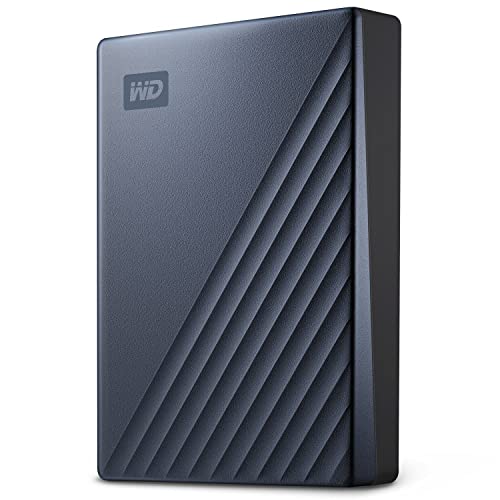
WD 5TB My Passport Ultra — Best Finish and USB-C
The Ultra is the Passport idea finished to a higher standard, and at 5TB — the capacity of consolidation — its refinements address the drive’s actual life. The connection is USB-C, with an adapter in the box for older ports, which ends the dongle negotiation for the modern laptops this drive will mostly serve. The shell adds metal to the Passport’s plastic, in the blue of the verified listing, giving the thick-profile enclosure a density and finish that suit an object destined to sit on desks and be handled in meetings rather than live in a drawer. Beneath the dress, the substance is the Passport’s own: password protection on hardware encryption, and the backup software that maintains the archive’s copies.
Read the Ultra’s premium correctly and it is easy to place. You are not buying capacity — the standard Passport beside it holds the same five terabytes — nor speed, which the shared mechanism class fixes for both. You are buying the connection your machines actually have, a shell that survives and presents better across years of public handling, and the small daily pleasures of an object finished properly. For the professional whose drive is effectively office equipment, those are working virtues, and the Ultra is the natural top of WD’s staircase. For the drawer-bound rotation drive, they are embroidery, and the standard Passport or the Elements will serve the same data with money left over for the twin.
- Capacity: 5TB, thick-profile 2.5-inch mechanism, bus-powered
- Connection: USB-C, with USB-A adapter included
- Security: password protection with hardware encryption
- Software: WD backup suite with protective features
- Form: metal-accented enclosure, blue on the verified listing
Strengths
- USB-C natively, adapter included — the connection question simply ends.
- The metal-accented shell wears years of public handling with grace.
- Full Passport protection and backup substance beneath the finish.
Trade-offs
- The premium buys finish and connection, not capacity or speed.
- Its presentability is wasted on drawer and rotation duty.
- The password’s finality applies here exactly as on the standard Passport.
Best for: professionals whose drive works in public on modern, USB-C machines. Not suited for: hidden-away vault roles where its virtues cannot be seen or used.
The Internal 5TB Drive — The Missing Size (Prose Only)
This entry reviews a product that does not exist, and its non-existence is the lesson. Internal hard drives — the 3.5-inch mechanisms that fill desktop bays and NAS enclosures — are built from platter configurations whose capacities step 4TB to 6TB with nothing between; no major maker sells a 5TB internal, and a listing that claims one is mislabelled, miscounted or worse. The portable world reached five because its smaller platters divide differently. So the desktop builder or NAS owner who typed this guide’s keyword into a search box is not missing a product through poor shopping; they are standing at a gap in the industry’s staircase, and the correct move is to choose which side of the gap their need truly sits on.
The guidance is straightforward once the gap is accepted. If the bay’s job is bulk storage and the budget is real, step down to 4TB, where the desktop and NAS shelves are deep, mature and keenly priced — our companion guide to 4TB drives covers both branches. If the job has genuinely outgrown four — an array’s usable space, a media server’s library — step up to 6TB, where the internal ranges resume in strength. What not to do is force the portable answer into the internal question: a 5TB portable is a fine backup target for a NAS, and many owners use one exactly so, but it is not a bay drive and no adapter makes it one. The missing size, understood properly, is the market’s way of telling internal buyers to commit to a side.
- Capacity: 5TB — not manufactured in 3.5-inch internal form
- Reason: internal platter configurations step from 4TB to 6TB
- Step down: 4TB internal — deep, mature desktop and NAS shelves
- Step up: 6TB internal — where the internal ranges resume
- Status in this guide: prose-only explainer; no product, no link, by design
Strengths
- Knowing the gap exists saves buyers from mislabelled listings and wasted hunts.
- The neighbouring sizes are stronger shelves than a niche 5TB internal would ever be.
- A 5TB portable still serves the internal world — as its backup target.
Trade-offs
- Buyers sized exactly at five terabytes must round, one way or the other.
- Rounding up costs more today; rounding down may cost a migration sooner.
- The gap confuses every new shopper once — you are now past your turn.
Best for: desktop and NAS shoppers who needed the map more than a model. Not suited for: portable buyers, for whom the five drives above are the whole story.
Comparison table
| Drive | Maker’s line | Connection | Encryption | Backup software | Choose it when |
|---|---|---|---|---|---|
| WD My Passport 5TB | Guarded portable | USB-A cable | Hardware AES | Yes | The travelling archive needs full protection |
| Seagate Portable 5TB | Plain portable | USB-A cable | None | No | A console or media vault with rescue cover |
| Seagate One Touch 5TB | Guarded portable | USB-A cable | Hardware, password-activated | Yes | Seagate loyalty plus a travelling archive |
| WD Elements Portable 5TB | Plain portable | USB-A cable | None | No | Bare capacity for libraries and rotations |
| WD My Passport Ultra 5TB | Premium portable | USB-C + adapter | Hardware | Yes | Modern machines and a drive that works in public |
| Internal 5TB | Does not exist | — | — | — | Step to 4TB or 6TB internal instead |
What should a 5TB buyer decide before choosing a badge?
Guarded or plain: what will the drive’s life look like?
The shelf divides on this question more honestly than on any specification. A drive whose life is a drawer, a shelf and a weekly appearance as a backup target gains almost nothing from encryption — its risks are mechanical, and its money is better spent on its twin. A drive whose life is bags, desks in shared offices, hotel rooms and the occasional forgotten taxi gains everything from it, because its realistic disaster is not failure but loss into a stranger’s hands. The My Passport, One Touch and Ultra exist for the second life; the Elements and the Seagate Portable for the first. Misjudging your own drive’s biography is the expensive error at this capacity, in both directions — the guarded drive never configured, the plain drive lost with the family archive readable on it.
How much headroom does five terabytes really give you?
Less than the number sings, for two arithmetic reasons. The displayed capacity will be roughly four and a half in the operating system’s units — the standing difference between the maker’s decimal counting and the computer’s binary ruler, identical on every drive in this guide. And a backup drive should be treated as full at ninety percent, because backup software needs room to build new restore points while honouring old ones. Budget against an honest four usable terabytes, measure your library and its annual growth against that figure, and the drive’s service life stops being a surprise. Buyers who do this sum before purchase are the ones still praising the drive in year four.
Is the step from 4TB to 5TB worth it?
For the portable buyer, the step buys a quarter more room in the same format, at a price premium usually smaller than a quarter — which makes it the rational size for anyone whose 4TB arithmetic is already tight. Its real value, though, is temporal: it postpones the next migration, and migrations of multi-terabyte libraries are measured in evenings. For the internal buyer, the question dissolves — there is no step, only the 4-to-6 jump, and the prose entry above covers the choosing. The one buyer for whom 5TB is a trap is the one whose library is actually small: a 2TB drive and a founded rotation protect a modest archive better than a single cavernous drive ever will.
What does the thick profile mean for heat and noise?
More platters in a sealed 2.5-inch enclosure means a drive that works a little warmer and hums a little more present than its slim siblings, and both are normal rather than warning signs. During a long copy the shell will feel warm to the touch; that is the mechanism’s heat taking the only exit it has, and the correct response is simply to leave the drive uncovered, on a hard surface, with air around it — not stacked under papers or inside a closed drawer mid-backup. Noise follows the same logic: a soft, steady hum with occasional seeking chatter is a working drive, while a new rhythmic click or a buzz that arrives suddenly in month eight is a symptom, to be answered by copying the irreplaceable material first and diagnosing second. Owners who learn the drive’s healthy sounds in its first week own the reference every later judgement needs.
Why are there no other brands at this size?
Because the portable hard-drive market has consolidated into the hands of the two makers whose drives fill this guide, plus Toshiba at the sizes below — and at 5TB, the shelf belongs to WD and Seagate alone. That is neither a conspiracy nor a quality verdict on anyone else; it is the economics of a mature, low-margin format whose buyers are served by a handful of enormous product lines. The practical consequence for you is pleasant: the choice at 5TB is a short one between well-documented drives with long track records, and the energy other categories demand for brand research can be spent here on the questions that actually decide satisfaction — protection, connection and the system the drive joins.
How do you set up a 5TB portable so it serves for years?
Begin with the ceremony, not the copying. Before the first file lands, rename the volume for its role, format it for the platform it will serve, and — on a guarded model — set the password and record it in your password manager. Retrofitting protection onto a full drive is a migration; installing it on an empty one is a minute. The order of operations in the first evening decides whether the drive’s features exist in practice or only on its box.
Stage the first backup like an event. Five terabytes through a mechanical drive is an overnight transfer, so give it the night: mains power, sleep disabled, the drive flat and ventilated, the backup software doing the copying with its verification on. Resist supervising it. In the morning, open material from the library’s beginning, middle and recent past before declaring the drive in service — until files have actually been opened from it, the backup is a claim, not a fact.
Learn its healthy voice. During that first backup, stay nearby for a few minutes and simply listen: the soft spin-up, the steady hum, the faint chatter of a long copy at work. That soundscape is the drive’s normal, and owning a memory of it turns every later noise into information rather than anxiety. Owners who skip this small ritual meet each new sound as a stranger; owners who perform it can tell, a year later, within seconds, whether the drive is working or asking for help — and at five terabytes, that early warning is worth terabytes.
Found the system, not just the drive. Decide in the first week where the second copy lives — a twin in rotation, the computer’s own storage for the working set, a cloud tier for the irreplaceable folders — and write the arrangement on a note kept with the drive. A 5TB drive is large enough to become a household’s single point of failure by sheer convenience, and the founding week is when that fate is cheapest to prevent.
Put the audits on the calendar. Twice a year: free space against growth, backup’s latest date confirmed, a handful of files opened from different years, the maker’s diagnostic run if anything feels different. Five terabytes fills slowly enough that the wall is invisible until it is close; the calendar is how you see it coming while the succession is still a choice.
What mistakes follow buyers to this capacity?
Hunting for the internal 5TB that does not exist. Hours of searching, and occasionally a mislabelled listing bought in hope, are the tax on not knowing the staircase skips five. You have read the prose entry; you are exempt. Choose your side of the gap.
Confusing guarded with backed up. Encryption protects a drive’s contents from strangers; it does nothing when the drive itself fails, is dropped or is stolen outright. The guarded Passport still needs its twin, exactly as the plain Elements does — the lock and the copy solve different disasters.
Buying the ceiling for a ground-floor library. Five terabytes purchased for a one-terabyte life is not future-proofing; it is a larger, costlier object performing a small drive’s job, while the money that could have founded the rotation sits idle inside it. Size the drive to the measured library plus honest growth.
Letting the first backup be a drag-and-drop. At this scale a file-manager copy is slow, unverified and unresumable — an interrupted evening becomes a restarted week. The backup software exists precisely for this maiden voyage; use it, verify, and only then relax into increments.
Assuming the drive you buy today is the drive you will manage forever. Libraries outgrow even this ceiling, and the owners who fare best are those who bought the 5TB as a citizen of a system — named, documented, twinned — so that its eventual successor inherits an organised library rather than an archeological dig. The migration you will make in five years is being made easy or hard by the habits you set in the first week.
Ignoring the displayed-capacity surprise until it matters. The roughly four-and-a-half figure the computer reports is not lost space, but plans made against the box’s five will quietly overrun. Budget to the displayed number from day one and the arithmetic never ambushes a backup at ninety-nine percent.
Arriving at five terabytes: the migration most buyers are really making
Nobody’s first drive is a 5TB. Buyers arrive here from a full 2TB, a strained 4TB, or a drawer of mixed capacities whose combined contents have outgrown every individual member, and the purchase is really a migration project wearing a shopping decision’s clothes. Planned well, the project is a single organised weekend: the new drive is set up and protected while empty, the libraries are copied — not moved — from each source in turn, the result is verified by opening material from every era and origin, and only then are the old drives reassigned. The old 2TB becomes the rotation’s off-site member; the old portable becomes the console’s vault; the drawer empties into roles instead of landfill. Planned badly — sources deleted as they are copied, verification skipped, the new drive filled in a drag-and-drop frenzy — the migration manufactures the very loss it was meant to prevent, and it does so at the moment of maximum concentration, when everything the household owns is in transit at once.
Two rules carry the whole project. Copy, never move, until the destination is verified; a move interrupted is a corruption, while a copy interrupted is merely an unfinished afternoon. And keep the sources intact for a full month after the migration, however untidy the drawer looks — the month is when the missing folder, the mis-copied archive and the forgotten corner announce themselves, and a source drive wiped on day two cannot answer questions asked on day twenty. The buyers who speak warmly of their 5TB drives in later years are, without exception, the ones who migrated like librarians rather than like movers.
Five terabytes in a small business or studio
The capacity has a second homeland worth addressing: the small studio, the trades business, the one-person firm whose records, job photographs and project archives have grown past domestic scale without reaching the point where a server makes sense. For that buyer, a pair of these drives — one guarded model in daily service, one plain model as its scheduled twin, stored off the premises — constitutes a complete, honest backup system at a cost the business will not notice, and the guarded pick’s encryption answers the question clients are increasingly entitled to ask about where their material lives. The My Passport and the One Touch were designed with exactly this desk in mind, and their software’s set-and-forget character suits an owner whose backup policy must survive busy seasons without attention.
The limits deserve the same candour. A two-drive rotation is not versioned, off-site, real-time protection of the kind a growing firm eventually needs; it is the excellent first storey of a system whose upper floors — a NAS, a cloud tier, an accountant’s copy — get built as the business grows. What the 5TB pair guarantees is that the firm’s history survives the drive failure, the burglary and the spilled coffee, which are the disasters that actually close small businesses’ archives. Buy the pair, label them by week, rotate them on a fixed day, and the system will still be quietly working when the firm is ready for its next storey.
What recovery cover means when five terabytes fail
At smaller capacities a drive failure is an errand; at five terabytes it is an event, and the recovery provisions attached to a drive deserve a clear-eyed paragraph before you need them. A standard warranty replaces hardware — a new empty drive, promptly shipped — and leaves the data where the failure put it. Rescue services, where a listing includes them, attempt the other half: specialists open the failed mechanism in clean conditions and try to read what the platters still hold. Seagate builds such cover into parts of its range, and it is a genuine differentiator for a drive holding a consolidated archive. But its honest framing matters: an attempt is not a guarantee, a successful recovery takes weeks rather than days, and the entire service exists to rescue people from a situation a second copy prevents for the price of a plain drive. Read the cover as insurance you hope never to test, buy the twin anyway, and let the two arrangements do their different jobs.
Reading the makers’ staircases at this size
Newcomers to this capacity sometimes ask why one maker fields three drives that hold identical data, and the answer is a small lesson in how storage lines are built. A portable range is a staircase of willingness: the base step sells the mechanism and the room, the middle step sells protection of that room, and the top step sells the experience of owning the room — connection, finish, presence. WD’s staircase is the explicit one in this guide, Elements to Passport to Ultra, each step reusing the mechanism below it and repricing the layer above. Seagate’s is compressed into two — the plain Portable and the guarded One Touch — which is not a lesser range but a different bet about how finely buyers slice their preferences. Neither staircase implies that the base step is a worse drive; the mechanism’s reliability story is shared across each maker’s steps, and what changes is the wrapping of software, security and materials around it.
The buying skill the staircase teaches is to price the steps against your own behaviour rather than against each other. The middle step is worth its premium to the owner who will complete its setup; to the owner who will not, it is the base step wearing a costlier badge, and the honest purchase is the base. The top step is worth its premium to the owner whose machines and working life will touch its advantages daily; to the drawer-bound drive it is jewellery on a vault. Read your own habits as carefully as the listings, and the staircase stops being a sales device and becomes what it should be — a menu of genuinely different ownership experiences at one capacity.
The living-room life of a five-terabyte drive
A quieter career awaits many of these drives, and it deserves its paragraph: the media vault beside the television or the streamer, holding the household’s film and music library in one bus-powered box that asks for no outlet and makes no noise worth mentioning. The plain picks were born for it — the Elements and the Seagate Portable mount on anything, sip power from the port they are given, and present the library without software mediation. Two practicalities govern the role. The filesystem must be one the television or player can read, which occasionally means the compromise format rather than a computer-native one, decided before the library is copied rather than after. And the drive should be treated as the library’s home, not its only home: media collections accumulate over years of ripping and downloading that nobody wishes to repeat, so the vault earns a backup of its own, even if that backup is a smaller drive updated seasonally. Five terabytes beside the television is a household institution; institutions get maintained.
How does a drive this size change your backup habits?
Capacity is a behavioural drug, and five terabytes changes habits in two directions worth watching. The benign direction is generosity: with room to spare, owners stop pruning backups, keep deeper history, and let the software retain versions they would once have deleted to save space — and history, as every restore story teaches, is where backups earn their keep. The dangerous direction is consolidation drift: folder by folder, the big drive becomes the place things are put, then the place things live, then the only place they exist, each step too small to feel like a decision. The drive did not change; the owner’s mental model did, from “the copy” to “the archive” to “the original,” without a single deliberate choice being made. Naming the drift is most of the defence. The rest is the founding discipline from this guide’s setup section: the note that says what the drive is, the twin that exists somewhere else, and the twice-yearly audit that asks, in writing, whether anything on the drive exists nowhere else — and fixes the answer when it is yes.
Final Recommendation
Most buyers at this capacity should take the WD My Passport 5TB: five terabytes is the size of a consolidated archive, and the Passport is the drive that guards a consolidation — encryption for the loss scenario, scheduled backup for the neglect scenario, in the format’s most proven package. If your machines are modern and the drive will work in public, the Ultra’s USB-C and finish earn their premium honestly; if your loyalty or your desk runs Seagate, the One Touch is the guarded equivalent and the plain Portable is the vault. The Elements remains the librarian’s and the rotation-builder’s instrument, bare and dependable. And if you arrived hunting an internal drive, leave with the map instead: step down to four or up to six, and let a portable from this shelf serve as that system’s backup — because five terabytes, understood properly, is not a compromise size at all, but the portable format’s fullest expression, waiting for the buyers whose libraries have genuinely grown into it. Buy it measured, set it up guarded or plain according to the life it will lead, twin it before it fills, and audit it twice a year; a drive treated that way at this capacity does not merely store a household’s history — it becomes the reason that history survives to be argued over by grandchildren.
Frequently Asked Questions
Why is there no 5TB internal hard drive?
Because of how internal drives are built. The 3.5-inch mechanisms used in desktops and NAS enclosures are assembled from platter configurations whose total capacities step from four terabytes directly to six; no combination lands on five, and no major maker has ever shipped one. Portable drives use a different, smaller platter family whose arithmetic does land on five — which is why this capacity exists only in the portable world, and why any internal listing claiming 5TB should be read as an error or a mislabel.
Is 5TB too much for a backup drive?
Only if your data is small. The right backup drive holds your entire dataset several times over, because the value of a backup lives in its history — the file as it was before the bad edit, the folder before the enthusiastic cleanup. For a household with two or three terabytes of accumulated life, a 5TB backup drive is not excess; it is the first size that makes history comfortable. For a single modest laptop, it is more than the job needs, and a smaller drive plus a second copy elsewhere protects better.
Can these drives work with a games console?
Yes — the Seagate Portable’s listing names the consoles explicitly, and the WD drives serve the same duty. Expect the console to format the drive for its own library, and remember the current generation’s rule that the newest titles may need to live on internal storage even when an external vault holds the rest of the collection. Five terabytes makes a generous vault; give the console the drive outright instead of trying to split it with your PC.
How long does it take to fill a 5TB portable?
Long enough that you plan it rather than watch it: a complete first backup or library migration at this capacity is an overnight run, and large additions thereafter are evening-scale events. Routine incremental backups, moving only what changed, are quick. This is the physics of mechanical storage at its largest portable size, not a flaw in any model here — and it is the honest reason the working-drive role belongs to SSDs while the vault role belongs to these.
My computer shows about 4.5TB on a new 5TB drive. Is it faulty?
No — it is arithmetic, not damage. Makers count a terabyte as a trillion bytes; your operating system divides by a larger binary unit and reports the same bytes as roughly 4.5 of its terabytes. Every maker’s 5TB drive shows the same figure on screen, because the bytes underneath are identical. Work to the number the computer reports and the puzzle stops mattering, leaving only the genuine question of how fast your collection grows into the space.
Should I buy the 5TB or save with the 4TB?
Measure, then decide. Add up your library, double it for history and a few years of growth, and compare against the usable space of each size — roughly 3.6 displayed terabytes for the 4TB drives, roughly 4.5 for these. If the sum sits comfortably under the smaller figure, save the money and put it toward the second copy. If it presses the smaller figure at all, the 5TB step is cheaper than the migration it postpones, and it is the last step the portable format offers before the desktop sizes take over.
Can a 5TB portable be used as a Time Machine or system backup target?
Yes, and it is one of the size’s best employments: a system backup wants a target at least twice the size of the machine’s storage so that history accumulates, and five terabytes gives even a large laptop years of restore points. Format the drive for the platform it will serve so the backup system can treat it natively, dedicate it to that duty rather than sharing it with a media library, and let the schedule run undisturbed. A backup drive with a second job is a backup drive whose owner will eventually borrow space from it at the worst possible moment.
Is it safe to buy a 5TB drive from a marketplace seller?
Apply the caution this capacity deserves. Drives at this size are valuable enough to attract mislabelled and refurbished stock presented loosely, and the condition of a mechanical drive cannot be judged from a photograph. Buy from the maker or an established retailer, check on arrival that the capacity and model match the listing, register the warranty promptly, and run the maker’s diagnostic before the return window closes. The small saving from an ambiguous listing is priced against the entire archive the drive will hold.
Will these drives work with a tablet or phone for extra storage?
Inconsistently, and the inconsistency grows with capacity. A thick-profile 5TB mechanism is among the thirstiest bus-powered devices, and many phones will not supply enough power for it to spin up at all; USB-C tablets manage it more often, though each model behaves differently, and the filesystem question waits behind the power question. If mobile access is a core requirement, test with your exact devices before committing the library — and recognise that the use case belongs naturally to smaller drives and SSDs, not to the portable ceiling.
Related Guides
Sizing around this capacity? Our guides to the best 4tb portable hard drives and the best 4 tb hard drives cover the step below in both its branches, and the best 6tb external hard drives picks up where the portable format ends. For a smaller travelling drive instead, the best 2 tb portable hard drives compare the 2TB class.



[…] you may also want the best 2tb internal hard drives if the library has already outgrown a terabyte, the best affordable desktop hard drives for the wider value picture across capacities, and the best 6tb nas hard drives when the storage […]
[…] the neighbouring sizes? See the best 5 terabyte hard drives for the portable ceiling below this one, the best 10tb external hard drives for the desktop archive […]