What's inside
- Key Takeaways
- Quick Picks: Ambidextrous Mice at a Glance
- How Did We Judge What Counts as Ambidextrous?
- Why Does Button Placement Matter More Than Shell Shape?
- Which Grip Styles Suit a Symmetrical Shell?
- Does Weight Distribution Matter More Than Total Weight?
- What Should Left-Handed Players Know About Software Mirroring?
- The Six Ambidextrous Mice, Reviewed in Detail
- Which Symmetrical Mouse Suits Which Kind of Game?
- How Do the Six Compare Side by Side?
- How Do You Set Up a Mouse for Both Hands?
- What About Polling Rate, Lift-Off and the Other Spec-Sheet Numbers?
- What Mistakes Do Ambidextrous Mouse Buyers Make?
- How Should You Test a Symmetrical Mouse Before Committing?
- Can One Mouse Serve Two People With Opposite Hands?
- What Do Children and Smaller Hands Need From a Symmetrical Mouse?
- How Long Should a Good Symmetrical Mouse Last, and What Wears First?
- Final Recommendation
- Frequently Asked Questions
- Related Guides
As an Amazon Associate I earn from qualifying purchases. This post may contain affiliate links at no extra cost to you.
gizmoverdict.com is reader-supported. When you buy through links on our site, we may earn an affiliate commission.
Where to buy: every mouse below links to its Amazon listing, where you can check the current cable type, colour and what is included in the box before you order, and where you should choose check price on Amazon rather than trusting any figure quoted elsewhere.
Finding the best ambidextrous mouse sounds simple until you discover how loosely the word gets used. A genuinely ambidextrous mouse has a symmetrical shell, so the curve under your palm feels the same whichever hand holds it. Plenty of products borrow the label while quietly shaping the body for right-handers, or while bolting the thumb buttons onto the left side only, which leaves a left-handed player reaching across the shell for controls that were never placed for them. If you play left-handed, if you swap hands because of wrist fatigue, or if you share a desk with someone who mouses on the opposite side, that distinction decides whether a purchase delights you or annoys you daily.
The six mice in this guide were picked to cover the honest spectrum. One of them lets you move its side buttons from one flank to the other, which is as close to true ambidexterity as gaming hardware gets. Others pair a symmetrical body with buttons fixed on the left, a compromise that suits left-handers who drive the side keys with a ring finger, and right-handers who simply prefer a neutral shape. Two are wireless, three are wired, and one button-heavy outsider serves players who map half their abilities to the mouse. Read the symmetry notes on each pick carefully, because that detail matters more here than any sensor headline.
Key Takeaways
- A symmetrical shell is the entry requirement, yet button placement separates real ambidexterity from marketing shorthand, so check which flank carries the side keys before anything else.
- Swappable side buttons, offered by one pick here, let a single mouse serve a left-handed morning and a right-handed evening without compromise on either side.
- Weight shapes how a symmetrical mouse feels in flick shots: the lightest pick here suits fingertip players, while the heavier wireless options trade agility for battery and calm tracking.
- Wireless symmetrical mice usually hide their side buttons on the left only, which right-handers never notice and left-handers must plan around.
- Grip width matters as much as length for switch-hitters, because a narrow shell lets either hand wrap without the pinky dragging on the pad.
Quick Picks: Ambidextrous Mice at a Glance
| Pick | Badge | Why it made the cut |
|---|---|---|
| CORSAIR M75 Wired RGB Lightweight FPS Gaming Mouse | Truly ambidextrous | Its side buttons unclip and swap between flanks, so the mouse reshapes itself for whichever hand is playing tonight. |
| GLORIOUS Model O Eternal Gaming Mouse | Lightest symmetrical shell | A 55-gram symmetrical body that disappears under a fingertip grip and asks almost nothing of your wrist during long sessions. |
| Logitech G305 LIGHTSPEED Wireless Gaming Mouse | Wireless value for either desk side | Proven LIGHTSPEED wireless in a neutral shell, with the honest caveat that its thumb buttons live on the left flank only. |
| Razer Viper V3 HyperSpeed Wireless Gaming Mouse | Long-haul wireless | A symmetrical esports shape with battery endurance measured in weeks of play rather than days, for players done with cables. |
| CORSAIR KATAR PRO XT Wired Gaming Mouse | Compact wired all-rounder | A small, light symmetrical frame with pre-tensioned main clicks that suits claw grips in either hand. |
| Bloody J90s RGB Gaming Mouse | Button-heavy budget pick | Twelve customisable buttons on an ambidextrous body for players who bind abilities, macros and media keys to the mouse itself. |
How Did We Judge What Counts as Ambidextrous?
Our first filter was geometric honesty. We laid each candidate’s silhouette over its mirror image, at least on paper, and rejected shells with a sculpted right-hand thumb rest or a palm hump that leans one way. A symmetrical outline does not guarantee comfort, yet an asymmetrical one guarantees that one of your hands is holding a compromise. The second filter concerned buttons. Side keys are where ambidextrous claims go to die, so we recorded exactly where each model’s extra buttons sit, whether they can be moved, and whether the software lets you mirror the main clicks for a left-handed primary button.
Weight and size formed the third filter, because switch-hitters feel imbalance faster than anyone. A heavy mouse with its battery stacked toward the rear drags differently in each hand, while a centred, light shell behaves predictably whichever way round it points. We favoured mice whose mass sits near the middle and whose width stays moderate, since very wide symmetrical bodies force the outer fingers of the holding hand into a splayed grip. Finally, we checked the unglamorous details: whether the cable, on wired models, exits centrally rather than at an angle, whether the scroll wheel sits on the centreline, and whether replacement feet and grips treat both flanks equally.
One more consideration shaped the final six. Many left-handed players have spent years adapting to right-handed gear, developing a style where the side buttons are worked by the ring finger of the left hand or simply ignored. A guide that only served purists would fail those players, so this list includes both the fully swappable design and the left-button compromise designs, each labelled plainly so you can match the mouse to the habits you actually have rather than the ones a product page imagines.
Why Does Button Placement Matter More Than Shell Shape?
Hold a symmetrical mouse with your eyes closed and both hands will report roughly the same shape. Now try to press the side buttons with your left hand on a mouse that carries them only on its left flank. Your ring finger, and perhaps your pinky, must curl inward to find keys positioned for a right thumb, and every press nudges the mouse sideways at the exact moment you wanted it still. In a shooter that translates to a flinched aim; in a strategy game it means the panic key you bound to the side is effectively missing. Shell symmetry gets you halfway. Button symmetry finishes the job.
There are three practical arrangements on the market. The rarest is the swappable design, where magnetic or clipped button modules move between flanks, mirrored by a software toggle. Next comes the four-button layout with keys on both sides, elegant but prone to accidental presses from the ring finger resting on the unused pair. Most common, and represented here, is the symmetrical shell with left-side buttons only. That layout is genuinely fine for right-handers who want a neutral shape, and workable for left-handers who either ignore side keys or have trained the ring-finger reach. What it is not is fully ambidextrous, and this guide refuses to pretend otherwise.
Software mirroring deserves a mention because it rescues many compromise mice. Most major gaming suites let you swap the primary and secondary clicks, so a left-handed player can click with the index finger of the left hand as nature intended. Fewer suites let you rebind the fixed side buttons to sensible left-hand duties, and almost none can move a physical button across the shell. When you read the picks below, weigh the physical layout first and the software second; you will live with the plastic every day, while the app is something you open twice a year.
Which Grip Styles Suit a Symmetrical Shell?
Fingertip players tend to love symmetrical mice, because the low, even hump leaves room for the fingers to steer without the palm interfering. If your control comes from small finger movements and your palm rarely touches the mouse, a light symmetrical body in either hand feels like an extension of the hand itself. Claw grip players also adapt well, provided the shell is long enough for the knuckles to arch without the fingertips overhanging the front edge. The compact pick in this guide will feel short for large claw hands, and we say so in its review.
Palm grip is where symmetry asks for patience. A full palm contact spreads pressure across an even curve, which many players find comfortable for hours, yet the sculpted valley that a right-handed ergonomic shell offers your thumb simply does not exist here. Switch-hitters who palm the mouse often add grip tape to the flanks, building a personalised asymmetry they can peel off when the other hand takes over. That trick, humble as it sounds, is one reason symmetrical mice remain the shared-desk standard: the base shape stays neutral and each user customises the surface.
Hand size cuts across all of this. Measure your hand from fingertip to wrist crease and compare it with each mouse’s length before ordering. A symmetrical mouse that is too long forces the holding hand, whichever it is, to stretch for the side buttons; one that is too short cramps the fingers into a permanent claw. Because you may use both hands, fit matters twice, and the safest choice is usually the middle-sized shell rather than the extreme at either end.
Does Weight Distribution Matter More Than Total Weight?
Spec sheets report a single number for weight, yet your hand experiences a distribution. Two mice can both claim 60 grams and feel entirely different because one carries its mass under the palm while the other concentrates it beneath the sensor. For a player using one hand, a slightly odd balance becomes familiar within a week. For a player using both hands, balance is the personality of the mouse, and it must read the same from either side. A rear-heavy design drags its tail when your right hand pulls it, then drags the opposite way, subjectively, when your left hand mirrors the motion, because the muscles involved are not symmetrical even when the shell is.
This is why the battery question matters beyond convenience. A mouse powered by a replaceable AA cell, like the G305, places a dense cylinder near the middle of the body, and that central lump actually helps ambidextrous handling: the pivot point stays under the sensor for both hands. Built-in rechargeable packs can be spread flatter, which designers exploit to shift balance forward or backward for a particular feel. Neither approach is wrong, but switch-hitters should prefer the centred, predictable option, and should be suspicious of any symmetrical mouse praised for its distinctive weight bias. Distinctive bias is a one-hand luxury.
There is also the question of feet and friction. Glide pads are usually arranged symmetrically, yet wear patterns are not: a right-handed player wears the left-front foot hardest, and when the mouse changes hands the worn foot moves to a different corner of the workload. Players who alternate daily will wear a symmetrical mouse evenly almost by accident, which quietly extends the life of the feet. It is a small, unglamorous advantage, but ambidextrous setups collect several of those, and together they explain why shared mice in good households seem to age more gracefully than their single-hand counterparts.
What Should Left-Handed Players Know About Software Mirroring?
Switching the primary button sounds like a checkbox, and in the major suites it is. The subtleties live one layer down. Operating systems, games and mouse software can each hold their own idea of which button is primary, and a setup that works on the desktop can quietly revert inside a game that reads raw input. The reliable pattern is to set the swap in the mouse’s own software and save it to onboard memory where the mouse offers it, so the device itself reports the mirrored layout to every machine and every game. Mice without onboard memory tie your left-handed configuration to one computer and one installation, which matters if you play at a friend’s house, a campus lab or a tournament PC.
DPI stages need mirroring thought too. A left hand that is still learning usually wants a lower default sensitivity than your trained right, so store separate stages per profile rather than forcing both hands through one setting. Scroll direction is a stranger trap: some players discover that what feels like natural scrolling flips when the mouse changes hands, because the finger doing the scrolling changes. None of these details appear on a product box, and all of them decide whether your second week of left-handed play feels promising or cursed. Spend one quiet evening configuring, testing in a practice range and writing down what you chose; future sessions will thank present you.
Finally, consider the keyboard half of a mirrored setup. A left-handed mouse position pushes the keyboard right, which changes where your movement keys fall and may crowd a full-size board against the mouse’s travel space. Many switch-hitters end up with a compact keyboard for exactly this reason, not from fashion but from geometry. Judge your desk as a system: mouse symmetry is the headline, yet the supporting cast of board width, pad size and monitor position decides whether the headline act can perform.
The Six Ambidextrous Mice, Reviewed in Detail

CORSAIR M75 Wired RGB Lightweight FPS Gaming Mouse — Truly ambidextrous
Start with the mechanism, because it defines this mouse. The M75 carries side button modules on both flanks that can be swapped, so the pair of keys sits under your thumb whether that thumb belongs to your right hand or your left. No other pick in this guide does that, and for a player who genuinely alternates hands, or a left-hander tired of ring-finger gymnastics, the difference is not subtle. Combined with software mirroring of the primary click, the M75 becomes the rare gaming mouse that asks nothing of the hand that holds it.
In play it behaves like a disciplined lightweight FPS mouse. The 26,000 DPI optical sensor figure is a ceiling rather than a setting anyone should use, yet the tracking underneath it is clean and predictable at the modest sensitivities where flicks actually happen. The main clicks use optical switches with a crisp, immediate break, and the wired connection removes every battery question from a tournament weekend. Corsair’s iCUE software handles the mirroring and button assignments, and it is also where you will tame the RGB, which glows through the rear of the shell whether you asked it to or not.
- Connection: wired USB
- Sensor ceiling: 26,000 DPI optical
- Side buttons: swappable between both flanks
- Software: Corsair iCUE for mirroring and macros
- Shell: symmetrical, lightweight FPS shape
Strengths
- Button modules genuinely move to the side your thumb is on, ending the left-hand compromise entirely.
- Optical main switches feel sharp and resist the double-click wear that haunts mechanical switches.
- The shape stays neutral at speed, with no sculpted rest steering either hand.
Trade-offs
- The cable tethers you to the desk, which wireless converts will feel immediately.
- iCUE is powerful but heavy, and mirroring setups live inside it rather than on the mouse alone.
- Players who never swap hands pay for a mechanism they will set once and forget.
Best for: left-handed FPS players and true switch-hitters who want their thumb buttons under their actual thumb. Not suited for: players who insist on a cable-free desk or who prefer a tall ergonomic palm hump.

GLORIOUS Model O Eternal Gaming Mouse — Lightest symmetrical shell
At 55 grams the Model O Eternal is the featherweight of this guide, and its symmetrical shell is the classic Glorious shape that helped define the ultralight category. The low profile and even flanks make it a natural fingertip mouse for either hand, and the dual-zone RGB lighting runs along the sides where, for once, both hands get the same view. Its 12,000 DPI optical sensor sounds modest beside the headline numbers elsewhere in this list, yet in real play that ceiling sits far above the settings most players use, and the tracking beneath it is honest.
The main switches are mechanical units rated for long service, with a light, snappy actuation that suits rapid clicking in MOBAs and shooters alike. Being wired, it never sleeps, never needs charging and never asks you to think about a battery indicator before a ranked session. The side buttons follow the common pattern of living on the left flank, so read this pick as a symmetrical shell for right-handers and for left-handers who drive side keys with a ring finger or do without them. Within that honest boundary, it is a beautifully judged mouse.
- Connection: wired USB
- Weight: 55 grams
- Sensor ceiling: 12,000 DPI optical
- Clicks: mechanical switches with dual-zone RGB on the shell
- Shell: symmetrical ultralight shape
Strengths
- The 55-gram mass makes direction changes feel almost free, sparing the wrist over long sessions.
- A proven symmetrical outline that fingertip and claw players in either hand adapt to quickly.
- No battery, no dongle and no wireless dropouts to troubleshoot at the worst moment.
Trade-offs
- Side buttons sit on the left flank only, limiting true left-hand use.
- The sensor ceiling is lower than rivals, even if few players will ever feel that limit.
- Very light mice can feel insubstantial to players raised on heavier, deliberate hardware.
Best for: fingertip players of either hand who prize low weight above every other trait. Not suited for: left-handers who rely on thumb buttons, or palm grippers wanting a tall, filled-out shell.

Logitech G305 LIGHTSPEED Wireless Gaming Mouse — Wireless value for either desk side
The G305 has been the default recommendation for affordable wireless gaming for years, and its symmetrical shell earns it a place here. Logitech’s HERO sensor delivers accurate tracking while sipping power, which is how this mouse stretches toward 250 hours of play from a single AA battery. That battery detail matters for ambidextrous use more than it first appears: the cell sits centrally, so the balance stays honest in both hands, and there is no charging cable dictating which side of the desk the mouse parks on overnight.
Now the honesty this guide promised. The G305’s two side buttons live on the left flank, shaped for a right thumb. A left-handed player gets the symmetrical body, the wireless freedom and the reliable sensor, but works those buttons with a ring finger or remaps essential actions elsewhere. For shared desks where the left-hander mainly browses, works and plays slower-paced games, that compromise is perfectly liveable. For a left-handed FPS specialist, the Corsair M75 above exists precisely because of this limitation. Judged as a right-hander’s neutral mouse and a household’s shared wireless mouse, the G305 remains superb value.
- Connection: LIGHTSPEED 2.4GHz wireless, USB receiver
- Sensor: HERO, up to 12,000 DPI
- Battery: single AA, up to 250 hours of play
- Buttons: six programmable, side pair on the left flank
- Shell: symmetrical, compact
Strengths
- Exceptional battery life from a replaceable AA cell you can buy anywhere on earth.
- LIGHTSPEED wireless that feels indistinguishable from wired in everyday play.
- Central battery placement keeps the balance neutral for both hands.
Trade-offs
- Left-flank side buttons only, the recurring compromise of this category.
- The compact shell can crowd very large hands in a palm grip.
- No Bluetooth, so laptop users juggle the receiver or a hub.
Best for: shared desks, laptop bags and right-handers wanting a neutral wireless shape without a charging routine. Not suited for: left-handed players who lean on side buttons in fast games.

Razer Viper V3 HyperSpeed Wireless Gaming Mouse — Long-haul wireless
Razer’s Viper line is the symmetrical shape many esports players picture when they close their eyes, and the V3 HyperSpeed brings that outline to a battery-focused wireless design. At 82 grams it is heavier than the wired feathers in this guide, yet the mass buys endurance: up to 280 hours of play per charge cycle of its battery arrangement, which changes how you think about a wireless mouse. Instead of a nightly charging ritual, you get a peripheral that simply works for weeks, on either side of the keyboard.
The Focus Pro 30K optical sensor is flagship-grade, with tracking that stays composed during the violent direction changes of arena shooters. Razer’s second-generation mechanical switches give a firm, tactile click that some players prefer to optical switches for its feedback. The shape deserves its reputation: safe, low and even, with side buttons on the left flank in the usual arrangement. Left-handers should again read that clearly. What the Viper offers them is an elite symmetrical shell and wireless manners; what it does not offer is mirrored buttons. Right-handers who swap to the left for work tasks, though, will find it a superb two-role mouse.
- Connection: HyperSpeed 2.4GHz wireless
- Weight: 82 grams
- Sensor: Focus Pro optical, up to 30,000 DPI
- Battery life: up to 280 hours
- Switches: mechanical, second generation
Strengths
- Battery endurance that removes charging from your weekly routine almost entirely.
- A tournament-proven symmetrical shape with no awkward edges for either hand.
- Sensor performance that will never be the reason a shot missed.
Trade-offs
- Heavier than wired ultralights, which fingertip purists will notice in flicks.
- Side buttons remain a left-flank arrangement for right thumbs.
- Mechanical switches, while tactile, lack the wear immunity of optical designs.
Best for: wireless players who play on both sides of the desk and hate charging cables. Not suited for: ultralight devotees or left-handers needing mirrored side keys.
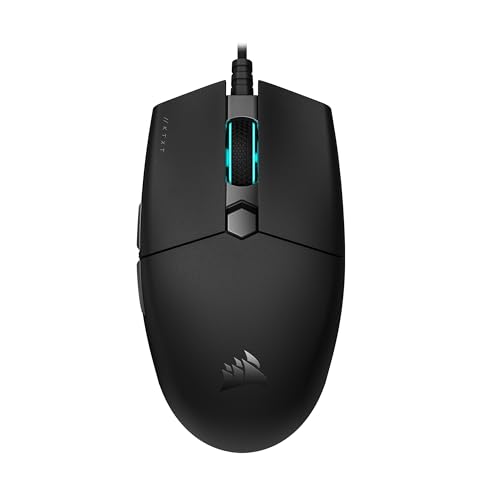
CORSAIR KATAR PRO XT Wired Gaming Mouse — Compact wired all-rounder
The Katar Pro XT is the small, eager option in this line-up: an ultra-light wired mouse with a compact symmetrical shell that suits players whose hands or grips found the others roomy. Corsair’s Quickstrike buttons pre-tension the main clicks so there is no dead travel before actuation, and in fast games that immediacy is genuinely perceptible, like a trigger that has had its slack removed. The 18,000 DPI optical sensor provides more ceiling than the shape’s target games will ever request.
Compactness is both the appeal and the warning. Small and medium hands in a claw or fingertip grip will feel instantly at home in either hand, and the light body encourages the constant micro-corrections that symmetrical mice reward. Large hands, though, will find their fingers spilling past the front and their palm hovering with nowhere to rest. The side buttons sit on the left flank, following the category pattern, and the braided-style cable is light enough not to fight the shell’s agility. As a second mouse for a laptop bag or a child’s first proper gaming setup that either hand can borrow, it makes a strong case.
- Connection: wired USB
- Sensor ceiling: 18,000 DPI optical
- Main clicks: Quickstrike pre-tensioned buttons
- Software: Corsair iCUE
- Shell: compact symmetrical, ultra-light class
Strengths
- Pre-tensioned clicks feel instant, flattering fast-twitch play in either hand.
- The compact shell welcomes smaller hands that larger symmetrical mice overwhelm.
- Light cable and body together keep drag close to zero on a decent pad.
Trade-offs
- Large hands will simply run out of mouse, especially in palm grip.
- Side buttons follow the left-flank-only layout once again.
- iCUE must be installed to get the most from button assignments.
Best for: small-to-medium hands, claw and fingertip grips, and anyone wanting a nimble wired spare. Not suited for: large-handed palm grippers or left-hand thumb-button devotees.

Bloody J90s RGB Gaming Mouse — Button-heavy budget pick
Every line-up needs its maximalist, and the J90s is unapologetically that mouse. Twelve customisable buttons crowd an ambidextrous body, serving players who bind healing items, build menus, push-to-talk and three kinds of grenade to the mouse and still want a spare. Bloody, A4Tech’s gaming arm, builds for exactly this audience, and the J90s backs the button count with an 8,000 CPI optical sensor, tracking rated at 150 inches per second and a metal-footed glide that feels slicker than the price class suggests.
Temper expectations in the right places. The sensor is a workhorse rather than a flagship, the software is functional rather than beautiful, and a shell carrying this many keys will never feel as clean in the hand as the minimal shapes above it. Extra buttons also mean extra chances to press the wrong thing during your first week, whichever hand you use. Yet for MMO and MOBA players on a budget, and for left-handers who remap creatively, the J90s offers a kind of freedom the sleeker mice cannot: everything within a finger’s reach, on a body that does not care which hand arrived.
- Connection: wired USB
- Sensor: optical, up to 8,000 CPI, 150 IPS tracking
- Buttons: twelve customisable
- Lighting: RGB with onboard profiles
- Shell: ambidextrous, button-rich layout
Strengths
- Twelve buttons open up binding layouts the six-button mice cannot attempt.
- The ambidextrous body plus deep remapping serves inventive left-handed setups.
- Metal glide feet give a smooth, durable slide unusual in this class.
Trade-offs
- The crowded shell feels busy and takes real adjustment time.
- Sensor and switch specifications trail the flagship picks in this guide.
- Companion software is utilitarian and less polished than Razer’s or Logitech’s.
Best for: MMO, MOBA and macro lovers who want maximum bindings on a neutral body. Not suited for: FPS purists who want the cleanest, lightest shell possible.
One more name deserves an honourable mention in prose. The Razer Viper 8KHz remains a reference point for wired symmetrical design, with its high polling rate and true esports pedigree, and players who find one at a sensible cost will understand why the shape is so imitated. We discuss it here as context rather than as a linked pick, and it is a useful benchmark when you compare the shells above: if a mouse feels as honest in both hands as that Viper does, it has earned the ambidextrous label.
Which Symmetrical Mouse Suits Which Kind of Game?
Tactical shooters reward the lightest, simplest shapes, because a round is a chain of small corrections ending in one committed flick. The Model O Eternal and the Katar Pro XT speak that language fluently, and the M75 joins them while adding its mirroring trick. Players in this genre should also think about what their non-dominant hand does during long defensive holds: a symmetrical mouse lets you rest your main hand and hold an angle with the other during casual matches, a small mercy across a long evening that one-handed setups cannot offer.
Battle royale and arena titles add vertical tracking and constant looting to the workload, which favours a slightly larger shell and dependable wireless freedom. The Viper V3 HyperSpeed was practically designed in this neighbourhood, and the G305 serves it well for players who prefer replaceable batteries. In these games the side buttons usually carry healing and inventory duties, so the left-flank question returns with force: a left-handed battle royale player should weigh the M75’s swappable buttons heavily, because fumbling a heal key mid-fight is a death sentence the stats screen will not explain.
Strategy, MOBA and MMO players live by bindings rather than raw aim, and for them the J90s reorders the whole conversation. Twelve buttons on a neutral body means a left-handed MMO player can finally build the same thumb-grid layouts that right-handers take for granted, even if the grid here is arranged differently. Turn-based and slower games, meanwhile, are where new switch-hitters should train: the forgiving pace lets the learning hand build accuracy without the frustration of competitive respawn timers. Match the mouse to the genre you play most, then let it be merely good at the rest.
One genre deserves a footnote of its own: rhythm and aim-trainer games, beloved by players rebuilding skill in a recovering hand. Their demands are pure tracking and endurance, with no buttons to speak of, which makes them the fairest possible test of a symmetrical shell. If a mouse feels balanced through an hour of aim training in each hand, its geometry is honest, whatever the box claimed.
How Do the Six Compare Side by Side?
| Mouse | Connection | Symmetry honesty | Character |
|---|---|---|---|
| CORSAIR M75 | Wired | Swappable buttons, both flanks | The only pick that fully mirrors for either hand |
| GLORIOUS Model O Eternal | Wired | Symmetrical shell, left side buttons | Featherweight fingertip agility |
| Logitech G305 | Wireless | Symmetrical shell, left side buttons | AA-powered endurance and value |
| Razer Viper V3 HyperSpeed | Wireless | Symmetrical shell, left side buttons | Esports shape with weeks of battery |
| CORSAIR KATAR PRO XT | Wired | Symmetrical shell, left side buttons | Compact frame, instant-feeling clicks |
| Bloody J90s | Wired | Ambidextrous body, twelve buttons | Maximum bindings on a budget |
Read the middle column as the soul of this guide. Five of these mice share the same honest compromise, differing in weight, size, connection and button count. One breaks the compromise entirely. Your first decision is whether that break matters to your hands; everything after it is ordinary mouse shopping about size, weight and budget tier.
How Do You Set Up a Mouse for Both Hands?
Begin by deciding which hand is primary in each context, because gaming and working often differ. Set your gaming profile first: sensitivity, side button bindings and primary click assignment for the hand you compete with. Then build the second profile deliberately rather than copying the first, since your non-dominant hand usually prefers a lower sensitivity and simpler bindings. Most suites in this guide save profiles to onboard memory or the app; either way, label them by hand, not by game, so future-you understands the system at a glance.
Keep a small log during the first fortnight, nothing elaborate: which hand played, for how long, and one line about comfort. Patterns appear quickly in such notes. Many switchers discover their left hand aims better at lower sensitivity but fatigues sooner, or that their right hand tolerates marathon sessions while their left prefers short, sharp ones. Those observations let you assign roles sensibly, competitive matches to the reliable hand and training volume to the developing one, instead of swapping on a whim and wondering why results wobble. The log also protects you from a subtle trap: judging a new symmetrical mouse during the exact weeks when an unfamiliar hand, rather than the hardware, is the real source of every missed shot.
Next, arrange the desk so swapping costs nothing. A symmetrical mouse deserves a symmetrical stage: centre the pad, route a wired cable with slack on both sides or park the wireless receiver where either hand’s position keeps a clear line to it, and keep the keyboard easy to slide. Players who switch because of fatigue should also schedule the swap rather than waiting for pain; alternating every hour protects both wrists better than heroic endurance with one. Finally, give the new hand two weeks of low-stakes play before judging it. Your aim will feel clumsy for days, then improve in a rush, and many switch-hitters report that the exercise sharpens their main hand too.
What About Polling Rate, Lift-Off and the Other Spec-Sheet Numbers?
Polling rate describes how often the mouse reports its position, and the standard thousand reports per second is already faster than your monitor can display and your hand can meaningfully vary. Higher rates exist and some players swear by the smoother cursor path, yet the benefit shrinks fast beyond the standard, while the cost in battery life on wireless models is real. For an ambidextrous buyer the practical advice is simple: treat polling as a settled technology, not a selection criterion, and spend your attention on shape and buttons where differences are large enough to feel.
Lift-off distance matters more, because symmetrical-mouse players tend to lift and reset during wide sweeps, and a sensor that keeps tracking while the mouse is half-raised will smear those resets into unwanted cursor drift. Modern optical sensors in this guide handle lift-off cleanly, and several let you tune it in software. Set it low if you are a lifter, higher if you play on an uneven or glossy surface. Angle snapping and smoothing, the legacy sins of cheap sensors, are effectively absent from every pick here, which is precisely why this guide spends its words on geometry instead of sensor mythology: at this level, sensors are solved and hands are not.
What Mistakes Do Ambidextrous Mouse Buyers Make?
The classic error is trusting the word ambidextrous on a box without checking where the buttons live. A symmetrical shell with left-only buttons is a fine product and a poor left-handed mouse, and the disappointment only surfaces after the return window feels short. The second mistake is buying by sensor numbers. The gap between a 12,000 and a 30,000 DPI ceiling is marketing territory; the gap between a shell that fits your hand and one that does not is measured in accuracy every single session.
Third, switch-hitters often buy the lightest mouse available and discover their non-dominant hand prefers a little mass for control, since weaker fine motor skills benefit from inertia that damps tremor. Fourth, players forget the software question: can this mouse mirror its primary click, store two profiles and reassign its side keys? Hardware symmetry without software symmetry is half a solution. Finally, many buyers ignore the humble mouse pad. A symmetrical mouse swapped between hands travels across more of the pad than a single-hand setup, so a pad that is too small punishes the hand parked nearer the edge.
How Should You Test a Symmetrical Mouse Before Committing?
Run a handedness audit during the first evenings, while returning the mouse is still easy. Play one familiar game with your usual hand and note where your fingers rest without thinking: if your ring finger keeps landing on a side button you did not intend to press, the shell is either too narrow for you or its buttons sit too low. Then repeat with the other hand, even if you bought the mouse mainly for one side, because a supposedly ambidextrous shape that only works one way round has failed its defining test. Pay attention to the scroll wheel in both orientations; a wheel that feels centred to one hand and offset to the other betrays a shell that is less symmetrical than its outline promises.
Test the cable or the receiver in your real room, not an idealised one. Wired symmetrical mice get dragged in both directions across a week of swapped use, and a stiff cable that behaved when it bent left may fight you when it bends right. Wireless players should check for dropouts with the receiver in its permanent home, through the desk clutter and monitor stands that marketing photographs omit. These are boring tests. They are also the difference between a mouse you keep for four years and one you quietly replace by spring.
Can One Mouse Serve Two People With Opposite Hands?
Households ask this more than solo players do, and the answer is yes, with two conditions. The first is profile discipline: each person needs their own saved settings, because a shared sensitivity is a daily argument waiting for a trigger. Mice with onboard profile switching handle this gracefully; app-dependent mice handle it as long as both users accept the same software. The second condition is hygiene and wear honesty. Two players double the click count and the palm contact, so switches and coatings age at twice the solo rate. That is not a reason to buy two mice, but it is a reason to choose models with durable switches and replaceable feet, and to budget the mouse as a two-year household appliance rather than a four-year personal one.
There is a social wrinkle worth naming. The left-handed member of a household has usually spent years as the adaptable one, quietly using whatever right-handed gear the house already owned. Choosing a genuinely ambidextrous mouse, ideally the swappable-button kind, reverses that pattern in a way people feel out of proportion to the money involved. If this guide helps a household make that small correction, it will have done more good than any sensor comparison could.
What Do Children and Smaller Hands Need From a Symmetrical Mouse?
Families often land on this guide because a child is left-handed and the household mouse is a sculpted right-handed lump. For younger players the priorities reorder themselves: size first, because a shell that fits a child’s hand teaches good grip habits instead of a sprawling stretch; durability second, because school bags and shared family desks are rough neighbourhoods; and simplicity third, because a six-button mouse a child understands beats a twelve-button one they fear. The Katar Pro XT’s compact frame and the G305’s replaceable battery both make quiet sense in a family context, and either can be handed down to a sibling whose dominant hand may be the opposite one, which is the ambidextrous advantage in its most practical form.
Parents should also know that handedness in children can stay fluid longer than expected. A child who writes left-handed may mouse right-handed happily, or swap by task for years. A symmetrical mouse respects that uncertainty instead of forcing an early declaration, and when the preference finally settles, the same mouse keeps serving. Set the sensitivity modestly, enable the mirrored primary click if the left hand wins, and resist buying a miniature novelty mouse shaped like a cartoon animal; children outgrow the joke long before they outgrow a well-made symmetrical shell.
How Long Should a Good Symmetrical Mouse Last, and What Wears First?
The main switches are the usual first casualty, developing a double-click or a dead spot after years of service, which is one reason optical-switch designs like the M75 attract players who keep hardware for a long time. Glide feet wear second, especially on hard pads, and the good news is that feet are cheap, replaceable and usually sold for popular models like the ones in this guide. Cables fray at the shell entry on wired mice that get dragged in both directions, so switch-hitters should inspect that junction every few months and consider a mouse bungee, which lifts the cable and removes most of the bending stress entirely.
Batteries age in their own way. A rechargeable mouse that once lasted a month may hold two weeks after three years, which is an annoyance rather than a failure, while an AA-powered design like the G305 simply asks for a fresh cell and returns to full strength. Coatings and rubberised sides degrade slowest but most visibly, growing shiny where palms rest; grip tape refreshes the feel for a few dollars and, as noted earlier, doubles as a way to personalise each flank. None of the six picks here is disposable tech, and with feet, tape and the occasional battery, any of them should serve through several generations of the games you play on it.
Cleaning deserves thirty seconds of this guide because symmetrical mice collect grime on both flanks rather than one. A soft brush around the sensor lens, a wipe of the shell with a barely damp cloth and a blast of air under the buttons each month will keep tracking honest and clicks crisp. Avoid soaking the shell or spraying cleaner directly onto it, and never oil a scroll wheel that has gone noisy; a wheel complaint is usually dust, and dust leaves the way it came in.
Final Recommendation
If you take one mouse from this guide, take the CORSAIR M75, because it is the only design here that treats your left hand as a first-class citizen rather than a tolerated guest. Players who know they will never swap, and simply want the finest symmetrical shapes in each connection style, should look at the Model O Eternal for wired lightness, the Viper V3 HyperSpeed for wireless endurance and the G305 for sheer value. The Katar Pro XT serves smaller hands, and the J90s serves button maximalists, each honestly labelled.
Whatever you choose, test it with the hand you actually play with, at the desk you actually use, during the first days while returns are painless. Test it tired as well as fresh, in a long session as well as a short one, because hands forgive a mouse almost anything for twenty minutes and start filing honest complaints around hour two. A mouse that both your hands trust is a rare and quietly wonderful thing, and the left-handed player who finally stops adapting to right-handed gear will wonder why they waited so long to demand it.
Frequently Asked Questions
Can a right-handed player benefit from an ambidextrous mouse?
Yes. Many right-handers prefer the neutral shell because it does not lock the wrist into one sculpted posture, and players who alternate hands for work tasks reduce strain on their main hand. The symmetrical shape is a preference, not a concession.
Are side buttons on both sides always better?
Not always. Buttons on both flanks can be pressed accidentally by the resting ring finger, which is why swappable modules, like those on the M75, are the smarter engineering answer: the unused side stays smooth.
Is wireless reliable enough for competitive play?
Modern 2.4GHz systems from Logitech and Razer are effectively indistinguishable from wired in latency for human players. The real wireless questions are battery management and receiver placement, not raw responsiveness.
Which of these suits a left-handed FPS player best?
The CORSAIR M75, because its buttons physically move to the right flank and its software mirrors the primary click. The other picks offer symmetrical shells that left-handers can use, with the side-button caveat explained in each review.
How long does it take to learn to play with the other hand?
Most players report two to three weeks of casual play before the new hand feels merely ordinary rather than clumsy. Start in cooperative or single-player games, lower your sensitivity slightly, and keep sessions short while the muscles learn. Accuracy returns first in tracking, later in flicks, and last in the small panic movements that ranked play demands, so grade your progress kindly and by category. Players switching because of injury should follow their clinician’s guidance over any timeline in a buying guide, and treat the mouse as rehabilitation equipment that happens to be fun, not as a shortcut around recovery.
Should I keep my old right-handed mouse as a spare?
Keeping it costs nothing and it can serve guests, a second computer or an emergency when a battery dies mid-evening. Many switch-hitters, though, find that after a month with a good symmetrical mouse the old sculpted one feels strangely opinionated, like a handshake from someone squeezing too hard. Let it live in a drawer for visitors; your hands have moved on, and that reaction is itself a useful verdict on how well the new mouse fits both of them.
Do symmetrical mice work well for everyday office use?
They do, and offices are quietly full of them for the same sharing reasons households discover. A neutral shell suits whoever sits down at a hot desk, the gaming sensors track flawlessly on paperwork-day tasks, and the extra buttons map happily to copy, paste and window switching. If the RGB lighting feels loud for a meeting room, every suite represented here can dim or disable it, leaving a sober-looking mouse that happens to be excellent at spreadsheets.
Related Guides
Players building out a full symmetrical setup may also enjoy our companion reading: our guide to lightweight esports mice, our roundup of wireless gaming mice and our advice on choosing a mouse pad for large sweeping aim.
Related guides
- Best 4K UHD HDR HDMI Extenders: 4K60, Long-Run and 4K120 Kits Compared
- Best 25–35 Inch Monitors With Lowest Display Lag: An Honest Ranking Without Invented Numbers
- Best Enterprise SATA SSDs: Endurance Classes, Power-Loss Protection and Fleet Sense
- Best Color Product Label Printers: Six Desktop Machines for Short-Run Product Labels


