What's inside
- Key Takeaways
- Quick Picks
- How Did We Choose These Picks?
- Which Large Gaming Laptops Deserve a Detailed Look?
- What About the Class’s Ancestor, the Alienware X17 R2?
- How Do You Set Up a Desk Around an 18-Inch Laptop?
- Comparison Table
- What Mistakes Do Buyers of Large Gaming Laptops Keep Making?
- How Loud, Hot and Hungry Is This Class in Real Life?
- How Do the Flagships Divide the Work of a Week?
- What Should You Know About Power, Circuits and Moving One Safely?
- How Does This Class Age Compared With Smaller Gaming Laptops?
- Which Buyer Belongs at Which Altitude?
- What Does Delivery Day Look Like for a Machine This Size?
- Should You Add an External Monitor to a Screen This Big?
- How Do You Keep a Flagship Cool Across a Long Summer?
- What Is the Class’s Resale and Hand-Down Story?
- How Should You Think About the Power Brick as Part of the Machine?
- What About Keyboards, Sound and the Pleasures of Scale?
- A Final Word on Buying the Summit Versus the Slope
- Final Recommendation
- Frequently Asked Questions
- Related Guides
As an Amazon Associate I earn from qualifying purchases. This post may contain affiliate links at no extra cost to you.
gizmoverdict.com is reader-supported. When you buy through links on our site, we may earn an affiliate commission.
Where to buy: Every linked laptop below leads to its current Amazon listing. Machines in this class ship in many configurations under shared names — two picks here are the same laptop family with different processors — so confirm the exact CPU, graphics chip, memory and panel on the listing you open.
The best large gaming laptops make no apology for what they are: 17.3 and 18 inch machines built to replace a desktop, not to accompany one. Everything about the class follows from that surrender of portability. The screens are vast, the cooling has room to be serious, the keyboards gain number pads and breathing space, and the weight — of the laptop, and of the large power brick it requires — crosses the line where a bag becomes a commitment. This guide celebrates the class for the readers it suits and warns the readers it does not, because a large gaming laptop bought by a traveller is an expensive regret, while the same machine bought by a desk-bound player is the best gaming purchase they will ever make.
The six picks map the class’s real range. At its summit sit two ASUS ROG Strix G18 configurations and a ROG Strix SCAR 18 carrying the strongest laptop graphics chip in this guide, alongside Razer’s Blade 18 with its dual-mode display. The class’s sensible middle is an Acer Nitro V in 17.3-inch form with current-generation graphics, and its value elder is an ASUS TUF F17 from an earlier generation, included with its age stated as plainly as its virtues. Two of the picks share the Strix G18 name with different processors and graphics arrangements, and this guide distinguishes them carefully rather than letting a shared badge blur two different machines.
One more name earns a prose mention for historical completeness: Alienware’s X17 R2, a 17.3-inch flagship of its generation whose best-known graphics configuration carried the GeForce RTX 3070 Ti — the Ti variant, a meaningfully stronger chip than the plain RTX 3070 it is sometimes lazily shortened to. It is covered without a link after the main reviews, as the class’s recent ancestor, and it is named correctly there because in this class precision about graphics variants is the whole game.
Key Takeaways
- Portability is the price of admission, paid in full: these machines plus their power bricks are desk equipment that can be moved, not travel companions.
- Two picks share the ROG Strix G18 name. One pairs a Ryzen 9 with an RTX 5070; the other pairs an Intel Core Ultra 9 with an RTX 5070, 32GB of memory and a 2.5K 240Hz panel — read them as siblings, not duplicates.
- The SCAR 18 carries the RTX 5090, the strongest laptop graphics in this guide, and is priced and powered accordingly.
- The TUF F17 is an earlier-generation value route — an 11th-generation Intel platform with an RTX 3050 — and is recommended only with that generation understood.
- At this size the screen is the experience: 2.5K resolution at 240Hz on the 18-inch flagships is a different world from the Full HD panels of mainstream gaming.
Quick Picks
| Pick | Badge | Why it earns its place |
|---|---|---|
| ASUS ROG Strix G18 (Ryzen 9, RTX 5070) | AMD-powered flagship | An 18-inch Nebula display at 2.5K and 240Hz driven by a Ryzen 9 9955HX and an RTX 5070 — the class’s modern mainstream flagship. |
| ASUS ROG Strix G18 (Ultra 9, RTX 5070) | Intel-powered sibling | The same G18 idea on Intel’s Core Ultra 9 275HX, with 32GB of memory, a terabyte of storage and full DCI-P3 colour. |
| Razer Blade 18 (2026) | Dual-mode display flagship | An RTX 5080 flagship whose 18-inch screen switches between UHD+ at 240Hz and FHD+ at 440Hz, with Wi-Fi 7 and Thunderbolt 5. |
| Acer Nitro V 17 | Sensible large middle | A 17.3-inch Nitro with an RTX 5060, 16GB of memory and a Full HD panel — the class’s proportions without the flagship ceremony. |
| ASUS TUF F17 | Earlier-generation value | A 17.3-inch TUF from the RTX 3050 generation with 8GB of memory, for big-screen esports and older libraries at the class’s friendliest entry. |
| ASUS ROG Strix SCAR 18 (2025) | Class maximum | An RTX 5090, a Core Ultra 9, 32GB of memory, 2TB of storage and a Nebula HDR panel — the strongest machine in this guide by a clear margin. |
How Did We Choose These Picks?
We chose to map the class honestly from summit to base, because large gaming laptops attract two kinds of misreading: flagship roundups that pretend the class begins at its most expensive machines, and value roundups that hide how far the summit actually is from the base. This list holds both ends and the middle in one frame, with generations labelled, so a reader can locate their own ambition on the map before spending anything.
Within that map, we weighted the things size is supposed to buy. Cooling headroom and sustained performance matter more here than in any other class, because surrendering portability for a machine that throttles like a thin one is the class’s only unforgivable waste. Screen quality matters enormously, because at 18 inches the panel is effectively a monitor you also compute on. And configuration clarity mattered enough that the two Strix G18 siblings receive separate reviews with their processors in their names — a courtesy this category’s listings do not always extend.
Finally, we kept one earlier-generation machine in the list deliberately. The TUF F17 represents the large class’s second-hand-adjacent, old-stock reality: big screens age slower than graphics chips, and a huge panel with modest silicon serves esports and older libraries happily for years. It is included as that, labelled as that, and priced by the reader accordingly.
Which Large Gaming Laptops Deserve a Detailed Look?

ASUS ROG Strix G18 (Ryzen 9, RTX 5070) — AMD-powered flagship
The Strix G18 in its Ryzen form is the modern flagship of this class in its most straightforward specification: an AMD Ryzen 9 9955HX — a many-core desktop-class processor — driving a GeForce RTX 5070, behind an 18-inch ROG Nebula display in 16:10 shape at 2.5K resolution, refreshing at 240Hz with a 3ms response. Linger on that panel, because it is the reason the machine exists. At 18 inches, 2.5K is the resolution where games gain genuine grandeur without the hardware penalty of 4K, and 240Hz keeps fast titles fluid in a way that makes smaller, slower screens feel like compromises you can see.
The Ryzen platform gives this sibling its character. AMD’s HX-series chips bring core counts that laugh at streaming, compiling and content work alongside the games, and in a chassis this size the cooling exists to let those cores work rather than merely visit. Wi-Fi 6E and a four-zone RGB keyboard round out a specification that treats the machine as what it is: a desktop that folds. Owners should set it up like one — a permanent desk position, the brick parked, peripherals gathered — and visit other rooms only for occasions.
Distinguish it clearly from its Intel sibling reviewed next. Same family, same screen formula, same graphics rung; different processor platform, and in the Intel listing’s case a stated 32GB memory configuration. Neither is the “real” G18. They are platform alternatives of one design, and the choice between them is the familiar AMD-versus-Intel judgement about core behaviour, platform features and the exact listing in front of you — not a hierarchy this guide will fake.
- Display: 18-inch Nebula, 16:10, 2.5K, 240Hz, 3ms
- Graphics: GeForce RTX 5070 laptop GPU
- Processor: AMD Ryzen 9 9955HX
- Memory: see listing for this configuration’s fitted amount
- Extras: Wi-Fi 6E, four-zone RGB backlit keyboard per listing
Strengths
- A flagship panel in every dimension: size, resolution, refresh and response.
- Many-core Ryzen power serves creation and streaming beside the games.
- Full-size chassis gives the cooling room this class promises.
Trade-offs
- Laptop and brick together end any casual notion of portability.
- Confirm the fitted memory on this configuration before ordering.
- Flagship pricing applies across purchase and accessories alike.
Best for: desk-bound players and creators who want the modern flagship on AMD’s platform. Not suited for: anyone who travels with their gaming machine more than occasionally.
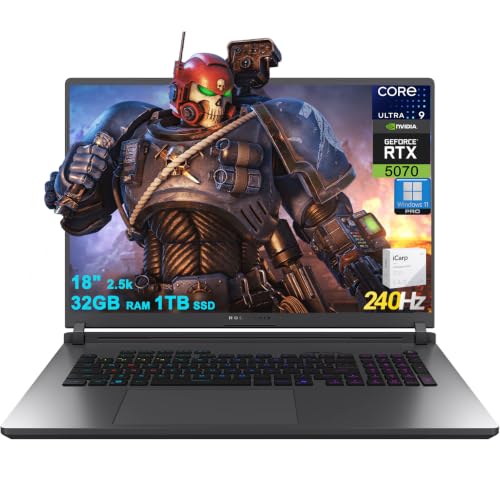
ASUS ROG Strix G18 (Ultra 9, RTX 5070) — Intel-powered sibling
The second G18 in this guide is the same design idea executed on Intel’s flagship platform: a 24-core Core Ultra 9 275HX, a GeForce RTX 5070, 32GB of memory and a 1TB drive, behind an 18-inch panel at 2560 by 1600 refreshing at 240Hz with full DCI-P3 colour coverage. If the Ryzen machine is the class’s modern flagship in general, this configuration is its most completely specified mainstream form — the memory already at the generous level, the colour gamut stated for creators, the processor at the top of Intel’s mobile range.
The DCI-P3 figure deserves its sentence. Most gaming panels cover the standard colour space; a stated full DCI-P3 panel speaks the wider cinema gamut, which matters to the buyer whose 18-inch screen will grade video and judge photographs between games. In a class where the screen is effectively a monitor, that specification elevates this sibling from gaming furniture to a genuine dual-purpose workstation display, and it is the detail most likely to decide the sibling rivalry for creator-players.
Everything else said about the G18’s life applies unchanged: the desk is its habitat, the brick is its ballast, the fans under full load are the sound of a large cooling system doing large work, and the ownership pleasure is permanence — a machine that stays where it is put and performs like the desktop it replaced. Choose between the siblings on platform preference, the memory configuration in front of you and that colour specification, and you will have chosen well either way; the design underneath is the same argument, twice proven.
- Display: 18-inch, 2560 by 1600, 240Hz, full DCI-P3 per listing
- Graphics: GeForce RTX 5070 laptop GPU
- Processor: Intel Core Ultra 9 275HX, 24-core
- Memory and storage: 32GB RAM, 1TB SSD
- Class note: the Intel sibling of the Ryzen G18 above — same family, different platform
Strengths
- 32GB fitted and a terabyte aboard: the complete mainstream flagship specification.
- Full DCI-P3 colour makes the huge panel a creator-grade display.
- Intel’s flagship mobile processor with cores for every workload.
Trade-offs
- All the class’s weight and brick realities apply in full.
- Two near-identical listings invite configuration confusion — verify before ordering.
- Premium positioning throughout the ownership experience.
Best for: creator-players who want the complete G18 specification on Intel’s platform. Not suited for: travellers, or buyers who do not need the colour-gamut upgrade.

Razer Blade 18 (2026) — Dual-mode display flagship
Razer’s Blade 18 takes the class’s flagship brief and adds the most interesting screen idea in this guide: an 18-inch dual-mode display that runs at UHD+ resolution and 240Hz for cinematic play, or drops to FHD+ at a remarkable 440Hz for competitive titles where frame rate is the entire sport. One panel, two personalities, switchable by the game in front of you. Around that screen sits an RTX 5080, an Intel Core Ultra 9 290HX, 32GB of DDR5 memory, a 1TB drive, Wi-Fi 7 and Thunderbolt 5 — a specification that reads like a checklist of everything current.
The dual-mode panel deserves defence against the charge of gimmickry, because it solves a real dilemma of this class. A fixed UHD+ screen forces competitive players to run below native resolution or accept lower frame rates; a fixed high-refresh Full HD screen wastes the flagship hardware in story games. Razer’s answer lets the display match the library instead of the library apologising to the display, and at 18 inches both modes have the physical grandeur to justify themselves. It is the kind of feature that sounds like marketing until the first week of owning both a shooter and an epic.
The Blade ownership terms are the family’s known ones, stated plainly: a premium price for a premium object, a slim-for-its-class metal chassis that works its cooling hard under sustained load, and an ecosystem whose accessories continue the pricing theme. None of that has ever been the point of contention. The Blade 18 is for the buyer who wants the class’s most considered design and its most flexible screen, and who regards the premium as the cost of those two superlatives rather than as an inefficiency to explain away.
- Display: 18-inch dual mode — UHD+ at 240Hz or FHD+ at 440Hz
- Graphics: GeForce RTX 5080 laptop GPU
- Processor: Intel Core Ultra 9 290HX
- Memory and storage: 32GB DDR5, 1TB SSD
- Connectivity: Wi-Fi 7, Thunderbolt 5 per listing
Strengths
- The dual-mode screen serves cinematic and competitive libraries equally.
- RTX 5080 graphics sit a rung above the G18 pair.
- Current-generation connectivity, including Thunderbolt 5, future-proofs the desk.
Trade-offs
- The class’s premium pricing, extended across its accessory ecosystem.
- Slim metal design works its cooling hard in marathon sessions.
- Still an 18-inch machine with a flagship brick: the desk is its home.
Best for: players with mixed cinematic and competitive libraries who want one screen for both. Not suited for: value buyers, or anyone whose desk cannot host the class.

Acer Nitro V 17 — Sensible large middle
Not every large laptop needs to be a flagship, and the Nitro V 17 is the proof this guide is glad to include: a 17.3-inch Acer carrying a GeForce RTX 5060 — current-generation graphics — with 16GB of memory, a 512GB drive and a Full HD IPS panel, with Wi-Fi 6 aboard. It trades the flagships’ 2.5K resolution and extreme refresh for the class’s essential gift, sheer screen size with modern silicon behind it, at a position in the range that ordinary budgets can contemplate.
Full HD at 17.3 inches deserves an honest assessment rather than a reflexive wince. Pixel density is lower than the flagships’ panels, and side by side the difference in text crispness is visible. In games, the equation flips kindly: the RTX 5060 drives Full HD with headroom to spare, settings climb, frame rates flourish, and the big screen’s immersion — which was always the point of this class — survives intact. For the player whose library is games rather than spreadsheets, the Nitro’s panel choice is not a compromise but a matching of resolution to hardware, the same logic the 1080p class runs on, scaled up.
Its compromises live where the class’s middle always puts them: storage starts at the familiar 512GB, the chassis is Acer’s purposeful Nitro plastic rather than flagship metal, and the screen’s colour and brightness ambitions are mainstream. In exchange, the buyer gets the large-laptop life — the big keyboard deck, the room-filling screen, the desktop replacement that still leaves budget for the desk around it. For many readers, that is not the class’s consolation prize. It is the class’s point.
- Display: 17.3-inch Full HD IPS
- Graphics: GeForce RTX 5060, current generation
- Memory and storage: 16GB RAM, 512GB SSD
- Model: ANV17-41-R8ML per listing
- Connectivity: Wi-Fi 6
Strengths
- Current-generation graphics with the class’s screen size, minus flagship pricing.
- Full HD lets the RTX 5060 run with headroom and high settings.
- Full 16GB memory fitted — a complete specification as delivered.
Trade-offs
- Full HD at this size shows lower pixel density than the 2.5K flagships.
- 512GB storage is tight for a desktop replacement’s library.
- Mainstream materials and panel ambitions, as its station dictates.
Best for: players who want the big-screen life on a realistic budget. Not suited for: buyers who need flagship resolution or creator-grade colour.

ASUS TUF F17 — Earlier-generation value
The TUF F17 enters this guide under a label it does not hide from: earlier generation. Its platform is an Intel Core i5-11400H, its graphics a GeForce RTX 3050, its memory 8GB of DDR4 and its storage a 512GB PCIe drive, behind a 17.3-inch Full HD IPS-type panel at 144Hz. Every one of those figures belongs to an older season of this class, and a guide that presented the machine as a contemporary would be lying by omission. Presented honestly, it becomes something more interesting: the large class’s value elder, a big durable screen with modest silicon, for the libraries that modest silicon still serves completely.
Those libraries are real. Esports titles at 144Hz on a 17.3-inch screen are a genuine pleasure that no specification snobbery should talk a buyer out of, and the last decade’s catalogue plays on an RTX 3050 today exactly as it did at launch. The TUF family’s durability brief applies with full force — this is a chassis built to be carried occasionally and used daily for years — and the 8GB of memory carries the same advice this batch’s dedicated guide gives it: it is a floor, and the upgrade path should be checked and used. At the right position, the F17 is the cheapest honest ticket into this class ever printed.
The cautions scale with the opportunity. An 11th-generation platform’s support horizon is shorter than anything else in this guide, its graphics ceiling is fixed and modest, and its value exists only relative to a price that respects those facts — if a listing asks near-current money for it, the Nitro V 17 above is the correct purchase instead. Bought at its proper station, though, the F17 is how a patient buyer gets the big screen now and lets the flagship wait for a richer season.
- Display: 17.3-inch Full HD IPS-type, 144Hz
- Graphics: GeForce RTX 3050 laptop GPU
- Processor: Intel Core i5-11400H — earlier-generation platform
- Memory and storage: 8GB DDR4 — plan the upgrade; 512GB PCIe SSD
- Design focus: TUF durability at the class’s friendliest entry
Strengths
- The big TUF screen and 144Hz panel serve esports and older libraries completely.
- Durability-led chassis built for years of daily use.
- The class’s most accessible entry when priced at its true station.
Trade-offs
- Earlier-generation processor and graphics set a firm, modest ceiling.
- 8GB of memory needs the upgrade this guide’s sibling article details.
- Value evaporates if a listing prices it near current machines.
Best for: patient value buyers with esports and back-catalogue libraries. Not suited for: anyone wanting current-generation performance or a long support runway.

ASUS ROG Strix SCAR 18 (2025) — Class maximum
The SCAR 18 is where this class stops negotiating. Its specification is the guide’s ceiling in every column at once: a GeForce RTX 5090, the strongest laptop graphics chip NVIDIA currently fields; an Intel Core Ultra 9 275HX; 32GB of DDR5 memory; a 2TB drive; and an 18-inch ROG Nebula HDR display at 2.5K and 240Hz with a 3ms response, in the SCAR line’s flagship chassis. Machines like this exist to answer a single question — how much desktop-class performance can be folded into a laptop shape at all — and the SCAR’s answer is: more than most desktops in most homes.
Who is it for, honestly? The player whose library is the heaviest current releases at maximum settings and high refresh, who will use the headroom weekly rather than admire it in a specification sheet. The creator whose renders and exports bill by the hour, for whom the strongest mobile graphics and processor pairing is a business tool. And the enthusiast for whom the flagship is the hobby — a legitimate buyer this guide will not condescend to, provided they purchase with the class’s terms accepted: the weight, the brick, the fans at full voice, the premium that extends to every accessory and insurance decision the machine touches.
Set against its own siblings, the SCAR clarifies the G18 pair’s role: they are the flagships for players, while the SCAR is the flagship for the specification itself. Nothing in this guide diminishes by standing next to it, because nothing else here pretends to its brief. If your desk, your library and your intentions all point at the maximum, this is the machine the class was named for — the largest screen, the strongest silicon, and no rung above it left to wish for.
- Display: 18-inch Nebula HDR, 16:10, 2.5K, 240Hz, 3ms
- Graphics: GeForce RTX 5090 — the strongest laptop GPU in this guide
- Processor: Intel Core Ultra 9 275HX
- Memory and storage: 32GB DDR5, 2TB SSD
- Class note: the SCAR flagship line, above the Strix G18 pair
Strengths
- Maximum graphics, processor, memory and storage in one machine.
- Nebula HDR panel matches the silicon’s ambitions.
- 2TB storage finally matches a flagship library’s appetite.
Trade-offs
- The class’s highest commitment in price, weight and power draw.
- Performance most libraries will never fully tax.
- Portability is ceremonial: it can be moved, and that is all.
Best for: maximum-settings players, professional creators and flagship enthusiasts. Not suited for: any buyer who travels, budgets, or plays a light library.
What About the Class’s Ancestor, the Alienware X17 R2?
Shoppers researching this class will meet Alienware’s X17 R2 in older roundups and remaining listings, and it deserves a precise footnote. The X17 R2 was Dell’s slim 17.3-inch flagship of its generation, and its headline graphics configuration carried the GeForce RTX 3070 Ti — note the Ti. The RTX 3070 Ti is a distinct, stronger chip than the plain RTX 3070, and listings or articles that shorten the name are understating the machine. Precision matters here for a practical reason: a buyer comparing an X17 R2 against newer machines should credit it with the Ti’s performance, just as they should debit it for its generation’s age, its support horizon and the renewed or old-stock channels through which such machines now mostly travel.
We cover it in prose because this guide links only its verified current pool, and the X17 R2’s present-day listing picture belongs to the same careful-reading category as any earlier flagship: verify the exact configuration — Ti included — the condition and the warranty before letting nostalgia do the arithmetic. As an ancestor, it explains the class’s DNA well: the slim-flagship ambition that Razer’s Blade 18 now carries, and the big-screen seriousness the Strix line inherited. Honour it accurately, and buy its descendants knowingly.
How Do You Set Up a Desk Around an 18-Inch Laptop?
Treat the machine as the room’s anchor and arrange outward. The laptop sits on a stand or a cooling pad that respects its underside intakes — at this size and power, airflow is furniture design — with its exhaust given a clear path that does not warm the wall or the user. The brick lives on the floor or a shelf, permanently plugged, because a flagship power supply is infrastructure, not luggage. Peripherals gather through a dock where the ports allow it: the external keyboard at proper height, the mouse on a pad sized for the sweeping movements big-screen gaming invites, a headset hook within reach for the hours when the fans have something to say.
The screen’s own ergonomics reward one adjustment people skip. An 18-inch panel at desk distance should sit with its centre slightly below eye level and far enough back that the whole display lives inside a comfortable glance; too close, and the grandeur becomes neck work. Calibrate the panel’s brightness to the room rather than its maximum, enable the high refresh rate in Windows settings — flagships have shipped idling below it — and set the manufacturer’s performance profile as the plugged-in default. A desk arranged this way turns the class’s compromises into rituals, and its strengths into the room’s character.
Comparison Table
| Laptop | Graphics | Screen | Watch out for |
|---|---|---|---|
| ASUS ROG Strix G18 (Ryzen 9, RTX 5070) | RTX 5070 | 18-inch 2.5K 240Hz Nebula | Confirm fitted memory on the listing |
| ASUS ROG Strix G18 (Ultra 9, RTX 5070) | RTX 5070 | 18-inch 2.5K 240Hz, DCI-P3 | Sibling confusion — verify configuration |
| Razer Blade 18 (2026) | RTX 5080 | 18-inch dual-mode 240Hz / 440Hz | Premium ecosystem pricing |
| Acer Nitro V 17 | RTX 5060 | 17.3-inch Full HD IPS | 512GB storage; mainstream panel |
| ASUS TUF F17 | RTX 3050 | 17.3-inch FHD 144Hz | Earlier generation; 8GB memory |
| ASUS ROG Strix SCAR 18 (2025) | RTX 5090 | 18-inch 2.5K 240Hz Nebula HDR | Maximum price, weight and power |
What Mistakes Do Buyers of Large Gaming Laptops Keep Making?
The founding mistake is buying the class for a life it cannot live: weekly travel, café afternoons, a lap. The weight figures in listings describe the laptop alone, and the honest travel weight adds a flagship power brick, which together announce themselves in a shoulder by the second journey. Buy this class for a desk and it is a triumph; buy it for the road and it is a gym membership with a screen. The second mistake is sibling confusion — ordering a Strix G18 and receiving the other platform’s configuration because the listings share a name and a photograph’s angle. Verify the processor in the order summary, every time.
The third mistake is starving the machine’s environment: an 18-inch flagship wedged into a desk nook, exhausting into a wall, throttling itself into the performance of a lesser machine while its owner blames the silicon. These laptops need air the way desktops do. The fourth is neglecting the panel settings — refresh rate left at a default, HDR never configured, the dual-mode screen never switched for the competitive title it was bought for. The fifth is buying the maximum for a library that cannot use it: the SCAR’s magnificence is wasted on esports and spreadsheets, and the Nitro’s honest middle exists precisely for the buyer wise enough to know their own catalogue.
How Loud, Hot and Hungry Is This Class in Real Life?
Plan for the physics without flinching. Under full gaming load, large cooling systems move large amounts of air, and the sound is a deep, purposeful rush rather than a thin whine — easier to live with than a small laptop’s scream, and still unmistakably present in a quiet room. A headset remains the class’s social contract. Heat exhausts in quantities that warm the desk’s neighbourhood, which winter players call a feature and summer players call a reason to keep the vents’ path clear and the room’s air moving. Power draw at full tilt is desktop territory, delivered by bricks sized accordingly; a circuit shared with a kettle and a heater deserves a thought in older houses.
Against those honest costs, record the class’s comforts. In everyday work the big machines idle in near-silence, their cooling loafing far below capacity. Keyboards gain the room for full travel and number pads, decks stay cool where palms rest in ordinary use, and the screens reduce the squint-and-scroll tax to nearly nothing. The class is not extreme in daily life. It is extreme on demand, which is exactly the distribution its buyers are paying for.
How Do the Flagships Divide the Work of a Week?
Consider the class in use rather than in specification. A flagship 18-inch machine spends its mornings as the household’s most capable office computer — documents across a screen that shows two of everything, calls in which the big panel’s gallery view finally fits the whole team, creative applications with room for timeline, canvas and tools at once. Its afternoons might render, compile or export with the processor’s many cores earning their keep, the cooling audible in the way a workshop is audible: purposefully, in another register from annoyance. Its evenings are the point of the purchase — a game at 2.5K and high refresh on a screen that fills the seated view, with the settings menu opened for pleasure rather than negotiation.
The middle of the class lives the same week at a different altitude. The Nitro V 17’s owner plays the same library at Full HD with headroom, works on the same big canvas, and notices the compromises only in the places this guide named: pixel density in text, storage arithmetic, panel ambition. The TUF F17’s owner plays an older, lighter week superbly and knows its boundary. That gradient — same shape of life, different ceilings — is why this guide insists on locating your library before your laptop. The class does not have a best machine. It has a best altitude for each reader, and the cost of choosing the wrong one is paid in both directions.
What Should You Know About Power, Circuits and Moving One Safely?
Flagship bricks draw serious current, and the practicalities deserve a paragraph in a guide that prides itself on them. Plug the machine into a sound outlet or a quality surge protector rather than a tired power strip shared with half the room; a desktop replacement deserves desktop-grade power hygiene. When the machine does travel — and even in this class, life occasionally requires it — shut it down rather than sleeping it in a bag, give the brick its own compartment so its weight does not ride against the screen, and let a hot machine cool before it is sealed into luggage after a session. Hinges and panels on large laptops are engineered for their size, but leverage is leverage, and opening the lid from its centre rather than a corner is a habit worth the two seconds it costs.
Insurance and warranty thinking scales with the machine. A flagship’s replacement value argues for reading the accidental-damage terms at purchase rather than at the first accident, and for registering the warranty while the invoice is warm. None of this is thrilling, and all of it is the difference between a flagship owned confidently for five years and one owned anxiously. The class asks its buyers to be adults about infrastructure; in exchange it never asks them to compromise about play.
How Does This Class Age Compared With Smaller Gaming Laptops?
Large machines age on two clocks running at different speeds. The screen clock is slow: an 18-inch 2.5K 240Hz panel will look current for many years, because display progress at this size is incremental and the specification starts at the summit. The silicon clock is the familiar one — graphics generations will pass, and the flagship of today becomes the strong machine of year three and the honest machine of year five. What size buys against that clock is cooling and power headroom: a big chassis extracts its chips’ full value for their whole lives, where thin machines begin trimming theirs early, so the large laptop’s decline is a gentle slope rather than a cliff.
The ownership habits that matter are the class’s own: keep the considerable cooling paths clean, because a flagship’s fin stacks collect a flagship’s worth of dust; keep storage breathing room on the drive; and resist the upgrade itch that launch events are designed to provoke, because a machine bought at the summit has years of library left in it. The TUF F17 in this guide is the proof of the class’s longevity viewed from the other end — an earlier generation still serving its brief completely. Buy the altitude your library needs, maintain the machine like the furniture it is, and this class will outlast your expectations in both directions.
Which Buyer Belongs at Which Altitude?
Let the library arbitrate, one final time, in concrete terms. The competitive player who also wants grandeur should look first at the Blade 18, whose 440Hz mode is the only screen in this guide built for their sport at this size, with the G18 pair as the high-refresh mainstream alternative. The cinematic single-player, whose evenings are open worlds at maximum beauty, belongs with the G18 siblings or, if the budget and the appetite both run to it, the SCAR — the machines whose panels and graphics were specified for exactly those hours. The creator-player, cutting video by day and gaming by night, should weight the Intel G18’s colour gamut and the SCAR’s rendering muscle according to how billable their exports are.
The sensible spender, who wants the big screen and modern games without the flagship ceremony, is the Nitro V 17’s entire reason for existing, and should resist being upsold past it by summit specifications their library will not visit. The patient bargain hunter with an esports and back-catalogue library is the TUF F17’s reader, provided the price respects the generation. And the traveller who has read this far out of longing should take the guide’s recurring advice as a kindness: buy the 14-inch machine, and let the large class be the desk you come home to in some later, more settled season. Every altitude in this class is honourable. The only dishonour is buying the wrong one with your eyes closed.
What Does Delivery Day Look Like for a Machine This Size?
It begins with space: clear the desk before the box arrives, because an 18-inch laptop’s unboxing is a two-handed ceremony and its footprint will reorganise whatever surface it lands on. Verify the configuration against the order before the packaging disperses — processor, graphics, memory, storage and panel, with the sibling warning of this guide held firmly in mind for G18 buyers. Run the screen through bright and dark test images, set the refresh rate to its full figure, and play a familiar game long enough for the cooling to introduce itself at each profile.
Then finish the infrastructure while motivation lasts: surge protection in place, the brick parked where it will live, warranty registered, the return deadline noted, and the desk’s cable paths arranged so the machine can be lifted out for cleaning without dismantling the room. A flagship set up this way on day one tends to stay set up, which is the class’s whole philosophy — permanence, chosen deliberately, and then enjoyed without further thought for years.
Should You Add an External Monitor to a Screen This Big?
It sounds like a paradox, and for many owners the answer is a happy no: the 18-inch panel is the monitor, and the desk stays clean. Two legitimate exceptions exist. The competitive player may add a smaller, even faster dedicated display for ranked sessions while keeping the big panel for everything else — the Blade 18’s dual-mode design exists partly to make even that unnecessary. And the creator may add a colour-critical reference monitor for final judgement while the laptop’s own vast screen carries the working canvas. Everyone else should spend the monitor money on the desk, the chair and the games, and enjoy the rare pleasure of a laptop whose screen is not the compromise the rest of the setup apologises for.
How Do You Keep a Flagship Cool Across a Long Summer?
Heat is the class’s tax collector, and summer is its audit. The habits that matter are unglamorous and cumulative: keep the machine’s underside and rear paths unobstructed, clean the intake grilles and fin stacks on a schedule rather than a crisis, and let the room’s air move — a flagship exhausting into still, hot air is fighting the season with one hand tied. In the software, the balanced profile exists for the evenings when the room is already warm and the game’s demands are modest; save the maximum profile for the sessions that need it, and the machine will spend the summer composed instead of desperate. Owners in genuinely hot climates should treat a cooling pad as a reasonable purchase rather than an admission of defeat.
Watch the baseline, too. A flagship whose fan voice or temperatures change character at a familiar workload is telling you something — dust, a blocked vent, a background process with ambitions — and the time to listen is the first week of the change, not the first shutdown. Big machines forgive a great deal, but they report their troubles early to owners who know their normal. Learn your machine’s normal in its first season and every later season becomes a comparison you can actually make.
What Is the Class’s Resale and Hand-Down Story?
Big gaming laptops hold a peculiar place in the second life market: their screens and chassis remain impressive long after their silicon becomes merely strong, which makes a well-kept flagship an unusually desirable hand-down — the household’s second desk, a younger player’s first serious machine, a creator’s backup that is nobody’s idea of a compromise. The complete configurations in this guide, with generous memory and storage already fitted, pass onward without a caveat paragraph. When the time comes, a factory reset, an honest account of battery health and the original brick travelling with the machine are the whole etiquette. Buy the altitude you need, keep the machine like furniture, and this class will serve two owners before it asks to retire — a lifespan few other categories of gaming hardware can claim.
How Should You Think About the Power Brick as Part of the Machine?
Every class has an unglamorous component that quietly decides ownership satisfaction, and in this one it is the power supply. Flagship bricks are large, warm and heavy enough to be furniture decisions in themselves: where it lives, how its cable runs, whether a second one is worth buying so the desk and the occasional travel bag each have their own. That second-brick question is the class’s most practical luxury — it converts the machine from “movable with a ceremony” into “movable”, because the heaviest, most awkward part of the move stays behind in both places. Owners who travel between two fixed desks — home and office, house and cottage — should price a second genuine brick into the flagship purchase from the start and thank themselves at every transition.
Respect the brick’s specifications as you would the laptop’s. Third-party supplies that promise flagship wattage at novelty prices are a false economy on a machine whose entire value is concentrated silicon; the manufacturer’s own unit, or a verifiably rated equivalent, is the only sensible companion. Coil its cable loosely, keep its vents as clear as the laptop’s, and never bury it under cushions or paperwork while it works — a brick under load is a heater with a job, and it deserves the same airflow courtesy as the machine it feeds.
What About Keyboards, Sound and the Pleasures of Scale?
Size buys comforts that specification sheets undersell. A full-width keyboard with a number pad changes data entry, strategy games and creative shortcuts from cramped to natural, and the deck’s depth gives palms a proper rest that smaller machines cannot offer. Speakers gain the volume — literal air volume — to sound like a system rather than a telephone, which matters in the class’s natural habitat of solo evening play. Webcams and microphones, given room to be properly placed and sized, stop being the apology they are on thin machines. Even the hinge benefits: opening an 18-inch lid is a slow, deliberate, satisfying motion that reminds the owner daily that this object was built as furniture, not luggage.
None of these pleasures headline a listing, and together they are a large part of why owners of this class describe their machines with an affection that smaller laptops rarely inspire. A desktop replacement succeeds when the desk itself becomes a place you want to be, and keyboards you enjoy, sound you respect and a screen that fills the view are how that happens. When you audition this class — in a store, at a friend’s desk — spend your minutes on those surfaces rather than the benchmark of the day. They are what you will actually live with, at scale, for years.
A Final Word on Buying the Summit Versus the Slope
Every reader of this guide eventually faces the same fork in different clothing: the complete flagship whose specification ends all arguments, or the sensible slope below it whose savings fund the rest of the room. There is no coward’s answer and no fool’s answer, only an honest one, and it is found in the last month of your actual play rather than the next month of launches. If your recent evenings were spent lowering settings and wishing, buy the altitude that ends the wishing. If they were spent happily inside a library the middle of this class already masters, buy the slope, furnish the desk properly, and let the summit’s owners enjoy a magnificence your games would never have visited. The class rewards self-knowledge more than any other in gaming hardware, because its machines are too large, too powerful and too permanent to be accidents.
Final Recommendation
Choose by the desk you actually own and the library you actually play. The two Strix G18 siblings are the class’s modern flagships — the Ryzen form for AMD’s many-core character, the Intel form for its complete 32GB specification and creator-grade colour — and between them they answer most flagship buyers. The Blade 18 is the connoisseur’s flagship, its dual-mode screen serving two libraries from one panel, while the SCAR 18 stands alone as the maximum, for the player or creator whose work and play genuinely tax the strongest silicon sold in a laptop. The Nitro V 17 brings the big-screen life to a realistic budget with current graphics, and the TUF F17, honestly priced and honestly labelled, is the patient buyer’s doorway. Buy the class for permanence, give it air and a desk worthy of it, and a large gaming laptop will repay you with the most complete gaming experience that has ever folded shut.
Frequently Asked Questions
What is the difference between the two ROG Strix G18 picks?
Platform and configuration. The Ryzen model pairs an AMD Ryzen 9 9955HX with the RTX 5070; the Intel model pairs a 24-core Core Ultra 9 275HX with the same graphics rung, and its listing specifies 32GB of memory, a 1TB drive and full DCI-P3 colour. They are siblings of one design, not duplicates — verify the processor in the order summary before buying either.
Is an 18-inch gaming laptop portable at all?
It is movable: between desks, rooms and houses, in a vehicle, on the occasional trip where its presence justifies the carry. It is not a daily travel companion, and its power brick must be counted in the honest weight. Buyers who need weekly mobility should read the 14-inch guide instead.
What does the Blade 18’s dual-mode display actually do?
It lets the 18-inch panel run in two personalities: UHD+ resolution at 240Hz for cinematic, detail-led games, or FHD+ at 440Hz for competitive titles where frame rate dominates. You switch modes to match the game, rather than compromising one library for the other at purchase.
Is the TUF F17 too old to buy?
Not for its brief, bought at its station. Its earlier-generation platform and RTX 3050 serve esports and older libraries on a big 144Hz screen, in a durable chassis. It is the wrong buy at near-current pricing or for demanding new releases, and its 8GB of memory should be upgraded as this batch’s memory guide explains.
Was the Alienware X17 R2 an RTX 3070 laptop?
Its headline configuration was the RTX 3070 Ti — the Ti variant, a stronger chip than the plain 3070 it is often shortened to. The distinction matters when comparing it with newer machines, and this guide names it correctly wherever the model is discussed.
Do these laptops need a cooling pad?
They need airflow more than accessories: clear intake and exhaust paths, a stand that lifts the rear, and a desk layout that does not recycle their own exhaust. A cooling pad can help in a warm room, but placement and clearance deliver most of the benefit for free, and no pad rescues a flagship wedged into a cupboard.
Will an 18-inch gaming laptop fit in a bag I already own?
Usually not, and it is better to learn that from a tape measure than from a returned order. Most backpacks and messenger bags are built around a 15.6 or at most a 17-inch laptop sleeve, and an 18-inch machine is wider and deeper than those sleeves by a margin that no amount of optimism compresses. Measure the sleeve’s internal width and depth, then compare them with the footprint in the pick’s spec list rather than the screen diagonal — bezels and chassis overhang decide fit, not the marketing number. Dedicated 18-inch bags and rolling cases exist, and many owners of machines this size treat the laptop as desk equipment that occasionally travels in a padded case rather than as a daily carry. Add the power brick to your mental picture: the adapters for this class are large, and the honest travel weight of the whole kit is the number that decides whether it leaves the house.
Do the biggest laptops actually run quieter than smaller ones?
They can, and the reason is physics rather than tuning magic. A larger chassis gives the maker room for bigger fans, and a bigger fan moves the same air at lower speed with a lower, less intrusive tone; there is also more heatsink mass and more internal volume for air to move through, so the cooling system spends less of its life at full effort. Under the bursty loads of ordinary gaming — where the processor and graphics card surge and settle rather than pinning at maximum for hours — a large machine often stays in the calm part of its fan curve where a compact laptop would already be working audibly. The caveat is the flagship silicon these laptops carry: ask an 18-inch machine for a sustained maximum-effort render and it will still make itself heard, because the total heat is genuinely large. Size buys headroom and a pleasanter noise character, not silence.
Related Guides
For the rest of the size spectrum, see best 15.6 inch gaming laptops for the mainstream middle, best 14 inch laptop gaming laptops for the portable extreme, and best 1080p gaming laptops for the resolution-first view of the market. You may also want our guide to best 15.6-inch gaming laptops.
Related guides
- Best 1440p 165Hz Monitors: One Native 165Hz Pick, Three 180Hz Upgrades, an Overclock Headline and a 160Hz Ultrawide
- Best 13×19 Professional Printers
- Best 3rd Party MacBook Chargers: 96W-Class Alternatives, the 100W Cable Rule, and the Apple Benchmark
- Best Built PC: Six Prebuilt Gaming PCs Judged on Parts, Power and Upgrades


