What's inside
- Where to buy
- Key Takeaways
- Quick Picks
- How Did We Judge Small Tablets When the Target Size No Longer Exists?
- What Actually Changes Between 8.3 and 8.8 Inches?
- Comparison Table
- How Do You Set Up a Small Tablet for Reading Comfort?
- Which Buying Mistakes Haunt the Small-Tablet Market?
- Does a Small Tablet Still Make Sense Beside a Big Phone?
- How Should You Budget Across This Odd Little Category?
- How Long Will a Compact Tablet Stay Supported?
- What About E-Readers — Should Readers Skip Tablets Altogether?
- Why Do Travellers Keep Defending the Smallest Screen in the Bag?
- Which Accessories Actually Earn Their Place at This Size?
- What Should Parents Know Before Handing Down a Compact Tablet?
- Final Recommendation
- Frequently Asked Questions
- Related Guides
As an Amazon Associate I earn from qualifying purchases. This post may contain affiliate links at no extra cost to you.
gizmoverdict.com is reader-supported. When you buy through links on our site, we may earn an affiliate commission.
Where to buy
Anyone searching for the best 7 tablets in 2026 deserves the awkward truth before the shopping list: the true seven-inch tablet, as a living product class, is gone. Amazon’s Fire 7 was the last household name at that diagonal, and it has been discontinued without a clean current listing to point you at. No major maker announced a new seven-inch slate this year, and the second-hand market is filling with worn batteries and abandoned software. So this guide does the next most honest thing. It rounds up the smallest tablets you can actually buy new today, states the real screen size of every single one in its heading, and treats the vanished seven-inch class itself as a pick you should think twice about chasing.
Why did seven inches die? Three forces converged. Phones grew into the space from below, with large handsets now offering screens that rival a small tablet while also making calls and fitting a coat pocket. Panel factories standardised their cutting lines around larger glass, which made eight-inch and bigger displays cheaper per unit than an odd seven-inch run. And the reading crowd that once defended the size discovered that an 8.7-inch screen in a slim modern frame weighs barely more than the old seven-inchers did, while showing a full extra line or two of text per page. The class did not fail because people hated it. It failed because everything around it absorbed its job.
What survives is a cluster of compact slates between 8.3 and 8.8 inches, and they split into clear personalities. Samsung’s Galaxy Tab A9 and Lenovo’s Tab One are the affordable everyday pair, both at 8.7 inches. Apple’s iPad mini is the premium outlier at 8.3 inches, the closest thing to the old seven-inch spirit with vastly more power. Lenovo’s Legion Tab stretches to 8.8 inches and aims squarely at gamers. Amazon’s Fire HD 8 from 2020, clearly labelled as a 2020 model wherever it appears here, is the budget ghost of the older era. And the sixth pick is the discontinued Fire 7 class itself, covered in prose with no buying link, because pretending it is still a normal purchase would be the one dishonest move this guide refuses to make.
Key Takeaways
- No manufacturer currently sells a true seven-inch tablet through a clean listing; the Fire 7 line ended, and this guide will not pretend otherwise.
- The smallest genuinely buyable screens cluster at 8.3 to 8.8 inches, and every pick below carries its measured diagonal in plain sight.
- Apple’s iPad mini at 8.3 inches is the nearest living relative of the seven-inch idea, but it runs iPadOS and sits in a different price universe from the Android pair.
- Samsung’s Tab A9 and Lenovo’s Tab One, both 8.7 inches, are the sensible default pair for reading, video and light browsing on Android.
- The Fire HD 8 offered here is the 2020 edition running Fire OS, a fine streamer that asks you to live without the Google Play Store by default.
- Chasing a used seven-inch tablet usually buys you a tired battery and frozen software; a new 8.7-inch slate is the safer small-screen purchase.
Quick Picks
| Pick | Badge | Why it earns its place |
|---|---|---|
| Samsung Galaxy Tab A9 8.7 | Smallest sensible Android default | An 8.7-inch Samsung with the full Play Store, a metal shell and none of the compromises that killed the seven-inch class. |
| Lenovo Tab One 8.7 | Reading-first budget slate | Lenovo tuned this 8.7-incher for long reading sessions and ships a clear case in the box, a small kindness rivals skip. |
| Apple iPad mini 8.3 | Closest to the old seven-inch spirit | The 8.3-inch mini is the most powerful compact tablet sold today, pocketable in a jacket and fluent with a pencil. |
| Amazon Fire HD 8 (2020) | Labelled 2020 budget streamer | A 2020 Fire OS slate that still streams and reads perfectly well, provided Amazon’s app shelf covers what you open daily. |
| Lenovo Legion Tab Gen 3 8.8 | Compact gaming outlier | An 8.8-inch gaming machine with a flagship Snapdragon inside, proof that small no longer has to mean slow. |
| Amazon Fire 7 (discontinued class) | Prose-only: the class that ended | Covered without a link because the model line is discontinued; read its section before hunting one second-hand. |
How Did We Judge Small Tablets When the Target Size No Longer Exists?
The first filter was honesty about dimensions. Every candidate had to publish a real diagonal, and we recorded that number rather than the marketing neighbourhood it gets shelved under. A tablet listed at 8.7 inches is an 8.7-inch tablet in this guide, even when a retailer’s category page files it under seven-inch results to catch stray searches. That discipline sounds pedantic until you buy a case, a car mount or a kitchen stand sized for a screen that never arrives.
Weight and one-handed comfort came next, because the entire appeal of this end of the market is a device you hold rather than prop up. We favoured slates that stay pleasant during a forty-minute reading session in bed, with rounded edges, balanced weight distribution and screens that dim low enough for dark rooms. Raw performance mattered only up to the point where the interface stops stuttering; beyond that, battery endurance across a travel day and the health of the software store counted for more. Finally, we asked how long each maker tends to support its small models with updates, since a cheap tablet abandoned after a year is expensive in the only way that matters.
One more judgement call deserves stating openly. We included a discontinued product as a prose-only pick because the search term itself points at it. Readers typing this keyword overwhelmingly mean the Fire 7 and its peers. A guide that silently substituted six larger tablets and never mentioned the extinction would technically answer the query while dodging its real question. You will find that section written as a caution, not a sales pitch. Treat this guide’s size labels as a standing promise: if a future revision of any listing changes the hardware under the same name, the diagonal printed here is the one to hold the seller to.
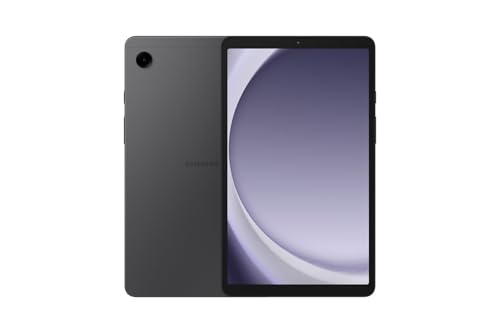
Samsung Galaxy Tab A9 8.7 — Smallest sensible Android default
The Galaxy Tab A9 is what the seven-inch tablet grew up to become. Its screen measures 8.7 inches, which sounds like a betrayal of the keyword until you hold the thing: slim bezels mean the body is barely wider than the chunky seven-inch slates of a decade ago, yet the display shows noticeably more of a novel page, a recipe or a departure board. Samsung builds it around a metal back that feels a class above the plastic shells this price band used to mean, and the whole package stays light enough for one-handed reading on a train without your wrist filing a complaint.
Daily behaviour is calm rather than thrilling. The processor handles browsing, mail, streaming and casual games without drama, the speakers are tuned with Dolby Atmos support that flatters dialogue in films, and the battery comfortably covers a day of mixed use with charge left for the evening. One listing note matters here: this is the international Wi-Fi edition with 64GB of storage, so check the listing title carefully if you were expecting a cellular variant or a region-specific bundle. Storage expands by microSD card, which quietly solves the download pile-up that long flights create.
There is also a family angle worth weighing. Samsung’s software includes a kids mode with parental controls that are genuinely configurable rather than decorative, so the A9 can double as a supervised child’s tablet without surrendering its adult usefulness afterwards. Multi-window support on the 8.7-inch screen is usable for the classic pairing of notes beside a browser, something the old seven-inch generation never managed without comedy. And because Samsung sells accessories for this line in real volume, replacement cases, screen protectors and chargers remain easy to source years later — a dull advantage that owners appreciate precisely when something breaks on a trip.
- Display: 8.7-inch LCD, the real diagonal used throughout this guide
- Storage: 64GB built in, microSD expansion available
- System: Android with the full Google Play Store
- Body: metal back, Wi-Fi only on this listing
- Extras: face unlock, Dolby Atmos speakers
Strengths
- Feels sturdier than its price suggests, thanks to the metal shell and tight assembly.
- Play Store access keeps banking, reading and work apps all within reach.
- microSD slot swallows an offline film library without touching internal space.
Trade-offs
- The screen is an everyday LCD, pleasant but not the deep-contrast panel film lovers crave.
- 64GB fills quickly if you hoard games; the card slot is a workaround, not a cure.
- International listing means warranty paperwork deserves a careful read before ordering.
Best for: readers and travellers who want the smallest fuss-free Android slate Samsung currently makes.
Not suited for: stylus note-takers, since this model leaves pen support to its bigger siblings.

Lenovo Tab One 8.7 — Reading-first budget slate
Lenovo aimed the Tab One at a specific person: the reader who wants a dedicated screen that is not their phone. At 8.7 inches with an HD panel, it makes no claim to cinematic glory. What it offers instead is a matte-leaning, eye-comfort-certified display that stays gentle during long evening chapters, a slim body that disappears into a tote bag, and a clear protective case included in the box so the tablet survives its first week of kitchen counters and school runs without an extra purchase.
The specification sheet reads modestly — 4GB of memory and 64GB of storage — and the Tab One behaves accordingly, rewarding single-task focus and punishing anyone who tries to juggle a video call, a browser forest and a game simultaneously. That honesty is almost refreshing. For books, news, podcasts, video streaming and the odd video chat with family, the pace feels perfectly adequate, and Lenovo’s software layer stays close to plain Android with the Play Store fully present. Battery life stretches across several days of reading-heavy use, which is exactly the rhythm this machine was designed around.
Think about where the Tab One will actually live. It is the tablet equivalent of a paperback left on the arm of a sofa: always within reach, never demanding attention, charged every few days rather than every night. Lenovo’s reading-friendly touches extend to a display mode that softens contrast for late sessions, and the front camera’s placement suits the landscape video calls that family chats have settled into. Parents should note the presence of a proper kids space with content controls, which makes the Tab One an easy hand-me-down when a newer device eventually replaces it. Nothing about it chases headlines, and that restraint is the design’s whole charm.
- Display: 8.7-inch HD panel with eye-comfort certification
- Memory and storage: 4GB RAM, 64GB storage
- System: Android with Google Play Store access
- In the box: clear protective case included
- Design: slim, light, built for one-handed holding
Strengths
- Reading comfort leads the design, from the gentle panel tuning to the low weight.
- Bundled case removes the usual first-week accessory scramble.
- Multi-day battery suits the read-a-chapter-nightly routine beautifully.
Trade-offs
- HD resolution shows its limits on dense PDFs and fine comic lettering.
- Performance headroom is thin; heavy multitasking makes it hesitate.
- Cameras are strictly functional, fine for calls and document scans only.
Best for: dedicated readers who want a calm, inexpensive screen reserved for books and streaming.
Not suited for: gamers chasing high frame rates in demanding 3D titles.

Apple iPad mini 8.3 — Closest to the old seven-inch spirit
If the seven-inch tablet had survived and gone to finishing school, it would look like the iPad mini. The screen measures 8.3 inches — the smallest diagonal in this entire guide — wrapped in a body that slides into a jacket pocket or the outer sleeve of a carry-on. Inside sits the A17 Pro chip, hardware with more in common with flagship phones than with any budget slate, and that surplus power changes the small-tablet experience completely: games run at high settings, photo edits apply instantly, and the device never feels like the compromise purchase small Android tablets sometimes become.
Be clear about the ecosystem before anything else: this is iPadOS, not Android. Your apps come from Apple’s App Store, your files live in Apple’s world, and the accessories — including support for the Apple Pencil Pro — follow Apple’s pricing logic. For readers, the mini is arguably the finest small reading device sold today, with a sharp laminated display that handles comics, magazines and annotated PDFs with grace. Pilots, field engineers and medical staff adopted earlier minis as clipboard replacements for good reason, and this generation’s speed only widens that professional fan base. It costs far more than the Android pair above; what the money buys is longevity, since Apple supports its tablets with updates for many years.
Professional niches explain the mini’s staying power better than benchmarks do. Aviation authorities and airlines cleared earlier generations for cockpit duty, retailers mount them as elegant point-of-sale terminals, and clinicians carry them in coat pockets sized, almost literally, around this device. The current model’s USB-C port connects to external displays and fast storage, so the smallest pick in this guide can anchor a modest desk setup when needed. Resale values also behave differently here: minis hold their worth unusually well, which softens the initial price for anyone who upgrades on a cycle rather than running devices into the ground.
- Display: 8.3-inch Liquid Retina, the smallest screen in this guide
- Chip: Apple A17 Pro
- Storage: 128GB on this listing
- System: iPadOS with the Apple App Store
- Extras: Apple Pencil Pro support, Touch ID in the top button
Strengths
- Performance embarrasses every other compact tablet, full stop.
- Truly pocketable dimensions keep the original small-tablet promise alive.
- Long software support stretches the high purchase price across many years.
Trade-offs
- Costs several times what the Tab A9 or Tab One ask.
- iPadOS file handling still frustrates people arriving from Android or Windows habits.
- No expandable storage; the 128GB ceiling is permanent.
Best for: buyers who want one premium compact tablet to keep for half a decade.
Not suited for: households standardised on Google accounts and Play Store purchases.
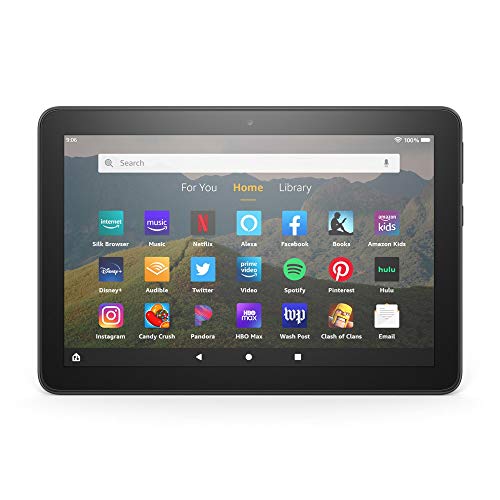
Amazon Fire HD 8 (2020) — Labelled 2020 budget streamer
Read the label first, because it carries the whole story: this Fire HD 8 is the 2020 release, an older generation still circulating through listings years later. Its screen measures exactly 8.0 inches, which technically makes it the closest surviving Amazon slate to the seven-inch idea. In daily service it remains a perfectly decent streaming and reading machine — Prime Video, Kindle books, Audible and the big streaming apps all run happily — and its low price reflects its age more than any fatal flaw.
The compromises are the familiar Fire ones, sharpened by time. Fire OS is Amazon’s fork of Android, and the Google Play Store is absent by default, so your app life runs through Amazon’s Appstore, which covers the entertainment mainstream but thins out quickly for work tools, niche reading apps and many banking apps. A 2020 processor also means app launches carry a small pause, and software support for a model of this vintage should be treated as a pleasant surprise rather than an expectation. Bought knowingly, as a cheap sofa-and-kitchen screen or a child’s supervised streamer, it earns its keep. Bought assuming a modern Android tablet, it will disappoint within the hour.
Households already invested in Amazon’s world will find small delights. The Fire HD 8 doubles as an Echo Show-style smart display on a stand, answers to Alexa hands-free, and runs the household’s ring cameras, shopping lists and music services with the familiarity of a kitchen appliance. Children’s profiles are mature and genuinely granular, which is why so many of these tablets end their lives as supervised family devices. Just keep the mental label attached: a 2020 appliance for Amazon’s services, bought at an appliance price, and judged by appliance standards rather than by the flagship yardsticks applied to the iPad mini above.
- Display: 8.0-inch HD screen
- Release year: 2020 — an older generation, labelled as such
- Storage: 32GB, expandable by microSD
- System: Fire OS, Amazon Appstore, no Google Play by default
- Strength of the format: hands-free Alexa and Show Mode behaviour
Strengths
- Lowest-cost route into a genuinely usable eight-inch streaming screen.
- Deep integration with Kindle, Audible and Prime Video libraries.
- microSD expansion keeps offline downloads cheap to grow.
Trade-offs
- 2020 hardware shows its age in launch speeds and camera quality.
- Amazon’s Appstore lacks many work and niche apps people expect.
- Update support for this generation is limited and winding down.
Best for: Households deep in the Amazon world wanting a spare streaming screen for kitchen or bedside duty.
Not suited for: anyone whose essential apps live exclusively in the Google Play Store.

Lenovo Legion Tab Gen 3 8.8 — Compact gaming outlier
The Legion Tab Gen 3 exists to disprove the assumption that a small tablet must be a weak one. Its display measures 8.8 inches — the largest in this line-up, stated plainly — and behind that glass sits a Snapdragon 8 Gen 3, a flagship-class processor paired with 12GB of memory. The result is a machine that plays demanding games at high settings while still slipping into a sling bag, a combination that simply did not exist in the seven-inch era, when small automatically meant the slowest chip on the shelf.
Gaming shapes every design decision. The high-refresh display keeps fast scenes fluid, the cooling system is built for sustained sessions rather than benchmark sprints, and Lenovo’s gaming software offers performance modes and control mapping for people who pair a Bluetooth controller. Outside games, that same hardware makes the Legion Tab the snappiest general-purpose slate in this guide: split-screen browsing, large spreadsheets and photo libraries all move with flagship ease. The trade is price and purpose — this costs proper money, carries no stylus ambitions, and its talents are wasted on anyone whose tablet life is purely novels and news. But as proof of where the small category’s ceiling now sits, nothing else here comes close.
Portability changes gaming habits in ways raw power never could. A Legion Tab in a sling bag turns a train commute into a proper session of a demanding role-playing game, and its size lets you hold it controller-style for touchscreen titles without the wrist strain a large slate inflicts. Lenovo also ships a desktop-style mode when the tablet connects to an external monitor, so the same device can anchor a modest battlestation at home and travel light the next morning. Thermals deserve the praise reviewers give them: long sessions stay consistent instead of throttling into mush after twenty minutes, which is precisely where earlier small gaming experiments used to fail.
- Display: 8.8-inch high-refresh panel, largest in this guide
- Chip: Snapdragon 8 Gen 3
- Memory: 12GB RAM
- System: Android with Google Play Store
- Focus: gaming features, controller support, sustained cooling
Strengths
- Flagship speed in a genuinely portable eight-point-eight-inch frame.
- High-refresh screen flatters both games and everyday scrolling.
- Hardware headroom promises several years of comfortable service.
Trade-offs
- Premium pricing for a size class many shoppers associate with budget buys.
- No bundled stylus and no handwriting-first features.
- Battery drains briskly when games run at maximum settings.
Best for: mobile gamers who refuse to carry a ten-inch slab to get flagship power.
Not suited for: pure readers paying flagship money for power they will never touch.
Amazon Fire 7 (discontinued class) — Prose-only: the class that ended
This final pick carries no buying link, deliberately. The Fire 7 was the last true seven-inch tablet from a major brand, and Amazon has discontinued it; the listings that still surface are leftover stock, third-party resellers or used units described with varying honesty. We include the class here because it is what the keyword actually asks about, and because a guide that quietly ignored its disappearance would leave readers hunting a product category that no longer exists in any supported form.
Consider what a surviving Fire 7 offers in 2026. The hardware was modest even at launch: a low-resolution seven-inch screen, minimal memory and storage sized for a handful of apps and books. Years on, the battery in any used unit has endured hundreds of charge cycles, the software sits far behind current security expectations, and Amazon’s own services increasingly assume newer Fire OS versions. As a disposable screen for a toddler’s cartoons or a single-purpose kitchen timer, a very cheap unit might amuse. As a main tablet bought with real expectations, it is a purchase built on nostalgia for a size the industry has retired. The honest recommendation is the one this whole guide embodies: accept the extra inch and a half, and buy one of the supported machines above.
There is a small archaeology lesson in why the class vanished so completely. Seven-inch tablets were creatures of a specific moment: phones were still small, e-readers felt limited, and a cheap seven-inch Android slate was the first big screen many households owned. Each condition reversed. Phones ballooned past six and a half inches, dedicated e-readers kept the long-form reading crown, and streaming migrated to televisions and larger tablets alike. The Fire 7 outlived its rivals through Amazon’s ecosystem gravity alone, and when even that subsidy stopped making sense, the size had no defender left. Understanding that history helps you shop the successors without resentment: the category did not betray you, it simply finished its job.
- Display: 7.0 inches — the genuine size this keyword remembers
- Status: discontinued, no clean current listing, prose-only here
- System: older Fire OS, update path effectively closed
- Typical condition now: used or leftover stock, battery wear unknown
- Verdict of this guide: historical interest, not a recommended purchase
Strengths
- Still the only way to own the exact seven-inch reading footprint.
- Used prices can be trivially low for a throwaway spare screen.
- Kindle reading on a healthy unit remains perfectly pleasant.
Trade-offs
- No manufacturer support, no security future, no warranty worth the name.
- Battery health on used units is a lottery you usually lose slowly.
- Performance was modest at launch and has not improved with age.
Best for: collectors and tinkerers who know exactly what a retired platform involves.
Not suited for: anyone expecting a supported tablet for everyday family use.
One more filter quietly shaped the final six: repairability and the second life of the device. Compact tablets get handed down — to children, to parents, to kitchen duty — more than any other gadget class, so we favoured models whose batteries are commonly serviceable, whose brands publish parts and guides, and whose software can be reset cleanly for a new owner. A tablet that becomes e-waste the moment its first owner upgrades has a hidden cost no discount fully repays. The discontinued Fire 7 fails this test outright, which is another reason its section reads as an obituary rather than a recommendation.
What Actually Changes Between 8.3 and 8.8 Inches?
Half an inch of diagonal sounds like pedantry, so translate it into area. Screen surface grows with the square of the diagonal, which means an 8.8-inch panel offers roughly a quarter more viewing area than an 8.3-inch one, and both dwarf the old seven-inch screens by well over half. In practice that gap decides whether a magazine page renders whole or needs a pinch, whether split-screen shows two usable apps or two cramped slivers, and whether film subtitles stay readable from an armchair’s distance. The physical bodies, though, have converged: thin bezels mean the 8.7-inch Tab A9 is scarcely wider in the hand than seven-inch tablets were when bezels were fat. You are not carrying much more device. You are simply seeing much more through it.
Reading deserves its own paragraph, because reading built this category. A seven-inch page at typical ebook settings shows a satisfying chunk of prose, but the 8.7-inch generation adds two or three lines per screen, which compounds across a novel into hundreds fewer page turns. Comics and PDFs benefit even more, since fixed-layout pages scale to the full panel instead of floating in letterboxed miniature. If your small-tablet life is ninety percent text, the modern sizes are not a compromise at all. They are the upgrade the old class would eventually have become.
Comparison Table
| Pick | Real size | System | Storage | Character |
|---|---|---|---|---|
| Samsung Galaxy Tab A9 | 8.7 inch | Android | 64GB + microSD | Everyday default |
| Lenovo Tab One | 8.7 inch | Android | 64GB | Reading-first budget |
| Apple iPad mini | 8.3 inch | iPadOS | 128GB | Premium compact |
| Amazon Fire HD 8 (2020) | 8.0 inch | Fire OS | 32GB + microSD | Budget streamer, 2020 |
| Lenovo Legion Tab Gen 3 | 8.8 inch | Android | Flagship class | Compact gaming |
| Amazon Fire 7 class | 7.0 inch | Older Fire OS | Minimal | Discontinued, prose-only |
How Do You Set Up a Small Tablet for Reading Comfort?
Start with light, not apps. Set the display’s colour temperature warm for evening sessions, enable the eye-comfort or night mode your system offers, and lower brightness further than instinct suggests — a small screen held close needs far less light than a television across the room. Turn on automatic brightness only after you have taught it your preferences by adjusting manually in a few rooms; the sensor learns from corrections. Then choose your reading app deliberately. Kindle, Kobo, Libby and a good PDF reader each handle library sync differently, and the right one depends on where your books actually live, not on which icon looks nicest.
Next, tame the interruptions. A reading tablet earns its keep by being boring: disable notifications from everything except messages you genuinely answer, move social apps off the home screen, and let focus or do-not-disturb modes switch on during your usual reading hours. Sort downloads before a trip rather than at the gate — books, a few films, offline maps — and confirm each file opens in aeroplane mode at home, where fixing a licensing hiccup costs nothing. Finally, protect the hardware with the same dull competence: a case that covers corners, a screen protector if the tablet rides in bags with keys, and a charging cable that lives where the tablet sleeps, so the device is always ready when a chapter calls.
Sound is the step everyone skips and everyone notices later. Small tablets are natural podcast and audiobook machines, yet their speakers fire from a single edge and smother under a case flap or a duvet. Learn where your pick’s speakers sit, keep that edge uncovered during listening, and pair a small Bluetooth speaker or earbuds for anything you truly care about hearing well. A final comfort: create a separate user profile or reading-only home screen for children before the first hand-over, not after the first accidental purchase. Ten calm minutes of setup at home prevents the specific chaos that gives family tablets their battered reputation.
Which Buying Mistakes Haunt the Small-Tablet Market?
The trap in this class is buying the size in the headline instead of the size in the specification table. Shoppers burned by category pages that file 8.7-inch tablets under seven-inch searches end up with cases that do not fit and a lingering sense of deception. Read the diagonal in the maker’s own spec sheet, every time. A second mistake is chasing discontinued models at inflated prices because a marketplace listing uses words like rare or collectible. Retired consumer electronics are neither; they are ageing batteries in plastic shells, and their price should fall, not climb.
Third, people underestimate the app-store divide. A Fire tablet is a fine entertainment device and a frustrating everything-else device if your life runs on Google services; an iPad is a superb machine that will not run your Android purchases. Decide by software first and hardware second. Fourth, storage optimism ruins more small tablets than slow processors do — 32GB vanishes under two streaming apps’ download queues and a photo backup habit. Either buy the bigger storage tier or confirm a card slot exists. Finally, beware the too-cheap no-name seven-inch listings that still circulate from obscure brands: unknown update policies, murky warranties and screens that strain eyes are the usual cargo behind those bargains.
Does a Small Tablet Still Make Sense Beside a Big Phone?
Sceptics ask the fair question: when flagship phones carry screens approaching seven inches, why buy a compact tablet at all? The answer starts with aspect ratio. Phone displays are tall and narrow, shaped for scrolling feeds; tablet panels at 8.7 inches are proportionally wider, so a book page, a film frame or a two-column document uses the glass far more honestly. A film on a large phone still renders as a modest rectangle floating in letterbox, while the same film on the Tab A9 fills a genuinely cinematic area. Reading shows the gap even more starkly — the wider page holds more words per line at comfortable sizes, which reduces the eye’s constant return sweep and makes long sessions measurably calmer.
Then there is the separation-of-devices argument, which heavy readers and parents understand instinctively. A tablet is not interrupted by calls, not drained by a day of photography and navigation, and not missed when a child borrows it for a film. Its battery answers to one job. Its home screen can be arranged purely for leisure, without the work apps that colonise a phone. For travellers, the tablet absorbs the entertainment load so the phone — the device holding boarding passes, payment cards and the ride home — stays charged for what only it can do. Those are not nostalgic arguments. They describe how these small slates are actually used in households that own both.
How Should You Budget Across This Odd Little Category?
The price spread in this guide is the widest of any tablet category, because the picks answer different questions. At the bottom, the 2020 Fire HD 8 and the Tab One treat the tablet as an appliance: buy it, use it for streaming and reading, replace it without grief when it fades. In the middle, the Tab A9 charges more for build quality, storage flexibility and the full Android experience, and justifies the step to anyone who will use the device daily for years. At the top, the iPad mini and Legion Tab are not really small-budget-tablets at all; they are flagship machines that happen to be compact, and they should be compared against full-size flagships, not against the budget pair.
Accessories belong in the budget from the start. Add a case and screen protection for any tablet that travels, a longer cable for sofa charging, and — for the mini or Legion — a stylus or controller only if your habits genuinely call for one. Storage upgrades follow the same honesty rule: pay for the bigger tier on sealed devices like the iPad, since no later purchase can fix a full drive, while card-slot models let you postpone the decision cheaply. Spread across a realistic four-year life, the daily cost difference between the sensible middle and the false economy at the bottom is small, and the frustration difference is anything but.
How Long Will a Compact Tablet Stay Supported?
Support horizons differ so sharply across these six picks that they deserve direct comparison. Apple’s record with the mini line is the benchmark: iPads typically receive major system updates for five years or more, and app developers keep targeting them long after that, which is a large part of why the mini’s price stings less over time. Samsung’s recent budget tablets have improved their update pledges compared with the bad old days, though buyers should confirm the specific promise attached to the A9’s generation rather than assuming flagship treatment. Lenovo’s support for its small consumer slates has historically been shorter and less predictable, a real consideration for the Tab One and a reason its low price matters to the value equation.
Amazon plays a different game entirely. Fire tablets receive security updates for a stated period after last sale, but the 2020 Fire HD 8 sits near the end of that road, and the discontinued Fire 7 has effectively arrived at the destination. None of this makes the Amazon picks bad purchases; it makes them purchases with known expiry dates, to be priced accordingly. The practical rule is simple. The longer you intend to keep a tablet, the more the support record should weigh against the sticker price, and the more the premium picks in this guide start to look like the frugal ones.
What About E-Readers — Should Readers Skip Tablets Altogether?
Every small-tablet guide owes readers this detour, because the seven-inch class always lived in the e-reader’s shadow. A dedicated e-ink device beats every pick here for pure novel reading: weeks of battery, a paper-like screen that laughs at sunlight, and zero notifications nibbling at your attention. If your reading is exclusively long-form fiction and non-fiction bought from one store, an e-reader plus your phone may genuinely cover your life, and this guide will not pretend a glowing LCD is superior for that single task.
Tablets answer back with everything else. Colour arrives for comics, magazines, cookbooks and children’s picture books, which e-ink still handles awkwardly. Library apps, news subscriptions, PDFs with diagrams, read-aloud audiobook pairing and the quick detour into a map or a message all live naturally on a tablet and clumsily or not at all on an e-reader. The honest household answer is often both, bought at different tiers: an inexpensive e-reader for the bedside, and one of the 8.7-inch slates above for the colourful, connected remainder. Choosing between them by pretending one device wins every category is how buyers end up dissatisfied with two purchases instead of pleased with one.
Why Do Travellers Keep Defending the Smallest Screen in the Bag?
Frequent travellers form the small tablet’s most loyal constituency, and their reasoning is ruthlessly practical. Cabin bags have hard weight and volume limits, and a full-size tablet plus a laptop plus a phone charger starts to feel like a technology expedition rather than a trip. A compact slate covers the journey’s actual screen needs — films in the seat-back era’s decline, books in the departure lounge, maps and menus at the destination — while weighing less than the paperback it replaces. Hotel-room evenings are the other half of the story: a small tablet props on a nightstand, streams in bed, and never triggers the work associations a laptop drags behind it.
There are technique details worth copying from people who do this weekly. Download entertainment over home Wi-Fi in original quality, because hotel networks punish streaming ambitions and airport downloads arrive corrupted by captive portals. Keep one charging cable and a compact multi-port charger that serves phone and tablet together, so the kit stays a single pouch rather than a cable nest. Photograph your documents onto the tablet as an offline backup to your phone copies. And choose the tablet whose store holds your media: a traveller whose films live in Google Play should not buy a Fire, however cheap the seat-back entertainment looks in the listing.
Security habits matter more at this size, oddly, because small tablets get left in seat pockets and café tables. Enable device-finding services, set a real passcode rather than a pattern a neighbour can watch, and keep payment cards off a device whose main job is entertainment. The iPad mini and the Tab A9 both handle encryption and remote wiping gracefully; the older Fire models demand more manual care. A lost budget tablet should be an annoyance, not an identity-theft starter kit, and ten minutes of setup decides which outcome you get.
Which Accessories Actually Earn Their Place at This Size?
Accessory marketing assumes every tablet needs a keyboard, a stand, a stylus and a sleeve, and at this end of the market most of that assumption is wrong. Keyboards belong to larger screens where two hands and a document can coexist; on an 8.7-inch slate a keyboard case turns a featherweight reader into a clumsy netbook tribute. The accessories that genuinely earn their money here are humbler. A case with a hand strap transforms one-handed reading on trains and in armchairs. A simple folding stand unlocks the kitchen-counter and video-call duties these tablets quietly excel at. A matte screen protector, for readers, trades a whisper of sharpness for freedom from lamp reflections during evening chapters.
Charging gear deserves one deliberate purchase. These tablets sip power slowly and forgive almost any charger, but a single quality multi-port brick shared between phone and tablet simplifies every bag you own. Buy cables longer than you think you need; sofa and nightstand geometry always wins arguments against the short cable in the box. For the Legion Tab, a compact Bluetooth controller is the one gaming accessory that changes the experience rather than decorating it. For the iPad mini, the Pencil makes sense only if handwriting or drawing is a real habit — as an aspirational purchase it becomes the most expensive stylus-shaped paperweight you own. Spend on the two accessories matched to your actual routine and ignore the rest of the catalogue with a clear conscience.
What Should Parents Know Before Handing Down a Compact Tablet?
The hand-me-down path is where compact tablets spend their second lives, and a little preparation decides whether that life is happy. Begin with a full factory reset, which clears your accounts, saved passwords and photo libraries in one stroke; then sign in only with the child’s own supervised account, never your primary one. Every platform here handles this differently. Samsung and Lenovo offer kids spaces inside Android with time limits and content filters, Apple provides the most granular parental controls of the group through Screen Time and family sharing, and Amazon’s child profiles remain the benchmark for simple, sturdy supervision — one reason ageing Fire tablets persist in family service long after their specifications stopped impressing anyone.
Hardware checks matter as much as software ones. Inspect the charging port for the wobble that years of enthusiastic cable insertion produces, run the battery through one full day before promising the tablet to a child, and replace a bulging or fast-draining battery rather than handing down a hazard. Fit the toughest case you can find, because a device that survived your careful adult years will now meet playground physics. Set expectations honestly, too: a hand-me-down will run reading, video and light games happily, but the newest educational apps may demand newer systems. A child told plainly what their tablet can and cannot do will enjoy it far more than one promised a machine it never was.
Final Recommendation
Most readers who arrived hunting for seven inches should leave with 8.7. The Samsung Galaxy Tab A9 is the balanced default — sturdy, store-complete, sensibly priced — while Lenovo’s Tab One undercuts it for anyone whose tablet life is mostly books and streams. The iPad mini stands apart as the premium answer and the truest heir to the pocketable idea, worth its price if you live in Apple’s ecosystem and keep devices for years. The Legion Tab serves gamers who want flagship muscle in a sling-bag size, and the 2020 Fire HD 8 makes sense only as a knowingly cheap Amazon streamer. As for the genuine seven-inch tablet: let it rest — the size had a good decade, and the screens that replaced it kept its spirit while fixing nearly everything else.
Whichever route you take, buy the screen size that exists rather than the one nostalgia advertises, confirm the diagonal on the maker’s own specification page before paying, and let your app library — not a headline number — arbitrate between Android, iPadOS and Fire OS. Do that, and the smallest tablet in your bag will quietly become the one you reach for most.
Frequently Asked Questions
Does anyone still make a true 7-inch tablet?
No major brand currently sells one through a clean, supported listing. Amazon’s Fire 7 was the last familiar name at the size and has been discontinued, which is why this guide covers the smallest living alternatives and labels every real diagonal instead of pretending the old class survives.
Is an 8.7-inch tablet much bigger to carry than a 7-inch one?
Barely. Modern thin bezels mean an 8.7-inch tablet’s body is only slightly wider than the chunky-framed seven-inch models of a decade ago, while its screen area is dramatically larger. In a tote bag or jacket-adjacent carry, the difference registers as negligible; in reading comfort, it registers immediately.
Why does the Fire HD 8 in this guide say 2020?
Because the clean listing available is the 2020 generation, and the year changes what you should expect: an older processor, 32GB of storage and a winding-down update path. It still streams and reads well for the money, but it should be bought as a budget 2020 machine, not mistaken for a current model.
Can the iPad mini replace an Android tablet in a Google household?
Technically it can, practically it depends on your purchases. Apps bought on Google Play do not transfer to Apple’s App Store, and Google’s services run through individual apps rather than system integration. Households deep in Google subscriptions usually stay happier with the Tab A9 or Tab One.
Should I buy a used Fire 7 for a child?
Only at a throwaway price and with modest hopes. The battery will be worn, the software unsupported and some current children’s services may refuse the old Fire OS. A new Tab One or a current Fire Kids model gives you parental controls and a warranty, which matter more in a child’s hands than an exact screen size.
What is the smallest tablet here that can actually game?
The Lenovo Legion Tab Gen 3, and it is not close. Its Snapdragon 8 Gen 3 and 12GB of memory handle demanding titles at settings the other picks cannot approach. The iPad mini also games superbly through Apple’s library. The budget Android pair are happiest with casual and older games.
How much storage does a small tablet really need?
Readers and streamers who download selectively live comfortably in 64GB, especially with a microSD slot absorbing films. The 32GB on the 2020 Fire HD 8 demands discipline — a couple of streaming apps with modest download queues — and the iPad mini’s sealed 128GB is the comfortable tier for people who hoard apps, games and photo libraries. Buy for your download habits, not your intentions.
Will a compact tablet work as a second screen for a laptop?
Several of these picks can moonlight as portable second displays, which surprises people who filed them as mere media players. The iPad mini pairs with a Mac through Apple’s Sidecar feature with very low lag, turning the smallest pick here into a genuinely useful reference screen for timelines, chat windows or tool palettes. Samsung’s Tab A9 offers a second-screen mode for Windows PCs through Samsung’s own software, and the Legion Tab’s external display support runs the relationship the other way, driving a monitor from the tablet. The budget Fire and Tab One are not built for this trick. If a pocketable second display appeals to you, it is one more reason the premium end of this little category earns its price.
Related Guides
Small screens are one corner of a much bigger tablet landscape. If your shortlist is drifting larger, our roundup of compact Android tablets for travel follows the same honest-sizing rules up the size range, while the guide to tablets built for long reading sessions compares eye-comfort panels in depth, and our overview of small gaming tablets with flagship chips takes the Legion Tab’s category further.
Related guides
- Best 3D Art Tablets
- Best Canon Point and Shoot Digital Cameras: PowerShot Picks From Pocket Compacts to Travel Zooms
- Best Balancing Stabilizers for Mirrorless Cameras: Payload, Balancing and Native Vertical Shooting
- Best Basic Phones Camera Buyers Can Trust: Flip Phones and Simple Handsets That Still Take a Photograph


