What's inside
- Where to buy
- Key Takeaways
- Quick Picks
- How did we choose desks for animation work specifically?
- What makes tracing work — and what quietly defeats it?
- Where does a separate light pad fit into an animation setup?
- How do the best animation desks compare?
- How do you set up an animation desk for a long session?
- Which mistakes do buyers of animation desks repeat?
- How do you care for a light surface and a glass top over years of work?
- What does a hybrid traditional-digital pipeline need from a desk?
- Final Recommendation
- Frequently Asked Questions
- Related Guides
As an Amazon Associate I earn from qualifying purchases. This post may contain affiliate links at no extra cost to you.
gizmoverdict.com is reader-supported. When you buy through links on our site, we may earn an affiliate commission.
Where to buy
American readers can buy every one of the best animation desks in this roundup from Amazon, and we link each detailed section to the verified listing, so the light features, tilt behaviour and dimensions in the text belong to that product rather than to a similarly named variant. One further product, a Huion light pad, is discussed in prose in the buying section because it is an accessory that sits on a desk rather than a desk itself, and it carries no link or pick status in this guide.
The best animation desks solve a problem that ordinary drawing tables only half understand. Animation — whether hand-drawn frames, stop-motion planning, storyboarding or the cleanup stages of a digital pipeline — is built on comparison: this frame against the previous one, this pose against the key drawing underneath. Traditionally that comparison happened on a light box, where a glowing surface shone through stacked sheets and let the animator see two drawings at once. The modern animation desk folds that glowing surface into the drafting table itself, or at least makes room for it, and adds the tilting top that keeps a long session of frame work from becoming a wrestling match with your own neck.
That is why this roundup is organised around light first and furniture second. One pick, the Studio Designs Fusion, builds an LED light pad directly into its tempered glass top — the genuine article, not a lamp underneath and a hope. Others offer clear glass that a separate pad or lamp can shine through, or honest wooden tops for animators whose tracing happens on a portable pad they already own. Around that central question orbit the usual drafting concerns: how far the top tilts, whether the desk can rise toward standing height for long cleanup sessions, and where the pencils, peg bars and frame stacks live between passes.
A note on honesty before the picks, because light invites exaggeration. We do not quote brightness figures or promise perfectly even illumination for any product here, because the listings themselves do not establish those numbers and a tracing surface should be judged by the work it must do: pencil lines through one or two sheets of animation paper is the real test, and it is a far kinder test than the marketing language suggests. Thick boards and heavy watercolour paper defeat every light surface ever made, and no desk below will be praised for defeating them.
Key Takeaways
- The Studio Designs Fusion is the only pick with an LED light pad integrated into its top — tracing needs no separate accessory on it.
- Glass tops on the Triflex, Futura and Landpink let a separate light pad or lamp shine through from beneath or behind the sheet.
- The ECACAD is the electric option, pairing a tilting top with powered height adjustment and three memory presets.
- A Huion A3 light pad is an accessory, not a desk; it upgrades any flat or glass surface and is covered in prose below.
- Animation paper is thin, which is why tracing works here at all — judge light features against one or two sheets, not boards.
Quick Picks
| Pick | Badge | Why it earns its place |
|---|---|---|
| Studio Designs Fusion Drafting Table with LED Light Pad | Integrated light, the real thing | A built-in LED pad inside a height-and-angle adjustable glass top, with storage — the complete animation station. |
| ECACAD Electric Drafting Table | Powered height, tilting top | Electric lift through a stated 32.5 to 47.2 inch range with memory presets, in a dark walnut finish. |
| SD Studio Designs Triflex Drawing Table | Sit-to-stand glass | Converts between sitting and standing work over a clear glass top that welcomes a pad beneath. |
| SD Studio Designs Futura Station | Folding-shelf classic | A long-running glass station whose folding top shelf keeps references and tools hovering over the work. |
| Landpink Glass Drafting Table | Simple glass canvas | An uncluttered glass top for animators who already own a pad and want the desk to stay out of the way. |
| VECELO Drafting Table | Drawers-and-stool starter | A complete wooden-topped station with two drawers for frame stacks, peg bars and the daily pencil economy. |
How did we choose desks for animation work specifically?
We began from the workflow rather than the furniture catalogue. An animator’s desk must do three things an ordinary desk can skip: present stacked sheets to a light source, hold a tilted working angle for hours of repetitive drawing, and keep a small economy of tools — pencils, erasers, peg bars, hole punches, frame stacks in sequence — within reach without letting them colonise the drawing area. Candidates were scored against those duties first, and only then on general drafting virtues. That ordering is why a desk with an integrated light pad leads this guide while several perfectly good art desks from our companion roundups do not appear here at all.
The second filter was honesty about the light. Integrated pads, glass that transmits light, and solid tops that require a pad on the surface are three different propositions, and listings love to blur them into one glowing photograph. We have kept them separate in every section below, and where a desk needs an accessory to trace at all, the section says so in its opening paragraphs rather than in a footnote. Readers who already own a pad will shop differently from readers buying their first tracing setup, and the guide respects both starting points.
Finally, we weighted adjustability for session length. Animation is marathon work — a few seconds of finished film can mean an evening of near-identical drawings — so desks that change height, convert to standing, or at least tilt through a useful range earned their places over prettier fixed furniture. Storage mattered in proportion to its animation usefulness: drawers that hold frame stacks flat and in order beat decorative shelving every time, and that preference shows in the picks.
What makes tracing work — and what quietly defeats it?
Tracing is a negotiation between light and paper, and paper usually wins on thickness. Standard animation paper is thin by design, which is why a glowing surface can show a key drawing through a fresh sheet clearly enough to ink or clean up over it. Add a second sheet and the image softens; add a board, a thick watercolour sheet or a stack of roughs, and every light source in this guide surrenders. Animators plan around that physics — roughs are compared by flipping and by peg-bar registration as much as by light — and a desk should be bought for the one-to-two-sheet work that dominates real production, not for the impossible cases.
Registration is the unglamorous half of tracing that furniture can genuinely help or hinder. Sheets must return to exactly the same position, frame after frame, which is why a stable top that does not creep, a ledge that registers a peg bar consistently, and a surface free of flex matter more than raw brightness. When you set up any desk below, tape your peg bar’s home position during the first session and keep it there; the discipline of a fixed registration point is worth more than any feature printed on a box.
Ambient light finishes the triangle. A tracing surface that sings in a dim room can wash out under a bright ceiling light or a sunny window, so the room’s lighting is part of the equipment whether you budget for it or not. Many animators work with the main light low and a task lamp aimed away from the glass during tracing passes, then restore full light for drawing passes. Desks with glass tops reward that rhythm; desks with integrated pads reward it most, because the light is exactly where the sheet is, every time, with nothing to position or plug in separately.
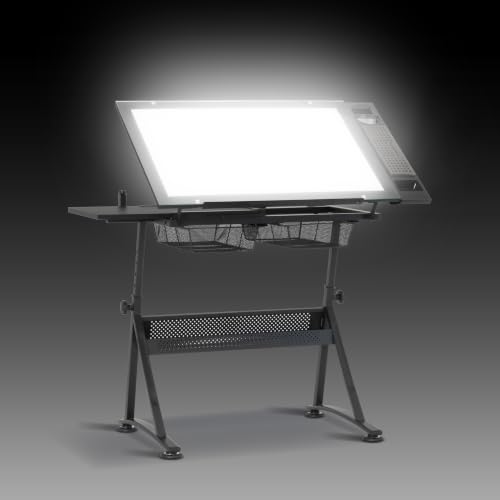
Studio Designs Fusion Drafting Table with LED Light Pad — Integrated light, the real thing
Every other desk in this guide approaches the light question with a workaround. The Fusion simply answers it: an LED light pad is integrated into its tempered glass top, so the tracing surface and the drawing surface are the same square of furniture. The listing pairs that pad with height and angle adjustment and built-in storage, and names the Artograph light pad lineage in its description — this is a desk designed from the animator’s workflow outward, rather than a drafting table that tolerates tracing as an afterthought. For hand-drawn work, that integration changes the texture of a session: no pad to fetch, position, plug in and pack away, just a switch between you and the previous frame glowing through the sheet.
The glass top earns its keep beyond the light. It wipes clean after ink passes, presents a firm, unyielding plane for the repetitive pressure of cleanup drawing, and — when the pad is off — behaves as an ordinary elegant drafting surface for storyboarding and layout work that needs no illumination. Height adjustment matters here more than in most categories, because animation sessions run long and the option to raise the desk, stand for a cleanup pass, then return to a stored sitting height is the difference between a desk that serves a whole production and one that serves its first enthusiastic week.
Storage on the Fusion keeps the frame economy close: the current scene’s sheets, the tools of the current pass, the references for the current shot. Animation generates paper in strict sequence, and a desk that holds the active stack in order — rather than in a hopeful pile — quietly prevents the lost-frame rummage that eats evenings. The design will not file a whole production; a plan chest or folders nearby remain the archive. But as the active workstation, its organisation matches the work’s rhythm.
Who should skip it? Animators whose pipeline is fully digital, tracing nothing, will pay for a light they never switch on, and the glass-topped Triflex or Futura will serve their drawing at a simpler specification. Painters, too, should look elsewhere in our guides, since a light pad contributes nothing to opaque media. But for the hand-drawn animator — student, hobbyist, or professional keeping a traditional desk beside the digital one — the Fusion is the only pick here that was clearly imagined by someone who has cleaned up a scene at midnight, and it leads this roundup on merit.
Students of traditional animation should weigh one more practical gift: consistency between home and classroom. School light tables set the reference experience, and a home desk whose tracing behaves the same way — sheet down, light on, draw — removes the adjustment period that eats practice time on lesser setups. The Fusion is the closest thing in this guide to bringing the classroom station home, and for a student mid-course, that continuity can matter more than any single specification on its list.
- Top: tempered glass with an integrated LED light pad
- Adjustment: both height and tilt angle adjustable
- Storage: built into the station for active frame stacks and tools
- Light: pad is part of the desk, not an accessory to position
- Typical duties: hand-drawn animation, cleanup, inking and tracing-led illustration
Strengths
- Tracing begins with a switch, not a setup — the pad lives where the sheet lies.
- Height adjustment supports the long, posture-hungry sessions animation demands.
- Glass cleans instantly after ink work and stays firm under repetitive pressure.
Trade-offs
- Fully digital animators pay for illumination their workflow never uses.
- Glass rules out clamping accessories along the top’s edge.
- Integrated electrics mean the desk wants a socket within sensible reach.
Best for: hand-drawn animators, cleanup artists and anyone whose tracing is a daily rather than occasional act. Not suited for: purely digital pipelines or opaque-media painters needing a wooden top.

ECACAD Electric Drafting Table — Powered height, tilting top
The ECACAD approaches the animation desk from the ergonomics of the long session, and it is the only electric entry here: a tilting workstation top of 47.2 by 23.6 inches, riding on a powered lift that the listing states adjusts from 32.5 to 47.2 inches, with three memory presets to hold the heights you actually use. The dark walnut finish gives it a studio-furniture gravity the glass desks do not attempt. For animators who alternate — seated for roughs, standing for cleanup, perched for inking — the presets turn posture changes into a button press rather than a project.
That powered range deserves a moment’s appreciation, because drafting tables that tilt are common and drafting tables that also rise are not. The tilt handles the drawing angle; the lift handles the human. In practice the combination means the desk can be tuned so the tilted sheet meets your eyes and forearms correctly in both postures, instead of the usual compromise where standing work happens at a desk designed for a chair. Storage built into the design keeps the session’s materials near the work, and the wide top takes a drawing board, a reference tablet and the active frame stack in a row without negotiation.
Light, on the ECACAD, is a bring-your-own affair, and the guide will not pretend otherwise: the top is a solid workstation surface, so tracing happens on a portable pad placed on it — the Huion accessory discussed below is exactly the partner this desk assumes — rather than through it. Many animators prefer that arrangement anyway, since a pad can travel to the sofa, the classroom or the scanner. Buy the ECACAD for its movement and its surface, pair it with a pad for tracing duty, and the combination covers the full animation brief with each tool doing what it does best.
The electric cautions from our standing-desk coverage apply in miniature: keep the cable loop generous for the full rise, expect a measured pace of travel rather than an elevator’s, and keep drinks disciplined around a powered desk. None of that diminishes the central appeal. For the animator whose sessions run to hours and whose body files complaints about fixed furniture, this is the roundup’s most considerate desk — the one that adjusts to the artist twice over, in angle and in altitude.
There is also a quieter, domestic argument for this desk: it looks like furniture. Animation corners often live in shared rooms, and a dark walnut workstation with clean lines earns its permanent place in a way that glass-and-steel equipment sometimes must negotiate for. When the session ends, the ECACAD reads as a handsome desk that happens to tilt and rise, not as a machine awaiting its operator — and for the animator whose studio is also a living room, that social camouflage has genuine daily value.
- Top: 47.2 by 23.6 inch tilting workstation surface
- Height: electric adjustment stated from 32.5 to 47.2 inches
- Presets: three memory positions for stored heights
- Finish: dark walnut, with storage built into the design
- Tracing: via a separate light pad placed on the top
Strengths
- Tilt plus powered height is the fullest adjustment pairing in this roundup.
- Presets make posture changes a habit instead of an interruption.
- A wide, handsome surface that suits studio rooms as furniture, not just equipment.
Trade-offs
- No light shines through a solid top, so a pad is a necessary companion for tracing.
- Powered desks need socket planning and a generous cable loop.
- The lift’s pace is stately; frequent micro-adjusters should know that in advance.
Best for: long-session animators who alternate sitting and standing and already own, or will buy, a light pad. Not suited for: buyers wanting integrated light or a glass surface.

SD Studio Designs Triflex Drawing Table — Sit-to-stand glass
The Triflex has been a small-studio fixture for years, and its formula explains its staying power: a clear glass top of 35.25 by 23.5 inches on a frame that converts between sitting and standing work, finished here in charcoal black with clear glass. That conversion is the headline — a drafting table that follows the animator through the postures of a long day — but the glass is the quiet co-star, because a transparent top turns any light pad or lamp placed beneath it into a tracing station without the desk itself containing a single wire.
In animation terms, that arrangement suits the hybrid worker beautifully. Roughs and storyboards happen on the glass as on any firm surface; tracing passes happen by sliding the pad underneath and letting the sheet glow; cleanup happens at whichever height the hour suggests. The desk’s footprint stays modest while doing all of this, which is why the Triflex keeps appearing in bedrooms and shared studios where a dedicated animation suite is not on the menu. Studio Designs builds this table in other finishes too — a silver and blue glass sibling appears in our art desks roundup — and the design’s longevity across those variants is its own review.
Conversion mechanisms ask one thing of their owners: use them deliberately. The Triflex rewards a routine — seated mornings, standing afternoons — rather than constant fiddling, and its glass top asks for the standard glass etiquette of no edge clamps and a wipe before sliding paper across it. Storage is modest compared with the drawer desks here, so the frame economy lives in a caddy or nearby shelf; animators with large active stacks should plan that companion storage from the start.
We place the Triflex as the roundup’s flexible traditionalist: no integrated electrics in the top, no powered lift, just glass, tilt and a frame that stands when you do. For animators who already own a pad — the most common situation in practice — it may be the most rational purchase in this entire guide, because it adds exactly the furniture the pad was missing and nothing it was not.
One more working pattern suits this desk particularly well: the storyboard sprint. Boards are drawn fast, pinned or spread for review, then redrawn — a cycle that alternates seated intensity with standing back to judge the wall or the desk from a distance. A station that changes height without tools lets the artist keep that rhythm inside one piece of furniture, standing to assess the sequence as an audience would, then dropping back into the drawing posture. Few desks at this level serve the review half of animation as naturally.
- Top: clear glass, listed at 35.25 by 23.5 inches
- Adjustment: sit-to-stand conversion plus tilting drawing surface
- Finish: charcoal black frame with clear glass in this variant
- Tracing: light pad or lamp placed beneath the transparent top
- Typical duties: hybrid traditional-digital animation and storyboard work
Strengths
- Sit-to-stand range serves marathon sessions better than fixed drafting tables.
- Glass turns an existing pad into a tracing station with zero desk wiring.
- A proven, long-running design with a modest room footprint.
Trade-offs
- Storage is light, so frame stacks need a caddy or shelf nearby.
- The conversion rewards routine use rather than constant adjustment.
- Glass etiquette applies: no clamps, and wipe grit away before sliding sheets.
Best for: pad-owning animators wanting posture variety in a compact, proven station. Not suited for: buyers wanting integrated light or generous built-in drawers.

SD Studio Designs Futura Station — Folding-shelf classic
The Futura Station is the desk animators recommend to each other in forum threads that span years, and its signature is above the work rather than in it: a folding shelf top that hovers over the main surface, holding the reference monitor, the model sheet, the tablet with the animatic paused — the visual company every frame is drawn in — while the glass worktop below tilts for the drawing itself. A drawer rides in the frame for the tools of the current pass. At 35.5 inches wide it is a compact station with a vertical imagination, built for rooms where floor space is rationed but the work still needs its references in view.
That shelf changes the ergonomics of reference work in a way worth picturing. On a flat desk, references lie beside the sheet and the head commutes between them, tilting and turning hundreds of times a session. The Futura raises the reference toward the line of sight, so the eyes travel instead of the neck. Storyboard artists feel the same benefit with a script or a board panel propped above the current frame. When the shelf is not needed, it folds — the station’s party trick — and the desk returns to an ordinary, if handsome, glass drafting table.
The glass top supports the tracing workflow in the family manner: a pad beneath the transparent surface turns it into a light table, and the firm plane suits the repetitive strokes of inbetweening. Buyers should note the Futura’s proposition is the shelf and the glass together; its storage is a drawer rather than a filing system, and its width suits one artist’s active scene rather than a sprawling production spread. Within that scope, few desks at any level are as thoughtfully arranged for the reference-heavy reality of animation.
Longevity is the closing argument. Designs that survive this long in a niche market do so because working animators keep rebuying and recommending them, and the Futura’s continued presence across Studio Designs’ range — including its prose mention in our adjustable art desks guide, where it sat outside the linked picks — reflects that reputation. If your animation work lives and dies by the reference above the page, this is the desk that was drawn around your habit.
Comic artists should notice this desk across the category border, because their workflow is the animator’s close cousin: a reference or script hovering in view, a page tilted below it, ink passing over pencils that a light surface helped place. The Futura’s shelf was practically drawn for the comics process, and its drawer holds the nibs and brushes of the current page. Cross-traffic between crafts is usually marketing fog, but here the overlap is mechanical and real — the same posture, the same references, the same glass.
- Top: glass drawing surface, station listed at 35.5 inches wide
- Shelf: folding top shelf for references, monitor or tablet
- Storage: a drawer built into the frame for current tools
- Tracing: pad beneath the glass, in the Studio Designs manner
- Typical duties: reference-heavy animation, storyboarding and illustration
Strengths
- The raised shelf puts references in the line of sight, sparing the neck.
- Folding design lets the station simplify when the shelf is not needed.
- A long-proven favourite among working traditional animators.
Trade-offs
- Storage is a single drawer, so archives live elsewhere by necessity.
- The 35.5-inch width suits one active scene, not a production-wide spread.
- Like all glass here, it declines edge clamps and wants a wipe before use.
Best for: reference-driven animators and storyboard artists in compact studios. Not suited for: buyers needing wide surfaces or deep built-in storage.
Landpink Glass Drafting Table — Simple glass canvas
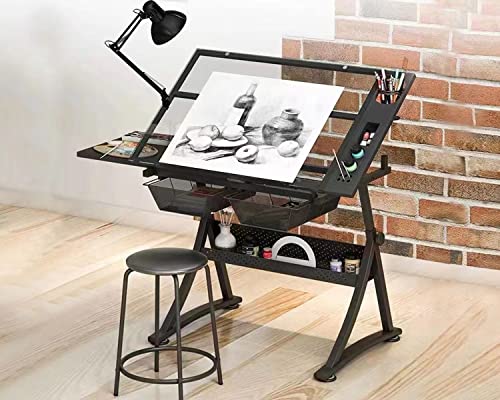
Animators who own a good light pad often shop for a desk the way drummers shop for a stool: the instrument is already theirs, and the furniture must simply hold position, stay firm and disappear. The Landpink is that desk in this roundup — a clear glass drafting top on a straightforward studio frame, with an adjustable tilt and no integrated systems competing for your attention or your sockets. Slide the pad beneath the glass and it becomes a tracing station; remove it and the desk returns to a clean, wipeable drawing surface that asks nothing of anyone.
The simplicity cuts in the animator’s favour during mixed sessions. Storyboard panels can be taped and compared across the glass, ink work cleans up in seconds when a nib misbehaves, and the transparent top keeps a small animation corner feeling open where a solid slab would crowd it. Pencil artists should keep a drawing board in the kit, since paper glides on glass more freely than on wood, and the board also protects the surface during the heavy, repetitive pressure of cleanup passes.
What the Landpink does not do is organise your production. There is no drawer bank courting your frame stacks and no shelf raising your references, so the station around it — a caddy for tools, a folder system for scenes, a small shelf for the reference tablet — is the owner’s design. Animators who already run that system on a kitchen table and simply want the table upgraded will find this desk the purest step up. Animators starting from nothing should budget the companions alongside it, or look at the VECELO’s drawers below.
Value is the closing note, stated qualitatively as this guide always states it: by declining integrated light, powered height and storage furniture, the Landpink concentrates its cost on the glass and the frame, and for the pad-owning animator that concentration is exactly correct. It is the roundup’s minimalist answer, and minimalism, in a workflow as equipment-hungry as animation, is a feature with real cash value.
Renters in bright, white-walled rooms form another natural audience. A transparent top on a light frame adds a working station without adding a visual obstacle, and when the tenancy ends the desk’s simplicity — no integrated electrics to test, no mechanisms to baby — makes it the easiest piece in the studio to move, lend or sell onward. Animation equipment accumulates enough complexity on its own; a desk that contributes none of it has a calmness that should not be underestimated when comparing specifications.
- Top: clear glass panel with adjustable tilt
- Light: none built in — designed to work with your pad beneath
- Storage: minimal, keeping the station’s organisation external
- Frame: simple studio supports in a home-friendly finish
- Typical duties: tracing with an owned pad, storyboards and ink work
Strengths
- Pairs with an existing pad to trace through glass with no desk wiring.
- Wipes clean instantly, which ink-heavy animation passes appreciate daily.
- A pared-back specification keeps attention and budget on the work surface.
Trade-offs
- Paper slides on glass, so a drawing board joins the everyday kit.
- No drawers or shelf, so production storage is entirely external.
- Clamp-on lamps must find a floor stand or a nearby shelf instead.
Best for: pad-owning animators wanting a clean glass canvas and nothing else. Not suited for: first-time buyers needing light, storage and desk in one purchase.

VECELO Drafting Table — Drawers-and-stool starter
Beginners in animation face a particular shopping problem: the workflow needs a tilting desk, a seat, and somewhere for several hundred sheets of paper to live in strict order, and it needs them all before the first scene can start. The VECELO answers with the complete station — a tilting wooden-topped desk, two drawers beneath the surface, and a stool in the same box. The drawers are the animation feature here, more than the tilt: frame stacks rest flat and sequential in a drawer in a way they never do in a pile, and the discipline of one drawer for roughs and one for cleanups has organised more first productions than any software.
The wooden top defines its tracing story honestly. Light does not pass through it, so tracing duty belongs to a pad placed on the surface — the standard arrangement for most student animators, whose pads also travel to classes and scanners. In exchange, the top grips paper kindly during the heavy drawing passes, accepts a peg bar taped or fixed at its edge without complaint, and shrugs off the knife work of cutting down paper stock. For a first desk, that forgiving character suits the learning curve better than glass’s precision.
Daily life at the VECELO settles into a productive rhythm quickly: the stool is matched to the desk by its maker, the drawers stage the current scene, and the top clears in a minute when the session ends. Its limits are the class’s limits — a frame that prefers drawing pressure to leaning, drawers sized for paper and tools rather than equipment — and within a student budget those limits are the right ones to accept. Money not spent on furniture is money available for paper, pencils and the pad, which is the correct allocation for a first year of animation.
Students in shared houses will also appreciate how completely the station packs into one corner and how little of the room it argues with. When the course ends or the hobby fades, the desk remains useful as a study or craft table; when the hobby becomes a calling, it remains useful as the traditional desk beside a digital setup. Few first purchases in any craft offer that many second lives, and the VECELO earns its place here by making the first life so easy to start.
Parents buying for a teenager bitten by animation will find the arithmetic friendly here too. The hobby’s survival through its first year depends on the corner being ready whenever enthusiasm strikes — desk up, drawers loaded, stool waiting — rather than on a setup ritual that must be performed before drawing can begin. A complete station like this one lowers the activation energy of practice, and practice, in animation more than in almost any craft, is the entire difference between a passing interest and a portfolio.
- Top: tilting wooden-tone surface, kind to paper and peg bars
- Storage: two drawers sized for frame stacks and daily tools
- Seating: stool included, matched to the desk by the maker
- Tracing: with a light pad placed on the surface
- Typical duties: student animation, first productions and study-desk duty
Strengths
- Drawers keep frame stacks flat, ordered and off the drawing surface.
- Desk, storage and seat arrive together for a first setup with no gaps.
- The wooden top tolerates cutting, taping and heavy drawing pressure.
Trade-offs
- Tracing needs a pad on top, since no light passes through the surface.
- The bundled stool is a starter seat rather than an all-evening chair.
- A lighter frame prefers drawing pressure to being leaned upon.
Best for: animation students and first productions needing a complete, organised corner. Not suited for: through-glass tracing or buyers wanting integrated light.
Where does a separate light pad fit into an animation setup?
It fits on top of the desk, and the distinction matters enough that this guide gives it its own section. A light pad — the Huion A3 LED light pad is the example named in our research pool — is a slim, portable panel that glows evenly enough to trace through a sheet or two of paper. It is an accessory, not furniture: it has no legs, no tilt, no drawers, and it does not become a desk by being large. What it does is liberate tracing from any particular desk, which is why so many animators own one alongside whatever table they draw at.
Paired with the solid-topped picks here — the ECACAD and the VECELO — a pad of A3 proportions covers the standard animation field with room to spare, then slides into a shelf when the desk returns to drawing. Paired with a sofa, a scanner or a classroom table, it travels in a way no integrated desk can. The honest limitations travel with it: brightness is finite, thick paper defeats it as surely as it defeats the Fusion’s built-in pad, and it adds one more cable to the desk’s economy. Judge it as the flexible half of a two-part system — pad for light, desk for everything else — and it is excellent value in the workflow. Judge the Fusion, by contrast, as that system pre-assembled into one piece of furniture.
How do the best animation desks compare?
| Desk | Light story | Top | Height behaviour | Storage |
|---|---|---|---|---|
| Studio Designs Fusion | LED pad integrated | Tempered glass | Adjustable | Built in |
| ECACAD Electric | Pad on top | Solid, dark walnut | Electric, 3 presets | Built in |
| Triflex | Pad beneath glass | Clear glass | Sit-to-stand | Modest |
| Futura Station | Pad beneath glass | Glass | Drafting height | Drawer + folding shelf |
| Landpink | Pad beneath glass | Clear glass | Drafting height | Minimal |
| VECELO | Pad on top | Wooden tone | Drafting height | Two drawers + stool |
The light column is the whole guide in miniature. One desk integrates the pad, two expect it on the surface, and three invite it underneath their glass — and none of those answers is wrong, because they map to three kinds of owners: the animator buying a complete system, the animator pairing a desk with a pad they will also travel with, and the animator who already owns the pad and needs furniture worthy of it. The other columns then break the ties: height behaviour for the long-session workers, storage for the paper-heavy ones. Choose your row in the light column first and the rest of the table becomes a shortlist rather than a puzzle.
How do you set up an animation desk for a long session?
Register before you decorate. Fix the peg bar or your taped registration point, lay the active scene’s stack in order within reach of your non-drawing hand, and put the tools of the current pass — only that pass — on the desk. Roughing, cleanup and inking each want a slightly different kit, and a desk dressed for one pass at a time stays clear enough to work on. The drawers and shelves in this roundup exist precisely to hold the other passes’ tools one arm’s length away, staged rather than scattered.
Then tune the geometry. Tilt the top until the sheet meets your forearm without your shoulder rising, set the desk height — on the ECACAD and Fusion by their adjustments, on the others by your chair — so your eyes meet the middle of the page without a bow, and position the reference where your gaze, not your neck, does the travelling. The Futura’s shelf exists for exactly this; on other desks, a small stand for the tablet or model sheet repays its footprint within one session.
Lighting finishes the setup, and it changes by pass. Drawing passes want the room honestly lit and the page shadow-free; tracing passes want the ambient light lowered so the pad’s glow can do its work. Build both states into the room — a dimmable main light or a lamp you can swing away — rather than improvising with a hand over the page. Animators who set up this deliberately for the first week find the routine becomes invisible by the second, which is when the real work starts flowing.
Which mistakes do buyers of animation desks repeat?
The classic error is buying light twice — paying for an integrated pad in the desk while already owning a portable pad that does the same job — or, its mirror, buying a solid-topped desk and no pad at all, then discovering that tracing was the entire point of the purchase. Inventory your current kit before choosing a row in the comparison table. The second error is judging brightness by photographs: listing images are shot in dark rooms with the exposure working hard, and they promise a glow no paper will ever see. Judge by your paper and your sheet count instead.
Third, buyers forget registration. A beautiful desk whose top flexes or whose ledge cannot hold a peg bar consistently will produce frames that swim against each other, and no light quality compensates for drawings that will not align. Fourth comes storage optimism: animation paper multiplies beyond all predictions, and a desk with nowhere for the active stack to live in order becomes a very expensive pile. Finally, digital-first animators sometimes buy a traditional station as décor for a workflow that lives entirely on a tablet; the honest desk for that workflow is a good ordinary desk, and our other guides cover it without the light-pad romance.
How do you care for a light surface and a glass top over years of work?
Light surfaces live or die by what touches them. Never cut on a pad or an integrated light top, never rest a hot mug on one, and treat grit as the enemy it is: a single grain dragged beneath a sheet can scratch a line into the glowing area that will photobomb every tracing session thereafter. Wipe before you slide, keep a sacrificial sheet between heavy boards and the surface, and the light will stay as even as the day the desk arrived. The Fusion’s glass armour makes this routine easier; a bare pad on a wooden desk asks for more vigilance, which is part of the honest price of its flexibility.
The desk around the light wants a quarterly rhythm: tilt hinges checked, fasteners given a quarter-turn where they ask for it, cables inspected where they flex at the desk’s moving points. On the powered ECACAD, keep the rising column free of dust so the mechanism travels cleanly; on the glass Studio Designs models, check the shelf and drawer hardware that animation sessions lean on daily. None of this is skilled labour, but it is the difference between a station that still feels precise in its third production and one that has quietly become a wobbly table with a lamp in it.
What does a hybrid traditional-digital pipeline need from a desk?
Most working animators today live in both worlds: roughs on paper, cleanup scanned, colour and compositing on screen. That pipeline asks the desk for three specific mercies. First, a surface that flattens completely, because scanners, pen displays and laptops all want level ground at different hours. Second, a home for the screen that does not evict the drawing — the Futura’s shelf, the ECACAD’s width, or a monitor arm on a neighbouring surface all solve it differently. Third, cable and power sanity, since a scanner, a lamp, a pad and a computer make four citizens of one socket strip.
Plan the desk’s position with the scanner in the story, even if the scanner lives across the room: paper travels between the two constantly, and a route that crosses the household’s traffic will eventually cost a scene its order. The desks in this roundup all serve the hybrid life credibly, but they serve it best when the buyer sketches the whole loop — draw, trace, scan, colour, print, compare — on paper first and checks each station of the loop against the room. Furniture chosen for a workflow beats furniture chosen for a photograph, every single production.
Final Recommendation
If tracing is the heartbeat of your work and you are buying the system whole, the Fusion is the desk this category would design for itself: the light lives in the glass, the height adjusts for the long sessions, and nothing needs fetching before a cleanup pass can begin. If your sessions are long but your tracing already rides on a portable pad, the ECACAD’s powered height and wide walnut top make the most considerate partner, while the Triflex offers posture variety and through-glass tracing in a proven, simpler frame. Reference-driven artists should follow the Futura’s shelf; minimalists with a pad should take the Landpink’s clean glass; and students assembling a first corner should let the VECELO’s drawers and stool start their production properly. Animation rewards the desk that disappears beneath the frames — choose the light story that matches the kit you own, and the drawings, not the furniture, will be what your evenings are about.
Frequently Asked Questions
Do I need a light pad built into the desk?
Only if you trace constantly and do not already own a portable pad. The Fusion’s integration is a genuine convenience for daily tracing — the light is always positioned, always powered, always part of the same surface — but a separate pad on or under the other desks here performs the same core job and travels to scanners and classrooms, which an integrated pad never will. Many professionals run both across a career: the pad first, the integrated desk when the workflow proves permanent.
Is a Huion light pad a kind of animation desk?
No — it is an accessory panel that sits on a desk and glows for tracing work. It has no legs, tilt or storage, and this guide treats it as a partner to a desk rather than a pick in its own right. Confusing the two categories leads to ordering a panel and expecting furniture, which is a disappointing delivery day by any standard. Buy the pad for the light and a desk for everything the light needs around it.
How many sheets can I trace through at once?
Plan on one fresh sheet over one key drawing as the comfortable working case on any light surface here. A second sheet softens the image noticeably, and boards or thick papers defeat tracing light entirely, which is why animators also rely on peg-bar registration and flipping to compare frames. Lowering the room’s ambient light during a tracing pass recovers more clarity than any setting on the pad itself, so treat the room as part of the equipment.
Glass or wooden top for hand-drawn animation?
Glass if tracing through the surface or easy ink cleanup leads your workflow; wood if you cut paper, tape peg bars and draw heavily on the surface itself, or if your paper tends to skate on smooth surfaces. The Fusion and the glass Studio Designs models serve the first camp, the VECELO the second, and the ECACAD splits the difference with a solid top and a pad resting on it. Beginners who genuinely do not know their camp yet usually settle faster on wood, then add glass when tracing becomes a daily habit.
Can these desks serve a digital animation workflow?
Yes, as drawing and reference stations beside the screen: storyboarding, thumbnailing, traditional passes that get scanned, and a tilted surface for a pen display all fit naturally on these desks. Buy for those duties honestly, though — a fully digital pipeline that never touches paper does not need the light features that define this category, and the money they command buys a better monitor or chair instead. The desks earn their place in a digital studio when paper remains one of its genuine stages, as it still does in most professional pipelines today, from student films to feature productions working across several countries and time zones on shared sequences of drawings passed hand to hand between departments and studios across the production from layout to final cleanup stages.
What size desk does animation paper need?
Standard animation fields sit comfortably on every top here, including the 35-inch-class glass stations, because the working area for a single sheet is modest. Size becomes an issue only when references, a pad and the active stack must coexist on the same plane, which is where the ECACAD’s wider top and the Futura’s raised shelf earn their keep. If your scenes run to large-format layouts, measure the tilted area specifically rather than the desk’s overall width before ordering.
Related Guides
Neighbouring roundups for the rest of the studio: best adjustable art desks for tilting tables beyond animation, best art desks when storage outweighs light, and best adjustable desks for sit-stand workstations that serve the digital side of the pipeline.


